Gaston Cruz - MVP Data Platform
Data Analytics Architect
Slalom, Seattle.
/gastoncruz
@gastonfcruz
gastoncruz
gastoncruz@outlook.com
www.gastoncruz.com
Power BI with Big Data
Composite Models and Aggregations
Seattle Modern Excel + Power BI User Group
(MEUG)
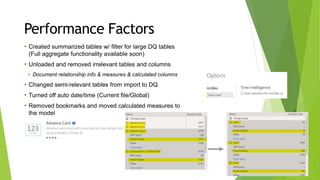
Performance Factors
• Created summarized tables w/ filter for large DQ tables
(Full aggregate functionality available soon)
• Unloaded and removed irrelevant tables and columns
• Document relationship info & measures & calculated columns
• Changed semi-relevant tables from import to DQ
• Turned off auto date/time (Current file/Global)
• Removed bookmarks and moved calculated measures to
the model
• Removed custom visuals
Composite Model
Power BI Architecture (Ad-Hoc
Model)
• Transactional Views in
DW
• Best Practice to build
pre calculated columns
Power BI Desktop
Power BI Desktop
Dual
On-Prem
Gateway
DirectQuery Import
Power BI Desktop
Power BI Desktop
Gateway
Data Sources
Dashboard
Report
Reports
Publish
Periodic Data Refresh
Periodic
Data Refresh
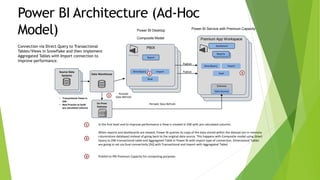
In the first level and to improve performance a View is created in DW with pre calculated columns
When reports and dashboards are viewed, Power BI queries its copy of the data stored within the dataset (an in-memory
columnstore database) instead of going back to the original data source. This happens with Composite model using Direct
Query to DW transactional table and Aggregated Table in Power BI with Import type of connection. Dimensional Tables
are going to set via Dual connectivity (DQ with Transactional and Import with Aggregated Table)
Publish to PBI Premium Capacity for computing purposes
1
1
2
3
2
Power BI Desktop
Composite Model
Power BI Service with Premium Capacity
Source Data
Source Data
Source Data
Systems Data Warehouse
Publish
PBIX
Premium App Workspace
3Dual
DirectQuery Import
Connection via Direct Query to Transactional
Tables/Views in Snowflake and then implement
Aggregated Tables with Import connection to
improve performance.
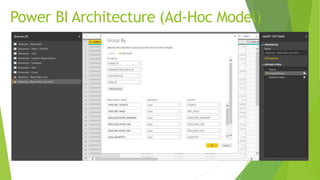
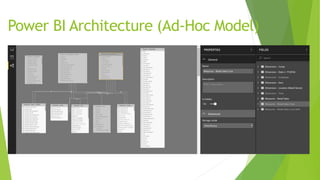
Power BI Architecture (Ad-Hoc Model)
Power BI Architecture (Ad-Hoc
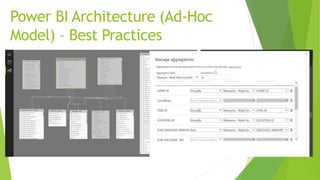
Model) – Best Practices
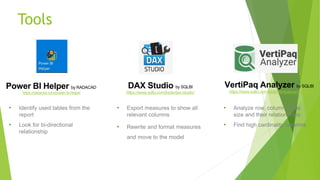
Tools
DAX Studio by SQLBI
https://www.sqlbi.com/tools/dax-studio/
VertiPaq Analyzer by SQLBI
https://www.sqlbi.com/tools/vertipaq-analyzer/
•
•
•
•
•
•
Power BI Helper by RADACAD
https://radacad.com/power-bi-helper
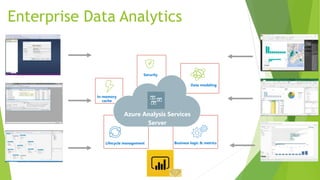
Business logic & metrics
Data modeling
Security
Azure Analysis Services
Server
Lifecycle management
In-memory
cache
Enterprise Data Analytics
Thanks! And see you on the next
meetup!!!
@gastonfcruz
"Improve the Process"

Big data models with Power BI - Composite Models and Aggregations

  • 1.
    Gaston Cruz -MVP Data Platform Data Analytics Architect Slalom, Seattle. /gastoncruz @gastonfcruz gastoncruz gastoncruz@outlook.com www.gastoncruz.com Power BI with Big Data Composite Models and Aggregations Seattle Modern Excel + Power BI User Group (MEUG)
  • 2.
    Performance Factors • Createdsummarized tables w/ filter for large DQ tables (Full aggregate functionality available soon) • Unloaded and removed irrelevant tables and columns • Document relationship info & measures & calculated columns • Changed semi-relevant tables from import to DQ • Turned off auto date/time (Current file/Global) • Removed bookmarks and moved calculated measures to the model • Removed custom visuals
  • 3.
    Composite Model Power BIArchitecture (Ad-Hoc Model) • Transactional Views in DW • Best Practice to build pre calculated columns Power BI Desktop Power BI Desktop Dual On-Prem Gateway DirectQuery Import Power BI Desktop Power BI Desktop Gateway Data Sources Dashboard Report Reports Publish Periodic Data Refresh Periodic Data Refresh In the first level and to improve performance a View is created in DW with pre calculated columns When reports and dashboards are viewed, Power BI queries its copy of the data stored within the dataset (an in-memory columnstore database) instead of going back to the original data source. This happens with Composite model using Direct Query to DW transactional table and Aggregated Table in Power BI with Import type of connection. Dimensional Tables are going to set via Dual connectivity (DQ with Transactional and Import with Aggregated Table) Publish to PBI Premium Capacity for computing purposes 1 1 2 3 2 Power BI Desktop Composite Model Power BI Service with Premium Capacity Source Data Source Data Source Data Systems Data Warehouse Publish PBIX Premium App Workspace 3Dual DirectQuery Import Connection via Direct Query to Transactional Tables/Views in Snowflake and then implement Aggregated Tables with Import connection to improve performance.
  • 4.
    Power BI Architecture(Ad-Hoc Model)
  • 5.
    Power BI Architecture(Ad-Hoc Model)
  • 6.
    Power BI Architecture(Ad-Hoc Model) – Best Practices
  • 7.
    Tools DAX Studio bySQLBI https://www.sqlbi.com/tools/dax-studio/ VertiPaq Analyzer by SQLBI https://www.sqlbi.com/tools/vertipaq-analyzer/ • • • • • • Power BI Helper by RADACAD https://radacad.com/power-bi-helper
  • 8.
    Business logic &metrics Data modeling Security Azure Analysis Services Server Lifecycle management In-memory cache Enterprise Data Analytics
  • 9.
    Thanks! And seeyou on the next meetup!!! @gastonfcruz "Improve the Process"