Download to read offline


![Initialize arrays in .m files
- (void)viewDidLoad
{
[super viewDidLoad];
// Do any additional setup after loading the view, typically from a nib.
arrItems=[[NSArray
alloc]initWithObjects:@"iphone",@"android",@"java",@"testing", nil];
arrLocation=[[NSArray
alloc]initWithObjects:@"ahmedabad",@"baroda",@"surat", nil];
}](https://image.slidesharecdn.com/presentation5pickerview-150315010027-conversion-gate01/85/Presentation5-picker-view-4-320.jpg)
![Add delegates methods 1 & 2
// returns the number of 'columns' to display.
- (NSInteger)numberOfComponentsInPickerView:(UIPickerView *)pickerView
{ return 2; }
// returns the # of rows in each component..
- (NSInteger)pickerView:(UIPickerView *)pickerView
numberOfRowsInComponent:(NSInteger)component
{
if (component==0) {
return [arrItems count];
}
else {
return [arrLocation count];
}
}](https://image.slidesharecdn.com/presentation5pickerview-150315010027-conversion-gate01/85/Presentation5-picker-view-5-320.jpg)
![- (NSString *)pickerView:(UIPickerView *)pickerView titleForRow:(NSInteger)row
forComponent:(NSInteger)component
{
if (component==0) {
return [arrItems objectAtIndex:row];
}
else {
return [arrLocation objectAtIndex:row];
}
}
Add delegates methods 3](https://image.slidesharecdn.com/presentation5pickerview-150315010027-conversion-gate01/85/Presentation5-picker-view-6-320.jpg)
![- (void)pickerView:(UIPickerView *)pickerView didSelectRow:(NSInteger)row
inComponent:(NSInteger)component
{
NSString *Str;
if (component==0) {
Str =[arrItems objectAtIndex:row];
}
else{
Str = [arrLocation objectAtIndex:row];
}
UIAlertView *alert=[[UIAlertView alloc]initWithTitle:@"selected" message:Str
delegate:nil cancelButtonTitle:@"ok" otherButtonTitles:nil, nil];
[alert show];
}
Add delegates methods 4](https://image.slidesharecdn.com/presentation5pickerview-150315010027-conversion-gate01/85/Presentation5-picker-view-7-320.jpg)


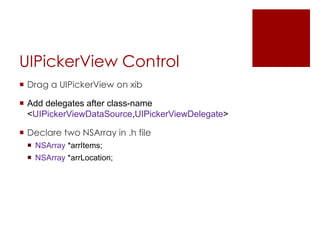
The document discusses how to use a UIPickerView control in iOS programming. It describes dragging a UIPickerView onto an interface, adding data source and delegate methods, initializing arrays to store picker data, and implementing methods to return the number of components, rows in each component, and title for each row. A delegate method is also provided to handle selection of a row and display the selected value in an alert.


