InkBlog
A Pen-Based Blog Tool for e-Learning Environments
André C. da Silva1,2 Heloísa V. da Rocha1,3
acsilva@ic.unicamp.br heloisa@ic.unicamp.br
Ph.D. Student Advisor
1Institute of Computing and 3NIED / UNICAMP
2Federal Institute of São Paulo
São Paulo – Brazil
InSITE 2013 Porto, Portugal - July, 3rd 2013
Outline
● Introduction
– Blogs, Weblogs and Edublogs
– Pen-based computing
● Motivation
● Approach
– The InkBlog
● Final Considerations and Future Works
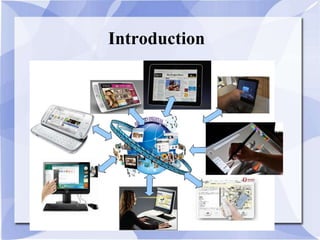
Introduction
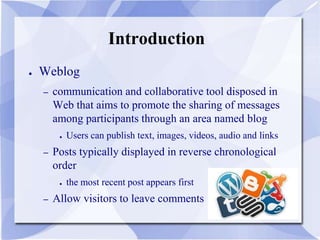
● Weblog
– communication and collaborative tool disposed in
Web that aims to promote the sharing of messages
among participants through an area named blog
● Users can publish text, images, videos, audio and links
– Posts typically displayed in reverse chronological
order
● the most recent post appears first
– Allow visitors to leave comments
Introduction
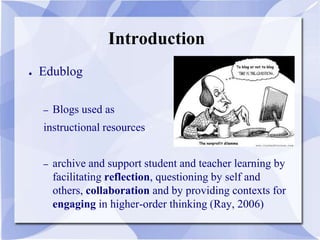
● Edublog
– Blogs used as
instructional resources
– archive and support student and teacher learning by
facilitating reflection, questioning by self and
others, collaboration and by providing contexts for
engaging in higher-order thinking (Ray, 2006)
Introduction
Introduction
● Blogs and
e-Learning environments
– Each course participant (student or teacher) owns a
blog, where the user can post and manage messages
– Each participant may access other course
participants’ blogs, comment posted messages by
the owner of the blog
– Usually, the users interact with in a text editor that
allows users without HTML (HyperText Markup
Language) skills to write rich text
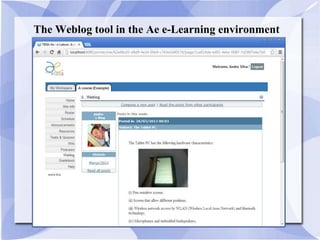
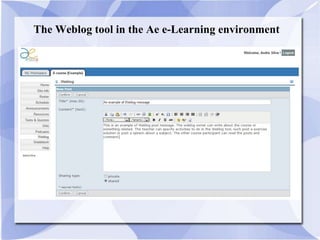
The Weblog tool in the Ae e-Learning environment
Introduction
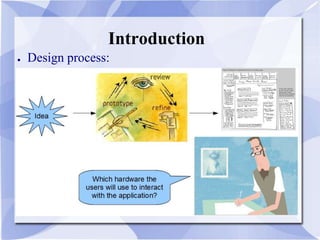
● Design process:
Introduction
Motivation
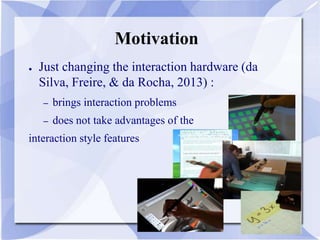
● Just changing the interaction hardware (da
Silva, Freire, & da Rocha, 2013) :
– brings interaction problems
– does not take advantages of the
interaction style features
Motivation
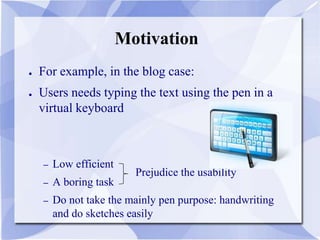
● For example, in the blog case:
● Users needs typing the text using the pen in a
virtual keyboard
– Low efficient
– A boring task
– Do not take the mainly pen purpose: handwriting
and do sketches easily
Prejudice the usability
Pen-Based Computing (I)
● Refers to a computer user-interface using a pen,
rather than devices such as a keyboard or a
mouse
● User interfaces for pen computing can be
implemented in several ways:
– using the pen as a pointing input device
– considering direct manipulation, handwriting or
gesture recognition (better advantages)
Pen-Based Computing (II)
● Berque, Bonebright and Whitesell (2004)
– “these concepts [from computer science curriculum] are
very difficult to communicate quickly and
extemporaneously using a keyboard and they are also
difficult to describe orally”
● Florea and Radu (2007)
– concept maps to improve the quality and efficiency of the
instructional process
● Benlloch, Buendía and Cano (2009)
– six steps based on a teaching method that incorporates active
learning techniques
Pen-Based Computing (III)
● Backon (2006)
– “the keyboard allows a rapid typewriting and do
texts structured by topics, but only pen can allow a
creativity increment, better flexibility and a natural
record of the think development process and
rationale in all stages (ideal requirements for the
educational environment)”
Pen-Based Computing (IV)
● Some educational applications:
– OrganicPad (Pargas et al., 2007)
– MathBrush (Labahn et al., 2008)
● “entering mathematics on a computer is problematic, it is
more natural write the formulae than inputting the latex
form, maple form or mathematic form”
– Classroom Presenter (Anderson et al., 2007)
– Pen Annotation and @Graph (Florea and Radu,
2007)
– …
All limited to
the Tablet PC
platform
Research Question
● How to get the pen computing advantages in
Web tools, mainly in e-Learning environments?
– Users with pen-based devices, such as tablet, can
access Weblogs and easily read the posts, but
writing blog post is not too easy: the user needs to
type the text
Solution and Approach
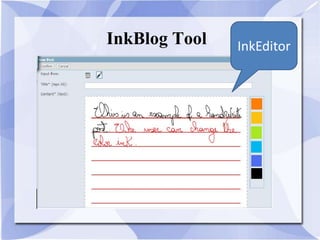
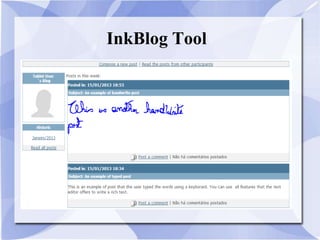
● Add features to manipulate electronic ink into a blog
tool to make it easier to handwrite or sketched posts in
pen-based devices
● Approach:
– Study the blog tool and her architecture
– Study technologies to receive data from pen
– Implement modules to receive data from pen
– Store the data in the database
– Implement modules to render the data
– Validate using various browsers
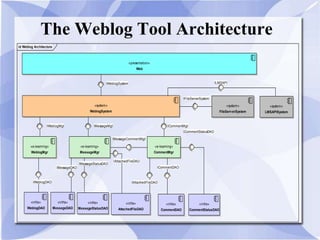
The Weblog Tool Architecture
id Weblog Architecture
«presentation»
Web
«system»
WeblogSystem
«system»
FileServerSystem
«e-learning»
WeblogMgr
«e-learning»
MessageMgr
«e-learning»
CommentMgr
«infra»
WeblogDAO
«infra»
MessageDAO
«infra»
MessageStatusDAO
«infra»
CommentDAO
«infra»
CommentStatusDAO
«infra»
AttachedFileDAO
«system»
LMSAPISystem
ILMSAPI
ICommentStatusDAO
ICommentDAO
IMessageStatusDAO
IMessageDAO
IAttachedFileDAO
IAttachedFileDAO
IWeblogDAO
IMessageCommentMgt
ICommentMgtIMessageMgtIWeblogMgt
IFileServerSystem
IWeblogSystem
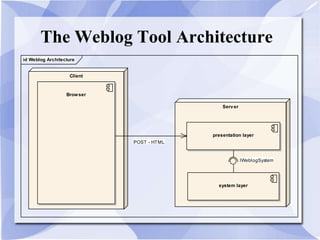
The Weblog Tool Architecture
id Weblog Architecture
Client
Browser
Server
presentation layer
system layer
IWeblogSystem
POST - HTML
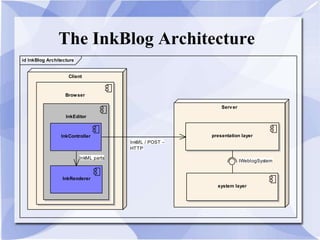
The InkBlog Architecture
id InkBlog Architecture
Client
Browser
InkEditor
InkRenderer
Server
presentation layer
system layer
InkController
InkML parts
InkML / POST -
HTTP
IWeblogSystem
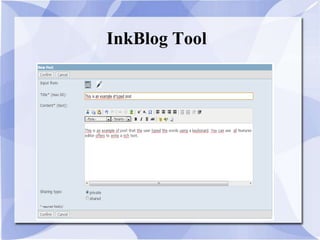
InkBlog Tool
InkBlog Tool InkEditor
InkBlog Tool
Validation
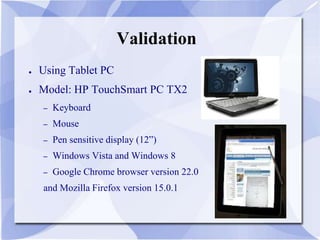
● Using Tablet PC
● Model: HP TouchSmart PC TX2
– Keyboard
– Mouse
– Pen sensitive display (12”)
– Windows Vista and Windows 8
– Google Chrome browser version 22.0
and Mozilla Firefox version 15.0.1
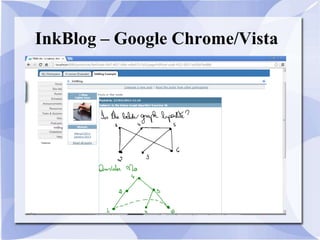
InkBlog – Google Chrome/Vista
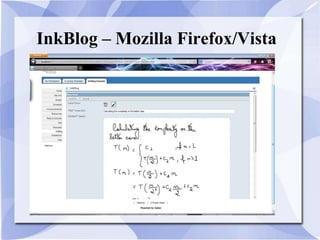
InkBlog – Mozilla Firefox/Vista
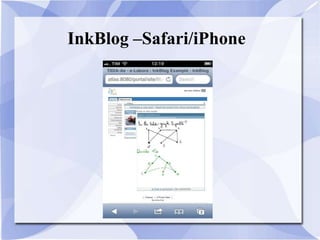
InkBlog –Safari/iPhone
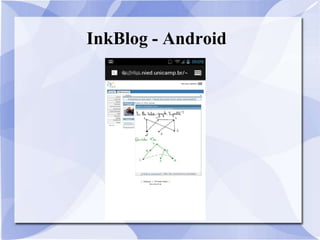
InkBlog - Android
Final Considerations
● InkBlog: allow users do handwriting posts and
draws sketches to do their activities
– We improve the Ae´s Weblog with components to
generate and manipulate electronic ink, calling this
new tool as InkBlog
– We chose well-defined and promising technologies,
such as W3C InkML and HTML5
– First version of InkEditor:
● can be integrated with other tools
Future Works
● Do more validation studies mainly in real
contexts
Humanities
Arts
Engineering
Biology
Physics
Mathematics
Future Works
● Study the impact of adding other data types
– Some tools need access data from other tools.
– E .g. the search tools: how to do a search in InkML
data?
● Increase the InkEditor functionalities, such as
ink selection, copy and paste features
● Implement gesture support
Acknowledgment
Instituto de
Computação
InkBlog
A Pen-Based Blog Tool for e-Learning Environments
André C. da Silva1,2 Heloísa V. da Rocha1,3
acsilva@ic.unicamp.br heloisa@ic.unicamp.br
Ph.D. Student Advisor
1Institute of Computing and 3NIED / UNICAMP
2Federal Institute of São Paulo
São Paulo – Brazil
InSITE 2013 Porto, Portugal - July, 3rd 2013
Muito
Obrigado!

InkBlog: A Pen-Based Blog Tool for e-Learning Environments

  • 1.
    InkBlog A Pen-Based BlogTool for e-Learning Environments André C. da Silva1,2 Heloísa V. da Rocha1,3 acsilva@ic.unicamp.br heloisa@ic.unicamp.br Ph.D. Student Advisor 1Institute of Computing and 3NIED / UNICAMP 2Federal Institute of São Paulo São Paulo – Brazil InSITE 2013 Porto, Portugal - July, 3rd 2013
  • 2.
    Outline ● Introduction – Blogs,Weblogs and Edublogs – Pen-based computing ● Motivation ● Approach – The InkBlog ● Final Considerations and Future Works
  • 3.
    Introduction ● Weblog – communicationand collaborative tool disposed in Web that aims to promote the sharing of messages among participants through an area named blog ● Users can publish text, images, videos, audio and links – Posts typically displayed in reverse chronological order ● the most recent post appears first – Allow visitors to leave comments
  • 4.
    Introduction ● Edublog – Blogsused as instructional resources – archive and support student and teacher learning by facilitating reflection, questioning by self and others, collaboration and by providing contexts for engaging in higher-order thinking (Ray, 2006)
  • 5.
  • 6.
    Introduction ● Blogs and e-Learningenvironments – Each course participant (student or teacher) owns a blog, where the user can post and manage messages – Each participant may access other course participants’ blogs, comment posted messages by the owner of the blog – Usually, the users interact with in a text editor that allows users without HTML (HyperText Markup Language) skills to write rich text
  • 7.
    The Weblog toolin the Ae e-Learning environment
  • 8.
    The Weblog toolin the Ae e-Learning environment
  • 9.
  • 10.
  • 11.
    Motivation ● Just changingthe interaction hardware (da Silva, Freire, & da Rocha, 2013) : – brings interaction problems – does not take advantages of the interaction style features
  • 12.
    Motivation ● For example,in the blog case: ● Users needs typing the text using the pen in a virtual keyboard – Low efficient – A boring task – Do not take the mainly pen purpose: handwriting and do sketches easily Prejudice the usability
  • 13.
    Pen-Based Computing (I) ●Refers to a computer user-interface using a pen, rather than devices such as a keyboard or a mouse ● User interfaces for pen computing can be implemented in several ways: – using the pen as a pointing input device – considering direct manipulation, handwriting or gesture recognition (better advantages)
  • 14.
    Pen-Based Computing (II) ●Berque, Bonebright and Whitesell (2004) – “these concepts [from computer science curriculum] are very difficult to communicate quickly and extemporaneously using a keyboard and they are also difficult to describe orally” ● Florea and Radu (2007) – concept maps to improve the quality and efficiency of the instructional process ● Benlloch, Buendía and Cano (2009) – six steps based on a teaching method that incorporates active learning techniques
  • 15.
    Pen-Based Computing (III) ●Backon (2006) – “the keyboard allows a rapid typewriting and do texts structured by topics, but only pen can allow a creativity increment, better flexibility and a natural record of the think development process and rationale in all stages (ideal requirements for the educational environment)”
  • 16.
    Pen-Based Computing (IV) ●Some educational applications: – OrganicPad (Pargas et al., 2007) – MathBrush (Labahn et al., 2008) ● “entering mathematics on a computer is problematic, it is more natural write the formulae than inputting the latex form, maple form or mathematic form” – Classroom Presenter (Anderson et al., 2007) – Pen Annotation and @Graph (Florea and Radu, 2007) – … All limited to the Tablet PC platform
  • 17.
    Research Question ● Howto get the pen computing advantages in Web tools, mainly in e-Learning environments? – Users with pen-based devices, such as tablet, can access Weblogs and easily read the posts, but writing blog post is not too easy: the user needs to type the text
  • 18.
    Solution and Approach ●Add features to manipulate electronic ink into a blog tool to make it easier to handwrite or sketched posts in pen-based devices ● Approach: – Study the blog tool and her architecture – Study technologies to receive data from pen – Implement modules to receive data from pen – Store the data in the database – Implement modules to render the data – Validate using various browsers
  • 19.
    The Weblog ToolArchitecture id Weblog Architecture «presentation» Web «system» WeblogSystem «system» FileServerSystem «e-learning» WeblogMgr «e-learning» MessageMgr «e-learning» CommentMgr «infra» WeblogDAO «infra» MessageDAO «infra» MessageStatusDAO «infra» CommentDAO «infra» CommentStatusDAO «infra» AttachedFileDAO «system» LMSAPISystem ILMSAPI ICommentStatusDAO ICommentDAO IMessageStatusDAO IMessageDAO IAttachedFileDAO IAttachedFileDAO IWeblogDAO IMessageCommentMgt ICommentMgtIMessageMgtIWeblogMgt IFileServerSystem IWeblogSystem
  • 20.
    The Weblog ToolArchitecture id Weblog Architecture Client Browser Server presentation layer system layer IWeblogSystem POST - HTML
  • 21.
    The InkBlog Architecture idInkBlog Architecture Client Browser InkEditor InkRenderer Server presentation layer system layer InkController InkML parts InkML / POST - HTTP IWeblogSystem
  • 22.
  • 23.
  • 24.
  • 25.
    Validation ● Using TabletPC ● Model: HP TouchSmart PC TX2 – Keyboard – Mouse – Pen sensitive display (12”) – Windows Vista and Windows 8 – Google Chrome browser version 22.0 and Mozilla Firefox version 15.0.1
  • 26.
    InkBlog – GoogleChrome/Vista
  • 27.
    InkBlog – MozillaFirefox/Vista
  • 28.
  • 29.
  • 30.
    Final Considerations ● InkBlog:allow users do handwriting posts and draws sketches to do their activities – We improve the Ae´s Weblog with components to generate and manipulate electronic ink, calling this new tool as InkBlog – We chose well-defined and promising technologies, such as W3C InkML and HTML5 – First version of InkEditor: ● can be integrated with other tools
  • 31.
    Future Works ● Domore validation studies mainly in real contexts Humanities Arts Engineering Biology Physics Mathematics
  • 32.
    Future Works ● Studythe impact of adding other data types – Some tools need access data from other tools. – E .g. the search tools: how to do a search in InkML data? ● Increase the InkEditor functionalities, such as ink selection, copy and paste features ● Implement gesture support
  • 33.
  • 34.
    InkBlog A Pen-Based BlogTool for e-Learning Environments André C. da Silva1,2 Heloísa V. da Rocha1,3 acsilva@ic.unicamp.br heloisa@ic.unicamp.br Ph.D. Student Advisor 1Institute of Computing and 3NIED / UNICAMP 2Federal Institute of São Paulo São Paulo – Brazil InSITE 2013 Porto, Portugal - July, 3rd 2013 Muito Obrigado!