Presentation on Entity-Relationship
diagram
Entity Relationship Model
• Entity Relationship Model is a logical representation of
data in an organization. OR
• A semantic data model, used for the graphical
representation of the conceptual database design
• It is used to describe the elements of a system and their
relationship.
• It was introduced be peter Chen in 1976.
Entity Relationship Model
• Advantages of E-R Model
– Conceptual simplicity
– Visual representation
– Effective communication tool
Entity Relationship Model
 Major Components
 Entities
 Attributes
 Relationships
Entity Relationship Model
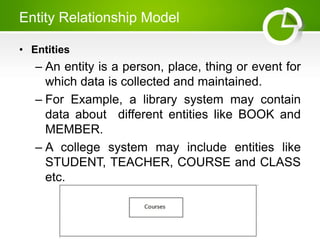
• Entities
– An entity is a person, place, thing or event for
which data is collected and maintained.
– For Example, a library system may contain
data about different entities like BOOK and
MEMBER.
– A college system may include entities like
STUDENT, TEACHER, COURSE and CLASS
etc.
Entity Relationship Model
• Some examples of entities are as follows.
– Person: TEACHER, PLAYER, DOCTOR
– Place: COUNTRY, CITY
– Object: VEHICLE, TOY, FURNITURE
– Event: PURCHASE, ADMISSION,
REGISTRATION
– Concept: ACCOUNT, PROGRAMMING
• The entity is used in three meanings that
are as follow
Entity Relationship Model
• Entity Type
– It is collection of entity having common
attribute.
– All entities in an entity type share common
characteristics. It is also Known as entity
class.
– For Example , STUDENT entity class is a set
of all students.
Entity Relationship Model
• Entity Instance
– An entity instance is a single occurrence of
an entity.
– For Example , a student Abdullah of
STUDENT entity type is an entity instance.
Entity Relationship Model
• Entity Set
– A set of all entities of a particular entity type
in the database at a given point of times is
called as entity set.
– For Example , an entity set student may
consist of all student in the university.
Types of Entities
• Types of Entities
– The following are the types of entities in
DBMS
• Strong Entity
– The strong entity has a primary key. Weak
entities are dependent on strong entity. Its
existence is not dependent on any other
entity.
– Strong Entity is represented by a single
rectangle −
Types of Entities
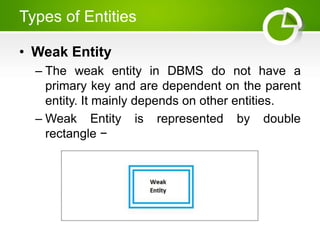
• Weak Entity
– The weak entity in DBMS do not have a
primary key and are dependent on the parent
entity. It mainly depends on other entities.
– Weak Entity is represented by double
rectangle −
Types of Entities
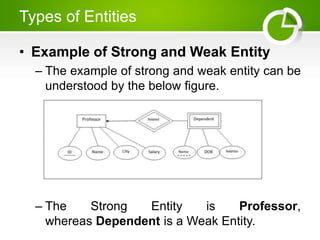
• Example of Strong and Weak Entity
– The example of strong and weak entity can be
understood by the below figure.
– The Strong Entity is Professor,
whereas Dependent is a Weak Entity.
Elements of E-R Model
• Attributes describe the characteristics or
properties of an entity in a database table.
An entity in a database table is defined
with the ‘fixed’ set of attributes.
• For example, if we have to define a
student entity then we can define it with
the set of attributes like roll number, name,
course.
• The attribute values, of each student
entity, will define its characteristics in the
table.
Entity-Relationship Diagram
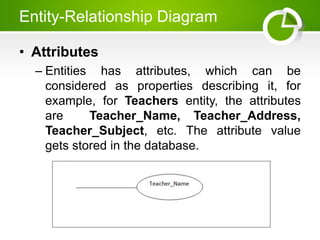
• Attributes
– Entities has attributes, which can be
considered as properties describing it, for
example, for Teachers entity, the attributes
are Teacher_Name, Teacher_Address,
Teacher_Subject, etc. The attribute value
gets stored in the database.
Entity-Relationship Diagram
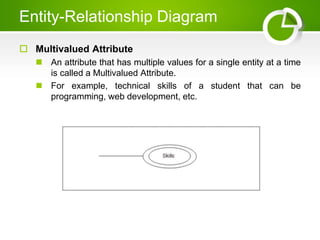
 Multivalued Attribute
 An attribute that has multiple values for a single entity at a time
is called a Multivalued Attribute.
 For example, technical skills of a student that can be
programming, web development, etc.
Entity-Relationship Diagram
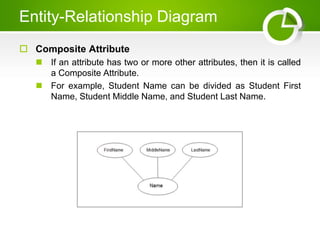
 Composite Attribute
 If an attribute has two or more other attributes, then it is called
a Composite Attribute.
 For example, Student Name can be divided as Student First
Name, Student Middle Name, and Student Last Name.
Entity-Relationship Diagram
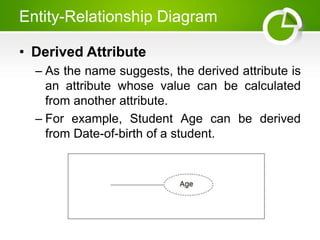
• Derived Attribute
– As the name suggests, the derived attribute is
an attribute whose value can be calculated
from another attribute.
– For example, Student Age can be derived
from Date-of-birth of a student.
Thank You

Presentation on Entity Relationship Diagram.pptx

  • 1.
  • 2.
    Entity Relationship Model •Entity Relationship Model is a logical representation of data in an organization. OR • A semantic data model, used for the graphical representation of the conceptual database design • It is used to describe the elements of a system and their relationship. • It was introduced be peter Chen in 1976.
  • 3.
    Entity Relationship Model •Advantages of E-R Model – Conceptual simplicity – Visual representation – Effective communication tool
  • 4.
    Entity Relationship Model Major Components  Entities  Attributes  Relationships
  • 5.
    Entity Relationship Model •Entities – An entity is a person, place, thing or event for which data is collected and maintained. – For Example, a library system may contain data about different entities like BOOK and MEMBER. – A college system may include entities like STUDENT, TEACHER, COURSE and CLASS etc.
  • 6.
    Entity Relationship Model •Some examples of entities are as follows. – Person: TEACHER, PLAYER, DOCTOR – Place: COUNTRY, CITY – Object: VEHICLE, TOY, FURNITURE – Event: PURCHASE, ADMISSION, REGISTRATION – Concept: ACCOUNT, PROGRAMMING • The entity is used in three meanings that are as follow
  • 7.
    Entity Relationship Model •Entity Type – It is collection of entity having common attribute. – All entities in an entity type share common characteristics. It is also Known as entity class. – For Example , STUDENT entity class is a set of all students.
  • 8.
    Entity Relationship Model •Entity Instance – An entity instance is a single occurrence of an entity. – For Example , a student Abdullah of STUDENT entity type is an entity instance.
  • 9.
    Entity Relationship Model •Entity Set – A set of all entities of a particular entity type in the database at a given point of times is called as entity set. – For Example , an entity set student may consist of all student in the university.
  • 10.
    Types of Entities •Types of Entities – The following are the types of entities in DBMS • Strong Entity – The strong entity has a primary key. Weak entities are dependent on strong entity. Its existence is not dependent on any other entity. – Strong Entity is represented by a single rectangle −
  • 11.
    Types of Entities •Weak Entity – The weak entity in DBMS do not have a primary key and are dependent on the parent entity. It mainly depends on other entities. – Weak Entity is represented by double rectangle −
  • 12.
    Types of Entities •Example of Strong and Weak Entity – The example of strong and weak entity can be understood by the below figure. – The Strong Entity is Professor, whereas Dependent is a Weak Entity.
  • 13.
    Elements of E-RModel • Attributes describe the characteristics or properties of an entity in a database table. An entity in a database table is defined with the ‘fixed’ set of attributes. • For example, if we have to define a student entity then we can define it with the set of attributes like roll number, name, course. • The attribute values, of each student entity, will define its characteristics in the table.
  • 14.
    Entity-Relationship Diagram • Attributes –Entities has attributes, which can be considered as properties describing it, for example, for Teachers entity, the attributes are Teacher_Name, Teacher_Address, Teacher_Subject, etc. The attribute value gets stored in the database.
  • 15.
    Entity-Relationship Diagram  MultivaluedAttribute  An attribute that has multiple values for a single entity at a time is called a Multivalued Attribute.  For example, technical skills of a student that can be programming, web development, etc.
  • 16.
    Entity-Relationship Diagram  CompositeAttribute  If an attribute has two or more other attributes, then it is called a Composite Attribute.  For example, Student Name can be divided as Student First Name, Student Middle Name, and Student Last Name.
  • 17.
    Entity-Relationship Diagram • DerivedAttribute – As the name suggests, the derived attribute is an attribute whose value can be calculated from another attribute. – For example, Student Age can be derived from Date-of-birth of a student.
  • 18.