The Future Touch

Name: Pure Stone
Members:       Fu Yingying   Wang Lei   Lin Quan
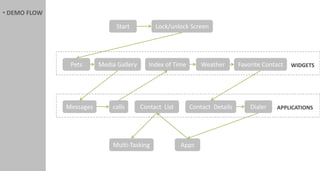
• DEMO FLOW

                               Start          Lock/unlock Screen


               Pets      Media Gallery      Index of Time       Weather       Favorite Contact   WIDGETS


              Messages       calls       Contact List       Contact Details       Dialer   APPLICATIONS


                             Multi-Tasking              Apps
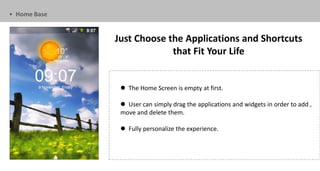
• Home Base


              Just Choose the Applications and Shortcuts
                           that Fit Your Life


                The Home Screen is empty at first.

                User can simply drag the applications and widgets in order to add ,
               move and delete them.

                Fully personalize the experience.
Emotional Attachment
                Unexpected Experience
Personalized Customization
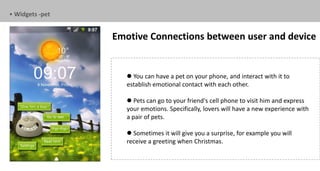
• Widgets -pet


                 Emotive Connections between user and device


                     You can have a pet on your phone, and interact with it to
                    establish emotional contact with each other.

                     Pets can go to your friend's cell phone to visit him and express
                    your emotions. Specifically, lovers will have a new experience with
                    a pair of pets.

                     Sometimes it will give you a surprise, for example you will
                    receive a greeting when Christmas.
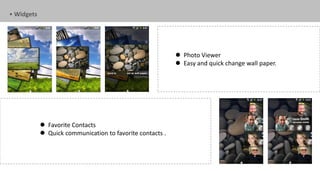
• Widgets


                                                            Photo Viewer
                                                            Easy and quick change wall paper.


             Favorite Contacts
             Quick communication to favorite contacts .
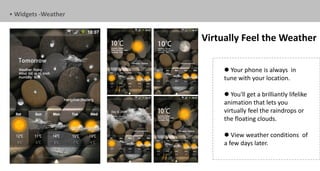
• Widgets -Weather


                     Virtually Feel the Weather

                           Your phone is always in
                          tune with your location.

                           You'll get a brilliantly lifelike
                          animation that lets you
                          virtually feel the raindrops or
                          the floating clouds.

                           View weather conditions of
                          a few days later.
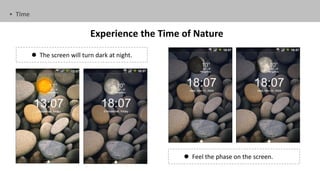
• Time


                              Experience the Time of Nature
          The screen will turn dark at night.


                                                   Feel the phase on the screen.
Intelligent Adaptivity
                   Fine-Tuned Flexibility
Efficient Operation
• APPs


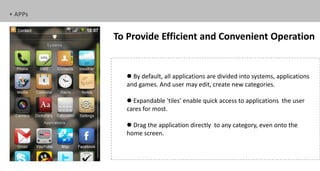
         To Provide Efficient and Convenient Operation


            By default, all applications are divided into systems, applications
           and games. And user may edit, create new categories.

            Expandable 'tiles' enable quick access to applications the user
           cares for most.

            Drag the application directly to any category, even onto the
           home screen.
• Calls and Messages


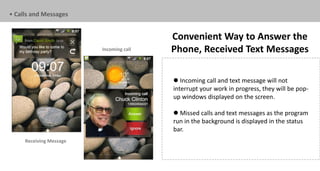
                                         Convenient Way to Answer the
                         Incoming call   Phone, Received Text Messages

                                          Incoming call and text message will not
                                         interrupt your work in progress, they will be pop-
                                         up windows displayed on the screen.

                                          Missed calls and text messages as the program
                                         run in the background is displayed in the status
                                         bar.
     Receiving Message
• Contacts


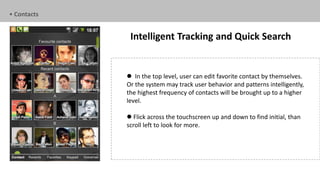
              Intelligent Tracking and Quick Search


              In the top level, user can edit favorite contact by themselves.
             Or the system may track user behavior and patterns intelligently,
             the highest frequency of contacts will be brought up to a higher
             level.

              Flick across the touchscreen up and down to find initial, than
             scroll left to look for more.
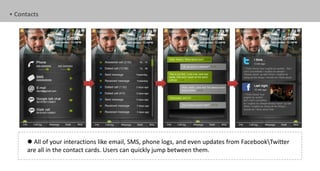
• Contacts


       All of your interactions like email, SMS, phone logs, and even updates from FacebookTwitter
      are all in the contact cards. Users can quickly jump between them.
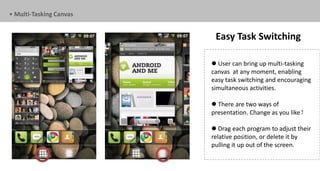
• Multi-Tasking Canvas


                          Easy Task Switching

                          User can bring up multi-tasking
                         canvas at any moment, enabling
                         easy task switching and encouraging
                         simultaneous activities.

                          There are two ways of
                         presentation. Change as you like!

                          Drag each program to adjust their
                         relative position, or delete it by
                         pulling it up out of the screen.
END.
THANK YOU FOR WATCHING

Presentation

  • 1.
    The Future Touch Name:Pure Stone Members: Fu Yingying Wang Lei Lin Quan
  • 2.
    • DEMO FLOW Start Lock/unlock Screen Pets Media Gallery Index of Time Weather Favorite Contact WIDGETS Messages calls Contact List Contact Details Dialer APPLICATIONS Multi-Tasking Apps
  • 3.
    • Home Base Just Choose the Applications and Shortcuts that Fit Your Life  The Home Screen is empty at first.  User can simply drag the applications and widgets in order to add , move and delete them.  Fully personalize the experience.
  • 4.
    Emotional Attachment Unexpected Experience Personalized Customization
  • 5.
    • Widgets -pet Emotive Connections between user and device  You can have a pet on your phone, and interact with it to establish emotional contact with each other.  Pets can go to your friend's cell phone to visit him and express your emotions. Specifically, lovers will have a new experience with a pair of pets.  Sometimes it will give you a surprise, for example you will receive a greeting when Christmas.
  • 6.
    • Widgets  Photo Viewer  Easy and quick change wall paper.  Favorite Contacts  Quick communication to favorite contacts .
  • 7.
    • Widgets -Weather Virtually Feel the Weather  Your phone is always in tune with your location.  You'll get a brilliantly lifelike animation that lets you virtually feel the raindrops or the floating clouds.  View weather conditions of a few days later.
  • 8.
    • Time Experience the Time of Nature  The screen will turn dark at night.  Feel the phase on the screen.
  • 9.
    Intelligent Adaptivity Fine-Tuned Flexibility Efficient Operation
  • 10.
    • APPs To Provide Efficient and Convenient Operation  By default, all applications are divided into systems, applications and games. And user may edit, create new categories.  Expandable 'tiles' enable quick access to applications the user cares for most.  Drag the application directly to any category, even onto the home screen.
  • 11.
    • Calls andMessages Convenient Way to Answer the Incoming call Phone, Received Text Messages  Incoming call and text message will not interrupt your work in progress, they will be pop- up windows displayed on the screen.  Missed calls and text messages as the program run in the background is displayed in the status bar. Receiving Message
  • 12.
    • Contacts Intelligent Tracking and Quick Search  In the top level, user can edit favorite contact by themselves. Or the system may track user behavior and patterns intelligently, the highest frequency of contacts will be brought up to a higher level.  Flick across the touchscreen up and down to find initial, than scroll left to look for more.
  • 13.
    • Contacts  All of your interactions like email, SMS, phone logs, and even updates from FacebookTwitter are all in the contact cards. Users can quickly jump between them.
  • 14.
    • Multi-Tasking Canvas Easy Task Switching  User can bring up multi-tasking canvas at any moment, enabling easy task switching and encouraging simultaneous activities.  There are two ways of presentation. Change as you like!  Drag each program to adjust their relative position, or delete it by pulling it up out of the screen.
  • 15.