Automated testing in
Java
Agenda
 Testing
 Level of testing
 Clean test
 Libraries and tools
 Maven and testing
 Show case
 Good practices in testing
Testing
 Specification ->Write Code ->Test
 Testing – manual or automated testing
 Automated testing
 Faster than manual testing;
 Automates repetitive actions;
 Very helpful in regression testing when code changes frequently;
 Gives programmer safeness to change code;
 Covers more test cases in a same amount of time than manual
testing.
Levels of
testing
According to the book Growing Object-Oriented Software Guided
byTests
 Unit: Do our objects do the right thing, are they convenient to
work with?
 Integration: Does our code work against code we can't change?
 Acceptance: Does the whole system work?
Some rules
 Breaking Out: Splitting a Large Object into a Group of
CollaboratingObjects
 Break up an Object if it becomes too large to test easily, or if its
test failures become difficult to interpret.Then unit-test the new
parts separatley.
 Building Off: Defining a new service that an object needs and add
in a new object to provide it
 Building Up: Hiding Related Objects into a containingObject ->
When we have a cluster of related objects that work together, we
can package them up in a containing object.The new object hides
the complexity in an abstraction that allow us to program at a
higher lever
 When the test for an object becomes too complicated to set up -
when there are too many moving parts to get the code into the
relevant state - consider bundling up some of the collaborating
objects
Clean test
 F.I.R.S.T
 Fast
 Independent
 Repeatable
 Self-Validating
 Timely
 BUILD-OPERATE-CHECK pattern
 Give test methods meaningful names
 public void should_do_something_when_conditions_are_fulfilled()
Libraries
 JUnit - testing framework
 http://junit.org/junit4/
 AssertJ - fluent assertions for java
 http://joel-costigliola.github.io/assertj/
 Mockito – enables mock creation, verification and stubbing
 http://mockito.org/
 Spring-test (Spring framework)
 http://docs.spring.io/spring/docs/current/spring-framework-
reference/html/integration-testing.html
 Arquillian (Java EE) – very similar to spring-test
 http://arquillian.org/
 Flyway – database migrations
 https://flywaydb.org/
Maven and
testing
 validate - compile - test - package - verify - install – deploy
 Plugins
 Surefire (unit testing)
 Failsafe (integration testing)
 pre-integration-test phase (build test environment)
 Naming conventions:
 Surefire – NameOfTheClassTest
 Class path same as the class that is being tested
 Packages private methods can be accessed this way
 Failsafe – NameOfTheClassTestIT
 Plugin must be specified in pom.xml
 Verify and IntegrationTest phases
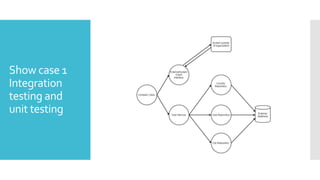
Show case 1
Integration
testing and
unit testing
Basic idea –
test layer by
layer
 Repository layer
 Simulate environment in which application will be ran
 Do not mock entity manager, use real database
 Use repository persist/findById method to set up test case
 Service layer
 Simulate environment in which class will be ran
 Construct all dependencies (repository layer)
 Use repository persist/findById method to set up test case
 Complex class
 Mock external client, cover all cases (simple case - true or false)
 Construct all dependencies (service + repository layer)
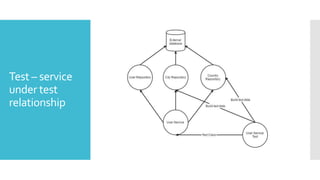
Test – service
under test
relationship
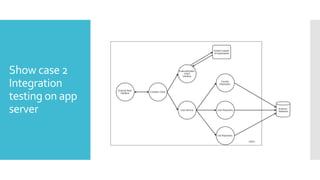
Show case 2
Integration
testing on app
server
Basic idea
 Use real database
 Build clean database before integration test phase (use flyway ->
maven plugin exists)
 Build and deploy war to a real app server (use embedded if
possible)
 Use repository layer to insert test data
 Use test data builders for defaults – plugins for IDEs exists
 Clear database after every test
 Clean database after integration test phase is finished
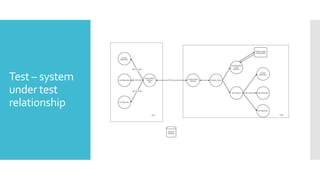
Test – system
under test
relationship
Testing system
with
dependency
(client) to
another
system
 Do not write integration tests with real client !!!
 Hard to maintain tests
 Hard to set up test environment (instead of setting up only one
system you need to set up multiple systems)
 Write integration test which tests client <–> external system
communication
 For example write a test which sends a request to system but with
no authentication data – expected error authentication exception
 In system and integration test use mocks that accepts limited set
of data
 For example checkAddressExists – there are 2 possible outcomes,
cover them with you test. If the other system do what it is
expected to do, this will be sufficient
 Your job is not to test other systems !!!
 Test manually whole test flow and capture the right behaviour
with mock objects
Testing
Repository
Layer
 Do not test persist, remote or findById methods which are directly
calling entity manager methods
 Do not test AbstractMethods that are shared across Repositories
which are already tested on one or two Repository
implementation – for example findPaged
Testing Facade
WebServices
 Do not use real client, use mocks when writing integration tests
 Write integration test which tests client <–> external system
communication
 In mocks cover cases:
 Everything went ok;
 External system threw Exception.
 Test those cases and capture the correct behaviour with
integration and/or unit tests.
 Run manual testing with real clients and capture correct behaviour
in the integration test when communicating with the mock

Presentation

  • 1.
  • 2.
    Agenda  Testing  Levelof testing  Clean test  Libraries and tools  Maven and testing  Show case  Good practices in testing
  • 3.
    Testing  Specification ->WriteCode ->Test  Testing – manual or automated testing  Automated testing  Faster than manual testing;  Automates repetitive actions;  Very helpful in regression testing when code changes frequently;  Gives programmer safeness to change code;  Covers more test cases in a same amount of time than manual testing.
  • 4.
    Levels of testing According tothe book Growing Object-Oriented Software Guided byTests  Unit: Do our objects do the right thing, are they convenient to work with?  Integration: Does our code work against code we can't change?  Acceptance: Does the whole system work?
  • 5.
    Some rules  BreakingOut: Splitting a Large Object into a Group of CollaboratingObjects  Break up an Object if it becomes too large to test easily, or if its test failures become difficult to interpret.Then unit-test the new parts separatley.  Building Off: Defining a new service that an object needs and add in a new object to provide it  Building Up: Hiding Related Objects into a containingObject -> When we have a cluster of related objects that work together, we can package them up in a containing object.The new object hides the complexity in an abstraction that allow us to program at a higher lever  When the test for an object becomes too complicated to set up - when there are too many moving parts to get the code into the relevant state - consider bundling up some of the collaborating objects
  • 6.
    Clean test  F.I.R.S.T Fast  Independent  Repeatable  Self-Validating  Timely  BUILD-OPERATE-CHECK pattern  Give test methods meaningful names  public void should_do_something_when_conditions_are_fulfilled()
  • 7.
    Libraries  JUnit -testing framework  http://junit.org/junit4/  AssertJ - fluent assertions for java  http://joel-costigliola.github.io/assertj/  Mockito – enables mock creation, verification and stubbing  http://mockito.org/  Spring-test (Spring framework)  http://docs.spring.io/spring/docs/current/spring-framework- reference/html/integration-testing.html  Arquillian (Java EE) – very similar to spring-test  http://arquillian.org/  Flyway – database migrations  https://flywaydb.org/
  • 8.
    Maven and testing  validate- compile - test - package - verify - install – deploy  Plugins  Surefire (unit testing)  Failsafe (integration testing)  pre-integration-test phase (build test environment)  Naming conventions:  Surefire – NameOfTheClassTest  Class path same as the class that is being tested  Packages private methods can be accessed this way  Failsafe – NameOfTheClassTestIT  Plugin must be specified in pom.xml  Verify and IntegrationTest phases
  • 9.
  • 10.
    Basic idea – testlayer by layer  Repository layer  Simulate environment in which application will be ran  Do not mock entity manager, use real database  Use repository persist/findById method to set up test case  Service layer  Simulate environment in which class will be ran  Construct all dependencies (repository layer)  Use repository persist/findById method to set up test case  Complex class  Mock external client, cover all cases (simple case - true or false)  Construct all dependencies (service + repository layer)
  • 11.
    Test – service undertest relationship
  • 12.
  • 13.
    Basic idea  Usereal database  Build clean database before integration test phase (use flyway -> maven plugin exists)  Build and deploy war to a real app server (use embedded if possible)  Use repository layer to insert test data  Use test data builders for defaults – plugins for IDEs exists  Clear database after every test  Clean database after integration test phase is finished
  • 14.
    Test – system undertest relationship
  • 15.
    Testing system with dependency (client) to another system Do not write integration tests with real client !!!  Hard to maintain tests  Hard to set up test environment (instead of setting up only one system you need to set up multiple systems)  Write integration test which tests client <–> external system communication  For example write a test which sends a request to system but with no authentication data – expected error authentication exception  In system and integration test use mocks that accepts limited set of data  For example checkAddressExists – there are 2 possible outcomes, cover them with you test. If the other system do what it is expected to do, this will be sufficient  Your job is not to test other systems !!!  Test manually whole test flow and capture the right behaviour with mock objects
  • 16.
    Testing Repository Layer  Do nottest persist, remote or findById methods which are directly calling entity manager methods  Do not test AbstractMethods that are shared across Repositories which are already tested on one or two Repository implementation – for example findPaged
  • 17.
    Testing Facade WebServices  Donot use real client, use mocks when writing integration tests  Write integration test which tests client <–> external system communication  In mocks cover cases:  Everything went ok;  External system threw Exception.  Test those cases and capture the correct behaviour with integration and/or unit tests.  Run manual testing with real clients and capture correct behaviour in the integration test when communicating with the mock