Integration Testing
By
1.Samson Legesse
2.Tsegabrehan Zerihun
3.Teklerufael Kebebe
4.Mesele Mehamad
Object Oriented Software
Development
2
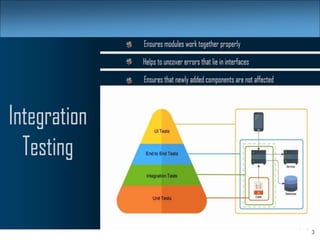
3
4
Integration
• Integration: Combining 2 or more software units
– Often a subset of the overall project (!= system testing)
• Why do software engineers care about integration?
– New problems will inevitably surface
• many systems now together that have never been before
– If done poorly, all problems present themselves at once
• hard to diagnose, debug, fix
– Cascade of interdependencies
• cannot find and solve problems one-at-a-time
5
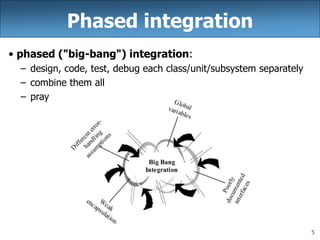
Phased integration
• phased ("big-bang") integration:
– design, code, test, debug each class/unit/subsystem separately
– combine them all
– pray
6
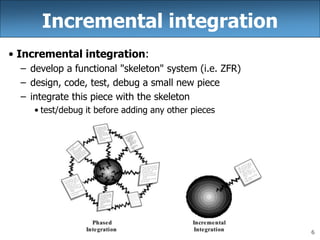
Incremental integration
• Incremental integration:
– develop a functional "skeleton" system (i.e. ZFR)
– design, code, test, debug a small new piece
– integrate this piece with the skeleton
• test/debug it before adding any other pieces
7
Benefits of incremental
• Benefits:
– Errors easier to isolate, find, fix
• reduces developer bug-fixing load
– System is always in a (relatively) working state
• good for customer relations, developer morale
• Drawbacks:
– May need to create "stub" versions of some features that have
not yet been integrated
8
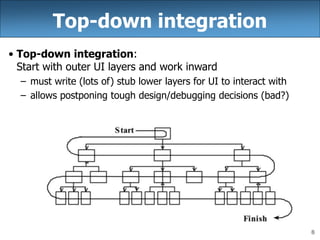
Top-down integration
• Top-down integration:
Start with outer UI layers and work inward
– must write (lots of) stub lower layers for UI to interact with
– allows postponing tough design/debugging decisions (bad?)
9
Bottom-up integration
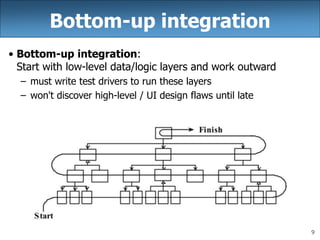
• Bottom-up integration:
Start with low-level data/logic layers and work outward
– must write test drivers to run these layers
– won't discover high-level / UI design flaws until late
10
"Sandwich" integration
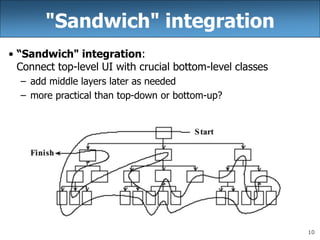
• “Sandwich" integration:
Connect top-level UI with crucial bottom-level classes
– add middle layers later as needed
– more practical than top-down or bottom-up?
11
Daily builds
• Daily build: Compile working executable on a daily basis
– allows you to test the quality of your integration so far
– helps morale; product "works every day"; visible progress
– best done automated or through an easy script
– quickly catches/exposes any bug that breaks the build
• Smoke test: A quick set of tests run on the daily build.
– NOT exhaustive; just sees whether code "smokes" (breaks)
– used (along with compilation) to make sure daily build runs
• Continuous integration:
Adding new units immediately as they are written.
12
13
Integration testing
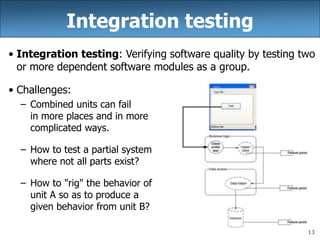
• Integration testing: Verifying software quality by testing two
or more dependent software modules as a group.
• Challenges:
– Combined units can fail
in more places and in more
complicated ways.
– How to test a partial system
where not all parts exist?
– How to "rig" the behavior of
unit A so as to produce a
given behavior from unit B?
14
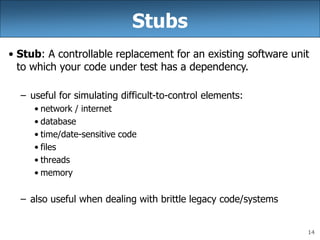
Stubs
• Stub: A controllable replacement for an existing software unit
to which your code under test has a dependency.
– useful for simulating difficult-to-control elements:
• network / internet
• database
• time/date-sensitive code
• files
• threads
• memory
– also useful when dealing with brittle legacy code/systems
15
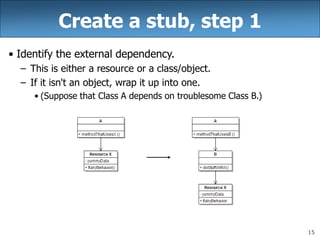
Create a stub, step 1
• Identify the external dependency.
– This is either a resource or a class/object.
– If it isn't an object, wrap it up into one.
• (Suppose that Class A depends on troublesome Class B.)
16
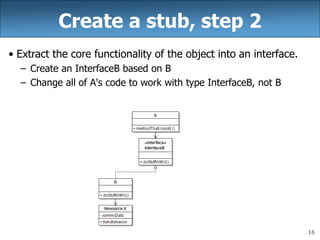
Create a stub, step 2
• Extract the core functionality of the object into an interface.
– Create an InterfaceB based on B
– Change all of A's code to work with type InterfaceB, not B
17
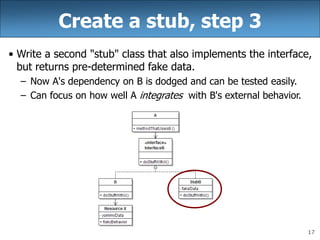
Create a stub, step 3
• Write a second "stub" class that also implements the interface,
but returns pre-determined fake data.
– Now A's dependency on B is dodged and can be tested easily.
– Can focus on how well A integrates with B's external behavior.
18
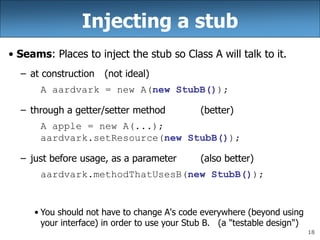
Injecting a stub
• Seams: Places to inject the stub so Class A will talk to it.
– at construction (not ideal)
A aardvark = new A(new StubB());
– through a getter/setter method (better)
A apple = new A(...);
aardvark.setResource(new StubB());
– just before usage, as a parameter (also better)
aardvark.methodThatUsesB(new StubB());
• You should not have to change A's code everywhere (beyond using
your interface) in order to use your Stub B. (a "testable design")
19
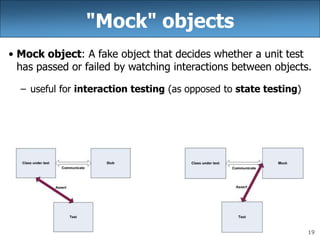
"Mock" objects
• Mock object: A fake object that decides whether a unit test
has passed or failed by watching interactions between objects.
– useful for interaction testing (as opposed to state testing)
20
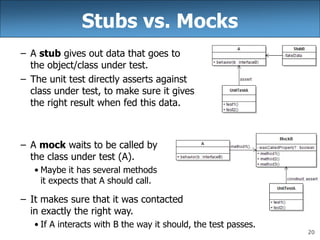
Stubs vs. Mocks
– A stub gives out data that goes to
the object/class under test.
– The unit test directly asserts against
class under test, to make sure it gives
the right result when fed this data.
– A mock waits to be called by
the class under test (A).
• Maybe it has several methods
it expects that A should call.
– It makes sure that it was contacted
in exactly the right way.
• If A interacts with B the way it should, the test passes.
21
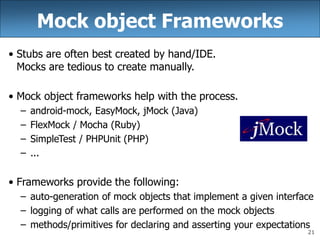
Mock object Frameworks
• Stubs are often best created by hand/IDE.
Mocks are tedious to create manually.
• Mock object frameworks help with the process.
– android-mock, EasyMock, jMock (Java)
– FlexMock / Mocha (Ruby)
– SimpleTest / PHPUnit (PHP)
– ...
• Frameworks provide the following:
– auto-generation of mock objects that implement a given interface
– logging of what calls are performed on the mock objects
– methods/primitives for declaring and asserting your expectations
22
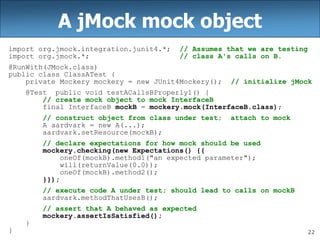
A jMock mock object
import org.jmock.integration.junit4.*; // Assumes that we are testing
import org.jmock.*; // class A's calls on B.
@RunWith(JMock.class)
public class ClassATest {
private Mockery mockery = new JUnit4Mockery(); // initialize jMock
@Test public void testACallsBProperly1() {
// create mock object to mock InterfaceB
final InterfaceB mockB = mockery.mock(InterfaceB.class);
// construct object from class under test; attach to mock
A aardvark = new A(...);
aardvark.setResource(mockB);
// declare expectations for how mock should be used
mockery.checking(new Expectations() {{
oneOf(mockB).method1("an expected parameter");
will(returnValue(0.0));
oneOf(mockB).method2();
}});
// execute code A under test; should lead to calls on mockB
aardvark.methodThatUsesB();
// assert that A behaved as expected
mockery.assertIsSatisfied();
}
}
23
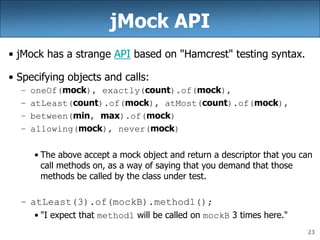
jMock API
• jMock has a strange API based on "Hamcrest" testing syntax.
• Specifying objects and calls:
– oneOf(mock), exactly(count).of(mock),
– atLeast(count).of(mock), atMost(count).of(mock),
– between(min, max).of(mock)
– allowing(mock), never(mock)
• The above accept a mock object and return a descriptor that you can
call methods on, as a way of saying that you demand that those
methods be called by the class under test.
– atLeast(3).of(mockB).method1();
• "I expect that method1 will be called on mockB 3 times here."
24
Expected actions
• .will(action)
– actions: returnValue(v), throwException(e)
• values:
– equal(value), same(value), any(type), aNull(type),
aNonNull(type), not(value), anyOf(value1, ..,valueN)
– oneOf(mockB).method1();
will(returnValue(anyOf(1, 4, -3)));
• "I expect that method1 will be called on mockB once here, and that
it will return either 1, 4, or -3."
25
Using stubs/mocks together
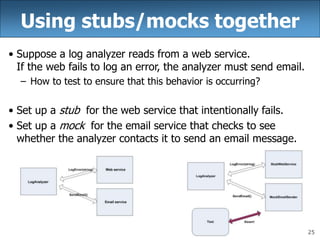
• Suppose a log analyzer reads from a web service.
If the web fails to log an error, the analyzer must send email.
– How to test to ensure that this behavior is occurring?
• Set up a stub for the web service that intentionally fails.
• Set up a mock for the email service that checks to see
whether the analyzer contacts it to send an email message.
26
27
28
END
Thank you

Integration testing

  • 1.
    Integration Testing By 1.Samson Legesse 2.TsegabrehanZerihun 3.Teklerufael Kebebe 4.Mesele Mehamad Object Oriented Software Development
  • 2.
  • 3.
  • 4.
    4 Integration • Integration: Combining2 or more software units – Often a subset of the overall project (!= system testing) • Why do software engineers care about integration? – New problems will inevitably surface • many systems now together that have never been before – If done poorly, all problems present themselves at once • hard to diagnose, debug, fix – Cascade of interdependencies • cannot find and solve problems one-at-a-time
  • 5.
    5 Phased integration • phased("big-bang") integration: – design, code, test, debug each class/unit/subsystem separately – combine them all – pray
  • 6.
    6 Incremental integration • Incrementalintegration: – develop a functional "skeleton" system (i.e. ZFR) – design, code, test, debug a small new piece – integrate this piece with the skeleton • test/debug it before adding any other pieces
  • 7.
    7 Benefits of incremental •Benefits: – Errors easier to isolate, find, fix • reduces developer bug-fixing load – System is always in a (relatively) working state • good for customer relations, developer morale • Drawbacks: – May need to create "stub" versions of some features that have not yet been integrated
  • 8.
    8 Top-down integration • Top-downintegration: Start with outer UI layers and work inward – must write (lots of) stub lower layers for UI to interact with – allows postponing tough design/debugging decisions (bad?)
  • 9.
    9 Bottom-up integration • Bottom-upintegration: Start with low-level data/logic layers and work outward – must write test drivers to run these layers – won't discover high-level / UI design flaws until late
  • 10.
    10 "Sandwich" integration • “Sandwich"integration: Connect top-level UI with crucial bottom-level classes – add middle layers later as needed – more practical than top-down or bottom-up?
  • 11.
    11 Daily builds • Dailybuild: Compile working executable on a daily basis – allows you to test the quality of your integration so far – helps morale; product "works every day"; visible progress – best done automated or through an easy script – quickly catches/exposes any bug that breaks the build • Smoke test: A quick set of tests run on the daily build. – NOT exhaustive; just sees whether code "smokes" (breaks) – used (along with compilation) to make sure daily build runs • Continuous integration: Adding new units immediately as they are written.
  • 12.
  • 13.
    13 Integration testing • Integrationtesting: Verifying software quality by testing two or more dependent software modules as a group. • Challenges: – Combined units can fail in more places and in more complicated ways. – How to test a partial system where not all parts exist? – How to "rig" the behavior of unit A so as to produce a given behavior from unit B?
  • 14.
    14 Stubs • Stub: Acontrollable replacement for an existing software unit to which your code under test has a dependency. – useful for simulating difficult-to-control elements: • network / internet • database • time/date-sensitive code • files • threads • memory – also useful when dealing with brittle legacy code/systems
  • 15.
    15 Create a stub,step 1 • Identify the external dependency. – This is either a resource or a class/object. – If it isn't an object, wrap it up into one. • (Suppose that Class A depends on troublesome Class B.)
  • 16.
    16 Create a stub,step 2 • Extract the core functionality of the object into an interface. – Create an InterfaceB based on B – Change all of A's code to work with type InterfaceB, not B
  • 17.
    17 Create a stub,step 3 • Write a second "stub" class that also implements the interface, but returns pre-determined fake data. – Now A's dependency on B is dodged and can be tested easily. – Can focus on how well A integrates with B's external behavior.
  • 18.
    18 Injecting a stub •Seams: Places to inject the stub so Class A will talk to it. – at construction (not ideal) A aardvark = new A(new StubB()); – through a getter/setter method (better) A apple = new A(...); aardvark.setResource(new StubB()); – just before usage, as a parameter (also better) aardvark.methodThatUsesB(new StubB()); • You should not have to change A's code everywhere (beyond using your interface) in order to use your Stub B. (a "testable design")
  • 19.
    19 "Mock" objects • Mockobject: A fake object that decides whether a unit test has passed or failed by watching interactions between objects. – useful for interaction testing (as opposed to state testing)
  • 20.
    20 Stubs vs. Mocks –A stub gives out data that goes to the object/class under test. – The unit test directly asserts against class under test, to make sure it gives the right result when fed this data. – A mock waits to be called by the class under test (A). • Maybe it has several methods it expects that A should call. – It makes sure that it was contacted in exactly the right way. • If A interacts with B the way it should, the test passes.
  • 21.
    21 Mock object Frameworks •Stubs are often best created by hand/IDE. Mocks are tedious to create manually. • Mock object frameworks help with the process. – android-mock, EasyMock, jMock (Java) – FlexMock / Mocha (Ruby) – SimpleTest / PHPUnit (PHP) – ... • Frameworks provide the following: – auto-generation of mock objects that implement a given interface – logging of what calls are performed on the mock objects – methods/primitives for declaring and asserting your expectations
  • 22.
    22 A jMock mockobject import org.jmock.integration.junit4.*; // Assumes that we are testing import org.jmock.*; // class A's calls on B. @RunWith(JMock.class) public class ClassATest { private Mockery mockery = new JUnit4Mockery(); // initialize jMock @Test public void testACallsBProperly1() { // create mock object to mock InterfaceB final InterfaceB mockB = mockery.mock(InterfaceB.class); // construct object from class under test; attach to mock A aardvark = new A(...); aardvark.setResource(mockB); // declare expectations for how mock should be used mockery.checking(new Expectations() {{ oneOf(mockB).method1("an expected parameter"); will(returnValue(0.0)); oneOf(mockB).method2(); }}); // execute code A under test; should lead to calls on mockB aardvark.methodThatUsesB(); // assert that A behaved as expected mockery.assertIsSatisfied(); } }
  • 23.
    23 jMock API • jMockhas a strange API based on "Hamcrest" testing syntax. • Specifying objects and calls: – oneOf(mock), exactly(count).of(mock), – atLeast(count).of(mock), atMost(count).of(mock), – between(min, max).of(mock) – allowing(mock), never(mock) • The above accept a mock object and return a descriptor that you can call methods on, as a way of saying that you demand that those methods be called by the class under test. – atLeast(3).of(mockB).method1(); • "I expect that method1 will be called on mockB 3 times here."
  • 24.
    24 Expected actions • .will(action) –actions: returnValue(v), throwException(e) • values: – equal(value), same(value), any(type), aNull(type), aNonNull(type), not(value), anyOf(value1, ..,valueN) – oneOf(mockB).method1(); will(returnValue(anyOf(1, 4, -3))); • "I expect that method1 will be called on mockB once here, and that it will return either 1, 4, or -3."
  • 25.
    25 Using stubs/mocks together •Suppose a log analyzer reads from a web service. If the web fails to log an error, the analyzer must send email. – How to test to ensure that this behavior is occurring? • Set up a stub for the web service that intentionally fails. • Set up a mock for the email service that checks to see whether the analyzer contacts it to send an email message.
  • 26.
  • 27.
  • 28.