Automated Testing with Team Test
Unit, Web, Performance, Load, Manual, and Ordered Tests
Code Coverage and Code Analysis
2 For Discussion Purposes Only | © 2007 Computer Enterprises, Inc.
Quality Challenges
“Software bugs, or errors, are so
prevalent and so detrimental that they
cost the U.S. economy an estimated
$59.5 billion annually, or about 0.6
percent of the gross domestic
product…an estimated $22.2 billion,
could be eliminated by an improved
testing infrastructure that enables
earlier and more effective
identification and removal of software
defects.”
(Source: NIST 2002)
Satisfying
users
Business
interruption
risks
Ongoing
maintenance
costs rising
Less avail.
resources
3 For Discussion Purposes Only | © 2007 Computer Enterprises, Inc.
How Does VSTS/TFS Help?
 Increased Communication and Integration…
 Code Analysis Tools
 Code Profiling Tools
 Unit Testing and Code Coverage
 Load Testing
 Other Testing Tools
 Test Case Management
4 For Discussion Purposes Only | © 2007 Computer Enterprises, Inc.
Unit Testing
 Each unit is tested
independently
 A large percentage of
defects are identified during
unit testing
 Automatic and repeatable
code testing
 Simplifies integration
 Self documenting
 Auto-generate
Isolate small portion of code & determine whether it works correctly
5 For Discussion Purposes Only | © 2007 Computer Enterprises, Inc.
Benefits of Automated Unit Testing
 Repeatable unit that verifies code still works
 Confirm code is tested
 Build a set of regression tests
 Make changes with confidence
 Aid in understanding code
 Limits: integration, web and Windows UI testing, load,
performance testing
6 For Discussion Purposes Only | © 2007 Computer Enterprises, Inc.
Unit Test Types
 Class (standard)
– Test the properties and methods of a class
 Data-driven
– Bind unit test parameters to a datasource
 ASP.NET
– Test classes (or business logic) inside an ASP.NET application
– Run in the context of the web server (ASP objects available)
 Web Services
– Define a web reference to the service
7 For Discussion Purposes Only | © 2007 Computer Enterprises, Inc.
Extensions of Unit Testing
 Regression Testing
– Modifications are validated with regression tests
– Write new code and verify system continues to function
correctly
 Integration Testing
– Helps validate how tested components interact with
one another
– Can identify problems that occur when units are
combined
 Scenario Testing
– Combine sequence of unit tests to cover a scenario
8 For Discussion Purposes Only | © 2007 Computer Enterprises, Inc.
Writing Effective Unit Tests
 Atomic
– Should not require others tests to be run first
 Cover all cases
– One test for each sceneario
– Cover all conditions, exceptions, nulls, etc.
 Able to re-run without configuration
– Database create/read/update/delete without having to
modify the database before or after the test is run
 Test a common application state
Unit tests should be …
9 For Discussion Purposes Only | © 2007 Computer Enterprises, Inc.
Unit Test Conditions
 Success baseline
– Common, successful, most-likely call to your code
 Parameter mix
– Pass a varied set of parameters
– Data-driven
 Bounds checking
– Stress the upper and lower limits of your parameters
 Null values
– Determine outcome of passing nulls to parameters
 Error conditions
– Trigger error conditions and validate expected outcomes
 Code coverage scenarios
– Test all conditions in your code
10 For Discussion Purposes Only | © 2007 Computer Enterprises, Inc.
Creating Unit Tests (1 of 2)
 Attributes are used to denote which methods and classes should be
loaded for tests
– TestClass – denotes a class for testing
– TestMethod – denotes a method for testing
• must return void (Sub for VB.NET) and have no parameters
 Certain attributes are associated with initialization
– TestInitialize – run before each test
– TestCleanup – run after each test
– ClassInitialize – run once before running any tests in the class
– ClassCleanup – run once after running all tests in the class
 Assert – static type used for asserting test values
 ExpectedException – attribute used for determining the exception that
should be thrown from the test
11 For Discussion Purposes Only | © 2007 Computer Enterprises, Inc.
Creating Unit Tests (2 of 2)
 Methods on the Assert type
– AreSame / AreNotSame
– AreEqual / AreNotEqual
– IsNull / IsNotNull
– IsInstanceOfType / IsNotInstanceOfType
– IsTrue / IsFalse
 Other Assert types
– CollectionAssert – collection equivalency
– StringAssert – string comparison/regex matching
 Web test types
– HtmlDocument – grants access to tags in the html document
– Validate*/Extract* - types used for reading field values from the
request and response
Unit Tests
13 For Discussion Purposes Only | © 2007 Computer Enterprises, Inc.
Code Coverage
 Improves effectiveness of tests
 Show a measurable indication
of code that was covered by
unit tests
– Strive for 75% and higher
 Shows the ratio of executed
logic to the total logic
 Can be used in conjunction with
unit and load testing
 Helps to find unused code
Determine code that is exercised by tests
Code Coverage
15 For Discussion Purposes Only | © 2007 Computer Enterprises, Inc.
Static Code Analysis
 Provides a means to enforce coding standards
 Configurable
 Reduction in code reviews for small issues
 Provides guidance on how to fix
 Define a check-in policy to enforce code analysis pass
 Coverage includes issues with design, globalization, interoperability,
maintainability, naming, performance, reliability, security, and usage
 Warning: developers can supress messages with attirbute
[SuppressMessage("AdventureWorks.Rules", "AW14441")]
 MORE INFO see, “Writing Quality Code” in TFS documentation
Static Code Analysis
17 For Discussion Purposes Only | © 2007 Computer Enterprises, Inc.
Web Testing
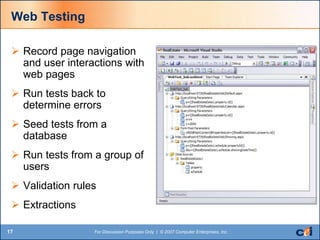
 Record page navigation
and user interactions with
web pages
 Run tests back to
determine errors
 Seed tests from a
database
 Run tests from a group of
users
 Validation rules
 Extractions
Web Testing
19 For Discussion Purposes Only | © 2007 Computer Enterprises, Inc.
Load Testing
 Load Testing: ensure application works under expected, concurrent
user load
 Create test cases that simulate real user conditions
 Distribute tests across cases based on user behavior
 Assume standard think times
 Distribute across connection types
 Simulate an application performance
in a production environment
 Provide repository to look at a
performance trend over time, to see
if changes are helping or hurting
Simulate multiple users against an application simultaneously
20 For Discussion Purposes Only | © 2007 Computer Enterprises, Inc.
Stress Testing
 Stress Testing: determine breaking points in your
application
 Find scalability issues before the application is deployed
 Step (increase) user load over time, monitor
 Find breaking point and use to monitor application
– Change software
– Add hardware
21 For Discussion Purposes Only | © 2007 Computer Enterprises, Inc.
Performance Testing
 Test at single user
 Test at normal load
 Test at peak load (1.5x normal load)
 Measure against expected performance
– Peak load should allow for a 20-30% increase in metric
 Set thresholds on the output to avoid digging through data
Load, Stress, and
Performance Testing
23 For Discussion Purposes Only | © 2007 Computer Enterprises, Inc.
Manual Test
 Tracked like other tests when executing test groups
 Presented to the tester to enter and confirm results
 Defined as text file or Word document
24 For Discussion Purposes Only | © 2007 Computer Enterprises, Inc.
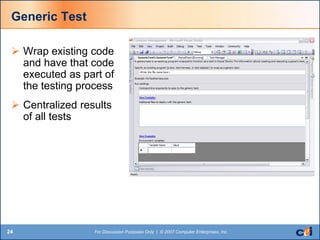
Generic Test
 Wrap existing code
and have that code
executed as part of
the testing process
 Centralized results
of all tests
25 For Discussion Purposes Only | © 2007 Computer Enterprises, Inc.
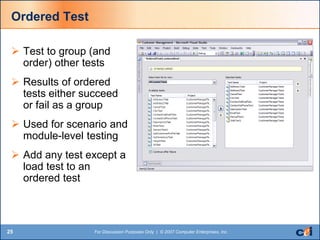
Ordered Test
 Test to group (and
order) other tests
 Results of ordered
tests either succeed
or fail as a group
 Used for scenario and
module-level testing
 Add any test except a
load test to an
ordered test
Manual Test
27 For Discussion Purposes Only | © 2007 Computer Enterprises, Inc.
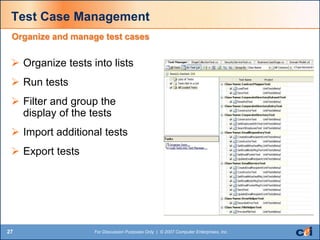
Test Case Management
 Organize tests into lists
 Run tests
 Filter and group the
display of the tests
 Import additional tests
 Export tests
Organize and manage test cases
28 For Discussion Purposes Only | © 2007 Computer Enterprises, Inc.
The Test Lab
 Clients
– Tester machine
– Used to create and edit tests / view results
 Servers
– Deployed test environment (web servers, load balancer, database server,
etc.)
 Agents
– Computers running tests (multiple-threads, each a user)
– Listen for commands from controller
– Execute tests and pass results back to controller
 Controller
– Central computer that administers agents and collects results
– Distributes load by applying weights to agents
29 For Discussion Purposes Only | © 2007 Computer Enterprises, Inc.
The Test Lab Database
 Run against a test version of the database
 Test data should be same nature and size as production
 Test a steady state of the database
 Automate the initialization of the database
 Extract data using rules to obfuscate personal information
– Visual Studio Database Developer
Test Lab Database Initialization

Justin Presentation PPT Upload

  • 1.
    Automated Testing withTeam Test Unit, Web, Performance, Load, Manual, and Ordered Tests Code Coverage and Code Analysis
  • 2.
    2 For DiscussionPurposes Only | © 2007 Computer Enterprises, Inc. Quality Challenges “Software bugs, or errors, are so prevalent and so detrimental that they cost the U.S. economy an estimated $59.5 billion annually, or about 0.6 percent of the gross domestic product…an estimated $22.2 billion, could be eliminated by an improved testing infrastructure that enables earlier and more effective identification and removal of software defects.” (Source: NIST 2002) Satisfying users Business interruption risks Ongoing maintenance costs rising Less avail. resources
  • 3.
    3 For DiscussionPurposes Only | © 2007 Computer Enterprises, Inc. How Does VSTS/TFS Help?  Increased Communication and Integration…  Code Analysis Tools  Code Profiling Tools  Unit Testing and Code Coverage  Load Testing  Other Testing Tools  Test Case Management
  • 4.
    4 For DiscussionPurposes Only | © 2007 Computer Enterprises, Inc. Unit Testing  Each unit is tested independently  A large percentage of defects are identified during unit testing  Automatic and repeatable code testing  Simplifies integration  Self documenting  Auto-generate Isolate small portion of code & determine whether it works correctly
  • 5.
    5 For DiscussionPurposes Only | © 2007 Computer Enterprises, Inc. Benefits of Automated Unit Testing  Repeatable unit that verifies code still works  Confirm code is tested  Build a set of regression tests  Make changes with confidence  Aid in understanding code  Limits: integration, web and Windows UI testing, load, performance testing
  • 6.
    6 For DiscussionPurposes Only | © 2007 Computer Enterprises, Inc. Unit Test Types  Class (standard) – Test the properties and methods of a class  Data-driven – Bind unit test parameters to a datasource  ASP.NET – Test classes (or business logic) inside an ASP.NET application – Run in the context of the web server (ASP objects available)  Web Services – Define a web reference to the service
  • 7.
    7 For DiscussionPurposes Only | © 2007 Computer Enterprises, Inc. Extensions of Unit Testing  Regression Testing – Modifications are validated with regression tests – Write new code and verify system continues to function correctly  Integration Testing – Helps validate how tested components interact with one another – Can identify problems that occur when units are combined  Scenario Testing – Combine sequence of unit tests to cover a scenario
  • 8.
    8 For DiscussionPurposes Only | © 2007 Computer Enterprises, Inc. Writing Effective Unit Tests  Atomic – Should not require others tests to be run first  Cover all cases – One test for each sceneario – Cover all conditions, exceptions, nulls, etc.  Able to re-run without configuration – Database create/read/update/delete without having to modify the database before or after the test is run  Test a common application state Unit tests should be …
  • 9.
    9 For DiscussionPurposes Only | © 2007 Computer Enterprises, Inc. Unit Test Conditions  Success baseline – Common, successful, most-likely call to your code  Parameter mix – Pass a varied set of parameters – Data-driven  Bounds checking – Stress the upper and lower limits of your parameters  Null values – Determine outcome of passing nulls to parameters  Error conditions – Trigger error conditions and validate expected outcomes  Code coverage scenarios – Test all conditions in your code
  • 10.
    10 For DiscussionPurposes Only | © 2007 Computer Enterprises, Inc. Creating Unit Tests (1 of 2)  Attributes are used to denote which methods and classes should be loaded for tests – TestClass – denotes a class for testing – TestMethod – denotes a method for testing • must return void (Sub for VB.NET) and have no parameters  Certain attributes are associated with initialization – TestInitialize – run before each test – TestCleanup – run after each test – ClassInitialize – run once before running any tests in the class – ClassCleanup – run once after running all tests in the class  Assert – static type used for asserting test values  ExpectedException – attribute used for determining the exception that should be thrown from the test
  • 11.
    11 For DiscussionPurposes Only | © 2007 Computer Enterprises, Inc. Creating Unit Tests (2 of 2)  Methods on the Assert type – AreSame / AreNotSame – AreEqual / AreNotEqual – IsNull / IsNotNull – IsInstanceOfType / IsNotInstanceOfType – IsTrue / IsFalse  Other Assert types – CollectionAssert – collection equivalency – StringAssert – string comparison/regex matching  Web test types – HtmlDocument – grants access to tags in the html document – Validate*/Extract* - types used for reading field values from the request and response
  • 12.
  • 13.
    13 For DiscussionPurposes Only | © 2007 Computer Enterprises, Inc. Code Coverage  Improves effectiveness of tests  Show a measurable indication of code that was covered by unit tests – Strive for 75% and higher  Shows the ratio of executed logic to the total logic  Can be used in conjunction with unit and load testing  Helps to find unused code Determine code that is exercised by tests
  • 14.
  • 15.
    15 For DiscussionPurposes Only | © 2007 Computer Enterprises, Inc. Static Code Analysis  Provides a means to enforce coding standards  Configurable  Reduction in code reviews for small issues  Provides guidance on how to fix  Define a check-in policy to enforce code analysis pass  Coverage includes issues with design, globalization, interoperability, maintainability, naming, performance, reliability, security, and usage  Warning: developers can supress messages with attirbute [SuppressMessage("AdventureWorks.Rules", "AW14441")]  MORE INFO see, “Writing Quality Code” in TFS documentation
  • 16.
  • 17.
    17 For DiscussionPurposes Only | © 2007 Computer Enterprises, Inc. Web Testing  Record page navigation and user interactions with web pages  Run tests back to determine errors  Seed tests from a database  Run tests from a group of users  Validation rules  Extractions
  • 18.
  • 19.
    19 For DiscussionPurposes Only | © 2007 Computer Enterprises, Inc. Load Testing  Load Testing: ensure application works under expected, concurrent user load  Create test cases that simulate real user conditions  Distribute tests across cases based on user behavior  Assume standard think times  Distribute across connection types  Simulate an application performance in a production environment  Provide repository to look at a performance trend over time, to see if changes are helping or hurting Simulate multiple users against an application simultaneously
  • 20.
    20 For DiscussionPurposes Only | © 2007 Computer Enterprises, Inc. Stress Testing  Stress Testing: determine breaking points in your application  Find scalability issues before the application is deployed  Step (increase) user load over time, monitor  Find breaking point and use to monitor application – Change software – Add hardware
  • 21.
    21 For DiscussionPurposes Only | © 2007 Computer Enterprises, Inc. Performance Testing  Test at single user  Test at normal load  Test at peak load (1.5x normal load)  Measure against expected performance – Peak load should allow for a 20-30% increase in metric  Set thresholds on the output to avoid digging through data
  • 22.
  • 23.
    23 For DiscussionPurposes Only | © 2007 Computer Enterprises, Inc. Manual Test  Tracked like other tests when executing test groups  Presented to the tester to enter and confirm results  Defined as text file or Word document
  • 24.
    24 For DiscussionPurposes Only | © 2007 Computer Enterprises, Inc. Generic Test  Wrap existing code and have that code executed as part of the testing process  Centralized results of all tests
  • 25.
    25 For DiscussionPurposes Only | © 2007 Computer Enterprises, Inc. Ordered Test  Test to group (and order) other tests  Results of ordered tests either succeed or fail as a group  Used for scenario and module-level testing  Add any test except a load test to an ordered test
  • 26.
  • 27.
    27 For DiscussionPurposes Only | © 2007 Computer Enterprises, Inc. Test Case Management  Organize tests into lists  Run tests  Filter and group the display of the tests  Import additional tests  Export tests Organize and manage test cases
  • 28.
    28 For DiscussionPurposes Only | © 2007 Computer Enterprises, Inc. The Test Lab  Clients – Tester machine – Used to create and edit tests / view results  Servers – Deployed test environment (web servers, load balancer, database server, etc.)  Agents – Computers running tests (multiple-threads, each a user) – Listen for commands from controller – Execute tests and pass results back to controller  Controller – Central computer that administers agents and collects results – Distributes load by applying weights to agents
  • 29.
    29 For DiscussionPurposes Only | © 2007 Computer Enterprises, Inc. The Test Lab Database  Run against a test version of the database  Test data should be same nature and size as production  Test a steady state of the database  Automate the initialization of the database  Extract data using rules to obfuscate personal information – Visual Studio Database Developer
  • 30.
    Test Lab DatabaseInitialization