AMIS – 26 november 2012
INTRODUCTIE IN GROOVY
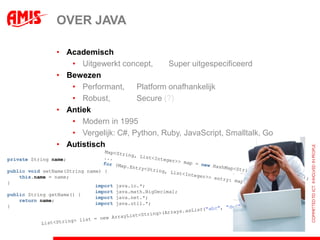
OVER JAVA

                • Academisch
                   • Uitgewerkt concept,      Super uitgespecificeerd
                • Bewezen
                   • Performant,     Platform onafhankelijk
                   • Robust,         Secure (?)
                • Antiek
                   • Modern in 1995
                   • Vergelijk: C#, Python, Ruby, JavaScript, Smalltalk, Go
                • Autistisch
private String name;

public void setName(String name) {
    this.name = name;
}
                              import   java.io.*;
                              import   java.math.BigDecimal;
public String getName() {
                              import   java.net.*;
    return name;
                              import   java.util.*;
}
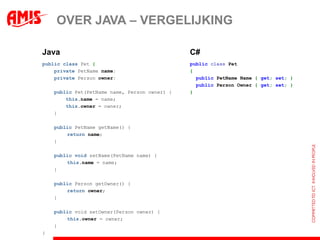
OVER JAVA – VERGELIJKING

Java                                           C#
public class Pet {                             public class Pet
    private PetName name;                      {
    private Person owner;                        public PetName Name { get; set; }
                                                 public Person Owner { get; set; }
    public Pet(PetName name, Person owner) {   }
        this.name = name;
        this.owner = owner;
    }

    public PetName getName() {
        return name;
    }

    public void setName(PetName name) {
        this.name = name;
    }

    public Person getOwner() {
        return owner;
    }

    public void setOwner(Person owner) {
        this.owner = owner;
    }
}
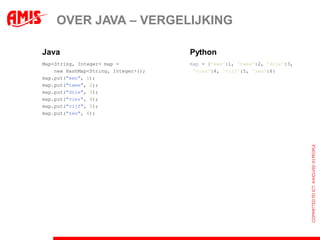
OVER JAVA – VERGELIJKING

Java                                  Python
Map<String, Integer> map =            map = {'een':1, 'twee':2, 'drie':3,
    new HashMap<String, Integer>();    'vier':4, 'vijf':5, 'zes':6}
map.put("een", 1);
map.put("twee", 2);
map.put("drie", 3);
map.put("vier", 4);
map.put("vijf", 5);
map.put("zes", 6);
OVER JAVA – VERGELIJKING

Java                                           Python
FileInputStream fis = null;                    with open('file.txt', 'r') as f:
InputStreamReader isr = null;                       for line in f:
BufferedReader br = null;                                 print line,
try {
    fis = new FileInputStream("file.txt");
    isr = new InputStreamReader(fis);
    br = new BufferedReader(isr);
    String line;
    while ((line = br.readLine()) != null) {
        System.out.println(line);
    }
} catch (IOException e) {
    throw new RuntimeException(e);
} finally {
    if (br != null)
        try { br.close();
        } catch (IOException e) { }
    if (isr != null)
        try { isr.close();
        } catch (IOException e) { }
    if (fis != null)
        try { fis.close();
        } catch (IOException e) { }
}
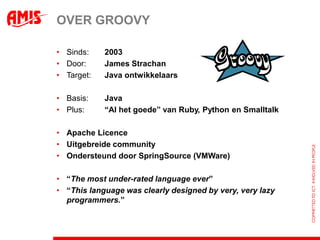
OVER GROOVY

• Sinds:    2003
• Door:     James Strachan
• Target:   Java ontwikkelaars

• Basis:    Java
• Plus:     “Al het goede” van Ruby, Python en Smalltalk

• Apache Licence
• Uitgebreide community
• Ondersteund door SpringSource (VMWare)

• “The most under-rated language ever”
• “This language was clearly designed by very, very lazy
  programmers.”
OVER GROOVY

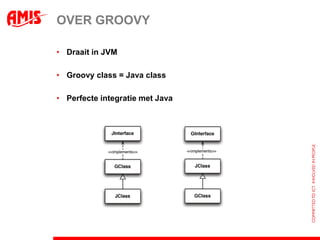
• Draait in JVM

• Groovy class = Java class

• Perfecte integratie met Java
HELLO WORLD - JAVA

public class HelloWorld {


    private String name;


    public void setName(String name) {
        this.name = name;
    }


    public String getName() {
        return name;
    }


    public String greet() {
        return "Hello " + name;
    }


    public static void main(String[] args) {
        HelloWorld helloWorld = new HelloWorld();
        helloWorld.setName("Groovy");
        System.out.println(helloWorld.greet());
    }
}
HELLO WORLD - GROOVY

public class HelloWorld {


    private String name;


    public void setName(String name) {
        this.name = name;
    }


    public String getName() {
        return name;
    }


    public String greet() {
        return "Hello " + name;
    }


    public static void main(String[] args) {
        HelloWorld helloWorld = new HelloWorld();
        helloWorld.setName("Groovy");
        System.out.println(helloWorld.greet());
    }
}
HELLO WORLD - GROOVY

public class HelloWorld {


    private String name;


    public void setName(String name) {
        this.name = name;
    }


    public String getName() {
        return name;
    }


    public String greet() {
        return "Hello " + name;
    }


    public static void main(String[] args) {
        HelloWorld helloWorld = new HelloWorld();
        helloWorld.setName("Groovy");
        System.out.println(helloWorld.greet());
    }
}
HELLO WORLD - GROOVY

public class HelloWorld {


    String name;


    public String greet() {
        return "Hello " + name;
    }


    public static void main(String[] args) {
        HelloWorld helloWorld = new HelloWorld();
        helloWorld.setName("Groovy");
        System.out.println(helloWorld.greet());
    }
}
HELLO WORLD - GROOVY

public class HelloWorld {


    String name;


    public String greet() {
        return "Hello " + name;
    }


    public static void main(String[] args) {
        HelloWorld helloWorld = new HelloWorld();
        helloWorld.setName("Groovy");
        System.out.println(helloWorld.greet());
    }
}
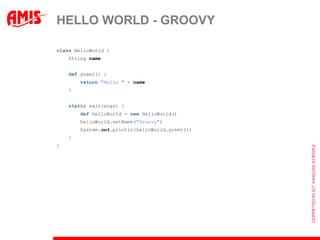
HELLO WORLD - GROOVY

class HelloWorld {
    String name


    def greet() {
        return "Hello " + name
    }


    static main(args) {
        def helloWorld = new HelloWorld()
        helloWorld.setName("Groovy")
        System.out.println(helloWorld.greet())
    }
}
HELLO WORLD - GROOVY

class HelloWorld {
    String name


    def greet() {
        return "Hello " + name
    }


    static main(args) {
                                        name:"Groovy")
        def helloWorld = new HelloWorld()
        helloWorld.setName("Groovy")
        System.out.println(helloWorld.greet())
    }
}
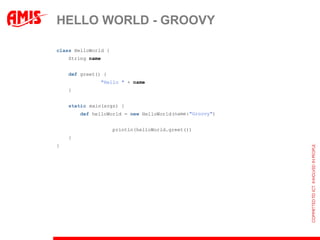
HELLO WORLD - GROOVY

class HelloWorld {
    String name


    def greet() { "Hello " + name }


    static main(args) {
        def helloWorld = new HelloWorld(name:"Groovy")
        println(helloWorld.greet())
    }
}
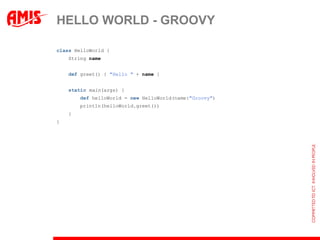
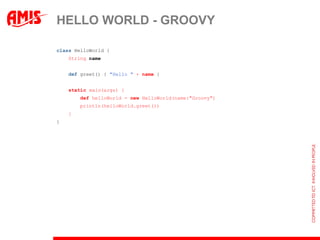
HELLO WORLD - GROOVY

class HelloWorld {
    String name


    def greet() { "Hello " + name }


    static main(args) {
        def helloWorld = new HelloWorld(name:"Groovy")
        println(helloWorld.greet())
    }
}
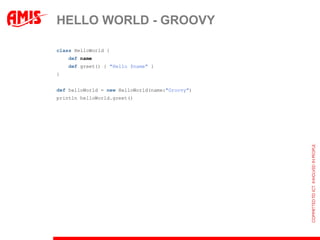
HELLO WORLD - GROOVY

class HelloWorld {
    def name
    def greet() { "Hello $name" }
}


def helloWorld = new HelloWorld(name:"Groovy")
println helloWorld.greet()
HELLO WORLD - GROOVY

public class HelloWorld {                         class HelloWorld {
                                                      def name
    private String name;                              def greet() { "Hello $name" }
                                                  }
    public void setName(String name) {
        this.name = name;                         def helloWorld = new HelloWorld(name:"Groovy")
    }                                             println helloWorld.greet()


    public String getName() {
        return name;
    }


    public String greet() {
        return "Hello " + name;
    }


    public static void main(String[] args) {
        HelloWorld helloWorld = new HelloWorld();
        helloWorld.setName("Groovy");
        System.out.println(helloWorld.greet());
    }
}
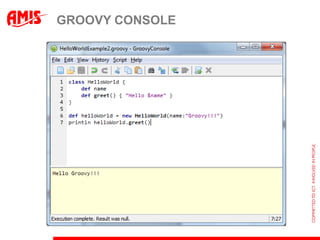
GROOVY CONSOLE
GROOVY INTEGRATION

•   Als Programmeertaal
     – Compileert design-time
     – Configuratie in Ant build script
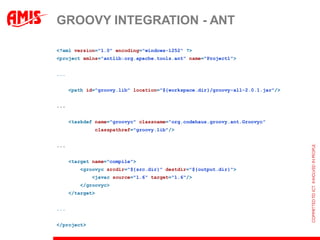
GROOVY INTEGRATION - ANT

<?xml version="1.0" encoding="windows-1252" ?>
<project xmlns="antlib:org.apache.tools.ant" name="Project1">


...


      <path id="groovy.lib" location="${workspace.dir}/groovy-all-2.0.1.jar"/>


...


      <taskdef name="groovyc" classname="org.codehaus.groovy.ant.Groovyc“
              classpathref="groovy.lib"/>


...


      <target name="compile">
         <groovyc srcdir="${src.dir}" destdir="${output.dir}">
              <javac source="1.6" target="1.6"/>
         </groovyc>
      </target>


...


</project>
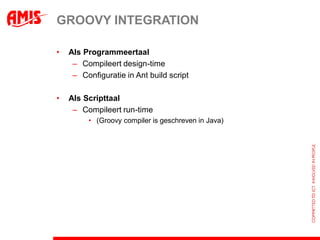
GROOVY INTEGRATION

•   Als Programmeertaal
     – Compileert design-time
     – Configuratie in Ant build script

•   Als Scripttaal
     – Compileert run-time
         • (Groovy compiler is geschreven in Java)
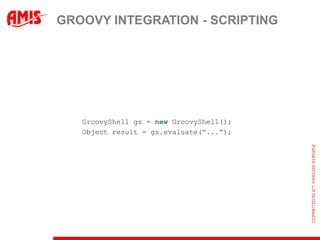
GROOVY INTEGRATION - SCRIPTING


   GroovyShell gs = new GroovyShell();
   Object result = gs.evaluate("...");
GROOVY FEATURES

•   Native syntax
     – Lists
         def list = [1, 2, 3, 4]


     – Maps:
         def map = [nl: 'Nederland', be: 'Belgie']
         assert map['nl'] == 'Nederland'
                && map.be == 'Belgie'


     – Ranges:
         def range = 11..36


     – Regular Expressions
         assert 'abc' ==~ /.wc/
GROOVY FEATURES

•   Native syntax (vervolg)
     – GStrings
         "Hello $name, it is now: ${new Date()}"


     – Multiline Strings
         def string = """Dit is regel 1.
             Dit is regel 2."""


     – Multiple assignment
         def (a, b) = [1, 2]
         (a, b) = [b, a]
         def (p, q, r, s, t) = 1..5
GROOVY FEATURES

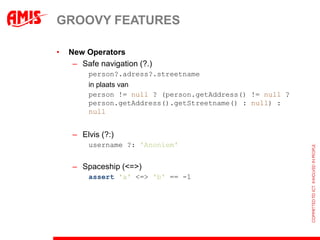
•   New Operators
     – Safe navigation (?.)
         person?.adress?.streetname
         in plaats van
         person != null ? (person.getAddress() != null ?
         person.getAddress().getStreetname() : null) :
         null


     – Elvis (?:)
         username ?: 'Anoniem'


     – Spaceship (<=>)
         assert 'a' <=> 'b' == -1
GROOVY FEATURES

•   Operator overloading
     – Uitgebreid toegepast in GDK, voorbeelden:
         def list = ['a', 'b', 1, 2, 3]
         assert list + list == list * 2
         assert list - ['a', 'b'] == [1, 2, 3]

         new Date() + 1 // Een date morgen
GROOVY FEATURES

•   Smart conversion (voorbeelden)
     – to Numbers
        def string = '123'
        def nr = string as int
        assert string.class.name == 'java.lang.String'
        assert nr.class.name == 'java.lang.Integer'


    – to Booleans (Groovy truth)
        assert "" as boolean == false
        if (string) { ... }


    – to JSON
        [a:1, b:2] as Json // {"a":1,"b":2}


    – to interfaces
GROOVY FEATURES

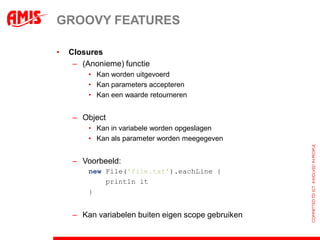
•   Closures
     – (Anonieme) functie
         • Kan worden uitgevoerd
         • Kan parameters accepteren
         • Kan een waarde retourneren


     – Object
         • Kan in variabele worden opgeslagen
         • Kan als parameter worden meegegeven


     – Voorbeeld:
         new File('file.txt').eachLine({ line ->
             println it
                     line
         })


     – Kan variabelen buiten eigen scope gebruiken
GROOVY FEATURES

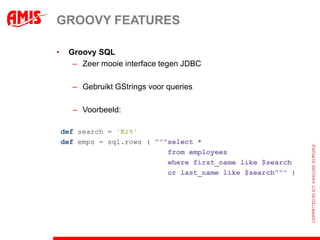
•    Groovy SQL
      – Zeer mooie interface tegen JDBC

      – Gebruikt GStrings voor queries

      – Voorbeeld:

    def search = 'Ki%'
    def emps = sql.rows ( """select *
                             from employees
                             where first_name like $search
                             or last_name like $search""" )
GROOVY FEATURES

•   Builders
     – ‘Native syntax’ voor het opbouwen van:
         •   XML
         •   GUI (Swing)
         •   Json
         •   Ant taken
         •   …


     – Op basis van Closures
GROOVY QUIZ

•   Geldig?

    def l = [ [a:1, b:2], [a:3, b:4] ]
    def (m, n) = l


    class Bean { def id, name }
      def
    new Bean().setName('Pieter')
    [id:123, name:'Pieter'] as Bean


    geef mij nu een kop koffie, snel
GROOVY FEATURES

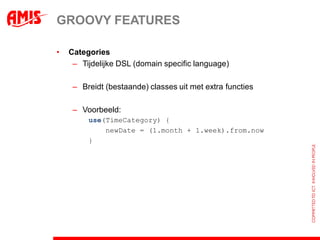
•   Categories
     – Tijdelijke DSL (domain specific language)

     – Breidt (bestaande) classes uit met extra functies

     – Voorbeeld:
         use(TimeCategory) {
             newDate = (1.month + 1.week).from.now
         }
GROOVY FEATURES

•   (AST) Transformations
     – Verder reduceren boiler plate code

     – Enkele patterns worden meegeleverd, o.a.:
         • @Singleton
         • @Immutable / @Canonical
         • @Lazy
         • @Delegate (multiple inheritance!)
GROOVY CASES

•   Java omgeving
     – Als je werkt met: (ook in productie)
         •   Beans
         •   XML / HTML / JSON
         •   Bestanden / IO algemeen
         •   Database via JDBC
         •   Hardcore Java classes (minder boilerplate)
         •   DSL
         •   Rich clients (ook JavaFX)

     – Functioneel programmeren in Java

     – Prototyping

     – Extreme dynamic classloading

•   Shell scripting
GROOVY HANDSON
“ADF SCRIPTENGINE”

•   Combinatie van:
     – ADF
     – Groovy
        • met wat nieuwe constructies (“omdat het kan”)


•   Features
     – Programmaflow in Groovy

    – Builder syntax voor tonen schermen in ADF
        • Control state is volledig serialiseerbaar (high availability enzo)


    – Bindings (à la EL ValueBindings)

    – Mooie API (à la Grails) richting Model (bijv. ADF BC,
      WebServices, etc...)
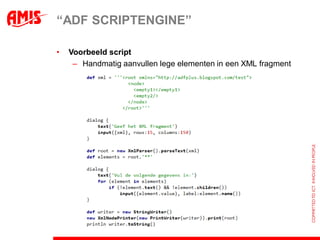
“ADF SCRIPTENGINE”

•   Voorbeeld script
     – Handmatig aanvullen lege elementen in een XML fragment
GROOVY TEASER

•   Method parameters with defaults
•   Method with named parameters
•   Creating Groovy API’s
•   Runtime meta-programming
•   Compile-time meta-programming
•   Interceptors
•   Advanced OO (Groovy interfaces)
•   GUI’s
•   …

Presentatie - Introductie in Groovy

  • 1.
    AMIS – 26november 2012 INTRODUCTIE IN GROOVY
  • 2.
    OVER JAVA • Academisch • Uitgewerkt concept, Super uitgespecificeerd • Bewezen • Performant, Platform onafhankelijk • Robust, Secure (?) • Antiek • Modern in 1995 • Vergelijk: C#, Python, Ruby, JavaScript, Smalltalk, Go • Autistisch private String name; public void setName(String name) { this.name = name; } import java.io.*; import java.math.BigDecimal; public String getName() { import java.net.*; return name; import java.util.*; }
  • 3.
    OVER JAVA –VERGELIJKING Java C# public class Pet { public class Pet private PetName name; { private Person owner; public PetName Name { get; set; } public Person Owner { get; set; } public Pet(PetName name, Person owner) { } this.name = name; this.owner = owner; } public PetName getName() { return name; } public void setName(PetName name) { this.name = name; } public Person getOwner() { return owner; } public void setOwner(Person owner) { this.owner = owner; } }
  • 4.
    OVER JAVA –VERGELIJKING Java Python Map<String, Integer> map = map = {'een':1, 'twee':2, 'drie':3, new HashMap<String, Integer>(); 'vier':4, 'vijf':5, 'zes':6} map.put("een", 1); map.put("twee", 2); map.put("drie", 3); map.put("vier", 4); map.put("vijf", 5); map.put("zes", 6);
  • 5.
    OVER JAVA –VERGELIJKING Java Python FileInputStream fis = null; with open('file.txt', 'r') as f: InputStreamReader isr = null; for line in f: BufferedReader br = null; print line, try { fis = new FileInputStream("file.txt"); isr = new InputStreamReader(fis); br = new BufferedReader(isr); String line; while ((line = br.readLine()) != null) { System.out.println(line); } } catch (IOException e) { throw new RuntimeException(e); } finally { if (br != null) try { br.close(); } catch (IOException e) { } if (isr != null) try { isr.close(); } catch (IOException e) { } if (fis != null) try { fis.close(); } catch (IOException e) { } }
  • 6.
    OVER GROOVY • Sinds: 2003 • Door: James Strachan • Target: Java ontwikkelaars • Basis: Java • Plus: “Al het goede” van Ruby, Python en Smalltalk • Apache Licence • Uitgebreide community • Ondersteund door SpringSource (VMWare) • “The most under-rated language ever” • “This language was clearly designed by very, very lazy programmers.”
  • 7.
    OVER GROOVY • Draaitin JVM • Groovy class = Java class • Perfecte integratie met Java
  • 8.
    HELLO WORLD -JAVA public class HelloWorld { private String name; public void setName(String name) { this.name = name; } public String getName() { return name; } public String greet() { return "Hello " + name; } public static void main(String[] args) { HelloWorld helloWorld = new HelloWorld(); helloWorld.setName("Groovy"); System.out.println(helloWorld.greet()); } }
  • 9.
    HELLO WORLD -GROOVY public class HelloWorld { private String name; public void setName(String name) { this.name = name; } public String getName() { return name; } public String greet() { return "Hello " + name; } public static void main(String[] args) { HelloWorld helloWorld = new HelloWorld(); helloWorld.setName("Groovy"); System.out.println(helloWorld.greet()); } }
  • 10.
    HELLO WORLD -GROOVY public class HelloWorld { private String name; public void setName(String name) { this.name = name; } public String getName() { return name; } public String greet() { return "Hello " + name; } public static void main(String[] args) { HelloWorld helloWorld = new HelloWorld(); helloWorld.setName("Groovy"); System.out.println(helloWorld.greet()); } }
  • 11.
    HELLO WORLD -GROOVY public class HelloWorld { String name; public String greet() { return "Hello " + name; } public static void main(String[] args) { HelloWorld helloWorld = new HelloWorld(); helloWorld.setName("Groovy"); System.out.println(helloWorld.greet()); } }
  • 12.
    HELLO WORLD -GROOVY public class HelloWorld { String name; public String greet() { return "Hello " + name; } public static void main(String[] args) { HelloWorld helloWorld = new HelloWorld(); helloWorld.setName("Groovy"); System.out.println(helloWorld.greet()); } }
  • 13.
    HELLO WORLD -GROOVY class HelloWorld { String name def greet() { return "Hello " + name } static main(args) { def helloWorld = new HelloWorld() helloWorld.setName("Groovy") System.out.println(helloWorld.greet()) } }
  • 14.
    HELLO WORLD -GROOVY class HelloWorld { String name def greet() { return "Hello " + name } static main(args) { name:"Groovy") def helloWorld = new HelloWorld() helloWorld.setName("Groovy") System.out.println(helloWorld.greet()) } }
  • 15.
    HELLO WORLD -GROOVY class HelloWorld { String name def greet() { "Hello " + name } static main(args) { def helloWorld = new HelloWorld(name:"Groovy") println(helloWorld.greet()) } }
  • 16.
    HELLO WORLD -GROOVY class HelloWorld { String name def greet() { "Hello " + name } static main(args) { def helloWorld = new HelloWorld(name:"Groovy") println(helloWorld.greet()) } }
  • 17.
    HELLO WORLD -GROOVY class HelloWorld { def name def greet() { "Hello $name" } } def helloWorld = new HelloWorld(name:"Groovy") println helloWorld.greet()
  • 18.
    HELLO WORLD -GROOVY public class HelloWorld { class HelloWorld { def name private String name; def greet() { "Hello $name" } } public void setName(String name) { this.name = name; def helloWorld = new HelloWorld(name:"Groovy") } println helloWorld.greet() public String getName() { return name; } public String greet() { return "Hello " + name; } public static void main(String[] args) { HelloWorld helloWorld = new HelloWorld(); helloWorld.setName("Groovy"); System.out.println(helloWorld.greet()); } }
  • 19.
  • 20.
    GROOVY INTEGRATION • Als Programmeertaal – Compileert design-time – Configuratie in Ant build script
  • 21.
    GROOVY INTEGRATION -ANT <?xml version="1.0" encoding="windows-1252" ?> <project xmlns="antlib:org.apache.tools.ant" name="Project1"> ... <path id="groovy.lib" location="${workspace.dir}/groovy-all-2.0.1.jar"/> ... <taskdef name="groovyc" classname="org.codehaus.groovy.ant.Groovyc“ classpathref="groovy.lib"/> ... <target name="compile"> <groovyc srcdir="${src.dir}" destdir="${output.dir}"> <javac source="1.6" target="1.6"/> </groovyc> </target> ... </project>
  • 22.
    GROOVY INTEGRATION • Als Programmeertaal – Compileert design-time – Configuratie in Ant build script • Als Scripttaal – Compileert run-time • (Groovy compiler is geschreven in Java)
  • 23.
    GROOVY INTEGRATION -SCRIPTING GroovyShell gs = new GroovyShell(); Object result = gs.evaluate("...");
  • 24.
    GROOVY FEATURES • Native syntax – Lists def list = [1, 2, 3, 4] – Maps: def map = [nl: 'Nederland', be: 'Belgie'] assert map['nl'] == 'Nederland' && map.be == 'Belgie' – Ranges: def range = 11..36 – Regular Expressions assert 'abc' ==~ /.wc/
  • 25.
    GROOVY FEATURES • Native syntax (vervolg) – GStrings "Hello $name, it is now: ${new Date()}" – Multiline Strings def string = """Dit is regel 1. Dit is regel 2.""" – Multiple assignment def (a, b) = [1, 2] (a, b) = [b, a] def (p, q, r, s, t) = 1..5
  • 26.
    GROOVY FEATURES • New Operators – Safe navigation (?.) person?.adress?.streetname in plaats van person != null ? (person.getAddress() != null ? person.getAddress().getStreetname() : null) : null – Elvis (?:) username ?: 'Anoniem' – Spaceship (<=>) assert 'a' <=> 'b' == -1
  • 27.
    GROOVY FEATURES • Operator overloading – Uitgebreid toegepast in GDK, voorbeelden: def list = ['a', 'b', 1, 2, 3] assert list + list == list * 2 assert list - ['a', 'b'] == [1, 2, 3] new Date() + 1 // Een date morgen
  • 28.
    GROOVY FEATURES • Smart conversion (voorbeelden) – to Numbers def string = '123' def nr = string as int assert string.class.name == 'java.lang.String' assert nr.class.name == 'java.lang.Integer' – to Booleans (Groovy truth) assert "" as boolean == false if (string) { ... } – to JSON [a:1, b:2] as Json // {"a":1,"b":2} – to interfaces
  • 29.
    GROOVY FEATURES • Closures – (Anonieme) functie • Kan worden uitgevoerd • Kan parameters accepteren • Kan een waarde retourneren – Object • Kan in variabele worden opgeslagen • Kan als parameter worden meegegeven – Voorbeeld: new File('file.txt').eachLine({ line -> println it line }) – Kan variabelen buiten eigen scope gebruiken
  • 30.
    GROOVY FEATURES • Groovy SQL – Zeer mooie interface tegen JDBC – Gebruikt GStrings voor queries – Voorbeeld: def search = 'Ki%' def emps = sql.rows ( """select * from employees where first_name like $search or last_name like $search""" )
  • 31.
    GROOVY FEATURES • Builders – ‘Native syntax’ voor het opbouwen van: • XML • GUI (Swing) • Json • Ant taken • … – Op basis van Closures
  • 32.
    GROOVY QUIZ • Geldig? def l = [ [a:1, b:2], [a:3, b:4] ] def (m, n) = l class Bean { def id, name } def new Bean().setName('Pieter') [id:123, name:'Pieter'] as Bean geef mij nu een kop koffie, snel
  • 33.
    GROOVY FEATURES • Categories – Tijdelijke DSL (domain specific language) – Breidt (bestaande) classes uit met extra functies – Voorbeeld: use(TimeCategory) { newDate = (1.month + 1.week).from.now }
  • 34.
    GROOVY FEATURES • (AST) Transformations – Verder reduceren boiler plate code – Enkele patterns worden meegeleverd, o.a.: • @Singleton • @Immutable / @Canonical • @Lazy • @Delegate (multiple inheritance!)
  • 35.
    GROOVY CASES • Java omgeving – Als je werkt met: (ook in productie) • Beans • XML / HTML / JSON • Bestanden / IO algemeen • Database via JDBC • Hardcore Java classes (minder boilerplate) • DSL • Rich clients (ook JavaFX) – Functioneel programmeren in Java – Prototyping – Extreme dynamic classloading • Shell scripting
  • 36.
  • 37.
    “ADF SCRIPTENGINE” • Combinatie van: – ADF – Groovy • met wat nieuwe constructies (“omdat het kan”) • Features – Programmaflow in Groovy – Builder syntax voor tonen schermen in ADF • Control state is volledig serialiseerbaar (high availability enzo) – Bindings (à la EL ValueBindings) – Mooie API (à la Grails) richting Model (bijv. ADF BC, WebServices, etc...)
  • 38.
    “ADF SCRIPTENGINE” • Voorbeeld script – Handmatig aanvullen lege elementen in een XML fragment
  • 39.
    GROOVY TEASER • Method parameters with defaults • Method with named parameters • Creating Groovy API’s • Runtime meta-programming • Compile-time meta-programming • Interceptors • Advanced OO (Groovy interfaces) • GUI’s • …