I
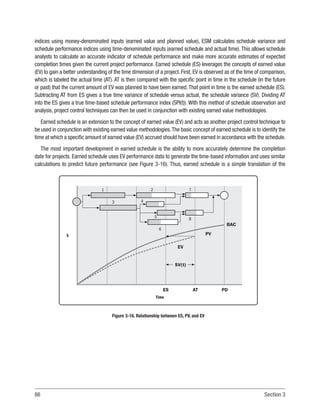
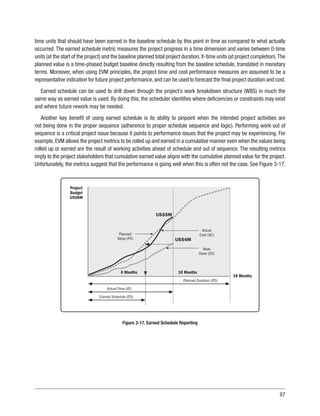
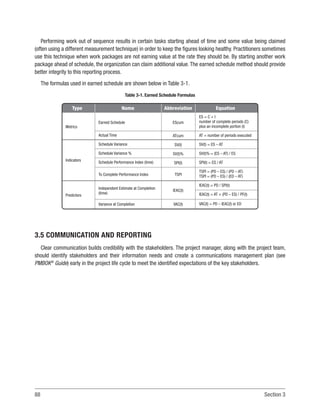
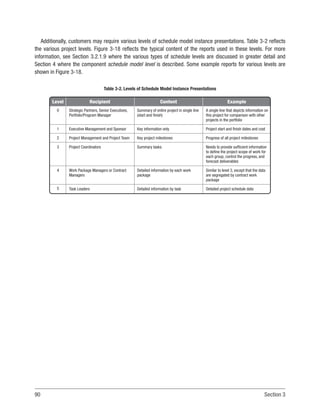
PRACTICE STANDARD
FOR SCHEDULING
ISBN: 978-1-62825-561-4
Published by:
Project Management Institute, Inc.
14 Campus Boulevard
Newtown Square, Pennsylvania 19073-3299 USA
Phone: +610-356-4600
Fax: +610-356-4647
Email: customercare@pmi.org
Internet: www.PMI.org
©2019 Project Management Institute, Inc. All rights reserved.
Our copyright content is protected by U.S. intellectual property law that is recognized by most countries. To republish or
reproduce our content, you must obtain our permission. Please go to http://www.pmi.org/permissions for details.
To place a Trade Order or for pricing information, please contact Independent Publishers Group:
Independent Publishers Group
Order Department
814 North Franklin Street
Chicago, IL 60610 USA
Phone: +1 800-888-4741
Fax: +1 312-337-5985
Email: orders@ipgbook.com (For orders only)
For all other inquiries, please contact the PMI Book Service Center.
PMI Book Service Center
P.O. Box 932683, Atlanta, GA 31193-2683 USA
Phone: 1-866-276-4764 (within the U.S. or Canada) or +1-770-280-4129 (globally)
Fax: +1-770-280-4113
Email: info@bookorders.pmi.org
Printed in the United States of America. No part of this work may be reproduced or transmitted in any form or by any means,
electronic, manual, photocopying, recording, or by any information storage and retrieval system, without prior written
permission of the publisher.
The paper used in this book complies with the Permanent Paper Standard issued by the National Information Standards
Organization (Z39.48—1984).
PMI, the PMI logo, PMBOK, OPM3, PMP, CAPM, PgMP, PfMP, PMI-RMP, PMI-SP, PMI-ACP, PMI-PBA, PROJECT MANAGEMENT JOURNAL, PM NETWORK, PMI
TODAY, PULSE OF THE PROFESSION and the slogan MAKING PROJECT MANAGEMENT INDISPENSABLE FOR BUSINESS RESULTS. are all marks of Project
Management Institute, Inc. For a comprehensive list of PMI trademarks, contact the PMI Legal Department. All other trademarks, service marks, trade names,
trade dress, product names and logos appearing herein are the property of their respective owners. Any rights not expressly granted herein are reserved.
10 9 8 7 6 5 4 3 2 1
Library of Congress Cataloging-in-Publication Data
Names: Project Management Institute.
Title: Practice standard for scheduling / Project Management Institute.
Description: Third edition. | Newtown Square : Project Management Institute,
2019. | Revised edition of Practice standard for scheduling, c2011. |
Includes bibliographical references and index.
Identifiers: LCCN 2019009443 (print) | LCCN 2019010321 (ebook) | ISBN
9781628255621 (ePub) | ISBN 9781628255638 (kindle) | ISBN 9781628255645
(Web PDF) | ISBN 9781628255614 (paperback)
Subjects: LCSH: Project management--Standards. | BISAC: BUSINESS & ECONOMICS
/ Project Management.
Classification: LCC HD69.P75 (ebook) | LCC HD69.P75 P653 2019 (print) | DDC
658.4/04--dc23
LC record available at https://lccn.loc.gov/2019009443
III
NOTICE
The Project Management Institute,Inc.(PMI) standards and guideline publications,of which the document contained
herein is one, are developed through a voluntary consensus standards development process. This process brings
together volunteers and/or seeks out the views of persons who have an interest in the topic covered by this publication.
While PMI administers the process and establishes rules to promote fairness in the development of consensus, it does
not write the document and it does not independently test, evaluate, or verify the accuracy or completeness of any
information or the soundness of any judgments contained in its standards and guideline publications.
PMI disclaims liability for any personal injury, property or other damages of any nature whatsoever, whether special,
indirect, consequential or compensatory, directly or indirectly resulting from the publication, use of application, or
reliance on this document. PMI disclaims and makes no guaranty or warranty, expressed or implied, as to the accuracy
or completeness of any information published herein,and disclaims and makes no warranty that the information in this
document will fulfill any of your particular purposes or needs. PMI does not undertake to guarantee the performance
of any individual manufacturer or seller’s products or services by virtue of this standard or guide.
In publishing and making this document available, PMI is not undertaking to render professional or other services
for or on behalf of any person or entity, nor is PMI undertaking to perform any duty owed by any person or entity to
someone else. Anyone using this document should rely on his or her own independent judgment or, as appropriate,
seek the advice of a competent professional in determining the exercise of reasonable care in any given circumstances.
Information and other standards on the topic covered by this publication may be available from other sources, which
the user may wish to consult for additional views or information not covered by this publication.
PMI has no power, nor does it undertake to police or enforce compliance with the contents of this document. PMI
does not certify, test, or inspect products, designs, or installations for safety or health purposes. Any certification or
other statement of compliance with any health or safety-related information in this document shall not be attributable
to PMI and is solely the responsibility of the certifier or maker of the statement.
V
TABLE OF CONTENTS
1. INTRODUCTION.........................................................................................................................1
1.1 Project Scheduling.........................................................................................................2
1.2 Why Scheduling?............................................................................................................3
1.3 Overview.........................................................................................................................5
1.4 Purpose...........................................................................................................................7
1.5 Applicability....................................................................................................................7
2. SCHEDULE MODEL PRINCIPLES AND CONCEPTS.....................................................................9
2.1 Overview.........................................................................................................................9
2.2 Project Life Cycles and Scheduling Approaches.........................................................10
2.2.1 Critical Path Approach.....................................................................................14
2.2.2 Critical Chain....................................................................................................18
2.2.3 Adaptive Life Cycle...........................................................................................21
2.2.4 Rolling Wave Planning.....................................................................................23
2.2.5 Other Approaches and Emerging Trends.........................................................25
2.3 Scheduling Tool............................................................................................................28
2.4 Schedule Model............................................................................................................29
2.5 Schedule Model Instances and Presentations............................................................30
2.6 Agile..............................................................................................................................31
2.6.1 Tracking and Presentation...............................................................................38
VI Table of Contents
3. SCHEDULE MODEL GOOD PRACTICES OVERVIEW..................................................................45
3.1 Schedule Management.................................................................................................45
3.1.1 Schedule Data Management Plan...................................................................46
3.1.2 Schedule Management Plan............................................................................47
3.1.2.1 Scheduling Approach........................................................................48
3.1.2.2 Scheduling Tool.................................................................................48
3.1.2.3 Schedule Model Creation Plan..........................................................48
3.1.2.4 Schedule Model ID............................................................................49
3.1.2.5 Schedule Model Instance.................................................................49
3.1.2.6 Calendars and Work Periods............................................................49
3.1.2.7 Project Update Cycle and Activity Granularity.................................50
3.1.2.8 Milestone and Activity Coding Structure.........................................51
3.1.2.9 Resource Planning............................................................................52
3.1.2.10 Key Performance Indicators...........................................................52
3.1.2.11 Master Schedule Model..................................................................53
3.1.2.12 Change Control................................................................................53
3.2 Schedule Model Creation.............................................................................................53
3.2.1 Develop Schedule Model Baseline...................................................................55
3.2.1.1 Define Milestones.............................................................................55
3.2.1.2 Define the Project’s Activities..........................................................55
3.2.1.3 Sequence Activities...........................................................................59
3.2.1.4 Determine Resources for Each Activity............................................61
3.2.1.5 Determine the Duration for Each Activity........................................62
3.2.1.6 Analyze the Schedule Output............................................................62
3.2.1.7 Approve the Schedule Model............................................................64
3.2.1.8 Baseline the Schedule Model...........................................................65
3.2.1.9 Schedule Levels................................................................................65
3.3 Schedule Model Maintenance......................................................................................67
3.3.1 Collect Actuals and Remaining Work or Duration..........................................67
3.3.2 Update the Schedule Model According to the Actuals...................................68
VII
3.3.3 Compare and Address Any Deviation..............................................................68
3.3.4 Update the Schedule Model with Approved Changes.....................................69
3.3.5 Update the Baseline Schedule Model..............................................................69
3.3.6 Communicate...................................................................................................69
3.3.7 Maintain the Records.......................................................................................70
3.3.8 Change Control.................................................................................................70
3.4 Schedule Model Analysis.............................................................................................71
3.4.1 Critical Path and Critical Activities..................................................................71
3.4.1.1 Critical Path.......................................................................................71
3.4.1.2 Critical Activities...............................................................................72
3.4.2 Total Float and Free Float.................................................................................72
3.4.3 Estimation of Activity Durations......................................................................74
3.4.4 Date Constraints...............................................................................................76
3.4.5 Open-Ended Activities......................................................................................77
3.4.6 Out of Sequence (OOS) Logic...........................................................................79
3.4.7 Leads and Lags................................................................................................81
3.4.8 Start-to-Finish Relationship............................................................................82
3.4.9 Links to/from Summary Activities...................................................................83
3.4.10 Schedule Resource Analysis..........................................................................83
3.4.11 Schedule Risk Assessment............................................................................83
3.4.12 Earned Schedule............................................................................................85
3.5 Communication and Reporting....................................................................................88
4. SCHEDULING COMPONENTS...................................................................................................93
4.1 How to Use the Components List.................................................................................94
4.1.1 Component Name.............................................................................................94
4.1.2 Required, Conditional, or Optional Use............................................................94
4.1.3 Manual or Calculated.......................................................................................94
4.1.4 Data Format......................................................................................................95
4.1.5 Behavior............................................................................................................95
4.1.6 Good Practices.................................................................................................95
VIII Table of Contents
4.1.7 Conditional Note/Associated Component.......................................................95
4.1.8 Definition..........................................................................................................95
4.2 List of Components by Category..................................................................................96
4.3 Detailed Components List............................................................................................98
5. CONFORMANCE INDEX.........................................................................................................137
5.1 Conformance Overview..............................................................................................137
5.1.1 Categories of Components.............................................................................138
5.1.2 Use of Schedule Components........................................................................138
5.1.3 Conformance Assessment.............................................................................139
5.2 Conformance Assessment Process...........................................................................140
APPENDIX X1
THIRD EDITION CHANGES........................................................................................................143
APPENDIX X2
CONTRIBUTORS AND REVIEWERS OF THE PRACTICE STANDARD FOR
SCHEDULING – THIRD EDITION...............................................................................................145
X2.1 Practice Standard for Scheduling – Third Edition Core Committee......................145
X2.2 Reviewers.................................................................................................................146
X2.2.1 SME Review..................................................................................................146
X2.2.2 Final Exposure Draft Review.......................................................................146
X2.3 PMI Standards Program Member Advisory Group (MAG).......................................148
X2.4 Consensus Body Review..........................................................................................148
X2.5 Production Staff.......................................................................................................149
APPENDIX X3
CONFORMANCE ASSESSMENT SCORING TABLE.....................................................................151
APPENDIX X4
CONFORMANCE ASSESSMENT WORKSHEETS.........................................................................159
IX
APPENDIX X5
FORENSIC SCHEDULE ANALYSIS..............................................................................................165
REFERENCES............................................................................................................................169
GLOSSARY................................................................................................................................171
INDEX.......................................................................................................................................195
XI
LIST OF TABLES AND FIGURES
Figure 1-1. Schedule Model Development and Use....................................................................6
Figure 2-1. Life Cycle Continuum..............................................................................................10
Figure 2-2. Example of Predictive Flow Diagram.....................................................................11
Figure 2-3. Iterative Flow Diagram...........................................................................................11
Figure 2-4. A Life Cycle of Varying Size Increments................................................................11
Figure 2-5. Adaptive Flow Diagram..........................................................................................12
Figure 2-6. Combined Predictive and Adaptive Approaches Used..........................................13
Figure 2-7. Schedule Model Flow..............................................................................................15
Figure 2-8. 
Flow Diagram for the Schedule Model Mapped to
PMBOK®
Guide Knowledge Area Processes..........................................................16
Figure 2-9. Example of CPM Diagram.......................................................................................18
Figure 2-10. Feeding Buffers.....................................................................................................20
Figure 2-11. Project Buffers......................................................................................................21
Figure 2-12. Diagram of Uncertainty........................................................................................22
Figure 2-13. Examples of Agile Approaches.............................................................................23
Figure 2-14. 
Example of Rolling Wave Planning—Planning
Package 1 Decomposed.......................................................................................24
Figure 2-15. 
Example of Rolling Wave Planning—Planning
Package 2 Decomposed.......................................................................................24
Figure 2-16. Location-Based Schedule Example.....................................................................25
XII List of Tables and Figures
Figure 2-17. Schedule Model Instances and Presentations....................................................30
Figure 2-18. Example of Multiple Iterations or Sprints............................................................32
Figure 2-19. Typical Adaptive Life Cycle...................................................................................33
Figure 2-20. Results of Sprint (Iteration) Planning Meeting....................................................34
Figure 2-21. Scrum Board Displaying Sprint (Iteration) 1.......................................................35
Figure 2-22. Kanban Board.......................................................................................................36
Figure 2-23. Example of Functional Dependencies between Requirements...........................37
Figure 2-24. Typical Burndown Chart with Planned Work.......................................................38
Figure 2-25. Burndown Chart with Remaining Work...............................................................39
Figure 2-26. Burndown Chart with Progress Smoothed-Over Iteration..................................40
Figure 2-27. Burndown Chart—Commitment Not Met.............................................................40
Figure 2-28. Burndown Chart with Remaining Work...............................................................41
Figure 2-29. Burndown Chart with Commitments Met............................................................41
Figure 2-30. Example of a Burnup Chart..................................................................................42
Figure 2-31. 
Relationships between Product Vision, Release Planning,
and Iteration Planning..........................................................................................43
Figure 3-1. Summary Activities................................................................................................57
Figure 3-2. LOE Activity.............................................................................................................58
Figure 3-3. Hammock Activity...................................................................................................58
Figure 3-4. Illustrations of Relationship Types in CPM Methodology......................................60
Figure 3-5. Required Activity Relationships.............................................................................61
Figure 3-6. Total Float and Free Float.......................................................................................73
Figure 3-7. 
Example of Precedence Diagram with PERT Activity
Duration Estimates.................................................................................................75
XIII
Figure 3-8. Example of Standard Deviation of an Activity.......................................................76
Figure 3-9. Example of Open Ends by Omission.......................................................................78
Figure 3-10. Virtual Open Example...........................................................................................79
Figure 3-11. Out of Sequence Logic Example...........................................................................80
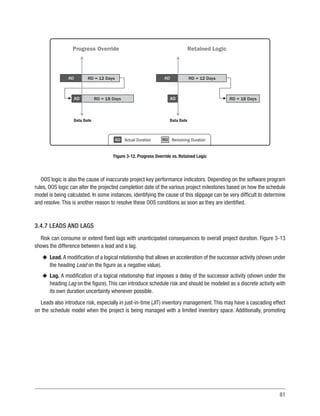
Figure 3-12. Progress Override vs. Retained Logic..................................................................81
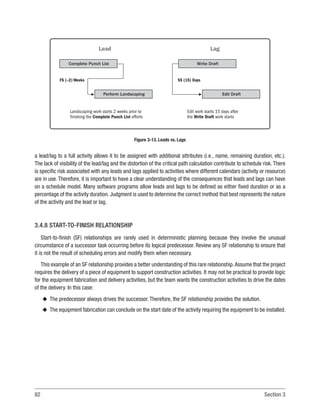
Figure 3-13. Leads vs. Lags......................................................................................................82
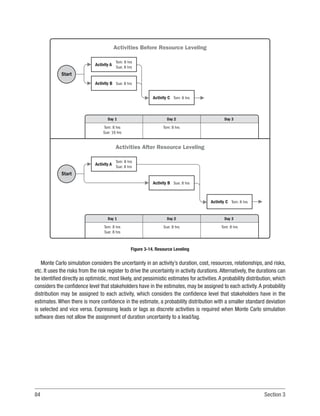
Figure 3-14. Resource Leveling................................................................................................84
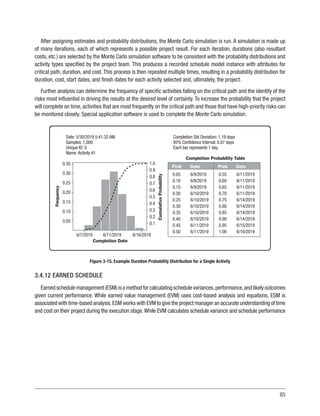
Figure 3-15. Example Duration Probability Distribution for a Single Activity.........................85
Figure 3-16. Relationship between ES, PV, and EV...................................................................86
Figure 3-17. Earned Schedule Reporting..................................................................................87
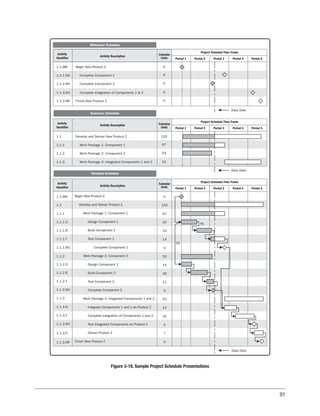
Figure 3-18. Sample Project Schedule Presentations..............................................................91
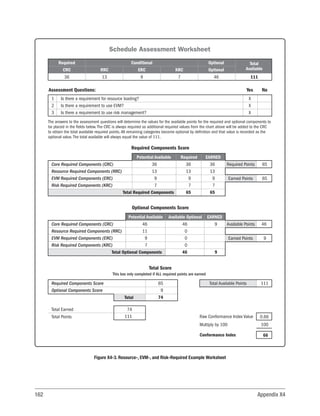
Figure X4-1. Base Worksheet..................................................................................................160
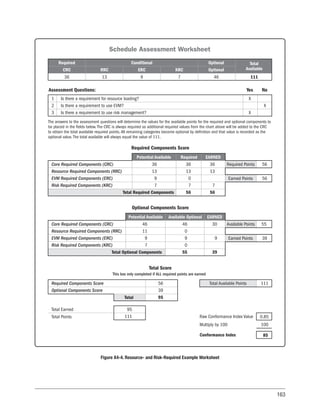
Figure X4-2. Resource-Required Example Worksheet...........................................................161
Figure X4-3. Resource-, EVM-, and Risk-Required Example Worksheet...............................162
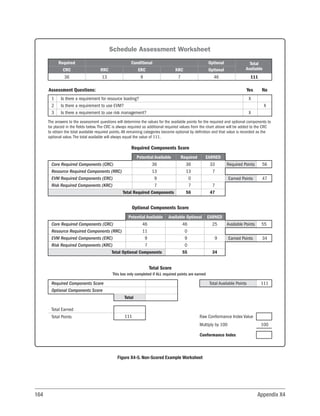
Figure X4-4. Resource- and Risk-Required Example Worksheet..........................................163
Figure X4-5. Non-Scored Example Worksheet.......................................................................164
Table 3-1. Earned Schedule Formulas......................................................................................88
Table 3-2. Levels of Schedule Model Instance Presentations.................................................90
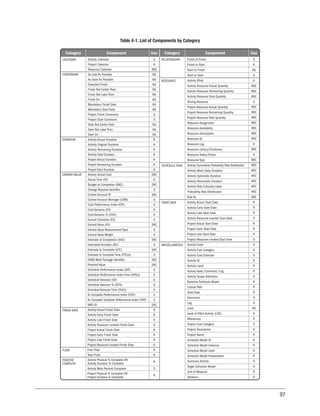
Table 4-1. List of Components by Category..............................................................................97
Table 5-1. Number of Components by Category.....................................................................140
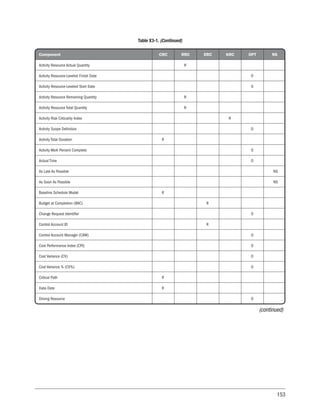
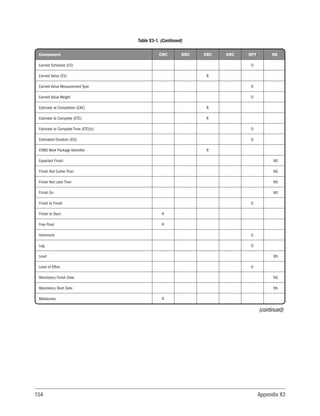
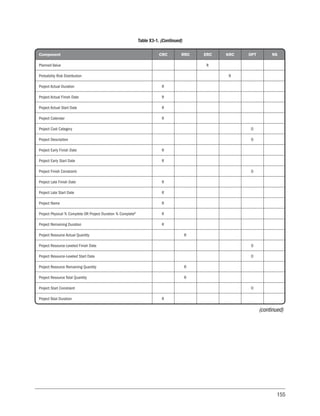
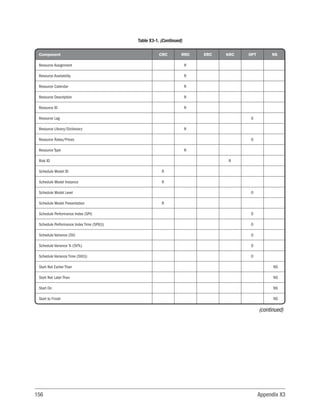
Table X3-1. Sample Conformance Assessment Scoring Table..............................................152
1
1
INTRODUCTION
The Practice Standard for Scheduling provides the framework to create, manage, and maintain schedules in a
project environment. This practice standard contains five main sections. Each section provides additional information
on the content and terminology used in this practice standard:
Section 1—Introduction. This section provides an introduction to scheduling and its benefits, as well as an
overview of the development and use of schedule models.
Section2—ScheduleModelPrinciplesandConcepts.Thissectionprovidesguidanceandinformationontheprinciples
and concepts associated with schedule model creation and use within predictive, adaptive, or hybrid environments.
Section 3—Schedule Model Good Practices Overview. This section provides guidance and information on
generally accepted good practices associated with the planning, developing, maintaining, communicating, and
reporting processes of an effective critical path method (CPM) schedule model approach.
Section 4—Scheduling Components. This section provides a detailed catalog of the potential components of a
CPM scheduling tool.
Section 5—Conformance Index. This section provides an overview of the conformance index process. It provides
a method for assessing how well a CPM schedule model incorporates the components, guidelines, definitions,
behaviors, and good practices outlined in this practice standard.
Appendixes contained in this practice standard are:
Appendix X1—Third Edition Changes
Appendix X2—Contributors and Reviewers of the Practice Standard for Scheduling – Third Edition
Appendix X3—Conformance Assessment Scoring Table
Appendix X4—Conformance Assessment Worksheets
Appendix X5—Forensic Schedule Analysis
2 Section 1
This practice standard includes adaptive approaches such as agile (see Sections 2.2.3 and 2.6). However, the
majority of the content of this practice standard, except where indicated, describes a traditional (i.e., predictive)
approach to scheduling using CPM. Additional information on agile may be found in the Agile Practice Guide [1].1
Section 1 provides an overview of the content of this practice standard and is divided as follows:
1.1 Project Scheduling
1.2 Why Scheduling?
1.3 Overview
1.4 Purpose
1.5 Applicability
1.1 PROJECT SCHEDULING
Project scheduling ensures the development of effective schedule models through the application of skills, tools,
techniques, and intuition acquired through knowledge, formal and informal training, and experience.A schedule model
rationally organizes and integrates various project components (e.g., activities, resources, and logical relationships) to
optimize the information available to the project management team and facilitate the likelihood of a successful project
completion within the approved schedule baseline. Key schedule model terms are defined as follows:
u
u Milestone. The PMI Lexicon of Project Management Terms [2] defines a milestone as: A significant point or
event in a portfolio, program, or project. For the purposes of this standard, a milestone is a significant point or
event in a project defined with a duration of zero time periods.
u
u Activity. The Lexicon [2] defines an activity as: A distinct, scheduled portion of work performed during the
course of a project. For the purposes of this standard, an activity is a unique and distinct scheduled portion of
work with a duration greater than zero time periods, to be performed during the course of a project.
u
u Resource. A skilled human resource (specific disciplines either individually or in crews or teams), equipment,
services, supplies, commodities, materials, budgets, or funds required to accomplish the defined work.
u
u Logical relationship. A dependency between two activities or between an activity and a milestone.
1
The numbers in bracket refer to the list of references at the end of this practice standard.
3
The terms scheduling tool, schedule model, schedule model instance, and schedule presentation are defined in the
glossary of this practice standard and described as follows:
u
u Scheduling tool. A tool that provides schedule component names,definitions,structural relationships,formats,
and algorithms for schedule calculation that support the application of a scheduling method.
u
u Schedule model. A representation of the plan for executing the project’s activities including durations,
dependencies, and other planning information, which is used to produce a project schedule along with other
scheduling artifacts. The schedule model is dynamic and is developed and maintained by the project team with
input from key stakeholders.It applies a selected scheduling approach to a scheduling tool using project-specific
data. The schedule model can be processed by a scheduling tool to produce various schedule model instances.
u
u Schedule model instance. A version of the schedule model that has been processed by a scheduling tool
based on inputs and adjustments made to the project-specific data within the scheduling tool. The scheduler
saves the schedule model instances as project records and for reference, including data date, version (based
on a completed update cycle), target schedule models, and the baseline schedule model. The instances can
produce various schedule presentations. When used together, the instances support report generation and
analysis, such as variance and risk analysis.
u
u Schedule presentation. An output published from a schedule model instance used to communicate project-
specific data for reporting, analysis, and decision making. Presentations may include bar charts, critical paths,
near critical paths, resource profiles, activity assignments, baselines, record of accomplishments, risks/issues,
etc. Presentations can also provide time-based forecasts and identify performance deviations throughout the
project’s life cycle.
1.2 WHY SCHEDULING?
Projects are complex temporary endeavors; however, a detailed schedule model that contains logically related
work allows the project to be simplified into manageable phases or groupings of activities.These phases or groupings
allow management to optimize the trade-offs between scope, cost, and schedule. Project performance is reported
and monitored when progress against these activities and milestones is recorded within the schedule model. As
progress is recorded on a project, the remaining effort, as defined in the approved baseline, requires reassessment.
The execution of a project often proceeds differently than the initial plan and baseline. In a typical project environment,
it becomes necessary to refine the schedule model because of (a) incomplete or inadequate planning, (b) further
decomposition of the project scope, (c) significant project changes, (d) organizational changes, or (e) environmental
changes. This iterative evolution is required to predict, recognize, and address those evolving factors and issues that
could potentially affect project performance.
4 Section 1
The key to project success is applying knowledge and experience to create a credible project management
plan. The project management plan optimally balances cost, resources, scope, and time-based performance with
the project team’s commitment to execute the project in accordance with the plan. Scheduling is one of the basic
requirements of project planning and analysis. The schedule model, once completed, becomes an effective planning
tool for (a) engaging communications that focus on optimizing future actions, (b) assisting proactive collaboration, and
(c) creating a project performance management system.
Scheduling provides the detail that represents who, how, where, and when the assigned project resources will
deliver the products, services, and results defined in the project scope.The detailed plan serves as a tool for managing
the activities to be performed,communications,and stakeholder expectations.It also serves as a basis for performance
reporting.The project manager together with the project team use the project schedule (baseline and actual progress)
as a primary tool for planning, executing, and controlling all project-based evolutions. The schedule model is used to
track, forecast, and monitor project performance throughout its life cycle.
The dynamic nature of a project’s execution is best served by a tool that allows for modeling of the project, the
project’s internal and external dependencies, and analysis due to the impact of progress and risk events. The model
concept looks for the schedule model to react to inputs (progress updates, progressive elaboration, changes to scope
definition (WBS), etc.) as the project team expects the project to perform based on those inputs. The following are
examples of how the schedule model supports the project by allowing for:
u
u Time phasing of required activities;
u
u Constraints that limit the options for managing a portfolio, program, project, or process;
u
u Resource planning;
u
u Mobilization of planned resources in a most efficient manner;
u
u Coordination of events within the project and among other projects;
u
u Visual representation of these schedule issues to the stakeholders;
u
u Early detection of risks, problems, issues, or opportunities;
u
u Implementation of actions to achieve the project objectives as planned;
u
u What-if and variance analysis;
u
u Cost planning; and
u
u Forecasting of estimate at complete and to complete.
5
1.3 OVERVIEW
This practice standard describes schedule model components (see Section 4) and generally recognized good
practices for scheduling processes. Generally recognized means that the knowledge and practices described are
applicable to most projects most of the time. Additionally, there is consensus about the value and usefulness of
knowledge and practices. Good practice means that there is general agreement that the application of these skills,
tools, and techniques can enhance the probability of success over a wide range of projects. Good practice does not
mean the knowledge described should always be applied uniformly to all projects—it means the project team is
responsible for determining what is appropriate for any given project. The proper use of the components and their
practices results in a schedule model usable for planning, executing, monitoring, and closing, in addition to the
delivery of the project scope to stakeholders. Although additional schedule approaches and life cycles are included,
this practice standard describes a traditional (i.e., predictive) approach to scheduling using the CPM approach.
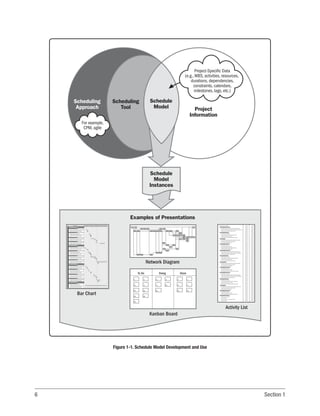
Schedule model creation begins with selecting a scheduling approach and a scheduling tool that support the
desired scheduling approach. Next, starting with the WBS, project-specific data are incorporated within the scheduling
tool to create a unique schedule model. Schedule model instances are snapshots captured from the schedule model.
Schedulers produce various presentations from these schedule model instances based on the project-specific data.
See Figure 1-1 to better understand the interrelationships of the schedule model creation concepts and terminology.
This process results in a schedule model for project execution, monitoring, and control that responds predictably to
progress and changes. The model is also used for engaging communications toward proactive optimization of future
actions. The scheduler should regularly update the schedule model to reflect progress and changes such as scope,
durations, milestones, allocated resources, productivity rates, means of accomplishment, variances, risk evaluations,
and scheduling logic.
This practice standard also provides an assessment that can be used to determine how well the schedule model
conforms to this practice standard. A conformance index (see Section 5 of this practice standard) is developed by
determining which components are used and how they are used within the schedule model. In order to obtain an
acceptable conformance assessment, a schedule model, at a minimum, should contain all of the required components
described in Section 4 and Appendix X3. The selection of an appropriate scheduling software tool provides access
to the required components necessary to develop the schedule model. The use of this practice standard, along with
experience, skill, and organizational maturity, provides the appropriate guidance for application of the components.
The inclusion of a component in this practice standard does not necessarily bear any relation to the issues of project
size or complexity. This practice standard assumes that all schedule models need to have the required components,
basic behaviors, and good practices. Project size and complexity only result in changes in scale and repetition of the
required components. A Guide to the Project Management Body of Knowledge (PMBOK®
Guide) [3] provides processes
to address the factors regarding project size and complexity. In addition, the definition of generally recognized also
6 Section 1
Figure 1-1. Schedule Model Development and Use
Examples of Presentations
Network Diagram
Bar Chart
Activity List
Schedule
Model
Instances
Schedule
Model Project
Information
Scheduling
Approach
Scheduling
Tool
Project-Specific Data
(e.g.,WBS, activities, resources,
durations, dependencies,
constraints, calendars,
milestones, lags, etc.)
For example,
CPM, agile
To Do Doing Done
1
11
13
18
5
4
13
11
2
21
5
13
4
8
14
1
2
13
18
20
Kanban Board
7
assumes that there are no significant differences for the use of the required components regarding the scheduling
practices of various industries. As practices evolve and develop within the project management community after the
publication of this practice standard, the definition of generally recognized will also evolve. More components may be
added to the core set, and good practices should become less subjective.
1.4 PURPOSE
This practice standard provides standards and guidelines using effective schedule management for a project by
providing knowledge on the creation and maintenance of schedule models. This practice standard expands on the
information contained in Section 6 of the PMBOK®
Guide.
This practice standard establishes a core set of required components to be used in order to establish a schedule
model that meets a minimum acceptable level of maturity (see Section 3), and a method to assess a schedule model
for conformance to this standard.
The goal of this practice standard is to create schedule models that are of value for the projects they represent.
This practice standard is not intended to provide a comprehensive guide on how to develop a schedule model.
For comprehensive instructions on developing a schedule model, refer to courses and textbooks on the subject.
1.5 APPLICABILITY
This practice standard applies to project management practitioners who are knowledgeable about the fundamentals
ofprojectschedulingasdescribedinthispracticestandard.Forthepurposesofthispracticestandard,thesepractitioners
will be known as schedulers. This practice standard focuses on approaches used in a predictive life cycle (specifically
CPM), but includes considerations as they relate to approaches used in adaptive life cycles (specifically agile).
CPM is the most common approach for project scheduling, but the prevalence of adaptive life cycles such as agile
has increased significantly since the previous edition of the practice standard, especially in software development.
Approaches used in an adaptive life cycle define a plan, but acknowledge that once work starts, the priorities may
change, and the plan needs to reflect this new information.These approaches also work well for projects experiencing
high levels of uncertainty and unpredictability in competitive global markets.
Finally, this practice standard includes expanded consideration for some of the emerging practices for project
scheduling approaches, such as location-based scheduling.
8 Section 1
It is the premise of this practice standard that: (a) the reader has a basic working knowledge of the Project
Management Process Groups and Knowledge Areas defined in the PMBOK®
Guide, (b) the project has a work
breakdown structure (WBS) that conforms to the processes defined in the Practice Standard for Work Breakdown
Structures [4], and (c) sufficient planning has been done.
As schedule development progresses, related practice standards such as the Agile Practice Guide [1], The Standard
for Earned Value Management [5], and The Standard for Risk Management in Portfolios, Programs, and Projects [6]
may be applied.
This practice standard is applicable to individual projects only—not to portfolios or programs. However, because
portfolios and programs are collections of individual projects, any individual schedule model within those structures
should make use of and be evaluated according to this practice standard.
An organization that embraces the principles and good practices outlined in this practice standard and applies
them globally across the organization ensures that all schedule models developed in support of the organization’s
strategic value proposition are done in a consistent manner throughout the organization.
9
2
SCHEDULE MODEL PRINCIPLES AND CONCEPTS
This section provides guidance and information on the principles and concepts associated with schedule model
creation and use within predictive or adaptive environments. This section covers the following topics:
2.1 Overview
2.2 Project Life Cycles and Scheduling Approaches
2.3 Scheduling Tool
2.4 Schedule Model
2.5 Schedule Model Instances and Presentations
2.6 Agile
Sections 2.2 through 2.5 link the processes described in this section to the good practices described in Section 3
and the scheduling components defined in Section 4.
2.1 OVERVIEW
The schedule management plan identifies the scheduling approach and the scheduling tool used to create the
schedule model. Schedule model creation incorporates the defined processes associated with the project scheduling
effort during planning.
A process to create a schedule model that meets the needs of the project and its stakeholders begins during project
planning.
Section 2.2.1 provides an overview of schedule model creation. Schedule model principles and concepts with
considerations related to adaptive and other emerging approaches appear in Sections 2.2.3 and 2.2.4.
10 Section 2
2.2 PROJECT LIFE CYCLES AND SCHEDULING APPROACHES
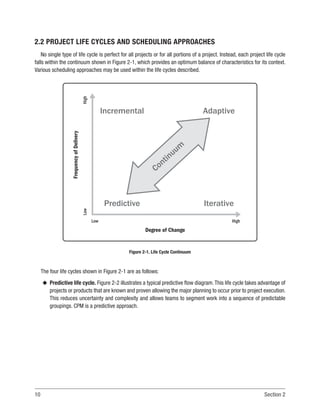
No single type of life cycle is perfect for all projects or for all portions of a project. Instead, each project life cycle
falls within the continuum shown in Figure 2-1, which provides an optimum balance of characteristics for its context.
Various scheduling approaches may be used within the life cycles described.
Frequency
of
Delivery
Low
High
Degree of Change
Predictive
Incremental
Iterative
Adaptive
Low High
Continuum
Figure 2-1. Life Cycle Continuum
The four life cycles shown in Figure 2-1 are as follows:
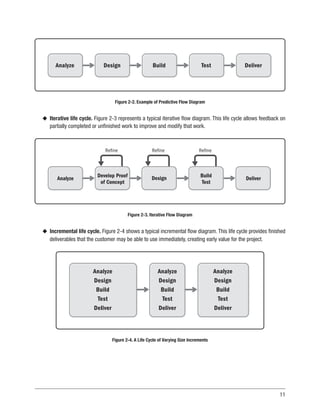
u
u Predictive life cycle. Figure 2-2 illustrates a typical predictive flow diagram.This life cycle takes advantage of
projects or products that are known and proven allowing the major planning to occur prior to project execution.
This reduces uncertainty and complexity and allows teams to segment work into a sequence of predictable
groupings. CPM is a predictive approach.
11
Analyze Design Build Test Deliver
Figure 2-2. Example of Predictive Flow Diagram
u
u Iterative life cycle. Figure 2-3 represents a typical iterative flow diagram. This life cycle allows feedback on
partially completed or unfinished work to improve and modify that work.
Analyze Develop Proof
of Concept
Refine Refine
Design
Refine
Build
Test
Deliver
Figure 2-3. Iterative Flow Diagram
u
u Incremental life cycle. Figure 2-4 shows a typical incremental flow diagram. This life cycle provides finished
deliverables that the customer may be able to use immediately, creating early value for the project.
Analyze
Design
Build
Test
Deliver
Analyze
Design
Build
Test
Deliver
Analyze
Design
Build
Test
Deliver
Figure 2-4. A Life Cycle of Varying Size Increments
12 Section 2
u
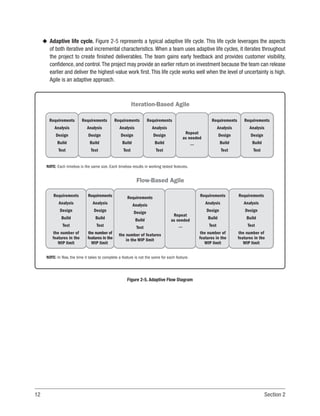
u Adaptive life cycle. Figure 2-5 represents a typical adaptive life cycle. This life cycle leverages the aspects
of both iterative and incremental characteristics. When a team uses adaptive life cycles, it iterates throughout
the project to create finished deliverables. The team gains early feedback and provides customer visibility,
confidence, and control.The project may provide an earlier return on investment because the team can release
earlier and deliver the highest-value work first. This life cycle works well when the level of uncertainty is high.
Agile is an adaptive approach.
Requirements
Analysis
Design
Build
Test
Requirements
Analysis
Design
Build
Test
NOTE: Each timebox is the same size. Each timebox results in working tested features.
Requirements
Analysis
Design
Build
Test
Requirements
Analysis
Design
Build
Test
Repeat
as needed
...
Requirements
Analysis
Design
Build
Test
Requirements
Analysis
Design
Build
Test
Iteration-Based Agile
Requirements
Analysis
Design
Build
Test
the number of
features in the
WIP limit
Requirements
Analysis
Design
Build
Test
the number of
features in the
WIP limit
Requirements
Analysis
Design
Build
Test
the number of features
in the WIP limit
Repeat
as needed
...
Requirements
Analysis
Design
Build
Test
the number of
features in the
WIP limit
Requirements
Analysis
Design
Build
Test
the number of
features in the
WIP limit
NOTE: In flow, the time it takes to complete a feature is not the same for each feature.
Flow-Based Agile
Figure 2-5. Adaptive Flow Diagram
13
u
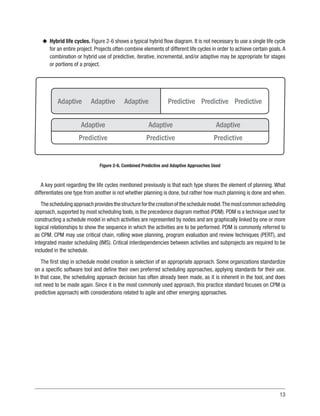
u Hybrid life cycles. Figure 2-6 shows a typical hybrid flow diagram. It is not necessary to use a single life cycle
for an entire project. Projects often combine elements of different life cycles in order to achieve certain goals.A
combination or hybrid use of predictive, iterative, incremental, and/or adaptive may be appropriate for stages
or portions of a project.
Adaptive Adaptive Adaptive Predictive Predictive Predictive
Adaptive
Predictive
Adaptive
Predictive
Adaptive
Predictive
Figure 2-6. Combined Predictive and Adaptive Approaches Used
A key point regarding the life cycles mentioned previously is that each type shares the element of planning. What
differentiates one type from another is not whether planning is done, but rather how much planning is done and when.
Theschedulingapproachprovidesthestructureforthecreationoftheschedulemodel.Themostcommonscheduling
approach, supported by most scheduling tools, is the precedence diagram method (PDM). PDM is a technique used for
constructing a schedule model in which activities are represented by nodes and are graphically linked by one or more
logical relationships to show the sequence in which the activities are to be performed. PDM is commonly referred to
as CPM. CPM may use critical chain, rolling wave planning, program evaluation and review techniques (PERT), and
integrated master scheduling (IMS). Critical interdependencies between activities and subprojects are required to be
included in the schedule.
The first step in schedule model creation is selection of an appropriate approach. Some organizations standardize
on a specific software tool and define their own preferred scheduling approaches, applying standards for their use.
In that case, the scheduling approach decision has often already been made, as it is inherent in the tool, and does
not need to be made again. Since it is the most commonly used approach, this practice standard focuses on CPM (a
predictive approach) with considerations related to agile and other emerging approaches.
14 Section 2
2.2.1 CRITICAL PATH APPROACH
CPM refers to the prevalent approach used in modern scheduling tools and helps to identify the shortest time to
complete the project. The critical path approach is used to derive the critical activities that cannot be delayed without
delaying the end date of the project. A basic principle of CPM is that each activity is driven by one or more preceding
activities. The pure CPM network allows only zero or positive total float on the project critical path. Modern CPM tools
accommodate a variety of features to enhance project schedule viability. These features include resources, calendars
(project, activity, and resource), constraints, varying definitions of criticality, elapsed durations, lags, leads, external
dependencies, activity priorities, and the assignment of actual start and finish dates to activities. These additional
features introduce the possibility of negative and varying float values along the critical path.
Generally, the approach used in these tools is the precedence diagramming method (PDM). This practice standard
follows that common usage convention but uses the term CPM.
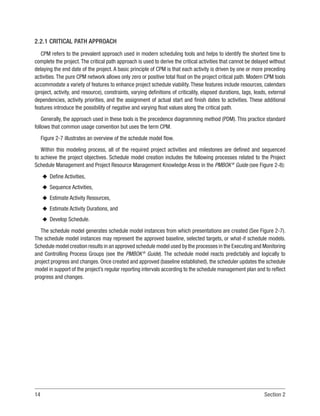
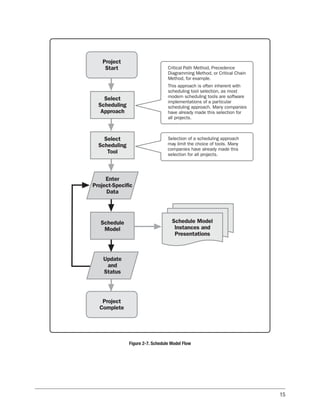
Figure 2-7 illustrates an overview of the schedule model flow.
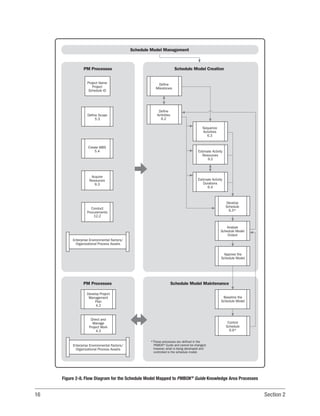
Within this modeling process, all of the required project activities and milestones are defined and sequenced
to achieve the project objectives. Schedule model creation includes the following processes related to the Project
Schedule Management and Project Resource Management Knowledge Areas in the PMBOK®
Guide (see Figure 2-8):
u
u Define Activities,
u
u Sequence Activities,
u
u Estimate Activity Resources,
u
u Estimate Activity Durations, and
u
u Develop Schedule.
The schedule model generates schedule model instances from which presentations are created (See Figure 2-7).
The schedule model instances may represent the approved baseline, selected targets, or what-if schedule models.
Schedule model creation results in an approved schedule model used by the processes in the Executing and Monitoring
and Controlling Process Groups (see the PMBOK®
Guide). The schedule model reacts predictably and logically to
project progress and changes. Once created and approved (baseline established), the scheduler updates the schedule
model in support of the project’s regular reporting intervals according to the schedule management plan and to reflect
progress and changes.
15
Enter
Project-Specific
Data
Schedule Model
Instances and
Presentations
Selection of a scheduling approach
may limit the choice of tools. Many
companies have already made this
selection for all projects.
Critical Path Method, Precedence
Diagramming Method, or Critical Chain
Method, for example.
This approach is often inherent with
scheduling tool selection, as most
modern scheduling tools are software
implementations of a particular
scheduling approach. Many companies
have already made this selection for
all projects.
Schedule
Model
Update
and
Status
Project
Complete
Select
Scheduling
Tool
Select
Scheduling
Approach
Project
Start
Figure 2-7. Schedule Model Flow
16 Section 2
Schedule Model Creation
Schedule Model Management
Schedule Model Maintenance
PM Processes
PM Processes
Project Name
Project
Schedule ID
Create WBS
5.4
Enterprise Environmental Factors/
Organizational Process Assets
Define Scope
5.3
Acquire
Resources
9.3
Conduct
Procurements
12.2
Direct and
Manage
Project Work
4.3
Develop Project
Management
Plan
4.2
Control
Schedule
6.6*
Baseline the
Schedule Model
Approve the
Schedule Model
Analyze
Schedule Model
Output
Develop
Schedule
6.5*
Define
Milestones
Define
Activities
6.2
Sequence
Activities
6.3
Estimate Activity
Resources
9.2
Estimate Activity
Durations
6.4
Enterprise Environmental Factors/
Organizational Process Assets
*These processes are defined in the
PMBOK® Guide and cannot be changed;
however, what is being developed and
controlled is the schedule model.
Figure 2-8. Flow Diagram for the Schedule Model Mapped to PMBOK®
Guide Knowledge Area Processes
17
CPM determines the minimum total project duration and the earliest possible finish date of the project. CPM
also determines the amount of scheduling flexibility (total float) in the schedule model. To apply CPM, a schedule
model that is comprised of project activities is developed. Early start and finish dates are calculated for each activity
by means of a forward pass from a specific project start date. Late start and finish dates are determined for each
activity by means of a backward pass, starting from the project early finish date determined during the forward pass
calculation or from a specific project finish date (constraint).
To establish a meaningful critical path, it is necessary to develop a logic-based network of activities with empirically
derived durations for execution in a realistic and practical manner. These logical relationships can be of a physical
nature (need for supporting structures, arrival of necessary resources, etc.) and the desired sequence from the
execution plan (north to south, inside to outside, etc.). In building out the schedule network, a loop may unintentionally
be created, where a path of activities returns to itself. In most cases, the scheduling tool will stop calculating and
provide a notification of the detected loop. Open ends in a schedule are those activities that lack a predecessor and/
or a successor activity, thereby creating a hole or gap in the schedule logic from project start to finish. The only open
ends that are acceptable are the project start and project finish milestones. The use of constraints, including leads
and lags, should be restricted to those conditions that cannot be adequately defined and modeled by the application
of activity logic.
CPM illustrates the relationships between activities left to right (time-phased), allowing project activities to flow
from a project start milestone to the project complete milestone. Relationships between time-phased activities are
represented by directional arrows. The logical relationships need to be satisfied.
In CPM, an activity can be connected from either its start or its finish.This allows a start-to-finish logic presentation
with no need to break the work down further. Another characteristic of CPM diagrams is the use of lead and lag
components.
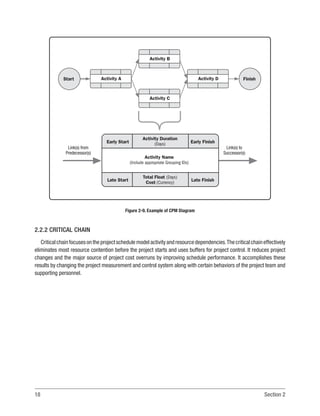
An example of a network diagram is shown in Figure 2-9.
18 Section 2
Activity Name
(Include appropriate Grouping IDs)
Total Float (Days)
Cost (Currency)
Activity Duration
(Days)
Late Start Late Finish
Early Start Early Finish
Link(s) to
Successor(s)
Link(s) from
Predecessor(s)
Activity B
Activity C
Activity D
Activity A Finish
Start
Figure 2-9. Example of CPM Diagram
2.2.2 CRITICAL CHAIN
Criticalchainfocusesontheprojectschedulemodelactivityandresourcedependencies.Thecriticalchaineffectively
eliminates most resource contention before the project starts and uses buffers for project control. It reduces project
changes and the major source of project cost overruns by improving schedule performance. It accomplishes these
results by changing the project measurement and control system along with certain behaviors of the project team and
supporting personnel.
19
Resource availability competes with the ability to execute tasks on the planned dates. As such, many software
programs allow resources to be leveled (so that they are not overburdened), which may stretch the project duration
and scheduled start and finish dates for activities. Considering the availability of resources, the resultant schedule
model may contain a resource-constrained critical path, and it is the starting point for critical chain scheduling. The
critical chain approach is developed from CPM and considers the effects of resource allocation, resource leveling, and
activity duration uncertainty on the CPM-determined critical path.
Critical chain creates an aggressive (but not necessarily detailed) resource-leveled project schedule. The
underpinning principle of the critical chain process lies in the fact that within a systemic chain of actions there is
almost always one action that is constrained or limited by resources, impacting the throughput of the entire chain.
The project end date is defined as the end of the critical chain, including the buffers to account for project risks,
uncertainties, and slippages. During project execution, when activities consume a longer duration than predicted by
the critical chain, the project buffer is gradually consumed.According to the degree of buffer consumption, the project
team can address necessary corrective actions; from “no need to react” to “planning the response” to “executing the
planned response to recover project buffer.” As long as the total of slippages is less than the buffer, there is a limited
effect on project scope, duration, and budget. This approach is called buffer management.
The longest resource-leveled path through the schedule, including buffers, is the critical chain.The critical chain is
often different from the critical path in CPM. The defining factors in the critical chain are buffer activities, resources
that are not multitasked, resource leveling, and buffer management.
Critical chain starts with a CPM schedule model, but differs from CPM in four main aspects:
u
u The critical chain assumes that significant, unexpected risks that were unforeseen will materialize during a
project and necessitate proactive actions.
u
u The focus of managerial attention remains fixed throughout the project on the critical chain and rate of project
buffer consumption.
u
u The critical chain considers the magnitude of resource contention (based on the theory of constraints) in the
calculation of project duration and scheduling of activities.
u
u Instead of margins being distributed and hidden in individual activities,the margins are exposed and aggregated
in buffers, thus reducing risk exposure to the project.
20 Section 2
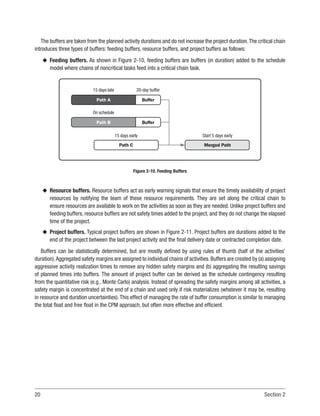
The buffers are taken from the planned activity durations and do not increase the project duration.The critical chain
introduces three types of buffers: feeding buffers, resource buffers, and project buffers as follows:
u
u Feeding buffers. As shown in Figure 2-10, feeding buffers are buffers (in duration) added to the schedule
model where chains of noncritical tasks feed into a critical chain task.
15 days late
On schedule
15 days early Start 5 days early
20-day buffer
Buffer
Buffer
Path A
Path B
Path C Merged Path
Figure 2-10. Feeding Buffers
u
u Resource buffers. Resource buffers act as early warning signals that ensure the timely availability of project
resources by notifying the team of these resource requirements. They are set along the critical chain to
ensure resources are available to work on the activities as soon as they are needed. Unlike project buffers and
feeding buffers, resource buffers are not safety times added to the project, and they do not change the elapsed
time of the project.
u
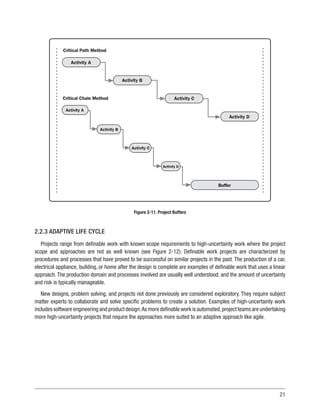
u Project buffers. Typical project buffers are shown in Figure 2-11. Project buffers are durations added to the
end of the project between the last project activity and the final delivery date or contracted completion date.
Buffers can be statistically determined, but are mostly defined by using rules of thumb (half of the activities’
duration).Aggregated safety margins are assigned to individual chains of activities.Buffers are created by (a) assigning
aggressive activity realization times to remove any hidden safety margins and (b) aggregating the resulting savings
of planned times into buffers. The amount of project buffer can be derived as the schedule contingency resulting
from the quantitative risk (e.g., Monte Carlo) analysis. Instead of spreading the safety margins among all activities, a
safety margin is concentrated at the end of a chain and used only if risk materializes (whatever it may be, resulting
in resource and duration uncertainties).This effect of managing the rate of buffer consumption is similar to managing
the total float and free float in the CPM approach, but often more effective and efficient.
21
Activity A
Activity D
Critical Path Method
Critical Chain Method
Activity B
Activity C
Activity A
Buffer
Activity B
Activity C
Activity D
Figure 2-11. Project Buffers
2.2.3 ADAPTIVE LIFE CYCLE
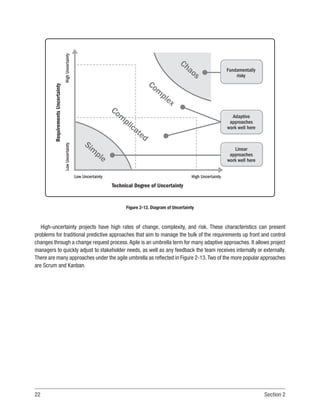
Projects range from definable work with known scope requirements to high-uncertainty work where the project
scope and approaches are not as well known (see Figure 2-12). Definable work projects are characterized by
procedures and processes that have proved to be successful on similar projects in the past. The production of a car,
electrical appliance, building, or home after the design is complete are examples of definable work that uses a linear
approach. The production domain and processes involved are usually well understood, and the amount of uncertainty
and risk is typically manageable.
New designs, problem solving, and projects not done previously are considered exploratory. They require subject
matter experts to collaborate and solve specific problems to create a solution. Examples of high-uncertainty work
includes software engineering and product design.As more definable work is automated,project teams are undertaking
more high-uncertainty projects that require the approaches more suited to an adaptive approach like agile.
22 Section 2
Requirements
Uncertainty
High
Uncertainty
Low
Uncertainty
Technical Degree of Uncertainty
Low Uncertainty High Uncertainty
Fundamentally
risky
Adaptive
approaches
work well here
Linear
approaches
work well here
Com
plicated
Com
plex
Chaos
Sim
ple
Figure 2-12. Diagram of Uncertainty
High-uncertainty projects have high rates of change, complexity, and risk. These characteristics can present
problems for traditional predictive approaches that aim to manage the bulk of the requirements up front and control
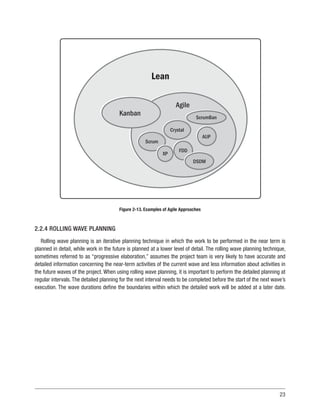
changes through a change request process.Agile is an umbrella term for many adaptive approaches. It allows project
managers to quickly adjust to stakeholder needs, as well as any feedback the team receives internally or externally.
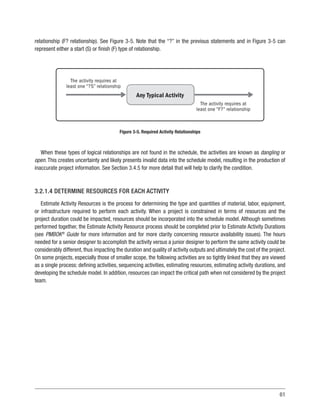
There are many approaches under the agile umbrella as reflected in Figure 2-13.Two of the more popular approaches
are Scrum and Kanban.
23
Agile
Kanban
Scrum
Crystal
ScrumBan
AUP
FDD
XP
DSDM
Lean
Figure 2-13. Examples of Agile Approaches
2.2.4 ROLLING WAVE PLANNING
Rolling wave planning is an iterative planning technique in which the work to be performed in the near term is
planned in detail, while work in the future is planned at a lower level of detail. The rolling wave planning technique,
sometimes referred to as “progressive elaboration,” assumes the project team is very likely to have accurate and
detailed information concerning the near-term activities of the current wave and less information about activities in
the future waves of the project. When using rolling wave planning, it is important to perform the detailed planning at
regular intervals.The detailed planning for the next interval needs to be completed before the start of the next wave’s
execution. The wave durations define the boundaries within which the detailed work will be added at a later date.
24 Section 2
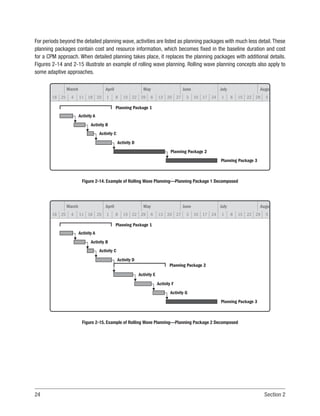
For periods beyond the detailed planning wave, activities are listed as planning packages with much less detail.These
planning packages contain cost and resource information, which becomes fixed in the baseline duration and cost
for a CPM approach. When detailed planning takes place, it replaces the planning packages with additional details.
Figures 2-14 and 2-15 illustrate an example of rolling wave planning. Rolling wave planning concepts also apply to
some adaptive approaches.
March
18 25 4 11 18 25 1 8 15 22 29 6 13 20 27 3 10 17 24 1 8 15 22 29 5
April May June July Augu
Planning Package 1
Activity A
Activity B
Activity C
Activity D
Planning Package 2
Planning Package 3
Figure 2-14. Example of Rolling Wave Planning—Planning Package 1 Decomposed
March
18 25 4 11 18 25 1 8 15 22 29 6 13 20 27 3 10 17 24 1 8 15 22 29 5
April May June July Augu
Planning Package 1
Activity A
Planning Package 2
Activity B
Activity E
Activity F
Activity G
Activity C
Activity D
Planning Package 3
Figure 2-15. Example of Rolling Wave Planning—Planning Package 2 Decomposed
25
2.2.5 OTHER APPROACHES AND EMERGING TRENDS
Other approaches and emerging trends for scheduling are:
u
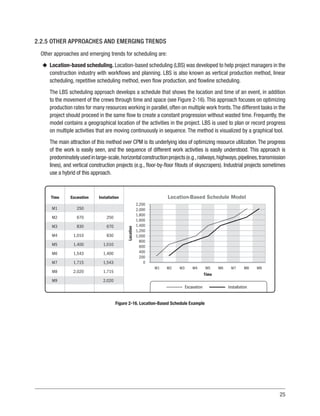
u Location-based scheduling. Location-based scheduling (LBS) was developed to help project managers in the
construction industry with workflows and planning. LBS is also known as vertical production method, linear
scheduling, repetitive scheduling method, even flow production, and flowline scheduling.
The LBS scheduling approach develops a schedule that shows the location and time of an event, in addition
to the movement of the crews through time and space (see Figure 2-16). This approach focuses on optimizing
production rates for many resources working in parallel, often on multiple work fronts.The different tasks in the
project should proceed in the same flow to create a constant progression without wasted time. Frequently, the
model contains a geographical location of the activities in the project. LBS is used to plan or record progress
on multiple activities that are moving continuously in sequence. The method is visualized by a graphical tool.
The main attraction of this method over CPM is its underlying idea of optimizing resource utilization.The progress
of the work is easily seen, and the sequence of different work activities is easily understood. This approach is
predominatelyusedinlarge-scale,horizontalconstructionprojects(e.g.,railways,highways,pipelines,transmission
lines), and vertical construction projects (e.g., floor-by-floor fitouts of skyscrapers). Industrial projects sometimes
use a hybrid of this approach.
Excavation Installation
Location-Based Schedule Model
Time
Installation
Excavation
Time
Location
M1 M2 M3 M4 M5 M6 M7 M8 M9
2,200
2,000
1,800
1,600
1,400
1,200
1,000
800
600
400
200
0
M1
M2
M3
M4
M5
M6
M7
M8
M9
250
670
830
1,010
1,400
1,543
1,715
2,020
250
670
830
1,010
1,400
1,543
1,715
2,020
Figure 2-16. Location-Based Schedule Example
26 Section 2
u
u On-demand scheduling. On-demand scheduling is typically used in an adaptive environment. On-demand
approaches are based on pull-based scheduling concepts from lean manufacturing.The purpose of on-demand
scheduling is to limit a team’s work-in-progress (WIP) in order to balance the demand against a team’s delivery
throughput. It is preferable that the project team is agile and responsive so that the work product can be
delivered “just in time.” Demand and capability are always fluctuating; therefore, balancing occurs when the
work enters the system, not before. Other scheduling approaches make assumptions about work products,
which makes it difficult to take any balancing actions once the work is put into a project. Using a pull approach,
the downstream work takes (pulls) work from upstream only when the downstream has the capability to
proceed with new work. Pull systems require that work stages have limits for work-in-progress (WIP-limits).
Once a flow is established, it helps to estimate the completion of work. Such systems are more predictable
and have fewer unwanted variations, which minimizes waste in the process. Planning removes bottlenecks,
thereby driving the value of the schedule model. Once the bottlenecks or constraints are removed, an efficient
process flow is created, which balances delivery throughput.
u
u Lean scheduling. Lean scheduling is based on the principles of lean project delivery (on-demand scheduling)
and designed to minimize waste in order to maximize value.To achieve this goal, deliverables are not assigned
to the team. Lean scheduling principles point to the importance of limiting queues by pulling work when
there is capacity to place the work into the process. The project team members collaborate in pull planning
sessions where the essential activities, durations, and handoffs between trades to complete milestones are
defined. The main steps are:
n
n Master scheduling. Identifies key milestones, essential activities, and phases. This detailed schedule is
created by the project team.
n
n Phase scheduling. Uses phases identified from the master schedule. Working backward (pulling), the
duration, sequences, constraints, and coordination in each phase are collaboratively established. The team
agrees on the plan and executes as a team. The output from this phase schedule is used to generate
look-ahead schedules.
n
n Look-ahead planning. Maximizes reliability by matching workflow with capacity. Detailed plans for work to
be done are established using weekly work plans, and a backlog of ready work is maintained.
u
u Intelligent systems. Intelligent systems consider artificial intelligence applied to project scheduling that is
based on machine learning. Machine learning uses algorithms to parse data, learns from it, and then makes a
determination or prediction. Based on that, instead of performing a sequence of activities manually, it enters
a set of assumptions and activity requirements, such as constraints, hard logic, resources, and conditions
(IF-THEN-ELSE). As an emerging trend, intelligent systems have been widely applicable across all industries.
For scheduling purposes, one possible scenario is that the schedule model learns from progress made and
proposes a new sequence of relationships based on the inputs for activities that remain to be performed.
Another possibility is that the schedule model learns from other projects’ schedule models, and based on
identified patterns, the schedule model recommends the level of contingency avoidance for materials, vendors,
27
or workers. Algorithms identify clusters of activities with specific behaviors and identify patterns where the
activities can be analyzed to understand how to avoid or exploit such patterns.
u
u Line of balance. Line of balance (LOB) was initially developed for planning and controlling manufacturing
industrial processes. Later, its use was expanded as a method for planning and controlling projects with
repetitive or long-duration activities.
LOB’s focus is on production rates (units) over time for repetitive activities, rather than on defining and tracking
discrete activities over time. This results in a visualization that shows the flow of work and units produced.
LOB shows repetitive work in the project as a single line on a graph rather than a series of individual activities
on a bar chart. This line represents the rate that the work needs to be performed to stay on schedule. LOB can
help expose process bottlenecks. The main advantage of LOB is that it calculates productivity along with time
in an easy graphical representation.
u
u Building information modeling. Building information modeling (BIM) is a process that creates and manages
information regarding the physical and functional characteristics of a building. It is used to support decision
making during a building’s entire life cycle.
The collection of project information in a central repository provides an opportunity to integrate the project’s
3D design model (height/width/depth) and the schedule model. BIM software allows the identification of
sequences for the design objects which become the underlying logic for the schedule model. In BIM, time
is considered the fourth dimension. Adding the dimension of time to BIM allows the schedule to be linked
with data objects at an appropriate level of detail and the project to be built virtually. It also allows for testing
different options before deciding the best approach from a scheduling perspective. Cost can be incorporated
as a fifth dimension. An integrated BIM approach supports the following:
n
n Cost estimating,
n
n 3D coordination,
n
n Timely procurement/prefabrication,
n
n Construction planning and monitoring,
n
n Visualization of a 4D model of planned execution, and
n
n Record model of the owner’s life cycle use.
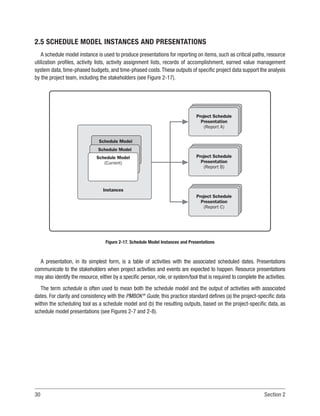
4D BIM modeling visualization incorporates start and finish date data for the supply and installation of
construction components and reveals the importance of them in relation to the overall project. BIM removes the
challenge brought about by the lack of visualization that is associated with traditional scheduling of construction
sequences. BIM software tools in the construction/engineering/infrastructure field save significant amounts of
time and money on projects that use it. This approach can substantially reduce both costs and schedule,
thereby reducing construction claims. Major companies and governments worldwide are beginning to mandate
the use of BIM on large projects.
28 Section 2
2.3 SCHEDULING TOOL
A scheduling tool is typically a software application that contains algorithms, components, features, and rules to
input and manipulate activities, dependencies, resources, and their assignments to create schedule model instances
and schedule presentations.Scheduling components are easily visualized by running a scheduling software application
and observing the functionality in the scheduling tool that is available to build the schedule model.
The scheduling tool is the platform upon which the schedule model is assembled.This platform provides the means
to adjust various schedule parameters and components within the model and analyze trends and performance. For
example, the scheduling tool for a CPM approach includes the capability to accomplish the following:
u
u Select the type of relationship (such as finish-to-start or finish-to-finish) between activities;
u
u Add lags and leads between activities;
u
u Add supplementary information to activities that aids in analysis, reporting, and grouping;
u
u Apply resources to the activities and use resource information along with resource availability to adjust the
scheduling of activities;
u
u Assign priorities to activities that use the same resources over the same period;
u
u Add constraints to activities where logic (e.g., precedence relationships with other activities) alone is not
adequate to meet the project requirements, especially when considering external schedule drivers and
resource availability;
u
u Capture a specific schedule model instance as a baseline;
u
u Record the actual progress of scheduled activities;
u
u Perform various what-if-analysis scenarios within the schedule model to obtain different project end dates;
u
u Analyze the impact that potential schedule model changes would have on the project objectives;
u
u Compare the most recent schedule model instance against a previous schedule model instance or against the
approved baseline instance to identify and quantify variances and trends; and
u
u Verify the validity of the resulting schedule model.
29
2.4 SCHEDULE MODEL
The introduction of project-specific data (e.g., work packages, activities, durations, resources, relationships,
dependencies, and constraints) into the scheduling tool creates a schedule model for the given project that is
independent of the approach and its requirements.
The schedule model is a management tool containing information related to the project execution plan. The
schedule model simulates distinct scenarios and situations that predict milestones and completion dates according
to the project’s actual and future data input by the project team. It is an important tool used for communication and
managing stakeholder expectations. The schedule model is guided by a schedule management plan that identifies
(a) the scheduling approach used; (b) the scheduling tool used; and (c) how the activities, planned dates, durations,
resources, dependencies, and constraints should be addressed.
Schedule model creation incorporates sequences, durations, resource requirements, and schedule constraints for
project execution in addition to monitoring and controlling. As a result, it generates a schedule model with planned
dates for completing the project activities.
Schedule model creation results in an approved schedule model used by the processes in the Planning and
Monitoring and Controlling Process Groups (see Section 6 in the PMBOK®
Guide),which reacts logically and predictably
to project progress and changes.
Schedule model analysis compares changes in the schedule model to the baseline based on updates of progress,
cost, and scope with the project team’s expectations of the impact of these changes. The changes in scope, through
formal changes or evolution, need to be included concurrently in the WBS and the schedule model.
The project team uses the schedule model to predict project finish dates in the form of schedule model instances.
The schedule model provides time-based forecasts, and responds dynamically to inputs and adjustments made
throughout the project’s life cycle.
In schedule model creation, milestones and defined activities, which are based on the project WBS and WBS
dictionary, need to be identified and described uniquely. Activity names should (a) start with a verb, (b) include at
least one unique specific object, and (c) include clarifying adjectives when necessary. Activities are sequenced with
appropriate logical relationships. The quantity, skill level, and capabilities of the resources required to complete each
activity should be considered. In addition, it is recommended to consult with those performing the activity to determine
their opinion as to the duration of each activity. Finally, if historical data are available, they should be considered
in determining duration. Constraints, including lead/lag time factors, should not be used in the schedule model to
replace schedule logic. The schedule model creation provides a baseline to permit comparison of progress against
the approved plan.
30 Section 2
2.5 SCHEDULE MODEL INSTANCES AND PRESENTATIONS
A schedule model instance is used to produce presentations for reporting on items, such as critical paths, resource
utilization profiles, activity lists, activity assignment lists, records of accomplishment, earned value management
system data, time-phased budgets, and time-phased costs.These outputs of specific project data support the analysis
by the project team, including the stakeholders (see Figure 2-17).
Schedule Model
(Current)
Schedule Model
(Current)
Project Schedule
Presentation
(Report C)
Project Schedule
Presentation
(Report B)
Project Schedule
Presentation
(Report A)
Schedule Model
(Current)
Instances
Figure 2-17. Schedule Model Instances and Presentations
A presentation, in its simplest form, is a table of activities with the associated scheduled dates. Presentations
communicate to the stakeholders when project activities and events are expected to happen. Resource presentations
may also identify the resource, either by a specific person, role, or system/tool that is required to complete the activities.
The term schedule is often used to mean both the schedule model and the output of activities with associated
dates. For clarity and consistency with the PMBOK®
Guide, this practice standard defines (a) the project-specific data
within the scheduling tool as a schedule model and (b) the resulting outputs, based on the project-specific data, as
schedule model presentations (see Figures 2-7 and 2-8).
31
Schedule model presentations can be represented in many ways, including but not limited to:
u
u Simple lists,
u
u Bar charts with dates,
u
u Network logic diagrams with dates,
u
u Resource usage patterns,
u
u Costs,
u
u Milestones,
u
u Master schedules,
u
u Departmental work lists,
u
u Team work lists,
u
u Deliverable due dates,
u
u Task dependency charts,
u
u Burn charts, and
u
u Kanban.
There are many other possible schedule presentations. These vary significantly based on the schedule approach,
tool used, and stakeholder communication requirements. Schedule model presentations can take the form of an early
start schedule, late start schedule, baseline schedule, resource-limited schedule, or target schedule. Other types of
presentations are derivatives of these five basic schedule types. Such derivatives include master schedules, milestone
schedules, and summary schedules. The use of these terms may vary from project to project and from organization
to organization. For agile approaches, see Section 2.6.
2.6 AGILE
Agile is an umbrella term for many adaptive approaches.Agile is a mindset defined by values, guided by principles,
and manifested through many different practices.There is more planning in agile than traditional approaches, but the
planning is distributed differently over the project life cycle.There is always a responsible amount of up-front planning
that should be done. Caution should be taken when there is little up-front planning because the risk of oversight and
delays due to rework is high. If there is too much up-front planning, the risk of creating a very detailed, inaccurate
plan increases.The optimal approach is to do enough up-front planning to minimize the risk of duplication and rework.
32 Section 2
Agile focuses on shorter build cycles and tangible results at frequent and incremental intervals. It focuses on
the realization of interim benefits instead of the completion of activities. An important element of an agile approach
includes having multiple iterations instead of moving from one phase to another.
Scrum and Kanban are two terms that are often used interchangeably, but there are significant differences between
these two agile frameworks. Scrum is used most often and is used to organize work into small, manageable pieces
expressed as stories. Stories deliver value from the end user’s perspective and are completed by a cross-functional
team within a prescribed time period called a sprint or iteration. These iterations are generally 1 to 4 weeks long and
are established by the organization’s project management methodology or determined by the team. The project team
maintains the iteration duration is throughout the life of the project to establish a cadence.
Like Scrum, Kanban encourages work to be broken down into manageable chunks.Where Scrum limits the amount
of time allowed to accomplish a particular amount of work, Kanban limits the amount of work allowed in any one
condition (only so many tasks can be ongoing and only so many tasks can be on the to-do list). Both Scrum and
Kanban allow large and complex requirements to be broken down into features in order to be completed efficiently.
Iteration 1
Feature ID Priority
Story Points
(Effort) Start Finish Duration State
Iteration 2
Iteration 3
Iteration 4
Backlog
A
B
C
D
E
F
G
H
I
J
K
L
M
10
2
2
6
14
5
6
3
8
3
5
0
0
30
17
4
7
2
High
Low
Low
Medium
3-Feb
3-Feb
10-Feb
3-Feb
2-Mar
6-Mar
2-Mar
16-Mar
30-Mar
30-Mar
7-Apr
27-Feb
28-Feb
21-Feb
28-Feb
28-Feb
27-Mar
27-Mar
27-Mar
27-Mar
24-Apr
24-Apr
24-Apr
22-May
20
15
15
20
20
16
20
10
20
10
5
20
0
0
0
0
0
0
Done
Done
Done
Done
Done
Done
In Progress
In Progress
Not Started
Backlog
Backlog
Backlog
Backlog
Figure 2-18. Example of Multiple Iterations or Sprints
33
In Figure 2-18, Iterations 1 and 2 are complete (done), Iteration 3 is in progress, and Iteration 4 is in development
(not started).All of the items from the prioritized backlog required to complete the iteration have not been added to an
iteration. Items still in the prioritized backlog will never have a duration estimate.
From the product backlog, based on priority, the team selects items that it believes can be completed in the
iteration. As part of iteration planning, the team creates an iteration backlog consisting of features and tasks. Once
the team commits to an iteration backlog, the iteration work begins. These components are reflected in Figure 2-19.
During the iteration, the team checks in on a daily basis with each other in the form of a 15-minute meeting known
as a daily standup meeting.Throughout the iteration cycles, the team maintains a schedule model presentation in the
form of an information board that visually communicates schedule progress toward iteration goals. At the end of the
iteration, the team demonstrates the work they have completed to the stakeholders and gathers feedback that affects
what they work on in future iterations. The team also holds a retrospective meeting to determine what to improve for
future iterations. This process is depicted in Figure 2-19.
Establish
Release
Goals
Review
Product
Backlog
Estimate
Iteration
Workload
Demo
Features
Discuss What
Is and
Is Not Done
Iteration
Retrospective
Iteration
Review
Iteration
(1-4 Weeks)
Iteration
Planning
Project Planning
Meeting
Product
Backlog
Iteration
Backlog
Potentially
Shippable
Product
Daily
Standup
Figure 2-19. Typical Adaptive Life Cycle
34 Section 2
Scrum Sprint 1 3 Issues (Total No. of Tasks for Each Sprint):
Linked Pages
14/Feb/18 9:16 PM • 28/Feb/18 9:16 PM (Iteration Time)
Create Kitchen Documentation KPT-1
KPT-2
Create CAD Files
Create Narrative for Kitchen Documentation KPT-3
•••
Scrum Sprint 2 2 Issues
Linked Pages
28/Feb/18 9:16 PM • 14/Mar/18 9:16 PM
Create Specifications KPT-4
KPT-5
Verify Materials and Products
•••
Backlog 5 Issues Create Sprint
Create Shop Drawings KPT-6
KPT-7
Obtain Part Numbers for Materials/Products
Create Design Verification Test Plan KPT-8
KPT-9
Prepare Construction Data
Create BOM (Bill of Materials) KPT-10
Figure 2-20. Results of Sprint (Iteration) Planning Meeting
A meeting is held on the first day of every iteration. The entire team meets to agree on the set of features they
can complete within the iteration and determine associated tasks for the agreed feature set. The team reviews work
estimates to see if they have enough time to complete all the features requested in the iteration. If so, the team
commits to the iteration (see Figure 2-20). If not, the lower-priority features go back into the product backlog until the
workload for the iteration is small enough to obtain the team’s commitment. Once iteration planning takes place and
the team makes a commitment to the planned work, the team begins to track its progress using visible information
boards.These boards include the burndown chart, the burnup chart, and the task board.The most common categories
used are to do, in progress, and done.
35
Scrum Sprint 1
Scrum Board
TO DO
Quick Filters
Create CAD Files
KPT-2
Assignee Scrum Sprint 1
9 Days Remaining Complete Sprint
Create Narrative for Kitchen Documentation
KPT-3
IN PROGRESS
Create Kitchen Documentation
KPT-1
DONE
•••
Figure 2-21. Scrum Board Displaying Sprint (Iteration) 1
While similar, there are differences between a scrum board and a kanban board:
u
u In a scrum board, the column labels reflect periods in the workflow beginning with the sprint backlog and
ending with whatever fulfills the team’s definition of done.All of the stories added to the board at the beginning
of each iteration appear in the final column at the end of that iteration. After the iteration, the team clears the
board and prepares for the next iteration. Work progresses from left to right until all work in the sprint is in the
Done column See Figure 2-21.
u
u In a kanban board, the column labels also show workflow stages, but with one difference—the maximum
number of stories allowed in each column at any one time is identified. This enforces the team-determined
limitations Kanban prescribes for each condition. Since each column has a limited number of allowed stories
and there are no required iterations, there is no reason to reset the kanban board as work progresses. It will
continue to flow for as long as the project continues, with new stories being added as the need arises, and
completed stories being reevaluated should it be necessary. See Figure 2-22.
36 Section 2
Kanban Board
•••
Quick Filters Release
BACKLOG 9 TO DO 0 IN PROGRESS 1 DONE 0
Assignee
KPT-2
Create CAD Files
••• KPT-3
Create Narrative for Kitchen Documentation
••• KPT-4
Create Specifications
••• KPT-5
Verify Materials and Products
••• KPT-6
Create Shop Drawings
••• KPT-7
Obtain Part Numbers for Materials/Products
••• KPT-8
Create Design Verification Test Plan
••• KPT-9
Prepare Construction Data
••• KPT-10
Create BOM (Bill of Materials)
KPT-1
Create Kitchen Documentation
•••
Figure 2-22. Kanban Board
Dependencies are another important topic in an agile approach. Agile tries to avoid dependencies between
requirements, but these do occur in practice. Dependencies occur between requirements for several reasons, such as:
u
u End-user-driven dependencies (occur naturally in the business domain as the result of end user activities),
u
u Requirements decomposition dependencies (when large requirements are decomposed into smaller ones,
there are dependencies from the original large requirement to the smaller subrequirements), or
u
u Technology-driven dependencies (some teams choose to identify requirements for a given platform,subsystem,
or architectural layer).
37
Figure 2-23 depicts a simple situation where there is an agile project organized into five teams (A thru E). The
arrows between requirements represent functional dependencies. In this example:
u
u Requirement 2 from team A’s backlog depends on requirement 4.
u
u Requirement 4 depends on requirement 3 from team B, which in turn depends on team C’s requirement 5,
which depends on team D’s requirement 2.
u
u Requirement 2 from team D depends on team E’s requirement 2, which depends on team D’s requirement 4,
which depends on team C’s requirement 7.
There could also be dependencies between other requirements.
Team A Team B Team C Team D Team E
Requirement 1
Requirement 2
Requirement 3
Requirement 4
Requirement 5
Requirement 6
Requirement 7
Requirement 8
Requirement 9
Requirement 10
Requirement 1
Requirement 2
Requirement 3
Requirement 4
Requirement 5
Requirement 6
Requirement 7
Requirement 8
Requirement 9
Requirement 10
Requirement 1
Requirement 2
Requirement 3
Requirement 4
Requirement 5
Requirement 6
Requirement 7
Requirement 8
Requirement 9
Requirement 10
Requirement 1
Requirement 2
Requirement 3
Requirement 4
Requirement 5
Requirement 6
Requirement 7
Requirement 8
Requirement 9
Requirement 10
Requirement 1
Requirement 2
Requirement 3
Requirement 4
Requirement 5
Requirement 6
Requirement 7
Requirement 8
Requirement 9
Requirement 10
Figure 2-23. Example of Functional Dependencies between Requirements
Dependencies can be addressed using strategies such as reprioritizing one or both of the requirements, using
a mockup to represent the missing functionality until it is available, and reworking the requirements to remove the
dependency.
38 Section 2
2.6.1 TRACKING AND PRESENTATION
Burndown charts are the most common agile tracking mechanisms used by the team. Their application and
usage varies over agile projects, but the key factor is to track remaining work over time. Plotting burndown using
work remaining is the most effective and efficient way of using burndown charts. The first step is to have a work
breakdown structure in place to drive the backlog, a key input for iteration planning. This is generally done during the
iteration-planning meeting. Each story should have an associated unit of measure, which the team decides on during
the planning meeting. Once the work breakdown is in place, the planned burndown chart is plotted.The planned effort
reflects progress assuming that all tasks will be completed within the iteration at a uniform rate. For example, if the
iteration duration is 2 weeks, the total effort of the iteration is 420 story points. On day 1 of the iteration, once the task
breakdown is in place, the planned burndown is plotted as shown in Figure 2-24.
Planned
Effort
Iteration Burndown Chart
Iteration Days
Effort
in
Hours
0 1 2 3 4 5 6 7 8 9
450
400
350
300
250
200
150
100
50
0
Figure 2-24. Typical Burndown Chart with Planned Work
39
The Y axis in Figure 2-24 depicts total story points in the iteration (420), which should be completed by the end
of the iteration. Planned effort is plotted, which assumes all work will be completed by the end of the iteration. Each
member picks up work to complete from the work breakdown. At the end of the day, the team updates the work
breakdown with the remaining work.
As progress is made during the iteration, Figure 2-25 represents the burndown with the remaining work.
Planned
Effort
Remaining
Effort
Iteration Burndown Chart
Iteration Days
Effort
in
Hours
0 1 2 3 4 5 6 7 8 9
450
400
350
300
250
200
150
100
50
0
Figure 2-25. Burndown Chart with Remaining Work
In Figure 2-25, when the remaining effort is above the line for planned effort, it means the team is going at a slower
pace and may not be able to complete all the commitments. It is expected that the remaining effort line will be above
the planned effort line at the beginning of the project or iteration as the team learns to work together and interact with
the stakeholders.
Figure 2-26 displays a burndown chart in which iteration commitments are met and progress has been smooth
over the iteration.
40 Section 2
Planned
Effort
Remaining
Effort
Iteration Burndown Chart
Iteration Days
Effort
in
Hours
0 1 2 3 4 5 6 7 8 9
450
400
350
300
250
200
150
100
50
0
Figure 2-26. Burndown Chart with Progress Smoothed-Over Iteration
In Figure 2-27, iteration commitments were not met. Approximately 100 story points of work were not completed
in the iteration. The remaining work then becomes part of the product backlog and is carried forward to subsequent
iterations.
Planned
Effort
Remaining
Effort
Iteration Burndown Chart
Iteration Days
Effort
in
Hours
0 1 2 3 4 5 6 7 8 9
450
400
350
300
250
200
150
100
50
0
Figure 2-27. Burndown Chart—Commitment Not Met
41
Another example of the burndown chart is shown in Figure 2-28. In this example, the team worked at a slow pace
in the first few days of the iteration and pushed toward the end of the iteration to meet the commitment.
Planned
Effort
Remaining
Effort
Iteration Burndown Chart
Iteration Days
Effort
in
Hours
0 1 2 3 4 5 6 7 8 9
450
400
350
300
250
200
150
100
50
0
Figure 2-28. Burndown Chart with Remaining Work
In Figure 2-29, though the commitment is met in the end, the team’s performance was not consistent. This could
be a case of meeting weekly goals by stretching toward the end of every week.
Planned
Effort
Remaining
Effort
Iteration Burndown Chart
Iteration Days
Effort
in
Hours
0 1 2 3 4 5 6 7 8 9
450
400
350
300
250
200
150
100
50
0
Figure 2-29. Burndown Chart with Commitments Met
42 Section 2
Burndown can be plotted at the iteration level or the release level.While iteration burndowns are generally tracked
using effort remaining, it is a common practice to use story points to track release burndown. A story point is a
measure of effort required to implement a story.
As shown in Figure 2-30, the same data can be represented in a different chart called a burnup chart. Burnup
charts show the story points completed instead of the remaining work as in a burndown chart. Story points are only
considered complete when stories or features are completed. Some teams attempt to measure story points without
completing the actual feature or story. When teams measure only story points, they measure capacity, not finished
work, which violates an agile principle that “the primary measure of progress is a working product.” Each team has
its own capacity. When a team uses story points, note that the number of story points a team completes in a given
time is unique to that team.
LEGEND
Day
1
35
30
25
20
15
10
5
0
Day
2
Day
3
Day
4
Day
5
Day
6
Day
7
Day
8
Day
9
Day
10
Story
Points
Done
Story Points Done
Figure 2-30. Example of a Burnup Chart
Iterationprogressistrackedusingtheburndownchart,thetaskboard,andthedailystandupmeeting.Incombination,
these three tools provide a clear picture of what is being worked on, what is completed, what is to be done, whether
or not it will be completed in time, and what may be preventing the team from meeting its sprint and/or release goal.
Regardless of whether the team uses burndown or burnup charts, the team can see completed work as the iteration
progresses. At the end of the iteration, the team is able to base the next measure of capacity (how many stories or
story points) on what was completed in this iteration.That allows the team to estimate what it is more likely to deliver
43
in the next iteration.Velocity, the sum of the story point sizes for the feature actually completed in this iteration, allows
the team to plan its next capacity more accurately by looking at its historical performance.
Release planning is a way to do long-term planning that consists of multiple iterations. This is often performed
every 3 to 6 months, and the result does not need to be a release to the customer but may be an internal release
to confirm system integration and validation. The team does not task out these features; instead the team provides
gross-level estimates to determine what features can be done in what iteration and how many of these features can
be completed. Release planning can be feature driven, time driven, or cost driven. Figure 2-32 shows the relationship
between product vision, release planning, and iteration planning.
Release 3
Release 2
Release 1
Release Plan
Iteration Plan
Iteration 0 Iteration 1 Iteration 2 Iteration 3 Iteration n
Feature D
(User Story 5)
Feature C
(User Story 4)
Feature B
(User Story 3)
Feature A
(User Story 2)
Feature A
(User Story 1)
5 Hours
8 Hours
4 Hours
12 Hours
Task A
Task B
Task C
Task D
Product vision drives
product roadmap
Product roadmap
drives release plans
Release plan
establishes
the iterations
Iteration plans
schedules feature
development
Tasks (estimated in
hours) created to
deliver user stories
Prioritized features
delivered by user
stories (estimated
in story points)
Figure 2-31. Relationships between Product Vision, Release Planning, and Iteration Planning
Agile relies on the burndown/burnup charts, task boards, backlogs, iteration plans, release plans, roadmaps, and
other metrics to formally communicate progress, status, and forecasts. All other forms of documentation are left up
to the team to decide. The agile rule of thumb is that if the documents add value and the customer is willing to pay
for it, then the artifact should be created. Documents required for governance issues (audits, accounting, and others)
may still need to be created.
45
3
SCHEDULE MODEL GOOD PRACTICES OVERVIEW
This section provides guidance and information on generally accepted good practices associated with the planning,
developing, maintaining, communicating, and reporting processes of an effective CPM schedule model approach.
This section covers the following:
3.1 Schedule Management
3.2 Schedule Model Creation
3.3 Schedule Model Maintenance
3.4 Schedule Model Analysis
3.5 Communication and Reporting
This section provides common requirements, terminology, and associated functionality. This section links the
discussion of the schedule processes described in Section 2 to the scheduling components defined in Section 4.
This section provides an overview, with examples, of how to create and maintain an effective schedule model.
3.1 SCHEDULE MANAGEMENT
Schedule management encompasses the scheduling-related efforts of the project team as part of the Develop
Project Management Plan process. Schedule management ensures that all applicable Project Management Process
Groups and Knowledge Areas are properly integrated within the overall schedule model. The schedule management
plan guides the development of the schedule model.
A schedule model requires planning and design in the same way that every project deliverable is planned and
designed.The project team needs to consider a variety of factors to create a schedule model that can be a useful tool
for the project. The schedule model is used by the project team to monitor performance on the project, communicate
information regarding the work, and compare the planned work with the actual progress. These concepts are
developed in support of the Develop Project Management Plan in accordance with the PMBOK®
Guide.
46 Section 3
Schedule management addresses the following:
u
u Trainingrequirementsfortheprojectteammembers,whichshouldincludeestablishingacommonunderstanding
of scheduling policies, procedures, and software technologies. For example, requirements should address
progress reporting, capturing project risks, and reflecting mitigation activities in the schedule model;
u
u Processes and procedures for schedule model data management, such as data formatting, versioning,
accessibility, storage and retrieval of the data, disaster recovery, and business continuity;
u
u Policies related to the methodology that will be used in the schedule model development and maintenance,
such as:
n
n Applicable performance thresholds typically defined by key performance indicators (KPIs),
n
n Content and frequency of presentations and reports,
n
n Earned value management (EVM) and earned schedule implementation and integration,
n
n Compatibility with other subsidiary project-related plans,
n
n Coherence with the applicable life cycle and resulting work breakdown structure (WBS),
n
n Risk tracking,
n
n Activity granularity,
n
n Considerations of contractual obligations,
n
n Consideration of resource requirements or constraints, and
n
n Potential contract liabilities (claims, mediation, arbitration, litigation, etc.).
u
u Processes and procedures for the following areas should be considered:
n
n Planning, updating, and maintaining the schedule model during the project life cycle;
n
n Determining an appropriate cycle to obtain the project status;
n
n Updating the schedule model; and
n
n Publishing the results to all project stakeholders in accordance with the communication management plan.
3.1.1 SCHEDULE DATA MANAGEMENT PLAN
The initial focus for developing a good schedule model is on the design aspects of the model for the specific project.
Each project is unique and the schedule model varies from project to project. The project team needs to define some
basic schedule model inputs and expected outputs to ensure that the minimum infrastructure needed to support
stakeholder requirements, backups and restores, disaster recovery, and business continuity are put into place. The
project scope,work breakdown structure (WBS),resource definitions (when required),and other schedule components
47
should have already been defined so that the team does not have to define these elements while developing the
schedule data management plan. However, if these project elements have not been defined or developed at this point
in time, the project team needs to focus on these areas before considering the schedule data management plan.
At a minimum,the project team should consider the following when developing the schedule data management plan:
u
u Define the list of schedule users, access rights, and responsibilities that each user will have. For example, some
users provide progress, while others have greater schedule access and are responsible for administrative
functions. Still others may be read-only users that cannot add or modify data but can review it and produce
reports.
u
u Determine the frequency (i.e., daily, weekly, or monthly) for backup of the schedule data. Backups are an
important part of schedule data configuration management. Required frequencies for backups are often
established by stakeholder expectations. This is critical to the concept of business continuity, as it establishes
valid recovery periods should some catastrophic data failure occur. It determines how accurate the recovered
data will be at any given period.
u
u Determine how previous instances of the schedule will be retrieved, by whom, at what intervals, and verify
that the procedures for data retrieval are accurate. A common mistake made is that backups are performed,
but there is no retrieval procedure. This becomes part of the business continuity plan.
u
u Determine the data retention requirements for the schedule model data. For some projects, the legal or local
requirements determine how the project data should be stored and for how long. It should be easy to access
at any time for audit purposes.
u
u Identify risks associated with the development of the schedule model related to the schedule data management.
For projects where users are distributed globally, user privileges to access data in different time zones could
lead to a conflict between infrastructure availability and the ability to apply infrastructure maintenance activities
(i.e., patches and upgrades). Backup, data replication, and high availability as a contingency in a disaster and
recovery infrastructure could also be impacted.
Protecting the data in the project is key to ensure availability, accessibility, and recoverability of data in the event
of equipment failure, intentional or unintentional destruction of data, or disaster of any kind.
3.1.2 SCHEDULE MANAGEMENT PLAN
The schedule management plan is a collection of processes, approaches, templates, and tools that comprise the
project’s execution strategy and objectives as reflected in the project’s schedule model. The schedule management
plan is unique to each project and is comprised of requirements defined by the implementing organization as well as
48 Section 3
the project scope documents. The schedule management plan defines how the schedule model will be developed,
updated, progressed, and shared. The schedule model predicts how the project will react to specific project factors
either known now or anticipated in the future. Good practice dictates that, to ensure quality, all schedule models
should be guided by a methodology that provides a checklist of requirements for the schedule model.
Determine the data hierarchy requirements for reporting purposes (as defined in the communications management
plan) and how these requirements impact the schedule data management process and data model. For example,
the types of activities shown to the steering committee are different than those shown to the project manager.
The schedule management plan requires components that enable the successful achievement of an efficient
scheduling process. Such a plan also enables the project team members to perform in a consistent manner. Projects
that do not have a schedule management plan tend to be inefficient, which results in higher costs, increased risk, and
longer project durations.The schedule management plan includes the elements described in Sections 3.1.2.1 through
3.1.2.12. A master list of the required documents and data should be created to ensure all aspects are covered.
3.1.2.1 SCHEDULING APPROACH
The project team should have access to the project documentation that defines the schedule approaches
approved by the organization to comply with the organizational and project requirements. Based on this information,
the scheduler implements the scheduling approach as determined by the project team. For more information about
scheduling approaches, refer to Section 2.2.
3.1.2.2 SCHEDULING TOOL
Selection of the scheduling tool is based on the scheduling approach selected and should comply with the
organizational and project requirements related to the tool. Careful consideration should be given to any requirements
that a selected tool may impose to ensure compatibility.
3.1.2.3 SCHEDULE MODEL CREATION PLAN
The project manager, in conjunction with the project team and key stakeholders, determines the plan for schedule
model creation. This centers on how the schedule model will be created and how all the parts will fit together.
The key considerations include: schedule approach and stakeholder participation in the Develop Schedule process in
accordance with the PMBOK®
Guide.
49
3.1.2.4 SCHEDULE MODEL ID
Every schedule model needs to have a unique identification that is specific to the project and does not change.This
allows for tracking schedule models over time and allows analysis and discussion of each model without confusion.
It also provides an excellent historical catalog for analysis at a later date. Most organizations establish standard
naming conventions that allow each project to be uniquely identified over the project life cycle.
3.1.2.5 SCHEDULE MODEL INSTANCE
Each instance of the schedule model has a unique identifier. The location of this identifier varies and depends on
the organizational process assets and tools used to control it.A unique schedule model instance identifier is essential
to allow the proper archiving of project documents and audit processes. The schedule management plan and/or the
configuration management plan provides the format for this component to ensure proper file naming conventions,
that version control is created and maintained, and that redundant naming does not occur.
3.1.2.6 CALENDARS AND WORK PERIODS
A default project calendar is defined. Calendars may also be defined for specific activities or portions of the project
including resources. Some of the calendar elements to be defined include:
u
u Working days in a week,
u
u Number of shifts to be worked each day,
u
u Number of hours to be worked each shift or day,
u
u Any periods of scheduled overtime work,
u
u Nonworking time (e.g., holidays, shutdowns, blackout dates, restricted times, etc.), and
u
u Time zones for geographically distributed teams. This element relates to the way international projects need
to function when products are being developed and delivered from other locations.There is a timing issue that
should be planned for in the model. Special international calendars should be created.
These calendar elements play a major role in determining the number and structure of the project calendars
required for the schedule.The use of multiple calendars introduces significant complexity to the calculation of float and
the critical path. This may be even more complex on a geographically distributed project. However, while scheduling
is simplified by using a single calendar, one calendar may be inadequate for managing a project spread across time
zones (e.g., a geographically distributed project team with associated local holidays), or where the project team has
different work schedules.
50 Section 3
Generally accepted practice is to use a default project calendar that is adequate and reasonable to perform the
work, based on the project’s normal working times. This project calendar is used as the default calendar for project
activities. This practice allows the project team to establish and schedule different working periods or calendars,
if needed, for certain activities.
3.1.2.7 PROJECT UPDATE CYCLE AND ACTIVITY GRANULARITY
The update cycle is the regular interval in which the current status of the project is reported. The appropriate
frequency for performing updates and reporting status against the schedule is defined as part of the schedule
management plan. This includes determining at what point in the cycle the update occurs and how often the status
is reported. The update cycle reflects how management intends to use the data generated from the schedule model.
The timing of review meetings, management reporting requirements, and payment cycles are often tied to updates.
The update cycle selected should provide management with an optimum level of control information without being
overly burdensome to those doing the reporting and analyzing.The optimum update cycle varies with the industry and
project—from hourly updates for planned outage projects in manufacturing/production facilities, to weekly or monthly
updates for major construction or software development projects. The update cycle selected has a direct relationship
to the activity durations contained within the schedule.
Experienced practitioners often divide the update cycle into two separate parts: (a) incorporating progress into the
model and (b) maintenance (issues discovered in the schedule that are no longer supportive or were input incorrectly,
etc.). This serves to reduce the progress reporting time to a minimum period.
The choice of update cycle is influenced by several factors, such as the rate of change in the project, the potential
impact the changes may have on the project, and the duration of the project. For relatively stable, long-term, low-risk
projects, a monthly or bimonthly status cycle may be appropriate. For volatile, high-risk projects, updates may be
required for every shift change or on an hourly basis. For maximum visibility and exposure, status information for
these projects may be displayed in large meeting rooms. Consideration should also be given to the cycle time between
updates. It should be sufficient for the information provided from the last update to be issued, analyzed, and acted
upon by the project team prior to the next update. The update cycle established should coordinate with the contract
or organizational processes.
The project team should consider which timescale to use: hours, days, weeks, or months. The timescale selected
depends on the frequency of the control processes and the level of detail needed in the activities. Most of the
time, activity timescales remain consistent throughout the project. However, specific project evolutions may require
different timescales that are effective for that evolution.
51
Consideration should also be given to the granularity of the project activities. Granularity considers how many
activities the schedule model contains and maintains. When determining the desired granularity of the schedule,
keep in mind that too much detail produces a confusing and overly large schedule model that is difficult and expensive
to manage. However, too little detail results in an insufficient flow of information and makes ongoing project control
more difficult. The project team should determine the optimum detail, which could be different for every project.
Resource scheduling requirements can also impact schedule granularity.The level of schedule detail also impacts the
project’s communications management plan.
3.1.2.8 MILESTONE AND ACTIVITY CODING STRUCTURE
Understanding the types of reports, analysis, stakeholder/client demands, and management plans for managing
and controlling the project data obtained from the schedule model has a large impact on the project coding structure.
The coding allows for the creation of presentations (see Section 3.5) of the schedule model and provides guidance
on the coding structures that are built into the schedule model. Due to advancements in project analysis tools and
software, specific code fields are often used to show the unique location of the work within the project so that
4D models, location-based scheduling (LBS), and other reporting tools can display project progress visually.
Well-designed coding structures are also helpful in analyzing project performance data by grouping, selection, and
sorting to highlight trends and anomalies. The coding provides assistance in the development and maintenance of
the schedule model as identified in the communications management plan, and helps to meet the project reporting
requirements.
The use of a sound, well-conceived activity coding structure that is separate from the activity identifier is essential.
Activities can be coded with more than one code for each activity, with each code holding a separate value, which
allows outputs to be customized for different purposes. For example, codes can be used to identify project phases,
subphases, locations of work, project events, gates, significant accomplishments, sources of supply, sources of
design, and the person or organization responsible to perform the activity. These codes can be used alone or in
multiple combinations. To achieve flexibility and enhanced functionality, most scheduling software supports multiple
codes for each activity.
A structured activity numbering or identity scheme should form part of the overall coding design. The use of a
structured activity identification system provides schedule users with a better understanding of how a particular
activity fits into the bigger picture by grasping the significance of the activity identifier itself. For example, the identifier
scheme can tie back to the project WBS. At a minimum, an activity identifier needs to be unique and follow a scheme
appropriate to the project.
52 Section 3
3.1.2.9 RESOURCE PLANNING
The schedule model should include the identification of resources necessary to accomplish the activities.Resources
can be of any type (e.g., human resources, machines, materials, location, etc.). The schedule management plan
identifies the elements required for resource planning and management. Items to consider are resource availability,
resource calendars, and resource skill sets. Understanding the critical resources for a project and how their availability
may impact the schedule allows for better management of the overall project.
Resource availability, human resource skill levels, and the dates and number of work periods (in calendar units) that
a given resource is available have a major impact on projects. While loading specific resources into the model, it is
critical to identify specific needs over time to include ramp-ups at the beginning of the project, peak demand periods,
and reasonable ramp-downs at the end of the project. Any one of these factors can have an impact on the project.
These factors also help to identify and understand the critical issues and mitigate negative impacts to the overall project.
Resource-loadingcurvesandreportsallowmanagementtolookattheresultingprojectionstodeterminewhethertheplan
is achievable or whether the end date should be adjusted. These resource curves and the data generated by the model
also help to understand the impacts that the project may experience from external influences (e.g., hurricanes, etc.).
Although resource loading of the schedule model is not required,it is a good practice.Resources should be considered by
the project team when determining activity durations and activity sequencing. A resource-loaded and leveled schedule
clearly indicates the interdependencies and impacts that the availability of resources has on project duration and cost.
3.1.2.10 KEY PERFORMANCE INDICATORS
To let the stakeholders know how the project is performing, many projects incorporate key performance indicators
(KPIs). These enable the project team to measure progress and monitor performance toward predefined project goals
(e.g., performance ratings, schedule health, EVM, and earned schedule). Performance issues and schedule health can
include tracking the following:
u
u Number of activity starts and finishes vs. the expected number of activities in a given period,
u
u Backlog of activities in progress,
u
u Percentage growth in activity durations,
u
u Number of added activities or deleted activities, and
u
u Any other type of indicator that explains and depicts project performance.
EVM can combine measurements of scope, schedule, and cost within a single integrated system, which provides
cost-based indicators. The application of EVM analysis in the early stages of a project increases the validity and
effectiveness of the schedule and cost baseline. Once established, this baseline underpins the understanding of
53
project performance during project execution. EVM can be expanded to include the concept of earned schedule, which
provides time-based indicators to complement cost-based indicators for project performance. For more information
about EVM and earned schedule, refer to Section 3.4.12 and The Standard for Earned Value Management [5].
The project communications management plan may also indicate specific areas of focus with indicators that need to
be monitored.These are usually specific project deliverables or aspects that management believes are directly related
to the ultimate success or failure of the project.
3.1.2.11 MASTER SCHEDULE MODEL
The schedule model is designed and built as a master project containing subprojects. The subprojects can be
structured according to the various teams responsible for specific subprojects of the bigger master project scope
that comprise the project. Examples of subprojects include phased execution (engineering, production, testing,
and integration), globally distributed teams, or the contracting strategy (e.g., multiple projects or multiple project
managers). These subprojects should be linked to each other in certain identified delivery/acceptance or interface
points to ensure that there is an integration between the plans. The schedule management plan defines the steps
used to create, manage, and control the master schedule, subprojects, and project interdependencies.
3.1.2.12 CHANGE CONTROL
Project change is inevitable, so it is essential to plan on how to deal with change (see Part 1, Section 4.6 of the
PMBOK®
Guide). Because projects are highly dynamic and change can occur frequently within the project, the project
team needs to plan for and manage change. Good scheduling practice ensures that, as revisions or adjustments
are made to the schedule as a result of project changes, the affected schedule activities and subsequent risks are
identified and marked as associated with a specific change in accordance with the configuration management plan.
This is especially important when the change results in additional work and may affect the project’s schedule or cost.
It is also critical when using the schedule baseline (discussed later) for benchmarking.
3.2 SCHEDULE MODEL CREATION
This section offers a general overview of the essential elements for developing a sound schedule model.
Good practices for each component are contained in the components list in Section 4 of this practice standard. A
review of Section 4 is strongly encouraged to understand all aspects associated with each component. It is crucial
to take into consideration all of the information, procedures, and restrictions documented in the schedule model
management section.
54 Section 3
A schedule model provides a useful detailed plan that can be used by the project manager and the project team
to assist in completing the project successfully. The project team develops the schedule model as a tool that is in
alignment with the schedule management plan.The schedule model captures the team’s vision of how the project will
be performed and how the project is expected to react to changes over time. The project team modifies the schedule
model appropriately to reflect changes (e.g., progress, scope, etc.) throughout the project life cycle. A well-developed
schedule model is a dynamic tool that provides a reasonable prediction of when the remaining project work can be
expected to be accomplished. It allows the project team to look at the performance of the project to date and use that
data to make accurate forecasts for the project evolutions that remain to be accomplished. Once the project has been
completed, the schedule model forms the basis for lessons learned activities that become the foundation for similar
projects in the future. The schedule model is also a critical component in any forensic scheduling analysis that may
be required on the project.
The schedule model describes:
u
u Work to be done (what),
u
u Resources required to do the work (who, what, and when),
u
u Activity durations (how long) based on resource availability and productivity, and

u
u Optimum activity sequence (when) based on logical relationships between schedule activities, resource
availability, and calendars.
The way to do the work (how) is defined by other documents in the overall project management plan. Establishing a
realistic and achievable schedule model is one of the critical initial actions. Some important points to consider during
the schedule model creation are:
u
u Ensure that the project requirements are understood and satisfied. The project team reviews and
understands the project’s scope, which provides guidance for the development of a work breakdown
structure (WBS). The project’s scope provides the background, information, and understanding needed to
develop the schedule model The goal is to ensure that all aspects of the project execution have been
adequately defined and included in the schedule model. Activities in the schedule model represent the work
that produces the deliverables or work packages identified in the WBS. Therefore, all work packages in the
WBS should be directly traceable to a schedule activity or group of activities. The schedule activities can
often be organized to reflect the hierarchy of the WBS. Conversely, each activity should roll up into only one
WBS element.
u
u Verify resource availability and assignments. The project team benefits greatly from a resource-loaded
schedule. During the schedule model creation process, it is important that the resource availability and
assignments are verified. The labor, material, equipment, and infrastructure needed to accomplish project
55
activities can be planned in advance, and anticipated problems can be mitigated. A feasible schedule model
assumes that sufficient resources are available to accomplish the activities as scheduled.This becomes much
easier when the schedule model is resource loaded, since resource requirement curves, burn rate, and other
resource-focused reports are then available. For more information on resources, see Section 9 of the PMBOK®
Guide on Project Resource Management. In the same way that activity codes are used to classify and organize
activities, resource codes (attributes) can be assigned to classify resources according to organization, skill
level or type, reporting structure, etc. In addition, resource identifiers (resource IDs) may be structured into a
meaningful scheme, similar to activity identifiers (activity IDs).
3.2.1 DEVELOP SCHEDULE MODEL BASELINE
The development of a good schedule model is achieved through the consistent application of sound practices.
Experience gained over time helps to select appropriate responses to the design requirements for the schedule model.
The key steps are explained below in Sections 3.2.1.1 through 3.2.1.9.
3.2.1.1 DEFINE MILESTONES
Once there is an understanding of the overall structure for the project data discussed previously, begin to lay
out the project’s milestones. A milestone has zero duration, has no resources assigned, is used as a benchmark to
measure progress, and may also reflect the start and finish points for various project events. Generally, a milestone
represents the start or completion of a portion or deliverable of the project. It may also be associated with external
constraints, such as the delivery of specific required approvals or deliverables. Each project should have a start
milestone and a finish milestone. See Section 3.5 for an example of a start milestone and finish milestone. The
project contains a list of milestones initially developed when the schedule model is created. These may have
originated from the customer, team members, or other stakeholders.As the schedule model is developed, additional
milestones are added as needed. It is an iterative process. (Note that in some cases, activities may be defined before
milestones.)
3.2.1.2 DEFINE THE PROJECT’S ACTIVITIES
Create the list of activities that need to be performed to complete the project based on the WBS and elaborated
by the team responsible for the execution of the work. These activities should represent the expected sequence of
the activities and represent the manner of how the work will occur. An activity is a measurable and discrete element
56 Section 3
(or block) of work that is a tangible element of the project scope. Activities are specific actions that are performed to
produce the project deliverables. The characteristics of a well-defined activity include:
u
u Activity owner. Multiple resources may be required to accomplish the activity; however a single person is
responsible and accountable for its performance. That individual should also report progress on the activity.
u
u Activity description. Activities describe the work that needs to be accomplished. As such, the description for
each activity starts with a verb and contains a unique, specific object.Although “pour wall” may be descriptive
of a task, the activity description needs to be more specific. Adjectives may be helpful to clarify ambiguities.
For example,“pour east wall foundation from x to y”or“review Section 3 terminology.”Each activity description
should be unique and leave no room for confusion; that is, it can be identified without ambiguity, and it should
be independent of the schedule presentation grouping or organization.
u
u Continuity of work activity.The work represented by an activity,once started,should be capable of proceeding
to completion without interruption (except for naturally occurring nonwork periods in the calendar). When the
work on an activity is suspended or delayed, it is often beneficial for the activity to be split into two or more
activities at natural break points.
u
u Activity duration. Typically, an activity’s duration should be less than two times the update cycle. This allows
the reporting of the start and finish of an activity within one or two update cycles, enabling management
to focus on performance and corrective actions, if needed. Exceptions to this general rule are continuous
activities, some of which are defined below:
n
n Summary activity. A summary activity is a single representation of activities aggregated by common
attributes within the schedule model and can be created in a number of ways:
m
m The first example is when the activity describes, in broad terms, the effort to be performed, and the
project does not have enough information to break it down into greater detail or does not desire to track
it at a lower level of detail. Examples of this are boring a 2-mile-long tunnel or paving several miles of
highway. See the first activity in Figure 3-1. In this example, the activity reflects the entire duration of
the tunnel work and nothing else.
m
m The second method is when the activities are automatically rolled up to create a summary of all the similar
activities as shown in Figure 3-1. In this example, the activities under Group A and under Group B are
summarized by a single bar shown above the activities to reflect what is shown under that bar and coded
to the appropriate group. Note that the start and finish dates reflect the early start date and the early finish
date and not the late dates; also the duration reflected on the summary bar matches the elapsed time from
start to finish of the group activities.Some software programs accomplish this summarization automatically
within the software. In doing so, the software rolls up the data according to specific rules and depicts them
as a bar extending over some duration. It is important to fully understand how the particular software is
accomplishing this summary so that inaccurate or confusing data are not developed and presented.
57
m
m A third example of a summary activity is an activity that can take longer than two or three update
periods such as a procurement activity performed by someone outside the project and expected on the
site at a particular date.The status of the work effort cannot be incorporated in the schedule other than
accounting for time until the event occurs. See the last activity in Figure 3-1.
Example Project
Start Finish
Summary
Bore a Two Mile Long...
Group A
Start of a Project
Task A
Task C
Task B
Group B
Task E
Task F
Task D
Procurement
Fabricate and Deliver...
75
75
36
0
10
15
10
21
10
10
20
50
50
04-Nov-19
04-Nov-19
04-Nov-19
04-Nov-19
05-Nov-19
03-Dec-19
19-Nov-19
04-Nov-19
19-Nov-19
19-Nov-19
04-Nov-19
04-Nov-19
04-Nov-19
14-Feb-20
14-Feb-20
23-Dec-19
18-Nov-19
23-Dec-19
02-Dec-19
02-Dec-19
02-Dec-19
02-Dec-19
29-Nov-19
10-Jan-20
10-Jan-20
14-Feb-20, Summary
23-Dec-19, Group A
02-Dec-19, Group B
10-Jan-20, Procurement
Fabricate and Deliver a Special Component
Start of Project, 04-Nov-19
Task A
Task C
Task B
Task E
Task F
Task D
Bore a Two Mile Long Tunnel
20 27 03 10 17 24 01 08 15 22 29 05 12 19 26 02 09 16 23 01 08 15 2
2019 November 2019 December 2019 January 2020 February 2020 March 2020
Activity Name
Original
Duration
Figure 3-1. Summary Activities
n
n Level-of-effort (LOE) activity.A level-of-effort (LOE) activity is incorporated into the schedule to track,account
for, and spread resources over a period of time. However, this does not accomplish a discrete, specific
deliverable product. One example of this is accounting for project hours associated with administrative
support. In this case, the activity duration should reflect the anticipated time for the activity. Generally, LOE
activities should not appear on the project critical path nor drive the project end date.Care needs to be given
to LOE activities, because when they are given static durations equal to the length of the entire project, they
should never end up on or drive the critical path. By their very nature of supporting detailed work activities,
LOEs cannot drive the project duration and cannot be critical; they are supportive in nature. It is a good
practice to define LOE activities in such a way that they will take their duration from the detailed activities
that they support. Generally, the duration of an LOE is determined by its logical relationships that determine
when it starts and finishes.These are typically shown as a start-to-start (SS) predecessor relationship and a
finish-to-finish (FF) successor relationship and no others (see Figure 3-2).When completed, the LOE activity
58 Section 3
list describes 100% of the work required to be completed for the project, although not all activities need to
be fully detailed when rolling wave planning is used as described in Section 2.2.4. Resource leveling should
not be performed on LOE-type activities. Constraints should not be applied on LOE activities. LOE activities
can have specific assigned resources and calendars to determine their start and finish dates.
n
n Hammock activity. A hammock activity is a bridging activity that uses and is confined by the SS and FF
relationships to supporting activities. An LOE activity is unlike a hammock activity because LOE activities
may have many types of relationships associated with them. See Figure 3-3.
LOE
Construction
A1050
A1060
A1070
A1075
A1080
A1090
A1100
A1110
Prep
Excavation
Foundation
EQUIP: Crane
Structural Steel
Roof
Windows
Envelope
113d
11d
15d
16d
17d
21d
11d
19d
25d
Figure 3-2. LOE Activity
Example Project
Activity Name Start Finish
Original
Duration
Group B
Task E
Task F
Task D
Group C
Task J
Task G
Task H
Hammock
Hammock Activity
21
10
10
20
30
10
10
10
40
40
04-Nov-19
19-Nov-19
19-Nov-19
04-Nov-19
19-Nov-19
17-Dec-19
19-Nov-19
02-Dec-19
05-Nov-19
05-Nov-19
02-Dec-19
02-Dec-19
02-Dec-19
29-Nov-19
30-Dec-19
30-Dec-19
02-Dec-19
13-Dec-19
30-Dec-19
30-Dec-19
02-Dec-19, Group B
30-Dec-19, Group C
30-Dec-19, Hammock
Task F
Task D
Task J
Task E
Task G
20 27 03 10 17 24 01 08 15 22 29 05 12 19
2019 November 2019 December 2019 January 2020
Task H
Hammock Activity
Figure 3-3. Hammock Activity
59
3.2.1.3 SEQUENCE ACTIVITIES
The sequencing of activities and milestones together with logic is the foundation of any schedule model. The
method of connection is defined as a relationship. Every activity and milestone except the first (with no predecessor)
and the last (with no successor) should be connected to at least one predecessor and one successor activity.With the
exception of the start milestone, a preceding activity needs to finish or start prior to any activity starting, and in turn,
that activity should be totally or partially completed to allow another activity to start.
See Figure 3-4 for examples of these various types of relationships. Typically, each predecessor activity finishes
prior to the start of its successor activity (or activities). This is known as a finish-to-start (FS) relationship. Sometimes
it is necessary to overlap activities. In this case, an option may be selected to use start-to-start (SS), finish-to-finish
(FF), or start-to-finish (SF) relationships. Figure 3-4 provides examples of the four relationship types in CPM. Most
(or in some cases, all) relationships in a detailed schedule model will be FS relationships. FS relationships result in
the simplest and least-complicated calculations for the schedule model. When other types of relationships are used,
they should be used sparingly and with an understanding of how the relationships have been implemented in the
scheduling software. Ideally, the sequence of all activities is configured so that the start of every activity has a logical
relationship from a predecessor and the finish of every activity has a logical relationship to a successor.
These practices prevent the schedule from being plagued with open ends. See Section 3.4.6 for examples of open
ends and virtual open ends.
Lag(s) may also be assigned to some relationships. A lag imposes a delay between its preceding activity and its
succeeding activity. A lag on an SS dependency delays the start of the successor, and a lag on an FF dependency
delays the finish of the successor. For example, if an activity has an SS dependency with a lag of +5 days, it would
delay the start of the successor activity until 5 days after the predecessor activity has started. The scheduler should
use lags with care and understand their impacts. Lags should only be used to represent delays that are physically
necessary, represent no work, and have duration but no resource assigned. Lags should not be used to represent
a period of time when work is actually occurring, such as review of a document before the next phase proceeds. It
is recommended that this type of work be shown as an activity in the schedule model instead of using a lag. When
included, such activities may be coded to show that these are activities for which another party (e.g., the client) is
responsible. These activities are sometimes referred to as schedule visibility tasks (SVT). This practice allows for
better control of the project and makes it obvious when a specific entity is impacting the project.
Using more than one calendar in a schedule model may impact the calculated lag results within the schedule
model.Additionally, understanding how different software packages handle multiple calendars is extremely important.
It is also possible to assign constraints to activities and milestones that require an activity or milestone to start or
finish at specific points in time. It is imperative to study the various types of constraints that are used and understand
60 Section 3
the effects and nuances their use has upon the schedule model. The generally accepted practice is that constraints
and lags should not be used to replace the addition of activities and relationships. However, the use of constraints is
generally acknowledged as necessary to meet contractual obligations.
Each activity, excluding the initial start milestone, should have a driving predecessor relationship—an F-S or S-S
predecessor (?S relationship)—which determines logically when the activity should start. In a similar manner, every
activity, excluding the final finish milestone, should also drive a successor activity through an F-S or F-F successor
Activity X Activity Y
Finish to Start
FS
The initiation of the successor activity
depends upon the completion of the
predecessor activity.
In this example, Activity X must be complete
before Activity Y can begin.
Finish to Finish
FF
The completion of the successor activity
depends upon the completion of the
predecessor activity.
In this example, Activity X must be complete
before Activity Y can finish.
Start to Start
SS
The initiation of the successor activity
depends upon the initiation of the
predecessor activity.
In this example, Activity Y can start after
Activity X has started.
Start to Finish
SF
The completion of the successor activity
depends upon the initiation of the
predecessor activity.
In this example, Activity Y cannot complete
until Activity X has started.
Activity X
Activity Y
Activity X
Activity Y
Activity X
Activity Y
Figure 3-4. Illustrations of Relationship Types in CPM Methodology
61
relationship (F? relationship). See Figure 3-5. Note that the “?” in the previous statements and in Figure 3-5 can
represent either a start (S) or finish (F) type of relationship.
Any Typical Activity
The activity requires at
least one “?S” relationship
The activity requires at
least one “F?” relationship
Figure 3-5. Required Activity Relationships
When these types of logical relationships are not found in the schedule, the activities are known as dangling or
open. This creates uncertainty and likely presents invalid data into the schedule model, resulting in the production of
inaccurate project information. See Section 3.4.5 for more detail that will help to clarify the condition.
3.2.1.4 DETERMINE RESOURCES FOR EACH ACTIVITY
Estimate Activity Resources is the process for determining the type and quantities of material, labor, equipment,
or infrastructure required to perform each activity. When a project is constrained in terms of resources and the
project duration could be impacted, resources should be incorporated into the schedule model. Although sometimes
performed together, the Estimate Activity Resource process should be completed prior to Estimate Activity Durations
(see PMBOK®
Guide for more information and for more clarity concerning resource availability issues). The hours
needed for a senior designer to accomplish the activity versus a junior designer to perform the same activity could be
considerably different, thus impacting the duration and quality of activity outputs and ultimately the cost of the project.
On some projects, especially those of smaller scope, the following activities are so tightly linked that they are viewed
as a single process: defining activities, sequencing activities, estimating resources, estimating activity durations, and
developing the schedule model. In addition, resources can impact the critical path when not considered by the project
team.
62 Section 3
3.2.1.5 DETERMINE THE DURATION FOR EACH ACTIVITY
The duration is an estimate of the working time necessary to accomplish the work represented by the activity.
In the case of team resources, the number of resources that are expected to be available to accomplish an activity,
together with the standard or expected productivity of those resources, often determine the activity’s duration. A
change to a driving resource allocated to the activity will have an effect on the duration, but this is not a simple,
straight-line relationship. Other factors influencing the duration are the type or skill level of the resources available to
undertake the work, resource calendars, the risk associated with the work, and the intrinsic nature of the work. Some
activities (e.g., a 24-hour stress test) take a set amount of time to complete regardless of the resource allocation.
While it is feasible to estimate a duration for an activity at any time, generally accepted good practice recommends
(a) defining the activity first, (b) tying it logically into the overall schedule sequence, and (c) focusing on activity
resources and duration. At this point in time, the relationship between the activity duration and work in the schedule
is better understood; so resource flows, activity team sizes, etc. can begin to be determined.The relationship between
the activity’s duration and its cost is made explicit in the basis of estimate or assumptions for both the cost and the
schedule. This document should be kept current as schedule durations change during schedule model maintenance.
See Sections 3.3 and 3.4 for more information.
The scheduler should understand the method used by the schedule model in order to plan the activities related to
duration estimation for each schedule activity. There are two types of schedule model methods:
u
u Deterministic schedule models. Deterministic schedule models are networks of activities connected with
dependencies that describe the work to be performed, static duration, and planned date to complete the
project if everything goes according to plan.
u
u Probabilisticschedulemodels.Probabilisticschedulemodelsarenetworkswithallelementsofadeterministic
schedule model, where the activity duration of the tasks are random variables with assigned minimum and
maximum durations and an appropriate probability distribution.
For more information about estimating activity duration, refer to the Practice Standard for Project Estimating [7]. For
more information on the best practices for project risk analysis using probabilistic schedule models, see The Standard
for Risk Management in Portfolios, Programs, and Projects [6].
3.2.1.6 ANALYZE THE SCHEDULE OUTPUT
Once completed, the schedule model contains a set of unique activities that have varying durations and are
connected by defined logical relationships. The schedule model provides the project team with information on what
needs to be accomplished and the sequence required to accomplish the project deliverables. However, the schedule
model does not indicate when these various activities should be performed. In order to acquire that information, the
63
scheduling tool is activated to calculate the dates and other values within the schedule model according to the chosen
scheduling method.The scheduling function always requires three distinct processes for time analysis, and it requires
a fourth process when resource smoothing or leveling is being used. The discrete steps are:
u
u Step 1. Assign a start date to the start milestone. Then, moving throughout the network from activity to
activity (from left to right) and in the sequence defined by the logical relationships, assign start and finish dates
for each activity and milestone, as determined by the defined durations.This is called a forward pass.The start
and finish dates for each activity are called the early start and early finish dates. When the analysis reaches
the end of the schedule model, the software determines the earliest possible finish date for the project and
the shortest project duration based on the activity’s estimated durations and logical relationships as defined.
u
u Step 2. Assign a finish date to the end milestone. This could be the same date as the one calculated by the
forward pass or a different date that was applied as a constraint due to contractual requirements, etc.The analysis
process then works back through the network from right to left until it arrives back at the start milestone, and
the software assigns another set of start and finish dates for each activity. This is called the backward pass and
establishes the late start and late finish dates for each activity and milestone. The late start and late finish dates
represent the latest dates that each task can start and finish without causing a delay in the finish date of the project.
u
u Step 3. Calculate float values by comparing the early and late dates (see Section 3.4.2 for more detail):
n
n Total float. Calculate total float by subtracting the early finish date from the late finish date (or the early start
from the late start). Negative total float means dates are not feasible without changing the plan.
Note—Total float is reflected on each activity but is derived from the project as a whole. It indicates the
number of days that the critical path of the project may slip (or needs to be recovered) to meet the desired
end date. The value is a shared value between all of the activities on a specific path for the project. Thus,
any activity on that path may use some or all of it, or recover some or all of it, as needed.
n
n Free float. Calculate free float by subtracting the early finish date of the activity from the early start of the
earliest of its successors. Free float is never a negative value.
Note—Free float indicates the amount of time a predecessor may slip before impacting its successor.
u
u Step 4. Conduct resource leveling. Once the float values have been calculated, conduct resource leveling
to minimize resource overallocations or reduce the fluctuations in resource demand. If this process is done
automatically, determine the processes and algorithms to be used.
Most project scheduling software packages have multiple options and settings that can have a significant
impact on the resulting resource-leveled schedule. Regardless of the scheduling software settings, there is
a trade-off between allowing the leveling solution to extend the project total duration and allowing the use of
more resources than initially allowed. Resource availability may be increased by adding more resources to the
team or by using overtime.
64 Section 3
Review the complete view of resource allocation across all activities before finalizing the overall resource
leveling. When a resource-level solution is determined, make manual adjustments to the schedule logic
(e.g., increase or decrease durations, add or remove relationships, or insert or delete lags to relationships or
resources) as needed in order to capture this leveling effort. Using constraints to lock in the levelized picture is
not considered to be good practice since it interferes with the normal schedule calculations.
3.2.1.7 APPROVE THE SCHEDULE MODEL
The project team reviews the results of this initial scheduling process to determine the acceptability of the schedule
model. The review should consider:
u
u Analyzed project end date,
u
u Milestone completion dates,
u
u Critical paths (the longest path for the project or as constraint driven),
u
u Total float values and resource requirements (resource burn rates over the project life cycle), and
u
u Resource ramp-up rates compared to resource availability, etc.
When alterations are required, the project team makes changes to the schedule logic, resource allocations and/
or durations, and then reanalyzes the schedule. The most common alteration required involves actions to reduce
the overall duration of the schedule or adjustments to resource loading. The key techniques used to compress the
schedule are crashing and fast tracking.
u
u Crashing. Crashing consists of adding resources to critical activities to shorten their durations (which may
or may not increase cost) or spending money in other ways to reduce the length of activities (e.g., expediting
parts). When adding resources to reduce activity duration, crashing only works for activities that are effort
driven. Crashing should only be performed on activities on the critical path and then on only those activities
that yield the most cost-effective result. Crashing typically increases project costs by some factor.
u
u Fast tracking. Fast tracking consists of changing the logic by overlapping critical activities rather than working
them strictly in sequence. Fast tracking increases the risk of rework because activities are started before their
initial predecessors are completed (see Section 6.5.2.6 of the PMBOK®
Guide), and possibly contributes to an
increased number of change orders on contracted work.
65
Both of these actions may result in a trade-off of cost versus schedule dates. These iterations continue until
an acceptable schedule model is developed—one that the key project stakeholders can agree is attainable and
affordable.
The formal process for the approval of the baseline schedule model is defined in the schedule management plan.
3.2.1.8 BASELINE THE SCHEDULE MODEL
Once agreed upon and approved, the first instance of the schedule model is called the project baseline schedule
model. This is the version that is developmentally complete and approved for capture or copied for future reference.
This baseline becomes the benchmark against which project performance is measured. It is generally accepted
practice that every project has a baseline schedule model in place before the project work begins. Once the baseline
has been approved through formal procedures, reports are distributed in accordance with the project communications
management plan, and changes to the baseline are monitored and controlled through the integrated change control
process and configuration management.The baseline schedule model information allows for the determination of the
original project critical path and identification of project schedule risks. See Section 3.3.5 for additional information
on updating and revising baselines.
3.2.1.9 SCHEDULE LEVELS
Schedules can be created and defined at various levels. The project team specifies the rules for the relative
granularity of the level’s schedule activities in the overall schedule model. It should be noted that schedule levels
can change depending on the approach (e.g., agile), practitioner, and the organizational scheduling requirements.
Section 3.5 contains sample reports that may be produced for audiences of various schedule levels. Each level has a
general purpose and content as follows:
u
u Level 0—Project summary. This report is a single line representing the entire project and is often used for
comparing projects in a program or portfolio. Audiences for this schedule level include, but are not limited to,
strategic partners (e.g., customers), senior executives, portfolio/program managers, and operations managers.
u
u Level 1—Executive summary. This report is a high-level schedule that includes key milestones and summary
activities by major phase, stage, or project being executed. It is typically represented in bar chart format and
may originate in a table of key elements or a graphic, but should ultimately be supported by a schedule that
contains integrated work evolutions over the project life cycle. Level 1 schedules provide high-level information
that assists in the decision-making process (go/no-go prioritization and criticality of projects). Audiences for
this schedule level include, but are not limited to, customers, senior executives, and general managers.
66 Section 3
u
u Level 2—Management summary. This report is generally prepared to communicate the integration of work
throughout the life cycle of a project. Level 2 schedules may reflect interfaces between key deliverables
and project participants (e.g., contractors, consultants, architects, engineers, etc.), which are required to
complete the identified deliverables. Typically presented in bar chart format, Level 2 schedules provide high-
level information that assists in the project decision-making process (reprioritization and criticality of project
deliverables) and is rolled up from more detailed schedule data.Audiences for this type of schedule include, but
are not limited to, customers, general managers, sponsors, and program or project managers.
u
u Level 3—Publication schedule. This report is generally prepared to communicate the execution of the
deliverables for each of the contracting parties. The schedule should reflect the interfaces between key
workgroups, disciplines, or crafts involved in the execution of the project in a bar chart or CPM network format.
Level 3 schedules assist the team in identifying critical paths and activities that could potentially affect the
outcome of a stage or phase of work. Level 3 schedules allow for mitigation and course correction while
allowing for complete reporting period reports. These reports include monthly reports, commodity curves, and
histograms. Audiences for this type of layout include, but are not limited to, program or project managers, and
supervisors.
u
u Level 4—Execution planning. This report is prepared to communicate the production of work evolutions
at the deliverable level. The schedule level should reflect interfaces between key elements that drive the
completion of activities. Typically presented in bar chart or CPM network format, Level 4 schedules usually
provide enough detail to plan and coordinate multidiscipline/craft activities. The period covered by a Level 4
layout or report is usually 1 week to 1 month, supporting the milestones and durations represented in a Level 3
schedule. The basis of the Level 4 schedule is the layouts defined in a database of work packages, lists, or
other detailed diagramming method where detailed steps, deliverables, and actions can be communicated
over the life of the scheduled items. Audiences for this type of schedule include, but are not limited to, project
managers and supervisors responsible for accomplishing the activities.
u
u Level 5—Detailed planning. This report is prepared to communicate task requirements for completing
activities identified in a detailed schedule. A Level 5 schedule is usually considered a working schedule that
reflects hourly, daily, or weekly work requirements. Depending on these requirements, Level 5 schedules are
usually prepared 1 day or 1 week in advance. The period covered by a Level 5 layout is usually 1 day to 1
week, supporting the milestones and durations represented in the Level 3 or 4 schedules. Typically, Level 5
schedules are presented in an activity-listing format without time-scaled graphical representations of work to
be accomplished. Level 5 schedules are used to plan and schedule use of resources (labor, equipment, and
materials) for each task. Audiences for this type of schedule include, but are not limited to, supervisors and
team members responsible for performing the work.
67
3.3 SCHEDULE MODEL MAINTENANCE
To ensure successful project execution, effective change control and disciplined update procedures are necessary.
Almost every project inevitably experiences change.The key is to determine the manner in which the project approves
and tracks changes as they occur throughout the project life cycle. Change can occur when work progresses more
quickly or slowly than planned, when changes occur in other elements of the project (e.g., scope changes), and/or
when the project team modifies its approach to the project work. Change can also be driven by external project issues
that the team has no control over but should react to.
Tracking progress begins after the project model is baselined, work begins, and regular monitoring and controlling
processes are implemented. These processes are important to help identify problems as early as possible and to
minimize their impact on the successful completion of the project.The main steps for tracking progress are as follows:
u
u Step 1. Save a baseline schedule model that contains the dates against which progress is compared. The
current schedule model may be copied and approved as a baseline, or a more suitable schedule model may
be approved as a baseline.
u
u Step 2. Report schedule progress as of a specific data date, also known as status date, update date, current
date, time-now date, or as-of date. The data date is a point in time when the status of the project is recorded.
The data date includes the date (including time of day) through which the project status and progress is
determined and reported. Any data to the left of the data date (earlier) is considered historical information.
Any data to the right of the data date (later) is the forecast of remaining work. The data date is also the
point at which scheduling and performance measurement analysis are conducted. This reported progress,
as a minimum, should include actual start and actual finish dates, remaining durations or work, and percent
complete.
u
u Step 3. Assign the new data date and recalculate all the activity dates as the last step for progressing the
schedule model.
Steps 2 and 3 of the status/update process occur on a regular basis, which is determined during the project
planning process. The steps involved in maintaining the schedule at each status/update are described in
Sections 3.3.1 through 3.3.7.
3.3.1 COLLECT ACTUALS AND REMAINING WORK OR DURATION
Collect the actual status of the project activities that should occur within the specific project time period being
measured. The status information collected includes the actual start dates for all activities that have begun and the
actual finish dates for all activities that have been completed as of the data date. When an activity is in progress,
68 Section 3
determine the amount of actual work, earned value, actual duration accomplished, amount of remaining work, and
duration of time needed to complete the remaining effort. Status can also include changes in duration or relationships
for future activities assuming that these future changes are modified in accordance with the project change control
process discussed in Section 3.3.8. Other information gathered at this time may include data on resource use and
costs incurred, provided the data have been tracked at the activity level. Collect the data as of a specific data date
(date/time). This data date is the end of the last day of the predetermined time interval, and it reflects the final day of
the update cycle to ensure that all progress is reported through this date.
3.3.2 UPDATE THE SCHEDULE MODEL ACCORDING TO THE ACTUALS
Incorporate the actual progress accomplished during the current update cycle.Incorporate the information gathered
during the periodic update process into the schedule model, analyze any future work efforts, and then create the new
schedule model forecast. Also at this time, input changes to future workflows due to scope changes and other issues
that were approved by the change control process (see Section 3.3.8.) and that may have a significant impact on the
new model forecast. Reschedule all incomplete activities based on the newly assigned remaining durations or work as
of the data date. Take care when updating progress because many scheduling software programs allow actual dates
to be applied to future work. Ensure quality control practices are in place to identify the entry of actual dates beyond
the data date and the percent-complete values being reported that are not valid in relation to the dates.
3.3.3 COMPARE AND ADDRESS ANY DEVIATION
Review and compare the newly updated schedule model outputs to the stored baseline. Identify and explain
cost and schedule variances (e.g., activities not started or finished on time), quantifiable deviations, departures, or
divergences away from a known baseline or expected value. Use variance thresholds and identify acceptable ranges
defined in the schedule management plan to determine which activities and conditions require reporting and further
analysis and action.This analysis should include discussions of ways to mitigate unfavorable performance trends and
slippages. Discussions may also include processes that address change control. A commonly used date variance is
the finish variance between early finish and baseline finish, which is usually expressed in units such as working days.
Comparing the status of an activity against more than one target may be useful. For example:
u
u Current schedule vs. the original plan (the baseline) to see the slippage compared to the original plan.
u
u Current schedule vs. the last update period to see the changes since the last update for the purpose of
identifying incremental slippages and trends.
69
3.3.4 UPDATE THE SCHEDULE MODEL WITH APPROVED CHANGES
Update the schedule model with any approved changes resulting from the overall change control process to ensure
the schedule model represents 100% of the current known scope of the project and current project management plan.
For additional detail on this process, see Section 3.3.8. The update and adjustment processes may need a number of
iterations to maintain a schedule model that remains realistic and achievable.
3.3.5 UPDATE THE BASELINE SCHEDULE MODEL
Review the baseline schedule model at regular, periodic intervals. Whenever the project is impacted by major
scope changes, either (a) through the formal change control process or (b) by events (e.g., a major redesign or
natural disaster) that significantly change the project schedule model, it may be necessary to perform a rebaseline.
A rebaseline is needed when the project no longer aligns well with its predefined key performance indicators.
It is essential to adequately explain why the rebaseline effort is needed. This typically includes an explanation of
the project issues and impacts related to the change that is driving a rebaseline effort as documented in the change
control process. A rebaseline effort requires the causes of the project changes to be identified and agreed to by the
key project stakeholders. Once everyone agrees that this new schedule model accurately reflects the project path
forward, capture it and use it to track performance from that point forward. Generally, this new rebaseline is named
sequentially after the first baseline. Archive the original baseline and retain it for records and historical purposes (it is
never deleted). It should also be noted that when a rebaseline is performed, performance on all completed activities is
accepted and therefore, all remaining work is now shown on schedule at the time. This means that past performance
statistics (good or bad) are zeroed out and started again from that point forward.
3.3.6 COMMUNICATE
When the current schedule’s update cycle is completed, distribute the reports (see Figures 2-7 and 2-18 for
schedule model presentations) in accordance with the schedule management plan and the project communications
management plan. See Section 3.5 for more information and examples of typical reports and presentations that may
be issued in accordance with the communications management plan associated with the schedule model.
70 Section 3
3.3.7 MAINTAIN THE RECORDS
Proper record management is part of configuration control. Detail the initial logic and major decision points of
the project and the thought process that went into creating the baselined schedule flow logic. This helps to support
actions taken and lessons learned. It is important to maintain records that explain all changes in activity durations or
logic as alterations are being made in the schedule model. Activity log notes are often used for this purpose. These
records provide valuable data if it becomes necessary to reconstruct what happened and why. Proper use of various
components (such as activity logs/notes/comments) is important for documenting the context as to why a task was
delayed or took longer than expected.This information can be used to (a) explain more completely why activities were
constrained to a certain date or (b) record any other information that explains what occurred on this activity. Compare
the baseline schedule to the last update of the schedule to document changes that have occurred over time and to
determine the accuracy of the original baseline. This information can be useful for future projects of similar scope.
Many of the good practices and elements described are also included in Section 4 within the details of each
component contained in the schedule model components list. A complete understanding of the various components
is needed in order to maximize the potential for their proper application and the development of a sound schedule.
3.3.8 CHANGE CONTROL
Controlling project changes is one of the most important aspects in keeping the project on schedule and ensuring
the schedule model remains relevant in terms of its ability to accurately forecast. For additional information and
guidance, see the Practice Standard for Project Configuration Management [8]. Project change can be driven by
either (a) internal factors such as a scope change or (b) external factors over which the team has no control. In either
situation, proper change control should be an integral part of the ongoing schedule model maintenance process.
Use components such as activity logs/notes/comments for documenting the context, identifying why a task was
delayed or took longer than expected, and documenting changes to the scheduling model logic. It is important for the
scheduling analyst to be able to understand the backward and forward traceability of the schedule model from the
baseline and determine how the accepted change maps back to any changes in the scheduling logic. Each schedule
model instance captures any changes between the previous instances of the schedule including any existing activity
logs/notes/comments when each instance is captured and archived.These logs/notes/comments provide an excellent
source of history for anyone trying to determine what occurred during the project’s performance and why.
71
3.4 SCHEDULE MODEL ANALYSIS
Schedule analysis uses common tools and techniques throughout the project life cycle to identify deviations from
the baseline schedule model. Schedule model analysis is the responsibility of the project team. The primary objective
of the analysis is the early identification of threats and opportunities to the project objectives. To accomplish this
analysis, the schedule model should be capable of forecasting the impacts/results of any changes, either external or
internal, to the project’s desired outcomes. These impacts could be positive or negative but are reflected as changes
in the project’s forecasted intermediate or final completion points.
There are several tools and techniques available to perform schedule model analysis. The specific procedures and
policies to be used for a project are described in the project’s schedule management plan. The most common items
reviewed during schedule analysis are described in Sections 3.4.1 through 3.4.13.
3.4.1 CRITICAL PATH AND CRITICAL ACTIVITIES
This section introduces and explains the difference between a project’s critical path and critical activities in a
CPM approach. These are terms that are often misunderstood and used incorrectly when discussing the project.
Establishing, identifying, and maintaining the project’s critical path is a key element in monitoring its performance.
It is critical to forensic processes.
Section 3.4.1.1 discusses the critical path in greater detail, and Section 3.4.1.2 focuses on critical activities.
3.4.1.1 CRITICAL PATH
The project’s critical path is one of the key components to understand project performance and accurately monitor
its forecasted movements based on inputs made over time to the project.
The critical path (project critical path) is the sequence of activities that predicts or defines the longest path and
shortest duration calculated for the project. It is the longest path through the project, starting at the earliest milestone
and ending at project completion.The critical path determines the duration of the project.The critical path calculations
consider activities and constraints to determine the longest path in the project. However, a critical path (specified
critical path) can end, for example, on a schedule milestone that occurs at any point within the schedule model and
that has a finish-no-later-than date constraint. (Note that constraints are used selectively in schedule models and only
after fully understanding their impacts.) A critical path report may also be requested for a specific subproject, phase,
craft/discipline, etc., which may or may not relate to the project critical path.
72 Section 3
Sometimes it is necessary to elevate the importance of seemingly less significant work evolutions due to risk
issues or other project-specific requirements. In these cases, the application of constraint(s) can alter the natural or
unconstrained critical path of the project, thus causing unexpected changes to project duration and cost.
A project can have multiple critical paths provided it has multiple critical sublevel milestones. A project with
multiple critical paths has a higher level of risk since the failure to meet any of these might result in failure to complete
all project milestones.
Regardless of how paths are defined or how many exist, the path from a starting point within the project to that
specific ending point can always be determined and monitored. Once a path is defined, it should be reviewed and
analyzed after each update to understand and document any changes.
Activities that fall on the critical path are critical path activities.
3.4.1.2 CRITICAL ACTIVITIES
It is important to distinguish between critical path activities and critical activities:
u
u Critical path activities. Those activities contained in the critical path(s).
u
u Critical activities. Those activities vital to the success of a project, even when they are not on the critical
path or critical chain. Critical activities are normally high risk in terms of scope, schedule, resources, safety,
environment, and/or cost and can cause a delay in the project end date and an increased likelihood of
project failure.
All activities contained within any critical path are critical path activities and are also considered critical activities.
However, critical activities can also be outside the critical path.
3.4.2 TOTAL FLOAT AND FREE FLOAT
Free float (FF) represents the amount of time an activity’s early finish date may be delayed without affecting any
successor activity’s early start date. FF is a property of an individual activity.
Total float (TF) represents the amount of time an activity’s early start date or early finish date may be delayed
without impacting the project end point. The TF value is shared among all of the activities in a specific path to either
a point where paths merge or to the project end point. When an activity in a path uses some of the available TF, then
that amount of TF is also used up for the rest of the activities to the merge point or the project end point. For example,
73
in Figure 3-6, each activity in this diagram displays the TF and FF after every activity bar. The TF is listed first and the
FF second. For example:
u
u Activity A reflects (0, 0), which indicates that both the TF and FF are zero.This means that this activity is on the
critical path. Any slippage in Activity A’s performance will cause an impact not only to its successor, but to the
project end point or associated milestone as well.
u
u Activity B reflects (10, 10), which indicates that TF is 10 days and FF is 10 days. This means that Activity B’s
performance could slip 10 days before an impact to its successor is realized.
u
u Activity E reflects (10, 0), which indicates that TF is 10 days and FF is 0 days. This means that any slippage
in Activity E’s performance will cause an impact to the successor activity’s start date, but it can slip 10 days
before an impact to the successor’s late finish date is realized.
10 Day Free Float
Day 1
15
10,10
10,10
10,0
10
10
15
3
2
0,0
Day 15
Duration
Day 16
0,0
0,0
0,0
5
A
B
C
D
G
E
F
Total Float
Free Float
Figure 3-6. Total Float and Free Float
Total float and free float should be monitored and reviewed after each project update to determine whether they
have changed since the previous update.
u
u Changes to total float indicate a threat to achieving project completion or specific milestones.
u
u Changes to free float indicate that a lack of progress may affect immediate successors causing them to start
or finish later than expected.
74 Section 3
Total float and free float may also be impacted by external dependencies and other hard constraint dates listed in the
schedule model.These external dependencies should be explained in activity logs/notes/comments or linked to external
milestones whenever they are applied so that everyone can understand what changes have been made and why.
Monitoring and managing these two vital components are critical to completing the project on time and meeting
milestones as planned. Decreases to total float and free float are strong indicators of the places where recovery plans
may need to be developed.
3.4.3 ESTIMATION OF ACTIVITY DURATIONS
The data from available historical information can be used to develop the duration estimates.
When there is a great deal of uncertainty in activity duration, a commonly used estimating technique is the three-point
estimate.These three points correspond to activity durations defined as optimistic, most likely, and pessimistic durations.
Additionally,the risk register may also be used to support estimating the uncertainty in activity durations.In order to quantify
uncertainty about the overall project duration, starting from the three-point estimate of every activity, PERT (program
evaluation and review technique), which uses an approximation of beta distribution, is most commonly used. PERT activity
duration is calculated as [optimistic duration + (4 × most likely duration) + pessimistic duration]/6 in a weighted average
distribution and [optimistic duration + most likely duration + pessimistic duration]/3 in a triangular distribution.
PERT focuses on activity duration. It allows for random activity duration and weights the activity-estimated duration
on the range of duration estimates provided by stakeholders.
In Figure 3-7,starting with a precedence diagram,PERT permits activity duration estimates to be determined,allowing
for the uncertainty contained in the duration estimating process.Three duration estimates are required for each activity:
u
u Optimistic duration. The minimum activity duration under the most favorable conditions.
u
u Most likely duration. The activity duration that will occur most often.
u
u Pessimistic duration. The activity duration under the least favorable conditions.
The durations determined by the referenced equation are used as activity-estimated durations. Generally, durations
are established at a specific statistical level of significance (for example, 95% confidence level). The weighting in
the equation is a manual approximation of the statistical distribution. With more sophisticated calculations (e.g.,
using computers), an implementation of statistical or multiple simulations of PERT is possible, which approaches the
methods and results of Monte Carlo analysis (see Section 3.4.11).
The degree to which the distribution is skewed is suggested by the shape of the curve representing the three
estimated durations (such as beta, uniform, or triangular). The distribution relating the three duration estimates (or
cost estimates) should be selected to best fit the supporting data for similar activities.
75
The standard deviation of an activity is reflected in Figure 3-8:
u
u Degree of variation from the average (mean),
u
u Indicates the standard error in the estimate and provides an idea of its accuracy, and
u
u The larger the standard deviation (spread between the optimistic and pessimistic estimates), the larger the
risk in the estimate:
n
n ± 1 standard deviation = 68.26%,
n
n ± 2 standard deviations = 95.46%,
n
n ± 3 standard deviations = 99.73%, and
n
n ± 6 standard deviations = 99.999998%.
Additional information on estimating techniques is provided in the Practice Standard for Project Estimating [7].
Probability
of
Occurrence
Lower
Higher
Possible Durations
Shorter Longer
Most Likely
PERT Weighted Average =
Optimistic + 4 x Most Likely + Pessimistic
6
Optimistic
Beta Distribution
Pessimistic
Figure 3-7. Example of Precedence Diagram with PERT Activity Duration Estimates
76 Section 3
3.4.4 DATE CONSTRAINTS
Date constraints restrict a project’s natural flow and logic and its ability to react to changes (both planned and
unplanned), disregard the effects of risk, and limit the usefulness of schedule risk analysis.This is sometimes referred
to as schedule model flexibility—the ability to absorb changes and still maintain the project end dates and/or major
milestones. Date constraints should be avoided whenever possible. Date constraints should only be used in limited
application after careful consideration and understanding of how they will impact the project over its entire life cycle.
Finally, they should be used only when compatible with a project’s expected course of development. The schedule
management plan may provide direction on the use of date constraints.
Mean + Six Sigma
68.26%
95.44%
99.73%
99.99%
Areas Under the Normal Curve
Figure 3-8. Example of Standard Deviation of an Activity
77
One use for a date constraint is to establish a not-earlier-than or a not-later-than date for activities that do not
have an effective predecessor or successor in the schedule.An example of this is the delivery of a piece of equipment
by a vendor when it is not practical or desirable to include the vendor’s activities in the schedule model. Even in this
example, care should be taken so as not to inject a break in the critical path.
Specific constraints cause the schedule model to react differently. For example, an as-soon-as-possible type
constraint provides complete flexibility without an imposed constraint. However, a start-no-earlier-than type of
constraint provides less flexibility since it impacts early start date calculations in some scenarios. Finally, a must-
start-on constraint removes all flexibility and forces a date, which makes it very difficult to identify the impacts of the
normal changes experienced during a project life cycle. Because constraints ultimately limit scheduling flexibility, they
should be used only when schedule logic cannot correctly address the situation. When a date constraint becomes
necessary, more flexible constraints are preferred.
Finally, whenever a constraint is incorporated into a schedule model, a note explaining the type of constraint added, its
intended purpose,and the reason for its use should also be included in the schedule documentation (e.g.,in the activity note/
comment/log).This provides a record for use at a later time to explain the rationale that was applied earlier in the project.
3.4.5 OPEN-ENDED ACTIVITIES
An open-ended activity is an activity lacking either a predecessor or a successor or both. Open-ended activities
obscure the logical relationships between project activities, create a false appearance of float in a project, and reduce
the apparent impact of risk during a schedule analysis. In such cases, it brings into question the logical relationship of
what is required to start the activity or what this activity accomplishes so that subsequent work evolutions can occur.
This lack of logic damages the validity of the entire schedule model.The only open-ended activities in a project should
be the start and finish milestones at the beginning and end of the project. Unless linked to other projects, a project’s
start and finish milestones always contain open ends.
Open ends occur either through omission (the user fails to assign a relationship) or by the result of progress being
reported on the project or relationships that do not close a path (see Figure 3-5),sometimes referred to as virtual open ends.
Figure 3-9 shows two examples of open ends caused by omission, highlighted by the bold arrows. In this example,
Activity C does not have a predecessor, and Activity F does not have a successor. In both cases, the schedule example
was created, and the user did not adhere to the requirements concerning relationships (i.e., each activity should have
an F-S or S-S predecessor and an F-S or F-F successor).Without these types of logical relationships, the activities are
called dangling or open. Uncertainty in the durations of dangling or open activities are not necessarily transmitted to
the rest of the schedule model.When progress is reported on the project, the result may cause activities to behave as
though they were open ended.
78 Section 3
The cases of omission can be resolved easily by ensuring attention to detail, compliance to good practices, and
deliberate care when constructing the schedule.
Virtual open ends or dangling activities occur most often when schedule activities are logically tied with relationships
that, once completed, provide no real driving relationship for a remaining activity. See Figure 3-10. In this example, the
large arrow shows thatActivity B was tied toActivity C with an SS relationship.Once the data date passed andActivity B
was reported as started, then Activity C should have also started—it did not, however. Now Activity C has no driving
relationship except time (it is riding the data date). In this example (as in most cases involving virtual open ends),
when activities are sequenced using SS and FF relationships as the only predecessors or successors, it increases
the likelihood that virtual open ends could be developed. Given these types of relationships, the performance of the
successor activity can occur once the predecessor activity starts or finishes with any assigned lag. Once this lag
period passes, the successor activity has no logical driving relationship. Often, the predecessor activity is reported as
complete, and the duration of time passes. However, the activity in question does not start or finish as the relationship
would imply. At some later date, the activity in question could be reflected as having a critical impact to the project,
but no one remembers why.
G
E
F
D
B
A
C
X
Z
Figure 3-9. Example of Open Ends by Omission
79
3.4.6 OUT OF SEQUENCE (OOS) LOGIC
OOS logic arises when reporting progress in a project. An OOS instance can occur in a variety of situations as
described in this section. Figure 3-11 shows the logic before and after the update.
In Figure 3-11,Activity B is reported as started before its predecessor is reported as finished in a finish-to-start (FS)
relationship, causing OOS logic. In this situation, Activity A has a finish-to-start (FS) relationship with Activity B, but
Activity B is updated and assigned an actual start date before Activity A is assigned an actual finish date.This violates
the FS logical relationship and the result is OOS logic. This case raises the question of whether the predecessor
activity needs to be completed prior to the successor activity starting in accordance with the assigned logic. Arrow 1
shows the logic violation at the front end of Activity B while Arrow 2 shows that this gap will occur when using the
retained logic method of scheduling.
In a similar manner, activities tied with start-to-start (SS) and finish-to-finish (FF) relationships can also be reported
as OOS by starting or finishing the successor activity before the driving relationship has occurred.
OOS logic should be corrected (e.g., by further decomposition of one of the activities involved) or removed in order
to preserve the integrity of the schedule model analysis. Schedule model analysis reports may identify OOS situations
and properly identify how to best resolve OOS logic problems. It is not recommended to rely solely on the scheduling
tool to correct the problem because only the team can best determine the OOS logic resolution. In some cases, the
defined relationship created during the planning stage may not be correct and should be corrected for this project
and for future reference.
G
E
F
D
B
A
C
X
Z
Data Date
Figure 3-10. Virtual Open Example
80 Section 3
Depending on the scheduling software being used and the schedule option(s) selected, an OOS condition results
in schedule calculations as reflected in Figure 3-12. A retained logic approach uses the original logic provided and
does not allow the remainder of the activity to start again until the predecessor activity is totally complete. As shown,
this results in the downstream activity dates being later or delayed. A progress override approach, on the other hand,
ignores the original logic and allows the activities to continue as reported, allowing the work to be performed in
parallel.The end result is that the reported activities are forecasted to finish earlier than previously anticipated, which
may not be valid.
The major difference between retained logic and progress override is whether the original logic was correct or
whether the resulting calculations are valid. This has a direct impact on the ability to accurately analyze the resulting
project’s performance. The system provides two different forecasted end dates for the activities according to the
calculations chosen. Generally, the progress override method provides an earlier end date, and the retained logic
projects a later end date. It is recommended as good practice to always address every occurrence of OOS and to use
the retained logic method. The user should resolve the OOS occurrence whenever it occurs as this will increase the
validity of the overall schedule model.
A
B
B
Data Date
After Update
Before Update
A
B
2
1
Figure 3-11. Out of Sequence Logic Example
81
OOS logic is also the cause of inaccurate project key performance indicators. Depending on the software program
rules, OOS logic can alter the projected completion date of the various project milestones based on how the schedule
model is being calculated. In some instances, identifying the cause of this slippage can be very difficult to determine
and resolve. This is another reason to resolve these OOS conditions as soon as they are identified.
3.4.7 LEADS AND LAGS
Risk can consume or extend fixed lags with unanticipated consequences to overall project duration. Figure 3-13
shows the difference between a lead and a lag.
u
u Lead. A modification of a logical relationship that allows an acceleration of the successor activity (shown under
the heading Lead on the figure as a negative value).
u
u Lag. A modification of a logical relationship that imposes a delay of the successor activity (shown under the
heading Lag on the figure). This can introduce schedule risk and should be modeled as a discrete activity with
its own duration uncertainty whenever possible.
Leads also introduce risk, especially in just-in-time (JIT) inventory management. This may have a cascading effect
on the schedule model when the project is being managed with a limited inventory space. Additionally, promoting
AD
Data Date
Progress Override
RD = 12 Days
AD RD = 18 Days
AD
Data Date
Retained Logic
RD = 12 Days
AD RD = 18 Days
Actual Duration Remaining Duration
AD RD
Figure 3-12. Progress Override vs. Retained Logic
82 Section 3
a lead/lag to a full activity allows it to be assigned with additional attributes (i.e., name, remaining duration, etc.).
The lack of visibility of the lead/lag and the distortion of the critical path calculation contribute to schedule risk. There
is specific risk associated with any leads and lags applied to activities where different calendars (activity or resource)
are in use. Therefore, it is important to have a clear understanding of the consequences that leads and lags can have
on a schedule model. Many software programs allow leads and lags to be defined as either fixed duration or as a
percentage of the activity duration. Judgment is used to determine the correct method that best represents the nature
of the activity and the lead or lag.
3.4.8 START-TO-FINISH RELATIONSHIP
Start-to-finish (SF) relationships are rarely used in deterministic planning because they involve the unusual
circumstance of a successor task occurring before its logical predecessor. Review any SF relationship to ensure that
it is not the result of scheduling errors and modify them when necessary.
This example of an SF relationship provides a better understanding of this rare relationship.Assume that the project
requires the delivery of a piece of equipment to support construction activities. It may not be practical to provide logic
for the equipment fabrication and delivery activities, but the team wants the construction activities to drive the dates
of the delivery. In this case:
u
u The predecessor always drives the successor. Therefore, the SF relationship provides the solution.
u
u The equipment fabrication can conclude on the start date of the activity requiring the equipment to be installed.
Landscaping work starts 2 weeks prior to
finishing the Complete Punch List efforts
Edit work starts 15 days after
the Write Draft work starts
FS (–2) Weeks
Lead
Complete Punch List
Perform Landscaping
SS (15) Days
Write Draft
Edit Draft
Lag
Figure 3-13. Leads vs. Lags
83
3.4.9 LINKS TO/FROM SUMMARY ACTIVITIES
Generally, it is not recommended to use links on summary activities because the logic can be difficult to follow. In
addition, it is difficult to identify the specific tasks that are driving the critical path. Using links on summary activities
may produce logic errors and create circular logic within the schedule model. It is a good practice to avoid the use of
links on summary activities.
3.4.10 SCHEDULE RESOURCE ANALYSIS
A sound schedule model contains activities/work elements that are established with careful consideration to
the resources that will be required to accomplish the effort. These resources can include various types of human
resources (e.g., programmers, writers, laborers, welders, iron workers, masons, carpenters, etc.). Resources can also
include critical equipment needs (e.g., cranes, printers, trucks, etc.).
Once resources are identified, productivity values, scarcity/availability of those types of resources, and interfaces
with other types of resources can become a factor in activity durations. Activity durations have an integral bearing on
the project duration as well as the cost.
Existing software often allows the project to be adjusted based on the availability of one or more defined resources.
This is called resource leveling. This leveling effort addresses the number of resources that may be available during
any period of time.The durations and timing of the schedule activities may be adjusted based on predefined resource
thresholds (see Figure 3-14). Note that in this example, the activities have been moved due to limited resource
availability, and the end date of the string of activities is now later. Generally, this results in longer project durations
or a decision to make more resources available. Some software products accomplish this leveling function within the
assigned parameters, but do not save the outcome. The scheduler and project staff should review the result of the
leveling effort and make specific changes to the project model logic to save the desired outcome.
3.4.11 SCHEDULE RISK ASSESSMENT
Schedule risk analysis is used to establish and validate schedule contingencies, identify priority risks and
risk-driven events, and continuously monitor changes on project-related risks. PERT does not recognize that parallel
float paths can contribute to risk especially at merge points (also known as merge bias or path convergence). It is too
complex to perform a deep analysis of this bias without doing a simulation such as Monte Carlo, which determines
the magnitude of the bias. The larger and more complex a project is, the greater the cumulative impact of risk on
the project. The circumstances dictating the frequency, rigor, and use of schedule risk identification and analysis are
documented in the project management plan or other contractual documents. For more information on risk concepts
see the PMBOK®
Guide and The Standard for Risk Management in Portfolios, Programs, and Projects [6].
84 Section 3
Monte Carlo simulation considers the uncertainty in an activity’s duration, cost, resources, relationships, and risks,
etc. It uses the risks from the risk register to drive the uncertainty in activity durations.Alternatively, the durations can
be identified directly as optimistic, most likely, and pessimistic estimates for activities.A probability distribution, which
considers the confidence level that stakeholders have in the estimates, may be assigned to each activity.A probability
distribution may be assigned to each activity, which considers the confidence level that stakeholders have in the
estimates. When there is more confidence in the estimate, a probability distribution with a smaller standard deviation
is selected and vice versa. Expressing leads or lags as discrete activities is required when Monte Carlo simulation
software does not allow the assignment of duration uncertainty to a lead/lag.
Start
Activity A
Tom: 8 hrs
Sue: 8 hrs
Activity B Sue: 8 hrs
Activity C Tom: 8 hrs
Tom: 8 hrs
Sue: 16 hrs
Tom: 8 hrs
Day 2 Day 3
Day 1
Start
Activity A
Tom: 8 hrs
Sue: 8 hrs
Activity B Sue: 8 hrs
Activity C Tom: 8 hrs
Tom: 8 hrs
Sue: 8 hrs
Sue: 8 hrs Tom: 8 hrs
Day 2 Day 3
Day 1
Activities Before Resource Leveling
Activities After Resource Leveling
Figure 3-14. Resource Leveling
85
After assigning estimates and probability distributions, the Monte Carlo simulation is run. A simulation is made up
of many iterations, each of which represents a possible project result. For each iteration, durations (also resultant
costs, etc.) are selected by the Monte Carlo simulation software to be consistent with the probability distributions and
activity types specified by the project team. This produces a recorded schedule model instance with attributes for
critical path, duration, and cost. This process is then repeated multiple times, resulting in a probability distribution for
duration, cost, start dates, and finish dates for each activity selected and, ultimately, the project.
Further analysis can determine the frequency of specific activities falling on the critical path and the identity of the
risks most influential in driving the results at the desired level of certainty. To increase the probability that the project
will complete on time, activities that are most frequently on the critical path and those that have high-priority risks can
be monitored closely. Special application software is used to complete the Monte Carlo simulation.
Date: 5/30/2019 5:41:32 AM
Samples: 1,000
Unique ID: 0
Name:Activity #1
Completion Std Deviation: 1.19 days
95% Confidence Interval: 0.07 days
Each bar represents 1 day
0.05
0.10
0.15
0.20
0.25
0.30
0.35
0.40
0.45
0.50
6/9/2019
6/9/2019
6/9/2019
6/10/2019
6/10/2019
6/10/2019
6/10/2019
6/10/2019
6/11/2019
6/11/2019
0.55
0.60
0.65
0.70
0.75
0.80
0.85
0.90
0.95
1.00
6/11/2019
6/11/2019
6/11/2019
6/11/2019
6/14/2019
6/14/2019
6/14/2019
6/14/2019
6/15/2019
6/16/2019
Prob Date
Completion Probability Table
Prob Date
1.0
0.9
0.8
0.7
0.6
0.5
0.4
0.3
0.2
0.1
0.35
0.30
0.25
0.20
0.15
0.10
0.05
6/7/2019 6/11/2019 6/16/2019
Cumulative
Probability
Completion Date
Frequency
Figure 3-15. Example Duration Probability Distribution for a Single Activity
3.4.12 EARNED SCHEDULE
Earnedschedulemanagement(ESM)isamethodforcalculatingschedulevariances,performance,andlikelyoutcomes
given current performance. While earned value management (EVM) uses cost-based analysis and equations, ESM is
associated with time-based analysis.ESM works with EVM to give the project manager an accurate understanding of time
and cost on their project during the execution stage.While EVM calculates schedule variance and schedule performance
86 Section 3
indices using money-denominated inputs (earned value and planned value), ESM calculates schedule variance and
schedule performance indices using time-denominated inputs (earned schedule and actual time). This allows schedule
analysts to calculate an accurate indicator of schedule performance and make more accurate estimates of expected
completion times given the current project performance. Earned schedule (ES) leverages the concepts of earned value
(EV) to gain a better understanding of the time dimension of a project. First, EV is observed as of the time of comparison,
which is labeled the actual time (AT). AT is then compared with the specific point in time in the schedule (in the future
or past) that the current amount of EV was planned to have been earned.That point in time is the earned schedule (ES).
Subtracting AT from ES gives a true time variance of schedule versus actual, the schedule variance (SV). Dividing AT
into the ES gives a true time-based schedule performance index (SPI(t)). With this method of schedule observation and
analysis, project control techniques can then be used in conjunction with existing earned value methodologies.
Earned schedule is an extension to the concept of earned value (EV) and acts as another project control technique to
be used in conjunction with existing earned value methodologies.The basic concept of earned schedule is to identify the
time at which a specific amount of earned value (EV) accrued should have been earned in accordance with the schedule.
The most important development in earned schedule is the ability to more accurately determine the completion
date for projects. Earned schedule uses EV performance data to generate the time-based information and uses similar
calculations to predict future performance (see Figure 3-16). Thus, earned schedule is a simple translation of the
ES
EV
SV(t)
PV
BAC
AT PD
Time
$
1 2 7
8
6
5
4
3
Figure 3-16. Relationship between ES, PV, and EV
87
time units that should have been earned in the baseline schedule by this point in time as compared to what actually
occurred. The earned schedule metric measures the project progress in a time dimension and varies between 0-time
units (at the start of the project) and the baseline planned total project duration,X-time units (at project completion).The
planned value is a time-phased budget baseline directly resulting from the baseline schedule, translated in monetary
terms. Moreover, when using EVM principles, the project time and cost performance measures are assumed to be a
representative indication for future project performance, and can be used to forecast the final project duration and cost.
Earned schedule can be used to drill down through the project’s work breakdown structure (WBS) in much the
same way as earned value is used. By doing this, the scheduler identifies where deficiencies or constraints may exist
and where future rework may be needed.
Another key benefit of using earned schedule is its ability to pinpoint when the intended project activities are
not being done in the proper sequence (adherence to proper schedule sequence and logic). Performing work out of
sequence is a critical project issue because it points to performance issues that the project may be experiencing. For
example,EVM allows the project metrics to be rolled up and earned in a cumulative manner even when the values being
rolled up or earned are the result of working activities ahead of schedule and out of sequence. The resulting metrics
imply to the project stakeholders that cumulative earned value aligns with the cumulative planned value for the project.
Unfortunately, the metrics suggest that the performance is going well when this is often not the case. See Figure 3-17.
US$5M
US$4M
6 Months
Planned Duration (PD)
10 Months
18 Months
Project
Budget
US$8M
Planned
Value (PV)
Actual
Cost (AC)
Work
Done (EV)
Actual Time (AT)
Earned Schedule (ES)
Figure 3-17. Earned Schedule Reporting
88 Section 3
Performing work out of sequence results in certain tasks starting ahead of time and some value being claimed
(often using a different measurement technique) in order to keep the figures looking healthy. Practitioners sometimes
use this technique when work packages are not earning value at the rate they should be. By starting another work
package ahead of schedule, the organization can claim additional value. The earned schedule method should provide
better integrity to this reporting process.
The formulas used in earned schedule are shown below in Table 3-1.
Type Name Abbreviation Equation
Earned Schedule
Actual Time
Schedule Variance
Schedule Variance %
Schedule Performance Index (time)
To Complete Performance Index
Independent Estimate at Completion
(time)
Variance at Completion
EScum
ATcum
SV(t)
SV(t)%
SPI(t)
TSPI
IEAC(t)
VAC(t)
ES = C + I
number of complete periods (C)
plus an incomplete portion (I)
AT = number of periods executed
SV(t) = ES – AT
SV(t)% = (ES – AT) / ES
SPI(t) = ES / AT
TSPI = (PD – ES) / (PD – AT)
TSPI = (PD – ES) / (ED – AT)
IEAC(t) = PD / SPI(t)
IEAC(t) = AT + (PD – ES) / PF(t)
VAC(t) = PD – IEAC(t) or ED
Metrics
Indicators
Predictors
Table 3-1. Earned Schedule Formulas
3.5 COMMUNICATION AND REPORTING
Clear communication builds credibility with the stakeholders. The project manager, along with the project team,
should identify stakeholders and their information needs and create a communications management plan (see
PMBOK®
Guide) early in the project life cycle to meet the identified expectations of the key stakeholders.
89
The schedule model is a strategic element in a project manager’s toolset for guiding a project successfully to its
target completion date.A schedule model provides a timeline of what will be accomplished and when by reflecting the
project activities with start and finish dates. A schedule model can be layered with different details to:
u
u Enable project managers to direct and manage resources more smoothly,
u
u Control the day-to-day project evolutions,
u
u Provide visibility to allow the project manager to overcome threats and take advantage of opportunities for the
project,
u
u Communicate more frequently and effectively with stakeholders, and
u
u Identify and monitor dependencies and constraints between tasks to minimize the impact of preventable
delays to the project.
The schedule model instance can produce multiple report formats based upon the stage of the development of the
project, project-required reports, and the primary user. Schedule reports may include:
u
u Critical path reports,
u
u WBS reports,
u
u Weekly and/or monthly detailed schedules,
u
u Resource reports,
u
u Assumption reports,
u
u Dependencies reports,
u
u Critical issues reports,
u
u Schedule risk reports,
u
u Progress reports, and
u
u Quantity reports, etc.
90 Section 3
Additionally, customers may require various levels of schedule model instance presentations. Table 3-2 reflects
the various project levels. Figure 3-18 reflects the typical content of the reports used in these levels. For more
information, see Section 3.2.1.9 where the various types of schedule levels are discussed in greater detail and
Section 4 where the component schedule model level is described. Some example reports for various levels are
shown in Figure 3-18.
Level Recipient Content Example
Strategic Partners, Senior Executives,
Portfolio/Program Manager
Executive Management and Sponsor
Project Management and Project Team
Project Coordinators
Work Package Managers or Contract
Managers
Task Leaders
Summary of entire project in single line
(start and finish)
Key information only
Key project milestones
Summary tasks
Detailed information by each work
package
Detailed information by task
A single line that depicts information on
this project for comparison with other
projects in the portfolio
Project start and finish dates and cost
Progress of all project milestones
Needs to provide sufficient information
to define the project scope of work for
each group, control the progress, and
forecast deliverables
Similar to level 3, except that the data
are segregated by contract work
package
Detailed project schedule data
0
1
2
3
4
5
Table 3-2. Levels of Schedule Model Instance Presentations
91
Project Schedule Time Frame
Period 5
Period 1 Period 2 Period 3
1.1.MB Begin New Product Z
Period 4
Calendar
Units
Calendar
Units
Calendar
Units
Complete Component 1
Complete Component 2
Finish New Product Z
0
0
0
0
Activity Description
Period 5
Period 1 Period 2 Period 3
1.1.MB 0
120
67
20
33
14
0
53
14
28
11
0
53
14
32
0
7
0
Period 4
1.1.1.M1
1.1.2.M1
1.1.3.MF
Complete Integration of Components 1  2 0
1.1.3.M1
Project Schedule Time Frame
Period 5
Period 1 Period 2 Period 3
1.1 Develop and Deliver New Product Z
Period 4
Work Package 1: Component 1
Work Package 2: Component 2
Work Package 3: Integrated Components 1 and 2
120
67
53
53
1.1.1
1.1.2
1.1.3
Milestone Schedule
Data Date
Data Date
Detailed Schedule
1.1.1.T
1.1
1.1.1
1.1.1.D
1.1.1.B
1.1.2.T
1.1.1.M1
1.1.2
1.1.2.D
1.1.2.B
1.1.3.M1
1.1.2.M1
1.1.3
1.1.3.G
1.1.3.T
Data Date
SS
FS
1.1.3.P
1.1.3.MF
Summary Schedule
Begin New Product Z
Develop and Deliver Product Z
Work Package 1: Component 1
Design Component 1
Build Component 1
Test Component 1
Complete Component 1
Work Package 2: Component 2
Design Component 2
Build Component 2
Test Component 2
Complete Component 2
Work Package 3: Integrated Components 1 and 2
Integrate Components 1 and 2 as Product Z
Complete Integration of Components 1 and 2
Test Integrated Components as Product Z
Deliver Product Z
Finish New Product Z
Activity
Identifier
Activity
Identifier
Activity
Identifier
Figure 3-18. Sample Project Schedule Presentations
93
4
SCHEDULING COMPONENTS
This section provides a detailed catalog of the potential components of a CPM scheduling tool. Each entry includes
eight possible types of information related to the component and indicates whether the component is considered to
be required, conditional, or optional by this practice standard. Required components are divided into four groups:
u
u Core-required components (CRC, shown as “R” in Table 4-1),
u
u Resource-required components (RRC),
u
u EVM-required components (ERC), and
u
u Risk-required components (KRC).
The requirements of the project determine which required components need to be present in a schedule model
before a maturity assessment can be performed. The maturity assessment and conformance index are explained in
detail in Section 5. This section is organized as follows:
4.1 How to Use the Components List. This section defines the type of information that can be shown for each
component.
4.2 List of Components by Category. This section depicts a breakdown of the components within a specific
category.This information will make it easier to locate a specific component. Each component is identified as required,
conditional, or optional.
4.3 Detailed Components List. This section lists each schedule component and its associated types of information
in alphabetical order.
94 Section 4
4.1 HOW TO USE THE COMPONENTS LIST
The layout for a typical component entry is shown below. Sections 4.1.1 through 4.1.8 define the content for each
data element within the component item.
Component Name Required, Conditional, or Optional Use Manual or Calculated
Data Format:
Behavior:
Good Practices:
Conditional Note/Associated Component:
Definition:
4.1.1 COMPONENT NAME
This data element contains the name of the component, which may differ within various tools.
4.1.2 REQUIRED, CONDITIONAL, OR OPTIONAL USE
This data element indicates whether the use of a component is: (a) required for any schedule model (CRC);
(b) conditionally required (RRC, ERC, KRC), based on the state or action of another component or a process; or
(c) optional (scored or not scored).
4.1.3 MANUAL OR CALCULATED
This data element indicates whether the data within the component is manually entered or calculated by the
scheduling tool. The manual/calculated attribute setting may be scheduling tool dependent.
95
4.1.4 DATA FORMAT
This data element describes how data are formatted within the component as part of the scheduling tool.The data
format may vary between scheduling tools.
4.1.5 BEHAVIOR
In the components list, this data element describes how the component reacts and/or enables reaction within the
scheduling tool. It is important to note that typically the behavior descriptions start with a verb indicating the action.
The actual behavior of a component may vary between scheduling tools or settings within the same tool.
4.1.6 GOOD PRACTICES
In this list, good practices means that there is general agreement that, when applied in conjunction with the named
component, the correct application of skills, tools, and techniques can enhance the chances of success over a wide
range of different projects. Good practice does not mean that the knowledge described should always be applied
uniformly on all projects. The project management team is responsible for determining what is appropriate for any
given project.
4.1.7 CONDITIONAL NOTE/ASSOCIATED COMPONENT
This data element indicates whether or how a component is related to another component or any important note
that should be considered.
4.1.8 DEFINITION
This data element describes the overall use and function of the component within the scheduling tool.The definition
provided is the same as provided in the Glossary, where applicable.
96 Section 4
4.2 LIST OF COMPONENTS BY CATEGORY
This section contains a list of the components organized by categories. The use column identifies whether a
component is a:
u
u Core-required component (R);
u
u Resource-required component (RRC);
u
u EVM-required component (ERC);
u
u Risk-required component (KRC);
u
u Optional component (O); or
u
u Not-scored (NS) component.
All of the required components need to be present to achieve a score on the maturity assessment process described
in greater detail in Section 5.
97
Category Category
Use Component
Component Use
CALENDAR
CONSTRAINT
DURATION
EARNED VALUE
FINISH DATE
FLOAT
PERCENT
COMPLETE
Activity Calendar
Project Calendar
Resource Calendar
As Late As Possible
As Soon As Possible
Expected Finish
Finish Not Earlier Than
Finish Not Later Than
Finish On
Mandatory Finish Date
Mandatory Start Date
Project Finish Constraint
Project Start Constraint
Start Not Earlier Than
Start Not Later Than
Start On
Activity Actual Duration
Activity Original Duration
Activity Remaining Duration
Activity Total Duration
Project Actual Duration
Project Remaining Duration
Project Total Duration
Activity Actual Cost
Actual Time (AT)
Budget at Completion (BAC)
Change Request Identifier
Control Account ID
Control Account Manager (CAM)
Cost Performance Index (CPI)
Cost Variance (CV)
Cost Variance % (CV%)
Earned Schedule (ES)
Earned Value (EV)
Earned Value Measurement Type
Earned Value Weight
Estimate at Completion (EAC)
Estimated Duration (ED)
Estimate to Complete (ETC)
Estimate to Compete Time (ETC(t))
EVMS Work Package Identifier
Planned Value
Schedule Performance Index (SPI)
Schedule Performance Index Time (SPI(t))
Schedule Variance (SV)
Schedule Variance % (SV%)
Schedule Variance Time (SV(t))
To Complete Performance Index (TCPI)
To Complete Schedule Performance Index (TSPI)
WBS ID
Activity Actual Finish Date
Activity Early Finish Date
Activity Late Finish Date
Activity Resource-Leveled Finish Date
Project Actual Finish Date
Project Early Finish Date
Project Late Finish Date
Project Resource-Leveled Finish Date
Free Float
Total Float
Activity Physical % Complete OR
Activity Duration % Complete
Activity Work Percent Complete
Project Physical % Complete OR
Project Duration % Complete
O
R
RRC
NS
NS
NS
NS
NS
NS
NS
NS
O
O
NS
NS
NS
R
R
R
R
R
R
R
ERC
O
ERC
O
ERC
O
O
O
O
O
ERC
O
O
ERC
O
ERC
O
ERC
ERC
O
O
O
O
O
O
O
ERC
R
R
R
O
R
R
R
O
R
R
R
O
R
Finish to Finish
Finish to Start
Start to Finish
Start to Start
Activity Effort
Activity Resource Actual Quantity
Activity Resource Remaining Quantity
Activity Resource Total Quantity
Driving Resource
Project Resource Actual Quantity
Project Resource Remaining Quantity
Project Resource Total Quantity
Resource Assignment
Resource Availability
Resource Description
Resource ID
Resource Lag
Resource Library/Dictionary
Resource Rates/Prices
Resource Type
Activity Cumulative Probability Risk Distribution
Activity Most Likely Duration
Activity Optimistic Duration
Activity Pessimistic Duration
Activity Risk Criticality Index
Probability Risk Distribution
Risk ID
Activity Actual Start Date
Activity Early Start Date
Activity Late Start Date
Activity Resource-Leveled Start Date
Project Actual Start Date
Project Early Start Date
Project Late Start Date
Project Resource-Leveled Start Date
Activity Code
Activity Cost Category
Activity Cost Estimate
Activity ID
Activity Label
Activity Note/Comment/Log
Activity Scope Definition
Baseline Schedule Model
Critical Path
Data Date
Hammock
Lag
Lead
Level of Effort Activity (LOE)
Milestones
Project Cost Category
Project Description
Project Name
Schedule Model ID
Schedule Model Instance
Schedule Model Level
Schedule Model Presentation
Summary Activity
Target Schedule Model
Unit of Measure
Variance
RELATIONSHIP
RESOURCE
SCHEDULE RISK
START DATE
MISCELLANEOUS
O
R
NS
O
O
RRC
RRC
RRC
O
RRC
RRC
RRC
RRC
RRC
RRC
RRC
O
RRC
O
RRC
KRC
KRC
KRC
KRC
KRC
KRC
KRC
R
R
R
O
R
R
R
O
O
O
O
R
R
O
O
R
R
R
O
O
NS
O
R
O
O
R
R
R
O
R
O
O
R
O
Table 4-1. List of Components by Category
98 Section 4
4.3 DETAILED COMPONENTS LIST
This section identifies individual components and the eight types of information defined for each component. It is
organized alphabetically.
Activity Actual Cost (AC) Required (ERC) Calculated/Manual
Data Format: Numeric
Behavior: Measurement of cost.
Good Practices: Includes actual cost when using earned value methodology in the schedule.
Conditional Note/Associated Component: See The Standard for Earned Value Management [5]. This term is also known as actual
cost of work performed (ACWP). This standard recognizes that AC may only be available at summarized levels of activities and not for
each discrete activity in the schedule model.
Definition: The total cost of the work completed during a given time period. This value may be calculated at any schedule model outline
level and between various data dates. When the calculation is performed using the project start date and the most current data date,
the values are called cumulative. Actual cost may also include monetary costs of materials and other fixed costs.
Activity Actual Duration Required Calculated/Manual
Data Format: Numeric
Behavior: Defines the length of time that has elapsed since the activity began. The unit of measure may be elapsed time or work time.
Good Practices:
Conditional Note/Associated Component:
Definition: The total number of work periods in calendar units between the schedule activity actual start date and either the data date of the
schedule model (if the schedule activity is in progress) or the activity actual finish date (if the schedule activity is complete).
Activity Actual Finish Date Required Manual
Data Format: Date
Behavior: Defines the date that the activity was completed.
Good Practices: All activities with finishes prior to the data date should have actual finish dates assigned. Actual dates replace CPM early
and late dates. Specifies that the activity is 100% complete.
Conditional Note/Associated Component: Activity duration percent complete/activity physical percent complete
Definition: The point in time at which a scheduled activity completed.
99
Activity Actual Start Date Required Manual
Data Format: Date
Behavior: Defines the date that progress was initiated on an activity.
Good Practices: All activities with starts prior to the data date should have actual start dates assigned. Actual dates replace CPM early
and late dates.
Conditional Note/Associated Component: Progress needs to have been initiated prior to the current data date.
Definition: The point in time at which a schedule activity began.
Activity Calendar Optional Manual
Data Format: Date/time
Behavior: Defines the working periods for the activity. The activity calendar overrides the project calendar for those activities to which it
is applied.
Good Practices:
Conditional Note/Associated Component:
Definition: A calendar of working and nonworking periods assigned to the schedule activity, which defines the work periods and nonwork
periods in calendar format. The activity calendar, on the schedule activities to which it is assigned, is used to replace the project calendar for
schedule calculations. See also project calendar and resource calendar.
Activity Code Optional Manual/Calculated
Data Format: Alphanumeric
Behavior: Stores one or more specific values that could be assigned to each activity within the schedule model. Multiple codes may exist for
each activity and they can use any of the attribute types: alpha, alphanumeric, date, time, etc.
Good Practices: Activity codes are used to facilitate sorting, organizing, summarizing, and grouping in schedule model presentations.
Conditional Note/Associated Component:
Definition: Values that identify characteristics of the work or in some way categorize the schedule activity that allows grouping, filtering,
and ordering of activities in a way that best represents a group of activities. In some scheduling software, custom fields are used to hold
this information.
100 Section 4
Activity Cost Category Optional Manual
Data Format: Alphanumeric
Behavior: Provides additional breakdowns that can be assigned for a specific cost account within the project.
Good Practices: For accounting purposes, costs should be broken down into categories, such as direct, indirect, labor, material,
equipment, etc.
Conditional Note/Associated Component:
Definition: A breakdown of the cost, such as labor cost, equipment cost, and material cost.
Activity Cost Estimate Optional Manual/Calculated
Data Format: Numeric
Behavior: Derived by adding all individual activity cost categories. May include costs in addition to those included in the planned value (PV).
Good Practices: The activity costs should be calculated by adding the individual activity cost categories that have been assigned to the
activity.
Conditional Note/Associated Component: Activity cost category, planned value
Definition: The projected cost of the schedule activity, which includes the cost for all resources required to perform and complete the activity,
including all cost types and cost categories.
Activity Cumulative Probability
Risk Distribution Required (KRC) Manual
Data Format: Table of dates, numeric (fractional)
Behavior: Stores results of method used to quantify uncertainty based upon the chosen probability distribution function representing risk of
activity durations.
Good Practices: The risk analysis process should be used for projects where schedule variances could have a significant impact on project
objectives.
Conditional Note/Associated Component:
Definition: A table of dates and their associated cumulative probabilities of occurrence for schedule activity completion. Dates are derived
using analytical techniques such as Monte Carlo calculations. When applied to the project end date, the value is equivalent to the project
cumulative probability risk distribution.
101
Activity Duration Percent Complete Required (see conditional note) Calculated/Manual
Data Format: Numeric (fractional)
Behavior: Represents the proportion of actual duration as a percentage of total expected activity duration completed at a given point
in time.
Good Practices: In the absence of earned value management, duration percent complete may be used as an indication of activity progress.
However, users need to recognize that this is a very rough approximation of true progress, and its use in lieu of EVM is discouraged. It is the
percent complete of the span of the activity without relation to the amount of work effort for the activity.
Conditional Note/Associated Component: Should use either activity duration percent complete or activity physical percent complete.
(See activity physical percent complete.)
Definition: The calculated percentage that the activity actual duration is of the activity total duration for a schedule activity that has work
in progress.
Activity Early Finish Date Required Calculated
Data Format: Date
Behavior: Identifies the early finish date of the activity, based on the CPM forward pass.
Good Practices: Date will be derived from the CPM calculations.
Definition: The earliest possible point in time when the uncompleted portion of the schedule activity can be completed based on the CPM
forward pass of schedule model logic.
Activity Early Start Date Required Calculated
Data Format: Date
Behavior: Defines the early start of the activity, based on the CPM forward pass.
Good Practices: Derived from the schedule network analysis calculations.
Conditional Note/Associated Component: Early start, duration
Definition: The earliest possible point in time when the schedule activity can begin based on the CPM forward pass of schedule model logic.
Activity Effort Optional Calculated/Manual
Data Format: Numeric
Behavior: Quantifies effort required for an activity. Also known as activity work.
Good Practices: Resources should be identified and assigned.
Conditional Note/Associated Component: Depends on activity duration and resource assignment.
Definition: The number of units required to complete a schedule activity or work breakdown structure component. Activity effort is usually
expressed as staff hours, staff days, or staff weeks. Not the same as duration.
102 Section 4
Activity ID Required Calculated
Data Format: Alphanumeric
Behavior: Identifies the schedule activity.
Good Practices: A unique identifier that can be automatically generated or follows a numbering scheme appropriate for the project. Many
projects assign a reasoned structure or coding to the activity ID.
Conditional Note/Associated Component:
Definition: A short, unique numeric or text identification assigned to each schedule activity to differentiate that project activity from other
activities.
Activity Label Required Manual
Data Format: Alphanumeric
Behavior: Allows user-defined information to be recorded about the activity.
Good Practices: Phrase or label starting with a verb and a unique, specific subject (noun/adjective).
Conditional Note/Associated Component:
Definition: A short phrase or label for each schedule activity used in conjunction with an activity identifier to differentiate that schedule
model activity from other schedule activities. The activity label normally describes the scope of work of the schedule activity. Also known as
activity description, activity name, and task name.
Activity Late Finish Date Required Calculated
Data Format: Date
Behavior: Identifies the late finish of the activity based on the CPM backward pass.
Good Practices: Derived from the CPM calculations.
Conditional Note/Associated Component:
Definition: The latest possible point in time when the schedule activity can be completed without violating a schedule constraint or delaying
the project end date.
Activity Late Start Date Required Calculated
Data Format: Date
Behavior: Defines the late start of the activity, based on the backward pass.
Good Practices: Derived from the CPM calculations.
Conditional Note/Associated Component:
Definition: The latest possible point in time when the schedule activity can begin without violating a schedule constraint or delaying the
project end date.
103
Activity Most Likely Duration Required (KRC) Calculated/Manual
Data Format: Numeric
Behavior: Identifies the length of time allocated to complete the schedule activity assuming normal conditions. Risks are only calculated on
remaining durations.
Good Practices: Most likely durations should be used for schedule risk calculations.
Conditional Note/Associated Component: Activity optimistic duration, activity pessimistic duration, activity original duration (if performing
risk analysis)
Definition: The total number of work periods in calendar units assigned to perform the schedule activity, considering all of the variables that
could affect performance; it is determined to be the most probable activity duration.
Activity Note/Comment/Log Optional Manual
Data Format: Alphanumeric
Behavior: Records any supplemental information for an activity.
Good Practices: Additional documentation on an activity as to why the activity was created, delayed, constrained, etc.
Conditional Note/Associated Component:
Definition: Documentation of additional supporting information for the activity.
Activity Optimistic Duration Required (KRC) Calculated/Manual
Data Format: Numeric
Behavior: Identifies the length of time allocated to complete the schedule activity assuming the best possible conditions. Risks are only
calculated on remaining durations.
Good Practices: Optimistic durations should be used for schedule risk calculations.
Conditional Note/Associated Component: Activity pessimistic duration, activity most likely duration, activity original duration (if performing
risk analysis)
Definition: The total number of work periods in calendar units assigned to perform the schedule activity, considering all of the variables that
could affect performance; it is determined to be the shortest possible activity duration.
104 Section 4
Activity Original Duration Required Manual
Data Format: Numeric
Behavior: Defines the length of time allocated to complete the schedule activity prior to reporting any progress on the activity. The
implementation of activity original duration is scheduling tool dependent.
Good Practices: A record should be maintained of how the duration was determined for future reference and revisions. Generally, durations
should not exceed two or three reporting cycles.
Conditional Note/Associated Component:
Definition: The activity duration originally assigned to a schedule activity; this duration is typically not updated as progress is reported on
the activity. Used for comparison with activity actual duration and activity remaining duration when reporting schedule progress, the activity
original duration is normally developed with a reliance on historical data, specialists, resource availability, financial considerations, and
volume of work to be performed.
Activity Pessimistic Duration Required (KRC) Calculated/Manual
Data Format: Numeric
Behavior: Identifies the length of time allocated to complete the schedule activity assuming the worst possible conditions. Risks are only
calculated on remaining durations.
Good Practices: Pessimistic durations should be used for schedule risk calculations.
Conditional Note/Associated Component: Activity optimistic duration, activity most likely duration, activity original duration (if performing
risk analysis)
Definition: The total number of work periods in calendar units assigned to perform the schedule activity, considering all of the variables that
could affect performance; it is determined to be the longest possible activity duration.
Activity Physical Percent Complete Required (see conditional note) Manual
Data Format: Numeric (fractional)
Behavior: Represents the proportion of actual physical work completed as a percentage of total expected physical work at a given point
in time.
Good Practices: For any started activity, the physical percent complete needs to be updated. The project scheduler should make a decision
at the beginning of the project as to which method will be used for the duration of the project. There may be different methods to measure
completeness. These include the earned value-based earning rules (see The Standard for Earned Value Management [5]) such as
50/50 rule, actual quantities, percent complete, nonlinear by milestone, etc., as well as estimates by the people working the activity. Of
these methods, EV-based percentage assessment is considered to be the best as it tends to be less subjective.
Conditional Note/Associated Component: Should use either activity duration percent complete or activity physical percent complete.
Requires use of earned value technique.
Definition: An estimate, expressed as a percent, of the amount of work that has been completed on a schedule activity, measured in terms
of either physical work progress or via the earning rules of earned value management.
105
Activity Remaining Duration Required Calculated/Manual
Data Format: Numeric
Behavior: Defines the length of time required to complete the activity as of the data date.
Good Practices: Once an activity begins but does not complete during a reporting cycle, a determination needs to be made as to the
duration that remains to complete the work.
Conditional Note/Associated Component: Resource assignments may impact activity remaining duration.
Definition: The total number of work periods in calendar units, either equal to the original duration for an activity that has not started or
between the data date of the project schedule and the CPM early finish date of a schedule activity that has an activity actual start date.
This represents the time needed to complete a schedule activity where the work is in progress. Note: Prior to actual start, activity remaining
duration = activity duration.
Activity Resource Actual Quantity Required (RRC) Manual/Calculated
Data Format: Numeric
Behavior: Measure of utilization of a resource at an activity level.
Good Practices: Resources should be identified and assigned. When resources are assigned, activity resource actual quantity should
be used.
Conditional Note/Associated Component:
Definition: The unit to express the amount of a resource used for an activity since the activity actual start date.
Activity Resource-Leveled Finish Date Optional Calculated
Data Format: Date
Behavior: Identifies the earliest finish for an activity based on resource limitations.
Good Practices: Resources should be identified and assigned. When resources are assigned and resource overallocations exist, resource
leveling should be used.
Conditional Note/Associated Component:
Definition: The point in time associated with the activity scheduled finish date of a resource-limited schedule activity in a resource-limited
schedule.
106 Section 4
Activity Resource-Leveled Start Date Optional Manual
Data Format: Date
Behavior: Identifies the earliest start for an activity based on resource limitations.
Good Practices: Resources should be identified and assigned. When resources are assigned and resource overallocations exist, resource
leveling should be used.
Conditional Note/Associated Component:
Definition: The point in time associated with the activity scheduled start date of a resource-limited schedule activity in a resource-limited schedule.
Activity Resource Remaining Quantity Required (RRC) Manual/Calculated
Data Format: Numeric
Behavior: Measure of resources needed to complete an activity as of the data date.
Good Practices: Once an activity begins but does not complete during a reporting cycle, a determination needs to be made as to the
resources that are still needed to complete the work.
Conditional Note/Associated Component: Resource assignments may impact activity remaining duration.
Definition: The unit to express resources needed to complete an activity as of data date.
Activity Resource Total Quantity Required (RRC) Manual/Calculated
Data Format: Numeric
Behavior: Measure of resources required to accomplish an activity. The quantity is unique per resource per activity.
Good Practices: Resources should be identified and assigned. When resources are assigned, activity resource total quantity should be used.
Conditional Note/Associated Component: Cost
Definition: The unit to express resources required to complete the activity regardless of availability or assignment.
Activity Risk Criticality Index Required (KRC) Calculated
Data Format: Numeric
Behavior: Represents the probability of an activity to become a member of a critical path. The calculation may vary based on the
scheduling tool.
Good Practices: A risk analysis process should be used for projects where stakeholders believe there is high risk. Risk analysis is
appropriate for projects in which schedule variances have a significant impact on project objectives.
Conditional Note/Associated Component:
Definition: The probability that the schedule activity will be on a critical path, calculated by dividing the number of times the activity is on a
critical path during simulation by the number of iterations in that simulation.
107
Activity Scope Definition Optional Manual
Data Format: Alphanumeric
Behavior: Allows user-defined information to be recorded about the work to be performed. May be documented in the activity
note/comment/log field or in a custom location.
Good Practices: The activity scope definition should be provided for each activity to further bound the work.
Conditional Note/Associated Component:
Definition: Documented narrative describing the work represented by the activity.
Activity Total Duration Required Calculated/Manual
Data Format: Numeric
Behavior: Defines activity duration from start to finish.
Good Practices:
Conditional Note/Associated Component: Actual duration, remaining duration
Definition: The total number of work periods in calendar units to complete a schedule activity. For schedule activities in progress, it includes
the activity actual duration plus the activity remaining duration.Also known as activity duration.
Activity Work Percent Complete Optional Calculated/Manual
Data Format: Numeric (fractional)
Behavior: Represents the proportion of actual work effort completed at a given point in time.
Good Practices:
Conditional Note/Associated Component:
Definition: An estimate, expressed as a percent of the amount of work that has been completed on a schedule activity. It is usually based
on the activity duration percent complete and the profile of work hours assigned to the activity.
Actual Time (AT) Optional Calculated
Data Format: Numeric
Behavior: Measures time.
Good Practices: Include earned schedule when using earned schedule methodology in the schedule model.
Conditional Note/Associated Component:
Definition: It is the number of periods executed.
108 Section 4
As Late As Possible Optional—Not Scored Manual
Data Format: Alphanumeric
Behavior: Allows an activity to be scheduled so that it finishes on its late start and finish dates given the present schedule model logic and
constraints. The behavior of as late as possible constraints is scheduling tool dependent.
Good Practices: Constraints are not to be a replacement for schedule network logic. The as late as possible constraint should be used
sparingly.
Conditional Note/Associated Component:
Definition: A constraint placed on an activity that will cause it to be scheduled on its late start and finish dates.
As Soon As Possible Optional—Not Scored Manual
Data Format: Alphanumeric
Behavior: Allows an activity to be scheduled so that it finishes on its CPM early finish date. The as soon as possible constraint is scheduling
tool dependent. It can be considered a flexible constraint.
Good Practices: Typically, the default date constraint. Should be used for most activities in the schedule model.
Conditional Note/Associated Component: Project start date
Definition: A constraint placed on an activity that will cause it to be scheduled to finish on the earliest date after the project start date
based on any predecessor activities and schedule logic.
Baseline Schedule Model Required Calculated
Data Format: Various
Behavior: Captures the scheduling components at the time the project plan was approved by the project stakeholders. The scheduling
components captured are scheduling tool dependent.
Good Practices:
Conditional Note/Associated Component: The development of the schedule model supports establishment and approval of an
analysis point.
Definition: A baseline schedule model is an instance of the scheduling components at the time the project plan was approved by the
project stakeholders (the latest approved schedule model) and is used for comparison to other schedule model instances.
109
Budget at Completion (BAC) Required (ERC) Calculated
Data Format: Numeric
Behavior: Defines the project-authorized budget.
Good Practices: Include resources and associated costs in the schedule model to define the time-phased budget.
Conditional Note/Associated Component: A management-approved BAC may be called an approved baseline.
Definition: The sum total of resource costs listed in the schedule model that is approved by management. BAC may be calculated by activity
and then summed to various levels.
Change Request Identifier Optional Manual
Data Format: Alphanumeric
Behavior: Identifies configuration-controlled authorized changes to the schedule model.
Good Practices: As part of schedule configuration management, use the change request identifier to mark schedule model changes
approved by configuration management processes. This item is normally addressed in a custom field.
Conditional Note/Associated Component: See the Practice Standard for Project Configuration Management [8].Activity note/comment/log.
Definition: The change request identifier is the primary key value for items in the program change log as related to the schedule model.
Control Account ID Required (ERC) Manual
Data Format: Alphanumeric
Behavior: Identifies work associated with a stated cost collection account.
Good Practices: Include the control account identifier when using earned value methodology in the schedule.
Conditional Note/Associated Component: See The Standard for Earned Value Management [5].
Definition: An alphanumeric cost-accounting identifier typically assigned at the intersection of the work breakdown structure and
organizational breakdown structure at the level where costs will be collected. Control accounts contain work packages.
110 Section 4
Control Account Manager (CAM) Optional Manual
Data Format: Alphanumeric
Behavior: Identifies the single person accountable for cost performance of a single control account.
Good Practices: Include the CAM identifier when using earned value methodology in the schedule. Sometimes a reference number is used
for a CAM without naming an individual.
Conditional Note/Associated Component: See The Standard for Earned Value Management [5].
Definition: An alphanumeric designation of the single person accountable for the costs and achievement of the scope of work identified by
the control account; this may be the name of an individual or a unique reference identifying the individual.
Cost Performance Index (CPI) Optional Calculated
Data Format: Numeric
Behavior: Defines cost performance relative to accomplishments and a time-phased budget.
Good Practices: Include CPI when using earned value methodology in the schedule.
Conditional Note/Associated Component: See The Standard for Earned Value Management [5].
Definition: EV/AC, calculated as time-phased values and used to measure the cost efficiency in a project. These values may be calculated
at any schedule model outline level and between various data dates. When the calculation is performed using the project start date and the
most current data date, the values are called cumulative.
Cost Variance (CV) Optional Calculated
Data Format: Numeric
Behavior: Represents the time-phased deviation of achieved performance from actual costs.
Good Practices: Include cost variance when using earned value methodology in the schedule.
Conditional Note/Associated Component: See The Standard for Earned Value Management [5].
Definition: EV − AC, calculated as time-phased values and used to measure cost performance in a project. These values may be calculated
at any schedule model outline level and between various data dates. When the calculation is performed using the project start date and the
most current data date, the values are called cumulative.
111
Cost Variance Percent (CV%) Optional Calculated
Data Format: Numeric
Behavior: Represents the time-phased deviation of scheduled performance from actual achieved performance expressed as a percentage.
Good Practices: Include cost variance percent when using earned value methodology in the schedule.
Conditional Note/Associated Component: See The Standard for Earned Value Management [5].
Definition: 100 × (EV − AC) / (EV), calculated as time-phased values. These values may be calculated at any schedule model outline level
and between various data dates. When the calculation is performed using the project start date and the most current data date, the values
are called cumulative. When EV = 0, CPI = 0, regardless of AC.
Critical Path Required Calculated
Data Format: Alphanumeric (list of activities)
Behavior: Identifies the activities on the critical path.
Good Practices: To establish a meaningful critical path, it is necessary to develop logical and well-defined activity relationships with
empirically derived durations for executing all the project activities in a practical manner. Therefore, there should not be any open ends other
than the project start and project finish. Constraints need to be restricted to only those that represent external or internal events that cannot
be effectively addressed with activity logic.
Conditional Note/Associated Component: Relationships defined for all activities.
Definition: Generally, but not always, the sequence of schedule activities determining the duration of the project. Generally, it is the longest
path through the project. However, a critical path can end, as an example, on a schedule milestone that is in the middle of the schedule
model and that has a finish-not-later-than imposed date schedule constraint. See also project critical path, specified critical path, and
critical path method.
Data Date Required Manual
Data Format: Date
Behavior: Records the date through which the project status and progress is determined and reported.
Good Practices: The data date should be advanced at the time of reporting status, at regular intervals.
Conditional Note/Associated Component:
Definition: A point in time when the status of the project is recorded. Any data to the left of the data date (earlier) is considered historical
information. Any data to the right of the data date (later) is the forecast of remaining work. The data date is also the point at which
scheduling and performance measurement analysis is conducted. Also known as as-of-date.
112 Section 4
Driving Resources Optional Manual
Data Format: Flag (determined by algorithm [Boolean])
Behavior: Identifies a resource as driving to control the duration of activities. Resources are only one of the elements that may affect an
activity duration.
Good Practices: Driving resources should be considered within the schedule.
Conditional Note/Associated Component:
Definition: Resources that are considered to have a direct impact on activity duration during resource leveling.
Earned Schedule (ES) Optional Calculated
Data Format: Numeric
Behavior: Measures accomplishment.
Good Practices: Include earned schedule when using earned schedule methodology in the schedule model.
Conditional Note/Associated Component:
Definition: Identify the time at which the amount of earned value (EV) accrued should have been earned. When the calculation is performed
using the project start date and the most current data date, the values are called cumulative.
Earned Value (EV) Required (ERC) Calculated
Data Format: Numeric
Behavior: Measures accomplishment.
Good Practices: Include earned value when using earned value methodology in the schedule model.
Conditional Note/Associated Component: See The Standard for Earned Value Management [5]. This term is also known as budgeted cost
of work performed (BCWP).
Definition: The time-phased value of the accomplished effort, independent of the cost needed to achieve the accomplishment; the cost that
would be budgeted for the amount of completed work prior to its execution. When completed, EV = BAC. These values may be calculated at
any schedule model outline level and between various data dates. When the calculation is performed using the project start date and the
most current data date, the values are called cumulative.
113
Earned Value Measurement Type Optional Manual
Data Format: Alphanumeric
Behavior: Identifies for each activity or WBS level, one of the recognized measurement types for collecting earned value as defined in the
project’s earned value management systems (EVMS). May include, for example, 0-100, 50-50, weighted milestone, etc.
Good Practices: For cost/schedule integration, include the earned value measurement type when using earned value methodology in the
schedule. The method stated in the schedule matches the earned value method stated in the work package.
Conditional Note/Associated Component: See The Standard for Earned Value Management [5].
Definition: The alphanumeric designation of a specific measurement type for collecting earned value in the schedule as defined in
the EVMS.
Earned Value Weight Optional Manual
Data Format: Numeric
Behavior: Assigns a percentage of earned value (EV) for a work package to be allocated to specific activities.
Good Practices: When EV is allocated on a percentage basis, use the EV weight in the schedule where appropriate.
Conditional Note/Associated Component: See The Standard for Earned Value Management [5].
Definition: The percentage of EV allocated to a specific group of activities.
Estimate at Completion (EAC) Required (ERC) Calculated
Data Format: Numeric
Behavior: Defines the total cost, including actual costs already incurred, plus additional costs required to complete the effort.
Good Practices: Assign a value representing the projected total costs incurred upon completion, independent of an authorized budget.
Conditional Note/Associated Component:
Definition: AC + ETC, cumulative actual incurred costs (AC) plus anticipated costs to complete the remaining scope independent of budget.
EAC is typically calculated for each activity and then summed to various levels. There are numerous methods to compute the value of
additional costs estimated to complete the remaining scope.
114 Section 4
Estimated Duration (ED) Optional Calculated
Data Format: Numeric
Behavior: Defines the total periods, including periods already incurred, plus additional periods required to complete the effort.
Good Practices: Assign a value representing the projected total periods incurred upon completion, independent of an authorized duration.
Conditional Note/Associated Component:
Definition: AT + ETC(t); it is the sum of cumulative actual periods (AT) and anticipated periods needed to complete the remaining scope
independent of authorized duration. ETC(t) is typically calculated for each activity and then summed to various levels. There are numerous
methods to compute the value of additional periods estimated to complete the remaining scope.
Estimate to Complete (ETC) Required (ERC) Calculated
Data Format: Numeric
Behavior: Defines the cost required to complete the identified remaining scope, without regard to prior expenses or budget.
Good Practices: Assign a value representing the projected remaining cost to complete, independent of authorized budget.
Conditional Note/Associated Component:
Definition: Anticipated costs to complete the remaining scope independent of budget and prior actual costs. ETC is typically calculated
for each activity and then summed to various levels. There are numerous methods to predict the value of remaining costs for the remaining
scope.
Estimate to Complete Time (ETC(t)) Optional Calculated
Data Format: Numeric
Behavior: Forecasted (anticipated) periods needed to complete the remaining scope independent of authorized duration.
Good Practices: Assign a value representing the projected remaining periods to complete, independent of authorized duration.
Conditional Note/Associated Component:
Definition: It is the forecasted (anticipated) periods needed to complete the remaining scope independent of authorized duration. ETC(t)
is typically calculated for each activity and then summed to various levels. There are numerous methods to compute the value of additional
periods estimated to complete the remaining scope.
115
EVMS Work Package Identifier Required (ERC) Manual
Data Format: Alphanumeric
Behavior: Identifies the EVMS work package in the schedules.
Good Practices: For cost/schedule integration, include the work package identifier when using earned value methodology in the schedule.
A work package may contain multiple WBS elements. The work package identifier for an activity will contain a single value that maps it to a
single work package.
Conditional Note/Associated Component: See The Standard for Earned Value Management [5] and the Practice Standard for Work
Breakdown Structures [4].
Definition: The work package identifier is an alphanumeric designation of a specific work package in the EVMS.
Expected Finish Optional–Not scored Manual
Data Format: Date
Behavior: Imposes a finish date on an activity that determines the remaining duration of the activity after it has been reported as started
with an actual start. The behavior of expected finish constraints are scheduling tool dependent.
Good Practices: Constraints are not to be a replacement for schedule network logic. The expected finish constraint should be used sparingly.
Conditional Note/Associated Component:
Definition: A date constraint placed on both the activity CPM early and late finish dates of an in-progress schedule activity that affects when
the schedule activity can be scheduled for completion and is usually in the form of a fixed imposed date. This constraint requires the activity
remaining duration to be set equal to the difference between the activity expected finish date and the data date to force the schedule
activity to be scheduled to finish upon the imposed date.
Finish Not Earlier Than Optional—Not scored Manual
Data Format: Date
Behavior: Imposes a date on the finish of an activity prior to which the activity cannot finish. The behavior of finish not earlier than is
scheduling tool dependent.
Good Practices: Constraints are not to be a replacement for schedule network logic.The finish not earlier than constraint should be used sparingly.
Conditional Note/Associated Component:
Definition: A date constraint placed on the schedule activity that affects when a schedule activity can be scheduled and is usually in the
form of a fixed imposed date.A finish not earlier than constraint prevents the activity from being scheduled to finish earlier than the imposed
date. Not earlier than constraints impact only the CPM forward pass calculation; therefore, only the CPM early dates of a schedule activity.
116 Section 4
Finish Not Later Than Optional—Not scored Manual
Data Format: Date
Behavior: Imposes a date on the finish of an activity specifying the latest date that an activity can finish. The behavior of finish not later than
is scheduling tool dependent.
Good Practices: Constraints are not to be a replacement for schedule network logic.The finish not later than constraint should be used sparingly.
Conditional Note/Associated Component:
Definition: A date constraint placed on the schedule activity that affects when a schedule activity can be scheduled and is usually in the form
of a fixed imposed date.A finish not later than constraint prevents the activity from being scheduled to finish later than the imposed date. Not
later than constraints impact only the CPM backward pass calculation and, therefore, the CPM calculated late dates of a schedule activity.
Finish On Optional—Not scored Manual
Data Format: Date
Behavior: Imposes a date on the finish of an activity on which it should finish. Impacts both the CPM forward and the CPM backward pass
calculation and, therefore, both CPM early and late dates. This causes the activity to have a zero total float while its predecessors and
successors may have different float values. The finish on date moves with the data date when the data date is later than the finish on date
and when the activity is not complete. The behavior of finish on constraints are scheduling tool dependent.
Good Practices: Constraints are not to be a replacement for schedule network logic. Since this constraint overrides the CPM calculation, this
component should not be used.
Conditional Note/Associated Component: Same as mandatory finish date.
Definition: A date constraint placed on the schedule activity that requires the schedule activity to finish on a specific date. Schedule
calculations do not override this constraint. Therefore, an imposed finish on sets the CPM forward pass early dates for all paths leading from
and the CPM late dates on paths leading to the activity. This is also known as must finish on.
Finish to Finish Optional Manual
Data Format: Alphanumeric (activity ID)
Behavior: Specifies for two activities that the successor activity cannot be completed until the predecessor activity is completed.
Good Practices: All activities, except the first and last activities, should have at least one ?S predecessor relationship and one F? successor
relationship, where “?” can be either an S or F, regardless of any other relationships that may be present. (Where S = start and F = finish).
Conditional Note/Associated Component:
Definition: The logical relationship where completion of work of the successor activity cannot finish until the completion of work of the
predecessor activity.
117
Finish to Start Required Manual
Data Format: Alphanumeric (activity ID)
Behavior: Specifies for two activities that the successor activity cannot be started until the predecessor activity is completed.
Good Practices: All activities, except the first and last activity, should have at least one ?S predecessor relationship and one F? successor
relationship, where “?” can be either an S or F, regardless of any other relationships that may be present. (Where S = start and F = finish.)
Typically, the most commonly used relationship.
Conditional Note/Associated Component:
Definition: The logical relationship where initiation of work of the successor activity depends upon the completion of work of the
predecessor activity.
Free Float Required Calculated
Data Format: Numeric
Behavior: Represents the amount of time an activity can delay its early finish without impacting any successor activity’s early start. It is the
difference between an activity’s early finish date and the earliest start date of the closest of its successors. As progress is recorded, this
value may change. This value may also change when remaining work, logic, or durations are revised.
Good Practices: Free float may be used to provide an early indication of activity or schedule slippage.
Conditional Note/Associated Component:
Definition: The amount of time that a schedule activity can be delayed without delaying the CPM early start of immediately following
schedule activities. See also total float, a similar but not equivalent term.
Hammock Activity Optional Calculated
Data Format: Alphanumeric
Behavior: Represents an activity that spans between two points in a schedule or across WBS packages.
Good Practices: Used for supporting resources that are needed in different WBS packages. It should be logically linked.
Conditional Note/Associated Component:
Definition: An activity that spans between two points in a schedule and is generally used for carrying time-related and supporting resources.
118 Section 4
Lag Optional Manual
Data Format: Numeric
Behavior: Modifies a logical relationship to impose a delay in the start or finish of the successor activity.
Good Practices: Lags are not to be a replacement for schedule network logic or activities. Lags should be used sparingly. Lags should only
be used for an unchanging period of time that occurs between one activity and another. A lag should not take resources.
Conditional Note/Associated Component:
Definition: A modification of a logical relationship that directs a delay in the successor activity. For example, in a finish-to-finish dependency
with a 10-day lag, the successor activity cannot finish until 10 days after the predecessor activity has finished. See also lead.
Lead Optional—Not scored Manual
Data Format: Numeric
Behavior: Modifies a logical relationship to impose an acceleration in the start or finish of the successor activity, analogous to negative lag.
Good Practices: Leads are not a replacement for schedule network logic or activities. Leads should be used rarely. Leads should only be
used for an unchanging period of time that occurs between one activity and another. A lead should not take resources.
Conditional Note/Associated Component:
Definition: A modification of a logical relationship that allows an acceleration of the successor activity. For example, in a finish-to-finish
dependency with a 10-day lead, the successor activity can finish 10 days before the predecessor activity has finished. A negative lead is
equivalent to a positive lag. See also lag.
Level of Effort Activity (LOE) Optional Calculated
Data Format: Alphanumeric
Behavior: Represents an activity aligned with a defined WBS package.
Good Practices: Used for vertical traceability and roll-up of WBS packages.
Conditional Note/Associated Component:
Definition: A group of schedule activities related to the same WBS package and displayed/reported as a single activity. LOE is used for work
packages where progress cannot easily be measured.
119
Mandatory Finish Date Optional—Not scored Manual
Data Format: Date
Behavior: Imposes a date on the finish of an activity on which it is required to finish. Impacts both the CPM forward and the backward
pass date calculations and therefore, both early and late dates. This causes the activity to have a zero total float while its predecessors and
successors may have different float values. The behavior of mandatory finish date constraints is scheduling tool dependent.
Good Practices: Constraints are not to be a replacement for schedule network logic. Since this constraint overrides the CPM calculation,
this component should not be used.
Conditional Note/Associated Component: Same as finish on.
Definition: A date constraint placed on the schedule activity that requires the schedule activity to finish on a specific date. Schedule
calculations do not override this constraint. Therefore, an imposed mandatory finish drives the CPM early dates for all paths leading from
and the late dates on paths leading to the activity. Also known as must finish on.
Mandatory Start Date Optional—Not scored Manual
Data Format: Date
Behavior: Imposes a date on the start of an activity on which it is required to start. Impacts both the CPM forward and the backward
pass date calculations and, therefore, both early and late dates. This causes the activity to have a zero total float while its predecessors
and successors may have different float values. The behavior of mandatory start date constraints is scheduling tool dependent.
Good Practices: Constraints are not to be a replacement for schedule network logic. Since this constraint overrides the CPM calculation,
this component should not be used.
Conditional Note/Associated Component: Same as start on.
Definition: A date constraint placed on the schedule activity that requires the schedule activity to start on a specific date. Schedule
calculations do not override this constraint. Therefore, an imposed mandatory start drives the CPM early dates for all paths leading from
and the late dates on paths leading to the activity. Also known as must start on.
Milestone Required Calculated
Data Format: Flag (determined by algorithm [Boolean])
Behavior: Represents an activity that identifies a significant event.
Good Practices: The milestone has no resources assigned and no duration.At a minimum, a project start and finish milestone needs to be
present in the schedule. Milestone indicator should have a unique shape such as a diamond.
Conditional Note/Associated Component:
Definition: A significant point or event in the project. See also schedule milestone.
120 Section 4
Planned Value (PV) Required (ERC) Calculated
Data Format: Numeric
Behavior: The time-phased measurement of anticipated expenditures.
Good Practices: Include planned value when using earned value methodology in the schedule model.
Conditional Note/Associated Component: See The Standard for Earned Value Management [5]. This term is also known as budgeted cost
of work scheduled (BCWS). PV is sometimes known as baseline plan.
Definition: The time-phased value of the management-approved intended and necessary expenditures to achieve the defined scope. When
the scope is completed, PV = BAC. These values may be calculated at any schedule model outline level and between various data dates.
When the calculation is performed using the project start date and the most current data date, the values are called cumulative.
Probability Risk Distribution Required (KRC) Calculated
Data Format: Numeric
Behavior: Represents a key input for quantitative risk analysis of activity durations. Common probability risk distributions include:
normal—or bell curve, log normal, uniform, triangular, Beta, and discrete (user-defined).
Good Practices: May be found in The Standard for Risk Management in Portfolios, Programs, and Projects [6]. Probability risk distribution
should be assigned to each activity in the schedule model. Data, usually judgmentally determined, is collected from project participants
and other experts during risk interviews or workshops.
Conditional Note/Associated Component:
Definition: Defines the probability that particular attributes or ranges of attributes will be, or have been, observed.
Project Actual Duration Required Calculated
Data Format: Numeric
Behavior: Identifies the length of time that has elapsed since the project plan began.
Good Practices:
Conditional Note/Associated Component:
Definition: The total number of work periods in calendar units between the project actual start date of the project and either the data date
of the schedule model instance when the project is in progress or the project actual finish date when the project is complete.
121
Project Actual Finish Date Required Calculated
Data Format: Date
Behavior: Identifies the actual finish of the project based on the last activity actual finish date.
Good Practices:
Conditional Note/Associated Component:
Definition: The point in time associated with the activity actual finish date of the last schedule activity in the project.
Project Actual Start Date Required Calculated
Data Format: Date
Behavior: Defines the actual start of the project based on the earliest activity actual start date.
Good Practices:
Conditional Note/Associated Component:
Definition: The point in time associated with the activity actual start date of the earliest schedule activity in the project.
Project Calendar Required Manual
Data Format: Date/time
Behavior: Defines the default working periods for the project.
Good Practices: At the project level, this constitutes the primary or default calendar for the project.
Conditional Note/Associated Component:
Definition: A calendar of working and nonworking periods that establish when schedule activities are worked and when schedule activities
are idle. Typically defines holidays, weekends, and shift hours. The calendar initially assigned to schedule activities and resources. See also
activity calendar and resource calendar.
Project Cost Category Optional Manual
Data Format: Alphanumeric
Behavior: Provides additional breakdowns that can be assigned for specific cost accounts within the project.
Good Practices: For accounting purposes, costs should be broken down into such categories as direct, indirect, labor, material,
equipment, etc.
Conditional Note/Associated Component:
Definition: Accounting elements used to integrate traditional chart of account line items with the project cost accounting structure.
122 Section 4
Project Description Optional Manual
Data Format: Alphanumeric
Behavior: Describes with a short phrase, the project.
Good Practices: The project description should summarize the scope of work for the entire project.
Conditional Note/Associated Component:
Definition: Documented narrative summary of the project scope statement.
Project Duration Percent Complete
Required (see Project Physical
Percent Complete) Calculated
Data Format: Numeric (fractional)
Behavior: Represents the progress of the project as a percentage of total expected project duration.
Good Practices:
Conditional Note/Associated Component: Should use either project duration percent complete or project physical percent complete.
Definition: An estimate, expressed as a percentage, of the entire project duration that has been completed on the project.
Project Early Finish Date Required Calculated
Data Format: Date
Behavior: Identifies the early finish of the last activity, based on the CPM forward pass.
Good Practices: Derived from the CPM calculations.
Conditional Note/Associated Component:
Definition: The point in time associated with the activity early finish date of the last schedule activity of the project.
Project Early Start Date Required Calculated
Data Format: Date
Behavior: Identifies the early start of the first activity, based on the CPM forward pass.
Good Practices: Derived from the CPM calculations.
Conditional Note/Associated Component:
Definition: The point in time associated with the activity early start date of the first schedule activity of the project.
123
Project Finish Constraint Optional Manual
Data Format: Date
Behavior: Provides the starting point for the CPM backward pass for the project. The constraint is used as the starting point for the
backward pass calculation for any activities in the schedule model with no successors and no other CPM backward pass constraints.
This date may be earlier or later than the project finish date that is calculated from the CPM forward pass.
Good Practices: The finish date, typically defined by the customer, and included in the schedule model. Effort needs to be made
to develop an achievable schedule model with nonnegative total float. This effort should result in a schedule model with a level of risk
acceptable to all stakeholders. If this is not accomplished, the stakeholder defining the project finish constraint should be informed
and a mitigation plan agreed upon.
Conditional Note/Associated Component:
Definition: A limitation or restraint placed on the project late finish date that affects when the project needs to finish and is usually in
the form of a fixed imposed date.
Project Late Finish Date Required Calculated
Data Format: Date
Behavior: Identifies the late finish of the last activity, based on the CPM forward pass.
Good Practices: Derived from the CPM calculations.
Conditional Note/Associated Component:
Definition: The point in time associated with the activity late finish date of the last schedule activity of the project.
Project Late Start Date Required Calculated
Data Format: Date
Behavior: Identifies the late start of the project’s first activity, based on the backward pass.
Good Practices: Derived from the CPM calculations.
Conditional Note/Associated Component:
Definition: The point in time associated with the activity late start date of the first schedule activity of the project.
124 Section 4
Project Name Required Manual
Data Format: Alphanumeric
Behavior: Describes, in a short form, the project.
Good Practices:
Conditional Note/Associated Component:
Definition: A short phrase or label for each project, used in conjunction with the project identifier to differentiate a particular project from
other projects in a program. Also known as project title.
Project Physical Percent Complete
Required (see Project Duration
Percent Complete) Calculated
Data Format: Numeric (fractional)
Behavior: Represents the progress of the project as a percentage of total physical work to be done. At the project level, this value is typically
calculated, using earned value management techniques. As progress is recorded, the earned value at the activity level is calculated.
Good Practices: Performed in accordance with The Standard for Earned Value Management [5]. Project physical percent complete is
determined by dividing the summarized earned value units by the project budget in the same units.
Conditional Note/Associated Component: Requires use of earned value technique. Should use either project duration percent complete
or project physical percent complete.
Definition: A calculation, expressed as a percent, of the amount of work that has been completed on the project, measured in terms of
physical work progress.
Project Remaining Duration Required Calculated
Data Format: Numeric
Behavior: Identifies the length of time required to complete the project from the data date.
Good Practices: Once a project begins but does not complete during a reporting cycle, a determination is made as to the duration that
remains to complete the work.
Conditional Note/Associated Component:
Definition: The total number of work periods in calendar units, either equal to the original duration for a project that has not started or
between the data date of the schedule model and the project early finish date of a project that has at least one activity actual start date.
This represents the time needed to complete a project where the work is in progress.
125
Project Resource Actual Quantity Required (RRC) Manual/Calculated
Data Format: Numeric
Behavior: Measure of resources utilization for the project as of data date.
Good Practices: Resources should be identified and assigned. When resources are assigned, project actual quantity should be used.
Conditional Note/Associated Component:
Definition: The unit to express resources utilization for the project as of data date.
Project Resource-Leveled Finish Date Optional Calculated
Data Format: Date
Behavior: Identifies the earliest finish for a project based on resource limitations.
Good Practices: Resources should be identified and assigned. When resources are assigned and resource overallocations exist, resource
leveling should be used.
Conditional Note/Associated Component:
Definition: The point in time associated with the last activity scheduled finish date of a resource-limited schedule activity in a resource-
limited schedule.
Project Resource-Leveled Start Date Optional Calculated
Data Format: Date
Behavior: Identifies the earliest start for a project based on resource limitations.
Good Practices: Resources should be identified and assigned. When resources are assigned and resource overallocations exist, resource
leveling should be used.
Conditional Note/Associated Component:
Definition: The point in time associated with the first activity scheduled start date of a resource-limited schedule activity in a resource-
limited schedule.
Project Resource Remaining Quantity Required (RRC) Calculated
Data Format: Numeric
Behavior: Measure of resources needed to complete a project as of the data date.
Good Practices: Once a project begins but does not complete during a reporting cycle, a determination needs to be made as to the
resources that are still needed to complete the work.
Conditional Note/Associated Component: Resource assignments may impact activity remaining duration.
Definition: The unit to express resources needed to complete activity project as of data date.
126 Section 4
Project Resource Total Quantity Required (RRC) Manual/Calculated
Data Format: Numeric
Behavior: Measure of the project’s resource assignments, usually expressed as resource type or measure.
Good Practices: Resources should be identified and assigned. When resources are assigned, project total quantity should be used.
Conditional Note/Associated Component:
Definition: The unit to express resource assignments across all activities of the project.
Project Start Constraint Optional Manual
Data Format: Date
Behavior: Provides the starting point for the forward pass for the project. Used as the starting point for the forward pass calculation for any
activities in the schedule model with no predecessors and no forward pass constraints.
Good Practices: The start date is typically defined by the customer and included in the schedule model. Effort needs to be made to develop
an achievable schedule model that meets the project start constraint. This effort should account for available resources and result in a
schedule model with a level of risk acceptable to all stakeholders. If this is not accomplished, the stakeholder defining the project start
constraint should be informed and a mitigation plan agreed upon.
Conditional Note/Associated Component:
Definition: A limitation or restraint placed on the project early start date that affects when the project can start and is usually in the form of
a fixed imposed date.
Project Total Duration Required Calculated
Data Format: Numeric
Behavior: Identifies the duration of the project from start to finish.
Good Practices:
Conditional Note/Associated Component:
Definition: The total number of work periods in calendar units to complete a project. For a project in progress, it includes the project actual
duration plus the project remaining duration.
Resource Assignment Required (RRC) Manual
Data Format: Numeric
Behavior: Action to assign a resource to an activity.
Good Practices: Resources should be identified and assigned. When resources are assigned, resource assignment will be used.
Conditional Note/Associated Component:
Definition: The activity of allocating a resource to a specific schedule model element.
127
Resource Availability Required (RRC) Manual
Data Format: Alphanumeric
Behavior: Establishes availability of a resource to support the project.
Good Practices: This value does not reflect the current and project resource assignments for the indicated resource.
Conditional Note/Associated Component:
Definition: The dates and number of work periods in calendar units that a given resource can be utilized according to the appropriate
resource calendar.
Resource Calendar Required (RRC) Manual
Data Format: Date/time
Behavior: Defines the working periods for the resource.
Good Practices:
Conditional Note/Associated Component:
Definition: A calendar of working and nonworking periods assigned to the resource, which defines the work periods and nonwork
periods in calendar format. Typically defines resource-specific holidays and resource availability periods. See also project calendar and
activity calendar.
Resource Description Required (RRC) Manual
Data Format: Alphanumeric
Behavior: Describes with a short phrase the resource and its associated domain.
Good Practices: Resources should be identified and assigned. If a resource is identified, the resource description is needed. All resource
descriptions should be unique.
Conditional Note/Associated Component:
Definition: A phrase that identifies a resource by type, role, or individual. Also known as resource name.
Resource ID Required (RRC) Calculated
Data Format: Alphanumeric
Behavior: Identifies the assigned resource.
Good Practices: Resources should be identified and assigned. If a resource is identified, the resource ID needs to be used. All resource
IDs should be unique.
Conditional Note/Associated Component:
Definition: A short, unique numeric or text description assigned to each specific resource to differentiate that resource from other resources.
The resource ID is typically unique within any one project.
128 Section 4
Resource Lag Optional Manual
Data Format: Numeric
Behavior: Defines the time from the start of the activity that a specific resource may begin work.
Good Practices: Resources should be identified and assigned. Resource lags are only to be used for an unchanging period of time that
should occur between the start of the activity and the use of the resource.
Conditional Note/Associated Component:
Definition: The number of calendar units a resource is to wait after the activity start date before beginning work on the schedule activity.
Resource Library/Dictionary Required (RRC) Manual
Data Format: Alphanumeric
Behavior: Provides a listing of resources applied to activities in the schedule model.
Good Practices: Resources should be identified and assigned. A resource library or dictionary should be organized into a meaningful
structure.
Conditional Note/Associated Component:
Definition: A documented tabulation containing the complete list, including resource attributes, of all resources that can be assigned to
project activities. Also known as resource dictionary.
Resource Rates/Prices Optional Manual
Data Format: Numeric
Behavior: Defines the cost per time unit for a specific resource.
Good Practices: Resources should be identified and assigned. When resources are assigned, resource rates/prices should be used.
Conditional Note/Associated Component:
Definition: The unit cost rate assigned to a specific resource, including known rate escalations.
Resource Type Required (RRC) Manual
Data Format: Alphanumeric
Behavior: Indicates the classification of the resource.
Good Practices: Resources should be identified and assigned. If a resource is identified, the resource type should be used.
Conditional Note/Associated Component:
Definition: A unique designation that differentiates a resource by skills, capabilities, or other attributes. An individual resource has one
resource type and many resources may have the same resource type.
129
Risk ID Required (KRC) Manual/Calculated
Data Format: Alphanumeric
Behavior: Distinguishes risks on the project’s risk register.
Good Practices: May be found in The Standard for Risk Management in Portfolios, Programs, and Projects [6]. Risk IDs are mapped to
activities in the schedule model where appropriate.
Conditional Note/Associated Component:
Definition: A short, unique numeric or text identification assigned to each risk on the project’s risk register.
Schedule Model ID Required Manual
Data Format: Alphanumeric
Behavior: Identifies the scheduled project.
Good Practices: Should be a unique identifier that can be automatically generated or follow a numbering scheme appropriate for the
organization. It is helpful to assign a reasoned structure or coding to the schedule model ID.
Conditional Note/Associated Component:
Definition: A short, unique numeric or text identification assigned to each schedule model to differentiate that schedule model from others.
Also known as project identifier.
Schedule Model Instance Required Calculated
Data Format: Alphanumeric
Behavior: Indicates which version of the model the schedule represents.
Good Practices: The version number should be incremented in a consistent manner as successive changes are made, resulting in different
versions of the schedule.
Conditional Note/Associated Component:
Definition: A designation of the instance of a schedule model. Examples include: as-of date, revision number, and agreed versioning codes,
among others. Also known as schedule model version.
130 Section 4
Schedule Model Level Optional Manual
Data Format: Numeric
Behavior: Defines the granularity or levels of detail of the schedule or its presentation.
Good Practices: Regardless of the physical-level depth of the overall schedule, it is recommended that the following schedule level
definitions be used:
• Level 0—Project Summary. This is a single line representing the entire project and is often used for comparing projects in a portfolio
or program.
• Level 1—Executive Summary. This is a summary-level schedule, usually only one page that includes the major contractual milestones
and summary-level activities.
• Level 2—Management Summary. This is a more extensive summary-level schedule, usually four to five pages that includes the
Level 1 summary and reports on similar activities by area or capital equipment.
• Level 3—Publication Schedule. This is the level of detail used to support the monthly report. It includes all major milestones and major
elements of engineering, procurement, construction, and start-up.
• Level 4—Execution Planning. This supports the construction and commissioning teams in their overall planning of the project.
All activities with a duration of more than 1 week should normally be shown. The 3-week look-ahead schedule is produced from
Level 4 and above.
• Level 5—Detailed Planning. This level of detail supports the short-term planning for the field, normally for those activities of less
than 1-week duration. Workarounds and critical areas can be exploded here.
Conditional Note/Associated Component:
Definition: A project team’s specified rule for the relative granularity of schedule activities in the overall schedule model.
Schedule Model Presentation Required Manual
Data Format: Graphical
Behavior: Displays schedule data.
Good Practices:
1. A visual display of the schedule model activities should be employed as a bar chart.
2. Outputs should depict the date upon which the output is generated.
3. Descriptions of the output and major items within the output should be included.
4. Outputs should show both progress and the current data date.
5. Any project network diagram should have as few logic crossover points as possible, while ensuring sufficient space to represent
relationship lines (see Figure 2-3 for example).
Conditional Note/Associated Component:
Definition: An output from schedule model instances used to communicate project-specific data for reporting, analysis, and decision making.
131
Schedule Performance Index (SPI) Optional Calculated
Data Format: Numeric
Behavior: Defines schedule performance comparing accomplished work to scheduled work.
Good Practices: Include SPI when using earned value methodology in the schedule.
Conditional Note/Associated Component: See The Standard for Earned Value Management [5].
Definition: EV/PV, calculated as time-phased values and used to measure a progress relative to the schedule. These values may be
calculated at any schedule model outline level and between various data dates. When the calculation is performed using the project start
date and the most current data date, the values are called cumulative.
Schedule Performance Index Time (SPI(t) Optional Calculated
Data Format: Numeric
Behavior: Defines schedule performance comparing accomplished work to actual time executed.
Good Practices: Include SPI(t) when using earned schedule methodology in the schedule.
Conditional Note/Associated Component:
Definition: It is the ratio of earned schedule and actual time and used to measure a progress relative to the schedule. These values may be
calculated at any schedule model outline level and between various data dates. When the calculation is performed using the project start
date and the most current data date, the values are called cumulative.
Schedule Variance (SV) Optional Calculated
Data Format: Numeric
Behavior: Deviation of scheduled performance from actual achieved performance.
Good Practices: Include schedule variance when using earned value methodology in the schedule.
Conditional Note/Associated Component: See The Standard for Earned Value Management [5].
Definition: (EV−PV)/PV, calculated as time-phased values and used to measure a progress relative to the schedule. These values may be
calculated at any schedule model outline level and between various data dates. When the calculation is performed using the project start
date and the most current data date, the values are called cumulative.
132 Section 4
Schedule Variance Percent (SV%) Optional Calculated
Data Format: Numeric
Behavior: Measures deviation of scheduled performance from actual achieved performance.
Good Practices: Include schedule variance percent when using earned value methodology in the schedule.
Conditional Note/Associated Component: See The Standard for Earned Value Management [5].
Definition: 100 × (EV−PV)/(PV), calculated as time-phased values. These values may be calculated at any schedule model outline level
and between various data dates. When the calculation is performed using the project start date and the most current data date, the values
are called cumulative.
Schedule Variance Time (SV(t) Optional Calculated
Data Format: Numeric
Behavior: Measures deviation of scheduled performance from actual time executed.
Good Practices: Include schedule variance SV(t) when using earned schedule methodology in the schedule.
Conditional Note/Associated Component:
Definition: It is the difference between earned schedule (ES) and actual time (AT), and used to measure a progress relative to the schedule.
These values may be calculated at any schedule model outline level and between various data dates. When the calculation is performed
using the project start date and the most current data date, the values are called cumulative.
Start Not Earlier Than Optional—Not Scored Manual
Data Format: Date
Behavior: Imposes a date on the start of an activity prior to which the activity cannot start. Not earlier than constraints impact only the
forward pass calculation, and therefore, the early dates of an activity.
Good Practices: Constraints are not to be a replacement for schedule network logic.The start not earlier than constraint should be used sparingly.
Conditional Note/Associated Component:
Definition: A date constraint placed on the schedule activity that affects when a schedule activity can be scheduled and is usually in the form of a
fixed imposed date.A start not earlier than constraint prevents the schedule activity from being scheduled to start earlier than the imposed date.
Start Not Later Than Optional—Not Scored Manual
Data Format: Date
Behavior: Imposes a date on the start of an activity specifying the latest date that an activity can start.
Good Practices: Constraints are not to be a replacement for schedule network logic.The start not later than constraint should be used sparingly.
Conditional Note/Associated Component:
Definition: A date constraint placed on the schedule activity that affects when a schedule activity can be scheduled and is usually in the form of
a fixed imposed date.A start not later than constraint prevents the schedule activity from being scheduled to start later than the imposed date.
133
Start On Optional—Not Scored Manual
Data Format: Date
Behavior: Imposes a date on the start of an activity on which it should start. Impacts both the forward and backward pass calculations,
and therefore, both early and late dates. This causes the activity to have a zero total float while its predecessors and successors may
have different float values. The start on date will move with the data date if the data date is later than the start on date. The behavior of
start on constraints are scheduling tool dependent.
Good Practices: Constraints are not to be a replacement for schedule network logic. Since this constraint overrides the CPM calculation,
this component should not be used.
Conditional Note/Associated Component: Same as mandatory start.
Definition: A date constraint placed on the schedule activity that requires the schedule activity to start on a specific date. Schedule
calculations do not override this constraint. Therefore, an imposed start on constraint sets the early dates for all paths leading from and
the late dates on paths leading to the activity.
Start to Finish Optional—Not Scored Manual
Data Format: Alphanumeric (Activity ID)
Behavior: Specifies for two activities that the successor activity cannot be finished until the predecessor activity is started.
Good Practices: All activities, except the first and last activity, should have at least one ?S predecessor relationship and one F? successor
relationship, where “?” can be either an S or F, regardless of any other relationships that may be present (where S = start and F = finish).
Conditional Note/Associated Component:
Definition: The logical relationship where completion of the successor schedule activity is dependent upon the initiation of the predecessor
schedule activity. See also logical relationship.
Start to Start Optional Manual
Data Format: Alphanumeric (Activity ID)
Behavior: Specifies for two activities that the successor activity cannot be started until the predecessor activity is started.
Good Practices: All activities, except the first and last activity, should have at least one ?S predecessor relationship and one F? successor
relationship, where “?” can be either an S or F, regardless of any other relationships that may be present (where S = start and F = finish).
Conditional Note/Associated Component:
Definition: The logical relationship where initiation of the work of the successor schedule activity depends upon the initiation of the work
of the predecessor schedule activity. See also logical relationship.
134 Section 4
Summary Activity Optional Calculated
Data Format: Alphanumeric
Behavior: Inherits information from subordinate activities. May be expressed as a roll-up activity.
Good Practices: Used for vertical traceability and roll-up.
Conditional Note/Associated Component:
Definition: A group of related schedule activities aggregated at some summary level, and displayed/reported as a single activity at that
summary level. See also subnetwork, subproject.
Target Schedule Model Optional Calculated
Data Format: Various
Behavior: Captures the scheduling components for a target schedule model.
Good Practices:
Conditional Note/Associated Component:
Definition: A target schedule model is an instance of the scheduling components used for comparison to other schedule models. A target
schedule model may be selected from any available schedule model instance, for example, last update period.
To Complete Performance Index (TCPI) Optional Calculated
Data Format: Numeric
Behavior: Measure of cost performance required to finish the project at the stated EAC or the stated BAC.
Good Practices: Include TCPI when using earned value methodology in the schedule.
Conditional Note/Associated Component: See The Standard for Earned Value Management [5].
Definition: TCPI is remaining effort divided by remaining budget (or authorized remaining funds).
TCPIBAC
= (BAC − EVCUM
)/(BAC − ACCUM
)
TCPIEAC
= (EAC − EVCUM
)/(EAC − ACCUM
)
135
To Complete Schedule
Performance Index (TSPI) Optional Calculated
Data Format: Numeric
Behavior: Measure of schedule performance required to finish the project at the stated estimated duration or the planned duration.
Good Practices: Include TSPI when using earned schedule methodology in the schedule.
Conditional Note/Associated Component:
Definition: TSPI is remaining duration divided by remaining estimated duration (or authorized remaining duration).
TSPI = (PD − ES)/(PD − AT)
TSPI = (PD − ES)/(ED − AT)
Total Float Required Calculated
Data Format: Numeric
Behavior: Represents the amount of time an activity can delay its CPM early start or CPM early finish without impacting the CPM late
finish of the project or violating a schedule constraint. It is computed as the difference between the CPM late and early dates of the activity,
calculated from the CPM backward and forward passes respectively. As progress is recorded, this value may change. This value may also
change if remaining work logic or durations are revised.
Good Practices: Total float may be used to provide an early indication of potential project completion slippage. This is done by constraining
the project finish milestone with a finish on constraint.
Conditional Note/Associated Component:
Definition: The total amount of time that a schedule activity may be delayed from its activity CPM early start date or activity CPM early
finish date without delaying the project CPM late finish date or violating a schedule constraint. Calculated using the critical path method
approach and by subtracting (a) the activity CPM early finish date from the activity CPM late finish date or (b) subtracting the activity CPM
early start date from the activity CPM late start date, with that difference expressed in calendar units. A total float value less than zero
indicates: (a) the activity CPM late date is scheduled prior to the activity CPM early date and (b) the path that includes the activity cannot
be completed in time to meet the CPM late finish of the pr oject.A total float value of zero or greater indicates (a) the path that includes
the activity can be completed in time to meet the CPM late finish of the project and (b) some schedule activities on that path may be
able to be delayed. See also free float.
Unit of Measure Required Manual
Data Format: Alphanumeric
Behavior: Provides quantifiable units for various components across the schedule.
Good Practices: Units of measure should be defined consistently throughout the schedule.
Conditional Note/Associated Component:
Definition: A designation of the type of quantity being measured, such as work-hours, cubic yards, or lines of code.
136 Section 4
Variance Optional Calculated
Data Format: Numeric
Behavior: Quantifies departure from a date reference point (such as start date, finish date, cost, baseline dates and cost, and duration).
Good Practices: The variance should be reviewed for trends at regular intervals to give early indications of deviation and to determine
whether corrective action is required.
Conditional Note/Associated Component:
Definition: The difference between two selected attributes expressed in appropriate units such as work days or currency.
WBS ID Required Manual/Calculated
Data Format: Alphanumeric
Behavior: Maps the activity or task to the work breakdown structure of the project. Aligns the activity to its parent element within the WBS.
Good Practices: May be found in the Practice Standard for Work Breakdown Structures [4].
Conditional Note/Associated Component:
Definition: A short, unique numeric or text identification assigned to each work breakdown structure (WBS) element to differentiate a
particular WBS from any other WBS element in a program.
137
5
CONFORMANCE INDEX
This section provides an overview of the conformance index process. This section is divided into the following
sections:
5.1 Conformance Overview
5.2 Conformance Assessment Process
Each section provides additional information on this practice standard’s content and terminology.
5.1 CONFORMANCE OVERVIEW
The conformance index provides a means to assess how well a CPM schedule model incorporates the guidelines,
definitions, behaviors, and good practices for the components as defined in Section 4 of this practice standard. Some
project managers may choose not to include some of these core-required components (CRC). In doing so, the resulting
schedule model will not be in conformance with this practice standard and may not be viable. The basic premise
is that as the conformance index increases, so does (a) the proper application of the schedule model components
and (b) the likelihood that the developed schedule model represents a sound plan. The conformance index was also
designed to reflect where the weaknesses of the developed schedule model exist and which areas are most in need of
improvement. Scheduling concepts, behaviors, attributes, and good practices are defined for all of the schedule model
components. Schedule model conformance is assessed by evaluating the existence and proper use of the various
components defined in this practice standard in accordance with good practices.
138 Section 5
5.1.1 CATEGORIES OF COMPONENTS
The component list in Section 4 identifies those components that are:
u
u Required components in a schedule model,
u
u Optional components that may be present but are not required, and
u
u Not-scored (NS) components, which are optional components that may be present in a schedule model but are
not scored in the conformance index.
The required core components are defined by four different groups:
u
u Core-required components (CRC) are required regardless of project complexity,
u
u Resource-required components (RRC) are required when the project documents require resource loading,
u
u EVM-required components (ERC) are required when the project documents require EVM (including earned
schedule) to be used on the project, and
u
u Risk-required components (KRC) are required when the project documents require risk concepts to be
considered during the schedule development and maintenance.
5.1.2 USE OF SCHEDULE COMPONENTS
Generally, the size of the project, the complexity of the project, or the experience of the scheduler or management
team drives the use of schedule components in a given schedule model.In order to comply with this practice standard,
core-required components (CRC) are required on any schedule,regardless of the project-defined requirements.Other
types of required components are applied for a specific project based on that project’s requirements. Requirements
are defined by various project documents and are typically contained within the organizational process assets,
the project contract language, or the schedule management plan for the project, but can also be included in other
written documents.
The RRC, ERC, and KRC are conditionally based on project requirements. For example, when the project requires
that resources be loaded on the project and there are no other requirements for earned value management or risk
management, the total required components are CRC + RRC. In a similar manner, each required area is added to
the CRC when required by the project. When resources, risks, and earned value management are required, then the
required components are CRC + RRC + ERC + KRC. As the complexity of the requirements on the project increases,
so does the number of total required components.
139
The required components need to be fully utilized in order to achieve a minimum acceptable level of conformance.
When the project documents do not provide requirements for the schedule, only the CRC components are required.
The RRC, ERC, and KRC remain optional components for that project. Scoring for the conformance index is performed
in accordance with Appendix X3, which divides the components into three basic categories: core required components
(CRC), conditionally required components (RRC, ERC, KRC), and optional components.
The conformance index process provides a means of adjusting the index value when optional components are used.
Existence of a component, in and of itself, is not sufficient to add to the score. Use of optional components can add to
the index only if these components comply with the good practice recommendations defined in the components list
in Table 4-1. The NS components can be present in a schedule model but are not counted in the conformance index
based on the component list in Section 4.
5.1.3 CONFORMANCE ASSESSMENT
The assessment process consists of two parts: (a) one for the application of required components and (b) one for
the application of optional components.These two parts are added together to obtain a total index value.The resulting
scores from these two assessments are added together to obtain a total index value. The assessment process is
explained in greater detail in Section 5.2. The critical concept is that the required components need to be present
before a conformance index value can be recorded. The specific required components can change based on project
requirements. The CRC should always be present regardless of the project scope complexity.
Once the schedule model has been assessed for incorporation of the appropriate required components, greater
degrees of conformance can be achieved through the proper use of the relevant optional schedule components.
Optional components are only counted when they properly and completely adhere to the definitions, behaviors, and
good practices defined in Section 4. Optional components should only be used to support the needs of a specific
project—never only to increase the index value. As a general rule, the use of optional components is expected to be
found in more sophisticated organizations or more complex schedule models. Schedule models that do not fully use
all of the required components and their concepts are considered developmental in nature. Developmental schedule
models may still be assessed with a conformance index value, but should be reflected as “does not meet minimum
conformance standards.”
The design of the schedule model conformance assessment process supports a manual assessment. When a
component is present in the schedule model and properly used, one point is earned. The ratio of the total number
of points (required plus optional) earned in relation to the total possible number of points that could be awarded
represents the conformance value and is expressed as a percentage on the continuum from 0 to 100. The required
components are an exception to this rule. As stated previously, when the required components (as defined by the
140 Section 5
project requirements) are not fully used (100% employed), then the schedule model does not comply with this practice
standard. If this minimum threshold is achieved, then the ratio value is depicted on the continuum or sliding scale,
with (32 = 36/111) being the lowest and (100 = 111/111) being the highest (see Table 5-1). The lowest value
(32 = 36/111) represents the ratio that would come from only the required components (CCR)—all of which are
necessary in every schedule model.
If the assessor determines that the minimum requirements have not been met, the assessor can (a) terminate the
assessment process or (b) continue the evaluation for the purpose of assisting the organization to identify specific
areas that require improvements. In this case, regardless of the ultimate number of points scored, the assessor
does not record the schedule model assessment value on the continuum because it does not meet the minimum
requirements.
5.2 CONFORMANCE ASSESSMENT PROCESS
Appendix X3 contains a list of the schedule components organized into core-required components (CRC),
conditionally required components (RRC, ERC, KRC), and optional components. Table 5-1 reflects the maximum
number of components by category as well as the total maximum scoreable number of components. Table 5-1
does not include the NS components so the total number of available components does not equal the total number
of components defined in Section 4. Using the list in Appendix X3, the assessor determines whether each required
component is present in the schedule model being analyzed.The scheduler should fully understand the good practices
associated with the various required and optional components.
Required
CRC
36
RRC
13
Conditional
ERC
9
KRC
7
Optional
Optional
46
Total
Available
111
Table 5-1. Number of Components by Category
To begin the assessment process, the assessor first determines the answer to the following questions:
u
u Is there a requirement for resource loading?
u
u Is there a requirement to use EVM?
u
u Is there a requirement to use schedule-based risk management?
141
When the answer to any of the questions is yes, the required schedule components for that group are needed in
addition to the CRC. The CRC, then, will be present in any schedule model. Examples of how the conditional required
components may affect the threshold include:
u
u When resource loading is required, the RRC is required and the minimum level of required components is
CRC + RRC.
u
u When EVM is required, the ERC is required, and the minimum level of required components is CRC + ERC.
u
u When risk management is required, the KRC is required, and the minimum level of required components is
CRC + KRC.
u
u When both resource loading and EVM are required, the minimum level of required components is CRC +
RRC + ERC.
u
u When resource loading, risk management, and EVM are required, the minimum level of required components
is CRC + KRC + RRC + ERC.
Depending on the project requirements, the value that can be attained for full compliance of the required
components can vary between CRC and CRC plus the sum of additional components required by RRC/ERC/KRC. This
value comprises the first part of the assessment process called the required components value.
The remaining part of the assessment score is comprised of all the available optional components. For example, when
KRC components are not required, then all risk components are considered optional. Once the required components are
accounted for,all of the remaining components are represented by the optional components value.The assessor reviews the
remaining optional components and,when they are present and properly used,the assessor awards the points as indicated.
Each optional component also has a value of one.The assessor determines a raw score by adding all earned points
from the required components together with the optional components. If all of the points associated with the required
components value are not earned, then a final raw score cannot be registered.The raw score, however, can be shared
with the project so that the organization can understand areas for improvement. Finally, the raw score is divided by
the total maximum possible score to obtain the conformance index. The resulting value is expressed as a percentage
and represents the conformance index score for the schedule model.
When the evaluation of a schedule model’s conformance with this practice standard and its implied maturity has
been accomplished:
u
u The assessor determines where a given schedule model falls on the assessment continuum.
u
u The scheduler then determines specific actions for moving further along the continuum.
A higher conformance index value does not automatically imply a better schedule model. However, it may indicate
a greater likelihood of achieving project objectives. Appendix X4 contains a blank scoring sheet and some examples.
143
APPENDIX X1
THIRD EDITION CHANGES
This appendix provides information about key changes made to the Practice Standard for Scheduling – Second
Edition to create the Practice Standard for Scheduling – Third Edition.
The project committee was chartered to update and enhance the Practice Standard for Scheduling – Second
Edition. The following areas were included in the approved scope for the update:
u
u Agile as an increased content area,
u
u All inputs that have been brought forth for consideration for inclusion or expansion (e.g., resource planning,
analysis, BIM and location-based scheduling, and forensic planning and analysis),
u
u All deferred and late comments from the second edition, and
u
u Potential alignment/consideration of the PMI Scheduling Professional (PMI-SP)®
exam specification.
Additionally, the following sources and criteria were considered:
u
u Harmonization of key topics and concepts with the PMI foundational standards,
u
u Alignment with the PMI Lexicon of Project Management Terms,
u
u Recommendations from the Standards Member Advisory Group,
u
u Recommendations from the subject matter expert review, and
u
u Recommendations from the public exposure draft review.
This edition of the Practice Standard for Scheduling focused on adding more clarity to the topics described in the
previous edition.
The most extensive change for this edition is the expanded coverage of scheduling using agile and other adaptive
approaches. This supports the increased coverage of agile in the PMBOK®
Guide – Sixth Edition and the release of
the Agile Practice Guide.
144 Appendix X1
There is a significant increase in the number of figures included throughout the Practice Standard for Scheduling –
Third Edition, based on several deferred comments requesting additional figures.
This edition also expands and introduces other approaches and emerging trends including: location-based
scheduling, on-demand scheduling, lean scheduling, intelligent systems, line of balance, building information
modeling, and earned schedule as a monitoring and control approach.
The appendix structure was modified to include two additional appendixes as follows:
u
u X1 Third Edition Changes—Describes key changes from the Second Edition to the Third Edition.
u
u X5 Forensic Schedule Analysis—Provides an introduction to the topic of forensic analysis of schedules.
145
APPENDIX X2
CONTRIBUTORS AND REVIEWERS OF THE
PRACTICE STANDARD FOR SCHEDULING – THIRD EDITION
This appendix lists, within groupings, those individuals who have contributed to the development and production
of the Practice Standard for Scheduling – Third Edition. The Project Management Institute is grateful to all of these
individuals for their support and acknowledges their contributions to the project management profession.
X2.1 PRACTICE STANDARD FOR SCHEDULING – THIRD EDITION CORE COMMITTEE
The following individuals served as members, were contributors of text or concepts, and served as leaders within
the Project Core Committee:
Bridget Fleming, Chair, MCP, PMI-SP, PMP
Harold “Mike” Mosley, Jr., Vice Chair, PE, PMP
Jeanine Cooper, OCP, PMI-SP, PMP
Charles T. Follin, PMP
Charles Gallagher, MBA, PMP
M. Elaine Lazar, MA, MA, Astd, PMI Standards Project Specialist
Sanjay Mandhan, MBA, PMP
Fernando Nunes de Oliveira, PMI-SP, PMI-RMP, PMP
Gilberto Regal Rodríguez, PMI-SP, PMP
146 Appendix X2
X2.2 REVIEWERS
X2.2.1 SME REVIEW
In addition to the members of the Committee, the following individuals provided their review and recommendations
on drafts of the standard:
James Aksel, PMP
Erik J. Brenner, MBA, PMP
Panos Chatzipanos, PhD, Dr Eur Ing
Jennifer C. Fortner, MSA, PMP
Ivo Gerber, PMI-ACP, PgMP
Walter Lipke, PE, MS, PMI Eric Jenett Award
Norman Patnode
Gary J. Sikma, PMI-ACP, PMP
Dave Violette, MPM, PMP
Laura A. Williams, PMI-SP, PMP
X2.2.2 FINAL EXPOSURE DRAFT REVIEW
In addition to the members of the Committee, the following individuals provided recommendations for improving
the Exposure Draft of the Practice Standard for Scheduling – Third Edition.
Abdalilah Hamed Abbas, PMI-RMP, PMP
Majed Abdeen, MSc, PMP
Ahmad Khairiri Abdul Ghani, Eur Ing, MBA, FIMechE
Habeeb Abdulla, MS, PMP
Emre Alic, PMP
Abdulrahman Alulaiyan, MBA, PMP
Nabeel Eltyeb Babiker, P3O, PMP
Pablo Balsamo
Haytham Baraka
Athanasios Bikos
Kiron D. Bondale, PMI-ACP, PMP
Naga Pradeep Buddhavarapu
Paulo Guilherme Coda A. Dias
Larry Cebuano, PMP
Panos Chatzipanos, PhD, Dr Eur Ing
Sergio Luis Conte, PhD, PMP
Pamela Crayon, CSM, PMP
William H. Dannenmaier, MBA, PMP
Saju Devassy, SAFe, POPM, PMP
Tasheka Dorsey, MBA, PMP
Phillip Doyle, PMP
Jon Edgar
Christopher Edwards, MBA, PMP
Mohamed MH El-fouly, PMI-SP, PMP
Walla S. Elhadey, PMI-RMP, PMP
Mossab Abbas ElKhidir, CCP, PMP
Wael K. Elmetwaly, PMI-ACP, PMP
Majdi N. Elyyan, PMI-RMP, PMP
147
Gregory Fabian, MS, PMP
Fereydoun Fardad, PMI-PBA, PMP
A. Fernández Fernández, BSc, CAPM
Bruce Gay, PMP
Ioanna Giampatzidou, MStat, OpRes, PMP
Theofanis Giotis, PhDc, PMP
Akram Hassan, PhD, PMP
Hossam Hassan Anwar, PMI-RMP, PMP
Paul A Ivinson, BSc(Hons), MIET, PMP
Yves Jordan
Rami M. W. Kaibni, BEng, PMP
Dorothy L. Kangas, PMP
Diwakar Killamsetty, PMP
Taeyoung Kim, PMP
Stefanos Kotsonis, PMP
P. Ravikumar, PMP, PgMP
Lydia Gala Liberio, PMI-RMP, PMP
Vladimir Liberzon, GPSF, PMP
Tong Liu
Carlos López Javier, MBA, PMP
Komal Mathur, CSM, PMP
Felipe Fernandes Moreira, PMP
Syed Ahsan Mustaqeem, PE, PMP
Vinay Nagaraj, SSBB (ASQ), MS
Asaya Nakasone, PMP
Aleksei Nikitin, PMI-ACP, PMP
Mohammad Ali Niroomand Rad, MArch, PMP
Habeeb Omar, PgMP, PfMP
Truc Pham, PMI-RMP, PMP
David R. Pratten, MIM, PMP
Claudia Prince, PMP
Carl Pro
Naga Santhi Rayavarapu, ITIL, PMP
Dan S. Roman, PMI-ACP, PMP
Jaime Andres Salazar Cabrera, PMI-RMP, PfMP
G. Lakshmi Sekhar, PMI-PBA, PMI-SP
Olby Shaju, SAFe Agilist, PMP
Artie Shaw, Jr., PMP
Edward Shehab, PMP, PgMP
Abel Sillas, DM, PMP
Mauro Sotille, PMI-RMP, PMP
Frank Spiegel, PMI-ACP, PMP
Mohammed Khedir Sultan, MBA, PMP
Tetsuya Tani, PMP
Laurent Thomas, PMI-ACP, PMP
Gaitan Marius Titi, PMI-PBA, PMP
Kevin Torres Barsallo, PMI-SP, PMP
Eric Uyttewaal, PMP
Dave Violette, MPM, PMP
Hany I. Zahran
148 Appendix X2
X2.3 PMI STANDARDS PROGRAM MEMBER ADVISORY GROUP (MAG)
The following individuals served as members of the PMI Standards Program Member Advisory Group during
development of the PMBOK®
Guide – Sixth Edition:
Maria Cristina Barbero, CSM, PMI-ACP, PMP
Michael J. Frenette, I.S.P., SMC, MCITP, PMP
Brian Grafsgaard, CSM, PMP, PgMP, PfMP
Dave Gunner, MSc, PMP, PfMP
Hagit Landman, MBA, PMI-SP, PMP
Vanina Mangano, PMP
Yvan Petit, PhD, MBA, MEng, PMP, PfMP
Carolina Gabriela Spindola, MBA, SSBB, PMP
Chris Stevens, PhD
Dave Violette, MPM, PMP
John Zlockie, MBA, PMP, PMI Standards Manager
X2.4 CONSENSUS BODY REVIEW
The following individuals served as members of the PMI Standards Program Consensus Body:
Nigel Blampied, PE, PMP
Chris Cartwright, MPM, PMP
John Dettbarn, DSc, PE
Charles Follin, PMP
Michael J. Frenette, I.S.P., SMC, MCITP, PMP
Brian Grafsgaard, CSM, PMP, PgMP, PfMP
Dave Gunner, MSc, PMP, PfMP
Dorothy Kangas, MS, PMP
Thomas Kurihara
Hagit Landman, MBA, PMI-SP, PMP
Tim MacFadyen, MBA, PMP
Vanina Mangano, PMP
Mike Mosley, PE, PMP
Nanette Patton, MSBA, PMP
Crispin (“Kik”) Piney, PgMP, PfMP
Mike Reed, PMP, PfMP
David Ross, PMP, PgMP
Paul Shaltry, PMP
Carolina Gabriela Spindola, MBA, SSBB, PMP
Chris Stevens, PhD
Judi Vincent
David J. Violette, MPM, PMP
149
X2.5 PRODUCTION STAFF
Special mention is due to the following employees of PMI:
Donn Greenberg, Manager, Publications
Kim Shinners, Publications Associate
Roberta Storer, Product Editor
Barbara Walsh, Publications Production Supervisor
151
APPENDIX X3
CONFORMANCE ASSESSMENT SCORING TABLE
Table X3-1 provides additional clarity concerning the four component categories: core-required components (CRC),
conditionally required components (RRC, ERC, KRC), and optional components (O). This table also provides the basis
for the official count of each component category that is used in the assessment worksheet, shown in Appendix X4.
The component is listed in the first column on the left of the table. The next six columns show which category
the component falls into: required core components (CRC), conditional resource components (RRC), conditional EVM
components (ERC), conditional risk components (KRC), optional components (OPT), or not scored (NS). The last line
of the table reflects a summary of each category type with a total value for the components.This last summary line is
also reflected on the top of the assessment worksheet as a reminder of the total available points in each category.
152 Appendix X3
Component CRC RRC ERC KRC OPT NS
Activity Actual Cost R
Activity Actual Duration R
Activity Actual Finish Date R
Activity Actual Start Date R
Activity Calendar O
Activity Code O
Activity Cost Category O
Activity Cost Estimate O
Activity Cumulative Probability Risk Distribution R
Activity Early Finish Date R
Activity Early Start Date R
Activity Effort O
Activity ID R
Activity Label R
Activity Late Finish Date R
Activity Late Start Date R
Activity Most Likely Duration R
Activity Note/Comment/Log O
Activity Optimistic Duration R
Activity Original Duration R
Activity Pessimistic Duration R
Activity Physical % Complete OR Activity Duration % CompleteA
R
Activity Remaining Duration R
Table X3-1. Sample Conformance Assessment Scoring Table
(continued)
153
Component CRC RRC ERC KRC OPT NS
Activity Resource Actual Quantity R
Activity Resource-Leveled Finish Date O
Activity Resource-Leveled Start Date O
Activity Resource Remaining Quantity R
Activity Resource Total Quantity R
Activity Risk Criticality Index R
Activity Scope Definition O
Activity Total Duration R
Activity Work Percent Complete O
Actual Time O
As Late As Possible NS
As Soon As Possible NS
Baseline Schedule Model R
Budget at Completion (BAC) R
Change Request Identifier O
Control Account ID R
Control Account Manager (CAM) O
Cost Performance Index (CPI) O
Cost Variance (CV) O
Cost Variance % (CV%) O
Critical Path R
Data Date R
Driving Resource O
Table X3-1. (Continued)
(continued)
154 Appendix X3
Component CRC RRC ERC KRC OPT NS
Earned Schedule (ES) O
Earned Value (EV) R
Earned Value Measurement Type O
Earned Value Weight O
Estimate at Completion (EAC) R
Estimate to Complete (ETC) R
Estimate to Complete Time (ETC(t)) O
Estimated Duration (ED) O
EVMS Work Package Identifier R
Expected Finish NS
Finish Not Earlier Than NS
Finish Not Later Than NS
Finish On NS
Finish to Finish O
Finish to Start R
Free Float R
Hammock O
Lag O
Lead NS
Level of Effort O
Mandatory Finish Date NS
Mandatory Start Date NS
Milestones R
Table X3-1. (Continued)
(continued)
155
Component CRC RRC ERC KRC OPT NS
Planned Value R
Probability Risk Distribution R
Project Actual Duration R
Project Actual Finish Date R
Project Actual Start Date R
Project Calendar R
Project Cost Category O
Project Description O
Project Early Finish Date R
Project Early Start Date R
Project Finish Constraint O
Project Late Finish Date R
Project Late Start Date R
Project Name R
Project Physical % Complete OR Project Duration % CompleteB
R
Project Remaining Duration R
Project Resource Actual Quantity R
Project Resource-Leveled Finish Date O
Project Resource-Leveled Start Date O
Project Resource Remaining Quantity R
Project Resource Total Quantity R
Project Start Constraint O
Project Total Duration R
Table X3-1. (Continued)
(continued)
156 Appendix X3
Component CRC RRC ERC KRC OPT NS
Resource Assignment R
Resource Availability R
Resource Calendar R
Resource Description R
Resource ID R
Resource Lag O
Resource Library/Dictionary R
Resource Rates/Prices O
Resource Type R
Risk ID R
Schedule Model ID R
Schedule Model Instance R
Schedule Model Level O
Schedule Model Presentation R
Schedule Performance Index (SPI) O
Schedule Performance Index Time (SPI(t)) O
Schedule Variance (SV) O
Schedule Variance % (SV%) O
Schedule Variance Time (SV(t)) O
Start Not Earlier Than NS
Start Not Later Than NS
Start On NS
Start to Finish NS
Table X3-1. (Continued)
(continued)
157
A
Activity percent complete should be either physical OR duration—ONE is required.
B
Project percent complete should be either physical OR duration—ONE is required.
Component CRC RRC ERC KRC OPT NS
Start to Start O
Summary Activity O
Target Schedule Model O
To Complete Performance Index (TCPI) O
To Complete Schedule Performance Index (TSPI) O
Total Float R
Unit of Measure R
Variance O
WBS ID R
Number of Components in Category 36 13 9 7 46 13
Total Number of Components: 111
Table X3-1. (Continued)
159
APPENDIX X4
CONFORMANCE ASSESSMENT WORKSHEETS
Appendix X4 provides a number of assessment worksheets.The values used for the total counts in each component
category are taken directly from Appendix X3. Each worksheet is explained in greater detail as follows:
u
u Figure X4-1 Base worksheet. Figure X4-1 reflects the potentially available values for each category filled in.
Note that the conditional component categories are listed in both sections at this point since it has not been
determined yet if they are required for the given project.The base sheet also reflects the required value for the
core components, the available optional values, and at the bottom of the page, the total available points are
shown. This base sheet can be reproduced and manually marked up for any assessment.
u
u Figure X4-2 Resource-required example worksheet. Figure X4-2 reflects a completed worksheet for a
project that only required resource loading in addition to the base core components; it reflects the presence of
some optional components as well. The example reflects an assessment score of 53.
u
u Figure X4-3 Resource, EVM, and risk-required example worksheet. Figure X4-3 reflects a completed
worksheet for a project that requires resource loading, EVM, and risk management in addition to the base
core components; it reflects the presence of some optional components as well. The example reflects an
assessment score of 67.
u
u Figure X4-4 Resource and risk-required example worksheet. Figure X4-4 reflects a completed worksheet
for a project that required resource loading and risk management in addition to the base core components; it
reflects the presence of some optional components as well. The example reflects an assessment score of 86.
Note that some of the scored optional components are EVM components, but since they were not required on
this project, they are in the optional category.
u
u Figure X4-5 Non-scored example worksheet. Figure X4-5 reflects a completed worksheet for a project
that required resource loading and risk management in addition to the base core components; it reflects the
presence of some optional components as well, including all of the EVM components. However, note that
this assessment has no score because not all of the required components are present. Three of the core
requirements are missing as well as three of the resource components. The rules state that if the required
components are not present, then no score should be recorded. Note you can still see earned versus available
points in both the required and optional areas, but no conformance index value is recorded.
Appendix X4 was developed to provide the user with examples for a greater understanding of how the assessment
process works.
160 Appendix X4
Schedule Assessment Worksheet
Required
CRC RRC ERC KRC
Conditional Optional
Optional
Total
Available
36 13 9 7 46 111
Assessment Questions:
Required Components Score
Yes No
1 Is there a requirement for resource loading?
2 Is there a requirement to use EVM?
3 Is there a requirement to use risk management?
Core Required Components (CRC)
Resource Required Components (RRC)
EVM Required Components (ERC)
Risk Required Components (KRC)
Total Required Components
The answers to the assessment questions will determine the values for the available points for the required and optional components to
be placed in the fields below. The CRC is always required so additional required values from the chart above will be added to the CRC
to obtain the total available required points. All remaining categories become optional by definition and that value is recorded as the
optional value. The total available will always equal the value of 111.
Potential Available Required EARNED
36
13
0
7
56
36
13
7
56
Required Points 56
56
Earned Points
36
13
9
7
Optional Components Score
Total Score
Core Required Components (CRC)
Resource Required Components (RRC)
EVM Required Components (ERC)
Risk Required Components (KRC)
This box only completed if ALL required points are earned
Total Optional Components
Total
Potential Available Available Optional EARNED
46
0
9
0
54
30
9
54
Available Points 54
39
Earned Points
46
13
9
7
Required Components Score
Optional Components Score
56
39
95
95
111
111
Total Available Points
Total Earned
Total Points Raw Conformance Index Value
Conformance Index
Multiply by 100
0.86
86
100
Figure X4-1. Base Worksheet
161
Figure X4-2. Resource-Required Example Worksheet
Schedule Assessment Worksheet
Required
CRC RRC ERC KRC
Conditional Optional
Optional
Total
Available
36 13 9 7 46 111
Assessment Questions:
Required Components Score
Yes No
1 Is there a requirement for resource loading? X
2 Is there a requirement to use EVM? X
3 Is there a requirement to use risk management? X
Core Required Components (CRC)
Resource Required Components (RRC)
EVM Required Components (ERC)
Risk Required Components (KRC)
Total Required Components
The answers to the assessment questions will determine the values for the available points for the required and optional components to
be placed in the fields below. The CRC is always required so additional required values from the chart above will be added to the CRC
to obtain the total available required points. All remaining categories become optional by definition and that value is recorded as the
optional value. The total available will always equal the value of 111.
Potential Available Required EARNED
36
13
0
0
49
36
13
49
Required Points 49
49
Earned Points
36
13
9
7
Optional Components Score
Total Score
Core Required Components (CRC)
Resource Required Components (RRC)
EVM Required Components (ERC)
Risk Required Components (KRC)
This box only completed if ALL required points are earned
Total Optional Components
Total
Potential Available Available Optional EARNED
46
0
9
7
62
5
5
10
Available Points 62
10
Earned Points
46
13
9
7
Required Components Score
Optional Components Score
49
10
59
59
111
111
Total Available Points
Total Earned
Total Points Raw Conformance Index Value
Conformance Index
Multiply by 100
0.53
53
100
162 Appendix X4
Figure X4-3. Resource-, EVM-, and Risk-Required Example Worksheet
Schedule Assessment Worksheet
Required
CRC RRC ERC KRC
Conditional Optional
Optional
Total
Available
36 13 9 7 46 111
Assessment Questions:
Required Components Score
Yes No
1 Is there a requirement for resource loading? X
2 Is there a requirement to use EVM? X
3 Is there a requirement to use risk management? X
Core Required Components (CRC)
Resource Required Components (RRC)
EVM Required Components (ERC)
Risk Required Components (KRC)
Total Required Components
The answers to the assessment questions will determine the values for the available points for the required and optional components to
be placed in the fields below. The CRC is always required so additional required values from the chart above will be added to the CRC
to obtain the total available required points. All remaining categories become optional by definition and that value is recorded as the
optional value. The total available will always equal the value of 111.
Potential Available Required EARNED
36
13
9
7
65
36
13
9
7
65
Required Points 65
65
Earned Points
36
13
9
7
Optional Components Score
Total Score
Core Required Components (CRC)
Resource Required Components (RRC)
EVM Required Components (ERC)
Risk Required Components (KRC)
This box only completed if ALL required points are earned
Total Optional Components
Total
Potential Available Available Optional EARNED
46
0
0
0
46
9
9
Available Points 46
9
Earned Points
46
11
9
7
Required Components Score
Optional Components Score
65
9
74
74
111
111
Total Available Points
Total Earned
Total Points 0.66
Raw Conformance Index Value
66
Conformance Index
100
Multiply by 100
163
Schedule Assessment Worksheet
Required
CRC RRC ERC KRC
Conditional Optional
Optional
Total
Available
36 13 9 7 46 111
Assessment Questions:
Required Components Score
Yes No
1 Is there a requirement for resource loading? X
2 Is there a requirement to use EVM? X
3 Is there a requirement to use risk management? X
Core Required Components (CRC)
Resource Required Components (RRC)
EVM Required Components (ERC)
Risk Required Components (KRC)
Total Required Components
The answers to the assessment questions will determine the values for the available points for the required and optional components to
be placed in the fields below. The CRC is always required so additional required values from the chart above will be added to the CRC
to obtain the total available required points. All remaining categories become optional by definition and that value is recorded as the
optional value. The total available will always equal the value of 111.
Potential Available Required EARNED
36
13
0
7
56
36
13
7
56
Required Points 56
56
Earned Points
36
13
9
7
Optional Components Score
Total Score
Core Required Components (CRC)
Resource Required Components (RRC)
EVM Required Components (ERC)
Risk Required Components (KRC)
This box only completed if ALL required points are earned
Total Optional Components
Total
Potential Available Available Optional EARNED
46
0
9
0
55
30
9
39
Available Points 55
39
Earned Points
46
11
9
7
Required Components Score
Optional Components Score
56
39
95
95
111
111
Total Available Points
Total Earned
Total Points Raw Conformance Index Value
Conformance Index
Multiply by 100
0.85
85
100
Figure X4-4. Resource- and Risk-Required Example Worksheet
164 Appendix X4
Schedule Assessment Worksheet
Required
CRC RRC ERC KRC
Conditional Optional
Optional
Total
Available
36 13 9 7 46 111
Assessment Questions:
Required Components Score
Yes No
1 Is there a requirement for resource loading? X
2 Is there a requirement to use EVM? X
3 Is there a requirement to use risk management? X
Core Required Components (CRC)
Resource Required Components (RRC)
EVM Required Components (ERC)
Risk Required Components (KRC)
Total Required Components
The answers to the assessment questions will determine the values for the available points for the required and optional components to
be placed in the fields below. The CRC is always required so additional required values from the chart above will be added to the CRC
to obtain the total available required points. All remaining categories become optional by definition and that value is recorded as the
optional value. The total available will always equal the value of 111.
Potential Available Required EARNED
36
13
0
7
56
33
7
7
47
Required Points 56
47
Earned Points
36
13
9
7
Optional Components Score
Total Score
Core Required Components (CRC)
Resource Required Components (RRC)
EVM Required Components (ERC)
Risk Required Components (KRC)
This box only completed if ALL required points are earned
Total Optional Components
Total
Potential Available Available Optional EARNED
46
0
9
0
55
25
9
34
Available Points 55
34
Earned Points
46
11
9
7
Required Components Score
Optional Components Score
56
39
95
111
111
Total Available Points
Total Earned
Total Points Raw Conformance Index Value
Conformance Index
Multiply by 100
0.86
86
100
Figure X4-5. Non-Scored Example Worksheet
165
APPENDIX X5
FORENSIC SCHEDULE ANALYSIS
Forensic schedule analysis was developed out of the need for tools and methods to assist in the understanding
and analysis of significant variances that arise during a project’s life cycle. The key component within the science of
forensic schedule analysis is always the same. The analysis is based on the ability to compare what was planned to
occur with what did occur. While simple in concept, it is often difficult to explain what happened when compared to
what was planned and determine what caused the difference. The Practice Standard for Scheduling and the good
practices it highlights allow the user to generate more effective scheduling tools and also make it easier to perform
forensic analysis when necessary. Much has been produced on the various methodologies and processes that can
be used to accomplish a forensic schedule analysis. Some of the better-known methodologies or processes are
summarized below:
u
u As-planned vs. as-built methodology. The as-planned vs. as-built methodology compares what was actually
accomplished versus what was originally planned. It can be performed at a summary level or in greater detail.
It focuses on specific delay areas and attempts to show why the delay occurred.
u
u Periodic analysis method. The periodic analysis method (windows) relies on the ability to compare the
schedule that was captured over time. It focuses on comparing the various schedules over specific time
intervals and seeks to explain the scheduled movement (delays) within that time frame, analyzing the schedule
from update to update.
u
u Time-impact analysis. The time impact analysis (TIA) methodology uses the incorporation of fragments or
portions of logic that represent the new work to be performed due to the change. It can also reflect the removal
of work no longer required. In either case, the schedules before and after the TIA are compared to the document
to quantify the delay or gain in schedule time.
166 Appendix X5
u
u Collapsed as-built methodology. The collapsed as-built method begins with the as-built schedule and then
subtracts activities representing delays or changes to demonstrate the effect on the completion date of a
project (minus the delay or change). Generally, this method is applied in cases where reliable, as-built schedule
information exists.
u
u Impacted as-planned method.The impacted as-planned method involves the insertion or addition of activities
representing delays or changes into the baseline schedule to determine the impact of those delayed activities
on the project’s completion date.
It should be noted that these various methodologies and processes often share common features and require active,
consistent, and accurate schedule updates and maintenance. However, some key elements of project scheduling can
be identified that will assist the forensic specialist in accomplishing the analysis.
The overarching task, as stated previously, is to compare what was planned to what occurred. Every project should
contain documents that allow an analyst to determine what was planned.
First, review the project contract and/or project charter and determine what it requires in the way of schedule
documents and tools.Various documents can be produced as proof of what was accomplished. Usually, this includes,
but is not limited to:
u
u Requirements to have a schedule model developed to a specific level of detail. It may also specify the required
timing for developing the schedule model.
u
u Requirements for creating and capturing a baseline schedule against which progress is compared. This includes
the baseline schedule approval process.
u
u Requirements for periodic schedule model updates including defining the cycle period.
u
u Specific required schedule model content (for example, activity code structures, activity IDs, activity-naming
conventions, and others).
u
u Requirements for identifying, tracking, and approving changes to the project schedule model.
u
u Requirements for performing rebaseline efforts when necessary and the approvals that are required.
u
u Definitions of who controls and owns the project float or how it will be used.
Second, check the organization’s own procedures and processes. Even if the contract does not contain some of
this data, the organization’s internal documents may provide the requirements that should have been put in place.
From these two sources previously described, the analyst should be able to determine the documents needed to
establish what was originally planned and approved to be accomplished.
167
Another consideration when reviewing the initial schedule model baseline is to ensure it is realistic. Some questions
to consider and answer are:
u
u Is the schedule going to be used as a real plan or is it being developed to fulfill a requirement of the contract?
If the key players and stakeholders are not truly committed to developing and working to the plan, it is doomed
from the start.
u
u Are the activity durations realistic and reasonable?
u
u Are the activity relationships complete and well thought out? Does the schedule logic make sense? Can it be
accomplished as shown?
u
u Does the schedule contain constraints that could be affecting the backward pass and forward pass?
u
u Does the critical path and near-critical path make sense?
u
u Does the critical path shift between updates?
u
u Was a schedule conformance assessment performed and if so what was the result?
At this point, there should be an understanding about the development of the initial schedule model efforts and
knowledge as to what was originally planned and how it was created.
The forensic analyst then focuses on determining what occurred versus what was planned. Many schedule model
updates can show what has occurred, from update period to update period, but rarely do they explain the reason
for the occurrence. The analyst needs to identify or forensically determine the reason using a variety of methods.
The following are examples of documents that a forensic analyst would probably seek:
u
u Copy of each schedule model progress update to reflect over time what happened to the plan;
u
u Any log or notebook entries associated with any scheduled activities;
u
u Copies of any formal change notices for the project and how that change affected the project work efforts;
u
u Copies of any project team members, work diaries, journals, notes, or logbooks;
u
u Copies of monthly, weekly, or daily progress reports;
u
u Copies of minutes of progress meetings;
u
u Copies of any change requests and/or requests for information and how they were dispositioned;
u
u Copies of any rebaselined schedules and any explanations as to what was done and why;
u
u Copies of any time-impact analysis efforts and analysis;
168 Appendix X5
u
u Other documents or notes that would allow the analyst to look back at the project’s performance and determine
why something occurred.
u
u Interviews with the parties involved in the execution of the activities to determine what occurred.
Once all these records, documents, and schedule model versions have been gathered, the science and art of
forensic analysis can begin. Often the initial stages of this analysis leads to a more in-depth study in specific areas
with the goal of determining what happened and why.
As projects become more and more complex, it increases the likelihood that projects will incur delays that result
in claims. However, many of the good practices described in this practice standard have been determined over many
years of practice to assist in the efforts to mitigate this claims process. This is especially true when considering
the importance of creating, maintaining, and updating every aspect of the project schedule in accordance with the
Practice Standard for Scheduling good practices.In the event of a forensic schedule analysis,the proper and consistent
application of these practices helps a forensic analyst to accomplish an analysis in an effective, efficient manner.
169
REFERENCES
[1] Project Management Institute. 2017. Agile Practice Guide. Newtown Square, PA: Author.
[2] Project Management Institute. 2017. PMI Lexicon of Project Management Terms. Newtown Square, PA: Author.
[3] Project Management Institute.2017.A Guide to the Project Management Body of Knowledge (PMBOK®
Guide) –
Sixth Edition. Newtown Square, PA: Author.
[4] Project Management Institute. 2019. Practice Standard for Work Breakdown Structures (WBS) – Third Edition.
Newtown Square, PA: Author.
[5] Project Management Institute. 2019. The Standard for Earned Value Management – Second Edition. Newtown
Square, PA: Author.
[6] Project Management Institute. 2019. The Standard for Risk Management in Portfolios, Programs, and Projects.
Newtown Square, PA: Author.
[7] Project Management Institute. 2019. Practice Standard for Project Estimating – Second Edition. Newtown
Square, PA: Author.
[8] Project Management Institute. 2007. Practice Standard for Project Configuration Management. Newtown
Square, PA: Author.
171
GLOSSARY
1. COMMON ACRONYMS
AC activity actual cost or actual cost
ACWP actual cost of work performed
AD activity duration
AF actual finish date
AS actual start date
BAC budget at completion
CAM control account manager
CPI cost performance index
CPM critical path method
CV cost variance
DD data date
DoD definition of done
DU duration
DUR duration
172Glossary
EAC estimate at completion
ETC estimate to complete
EV earned value
EVT earned value technique
FF free float
PC percent complete
PCT percent complete
PDM precedence diagramming method
PV planned value
RD remaining duration
SPI schedule performance index
SV schedule variance
TF total float
WBS work breakdown structure
2. DEFINITIONS
Activity. A distinct, scheduled portion of work performed during the course of a project. See also schedule activity.
Activity Actual Cost (AC). The realized cost incurred for the work performed on an activity during a specific time
period. See also budget at completion (BAC), earned value (EV), estimate at completion (EAC), estimate to complete
(ETC), and planned value (PV).
Activity Actual Duration. The total number of work periods, in calendar units, between the activity actual start date
of the schedule activity and either the data date of the schedule model, if the schedule activity is in progress, or the
activity actual finish date, if the schedule activity is complete. See also actual duration.
Activity Actual Finish Date. The point in time at which a schedule activity is completed.
Activity Actual Start Date. The point in time at which a schedule activity began.
173
Activity Calendar. The project calendar or another specifically defined calendar from the calendar library assigned
to the schedule activity that defines the work periods and nonwork periods in calendar format; used to replace the
project calendar during schedule network analysis. See also calendar library.
Activity Code. An alphanumeric value assigned to each activity that enables classifying, sorting, and filtering.
Activity Cost Category. A breakdown of the cost, such as labor cost, equipment cost, and material cost.
Activity Cost Estimate. The projected cost of the schedule activity that includes the cost for all resources required to
perform and complete the activity, including all cost types and cost components.
Activity Cumulative Probability Risk Distribution. A table of dates and their associated cumulative probabilities of
occurrence for schedule activity completion.
Activity Current Finish Date. See activity scheduled finish date.
Activity Current Start Date. See activity scheduled start date.
Activity Description (AD). A short phrase or label for each schedule activity, used in conjunction with an activity
identifier to differentiate a project schedule activity from other schedule activities. Also known as activity name or
activity title.
Activity Duration. The total number of work periods, in calendar units, between the activity early start date and the
activity early finish date of a schedule activity. See also duration (DU or DUR).
Activity Duration Percent Complete. The calculated percentage that the activity actual duration is of the activity total
duration for a schedule activity that has work in progress.
Activity Early Finish Date. The earliest possible point in time when the uncompleted portion of the schedule activity
can be completed given the assigned resources. See also early finish date.
Activity Early Start Date. The earliest possible point in time when the schedule activity can begin based on the
critical path method (CPM) forward pass of schedule model logic. See also early start date.
Activity Effort.The number of units required to complete a schedule activity or work breakdown structure component.
Activity Identifier. An alphanumeric value assigned to an activity and used to differentiate that activity from other
activities. See also activity code and activity label.
Activity Label. A phrase that names and describes an activity. See also activity code and activity identifier.
Activity Late Finish Date. The latest possible point in time when the schedule activity can be completed without
violating a schedule constraint or delaying the project end date. See also late finish date.
174Glossary
Activity Late Start Date. The latest possible point in time when the schedule activity can begin without violating a
schedule constraint or delaying the project end date. See also late start date.
Activity List. A documented tabulation of schedule activities that shows the activity description, activity identifier, and
a sufficiently detailed activity scope definition for the work so project team members understand what work is to be
performed. The list may have additional activity attributes.
Activity Most Likely Duration. The total number of work periods in calendar units assigned to perform the schedule
activity, considering all of the variables that could affect performance; it is determined to be the most probable activity
duration.
Activity Name. See activity description.
Activity Note. Documentation of additional supporting information for an activity.
Activity Optimistic Duration. The total number of work periods in calendar units assigned to perform the schedule
activity, considering all of the variables that could affect performance; it is determined to be the shortest possible
activity duration.
Activity Original Duration. The activity duration originally assigned to a schedule activity; this duration is typically
not updated as progress is reported on the activity. Used for comparison with activity actual duration and activity
remaining duration when reporting schedule progress.The activity original duration is normally developed by reliance
on historical data, specialists, resource availability, financial considerations, and volume of work to be performed.
Also known as planned duration.
Activity Pessimistic Duration. The total number of work periods in calendar units assigned to perform the schedule
activity, considering all of the variables that could affect performance, it is determined to be the longest possible
activity duration.
Activity Physical Percent Complete. An estimate, expressed as a percent, of the amount of work that has been
completed on a schedule activity, measured in terms of either physical work progress or by means of the earning
rules of earned value management.
Activity Planned Finish Date. See activity scheduled finish date.
Activity Planned Start Date. See activity scheduled start date.
Activity Remaining Duration. The total number of work periods, in calendar units, (a) equal to the original duration for
an activity that has not started or (b) between the data date of the project schedule and the critical path method (CPM)
early finish date of a schedule activity that has an activity actual start date.This represents the time needed to complete
a schedule activity where the work is in progress. See also remaining duration.
175
Activity Resource-Leveled Finish Date. The point in time associated with the activity scheduled finish date of a
resource-limited schedule activity in a resource-limited schedule.
Activity Resource-Leveled Start Date. The point in time associated with the activity scheduled start date of a
resource-limited schedule activity in a resource-limited schedule.
Activity Risk Criticality Index. The probability that the schedule activity will be on a critical path.
Activity Scheduled Finish Date. The point in time when work was scheduled to complete on a schedule activity.
The activity scheduled finish date is normally within the range of dates delimited by the activity early finish date and
the activity late finish date. It may reflect resource leveling of scarce resources. Also known as activity planned finish
date. See also scheduled finish date.
Activity Scheduled Start Date. The point in time when work was scheduled to begin on a schedule activity. The
activity scheduled start date is normally within the range of dates delimited by the activity early start date and the
activity late start date. It may reflect resource leveling of scarce resources. Also known as activity planned start date.
See also scheduled start date.
Activity Scope Definition. Documented narrative describing the work represented by the activity.
Activity Start Date. A point in time associated with the beginning of the schedule activity in a project. Usually qualified
by one of the following: actual, baseline, current, early, late, scheduled, or target. See also start date.
Activity Title. See activity description.
Activity Total Duration.The total number of work periods,in calendar units,to complete a schedule activity.For schedule
activities in progress, it includes the activity actual duration plus the activity remaining duration.
Activity Type. A categorization designation that differentiates the discrete schedule activities that have different
functions within the schedule model, such as milestone, task, summary, level of effort, and dummy.
Actual Cost (AC). The realized cost incurred for the work performed on an activity during a specific time period.
See also budget at completion (BAC), earned value (EV), estimate at completion (EAC), estimate to complete (ETC),
and planned value (PV).
Actual Cost of Work Performed (ACWP). See actual cost (AC).
Actual Duration. The time, in calendar units, between the actual start date of the schedule activity and either the data
date of the project schedule, if the schedule activity is in progress, or the actual finish date if the schedule activity is
complete. See also activity actual duration and project actual duration.
176Glossary
Activity Duration Percent Complete. The calculated percentage that the activity actual duration is of the activity
total duration for a schedule activity that has work in progress.
Actual Finish Date (AF). The point in time that work actually ended on a schedule activity. (Note: In some application
areas, the schedule activity is considered “finished” when work is “substantially complete.”) See also project actual
finish date.
Actual Start Date (AS). The point in time that work actually started on a schedule activity. See activity actual start date
and project actual start date.
Agile. A term used to describe a mindset of values and principles as set forth in the Agile Manifesto.
Approve. The act of formally confirming, sanctioning, ratifying, or agreeing to something.
Arrow. The graphic presentation of a schedule activity in the arrow diagramming method or a logical relationship
between schedule activities in the precedence diagramming method.
As-of Date. See data date (DD).
Assumption. A factor in the planning process considered to be true, real, or certain, without proof or demonstration.
Backlog. See iteration backlog and product backlog.
Backward Pass. A critical path method technique for calculating the late start and late finish dates by working
backward through the schedule model from the project end date. See also forward pass.
Bar. A rectangular-shaped, graphical display object used to represent the occurrence of a data component in a
document, such as a schedule activity in a bar chart whose length is determined by the activity start and end dates
corresponding to the timescale used for the bar chart. Bars can overlap or be displayed side by side to indicate
progress or baselines.
Bar Chart. A graphic display of schedule-related information. In the typical bar chart, schedule activities or work
breakdown structure components are listed down the left side of the chart, dates are shown across the top, and
activity durations are shown as date-placed horizontal bars. Also known as a Gantt chart.
Baseline. The approved version of a work product that can be changed using formal change control procedures, and
is used as the basis for comparison to actual results. Also known as performance measurement baseline. See also
cost baseline and schedule baseline.
Baseline Date. The date on which the current baseline was established. Sometimes used with a modifier, such as
project schedule, project scope, or project cost.
177
Budget. The approved estimate for the project or any work breakdown structure component or schedule activity.
See also estimate.
Budget at Completion (BAC). The sum of all budgets established for the work to be performed. See also actual cost
(AC), earned value (EV), estimate at completion (EAC), estimate to complete (ETC), and planned value (PV).
Budgeted Cost of Work Performed (BCWP). See earned value (EV).
Burndown Chart. A graphical representation of the work remaining versus the time left in a timebox.
Calendar. Defines periods when work can or cannot occur during a project and the length of the work period,
holidays, and exceptions.
Calendar Library. See activity calendar and resource calendar.
Calendar Unit. The smallest unit of time used in scheduling the project. Calendar units are generally in hours, days,
or weeks, but can also be in quarter years, months, shifts, or even in minutes.
Change Control. A process whereby modifications to documents, deliverables, or baselines associated with the
project are identified, documented, approved, or rejected.
Change Request Identifier.The primary key value for items in the program change log as related to the schedule model.
Component. A constituent part, element, or piece of a complex whole.
Constraint. A factor that limits the options for managing a project, program, portfolio, or process.
Control. Comparing actual performance with planned performance, analyzing variances, assessing trends to effect
process improvements, evaluating possible alternatives, and recommending appropriate corrective action as needed.
Control Account. A management control point where scope, budget, actual cost, and schedule are integrated and
compared to earned value for performance measurement.
Control Account ID. An alphanumeric cost-accounting identifier typically assigned at the intersection of the work
breakdown structure and organizational breakdown structure at the level where costs will be collected. Control
accounts contain work packages.
Control Account Manager (CAM). An alphanumeric designation of the single person accountable for the costs and
achievement of the scope of work identified by the control account; this may be the name of an individual or a unique
reference identifying the individual.
Corrective Action. An intentional activity that realigns the performance of the project work with the project
management plan.
178Glossary
Cost. The monetary value or price of a project activity or component that includes the monetary worth of the resources
required to perform and complete the activity or component, or to produce the component. A specific cost can be
composed of a combination of cost components including direct labor hours, other direct costs, indirect labor hours,
other indirect costs, and purchase price. (However, in the earned value management methodology, in some instances,
the term cost can represent only labor hours without conversion to monetary worth.) See also actual cost (AC) and
estimate.
Cost Baseline. The approved version of work package cost estimates and contingency reserve that can be changed
using formal change control procedures and is used as the basis for comparison to actual results. See also baseline
and schedule baseline.
Cost Performance Index (CPI). A measure of the cost efficiency of budgeted resources expressed as the ratio of
earned value to actual cost. See also schedule performance index (SPI).
Cost Type. A subdivision of the cost such as direct cost, indirect cost, and fee.
Cost Variance (CV). The amount of budget deficit or surplus at a given point in time, expressed as the difference
between the earned value and the actual cost. See also schedule variance (SV).
Crashing. A schedule compression technique used to shorten the schedule duration for the least incremental cost by
adding resources. See also fast tracking and schedule compression.
Criteria. Standards, rules, or tests on which a judgment or decision can be based, or by which a product, service,
result, or process can be evaluated.
Critical Activity. Any schedule activity on a critical path in a project schedule or through the use of calendars,
resources, or constraints that is critical to some artifact other than the critical path.
Critical Chain Approach. A schedule method that allows the project team to place buffers on any project schedule
path to account for limited resources and project uncertainties.
Critical Path. The sequence of activities that represents the longest path through a project, which determines the
shortest possible duration. See also critical path activity and critical path method.
Critical Path Activity. Any activity on the critical path in a project schedule. See also critical path and critical path
method.
Critical Path Method. A method used to estimate the minimum project duration and determine the amount of
scheduling flexibility on the network paths within the schedule model. See also critical path.
Current Finish Date. The current estimate of the point in time when a schedule activity will be completed, where the
estimate reflects any reported work progress. See also scheduled finish date.
179
Current Start Date. The current estimate of the point in time when a schedule activity will begin, where the estimate
reflects any reported work progress. See also scheduled start date.
Customer. The person or organization that will use the project’s product, service, or result. See also user.
Data Date (DD). A point in time when the status of the project is recorded.
Date. A term representing the day, month, and year of a calendar, and, in some instances, the time of day.
Decompose. See decomposition.
Decomposition. A technique used for dividing and subdividing the project scope and project deliverables into smaller,
more manageable parts.
Define Activities. The process of identifying the specific schedule activities that need to be performed to produce the
various project deliverables.
Definition of Done (DoD). A team’s checklist of all the criteria required to be met so that a deliverable can be
considered ready for customer use.
Deliverable. Any unique and verifiable product, result, or capability to perform a service that is produced to complete
a process, phase, or project.
Dependency. See logical relationship.
Develop Schedule. The process of analyzing schedule activity sequences, schedule activity durations, resource
requirements, and schedule constraints to create the project schedule.
Discipline. A field of work requiring specific knowledge that has a set of rules governing work conduct (e.g., mechanical
engineering, computer programming, cost estimating, etc.).
Document. A medium and the information recorded thereon that generally has permanence and can be read by a
person or a machine. Examples include project management plans, specifications, procedures, studies, and manuals.
Driving Resources. Resources that are considered to have a direct impact on activity duration during resource
leveling.
Duration. The total number of work periods required to complete an activity or project, expressed in hours, days, or
weeks. Usually qualified by one of the following: actual, baseline, current, original, remaining, scheduled, or target.
See also effort.
Duration Percent Complete. See activity duration percent complete and project duration percent complete.
180Glossary
Early Finish Date. In the critical path method, the earliest possible point in time when the uncompleted portions
of a schedule activity can finish based on the schedule network logic, the data date, and any schedule constraints.
See also early start date, late finish date, late start date, and schedule network analysis.
Early Start Date. In the critical path method, the earliest possible point in time when the uncompleted portions of a
schedule activity can start based on the schedule network logic, the data date, and any schedule constraints. See also
early finish date, late finish date, late start date, and schedule network analysis.
Earned Schedule. An earned value technique that measures the time at which planned value equals earned value.
Earned Value (EV). The measure of work performed expressed in terms of the budget authorized for that work.
See also actual cost (AC), budget at completion (BAC), estimate at completion (EAC), estimate to complete (ETC),
and planned value (PV).
Earned Value Technique (EVT). A specific technique for measuring the performance of work for a work breakdown
structure component, control account, or project. Also referred to as the earning rules and crediting method. See also
actual cost (AC), estimate at completion (EAC), and estimate to complete (ETC).
Effort. The number of labor units required to complete a schedule activity or work breakdown structure component,
often expressed in hours, days, or weeks. See also duration.
Estimate. A quantitative assessment of the likely amount or outcome, which is usually applied to project costs,
resources, effort, and durations, is usually preceded by a modifier (i.e., preliminary, conceptual, feasibility, order-of-
magnitude, definitive), and should always include some indication of accuracy (e.g., ± x %).
Estimate Activity Durations. The process of estimating the number of work periods that are needed to complete
individual schedule activities.
Estimate Activity Resources. The process of estimating the types and quantities of resources required to perform
each schedule activity.
Estimate at Completion (EAC). The expected total cost of completing all work expressed as the sum of the actual
cost to date and the estimate to complete. See also actual cost (AC), budget at completion (BAC), earned value (EV),
estimate to complete (ETC), and planned value (PV).
Estimate to Complete (ETC). The expected cost to finish all the remaining project work. See also actual cost (AC),
budget at completion (BAC), earned value (EV), estimate at completion (EAC), and planned value (PV).
Expected Finish Date. A date constraint placed on both the activity early and late finish dates of an in-progress
schedule activity that affects when the schedule activity can be scheduled for completion and is usually in the form
of a fixed imposed date. See also finish date and project finish date.
181
Fast Tracking. A schedule compression technique in which activities or phases normally done in sequence are
performed in parallel for at least a portion of their duration. See also crashing and schedule compression.
Finish Date. A point in time associated with a schedule activity’s completion. Usually qualified by one of the following:
actual, baseline, current, early, expected, late, mandatory, original, scheduled, or target. See also project finish date.
See also project finish date.
Finish Not Earlier Than. A schedule constraint placed on the schedule activity that affects when a schedule activity
can be scheduled and is usually in the form of a fixed imposed date
Finish Not Later Than. A schedule constraint placed on the schedule activity that affects when a schedule activity
can be scheduled and is usually in the form of a fixed imposed date.
Finish On.A date constraint placed on the schedule activity that requires the schedule activity to finish on a specific date.
Finish-to-Finish. A logical relationship in which a successor activity cannot finish until a predecessor activity has
finished. See also finish-to-start, start-to-finish, start-to-start, and logical relationship.
Finish-to-Start. A logical relationship in which a successor activity cannot finish until a predecessor activity has
finished. See also finish-to-start, start-to-finish, start-to-start, and logical relationship.
Float. Also known as slack. See also free float (FF) and total float (TF).
Forecasts. Estimates or predictions of conditions and events in the project’s future based on information and
knowledge available at the time of the forecast. Forecasts are updated and reissued based on work performance
information provided as the project is executed.
Forward Pass. A critical path method technique for calculating the early start and early finish dates by working
forward through the schedule model from the project start date or a given point in time. See also backward pass.
Free Float. The amount of time that a schedule activity can be delayed without delaying the early start date of any
successor or violating a schedule constraint. See also total float, critical path, and near-critical path.
Graph. A visual graphical display using lines and shapes to represent data values, such as project status or forecast
information.
Hammock Activity. An activity whose duration is aggregated by logical relationships from a group of related activities
within the schedule model. See also summary activity.
Imposed Date. A fixed date imposed on a schedule activity or schedule milestone, usually in the form of a “start-no-
earlier-than” and “finish-no-later-than” date.
Input. Any item, whether internal or external to the project that is required by a process before that process proceeds.
182Glossary
Integrated. Interrelated, interconnected, interlocked, or meshed components blended and unified into a functioning
or unified whole.
Iteration. A timeboxed cycle of development on a product or deliverable in which all of the work that is needed to
deliver value is performed.
Iteration Backlog. An ordered list of user-centric requirements that a team maintains for an iteration.
Kanban Board. A visualization tool that enables improvements to the flow of work by making bottlenecks and work
quantities visible.
Kanban Method. An agile method inspired by the original Kanban inventory control system and used specifically for
knowledge work.
Lag. The amount of time whereby a successor activity will be delayed with respect to a predecessor activity.
See also lead.
Late Finish Date. In the critical path method, the latest possible point in time when the uncompleted portions of
a schedule activity can finish based on the schedule network logic, the project completion date, and any schedule
constraints. See also early finish date, early start date, late start date, and schedule network analysis.
Late Start Date. In the critical path method, the latest possible point in time when the uncompleted portions of
a schedule activity can start based on the schedule network logic, the project completion date, and any schedule
constraints. See also early finish date, early start date, late finish date, and schedule network analysis.
Lead. The amount of time whereby a successor activity can be advanced with respect to a predecessor activity.
See also lag.
Lessons Learned. The knowledge gained during a project which shows how project events were addressed or should
be addressed in the future for the purpose of improving future performance.
Level of Effort. An activity that does not produce definitive end products and is measured by the passage of time.
Leveling. See resource leveling.
Logic. See network logic.
Logic Diagram. See project schedule network diagram.
Logical Relationship. A dependency between two activities or between an activity and a milestone. See also
finish-to-finish, finish-to-start, start-to-finish, and start-to-start.
183
Master Schedule. A summary-level project schedule that identifies major deliverables, work breakdown structure
components, and key schedule milestones. See also milestone schedule.
Methodology. A system of practices, techniques, procedures, and rules used by those who work in a discipline.
Milestone. A significant point or event in a project, program, or portfolio.
Milestone Schedule. A type of schedule that presents milestones with planned dates.
Most Likely Duration. An estimate of the most probable activity duration that takes into account all of the known
variables that could affect performance. See also optimistic duration and pessimistic duration.
Near-Critical Path. A sequence of activities with low float which, if exhausted, becomes a critical path sequence for
the project. See also critical path, free float, and total float.
Network. See project schedule network diagram.
Network Analysis. See schedule network analysis.
Network Logic. All activity dependencies in a project schedule network diagram. See also early finish date, early start
date, late finish date, late start date, and network path.
Node. A point at which dependency lines connect on a schedule network diagram. See also precedence diagramming
method (PDM).
Nonwork Period. A date, or part of a date, identified as a time for not performing work including designated holidays.
Open End. An activity with no predecessor, successor, or both.
Optimistic Duration. An estimate of the shortest activity duration that takes into account all of the known variables
that could affect performance. See also most likely duration and pessimistic duration.
Organization. A group of persons organized for some purpose or to perform some type of work within an enterprise.
Original Duration. The activity duration originally assigned to a schedule activity and not updated as progress is
reported on the activity. Typically used for comparison with actual duration and remaining duration when reporting
schedule progress.
Output. A product, result, or service generated by a process. May be an input to a successor process.
Percent Complete (PC or PCT). An estimate expressed as a percent of the amount of work that has been completed
on an activity or a work breakdown structure component.
184Glossary
Pessimistic Duration. An estimate of the longest activity duration that takes into account all of the known variables
that could affect performance. See also most likely duration and optimistic duration.
Phase. See also project phase.
Physical Work Progress. The amount of work physically completed on the project or task.
Planned Duration. See activity original duration and project original duration.
Planned Finish Date (PF). See scheduled finish date.
Planned Start Date (PS). See scheduled start date.
Planned Value (PV). The authorized budget assigned to scheduled work. See also actual cost (AC), budget at
completion (BAC), earned value (EV), estimate at completion (EAC), and estimate to complete (ETC).
Practice. A specific type of professional or management activity that contributes to the execution of a process and
that may employ one or more techniques and tools.
Precedence Diagramming Method (PDM). A technique used for constructing a schedule model in which activities
are represented by nodes and are graphically linked by one or more logical relationships to show the sequence in
which the activities are to be performed. See also node and project schedule network diagram.
Precedence Relationship. The term used in the precedence diagramming method for a logical relationship. See also
logical relationship.
Predecessor Activity. An activity that logically comes before a dependent activity in a schedule. See also successor
activity and summary activity.
Presentation. An output of a schedule model instance that presents the time-based information required by the
communication plan, including activities with planned dates, durations, milestone dates, and resource allocation.
Procedure. A series of steps followed in a regular, definitive order to accomplish something.
Process. A set of interrelated actions and activities performed to achieve a specified set of products, results, or
services.
Product. An artifact that is produced, is quantifiable, and can be either an end item in itself or a component item.Also
known as materials and goods. Contrast with result and service. See also deliverable.
Product Backlog. An ordered list of user-centric requirements that a team maintains for a product.
Progress Override. Schedule calculation that ignores logical relationships and allows activities with progress to
continue even if the predecessors’ logical relationships have not been satisfied.
185
Progressive Elaboration. The iterative process of increasing the level of detail in a project management plan as
greater amounts of information and more accurate estimates become available.
Project. A temporary endeavor undertaken to create a unique product, service, or result.
Project Actual Duration. The total number of work periods in calendar units between the project actual start date of
the project and either the data date of the schedule model instance, if the project is in progress, or the project actual
finish date, if the project is complete. See also actual duration.
Project Actual Finish Date. The point in time associated with the activity actual finish date of the last schedule
activity in the project. See also actual finish date.
Project Actual Start Date. The point in time associated with the activity actual start date of the first schedule activity
in the project. See also actual start date.
Project Begin Date. See project start date.
Project Calendar. A calendar that identifies working days and shifts that are available for scheduled activities.
Project Completion Date. See project end date.
Project Critical Path. The longest schedule network path from the project start date or the current project data date
to the project finish date. See also critical path.
Project Current Finish Date. See current finish date, project baseline finish date, and project scheduled finish date.
Project Current Start Date. See current start date, project baseline start date, and project scheduled start date.
Project Description. Documented narrative summary of the project scope statement.
Project Duration. The total number of work periods, in calendar units, between the project early start date and the
project early finish date. See also duration (DU or DUR).
Project Duration Percent Complete. An estimate expressed as the percentage that the project actual duration is of
the project total duration for a project that has work in progress.
Project Early Finish Date. The earliest possible point in time associated with the completion of the last schedule
activity of the project. See also early finish date.
Project Early Start Date. The earliest possible point in time associated with the beginning of the first schedule
activity of the project. See also early start date.
Project End Date. The point in time set by the project late finish date as determined by a schedule network analysis
or as established by a project finish constraint. Also known as project completion date.
186Glossary
Project Finish Constraint. A limitation or restraint placed on the project late finish date that affects when the project
should finish and is usually in the form of a fixed imposed date.
Project Finish Date. A point in time associated with the completion of the last schedule activity in a project. Usually
qualified by one of the following: actual, baseline, current, early, expected, late, mandatory, original, scheduled, or
target. See also finish date.
Project Identifier. A short, unique numeric or text identification assigned to each project to differentiate a particular
project from other projects in a program.
Project Late Finish Date. The latest possible point in time associated with the completion of the last schedule activity
of the project.
Project Late Start Date. The latest possible point in time associated with the beginning of the first schedule activity
of the project.
Project Management Plan. The document that describes how the project will be executed, monitored and controlled,
and closed.
Project Management Team. The members of the project team who are directly involved in project management
activities. On some smaller projects, the project management team may include virtually all of the project team
members.
Project Manager. The person assigned by the performing organization to lead the team that is responsible for
achieving the project objectives.
Project Name. A short phrase or label for each project, used in conjunction with the project identifier, to differentiate
a particular project from other projects in a program. Also known as project title.
Project Phase. A collection of logically related project activities that culminates in the completion of one or more
deliverables.
Project Physical Percent Complete. A calculation, expressed as a percent, of the amount of work that has been
completed on the project, measured in terms of physical work progress.
Project Planned Finish Date. See also project scheduled finish date.
Project Planned Start Date. See also project scheduled start date.
Project Remaining Duration.The total number of work periods,in calendar units,between the data date of the schedule
model and the project early finish date of a project that has at least one activity actual start date.This represents the time
needed to complete a project where the work is in progress. See also remaining duration (RD).
187
Project Resource-Leveled Finish Date. The point in time associated with the last activity scheduled finish date of a
resource-limited schedule activity in a resource-limited schedule.
Project Resource-Leveled Start Date. The point in time associated with the first activity scheduled start date of a
resource-limited schedule activity in a resource-limited schedule.
Project Schedule. An output of a schedule model that presents linked activities with planned dates, durations,
milestones, and resources.
Project Schedule Management. Project Schedule Management includes the processes required to manage the
timely completion of the project.
Project Scheduled Finish Date. See current finish date and scheduled finish date.
Project Scheduled Start Date. See current start date and scheduled start date.
Project Scope. The work performed to deliver a product, service, or result with the specified features and functions.
Project Scope Statement. The description of the project scope, major deliverables, assumptions, and constraints.
Project Sponsor. See sponsor.
Project Stakeholder. See stakeholder.
Project Start Constraint. A limitation or restraint placed on the project early start date that affects when the project
should start and is usually in the form of a fixed imposed date.
Project Start Date. A point in time associated with the start of the first schedule activity in a project. Usually qualified
by one of the following: actual, baseline, current, early, expected, late, mandatory, original, scheduled, or target.
See also start date.
Project Team. All the project team members, including the project management team, the project manager, and for
some projects, the project sponsor.
Project Team Members. The persons who report either directly or indirectly to the project manager, and who are
responsible for performing project work as a regular part of their assigned duties.
Project Time Management. See Project Schedule Management.
Project Title. See project name.
Project Total Duration. The total number of work periods, in calendar units, to complete a project. For a project in
progress, it includes the project actual duration plus the project remaining duration.
188Glossary
Project Work. See work.
Relationship Line. A logical relationship line drawn within a project schedule network diagram from one schedule
activity to one or more other schedule activities indicating the type of logical relationship by the relative position of the
beginning and end points of the line.
Remaining Duration (RD). The time, in calendar units, which is (a) equal to the original duration for an activity that
has not started or (b) between the data date of the project schedule and the finish date of a schedule activity that has
an actual start date. This represents the time needed to complete a schedule activity where the work is in progress.
See also activity remaining duration and project remaining duration.
Requirement. A condition or capability that is required to be met or possessed by a system, product, service, result,
or component to satisfy a contract, standard, specification, or other formally imposed documents.
Resource. Skilled human resources (specific disciplines either individually or in crews or teams), equipment, services,
supplies, commodities, budgets, or funds.
Resource Assignment. The linkage of one or more resources to a schedule activity and identification of the amount
of each resource that is needed to accomplish the work on that schedule activity.
Resource Attributes. Multiple attributes associated with each resource that can be included within the resource
library, such as resource identifier, resource name, resource type, resource availability, resource rate, resource code,
constraints, and assumptions.
Resource Availability. The dates and number of work periods, in calendar units, that a given resource is available
according to the appropriate resource calendar.
Resource Calendar. A calendar that identifies the working days and shifts upon which each specific resource is
available.
Resource-Constrained Schedule. See resource-limited schedule.
Resource Dictionary. See resource library.
Resource Identifier. A short, unique numeric or text identification assigned to each specific resource to differentiate
that resource from other resources.
Resource Lag. The number of calendar units a resource is to wait after the activity start date before beginning work
on the schedule activity.
Resource Leveling. A resource-optimization technique in which adjustments are made to the project schedule to
optimize the allocation of resources and which may affect critical path.
189
Resource Library.A documented tabulation containing the complete list,including resource attributes,of all resources
that can be assigned to project activities. Also known as resource dictionary.
Resource-Limited Schedule. A project schedule whose schedule activity, scheduled start dates, and scheduled
finish dates reflect expected resource availability. Also known as resource-constrained schedule. See also resource
leveling.
Resource Name.A short phrase or label for each resource used in conjunction with a resource identifier to differentiate
that resource from other resources, for example, by type, role, or individual.
Resource Rate. The unit cost rate assigned to a specific resource, including known rate escalations.
Resource Type. A unique designation that differentiates a resource by skills, capabilities, or other attributes.
Result. An output from performing project management processes and activities. Contrast with product and service.
See also deliverable.
Retained Logic. A schedule calculation which requires that an out-of-sequence activity cannot resume until all
predecessors’ logical relationships have been satisfied.
Role. A defined function to be performed by a project team member, such as testing, filing, inspecting, or coding.
Rolling Wave Planning. An iterative planning technique in which the work to be accomplished in the near term is
planned in detail, while the work in the future is planned at a higher level.
Schedule. See project schedule and schedule model.
Schedule Activity. A discrete, scheduled component of work performed during the course of a project. See also
activity.
Schedule Analysis. See also schedule network analysis.
Schedule Baseline. The approved version of a schedule model that can be changed using formal change
control procedures and is used as the basis for comparison to actual results. See also baseline and performance
measurement baseline.
Scheduled Finish Date. The point in time when work was scheduled to finish on a schedule activity. Also known as
planned finish date. See also activity scheduled finish date, current finish date, and project scheduled finish date.
Scheduled Start Date. The point in time when work was scheduled to start on a schedule activity. Also known as
planned start date. See also activity scheduled start date, current start date, and project scheduled start date.
190Glossary
Schedule Level. A project team-specified rule for the relative granularity of schedule activities in the overall schedule
model.
Schedule Milestone. A significant event in the project schedule, such as an event restraining future work or marking
the completion of a major deliverable. Also known as milestone activity. See also milestone.
Schedule Model. A representation of the plan for executing the project’s activities, including durations, dependencies,
and other planning information, used to produce a project schedule along with other scheduling artifacts. See also
schedule model analysis.
Schedule Model Analysis. A process used to investigate or analyze the output of the schedule model in order to
optimize the schedule. See also schedule model.
Schedule Model Instance. A version of the schedule model that has been processed by a schedule tool and
has reacted to inputs and adjustments made to the project-specific data within the scheduling tool (completed
update cycle), which is saved for record and reference, such as data date version, target schedule models, and the
baseline schedule model.
Schedule Network Analysis. A technique to identify early and late start dates, as well as early and late finish dates,
for the uncompleted portions of project activities. See also early finish date, early start date, late finish date, and late
start date.
Schedule Performance Index (SPI). A measure of schedule efficiency expressed as the ratio of earned value to
planned value. See also cost performance index (CPI).
Schedule Variance (SV). A measure of schedule performance expressed as the difference between the earned
value and the planned value. See also cost variance (CV).
Scheduling Approach. A system of practices, techniques, procedures, and rules used by project scheduling
schedulers. This methodology can be performed either manually or with project management software specifically
used for scheduling.
Scheduling Tool. A tool that provides schedule component names, definitions, structural relationships, and formats
to support the application of a scheduling method.
Scope. The sum of the products, services, and results to be provided as a project. See also project scope and
product scope.
Scrum. An agile framework for developing and sustaining complex products with specific roles, events, and artifacts.
Sequence Activities. The process of identifying and documenting relationships among project activities.
191
Service. Useful work performed that does not produce a tangible product or result, such as performing any of the
business functions supporting production or distribution. Contrast with product and result. See also deliverable.
Slack. See total float (TF) and free float (FF).
Specified Critical Path. The longest sequence of schedule activities in a project team member-specified schedule
network path. See also critical path.
Sponsor. An individual or a group that provides resources and support for the project, program, or portfolio, and is
accountable for enabling success. See also stakeholder.
Stakeholder. An individual, group, or organization that may affect, be affected by, or perceive itself to be affected by
a decision, activity, or outcome of a project, program, or portfolio. See also sponsor.
Start Date. A point in time associated with a schedule activity’s start. Usually qualified by one of the following:
actual, baseline, current, early, expected, late, mandatory, original, scheduled, or target. See also project start date.
Start Not Earlier Than. A schedule constraint placed on the schedule activity that affects when a schedule activity
can be scheduled and is usually in the form of a fixed imposed date.
Start Not Later Than. A schedule constraint placed on the schedule activity that affects when a schedule activity can
be scheduled and is usually in the form of a fixed imposed date.
Start On. A schedule constraint placed on the schedule activity that affects when a schedule activity can be scheduled
and is usually in the form of a fixed imposed date.
Start-to-Finish. A logical relationship in which a successor activity cannot finish until a predecessor activity has
started. See also finish-to-finish, finish-to-start, start-to-start, and logical relationship.
Start-to-Start. A logical relationship in which a successor activity cannot start until a predecessor activity has started.
See also finish-to-finish, finish-to-start, start-to-start, and logical relationship.
Status Date. A term whose meaning for status-data reporting varies by the brand of project management software
used for scheduling, where in some systems the status date is included in the past and in some systems the status
date is in the future. See also data date or time-now date.
Subnetwork. A subdivision (fragment) of a project schedule network diagram, usually representing a subproject or a
work package. See also summary activity.
Subphase. A subdivision of a phase.
Subproject. A smaller portion of the overall project created when a project is subdivided into more manageable
components or pieces. See also summary activity.
192Glossary
Successor. See successor activity.
Successor Activity.A dependent activity that logically comes after another activity in a schedule.See also predecessor
activity and summary activity.
Summary Activity. A group of related schedule activities aggregated and displayed as a single activity. See also
predecessor activity and successor activity.
System. An integrated set of regularly interacting or interdependent components created to accomplish a defined
objective, with defined and maintained relationships among its components, and the whole producing or operating
better than the simple sum of its components.
Target Schedule. A schedule adopted for comparison purposes during schedule network analysis, which can be
different from the baseline schedule. See also baseline.
Task. A term for work whose meaning and placement within a structured plan for project work varies by the
application area, industry, and brand of project management software.
Team Members. See project team members.
Technique. A defined, systematic procedure employed by a human resource to perform an activity to produce a
product or result or deliver a service, and that may employ one or more tools.
Template. A partially complete document in a predefined format that provides a defined structure for collecting,
organizing, and presenting information and data.
Three-Point Estimating. A technique used to estimate cost or duration by applying an average or weighted average
of optimistic, pessimistic, and most likely estimates when there is uncertainty with the individual activity estimates.
Time Now Date. See data date.
Timescale. A graduated marking of linear time, which displays time in specific units such as hours, days, weeks,
months, quarters, or years. Timescales can show more than one unit of time. Usually shown above or below the data
components within a document or electronic graphical display.
Tool. Something tangible, such as a template or software program, used in performing an activity to produce a
product or result.
Total Duration. See activity total duration and project total duration.
Total Float. The amount of time that a schedule activity can be delayed or extended from its early start date
without delaying the project finish date or violating a schedule constraint. See also free float, critical path, and
near-critical activity.
193
Unit of Measure.A designation of the type of quantity being measured,such as work hours,cubic yards,or lines of code.
User. The person or organization that will use the project’s product or service. See also customer.
Variance. A quantifiable deviation, departure, or divergence away from a known baseline or expected value.
Variance Threshold. A predetermined range of normal outcomes that is determined during the planning process and
sets the boundaries within which the team practices management by exception.
Virtual Open Ends. A condition that can occur when proper logical relationships are missing or when progress is
reported on an activity that results in the activity no longer having any driving relationship. It reacts as if it has no
predecessor or successor.
Work. Sustained physical or mental effort,exertion,or exercise of skill to overcome obstacles and achieve an objective.
Workaround. A response to a negative risk that has occurred.
Work Breakdown Structure (WBS). A hierarchical decomposition of the total scope of work to be carried out by the
project team to accomplish the project objectives and create the required deliverables.
Work Breakdown Structure Component. An entry in the work breakdown structure that can be at any level.
Work Breakdown Structure Identifier (WBS ID). A short, unique numeric or text identification assigned to each
WBS element or component to differentiate a particular WBS element from other WBS elements.
Work Package. The work defined at the lowest level of the work breakdown structure for which cost and duration
are estimated and managed.
Work Period. A date or part of a date identified as a time for performing work, which may be further divided into
calendar units such as shifts, hours, or even minutes.
195
A
AC. See Actual cost
Acronym list, 171–172
Activity, 172
activity granularity, 50–51
coding structure for, 51
CPM for, 71–72
dangling activities, 61
duration of, 56, 62
hammock activity, 58, 97, 117, 181
ID for, 55, 102
LOE activities, 57–58, 118
logical relationships in, 77–81
logic-based networks for, 17
margins for, 19
milestones and, 3
open activities, 61
open-ended activities, 77–79
owners for, 56
requirements for, 26–27
resources and, 30, 61, 83–85
sequence activity, 59–61, 190
software for, 28
standard deviations in, 75–76
summary activity, 56–57, 83, 134, 192
in WBS, 2, 51
Activity actual cost, 98, 172
Activity actual duration, 98, 172
Activity actual finish date, 98, 172
Activity actual start date, 99, 172
Activity calendar, 99, 173
Activity code, 99, 173
Activity cost category, 100, 173
Activity cost estimate, 100, 173
Activity cumulative probability risk distribution, 100
Activity description, 173
Activity duration, 173
Activity duration percent complete, 173
Activity early finish date, 101, 173
Activity early start date, 101, 173
Activity effort, 101, 173
Activity ID, 102, 173
Activity label, 102, 173
Activity late finish date, 102, 173
Activity late start date, 102, 174
Activity list, 174
INDEX
196Index
Activity most likely duration, 103, 174
Activity note/comment/log, 103, 174
Activity optimistic duration, 104, 174
Activity original duration, 174
Activity pessimistic duration, 104, 174
Activity physical percent complete or activity duration
percent complete, 104, 174
Activity remaining duration, 105, 174
Activity resource actual quantity, 105
Activity resource-leveled finish date, 105, 175
Activity resource-leveled start date, 106, 175
Activity resource remaining quantity, 106
Activity resource total quantity, 106
Activity risk criticality index, 106, 175
Activity scope definition, 107, 175
Activity scheduled finish date, 175
Activity scheduled start date, 175
Activity start date, 175
Activity total duration, 107, 175
Activity type, 175
Activity work percent complete, 107
Actual cost (AC), 175
Actual duration, 62, 74, 120, 175
Actual duration percent complete, 175
Actual finish date, 121, 176
Actual start date, 121, 176
Actual time (AT), 86, 88, 107
Actuals, 67–68
Adaptive life cycles, 11, 12, 21–23, 33
Agile, 12, 31–37, 176
as approaches, 2, 23
for presentations, 38–43
for product design, 21
Allocation, of resources, 64
Analysis, 62–64, 83
Applicability, 7–8
Approaches, 2, 13–14, 23, 48. See also Critical path
method; Life cycles
for scheduling models, 25–27
scheduling tools for, 9
Approval, 64–65
Approve, 176
Arrow, 176
As late as possible, 108
Assessments, 5, 7, 47
for conformance index, 139–140
process and, 140–141
of risk, 83–85
for scheduling models, 139
Assignments, 54–55, 63, 67
As soon as possible, 108
Assumption, 176
AT. See Actual time
Automation, 56
B
BAC. See Budget at completion
Backlogs, 35–37, 52–53, 184
Backward pass, 176
Bar chart, 176
Baseline, 55, 67–69, 176
Baseline date, 176
Baseline schedule model, 108
Behavior, for components, 95
BIM. See Building information modeling
Budget, 177
Budget at completion (BAC), 109, 177
Budgeting. See Cost
Buffer consumption, 19–20
Build cycles, 32
197
Building information modeling (BIM), 27
Burndown chart, 38–41, 177
Burnup chart, 42
C
Calculations, 94
Calendar, 49–50, 59, 177
Calendar unit, 177
CAM. See Control account manager
Change control, 53, 70, 177
Change request identifier, 109, 177
Coding structure, 51
Communication, 43, 69–70, 88–91
Complete punch list, 81–82
Component, 1, 93–106, 177. See also Scheduling
components
by category, 97, 138
conformance assessment of, 139
list of scheduling components, 98–136
name, 94
use of, 138
Conditional notes, of components, 95
Conditions, for components, 94
Conformance assessment, 139–141
Conformance index, 1, 5, 137–141
Constraint, 4, 6, 71, 76–77, 177
Control, 177
Control account ID, 109, 177
Control account manager (CAM), 110, 177
Core-required components (CRC), 93–94, 96, 138–141
Corrective action, 177
Cost, 172, 175, 178
EVM in, 85–86
planned value in, 86–88
Cost baseline, 178
Cost performance index (CPI), 110, 178
Cost type, 178
Cost variance (CV), 110, 178
Cost variance percent (CV%), 111
CPI. See Cost performance index
CPM. See Critical path method
Crashing, 64, 178
CRC. See Core-required components
Criteria, 178
Critical activity, 178
Critical chain approach, 178
Critical path, 111, 178
Critical path activity, 178
Critical path method (CPM), 1, 71
for activities, 71–72
critical chains, 18–21, 49–50
definitions for, 178, 191
network diagrams for, 17–18
relationships in, 59–61
for scheduling models, 14–18
WBS and, 54
Current finish date, 178
Current start date, 179
Customer, 43, 90, 179
CV. See Cost variance
CV%. See Cost variance percent
D
Data
for actual time, 86
for burnup chart, 42
calculations for, 94
dates for, 78–79, 179
elements, 94–95
EVM as, 85–86
198Index
formats, 94, 95
hierarchy requirements in, 48
standard deviation for, 75–76
for WBS, 5
Data date, 111, 179
Date, 179
Decomposition, 3, 179
Define activities, 179
Definition of done (DoD), 179
Dependencies, 36–37
Detailed planning, 23–24, 66
Deterministic schedule models, 62
Develop schedule, 179
Deviations, 68
Discipline, 179
Document, 179
Driving resource, 112, 179
Duration, 179. See also Scheduling components
of activities, 56, 62
actuals and, 67–68
most likely duration, 74–75
optimistic duration, 74–75
pessimistic duration, 74–75, 184
E
EAC. See Estimate at completion
Early finish dates, 101, 122, 180
Early start dates, 101, 122, 180
Earned schedule (ES), 112, 180
Earned schedule management (ESM), 85–88
Earned value (EV), 112, 180
Earned value management (EVM), 46, 52–53, 85–86, 93
Earned value technique (EVT), 180
Earned value weight, 113
ED. See Estimated duration
Effort, 180
Elements, in data formats, 95
Emerging trends, 25–27
End-users, 36
Engineering, 53
Equipment fabrication, 82
ERC. See EVM-required components
ES. See Earned schedule
ESM. See Earned schedule management
Estimate, 180
Estimate activity durations, 180
Estimate activity resources, 180
Estimate at completion (EAC), 113, 180
Estimated duration (ED), 114
Estimate to complete (ETC), 114, 180
Estimate to complete time (ETC(t)), 114, 180
Estimations, 61–62, 74–76, 180, 192
ETC. See Estimate to complete
ETC(t). See Estimate to complete time
EV. See Earned value
EVM-required components (ERC), 93–94, 96, 138–141.
See also Scheduling components
EVMS work package identifier, 115
Execution planning, 66
Executive summary, 66
Expected finish date, 115, 180
F
Fast tracking, 64, 181
Feeding buffers, 20
FF. See Free floats
FF relationships. See Finish-to-finish relationships
File naming, 49
Finish date, 181
Finish not earlier than, 115, 181
199
Finish not later than, 116, 181
Finish on, 116,181
Finish to finish, 116, 181
Finish-to-finish (FF) relationships, 57–58, 79–80
Finish to start, 117, 181
Finish-to-start (FS) relationships, 59–61, 79–80
Float values, 63, 181, 192
Flow diagrams, 11, 14–16
Forecasts, 181
Forensic process, 71
Forward pass, 181
Free float (FF), 63, 72–74, 73, 117, 181
FS. See Finish-to-start relationships
G
Glossary, 171–193
Granularity, 50–51
Graph, 25, 65–66, 181
H
Hammock activity, 58, 117, 181
Hierarchy requirements, 48
Human resources, 2, 52
Hybrid life cycles, 13
I
Imposed date, 181
Incremental life cycle, 11
Index. See Conformance index
Input, 181
Integrated, 182
Inventory, 81–82
Iteration backlog, 182
Iteration, 182. See also Sprints
Iteration backlog, 182
Iterative life cycle, 11
Iterative planning, 23
J
Just-in-time (JIT) inventory, 81–82
K
Kanban, 32–33, 35–37, 182
Kanban board, 182
Kanban method, 182
Key performance, 52–53
KRC. See Risk-required components
L
Lag, 59, 81–82, 118, 182
Late finish dates, 102, 123, 182
Late start dates, 102, 123, 182
LBS. See Location-based scheduling
Lead, 81–82, 118, 182
Lean scheduling, 26
Lessons learned, 182
Level-of-effort (LOE) activities, 57–58, 118, 182
Levels. See Schedule levels
Life cycles
adaptive life cycles, 11, 21–23, 33
date constraints for, 76–77
hybrid life cycles, 13
ID for, 49
incremental life cycle, 11
iterative life cycle, 11
life cycle continuum, 10
predictive life cycle, 10–11, 13
for scheduling models, 10–13
Line of balance (LOB), 27
LOB. See Line of balance
200Index
Location-based scheduling (LBS), 25, 51
LOE activities. See Level-of-effort activities
Logical relationships, 2–3, 29, 77–82, 182
Logic-based networks, 17
Look-ahead planning, 26
M
Maintenance, 50, 67–70
Management summary, 66
Mandatory finish date, 119
Mandatory start date, 119
Master schedule, 26, 53, 183
Merge points, 72–73
Methodology, 46–47, 60, 183
Milestone, 2–3, 51, 55, 59–60, 63–64, 119, 183
Milestone schedule, 183
Minimum conformance, 139
Monitoring, 41, 73–74
Monte Carlo simulation, 83–85
Most likely duration, 74, 183
N
Network diagrams, 17–18
Network logic, 183
Node, 183
Nonwork period, 183
Not-scored components (NS), 96. See also Scheduling
components
O
O. See Optional components
Omissions, 77–78
On-demand scheduling, 26
OOS logic. See Out of sequence logic
Open activities, 61
Open end, 183
Open-ended activity, 77–79
Optimistic duration, 74–75, 183
Optional components (O), 96, 138–141. See also
Scheduling components
Organization, 25–27, 46–47, 49–50, 183
Original duration, 183
Out of sequence (OOS) logic, 79–81
Output, 62–64, 183
Owners, for activities, 56
P
PDM. See Precedence diagramming method
Percent complete (PC or PCT), 183
Performance
assessment of, 47
CPI, 110
ESM in, 85–86
key performance, 52–53
monitoring of, 41
SPI, 131, 190
SPI(t), 131
TCPI, 134
of teams, 49–50
TSPI, 135
PERT. See Program evaluation and review techniques
Pessimistic duration, 74–75, 184
Phase scheduling, 26
Physical percent complete, 104, 124
Physical work progress, 184
Planned value, 86–88, 184
Planned work progress, 184
Planning, 23–24
execution planning, 66
look-ahead planning, 26
201
for management, 47–48
model schedule levels for, 130
planned value, 120
planning packages, 29, 47–48
release planning, 43
for resources, 52
scheduling tools for, 29
summaries for, 65–66
target schedules, 31, 134
up-front planning for, 31–32
Policy, 46
Practice, 184
Precedence diagramming method (PDM), 14, 184
Precedence relationship, 184
Predecessor activity, 184
Predictive life cycle, 10–11, 13
Presentation, 17, 184
agile for, 38–43
scheduling models and, 3, 6, 30–31, 90–91
Prices, for resources, 128
Probabilistic schedule models, 62, 85
Probability risk distribution, 120
Procedure, 53, 184
Process, 8, 15–16, 46, 71, 140–141, 184. See also
Flow diagrams
Product, 184
Product backlog, 33, 184
Product design, 21
Product vision, 43
Program evaluation and review techniques (PERT), 13
Progress, 28–29, 43, 50, 67
monitoring of, 73–74
progress override, 80–81, 184
Progressive elaboration, 185
Project, 185
Project actual duration, 120, 185
Project actual finish date, 121, 185
Project actual start date, 121, 185
Project calendar, 121, 185
Project cost category, 121
Project critical path, 185
Project description, 122, 185
Project duration, 185
Project duration percent complete, 122, 185
Project early finish date, 122, 185
Project early start date, 122, 185
Project end date, 185
Project finish constraint, 123, 186
Project finish date, 186
Project identifier, 186
Project late finish date, 123, 186
Project late start date, 123, 186
Project management plan, 186
Project management team, 186
Project manager, 186
Project name, 124, 186
Project phase, 186
Project physical percent complete or Project duration
percent complete, 124, 186
Project remaining duration, 124, 186
Project resource actual quantity, 125
Project resource-leveled finish date, 125, 187
Project resource-leveled start date, 125, 187
Project resource remaining quantity, 125
Project resource total quantity, 126
Project schedule, 187
Project schedule management, 187
Project scope, 187
Project scope statement, 187
Project start constraint, 126, 187
202Index
Project start date, 187
Project summary, 66
Project team, 187
Project team members, 187
Project total duration, 126, 187
Publication schedule, 66
PV. See Planned Value
R
Records, 70
Relationships, 82, 188
for dates, 57–61, 79–80
logical relationships, 2–3, 29, 77–81
Release planning, 43
Remaining duration (RD), 188
Reporting, 67, 87–90
Requirement, 26–27, 32–33, 37, 54, 139–140, 188
Resource, 18–19, 188
Resource assignment, 126, 188
Resource availability, 127, 188
Resource calendar, 127, 188
Resource description, 127
Resource ID, 127, 188
Resource lag, 128, 188
Resource leveling, 188
Resource library/dictionary, 128, 189
Resource-limited schedule, 189
Resource name, 189
Resource rates/prices, 128, 189
Resource-required component (RRC), 96, 138–141.
See also Scheduling components
Resource type, 128, 189
Result, 189
Retained logic, 80–81, 189
Risk
assessment of, 83–85
data for, 47
in logical relationships, 81–82
quantitative risk, 20
Risk ID, 129
Risk-required components (KRC), 93–94, 96, 138–141.
See also Scheduling components
Role, 189
Rolling wave planning, 23–24, 189
RRC. See Resource-required component
S
Schedule activity, 189
Schedule baseline, 189
Scheduled finish date, 189
Scheduled start date, 189
Schedule level, 65–66, 190
Schedule management, 45–53
Schedule milestone, 190
Schedule model, 2, 94, 190
Schedule model analysis, 71–88, 190
Schedule model creation 63–66
Schedule model instance, 190
Schedule model level, 130
Schedule model maintenance, 67–70
Schedule model presentation, 130
Schedule model principles and concepts, 9–43
agile, 31–43
project life cycles and scheduling approaches, 10–27
schedule model, 29
schedule model instances and presentations, 30–31
scheduling tool, 28
Schedule network analysis, 190
203
Schedule performance index (SPI), 131, 190
Schedule performance index time (SPI(t)), 131
Schedule variance (SV), 131, 190
Schedule variance percent (SV%), 132
Schedule variance time (SV(t)), 132
Scheduling approach, 190
Scheduling components, 93–136
activity actual cost (AC), 98, 172
activity actual duration, 98, 172
activity actual finish date, 98, 172
activity actual start date, 99, 172
activity calendar, 99, 172
activity code, 99, 173
activity cost category, 100, 173
activity cost estimate, 100, 173
activity cumulative probability risk distribution,
100, 173
activity early finish date, 101, 173
activity early start date, 101, 173
activity effort, 101, 173
activity ID, 102, 173
activity label, 102, 173
activity late finish date, 102, 173
activity late start date, 102, 174
activity most likely duration, 103, 174
activity note/comment/log, 103, 174
activity optimistic duration, 103, 174
activity original duration, 104, 174
activity pessimistic duration, 104, 174
activity physical percent complete or activity duration
percent complete, 104, 174
activity remaining duration, 105, 174
activity resource actual quantity, 105
activity resource-leveled finish date, 105, 175
activity resource-leveled start date, 106, 175
activity resource remaining quantity, 106
activity resource total quantity, 106
activity risk criticality index, 106, 175
activity scope definition, 107, 175
activity total duration, 107, 175
activity work percent complete, 107
actual time (AT), 107
as late as possible, 108
as soon as possible, 108
baseline schedule model, 108
budget at completion (BAC), 109, 177
change request identifier, 109, 177
control account ID, 109, 177
control account manager (CAM), 110, 177
cost performance index (CPI), 110, 178
cost variance, 110, 178
cost variance percent (CV%), 111
critical path, 111, 178
data date, 111, 179
driving resource, 112, 179
earned schedule (ES), 112, 180
earned value (EV), 112, 180
earned value measurement type, 113
earned value weight, 113
estimate at completion (EAC), 113, 180
estimated duration (ED), 114
estimate to complete (ETC), 114, 180
estimate to complete time (ETC(t)), 114
EVMS work package identifier, 115
expected finish date, 115, 180
finish not earlier than, 115, 181
finish not later than, 116, 181
finish on, 116, 181
finish to finish, 116, 181
finish to start, 117, 181
204Index
free float, 117, 181
hammock activity, 117, 181
lag, 118, 182
lead, 118, 182
level of effort (LOE), 118, 182
mandatory finish date, 119
mandatory start date, 119
milestone, 119, 183
planned value, 120, 184
probability risk distribution, 120
project actual duration, 120, 185
project actual finish date, 121, 185
project actual start date, 121, 185
project calendar, 121, 185
project cost category, 121
project description, 122, 185
project duration percent complete, 122, 185
project early finish date, 122, 185
project early start date, 122, 185
project finish constraint, 123, 186
project late finish date, 123, 186
project late start date, 123, 186
project name, 124, 186
project physical percent complete or project duration
percent complete, 124, 186
project remaining duration, 124, 186
project resource actual quantity, 125
project resource-leveled finish date, 125, 187
project resource-leveled start date, 125, 187
project resource remaining quantity, 125
project resource total quantity, 126
project start constraint, 126, 187
project total duration, 126, 187
resource assignment, 126, 188
resource availability, 127, 188
resource calendar, 127, 188
resource description, 127
resource ID, 127, 188
resource lag, 128, 188
resource library/dictionary, 128, 189
resource rates/prices, 128, 189
resource type, 128, 189
risk ID, 129
schedule model ID, 129
schedule model instance, 129, 190
schedule model level, 130
schedule model presentation, 130
schedule performance index (SPI), 131, 190
schedule performance index time (SPI(t)), 131
schedule variance (SV), 190
schedule variance % (SV%), 131
schedule variance time (SV(t)), 131
start not earlier than, 131, 191
start not later than, 131, 191
start on, 133, 191
start to finish, 133, 191
start to start 133, 191
summary activity, 134, 192
target schedule model 134,
to complete performance index (TCPI), 134
to complete schedule performance index (TSPI), 135
total float, 135, 192
unit of measure, 135, 193
variance, 136, 193
WBS ID, 136, 193
Scheduling tool, 3, 190
Scope, 21, 190
Scrum, 32–37, 190
205
Sequence activity, 59–61, 190
Service, 191
SF. See Start-to-finish relationships
Simulations, 83–85
Slippage, 68
Software, 28, 49, 51, 56
for release planning, 43
for resource leveling, 63, 83
Specified critical path, 191
SPI. See Schedule performance index
SPI(t). See Schedule performance index time
Sponsor, 191
Sprints, 32–34, 38–41
SS. See Start-to-start relationships
Stakeholder, 48, 88, 191
Start dates, 191
Start not earlier than, 131, 191
Start not later than, 131, 191
Start on, 133, 191
Start to finish, 133, 191
Start-to-finish (SF) relationships, 82
Start to start 133, 191
Start-to-start (SS) relationships, 57–61, 79–80, 133
Status date, 191
Story points, 39–42
Subnetwork, 191
Subphase, 191
Subproject, 191
Successor activity, 192
Summary activity, 56–57, 83, 134
SV. See Schedule variance
SV%. See Schedule variance percent
SV(t). See Schedule variance time
System, 191
T
Target schedule, 31, 192
Target schedule model, 134
Task, 192
Task execution, 19, 39–42
TCPI. See To complete performance index
Technique, 192
Technology-driven dependencies, 36
Template, 192
TF. See Total floats
Theory
of agile, 31–37
of components, 1, 93
of CPM, 5
of EVM, 46
of management, 45–46
minimum conformance, 139
of scheduling models, 3–4, 9
technical degree of uncertainty, 22
Three-point estimating, 192
Thresholds, 83
Time phasing, 4
AT, 86, 88, 107
for cost, 30
ETC(t), 114
for presentations, 17
probabilistic schedule models, 62
SPI(t), 131
SV(t), 132
for teams, 50–51
Timescale, 192
To complete performance index (TCPI), 134
To complete schedule performance index (TSPI), 135
206Index
Tool, 192
Total duration, 107, 126
Total float (TF), 63, 72–74, 135, 192
Training, 46
TSPI. See To complete schedule performance index
U
Unit of measure, 135, 193
Update cycles, 50–51, 69
Up-front planning, 31–32
User, 193
V
Value, 180, 184
EV, 112–113
EVM, 46, 52–53, 85–86, 93
performance value 86–88
planned value, 120
Variance, 136, 193
Variance threshold, 193
Velocity, 42–43
Virtual open ends, 78–79, 193
Visualization, 27, 54
W
WBS. See Work breakdown structure
Weight, of earned value, 113
Work, 193
Workaround, 193
Work breakdown structure (WBS), 193
Workflow
continuity for, 56
human resources and, 52
Kanban for, 35, 37
planning for, 26
sprints and, 38–41
work periods, 49–50
Work package, 193
Work period, 193
Practice Standard for Scheduling –Third Edition
The Practice Standard for Scheduling – Third Edition provides the latest thinking regarding good
and accepted practices in the area of scheduling for a project. Aligned with A Guide to the Project
Management Body of Knowledge (PMBOK®
Guide) – Sixth Edition, this updated practice standard
expounds on the information contained in Section 6 on Project Schedule Management of the
PMBOK®
Guide.
In this new edition of the practice standard, you will learn to identify the elements of a good schedule
model, its purpose, use, and benefits. You will also discover what is required to produce and maintain
a good schedule model.
Also included in the third edition:
„ Description of scheduling
„ Definition of schedule model
„ Uses and benefits of the schedule model
„ Definitions of key terms and steps for scheduling
„ Detailed descriptions of scheduling components
„ Guidance on the principles and concepts of schedule model creation and use
„ Descriptions of schedule model principles and concepts
„ Differences between schedule models, schedule model instances, and presentations
„ Detailed descriptions of critical path method, critical chain, program evaluation and review
technique (PERT), rolling wave planning, and Monte Carlo simulation
„ Uses and applications of adaptive project management approaches in scheduling, such as agile
„ Guidance and information on generally accepted good practices associated with the planning,
development, maintenance, communication, and reporting processes of an effective schedule
model
GLOBALSTANDARD
Project Management Institute
Global Operations Center
14 Campus Blvd
Newtown Square, PA 19073 USA
Tel: +1 610 356 4600
PMI.org

Practice+Standard+-+Scheduling+-+3th+%282019%29.pdf

  • 2.
  • 3.
    ISBN: 978-1-62825-561-4 Published by: ProjectManagement Institute, Inc. 14 Campus Boulevard Newtown Square, Pennsylvania 19073-3299 USA Phone: +610-356-4600 Fax: +610-356-4647 Email: customercare@pmi.org Internet: www.PMI.org ©2019 Project Management Institute, Inc. All rights reserved. Our copyright content is protected by U.S. intellectual property law that is recognized by most countries. To republish or reproduce our content, you must obtain our permission. Please go to http://www.pmi.org/permissions for details. To place a Trade Order or for pricing information, please contact Independent Publishers Group: Independent Publishers Group Order Department 814 North Franklin Street Chicago, IL 60610 USA Phone: +1 800-888-4741 Fax: +1 312-337-5985 Email: orders@ipgbook.com (For orders only) For all other inquiries, please contact the PMI Book Service Center. PMI Book Service Center P.O. Box 932683, Atlanta, GA 31193-2683 USA Phone: 1-866-276-4764 (within the U.S. or Canada) or +1-770-280-4129 (globally) Fax: +1-770-280-4113 Email: info@bookorders.pmi.org Printed in the United States of America. No part of this work may be reproduced or transmitted in any form or by any means, electronic, manual, photocopying, recording, or by any information storage and retrieval system, without prior written permission of the publisher. The paper used in this book complies with the Permanent Paper Standard issued by the National Information Standards Organization (Z39.48—1984). PMI, the PMI logo, PMBOK, OPM3, PMP, CAPM, PgMP, PfMP, PMI-RMP, PMI-SP, PMI-ACP, PMI-PBA, PROJECT MANAGEMENT JOURNAL, PM NETWORK, PMI TODAY, PULSE OF THE PROFESSION and the slogan MAKING PROJECT MANAGEMENT INDISPENSABLE FOR BUSINESS RESULTS. are all marks of Project Management Institute, Inc. For a comprehensive list of PMI trademarks, contact the PMI Legal Department. All other trademarks, service marks, trade names, trade dress, product names and logos appearing herein are the property of their respective owners. Any rights not expressly granted herein are reserved. 10 9 8 7 6 5 4 3 2 1 Library of Congress Cataloging-in-Publication Data Names: Project Management Institute. Title: Practice standard for scheduling / Project Management Institute. Description: Third edition. | Newtown Square : Project Management Institute, 2019. | Revised edition of Practice standard for scheduling, c2011. | Includes bibliographical references and index. Identifiers: LCCN 2019009443 (print) | LCCN 2019010321 (ebook) | ISBN 9781628255621 (ePub) | ISBN 9781628255638 (kindle) | ISBN 9781628255645 (Web PDF) | ISBN 9781628255614 (paperback) Subjects: LCSH: Project management--Standards. | BISAC: BUSINESS & ECONOMICS / Project Management. Classification: LCC HD69.P75 (ebook) | LCC HD69.P75 P653 2019 (print) | DDC 658.4/04--dc23 LC record available at https://lccn.loc.gov/2019009443
  • 4.
    III NOTICE The Project ManagementInstitute,Inc.(PMI) standards and guideline publications,of which the document contained herein is one, are developed through a voluntary consensus standards development process. This process brings together volunteers and/or seeks out the views of persons who have an interest in the topic covered by this publication. While PMI administers the process and establishes rules to promote fairness in the development of consensus, it does not write the document and it does not independently test, evaluate, or verify the accuracy or completeness of any information or the soundness of any judgments contained in its standards and guideline publications. PMI disclaims liability for any personal injury, property or other damages of any nature whatsoever, whether special, indirect, consequential or compensatory, directly or indirectly resulting from the publication, use of application, or reliance on this document. PMI disclaims and makes no guaranty or warranty, expressed or implied, as to the accuracy or completeness of any information published herein,and disclaims and makes no warranty that the information in this document will fulfill any of your particular purposes or needs. PMI does not undertake to guarantee the performance of any individual manufacturer or seller’s products or services by virtue of this standard or guide. In publishing and making this document available, PMI is not undertaking to render professional or other services for or on behalf of any person or entity, nor is PMI undertaking to perform any duty owed by any person or entity to someone else. Anyone using this document should rely on his or her own independent judgment or, as appropriate, seek the advice of a competent professional in determining the exercise of reasonable care in any given circumstances. Information and other standards on the topic covered by this publication may be available from other sources, which the user may wish to consult for additional views or information not covered by this publication. PMI has no power, nor does it undertake to police or enforce compliance with the contents of this document. PMI does not certify, test, or inspect products, designs, or installations for safety or health purposes. Any certification or other statement of compliance with any health or safety-related information in this document shall not be attributable to PMI and is solely the responsibility of the certifier or maker of the statement.
  • 6.
    V TABLE OF CONTENTS 1.INTRODUCTION.........................................................................................................................1 1.1 Project Scheduling.........................................................................................................2 1.2 Why Scheduling?............................................................................................................3 1.3 Overview.........................................................................................................................5 1.4 Purpose...........................................................................................................................7 1.5 Applicability....................................................................................................................7 2. SCHEDULE MODEL PRINCIPLES AND CONCEPTS.....................................................................9 2.1 Overview.........................................................................................................................9 2.2 Project Life Cycles and Scheduling Approaches.........................................................10 2.2.1 Critical Path Approach.....................................................................................14 2.2.2 Critical Chain....................................................................................................18 2.2.3 Adaptive Life Cycle...........................................................................................21 2.2.4 Rolling Wave Planning.....................................................................................23 2.2.5 Other Approaches and Emerging Trends.........................................................25 2.3 Scheduling Tool............................................................................................................28 2.4 Schedule Model............................................................................................................29 2.5 Schedule Model Instances and Presentations............................................................30 2.6 Agile..............................................................................................................................31 2.6.1 Tracking and Presentation...............................................................................38
  • 7.
    VI Table ofContents 3. SCHEDULE MODEL GOOD PRACTICES OVERVIEW..................................................................45 3.1 Schedule Management.................................................................................................45 3.1.1 Schedule Data Management Plan...................................................................46 3.1.2 Schedule Management Plan............................................................................47 3.1.2.1 Scheduling Approach........................................................................48 3.1.2.2 Scheduling Tool.................................................................................48 3.1.2.3 Schedule Model Creation Plan..........................................................48 3.1.2.4 Schedule Model ID............................................................................49 3.1.2.5 Schedule Model Instance.................................................................49 3.1.2.6 Calendars and Work Periods............................................................49 3.1.2.7 Project Update Cycle and Activity Granularity.................................50 3.1.2.8 Milestone and Activity Coding Structure.........................................51 3.1.2.9 Resource Planning............................................................................52 3.1.2.10 Key Performance Indicators...........................................................52 3.1.2.11 Master Schedule Model..................................................................53 3.1.2.12 Change Control................................................................................53 3.2 Schedule Model Creation.............................................................................................53 3.2.1 Develop Schedule Model Baseline...................................................................55 3.2.1.1 Define Milestones.............................................................................55 3.2.1.2 Define the Project’s Activities..........................................................55 3.2.1.3 Sequence Activities...........................................................................59 3.2.1.4 Determine Resources for Each Activity............................................61 3.2.1.5 Determine the Duration for Each Activity........................................62 3.2.1.6 Analyze the Schedule Output............................................................62 3.2.1.7 Approve the Schedule Model............................................................64 3.2.1.8 Baseline the Schedule Model...........................................................65 3.2.1.9 Schedule Levels................................................................................65 3.3 Schedule Model Maintenance......................................................................................67 3.3.1 Collect Actuals and Remaining Work or Duration..........................................67 3.3.2 Update the Schedule Model According to the Actuals...................................68
  • 8.
    VII 3.3.3 Compare andAddress Any Deviation..............................................................68 3.3.4 Update the Schedule Model with Approved Changes.....................................69 3.3.5 Update the Baseline Schedule Model..............................................................69 3.3.6 Communicate...................................................................................................69 3.3.7 Maintain the Records.......................................................................................70 3.3.8 Change Control.................................................................................................70 3.4 Schedule Model Analysis.............................................................................................71 3.4.1 Critical Path and Critical Activities..................................................................71 3.4.1.1 Critical Path.......................................................................................71 3.4.1.2 Critical Activities...............................................................................72 3.4.2 Total Float and Free Float.................................................................................72 3.4.3 Estimation of Activity Durations......................................................................74 3.4.4 Date Constraints...............................................................................................76 3.4.5 Open-Ended Activities......................................................................................77 3.4.6 Out of Sequence (OOS) Logic...........................................................................79 3.4.7 Leads and Lags................................................................................................81 3.4.8 Start-to-Finish Relationship............................................................................82 3.4.9 Links to/from Summary Activities...................................................................83 3.4.10 Schedule Resource Analysis..........................................................................83 3.4.11 Schedule Risk Assessment............................................................................83 3.4.12 Earned Schedule............................................................................................85 3.5 Communication and Reporting....................................................................................88 4. SCHEDULING COMPONENTS...................................................................................................93 4.1 How to Use the Components List.................................................................................94 4.1.1 Component Name.............................................................................................94 4.1.2 Required, Conditional, or Optional Use............................................................94 4.1.3 Manual or Calculated.......................................................................................94 4.1.4 Data Format......................................................................................................95 4.1.5 Behavior............................................................................................................95 4.1.6 Good Practices.................................................................................................95
  • 9.
    VIII Table ofContents 4.1.7 Conditional Note/Associated Component.......................................................95 4.1.8 Definition..........................................................................................................95 4.2 List of Components by Category..................................................................................96 4.3 Detailed Components List............................................................................................98 5. CONFORMANCE INDEX.........................................................................................................137 5.1 Conformance Overview..............................................................................................137 5.1.1 Categories of Components.............................................................................138 5.1.2 Use of Schedule Components........................................................................138 5.1.3 Conformance Assessment.............................................................................139 5.2 Conformance Assessment Process...........................................................................140 APPENDIX X1 THIRD EDITION CHANGES........................................................................................................143 APPENDIX X2 CONTRIBUTORS AND REVIEWERS OF THE PRACTICE STANDARD FOR SCHEDULING – THIRD EDITION...............................................................................................145 X2.1 Practice Standard for Scheduling – Third Edition Core Committee......................145 X2.2 Reviewers.................................................................................................................146 X2.2.1 SME Review..................................................................................................146 X2.2.2 Final Exposure Draft Review.......................................................................146 X2.3 PMI Standards Program Member Advisory Group (MAG).......................................148 X2.4 Consensus Body Review..........................................................................................148 X2.5 Production Staff.......................................................................................................149 APPENDIX X3 CONFORMANCE ASSESSMENT SCORING TABLE.....................................................................151 APPENDIX X4 CONFORMANCE ASSESSMENT WORKSHEETS.........................................................................159
  • 10.
    IX APPENDIX X5 FORENSIC SCHEDULEANALYSIS..............................................................................................165 REFERENCES............................................................................................................................169 GLOSSARY................................................................................................................................171 INDEX.......................................................................................................................................195
  • 12.
    XI LIST OF TABLESAND FIGURES Figure 1-1. Schedule Model Development and Use....................................................................6 Figure 2-1. Life Cycle Continuum..............................................................................................10 Figure 2-2. Example of Predictive Flow Diagram.....................................................................11 Figure 2-3. Iterative Flow Diagram...........................................................................................11 Figure 2-4. A Life Cycle of Varying Size Increments................................................................11 Figure 2-5. Adaptive Flow Diagram..........................................................................................12 Figure 2-6. Combined Predictive and Adaptive Approaches Used..........................................13 Figure 2-7. Schedule Model Flow..............................................................................................15 Figure 2-8. Flow Diagram for the Schedule Model Mapped to PMBOK® Guide Knowledge Area Processes..........................................................16 Figure 2-9. Example of CPM Diagram.......................................................................................18 Figure 2-10. Feeding Buffers.....................................................................................................20 Figure 2-11. Project Buffers......................................................................................................21 Figure 2-12. Diagram of Uncertainty........................................................................................22 Figure 2-13. Examples of Agile Approaches.............................................................................23 Figure 2-14. Example of Rolling Wave Planning—Planning Package 1 Decomposed.......................................................................................24 Figure 2-15. Example of Rolling Wave Planning—Planning Package 2 Decomposed.......................................................................................24 Figure 2-16. Location-Based Schedule Example.....................................................................25
  • 13.
    XII List ofTables and Figures Figure 2-17. Schedule Model Instances and Presentations....................................................30 Figure 2-18. Example of Multiple Iterations or Sprints............................................................32 Figure 2-19. Typical Adaptive Life Cycle...................................................................................33 Figure 2-20. Results of Sprint (Iteration) Planning Meeting....................................................34 Figure 2-21. Scrum Board Displaying Sprint (Iteration) 1.......................................................35 Figure 2-22. Kanban Board.......................................................................................................36 Figure 2-23. Example of Functional Dependencies between Requirements...........................37 Figure 2-24. Typical Burndown Chart with Planned Work.......................................................38 Figure 2-25. Burndown Chart with Remaining Work...............................................................39 Figure 2-26. Burndown Chart with Progress Smoothed-Over Iteration..................................40 Figure 2-27. Burndown Chart—Commitment Not Met.............................................................40 Figure 2-28. Burndown Chart with Remaining Work...............................................................41 Figure 2-29. Burndown Chart with Commitments Met............................................................41 Figure 2-30. Example of a Burnup Chart..................................................................................42 Figure 2-31. Relationships between Product Vision, Release Planning, and Iteration Planning..........................................................................................43 Figure 3-1. Summary Activities................................................................................................57 Figure 3-2. LOE Activity.............................................................................................................58 Figure 3-3. Hammock Activity...................................................................................................58 Figure 3-4. Illustrations of Relationship Types in CPM Methodology......................................60 Figure 3-5. Required Activity Relationships.............................................................................61 Figure 3-6. Total Float and Free Float.......................................................................................73 Figure 3-7. Example of Precedence Diagram with PERT Activity Duration Estimates.................................................................................................75
  • 14.
    XIII Figure 3-8. Exampleof Standard Deviation of an Activity.......................................................76 Figure 3-9. Example of Open Ends by Omission.......................................................................78 Figure 3-10. Virtual Open Example...........................................................................................79 Figure 3-11. Out of Sequence Logic Example...........................................................................80 Figure 3-12. Progress Override vs. Retained Logic..................................................................81 Figure 3-13. Leads vs. Lags......................................................................................................82 Figure 3-14. Resource Leveling................................................................................................84 Figure 3-15. Example Duration Probability Distribution for a Single Activity.........................85 Figure 3-16. Relationship between ES, PV, and EV...................................................................86 Figure 3-17. Earned Schedule Reporting..................................................................................87 Figure 3-18. Sample Project Schedule Presentations..............................................................91 Figure X4-1. Base Worksheet..................................................................................................160 Figure X4-2. Resource-Required Example Worksheet...........................................................161 Figure X4-3. Resource-, EVM-, and Risk-Required Example Worksheet...............................162 Figure X4-4. Resource- and Risk-Required Example Worksheet..........................................163 Figure X4-5. Non-Scored Example Worksheet.......................................................................164 Table 3-1. Earned Schedule Formulas......................................................................................88 Table 3-2. Levels of Schedule Model Instance Presentations.................................................90 Table 4-1. List of Components by Category..............................................................................97 Table 5-1. Number of Components by Category.....................................................................140 Table X3-1. Sample Conformance Assessment Scoring Table..............................................152
  • 16.
    1 1 INTRODUCTION The Practice Standardfor Scheduling provides the framework to create, manage, and maintain schedules in a project environment. This practice standard contains five main sections. Each section provides additional information on the content and terminology used in this practice standard: Section 1—Introduction. This section provides an introduction to scheduling and its benefits, as well as an overview of the development and use of schedule models. Section2—ScheduleModelPrinciplesandConcepts.Thissectionprovidesguidanceandinformationontheprinciples and concepts associated with schedule model creation and use within predictive, adaptive, or hybrid environments. Section 3—Schedule Model Good Practices Overview. This section provides guidance and information on generally accepted good practices associated with the planning, developing, maintaining, communicating, and reporting processes of an effective critical path method (CPM) schedule model approach. Section 4—Scheduling Components. This section provides a detailed catalog of the potential components of a CPM scheduling tool. Section 5—Conformance Index. This section provides an overview of the conformance index process. It provides a method for assessing how well a CPM schedule model incorporates the components, guidelines, definitions, behaviors, and good practices outlined in this practice standard. Appendixes contained in this practice standard are: Appendix X1—Third Edition Changes Appendix X2—Contributors and Reviewers of the Practice Standard for Scheduling – Third Edition Appendix X3—Conformance Assessment Scoring Table Appendix X4—Conformance Assessment Worksheets Appendix X5—Forensic Schedule Analysis
  • 17.
    2 Section 1 Thispractice standard includes adaptive approaches such as agile (see Sections 2.2.3 and 2.6). However, the majority of the content of this practice standard, except where indicated, describes a traditional (i.e., predictive) approach to scheduling using CPM. Additional information on agile may be found in the Agile Practice Guide [1].1 Section 1 provides an overview of the content of this practice standard and is divided as follows: 1.1 Project Scheduling 1.2 Why Scheduling? 1.3 Overview 1.4 Purpose 1.5 Applicability 1.1 PROJECT SCHEDULING Project scheduling ensures the development of effective schedule models through the application of skills, tools, techniques, and intuition acquired through knowledge, formal and informal training, and experience.A schedule model rationally organizes and integrates various project components (e.g., activities, resources, and logical relationships) to optimize the information available to the project management team and facilitate the likelihood of a successful project completion within the approved schedule baseline. Key schedule model terms are defined as follows: u u Milestone. The PMI Lexicon of Project Management Terms [2] defines a milestone as: A significant point or event in a portfolio, program, or project. For the purposes of this standard, a milestone is a significant point or event in a project defined with a duration of zero time periods. u u Activity. The Lexicon [2] defines an activity as: A distinct, scheduled portion of work performed during the course of a project. For the purposes of this standard, an activity is a unique and distinct scheduled portion of work with a duration greater than zero time periods, to be performed during the course of a project. u u Resource. A skilled human resource (specific disciplines either individually or in crews or teams), equipment, services, supplies, commodities, materials, budgets, or funds required to accomplish the defined work. u u Logical relationship. A dependency between two activities or between an activity and a milestone. 1 The numbers in bracket refer to the list of references at the end of this practice standard.
  • 18.
    3 The terms schedulingtool, schedule model, schedule model instance, and schedule presentation are defined in the glossary of this practice standard and described as follows: u u Scheduling tool. A tool that provides schedule component names,definitions,structural relationships,formats, and algorithms for schedule calculation that support the application of a scheduling method. u u Schedule model. A representation of the plan for executing the project’s activities including durations, dependencies, and other planning information, which is used to produce a project schedule along with other scheduling artifacts. The schedule model is dynamic and is developed and maintained by the project team with input from key stakeholders.It applies a selected scheduling approach to a scheduling tool using project-specific data. The schedule model can be processed by a scheduling tool to produce various schedule model instances. u u Schedule model instance. A version of the schedule model that has been processed by a scheduling tool based on inputs and adjustments made to the project-specific data within the scheduling tool. The scheduler saves the schedule model instances as project records and for reference, including data date, version (based on a completed update cycle), target schedule models, and the baseline schedule model. The instances can produce various schedule presentations. When used together, the instances support report generation and analysis, such as variance and risk analysis. u u Schedule presentation. An output published from a schedule model instance used to communicate project- specific data for reporting, analysis, and decision making. Presentations may include bar charts, critical paths, near critical paths, resource profiles, activity assignments, baselines, record of accomplishments, risks/issues, etc. Presentations can also provide time-based forecasts and identify performance deviations throughout the project’s life cycle. 1.2 WHY SCHEDULING? Projects are complex temporary endeavors; however, a detailed schedule model that contains logically related work allows the project to be simplified into manageable phases or groupings of activities.These phases or groupings allow management to optimize the trade-offs between scope, cost, and schedule. Project performance is reported and monitored when progress against these activities and milestones is recorded within the schedule model. As progress is recorded on a project, the remaining effort, as defined in the approved baseline, requires reassessment. The execution of a project often proceeds differently than the initial plan and baseline. In a typical project environment, it becomes necessary to refine the schedule model because of (a) incomplete or inadequate planning, (b) further decomposition of the project scope, (c) significant project changes, (d) organizational changes, or (e) environmental changes. This iterative evolution is required to predict, recognize, and address those evolving factors and issues that could potentially affect project performance.
  • 19.
    4 Section 1 Thekey to project success is applying knowledge and experience to create a credible project management plan. The project management plan optimally balances cost, resources, scope, and time-based performance with the project team’s commitment to execute the project in accordance with the plan. Scheduling is one of the basic requirements of project planning and analysis. The schedule model, once completed, becomes an effective planning tool for (a) engaging communications that focus on optimizing future actions, (b) assisting proactive collaboration, and (c) creating a project performance management system. Scheduling provides the detail that represents who, how, where, and when the assigned project resources will deliver the products, services, and results defined in the project scope.The detailed plan serves as a tool for managing the activities to be performed,communications,and stakeholder expectations.It also serves as a basis for performance reporting.The project manager together with the project team use the project schedule (baseline and actual progress) as a primary tool for planning, executing, and controlling all project-based evolutions. The schedule model is used to track, forecast, and monitor project performance throughout its life cycle. The dynamic nature of a project’s execution is best served by a tool that allows for modeling of the project, the project’s internal and external dependencies, and analysis due to the impact of progress and risk events. The model concept looks for the schedule model to react to inputs (progress updates, progressive elaboration, changes to scope definition (WBS), etc.) as the project team expects the project to perform based on those inputs. The following are examples of how the schedule model supports the project by allowing for: u u Time phasing of required activities; u u Constraints that limit the options for managing a portfolio, program, project, or process; u u Resource planning; u u Mobilization of planned resources in a most efficient manner; u u Coordination of events within the project and among other projects; u u Visual representation of these schedule issues to the stakeholders; u u Early detection of risks, problems, issues, or opportunities; u u Implementation of actions to achieve the project objectives as planned; u u What-if and variance analysis; u u Cost planning; and u u Forecasting of estimate at complete and to complete.
  • 20.
    5 1.3 OVERVIEW This practicestandard describes schedule model components (see Section 4) and generally recognized good practices for scheduling processes. Generally recognized means that the knowledge and practices described are applicable to most projects most of the time. Additionally, there is consensus about the value and usefulness of knowledge and practices. Good practice means that there is general agreement that the application of these skills, tools, and techniques can enhance the probability of success over a wide range of projects. Good practice does not mean the knowledge described should always be applied uniformly to all projects—it means the project team is responsible for determining what is appropriate for any given project. The proper use of the components and their practices results in a schedule model usable for planning, executing, monitoring, and closing, in addition to the delivery of the project scope to stakeholders. Although additional schedule approaches and life cycles are included, this practice standard describes a traditional (i.e., predictive) approach to scheduling using the CPM approach. Schedule model creation begins with selecting a scheduling approach and a scheduling tool that support the desired scheduling approach. Next, starting with the WBS, project-specific data are incorporated within the scheduling tool to create a unique schedule model. Schedule model instances are snapshots captured from the schedule model. Schedulers produce various presentations from these schedule model instances based on the project-specific data. See Figure 1-1 to better understand the interrelationships of the schedule model creation concepts and terminology. This process results in a schedule model for project execution, monitoring, and control that responds predictably to progress and changes. The model is also used for engaging communications toward proactive optimization of future actions. The scheduler should regularly update the schedule model to reflect progress and changes such as scope, durations, milestones, allocated resources, productivity rates, means of accomplishment, variances, risk evaluations, and scheduling logic. This practice standard also provides an assessment that can be used to determine how well the schedule model conforms to this practice standard. A conformance index (see Section 5 of this practice standard) is developed by determining which components are used and how they are used within the schedule model. In order to obtain an acceptable conformance assessment, a schedule model, at a minimum, should contain all of the required components described in Section 4 and Appendix X3. The selection of an appropriate scheduling software tool provides access to the required components necessary to develop the schedule model. The use of this practice standard, along with experience, skill, and organizational maturity, provides the appropriate guidance for application of the components. The inclusion of a component in this practice standard does not necessarily bear any relation to the issues of project size or complexity. This practice standard assumes that all schedule models need to have the required components, basic behaviors, and good practices. Project size and complexity only result in changes in scale and repetition of the required components. A Guide to the Project Management Body of Knowledge (PMBOK® Guide) [3] provides processes to address the factors regarding project size and complexity. In addition, the definition of generally recognized also
  • 21.
    6 Section 1 Figure1-1. Schedule Model Development and Use Examples of Presentations Network Diagram Bar Chart Activity List Schedule Model Instances Schedule Model Project Information Scheduling Approach Scheduling Tool Project-Specific Data (e.g.,WBS, activities, resources, durations, dependencies, constraints, calendars, milestones, lags, etc.) For example, CPM, agile To Do Doing Done 1 11 13 18 5 4 13 11 2 21 5 13 4 8 14 1 2 13 18 20 Kanban Board
  • 22.
    7 assumes that thereare no significant differences for the use of the required components regarding the scheduling practices of various industries. As practices evolve and develop within the project management community after the publication of this practice standard, the definition of generally recognized will also evolve. More components may be added to the core set, and good practices should become less subjective. 1.4 PURPOSE This practice standard provides standards and guidelines using effective schedule management for a project by providing knowledge on the creation and maintenance of schedule models. This practice standard expands on the information contained in Section 6 of the PMBOK® Guide. This practice standard establishes a core set of required components to be used in order to establish a schedule model that meets a minimum acceptable level of maturity (see Section 3), and a method to assess a schedule model for conformance to this standard. The goal of this practice standard is to create schedule models that are of value for the projects they represent. This practice standard is not intended to provide a comprehensive guide on how to develop a schedule model. For comprehensive instructions on developing a schedule model, refer to courses and textbooks on the subject. 1.5 APPLICABILITY This practice standard applies to project management practitioners who are knowledgeable about the fundamentals ofprojectschedulingasdescribedinthispracticestandard.Forthepurposesofthispracticestandard,thesepractitioners will be known as schedulers. This practice standard focuses on approaches used in a predictive life cycle (specifically CPM), but includes considerations as they relate to approaches used in adaptive life cycles (specifically agile). CPM is the most common approach for project scheduling, but the prevalence of adaptive life cycles such as agile has increased significantly since the previous edition of the practice standard, especially in software development. Approaches used in an adaptive life cycle define a plan, but acknowledge that once work starts, the priorities may change, and the plan needs to reflect this new information.These approaches also work well for projects experiencing high levels of uncertainty and unpredictability in competitive global markets. Finally, this practice standard includes expanded consideration for some of the emerging practices for project scheduling approaches, such as location-based scheduling.
  • 23.
    8 Section 1 Itis the premise of this practice standard that: (a) the reader has a basic working knowledge of the Project Management Process Groups and Knowledge Areas defined in the PMBOK® Guide, (b) the project has a work breakdown structure (WBS) that conforms to the processes defined in the Practice Standard for Work Breakdown Structures [4], and (c) sufficient planning has been done. As schedule development progresses, related practice standards such as the Agile Practice Guide [1], The Standard for Earned Value Management [5], and The Standard for Risk Management in Portfolios, Programs, and Projects [6] may be applied. This practice standard is applicable to individual projects only—not to portfolios or programs. However, because portfolios and programs are collections of individual projects, any individual schedule model within those structures should make use of and be evaluated according to this practice standard. An organization that embraces the principles and good practices outlined in this practice standard and applies them globally across the organization ensures that all schedule models developed in support of the organization’s strategic value proposition are done in a consistent manner throughout the organization.
  • 24.
    9 2 SCHEDULE MODEL PRINCIPLESAND CONCEPTS This section provides guidance and information on the principles and concepts associated with schedule model creation and use within predictive or adaptive environments. This section covers the following topics: 2.1 Overview 2.2 Project Life Cycles and Scheduling Approaches 2.3 Scheduling Tool 2.4 Schedule Model 2.5 Schedule Model Instances and Presentations 2.6 Agile Sections 2.2 through 2.5 link the processes described in this section to the good practices described in Section 3 and the scheduling components defined in Section 4. 2.1 OVERVIEW The schedule management plan identifies the scheduling approach and the scheduling tool used to create the schedule model. Schedule model creation incorporates the defined processes associated with the project scheduling effort during planning. A process to create a schedule model that meets the needs of the project and its stakeholders begins during project planning. Section 2.2.1 provides an overview of schedule model creation. Schedule model principles and concepts with considerations related to adaptive and other emerging approaches appear in Sections 2.2.3 and 2.2.4.
  • 25.
    10 Section 2 2.2PROJECT LIFE CYCLES AND SCHEDULING APPROACHES No single type of life cycle is perfect for all projects or for all portions of a project. Instead, each project life cycle falls within the continuum shown in Figure 2-1, which provides an optimum balance of characteristics for its context. Various scheduling approaches may be used within the life cycles described. Frequency of Delivery Low High Degree of Change Predictive Incremental Iterative Adaptive Low High Continuum Figure 2-1. Life Cycle Continuum The four life cycles shown in Figure 2-1 are as follows: u u Predictive life cycle. Figure 2-2 illustrates a typical predictive flow diagram.This life cycle takes advantage of projects or products that are known and proven allowing the major planning to occur prior to project execution. This reduces uncertainty and complexity and allows teams to segment work into a sequence of predictable groupings. CPM is a predictive approach.
  • 26.
    11 Analyze Design BuildTest Deliver Figure 2-2. Example of Predictive Flow Diagram u u Iterative life cycle. Figure 2-3 represents a typical iterative flow diagram. This life cycle allows feedback on partially completed or unfinished work to improve and modify that work. Analyze Develop Proof of Concept Refine Refine Design Refine Build Test Deliver Figure 2-3. Iterative Flow Diagram u u Incremental life cycle. Figure 2-4 shows a typical incremental flow diagram. This life cycle provides finished deliverables that the customer may be able to use immediately, creating early value for the project. Analyze Design Build Test Deliver Analyze Design Build Test Deliver Analyze Design Build Test Deliver Figure 2-4. A Life Cycle of Varying Size Increments
  • 27.
    12 Section 2 u uAdaptive life cycle. Figure 2-5 represents a typical adaptive life cycle. This life cycle leverages the aspects of both iterative and incremental characteristics. When a team uses adaptive life cycles, it iterates throughout the project to create finished deliverables. The team gains early feedback and provides customer visibility, confidence, and control.The project may provide an earlier return on investment because the team can release earlier and deliver the highest-value work first. This life cycle works well when the level of uncertainty is high. Agile is an adaptive approach. Requirements Analysis Design Build Test Requirements Analysis Design Build Test NOTE: Each timebox is the same size. Each timebox results in working tested features. Requirements Analysis Design Build Test Requirements Analysis Design Build Test Repeat as needed ... Requirements Analysis Design Build Test Requirements Analysis Design Build Test Iteration-Based Agile Requirements Analysis Design Build Test the number of features in the WIP limit Requirements Analysis Design Build Test the number of features in the WIP limit Requirements Analysis Design Build Test the number of features in the WIP limit Repeat as needed ... Requirements Analysis Design Build Test the number of features in the WIP limit Requirements Analysis Design Build Test the number of features in the WIP limit NOTE: In flow, the time it takes to complete a feature is not the same for each feature. Flow-Based Agile Figure 2-5. Adaptive Flow Diagram
  • 28.
    13 u u Hybrid lifecycles. Figure 2-6 shows a typical hybrid flow diagram. It is not necessary to use a single life cycle for an entire project. Projects often combine elements of different life cycles in order to achieve certain goals.A combination or hybrid use of predictive, iterative, incremental, and/or adaptive may be appropriate for stages or portions of a project. Adaptive Adaptive Adaptive Predictive Predictive Predictive Adaptive Predictive Adaptive Predictive Adaptive Predictive Figure 2-6. Combined Predictive and Adaptive Approaches Used A key point regarding the life cycles mentioned previously is that each type shares the element of planning. What differentiates one type from another is not whether planning is done, but rather how much planning is done and when. Theschedulingapproachprovidesthestructureforthecreationoftheschedulemodel.Themostcommonscheduling approach, supported by most scheduling tools, is the precedence diagram method (PDM). PDM is a technique used for constructing a schedule model in which activities are represented by nodes and are graphically linked by one or more logical relationships to show the sequence in which the activities are to be performed. PDM is commonly referred to as CPM. CPM may use critical chain, rolling wave planning, program evaluation and review techniques (PERT), and integrated master scheduling (IMS). Critical interdependencies between activities and subprojects are required to be included in the schedule. The first step in schedule model creation is selection of an appropriate approach. Some organizations standardize on a specific software tool and define their own preferred scheduling approaches, applying standards for their use. In that case, the scheduling approach decision has often already been made, as it is inherent in the tool, and does not need to be made again. Since it is the most commonly used approach, this practice standard focuses on CPM (a predictive approach) with considerations related to agile and other emerging approaches.
  • 29.
    14 Section 2 2.2.1CRITICAL PATH APPROACH CPM refers to the prevalent approach used in modern scheduling tools and helps to identify the shortest time to complete the project. The critical path approach is used to derive the critical activities that cannot be delayed without delaying the end date of the project. A basic principle of CPM is that each activity is driven by one or more preceding activities. The pure CPM network allows only zero or positive total float on the project critical path. Modern CPM tools accommodate a variety of features to enhance project schedule viability. These features include resources, calendars (project, activity, and resource), constraints, varying definitions of criticality, elapsed durations, lags, leads, external dependencies, activity priorities, and the assignment of actual start and finish dates to activities. These additional features introduce the possibility of negative and varying float values along the critical path. Generally, the approach used in these tools is the precedence diagramming method (PDM). This practice standard follows that common usage convention but uses the term CPM. Figure 2-7 illustrates an overview of the schedule model flow. Within this modeling process, all of the required project activities and milestones are defined and sequenced to achieve the project objectives. Schedule model creation includes the following processes related to the Project Schedule Management and Project Resource Management Knowledge Areas in the PMBOK® Guide (see Figure 2-8): u u Define Activities, u u Sequence Activities, u u Estimate Activity Resources, u u Estimate Activity Durations, and u u Develop Schedule. The schedule model generates schedule model instances from which presentations are created (See Figure 2-7). The schedule model instances may represent the approved baseline, selected targets, or what-if schedule models. Schedule model creation results in an approved schedule model used by the processes in the Executing and Monitoring and Controlling Process Groups (see the PMBOK® Guide). The schedule model reacts predictably and logically to project progress and changes. Once created and approved (baseline established), the scheduler updates the schedule model in support of the project’s regular reporting intervals according to the schedule management plan and to reflect progress and changes.
  • 30.
    15 Enter Project-Specific Data Schedule Model Instances and Presentations Selectionof a scheduling approach may limit the choice of tools. Many companies have already made this selection for all projects. Critical Path Method, Precedence Diagramming Method, or Critical Chain Method, for example. This approach is often inherent with scheduling tool selection, as most modern scheduling tools are software implementations of a particular scheduling approach. Many companies have already made this selection for all projects. Schedule Model Update and Status Project Complete Select Scheduling Tool Select Scheduling Approach Project Start Figure 2-7. Schedule Model Flow
  • 31.
    16 Section 2 ScheduleModel Creation Schedule Model Management Schedule Model Maintenance PM Processes PM Processes Project Name Project Schedule ID Create WBS 5.4 Enterprise Environmental Factors/ Organizational Process Assets Define Scope 5.3 Acquire Resources 9.3 Conduct Procurements 12.2 Direct and Manage Project Work 4.3 Develop Project Management Plan 4.2 Control Schedule 6.6* Baseline the Schedule Model Approve the Schedule Model Analyze Schedule Model Output Develop Schedule 6.5* Define Milestones Define Activities 6.2 Sequence Activities 6.3 Estimate Activity Resources 9.2 Estimate Activity Durations 6.4 Enterprise Environmental Factors/ Organizational Process Assets *These processes are defined in the PMBOK® Guide and cannot be changed; however, what is being developed and controlled is the schedule model. Figure 2-8. Flow Diagram for the Schedule Model Mapped to PMBOK® Guide Knowledge Area Processes
  • 32.
    17 CPM determines theminimum total project duration and the earliest possible finish date of the project. CPM also determines the amount of scheduling flexibility (total float) in the schedule model. To apply CPM, a schedule model that is comprised of project activities is developed. Early start and finish dates are calculated for each activity by means of a forward pass from a specific project start date. Late start and finish dates are determined for each activity by means of a backward pass, starting from the project early finish date determined during the forward pass calculation or from a specific project finish date (constraint). To establish a meaningful critical path, it is necessary to develop a logic-based network of activities with empirically derived durations for execution in a realistic and practical manner. These logical relationships can be of a physical nature (need for supporting structures, arrival of necessary resources, etc.) and the desired sequence from the execution plan (north to south, inside to outside, etc.). In building out the schedule network, a loop may unintentionally be created, where a path of activities returns to itself. In most cases, the scheduling tool will stop calculating and provide a notification of the detected loop. Open ends in a schedule are those activities that lack a predecessor and/ or a successor activity, thereby creating a hole or gap in the schedule logic from project start to finish. The only open ends that are acceptable are the project start and project finish milestones. The use of constraints, including leads and lags, should be restricted to those conditions that cannot be adequately defined and modeled by the application of activity logic. CPM illustrates the relationships between activities left to right (time-phased), allowing project activities to flow from a project start milestone to the project complete milestone. Relationships between time-phased activities are represented by directional arrows. The logical relationships need to be satisfied. In CPM, an activity can be connected from either its start or its finish.This allows a start-to-finish logic presentation with no need to break the work down further. Another characteristic of CPM diagrams is the use of lead and lag components. An example of a network diagram is shown in Figure 2-9.
  • 33.
    18 Section 2 ActivityName (Include appropriate Grouping IDs) Total Float (Days) Cost (Currency) Activity Duration (Days) Late Start Late Finish Early Start Early Finish Link(s) to Successor(s) Link(s) from Predecessor(s) Activity B Activity C Activity D Activity A Finish Start Figure 2-9. Example of CPM Diagram 2.2.2 CRITICAL CHAIN Criticalchainfocusesontheprojectschedulemodelactivityandresourcedependencies.Thecriticalchaineffectively eliminates most resource contention before the project starts and uses buffers for project control. It reduces project changes and the major source of project cost overruns by improving schedule performance. It accomplishes these results by changing the project measurement and control system along with certain behaviors of the project team and supporting personnel.
  • 34.
    19 Resource availability competeswith the ability to execute tasks on the planned dates. As such, many software programs allow resources to be leveled (so that they are not overburdened), which may stretch the project duration and scheduled start and finish dates for activities. Considering the availability of resources, the resultant schedule model may contain a resource-constrained critical path, and it is the starting point for critical chain scheduling. The critical chain approach is developed from CPM and considers the effects of resource allocation, resource leveling, and activity duration uncertainty on the CPM-determined critical path. Critical chain creates an aggressive (but not necessarily detailed) resource-leveled project schedule. The underpinning principle of the critical chain process lies in the fact that within a systemic chain of actions there is almost always one action that is constrained or limited by resources, impacting the throughput of the entire chain. The project end date is defined as the end of the critical chain, including the buffers to account for project risks, uncertainties, and slippages. During project execution, when activities consume a longer duration than predicted by the critical chain, the project buffer is gradually consumed.According to the degree of buffer consumption, the project team can address necessary corrective actions; from “no need to react” to “planning the response” to “executing the planned response to recover project buffer.” As long as the total of slippages is less than the buffer, there is a limited effect on project scope, duration, and budget. This approach is called buffer management. The longest resource-leveled path through the schedule, including buffers, is the critical chain.The critical chain is often different from the critical path in CPM. The defining factors in the critical chain are buffer activities, resources that are not multitasked, resource leveling, and buffer management. Critical chain starts with a CPM schedule model, but differs from CPM in four main aspects: u u The critical chain assumes that significant, unexpected risks that were unforeseen will materialize during a project and necessitate proactive actions. u u The focus of managerial attention remains fixed throughout the project on the critical chain and rate of project buffer consumption. u u The critical chain considers the magnitude of resource contention (based on the theory of constraints) in the calculation of project duration and scheduling of activities. u u Instead of margins being distributed and hidden in individual activities,the margins are exposed and aggregated in buffers, thus reducing risk exposure to the project.
  • 35.
    20 Section 2 Thebuffers are taken from the planned activity durations and do not increase the project duration.The critical chain introduces three types of buffers: feeding buffers, resource buffers, and project buffers as follows: u u Feeding buffers. As shown in Figure 2-10, feeding buffers are buffers (in duration) added to the schedule model where chains of noncritical tasks feed into a critical chain task. 15 days late On schedule 15 days early Start 5 days early 20-day buffer Buffer Buffer Path A Path B Path C Merged Path Figure 2-10. Feeding Buffers u u Resource buffers. Resource buffers act as early warning signals that ensure the timely availability of project resources by notifying the team of these resource requirements. They are set along the critical chain to ensure resources are available to work on the activities as soon as they are needed. Unlike project buffers and feeding buffers, resource buffers are not safety times added to the project, and they do not change the elapsed time of the project. u u Project buffers. Typical project buffers are shown in Figure 2-11. Project buffers are durations added to the end of the project between the last project activity and the final delivery date or contracted completion date. Buffers can be statistically determined, but are mostly defined by using rules of thumb (half of the activities’ duration).Aggregated safety margins are assigned to individual chains of activities.Buffers are created by (a) assigning aggressive activity realization times to remove any hidden safety margins and (b) aggregating the resulting savings of planned times into buffers. The amount of project buffer can be derived as the schedule contingency resulting from the quantitative risk (e.g., Monte Carlo) analysis. Instead of spreading the safety margins among all activities, a safety margin is concentrated at the end of a chain and used only if risk materializes (whatever it may be, resulting in resource and duration uncertainties).This effect of managing the rate of buffer consumption is similar to managing the total float and free float in the CPM approach, but often more effective and efficient.
  • 36.
    21 Activity A Activity D CriticalPath Method Critical Chain Method Activity B Activity C Activity A Buffer Activity B Activity C Activity D Figure 2-11. Project Buffers 2.2.3 ADAPTIVE LIFE CYCLE Projects range from definable work with known scope requirements to high-uncertainty work where the project scope and approaches are not as well known (see Figure 2-12). Definable work projects are characterized by procedures and processes that have proved to be successful on similar projects in the past. The production of a car, electrical appliance, building, or home after the design is complete are examples of definable work that uses a linear approach. The production domain and processes involved are usually well understood, and the amount of uncertainty and risk is typically manageable. New designs, problem solving, and projects not done previously are considered exploratory. They require subject matter experts to collaborate and solve specific problems to create a solution. Examples of high-uncertainty work includes software engineering and product design.As more definable work is automated,project teams are undertaking more high-uncertainty projects that require the approaches more suited to an adaptive approach like agile.
  • 37.
    22 Section 2 Requirements Uncertainty High Uncertainty Low Uncertainty TechnicalDegree of Uncertainty Low Uncertainty High Uncertainty Fundamentally risky Adaptive approaches work well here Linear approaches work well here Com plicated Com plex Chaos Sim ple Figure 2-12. Diagram of Uncertainty High-uncertainty projects have high rates of change, complexity, and risk. These characteristics can present problems for traditional predictive approaches that aim to manage the bulk of the requirements up front and control changes through a change request process.Agile is an umbrella term for many adaptive approaches. It allows project managers to quickly adjust to stakeholder needs, as well as any feedback the team receives internally or externally. There are many approaches under the agile umbrella as reflected in Figure 2-13.Two of the more popular approaches are Scrum and Kanban.
  • 38.
    23 Agile Kanban Scrum Crystal ScrumBan AUP FDD XP DSDM Lean Figure 2-13. Examplesof Agile Approaches 2.2.4 ROLLING WAVE PLANNING Rolling wave planning is an iterative planning technique in which the work to be performed in the near term is planned in detail, while work in the future is planned at a lower level of detail. The rolling wave planning technique, sometimes referred to as “progressive elaboration,” assumes the project team is very likely to have accurate and detailed information concerning the near-term activities of the current wave and less information about activities in the future waves of the project. When using rolling wave planning, it is important to perform the detailed planning at regular intervals.The detailed planning for the next interval needs to be completed before the start of the next wave’s execution. The wave durations define the boundaries within which the detailed work will be added at a later date.
  • 39.
    24 Section 2 Forperiods beyond the detailed planning wave, activities are listed as planning packages with much less detail.These planning packages contain cost and resource information, which becomes fixed in the baseline duration and cost for a CPM approach. When detailed planning takes place, it replaces the planning packages with additional details. Figures 2-14 and 2-15 illustrate an example of rolling wave planning. Rolling wave planning concepts also apply to some adaptive approaches. March 18 25 4 11 18 25 1 8 15 22 29 6 13 20 27 3 10 17 24 1 8 15 22 29 5 April May June July Augu Planning Package 1 Activity A Activity B Activity C Activity D Planning Package 2 Planning Package 3 Figure 2-14. Example of Rolling Wave Planning—Planning Package 1 Decomposed March 18 25 4 11 18 25 1 8 15 22 29 6 13 20 27 3 10 17 24 1 8 15 22 29 5 April May June July Augu Planning Package 1 Activity A Planning Package 2 Activity B Activity E Activity F Activity G Activity C Activity D Planning Package 3 Figure 2-15. Example of Rolling Wave Planning—Planning Package 2 Decomposed
  • 40.
    25 2.2.5 OTHER APPROACHESAND EMERGING TRENDS Other approaches and emerging trends for scheduling are: u u Location-based scheduling. Location-based scheduling (LBS) was developed to help project managers in the construction industry with workflows and planning. LBS is also known as vertical production method, linear scheduling, repetitive scheduling method, even flow production, and flowline scheduling. The LBS scheduling approach develops a schedule that shows the location and time of an event, in addition to the movement of the crews through time and space (see Figure 2-16). This approach focuses on optimizing production rates for many resources working in parallel, often on multiple work fronts.The different tasks in the project should proceed in the same flow to create a constant progression without wasted time. Frequently, the model contains a geographical location of the activities in the project. LBS is used to plan or record progress on multiple activities that are moving continuously in sequence. The method is visualized by a graphical tool. The main attraction of this method over CPM is its underlying idea of optimizing resource utilization.The progress of the work is easily seen, and the sequence of different work activities is easily understood. This approach is predominatelyusedinlarge-scale,horizontalconstructionprojects(e.g.,railways,highways,pipelines,transmission lines), and vertical construction projects (e.g., floor-by-floor fitouts of skyscrapers). Industrial projects sometimes use a hybrid of this approach. Excavation Installation Location-Based Schedule Model Time Installation Excavation Time Location M1 M2 M3 M4 M5 M6 M7 M8 M9 2,200 2,000 1,800 1,600 1,400 1,200 1,000 800 600 400 200 0 M1 M2 M3 M4 M5 M6 M7 M8 M9 250 670 830 1,010 1,400 1,543 1,715 2,020 250 670 830 1,010 1,400 1,543 1,715 2,020 Figure 2-16. Location-Based Schedule Example
  • 41.
    26 Section 2 u uOn-demand scheduling. On-demand scheduling is typically used in an adaptive environment. On-demand approaches are based on pull-based scheduling concepts from lean manufacturing.The purpose of on-demand scheduling is to limit a team’s work-in-progress (WIP) in order to balance the demand against a team’s delivery throughput. It is preferable that the project team is agile and responsive so that the work product can be delivered “just in time.” Demand and capability are always fluctuating; therefore, balancing occurs when the work enters the system, not before. Other scheduling approaches make assumptions about work products, which makes it difficult to take any balancing actions once the work is put into a project. Using a pull approach, the downstream work takes (pulls) work from upstream only when the downstream has the capability to proceed with new work. Pull systems require that work stages have limits for work-in-progress (WIP-limits). Once a flow is established, it helps to estimate the completion of work. Such systems are more predictable and have fewer unwanted variations, which minimizes waste in the process. Planning removes bottlenecks, thereby driving the value of the schedule model. Once the bottlenecks or constraints are removed, an efficient process flow is created, which balances delivery throughput. u u Lean scheduling. Lean scheduling is based on the principles of lean project delivery (on-demand scheduling) and designed to minimize waste in order to maximize value.To achieve this goal, deliverables are not assigned to the team. Lean scheduling principles point to the importance of limiting queues by pulling work when there is capacity to place the work into the process. The project team members collaborate in pull planning sessions where the essential activities, durations, and handoffs between trades to complete milestones are defined. The main steps are: n n Master scheduling. Identifies key milestones, essential activities, and phases. This detailed schedule is created by the project team. n n Phase scheduling. Uses phases identified from the master schedule. Working backward (pulling), the duration, sequences, constraints, and coordination in each phase are collaboratively established. The team agrees on the plan and executes as a team. The output from this phase schedule is used to generate look-ahead schedules. n n Look-ahead planning. Maximizes reliability by matching workflow with capacity. Detailed plans for work to be done are established using weekly work plans, and a backlog of ready work is maintained. u u Intelligent systems. Intelligent systems consider artificial intelligence applied to project scheduling that is based on machine learning. Machine learning uses algorithms to parse data, learns from it, and then makes a determination or prediction. Based on that, instead of performing a sequence of activities manually, it enters a set of assumptions and activity requirements, such as constraints, hard logic, resources, and conditions (IF-THEN-ELSE). As an emerging trend, intelligent systems have been widely applicable across all industries. For scheduling purposes, one possible scenario is that the schedule model learns from progress made and proposes a new sequence of relationships based on the inputs for activities that remain to be performed. Another possibility is that the schedule model learns from other projects’ schedule models, and based on identified patterns, the schedule model recommends the level of contingency avoidance for materials, vendors,
  • 42.
    27 or workers. Algorithmsidentify clusters of activities with specific behaviors and identify patterns where the activities can be analyzed to understand how to avoid or exploit such patterns. u u Line of balance. Line of balance (LOB) was initially developed for planning and controlling manufacturing industrial processes. Later, its use was expanded as a method for planning and controlling projects with repetitive or long-duration activities. LOB’s focus is on production rates (units) over time for repetitive activities, rather than on defining and tracking discrete activities over time. This results in a visualization that shows the flow of work and units produced. LOB shows repetitive work in the project as a single line on a graph rather than a series of individual activities on a bar chart. This line represents the rate that the work needs to be performed to stay on schedule. LOB can help expose process bottlenecks. The main advantage of LOB is that it calculates productivity along with time in an easy graphical representation. u u Building information modeling. Building information modeling (BIM) is a process that creates and manages information regarding the physical and functional characteristics of a building. It is used to support decision making during a building’s entire life cycle. The collection of project information in a central repository provides an opportunity to integrate the project’s 3D design model (height/width/depth) and the schedule model. BIM software allows the identification of sequences for the design objects which become the underlying logic for the schedule model. In BIM, time is considered the fourth dimension. Adding the dimension of time to BIM allows the schedule to be linked with data objects at an appropriate level of detail and the project to be built virtually. It also allows for testing different options before deciding the best approach from a scheduling perspective. Cost can be incorporated as a fifth dimension. An integrated BIM approach supports the following: n n Cost estimating, n n 3D coordination, n n Timely procurement/prefabrication, n n Construction planning and monitoring, n n Visualization of a 4D model of planned execution, and n n Record model of the owner’s life cycle use. 4D BIM modeling visualization incorporates start and finish date data for the supply and installation of construction components and reveals the importance of them in relation to the overall project. BIM removes the challenge brought about by the lack of visualization that is associated with traditional scheduling of construction sequences. BIM software tools in the construction/engineering/infrastructure field save significant amounts of time and money on projects that use it. This approach can substantially reduce both costs and schedule, thereby reducing construction claims. Major companies and governments worldwide are beginning to mandate the use of BIM on large projects.
  • 43.
    28 Section 2 2.3SCHEDULING TOOL A scheduling tool is typically a software application that contains algorithms, components, features, and rules to input and manipulate activities, dependencies, resources, and their assignments to create schedule model instances and schedule presentations.Scheduling components are easily visualized by running a scheduling software application and observing the functionality in the scheduling tool that is available to build the schedule model. The scheduling tool is the platform upon which the schedule model is assembled.This platform provides the means to adjust various schedule parameters and components within the model and analyze trends and performance. For example, the scheduling tool for a CPM approach includes the capability to accomplish the following: u u Select the type of relationship (such as finish-to-start or finish-to-finish) between activities; u u Add lags and leads between activities; u u Add supplementary information to activities that aids in analysis, reporting, and grouping; u u Apply resources to the activities and use resource information along with resource availability to adjust the scheduling of activities; u u Assign priorities to activities that use the same resources over the same period; u u Add constraints to activities where logic (e.g., precedence relationships with other activities) alone is not adequate to meet the project requirements, especially when considering external schedule drivers and resource availability; u u Capture a specific schedule model instance as a baseline; u u Record the actual progress of scheduled activities; u u Perform various what-if-analysis scenarios within the schedule model to obtain different project end dates; u u Analyze the impact that potential schedule model changes would have on the project objectives; u u Compare the most recent schedule model instance against a previous schedule model instance or against the approved baseline instance to identify and quantify variances and trends; and u u Verify the validity of the resulting schedule model.
  • 44.
    29 2.4 SCHEDULE MODEL Theintroduction of project-specific data (e.g., work packages, activities, durations, resources, relationships, dependencies, and constraints) into the scheduling tool creates a schedule model for the given project that is independent of the approach and its requirements. The schedule model is a management tool containing information related to the project execution plan. The schedule model simulates distinct scenarios and situations that predict milestones and completion dates according to the project’s actual and future data input by the project team. It is an important tool used for communication and managing stakeholder expectations. The schedule model is guided by a schedule management plan that identifies (a) the scheduling approach used; (b) the scheduling tool used; and (c) how the activities, planned dates, durations, resources, dependencies, and constraints should be addressed. Schedule model creation incorporates sequences, durations, resource requirements, and schedule constraints for project execution in addition to monitoring and controlling. As a result, it generates a schedule model with planned dates for completing the project activities. Schedule model creation results in an approved schedule model used by the processes in the Planning and Monitoring and Controlling Process Groups (see Section 6 in the PMBOK® Guide),which reacts logically and predictably to project progress and changes. Schedule model analysis compares changes in the schedule model to the baseline based on updates of progress, cost, and scope with the project team’s expectations of the impact of these changes. The changes in scope, through formal changes or evolution, need to be included concurrently in the WBS and the schedule model. The project team uses the schedule model to predict project finish dates in the form of schedule model instances. The schedule model provides time-based forecasts, and responds dynamically to inputs and adjustments made throughout the project’s life cycle. In schedule model creation, milestones and defined activities, which are based on the project WBS and WBS dictionary, need to be identified and described uniquely. Activity names should (a) start with a verb, (b) include at least one unique specific object, and (c) include clarifying adjectives when necessary. Activities are sequenced with appropriate logical relationships. The quantity, skill level, and capabilities of the resources required to complete each activity should be considered. In addition, it is recommended to consult with those performing the activity to determine their opinion as to the duration of each activity. Finally, if historical data are available, they should be considered in determining duration. Constraints, including lead/lag time factors, should not be used in the schedule model to replace schedule logic. The schedule model creation provides a baseline to permit comparison of progress against the approved plan.
  • 45.
    30 Section 2 2.5SCHEDULE MODEL INSTANCES AND PRESENTATIONS A schedule model instance is used to produce presentations for reporting on items, such as critical paths, resource utilization profiles, activity lists, activity assignment lists, records of accomplishment, earned value management system data, time-phased budgets, and time-phased costs.These outputs of specific project data support the analysis by the project team, including the stakeholders (see Figure 2-17). Schedule Model (Current) Schedule Model (Current) Project Schedule Presentation (Report C) Project Schedule Presentation (Report B) Project Schedule Presentation (Report A) Schedule Model (Current) Instances Figure 2-17. Schedule Model Instances and Presentations A presentation, in its simplest form, is a table of activities with the associated scheduled dates. Presentations communicate to the stakeholders when project activities and events are expected to happen. Resource presentations may also identify the resource, either by a specific person, role, or system/tool that is required to complete the activities. The term schedule is often used to mean both the schedule model and the output of activities with associated dates. For clarity and consistency with the PMBOK® Guide, this practice standard defines (a) the project-specific data within the scheduling tool as a schedule model and (b) the resulting outputs, based on the project-specific data, as schedule model presentations (see Figures 2-7 and 2-8).
  • 46.
    31 Schedule model presentationscan be represented in many ways, including but not limited to: u u Simple lists, u u Bar charts with dates, u u Network logic diagrams with dates, u u Resource usage patterns, u u Costs, u u Milestones, u u Master schedules, u u Departmental work lists, u u Team work lists, u u Deliverable due dates, u u Task dependency charts, u u Burn charts, and u u Kanban. There are many other possible schedule presentations. These vary significantly based on the schedule approach, tool used, and stakeholder communication requirements. Schedule model presentations can take the form of an early start schedule, late start schedule, baseline schedule, resource-limited schedule, or target schedule. Other types of presentations are derivatives of these five basic schedule types. Such derivatives include master schedules, milestone schedules, and summary schedules. The use of these terms may vary from project to project and from organization to organization. For agile approaches, see Section 2.6. 2.6 AGILE Agile is an umbrella term for many adaptive approaches.Agile is a mindset defined by values, guided by principles, and manifested through many different practices.There is more planning in agile than traditional approaches, but the planning is distributed differently over the project life cycle.There is always a responsible amount of up-front planning that should be done. Caution should be taken when there is little up-front planning because the risk of oversight and delays due to rework is high. If there is too much up-front planning, the risk of creating a very detailed, inaccurate plan increases.The optimal approach is to do enough up-front planning to minimize the risk of duplication and rework.
  • 47.
    32 Section 2 Agilefocuses on shorter build cycles and tangible results at frequent and incremental intervals. It focuses on the realization of interim benefits instead of the completion of activities. An important element of an agile approach includes having multiple iterations instead of moving from one phase to another. Scrum and Kanban are two terms that are often used interchangeably, but there are significant differences between these two agile frameworks. Scrum is used most often and is used to organize work into small, manageable pieces expressed as stories. Stories deliver value from the end user’s perspective and are completed by a cross-functional team within a prescribed time period called a sprint or iteration. These iterations are generally 1 to 4 weeks long and are established by the organization’s project management methodology or determined by the team. The project team maintains the iteration duration is throughout the life of the project to establish a cadence. Like Scrum, Kanban encourages work to be broken down into manageable chunks.Where Scrum limits the amount of time allowed to accomplish a particular amount of work, Kanban limits the amount of work allowed in any one condition (only so many tasks can be ongoing and only so many tasks can be on the to-do list). Both Scrum and Kanban allow large and complex requirements to be broken down into features in order to be completed efficiently. Iteration 1 Feature ID Priority Story Points (Effort) Start Finish Duration State Iteration 2 Iteration 3 Iteration 4 Backlog A B C D E F G H I J K L M 10 2 2 6 14 5 6 3 8 3 5 0 0 30 17 4 7 2 High Low Low Medium 3-Feb 3-Feb 10-Feb 3-Feb 2-Mar 6-Mar 2-Mar 16-Mar 30-Mar 30-Mar 7-Apr 27-Feb 28-Feb 21-Feb 28-Feb 28-Feb 27-Mar 27-Mar 27-Mar 27-Mar 24-Apr 24-Apr 24-Apr 22-May 20 15 15 20 20 16 20 10 20 10 5 20 0 0 0 0 0 0 Done Done Done Done Done Done In Progress In Progress Not Started Backlog Backlog Backlog Backlog Figure 2-18. Example of Multiple Iterations or Sprints
  • 48.
    33 In Figure 2-18,Iterations 1 and 2 are complete (done), Iteration 3 is in progress, and Iteration 4 is in development (not started).All of the items from the prioritized backlog required to complete the iteration have not been added to an iteration. Items still in the prioritized backlog will never have a duration estimate. From the product backlog, based on priority, the team selects items that it believes can be completed in the iteration. As part of iteration planning, the team creates an iteration backlog consisting of features and tasks. Once the team commits to an iteration backlog, the iteration work begins. These components are reflected in Figure 2-19. During the iteration, the team checks in on a daily basis with each other in the form of a 15-minute meeting known as a daily standup meeting.Throughout the iteration cycles, the team maintains a schedule model presentation in the form of an information board that visually communicates schedule progress toward iteration goals. At the end of the iteration, the team demonstrates the work they have completed to the stakeholders and gathers feedback that affects what they work on in future iterations. The team also holds a retrospective meeting to determine what to improve for future iterations. This process is depicted in Figure 2-19. Establish Release Goals Review Product Backlog Estimate Iteration Workload Demo Features Discuss What Is and Is Not Done Iteration Retrospective Iteration Review Iteration (1-4 Weeks) Iteration Planning Project Planning Meeting Product Backlog Iteration Backlog Potentially Shippable Product Daily Standup Figure 2-19. Typical Adaptive Life Cycle
  • 49.
    34 Section 2 ScrumSprint 1 3 Issues (Total No. of Tasks for Each Sprint): Linked Pages 14/Feb/18 9:16 PM • 28/Feb/18 9:16 PM (Iteration Time) Create Kitchen Documentation KPT-1 KPT-2 Create CAD Files Create Narrative for Kitchen Documentation KPT-3 ••• Scrum Sprint 2 2 Issues Linked Pages 28/Feb/18 9:16 PM • 14/Mar/18 9:16 PM Create Specifications KPT-4 KPT-5 Verify Materials and Products ••• Backlog 5 Issues Create Sprint Create Shop Drawings KPT-6 KPT-7 Obtain Part Numbers for Materials/Products Create Design Verification Test Plan KPT-8 KPT-9 Prepare Construction Data Create BOM (Bill of Materials) KPT-10 Figure 2-20. Results of Sprint (Iteration) Planning Meeting A meeting is held on the first day of every iteration. The entire team meets to agree on the set of features they can complete within the iteration and determine associated tasks for the agreed feature set. The team reviews work estimates to see if they have enough time to complete all the features requested in the iteration. If so, the team commits to the iteration (see Figure 2-20). If not, the lower-priority features go back into the product backlog until the workload for the iteration is small enough to obtain the team’s commitment. Once iteration planning takes place and the team makes a commitment to the planned work, the team begins to track its progress using visible information boards.These boards include the burndown chart, the burnup chart, and the task board.The most common categories used are to do, in progress, and done.
  • 50.
    35 Scrum Sprint 1 ScrumBoard TO DO Quick Filters Create CAD Files KPT-2 Assignee Scrum Sprint 1 9 Days Remaining Complete Sprint Create Narrative for Kitchen Documentation KPT-3 IN PROGRESS Create Kitchen Documentation KPT-1 DONE ••• Figure 2-21. Scrum Board Displaying Sprint (Iteration) 1 While similar, there are differences between a scrum board and a kanban board: u u In a scrum board, the column labels reflect periods in the workflow beginning with the sprint backlog and ending with whatever fulfills the team’s definition of done.All of the stories added to the board at the beginning of each iteration appear in the final column at the end of that iteration. After the iteration, the team clears the board and prepares for the next iteration. Work progresses from left to right until all work in the sprint is in the Done column See Figure 2-21. u u In a kanban board, the column labels also show workflow stages, but with one difference—the maximum number of stories allowed in each column at any one time is identified. This enforces the team-determined limitations Kanban prescribes for each condition. Since each column has a limited number of allowed stories and there are no required iterations, there is no reason to reset the kanban board as work progresses. It will continue to flow for as long as the project continues, with new stories being added as the need arises, and completed stories being reevaluated should it be necessary. See Figure 2-22.
  • 51.
    36 Section 2 KanbanBoard ••• Quick Filters Release BACKLOG 9 TO DO 0 IN PROGRESS 1 DONE 0 Assignee KPT-2 Create CAD Files ••• KPT-3 Create Narrative for Kitchen Documentation ••• KPT-4 Create Specifications ••• KPT-5 Verify Materials and Products ••• KPT-6 Create Shop Drawings ••• KPT-7 Obtain Part Numbers for Materials/Products ••• KPT-8 Create Design Verification Test Plan ••• KPT-9 Prepare Construction Data ••• KPT-10 Create BOM (Bill of Materials) KPT-1 Create Kitchen Documentation ••• Figure 2-22. Kanban Board Dependencies are another important topic in an agile approach. Agile tries to avoid dependencies between requirements, but these do occur in practice. Dependencies occur between requirements for several reasons, such as: u u End-user-driven dependencies (occur naturally in the business domain as the result of end user activities), u u Requirements decomposition dependencies (when large requirements are decomposed into smaller ones, there are dependencies from the original large requirement to the smaller subrequirements), or u u Technology-driven dependencies (some teams choose to identify requirements for a given platform,subsystem, or architectural layer).
  • 52.
    37 Figure 2-23 depictsa simple situation where there is an agile project organized into five teams (A thru E). The arrows between requirements represent functional dependencies. In this example: u u Requirement 2 from team A’s backlog depends on requirement 4. u u Requirement 4 depends on requirement 3 from team B, which in turn depends on team C’s requirement 5, which depends on team D’s requirement 2. u u Requirement 2 from team D depends on team E’s requirement 2, which depends on team D’s requirement 4, which depends on team C’s requirement 7. There could also be dependencies between other requirements. Team A Team B Team C Team D Team E Requirement 1 Requirement 2 Requirement 3 Requirement 4 Requirement 5 Requirement 6 Requirement 7 Requirement 8 Requirement 9 Requirement 10 Requirement 1 Requirement 2 Requirement 3 Requirement 4 Requirement 5 Requirement 6 Requirement 7 Requirement 8 Requirement 9 Requirement 10 Requirement 1 Requirement 2 Requirement 3 Requirement 4 Requirement 5 Requirement 6 Requirement 7 Requirement 8 Requirement 9 Requirement 10 Requirement 1 Requirement 2 Requirement 3 Requirement 4 Requirement 5 Requirement 6 Requirement 7 Requirement 8 Requirement 9 Requirement 10 Requirement 1 Requirement 2 Requirement 3 Requirement 4 Requirement 5 Requirement 6 Requirement 7 Requirement 8 Requirement 9 Requirement 10 Figure 2-23. Example of Functional Dependencies between Requirements Dependencies can be addressed using strategies such as reprioritizing one or both of the requirements, using a mockup to represent the missing functionality until it is available, and reworking the requirements to remove the dependency.
  • 53.
    38 Section 2 2.6.1TRACKING AND PRESENTATION Burndown charts are the most common agile tracking mechanisms used by the team. Their application and usage varies over agile projects, but the key factor is to track remaining work over time. Plotting burndown using work remaining is the most effective and efficient way of using burndown charts. The first step is to have a work breakdown structure in place to drive the backlog, a key input for iteration planning. This is generally done during the iteration-planning meeting. Each story should have an associated unit of measure, which the team decides on during the planning meeting. Once the work breakdown is in place, the planned burndown chart is plotted.The planned effort reflects progress assuming that all tasks will be completed within the iteration at a uniform rate. For example, if the iteration duration is 2 weeks, the total effort of the iteration is 420 story points. On day 1 of the iteration, once the task breakdown is in place, the planned burndown is plotted as shown in Figure 2-24. Planned Effort Iteration Burndown Chart Iteration Days Effort in Hours 0 1 2 3 4 5 6 7 8 9 450 400 350 300 250 200 150 100 50 0 Figure 2-24. Typical Burndown Chart with Planned Work
  • 54.
    39 The Y axisin Figure 2-24 depicts total story points in the iteration (420), which should be completed by the end of the iteration. Planned effort is plotted, which assumes all work will be completed by the end of the iteration. Each member picks up work to complete from the work breakdown. At the end of the day, the team updates the work breakdown with the remaining work. As progress is made during the iteration, Figure 2-25 represents the burndown with the remaining work. Planned Effort Remaining Effort Iteration Burndown Chart Iteration Days Effort in Hours 0 1 2 3 4 5 6 7 8 9 450 400 350 300 250 200 150 100 50 0 Figure 2-25. Burndown Chart with Remaining Work In Figure 2-25, when the remaining effort is above the line for planned effort, it means the team is going at a slower pace and may not be able to complete all the commitments. It is expected that the remaining effort line will be above the planned effort line at the beginning of the project or iteration as the team learns to work together and interact with the stakeholders. Figure 2-26 displays a burndown chart in which iteration commitments are met and progress has been smooth over the iteration.
  • 55.
    40 Section 2 Planned Effort Remaining Effort IterationBurndown Chart Iteration Days Effort in Hours 0 1 2 3 4 5 6 7 8 9 450 400 350 300 250 200 150 100 50 0 Figure 2-26. Burndown Chart with Progress Smoothed-Over Iteration In Figure 2-27, iteration commitments were not met. Approximately 100 story points of work were not completed in the iteration. The remaining work then becomes part of the product backlog and is carried forward to subsequent iterations. Planned Effort Remaining Effort Iteration Burndown Chart Iteration Days Effort in Hours 0 1 2 3 4 5 6 7 8 9 450 400 350 300 250 200 150 100 50 0 Figure 2-27. Burndown Chart—Commitment Not Met
  • 56.
    41 Another example ofthe burndown chart is shown in Figure 2-28. In this example, the team worked at a slow pace in the first few days of the iteration and pushed toward the end of the iteration to meet the commitment. Planned Effort Remaining Effort Iteration Burndown Chart Iteration Days Effort in Hours 0 1 2 3 4 5 6 7 8 9 450 400 350 300 250 200 150 100 50 0 Figure 2-28. Burndown Chart with Remaining Work In Figure 2-29, though the commitment is met in the end, the team’s performance was not consistent. This could be a case of meeting weekly goals by stretching toward the end of every week. Planned Effort Remaining Effort Iteration Burndown Chart Iteration Days Effort in Hours 0 1 2 3 4 5 6 7 8 9 450 400 350 300 250 200 150 100 50 0 Figure 2-29. Burndown Chart with Commitments Met
  • 57.
    42 Section 2 Burndowncan be plotted at the iteration level or the release level.While iteration burndowns are generally tracked using effort remaining, it is a common practice to use story points to track release burndown. A story point is a measure of effort required to implement a story. As shown in Figure 2-30, the same data can be represented in a different chart called a burnup chart. Burnup charts show the story points completed instead of the remaining work as in a burndown chart. Story points are only considered complete when stories or features are completed. Some teams attempt to measure story points without completing the actual feature or story. When teams measure only story points, they measure capacity, not finished work, which violates an agile principle that “the primary measure of progress is a working product.” Each team has its own capacity. When a team uses story points, note that the number of story points a team completes in a given time is unique to that team. LEGEND Day 1 35 30 25 20 15 10 5 0 Day 2 Day 3 Day 4 Day 5 Day 6 Day 7 Day 8 Day 9 Day 10 Story Points Done Story Points Done Figure 2-30. Example of a Burnup Chart Iterationprogressistrackedusingtheburndownchart,thetaskboard,andthedailystandupmeeting.Incombination, these three tools provide a clear picture of what is being worked on, what is completed, what is to be done, whether or not it will be completed in time, and what may be preventing the team from meeting its sprint and/or release goal. Regardless of whether the team uses burndown or burnup charts, the team can see completed work as the iteration progresses. At the end of the iteration, the team is able to base the next measure of capacity (how many stories or story points) on what was completed in this iteration.That allows the team to estimate what it is more likely to deliver
  • 58.
    43 in the nextiteration.Velocity, the sum of the story point sizes for the feature actually completed in this iteration, allows the team to plan its next capacity more accurately by looking at its historical performance. Release planning is a way to do long-term planning that consists of multiple iterations. This is often performed every 3 to 6 months, and the result does not need to be a release to the customer but may be an internal release to confirm system integration and validation. The team does not task out these features; instead the team provides gross-level estimates to determine what features can be done in what iteration and how many of these features can be completed. Release planning can be feature driven, time driven, or cost driven. Figure 2-32 shows the relationship between product vision, release planning, and iteration planning. Release 3 Release 2 Release 1 Release Plan Iteration Plan Iteration 0 Iteration 1 Iteration 2 Iteration 3 Iteration n Feature D (User Story 5) Feature C (User Story 4) Feature B (User Story 3) Feature A (User Story 2) Feature A (User Story 1) 5 Hours 8 Hours 4 Hours 12 Hours Task A Task B Task C Task D Product vision drives product roadmap Product roadmap drives release plans Release plan establishes the iterations Iteration plans schedules feature development Tasks (estimated in hours) created to deliver user stories Prioritized features delivered by user stories (estimated in story points) Figure 2-31. Relationships between Product Vision, Release Planning, and Iteration Planning Agile relies on the burndown/burnup charts, task boards, backlogs, iteration plans, release plans, roadmaps, and other metrics to formally communicate progress, status, and forecasts. All other forms of documentation are left up to the team to decide. The agile rule of thumb is that if the documents add value and the customer is willing to pay for it, then the artifact should be created. Documents required for governance issues (audits, accounting, and others) may still need to be created.
  • 60.
    45 3 SCHEDULE MODEL GOODPRACTICES OVERVIEW This section provides guidance and information on generally accepted good practices associated with the planning, developing, maintaining, communicating, and reporting processes of an effective CPM schedule model approach. This section covers the following: 3.1 Schedule Management 3.2 Schedule Model Creation 3.3 Schedule Model Maintenance 3.4 Schedule Model Analysis 3.5 Communication and Reporting This section provides common requirements, terminology, and associated functionality. This section links the discussion of the schedule processes described in Section 2 to the scheduling components defined in Section 4. This section provides an overview, with examples, of how to create and maintain an effective schedule model. 3.1 SCHEDULE MANAGEMENT Schedule management encompasses the scheduling-related efforts of the project team as part of the Develop Project Management Plan process. Schedule management ensures that all applicable Project Management Process Groups and Knowledge Areas are properly integrated within the overall schedule model. The schedule management plan guides the development of the schedule model. A schedule model requires planning and design in the same way that every project deliverable is planned and designed.The project team needs to consider a variety of factors to create a schedule model that can be a useful tool for the project. The schedule model is used by the project team to monitor performance on the project, communicate information regarding the work, and compare the planned work with the actual progress. These concepts are developed in support of the Develop Project Management Plan in accordance with the PMBOK® Guide.
  • 61.
    46 Section 3 Schedulemanagement addresses the following: u u Trainingrequirementsfortheprojectteammembers,whichshouldincludeestablishingacommonunderstanding of scheduling policies, procedures, and software technologies. For example, requirements should address progress reporting, capturing project risks, and reflecting mitigation activities in the schedule model; u u Processes and procedures for schedule model data management, such as data formatting, versioning, accessibility, storage and retrieval of the data, disaster recovery, and business continuity; u u Policies related to the methodology that will be used in the schedule model development and maintenance, such as: n n Applicable performance thresholds typically defined by key performance indicators (KPIs), n n Content and frequency of presentations and reports, n n Earned value management (EVM) and earned schedule implementation and integration, n n Compatibility with other subsidiary project-related plans, n n Coherence with the applicable life cycle and resulting work breakdown structure (WBS), n n Risk tracking, n n Activity granularity, n n Considerations of contractual obligations, n n Consideration of resource requirements or constraints, and n n Potential contract liabilities (claims, mediation, arbitration, litigation, etc.). u u Processes and procedures for the following areas should be considered: n n Planning, updating, and maintaining the schedule model during the project life cycle; n n Determining an appropriate cycle to obtain the project status; n n Updating the schedule model; and n n Publishing the results to all project stakeholders in accordance with the communication management plan. 3.1.1 SCHEDULE DATA MANAGEMENT PLAN The initial focus for developing a good schedule model is on the design aspects of the model for the specific project. Each project is unique and the schedule model varies from project to project. The project team needs to define some basic schedule model inputs and expected outputs to ensure that the minimum infrastructure needed to support stakeholder requirements, backups and restores, disaster recovery, and business continuity are put into place. The project scope,work breakdown structure (WBS),resource definitions (when required),and other schedule components
  • 62.
    47 should have alreadybeen defined so that the team does not have to define these elements while developing the schedule data management plan. However, if these project elements have not been defined or developed at this point in time, the project team needs to focus on these areas before considering the schedule data management plan. At a minimum,the project team should consider the following when developing the schedule data management plan: u u Define the list of schedule users, access rights, and responsibilities that each user will have. For example, some users provide progress, while others have greater schedule access and are responsible for administrative functions. Still others may be read-only users that cannot add or modify data but can review it and produce reports. u u Determine the frequency (i.e., daily, weekly, or monthly) for backup of the schedule data. Backups are an important part of schedule data configuration management. Required frequencies for backups are often established by stakeholder expectations. This is critical to the concept of business continuity, as it establishes valid recovery periods should some catastrophic data failure occur. It determines how accurate the recovered data will be at any given period. u u Determine how previous instances of the schedule will be retrieved, by whom, at what intervals, and verify that the procedures for data retrieval are accurate. A common mistake made is that backups are performed, but there is no retrieval procedure. This becomes part of the business continuity plan. u u Determine the data retention requirements for the schedule model data. For some projects, the legal or local requirements determine how the project data should be stored and for how long. It should be easy to access at any time for audit purposes. u u Identify risks associated with the development of the schedule model related to the schedule data management. For projects where users are distributed globally, user privileges to access data in different time zones could lead to a conflict between infrastructure availability and the ability to apply infrastructure maintenance activities (i.e., patches and upgrades). Backup, data replication, and high availability as a contingency in a disaster and recovery infrastructure could also be impacted. Protecting the data in the project is key to ensure availability, accessibility, and recoverability of data in the event of equipment failure, intentional or unintentional destruction of data, or disaster of any kind. 3.1.2 SCHEDULE MANAGEMENT PLAN The schedule management plan is a collection of processes, approaches, templates, and tools that comprise the project’s execution strategy and objectives as reflected in the project’s schedule model. The schedule management plan is unique to each project and is comprised of requirements defined by the implementing organization as well as
  • 63.
    48 Section 3 theproject scope documents. The schedule management plan defines how the schedule model will be developed, updated, progressed, and shared. The schedule model predicts how the project will react to specific project factors either known now or anticipated in the future. Good practice dictates that, to ensure quality, all schedule models should be guided by a methodology that provides a checklist of requirements for the schedule model. Determine the data hierarchy requirements for reporting purposes (as defined in the communications management plan) and how these requirements impact the schedule data management process and data model. For example, the types of activities shown to the steering committee are different than those shown to the project manager. The schedule management plan requires components that enable the successful achievement of an efficient scheduling process. Such a plan also enables the project team members to perform in a consistent manner. Projects that do not have a schedule management plan tend to be inefficient, which results in higher costs, increased risk, and longer project durations.The schedule management plan includes the elements described in Sections 3.1.2.1 through 3.1.2.12. A master list of the required documents and data should be created to ensure all aspects are covered. 3.1.2.1 SCHEDULING APPROACH The project team should have access to the project documentation that defines the schedule approaches approved by the organization to comply with the organizational and project requirements. Based on this information, the scheduler implements the scheduling approach as determined by the project team. For more information about scheduling approaches, refer to Section 2.2. 3.1.2.2 SCHEDULING TOOL Selection of the scheduling tool is based on the scheduling approach selected and should comply with the organizational and project requirements related to the tool. Careful consideration should be given to any requirements that a selected tool may impose to ensure compatibility. 3.1.2.3 SCHEDULE MODEL CREATION PLAN The project manager, in conjunction with the project team and key stakeholders, determines the plan for schedule model creation. This centers on how the schedule model will be created and how all the parts will fit together. The key considerations include: schedule approach and stakeholder participation in the Develop Schedule process in accordance with the PMBOK® Guide.
  • 64.
    49 3.1.2.4 SCHEDULE MODELID Every schedule model needs to have a unique identification that is specific to the project and does not change.This allows for tracking schedule models over time and allows analysis and discussion of each model without confusion. It also provides an excellent historical catalog for analysis at a later date. Most organizations establish standard naming conventions that allow each project to be uniquely identified over the project life cycle. 3.1.2.5 SCHEDULE MODEL INSTANCE Each instance of the schedule model has a unique identifier. The location of this identifier varies and depends on the organizational process assets and tools used to control it.A unique schedule model instance identifier is essential to allow the proper archiving of project documents and audit processes. The schedule management plan and/or the configuration management plan provides the format for this component to ensure proper file naming conventions, that version control is created and maintained, and that redundant naming does not occur. 3.1.2.6 CALENDARS AND WORK PERIODS A default project calendar is defined. Calendars may also be defined for specific activities or portions of the project including resources. Some of the calendar elements to be defined include: u u Working days in a week, u u Number of shifts to be worked each day, u u Number of hours to be worked each shift or day, u u Any periods of scheduled overtime work, u u Nonworking time (e.g., holidays, shutdowns, blackout dates, restricted times, etc.), and u u Time zones for geographically distributed teams. This element relates to the way international projects need to function when products are being developed and delivered from other locations.There is a timing issue that should be planned for in the model. Special international calendars should be created. These calendar elements play a major role in determining the number and structure of the project calendars required for the schedule.The use of multiple calendars introduces significant complexity to the calculation of float and the critical path. This may be even more complex on a geographically distributed project. However, while scheduling is simplified by using a single calendar, one calendar may be inadequate for managing a project spread across time zones (e.g., a geographically distributed project team with associated local holidays), or where the project team has different work schedules.
  • 65.
    50 Section 3 Generallyaccepted practice is to use a default project calendar that is adequate and reasonable to perform the work, based on the project’s normal working times. This project calendar is used as the default calendar for project activities. This practice allows the project team to establish and schedule different working periods or calendars, if needed, for certain activities. 3.1.2.7 PROJECT UPDATE CYCLE AND ACTIVITY GRANULARITY The update cycle is the regular interval in which the current status of the project is reported. The appropriate frequency for performing updates and reporting status against the schedule is defined as part of the schedule management plan. This includes determining at what point in the cycle the update occurs and how often the status is reported. The update cycle reflects how management intends to use the data generated from the schedule model. The timing of review meetings, management reporting requirements, and payment cycles are often tied to updates. The update cycle selected should provide management with an optimum level of control information without being overly burdensome to those doing the reporting and analyzing.The optimum update cycle varies with the industry and project—from hourly updates for planned outage projects in manufacturing/production facilities, to weekly or monthly updates for major construction or software development projects. The update cycle selected has a direct relationship to the activity durations contained within the schedule. Experienced practitioners often divide the update cycle into two separate parts: (a) incorporating progress into the model and (b) maintenance (issues discovered in the schedule that are no longer supportive or were input incorrectly, etc.). This serves to reduce the progress reporting time to a minimum period. The choice of update cycle is influenced by several factors, such as the rate of change in the project, the potential impact the changes may have on the project, and the duration of the project. For relatively stable, long-term, low-risk projects, a monthly or bimonthly status cycle may be appropriate. For volatile, high-risk projects, updates may be required for every shift change or on an hourly basis. For maximum visibility and exposure, status information for these projects may be displayed in large meeting rooms. Consideration should also be given to the cycle time between updates. It should be sufficient for the information provided from the last update to be issued, analyzed, and acted upon by the project team prior to the next update. The update cycle established should coordinate with the contract or organizational processes. The project team should consider which timescale to use: hours, days, weeks, or months. The timescale selected depends on the frequency of the control processes and the level of detail needed in the activities. Most of the time, activity timescales remain consistent throughout the project. However, specific project evolutions may require different timescales that are effective for that evolution.
  • 66.
    51 Consideration should alsobe given to the granularity of the project activities. Granularity considers how many activities the schedule model contains and maintains. When determining the desired granularity of the schedule, keep in mind that too much detail produces a confusing and overly large schedule model that is difficult and expensive to manage. However, too little detail results in an insufficient flow of information and makes ongoing project control more difficult. The project team should determine the optimum detail, which could be different for every project. Resource scheduling requirements can also impact schedule granularity.The level of schedule detail also impacts the project’s communications management plan. 3.1.2.8 MILESTONE AND ACTIVITY CODING STRUCTURE Understanding the types of reports, analysis, stakeholder/client demands, and management plans for managing and controlling the project data obtained from the schedule model has a large impact on the project coding structure. The coding allows for the creation of presentations (see Section 3.5) of the schedule model and provides guidance on the coding structures that are built into the schedule model. Due to advancements in project analysis tools and software, specific code fields are often used to show the unique location of the work within the project so that 4D models, location-based scheduling (LBS), and other reporting tools can display project progress visually. Well-designed coding structures are also helpful in analyzing project performance data by grouping, selection, and sorting to highlight trends and anomalies. The coding provides assistance in the development and maintenance of the schedule model as identified in the communications management plan, and helps to meet the project reporting requirements. The use of a sound, well-conceived activity coding structure that is separate from the activity identifier is essential. Activities can be coded with more than one code for each activity, with each code holding a separate value, which allows outputs to be customized for different purposes. For example, codes can be used to identify project phases, subphases, locations of work, project events, gates, significant accomplishments, sources of supply, sources of design, and the person or organization responsible to perform the activity. These codes can be used alone or in multiple combinations. To achieve flexibility and enhanced functionality, most scheduling software supports multiple codes for each activity. A structured activity numbering or identity scheme should form part of the overall coding design. The use of a structured activity identification system provides schedule users with a better understanding of how a particular activity fits into the bigger picture by grasping the significance of the activity identifier itself. For example, the identifier scheme can tie back to the project WBS. At a minimum, an activity identifier needs to be unique and follow a scheme appropriate to the project.
  • 67.
    52 Section 3 3.1.2.9RESOURCE PLANNING The schedule model should include the identification of resources necessary to accomplish the activities.Resources can be of any type (e.g., human resources, machines, materials, location, etc.). The schedule management plan identifies the elements required for resource planning and management. Items to consider are resource availability, resource calendars, and resource skill sets. Understanding the critical resources for a project and how their availability may impact the schedule allows for better management of the overall project. Resource availability, human resource skill levels, and the dates and number of work periods (in calendar units) that a given resource is available have a major impact on projects. While loading specific resources into the model, it is critical to identify specific needs over time to include ramp-ups at the beginning of the project, peak demand periods, and reasonable ramp-downs at the end of the project. Any one of these factors can have an impact on the project. These factors also help to identify and understand the critical issues and mitigate negative impacts to the overall project. Resource-loadingcurvesandreportsallowmanagementtolookattheresultingprojectionstodeterminewhethertheplan is achievable or whether the end date should be adjusted. These resource curves and the data generated by the model also help to understand the impacts that the project may experience from external influences (e.g., hurricanes, etc.). Although resource loading of the schedule model is not required,it is a good practice.Resources should be considered by the project team when determining activity durations and activity sequencing. A resource-loaded and leveled schedule clearly indicates the interdependencies and impacts that the availability of resources has on project duration and cost. 3.1.2.10 KEY PERFORMANCE INDICATORS To let the stakeholders know how the project is performing, many projects incorporate key performance indicators (KPIs). These enable the project team to measure progress and monitor performance toward predefined project goals (e.g., performance ratings, schedule health, EVM, and earned schedule). Performance issues and schedule health can include tracking the following: u u Number of activity starts and finishes vs. the expected number of activities in a given period, u u Backlog of activities in progress, u u Percentage growth in activity durations, u u Number of added activities or deleted activities, and u u Any other type of indicator that explains and depicts project performance. EVM can combine measurements of scope, schedule, and cost within a single integrated system, which provides cost-based indicators. The application of EVM analysis in the early stages of a project increases the validity and effectiveness of the schedule and cost baseline. Once established, this baseline underpins the understanding of
  • 68.
    53 project performance duringproject execution. EVM can be expanded to include the concept of earned schedule, which provides time-based indicators to complement cost-based indicators for project performance. For more information about EVM and earned schedule, refer to Section 3.4.12 and The Standard for Earned Value Management [5]. The project communications management plan may also indicate specific areas of focus with indicators that need to be monitored.These are usually specific project deliverables or aspects that management believes are directly related to the ultimate success or failure of the project. 3.1.2.11 MASTER SCHEDULE MODEL The schedule model is designed and built as a master project containing subprojects. The subprojects can be structured according to the various teams responsible for specific subprojects of the bigger master project scope that comprise the project. Examples of subprojects include phased execution (engineering, production, testing, and integration), globally distributed teams, or the contracting strategy (e.g., multiple projects or multiple project managers). These subprojects should be linked to each other in certain identified delivery/acceptance or interface points to ensure that there is an integration between the plans. The schedule management plan defines the steps used to create, manage, and control the master schedule, subprojects, and project interdependencies. 3.1.2.12 CHANGE CONTROL Project change is inevitable, so it is essential to plan on how to deal with change (see Part 1, Section 4.6 of the PMBOK® Guide). Because projects are highly dynamic and change can occur frequently within the project, the project team needs to plan for and manage change. Good scheduling practice ensures that, as revisions or adjustments are made to the schedule as a result of project changes, the affected schedule activities and subsequent risks are identified and marked as associated with a specific change in accordance with the configuration management plan. This is especially important when the change results in additional work and may affect the project’s schedule or cost. It is also critical when using the schedule baseline (discussed later) for benchmarking. 3.2 SCHEDULE MODEL CREATION This section offers a general overview of the essential elements for developing a sound schedule model. Good practices for each component are contained in the components list in Section 4 of this practice standard. A review of Section 4 is strongly encouraged to understand all aspects associated with each component. It is crucial to take into consideration all of the information, procedures, and restrictions documented in the schedule model management section.
  • 69.
    54 Section 3 Aschedule model provides a useful detailed plan that can be used by the project manager and the project team to assist in completing the project successfully. The project team develops the schedule model as a tool that is in alignment with the schedule management plan.The schedule model captures the team’s vision of how the project will be performed and how the project is expected to react to changes over time. The project team modifies the schedule model appropriately to reflect changes (e.g., progress, scope, etc.) throughout the project life cycle. A well-developed schedule model is a dynamic tool that provides a reasonable prediction of when the remaining project work can be expected to be accomplished. It allows the project team to look at the performance of the project to date and use that data to make accurate forecasts for the project evolutions that remain to be accomplished. Once the project has been completed, the schedule model forms the basis for lessons learned activities that become the foundation for similar projects in the future. The schedule model is also a critical component in any forensic scheduling analysis that may be required on the project. The schedule model describes: u u Work to be done (what), u u Resources required to do the work (who, what, and when), u u Activity durations (how long) based on resource availability and productivity, and u u Optimum activity sequence (when) based on logical relationships between schedule activities, resource availability, and calendars. The way to do the work (how) is defined by other documents in the overall project management plan. Establishing a realistic and achievable schedule model is one of the critical initial actions. Some important points to consider during the schedule model creation are: u u Ensure that the project requirements are understood and satisfied. The project team reviews and understands the project’s scope, which provides guidance for the development of a work breakdown structure (WBS). The project’s scope provides the background, information, and understanding needed to develop the schedule model The goal is to ensure that all aspects of the project execution have been adequately defined and included in the schedule model. Activities in the schedule model represent the work that produces the deliverables or work packages identified in the WBS. Therefore, all work packages in the WBS should be directly traceable to a schedule activity or group of activities. The schedule activities can often be organized to reflect the hierarchy of the WBS. Conversely, each activity should roll up into only one WBS element. u u Verify resource availability and assignments. The project team benefits greatly from a resource-loaded schedule. During the schedule model creation process, it is important that the resource availability and assignments are verified. The labor, material, equipment, and infrastructure needed to accomplish project
  • 70.
    55 activities can beplanned in advance, and anticipated problems can be mitigated. A feasible schedule model assumes that sufficient resources are available to accomplish the activities as scheduled.This becomes much easier when the schedule model is resource loaded, since resource requirement curves, burn rate, and other resource-focused reports are then available. For more information on resources, see Section 9 of the PMBOK® Guide on Project Resource Management. In the same way that activity codes are used to classify and organize activities, resource codes (attributes) can be assigned to classify resources according to organization, skill level or type, reporting structure, etc. In addition, resource identifiers (resource IDs) may be structured into a meaningful scheme, similar to activity identifiers (activity IDs). 3.2.1 DEVELOP SCHEDULE MODEL BASELINE The development of a good schedule model is achieved through the consistent application of sound practices. Experience gained over time helps to select appropriate responses to the design requirements for the schedule model. The key steps are explained below in Sections 3.2.1.1 through 3.2.1.9. 3.2.1.1 DEFINE MILESTONES Once there is an understanding of the overall structure for the project data discussed previously, begin to lay out the project’s milestones. A milestone has zero duration, has no resources assigned, is used as a benchmark to measure progress, and may also reflect the start and finish points for various project events. Generally, a milestone represents the start or completion of a portion or deliverable of the project. It may also be associated with external constraints, such as the delivery of specific required approvals or deliverables. Each project should have a start milestone and a finish milestone. See Section 3.5 for an example of a start milestone and finish milestone. The project contains a list of milestones initially developed when the schedule model is created. These may have originated from the customer, team members, or other stakeholders.As the schedule model is developed, additional milestones are added as needed. It is an iterative process. (Note that in some cases, activities may be defined before milestones.) 3.2.1.2 DEFINE THE PROJECT’S ACTIVITIES Create the list of activities that need to be performed to complete the project based on the WBS and elaborated by the team responsible for the execution of the work. These activities should represent the expected sequence of the activities and represent the manner of how the work will occur. An activity is a measurable and discrete element
  • 71.
    56 Section 3 (orblock) of work that is a tangible element of the project scope. Activities are specific actions that are performed to produce the project deliverables. The characteristics of a well-defined activity include: u u Activity owner. Multiple resources may be required to accomplish the activity; however a single person is responsible and accountable for its performance. That individual should also report progress on the activity. u u Activity description. Activities describe the work that needs to be accomplished. As such, the description for each activity starts with a verb and contains a unique, specific object.Although “pour wall” may be descriptive of a task, the activity description needs to be more specific. Adjectives may be helpful to clarify ambiguities. For example,“pour east wall foundation from x to y”or“review Section 3 terminology.”Each activity description should be unique and leave no room for confusion; that is, it can be identified without ambiguity, and it should be independent of the schedule presentation grouping or organization. u u Continuity of work activity.The work represented by an activity,once started,should be capable of proceeding to completion without interruption (except for naturally occurring nonwork periods in the calendar). When the work on an activity is suspended or delayed, it is often beneficial for the activity to be split into two or more activities at natural break points. u u Activity duration. Typically, an activity’s duration should be less than two times the update cycle. This allows the reporting of the start and finish of an activity within one or two update cycles, enabling management to focus on performance and corrective actions, if needed. Exceptions to this general rule are continuous activities, some of which are defined below: n n Summary activity. A summary activity is a single representation of activities aggregated by common attributes within the schedule model and can be created in a number of ways: m m The first example is when the activity describes, in broad terms, the effort to be performed, and the project does not have enough information to break it down into greater detail or does not desire to track it at a lower level of detail. Examples of this are boring a 2-mile-long tunnel or paving several miles of highway. See the first activity in Figure 3-1. In this example, the activity reflects the entire duration of the tunnel work and nothing else. m m The second method is when the activities are automatically rolled up to create a summary of all the similar activities as shown in Figure 3-1. In this example, the activities under Group A and under Group B are summarized by a single bar shown above the activities to reflect what is shown under that bar and coded to the appropriate group. Note that the start and finish dates reflect the early start date and the early finish date and not the late dates; also the duration reflected on the summary bar matches the elapsed time from start to finish of the group activities.Some software programs accomplish this summarization automatically within the software. In doing so, the software rolls up the data according to specific rules and depicts them as a bar extending over some duration. It is important to fully understand how the particular software is accomplishing this summary so that inaccurate or confusing data are not developed and presented.
  • 72.
    57 m m A thirdexample of a summary activity is an activity that can take longer than two or three update periods such as a procurement activity performed by someone outside the project and expected on the site at a particular date.The status of the work effort cannot be incorporated in the schedule other than accounting for time until the event occurs. See the last activity in Figure 3-1. Example Project Start Finish Summary Bore a Two Mile Long... Group A Start of a Project Task A Task C Task B Group B Task E Task F Task D Procurement Fabricate and Deliver... 75 75 36 0 10 15 10 21 10 10 20 50 50 04-Nov-19 04-Nov-19 04-Nov-19 04-Nov-19 05-Nov-19 03-Dec-19 19-Nov-19 04-Nov-19 19-Nov-19 19-Nov-19 04-Nov-19 04-Nov-19 04-Nov-19 14-Feb-20 14-Feb-20 23-Dec-19 18-Nov-19 23-Dec-19 02-Dec-19 02-Dec-19 02-Dec-19 02-Dec-19 29-Nov-19 10-Jan-20 10-Jan-20 14-Feb-20, Summary 23-Dec-19, Group A 02-Dec-19, Group B 10-Jan-20, Procurement Fabricate and Deliver a Special Component Start of Project, 04-Nov-19 Task A Task C Task B Task E Task F Task D Bore a Two Mile Long Tunnel 20 27 03 10 17 24 01 08 15 22 29 05 12 19 26 02 09 16 23 01 08 15 2 2019 November 2019 December 2019 January 2020 February 2020 March 2020 Activity Name Original Duration Figure 3-1. Summary Activities n n Level-of-effort (LOE) activity.A level-of-effort (LOE) activity is incorporated into the schedule to track,account for, and spread resources over a period of time. However, this does not accomplish a discrete, specific deliverable product. One example of this is accounting for project hours associated with administrative support. In this case, the activity duration should reflect the anticipated time for the activity. Generally, LOE activities should not appear on the project critical path nor drive the project end date.Care needs to be given to LOE activities, because when they are given static durations equal to the length of the entire project, they should never end up on or drive the critical path. By their very nature of supporting detailed work activities, LOEs cannot drive the project duration and cannot be critical; they are supportive in nature. It is a good practice to define LOE activities in such a way that they will take their duration from the detailed activities that they support. Generally, the duration of an LOE is determined by its logical relationships that determine when it starts and finishes.These are typically shown as a start-to-start (SS) predecessor relationship and a finish-to-finish (FF) successor relationship and no others (see Figure 3-2).When completed, the LOE activity
  • 73.
    58 Section 3 listdescribes 100% of the work required to be completed for the project, although not all activities need to be fully detailed when rolling wave planning is used as described in Section 2.2.4. Resource leveling should not be performed on LOE-type activities. Constraints should not be applied on LOE activities. LOE activities can have specific assigned resources and calendars to determine their start and finish dates. n n Hammock activity. A hammock activity is a bridging activity that uses and is confined by the SS and FF relationships to supporting activities. An LOE activity is unlike a hammock activity because LOE activities may have many types of relationships associated with them. See Figure 3-3. LOE Construction A1050 A1060 A1070 A1075 A1080 A1090 A1100 A1110 Prep Excavation Foundation EQUIP: Crane Structural Steel Roof Windows Envelope 113d 11d 15d 16d 17d 21d 11d 19d 25d Figure 3-2. LOE Activity Example Project Activity Name Start Finish Original Duration Group B Task E Task F Task D Group C Task J Task G Task H Hammock Hammock Activity 21 10 10 20 30 10 10 10 40 40 04-Nov-19 19-Nov-19 19-Nov-19 04-Nov-19 19-Nov-19 17-Dec-19 19-Nov-19 02-Dec-19 05-Nov-19 05-Nov-19 02-Dec-19 02-Dec-19 02-Dec-19 29-Nov-19 30-Dec-19 30-Dec-19 02-Dec-19 13-Dec-19 30-Dec-19 30-Dec-19 02-Dec-19, Group B 30-Dec-19, Group C 30-Dec-19, Hammock Task F Task D Task J Task E Task G 20 27 03 10 17 24 01 08 15 22 29 05 12 19 2019 November 2019 December 2019 January 2020 Task H Hammock Activity Figure 3-3. Hammock Activity
  • 74.
    59 3.2.1.3 SEQUENCE ACTIVITIES Thesequencing of activities and milestones together with logic is the foundation of any schedule model. The method of connection is defined as a relationship. Every activity and milestone except the first (with no predecessor) and the last (with no successor) should be connected to at least one predecessor and one successor activity.With the exception of the start milestone, a preceding activity needs to finish or start prior to any activity starting, and in turn, that activity should be totally or partially completed to allow another activity to start. See Figure 3-4 for examples of these various types of relationships. Typically, each predecessor activity finishes prior to the start of its successor activity (or activities). This is known as a finish-to-start (FS) relationship. Sometimes it is necessary to overlap activities. In this case, an option may be selected to use start-to-start (SS), finish-to-finish (FF), or start-to-finish (SF) relationships. Figure 3-4 provides examples of the four relationship types in CPM. Most (or in some cases, all) relationships in a detailed schedule model will be FS relationships. FS relationships result in the simplest and least-complicated calculations for the schedule model. When other types of relationships are used, they should be used sparingly and with an understanding of how the relationships have been implemented in the scheduling software. Ideally, the sequence of all activities is configured so that the start of every activity has a logical relationship from a predecessor and the finish of every activity has a logical relationship to a successor. These practices prevent the schedule from being plagued with open ends. See Section 3.4.6 for examples of open ends and virtual open ends. Lag(s) may also be assigned to some relationships. A lag imposes a delay between its preceding activity and its succeeding activity. A lag on an SS dependency delays the start of the successor, and a lag on an FF dependency delays the finish of the successor. For example, if an activity has an SS dependency with a lag of +5 days, it would delay the start of the successor activity until 5 days after the predecessor activity has started. The scheduler should use lags with care and understand their impacts. Lags should only be used to represent delays that are physically necessary, represent no work, and have duration but no resource assigned. Lags should not be used to represent a period of time when work is actually occurring, such as review of a document before the next phase proceeds. It is recommended that this type of work be shown as an activity in the schedule model instead of using a lag. When included, such activities may be coded to show that these are activities for which another party (e.g., the client) is responsible. These activities are sometimes referred to as schedule visibility tasks (SVT). This practice allows for better control of the project and makes it obvious when a specific entity is impacting the project. Using more than one calendar in a schedule model may impact the calculated lag results within the schedule model.Additionally, understanding how different software packages handle multiple calendars is extremely important. It is also possible to assign constraints to activities and milestones that require an activity or milestone to start or finish at specific points in time. It is imperative to study the various types of constraints that are used and understand
  • 75.
    60 Section 3 theeffects and nuances their use has upon the schedule model. The generally accepted practice is that constraints and lags should not be used to replace the addition of activities and relationships. However, the use of constraints is generally acknowledged as necessary to meet contractual obligations. Each activity, excluding the initial start milestone, should have a driving predecessor relationship—an F-S or S-S predecessor (?S relationship)—which determines logically when the activity should start. In a similar manner, every activity, excluding the final finish milestone, should also drive a successor activity through an F-S or F-F successor Activity X Activity Y Finish to Start FS The initiation of the successor activity depends upon the completion of the predecessor activity. In this example, Activity X must be complete before Activity Y can begin. Finish to Finish FF The completion of the successor activity depends upon the completion of the predecessor activity. In this example, Activity X must be complete before Activity Y can finish. Start to Start SS The initiation of the successor activity depends upon the initiation of the predecessor activity. In this example, Activity Y can start after Activity X has started. Start to Finish SF The completion of the successor activity depends upon the initiation of the predecessor activity. In this example, Activity Y cannot complete until Activity X has started. Activity X Activity Y Activity X Activity Y Activity X Activity Y Figure 3-4. Illustrations of Relationship Types in CPM Methodology
  • 76.
    61 relationship (F? relationship).See Figure 3-5. Note that the “?” in the previous statements and in Figure 3-5 can represent either a start (S) or finish (F) type of relationship. Any Typical Activity The activity requires at least one “?S” relationship The activity requires at least one “F?” relationship Figure 3-5. Required Activity Relationships When these types of logical relationships are not found in the schedule, the activities are known as dangling or open. This creates uncertainty and likely presents invalid data into the schedule model, resulting in the production of inaccurate project information. See Section 3.4.5 for more detail that will help to clarify the condition. 3.2.1.4 DETERMINE RESOURCES FOR EACH ACTIVITY Estimate Activity Resources is the process for determining the type and quantities of material, labor, equipment, or infrastructure required to perform each activity. When a project is constrained in terms of resources and the project duration could be impacted, resources should be incorporated into the schedule model. Although sometimes performed together, the Estimate Activity Resource process should be completed prior to Estimate Activity Durations (see PMBOK® Guide for more information and for more clarity concerning resource availability issues). The hours needed for a senior designer to accomplish the activity versus a junior designer to perform the same activity could be considerably different, thus impacting the duration and quality of activity outputs and ultimately the cost of the project. On some projects, especially those of smaller scope, the following activities are so tightly linked that they are viewed as a single process: defining activities, sequencing activities, estimating resources, estimating activity durations, and developing the schedule model. In addition, resources can impact the critical path when not considered by the project team.
  • 77.
    62 Section 3 3.2.1.5DETERMINE THE DURATION FOR EACH ACTIVITY The duration is an estimate of the working time necessary to accomplish the work represented by the activity. In the case of team resources, the number of resources that are expected to be available to accomplish an activity, together with the standard or expected productivity of those resources, often determine the activity’s duration. A change to a driving resource allocated to the activity will have an effect on the duration, but this is not a simple, straight-line relationship. Other factors influencing the duration are the type or skill level of the resources available to undertake the work, resource calendars, the risk associated with the work, and the intrinsic nature of the work. Some activities (e.g., a 24-hour stress test) take a set amount of time to complete regardless of the resource allocation. While it is feasible to estimate a duration for an activity at any time, generally accepted good practice recommends (a) defining the activity first, (b) tying it logically into the overall schedule sequence, and (c) focusing on activity resources and duration. At this point in time, the relationship between the activity duration and work in the schedule is better understood; so resource flows, activity team sizes, etc. can begin to be determined.The relationship between the activity’s duration and its cost is made explicit in the basis of estimate or assumptions for both the cost and the schedule. This document should be kept current as schedule durations change during schedule model maintenance. See Sections 3.3 and 3.4 for more information. The scheduler should understand the method used by the schedule model in order to plan the activities related to duration estimation for each schedule activity. There are two types of schedule model methods: u u Deterministic schedule models. Deterministic schedule models are networks of activities connected with dependencies that describe the work to be performed, static duration, and planned date to complete the project if everything goes according to plan. u u Probabilisticschedulemodels.Probabilisticschedulemodelsarenetworkswithallelementsofadeterministic schedule model, where the activity duration of the tasks are random variables with assigned minimum and maximum durations and an appropriate probability distribution. For more information about estimating activity duration, refer to the Practice Standard for Project Estimating [7]. For more information on the best practices for project risk analysis using probabilistic schedule models, see The Standard for Risk Management in Portfolios, Programs, and Projects [6]. 3.2.1.6 ANALYZE THE SCHEDULE OUTPUT Once completed, the schedule model contains a set of unique activities that have varying durations and are connected by defined logical relationships. The schedule model provides the project team with information on what needs to be accomplished and the sequence required to accomplish the project deliverables. However, the schedule model does not indicate when these various activities should be performed. In order to acquire that information, the
  • 78.
    63 scheduling tool isactivated to calculate the dates and other values within the schedule model according to the chosen scheduling method.The scheduling function always requires three distinct processes for time analysis, and it requires a fourth process when resource smoothing or leveling is being used. The discrete steps are: u u Step 1. Assign a start date to the start milestone. Then, moving throughout the network from activity to activity (from left to right) and in the sequence defined by the logical relationships, assign start and finish dates for each activity and milestone, as determined by the defined durations.This is called a forward pass.The start and finish dates for each activity are called the early start and early finish dates. When the analysis reaches the end of the schedule model, the software determines the earliest possible finish date for the project and the shortest project duration based on the activity’s estimated durations and logical relationships as defined. u u Step 2. Assign a finish date to the end milestone. This could be the same date as the one calculated by the forward pass or a different date that was applied as a constraint due to contractual requirements, etc.The analysis process then works back through the network from right to left until it arrives back at the start milestone, and the software assigns another set of start and finish dates for each activity. This is called the backward pass and establishes the late start and late finish dates for each activity and milestone. The late start and late finish dates represent the latest dates that each task can start and finish without causing a delay in the finish date of the project. u u Step 3. Calculate float values by comparing the early and late dates (see Section 3.4.2 for more detail): n n Total float. Calculate total float by subtracting the early finish date from the late finish date (or the early start from the late start). Negative total float means dates are not feasible without changing the plan. Note—Total float is reflected on each activity but is derived from the project as a whole. It indicates the number of days that the critical path of the project may slip (or needs to be recovered) to meet the desired end date. The value is a shared value between all of the activities on a specific path for the project. Thus, any activity on that path may use some or all of it, or recover some or all of it, as needed. n n Free float. Calculate free float by subtracting the early finish date of the activity from the early start of the earliest of its successors. Free float is never a negative value. Note—Free float indicates the amount of time a predecessor may slip before impacting its successor. u u Step 4. Conduct resource leveling. Once the float values have been calculated, conduct resource leveling to minimize resource overallocations or reduce the fluctuations in resource demand. If this process is done automatically, determine the processes and algorithms to be used. Most project scheduling software packages have multiple options and settings that can have a significant impact on the resulting resource-leveled schedule. Regardless of the scheduling software settings, there is a trade-off between allowing the leveling solution to extend the project total duration and allowing the use of more resources than initially allowed. Resource availability may be increased by adding more resources to the team or by using overtime.
  • 79.
    64 Section 3 Reviewthe complete view of resource allocation across all activities before finalizing the overall resource leveling. When a resource-level solution is determined, make manual adjustments to the schedule logic (e.g., increase or decrease durations, add or remove relationships, or insert or delete lags to relationships or resources) as needed in order to capture this leveling effort. Using constraints to lock in the levelized picture is not considered to be good practice since it interferes with the normal schedule calculations. 3.2.1.7 APPROVE THE SCHEDULE MODEL The project team reviews the results of this initial scheduling process to determine the acceptability of the schedule model. The review should consider: u u Analyzed project end date, u u Milestone completion dates, u u Critical paths (the longest path for the project or as constraint driven), u u Total float values and resource requirements (resource burn rates over the project life cycle), and u u Resource ramp-up rates compared to resource availability, etc. When alterations are required, the project team makes changes to the schedule logic, resource allocations and/ or durations, and then reanalyzes the schedule. The most common alteration required involves actions to reduce the overall duration of the schedule or adjustments to resource loading. The key techniques used to compress the schedule are crashing and fast tracking. u u Crashing. Crashing consists of adding resources to critical activities to shorten their durations (which may or may not increase cost) or spending money in other ways to reduce the length of activities (e.g., expediting parts). When adding resources to reduce activity duration, crashing only works for activities that are effort driven. Crashing should only be performed on activities on the critical path and then on only those activities that yield the most cost-effective result. Crashing typically increases project costs by some factor. u u Fast tracking. Fast tracking consists of changing the logic by overlapping critical activities rather than working them strictly in sequence. Fast tracking increases the risk of rework because activities are started before their initial predecessors are completed (see Section 6.5.2.6 of the PMBOK® Guide), and possibly contributes to an increased number of change orders on contracted work.
  • 80.
    65 Both of theseactions may result in a trade-off of cost versus schedule dates. These iterations continue until an acceptable schedule model is developed—one that the key project stakeholders can agree is attainable and affordable. The formal process for the approval of the baseline schedule model is defined in the schedule management plan. 3.2.1.8 BASELINE THE SCHEDULE MODEL Once agreed upon and approved, the first instance of the schedule model is called the project baseline schedule model. This is the version that is developmentally complete and approved for capture or copied for future reference. This baseline becomes the benchmark against which project performance is measured. It is generally accepted practice that every project has a baseline schedule model in place before the project work begins. Once the baseline has been approved through formal procedures, reports are distributed in accordance with the project communications management plan, and changes to the baseline are monitored and controlled through the integrated change control process and configuration management.The baseline schedule model information allows for the determination of the original project critical path and identification of project schedule risks. See Section 3.3.5 for additional information on updating and revising baselines. 3.2.1.9 SCHEDULE LEVELS Schedules can be created and defined at various levels. The project team specifies the rules for the relative granularity of the level’s schedule activities in the overall schedule model. It should be noted that schedule levels can change depending on the approach (e.g., agile), practitioner, and the organizational scheduling requirements. Section 3.5 contains sample reports that may be produced for audiences of various schedule levels. Each level has a general purpose and content as follows: u u Level 0—Project summary. This report is a single line representing the entire project and is often used for comparing projects in a program or portfolio. Audiences for this schedule level include, but are not limited to, strategic partners (e.g., customers), senior executives, portfolio/program managers, and operations managers. u u Level 1—Executive summary. This report is a high-level schedule that includes key milestones and summary activities by major phase, stage, or project being executed. It is typically represented in bar chart format and may originate in a table of key elements or a graphic, but should ultimately be supported by a schedule that contains integrated work evolutions over the project life cycle. Level 1 schedules provide high-level information that assists in the decision-making process (go/no-go prioritization and criticality of projects). Audiences for this schedule level include, but are not limited to, customers, senior executives, and general managers.
  • 81.
    66 Section 3 u uLevel 2—Management summary. This report is generally prepared to communicate the integration of work throughout the life cycle of a project. Level 2 schedules may reflect interfaces between key deliverables and project participants (e.g., contractors, consultants, architects, engineers, etc.), which are required to complete the identified deliverables. Typically presented in bar chart format, Level 2 schedules provide high- level information that assists in the project decision-making process (reprioritization and criticality of project deliverables) and is rolled up from more detailed schedule data.Audiences for this type of schedule include, but are not limited to, customers, general managers, sponsors, and program or project managers. u u Level 3—Publication schedule. This report is generally prepared to communicate the execution of the deliverables for each of the contracting parties. The schedule should reflect the interfaces between key workgroups, disciplines, or crafts involved in the execution of the project in a bar chart or CPM network format. Level 3 schedules assist the team in identifying critical paths and activities that could potentially affect the outcome of a stage or phase of work. Level 3 schedules allow for mitigation and course correction while allowing for complete reporting period reports. These reports include monthly reports, commodity curves, and histograms. Audiences for this type of layout include, but are not limited to, program or project managers, and supervisors. u u Level 4—Execution planning. This report is prepared to communicate the production of work evolutions at the deliverable level. The schedule level should reflect interfaces between key elements that drive the completion of activities. Typically presented in bar chart or CPM network format, Level 4 schedules usually provide enough detail to plan and coordinate multidiscipline/craft activities. The period covered by a Level 4 layout or report is usually 1 week to 1 month, supporting the milestones and durations represented in a Level 3 schedule. The basis of the Level 4 schedule is the layouts defined in a database of work packages, lists, or other detailed diagramming method where detailed steps, deliverables, and actions can be communicated over the life of the scheduled items. Audiences for this type of schedule include, but are not limited to, project managers and supervisors responsible for accomplishing the activities. u u Level 5—Detailed planning. This report is prepared to communicate task requirements for completing activities identified in a detailed schedule. A Level 5 schedule is usually considered a working schedule that reflects hourly, daily, or weekly work requirements. Depending on these requirements, Level 5 schedules are usually prepared 1 day or 1 week in advance. The period covered by a Level 5 layout is usually 1 day to 1 week, supporting the milestones and durations represented in the Level 3 or 4 schedules. Typically, Level 5 schedules are presented in an activity-listing format without time-scaled graphical representations of work to be accomplished. Level 5 schedules are used to plan and schedule use of resources (labor, equipment, and materials) for each task. Audiences for this type of schedule include, but are not limited to, supervisors and team members responsible for performing the work.
  • 82.
    67 3.3 SCHEDULE MODELMAINTENANCE To ensure successful project execution, effective change control and disciplined update procedures are necessary. Almost every project inevitably experiences change.The key is to determine the manner in which the project approves and tracks changes as they occur throughout the project life cycle. Change can occur when work progresses more quickly or slowly than planned, when changes occur in other elements of the project (e.g., scope changes), and/or when the project team modifies its approach to the project work. Change can also be driven by external project issues that the team has no control over but should react to. Tracking progress begins after the project model is baselined, work begins, and regular monitoring and controlling processes are implemented. These processes are important to help identify problems as early as possible and to minimize their impact on the successful completion of the project.The main steps for tracking progress are as follows: u u Step 1. Save a baseline schedule model that contains the dates against which progress is compared. The current schedule model may be copied and approved as a baseline, or a more suitable schedule model may be approved as a baseline. u u Step 2. Report schedule progress as of a specific data date, also known as status date, update date, current date, time-now date, or as-of date. The data date is a point in time when the status of the project is recorded. The data date includes the date (including time of day) through which the project status and progress is determined and reported. Any data to the left of the data date (earlier) is considered historical information. Any data to the right of the data date (later) is the forecast of remaining work. The data date is also the point at which scheduling and performance measurement analysis are conducted. This reported progress, as a minimum, should include actual start and actual finish dates, remaining durations or work, and percent complete. u u Step 3. Assign the new data date and recalculate all the activity dates as the last step for progressing the schedule model. Steps 2 and 3 of the status/update process occur on a regular basis, which is determined during the project planning process. The steps involved in maintaining the schedule at each status/update are described in Sections 3.3.1 through 3.3.7. 3.3.1 COLLECT ACTUALS AND REMAINING WORK OR DURATION Collect the actual status of the project activities that should occur within the specific project time period being measured. The status information collected includes the actual start dates for all activities that have begun and the actual finish dates for all activities that have been completed as of the data date. When an activity is in progress,
  • 83.
    68 Section 3 determinethe amount of actual work, earned value, actual duration accomplished, amount of remaining work, and duration of time needed to complete the remaining effort. Status can also include changes in duration or relationships for future activities assuming that these future changes are modified in accordance with the project change control process discussed in Section 3.3.8. Other information gathered at this time may include data on resource use and costs incurred, provided the data have been tracked at the activity level. Collect the data as of a specific data date (date/time). This data date is the end of the last day of the predetermined time interval, and it reflects the final day of the update cycle to ensure that all progress is reported through this date. 3.3.2 UPDATE THE SCHEDULE MODEL ACCORDING TO THE ACTUALS Incorporate the actual progress accomplished during the current update cycle.Incorporate the information gathered during the periodic update process into the schedule model, analyze any future work efforts, and then create the new schedule model forecast. Also at this time, input changes to future workflows due to scope changes and other issues that were approved by the change control process (see Section 3.3.8.) and that may have a significant impact on the new model forecast. Reschedule all incomplete activities based on the newly assigned remaining durations or work as of the data date. Take care when updating progress because many scheduling software programs allow actual dates to be applied to future work. Ensure quality control practices are in place to identify the entry of actual dates beyond the data date and the percent-complete values being reported that are not valid in relation to the dates. 3.3.3 COMPARE AND ADDRESS ANY DEVIATION Review and compare the newly updated schedule model outputs to the stored baseline. Identify and explain cost and schedule variances (e.g., activities not started or finished on time), quantifiable deviations, departures, or divergences away from a known baseline or expected value. Use variance thresholds and identify acceptable ranges defined in the schedule management plan to determine which activities and conditions require reporting and further analysis and action.This analysis should include discussions of ways to mitigate unfavorable performance trends and slippages. Discussions may also include processes that address change control. A commonly used date variance is the finish variance between early finish and baseline finish, which is usually expressed in units such as working days. Comparing the status of an activity against more than one target may be useful. For example: u u Current schedule vs. the original plan (the baseline) to see the slippage compared to the original plan. u u Current schedule vs. the last update period to see the changes since the last update for the purpose of identifying incremental slippages and trends.
  • 84.
    69 3.3.4 UPDATE THESCHEDULE MODEL WITH APPROVED CHANGES Update the schedule model with any approved changes resulting from the overall change control process to ensure the schedule model represents 100% of the current known scope of the project and current project management plan. For additional detail on this process, see Section 3.3.8. The update and adjustment processes may need a number of iterations to maintain a schedule model that remains realistic and achievable. 3.3.5 UPDATE THE BASELINE SCHEDULE MODEL Review the baseline schedule model at regular, periodic intervals. Whenever the project is impacted by major scope changes, either (a) through the formal change control process or (b) by events (e.g., a major redesign or natural disaster) that significantly change the project schedule model, it may be necessary to perform a rebaseline. A rebaseline is needed when the project no longer aligns well with its predefined key performance indicators. It is essential to adequately explain why the rebaseline effort is needed. This typically includes an explanation of the project issues and impacts related to the change that is driving a rebaseline effort as documented in the change control process. A rebaseline effort requires the causes of the project changes to be identified and agreed to by the key project stakeholders. Once everyone agrees that this new schedule model accurately reflects the project path forward, capture it and use it to track performance from that point forward. Generally, this new rebaseline is named sequentially after the first baseline. Archive the original baseline and retain it for records and historical purposes (it is never deleted). It should also be noted that when a rebaseline is performed, performance on all completed activities is accepted and therefore, all remaining work is now shown on schedule at the time. This means that past performance statistics (good or bad) are zeroed out and started again from that point forward. 3.3.6 COMMUNICATE When the current schedule’s update cycle is completed, distribute the reports (see Figures 2-7 and 2-18 for schedule model presentations) in accordance with the schedule management plan and the project communications management plan. See Section 3.5 for more information and examples of typical reports and presentations that may be issued in accordance with the communications management plan associated with the schedule model.
  • 85.
    70 Section 3 3.3.7MAINTAIN THE RECORDS Proper record management is part of configuration control. Detail the initial logic and major decision points of the project and the thought process that went into creating the baselined schedule flow logic. This helps to support actions taken and lessons learned. It is important to maintain records that explain all changes in activity durations or logic as alterations are being made in the schedule model. Activity log notes are often used for this purpose. These records provide valuable data if it becomes necessary to reconstruct what happened and why. Proper use of various components (such as activity logs/notes/comments) is important for documenting the context as to why a task was delayed or took longer than expected.This information can be used to (a) explain more completely why activities were constrained to a certain date or (b) record any other information that explains what occurred on this activity. Compare the baseline schedule to the last update of the schedule to document changes that have occurred over time and to determine the accuracy of the original baseline. This information can be useful for future projects of similar scope. Many of the good practices and elements described are also included in Section 4 within the details of each component contained in the schedule model components list. A complete understanding of the various components is needed in order to maximize the potential for their proper application and the development of a sound schedule. 3.3.8 CHANGE CONTROL Controlling project changes is one of the most important aspects in keeping the project on schedule and ensuring the schedule model remains relevant in terms of its ability to accurately forecast. For additional information and guidance, see the Practice Standard for Project Configuration Management [8]. Project change can be driven by either (a) internal factors such as a scope change or (b) external factors over which the team has no control. In either situation, proper change control should be an integral part of the ongoing schedule model maintenance process. Use components such as activity logs/notes/comments for documenting the context, identifying why a task was delayed or took longer than expected, and documenting changes to the scheduling model logic. It is important for the scheduling analyst to be able to understand the backward and forward traceability of the schedule model from the baseline and determine how the accepted change maps back to any changes in the scheduling logic. Each schedule model instance captures any changes between the previous instances of the schedule including any existing activity logs/notes/comments when each instance is captured and archived.These logs/notes/comments provide an excellent source of history for anyone trying to determine what occurred during the project’s performance and why.
  • 86.
    71 3.4 SCHEDULE MODELANALYSIS Schedule analysis uses common tools and techniques throughout the project life cycle to identify deviations from the baseline schedule model. Schedule model analysis is the responsibility of the project team. The primary objective of the analysis is the early identification of threats and opportunities to the project objectives. To accomplish this analysis, the schedule model should be capable of forecasting the impacts/results of any changes, either external or internal, to the project’s desired outcomes. These impacts could be positive or negative but are reflected as changes in the project’s forecasted intermediate or final completion points. There are several tools and techniques available to perform schedule model analysis. The specific procedures and policies to be used for a project are described in the project’s schedule management plan. The most common items reviewed during schedule analysis are described in Sections 3.4.1 through 3.4.13. 3.4.1 CRITICAL PATH AND CRITICAL ACTIVITIES This section introduces and explains the difference between a project’s critical path and critical activities in a CPM approach. These are terms that are often misunderstood and used incorrectly when discussing the project. Establishing, identifying, and maintaining the project’s critical path is a key element in monitoring its performance. It is critical to forensic processes. Section 3.4.1.1 discusses the critical path in greater detail, and Section 3.4.1.2 focuses on critical activities. 3.4.1.1 CRITICAL PATH The project’s critical path is one of the key components to understand project performance and accurately monitor its forecasted movements based on inputs made over time to the project. The critical path (project critical path) is the sequence of activities that predicts or defines the longest path and shortest duration calculated for the project. It is the longest path through the project, starting at the earliest milestone and ending at project completion.The critical path determines the duration of the project.The critical path calculations consider activities and constraints to determine the longest path in the project. However, a critical path (specified critical path) can end, for example, on a schedule milestone that occurs at any point within the schedule model and that has a finish-no-later-than date constraint. (Note that constraints are used selectively in schedule models and only after fully understanding their impacts.) A critical path report may also be requested for a specific subproject, phase, craft/discipline, etc., which may or may not relate to the project critical path.
  • 87.
    72 Section 3 Sometimesit is necessary to elevate the importance of seemingly less significant work evolutions due to risk issues or other project-specific requirements. In these cases, the application of constraint(s) can alter the natural or unconstrained critical path of the project, thus causing unexpected changes to project duration and cost. A project can have multiple critical paths provided it has multiple critical sublevel milestones. A project with multiple critical paths has a higher level of risk since the failure to meet any of these might result in failure to complete all project milestones. Regardless of how paths are defined or how many exist, the path from a starting point within the project to that specific ending point can always be determined and monitored. Once a path is defined, it should be reviewed and analyzed after each update to understand and document any changes. Activities that fall on the critical path are critical path activities. 3.4.1.2 CRITICAL ACTIVITIES It is important to distinguish between critical path activities and critical activities: u u Critical path activities. Those activities contained in the critical path(s). u u Critical activities. Those activities vital to the success of a project, even when they are not on the critical path or critical chain. Critical activities are normally high risk in terms of scope, schedule, resources, safety, environment, and/or cost and can cause a delay in the project end date and an increased likelihood of project failure. All activities contained within any critical path are critical path activities and are also considered critical activities. However, critical activities can also be outside the critical path. 3.4.2 TOTAL FLOAT AND FREE FLOAT Free float (FF) represents the amount of time an activity’s early finish date may be delayed without affecting any successor activity’s early start date. FF is a property of an individual activity. Total float (TF) represents the amount of time an activity’s early start date or early finish date may be delayed without impacting the project end point. The TF value is shared among all of the activities in a specific path to either a point where paths merge or to the project end point. When an activity in a path uses some of the available TF, then that amount of TF is also used up for the rest of the activities to the merge point or the project end point. For example,
  • 88.
    73 in Figure 3-6,each activity in this diagram displays the TF and FF after every activity bar. The TF is listed first and the FF second. For example: u u Activity A reflects (0, 0), which indicates that both the TF and FF are zero.This means that this activity is on the critical path. Any slippage in Activity A’s performance will cause an impact not only to its successor, but to the project end point or associated milestone as well. u u Activity B reflects (10, 10), which indicates that TF is 10 days and FF is 10 days. This means that Activity B’s performance could slip 10 days before an impact to its successor is realized. u u Activity E reflects (10, 0), which indicates that TF is 10 days and FF is 0 days. This means that any slippage in Activity E’s performance will cause an impact to the successor activity’s start date, but it can slip 10 days before an impact to the successor’s late finish date is realized. 10 Day Free Float Day 1 15 10,10 10,10 10,0 10 10 15 3 2 0,0 Day 15 Duration Day 16 0,0 0,0 0,0 5 A B C D G E F Total Float Free Float Figure 3-6. Total Float and Free Float Total float and free float should be monitored and reviewed after each project update to determine whether they have changed since the previous update. u u Changes to total float indicate a threat to achieving project completion or specific milestones. u u Changes to free float indicate that a lack of progress may affect immediate successors causing them to start or finish later than expected.
  • 89.
    74 Section 3 Totalfloat and free float may also be impacted by external dependencies and other hard constraint dates listed in the schedule model.These external dependencies should be explained in activity logs/notes/comments or linked to external milestones whenever they are applied so that everyone can understand what changes have been made and why. Monitoring and managing these two vital components are critical to completing the project on time and meeting milestones as planned. Decreases to total float and free float are strong indicators of the places where recovery plans may need to be developed. 3.4.3 ESTIMATION OF ACTIVITY DURATIONS The data from available historical information can be used to develop the duration estimates. When there is a great deal of uncertainty in activity duration, a commonly used estimating technique is the three-point estimate.These three points correspond to activity durations defined as optimistic, most likely, and pessimistic durations. Additionally,the risk register may also be used to support estimating the uncertainty in activity durations.In order to quantify uncertainty about the overall project duration, starting from the three-point estimate of every activity, PERT (program evaluation and review technique), which uses an approximation of beta distribution, is most commonly used. PERT activity duration is calculated as [optimistic duration + (4 × most likely duration) + pessimistic duration]/6 in a weighted average distribution and [optimistic duration + most likely duration + pessimistic duration]/3 in a triangular distribution. PERT focuses on activity duration. It allows for random activity duration and weights the activity-estimated duration on the range of duration estimates provided by stakeholders. In Figure 3-7,starting with a precedence diagram,PERT permits activity duration estimates to be determined,allowing for the uncertainty contained in the duration estimating process.Three duration estimates are required for each activity: u u Optimistic duration. The minimum activity duration under the most favorable conditions. u u Most likely duration. The activity duration that will occur most often. u u Pessimistic duration. The activity duration under the least favorable conditions. The durations determined by the referenced equation are used as activity-estimated durations. Generally, durations are established at a specific statistical level of significance (for example, 95% confidence level). The weighting in the equation is a manual approximation of the statistical distribution. With more sophisticated calculations (e.g., using computers), an implementation of statistical or multiple simulations of PERT is possible, which approaches the methods and results of Monte Carlo analysis (see Section 3.4.11). The degree to which the distribution is skewed is suggested by the shape of the curve representing the three estimated durations (such as beta, uniform, or triangular). The distribution relating the three duration estimates (or cost estimates) should be selected to best fit the supporting data for similar activities.
  • 90.
    75 The standard deviationof an activity is reflected in Figure 3-8: u u Degree of variation from the average (mean), u u Indicates the standard error in the estimate and provides an idea of its accuracy, and u u The larger the standard deviation (spread between the optimistic and pessimistic estimates), the larger the risk in the estimate: n n ± 1 standard deviation = 68.26%, n n ± 2 standard deviations = 95.46%, n n ± 3 standard deviations = 99.73%, and n n ± 6 standard deviations = 99.999998%. Additional information on estimating techniques is provided in the Practice Standard for Project Estimating [7]. Probability of Occurrence Lower Higher Possible Durations Shorter Longer Most Likely PERT Weighted Average = Optimistic + 4 x Most Likely + Pessimistic 6 Optimistic Beta Distribution Pessimistic Figure 3-7. Example of Precedence Diagram with PERT Activity Duration Estimates
  • 91.
    76 Section 3 3.4.4DATE CONSTRAINTS Date constraints restrict a project’s natural flow and logic and its ability to react to changes (both planned and unplanned), disregard the effects of risk, and limit the usefulness of schedule risk analysis.This is sometimes referred to as schedule model flexibility—the ability to absorb changes and still maintain the project end dates and/or major milestones. Date constraints should be avoided whenever possible. Date constraints should only be used in limited application after careful consideration and understanding of how they will impact the project over its entire life cycle. Finally, they should be used only when compatible with a project’s expected course of development. The schedule management plan may provide direction on the use of date constraints. Mean + Six Sigma 68.26% 95.44% 99.73% 99.99% Areas Under the Normal Curve Figure 3-8. Example of Standard Deviation of an Activity
  • 92.
    77 One use fora date constraint is to establish a not-earlier-than or a not-later-than date for activities that do not have an effective predecessor or successor in the schedule.An example of this is the delivery of a piece of equipment by a vendor when it is not practical or desirable to include the vendor’s activities in the schedule model. Even in this example, care should be taken so as not to inject a break in the critical path. Specific constraints cause the schedule model to react differently. For example, an as-soon-as-possible type constraint provides complete flexibility without an imposed constraint. However, a start-no-earlier-than type of constraint provides less flexibility since it impacts early start date calculations in some scenarios. Finally, a must- start-on constraint removes all flexibility and forces a date, which makes it very difficult to identify the impacts of the normal changes experienced during a project life cycle. Because constraints ultimately limit scheduling flexibility, they should be used only when schedule logic cannot correctly address the situation. When a date constraint becomes necessary, more flexible constraints are preferred. Finally, whenever a constraint is incorporated into a schedule model, a note explaining the type of constraint added, its intended purpose,and the reason for its use should also be included in the schedule documentation (e.g.,in the activity note/ comment/log).This provides a record for use at a later time to explain the rationale that was applied earlier in the project. 3.4.5 OPEN-ENDED ACTIVITIES An open-ended activity is an activity lacking either a predecessor or a successor or both. Open-ended activities obscure the logical relationships between project activities, create a false appearance of float in a project, and reduce the apparent impact of risk during a schedule analysis. In such cases, it brings into question the logical relationship of what is required to start the activity or what this activity accomplishes so that subsequent work evolutions can occur. This lack of logic damages the validity of the entire schedule model.The only open-ended activities in a project should be the start and finish milestones at the beginning and end of the project. Unless linked to other projects, a project’s start and finish milestones always contain open ends. Open ends occur either through omission (the user fails to assign a relationship) or by the result of progress being reported on the project or relationships that do not close a path (see Figure 3-5),sometimes referred to as virtual open ends. Figure 3-9 shows two examples of open ends caused by omission, highlighted by the bold arrows. In this example, Activity C does not have a predecessor, and Activity F does not have a successor. In both cases, the schedule example was created, and the user did not adhere to the requirements concerning relationships (i.e., each activity should have an F-S or S-S predecessor and an F-S or F-F successor).Without these types of logical relationships, the activities are called dangling or open. Uncertainty in the durations of dangling or open activities are not necessarily transmitted to the rest of the schedule model.When progress is reported on the project, the result may cause activities to behave as though they were open ended.
  • 93.
    78 Section 3 Thecases of omission can be resolved easily by ensuring attention to detail, compliance to good practices, and deliberate care when constructing the schedule. Virtual open ends or dangling activities occur most often when schedule activities are logically tied with relationships that, once completed, provide no real driving relationship for a remaining activity. See Figure 3-10. In this example, the large arrow shows thatActivity B was tied toActivity C with an SS relationship.Once the data date passed andActivity B was reported as started, then Activity C should have also started—it did not, however. Now Activity C has no driving relationship except time (it is riding the data date). In this example (as in most cases involving virtual open ends), when activities are sequenced using SS and FF relationships as the only predecessors or successors, it increases the likelihood that virtual open ends could be developed. Given these types of relationships, the performance of the successor activity can occur once the predecessor activity starts or finishes with any assigned lag. Once this lag period passes, the successor activity has no logical driving relationship. Often, the predecessor activity is reported as complete, and the duration of time passes. However, the activity in question does not start or finish as the relationship would imply. At some later date, the activity in question could be reflected as having a critical impact to the project, but no one remembers why. G E F D B A C X Z Figure 3-9. Example of Open Ends by Omission
  • 94.
    79 3.4.6 OUT OFSEQUENCE (OOS) LOGIC OOS logic arises when reporting progress in a project. An OOS instance can occur in a variety of situations as described in this section. Figure 3-11 shows the logic before and after the update. In Figure 3-11,Activity B is reported as started before its predecessor is reported as finished in a finish-to-start (FS) relationship, causing OOS logic. In this situation, Activity A has a finish-to-start (FS) relationship with Activity B, but Activity B is updated and assigned an actual start date before Activity A is assigned an actual finish date.This violates the FS logical relationship and the result is OOS logic. This case raises the question of whether the predecessor activity needs to be completed prior to the successor activity starting in accordance with the assigned logic. Arrow 1 shows the logic violation at the front end of Activity B while Arrow 2 shows that this gap will occur when using the retained logic method of scheduling. In a similar manner, activities tied with start-to-start (SS) and finish-to-finish (FF) relationships can also be reported as OOS by starting or finishing the successor activity before the driving relationship has occurred. OOS logic should be corrected (e.g., by further decomposition of one of the activities involved) or removed in order to preserve the integrity of the schedule model analysis. Schedule model analysis reports may identify OOS situations and properly identify how to best resolve OOS logic problems. It is not recommended to rely solely on the scheduling tool to correct the problem because only the team can best determine the OOS logic resolution. In some cases, the defined relationship created during the planning stage may not be correct and should be corrected for this project and for future reference. G E F D B A C X Z Data Date Figure 3-10. Virtual Open Example
  • 95.
    80 Section 3 Dependingon the scheduling software being used and the schedule option(s) selected, an OOS condition results in schedule calculations as reflected in Figure 3-12. A retained logic approach uses the original logic provided and does not allow the remainder of the activity to start again until the predecessor activity is totally complete. As shown, this results in the downstream activity dates being later or delayed. A progress override approach, on the other hand, ignores the original logic and allows the activities to continue as reported, allowing the work to be performed in parallel.The end result is that the reported activities are forecasted to finish earlier than previously anticipated, which may not be valid. The major difference between retained logic and progress override is whether the original logic was correct or whether the resulting calculations are valid. This has a direct impact on the ability to accurately analyze the resulting project’s performance. The system provides two different forecasted end dates for the activities according to the calculations chosen. Generally, the progress override method provides an earlier end date, and the retained logic projects a later end date. It is recommended as good practice to always address every occurrence of OOS and to use the retained logic method. The user should resolve the OOS occurrence whenever it occurs as this will increase the validity of the overall schedule model. A B B Data Date After Update Before Update A B 2 1 Figure 3-11. Out of Sequence Logic Example
  • 96.
    81 OOS logic isalso the cause of inaccurate project key performance indicators. Depending on the software program rules, OOS logic can alter the projected completion date of the various project milestones based on how the schedule model is being calculated. In some instances, identifying the cause of this slippage can be very difficult to determine and resolve. This is another reason to resolve these OOS conditions as soon as they are identified. 3.4.7 LEADS AND LAGS Risk can consume or extend fixed lags with unanticipated consequences to overall project duration. Figure 3-13 shows the difference between a lead and a lag. u u Lead. A modification of a logical relationship that allows an acceleration of the successor activity (shown under the heading Lead on the figure as a negative value). u u Lag. A modification of a logical relationship that imposes a delay of the successor activity (shown under the heading Lag on the figure). This can introduce schedule risk and should be modeled as a discrete activity with its own duration uncertainty whenever possible. Leads also introduce risk, especially in just-in-time (JIT) inventory management. This may have a cascading effect on the schedule model when the project is being managed with a limited inventory space. Additionally, promoting AD Data Date Progress Override RD = 12 Days AD RD = 18 Days AD Data Date Retained Logic RD = 12 Days AD RD = 18 Days Actual Duration Remaining Duration AD RD Figure 3-12. Progress Override vs. Retained Logic
  • 97.
    82 Section 3 alead/lag to a full activity allows it to be assigned with additional attributes (i.e., name, remaining duration, etc.). The lack of visibility of the lead/lag and the distortion of the critical path calculation contribute to schedule risk. There is specific risk associated with any leads and lags applied to activities where different calendars (activity or resource) are in use. Therefore, it is important to have a clear understanding of the consequences that leads and lags can have on a schedule model. Many software programs allow leads and lags to be defined as either fixed duration or as a percentage of the activity duration. Judgment is used to determine the correct method that best represents the nature of the activity and the lead or lag. 3.4.8 START-TO-FINISH RELATIONSHIP Start-to-finish (SF) relationships are rarely used in deterministic planning because they involve the unusual circumstance of a successor task occurring before its logical predecessor. Review any SF relationship to ensure that it is not the result of scheduling errors and modify them when necessary. This example of an SF relationship provides a better understanding of this rare relationship.Assume that the project requires the delivery of a piece of equipment to support construction activities. It may not be practical to provide logic for the equipment fabrication and delivery activities, but the team wants the construction activities to drive the dates of the delivery. In this case: u u The predecessor always drives the successor. Therefore, the SF relationship provides the solution. u u The equipment fabrication can conclude on the start date of the activity requiring the equipment to be installed. Landscaping work starts 2 weeks prior to finishing the Complete Punch List efforts Edit work starts 15 days after the Write Draft work starts FS (–2) Weeks Lead Complete Punch List Perform Landscaping SS (15) Days Write Draft Edit Draft Lag Figure 3-13. Leads vs. Lags
  • 98.
    83 3.4.9 LINKS TO/FROMSUMMARY ACTIVITIES Generally, it is not recommended to use links on summary activities because the logic can be difficult to follow. In addition, it is difficult to identify the specific tasks that are driving the critical path. Using links on summary activities may produce logic errors and create circular logic within the schedule model. It is a good practice to avoid the use of links on summary activities. 3.4.10 SCHEDULE RESOURCE ANALYSIS A sound schedule model contains activities/work elements that are established with careful consideration to the resources that will be required to accomplish the effort. These resources can include various types of human resources (e.g., programmers, writers, laborers, welders, iron workers, masons, carpenters, etc.). Resources can also include critical equipment needs (e.g., cranes, printers, trucks, etc.). Once resources are identified, productivity values, scarcity/availability of those types of resources, and interfaces with other types of resources can become a factor in activity durations. Activity durations have an integral bearing on the project duration as well as the cost. Existing software often allows the project to be adjusted based on the availability of one or more defined resources. This is called resource leveling. This leveling effort addresses the number of resources that may be available during any period of time.The durations and timing of the schedule activities may be adjusted based on predefined resource thresholds (see Figure 3-14). Note that in this example, the activities have been moved due to limited resource availability, and the end date of the string of activities is now later. Generally, this results in longer project durations or a decision to make more resources available. Some software products accomplish this leveling function within the assigned parameters, but do not save the outcome. The scheduler and project staff should review the result of the leveling effort and make specific changes to the project model logic to save the desired outcome. 3.4.11 SCHEDULE RISK ASSESSMENT Schedule risk analysis is used to establish and validate schedule contingencies, identify priority risks and risk-driven events, and continuously monitor changes on project-related risks. PERT does not recognize that parallel float paths can contribute to risk especially at merge points (also known as merge bias or path convergence). It is too complex to perform a deep analysis of this bias without doing a simulation such as Monte Carlo, which determines the magnitude of the bias. The larger and more complex a project is, the greater the cumulative impact of risk on the project. The circumstances dictating the frequency, rigor, and use of schedule risk identification and analysis are documented in the project management plan or other contractual documents. For more information on risk concepts see the PMBOK® Guide and The Standard for Risk Management in Portfolios, Programs, and Projects [6].
  • 99.
    84 Section 3 MonteCarlo simulation considers the uncertainty in an activity’s duration, cost, resources, relationships, and risks, etc. It uses the risks from the risk register to drive the uncertainty in activity durations.Alternatively, the durations can be identified directly as optimistic, most likely, and pessimistic estimates for activities.A probability distribution, which considers the confidence level that stakeholders have in the estimates, may be assigned to each activity.A probability distribution may be assigned to each activity, which considers the confidence level that stakeholders have in the estimates. When there is more confidence in the estimate, a probability distribution with a smaller standard deviation is selected and vice versa. Expressing leads or lags as discrete activities is required when Monte Carlo simulation software does not allow the assignment of duration uncertainty to a lead/lag. Start Activity A Tom: 8 hrs Sue: 8 hrs Activity B Sue: 8 hrs Activity C Tom: 8 hrs Tom: 8 hrs Sue: 16 hrs Tom: 8 hrs Day 2 Day 3 Day 1 Start Activity A Tom: 8 hrs Sue: 8 hrs Activity B Sue: 8 hrs Activity C Tom: 8 hrs Tom: 8 hrs Sue: 8 hrs Sue: 8 hrs Tom: 8 hrs Day 2 Day 3 Day 1 Activities Before Resource Leveling Activities After Resource Leveling Figure 3-14. Resource Leveling
  • 100.
    85 After assigning estimatesand probability distributions, the Monte Carlo simulation is run. A simulation is made up of many iterations, each of which represents a possible project result. For each iteration, durations (also resultant costs, etc.) are selected by the Monte Carlo simulation software to be consistent with the probability distributions and activity types specified by the project team. This produces a recorded schedule model instance with attributes for critical path, duration, and cost. This process is then repeated multiple times, resulting in a probability distribution for duration, cost, start dates, and finish dates for each activity selected and, ultimately, the project. Further analysis can determine the frequency of specific activities falling on the critical path and the identity of the risks most influential in driving the results at the desired level of certainty. To increase the probability that the project will complete on time, activities that are most frequently on the critical path and those that have high-priority risks can be monitored closely. Special application software is used to complete the Monte Carlo simulation. Date: 5/30/2019 5:41:32 AM Samples: 1,000 Unique ID: 0 Name:Activity #1 Completion Std Deviation: 1.19 days 95% Confidence Interval: 0.07 days Each bar represents 1 day 0.05 0.10 0.15 0.20 0.25 0.30 0.35 0.40 0.45 0.50 6/9/2019 6/9/2019 6/9/2019 6/10/2019 6/10/2019 6/10/2019 6/10/2019 6/10/2019 6/11/2019 6/11/2019 0.55 0.60 0.65 0.70 0.75 0.80 0.85 0.90 0.95 1.00 6/11/2019 6/11/2019 6/11/2019 6/11/2019 6/14/2019 6/14/2019 6/14/2019 6/14/2019 6/15/2019 6/16/2019 Prob Date Completion Probability Table Prob Date 1.0 0.9 0.8 0.7 0.6 0.5 0.4 0.3 0.2 0.1 0.35 0.30 0.25 0.20 0.15 0.10 0.05 6/7/2019 6/11/2019 6/16/2019 Cumulative Probability Completion Date Frequency Figure 3-15. Example Duration Probability Distribution for a Single Activity 3.4.12 EARNED SCHEDULE Earnedschedulemanagement(ESM)isamethodforcalculatingschedulevariances,performance,andlikelyoutcomes given current performance. While earned value management (EVM) uses cost-based analysis and equations, ESM is associated with time-based analysis.ESM works with EVM to give the project manager an accurate understanding of time and cost on their project during the execution stage.While EVM calculates schedule variance and schedule performance
  • 101.
    86 Section 3 indicesusing money-denominated inputs (earned value and planned value), ESM calculates schedule variance and schedule performance indices using time-denominated inputs (earned schedule and actual time). This allows schedule analysts to calculate an accurate indicator of schedule performance and make more accurate estimates of expected completion times given the current project performance. Earned schedule (ES) leverages the concepts of earned value (EV) to gain a better understanding of the time dimension of a project. First, EV is observed as of the time of comparison, which is labeled the actual time (AT). AT is then compared with the specific point in time in the schedule (in the future or past) that the current amount of EV was planned to have been earned.That point in time is the earned schedule (ES). Subtracting AT from ES gives a true time variance of schedule versus actual, the schedule variance (SV). Dividing AT into the ES gives a true time-based schedule performance index (SPI(t)). With this method of schedule observation and analysis, project control techniques can then be used in conjunction with existing earned value methodologies. Earned schedule is an extension to the concept of earned value (EV) and acts as another project control technique to be used in conjunction with existing earned value methodologies.The basic concept of earned schedule is to identify the time at which a specific amount of earned value (EV) accrued should have been earned in accordance with the schedule. The most important development in earned schedule is the ability to more accurately determine the completion date for projects. Earned schedule uses EV performance data to generate the time-based information and uses similar calculations to predict future performance (see Figure 3-16). Thus, earned schedule is a simple translation of the ES EV SV(t) PV BAC AT PD Time $ 1 2 7 8 6 5 4 3 Figure 3-16. Relationship between ES, PV, and EV
  • 102.
    87 time units thatshould have been earned in the baseline schedule by this point in time as compared to what actually occurred. The earned schedule metric measures the project progress in a time dimension and varies between 0-time units (at the start of the project) and the baseline planned total project duration,X-time units (at project completion).The planned value is a time-phased budget baseline directly resulting from the baseline schedule, translated in monetary terms. Moreover, when using EVM principles, the project time and cost performance measures are assumed to be a representative indication for future project performance, and can be used to forecast the final project duration and cost. Earned schedule can be used to drill down through the project’s work breakdown structure (WBS) in much the same way as earned value is used. By doing this, the scheduler identifies where deficiencies or constraints may exist and where future rework may be needed. Another key benefit of using earned schedule is its ability to pinpoint when the intended project activities are not being done in the proper sequence (adherence to proper schedule sequence and logic). Performing work out of sequence is a critical project issue because it points to performance issues that the project may be experiencing. For example,EVM allows the project metrics to be rolled up and earned in a cumulative manner even when the values being rolled up or earned are the result of working activities ahead of schedule and out of sequence. The resulting metrics imply to the project stakeholders that cumulative earned value aligns with the cumulative planned value for the project. Unfortunately, the metrics suggest that the performance is going well when this is often not the case. See Figure 3-17. US$5M US$4M 6 Months Planned Duration (PD) 10 Months 18 Months Project Budget US$8M Planned Value (PV) Actual Cost (AC) Work Done (EV) Actual Time (AT) Earned Schedule (ES) Figure 3-17. Earned Schedule Reporting
  • 103.
    88 Section 3 Performingwork out of sequence results in certain tasks starting ahead of time and some value being claimed (often using a different measurement technique) in order to keep the figures looking healthy. Practitioners sometimes use this technique when work packages are not earning value at the rate they should be. By starting another work package ahead of schedule, the organization can claim additional value. The earned schedule method should provide better integrity to this reporting process. The formulas used in earned schedule are shown below in Table 3-1. Type Name Abbreviation Equation Earned Schedule Actual Time Schedule Variance Schedule Variance % Schedule Performance Index (time) To Complete Performance Index Independent Estimate at Completion (time) Variance at Completion EScum ATcum SV(t) SV(t)% SPI(t) TSPI IEAC(t) VAC(t) ES = C + I number of complete periods (C) plus an incomplete portion (I) AT = number of periods executed SV(t) = ES – AT SV(t)% = (ES – AT) / ES SPI(t) = ES / AT TSPI = (PD – ES) / (PD – AT) TSPI = (PD – ES) / (ED – AT) IEAC(t) = PD / SPI(t) IEAC(t) = AT + (PD – ES) / PF(t) VAC(t) = PD – IEAC(t) or ED Metrics Indicators Predictors Table 3-1. Earned Schedule Formulas 3.5 COMMUNICATION AND REPORTING Clear communication builds credibility with the stakeholders. The project manager, along with the project team, should identify stakeholders and their information needs and create a communications management plan (see PMBOK® Guide) early in the project life cycle to meet the identified expectations of the key stakeholders.
  • 104.
    89 The schedule modelis a strategic element in a project manager’s toolset for guiding a project successfully to its target completion date.A schedule model provides a timeline of what will be accomplished and when by reflecting the project activities with start and finish dates. A schedule model can be layered with different details to: u u Enable project managers to direct and manage resources more smoothly, u u Control the day-to-day project evolutions, u u Provide visibility to allow the project manager to overcome threats and take advantage of opportunities for the project, u u Communicate more frequently and effectively with stakeholders, and u u Identify and monitor dependencies and constraints between tasks to minimize the impact of preventable delays to the project. The schedule model instance can produce multiple report formats based upon the stage of the development of the project, project-required reports, and the primary user. Schedule reports may include: u u Critical path reports, u u WBS reports, u u Weekly and/or monthly detailed schedules, u u Resource reports, u u Assumption reports, u u Dependencies reports, u u Critical issues reports, u u Schedule risk reports, u u Progress reports, and u u Quantity reports, etc.
  • 105.
    90 Section 3 Additionally,customers may require various levels of schedule model instance presentations. Table 3-2 reflects the various project levels. Figure 3-18 reflects the typical content of the reports used in these levels. For more information, see Section 3.2.1.9 where the various types of schedule levels are discussed in greater detail and Section 4 where the component schedule model level is described. Some example reports for various levels are shown in Figure 3-18. Level Recipient Content Example Strategic Partners, Senior Executives, Portfolio/Program Manager Executive Management and Sponsor Project Management and Project Team Project Coordinators Work Package Managers or Contract Managers Task Leaders Summary of entire project in single line (start and finish) Key information only Key project milestones Summary tasks Detailed information by each work package Detailed information by task A single line that depicts information on this project for comparison with other projects in the portfolio Project start and finish dates and cost Progress of all project milestones Needs to provide sufficient information to define the project scope of work for each group, control the progress, and forecast deliverables Similar to level 3, except that the data are segregated by contract work package Detailed project schedule data 0 1 2 3 4 5 Table 3-2. Levels of Schedule Model Instance Presentations
  • 106.
    91 Project Schedule TimeFrame Period 5 Period 1 Period 2 Period 3 1.1.MB Begin New Product Z Period 4 Calendar Units Calendar Units Calendar Units Complete Component 1 Complete Component 2 Finish New Product Z 0 0 0 0 Activity Description Activity Description Activity Description Period 5 Period 1 Period 2 Period 3 1.1.MB 0 120 67 20 33 14 0 53 14 28 11 0 53 14 32 0 7 0 Period 4 1.1.1.M1 1.1.2.M1 1.1.3.MF Complete Integration of Components 1 2 0 1.1.3.M1 Project Schedule Time Frame Project Schedule Time Frame Period 5 Period 1 Period 2 Period 3 1.1 Develop and Deliver New Product Z Period 4 Work Package 1: Component 1 Work Package 2: Component 2 Work Package 3: Integrated Components 1 and 2 120 67 53 53 1.1.1 1.1.2 1.1.3 Milestone Schedule Data Date Data Date Detailed Schedule 1.1.1.T 1.1 1.1.1 1.1.1.D 1.1.1.B 1.1.2.T 1.1.1.M1 1.1.2 1.1.2.D 1.1.2.B 1.1.3.M1 1.1.2.M1 1.1.3 1.1.3.G 1.1.3.T Data Date SS FS 1.1.3.P 1.1.3.MF Summary Schedule Begin New Product Z Develop and Deliver Product Z Work Package 1: Component 1 Design Component 1 Build Component 1 Test Component 1 Complete Component 1 Work Package 2: Component 2 Design Component 2 Build Component 2 Test Component 2 Complete Component 2 Work Package 3: Integrated Components 1 and 2 Integrate Components 1 and 2 as Product Z Complete Integration of Components 1 and 2 Test Integrated Components as Product Z Deliver Product Z Finish New Product Z Activity Identifier Activity Identifier Activity Identifier Figure 3-18. Sample Project Schedule Presentations
  • 108.
    93 4 SCHEDULING COMPONENTS This sectionprovides a detailed catalog of the potential components of a CPM scheduling tool. Each entry includes eight possible types of information related to the component and indicates whether the component is considered to be required, conditional, or optional by this practice standard. Required components are divided into four groups: u u Core-required components (CRC, shown as “R” in Table 4-1), u u Resource-required components (RRC), u u EVM-required components (ERC), and u u Risk-required components (KRC). The requirements of the project determine which required components need to be present in a schedule model before a maturity assessment can be performed. The maturity assessment and conformance index are explained in detail in Section 5. This section is organized as follows: 4.1 How to Use the Components List. This section defines the type of information that can be shown for each component. 4.2 List of Components by Category. This section depicts a breakdown of the components within a specific category.This information will make it easier to locate a specific component. Each component is identified as required, conditional, or optional. 4.3 Detailed Components List. This section lists each schedule component and its associated types of information in alphabetical order.
  • 109.
    94 Section 4 4.1HOW TO USE THE COMPONENTS LIST The layout for a typical component entry is shown below. Sections 4.1.1 through 4.1.8 define the content for each data element within the component item. Component Name Required, Conditional, or Optional Use Manual or Calculated Data Format: Behavior: Good Practices: Conditional Note/Associated Component: Definition: 4.1.1 COMPONENT NAME This data element contains the name of the component, which may differ within various tools. 4.1.2 REQUIRED, CONDITIONAL, OR OPTIONAL USE This data element indicates whether the use of a component is: (a) required for any schedule model (CRC); (b) conditionally required (RRC, ERC, KRC), based on the state or action of another component or a process; or (c) optional (scored or not scored). 4.1.3 MANUAL OR CALCULATED This data element indicates whether the data within the component is manually entered or calculated by the scheduling tool. The manual/calculated attribute setting may be scheduling tool dependent.
  • 110.
    95 4.1.4 DATA FORMAT Thisdata element describes how data are formatted within the component as part of the scheduling tool.The data format may vary between scheduling tools. 4.1.5 BEHAVIOR In the components list, this data element describes how the component reacts and/or enables reaction within the scheduling tool. It is important to note that typically the behavior descriptions start with a verb indicating the action. The actual behavior of a component may vary between scheduling tools or settings within the same tool. 4.1.6 GOOD PRACTICES In this list, good practices means that there is general agreement that, when applied in conjunction with the named component, the correct application of skills, tools, and techniques can enhance the chances of success over a wide range of different projects. Good practice does not mean that the knowledge described should always be applied uniformly on all projects. The project management team is responsible for determining what is appropriate for any given project. 4.1.7 CONDITIONAL NOTE/ASSOCIATED COMPONENT This data element indicates whether or how a component is related to another component or any important note that should be considered. 4.1.8 DEFINITION This data element describes the overall use and function of the component within the scheduling tool.The definition provided is the same as provided in the Glossary, where applicable.
  • 111.
    96 Section 4 4.2LIST OF COMPONENTS BY CATEGORY This section contains a list of the components organized by categories. The use column identifies whether a component is a: u u Core-required component (R); u u Resource-required component (RRC); u u EVM-required component (ERC); u u Risk-required component (KRC); u u Optional component (O); or u u Not-scored (NS) component. All of the required components need to be present to achieve a score on the maturity assessment process described in greater detail in Section 5.
  • 112.
    97 Category Category Use Component ComponentUse CALENDAR CONSTRAINT DURATION EARNED VALUE FINISH DATE FLOAT PERCENT COMPLETE Activity Calendar Project Calendar Resource Calendar As Late As Possible As Soon As Possible Expected Finish Finish Not Earlier Than Finish Not Later Than Finish On Mandatory Finish Date Mandatory Start Date Project Finish Constraint Project Start Constraint Start Not Earlier Than Start Not Later Than Start On Activity Actual Duration Activity Original Duration Activity Remaining Duration Activity Total Duration Project Actual Duration Project Remaining Duration Project Total Duration Activity Actual Cost Actual Time (AT) Budget at Completion (BAC) Change Request Identifier Control Account ID Control Account Manager (CAM) Cost Performance Index (CPI) Cost Variance (CV) Cost Variance % (CV%) Earned Schedule (ES) Earned Value (EV) Earned Value Measurement Type Earned Value Weight Estimate at Completion (EAC) Estimated Duration (ED) Estimate to Complete (ETC) Estimate to Compete Time (ETC(t)) EVMS Work Package Identifier Planned Value Schedule Performance Index (SPI) Schedule Performance Index Time (SPI(t)) Schedule Variance (SV) Schedule Variance % (SV%) Schedule Variance Time (SV(t)) To Complete Performance Index (TCPI) To Complete Schedule Performance Index (TSPI) WBS ID Activity Actual Finish Date Activity Early Finish Date Activity Late Finish Date Activity Resource-Leveled Finish Date Project Actual Finish Date Project Early Finish Date Project Late Finish Date Project Resource-Leveled Finish Date Free Float Total Float Activity Physical % Complete OR Activity Duration % Complete Activity Work Percent Complete Project Physical % Complete OR Project Duration % Complete O R RRC NS NS NS NS NS NS NS NS O O NS NS NS R R R R R R R ERC O ERC O ERC O O O O O ERC O O ERC O ERC O ERC ERC O O O O O O O ERC R R R O R R R O R R R O R Finish to Finish Finish to Start Start to Finish Start to Start Activity Effort Activity Resource Actual Quantity Activity Resource Remaining Quantity Activity Resource Total Quantity Driving Resource Project Resource Actual Quantity Project Resource Remaining Quantity Project Resource Total Quantity Resource Assignment Resource Availability Resource Description Resource ID Resource Lag Resource Library/Dictionary Resource Rates/Prices Resource Type Activity Cumulative Probability Risk Distribution Activity Most Likely Duration Activity Optimistic Duration Activity Pessimistic Duration Activity Risk Criticality Index Probability Risk Distribution Risk ID Activity Actual Start Date Activity Early Start Date Activity Late Start Date Activity Resource-Leveled Start Date Project Actual Start Date Project Early Start Date Project Late Start Date Project Resource-Leveled Start Date Activity Code Activity Cost Category Activity Cost Estimate Activity ID Activity Label Activity Note/Comment/Log Activity Scope Definition Baseline Schedule Model Critical Path Data Date Hammock Lag Lead Level of Effort Activity (LOE) Milestones Project Cost Category Project Description Project Name Schedule Model ID Schedule Model Instance Schedule Model Level Schedule Model Presentation Summary Activity Target Schedule Model Unit of Measure Variance RELATIONSHIP RESOURCE SCHEDULE RISK START DATE MISCELLANEOUS O R NS O O RRC RRC RRC O RRC RRC RRC RRC RRC RRC RRC O RRC O RRC KRC KRC KRC KRC KRC KRC KRC R R R O R R R O O O O R R O O R R R O O NS O R O O R R R O R O O R O Table 4-1. List of Components by Category
  • 113.
    98 Section 4 4.3DETAILED COMPONENTS LIST This section identifies individual components and the eight types of information defined for each component. It is organized alphabetically. Activity Actual Cost (AC) Required (ERC) Calculated/Manual Data Format: Numeric Behavior: Measurement of cost. Good Practices: Includes actual cost when using earned value methodology in the schedule. Conditional Note/Associated Component: See The Standard for Earned Value Management [5]. This term is also known as actual cost of work performed (ACWP). This standard recognizes that AC may only be available at summarized levels of activities and not for each discrete activity in the schedule model. Definition: The total cost of the work completed during a given time period. This value may be calculated at any schedule model outline level and between various data dates. When the calculation is performed using the project start date and the most current data date, the values are called cumulative. Actual cost may also include monetary costs of materials and other fixed costs. Activity Actual Duration Required Calculated/Manual Data Format: Numeric Behavior: Defines the length of time that has elapsed since the activity began. The unit of measure may be elapsed time or work time. Good Practices: Conditional Note/Associated Component: Definition: The total number of work periods in calendar units between the schedule activity actual start date and either the data date of the schedule model (if the schedule activity is in progress) or the activity actual finish date (if the schedule activity is complete). Activity Actual Finish Date Required Manual Data Format: Date Behavior: Defines the date that the activity was completed. Good Practices: All activities with finishes prior to the data date should have actual finish dates assigned. Actual dates replace CPM early and late dates. Specifies that the activity is 100% complete. Conditional Note/Associated Component: Activity duration percent complete/activity physical percent complete Definition: The point in time at which a scheduled activity completed.
  • 114.
    99 Activity Actual StartDate Required Manual Data Format: Date Behavior: Defines the date that progress was initiated on an activity. Good Practices: All activities with starts prior to the data date should have actual start dates assigned. Actual dates replace CPM early and late dates. Conditional Note/Associated Component: Progress needs to have been initiated prior to the current data date. Definition: The point in time at which a schedule activity began. Activity Calendar Optional Manual Data Format: Date/time Behavior: Defines the working periods for the activity. The activity calendar overrides the project calendar for those activities to which it is applied. Good Practices: Conditional Note/Associated Component: Definition: A calendar of working and nonworking periods assigned to the schedule activity, which defines the work periods and nonwork periods in calendar format. The activity calendar, on the schedule activities to which it is assigned, is used to replace the project calendar for schedule calculations. See also project calendar and resource calendar. Activity Code Optional Manual/Calculated Data Format: Alphanumeric Behavior: Stores one or more specific values that could be assigned to each activity within the schedule model. Multiple codes may exist for each activity and they can use any of the attribute types: alpha, alphanumeric, date, time, etc. Good Practices: Activity codes are used to facilitate sorting, organizing, summarizing, and grouping in schedule model presentations. Conditional Note/Associated Component: Definition: Values that identify characteristics of the work or in some way categorize the schedule activity that allows grouping, filtering, and ordering of activities in a way that best represents a group of activities. In some scheduling software, custom fields are used to hold this information.
  • 115.
    100 Section 4 ActivityCost Category Optional Manual Data Format: Alphanumeric Behavior: Provides additional breakdowns that can be assigned for a specific cost account within the project. Good Practices: For accounting purposes, costs should be broken down into categories, such as direct, indirect, labor, material, equipment, etc. Conditional Note/Associated Component: Definition: A breakdown of the cost, such as labor cost, equipment cost, and material cost. Activity Cost Estimate Optional Manual/Calculated Data Format: Numeric Behavior: Derived by adding all individual activity cost categories. May include costs in addition to those included in the planned value (PV). Good Practices: The activity costs should be calculated by adding the individual activity cost categories that have been assigned to the activity. Conditional Note/Associated Component: Activity cost category, planned value Definition: The projected cost of the schedule activity, which includes the cost for all resources required to perform and complete the activity, including all cost types and cost categories. Activity Cumulative Probability Risk Distribution Required (KRC) Manual Data Format: Table of dates, numeric (fractional) Behavior: Stores results of method used to quantify uncertainty based upon the chosen probability distribution function representing risk of activity durations. Good Practices: The risk analysis process should be used for projects where schedule variances could have a significant impact on project objectives. Conditional Note/Associated Component: Definition: A table of dates and their associated cumulative probabilities of occurrence for schedule activity completion. Dates are derived using analytical techniques such as Monte Carlo calculations. When applied to the project end date, the value is equivalent to the project cumulative probability risk distribution.
  • 116.
    101 Activity Duration PercentComplete Required (see conditional note) Calculated/Manual Data Format: Numeric (fractional) Behavior: Represents the proportion of actual duration as a percentage of total expected activity duration completed at a given point in time. Good Practices: In the absence of earned value management, duration percent complete may be used as an indication of activity progress. However, users need to recognize that this is a very rough approximation of true progress, and its use in lieu of EVM is discouraged. It is the percent complete of the span of the activity without relation to the amount of work effort for the activity. Conditional Note/Associated Component: Should use either activity duration percent complete or activity physical percent complete. (See activity physical percent complete.) Definition: The calculated percentage that the activity actual duration is of the activity total duration for a schedule activity that has work in progress. Activity Early Finish Date Required Calculated Data Format: Date Behavior: Identifies the early finish date of the activity, based on the CPM forward pass. Good Practices: Date will be derived from the CPM calculations. Definition: The earliest possible point in time when the uncompleted portion of the schedule activity can be completed based on the CPM forward pass of schedule model logic. Activity Early Start Date Required Calculated Data Format: Date Behavior: Defines the early start of the activity, based on the CPM forward pass. Good Practices: Derived from the schedule network analysis calculations. Conditional Note/Associated Component: Early start, duration Definition: The earliest possible point in time when the schedule activity can begin based on the CPM forward pass of schedule model logic. Activity Effort Optional Calculated/Manual Data Format: Numeric Behavior: Quantifies effort required for an activity. Also known as activity work. Good Practices: Resources should be identified and assigned. Conditional Note/Associated Component: Depends on activity duration and resource assignment. Definition: The number of units required to complete a schedule activity or work breakdown structure component. Activity effort is usually expressed as staff hours, staff days, or staff weeks. Not the same as duration.
  • 117.
    102 Section 4 ActivityID Required Calculated Data Format: Alphanumeric Behavior: Identifies the schedule activity. Good Practices: A unique identifier that can be automatically generated or follows a numbering scheme appropriate for the project. Many projects assign a reasoned structure or coding to the activity ID. Conditional Note/Associated Component: Definition: A short, unique numeric or text identification assigned to each schedule activity to differentiate that project activity from other activities. Activity Label Required Manual Data Format: Alphanumeric Behavior: Allows user-defined information to be recorded about the activity. Good Practices: Phrase or label starting with a verb and a unique, specific subject (noun/adjective). Conditional Note/Associated Component: Definition: A short phrase or label for each schedule activity used in conjunction with an activity identifier to differentiate that schedule model activity from other schedule activities. The activity label normally describes the scope of work of the schedule activity. Also known as activity description, activity name, and task name. Activity Late Finish Date Required Calculated Data Format: Date Behavior: Identifies the late finish of the activity based on the CPM backward pass. Good Practices: Derived from the CPM calculations. Conditional Note/Associated Component: Definition: The latest possible point in time when the schedule activity can be completed without violating a schedule constraint or delaying the project end date. Activity Late Start Date Required Calculated Data Format: Date Behavior: Defines the late start of the activity, based on the backward pass. Good Practices: Derived from the CPM calculations. Conditional Note/Associated Component: Definition: The latest possible point in time when the schedule activity can begin without violating a schedule constraint or delaying the project end date.
  • 118.
    103 Activity Most LikelyDuration Required (KRC) Calculated/Manual Data Format: Numeric Behavior: Identifies the length of time allocated to complete the schedule activity assuming normal conditions. Risks are only calculated on remaining durations. Good Practices: Most likely durations should be used for schedule risk calculations. Conditional Note/Associated Component: Activity optimistic duration, activity pessimistic duration, activity original duration (if performing risk analysis) Definition: The total number of work periods in calendar units assigned to perform the schedule activity, considering all of the variables that could affect performance; it is determined to be the most probable activity duration. Activity Note/Comment/Log Optional Manual Data Format: Alphanumeric Behavior: Records any supplemental information for an activity. Good Practices: Additional documentation on an activity as to why the activity was created, delayed, constrained, etc. Conditional Note/Associated Component: Definition: Documentation of additional supporting information for the activity. Activity Optimistic Duration Required (KRC) Calculated/Manual Data Format: Numeric Behavior: Identifies the length of time allocated to complete the schedule activity assuming the best possible conditions. Risks are only calculated on remaining durations. Good Practices: Optimistic durations should be used for schedule risk calculations. Conditional Note/Associated Component: Activity pessimistic duration, activity most likely duration, activity original duration (if performing risk analysis) Definition: The total number of work periods in calendar units assigned to perform the schedule activity, considering all of the variables that could affect performance; it is determined to be the shortest possible activity duration.
  • 119.
    104 Section 4 ActivityOriginal Duration Required Manual Data Format: Numeric Behavior: Defines the length of time allocated to complete the schedule activity prior to reporting any progress on the activity. The implementation of activity original duration is scheduling tool dependent. Good Practices: A record should be maintained of how the duration was determined for future reference and revisions. Generally, durations should not exceed two or three reporting cycles. Conditional Note/Associated Component: Definition: The activity duration originally assigned to a schedule activity; this duration is typically not updated as progress is reported on the activity. Used for comparison with activity actual duration and activity remaining duration when reporting schedule progress, the activity original duration is normally developed with a reliance on historical data, specialists, resource availability, financial considerations, and volume of work to be performed. Activity Pessimistic Duration Required (KRC) Calculated/Manual Data Format: Numeric Behavior: Identifies the length of time allocated to complete the schedule activity assuming the worst possible conditions. Risks are only calculated on remaining durations. Good Practices: Pessimistic durations should be used for schedule risk calculations. Conditional Note/Associated Component: Activity optimistic duration, activity most likely duration, activity original duration (if performing risk analysis) Definition: The total number of work periods in calendar units assigned to perform the schedule activity, considering all of the variables that could affect performance; it is determined to be the longest possible activity duration. Activity Physical Percent Complete Required (see conditional note) Manual Data Format: Numeric (fractional) Behavior: Represents the proportion of actual physical work completed as a percentage of total expected physical work at a given point in time. Good Practices: For any started activity, the physical percent complete needs to be updated. The project scheduler should make a decision at the beginning of the project as to which method will be used for the duration of the project. There may be different methods to measure completeness. These include the earned value-based earning rules (see The Standard for Earned Value Management [5]) such as 50/50 rule, actual quantities, percent complete, nonlinear by milestone, etc., as well as estimates by the people working the activity. Of these methods, EV-based percentage assessment is considered to be the best as it tends to be less subjective. Conditional Note/Associated Component: Should use either activity duration percent complete or activity physical percent complete. Requires use of earned value technique. Definition: An estimate, expressed as a percent, of the amount of work that has been completed on a schedule activity, measured in terms of either physical work progress or via the earning rules of earned value management.
  • 120.
    105 Activity Remaining DurationRequired Calculated/Manual Data Format: Numeric Behavior: Defines the length of time required to complete the activity as of the data date. Good Practices: Once an activity begins but does not complete during a reporting cycle, a determination needs to be made as to the duration that remains to complete the work. Conditional Note/Associated Component: Resource assignments may impact activity remaining duration. Definition: The total number of work periods in calendar units, either equal to the original duration for an activity that has not started or between the data date of the project schedule and the CPM early finish date of a schedule activity that has an activity actual start date. This represents the time needed to complete a schedule activity where the work is in progress. Note: Prior to actual start, activity remaining duration = activity duration. Activity Resource Actual Quantity Required (RRC) Manual/Calculated Data Format: Numeric Behavior: Measure of utilization of a resource at an activity level. Good Practices: Resources should be identified and assigned. When resources are assigned, activity resource actual quantity should be used. Conditional Note/Associated Component: Definition: The unit to express the amount of a resource used for an activity since the activity actual start date. Activity Resource-Leveled Finish Date Optional Calculated Data Format: Date Behavior: Identifies the earliest finish for an activity based on resource limitations. Good Practices: Resources should be identified and assigned. When resources are assigned and resource overallocations exist, resource leveling should be used. Conditional Note/Associated Component: Definition: The point in time associated with the activity scheduled finish date of a resource-limited schedule activity in a resource-limited schedule.
  • 121.
    106 Section 4 ActivityResource-Leveled Start Date Optional Manual Data Format: Date Behavior: Identifies the earliest start for an activity based on resource limitations. Good Practices: Resources should be identified and assigned. When resources are assigned and resource overallocations exist, resource leveling should be used. Conditional Note/Associated Component: Definition: The point in time associated with the activity scheduled start date of a resource-limited schedule activity in a resource-limited schedule. Activity Resource Remaining Quantity Required (RRC) Manual/Calculated Data Format: Numeric Behavior: Measure of resources needed to complete an activity as of the data date. Good Practices: Once an activity begins but does not complete during a reporting cycle, a determination needs to be made as to the resources that are still needed to complete the work. Conditional Note/Associated Component: Resource assignments may impact activity remaining duration. Definition: The unit to express resources needed to complete an activity as of data date. Activity Resource Total Quantity Required (RRC) Manual/Calculated Data Format: Numeric Behavior: Measure of resources required to accomplish an activity. The quantity is unique per resource per activity. Good Practices: Resources should be identified and assigned. When resources are assigned, activity resource total quantity should be used. Conditional Note/Associated Component: Cost Definition: The unit to express resources required to complete the activity regardless of availability or assignment. Activity Risk Criticality Index Required (KRC) Calculated Data Format: Numeric Behavior: Represents the probability of an activity to become a member of a critical path. The calculation may vary based on the scheduling tool. Good Practices: A risk analysis process should be used for projects where stakeholders believe there is high risk. Risk analysis is appropriate for projects in which schedule variances have a significant impact on project objectives. Conditional Note/Associated Component: Definition: The probability that the schedule activity will be on a critical path, calculated by dividing the number of times the activity is on a critical path during simulation by the number of iterations in that simulation.
  • 122.
    107 Activity Scope DefinitionOptional Manual Data Format: Alphanumeric Behavior: Allows user-defined information to be recorded about the work to be performed. May be documented in the activity note/comment/log field or in a custom location. Good Practices: The activity scope definition should be provided for each activity to further bound the work. Conditional Note/Associated Component: Definition: Documented narrative describing the work represented by the activity. Activity Total Duration Required Calculated/Manual Data Format: Numeric Behavior: Defines activity duration from start to finish. Good Practices: Conditional Note/Associated Component: Actual duration, remaining duration Definition: The total number of work periods in calendar units to complete a schedule activity. For schedule activities in progress, it includes the activity actual duration plus the activity remaining duration.Also known as activity duration. Activity Work Percent Complete Optional Calculated/Manual Data Format: Numeric (fractional) Behavior: Represents the proportion of actual work effort completed at a given point in time. Good Practices: Conditional Note/Associated Component: Definition: An estimate, expressed as a percent of the amount of work that has been completed on a schedule activity. It is usually based on the activity duration percent complete and the profile of work hours assigned to the activity. Actual Time (AT) Optional Calculated Data Format: Numeric Behavior: Measures time. Good Practices: Include earned schedule when using earned schedule methodology in the schedule model. Conditional Note/Associated Component: Definition: It is the number of periods executed.
  • 123.
    108 Section 4 AsLate As Possible Optional—Not Scored Manual Data Format: Alphanumeric Behavior: Allows an activity to be scheduled so that it finishes on its late start and finish dates given the present schedule model logic and constraints. The behavior of as late as possible constraints is scheduling tool dependent. Good Practices: Constraints are not to be a replacement for schedule network logic. The as late as possible constraint should be used sparingly. Conditional Note/Associated Component: Definition: A constraint placed on an activity that will cause it to be scheduled on its late start and finish dates. As Soon As Possible Optional—Not Scored Manual Data Format: Alphanumeric Behavior: Allows an activity to be scheduled so that it finishes on its CPM early finish date. The as soon as possible constraint is scheduling tool dependent. It can be considered a flexible constraint. Good Practices: Typically, the default date constraint. Should be used for most activities in the schedule model. Conditional Note/Associated Component: Project start date Definition: A constraint placed on an activity that will cause it to be scheduled to finish on the earliest date after the project start date based on any predecessor activities and schedule logic. Baseline Schedule Model Required Calculated Data Format: Various Behavior: Captures the scheduling components at the time the project plan was approved by the project stakeholders. The scheduling components captured are scheduling tool dependent. Good Practices: Conditional Note/Associated Component: The development of the schedule model supports establishment and approval of an analysis point. Definition: A baseline schedule model is an instance of the scheduling components at the time the project plan was approved by the project stakeholders (the latest approved schedule model) and is used for comparison to other schedule model instances.
  • 124.
    109 Budget at Completion(BAC) Required (ERC) Calculated Data Format: Numeric Behavior: Defines the project-authorized budget. Good Practices: Include resources and associated costs in the schedule model to define the time-phased budget. Conditional Note/Associated Component: A management-approved BAC may be called an approved baseline. Definition: The sum total of resource costs listed in the schedule model that is approved by management. BAC may be calculated by activity and then summed to various levels. Change Request Identifier Optional Manual Data Format: Alphanumeric Behavior: Identifies configuration-controlled authorized changes to the schedule model. Good Practices: As part of schedule configuration management, use the change request identifier to mark schedule model changes approved by configuration management processes. This item is normally addressed in a custom field. Conditional Note/Associated Component: See the Practice Standard for Project Configuration Management [8].Activity note/comment/log. Definition: The change request identifier is the primary key value for items in the program change log as related to the schedule model. Control Account ID Required (ERC) Manual Data Format: Alphanumeric Behavior: Identifies work associated with a stated cost collection account. Good Practices: Include the control account identifier when using earned value methodology in the schedule. Conditional Note/Associated Component: See The Standard for Earned Value Management [5]. Definition: An alphanumeric cost-accounting identifier typically assigned at the intersection of the work breakdown structure and organizational breakdown structure at the level where costs will be collected. Control accounts contain work packages.
  • 125.
    110 Section 4 ControlAccount Manager (CAM) Optional Manual Data Format: Alphanumeric Behavior: Identifies the single person accountable for cost performance of a single control account. Good Practices: Include the CAM identifier when using earned value methodology in the schedule. Sometimes a reference number is used for a CAM without naming an individual. Conditional Note/Associated Component: See The Standard for Earned Value Management [5]. Definition: An alphanumeric designation of the single person accountable for the costs and achievement of the scope of work identified by the control account; this may be the name of an individual or a unique reference identifying the individual. Cost Performance Index (CPI) Optional Calculated Data Format: Numeric Behavior: Defines cost performance relative to accomplishments and a time-phased budget. Good Practices: Include CPI when using earned value methodology in the schedule. Conditional Note/Associated Component: See The Standard for Earned Value Management [5]. Definition: EV/AC, calculated as time-phased values and used to measure the cost efficiency in a project. These values may be calculated at any schedule model outline level and between various data dates. When the calculation is performed using the project start date and the most current data date, the values are called cumulative. Cost Variance (CV) Optional Calculated Data Format: Numeric Behavior: Represents the time-phased deviation of achieved performance from actual costs. Good Practices: Include cost variance when using earned value methodology in the schedule. Conditional Note/Associated Component: See The Standard for Earned Value Management [5]. Definition: EV − AC, calculated as time-phased values and used to measure cost performance in a project. These values may be calculated at any schedule model outline level and between various data dates. When the calculation is performed using the project start date and the most current data date, the values are called cumulative.
  • 126.
    111 Cost Variance Percent(CV%) Optional Calculated Data Format: Numeric Behavior: Represents the time-phased deviation of scheduled performance from actual achieved performance expressed as a percentage. Good Practices: Include cost variance percent when using earned value methodology in the schedule. Conditional Note/Associated Component: See The Standard for Earned Value Management [5]. Definition: 100 × (EV − AC) / (EV), calculated as time-phased values. These values may be calculated at any schedule model outline level and between various data dates. When the calculation is performed using the project start date and the most current data date, the values are called cumulative. When EV = 0, CPI = 0, regardless of AC. Critical Path Required Calculated Data Format: Alphanumeric (list of activities) Behavior: Identifies the activities on the critical path. Good Practices: To establish a meaningful critical path, it is necessary to develop logical and well-defined activity relationships with empirically derived durations for executing all the project activities in a practical manner. Therefore, there should not be any open ends other than the project start and project finish. Constraints need to be restricted to only those that represent external or internal events that cannot be effectively addressed with activity logic. Conditional Note/Associated Component: Relationships defined for all activities. Definition: Generally, but not always, the sequence of schedule activities determining the duration of the project. Generally, it is the longest path through the project. However, a critical path can end, as an example, on a schedule milestone that is in the middle of the schedule model and that has a finish-not-later-than imposed date schedule constraint. See also project critical path, specified critical path, and critical path method. Data Date Required Manual Data Format: Date Behavior: Records the date through which the project status and progress is determined and reported. Good Practices: The data date should be advanced at the time of reporting status, at regular intervals. Conditional Note/Associated Component: Definition: A point in time when the status of the project is recorded. Any data to the left of the data date (earlier) is considered historical information. Any data to the right of the data date (later) is the forecast of remaining work. The data date is also the point at which scheduling and performance measurement analysis is conducted. Also known as as-of-date.
  • 127.
    112 Section 4 DrivingResources Optional Manual Data Format: Flag (determined by algorithm [Boolean]) Behavior: Identifies a resource as driving to control the duration of activities. Resources are only one of the elements that may affect an activity duration. Good Practices: Driving resources should be considered within the schedule. Conditional Note/Associated Component: Definition: Resources that are considered to have a direct impact on activity duration during resource leveling. Earned Schedule (ES) Optional Calculated Data Format: Numeric Behavior: Measures accomplishment. Good Practices: Include earned schedule when using earned schedule methodology in the schedule model. Conditional Note/Associated Component: Definition: Identify the time at which the amount of earned value (EV) accrued should have been earned. When the calculation is performed using the project start date and the most current data date, the values are called cumulative. Earned Value (EV) Required (ERC) Calculated Data Format: Numeric Behavior: Measures accomplishment. Good Practices: Include earned value when using earned value methodology in the schedule model. Conditional Note/Associated Component: See The Standard for Earned Value Management [5]. This term is also known as budgeted cost of work performed (BCWP). Definition: The time-phased value of the accomplished effort, independent of the cost needed to achieve the accomplishment; the cost that would be budgeted for the amount of completed work prior to its execution. When completed, EV = BAC. These values may be calculated at any schedule model outline level and between various data dates. When the calculation is performed using the project start date and the most current data date, the values are called cumulative.
  • 128.
    113 Earned Value MeasurementType Optional Manual Data Format: Alphanumeric Behavior: Identifies for each activity or WBS level, one of the recognized measurement types for collecting earned value as defined in the project’s earned value management systems (EVMS). May include, for example, 0-100, 50-50, weighted milestone, etc. Good Practices: For cost/schedule integration, include the earned value measurement type when using earned value methodology in the schedule. The method stated in the schedule matches the earned value method stated in the work package. Conditional Note/Associated Component: See The Standard for Earned Value Management [5]. Definition: The alphanumeric designation of a specific measurement type for collecting earned value in the schedule as defined in the EVMS. Earned Value Weight Optional Manual Data Format: Numeric Behavior: Assigns a percentage of earned value (EV) for a work package to be allocated to specific activities. Good Practices: When EV is allocated on a percentage basis, use the EV weight in the schedule where appropriate. Conditional Note/Associated Component: See The Standard for Earned Value Management [5]. Definition: The percentage of EV allocated to a specific group of activities. Estimate at Completion (EAC) Required (ERC) Calculated Data Format: Numeric Behavior: Defines the total cost, including actual costs already incurred, plus additional costs required to complete the effort. Good Practices: Assign a value representing the projected total costs incurred upon completion, independent of an authorized budget. Conditional Note/Associated Component: Definition: AC + ETC, cumulative actual incurred costs (AC) plus anticipated costs to complete the remaining scope independent of budget. EAC is typically calculated for each activity and then summed to various levels. There are numerous methods to compute the value of additional costs estimated to complete the remaining scope.
  • 129.
    114 Section 4 EstimatedDuration (ED) Optional Calculated Data Format: Numeric Behavior: Defines the total periods, including periods already incurred, plus additional periods required to complete the effort. Good Practices: Assign a value representing the projected total periods incurred upon completion, independent of an authorized duration. Conditional Note/Associated Component: Definition: AT + ETC(t); it is the sum of cumulative actual periods (AT) and anticipated periods needed to complete the remaining scope independent of authorized duration. ETC(t) is typically calculated for each activity and then summed to various levels. There are numerous methods to compute the value of additional periods estimated to complete the remaining scope. Estimate to Complete (ETC) Required (ERC) Calculated Data Format: Numeric Behavior: Defines the cost required to complete the identified remaining scope, without regard to prior expenses or budget. Good Practices: Assign a value representing the projected remaining cost to complete, independent of authorized budget. Conditional Note/Associated Component: Definition: Anticipated costs to complete the remaining scope independent of budget and prior actual costs. ETC is typically calculated for each activity and then summed to various levels. There are numerous methods to predict the value of remaining costs for the remaining scope. Estimate to Complete Time (ETC(t)) Optional Calculated Data Format: Numeric Behavior: Forecasted (anticipated) periods needed to complete the remaining scope independent of authorized duration. Good Practices: Assign a value representing the projected remaining periods to complete, independent of authorized duration. Conditional Note/Associated Component: Definition: It is the forecasted (anticipated) periods needed to complete the remaining scope independent of authorized duration. ETC(t) is typically calculated for each activity and then summed to various levels. There are numerous methods to compute the value of additional periods estimated to complete the remaining scope.
  • 130.
    115 EVMS Work PackageIdentifier Required (ERC) Manual Data Format: Alphanumeric Behavior: Identifies the EVMS work package in the schedules. Good Practices: For cost/schedule integration, include the work package identifier when using earned value methodology in the schedule. A work package may contain multiple WBS elements. The work package identifier for an activity will contain a single value that maps it to a single work package. Conditional Note/Associated Component: See The Standard for Earned Value Management [5] and the Practice Standard for Work Breakdown Structures [4]. Definition: The work package identifier is an alphanumeric designation of a specific work package in the EVMS. Expected Finish Optional–Not scored Manual Data Format: Date Behavior: Imposes a finish date on an activity that determines the remaining duration of the activity after it has been reported as started with an actual start. The behavior of expected finish constraints are scheduling tool dependent. Good Practices: Constraints are not to be a replacement for schedule network logic. The expected finish constraint should be used sparingly. Conditional Note/Associated Component: Definition: A date constraint placed on both the activity CPM early and late finish dates of an in-progress schedule activity that affects when the schedule activity can be scheduled for completion and is usually in the form of a fixed imposed date. This constraint requires the activity remaining duration to be set equal to the difference between the activity expected finish date and the data date to force the schedule activity to be scheduled to finish upon the imposed date. Finish Not Earlier Than Optional—Not scored Manual Data Format: Date Behavior: Imposes a date on the finish of an activity prior to which the activity cannot finish. The behavior of finish not earlier than is scheduling tool dependent. Good Practices: Constraints are not to be a replacement for schedule network logic.The finish not earlier than constraint should be used sparingly. Conditional Note/Associated Component: Definition: A date constraint placed on the schedule activity that affects when a schedule activity can be scheduled and is usually in the form of a fixed imposed date.A finish not earlier than constraint prevents the activity from being scheduled to finish earlier than the imposed date. Not earlier than constraints impact only the CPM forward pass calculation; therefore, only the CPM early dates of a schedule activity.
  • 131.
    116 Section 4 FinishNot Later Than Optional—Not scored Manual Data Format: Date Behavior: Imposes a date on the finish of an activity specifying the latest date that an activity can finish. The behavior of finish not later than is scheduling tool dependent. Good Practices: Constraints are not to be a replacement for schedule network logic.The finish not later than constraint should be used sparingly. Conditional Note/Associated Component: Definition: A date constraint placed on the schedule activity that affects when a schedule activity can be scheduled and is usually in the form of a fixed imposed date.A finish not later than constraint prevents the activity from being scheduled to finish later than the imposed date. Not later than constraints impact only the CPM backward pass calculation and, therefore, the CPM calculated late dates of a schedule activity. Finish On Optional—Not scored Manual Data Format: Date Behavior: Imposes a date on the finish of an activity on which it should finish. Impacts both the CPM forward and the CPM backward pass calculation and, therefore, both CPM early and late dates. This causes the activity to have a zero total float while its predecessors and successors may have different float values. The finish on date moves with the data date when the data date is later than the finish on date and when the activity is not complete. The behavior of finish on constraints are scheduling tool dependent. Good Practices: Constraints are not to be a replacement for schedule network logic. Since this constraint overrides the CPM calculation, this component should not be used. Conditional Note/Associated Component: Same as mandatory finish date. Definition: A date constraint placed on the schedule activity that requires the schedule activity to finish on a specific date. Schedule calculations do not override this constraint. Therefore, an imposed finish on sets the CPM forward pass early dates for all paths leading from and the CPM late dates on paths leading to the activity. This is also known as must finish on. Finish to Finish Optional Manual Data Format: Alphanumeric (activity ID) Behavior: Specifies for two activities that the successor activity cannot be completed until the predecessor activity is completed. Good Practices: All activities, except the first and last activities, should have at least one ?S predecessor relationship and one F? successor relationship, where “?” can be either an S or F, regardless of any other relationships that may be present. (Where S = start and F = finish). Conditional Note/Associated Component: Definition: The logical relationship where completion of work of the successor activity cannot finish until the completion of work of the predecessor activity.
  • 132.
    117 Finish to StartRequired Manual Data Format: Alphanumeric (activity ID) Behavior: Specifies for two activities that the successor activity cannot be started until the predecessor activity is completed. Good Practices: All activities, except the first and last activity, should have at least one ?S predecessor relationship and one F? successor relationship, where “?” can be either an S or F, regardless of any other relationships that may be present. (Where S = start and F = finish.) Typically, the most commonly used relationship. Conditional Note/Associated Component: Definition: The logical relationship where initiation of work of the successor activity depends upon the completion of work of the predecessor activity. Free Float Required Calculated Data Format: Numeric Behavior: Represents the amount of time an activity can delay its early finish without impacting any successor activity’s early start. It is the difference between an activity’s early finish date and the earliest start date of the closest of its successors. As progress is recorded, this value may change. This value may also change when remaining work, logic, or durations are revised. Good Practices: Free float may be used to provide an early indication of activity or schedule slippage. Conditional Note/Associated Component: Definition: The amount of time that a schedule activity can be delayed without delaying the CPM early start of immediately following schedule activities. See also total float, a similar but not equivalent term. Hammock Activity Optional Calculated Data Format: Alphanumeric Behavior: Represents an activity that spans between two points in a schedule or across WBS packages. Good Practices: Used for supporting resources that are needed in different WBS packages. It should be logically linked. Conditional Note/Associated Component: Definition: An activity that spans between two points in a schedule and is generally used for carrying time-related and supporting resources.
  • 133.
    118 Section 4 LagOptional Manual Data Format: Numeric Behavior: Modifies a logical relationship to impose a delay in the start or finish of the successor activity. Good Practices: Lags are not to be a replacement for schedule network logic or activities. Lags should be used sparingly. Lags should only be used for an unchanging period of time that occurs between one activity and another. A lag should not take resources. Conditional Note/Associated Component: Definition: A modification of a logical relationship that directs a delay in the successor activity. For example, in a finish-to-finish dependency with a 10-day lag, the successor activity cannot finish until 10 days after the predecessor activity has finished. See also lead. Lead Optional—Not scored Manual Data Format: Numeric Behavior: Modifies a logical relationship to impose an acceleration in the start or finish of the successor activity, analogous to negative lag. Good Practices: Leads are not a replacement for schedule network logic or activities. Leads should be used rarely. Leads should only be used for an unchanging period of time that occurs between one activity and another. A lead should not take resources. Conditional Note/Associated Component: Definition: A modification of a logical relationship that allows an acceleration of the successor activity. For example, in a finish-to-finish dependency with a 10-day lead, the successor activity can finish 10 days before the predecessor activity has finished. A negative lead is equivalent to a positive lag. See also lag. Level of Effort Activity (LOE) Optional Calculated Data Format: Alphanumeric Behavior: Represents an activity aligned with a defined WBS package. Good Practices: Used for vertical traceability and roll-up of WBS packages. Conditional Note/Associated Component: Definition: A group of schedule activities related to the same WBS package and displayed/reported as a single activity. LOE is used for work packages where progress cannot easily be measured.
  • 134.
    119 Mandatory Finish DateOptional—Not scored Manual Data Format: Date Behavior: Imposes a date on the finish of an activity on which it is required to finish. Impacts both the CPM forward and the backward pass date calculations and therefore, both early and late dates. This causes the activity to have a zero total float while its predecessors and successors may have different float values. The behavior of mandatory finish date constraints is scheduling tool dependent. Good Practices: Constraints are not to be a replacement for schedule network logic. Since this constraint overrides the CPM calculation, this component should not be used. Conditional Note/Associated Component: Same as finish on. Definition: A date constraint placed on the schedule activity that requires the schedule activity to finish on a specific date. Schedule calculations do not override this constraint. Therefore, an imposed mandatory finish drives the CPM early dates for all paths leading from and the late dates on paths leading to the activity. Also known as must finish on. Mandatory Start Date Optional—Not scored Manual Data Format: Date Behavior: Imposes a date on the start of an activity on which it is required to start. Impacts both the CPM forward and the backward pass date calculations and, therefore, both early and late dates. This causes the activity to have a zero total float while its predecessors and successors may have different float values. The behavior of mandatory start date constraints is scheduling tool dependent. Good Practices: Constraints are not to be a replacement for schedule network logic. Since this constraint overrides the CPM calculation, this component should not be used. Conditional Note/Associated Component: Same as start on. Definition: A date constraint placed on the schedule activity that requires the schedule activity to start on a specific date. Schedule calculations do not override this constraint. Therefore, an imposed mandatory start drives the CPM early dates for all paths leading from and the late dates on paths leading to the activity. Also known as must start on. Milestone Required Calculated Data Format: Flag (determined by algorithm [Boolean]) Behavior: Represents an activity that identifies a significant event. Good Practices: The milestone has no resources assigned and no duration.At a minimum, a project start and finish milestone needs to be present in the schedule. Milestone indicator should have a unique shape such as a diamond. Conditional Note/Associated Component: Definition: A significant point or event in the project. See also schedule milestone.
  • 135.
    120 Section 4 PlannedValue (PV) Required (ERC) Calculated Data Format: Numeric Behavior: The time-phased measurement of anticipated expenditures. Good Practices: Include planned value when using earned value methodology in the schedule model. Conditional Note/Associated Component: See The Standard for Earned Value Management [5]. This term is also known as budgeted cost of work scheduled (BCWS). PV is sometimes known as baseline plan. Definition: The time-phased value of the management-approved intended and necessary expenditures to achieve the defined scope. When the scope is completed, PV = BAC. These values may be calculated at any schedule model outline level and between various data dates. When the calculation is performed using the project start date and the most current data date, the values are called cumulative. Probability Risk Distribution Required (KRC) Calculated Data Format: Numeric Behavior: Represents a key input for quantitative risk analysis of activity durations. Common probability risk distributions include: normal—or bell curve, log normal, uniform, triangular, Beta, and discrete (user-defined). Good Practices: May be found in The Standard for Risk Management in Portfolios, Programs, and Projects [6]. Probability risk distribution should be assigned to each activity in the schedule model. Data, usually judgmentally determined, is collected from project participants and other experts during risk interviews or workshops. Conditional Note/Associated Component: Definition: Defines the probability that particular attributes or ranges of attributes will be, or have been, observed. Project Actual Duration Required Calculated Data Format: Numeric Behavior: Identifies the length of time that has elapsed since the project plan began. Good Practices: Conditional Note/Associated Component: Definition: The total number of work periods in calendar units between the project actual start date of the project and either the data date of the schedule model instance when the project is in progress or the project actual finish date when the project is complete.
  • 136.
    121 Project Actual FinishDate Required Calculated Data Format: Date Behavior: Identifies the actual finish of the project based on the last activity actual finish date. Good Practices: Conditional Note/Associated Component: Definition: The point in time associated with the activity actual finish date of the last schedule activity in the project. Project Actual Start Date Required Calculated Data Format: Date Behavior: Defines the actual start of the project based on the earliest activity actual start date. Good Practices: Conditional Note/Associated Component: Definition: The point in time associated with the activity actual start date of the earliest schedule activity in the project. Project Calendar Required Manual Data Format: Date/time Behavior: Defines the default working periods for the project. Good Practices: At the project level, this constitutes the primary or default calendar for the project. Conditional Note/Associated Component: Definition: A calendar of working and nonworking periods that establish when schedule activities are worked and when schedule activities are idle. Typically defines holidays, weekends, and shift hours. The calendar initially assigned to schedule activities and resources. See also activity calendar and resource calendar. Project Cost Category Optional Manual Data Format: Alphanumeric Behavior: Provides additional breakdowns that can be assigned for specific cost accounts within the project. Good Practices: For accounting purposes, costs should be broken down into such categories as direct, indirect, labor, material, equipment, etc. Conditional Note/Associated Component: Definition: Accounting elements used to integrate traditional chart of account line items with the project cost accounting structure.
  • 137.
    122 Section 4 ProjectDescription Optional Manual Data Format: Alphanumeric Behavior: Describes with a short phrase, the project. Good Practices: The project description should summarize the scope of work for the entire project. Conditional Note/Associated Component: Definition: Documented narrative summary of the project scope statement. Project Duration Percent Complete Required (see Project Physical Percent Complete) Calculated Data Format: Numeric (fractional) Behavior: Represents the progress of the project as a percentage of total expected project duration. Good Practices: Conditional Note/Associated Component: Should use either project duration percent complete or project physical percent complete. Definition: An estimate, expressed as a percentage, of the entire project duration that has been completed on the project. Project Early Finish Date Required Calculated Data Format: Date Behavior: Identifies the early finish of the last activity, based on the CPM forward pass. Good Practices: Derived from the CPM calculations. Conditional Note/Associated Component: Definition: The point in time associated with the activity early finish date of the last schedule activity of the project. Project Early Start Date Required Calculated Data Format: Date Behavior: Identifies the early start of the first activity, based on the CPM forward pass. Good Practices: Derived from the CPM calculations. Conditional Note/Associated Component: Definition: The point in time associated with the activity early start date of the first schedule activity of the project.
  • 138.
    123 Project Finish ConstraintOptional Manual Data Format: Date Behavior: Provides the starting point for the CPM backward pass for the project. The constraint is used as the starting point for the backward pass calculation for any activities in the schedule model with no successors and no other CPM backward pass constraints. This date may be earlier or later than the project finish date that is calculated from the CPM forward pass. Good Practices: The finish date, typically defined by the customer, and included in the schedule model. Effort needs to be made to develop an achievable schedule model with nonnegative total float. This effort should result in a schedule model with a level of risk acceptable to all stakeholders. If this is not accomplished, the stakeholder defining the project finish constraint should be informed and a mitigation plan agreed upon. Conditional Note/Associated Component: Definition: A limitation or restraint placed on the project late finish date that affects when the project needs to finish and is usually in the form of a fixed imposed date. Project Late Finish Date Required Calculated Data Format: Date Behavior: Identifies the late finish of the last activity, based on the CPM forward pass. Good Practices: Derived from the CPM calculations. Conditional Note/Associated Component: Definition: The point in time associated with the activity late finish date of the last schedule activity of the project. Project Late Start Date Required Calculated Data Format: Date Behavior: Identifies the late start of the project’s first activity, based on the backward pass. Good Practices: Derived from the CPM calculations. Conditional Note/Associated Component: Definition: The point in time associated with the activity late start date of the first schedule activity of the project.
  • 139.
    124 Section 4 ProjectName Required Manual Data Format: Alphanumeric Behavior: Describes, in a short form, the project. Good Practices: Conditional Note/Associated Component: Definition: A short phrase or label for each project, used in conjunction with the project identifier to differentiate a particular project from other projects in a program. Also known as project title. Project Physical Percent Complete Required (see Project Duration Percent Complete) Calculated Data Format: Numeric (fractional) Behavior: Represents the progress of the project as a percentage of total physical work to be done. At the project level, this value is typically calculated, using earned value management techniques. As progress is recorded, the earned value at the activity level is calculated. Good Practices: Performed in accordance with The Standard for Earned Value Management [5]. Project physical percent complete is determined by dividing the summarized earned value units by the project budget in the same units. Conditional Note/Associated Component: Requires use of earned value technique. Should use either project duration percent complete or project physical percent complete. Definition: A calculation, expressed as a percent, of the amount of work that has been completed on the project, measured in terms of physical work progress. Project Remaining Duration Required Calculated Data Format: Numeric Behavior: Identifies the length of time required to complete the project from the data date. Good Practices: Once a project begins but does not complete during a reporting cycle, a determination is made as to the duration that remains to complete the work. Conditional Note/Associated Component: Definition: The total number of work periods in calendar units, either equal to the original duration for a project that has not started or between the data date of the schedule model and the project early finish date of a project that has at least one activity actual start date. This represents the time needed to complete a project where the work is in progress.
  • 140.
    125 Project Resource ActualQuantity Required (RRC) Manual/Calculated Data Format: Numeric Behavior: Measure of resources utilization for the project as of data date. Good Practices: Resources should be identified and assigned. When resources are assigned, project actual quantity should be used. Conditional Note/Associated Component: Definition: The unit to express resources utilization for the project as of data date. Project Resource-Leveled Finish Date Optional Calculated Data Format: Date Behavior: Identifies the earliest finish for a project based on resource limitations. Good Practices: Resources should be identified and assigned. When resources are assigned and resource overallocations exist, resource leveling should be used. Conditional Note/Associated Component: Definition: The point in time associated with the last activity scheduled finish date of a resource-limited schedule activity in a resource- limited schedule. Project Resource-Leveled Start Date Optional Calculated Data Format: Date Behavior: Identifies the earliest start for a project based on resource limitations. Good Practices: Resources should be identified and assigned. When resources are assigned and resource overallocations exist, resource leveling should be used. Conditional Note/Associated Component: Definition: The point in time associated with the first activity scheduled start date of a resource-limited schedule activity in a resource- limited schedule. Project Resource Remaining Quantity Required (RRC) Calculated Data Format: Numeric Behavior: Measure of resources needed to complete a project as of the data date. Good Practices: Once a project begins but does not complete during a reporting cycle, a determination needs to be made as to the resources that are still needed to complete the work. Conditional Note/Associated Component: Resource assignments may impact activity remaining duration. Definition: The unit to express resources needed to complete activity project as of data date.
  • 141.
    126 Section 4 ProjectResource Total Quantity Required (RRC) Manual/Calculated Data Format: Numeric Behavior: Measure of the project’s resource assignments, usually expressed as resource type or measure. Good Practices: Resources should be identified and assigned. When resources are assigned, project total quantity should be used. Conditional Note/Associated Component: Definition: The unit to express resource assignments across all activities of the project. Project Start Constraint Optional Manual Data Format: Date Behavior: Provides the starting point for the forward pass for the project. Used as the starting point for the forward pass calculation for any activities in the schedule model with no predecessors and no forward pass constraints. Good Practices: The start date is typically defined by the customer and included in the schedule model. Effort needs to be made to develop an achievable schedule model that meets the project start constraint. This effort should account for available resources and result in a schedule model with a level of risk acceptable to all stakeholders. If this is not accomplished, the stakeholder defining the project start constraint should be informed and a mitigation plan agreed upon. Conditional Note/Associated Component: Definition: A limitation or restraint placed on the project early start date that affects when the project can start and is usually in the form of a fixed imposed date. Project Total Duration Required Calculated Data Format: Numeric Behavior: Identifies the duration of the project from start to finish. Good Practices: Conditional Note/Associated Component: Definition: The total number of work periods in calendar units to complete a project. For a project in progress, it includes the project actual duration plus the project remaining duration. Resource Assignment Required (RRC) Manual Data Format: Numeric Behavior: Action to assign a resource to an activity. Good Practices: Resources should be identified and assigned. When resources are assigned, resource assignment will be used. Conditional Note/Associated Component: Definition: The activity of allocating a resource to a specific schedule model element.
  • 142.
    127 Resource Availability Required(RRC) Manual Data Format: Alphanumeric Behavior: Establishes availability of a resource to support the project. Good Practices: This value does not reflect the current and project resource assignments for the indicated resource. Conditional Note/Associated Component: Definition: The dates and number of work periods in calendar units that a given resource can be utilized according to the appropriate resource calendar. Resource Calendar Required (RRC) Manual Data Format: Date/time Behavior: Defines the working periods for the resource. Good Practices: Conditional Note/Associated Component: Definition: A calendar of working and nonworking periods assigned to the resource, which defines the work periods and nonwork periods in calendar format. Typically defines resource-specific holidays and resource availability periods. See also project calendar and activity calendar. Resource Description Required (RRC) Manual Data Format: Alphanumeric Behavior: Describes with a short phrase the resource and its associated domain. Good Practices: Resources should be identified and assigned. If a resource is identified, the resource description is needed. All resource descriptions should be unique. Conditional Note/Associated Component: Definition: A phrase that identifies a resource by type, role, or individual. Also known as resource name. Resource ID Required (RRC) Calculated Data Format: Alphanumeric Behavior: Identifies the assigned resource. Good Practices: Resources should be identified and assigned. If a resource is identified, the resource ID needs to be used. All resource IDs should be unique. Conditional Note/Associated Component: Definition: A short, unique numeric or text description assigned to each specific resource to differentiate that resource from other resources. The resource ID is typically unique within any one project.
  • 143.
    128 Section 4 ResourceLag Optional Manual Data Format: Numeric Behavior: Defines the time from the start of the activity that a specific resource may begin work. Good Practices: Resources should be identified and assigned. Resource lags are only to be used for an unchanging period of time that should occur between the start of the activity and the use of the resource. Conditional Note/Associated Component: Definition: The number of calendar units a resource is to wait after the activity start date before beginning work on the schedule activity. Resource Library/Dictionary Required (RRC) Manual Data Format: Alphanumeric Behavior: Provides a listing of resources applied to activities in the schedule model. Good Practices: Resources should be identified and assigned. A resource library or dictionary should be organized into a meaningful structure. Conditional Note/Associated Component: Definition: A documented tabulation containing the complete list, including resource attributes, of all resources that can be assigned to project activities. Also known as resource dictionary. Resource Rates/Prices Optional Manual Data Format: Numeric Behavior: Defines the cost per time unit for a specific resource. Good Practices: Resources should be identified and assigned. When resources are assigned, resource rates/prices should be used. Conditional Note/Associated Component: Definition: The unit cost rate assigned to a specific resource, including known rate escalations. Resource Type Required (RRC) Manual Data Format: Alphanumeric Behavior: Indicates the classification of the resource. Good Practices: Resources should be identified and assigned. If a resource is identified, the resource type should be used. Conditional Note/Associated Component: Definition: A unique designation that differentiates a resource by skills, capabilities, or other attributes. An individual resource has one resource type and many resources may have the same resource type.
  • 144.
    129 Risk ID Required(KRC) Manual/Calculated Data Format: Alphanumeric Behavior: Distinguishes risks on the project’s risk register. Good Practices: May be found in The Standard for Risk Management in Portfolios, Programs, and Projects [6]. Risk IDs are mapped to activities in the schedule model where appropriate. Conditional Note/Associated Component: Definition: A short, unique numeric or text identification assigned to each risk on the project’s risk register. Schedule Model ID Required Manual Data Format: Alphanumeric Behavior: Identifies the scheduled project. Good Practices: Should be a unique identifier that can be automatically generated or follow a numbering scheme appropriate for the organization. It is helpful to assign a reasoned structure or coding to the schedule model ID. Conditional Note/Associated Component: Definition: A short, unique numeric or text identification assigned to each schedule model to differentiate that schedule model from others. Also known as project identifier. Schedule Model Instance Required Calculated Data Format: Alphanumeric Behavior: Indicates which version of the model the schedule represents. Good Practices: The version number should be incremented in a consistent manner as successive changes are made, resulting in different versions of the schedule. Conditional Note/Associated Component: Definition: A designation of the instance of a schedule model. Examples include: as-of date, revision number, and agreed versioning codes, among others. Also known as schedule model version.
  • 145.
    130 Section 4 ScheduleModel Level Optional Manual Data Format: Numeric Behavior: Defines the granularity or levels of detail of the schedule or its presentation. Good Practices: Regardless of the physical-level depth of the overall schedule, it is recommended that the following schedule level definitions be used: • Level 0—Project Summary. This is a single line representing the entire project and is often used for comparing projects in a portfolio or program. • Level 1—Executive Summary. This is a summary-level schedule, usually only one page that includes the major contractual milestones and summary-level activities. • Level 2—Management Summary. This is a more extensive summary-level schedule, usually four to five pages that includes the Level 1 summary and reports on similar activities by area or capital equipment. • Level 3—Publication Schedule. This is the level of detail used to support the monthly report. It includes all major milestones and major elements of engineering, procurement, construction, and start-up. • Level 4—Execution Planning. This supports the construction and commissioning teams in their overall planning of the project. All activities with a duration of more than 1 week should normally be shown. The 3-week look-ahead schedule is produced from Level 4 and above. • Level 5—Detailed Planning. This level of detail supports the short-term planning for the field, normally for those activities of less than 1-week duration. Workarounds and critical areas can be exploded here. Conditional Note/Associated Component: Definition: A project team’s specified rule for the relative granularity of schedule activities in the overall schedule model. Schedule Model Presentation Required Manual Data Format: Graphical Behavior: Displays schedule data. Good Practices: 1. A visual display of the schedule model activities should be employed as a bar chart. 2. Outputs should depict the date upon which the output is generated. 3. Descriptions of the output and major items within the output should be included. 4. Outputs should show both progress and the current data date. 5. Any project network diagram should have as few logic crossover points as possible, while ensuring sufficient space to represent relationship lines (see Figure 2-3 for example). Conditional Note/Associated Component: Definition: An output from schedule model instances used to communicate project-specific data for reporting, analysis, and decision making.
  • 146.
    131 Schedule Performance Index(SPI) Optional Calculated Data Format: Numeric Behavior: Defines schedule performance comparing accomplished work to scheduled work. Good Practices: Include SPI when using earned value methodology in the schedule. Conditional Note/Associated Component: See The Standard for Earned Value Management [5]. Definition: EV/PV, calculated as time-phased values and used to measure a progress relative to the schedule. These values may be calculated at any schedule model outline level and between various data dates. When the calculation is performed using the project start date and the most current data date, the values are called cumulative. Schedule Performance Index Time (SPI(t) Optional Calculated Data Format: Numeric Behavior: Defines schedule performance comparing accomplished work to actual time executed. Good Practices: Include SPI(t) when using earned schedule methodology in the schedule. Conditional Note/Associated Component: Definition: It is the ratio of earned schedule and actual time and used to measure a progress relative to the schedule. These values may be calculated at any schedule model outline level and between various data dates. When the calculation is performed using the project start date and the most current data date, the values are called cumulative. Schedule Variance (SV) Optional Calculated Data Format: Numeric Behavior: Deviation of scheduled performance from actual achieved performance. Good Practices: Include schedule variance when using earned value methodology in the schedule. Conditional Note/Associated Component: See The Standard for Earned Value Management [5]. Definition: (EV−PV)/PV, calculated as time-phased values and used to measure a progress relative to the schedule. These values may be calculated at any schedule model outline level and between various data dates. When the calculation is performed using the project start date and the most current data date, the values are called cumulative.
  • 147.
    132 Section 4 ScheduleVariance Percent (SV%) Optional Calculated Data Format: Numeric Behavior: Measures deviation of scheduled performance from actual achieved performance. Good Practices: Include schedule variance percent when using earned value methodology in the schedule. Conditional Note/Associated Component: See The Standard for Earned Value Management [5]. Definition: 100 × (EV−PV)/(PV), calculated as time-phased values. These values may be calculated at any schedule model outline level and between various data dates. When the calculation is performed using the project start date and the most current data date, the values are called cumulative. Schedule Variance Time (SV(t) Optional Calculated Data Format: Numeric Behavior: Measures deviation of scheduled performance from actual time executed. Good Practices: Include schedule variance SV(t) when using earned schedule methodology in the schedule. Conditional Note/Associated Component: Definition: It is the difference between earned schedule (ES) and actual time (AT), and used to measure a progress relative to the schedule. These values may be calculated at any schedule model outline level and between various data dates. When the calculation is performed using the project start date and the most current data date, the values are called cumulative. Start Not Earlier Than Optional—Not Scored Manual Data Format: Date Behavior: Imposes a date on the start of an activity prior to which the activity cannot start. Not earlier than constraints impact only the forward pass calculation, and therefore, the early dates of an activity. Good Practices: Constraints are not to be a replacement for schedule network logic.The start not earlier than constraint should be used sparingly. Conditional Note/Associated Component: Definition: A date constraint placed on the schedule activity that affects when a schedule activity can be scheduled and is usually in the form of a fixed imposed date.A start not earlier than constraint prevents the schedule activity from being scheduled to start earlier than the imposed date. Start Not Later Than Optional—Not Scored Manual Data Format: Date Behavior: Imposes a date on the start of an activity specifying the latest date that an activity can start. Good Practices: Constraints are not to be a replacement for schedule network logic.The start not later than constraint should be used sparingly. Conditional Note/Associated Component: Definition: A date constraint placed on the schedule activity that affects when a schedule activity can be scheduled and is usually in the form of a fixed imposed date.A start not later than constraint prevents the schedule activity from being scheduled to start later than the imposed date.
  • 148.
    133 Start On Optional—NotScored Manual Data Format: Date Behavior: Imposes a date on the start of an activity on which it should start. Impacts both the forward and backward pass calculations, and therefore, both early and late dates. This causes the activity to have a zero total float while its predecessors and successors may have different float values. The start on date will move with the data date if the data date is later than the start on date. The behavior of start on constraints are scheduling tool dependent. Good Practices: Constraints are not to be a replacement for schedule network logic. Since this constraint overrides the CPM calculation, this component should not be used. Conditional Note/Associated Component: Same as mandatory start. Definition: A date constraint placed on the schedule activity that requires the schedule activity to start on a specific date. Schedule calculations do not override this constraint. Therefore, an imposed start on constraint sets the early dates for all paths leading from and the late dates on paths leading to the activity. Start to Finish Optional—Not Scored Manual Data Format: Alphanumeric (Activity ID) Behavior: Specifies for two activities that the successor activity cannot be finished until the predecessor activity is started. Good Practices: All activities, except the first and last activity, should have at least one ?S predecessor relationship and one F? successor relationship, where “?” can be either an S or F, regardless of any other relationships that may be present (where S = start and F = finish). Conditional Note/Associated Component: Definition: The logical relationship where completion of the successor schedule activity is dependent upon the initiation of the predecessor schedule activity. See also logical relationship. Start to Start Optional Manual Data Format: Alphanumeric (Activity ID) Behavior: Specifies for two activities that the successor activity cannot be started until the predecessor activity is started. Good Practices: All activities, except the first and last activity, should have at least one ?S predecessor relationship and one F? successor relationship, where “?” can be either an S or F, regardless of any other relationships that may be present (where S = start and F = finish). Conditional Note/Associated Component: Definition: The logical relationship where initiation of the work of the successor schedule activity depends upon the initiation of the work of the predecessor schedule activity. See also logical relationship.
  • 149.
    134 Section 4 SummaryActivity Optional Calculated Data Format: Alphanumeric Behavior: Inherits information from subordinate activities. May be expressed as a roll-up activity. Good Practices: Used for vertical traceability and roll-up. Conditional Note/Associated Component: Definition: A group of related schedule activities aggregated at some summary level, and displayed/reported as a single activity at that summary level. See also subnetwork, subproject. Target Schedule Model Optional Calculated Data Format: Various Behavior: Captures the scheduling components for a target schedule model. Good Practices: Conditional Note/Associated Component: Definition: A target schedule model is an instance of the scheduling components used for comparison to other schedule models. A target schedule model may be selected from any available schedule model instance, for example, last update period. To Complete Performance Index (TCPI) Optional Calculated Data Format: Numeric Behavior: Measure of cost performance required to finish the project at the stated EAC or the stated BAC. Good Practices: Include TCPI when using earned value methodology in the schedule. Conditional Note/Associated Component: See The Standard for Earned Value Management [5]. Definition: TCPI is remaining effort divided by remaining budget (or authorized remaining funds). TCPIBAC = (BAC − EVCUM )/(BAC − ACCUM ) TCPIEAC = (EAC − EVCUM )/(EAC − ACCUM )
  • 150.
    135 To Complete Schedule PerformanceIndex (TSPI) Optional Calculated Data Format: Numeric Behavior: Measure of schedule performance required to finish the project at the stated estimated duration or the planned duration. Good Practices: Include TSPI when using earned schedule methodology in the schedule. Conditional Note/Associated Component: Definition: TSPI is remaining duration divided by remaining estimated duration (or authorized remaining duration). TSPI = (PD − ES)/(PD − AT) TSPI = (PD − ES)/(ED − AT) Total Float Required Calculated Data Format: Numeric Behavior: Represents the amount of time an activity can delay its CPM early start or CPM early finish without impacting the CPM late finish of the project or violating a schedule constraint. It is computed as the difference between the CPM late and early dates of the activity, calculated from the CPM backward and forward passes respectively. As progress is recorded, this value may change. This value may also change if remaining work logic or durations are revised. Good Practices: Total float may be used to provide an early indication of potential project completion slippage. This is done by constraining the project finish milestone with a finish on constraint. Conditional Note/Associated Component: Definition: The total amount of time that a schedule activity may be delayed from its activity CPM early start date or activity CPM early finish date without delaying the project CPM late finish date or violating a schedule constraint. Calculated using the critical path method approach and by subtracting (a) the activity CPM early finish date from the activity CPM late finish date or (b) subtracting the activity CPM early start date from the activity CPM late start date, with that difference expressed in calendar units. A total float value less than zero indicates: (a) the activity CPM late date is scheduled prior to the activity CPM early date and (b) the path that includes the activity cannot be completed in time to meet the CPM late finish of the pr oject.A total float value of zero or greater indicates (a) the path that includes the activity can be completed in time to meet the CPM late finish of the project and (b) some schedule activities on that path may be able to be delayed. See also free float. Unit of Measure Required Manual Data Format: Alphanumeric Behavior: Provides quantifiable units for various components across the schedule. Good Practices: Units of measure should be defined consistently throughout the schedule. Conditional Note/Associated Component: Definition: A designation of the type of quantity being measured, such as work-hours, cubic yards, or lines of code.
  • 151.
    136 Section 4 VarianceOptional Calculated Data Format: Numeric Behavior: Quantifies departure from a date reference point (such as start date, finish date, cost, baseline dates and cost, and duration). Good Practices: The variance should be reviewed for trends at regular intervals to give early indications of deviation and to determine whether corrective action is required. Conditional Note/Associated Component: Definition: The difference between two selected attributes expressed in appropriate units such as work days or currency. WBS ID Required Manual/Calculated Data Format: Alphanumeric Behavior: Maps the activity or task to the work breakdown structure of the project. Aligns the activity to its parent element within the WBS. Good Practices: May be found in the Practice Standard for Work Breakdown Structures [4]. Conditional Note/Associated Component: Definition: A short, unique numeric or text identification assigned to each work breakdown structure (WBS) element to differentiate a particular WBS from any other WBS element in a program.
  • 152.
    137 5 CONFORMANCE INDEX This sectionprovides an overview of the conformance index process. This section is divided into the following sections: 5.1 Conformance Overview 5.2 Conformance Assessment Process Each section provides additional information on this practice standard’s content and terminology. 5.1 CONFORMANCE OVERVIEW The conformance index provides a means to assess how well a CPM schedule model incorporates the guidelines, definitions, behaviors, and good practices for the components as defined in Section 4 of this practice standard. Some project managers may choose not to include some of these core-required components (CRC). In doing so, the resulting schedule model will not be in conformance with this practice standard and may not be viable. The basic premise is that as the conformance index increases, so does (a) the proper application of the schedule model components and (b) the likelihood that the developed schedule model represents a sound plan. The conformance index was also designed to reflect where the weaknesses of the developed schedule model exist and which areas are most in need of improvement. Scheduling concepts, behaviors, attributes, and good practices are defined for all of the schedule model components. Schedule model conformance is assessed by evaluating the existence and proper use of the various components defined in this practice standard in accordance with good practices.
  • 153.
    138 Section 5 5.1.1CATEGORIES OF COMPONENTS The component list in Section 4 identifies those components that are: u u Required components in a schedule model, u u Optional components that may be present but are not required, and u u Not-scored (NS) components, which are optional components that may be present in a schedule model but are not scored in the conformance index. The required core components are defined by four different groups: u u Core-required components (CRC) are required regardless of project complexity, u u Resource-required components (RRC) are required when the project documents require resource loading, u u EVM-required components (ERC) are required when the project documents require EVM (including earned schedule) to be used on the project, and u u Risk-required components (KRC) are required when the project documents require risk concepts to be considered during the schedule development and maintenance. 5.1.2 USE OF SCHEDULE COMPONENTS Generally, the size of the project, the complexity of the project, or the experience of the scheduler or management team drives the use of schedule components in a given schedule model.In order to comply with this practice standard, core-required components (CRC) are required on any schedule,regardless of the project-defined requirements.Other types of required components are applied for a specific project based on that project’s requirements. Requirements are defined by various project documents and are typically contained within the organizational process assets, the project contract language, or the schedule management plan for the project, but can also be included in other written documents. The RRC, ERC, and KRC are conditionally based on project requirements. For example, when the project requires that resources be loaded on the project and there are no other requirements for earned value management or risk management, the total required components are CRC + RRC. In a similar manner, each required area is added to the CRC when required by the project. When resources, risks, and earned value management are required, then the required components are CRC + RRC + ERC + KRC. As the complexity of the requirements on the project increases, so does the number of total required components.
  • 154.
    139 The required componentsneed to be fully utilized in order to achieve a minimum acceptable level of conformance. When the project documents do not provide requirements for the schedule, only the CRC components are required. The RRC, ERC, and KRC remain optional components for that project. Scoring for the conformance index is performed in accordance with Appendix X3, which divides the components into three basic categories: core required components (CRC), conditionally required components (RRC, ERC, KRC), and optional components. The conformance index process provides a means of adjusting the index value when optional components are used. Existence of a component, in and of itself, is not sufficient to add to the score. Use of optional components can add to the index only if these components comply with the good practice recommendations defined in the components list in Table 4-1. The NS components can be present in a schedule model but are not counted in the conformance index based on the component list in Section 4. 5.1.3 CONFORMANCE ASSESSMENT The assessment process consists of two parts: (a) one for the application of required components and (b) one for the application of optional components.These two parts are added together to obtain a total index value.The resulting scores from these two assessments are added together to obtain a total index value. The assessment process is explained in greater detail in Section 5.2. The critical concept is that the required components need to be present before a conformance index value can be recorded. The specific required components can change based on project requirements. The CRC should always be present regardless of the project scope complexity. Once the schedule model has been assessed for incorporation of the appropriate required components, greater degrees of conformance can be achieved through the proper use of the relevant optional schedule components. Optional components are only counted when they properly and completely adhere to the definitions, behaviors, and good practices defined in Section 4. Optional components should only be used to support the needs of a specific project—never only to increase the index value. As a general rule, the use of optional components is expected to be found in more sophisticated organizations or more complex schedule models. Schedule models that do not fully use all of the required components and their concepts are considered developmental in nature. Developmental schedule models may still be assessed with a conformance index value, but should be reflected as “does not meet minimum conformance standards.” The design of the schedule model conformance assessment process supports a manual assessment. When a component is present in the schedule model and properly used, one point is earned. The ratio of the total number of points (required plus optional) earned in relation to the total possible number of points that could be awarded represents the conformance value and is expressed as a percentage on the continuum from 0 to 100. The required components are an exception to this rule. As stated previously, when the required components (as defined by the
  • 155.
    140 Section 5 projectrequirements) are not fully used (100% employed), then the schedule model does not comply with this practice standard. If this minimum threshold is achieved, then the ratio value is depicted on the continuum or sliding scale, with (32 = 36/111) being the lowest and (100 = 111/111) being the highest (see Table 5-1). The lowest value (32 = 36/111) represents the ratio that would come from only the required components (CCR)—all of which are necessary in every schedule model. If the assessor determines that the minimum requirements have not been met, the assessor can (a) terminate the assessment process or (b) continue the evaluation for the purpose of assisting the organization to identify specific areas that require improvements. In this case, regardless of the ultimate number of points scored, the assessor does not record the schedule model assessment value on the continuum because it does not meet the minimum requirements. 5.2 CONFORMANCE ASSESSMENT PROCESS Appendix X3 contains a list of the schedule components organized into core-required components (CRC), conditionally required components (RRC, ERC, KRC), and optional components. Table 5-1 reflects the maximum number of components by category as well as the total maximum scoreable number of components. Table 5-1 does not include the NS components so the total number of available components does not equal the total number of components defined in Section 4. Using the list in Appendix X3, the assessor determines whether each required component is present in the schedule model being analyzed.The scheduler should fully understand the good practices associated with the various required and optional components. Required CRC 36 RRC 13 Conditional ERC 9 KRC 7 Optional Optional 46 Total Available 111 Table 5-1. Number of Components by Category To begin the assessment process, the assessor first determines the answer to the following questions: u u Is there a requirement for resource loading? u u Is there a requirement to use EVM? u u Is there a requirement to use schedule-based risk management?
  • 156.
    141 When the answerto any of the questions is yes, the required schedule components for that group are needed in addition to the CRC. The CRC, then, will be present in any schedule model. Examples of how the conditional required components may affect the threshold include: u u When resource loading is required, the RRC is required and the minimum level of required components is CRC + RRC. u u When EVM is required, the ERC is required, and the minimum level of required components is CRC + ERC. u u When risk management is required, the KRC is required, and the minimum level of required components is CRC + KRC. u u When both resource loading and EVM are required, the minimum level of required components is CRC + RRC + ERC. u u When resource loading, risk management, and EVM are required, the minimum level of required components is CRC + KRC + RRC + ERC. Depending on the project requirements, the value that can be attained for full compliance of the required components can vary between CRC and CRC plus the sum of additional components required by RRC/ERC/KRC. This value comprises the first part of the assessment process called the required components value. The remaining part of the assessment score is comprised of all the available optional components. For example, when KRC components are not required, then all risk components are considered optional. Once the required components are accounted for,all of the remaining components are represented by the optional components value.The assessor reviews the remaining optional components and,when they are present and properly used,the assessor awards the points as indicated. Each optional component also has a value of one.The assessor determines a raw score by adding all earned points from the required components together with the optional components. If all of the points associated with the required components value are not earned, then a final raw score cannot be registered.The raw score, however, can be shared with the project so that the organization can understand areas for improvement. Finally, the raw score is divided by the total maximum possible score to obtain the conformance index. The resulting value is expressed as a percentage and represents the conformance index score for the schedule model. When the evaluation of a schedule model’s conformance with this practice standard and its implied maturity has been accomplished: u u The assessor determines where a given schedule model falls on the assessment continuum. u u The scheduler then determines specific actions for moving further along the continuum. A higher conformance index value does not automatically imply a better schedule model. However, it may indicate a greater likelihood of achieving project objectives. Appendix X4 contains a blank scoring sheet and some examples.
  • 158.
    143 APPENDIX X1 THIRD EDITIONCHANGES This appendix provides information about key changes made to the Practice Standard for Scheduling – Second Edition to create the Practice Standard for Scheduling – Third Edition. The project committee was chartered to update and enhance the Practice Standard for Scheduling – Second Edition. The following areas were included in the approved scope for the update: u u Agile as an increased content area, u u All inputs that have been brought forth for consideration for inclusion or expansion (e.g., resource planning, analysis, BIM and location-based scheduling, and forensic planning and analysis), u u All deferred and late comments from the second edition, and u u Potential alignment/consideration of the PMI Scheduling Professional (PMI-SP)® exam specification. Additionally, the following sources and criteria were considered: u u Harmonization of key topics and concepts with the PMI foundational standards, u u Alignment with the PMI Lexicon of Project Management Terms, u u Recommendations from the Standards Member Advisory Group, u u Recommendations from the subject matter expert review, and u u Recommendations from the public exposure draft review. This edition of the Practice Standard for Scheduling focused on adding more clarity to the topics described in the previous edition. The most extensive change for this edition is the expanded coverage of scheduling using agile and other adaptive approaches. This supports the increased coverage of agile in the PMBOK® Guide – Sixth Edition and the release of the Agile Practice Guide.
  • 159.
    144 Appendix X1 Thereis a significant increase in the number of figures included throughout the Practice Standard for Scheduling – Third Edition, based on several deferred comments requesting additional figures. This edition also expands and introduces other approaches and emerging trends including: location-based scheduling, on-demand scheduling, lean scheduling, intelligent systems, line of balance, building information modeling, and earned schedule as a monitoring and control approach. The appendix structure was modified to include two additional appendixes as follows: u u X1 Third Edition Changes—Describes key changes from the Second Edition to the Third Edition. u u X5 Forensic Schedule Analysis—Provides an introduction to the topic of forensic analysis of schedules.
  • 160.
    145 APPENDIX X2 CONTRIBUTORS ANDREVIEWERS OF THE PRACTICE STANDARD FOR SCHEDULING – THIRD EDITION This appendix lists, within groupings, those individuals who have contributed to the development and production of the Practice Standard for Scheduling – Third Edition. The Project Management Institute is grateful to all of these individuals for their support and acknowledges their contributions to the project management profession. X2.1 PRACTICE STANDARD FOR SCHEDULING – THIRD EDITION CORE COMMITTEE The following individuals served as members, were contributors of text or concepts, and served as leaders within the Project Core Committee: Bridget Fleming, Chair, MCP, PMI-SP, PMP Harold “Mike” Mosley, Jr., Vice Chair, PE, PMP Jeanine Cooper, OCP, PMI-SP, PMP Charles T. Follin, PMP Charles Gallagher, MBA, PMP M. Elaine Lazar, MA, MA, Astd, PMI Standards Project Specialist Sanjay Mandhan, MBA, PMP Fernando Nunes de Oliveira, PMI-SP, PMI-RMP, PMP Gilberto Regal Rodríguez, PMI-SP, PMP
  • 161.
    146 Appendix X2 X2.2REVIEWERS X2.2.1 SME REVIEW In addition to the members of the Committee, the following individuals provided their review and recommendations on drafts of the standard: James Aksel, PMP Erik J. Brenner, MBA, PMP Panos Chatzipanos, PhD, Dr Eur Ing Jennifer C. Fortner, MSA, PMP Ivo Gerber, PMI-ACP, PgMP Walter Lipke, PE, MS, PMI Eric Jenett Award Norman Patnode Gary J. Sikma, PMI-ACP, PMP Dave Violette, MPM, PMP Laura A. Williams, PMI-SP, PMP X2.2.2 FINAL EXPOSURE DRAFT REVIEW In addition to the members of the Committee, the following individuals provided recommendations for improving the Exposure Draft of the Practice Standard for Scheduling – Third Edition. Abdalilah Hamed Abbas, PMI-RMP, PMP Majed Abdeen, MSc, PMP Ahmad Khairiri Abdul Ghani, Eur Ing, MBA, FIMechE Habeeb Abdulla, MS, PMP Emre Alic, PMP Abdulrahman Alulaiyan, MBA, PMP Nabeel Eltyeb Babiker, P3O, PMP Pablo Balsamo Haytham Baraka Athanasios Bikos Kiron D. Bondale, PMI-ACP, PMP Naga Pradeep Buddhavarapu Paulo Guilherme Coda A. Dias Larry Cebuano, PMP Panos Chatzipanos, PhD, Dr Eur Ing Sergio Luis Conte, PhD, PMP Pamela Crayon, CSM, PMP William H. Dannenmaier, MBA, PMP Saju Devassy, SAFe, POPM, PMP Tasheka Dorsey, MBA, PMP Phillip Doyle, PMP Jon Edgar Christopher Edwards, MBA, PMP Mohamed MH El-fouly, PMI-SP, PMP Walla S. Elhadey, PMI-RMP, PMP Mossab Abbas ElKhidir, CCP, PMP Wael K. Elmetwaly, PMI-ACP, PMP Majdi N. Elyyan, PMI-RMP, PMP
  • 162.
    147 Gregory Fabian, MS,PMP Fereydoun Fardad, PMI-PBA, PMP A. Fernández Fernández, BSc, CAPM Bruce Gay, PMP Ioanna Giampatzidou, MStat, OpRes, PMP Theofanis Giotis, PhDc, PMP Akram Hassan, PhD, PMP Hossam Hassan Anwar, PMI-RMP, PMP Paul A Ivinson, BSc(Hons), MIET, PMP Yves Jordan Rami M. W. Kaibni, BEng, PMP Dorothy L. Kangas, PMP Diwakar Killamsetty, PMP Taeyoung Kim, PMP Stefanos Kotsonis, PMP P. Ravikumar, PMP, PgMP Lydia Gala Liberio, PMI-RMP, PMP Vladimir Liberzon, GPSF, PMP Tong Liu Carlos López Javier, MBA, PMP Komal Mathur, CSM, PMP Felipe Fernandes Moreira, PMP Syed Ahsan Mustaqeem, PE, PMP Vinay Nagaraj, SSBB (ASQ), MS Asaya Nakasone, PMP Aleksei Nikitin, PMI-ACP, PMP Mohammad Ali Niroomand Rad, MArch, PMP Habeeb Omar, PgMP, PfMP Truc Pham, PMI-RMP, PMP David R. Pratten, MIM, PMP Claudia Prince, PMP Carl Pro Naga Santhi Rayavarapu, ITIL, PMP Dan S. Roman, PMI-ACP, PMP Jaime Andres Salazar Cabrera, PMI-RMP, PfMP G. Lakshmi Sekhar, PMI-PBA, PMI-SP Olby Shaju, SAFe Agilist, PMP Artie Shaw, Jr., PMP Edward Shehab, PMP, PgMP Abel Sillas, DM, PMP Mauro Sotille, PMI-RMP, PMP Frank Spiegel, PMI-ACP, PMP Mohammed Khedir Sultan, MBA, PMP Tetsuya Tani, PMP Laurent Thomas, PMI-ACP, PMP Gaitan Marius Titi, PMI-PBA, PMP Kevin Torres Barsallo, PMI-SP, PMP Eric Uyttewaal, PMP Dave Violette, MPM, PMP Hany I. Zahran
  • 163.
    148 Appendix X2 X2.3PMI STANDARDS PROGRAM MEMBER ADVISORY GROUP (MAG) The following individuals served as members of the PMI Standards Program Member Advisory Group during development of the PMBOK® Guide – Sixth Edition: Maria Cristina Barbero, CSM, PMI-ACP, PMP Michael J. Frenette, I.S.P., SMC, MCITP, PMP Brian Grafsgaard, CSM, PMP, PgMP, PfMP Dave Gunner, MSc, PMP, PfMP Hagit Landman, MBA, PMI-SP, PMP Vanina Mangano, PMP Yvan Petit, PhD, MBA, MEng, PMP, PfMP Carolina Gabriela Spindola, MBA, SSBB, PMP Chris Stevens, PhD Dave Violette, MPM, PMP John Zlockie, MBA, PMP, PMI Standards Manager X2.4 CONSENSUS BODY REVIEW The following individuals served as members of the PMI Standards Program Consensus Body: Nigel Blampied, PE, PMP Chris Cartwright, MPM, PMP John Dettbarn, DSc, PE Charles Follin, PMP Michael J. Frenette, I.S.P., SMC, MCITP, PMP Brian Grafsgaard, CSM, PMP, PgMP, PfMP Dave Gunner, MSc, PMP, PfMP Dorothy Kangas, MS, PMP Thomas Kurihara Hagit Landman, MBA, PMI-SP, PMP Tim MacFadyen, MBA, PMP Vanina Mangano, PMP Mike Mosley, PE, PMP Nanette Patton, MSBA, PMP Crispin (“Kik”) Piney, PgMP, PfMP Mike Reed, PMP, PfMP David Ross, PMP, PgMP Paul Shaltry, PMP Carolina Gabriela Spindola, MBA, SSBB, PMP Chris Stevens, PhD Judi Vincent David J. Violette, MPM, PMP
  • 164.
    149 X2.5 PRODUCTION STAFF Specialmention is due to the following employees of PMI: Donn Greenberg, Manager, Publications Kim Shinners, Publications Associate Roberta Storer, Product Editor Barbara Walsh, Publications Production Supervisor
  • 166.
    151 APPENDIX X3 CONFORMANCE ASSESSMENTSCORING TABLE Table X3-1 provides additional clarity concerning the four component categories: core-required components (CRC), conditionally required components (RRC, ERC, KRC), and optional components (O). This table also provides the basis for the official count of each component category that is used in the assessment worksheet, shown in Appendix X4. The component is listed in the first column on the left of the table. The next six columns show which category the component falls into: required core components (CRC), conditional resource components (RRC), conditional EVM components (ERC), conditional risk components (KRC), optional components (OPT), or not scored (NS). The last line of the table reflects a summary of each category type with a total value for the components.This last summary line is also reflected on the top of the assessment worksheet as a reminder of the total available points in each category.
  • 167.
    152 Appendix X3 ComponentCRC RRC ERC KRC OPT NS Activity Actual Cost R Activity Actual Duration R Activity Actual Finish Date R Activity Actual Start Date R Activity Calendar O Activity Code O Activity Cost Category O Activity Cost Estimate O Activity Cumulative Probability Risk Distribution R Activity Early Finish Date R Activity Early Start Date R Activity Effort O Activity ID R Activity Label R Activity Late Finish Date R Activity Late Start Date R Activity Most Likely Duration R Activity Note/Comment/Log O Activity Optimistic Duration R Activity Original Duration R Activity Pessimistic Duration R Activity Physical % Complete OR Activity Duration % CompleteA R Activity Remaining Duration R Table X3-1. Sample Conformance Assessment Scoring Table (continued)
  • 168.
    153 Component CRC RRCERC KRC OPT NS Activity Resource Actual Quantity R Activity Resource-Leveled Finish Date O Activity Resource-Leveled Start Date O Activity Resource Remaining Quantity R Activity Resource Total Quantity R Activity Risk Criticality Index R Activity Scope Definition O Activity Total Duration R Activity Work Percent Complete O Actual Time O As Late As Possible NS As Soon As Possible NS Baseline Schedule Model R Budget at Completion (BAC) R Change Request Identifier O Control Account ID R Control Account Manager (CAM) O Cost Performance Index (CPI) O Cost Variance (CV) O Cost Variance % (CV%) O Critical Path R Data Date R Driving Resource O Table X3-1. (Continued) (continued)
  • 169.
    154 Appendix X3 ComponentCRC RRC ERC KRC OPT NS Earned Schedule (ES) O Earned Value (EV) R Earned Value Measurement Type O Earned Value Weight O Estimate at Completion (EAC) R Estimate to Complete (ETC) R Estimate to Complete Time (ETC(t)) O Estimated Duration (ED) O EVMS Work Package Identifier R Expected Finish NS Finish Not Earlier Than NS Finish Not Later Than NS Finish On NS Finish to Finish O Finish to Start R Free Float R Hammock O Lag O Lead NS Level of Effort O Mandatory Finish Date NS Mandatory Start Date NS Milestones R Table X3-1. (Continued) (continued)
  • 170.
    155 Component CRC RRCERC KRC OPT NS Planned Value R Probability Risk Distribution R Project Actual Duration R Project Actual Finish Date R Project Actual Start Date R Project Calendar R Project Cost Category O Project Description O Project Early Finish Date R Project Early Start Date R Project Finish Constraint O Project Late Finish Date R Project Late Start Date R Project Name R Project Physical % Complete OR Project Duration % CompleteB R Project Remaining Duration R Project Resource Actual Quantity R Project Resource-Leveled Finish Date O Project Resource-Leveled Start Date O Project Resource Remaining Quantity R Project Resource Total Quantity R Project Start Constraint O Project Total Duration R Table X3-1. (Continued) (continued)
  • 171.
    156 Appendix X3 ComponentCRC RRC ERC KRC OPT NS Resource Assignment R Resource Availability R Resource Calendar R Resource Description R Resource ID R Resource Lag O Resource Library/Dictionary R Resource Rates/Prices O Resource Type R Risk ID R Schedule Model ID R Schedule Model Instance R Schedule Model Level O Schedule Model Presentation R Schedule Performance Index (SPI) O Schedule Performance Index Time (SPI(t)) O Schedule Variance (SV) O Schedule Variance % (SV%) O Schedule Variance Time (SV(t)) O Start Not Earlier Than NS Start Not Later Than NS Start On NS Start to Finish NS Table X3-1. (Continued) (continued)
  • 172.
    157 A Activity percent completeshould be either physical OR duration—ONE is required. B Project percent complete should be either physical OR duration—ONE is required. Component CRC RRC ERC KRC OPT NS Start to Start O Summary Activity O Target Schedule Model O To Complete Performance Index (TCPI) O To Complete Schedule Performance Index (TSPI) O Total Float R Unit of Measure R Variance O WBS ID R Number of Components in Category 36 13 9 7 46 13 Total Number of Components: 111 Table X3-1. (Continued)
  • 174.
    159 APPENDIX X4 CONFORMANCE ASSESSMENTWORKSHEETS Appendix X4 provides a number of assessment worksheets.The values used for the total counts in each component category are taken directly from Appendix X3. Each worksheet is explained in greater detail as follows: u u Figure X4-1 Base worksheet. Figure X4-1 reflects the potentially available values for each category filled in. Note that the conditional component categories are listed in both sections at this point since it has not been determined yet if they are required for the given project.The base sheet also reflects the required value for the core components, the available optional values, and at the bottom of the page, the total available points are shown. This base sheet can be reproduced and manually marked up for any assessment. u u Figure X4-2 Resource-required example worksheet. Figure X4-2 reflects a completed worksheet for a project that only required resource loading in addition to the base core components; it reflects the presence of some optional components as well. The example reflects an assessment score of 53. u u Figure X4-3 Resource, EVM, and risk-required example worksheet. Figure X4-3 reflects a completed worksheet for a project that requires resource loading, EVM, and risk management in addition to the base core components; it reflects the presence of some optional components as well. The example reflects an assessment score of 67. u u Figure X4-4 Resource and risk-required example worksheet. Figure X4-4 reflects a completed worksheet for a project that required resource loading and risk management in addition to the base core components; it reflects the presence of some optional components as well. The example reflects an assessment score of 86. Note that some of the scored optional components are EVM components, but since they were not required on this project, they are in the optional category. u u Figure X4-5 Non-scored example worksheet. Figure X4-5 reflects a completed worksheet for a project that required resource loading and risk management in addition to the base core components; it reflects the presence of some optional components as well, including all of the EVM components. However, note that this assessment has no score because not all of the required components are present. Three of the core requirements are missing as well as three of the resource components. The rules state that if the required components are not present, then no score should be recorded. Note you can still see earned versus available points in both the required and optional areas, but no conformance index value is recorded. Appendix X4 was developed to provide the user with examples for a greater understanding of how the assessment process works.
  • 175.
    160 Appendix X4 ScheduleAssessment Worksheet Required CRC RRC ERC KRC Conditional Optional Optional Total Available 36 13 9 7 46 111 Assessment Questions: Required Components Score Yes No 1 Is there a requirement for resource loading? 2 Is there a requirement to use EVM? 3 Is there a requirement to use risk management? Core Required Components (CRC) Resource Required Components (RRC) EVM Required Components (ERC) Risk Required Components (KRC) Total Required Components The answers to the assessment questions will determine the values for the available points for the required and optional components to be placed in the fields below. The CRC is always required so additional required values from the chart above will be added to the CRC to obtain the total available required points. All remaining categories become optional by definition and that value is recorded as the optional value. The total available will always equal the value of 111. Potential Available Required EARNED 36 13 0 7 56 36 13 7 56 Required Points 56 56 Earned Points 36 13 9 7 Optional Components Score Total Score Core Required Components (CRC) Resource Required Components (RRC) EVM Required Components (ERC) Risk Required Components (KRC) This box only completed if ALL required points are earned Total Optional Components Total Potential Available Available Optional EARNED 46 0 9 0 54 30 9 54 Available Points 54 39 Earned Points 46 13 9 7 Required Components Score Optional Components Score 56 39 95 95 111 111 Total Available Points Total Earned Total Points Raw Conformance Index Value Conformance Index Multiply by 100 0.86 86 100 Figure X4-1. Base Worksheet
  • 176.
    161 Figure X4-2. Resource-RequiredExample Worksheet Schedule Assessment Worksheet Required CRC RRC ERC KRC Conditional Optional Optional Total Available 36 13 9 7 46 111 Assessment Questions: Required Components Score Yes No 1 Is there a requirement for resource loading? X 2 Is there a requirement to use EVM? X 3 Is there a requirement to use risk management? X Core Required Components (CRC) Resource Required Components (RRC) EVM Required Components (ERC) Risk Required Components (KRC) Total Required Components The answers to the assessment questions will determine the values for the available points for the required and optional components to be placed in the fields below. The CRC is always required so additional required values from the chart above will be added to the CRC to obtain the total available required points. All remaining categories become optional by definition and that value is recorded as the optional value. The total available will always equal the value of 111. Potential Available Required EARNED 36 13 0 0 49 36 13 49 Required Points 49 49 Earned Points 36 13 9 7 Optional Components Score Total Score Core Required Components (CRC) Resource Required Components (RRC) EVM Required Components (ERC) Risk Required Components (KRC) This box only completed if ALL required points are earned Total Optional Components Total Potential Available Available Optional EARNED 46 0 9 7 62 5 5 10 Available Points 62 10 Earned Points 46 13 9 7 Required Components Score Optional Components Score 49 10 59 59 111 111 Total Available Points Total Earned Total Points Raw Conformance Index Value Conformance Index Multiply by 100 0.53 53 100
  • 177.
    162 Appendix X4 FigureX4-3. Resource-, EVM-, and Risk-Required Example Worksheet Schedule Assessment Worksheet Required CRC RRC ERC KRC Conditional Optional Optional Total Available 36 13 9 7 46 111 Assessment Questions: Required Components Score Yes No 1 Is there a requirement for resource loading? X 2 Is there a requirement to use EVM? X 3 Is there a requirement to use risk management? X Core Required Components (CRC) Resource Required Components (RRC) EVM Required Components (ERC) Risk Required Components (KRC) Total Required Components The answers to the assessment questions will determine the values for the available points for the required and optional components to be placed in the fields below. The CRC is always required so additional required values from the chart above will be added to the CRC to obtain the total available required points. All remaining categories become optional by definition and that value is recorded as the optional value. The total available will always equal the value of 111. Potential Available Required EARNED 36 13 9 7 65 36 13 9 7 65 Required Points 65 65 Earned Points 36 13 9 7 Optional Components Score Total Score Core Required Components (CRC) Resource Required Components (RRC) EVM Required Components (ERC) Risk Required Components (KRC) This box only completed if ALL required points are earned Total Optional Components Total Potential Available Available Optional EARNED 46 0 0 0 46 9 9 Available Points 46 9 Earned Points 46 11 9 7 Required Components Score Optional Components Score 65 9 74 74 111 111 Total Available Points Total Earned Total Points 0.66 Raw Conformance Index Value 66 Conformance Index 100 Multiply by 100
  • 178.
    163 Schedule Assessment Worksheet Required CRCRRC ERC KRC Conditional Optional Optional Total Available 36 13 9 7 46 111 Assessment Questions: Required Components Score Yes No 1 Is there a requirement for resource loading? X 2 Is there a requirement to use EVM? X 3 Is there a requirement to use risk management? X Core Required Components (CRC) Resource Required Components (RRC) EVM Required Components (ERC) Risk Required Components (KRC) Total Required Components The answers to the assessment questions will determine the values for the available points for the required and optional components to be placed in the fields below. The CRC is always required so additional required values from the chart above will be added to the CRC to obtain the total available required points. All remaining categories become optional by definition and that value is recorded as the optional value. The total available will always equal the value of 111. Potential Available Required EARNED 36 13 0 7 56 36 13 7 56 Required Points 56 56 Earned Points 36 13 9 7 Optional Components Score Total Score Core Required Components (CRC) Resource Required Components (RRC) EVM Required Components (ERC) Risk Required Components (KRC) This box only completed if ALL required points are earned Total Optional Components Total Potential Available Available Optional EARNED 46 0 9 0 55 30 9 39 Available Points 55 39 Earned Points 46 11 9 7 Required Components Score Optional Components Score 56 39 95 95 111 111 Total Available Points Total Earned Total Points Raw Conformance Index Value Conformance Index Multiply by 100 0.85 85 100 Figure X4-4. Resource- and Risk-Required Example Worksheet
  • 179.
    164 Appendix X4 ScheduleAssessment Worksheet Required CRC RRC ERC KRC Conditional Optional Optional Total Available 36 13 9 7 46 111 Assessment Questions: Required Components Score Yes No 1 Is there a requirement for resource loading? X 2 Is there a requirement to use EVM? X 3 Is there a requirement to use risk management? X Core Required Components (CRC) Resource Required Components (RRC) EVM Required Components (ERC) Risk Required Components (KRC) Total Required Components The answers to the assessment questions will determine the values for the available points for the required and optional components to be placed in the fields below. The CRC is always required so additional required values from the chart above will be added to the CRC to obtain the total available required points. All remaining categories become optional by definition and that value is recorded as the optional value. The total available will always equal the value of 111. Potential Available Required EARNED 36 13 0 7 56 33 7 7 47 Required Points 56 47 Earned Points 36 13 9 7 Optional Components Score Total Score Core Required Components (CRC) Resource Required Components (RRC) EVM Required Components (ERC) Risk Required Components (KRC) This box only completed if ALL required points are earned Total Optional Components Total Potential Available Available Optional EARNED 46 0 9 0 55 25 9 34 Available Points 55 34 Earned Points 46 11 9 7 Required Components Score Optional Components Score 56 39 95 111 111 Total Available Points Total Earned Total Points Raw Conformance Index Value Conformance Index Multiply by 100 0.86 86 100 Figure X4-5. Non-Scored Example Worksheet
  • 180.
    165 APPENDIX X5 FORENSIC SCHEDULEANALYSIS Forensic schedule analysis was developed out of the need for tools and methods to assist in the understanding and analysis of significant variances that arise during a project’s life cycle. The key component within the science of forensic schedule analysis is always the same. The analysis is based on the ability to compare what was planned to occur with what did occur. While simple in concept, it is often difficult to explain what happened when compared to what was planned and determine what caused the difference. The Practice Standard for Scheduling and the good practices it highlights allow the user to generate more effective scheduling tools and also make it easier to perform forensic analysis when necessary. Much has been produced on the various methodologies and processes that can be used to accomplish a forensic schedule analysis. Some of the better-known methodologies or processes are summarized below: u u As-planned vs. as-built methodology. The as-planned vs. as-built methodology compares what was actually accomplished versus what was originally planned. It can be performed at a summary level or in greater detail. It focuses on specific delay areas and attempts to show why the delay occurred. u u Periodic analysis method. The periodic analysis method (windows) relies on the ability to compare the schedule that was captured over time. It focuses on comparing the various schedules over specific time intervals and seeks to explain the scheduled movement (delays) within that time frame, analyzing the schedule from update to update. u u Time-impact analysis. The time impact analysis (TIA) methodology uses the incorporation of fragments or portions of logic that represent the new work to be performed due to the change. It can also reflect the removal of work no longer required. In either case, the schedules before and after the TIA are compared to the document to quantify the delay or gain in schedule time.
  • 181.
    166 Appendix X5 u uCollapsed as-built methodology. The collapsed as-built method begins with the as-built schedule and then subtracts activities representing delays or changes to demonstrate the effect on the completion date of a project (minus the delay or change). Generally, this method is applied in cases where reliable, as-built schedule information exists. u u Impacted as-planned method.The impacted as-planned method involves the insertion or addition of activities representing delays or changes into the baseline schedule to determine the impact of those delayed activities on the project’s completion date. It should be noted that these various methodologies and processes often share common features and require active, consistent, and accurate schedule updates and maintenance. However, some key elements of project scheduling can be identified that will assist the forensic specialist in accomplishing the analysis. The overarching task, as stated previously, is to compare what was planned to what occurred. Every project should contain documents that allow an analyst to determine what was planned. First, review the project contract and/or project charter and determine what it requires in the way of schedule documents and tools.Various documents can be produced as proof of what was accomplished. Usually, this includes, but is not limited to: u u Requirements to have a schedule model developed to a specific level of detail. It may also specify the required timing for developing the schedule model. u u Requirements for creating and capturing a baseline schedule against which progress is compared. This includes the baseline schedule approval process. u u Requirements for periodic schedule model updates including defining the cycle period. u u Specific required schedule model content (for example, activity code structures, activity IDs, activity-naming conventions, and others). u u Requirements for identifying, tracking, and approving changes to the project schedule model. u u Requirements for performing rebaseline efforts when necessary and the approvals that are required. u u Definitions of who controls and owns the project float or how it will be used. Second, check the organization’s own procedures and processes. Even if the contract does not contain some of this data, the organization’s internal documents may provide the requirements that should have been put in place. From these two sources previously described, the analyst should be able to determine the documents needed to establish what was originally planned and approved to be accomplished.
  • 182.
    167 Another consideration whenreviewing the initial schedule model baseline is to ensure it is realistic. Some questions to consider and answer are: u u Is the schedule going to be used as a real plan or is it being developed to fulfill a requirement of the contract? If the key players and stakeholders are not truly committed to developing and working to the plan, it is doomed from the start. u u Are the activity durations realistic and reasonable? u u Are the activity relationships complete and well thought out? Does the schedule logic make sense? Can it be accomplished as shown? u u Does the schedule contain constraints that could be affecting the backward pass and forward pass? u u Does the critical path and near-critical path make sense? u u Does the critical path shift between updates? u u Was a schedule conformance assessment performed and if so what was the result? At this point, there should be an understanding about the development of the initial schedule model efforts and knowledge as to what was originally planned and how it was created. The forensic analyst then focuses on determining what occurred versus what was planned. Many schedule model updates can show what has occurred, from update period to update period, but rarely do they explain the reason for the occurrence. The analyst needs to identify or forensically determine the reason using a variety of methods. The following are examples of documents that a forensic analyst would probably seek: u u Copy of each schedule model progress update to reflect over time what happened to the plan; u u Any log or notebook entries associated with any scheduled activities; u u Copies of any formal change notices for the project and how that change affected the project work efforts; u u Copies of any project team members, work diaries, journals, notes, or logbooks; u u Copies of monthly, weekly, or daily progress reports; u u Copies of minutes of progress meetings; u u Copies of any change requests and/or requests for information and how they were dispositioned; u u Copies of any rebaselined schedules and any explanations as to what was done and why; u u Copies of any time-impact analysis efforts and analysis;
  • 183.
    168 Appendix X5 u uOther documents or notes that would allow the analyst to look back at the project’s performance and determine why something occurred. u u Interviews with the parties involved in the execution of the activities to determine what occurred. Once all these records, documents, and schedule model versions have been gathered, the science and art of forensic analysis can begin. Often the initial stages of this analysis leads to a more in-depth study in specific areas with the goal of determining what happened and why. As projects become more and more complex, it increases the likelihood that projects will incur delays that result in claims. However, many of the good practices described in this practice standard have been determined over many years of practice to assist in the efforts to mitigate this claims process. This is especially true when considering the importance of creating, maintaining, and updating every aspect of the project schedule in accordance with the Practice Standard for Scheduling good practices.In the event of a forensic schedule analysis,the proper and consistent application of these practices helps a forensic analyst to accomplish an analysis in an effective, efficient manner.
  • 184.
    169 REFERENCES [1] Project ManagementInstitute. 2017. Agile Practice Guide. Newtown Square, PA: Author. [2] Project Management Institute. 2017. PMI Lexicon of Project Management Terms. Newtown Square, PA: Author. [3] Project Management Institute.2017.A Guide to the Project Management Body of Knowledge (PMBOK® Guide) – Sixth Edition. Newtown Square, PA: Author. [4] Project Management Institute. 2019. Practice Standard for Work Breakdown Structures (WBS) – Third Edition. Newtown Square, PA: Author. [5] Project Management Institute. 2019. The Standard for Earned Value Management – Second Edition. Newtown Square, PA: Author. [6] Project Management Institute. 2019. The Standard for Risk Management in Portfolios, Programs, and Projects. Newtown Square, PA: Author. [7] Project Management Institute. 2019. Practice Standard for Project Estimating – Second Edition. Newtown Square, PA: Author. [8] Project Management Institute. 2007. Practice Standard for Project Configuration Management. Newtown Square, PA: Author.
  • 186.
    171 GLOSSARY 1. COMMON ACRONYMS ACactivity actual cost or actual cost ACWP actual cost of work performed AD activity duration AF actual finish date AS actual start date BAC budget at completion CAM control account manager CPI cost performance index CPM critical path method CV cost variance DD data date DoD definition of done DU duration DUR duration
  • 187.
    172Glossary EAC estimate atcompletion ETC estimate to complete EV earned value EVT earned value technique FF free float PC percent complete PCT percent complete PDM precedence diagramming method PV planned value RD remaining duration SPI schedule performance index SV schedule variance TF total float WBS work breakdown structure 2. DEFINITIONS Activity. A distinct, scheduled portion of work performed during the course of a project. See also schedule activity. Activity Actual Cost (AC). The realized cost incurred for the work performed on an activity during a specific time period. See also budget at completion (BAC), earned value (EV), estimate at completion (EAC), estimate to complete (ETC), and planned value (PV). Activity Actual Duration. The total number of work periods, in calendar units, between the activity actual start date of the schedule activity and either the data date of the schedule model, if the schedule activity is in progress, or the activity actual finish date, if the schedule activity is complete. See also actual duration. Activity Actual Finish Date. The point in time at which a schedule activity is completed. Activity Actual Start Date. The point in time at which a schedule activity began.
  • 188.
    173 Activity Calendar. Theproject calendar or another specifically defined calendar from the calendar library assigned to the schedule activity that defines the work periods and nonwork periods in calendar format; used to replace the project calendar during schedule network analysis. See also calendar library. Activity Code. An alphanumeric value assigned to each activity that enables classifying, sorting, and filtering. Activity Cost Category. A breakdown of the cost, such as labor cost, equipment cost, and material cost. Activity Cost Estimate. The projected cost of the schedule activity that includes the cost for all resources required to perform and complete the activity, including all cost types and cost components. Activity Cumulative Probability Risk Distribution. A table of dates and their associated cumulative probabilities of occurrence for schedule activity completion. Activity Current Finish Date. See activity scheduled finish date. Activity Current Start Date. See activity scheduled start date. Activity Description (AD). A short phrase or label for each schedule activity, used in conjunction with an activity identifier to differentiate a project schedule activity from other schedule activities. Also known as activity name or activity title. Activity Duration. The total number of work periods, in calendar units, between the activity early start date and the activity early finish date of a schedule activity. See also duration (DU or DUR). Activity Duration Percent Complete. The calculated percentage that the activity actual duration is of the activity total duration for a schedule activity that has work in progress. Activity Early Finish Date. The earliest possible point in time when the uncompleted portion of the schedule activity can be completed given the assigned resources. See also early finish date. Activity Early Start Date. The earliest possible point in time when the schedule activity can begin based on the critical path method (CPM) forward pass of schedule model logic. See also early start date. Activity Effort.The number of units required to complete a schedule activity or work breakdown structure component. Activity Identifier. An alphanumeric value assigned to an activity and used to differentiate that activity from other activities. See also activity code and activity label. Activity Label. A phrase that names and describes an activity. See also activity code and activity identifier. Activity Late Finish Date. The latest possible point in time when the schedule activity can be completed without violating a schedule constraint or delaying the project end date. See also late finish date.
  • 189.
    174Glossary Activity Late StartDate. The latest possible point in time when the schedule activity can begin without violating a schedule constraint or delaying the project end date. See also late start date. Activity List. A documented tabulation of schedule activities that shows the activity description, activity identifier, and a sufficiently detailed activity scope definition for the work so project team members understand what work is to be performed. The list may have additional activity attributes. Activity Most Likely Duration. The total number of work periods in calendar units assigned to perform the schedule activity, considering all of the variables that could affect performance; it is determined to be the most probable activity duration. Activity Name. See activity description. Activity Note. Documentation of additional supporting information for an activity. Activity Optimistic Duration. The total number of work periods in calendar units assigned to perform the schedule activity, considering all of the variables that could affect performance; it is determined to be the shortest possible activity duration. Activity Original Duration. The activity duration originally assigned to a schedule activity; this duration is typically not updated as progress is reported on the activity. Used for comparison with activity actual duration and activity remaining duration when reporting schedule progress.The activity original duration is normally developed by reliance on historical data, specialists, resource availability, financial considerations, and volume of work to be performed. Also known as planned duration. Activity Pessimistic Duration. The total number of work periods in calendar units assigned to perform the schedule activity, considering all of the variables that could affect performance, it is determined to be the longest possible activity duration. Activity Physical Percent Complete. An estimate, expressed as a percent, of the amount of work that has been completed on a schedule activity, measured in terms of either physical work progress or by means of the earning rules of earned value management. Activity Planned Finish Date. See activity scheduled finish date. Activity Planned Start Date. See activity scheduled start date. Activity Remaining Duration. The total number of work periods, in calendar units, (a) equal to the original duration for an activity that has not started or (b) between the data date of the project schedule and the critical path method (CPM) early finish date of a schedule activity that has an activity actual start date.This represents the time needed to complete a schedule activity where the work is in progress. See also remaining duration.
  • 190.
    175 Activity Resource-Leveled FinishDate. The point in time associated with the activity scheduled finish date of a resource-limited schedule activity in a resource-limited schedule. Activity Resource-Leveled Start Date. The point in time associated with the activity scheduled start date of a resource-limited schedule activity in a resource-limited schedule. Activity Risk Criticality Index. The probability that the schedule activity will be on a critical path. Activity Scheduled Finish Date. The point in time when work was scheduled to complete on a schedule activity. The activity scheduled finish date is normally within the range of dates delimited by the activity early finish date and the activity late finish date. It may reflect resource leveling of scarce resources. Also known as activity planned finish date. See also scheduled finish date. Activity Scheduled Start Date. The point in time when work was scheduled to begin on a schedule activity. The activity scheduled start date is normally within the range of dates delimited by the activity early start date and the activity late start date. It may reflect resource leveling of scarce resources. Also known as activity planned start date. See also scheduled start date. Activity Scope Definition. Documented narrative describing the work represented by the activity. Activity Start Date. A point in time associated with the beginning of the schedule activity in a project. Usually qualified by one of the following: actual, baseline, current, early, late, scheduled, or target. See also start date. Activity Title. See activity description. Activity Total Duration.The total number of work periods,in calendar units,to complete a schedule activity.For schedule activities in progress, it includes the activity actual duration plus the activity remaining duration. Activity Type. A categorization designation that differentiates the discrete schedule activities that have different functions within the schedule model, such as milestone, task, summary, level of effort, and dummy. Actual Cost (AC). The realized cost incurred for the work performed on an activity during a specific time period. See also budget at completion (BAC), earned value (EV), estimate at completion (EAC), estimate to complete (ETC), and planned value (PV). Actual Cost of Work Performed (ACWP). See actual cost (AC). Actual Duration. The time, in calendar units, between the actual start date of the schedule activity and either the data date of the project schedule, if the schedule activity is in progress, or the actual finish date if the schedule activity is complete. See also activity actual duration and project actual duration.
  • 191.
    176Glossary Activity Duration PercentComplete. The calculated percentage that the activity actual duration is of the activity total duration for a schedule activity that has work in progress. Actual Finish Date (AF). The point in time that work actually ended on a schedule activity. (Note: In some application areas, the schedule activity is considered “finished” when work is “substantially complete.”) See also project actual finish date. Actual Start Date (AS). The point in time that work actually started on a schedule activity. See activity actual start date and project actual start date. Agile. A term used to describe a mindset of values and principles as set forth in the Agile Manifesto. Approve. The act of formally confirming, sanctioning, ratifying, or agreeing to something. Arrow. The graphic presentation of a schedule activity in the arrow diagramming method or a logical relationship between schedule activities in the precedence diagramming method. As-of Date. See data date (DD). Assumption. A factor in the planning process considered to be true, real, or certain, without proof or demonstration. Backlog. See iteration backlog and product backlog. Backward Pass. A critical path method technique for calculating the late start and late finish dates by working backward through the schedule model from the project end date. See also forward pass. Bar. A rectangular-shaped, graphical display object used to represent the occurrence of a data component in a document, such as a schedule activity in a bar chart whose length is determined by the activity start and end dates corresponding to the timescale used for the bar chart. Bars can overlap or be displayed side by side to indicate progress or baselines. Bar Chart. A graphic display of schedule-related information. In the typical bar chart, schedule activities or work breakdown structure components are listed down the left side of the chart, dates are shown across the top, and activity durations are shown as date-placed horizontal bars. Also known as a Gantt chart. Baseline. The approved version of a work product that can be changed using formal change control procedures, and is used as the basis for comparison to actual results. Also known as performance measurement baseline. See also cost baseline and schedule baseline. Baseline Date. The date on which the current baseline was established. Sometimes used with a modifier, such as project schedule, project scope, or project cost.
  • 192.
    177 Budget. The approvedestimate for the project or any work breakdown structure component or schedule activity. See also estimate. Budget at Completion (BAC). The sum of all budgets established for the work to be performed. See also actual cost (AC), earned value (EV), estimate at completion (EAC), estimate to complete (ETC), and planned value (PV). Budgeted Cost of Work Performed (BCWP). See earned value (EV). Burndown Chart. A graphical representation of the work remaining versus the time left in a timebox. Calendar. Defines periods when work can or cannot occur during a project and the length of the work period, holidays, and exceptions. Calendar Library. See activity calendar and resource calendar. Calendar Unit. The smallest unit of time used in scheduling the project. Calendar units are generally in hours, days, or weeks, but can also be in quarter years, months, shifts, or even in minutes. Change Control. A process whereby modifications to documents, deliverables, or baselines associated with the project are identified, documented, approved, or rejected. Change Request Identifier.The primary key value for items in the program change log as related to the schedule model. Component. A constituent part, element, or piece of a complex whole. Constraint. A factor that limits the options for managing a project, program, portfolio, or process. Control. Comparing actual performance with planned performance, analyzing variances, assessing trends to effect process improvements, evaluating possible alternatives, and recommending appropriate corrective action as needed. Control Account. A management control point where scope, budget, actual cost, and schedule are integrated and compared to earned value for performance measurement. Control Account ID. An alphanumeric cost-accounting identifier typically assigned at the intersection of the work breakdown structure and organizational breakdown structure at the level where costs will be collected. Control accounts contain work packages. Control Account Manager (CAM). An alphanumeric designation of the single person accountable for the costs and achievement of the scope of work identified by the control account; this may be the name of an individual or a unique reference identifying the individual. Corrective Action. An intentional activity that realigns the performance of the project work with the project management plan.
  • 193.
    178Glossary Cost. The monetaryvalue or price of a project activity or component that includes the monetary worth of the resources required to perform and complete the activity or component, or to produce the component. A specific cost can be composed of a combination of cost components including direct labor hours, other direct costs, indirect labor hours, other indirect costs, and purchase price. (However, in the earned value management methodology, in some instances, the term cost can represent only labor hours without conversion to monetary worth.) See also actual cost (AC) and estimate. Cost Baseline. The approved version of work package cost estimates and contingency reserve that can be changed using formal change control procedures and is used as the basis for comparison to actual results. See also baseline and schedule baseline. Cost Performance Index (CPI). A measure of the cost efficiency of budgeted resources expressed as the ratio of earned value to actual cost. See also schedule performance index (SPI). Cost Type. A subdivision of the cost such as direct cost, indirect cost, and fee. Cost Variance (CV). The amount of budget deficit or surplus at a given point in time, expressed as the difference between the earned value and the actual cost. See also schedule variance (SV). Crashing. A schedule compression technique used to shorten the schedule duration for the least incremental cost by adding resources. See also fast tracking and schedule compression. Criteria. Standards, rules, or tests on which a judgment or decision can be based, or by which a product, service, result, or process can be evaluated. Critical Activity. Any schedule activity on a critical path in a project schedule or through the use of calendars, resources, or constraints that is critical to some artifact other than the critical path. Critical Chain Approach. A schedule method that allows the project team to place buffers on any project schedule path to account for limited resources and project uncertainties. Critical Path. The sequence of activities that represents the longest path through a project, which determines the shortest possible duration. See also critical path activity and critical path method. Critical Path Activity. Any activity on the critical path in a project schedule. See also critical path and critical path method. Critical Path Method. A method used to estimate the minimum project duration and determine the amount of scheduling flexibility on the network paths within the schedule model. See also critical path. Current Finish Date. The current estimate of the point in time when a schedule activity will be completed, where the estimate reflects any reported work progress. See also scheduled finish date.
  • 194.
    179 Current Start Date.The current estimate of the point in time when a schedule activity will begin, where the estimate reflects any reported work progress. See also scheduled start date. Customer. The person or organization that will use the project’s product, service, or result. See also user. Data Date (DD). A point in time when the status of the project is recorded. Date. A term representing the day, month, and year of a calendar, and, in some instances, the time of day. Decompose. See decomposition. Decomposition. A technique used for dividing and subdividing the project scope and project deliverables into smaller, more manageable parts. Define Activities. The process of identifying the specific schedule activities that need to be performed to produce the various project deliverables. Definition of Done (DoD). A team’s checklist of all the criteria required to be met so that a deliverable can be considered ready for customer use. Deliverable. Any unique and verifiable product, result, or capability to perform a service that is produced to complete a process, phase, or project. Dependency. See logical relationship. Develop Schedule. The process of analyzing schedule activity sequences, schedule activity durations, resource requirements, and schedule constraints to create the project schedule. Discipline. A field of work requiring specific knowledge that has a set of rules governing work conduct (e.g., mechanical engineering, computer programming, cost estimating, etc.). Document. A medium and the information recorded thereon that generally has permanence and can be read by a person or a machine. Examples include project management plans, specifications, procedures, studies, and manuals. Driving Resources. Resources that are considered to have a direct impact on activity duration during resource leveling. Duration. The total number of work periods required to complete an activity or project, expressed in hours, days, or weeks. Usually qualified by one of the following: actual, baseline, current, original, remaining, scheduled, or target. See also effort. Duration Percent Complete. See activity duration percent complete and project duration percent complete.
  • 195.
    180Glossary Early Finish Date.In the critical path method, the earliest possible point in time when the uncompleted portions of a schedule activity can finish based on the schedule network logic, the data date, and any schedule constraints. See also early start date, late finish date, late start date, and schedule network analysis. Early Start Date. In the critical path method, the earliest possible point in time when the uncompleted portions of a schedule activity can start based on the schedule network logic, the data date, and any schedule constraints. See also early finish date, late finish date, late start date, and schedule network analysis. Earned Schedule. An earned value technique that measures the time at which planned value equals earned value. Earned Value (EV). The measure of work performed expressed in terms of the budget authorized for that work. See also actual cost (AC), budget at completion (BAC), estimate at completion (EAC), estimate to complete (ETC), and planned value (PV). Earned Value Technique (EVT). A specific technique for measuring the performance of work for a work breakdown structure component, control account, or project. Also referred to as the earning rules and crediting method. See also actual cost (AC), estimate at completion (EAC), and estimate to complete (ETC). Effort. The number of labor units required to complete a schedule activity or work breakdown structure component, often expressed in hours, days, or weeks. See also duration. Estimate. A quantitative assessment of the likely amount or outcome, which is usually applied to project costs, resources, effort, and durations, is usually preceded by a modifier (i.e., preliminary, conceptual, feasibility, order-of- magnitude, definitive), and should always include some indication of accuracy (e.g., ± x %). Estimate Activity Durations. The process of estimating the number of work periods that are needed to complete individual schedule activities. Estimate Activity Resources. The process of estimating the types and quantities of resources required to perform each schedule activity. Estimate at Completion (EAC). The expected total cost of completing all work expressed as the sum of the actual cost to date and the estimate to complete. See also actual cost (AC), budget at completion (BAC), earned value (EV), estimate to complete (ETC), and planned value (PV). Estimate to Complete (ETC). The expected cost to finish all the remaining project work. See also actual cost (AC), budget at completion (BAC), earned value (EV), estimate at completion (EAC), and planned value (PV). Expected Finish Date. A date constraint placed on both the activity early and late finish dates of an in-progress schedule activity that affects when the schedule activity can be scheduled for completion and is usually in the form of a fixed imposed date. See also finish date and project finish date.
  • 196.
    181 Fast Tracking. Aschedule compression technique in which activities or phases normally done in sequence are performed in parallel for at least a portion of their duration. See also crashing and schedule compression. Finish Date. A point in time associated with a schedule activity’s completion. Usually qualified by one of the following: actual, baseline, current, early, expected, late, mandatory, original, scheduled, or target. See also project finish date. See also project finish date. Finish Not Earlier Than. A schedule constraint placed on the schedule activity that affects when a schedule activity can be scheduled and is usually in the form of a fixed imposed date Finish Not Later Than. A schedule constraint placed on the schedule activity that affects when a schedule activity can be scheduled and is usually in the form of a fixed imposed date. Finish On.A date constraint placed on the schedule activity that requires the schedule activity to finish on a specific date. Finish-to-Finish. A logical relationship in which a successor activity cannot finish until a predecessor activity has finished. See also finish-to-start, start-to-finish, start-to-start, and logical relationship. Finish-to-Start. A logical relationship in which a successor activity cannot finish until a predecessor activity has finished. See also finish-to-start, start-to-finish, start-to-start, and logical relationship. Float. Also known as slack. See also free float (FF) and total float (TF). Forecasts. Estimates or predictions of conditions and events in the project’s future based on information and knowledge available at the time of the forecast. Forecasts are updated and reissued based on work performance information provided as the project is executed. Forward Pass. A critical path method technique for calculating the early start and early finish dates by working forward through the schedule model from the project start date or a given point in time. See also backward pass. Free Float. The amount of time that a schedule activity can be delayed without delaying the early start date of any successor or violating a schedule constraint. See also total float, critical path, and near-critical path. Graph. A visual graphical display using lines and shapes to represent data values, such as project status or forecast information. Hammock Activity. An activity whose duration is aggregated by logical relationships from a group of related activities within the schedule model. See also summary activity. Imposed Date. A fixed date imposed on a schedule activity or schedule milestone, usually in the form of a “start-no- earlier-than” and “finish-no-later-than” date. Input. Any item, whether internal or external to the project that is required by a process before that process proceeds.
  • 197.
    182Glossary Integrated. Interrelated, interconnected,interlocked, or meshed components blended and unified into a functioning or unified whole. Iteration. A timeboxed cycle of development on a product or deliverable in which all of the work that is needed to deliver value is performed. Iteration Backlog. An ordered list of user-centric requirements that a team maintains for an iteration. Kanban Board. A visualization tool that enables improvements to the flow of work by making bottlenecks and work quantities visible. Kanban Method. An agile method inspired by the original Kanban inventory control system and used specifically for knowledge work. Lag. The amount of time whereby a successor activity will be delayed with respect to a predecessor activity. See also lead. Late Finish Date. In the critical path method, the latest possible point in time when the uncompleted portions of a schedule activity can finish based on the schedule network logic, the project completion date, and any schedule constraints. See also early finish date, early start date, late start date, and schedule network analysis. Late Start Date. In the critical path method, the latest possible point in time when the uncompleted portions of a schedule activity can start based on the schedule network logic, the project completion date, and any schedule constraints. See also early finish date, early start date, late finish date, and schedule network analysis. Lead. The amount of time whereby a successor activity can be advanced with respect to a predecessor activity. See also lag. Lessons Learned. The knowledge gained during a project which shows how project events were addressed or should be addressed in the future for the purpose of improving future performance. Level of Effort. An activity that does not produce definitive end products and is measured by the passage of time. Leveling. See resource leveling. Logic. See network logic. Logic Diagram. See project schedule network diagram. Logical Relationship. A dependency between two activities or between an activity and a milestone. See also finish-to-finish, finish-to-start, start-to-finish, and start-to-start.
  • 198.
    183 Master Schedule. Asummary-level project schedule that identifies major deliverables, work breakdown structure components, and key schedule milestones. See also milestone schedule. Methodology. A system of practices, techniques, procedures, and rules used by those who work in a discipline. Milestone. A significant point or event in a project, program, or portfolio. Milestone Schedule. A type of schedule that presents milestones with planned dates. Most Likely Duration. An estimate of the most probable activity duration that takes into account all of the known variables that could affect performance. See also optimistic duration and pessimistic duration. Near-Critical Path. A sequence of activities with low float which, if exhausted, becomes a critical path sequence for the project. See also critical path, free float, and total float. Network. See project schedule network diagram. Network Analysis. See schedule network analysis. Network Logic. All activity dependencies in a project schedule network diagram. See also early finish date, early start date, late finish date, late start date, and network path. Node. A point at which dependency lines connect on a schedule network diagram. See also precedence diagramming method (PDM). Nonwork Period. A date, or part of a date, identified as a time for not performing work including designated holidays. Open End. An activity with no predecessor, successor, or both. Optimistic Duration. An estimate of the shortest activity duration that takes into account all of the known variables that could affect performance. See also most likely duration and pessimistic duration. Organization. A group of persons organized for some purpose or to perform some type of work within an enterprise. Original Duration. The activity duration originally assigned to a schedule activity and not updated as progress is reported on the activity. Typically used for comparison with actual duration and remaining duration when reporting schedule progress. Output. A product, result, or service generated by a process. May be an input to a successor process. Percent Complete (PC or PCT). An estimate expressed as a percent of the amount of work that has been completed on an activity or a work breakdown structure component.
  • 199.
    184Glossary Pessimistic Duration. Anestimate of the longest activity duration that takes into account all of the known variables that could affect performance. See also most likely duration and optimistic duration. Phase. See also project phase. Physical Work Progress. The amount of work physically completed on the project or task. Planned Duration. See activity original duration and project original duration. Planned Finish Date (PF). See scheduled finish date. Planned Start Date (PS). See scheduled start date. Planned Value (PV). The authorized budget assigned to scheduled work. See also actual cost (AC), budget at completion (BAC), earned value (EV), estimate at completion (EAC), and estimate to complete (ETC). Practice. A specific type of professional or management activity that contributes to the execution of a process and that may employ one or more techniques and tools. Precedence Diagramming Method (PDM). A technique used for constructing a schedule model in which activities are represented by nodes and are graphically linked by one or more logical relationships to show the sequence in which the activities are to be performed. See also node and project schedule network diagram. Precedence Relationship. The term used in the precedence diagramming method for a logical relationship. See also logical relationship. Predecessor Activity. An activity that logically comes before a dependent activity in a schedule. See also successor activity and summary activity. Presentation. An output of a schedule model instance that presents the time-based information required by the communication plan, including activities with planned dates, durations, milestone dates, and resource allocation. Procedure. A series of steps followed in a regular, definitive order to accomplish something. Process. A set of interrelated actions and activities performed to achieve a specified set of products, results, or services. Product. An artifact that is produced, is quantifiable, and can be either an end item in itself or a component item.Also known as materials and goods. Contrast with result and service. See also deliverable. Product Backlog. An ordered list of user-centric requirements that a team maintains for a product. Progress Override. Schedule calculation that ignores logical relationships and allows activities with progress to continue even if the predecessors’ logical relationships have not been satisfied.
  • 200.
    185 Progressive Elaboration. Theiterative process of increasing the level of detail in a project management plan as greater amounts of information and more accurate estimates become available. Project. A temporary endeavor undertaken to create a unique product, service, or result. Project Actual Duration. The total number of work periods in calendar units between the project actual start date of the project and either the data date of the schedule model instance, if the project is in progress, or the project actual finish date, if the project is complete. See also actual duration. Project Actual Finish Date. The point in time associated with the activity actual finish date of the last schedule activity in the project. See also actual finish date. Project Actual Start Date. The point in time associated with the activity actual start date of the first schedule activity in the project. See also actual start date. Project Begin Date. See project start date. Project Calendar. A calendar that identifies working days and shifts that are available for scheduled activities. Project Completion Date. See project end date. Project Critical Path. The longest schedule network path from the project start date or the current project data date to the project finish date. See also critical path. Project Current Finish Date. See current finish date, project baseline finish date, and project scheduled finish date. Project Current Start Date. See current start date, project baseline start date, and project scheduled start date. Project Description. Documented narrative summary of the project scope statement. Project Duration. The total number of work periods, in calendar units, between the project early start date and the project early finish date. See also duration (DU or DUR). Project Duration Percent Complete. An estimate expressed as the percentage that the project actual duration is of the project total duration for a project that has work in progress. Project Early Finish Date. The earliest possible point in time associated with the completion of the last schedule activity of the project. See also early finish date. Project Early Start Date. The earliest possible point in time associated with the beginning of the first schedule activity of the project. See also early start date. Project End Date. The point in time set by the project late finish date as determined by a schedule network analysis or as established by a project finish constraint. Also known as project completion date.
  • 201.
    186Glossary Project Finish Constraint.A limitation or restraint placed on the project late finish date that affects when the project should finish and is usually in the form of a fixed imposed date. Project Finish Date. A point in time associated with the completion of the last schedule activity in a project. Usually qualified by one of the following: actual, baseline, current, early, expected, late, mandatory, original, scheduled, or target. See also finish date. Project Identifier. A short, unique numeric or text identification assigned to each project to differentiate a particular project from other projects in a program. Project Late Finish Date. The latest possible point in time associated with the completion of the last schedule activity of the project. Project Late Start Date. The latest possible point in time associated with the beginning of the first schedule activity of the project. Project Management Plan. The document that describes how the project will be executed, monitored and controlled, and closed. Project Management Team. The members of the project team who are directly involved in project management activities. On some smaller projects, the project management team may include virtually all of the project team members. Project Manager. The person assigned by the performing organization to lead the team that is responsible for achieving the project objectives. Project Name. A short phrase or label for each project, used in conjunction with the project identifier, to differentiate a particular project from other projects in a program. Also known as project title. Project Phase. A collection of logically related project activities that culminates in the completion of one or more deliverables. Project Physical Percent Complete. A calculation, expressed as a percent, of the amount of work that has been completed on the project, measured in terms of physical work progress. Project Planned Finish Date. See also project scheduled finish date. Project Planned Start Date. See also project scheduled start date. Project Remaining Duration.The total number of work periods,in calendar units,between the data date of the schedule model and the project early finish date of a project that has at least one activity actual start date.This represents the time needed to complete a project where the work is in progress. See also remaining duration (RD).
  • 202.
    187 Project Resource-Leveled FinishDate. The point in time associated with the last activity scheduled finish date of a resource-limited schedule activity in a resource-limited schedule. Project Resource-Leveled Start Date. The point in time associated with the first activity scheduled start date of a resource-limited schedule activity in a resource-limited schedule. Project Schedule. An output of a schedule model that presents linked activities with planned dates, durations, milestones, and resources. Project Schedule Management. Project Schedule Management includes the processes required to manage the timely completion of the project. Project Scheduled Finish Date. See current finish date and scheduled finish date. Project Scheduled Start Date. See current start date and scheduled start date. Project Scope. The work performed to deliver a product, service, or result with the specified features and functions. Project Scope Statement. The description of the project scope, major deliverables, assumptions, and constraints. Project Sponsor. See sponsor. Project Stakeholder. See stakeholder. Project Start Constraint. A limitation or restraint placed on the project early start date that affects when the project should start and is usually in the form of a fixed imposed date. Project Start Date. A point in time associated with the start of the first schedule activity in a project. Usually qualified by one of the following: actual, baseline, current, early, expected, late, mandatory, original, scheduled, or target. See also start date. Project Team. All the project team members, including the project management team, the project manager, and for some projects, the project sponsor. Project Team Members. The persons who report either directly or indirectly to the project manager, and who are responsible for performing project work as a regular part of their assigned duties. Project Time Management. See Project Schedule Management. Project Title. See project name. Project Total Duration. The total number of work periods, in calendar units, to complete a project. For a project in progress, it includes the project actual duration plus the project remaining duration.
  • 203.
    188Glossary Project Work. Seework. Relationship Line. A logical relationship line drawn within a project schedule network diagram from one schedule activity to one or more other schedule activities indicating the type of logical relationship by the relative position of the beginning and end points of the line. Remaining Duration (RD). The time, in calendar units, which is (a) equal to the original duration for an activity that has not started or (b) between the data date of the project schedule and the finish date of a schedule activity that has an actual start date. This represents the time needed to complete a schedule activity where the work is in progress. See also activity remaining duration and project remaining duration. Requirement. A condition or capability that is required to be met or possessed by a system, product, service, result, or component to satisfy a contract, standard, specification, or other formally imposed documents. Resource. Skilled human resources (specific disciplines either individually or in crews or teams), equipment, services, supplies, commodities, budgets, or funds. Resource Assignment. The linkage of one or more resources to a schedule activity and identification of the amount of each resource that is needed to accomplish the work on that schedule activity. Resource Attributes. Multiple attributes associated with each resource that can be included within the resource library, such as resource identifier, resource name, resource type, resource availability, resource rate, resource code, constraints, and assumptions. Resource Availability. The dates and number of work periods, in calendar units, that a given resource is available according to the appropriate resource calendar. Resource Calendar. A calendar that identifies the working days and shifts upon which each specific resource is available. Resource-Constrained Schedule. See resource-limited schedule. Resource Dictionary. See resource library. Resource Identifier. A short, unique numeric or text identification assigned to each specific resource to differentiate that resource from other resources. Resource Lag. The number of calendar units a resource is to wait after the activity start date before beginning work on the schedule activity. Resource Leveling. A resource-optimization technique in which adjustments are made to the project schedule to optimize the allocation of resources and which may affect critical path.
  • 204.
    189 Resource Library.A documentedtabulation containing the complete list,including resource attributes,of all resources that can be assigned to project activities. Also known as resource dictionary. Resource-Limited Schedule. A project schedule whose schedule activity, scheduled start dates, and scheduled finish dates reflect expected resource availability. Also known as resource-constrained schedule. See also resource leveling. Resource Name.A short phrase or label for each resource used in conjunction with a resource identifier to differentiate that resource from other resources, for example, by type, role, or individual. Resource Rate. The unit cost rate assigned to a specific resource, including known rate escalations. Resource Type. A unique designation that differentiates a resource by skills, capabilities, or other attributes. Result. An output from performing project management processes and activities. Contrast with product and service. See also deliverable. Retained Logic. A schedule calculation which requires that an out-of-sequence activity cannot resume until all predecessors’ logical relationships have been satisfied. Role. A defined function to be performed by a project team member, such as testing, filing, inspecting, or coding. Rolling Wave Planning. An iterative planning technique in which the work to be accomplished in the near term is planned in detail, while the work in the future is planned at a higher level. Schedule. See project schedule and schedule model. Schedule Activity. A discrete, scheduled component of work performed during the course of a project. See also activity. Schedule Analysis. See also schedule network analysis. Schedule Baseline. The approved version of a schedule model that can be changed using formal change control procedures and is used as the basis for comparison to actual results. See also baseline and performance measurement baseline. Scheduled Finish Date. The point in time when work was scheduled to finish on a schedule activity. Also known as planned finish date. See also activity scheduled finish date, current finish date, and project scheduled finish date. Scheduled Start Date. The point in time when work was scheduled to start on a schedule activity. Also known as planned start date. See also activity scheduled start date, current start date, and project scheduled start date.
  • 205.
    190Glossary Schedule Level. Aproject team-specified rule for the relative granularity of schedule activities in the overall schedule model. Schedule Milestone. A significant event in the project schedule, such as an event restraining future work or marking the completion of a major deliverable. Also known as milestone activity. See also milestone. Schedule Model. A representation of the plan for executing the project’s activities, including durations, dependencies, and other planning information, used to produce a project schedule along with other scheduling artifacts. See also schedule model analysis. Schedule Model Analysis. A process used to investigate or analyze the output of the schedule model in order to optimize the schedule. See also schedule model. Schedule Model Instance. A version of the schedule model that has been processed by a schedule tool and has reacted to inputs and adjustments made to the project-specific data within the scheduling tool (completed update cycle), which is saved for record and reference, such as data date version, target schedule models, and the baseline schedule model. Schedule Network Analysis. A technique to identify early and late start dates, as well as early and late finish dates, for the uncompleted portions of project activities. See also early finish date, early start date, late finish date, and late start date. Schedule Performance Index (SPI). A measure of schedule efficiency expressed as the ratio of earned value to planned value. See also cost performance index (CPI). Schedule Variance (SV). A measure of schedule performance expressed as the difference between the earned value and the planned value. See also cost variance (CV). Scheduling Approach. A system of practices, techniques, procedures, and rules used by project scheduling schedulers. This methodology can be performed either manually or with project management software specifically used for scheduling. Scheduling Tool. A tool that provides schedule component names, definitions, structural relationships, and formats to support the application of a scheduling method. Scope. The sum of the products, services, and results to be provided as a project. See also project scope and product scope. Scrum. An agile framework for developing and sustaining complex products with specific roles, events, and artifacts. Sequence Activities. The process of identifying and documenting relationships among project activities.
  • 206.
    191 Service. Useful workperformed that does not produce a tangible product or result, such as performing any of the business functions supporting production or distribution. Contrast with product and result. See also deliverable. Slack. See total float (TF) and free float (FF). Specified Critical Path. The longest sequence of schedule activities in a project team member-specified schedule network path. See also critical path. Sponsor. An individual or a group that provides resources and support for the project, program, or portfolio, and is accountable for enabling success. See also stakeholder. Stakeholder. An individual, group, or organization that may affect, be affected by, or perceive itself to be affected by a decision, activity, or outcome of a project, program, or portfolio. See also sponsor. Start Date. A point in time associated with a schedule activity’s start. Usually qualified by one of the following: actual, baseline, current, early, expected, late, mandatory, original, scheduled, or target. See also project start date. Start Not Earlier Than. A schedule constraint placed on the schedule activity that affects when a schedule activity can be scheduled and is usually in the form of a fixed imposed date. Start Not Later Than. A schedule constraint placed on the schedule activity that affects when a schedule activity can be scheduled and is usually in the form of a fixed imposed date. Start On. A schedule constraint placed on the schedule activity that affects when a schedule activity can be scheduled and is usually in the form of a fixed imposed date. Start-to-Finish. A logical relationship in which a successor activity cannot finish until a predecessor activity has started. See also finish-to-finish, finish-to-start, start-to-start, and logical relationship. Start-to-Start. A logical relationship in which a successor activity cannot start until a predecessor activity has started. See also finish-to-finish, finish-to-start, start-to-start, and logical relationship. Status Date. A term whose meaning for status-data reporting varies by the brand of project management software used for scheduling, where in some systems the status date is included in the past and in some systems the status date is in the future. See also data date or time-now date. Subnetwork. A subdivision (fragment) of a project schedule network diagram, usually representing a subproject or a work package. See also summary activity. Subphase. A subdivision of a phase. Subproject. A smaller portion of the overall project created when a project is subdivided into more manageable components or pieces. See also summary activity.
  • 207.
    192Glossary Successor. See successoractivity. Successor Activity.A dependent activity that logically comes after another activity in a schedule.See also predecessor activity and summary activity. Summary Activity. A group of related schedule activities aggregated and displayed as a single activity. See also predecessor activity and successor activity. System. An integrated set of regularly interacting or interdependent components created to accomplish a defined objective, with defined and maintained relationships among its components, and the whole producing or operating better than the simple sum of its components. Target Schedule. A schedule adopted for comparison purposes during schedule network analysis, which can be different from the baseline schedule. See also baseline. Task. A term for work whose meaning and placement within a structured plan for project work varies by the application area, industry, and brand of project management software. Team Members. See project team members. Technique. A defined, systematic procedure employed by a human resource to perform an activity to produce a product or result or deliver a service, and that may employ one or more tools. Template. A partially complete document in a predefined format that provides a defined structure for collecting, organizing, and presenting information and data. Three-Point Estimating. A technique used to estimate cost or duration by applying an average or weighted average of optimistic, pessimistic, and most likely estimates when there is uncertainty with the individual activity estimates. Time Now Date. See data date. Timescale. A graduated marking of linear time, which displays time in specific units such as hours, days, weeks, months, quarters, or years. Timescales can show more than one unit of time. Usually shown above or below the data components within a document or electronic graphical display. Tool. Something tangible, such as a template or software program, used in performing an activity to produce a product or result. Total Duration. See activity total duration and project total duration. Total Float. The amount of time that a schedule activity can be delayed or extended from its early start date without delaying the project finish date or violating a schedule constraint. See also free float, critical path, and near-critical activity.
  • 208.
    193 Unit of Measure.Adesignation of the type of quantity being measured,such as work hours,cubic yards,or lines of code. User. The person or organization that will use the project’s product or service. See also customer. Variance. A quantifiable deviation, departure, or divergence away from a known baseline or expected value. Variance Threshold. A predetermined range of normal outcomes that is determined during the planning process and sets the boundaries within which the team practices management by exception. Virtual Open Ends. A condition that can occur when proper logical relationships are missing or when progress is reported on an activity that results in the activity no longer having any driving relationship. It reacts as if it has no predecessor or successor. Work. Sustained physical or mental effort,exertion,or exercise of skill to overcome obstacles and achieve an objective. Workaround. A response to a negative risk that has occurred. Work Breakdown Structure (WBS). A hierarchical decomposition of the total scope of work to be carried out by the project team to accomplish the project objectives and create the required deliverables. Work Breakdown Structure Component. An entry in the work breakdown structure that can be at any level. Work Breakdown Structure Identifier (WBS ID). A short, unique numeric or text identification assigned to each WBS element or component to differentiate a particular WBS element from other WBS elements. Work Package. The work defined at the lowest level of the work breakdown structure for which cost and duration are estimated and managed. Work Period. A date or part of a date identified as a time for performing work, which may be further divided into calendar units such as shifts, hours, or even minutes.
  • 210.
    195 A AC. See Actualcost Acronym list, 171–172 Activity, 172 activity granularity, 50–51 coding structure for, 51 CPM for, 71–72 dangling activities, 61 duration of, 56, 62 hammock activity, 58, 97, 117, 181 ID for, 55, 102 LOE activities, 57–58, 118 logical relationships in, 77–81 logic-based networks for, 17 margins for, 19 milestones and, 3 open activities, 61 open-ended activities, 77–79 owners for, 56 requirements for, 26–27 resources and, 30, 61, 83–85 sequence activity, 59–61, 190 software for, 28 standard deviations in, 75–76 summary activity, 56–57, 83, 134, 192 in WBS, 2, 51 Activity actual cost, 98, 172 Activity actual duration, 98, 172 Activity actual finish date, 98, 172 Activity actual start date, 99, 172 Activity calendar, 99, 173 Activity code, 99, 173 Activity cost category, 100, 173 Activity cost estimate, 100, 173 Activity cumulative probability risk distribution, 100 Activity description, 173 Activity duration, 173 Activity duration percent complete, 173 Activity early finish date, 101, 173 Activity early start date, 101, 173 Activity effort, 101, 173 Activity ID, 102, 173 Activity label, 102, 173 Activity late finish date, 102, 173 Activity late start date, 102, 174 Activity list, 174 INDEX
  • 211.
    196Index Activity most likelyduration, 103, 174 Activity note/comment/log, 103, 174 Activity optimistic duration, 104, 174 Activity original duration, 174 Activity pessimistic duration, 104, 174 Activity physical percent complete or activity duration percent complete, 104, 174 Activity remaining duration, 105, 174 Activity resource actual quantity, 105 Activity resource-leveled finish date, 105, 175 Activity resource-leveled start date, 106, 175 Activity resource remaining quantity, 106 Activity resource total quantity, 106 Activity risk criticality index, 106, 175 Activity scope definition, 107, 175 Activity scheduled finish date, 175 Activity scheduled start date, 175 Activity start date, 175 Activity total duration, 107, 175 Activity type, 175 Activity work percent complete, 107 Actual cost (AC), 175 Actual duration, 62, 74, 120, 175 Actual duration percent complete, 175 Actual finish date, 121, 176 Actual start date, 121, 176 Actual time (AT), 86, 88, 107 Actuals, 67–68 Adaptive life cycles, 11, 12, 21–23, 33 Agile, 12, 31–37, 176 as approaches, 2, 23 for presentations, 38–43 for product design, 21 Allocation, of resources, 64 Analysis, 62–64, 83 Applicability, 7–8 Approaches, 2, 13–14, 23, 48. See also Critical path method; Life cycles for scheduling models, 25–27 scheduling tools for, 9 Approval, 64–65 Approve, 176 Arrow, 176 As late as possible, 108 Assessments, 5, 7, 47 for conformance index, 139–140 process and, 140–141 of risk, 83–85 for scheduling models, 139 Assignments, 54–55, 63, 67 As soon as possible, 108 Assumption, 176 AT. See Actual time Automation, 56 B BAC. See Budget at completion Backlogs, 35–37, 52–53, 184 Backward pass, 176 Bar chart, 176 Baseline, 55, 67–69, 176 Baseline date, 176 Baseline schedule model, 108 Behavior, for components, 95 BIM. See Building information modeling Budget, 177 Budget at completion (BAC), 109, 177 Budgeting. See Cost Buffer consumption, 19–20 Build cycles, 32
  • 212.
    197 Building information modeling(BIM), 27 Burndown chart, 38–41, 177 Burnup chart, 42 C Calculations, 94 Calendar, 49–50, 59, 177 Calendar unit, 177 CAM. See Control account manager Change control, 53, 70, 177 Change request identifier, 109, 177 Coding structure, 51 Communication, 43, 69–70, 88–91 Complete punch list, 81–82 Component, 1, 93–106, 177. See also Scheduling components by category, 97, 138 conformance assessment of, 139 list of scheduling components, 98–136 name, 94 use of, 138 Conditional notes, of components, 95 Conditions, for components, 94 Conformance assessment, 139–141 Conformance index, 1, 5, 137–141 Constraint, 4, 6, 71, 76–77, 177 Control, 177 Control account ID, 109, 177 Control account manager (CAM), 110, 177 Core-required components (CRC), 93–94, 96, 138–141 Corrective action, 177 Cost, 172, 175, 178 EVM in, 85–86 planned value in, 86–88 Cost baseline, 178 Cost performance index (CPI), 110, 178 Cost type, 178 Cost variance (CV), 110, 178 Cost variance percent (CV%), 111 CPI. See Cost performance index CPM. See Critical path method Crashing, 64, 178 CRC. See Core-required components Criteria, 178 Critical activity, 178 Critical chain approach, 178 Critical path, 111, 178 Critical path activity, 178 Critical path method (CPM), 1, 71 for activities, 71–72 critical chains, 18–21, 49–50 definitions for, 178, 191 network diagrams for, 17–18 relationships in, 59–61 for scheduling models, 14–18 WBS and, 54 Current finish date, 178 Current start date, 179 Customer, 43, 90, 179 CV. See Cost variance CV%. See Cost variance percent D Data for actual time, 86 for burnup chart, 42 calculations for, 94 dates for, 78–79, 179 elements, 94–95 EVM as, 85–86
  • 213.
    198Index formats, 94, 95 hierarchyrequirements in, 48 standard deviation for, 75–76 for WBS, 5 Data date, 111, 179 Date, 179 Decomposition, 3, 179 Define activities, 179 Definition of done (DoD), 179 Dependencies, 36–37 Detailed planning, 23–24, 66 Deterministic schedule models, 62 Develop schedule, 179 Deviations, 68 Discipline, 179 Document, 179 Driving resource, 112, 179 Duration, 179. See also Scheduling components of activities, 56, 62 actuals and, 67–68 most likely duration, 74–75 optimistic duration, 74–75 pessimistic duration, 74–75, 184 E EAC. See Estimate at completion Early finish dates, 101, 122, 180 Early start dates, 101, 122, 180 Earned schedule (ES), 112, 180 Earned schedule management (ESM), 85–88 Earned value (EV), 112, 180 Earned value management (EVM), 46, 52–53, 85–86, 93 Earned value technique (EVT), 180 Earned value weight, 113 ED. See Estimated duration Effort, 180 Elements, in data formats, 95 Emerging trends, 25–27 End-users, 36 Engineering, 53 Equipment fabrication, 82 ERC. See EVM-required components ES. See Earned schedule ESM. See Earned schedule management Estimate, 180 Estimate activity durations, 180 Estimate activity resources, 180 Estimate at completion (EAC), 113, 180 Estimated duration (ED), 114 Estimate to complete (ETC), 114, 180 Estimate to complete time (ETC(t)), 114, 180 Estimations, 61–62, 74–76, 180, 192 ETC. See Estimate to complete ETC(t). See Estimate to complete time EV. See Earned value EVM-required components (ERC), 93–94, 96, 138–141. See also Scheduling components EVMS work package identifier, 115 Execution planning, 66 Executive summary, 66 Expected finish date, 115, 180 F Fast tracking, 64, 181 Feeding buffers, 20 FF. See Free floats FF relationships. See Finish-to-finish relationships File naming, 49 Finish date, 181 Finish not earlier than, 115, 181
  • 214.
    199 Finish not laterthan, 116, 181 Finish on, 116,181 Finish to finish, 116, 181 Finish-to-finish (FF) relationships, 57–58, 79–80 Finish to start, 117, 181 Finish-to-start (FS) relationships, 59–61, 79–80 Float values, 63, 181, 192 Flow diagrams, 11, 14–16 Forecasts, 181 Forensic process, 71 Forward pass, 181 Free float (FF), 63, 72–74, 73, 117, 181 FS. See Finish-to-start relationships G Glossary, 171–193 Granularity, 50–51 Graph, 25, 65–66, 181 H Hammock activity, 58, 117, 181 Hierarchy requirements, 48 Human resources, 2, 52 Hybrid life cycles, 13 I Imposed date, 181 Incremental life cycle, 11 Index. See Conformance index Input, 181 Integrated, 182 Inventory, 81–82 Iteration backlog, 182 Iteration, 182. See also Sprints Iteration backlog, 182 Iterative life cycle, 11 Iterative planning, 23 J Just-in-time (JIT) inventory, 81–82 K Kanban, 32–33, 35–37, 182 Kanban board, 182 Kanban method, 182 Key performance, 52–53 KRC. See Risk-required components L Lag, 59, 81–82, 118, 182 Late finish dates, 102, 123, 182 Late start dates, 102, 123, 182 LBS. See Location-based scheduling Lead, 81–82, 118, 182 Lean scheduling, 26 Lessons learned, 182 Level-of-effort (LOE) activities, 57–58, 118, 182 Levels. See Schedule levels Life cycles adaptive life cycles, 11, 21–23, 33 date constraints for, 76–77 hybrid life cycles, 13 ID for, 49 incremental life cycle, 11 iterative life cycle, 11 life cycle continuum, 10 predictive life cycle, 10–11, 13 for scheduling models, 10–13 Line of balance (LOB), 27 LOB. See Line of balance
  • 215.
    200Index Location-based scheduling (LBS),25, 51 LOE activities. See Level-of-effort activities Logical relationships, 2–3, 29, 77–82, 182 Logic-based networks, 17 Look-ahead planning, 26 M Maintenance, 50, 67–70 Management summary, 66 Mandatory finish date, 119 Mandatory start date, 119 Master schedule, 26, 53, 183 Merge points, 72–73 Methodology, 46–47, 60, 183 Milestone, 2–3, 51, 55, 59–60, 63–64, 119, 183 Milestone schedule, 183 Minimum conformance, 139 Monitoring, 41, 73–74 Monte Carlo simulation, 83–85 Most likely duration, 74, 183 N Network diagrams, 17–18 Network logic, 183 Node, 183 Nonwork period, 183 Not-scored components (NS), 96. See also Scheduling components O O. See Optional components Omissions, 77–78 On-demand scheduling, 26 OOS logic. See Out of sequence logic Open activities, 61 Open end, 183 Open-ended activity, 77–79 Optimistic duration, 74–75, 183 Optional components (O), 96, 138–141. See also Scheduling components Organization, 25–27, 46–47, 49–50, 183 Original duration, 183 Out of sequence (OOS) logic, 79–81 Output, 62–64, 183 Owners, for activities, 56 P PDM. See Precedence diagramming method Percent complete (PC or PCT), 183 Performance assessment of, 47 CPI, 110 ESM in, 85–86 key performance, 52–53 monitoring of, 41 SPI, 131, 190 SPI(t), 131 TCPI, 134 of teams, 49–50 TSPI, 135 PERT. See Program evaluation and review techniques Pessimistic duration, 74–75, 184 Phase scheduling, 26 Physical percent complete, 104, 124 Physical work progress, 184 Planned value, 86–88, 184 Planned work progress, 184 Planning, 23–24 execution planning, 66 look-ahead planning, 26
  • 216.
    201 for management, 47–48 modelschedule levels for, 130 planned value, 120 planning packages, 29, 47–48 release planning, 43 for resources, 52 scheduling tools for, 29 summaries for, 65–66 target schedules, 31, 134 up-front planning for, 31–32 Policy, 46 Practice, 184 Precedence diagramming method (PDM), 14, 184 Precedence relationship, 184 Predecessor activity, 184 Predictive life cycle, 10–11, 13 Presentation, 17, 184 agile for, 38–43 scheduling models and, 3, 6, 30–31, 90–91 Prices, for resources, 128 Probabilistic schedule models, 62, 85 Probability risk distribution, 120 Procedure, 53, 184 Process, 8, 15–16, 46, 71, 140–141, 184. See also Flow diagrams Product, 184 Product backlog, 33, 184 Product design, 21 Product vision, 43 Program evaluation and review techniques (PERT), 13 Progress, 28–29, 43, 50, 67 monitoring of, 73–74 progress override, 80–81, 184 Progressive elaboration, 185 Project, 185 Project actual duration, 120, 185 Project actual finish date, 121, 185 Project actual start date, 121, 185 Project calendar, 121, 185 Project cost category, 121 Project critical path, 185 Project description, 122, 185 Project duration, 185 Project duration percent complete, 122, 185 Project early finish date, 122, 185 Project early start date, 122, 185 Project end date, 185 Project finish constraint, 123, 186 Project finish date, 186 Project identifier, 186 Project late finish date, 123, 186 Project late start date, 123, 186 Project management plan, 186 Project management team, 186 Project manager, 186 Project name, 124, 186 Project phase, 186 Project physical percent complete or Project duration percent complete, 124, 186 Project remaining duration, 124, 186 Project resource actual quantity, 125 Project resource-leveled finish date, 125, 187 Project resource-leveled start date, 125, 187 Project resource remaining quantity, 125 Project resource total quantity, 126 Project schedule, 187 Project schedule management, 187 Project scope, 187 Project scope statement, 187 Project start constraint, 126, 187
  • 217.
    202Index Project start date,187 Project summary, 66 Project team, 187 Project team members, 187 Project total duration, 126, 187 Publication schedule, 66 PV. See Planned Value R Records, 70 Relationships, 82, 188 for dates, 57–61, 79–80 logical relationships, 2–3, 29, 77–81 Release planning, 43 Remaining duration (RD), 188 Reporting, 67, 87–90 Requirement, 26–27, 32–33, 37, 54, 139–140, 188 Resource, 18–19, 188 Resource assignment, 126, 188 Resource availability, 127, 188 Resource calendar, 127, 188 Resource description, 127 Resource ID, 127, 188 Resource lag, 128, 188 Resource leveling, 188 Resource library/dictionary, 128, 189 Resource-limited schedule, 189 Resource name, 189 Resource rates/prices, 128, 189 Resource-required component (RRC), 96, 138–141. See also Scheduling components Resource type, 128, 189 Result, 189 Retained logic, 80–81, 189 Risk assessment of, 83–85 data for, 47 in logical relationships, 81–82 quantitative risk, 20 Risk ID, 129 Risk-required components (KRC), 93–94, 96, 138–141. See also Scheduling components Role, 189 Rolling wave planning, 23–24, 189 RRC. See Resource-required component S Schedule activity, 189 Schedule baseline, 189 Scheduled finish date, 189 Scheduled start date, 189 Schedule level, 65–66, 190 Schedule management, 45–53 Schedule milestone, 190 Schedule model, 2, 94, 190 Schedule model analysis, 71–88, 190 Schedule model creation 63–66 Schedule model instance, 190 Schedule model level, 130 Schedule model maintenance, 67–70 Schedule model presentation, 130 Schedule model principles and concepts, 9–43 agile, 31–43 project life cycles and scheduling approaches, 10–27 schedule model, 29 schedule model instances and presentations, 30–31 scheduling tool, 28 Schedule network analysis, 190
  • 218.
    203 Schedule performance index(SPI), 131, 190 Schedule performance index time (SPI(t)), 131 Schedule variance (SV), 131, 190 Schedule variance percent (SV%), 132 Schedule variance time (SV(t)), 132 Scheduling approach, 190 Scheduling components, 93–136 activity actual cost (AC), 98, 172 activity actual duration, 98, 172 activity actual finish date, 98, 172 activity actual start date, 99, 172 activity calendar, 99, 172 activity code, 99, 173 activity cost category, 100, 173 activity cost estimate, 100, 173 activity cumulative probability risk distribution, 100, 173 activity early finish date, 101, 173 activity early start date, 101, 173 activity effort, 101, 173 activity ID, 102, 173 activity label, 102, 173 activity late finish date, 102, 173 activity late start date, 102, 174 activity most likely duration, 103, 174 activity note/comment/log, 103, 174 activity optimistic duration, 103, 174 activity original duration, 104, 174 activity pessimistic duration, 104, 174 activity physical percent complete or activity duration percent complete, 104, 174 activity remaining duration, 105, 174 activity resource actual quantity, 105 activity resource-leveled finish date, 105, 175 activity resource-leveled start date, 106, 175 activity resource remaining quantity, 106 activity resource total quantity, 106 activity risk criticality index, 106, 175 activity scope definition, 107, 175 activity total duration, 107, 175 activity work percent complete, 107 actual time (AT), 107 as late as possible, 108 as soon as possible, 108 baseline schedule model, 108 budget at completion (BAC), 109, 177 change request identifier, 109, 177 control account ID, 109, 177 control account manager (CAM), 110, 177 cost performance index (CPI), 110, 178 cost variance, 110, 178 cost variance percent (CV%), 111 critical path, 111, 178 data date, 111, 179 driving resource, 112, 179 earned schedule (ES), 112, 180 earned value (EV), 112, 180 earned value measurement type, 113 earned value weight, 113 estimate at completion (EAC), 113, 180 estimated duration (ED), 114 estimate to complete (ETC), 114, 180 estimate to complete time (ETC(t)), 114 EVMS work package identifier, 115 expected finish date, 115, 180 finish not earlier than, 115, 181 finish not later than, 116, 181 finish on, 116, 181 finish to finish, 116, 181 finish to start, 117, 181
  • 219.
    204Index free float, 117,181 hammock activity, 117, 181 lag, 118, 182 lead, 118, 182 level of effort (LOE), 118, 182 mandatory finish date, 119 mandatory start date, 119 milestone, 119, 183 planned value, 120, 184 probability risk distribution, 120 project actual duration, 120, 185 project actual finish date, 121, 185 project actual start date, 121, 185 project calendar, 121, 185 project cost category, 121 project description, 122, 185 project duration percent complete, 122, 185 project early finish date, 122, 185 project early start date, 122, 185 project finish constraint, 123, 186 project late finish date, 123, 186 project late start date, 123, 186 project name, 124, 186 project physical percent complete or project duration percent complete, 124, 186 project remaining duration, 124, 186 project resource actual quantity, 125 project resource-leveled finish date, 125, 187 project resource-leveled start date, 125, 187 project resource remaining quantity, 125 project resource total quantity, 126 project start constraint, 126, 187 project total duration, 126, 187 resource assignment, 126, 188 resource availability, 127, 188 resource calendar, 127, 188 resource description, 127 resource ID, 127, 188 resource lag, 128, 188 resource library/dictionary, 128, 189 resource rates/prices, 128, 189 resource type, 128, 189 risk ID, 129 schedule model ID, 129 schedule model instance, 129, 190 schedule model level, 130 schedule model presentation, 130 schedule performance index (SPI), 131, 190 schedule performance index time (SPI(t)), 131 schedule variance (SV), 190 schedule variance % (SV%), 131 schedule variance time (SV(t)), 131 start not earlier than, 131, 191 start not later than, 131, 191 start on, 133, 191 start to finish, 133, 191 start to start 133, 191 summary activity, 134, 192 target schedule model 134, to complete performance index (TCPI), 134 to complete schedule performance index (TSPI), 135 total float, 135, 192 unit of measure, 135, 193 variance, 136, 193 WBS ID, 136, 193 Scheduling tool, 3, 190 Scope, 21, 190 Scrum, 32–37, 190
  • 220.
    205 Sequence activity, 59–61,190 Service, 191 SF. See Start-to-finish relationships Simulations, 83–85 Slippage, 68 Software, 28, 49, 51, 56 for release planning, 43 for resource leveling, 63, 83 Specified critical path, 191 SPI. See Schedule performance index SPI(t). See Schedule performance index time Sponsor, 191 Sprints, 32–34, 38–41 SS. See Start-to-start relationships Stakeholder, 48, 88, 191 Start dates, 191 Start not earlier than, 131, 191 Start not later than, 131, 191 Start on, 133, 191 Start to finish, 133, 191 Start-to-finish (SF) relationships, 82 Start to start 133, 191 Start-to-start (SS) relationships, 57–61, 79–80, 133 Status date, 191 Story points, 39–42 Subnetwork, 191 Subphase, 191 Subproject, 191 Successor activity, 192 Summary activity, 56–57, 83, 134 SV. See Schedule variance SV%. See Schedule variance percent SV(t). See Schedule variance time System, 191 T Target schedule, 31, 192 Target schedule model, 134 Task, 192 Task execution, 19, 39–42 TCPI. See To complete performance index Technique, 192 Technology-driven dependencies, 36 Template, 192 TF. See Total floats Theory of agile, 31–37 of components, 1, 93 of CPM, 5 of EVM, 46 of management, 45–46 minimum conformance, 139 of scheduling models, 3–4, 9 technical degree of uncertainty, 22 Three-point estimating, 192 Thresholds, 83 Time phasing, 4 AT, 86, 88, 107 for cost, 30 ETC(t), 114 for presentations, 17 probabilistic schedule models, 62 SPI(t), 131 SV(t), 132 for teams, 50–51 Timescale, 192 To complete performance index (TCPI), 134 To complete schedule performance index (TSPI), 135
  • 221.
    206Index Tool, 192 Total duration,107, 126 Total float (TF), 63, 72–74, 135, 192 Training, 46 TSPI. See To complete schedule performance index U Unit of measure, 135, 193 Update cycles, 50–51, 69 Up-front planning, 31–32 User, 193 V Value, 180, 184 EV, 112–113 EVM, 46, 52–53, 85–86, 93 performance value 86–88 planned value, 120 Variance, 136, 193 Variance threshold, 193 Velocity, 42–43 Virtual open ends, 78–79, 193 Visualization, 27, 54 W WBS. See Work breakdown structure Weight, of earned value, 113 Work, 193 Workaround, 193 Work breakdown structure (WBS), 193 Workflow continuity for, 56 human resources and, 52 Kanban for, 35, 37 planning for, 26 sprints and, 38–41 work periods, 49–50 Work package, 193 Work period, 193
  • 222.
    Practice Standard forScheduling –Third Edition The Practice Standard for Scheduling – Third Edition provides the latest thinking regarding good and accepted practices in the area of scheduling for a project. Aligned with A Guide to the Project Management Body of Knowledge (PMBOK® Guide) – Sixth Edition, this updated practice standard expounds on the information contained in Section 6 on Project Schedule Management of the PMBOK® Guide. In this new edition of the practice standard, you will learn to identify the elements of a good schedule model, its purpose, use, and benefits. You will also discover what is required to produce and maintain a good schedule model. Also included in the third edition: „ Description of scheduling „ Definition of schedule model „ Uses and benefits of the schedule model „ Definitions of key terms and steps for scheduling „ Detailed descriptions of scheduling components „ Guidance on the principles and concepts of schedule model creation and use „ Descriptions of schedule model principles and concepts „ Differences between schedule models, schedule model instances, and presentations „ Detailed descriptions of critical path method, critical chain, program evaluation and review technique (PERT), rolling wave planning, and Monte Carlo simulation „ Uses and applications of adaptive project management approaches in scheduling, such as agile „ Guidance and information on generally accepted good practices associated with the planning, development, maintenance, communication, and reporting processes of an effective schedule model GLOBALSTANDARD Project Management Institute Global Operations Center 14 Campus Blvd Newtown Square, PA 19073 USA Tel: +1 610 356 4600 PMI.org