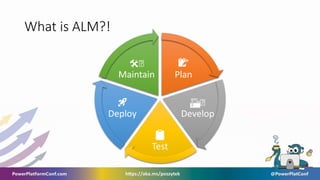
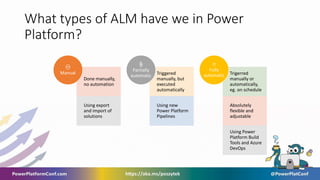
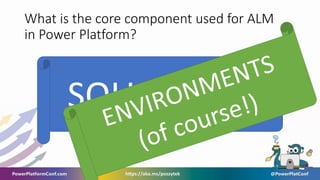
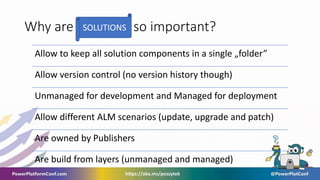
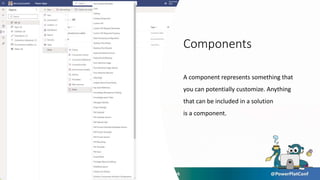
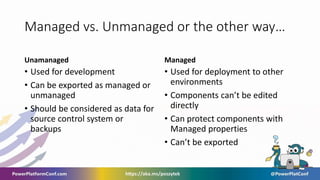
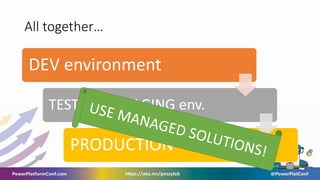
This document discusses Application Lifecycle Management (ALM) fundamentals in the Power Platform. It defines ALM and the different types, from manual to fully automatic. The core component for ALM in Power Platform is Solutions, which allow components to be grouped and version controlled. Solutions can be unmanaged for development or managed for deployment. The document also covers components, publishers, and the differences between managed and unmanaged solutions. It provides an overview of how updates, upgrades, and patches work with solutions and ALM processes like development, testing, and production.



![[DW&EU] Citizen Development: The missing pieces of the puzzle](https://cdn.slidesharecdn.com/ss_thumbnails/spencerharbarsjhspswarsaw2020v2-200407080554-thumbnail.jpg?width=640&height=640&fit=bounds)
![[PU&D] - The ultimate guide to UX design in PowerApps apps](https://cdn.slidesharecdn.com/ss_thumbnails/michalguzowskitheultimateguidetouxdesigninpowerappsapps-200404192326-thumbnail.jpg?width=640&height=640&fit=bounds)
![[DW&EU] - Bridging the Gap - Connecting IT and the Business to drive successf...](https://cdn.slidesharecdn.com/ss_thumbnails/antjelamartinespswarsawonline2020antjelamartinebridgingthegap-200404191759-thumbnail.jpg?width=640&height=640&fit=bounds)
![[PU&D] - Become a flow/Power Automate hero in 2020 with](https://cdn.slidesharecdn.com/ss_thumbnails/spswarsawsessiononlineapril2020-200403100712-200404191249-thumbnail.jpg?width=640&height=640&fit=bounds)
![[DW&EU] - The Cloud in my handbag](https://cdn.slidesharecdn.com/ss_thumbnails/thecloudinmyhandbag-200404190332-thumbnail.jpg?width=640&height=640&fit=bounds)
![[DW&EU] - Private Channels in Microsoft Teams - Deep Dive](https://cdn.slidesharecdn.com/ss_thumbnails/robertmulsow2020-04-03spswarsaw-privatechannelsrobert-mulsow-200404190319-thumbnail.jpg?width=640&height=640&fit=bounds)
![[PU&D] - Securing IT Against Modern Threats with Microsoft Cloud Security Tools](https://cdn.slidesharecdn.com/ss_thumbnails/noelmicrosoftcloudsecuritytools-200404190312-thumbnail.jpg?width=640&height=640&fit=bounds)
![[DW&EU] - Microsoft Forms - The Hidden Gem of O365](https://cdn.slidesharecdn.com/ss_thumbnails/mattwestonmicrosoftforms-thehiddengemofo365-200404190307-thumbnail.jpg?width=640&height=640&fit=bounds)
![[PU&D] - Create your personal Assistant with Microsoft Bot Framework Composer](https://cdn.slidesharecdn.com/ss_thumbnails/martingudelspswarsaw-createyourpersonalassistantwithmicrosoftbotframeworkcomposer-200404190304-thumbnail.jpg?width=640&height=640&fit=bounds)
![[DW&EU] - Case study: Office 365 user adoption roadmap step by step](https://cdn.slidesharecdn.com/ss_thumbnails/karoliinakettukarikettukarispswarsawonline3-200404190303-thumbnail.jpg?width=640&height=640&fit=bounds)
![[PU&D] - The road to Microsoft Teams from SharePoint](https://cdn.slidesharecdn.com/ss_thumbnails/jimmyhangtheroadtoteamsfromsharepointjimmy-200404190302-thumbnail.jpg?width=640&height=640&fit=bounds)
![[PU&D] - Power Platform Unchained](https://cdn.slidesharecdn.com/ss_thumbnails/djangolohn20200403sharepointsaturdaywarsawpowerplatformunchained-200404190257-thumbnail.jpg?width=640&height=640&fit=bounds)
![[PU&D] - Power Platform only for Citizen Developers?](https://cdn.slidesharecdn.com/ss_thumbnails/dawidziolkowskispswarsaw2020pponlyforcitizendevelopers-200404190255-thumbnail.jpg?width=640&height=640&fit=bounds)
![[DW&U] - To-Do, Doing, Done: How to manage work](https://cdn.slidesharecdn.com/ss_thumbnails/alaneardleyto-do-20200403-spswarsawonline-200404190254-thumbnail.jpg?width=640&height=640&fit=bounds)


![Getting Started with Apache Spark: Big Data Made Simple [Free Meetup]](https://cdn.slidesharecdn.com/ss_thumbnails/apachesparkgettingstarted-260203175547-8361bcc3-thumbnail.jpg?width=640&height=640&fit=bounds)


