Podcasting  & Slidecasting for Dissemination in Teaching and Learning [email_address] Flickr - socalgal_64
Overview Definitions & Examples Pedagogical and research value A bit of Media Theory... Technology involved: laptop or mic, Websites Options for licensing and distribution Steps involved Tips and tricks
Definitions and Examples Podcasting: “distribute (multimedia files) over the internet for playback on a mobile device or a personal computer” (Wordnet)   Slidecasting: “an audio podcast that is combined with a slideshow... presentation.” www.slideshare.net  commercial slide provides services for: Uploading slides (& audio) Combining  (optional) Accessing them
Value for Teaching & Research OF COURSE: record your lectures for your class BUT: There are many other pedagogical uses: Record presentation in one context and provide as supplementary info in another class or context Record presentation in face-to-face class to possibly use online Record your presentation at a conference to disseminate it more broadly via your CV, etc. (some conferences are now run this way)
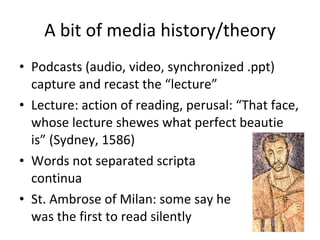
A bit of media history/theory Podcasts (audio, video, synchronized .ppt) capture and recast the “lecture” Lecture: action of reading, perusal: “That face, whose lecture shewes what perfect beautie is” (Sydney, 1586) Words not separated scripta  continua St. Ambrose of Milan: some say he was the first to read silently
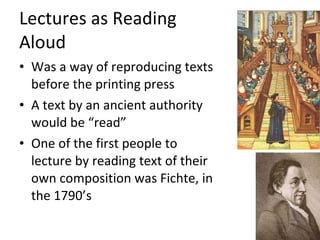
Lectures as Reading  Aloud Was a way of reproducing texts before the printing press A text by an ancient authority would be “read” One of the first people to lecture by reading text of their own composition was Fichte, in the 1790’s
Contradictory form of Lecture “ Guide on the side” vs. “Sage on the stage” “ Chalk and Talk;” “industrial model”  Randy Pausch Last Lecture; Walter Lewin, lectures on classical mechanics mediatrans.ca/test/Sean_B_Franzel.html New Media Studies Centre:  nms.tru.ca   Lecture as oral genre; combines with text/multimedia with great flexibility
Technology needed for Slideshare Presentations : pdf, ppt, pps, pptx, ppsx, pot, potx (Powerpoint); odp (OpenOffice); key, zip (Apple Keynote).  Documents : pdf, doc, docx, rtf, xls (MSOffice); odt, ods(OpenOffice); Apple iWork Pages MP3:  the only audio format 100 Mb upload limit
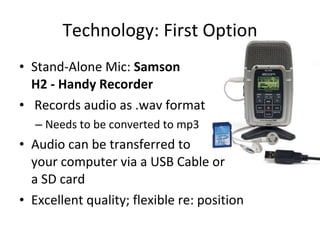
Technology: First Option Stand-Alone Mic:  Samson  H2 - Handy Recorder Records audio as .wav format Needs to be converted to mp3 Audio can be transferred to your computer via a USB Cable or a SD card Excellent quality; flexible re: position
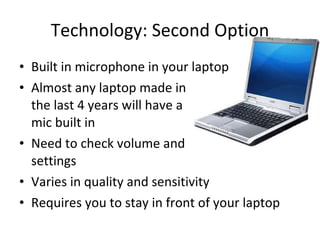
Technology: Second Option Built in microphone in your laptop Almost any laptop made in  the last 4 years will have a  mic built in Need to check volume and  settings Varies in quality and sensitivity  Requires you to stay in front of your laptop
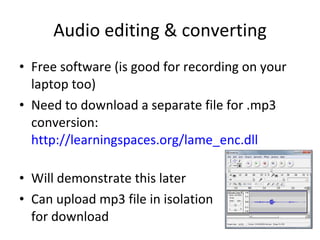
Audio editing & converting Free software (is good for recording on your laptop too) Need to download a separate file for .mp3 conversion:  http://learningspaces.org/lame_enc.dll   Will demonstrate this later Can upload mp3 file in isolation for download
Options for Licensing and Distribution You retain the  copyright  to your presentation on Slideshare (& in other contexts by default) You can  license  it for particular kinds of use using Creative Commons licensing for Canada: Attribution always required Non-commercial use only Others can/cannot modify Others have to continue to share it Applies to  all contents , incl. photos, etc.
Steps involved (after your presentation) Save Audio Edit Audio Upload Audio and Slides Combine and synchronize audio and slides on slideshare.net; see demo at:  http://www.slideshare.net/jboutelle/slidecasting-101   Share with your students, colleagues, friends! E.g.  http://learningspaces.org
Tips and Tricks Try different settings in converting audio to mp3 to “satisfice” file size and quality Use a photo (with an appropriate CC license) from Flickr for your title slide You can delete the “ums” and “aahs” from your audio file easily using Audacity Re-load the audio-to-slide synch tool in Slideshare if controls not showing initially
Collections TED Talks:  http://www.ted.com/ Webcast.Berkeley:  http://webcast.berkeley.edu/ iTunes U:  http://www.apple.com/education/itunes-u/ BookTV:  http://www.booktv.org/ Conferences in your field; e.g.:  http://mediatrans.ca/test

Podcasting

  • 1.
    Podcasting &Slidecasting for Dissemination in Teaching and Learning [email_address] Flickr - socalgal_64
  • 2.
    Overview Definitions &Examples Pedagogical and research value A bit of Media Theory... Technology involved: laptop or mic, Websites Options for licensing and distribution Steps involved Tips and tricks
  • 3.
    Definitions and ExamplesPodcasting: “distribute (multimedia files) over the internet for playback on a mobile device or a personal computer” (Wordnet)   Slidecasting: “an audio podcast that is combined with a slideshow... presentation.” www.slideshare.net commercial slide provides services for: Uploading slides (& audio) Combining (optional) Accessing them
  • 4.
    Value for Teaching& Research OF COURSE: record your lectures for your class BUT: There are many other pedagogical uses: Record presentation in one context and provide as supplementary info in another class or context Record presentation in face-to-face class to possibly use online Record your presentation at a conference to disseminate it more broadly via your CV, etc. (some conferences are now run this way)
  • 5.
    A bit ofmedia history/theory Podcasts (audio, video, synchronized .ppt) capture and recast the “lecture” Lecture: action of reading, perusal: “That face, whose lecture shewes what perfect beautie is” (Sydney, 1586) Words not separated scripta continua St. Ambrose of Milan: some say he was the first to read silently
  • 6.
    Lectures as Reading Aloud Was a way of reproducing texts before the printing press A text by an ancient authority would be “read” One of the first people to lecture by reading text of their own composition was Fichte, in the 1790’s
  • 7.
    Contradictory form ofLecture “ Guide on the side” vs. “Sage on the stage” “ Chalk and Talk;” “industrial model” Randy Pausch Last Lecture; Walter Lewin, lectures on classical mechanics mediatrans.ca/test/Sean_B_Franzel.html New Media Studies Centre: nms.tru.ca Lecture as oral genre; combines with text/multimedia with great flexibility
  • 8.
    Technology needed forSlideshare Presentations : pdf, ppt, pps, pptx, ppsx, pot, potx (Powerpoint); odp (OpenOffice); key, zip (Apple Keynote).  Documents : pdf, doc, docx, rtf, xls (MSOffice); odt, ods(OpenOffice); Apple iWork Pages MP3: the only audio format 100 Mb upload limit
  • 9.
    Technology: First OptionStand-Alone Mic: Samson H2 - Handy Recorder Records audio as .wav format Needs to be converted to mp3 Audio can be transferred to your computer via a USB Cable or a SD card Excellent quality; flexible re: position
  • 10.
    Technology: Second OptionBuilt in microphone in your laptop Almost any laptop made in the last 4 years will have a mic built in Need to check volume and settings Varies in quality and sensitivity Requires you to stay in front of your laptop
  • 11.
    Audio editing &converting Free software (is good for recording on your laptop too) Need to download a separate file for .mp3 conversion: http://learningspaces.org/lame_enc.dll Will demonstrate this later Can upload mp3 file in isolation for download
  • 12.
    Options for Licensingand Distribution You retain the copyright to your presentation on Slideshare (& in other contexts by default) You can license it for particular kinds of use using Creative Commons licensing for Canada: Attribution always required Non-commercial use only Others can/cannot modify Others have to continue to share it Applies to all contents , incl. photos, etc.
  • 13.
    Steps involved (afteryour presentation) Save Audio Edit Audio Upload Audio and Slides Combine and synchronize audio and slides on slideshare.net; see demo at: http://www.slideshare.net/jboutelle/slidecasting-101 Share with your students, colleagues, friends! E.g. http://learningspaces.org
  • 14.
    Tips and TricksTry different settings in converting audio to mp3 to “satisfice” file size and quality Use a photo (with an appropriate CC license) from Flickr for your title slide You can delete the “ums” and “aahs” from your audio file easily using Audacity Re-load the audio-to-slide synch tool in Slideshare if controls not showing initially
  • 15.
    Collections TED Talks: http://www.ted.com/ Webcast.Berkeley: http://webcast.berkeley.edu/ iTunes U: http://www.apple.com/education/itunes-u/ BookTV: http://www.booktv.org/ Conferences in your field; e.g.: http://mediatrans.ca/test