© 2011 Extreme Networks, Inc. All rights reserved.
Bezpieczne i wysoce skalowalne
Data Center
Piotr Szolkowski
Pre-sales Support Engineer
pszolkowski@extremenetworks.com
© 2011 Extreme Networks, Inc. All rights reserved.
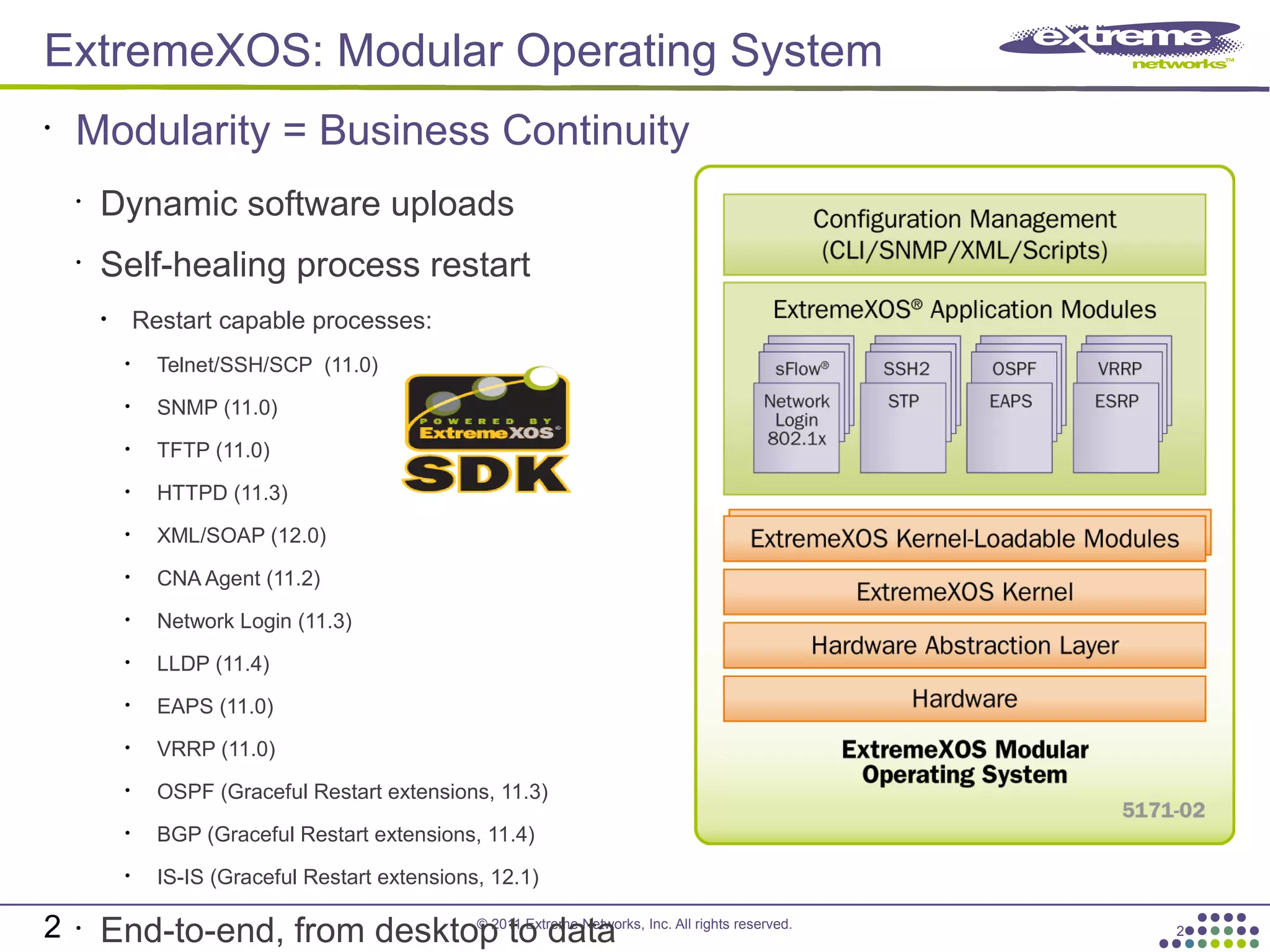
ExtremeXOS: Modular Operating System
2
•
Dynamic software uploads
•
Self-healing process restart
• Restart capable processes:
• Telnet/SSH/SCP (11.0)
• SNMP (11.0)
• TFTP (11.0)
• HTTPD (11.3)
• XML/SOAP (12.0)
• CNA Agent (11.2)
• Network Login (11.3)
• LLDP (11.4)
• EAPS (11.0)
• VRRP (11.0)
• OSPF (Graceful Restart extensions, 11.3)
• BGP (Graceful Restart extensions, 11.4)
• IS-IS (Graceful Restart extensions, 12.1)
•
End-to-end, from desktop to data
•
Modularity = Business Continuity
2
© 2011 Extreme Networks, Inc. All rights reserved.
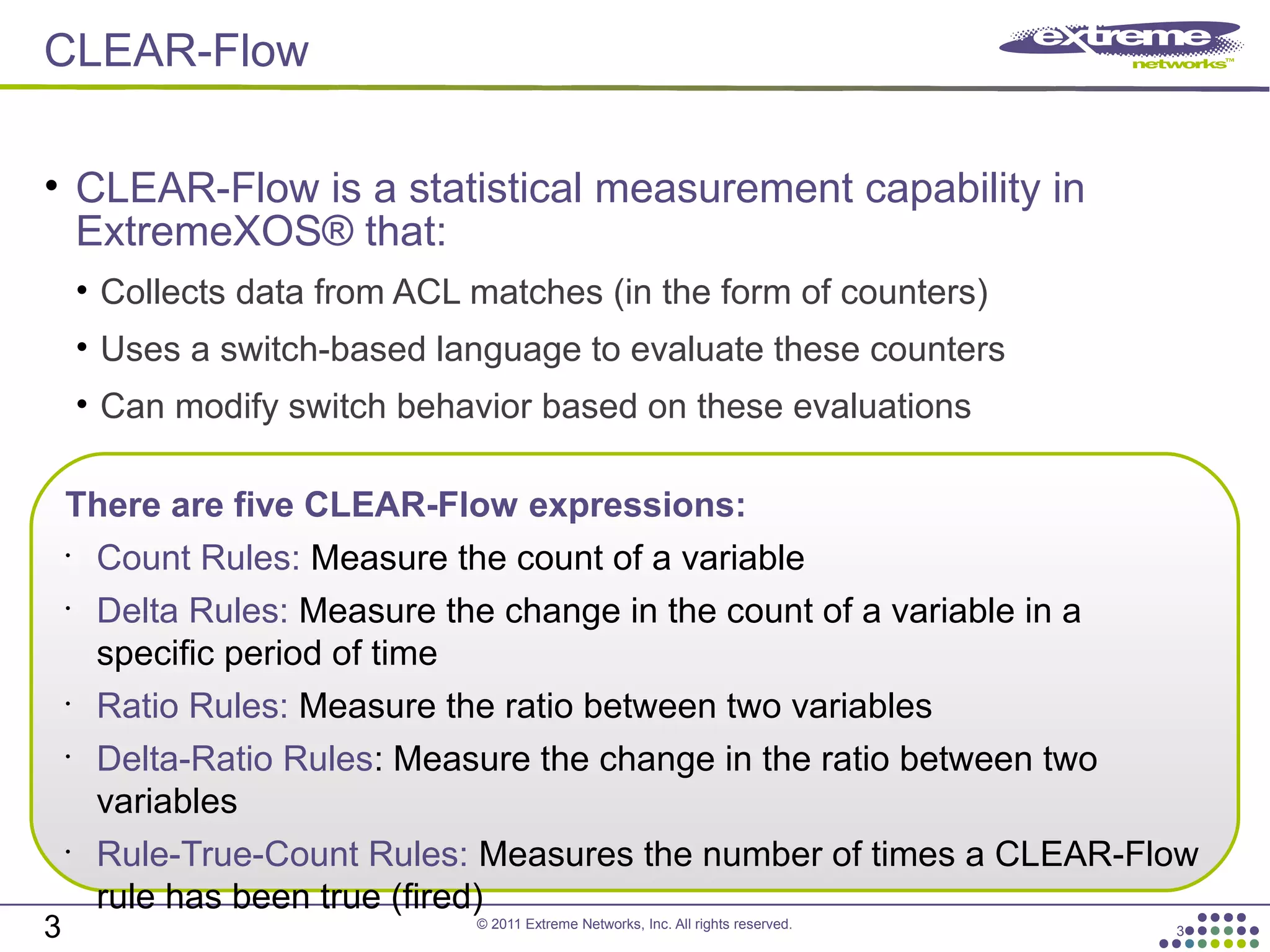
CLEAR-Flow
3
• CLEAR-Flow is a statistical measurement capability in
ExtremeXOS® that:
• Collects data from ACL matches (in the form of counters)
• Uses a switch-based language to evaluate these counters
• Can modify switch behavior based on these evaluations
3
There are five CLEAR-Flow expressions:
•
Count Rules: Measure the count of a variable
•
Delta Rules: Measure the change in the count of a variable in a
specific period of time
•
Ratio Rules: Measure the ratio between two variables
•
Delta-Ratio Rules: Measure the change in the ratio between two
variables
•
Rule-True-Count Rules: Measures the number of times a CLEAR-Flow
rule has been true (fired)
© 2011 Extreme Networks, Inc. All rights reserved.
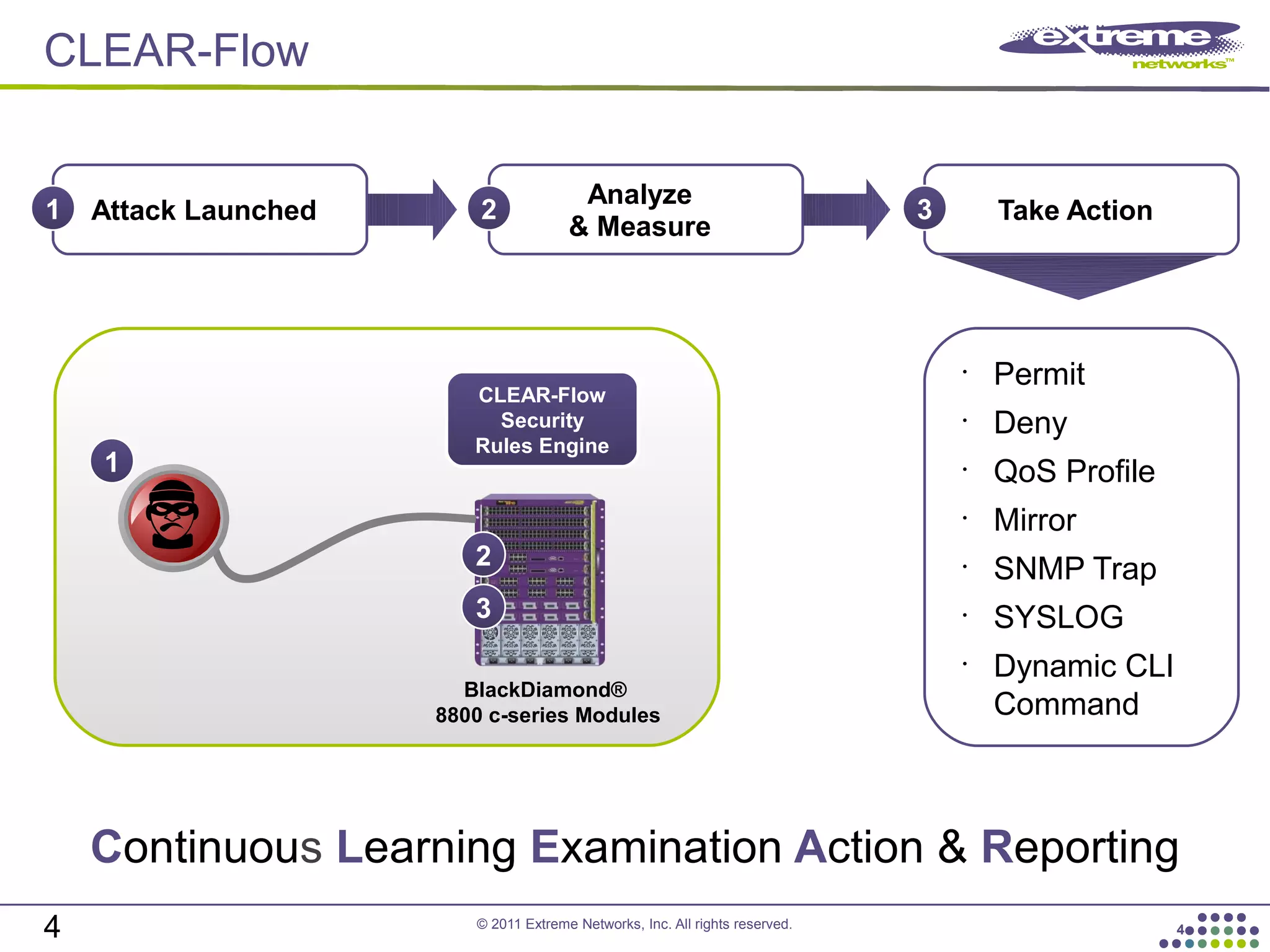
CLEAR-Flow
4
Attack Launched1
Analyze
& Measure
2
BlackDiamond®
8800 c-series Modules
CLEAR-Flow
Security
Rules Engine
1
2
Take Action
3
•
Permit
•
Deny
•
QoS Profile
•
Mirror
•
SNMP Trap
•
SYSLOG
•
Dynamic CLI
Command
Continuous Learning Examination Action & Reporting
3
4
© 2011 Extreme Networks, Inc. All rights reserved.
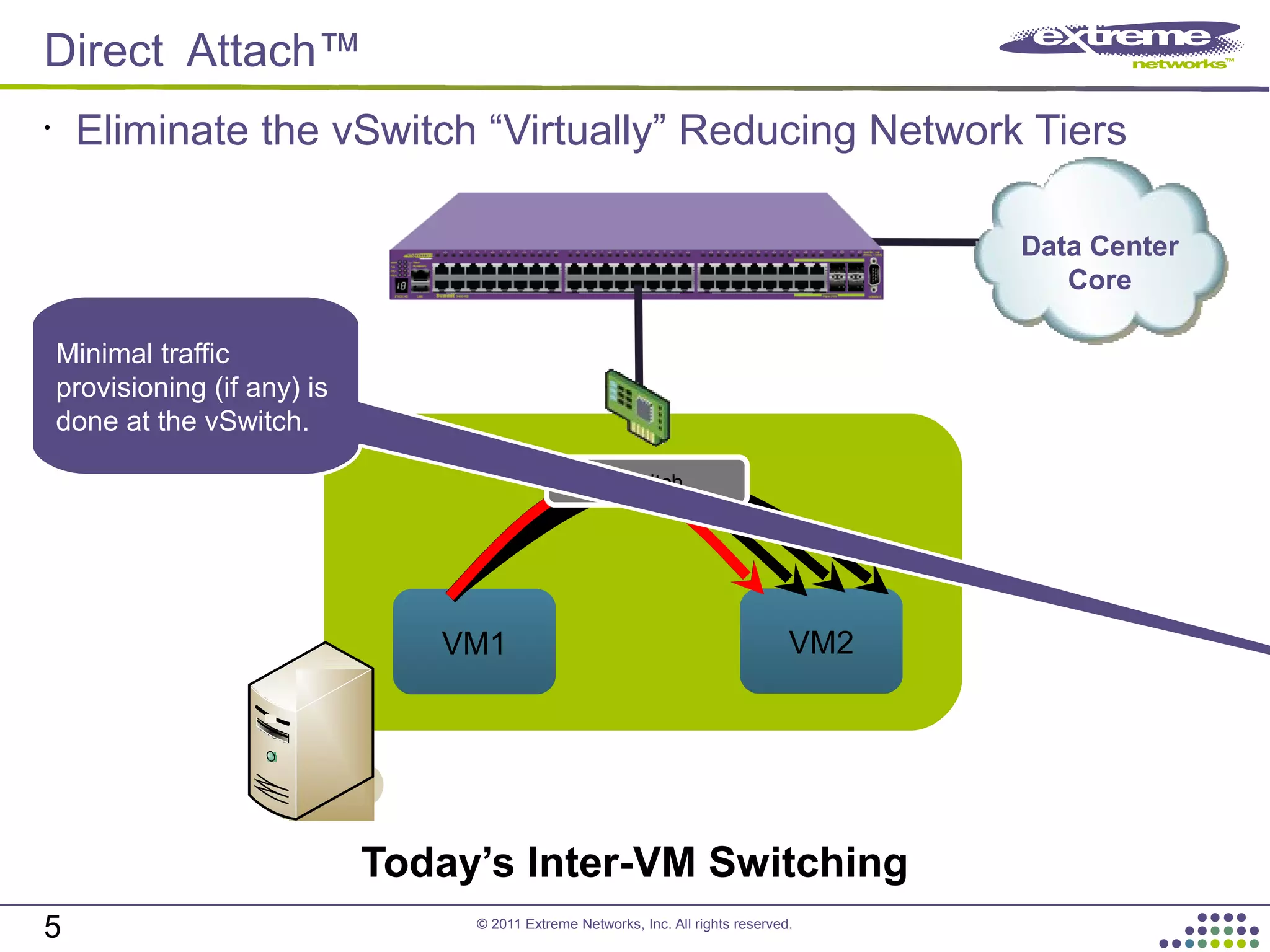
Direct Attach™
5
•
Eliminate the vSwitch “Virtually” Reducing Network Tiers
Data Center
Core
VM1 VM2
vSwitch
Minimal traffic
provisioning (if any) is
done at the vSwitch.
Today’s Inter-VM Switching
© 2011 Extreme Networks, Inc. All rights reserved.
Direct Attach™
6
•
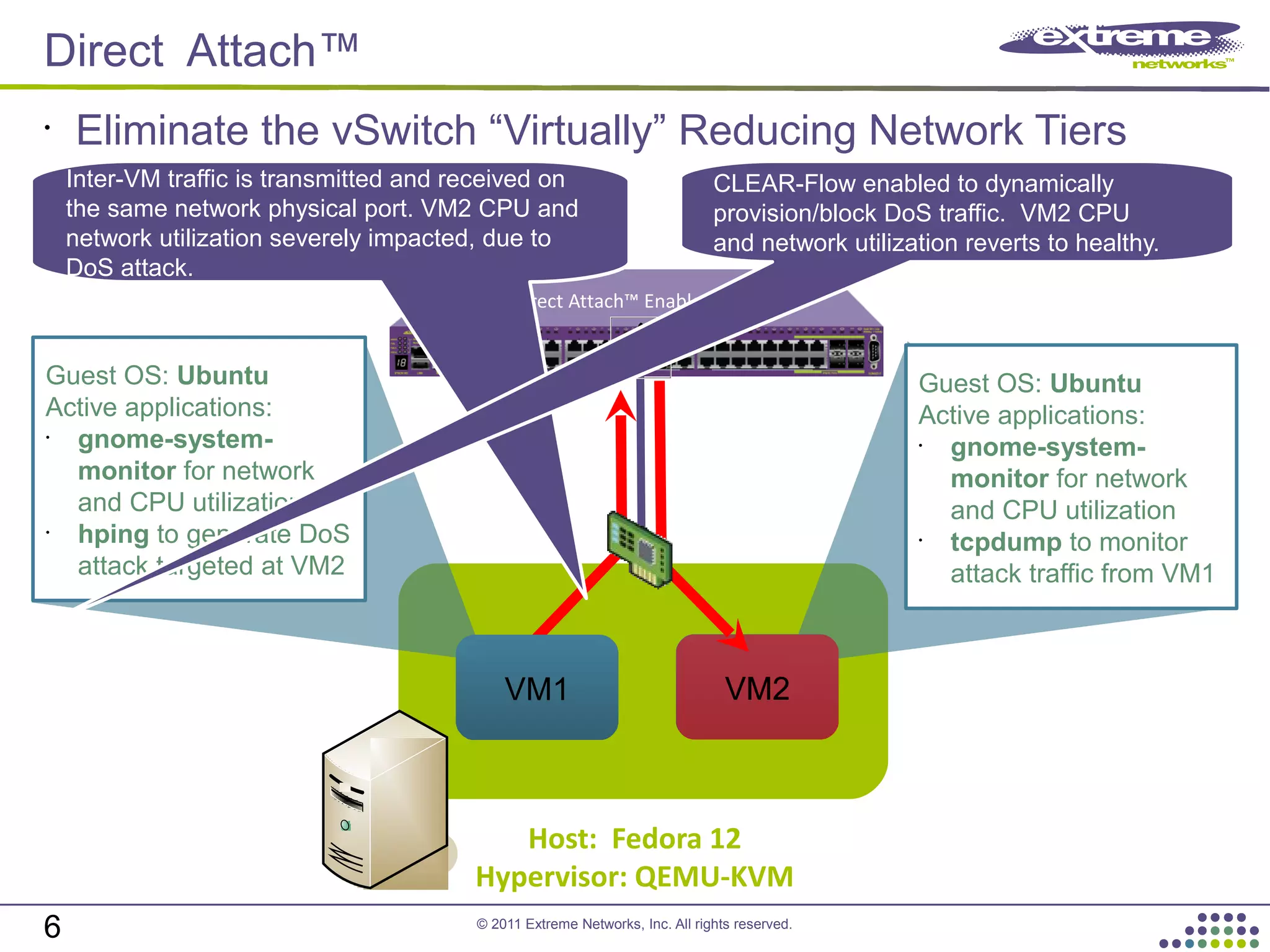
Eliminate the vSwitch “Virtually” Reducing Network Tiers
VM2
Direct Attach™ Enabled Switch
Host: Fedora 12
Hypervisor: QEMU-KVM
Guest OS: Ubuntu
Active applications:
•
gnome-system-
monitor for network
and CPU utilization
•
tcpdump to monitor
attack traffic from VM1
VM1
Guest OS: Ubuntu
Active applications:
•
gnome-system-
monitor for network
and CPU utilization
•
hping to generate DoS
attack targeted at VM2
VM2
Inter-VM traffic is transmitted and received on
the same network physical port. VM2 CPU and
network utilization severely impacted, due to
DoS attack.
CLEAR-Flow enabled to dynamically
provision/block DoS traffic. VM2 CPU
and network utilization reverts to healthy.
© 2011 Extreme Networks, Inc. All rights reserved.
Virtual Machine Manager
NIC NIC
Hypervisor Hypervisor
Network Admin
VM1
IP: 1.1.1.2
MAC: 00:0A
Switch Port
Config
IP: 1.1.1.2
MAC: 00:0A
QoS: QP7
ACL: Deny HTTP
Switch Port
Config
None or
Disabled
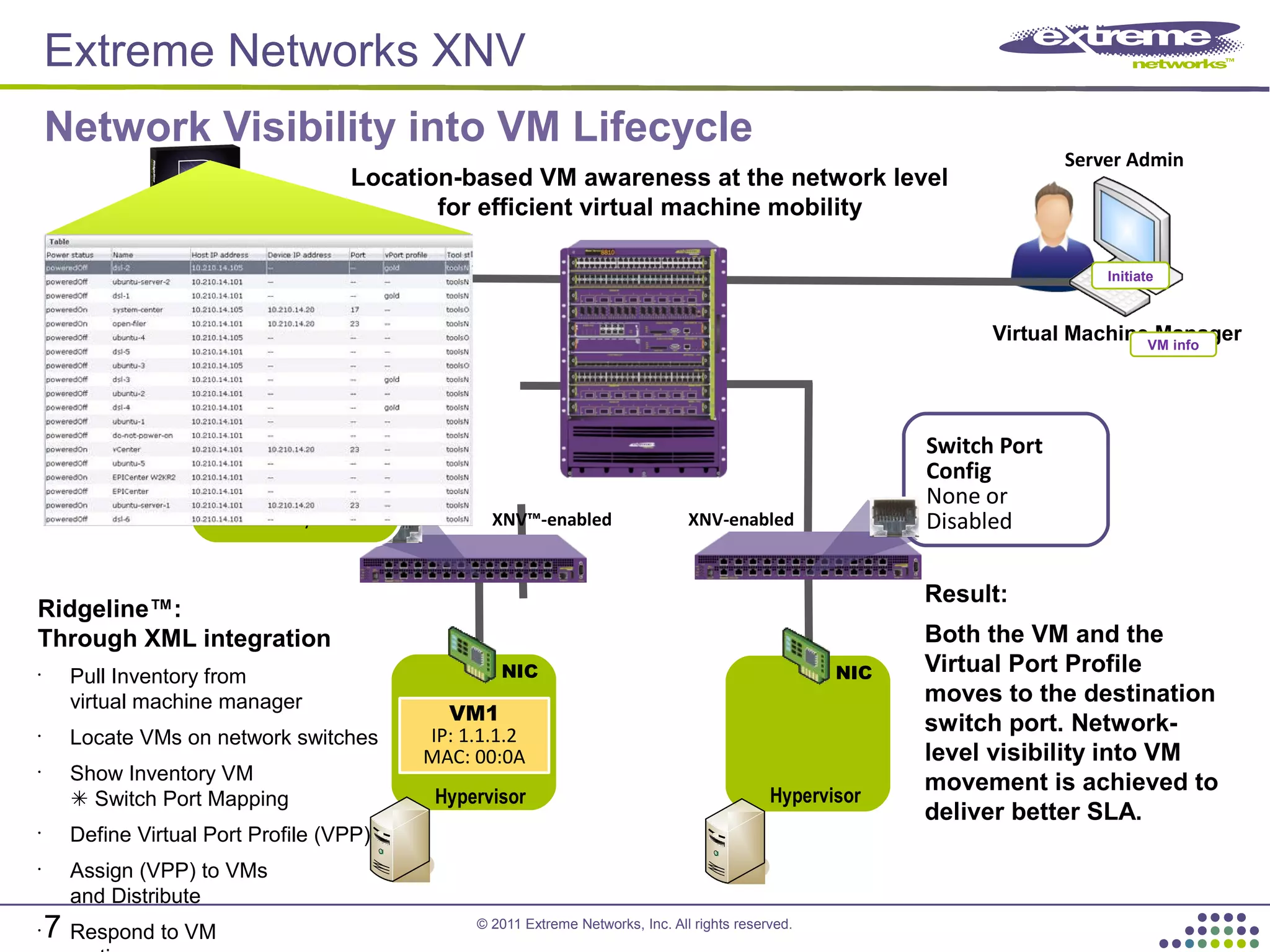
Location-based VM awareness at the network level
for efficient virtual machine mobility
VM info
Switch Port Config
Virtual Port Profile
IP: 1.1.1.2
MAC: 00:0A
QoS: QP7
ACL: Deny HTTP XNV-enabledXNV™-enabled
Switch Port Config
Virtual Port Profile
IP: 1.1.1.2
MAC: 00:0A
QoS: QP7
ACL: Deny HTTP
Result:
Both the VM and the
Virtual Port Profile
moves to the destination
switch port. Network-
level visibility into VM
movement is achieved to
deliver better SLA.
Ridgeline™:
Through XML integration
•
Pull Inventory from
virtual machine manager
•
Locate VMs on network switches
•
Show Inventory VM
Switch Port Mapping
•
Define Virtual Port Profile (VPP)
•
Assign (VPP) to VMs
and Distribute
•
Respond to VM
Initiate
Query
Network Visibility into VM Lifecycle
Server Admin
Extreme Networks XNV
7
© 2011 Extreme Networks, Inc. All rights reserved.
M-LAG DA: Link Resiliency
8 8
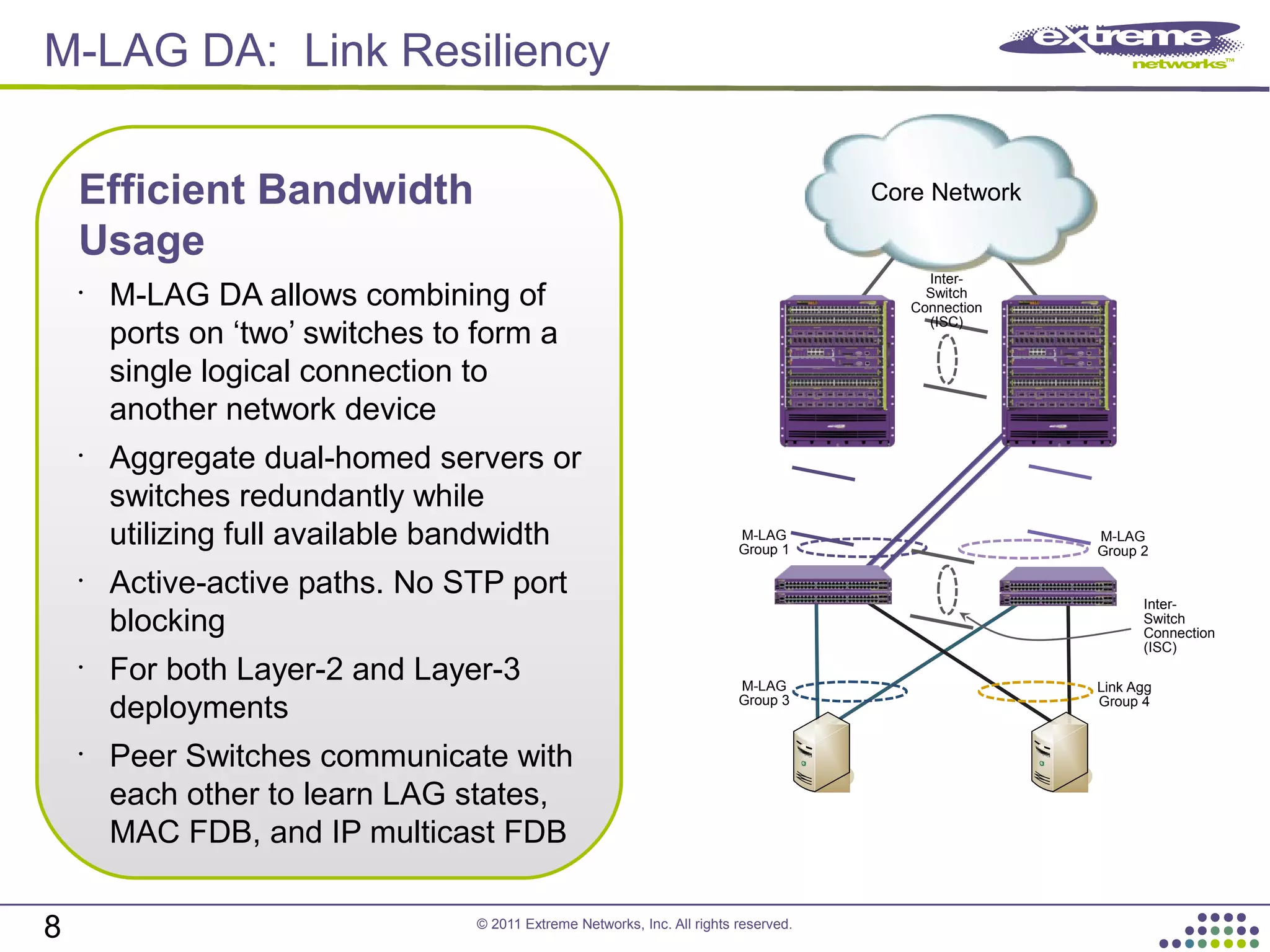
Efficient Bandwidth
Usage
•
M-LAG DA allows combining of
ports on ‘two’ switches to form a
single logical connection to
another network device
•
Aggregate dual-homed servers or
switches redundantly while
utilizing full available bandwidth
•
Active-active paths. No STP port
blocking
•
For both Layer-2 and Layer-3
deployments
•
Peer Switches communicate with
each other to learn LAG states,
MAC FDB, and IP multicast FDB
Core Network
M-LAG
Group 1
M-LAG
Group 2
M-LAG
Group 3
Link Agg
Group 4
Inter-
Switch
Connection
(ISC)
Inter-
Switch
Connection
(ISC)
© 2011 Extreme Networks, Inc. All rights reserved.
9
Summit X670 Top of Rack
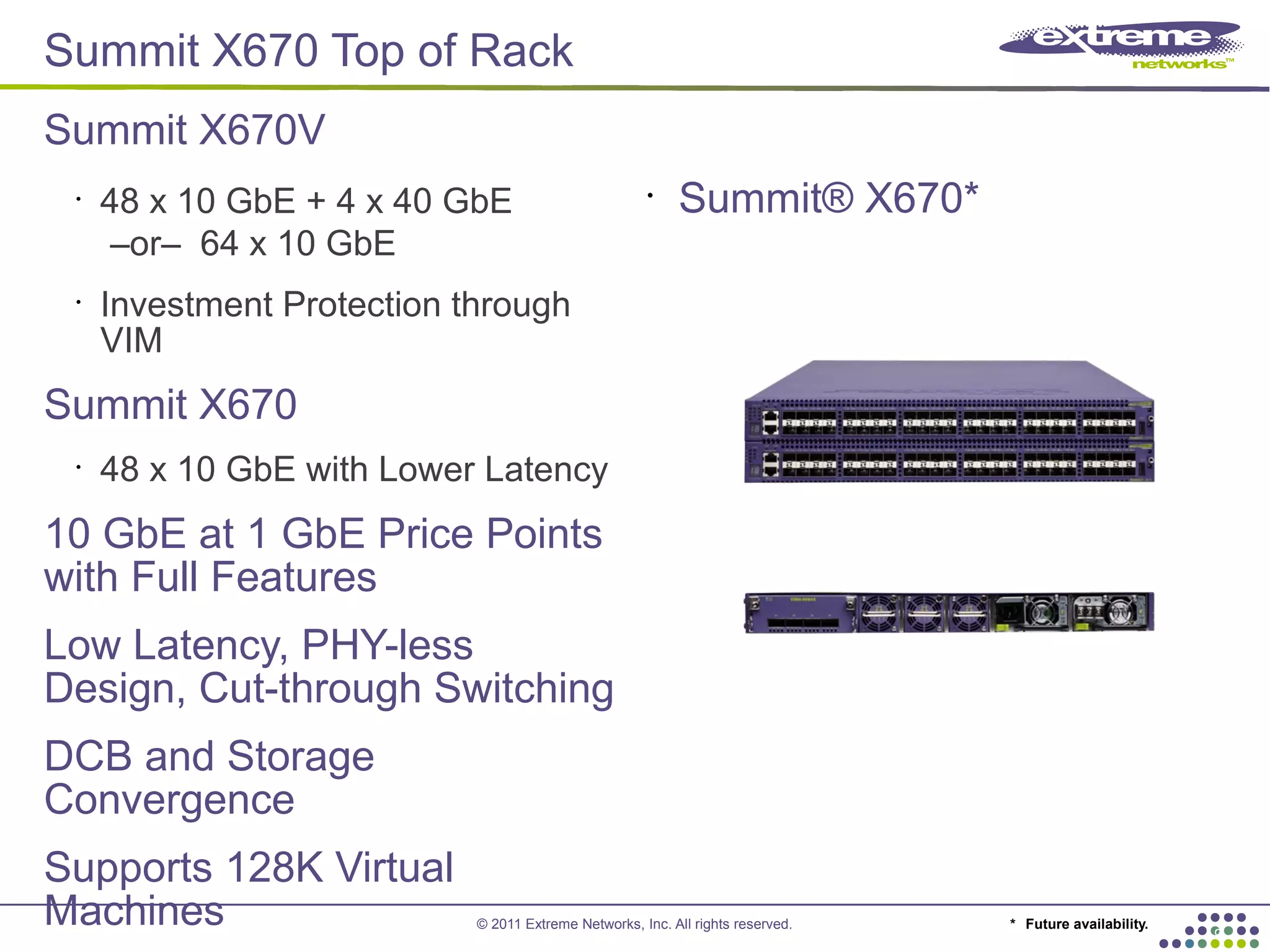
Summit X670V
•
48 x 10 GbE + 4 x 40 GbE
–or– 64 x 10 GbE
•
Investment Protection through
VIM
Summit X670
•
48 x 10 GbE with Lower Latency
10 GbE at 1 GbE Price Points
with Full Features
Low Latency, PHY-less
Design, Cut-through Switching
DCB and Storage
Convergence
Supports 128K Virtual
Machines
•
Summit® X670*
* Future availability.
© 2011 Extreme Networks, Inc. All rights reserved.
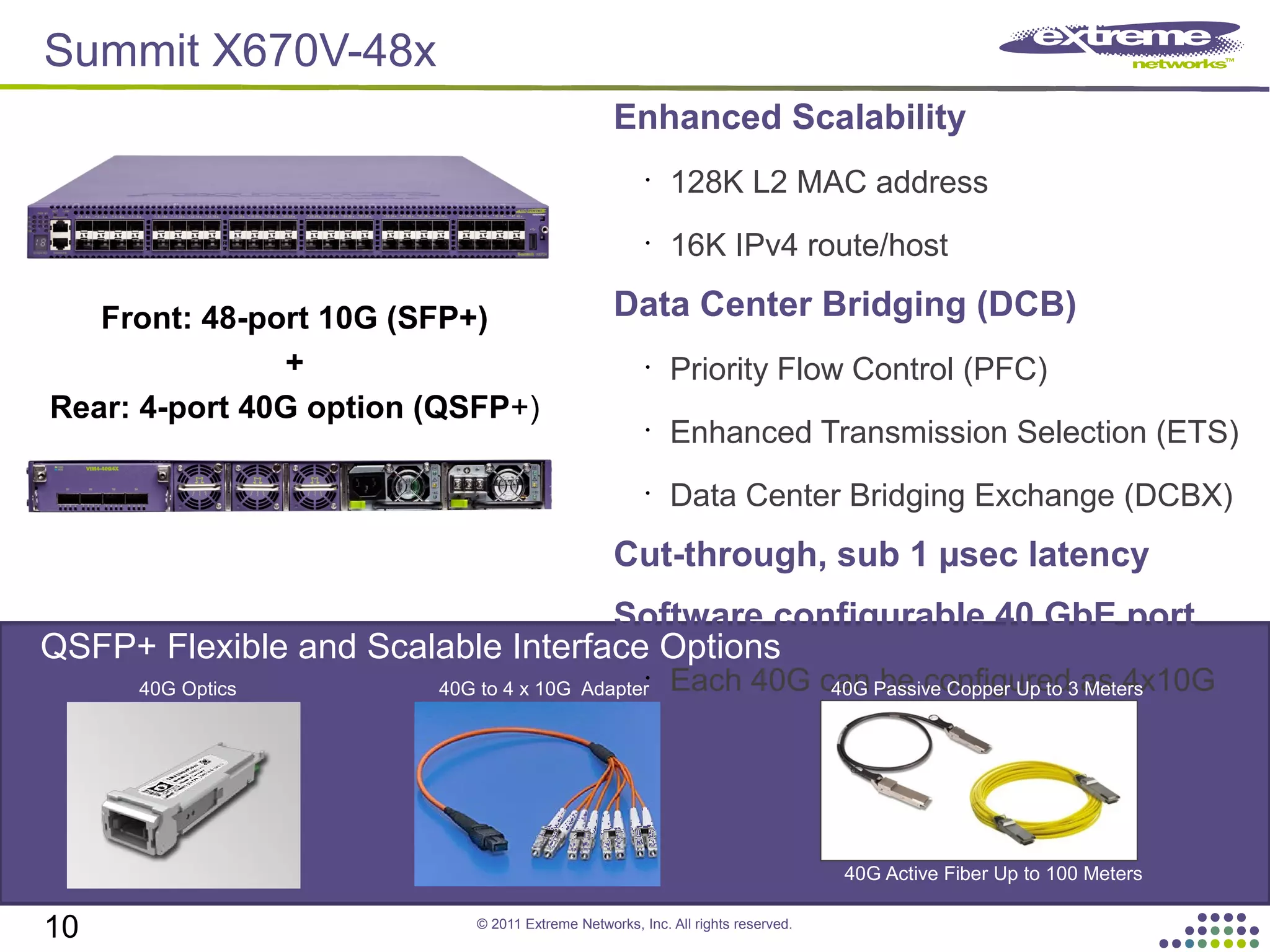
Enhanced Scalability
•
128K L2 MAC address
•
16K IPv4 route/host
Data Center Bridging (DCB)
•
Priority Flow Control (PFC)
•
Enhanced Transmission Selection (ETS)
•
Data Center Bridging Exchange (DCBX)
Cut-through, sub 1 µsec latency
Software configurable 40 GbE port
•
Each 40G can be configured as 4x10G
Front: 48-port 10G (SFP+)
+
Rear: 4-port 40G option (QSFP+)
40G Optics 40G to 4 x 10G Adapter 40G Passive Copper Up to 3 Meters
QSFP+ Flexible and Scalable Interface Options
10
40G Active Fiber Up to 100 Meters
Summit X670V-48x
© 2011 Extreme Networks, Inc. All rights reserved.
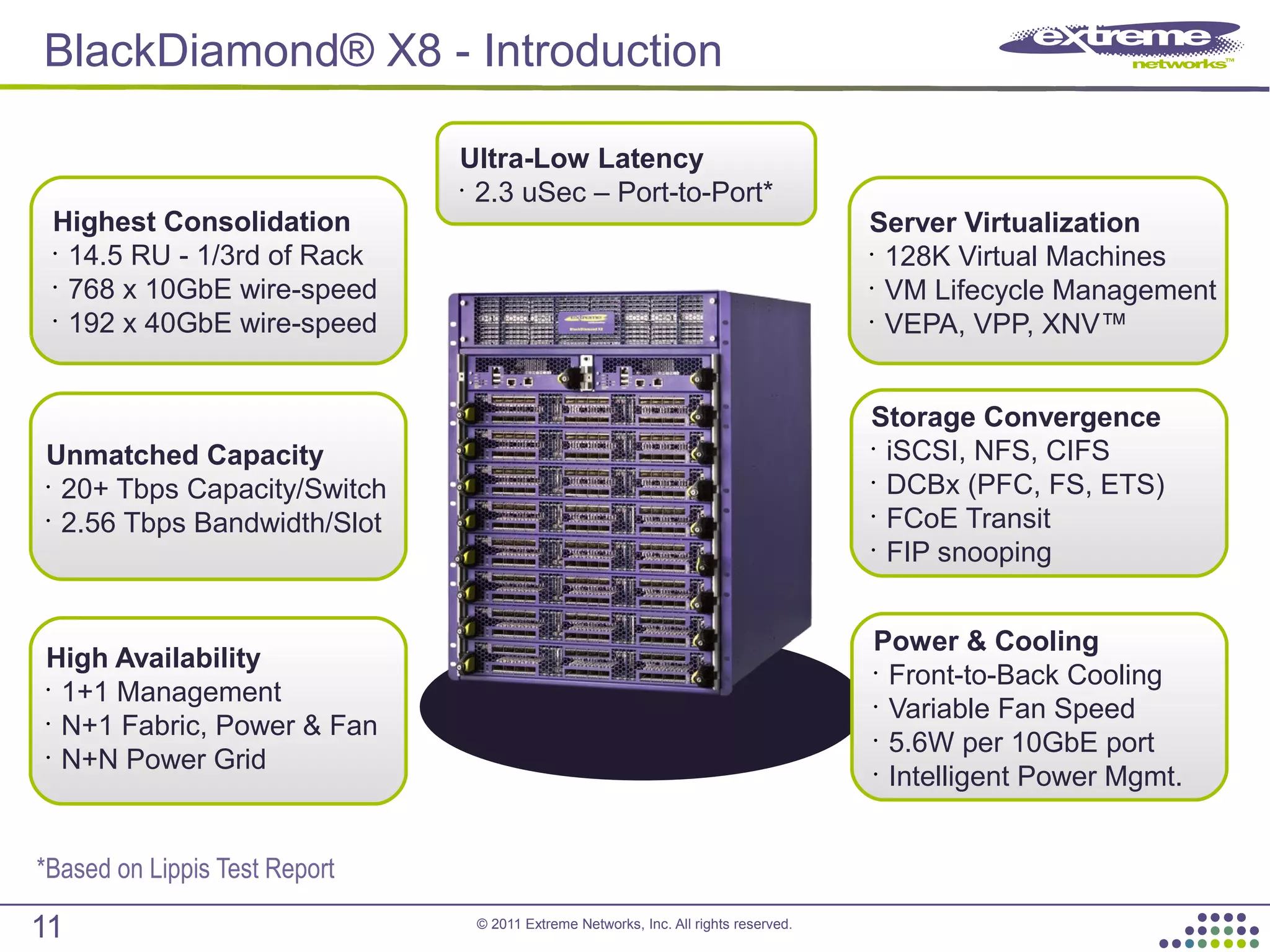
BlackDiamond® X8 - Introduction
Highest Consolidation
•
14.5 RU - 1/3rd of Rack
•
768 x 10GbE wire-speed
•
192 x 40GbE wire-speed
Unmatched Capacity
•
20+ Tbps Capacity/Switch
•
2.56 Tbps Bandwidth/Slot
Ultra-Low Latency
•
2.3 uSec – Port-to-Port*
High Availability
•
1+1 Management
•
N+1 Fabric, Power & Fan
•
N+N Power Grid
Server Virtualization
•
128K Virtual Machines
•
VM Lifecycle Management
•
VEPA, VPP, XNV™
Storage Convergence
•
iSCSI, NFS, CIFS
•
DCBx (PFC, FS, ETS)
•
FCoE Transit
•
FIP snooping
Power & Cooling
•
Front-to-Back Cooling
•
Variable Fan Speed
•
5.6W per 10GbE port
•
Intelligent Power Mgmt.
11
*Based on Lippis Test Report
© 2011 Extreme Networks, Inc. All rights reserved.
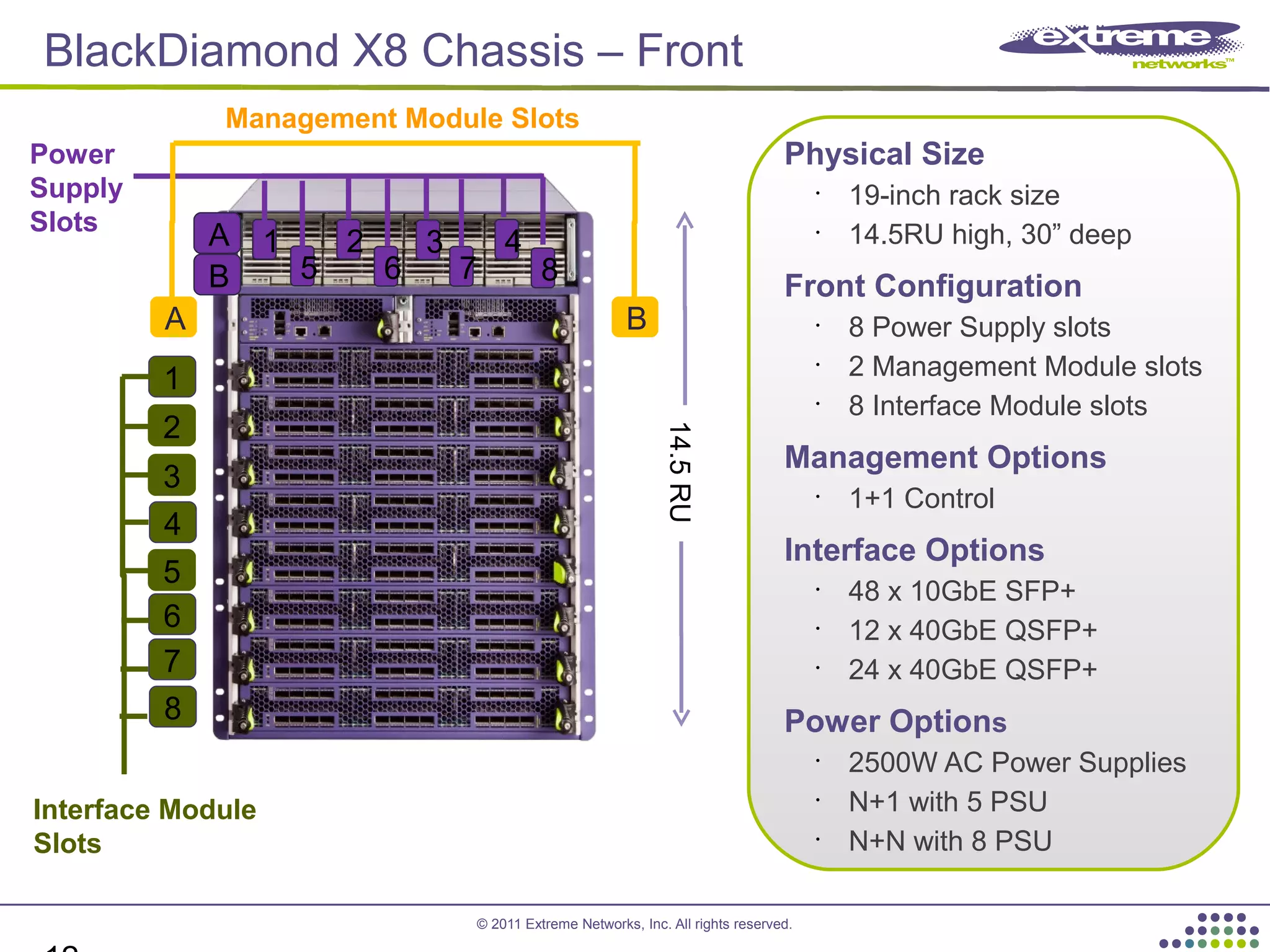
BlackDiamond X8 Chassis – Front
Management Module Slots
Power
Supply
Slots
Interface Module
Slots
BA
1
2
3
4
5
1 2 3 4
5 6 7 8
6
7
8
Physical Size
•
19-inch rack size
•
14.5RU high, 30” deep
Front Configuration
•
8 Power Supply slots
•
2 Management Module slots
•
8 Interface Module slots
Management Options
•
1+1 Control
Interface Options
•
48 x 10GbE SFP+
•
12 x 40GbE QSFP+
•
24 x 40GbE QSFP+
Power Options
•
2500W AC Power Supplies
•
N+1 with 5 PSU
•
N+N with 8 PSU
14.5RU
B
A
© 2011 Extreme Networks, Inc. All rights reserved.
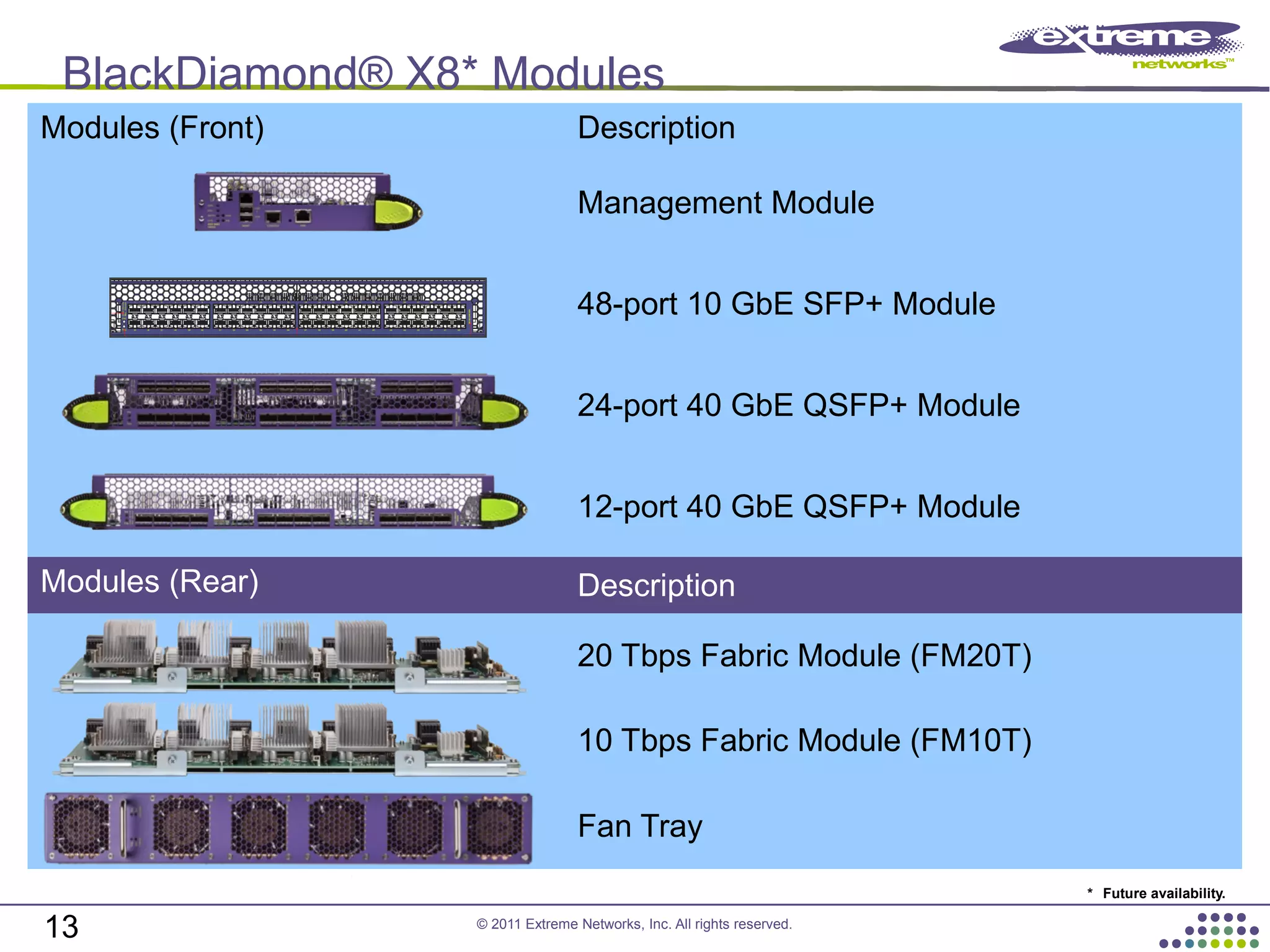
BlackDiamond® X8* Modules
13
Modules (Front) Description
Management Module
48-port 10 GbE SFP+ Module
24-port 40 GbE QSFP+ Module
12-port 40 GbE QSFP+ Module
Modules (Rear) Description
20 Tbps Fabric Module (FM20T)
10 Tbps Fabric Module (FM10T)
Fan Tray
* Future availability.
© 2011 Extreme Networks, Inc. All rights reserved.
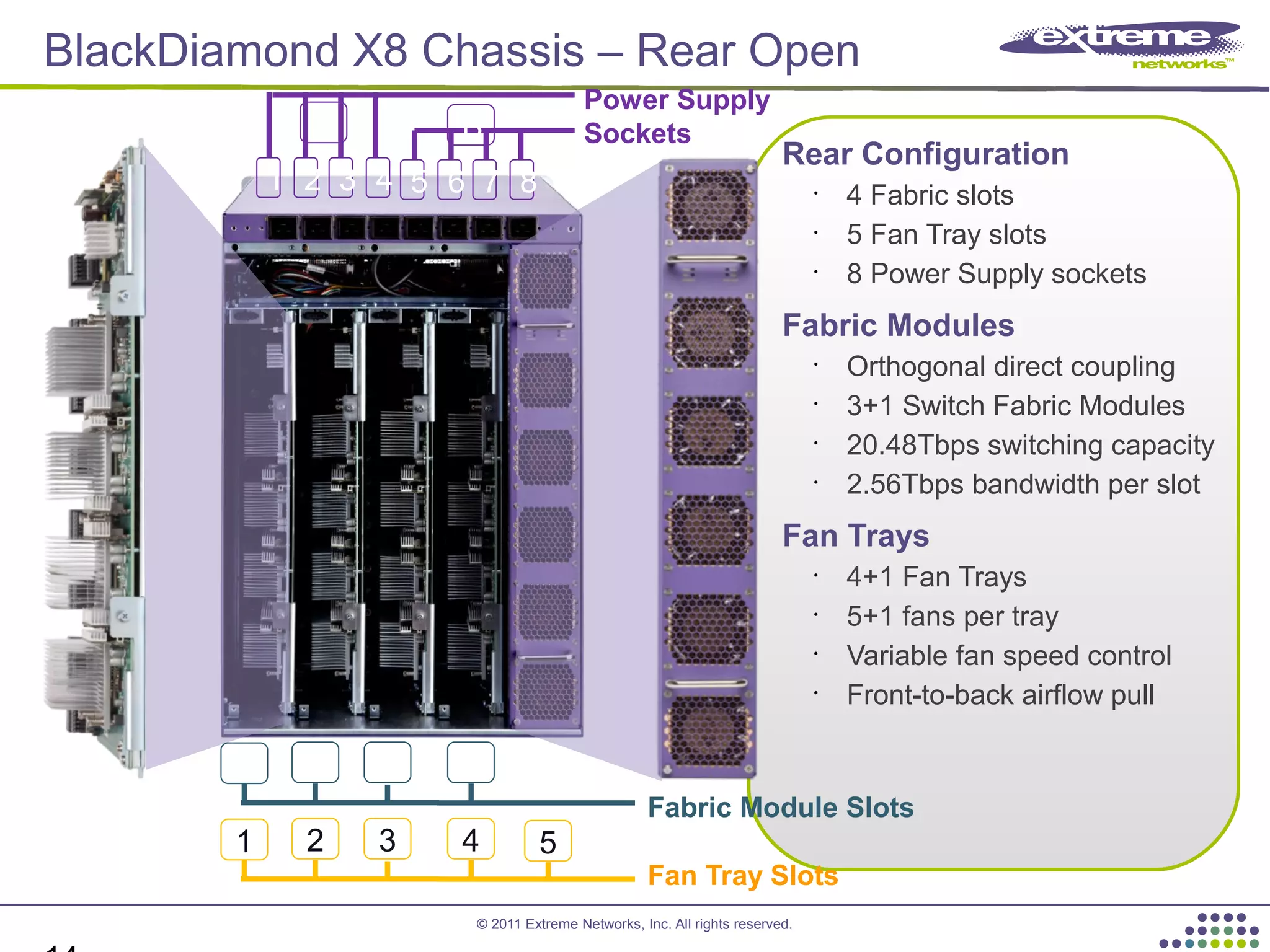
BlackDiamond X8 Chassis – Rear Open
Rear Configuration
•
4 Fabric slots
•
5 Fan Tray slots
•
8 Power Supply sockets
Fabric Modules
•
Orthogonal direct coupling
•
3+1 Switch Fabric Modules
•
20.48Tbps switching capacity
•
2.56Tbps bandwidth per slot
Fan Trays
•
4+1 Fan Trays
•
5+1 fans per tray
•
Variable fan speed control
•
Front-to-back airflow pull
Fan Tray Slots
Fabric Module Slots
1 2 3 4
1 2 3 4 5
Power Supply
Sockets
1 2 3 4 5 6 7 8
A B
© 2011 Extreme Networks, Inc. All rights reserved.
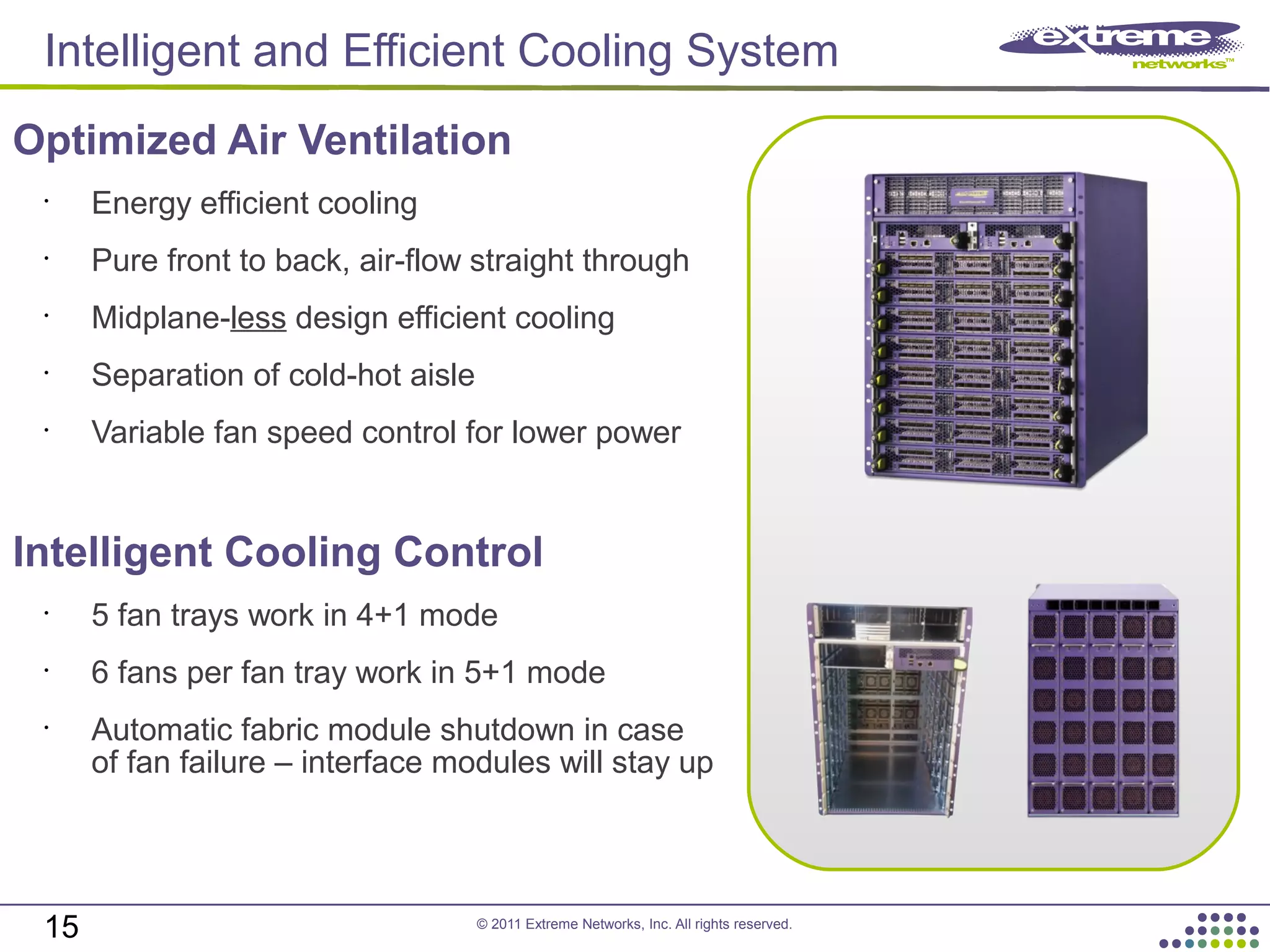
Optimized Air Ventilation
•
Energy efficient cooling
•
Pure front to back, air-flow straight through
•
Midplane-less design efficient cooling
•
Separation of cold-hot aisle
•
Variable fan speed control for lower power
Intelligent Cooling Control
•
5 fan trays work in 4+1 mode
•
6 fans per fan tray work in 5+1 mode
•
Automatic fabric module shutdown in case
of fan failure – interface modules will stay up
15
Intelligent and Efficient Cooling System
© 2011 Extreme Networks, Inc. All rights reserved.
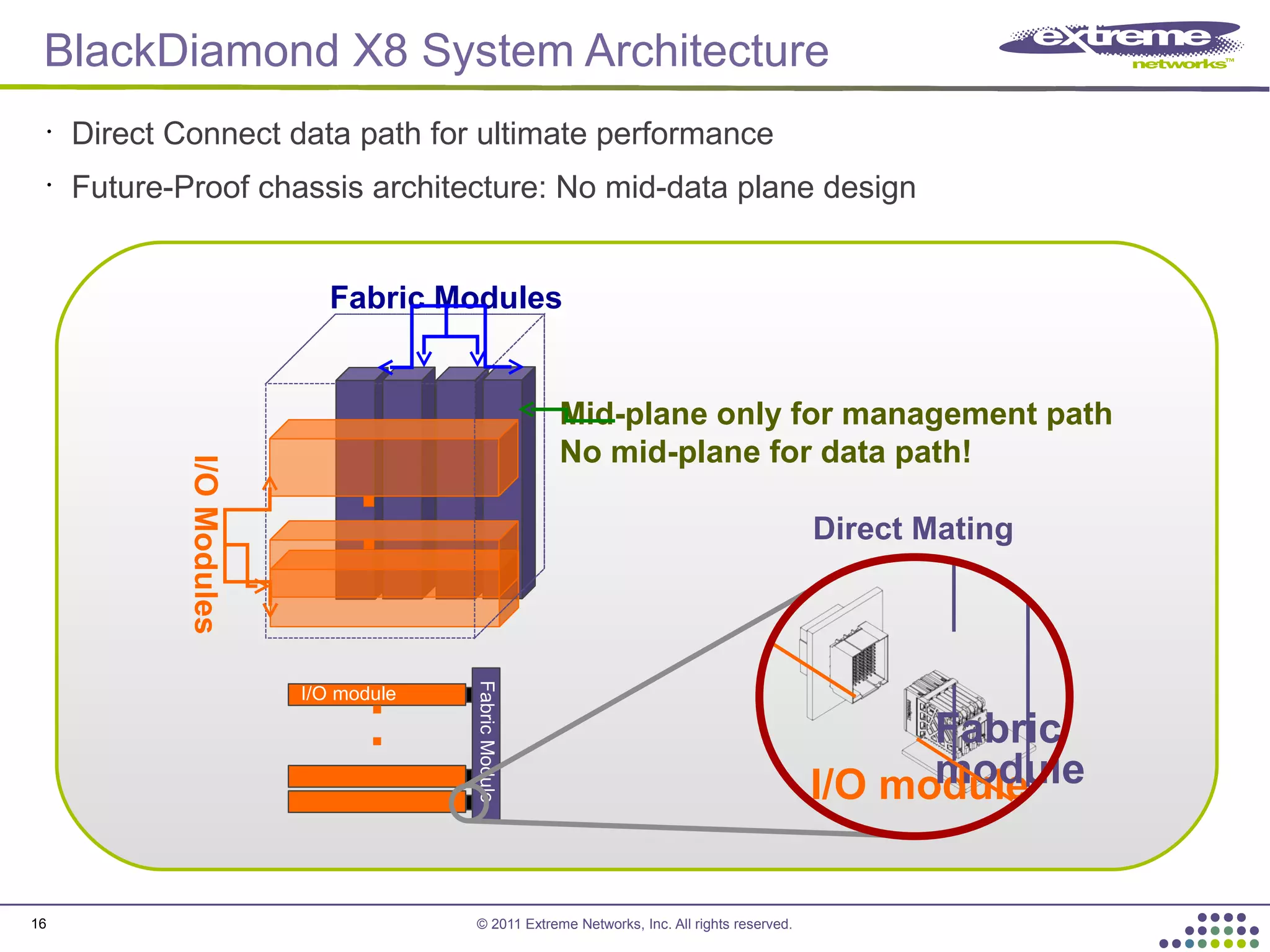
FabricModule
I/O module
I/O module
Fabric
module
Direct Mating
I/OModules
Mid-plane only for management path
No mid-plane for data path!
Fabric Modules
16
BlackDiamond X8 System Architecture
•
Direct Connect data path for ultimate performance
•
Future-Proof chassis architecture: No mid-data plane design
© 2011 Extreme Networks, Inc. All rights reserved.
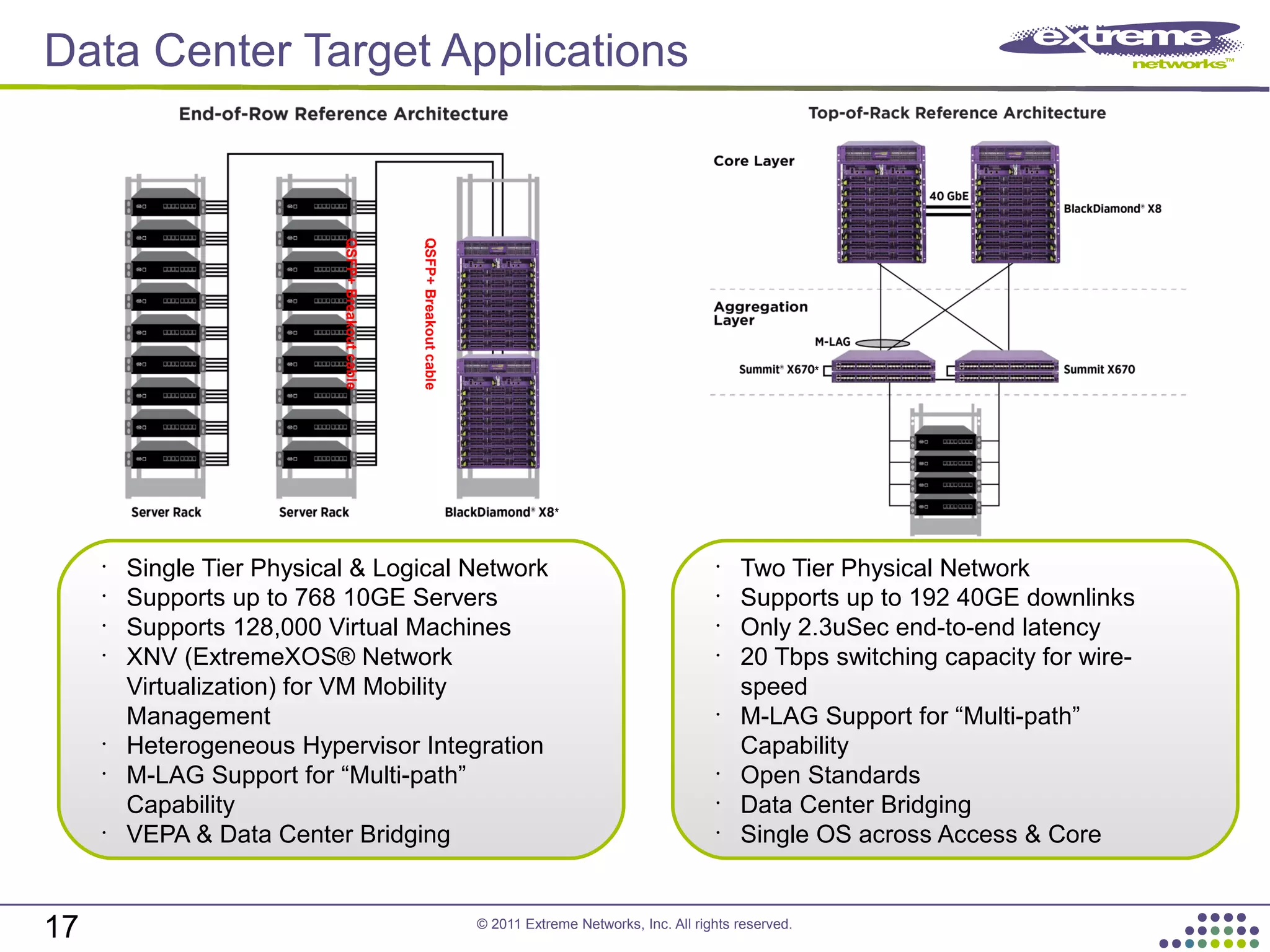
Data Center Target Applications
QSFP+Breakoutcable
QSFP+Breakoutcable
17
*
*
•
Single Tier Physical & Logical Network
•
Supports up to 768 10GE Servers
•
Supports 128,000 Virtual Machines
•
XNV (ExtremeXOS® Network
Virtualization) for VM Mobility
Management
•
Heterogeneous Hypervisor Integration
•
M-LAG Support for “Multi-path”
Capability
•
VEPA & Data Center Bridging
•
Two Tier Physical Network
•
Supports up to 192 40GE downlinks
•
Only 2.3uSec end-to-end latency
•
20 Tbps switching capacity for wire-
speed
•
M-LAG Support for “Multi-path”
Capability
•
Open Standards
•
Data Center Bridging
•
Single OS across Access & Core
© 2011 Extreme Networks, Inc. All rights reserved.
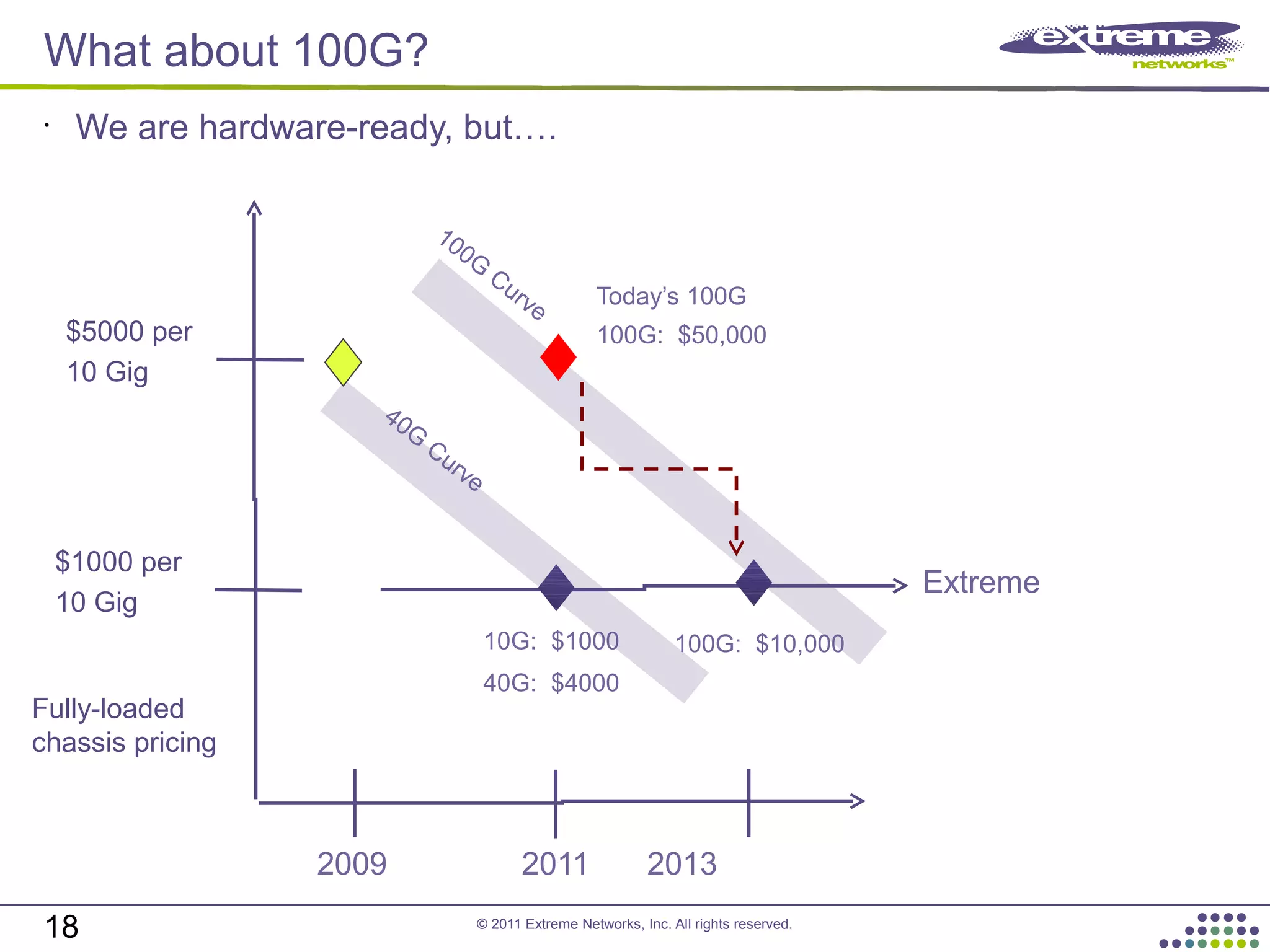
What about 100G?
18
•
We are hardware-ready, but….
2009 2011 2013
10G: $1000
40G: $4000
$1000 per
10 Gig
$5000 per
10 Gig
Extreme
Fully-loaded
chassis pricing
40G
Curve
Today’s 100G
100G: $50,000
100G: $10,000
100G
Curve
© 2011 Extreme Networks, Inc. All rights reserved.
Thank you
19

PLNOG 8: Piotr Szolkowski - Bezpieczne i wysoce skalowalne Data Center

  • 1.
    © 2011 ExtremeNetworks, Inc. All rights reserved. Bezpieczne i wysoce skalowalne Data Center Piotr Szolkowski Pre-sales Support Engineer pszolkowski@extremenetworks.com
  • 2.
    © 2011 ExtremeNetworks, Inc. All rights reserved. ExtremeXOS: Modular Operating System 2 • Dynamic software uploads • Self-healing process restart • Restart capable processes: • Telnet/SSH/SCP (11.0) • SNMP (11.0) • TFTP (11.0) • HTTPD (11.3) • XML/SOAP (12.0) • CNA Agent (11.2) • Network Login (11.3) • LLDP (11.4) • EAPS (11.0) • VRRP (11.0) • OSPF (Graceful Restart extensions, 11.3) • BGP (Graceful Restart extensions, 11.4) • IS-IS (Graceful Restart extensions, 12.1) • End-to-end, from desktop to data • Modularity = Business Continuity 2
  • 3.
    © 2011 ExtremeNetworks, Inc. All rights reserved. CLEAR-Flow 3 • CLEAR-Flow is a statistical measurement capability in ExtremeXOS® that: • Collects data from ACL matches (in the form of counters) • Uses a switch-based language to evaluate these counters • Can modify switch behavior based on these evaluations 3 There are five CLEAR-Flow expressions: • Count Rules: Measure the count of a variable • Delta Rules: Measure the change in the count of a variable in a specific period of time • Ratio Rules: Measure the ratio between two variables • Delta-Ratio Rules: Measure the change in the ratio between two variables • Rule-True-Count Rules: Measures the number of times a CLEAR-Flow rule has been true (fired)
  • 4.
    © 2011 ExtremeNetworks, Inc. All rights reserved. CLEAR-Flow 4 Attack Launched1 Analyze & Measure 2 BlackDiamond® 8800 c-series Modules CLEAR-Flow Security Rules Engine 1 2 Take Action 3 • Permit • Deny • QoS Profile • Mirror • SNMP Trap • SYSLOG • Dynamic CLI Command Continuous Learning Examination Action & Reporting 3 4
  • 5.
    © 2011 ExtremeNetworks, Inc. All rights reserved. Direct Attach™ 5 • Eliminate the vSwitch “Virtually” Reducing Network Tiers Data Center Core VM1 VM2 vSwitch Minimal traffic provisioning (if any) is done at the vSwitch. Today’s Inter-VM Switching
  • 6.
    © 2011 ExtremeNetworks, Inc. All rights reserved. Direct Attach™ 6 • Eliminate the vSwitch “Virtually” Reducing Network Tiers VM2 Direct Attach™ Enabled Switch Host: Fedora 12 Hypervisor: QEMU-KVM Guest OS: Ubuntu Active applications: • gnome-system- monitor for network and CPU utilization • tcpdump to monitor attack traffic from VM1 VM1 Guest OS: Ubuntu Active applications: • gnome-system- monitor for network and CPU utilization • hping to generate DoS attack targeted at VM2 VM2 Inter-VM traffic is transmitted and received on the same network physical port. VM2 CPU and network utilization severely impacted, due to DoS attack. CLEAR-Flow enabled to dynamically provision/block DoS traffic. VM2 CPU and network utilization reverts to healthy.
  • 7.
    © 2011 ExtremeNetworks, Inc. All rights reserved. Virtual Machine Manager NIC NIC Hypervisor Hypervisor Network Admin VM1 IP: 1.1.1.2 MAC: 00:0A Switch Port Config IP: 1.1.1.2 MAC: 00:0A QoS: QP7 ACL: Deny HTTP Switch Port Config None or Disabled Location-based VM awareness at the network level for efficient virtual machine mobility VM info Switch Port Config Virtual Port Profile IP: 1.1.1.2 MAC: 00:0A QoS: QP7 ACL: Deny HTTP XNV-enabledXNV™-enabled Switch Port Config Virtual Port Profile IP: 1.1.1.2 MAC: 00:0A QoS: QP7 ACL: Deny HTTP Result: Both the VM and the Virtual Port Profile moves to the destination switch port. Network- level visibility into VM movement is achieved to deliver better SLA. Ridgeline™: Through XML integration • Pull Inventory from virtual machine manager • Locate VMs on network switches • Show Inventory VM Switch Port Mapping • Define Virtual Port Profile (VPP) • Assign (VPP) to VMs and Distribute • Respond to VM Initiate Query Network Visibility into VM Lifecycle Server Admin Extreme Networks XNV 7
  • 8.
    © 2011 ExtremeNetworks, Inc. All rights reserved. M-LAG DA: Link Resiliency 8 8 Efficient Bandwidth Usage • M-LAG DA allows combining of ports on ‘two’ switches to form a single logical connection to another network device • Aggregate dual-homed servers or switches redundantly while utilizing full available bandwidth • Active-active paths. No STP port blocking • For both Layer-2 and Layer-3 deployments • Peer Switches communicate with each other to learn LAG states, MAC FDB, and IP multicast FDB Core Network M-LAG Group 1 M-LAG Group 2 M-LAG Group 3 Link Agg Group 4 Inter- Switch Connection (ISC) Inter- Switch Connection (ISC)
  • 9.
    © 2011 ExtremeNetworks, Inc. All rights reserved. 9 Summit X670 Top of Rack Summit X670V • 48 x 10 GbE + 4 x 40 GbE –or– 64 x 10 GbE • Investment Protection through VIM Summit X670 • 48 x 10 GbE with Lower Latency 10 GbE at 1 GbE Price Points with Full Features Low Latency, PHY-less Design, Cut-through Switching DCB and Storage Convergence Supports 128K Virtual Machines • Summit® X670* * Future availability.
  • 10.
    © 2011 ExtremeNetworks, Inc. All rights reserved. Enhanced Scalability • 128K L2 MAC address • 16K IPv4 route/host Data Center Bridging (DCB) • Priority Flow Control (PFC) • Enhanced Transmission Selection (ETS) • Data Center Bridging Exchange (DCBX) Cut-through, sub 1 µsec latency Software configurable 40 GbE port • Each 40G can be configured as 4x10G Front: 48-port 10G (SFP+) + Rear: 4-port 40G option (QSFP+) 40G Optics 40G to 4 x 10G Adapter 40G Passive Copper Up to 3 Meters QSFP+ Flexible and Scalable Interface Options 10 40G Active Fiber Up to 100 Meters Summit X670V-48x
  • 11.
    © 2011 ExtremeNetworks, Inc. All rights reserved. BlackDiamond® X8 - Introduction Highest Consolidation • 14.5 RU - 1/3rd of Rack • 768 x 10GbE wire-speed • 192 x 40GbE wire-speed Unmatched Capacity • 20+ Tbps Capacity/Switch • 2.56 Tbps Bandwidth/Slot Ultra-Low Latency • 2.3 uSec – Port-to-Port* High Availability • 1+1 Management • N+1 Fabric, Power & Fan • N+N Power Grid Server Virtualization • 128K Virtual Machines • VM Lifecycle Management • VEPA, VPP, XNV™ Storage Convergence • iSCSI, NFS, CIFS • DCBx (PFC, FS, ETS) • FCoE Transit • FIP snooping Power & Cooling • Front-to-Back Cooling • Variable Fan Speed • 5.6W per 10GbE port • Intelligent Power Mgmt. 11 *Based on Lippis Test Report
  • 12.
    © 2011 ExtremeNetworks, Inc. All rights reserved. BlackDiamond X8 Chassis – Front Management Module Slots Power Supply Slots Interface Module Slots BA 1 2 3 4 5 1 2 3 4 5 6 7 8 6 7 8 Physical Size • 19-inch rack size • 14.5RU high, 30” deep Front Configuration • 8 Power Supply slots • 2 Management Module slots • 8 Interface Module slots Management Options • 1+1 Control Interface Options • 48 x 10GbE SFP+ • 12 x 40GbE QSFP+ • 24 x 40GbE QSFP+ Power Options • 2500W AC Power Supplies • N+1 with 5 PSU • N+N with 8 PSU 14.5RU B A
  • 13.
    © 2011 ExtremeNetworks, Inc. All rights reserved. BlackDiamond® X8* Modules 13 Modules (Front) Description Management Module 48-port 10 GbE SFP+ Module 24-port 40 GbE QSFP+ Module 12-port 40 GbE QSFP+ Module Modules (Rear) Description 20 Tbps Fabric Module (FM20T) 10 Tbps Fabric Module (FM10T) Fan Tray * Future availability.
  • 14.
    © 2011 ExtremeNetworks, Inc. All rights reserved. BlackDiamond X8 Chassis – Rear Open Rear Configuration • 4 Fabric slots • 5 Fan Tray slots • 8 Power Supply sockets Fabric Modules • Orthogonal direct coupling • 3+1 Switch Fabric Modules • 20.48Tbps switching capacity • 2.56Tbps bandwidth per slot Fan Trays • 4+1 Fan Trays • 5+1 fans per tray • Variable fan speed control • Front-to-back airflow pull Fan Tray Slots Fabric Module Slots 1 2 3 4 1 2 3 4 5 Power Supply Sockets 1 2 3 4 5 6 7 8 A B
  • 15.
    © 2011 ExtremeNetworks, Inc. All rights reserved. Optimized Air Ventilation • Energy efficient cooling • Pure front to back, air-flow straight through • Midplane-less design efficient cooling • Separation of cold-hot aisle • Variable fan speed control for lower power Intelligent Cooling Control • 5 fan trays work in 4+1 mode • 6 fans per fan tray work in 5+1 mode • Automatic fabric module shutdown in case of fan failure – interface modules will stay up 15 Intelligent and Efficient Cooling System
  • 16.
    © 2011 ExtremeNetworks, Inc. All rights reserved. FabricModule I/O module I/O module Fabric module Direct Mating I/OModules Mid-plane only for management path No mid-plane for data path! Fabric Modules 16 BlackDiamond X8 System Architecture • Direct Connect data path for ultimate performance • Future-Proof chassis architecture: No mid-data plane design
  • 17.
    © 2011 ExtremeNetworks, Inc. All rights reserved. Data Center Target Applications QSFP+Breakoutcable QSFP+Breakoutcable 17 * * • Single Tier Physical & Logical Network • Supports up to 768 10GE Servers • Supports 128,000 Virtual Machines • XNV (ExtremeXOS® Network Virtualization) for VM Mobility Management • Heterogeneous Hypervisor Integration • M-LAG Support for “Multi-path” Capability • VEPA & Data Center Bridging • Two Tier Physical Network • Supports up to 192 40GE downlinks • Only 2.3uSec end-to-end latency • 20 Tbps switching capacity for wire- speed • M-LAG Support for “Multi-path” Capability • Open Standards • Data Center Bridging • Single OS across Access & Core
  • 18.
    © 2011 ExtremeNetworks, Inc. All rights reserved. What about 100G? 18 • We are hardware-ready, but…. 2009 2011 2013 10G: $1000 40G: $4000 $1000 per 10 Gig $5000 per 10 Gig Extreme Fully-loaded chassis pricing 40G Curve Today’s 100G 100G: $50,000 100G: $10,000 100G Curve
  • 19.
    © 2011 ExtremeNetworks, Inc. All rights reserved. Thank you 19