Over view:-
      Abstract
      Introduction
      Types of Virtualization
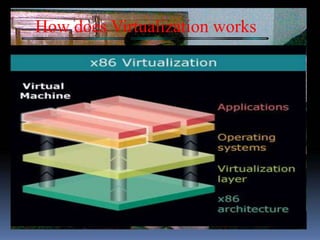
      How does Virtualization works
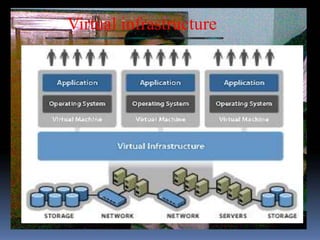
      Virtual infrastructure
      Benefits
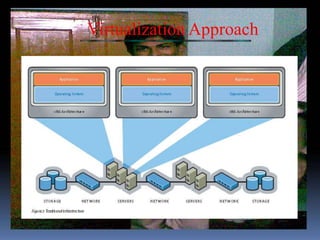
      Virtualization Approch
     How virtualization complements new-generation
        hardware
     Why virtualization?
     Conclusion
Abstract
       Virtualization is a proven software technology that is
rapidly transforming the IT landscape and fundamentally changing
the way that people compute. Today’s powerful x86 computer
hardware was designed to run a single operating system and a
single application. This leaves most machines vastly underutilized.
Virtualization lets you run multiple virtual machines on a single
physical machine, sharing the resources of that single computer
across multiple environments.
Introduction
          We are familiar with the concept of multiple
  processes running simultaneously and sharing the
  resources of a single computer. This is achieved by
  operating system acting as a single point of contact
  interfacing with the hardware resources, and there by
  controlling the access to hardware resources by
  multiple processes.
          Virtualization can be thought of as an
  extension of this concept, where in multiple operating
  systems are allowed to share the hardware
  simultaneously by means of virtualization software
Types of Virtualization

      PARA VIRTUALISATION

       FULL VIRTUALIZATION
With virtualization we can be

     able to dynamically move resources
     able to share resources
     making better use of the resources
     driving up utilization
How does Virtualization works
Virtual infrastructure
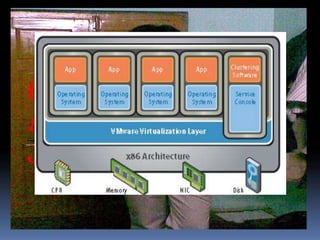
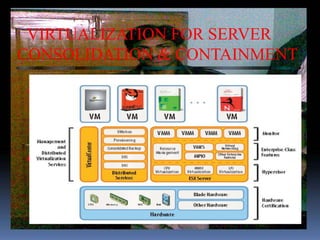
A virtual infrastructure consists of the following components:

Bare-metal hypervisors to enable full virtualization of
  each x86 computer.
Virtual infrastructure services such as resource
  management and consolidated backup to optimize
  available resources among virtual machines
Automation solutions that provide special capabilities to
  optimize a particular IT process such as provisioning or
  disaster recovery.
Benefits

 Compatibility
 Isolation
 Encapsulation
 Hardware Independence
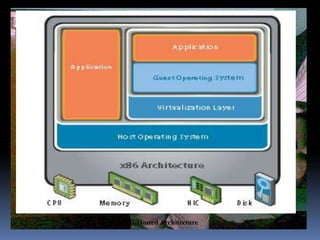
Virtualization Approach
FIG:Hosted Architecture
How virtualization complements
             new-generation hardware
   Extensive ‘scale-out’ and multi-tier application architectures
are becoming increasingly common, and the adoption of smaller
form-factor blade servers is growing dramatically. Since the
transition to blade architectures is generally driven by a desire for
physical consolidation of IT resources, virtualization is an ideal
complement for blade servers, delivering benefits such as resource
optimization, operational efficiency and rapid provisioning.
VIRTUALIZATION FOR SERVER
CONSOLIDATION & CONTAINMENT
Why virtualization?

      Reduce Costs
      Improve asset utilization
      Enhance management
      Increase flexibility
      Allow faster resource deployment
      Allow faster resource deployment
      Gain operational flexibility:
Conclusion
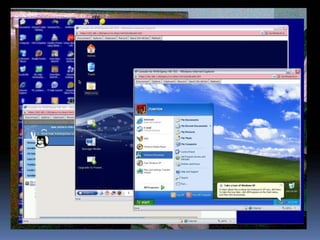
 Virtualization enables us to run more than one
    operating system at once.
 Hence it is very easy for a programmer to evaluate his
    program simultaneously in different operating
    system.
 It becomes easy for various organizations to provide a
    new desktop for a newcomer with existing
    resources.
 Effective utilization of resources.
Biblography


      www.virtualbox.org
      www.vmware.com
      www.sun.com
      www.sundevelopers.com
      www.linuxforyou.com
PLAT FORM VIRTUALIZATION

PLAT FORM VIRTUALIZATION

  • 2.
    Over view:-  Abstract  Introduction  Types of Virtualization  How does Virtualization works  Virtual infrastructure  Benefits  Virtualization Approch How virtualization complements new-generation hardware Why virtualization? Conclusion
  • 3.
    Abstract Virtualization is a proven software technology that is rapidly transforming the IT landscape and fundamentally changing the way that people compute. Today’s powerful x86 computer hardware was designed to run a single operating system and a single application. This leaves most machines vastly underutilized. Virtualization lets you run multiple virtual machines on a single physical machine, sharing the resources of that single computer across multiple environments.
  • 4.
    Introduction We are familiar with the concept of multiple processes running simultaneously and sharing the resources of a single computer. This is achieved by operating system acting as a single point of contact interfacing with the hardware resources, and there by controlling the access to hardware resources by multiple processes. Virtualization can be thought of as an extension of this concept, where in multiple operating systems are allowed to share the hardware simultaneously by means of virtualization software
  • 5.
    Types of Virtualization PARA VIRTUALISATION  FULL VIRTUALIZATION
  • 6.
    With virtualization wecan be able to dynamically move resources able to share resources making better use of the resources driving up utilization
  • 7.
  • 8.
  • 9.
    A virtual infrastructureconsists of the following components: Bare-metal hypervisors to enable full virtualization of each x86 computer. Virtual infrastructure services such as resource management and consolidated backup to optimize available resources among virtual machines Automation solutions that provide special capabilities to optimize a particular IT process such as provisioning or disaster recovery.
  • 10.
    Benefits Compatibility Isolation Encapsulation Hardware Independence
  • 11.
  • 12.
  • 14.
    How virtualization complements new-generation hardware Extensive ‘scale-out’ and multi-tier application architectures are becoming increasingly common, and the adoption of smaller form-factor blade servers is growing dramatically. Since the transition to blade architectures is generally driven by a desire for physical consolidation of IT resources, virtualization is an ideal complement for blade servers, delivering benefits such as resource optimization, operational efficiency and rapid provisioning.
  • 15.
  • 16.
    Why virtualization?  Reduce Costs  Improve asset utilization  Enhance management  Increase flexibility  Allow faster resource deployment  Allow faster resource deployment  Gain operational flexibility:
  • 18.
    Conclusion Virtualization enablesus to run more than one operating system at once. Hence it is very easy for a programmer to evaluate his program simultaneously in different operating system. It becomes easy for various organizations to provide a new desktop for a newcomer with existing resources. Effective utilization of resources.
  • 19.
    Biblography www.virtualbox.org www.vmware.com www.sun.com www.sundevelopers.com www.linuxforyou.com