
Planning for a (Mostly)
Hassle-Free Cloud Migration
Joe Conlin
Senior Solutions Engineer
VTUG 2016 Winter Warmer
Introduction
There is no
“one right way”
for cloud migration
…Let’s talk about proper planning
to significantly reduce your
migration headaches
Cloud Migration Steps
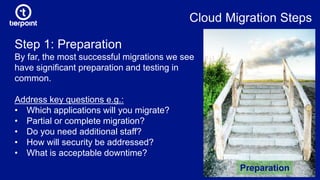
Step 1: Preparation
By far, the most successful migrations we see
have significant preparation and testing in
common.
Address key questions e.g.:
• Which applications will you migrate?
• Partial or complete migration?
• Do you need additional staff?
• How will security be addressed?
• What is acceptable downtime?
Preparation
Key Question: Do you need to redesign your apps
for the cloud?
Source: AkamaiSource: Akamai
Pros
• Apps are in load balanced
pools that increase agility
• Apps scale and cluster
easily for high availability
and flexibility
Cons
• Time & licensing costs
• Risk of change and
complexity
• Will it work?
• Possible vendor lock-in
Key Question: How quickly do you need the migration
to be done?
Time
• Do you run servers that have multiple roles?
This extends migration time.
• Many other factors influence how long it
takes; typical timeframe is a few weeks to
more than six months.
Cloud Migration Steps
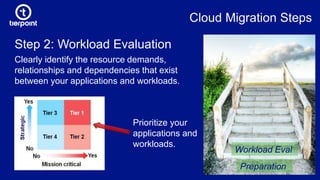
Step 2: Workload Evaluation
Clearly identify the resource demands,
relationships and dependencies that exist
between your applications and workloads.
Preparation
Workload Eval
Prioritize your
applications and
workloads.
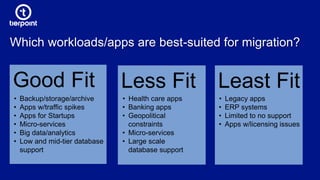
Which workloads/apps are best-suited for migration?
Good Fit
• Backup/storage/archive
• Apps w/traffic spikes
• Apps for Startups
• Micro-services
• Big data/analytics
• Low and mid-tier database
support
Less Fit Least Fit
• Health care apps
• Banking apps
• Geopolitical
constraints
• Micro-services
• Large scale
database support
• Legacy apps
• ERP systems
• Limited to no support
• Apps w/licensing issues
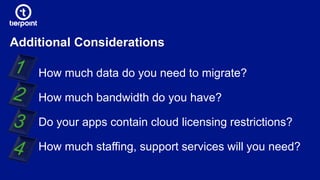
Additional Considerations
How much data do you need to migrate?
How much bandwidth do you have?
Do your apps contain cloud licensing restrictions?
How much staffing, support services will you need?
Cloud Migration Steps
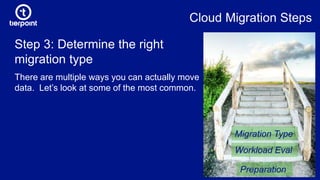
Step 3: Determine the right
migration type
There are multiple ways you can actually move
data. Let’s look at some of the most common.
Preparation
Workload Eval
Migration Type
Migration Types
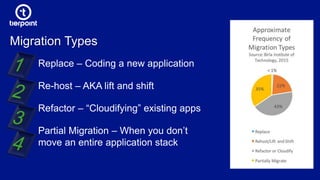
Replace – Coding a new application
Re-host – AKA lift and shift
Refactor – “Cloudifying” existing apps
Partial Migration – When you don’t
move an entire application stack
Lift & Shift vs. Greenfield Builds
Re-host or start from scratch? That is the
question.
Don’t assume that reusing what
you already have is the best
option!
Greenfield Builds vs. Lift & Shift
Starting with a fresh base OS offers benefits that
can make the effort worth it.
Legacy issues are of no concern
Access to latest OS & other technologies
Faster cutover, less maintenance times because you can work in
parallel with your steady-state production environment
Cloud Migration Steps
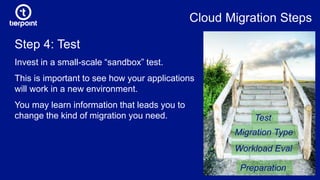
Step 4: Test
Invest in a small-scale “sandbox” test.
This is important to see how your applications
will work in a new environment.
You may learn information that leads you to
change the kind of migration you need.
Preparation
Workload Eval
Migration Type
Test
Cloud Migration Steps
Preparation
Workload Eval
Migration Type
Test
Execute
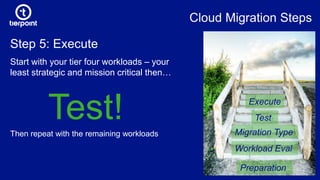
Step 5: Execute
Start with your tier four workloads – your
least strategic and mission critical then…
Test!Then repeat with the remaining workloads
Cloud Migration Steps
Preparation
Workload Eval
Migration Type
Test
Execute
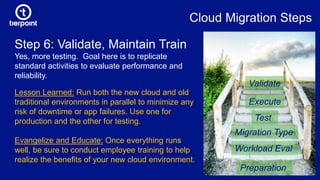
Step 6: Validate, Maintain Train
Yes, more testing. Goal here is to replicate
standard activities to evaluate performance and
reliability.
Validate
Lesson Learned: Run both the new cloud and old
traditional environments in parallel to minimize any
risk of downtime or app failures. Use one for
production and the other for testing.
Evangelize and Educate: Once everything runs
well, be sure to conduct employee training to help
realize the benefits of your new cloud environment.
The Hypervisor
Hypervisor compatibility is important – whether a CSP uses
VMware, Xen or KVM, there are specific considerations for each.
Inspect your provider to understand how they back their
availability claims and SLAs – technologies, people, processes
Are they proficient at using cross-hypervisor and p2v migration
tools?
Evaluating Cloud Providers for Best Fit
The Network
What is the max throughput available?
Do they have layer 2 and layer 3 capabilities?
Can they integrate w/third-party carriers?
Do you pay on transferred data or on a commit rate?
Evaluating Cloud Providers for Best Fit
Services & Support
How can they seed your data to their platform?
Understand their migration service offerings; who performs them?
What is their typical installation and does it fit with your needs?
For more insights, tips from the cloud migration trenches, visit
TierPoint.com: Resources > Whitepapers > Simplify Cloud Migration.
Evaluating Cloud Providers for Best Fit
Entertainment Industry: Major Cable TV Network
Existing TierPoint DR client working with another vendor
for production when vendor’s building was sold.
Challenge: They needed to move their production data
with a live fail over to TierPoint, then a fail back to a new
production environment while reestablishing replication
with TierPoint.
Solution: A TierPoint Private Cloud using VMware Site Recovery Manager
Case Study
Entertainment Industry: Major Cable TV Network
Gathered extensive detailed information about the client’s production
environment including desired RTOs/RPOs.
Designed and built a private cloud environment based on the highly
scalable TierPoint FlexPod Cloud platform running Cisco UCS,
NetApp and VMware.
Leveraged Cisco UCS and NetApp for bare-metal SQL clusters
Implemented replication and failover using vSphere Replication over
existing 10G layer 2 network
Case Study
Entertainment Industry: Major Cable TV Network
Tested and validated cutover and failback procedures and worked
with client to determine ideal cutover time
Cutover production to TierPoint Hawthorne cloud environment in
waves
Client then moved their production environment back to another
location and re-established replication to insure a new functional
DR site
Case Study
Thank You
Joe Conlin
joe.conlin@tierpoint.com

Planning for a (Mostly) Hassle-Free Cloud Migration | VTUG 2016 Winter Warmer

  • 1.
    Planning for a(Mostly) Hassle-Free Cloud Migration Joe Conlin Senior Solutions Engineer VTUG 2016 Winter Warmer
  • 2.
    Introduction There is no “oneright way” for cloud migration …Let’s talk about proper planning to significantly reduce your migration headaches
  • 3.
    Cloud Migration Steps Step1: Preparation By far, the most successful migrations we see have significant preparation and testing in common. Address key questions e.g.: • Which applications will you migrate? • Partial or complete migration? • Do you need additional staff? • How will security be addressed? • What is acceptable downtime? Preparation
  • 4.
    Key Question: Doyou need to redesign your apps for the cloud? Source: AkamaiSource: Akamai Pros • Apps are in load balanced pools that increase agility • Apps scale and cluster easily for high availability and flexibility Cons • Time & licensing costs • Risk of change and complexity • Will it work? • Possible vendor lock-in
  • 5.
    Key Question: Howquickly do you need the migration to be done? Time • Do you run servers that have multiple roles? This extends migration time. • Many other factors influence how long it takes; typical timeframe is a few weeks to more than six months.
  • 6.
    Cloud Migration Steps Step2: Workload Evaluation Clearly identify the resource demands, relationships and dependencies that exist between your applications and workloads. Preparation Workload Eval Prioritize your applications and workloads.
  • 7.
    Which workloads/apps arebest-suited for migration? Good Fit • Backup/storage/archive • Apps w/traffic spikes • Apps for Startups • Micro-services • Big data/analytics • Low and mid-tier database support Less Fit Least Fit • Health care apps • Banking apps • Geopolitical constraints • Micro-services • Large scale database support • Legacy apps • ERP systems • Limited to no support • Apps w/licensing issues
  • 8.
    Additional Considerations How muchdata do you need to migrate? How much bandwidth do you have? Do your apps contain cloud licensing restrictions? How much staffing, support services will you need?
  • 9.
    Cloud Migration Steps Step3: Determine the right migration type There are multiple ways you can actually move data. Let’s look at some of the most common. Preparation Workload Eval Migration Type
  • 10.
    Migration Types Replace –Coding a new application Re-host – AKA lift and shift Refactor – “Cloudifying” existing apps Partial Migration – When you don’t move an entire application stack
  • 11.
    Lift & Shiftvs. Greenfield Builds Re-host or start from scratch? That is the question. Don’t assume that reusing what you already have is the best option!
  • 12.
    Greenfield Builds vs.Lift & Shift Starting with a fresh base OS offers benefits that can make the effort worth it. Legacy issues are of no concern Access to latest OS & other technologies Faster cutover, less maintenance times because you can work in parallel with your steady-state production environment
  • 13.
    Cloud Migration Steps Step4: Test Invest in a small-scale “sandbox” test. This is important to see how your applications will work in a new environment. You may learn information that leads you to change the kind of migration you need. Preparation Workload Eval Migration Type Test
  • 14.
    Cloud Migration Steps Preparation WorkloadEval Migration Type Test Execute Step 5: Execute Start with your tier four workloads – your least strategic and mission critical then… Test!Then repeat with the remaining workloads
  • 15.
    Cloud Migration Steps Preparation WorkloadEval Migration Type Test Execute Step 6: Validate, Maintain Train Yes, more testing. Goal here is to replicate standard activities to evaluate performance and reliability. Validate Lesson Learned: Run both the new cloud and old traditional environments in parallel to minimize any risk of downtime or app failures. Use one for production and the other for testing. Evangelize and Educate: Once everything runs well, be sure to conduct employee training to help realize the benefits of your new cloud environment.
  • 16.
    The Hypervisor Hypervisor compatibilityis important – whether a CSP uses VMware, Xen or KVM, there are specific considerations for each. Inspect your provider to understand how they back their availability claims and SLAs – technologies, people, processes Are they proficient at using cross-hypervisor and p2v migration tools? Evaluating Cloud Providers for Best Fit
  • 17.
    The Network What isthe max throughput available? Do they have layer 2 and layer 3 capabilities? Can they integrate w/third-party carriers? Do you pay on transferred data or on a commit rate? Evaluating Cloud Providers for Best Fit
  • 18.
    Services & Support Howcan they seed your data to their platform? Understand their migration service offerings; who performs them? What is their typical installation and does it fit with your needs? For more insights, tips from the cloud migration trenches, visit TierPoint.com: Resources > Whitepapers > Simplify Cloud Migration. Evaluating Cloud Providers for Best Fit
  • 19.
    Entertainment Industry: MajorCable TV Network Existing TierPoint DR client working with another vendor for production when vendor’s building was sold. Challenge: They needed to move their production data with a live fail over to TierPoint, then a fail back to a new production environment while reestablishing replication with TierPoint. Solution: A TierPoint Private Cloud using VMware Site Recovery Manager Case Study
  • 20.
    Entertainment Industry: MajorCable TV Network Gathered extensive detailed information about the client’s production environment including desired RTOs/RPOs. Designed and built a private cloud environment based on the highly scalable TierPoint FlexPod Cloud platform running Cisco UCS, NetApp and VMware. Leveraged Cisco UCS and NetApp for bare-metal SQL clusters Implemented replication and failover using vSphere Replication over existing 10G layer 2 network Case Study
  • 21.
    Entertainment Industry: MajorCable TV Network Tested and validated cutover and failback procedures and worked with client to determine ideal cutover time Cutover production to TierPoint Hawthorne cloud environment in waves Client then moved their production environment back to another location and re-established replication to insure a new functional DR site Case Study
  • 23.