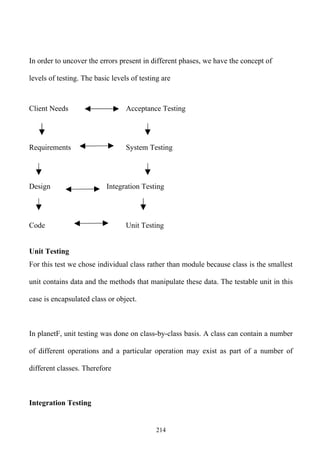


PROJECT TITLE


The Social Networking
       System
         For


www.planetF.com


           1
INTRODUCTION

People have used the idea of “social network” loosely for over a century to connote

complex sets of relationship between members of social systems at all scales, from

interpersonal to international.


According to Stephen Downes, “A social network is a collection of individuals linked

together by a set of relations”.


The conceptual idea of social networks sites is to construct an informal communication

environment, which allows users to interact within an online community of friends.

People connect with each other by creating online profiles to share interests such as

thoughts, music, photos, videos, etc. Since their inception they have attracted millions

of users for whom checking their SNS profile has become part of their daily routine.

Some are even wondering if social network sites will one day replace email systems.


                                           2
OBJECTIVE

This main objective of this website is to provide an informal communication

environment which allows users to interact within an online community of friends. In

details as follows -:

     1. To have an secure and attractive login page access.

     2. Make new user account more user friendly and proper validation of details.

     3. Search friends easily on network.

     4. Send friend request to other users to make friends.

     5. Add friends to your friend box to accept request.

     6. Creating a public profile having social, professional and personal information.

     7. Ease of editing of profile anytime you need.

     8. Upload and share photographs on network.

     9. Send messages to other friends in terms of scrapbook.

     10. Reply directly to incoming user scraps.

     11. Administration page to keep an eye on user operation.

     12. Easily password recovery processing.


                                            3
The goal of this system is :

    To create a Database for the system

    To create a secure and attractive login page with suitable validations for users.

    To create a Home Page design for the system this will have various options for

      the user by which he/she can control their information as well as can use

      services offered by this website.

    To create An Administrator section -An interface for the system with features

      like setting maximum number of friends a user can have, removing or allotting

      services to the user, removing unwanted data like images videos uploaded by

      user, taking feedbacks from the user etc.

    To create A User section - An interface for the system with features like create

      profile, edit profile, add friends, search friends, sending a message to friend ,,

      sending email to friend and many more.


                          PROJECT CATEGORY

Whenever any software is developed it may be categorized in any form particular. It

may categorized on the bases of there work and the performance. It can change the

management system of the particular software. With a particular category it can make

the software become understandable for the others perfectly. On time of developing or

making software we need to look on their category.

                                           4
That it belongs with which particular category. Either it is management

related, games related, developing or cd-making etc. The software which I was

making, it belongs to communication software or social software which will provide

social networking services.


           TOOLS, PLATFORM AND LANGUAGES

• HTML

Hyper Text Markup Language – This language is a markup language, which runs

inside any Internet browser and is used to create the basic layout of a Web Page. Html

is called Hyper Text Language because used to develop several Hyper Text words

(hypertext words are words which have some actions with it) for a website, which

provides connectivity to other pages. It is called a Markup Language because it uses

syntax called as Markup Elements to format a web document.


SERVLET

       The Servlet works as a middle tier for a web based application or especially for

a website. Servlet are snippets of Java programs which run inside a Servlet Container.

A Servlet Container is much like a Web Server which handles user requests and

generates responses. Servlet Container is different from a Web Server because it can

not only serve requests for static content like HTML page, GIF images, etc., it can also


                                           5
contain Java Servlets and JSP pages to generate dynamic response. Servlet Container is

responsible for loading and maintaining the lifecycle of the Java Servlet. Servlet

Container can be used standalone or more often used in conjunction with a Web server.


JSP (Java Server Page)


              JSP is works as little bit designing dynamic web page. Java Server Pages
or JSP for short is Sun's solution for developing dynamic web sites. JSP provide
excellent server side scripting support for creating database driven web applications.
JSP enable the developers to directly insert java code into JSP file, this makes the
development process very simple and its maintenance also becomes very easy. JSP
pages are efficient, it loads into the web server’s memory on receiving the request very
first time and the subsequent calls are served within a very short period of time

JDBC (Java Database Connectivity)

             Jdbc is used for Database Connectivity. Jdbc provides 4 types of driver
but in this project type-1 driver is used.

Working process of jdbc :-

                     1. Establish a connection with a database

                     2. Sends Statements

                     3. Processes the results


ORACLE

             The input given by the user on the Internet or on a standalone computer is
the most precious thing, which is stored at a safe place called as the DATABASE.


                                             6
Oracle is one of the most secure and huge database storage System available now a
day. On the internet it is used to keep the record of the users registering through the
website and maintain a daily report of them.


• JAVASCRIPT

JavaScript is a Scripting language which provides all the language features with

variables, loops, functions etc. the functions of JavaScript are written in a page as an:

   Inline Script

   Embedded Script

   Linked Script

These scripts help us to handle events generated by a user over the internet. A

JavaScript function can be called to perform some task when the user demands for thus

JavaScript can make a website Interactive which could act on user actions. In this

project I am going to use a linked scripting code that will act as a validation code for

the form pages.


                                             7
HARDWARE AND SOFTWARE REQUIREMENT
HARDWARE: Computer hardware refers to the physical parts of a computer and

related devices. Internal hardware devices include mother board, hard device, and

RAM. External hardware devices include monitors, keyboards, mice, printers, and

scanners.

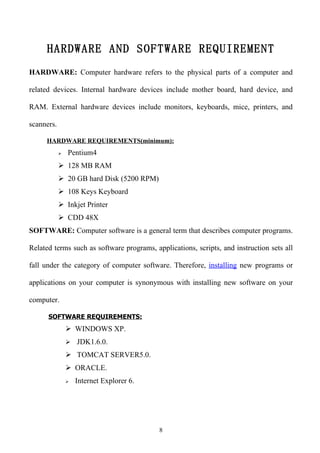
     HARDWARE REQUIREMENTS(minimum):
               Pentium4
             128 MB RAM
             20 GB hard Disk (5200 RPM)
             108 Keys Keyboard
             Inkjet Printer
             CDD 48X
SOFTWARE: Computer software is a general term that describes computer programs.

Related terms such as software programs, applications, scripts, and instruction sets all

fall under the category of computer software. Therefore, installing new programs or

applications on your computer is synonymous with installing new software on your

computer.

      SOFTWARE REQUIREMENTS:
                 WINDOWS XP.
                 JDK1.6.0.

                 TOMCAT SERVER5.0.
                 ORACLE.
                   Internet Explorer 6.


                                           8
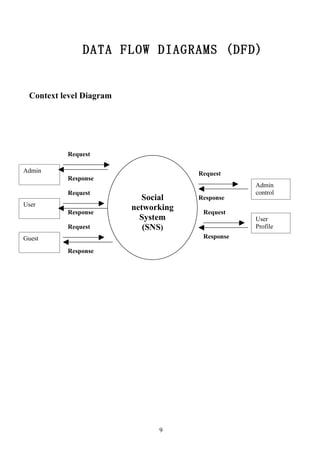
DATA FLOW DIAGRAMS (DFD)


 Context level Diagram


          Request

Admin                                 Request
          Response
                                                  Admin
          Request                                 control
                           Social     Response
User
                         networking
          Response                     Request
                           System                 User
          Request           (SNS)                 Profile
Guest                                  Response

          Response


                               9
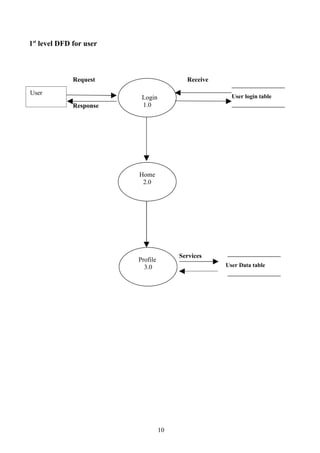
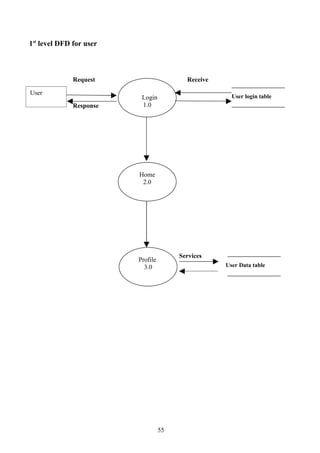
1st level DFD for user


              Request                     Receive

User
                          Login                       User login table
              Response    1.0


                         Home
                          2.0


                                        Services
                         Profile
                           3.0                      User Data table


                                   10
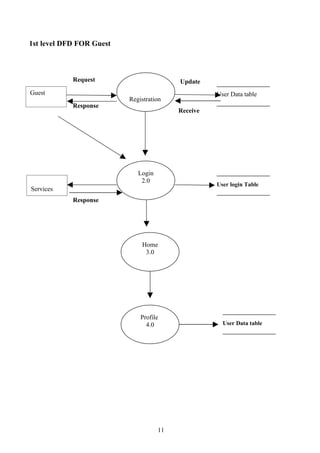
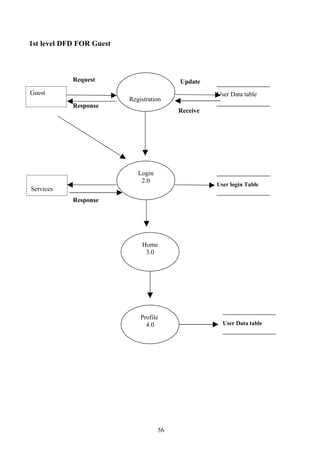
1st level DFD FOR Guest


            Request                       Update
Guest                                               User Data table
                          Registration
            Response          1.0
                                          Receive


                             Login
                              2.0
                                                    User login Table
Services
            Response


                              Home
                               3.0


                              Profile
                                4.0                   User Data table


                                     11
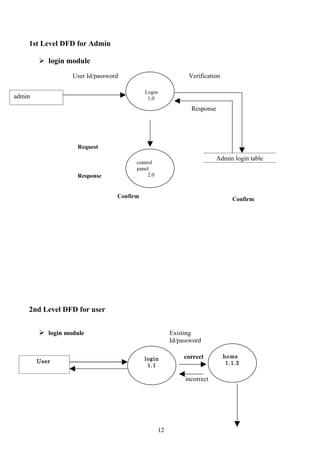
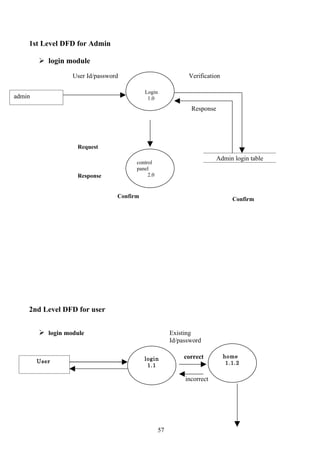
1st Level DFD for Admin

         login module
                  User Id/password                           Verification

                                           Login
admin                                       1.0
                                                              Response


                    Request
                                                                         Admin login table
                                       control
                                       panel
                    Response                2.0


                                 Confirm                                       Confirm


    2nd Level DFD for user


         login module                                 Existing
                                                       Id/password

                                           login            correct         home
        User                                                                 1.1.2
                                            1.1

                                                            incorrect


                                                  12
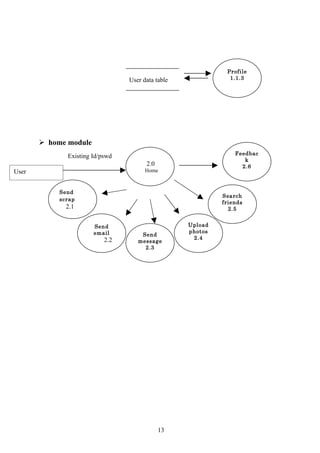
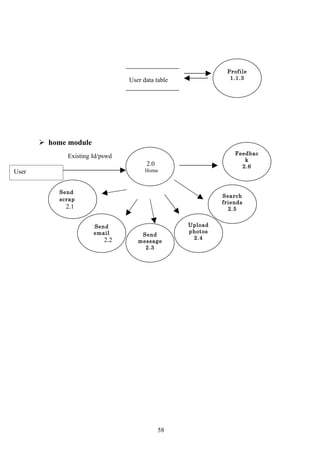
Profile
                                 User data table              1.1.3


        home module
                                                                Feedbac
              Existing Id/pswd
                                                                   k
                                       2.0                        2.6
User                                   Home


            Send
                                                            Search
            scrap
                                                            friends
              2.1                                             2.5


                       Send                        Upload
                       email                       photos
                                     Send
                           2.2                      2.4
                                    message
                                      2.3


                                             13
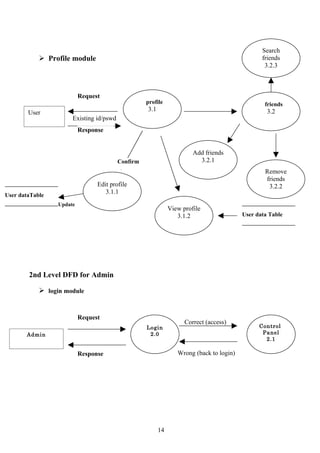
Search
             Profile module                                                                    friends
                                                                                                 3.2.3


                          Request
                                                   profile                                       friends
                                                   3.1                                            3.2
        User
                      Existing id/pswd
                          Response


                                                                       Add friends
                                         Confirm                         3.2.1
                                                                                                 Remove
                                                                                                 friends
                                Edit profile                                                      3.2.2
                                   3.1.1
User dataTable
                 Update
                                                              View profile
                                                                 3.1.2                   User data Table


        2nd Level DFD for Admin

             login module


                          Request
                                                                    Correct (access)
                                                   Login                                       Control
       Admin                                        2.0                                         Panel
                                                                                                 2.1

                          Response                               Wrong (back to login)


                                                         14
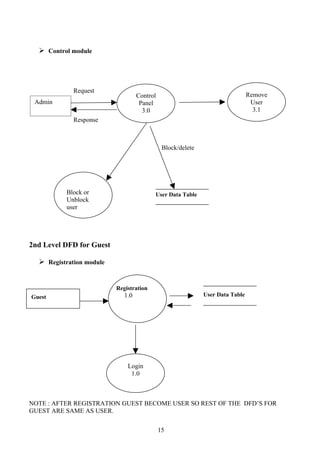
 Control module


             Request
                                   Control                                     Remove
 Admin                              Panel                                       User
                                     3.0                                         3.1
             Response


                                              Block/delete


          Block or                       User Data Table
          Unblock
          user


2nd Level DFD for Guest

   Registration module


                          Registration
Guest                        1.0                             User Data Table


                              Login
                               1.0


NOTE : AFTER REGISTRATION GUEST BECOME USER SO REST OF THE DFD’S FOR
GUEST ARE SAME AS USER.

                                             15
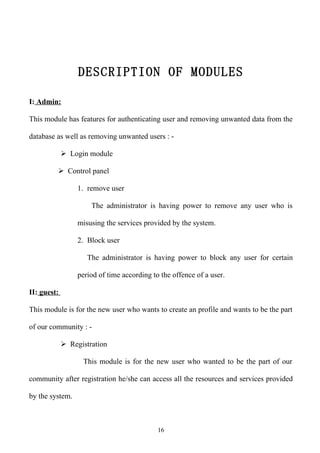
DESCRIPTION OF MODULES

I: Admin:

This module has features for authenticating user and removing unwanted data from the

database as well as removing unwanted users : -

              Login module

          Control panel

                  1. remove user

                      The administrator is having power to remove any user who is

                  misusing the services provided by the system.

                  2. Block user

                     The administrator is having power to block any user for certain

                  period of time according to the offence of a user.

II: guest:

This module is for the new user who wants to create an profile and wants to be the part

of our community : -

              Registration

                   This module is for the new user who wanted to be the part of our

community after registration he/she can access all the resources and services provided

by the system.


                                             16
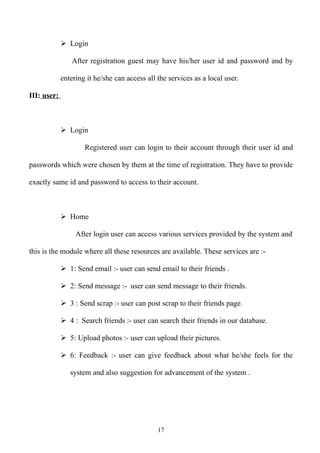
 Login

                After registration guest may have his/her user id and password and by

             entering it he/she can access all the services as a local user.

III: user:


              Login

                     Registered user can login to their account through their user id and

passwords which were chosen by them at the time of registration. They have to provide

exactly same id and password to access to their account.


              Home

                  After login user can access various services provided by the system and

this is the module where all these resources are available. These services are :-

              1: Send email :- user can send email to their friends .

              2: Send message :- user can send message to their friends.

              3 : Send scrap :- user can post scrap to their friends page.

              4 : Search friends :- user can search their friends in our database.

              5: Upload photos :- user can upload their pictures.

              6: Feedback :- user can give feedback about what he/she feels for the

                system and also suggestion for advancement of the system .


                                               17
 Profile

                 This is the module where all the user information is displayed which

he/she entered at the time of registration . user can complete his/her profile at any point

of time only mandatory information is to be entered at the time of joining.


           Friends

                This is the module where user can add new friends those were already

          part of our community and also can remove them as per their need.


                                            18
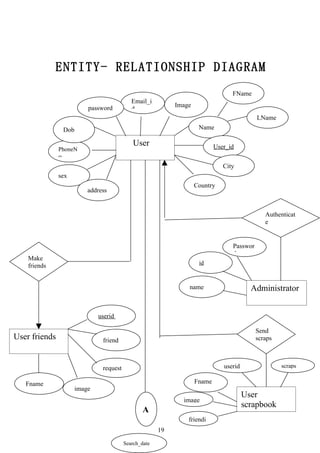
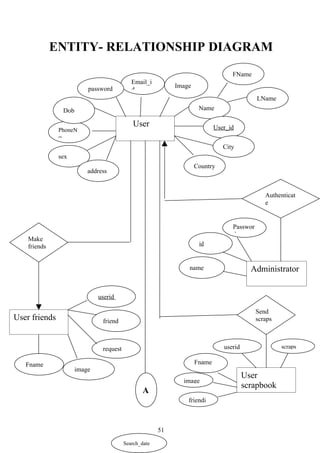
ENTITY- RELATIONSHIP DIAGRAM
                                                                                     FName
                                               Email_i
                             password                          Image
                                               d
                                                                                               LName
                   Dob                                                  Name

                                                User                           User_id
               PhoneN
               o
                                                                                  City
               sex
                                                                       Country
                             address


                                                                                                  Authenticat
                                                                                                  e


                                                                                     Passwor
                                                                                     d
    Make
                                                                        id
    friends


                                                                   name                      Administrator


                                 userid

                                                                                               Send
User friends                      friend                                                       scraps


                                  request                                         userid                scraps


   Fname                                                               Fname
                         image
                                                                                           User
                                                                 image
                                                                                           scrapbook
                                                    A
                                                                   friendi
                                                          19

                                            Search_date
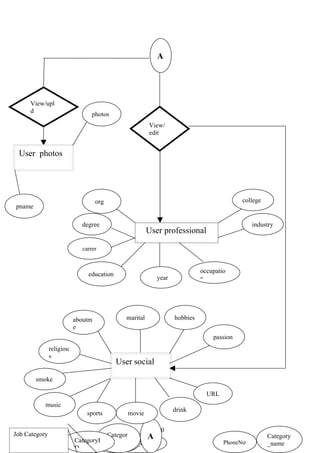
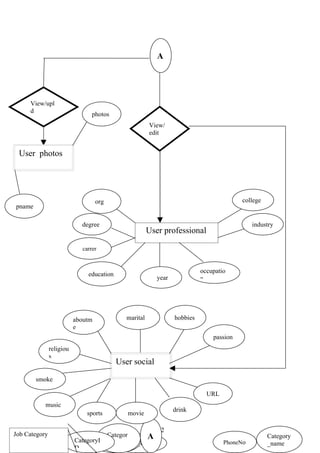
A


     View/upl
     d
                            photos
                                                   View/
                                                   edit


 User photos


                               org                                                   college
pname

                        degree                                                           industry
                                                   User professional

                        carrer


                                                                       occupatio
                          education
                                                      year             n


                      aboutm             marital             hobbies
                      e
                                                                           passion
           religiou
           s
                                      User social
        smoke

                                                                         URL
          music
                                                             drink
                          sports         movie

                                                      20
Job Category                     Categor        A                                              Category
    Job_Nam           CategoryI Password
                                 y    Search_date                              PhoneNo         _name
    e                 D
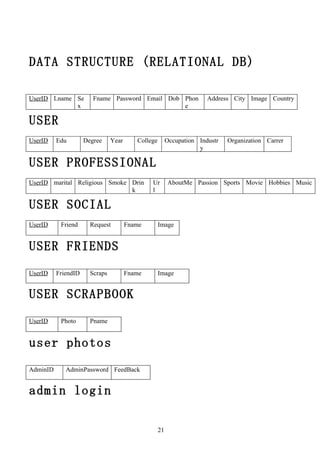
DATA STRUCTURE (RELATIONAL DB)

UserID Lname Se         Fname Password Email Dob Phon                  Address City Image Country
             x                                   e

USER
UserID    Edu        Degree     Year      College        Occupation Industr   Organization Carrer
                                                                    y

USER PROFESSIONAL
UserID marital Religious Smoke Drin            Ur        AboutMe Passion Sports Movie Hobbies Music
                               k               l

USER SOCIAL
UserID     Friend      Request         Fname        Image


USER FRIENDS
UserID    FriendID     Scraps          Fname        Image


USER SCRAPBOOK
UserID     Photo       Pname


user photos
AdminID      AdminPassword FeedBack


admin login

                                                    21
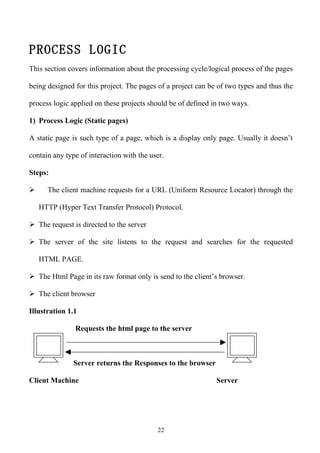
PROCESS LOGIC
This section covers information about the processing cycle/logical process of the pages

being designed for this project. The pages of a project can be of two types and thus the

process logic applied on these projects should be of defined in two ways.

1) Process Logic (Static pages)

A static page is such type of a page, which is a display only page. Usually it doesn’t

contain any type of interaction with the user.

Steps:

     The client machine requests for a URL (Uniform Resource Locator) through the

    HTTP (Hyper Text Transfer Protocol) Protocol.

 The request is directed to the server

 The server of the site listens to the request and searches for the requested

    HTML PAGE.

 The Html Page in its raw format only is send to the client’s browser.

 The client browser

Illustration 1.1

               Requests the html page to the server


               Server returns the Responses to the browser

Client Machine                                                Server


                                           22
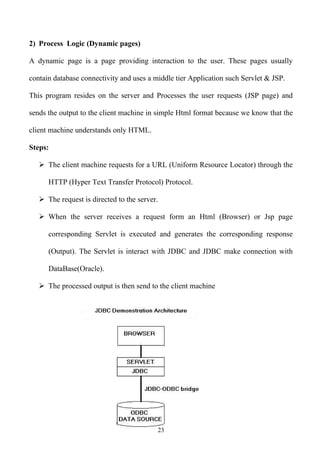
2) Process Logic (Dynamic pages)

A dynamic page is a page providing interaction to the user. These pages usually

contain database connectivity and uses a middle tier Application such Servlet & JSP.

This program resides on the server and Processes the user requests (JSP page) and

sends the output to the client machine in simple Html format because we know that the

client machine understands only HTML.

Steps:

    The client machine requests for a URL (Uniform Resource Locator) through the

      HTTP (Hyper Text Transfer Protocol) Protocol.

    The request is directed to the server.

    When the server receives a request form an Html (Browser) or Jsp page

      corresponding Servlet is executed and generates the corresponding response

      (Output). The Servlet is interact with JDBC and JDBC make connection with

      DataBase(Oracle).

    The processed output is then send to the client machine


                                          23
SECURITY
     As this project is an online project, which is running on the Internet providing
     global access to its users for which it is being developed, Security is a major
     part, which I have taken care & considered very closely. Being the site designer,
     developer and programmer I have used every possible technique to stop any
     breach in the security of this website.
                             In this project security concern and possible threat to the
     security of this project over the Internet has been rectified from almost each and
     every angle. In this regard a few techniques that I have used in this project are
     mentioned below.


• Domain Level Security: -
            The domain renewal or up-gradation for this site is protected through
     password, which prevents any hacker to directly enter into this domain and gain
     control of it.
• Secure Connection :
     Secure Socket Layer – This technique is used by the server of this website.
     Through this technique the data being send or received to or from the server runs
     on a protected layer of Sockets through
     HTTP Request object. Especially forms are protected through this technique.
• FTP Password: -
     File Transfer Protocol – I have specially allocated a separate label of password
     to be used for FTP operations. Using this the contents of the site can be changed
     at any time. This password is registered with the domain server of the site and
     provides login the authenticated clients only.


                                          24
LIMITATIONS OF THE PROJECT
Any computer program has a pre-defined scope of areas in which the program is

allowed to navigate out of this are is the boundary of any project. For a website project

the major boundary is manipulating with the client machine. This limitation is very

much helpful as there are several users who do not what a site to enter into their

memory area.


Such As:

   1. As like any other websites the scope of this site also is limited only to the server

      manipulation and not with the client

   2. The database in which the reports are being saved is also limited to its defined

      table only it could not go beyond that.


Any computer program has a pre-defined scope of areas in which the program is

allowed to navigate out of this are is the boundary of any project.

For a website project the major boundary is manipulating with the client machine. An

html page is not allowed to write to the memory locations of the client’s computer.

This limitation is very much helpful as there are several users who do not what a site to

enter into their memory area.


                                             25
SCOPE OF FUTURE APPLICATION
In this age of fast growing technology and implementation of the latest technology

there is always a scope for further improvement. Also there can be several ways to

achieve the target.

           The main motto is to implement the new concept in the field of development

by using the tips and tricks related to the modern, primitive and advance age styles and

that makes the difference. There is nothing to do without future implementation.


      With the day by day growing number of internet user’s the project applications

are also concentrating on various types of users. In other words we can say that internet

is a global area of information which can be broadcasted to a computer and now a days

the most popular to the mobile phones.

      The future applications of this project could be such type of applications, which

will enable this site to be viewed by the WAP browsers. And also I would like to add

some more features for the user and admin like :-

1:- chat box for user for live chatting.

2:- web cam chat for user for broadcasting them live over internet.

3:- photo tagging .

4:- user can ignore a friend for some period of time.

5:- sending virtual gifts to friends.

6:- admin can set maximum number of friend for any particular user. Etc.


                                           26
BIBLIOGRAPHY

 Book – MASTERING JAVASCRIPT

    Author – Jaworski

    Publisher - BPB Publicaion


 Book – HTML BLACK BOOK

    Author – Steven Holzner

    Publisher – DreamTech Press


 Book - ORACLE: THE COMPLETE REFERENCE

    Author - George Koch & Kevin Loney

    Publisher - TATA McGraw-HILL COMPANY LIMITED


 Book – JAVA2 COMPLETE REFERENCE

    Author – Herbert Schildt

    Publisher – TATA McGraw-Hill


          END OF PROJECT SYNOPSIS
                                  27
START OF PROJECT REPORT

INTRODUCTION
People have used the idea of “social network” loosely for over a century to connote

complex sets of relationship between members of social systems at all scales, from

interpersonal to international.

      According to Stephen Downes, “A social network is a collection of individuals

linked together by a set of relations”.


We define social network sites as web-based services that allow individuals to (1)

construct a public or semi-public profile within a bounded system, (2) articulate a list

of other users with whom they share a connection, and (3) view and traverse their list

of connections and those made by others within the system.


The conceptual idea of social networks sites is to construct an informal communication

environment, which allows users to interact within an online community of friends.

People connect with each other by creating online profiles to share interests such as

thoughts, music, photos, videos, etc. Since their inception they have attracted millions

of users for whom checking their SNS profile has become part of their daily routine.

Some are even wondering if social network sites will one day replace email systems.


                                          28
A History of Social Network Sites
The Early Years

According to the definition above, the first recognizable social network site launched

in 1997. SixDegrees.com allowed users to create profiles, list their Friends and,
beginning in 1998, surf the Friends lists. Each of these features existed in some form
before SixDegrees, of course. Profiles existed on most major dating sites and many
community sites. AIM and ICQ buddy lists supported lists of Friends, although those
Friends were not visible to others. Classmates.com allowed people to affiliate with
their high school or college and surf the network for others who were also affiliated,
but users could not create profiles orlist Friends until years later. SixDegrees was the
first to combine these features.

SixDegrees promoted itself as a tool to help people connect with and send messages to
others. While SixDegrees attracted millions of users, it failed to become a sustainable
business and, in 2000, the service closed. Looking back, its founder believes that
SixDegrees was simply ahead of its time (A. Weinreich, personal communication, July
11, 2007). While people were already flocking to the Internet, most did not have
extended networks of friends who were online. Early adopters complained that there
was little to do after accepting Friend requests, and most users were not interested in
meeting strangers.From 1997 to 2001, a number of community tools began supporting
various combinations of profiles and publicly articulated Friends. AsianAvenue,
BlackPlanet, and MiGente allowed users to create personal, professional, and dating
profiles—users could identify Friends on their personal profiles without seeking
approval for those connections (O.Wasow, personal communication, August 16, 2007).
Likewise, shortly after its launch in 1999, LiveJournal listed one-directional
connections on user pages. LiveJournal's creator suspects that he fashioned these
Friends after instant messaging buddy lists (B. Fitzpatrick, personal communication,
June 15, 2007)—on LiveJournal, people mark others as Friends to follow their journals
and manage privacy settings. The Korean virtual worlds site Cyworld was started in
1999 and added SNS features in 2001, independent of these other sites (see Kim &
Yun, this issue). Likewise, when the Swedish web community LunarStorm refashioned
itself as an SNS in 2000, it contained Friends lists, guestbooks, and diary pages (D.
Skog, personal communication, September 24, 2007).

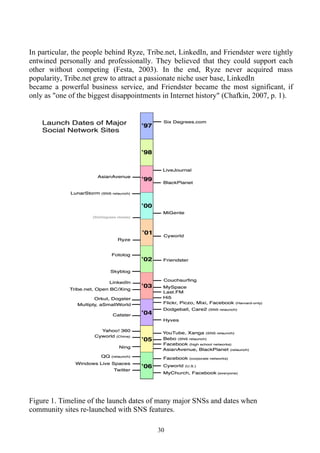
The next wave of SNSs began when Ryze.com was launched in 2001 to help people
leverage their business networks. Ryze's founder reports that he first introduced the site
to his friends—primarily members of the San Francisco business and technology
community, including the entrepreneurs and investors behind many future SNSs (A.
Scott, personalcommunication, June 14, 2007).

                                           29
In particular, the people behind Ryze, Tribe.net, LinkedIn, and Friendster were tightly
entwined personally and professionally. They believed that they could support each
other without competing (Festa, 2003). In the end, Ryze never acquired mass
popularity, Tribe.net grew to attract a passionate niche user base, LinkedIn
became a powerful business service, and Friendster became the most significant, if
only as "one of the biggest disappointments in Internet history" (Chafkin, 2007, p. 1).


Figure 1. Timeline of the launch dates of many major SNSs and dates when
community sites re-launched with SNS features.

                                          30
OBJECTIVE

This main objective of this System is to provide an informal communication

environment which allows users to interact within an online community of friends. In

details as follows -:

     1. To have an secure and attractive login page access.

     2. Make new user account more user friendly and proper validation of details.

     3. Search friends easily on network.

     4. Send friend request to other users to make friends.

     5. Add friends to your friend box to accept request.

     6. Creating a public profile having social, professional and personal information.

     7. Ease of editing of profile anytime you need.

     8. Upload and share photographs on network.

     9. Send messages to other friends in terms of scrapbook.

     10. Reply directly to incoming user scraps.

     11. Administration page to keep an eye on user operation.

     12. Easily password recovery processing.


                                            31
Features of the project:


Share

Personal profiles. Create and customize a profile with certain content

Such as name, location, interests, website links, and more.

Show

Personal user image. Upload a user image to represent you on the

Network.

Socialize

Communicate with text-based comments. PlanetF allow you to communicate with

friends either by private e-mail-like correspondence, public message board-like posts,

or both.


OTHER Features :

This web site built on 3 Tier Architecture.

The web site also includes the electronic mail facility for the users who have registered

themselves.

This web site gives user to retrieve their lost password through easy recovering method

which is graphical as well.


                                              32
ANALYSIS
Identification of need

This project is an attempt to get people together where everyone is busy in their day to

day tasks and household activities. This project ensures that the different people meet

different people in a healthy manner nothing unsocial and only if they are relevant to

each other or wish to know new prople. User need to register to get access to the

website with some mandatory information to be enterd at registration time. After

registration user can login to website through user id and password they have selected

during registration and user can use various services provided by the system.


The administrator has the right to know everything. He has the right to know the

details of the users, has the right to change any service that is provided to the users as

well as administrator can delete or modify any unhealthy information or data provided

by the user. Even the user’s passwords and hidden details are accessible by the

administrator.User can freely use any of the services provided by the system with out

voiltaion any rule maintained by administrator. Through this system all works are done

through computer nothing manually so it results in fast service provider.


The user’s can also contact the administrator or officials through email or his contact

numbers but first they have to register themselves as a member by filling up a

registration form which can be filled online. Once registered, users can access these


                                           33
services and register for any services being provided by planetF.com, that too online

by sitting at home within a fraction of a second by a flick of a button.


Aim of this project is to provide an environment helpful for administrator and users as

well, so that, they users can easily connect to each other and share their information

with each other as well as administrator can easily keep eye on the users through easy

to use interface. This project is developed after thorough study of the existing social

networking system present today. Requirement analysis is concerned with identifying

the basic function of software component in a hardware & software system.


                                            34
Feasibility Study
A feasibility study is conducted to select the best system that meets performance

requirement. This entails an identification description, an evaluation of candidate

system and the selection of best system for the networked operations. The system

required performance is defined by a statement of constraints, the identification of

specific system objective and a description of outputs.


The key consideration in feasibility analysis are :


Economic feasibility


The proposed system is economically feasible because the cost involved in purchasing

the hardware and the software are within approachable. The personal cost like salaries

of employees hired are also nominal, because working in this system need not required

a highly qualified professional. The operating-environment costs are marginal. The less

time involved also helped in its economical feasibility.


The benefits of this project include four types:


Cost – saving benefits

This project reduces the efforts and time of the user they can easily share their

information as well as contact each other free of cost .


                                            35
Improve-service-level benefits


Proposed system improves the system’s performance because the current system is

based on heavy data processing while the proposed system is based on limited

neccesary database which is easy to handle.


Improve-information-level benefits

It provides better information in the stipulated space and time for decision-making.


Time-saving-benefits

It saves lots of time and provides the same result in a far lesser period of time.


Technical Feasibility


Hardware requirement for development

Hardware Configuration

        Processor    Intel Pentium 4 CPU, 2.66GHz

Memory

             RAM 256 MB DDR 1

             Hard Disk 40 GB SATA

Drive        CD-RW, Floppy drive


                                            36
Software requirement for development

Software Configuration

             Operating System

             Windows XP Professional

             Front End

             Java, Java Server Pages, HTML, javascript

             Net Beans 7.0 Dream weaver

             Back End

                   Oracle 10g


Behavioral Feasibility


Employees of the company are habitual of working with manual system and don’t have

the knowledge of working in a computer application based environment that is used in

their intranet and are generally resistant to make changes in their working attitude.


People are inherently resistant to change and computers have been known to facilitate

changes. An estimate should be made of how strong a reaction the staffs are likely to

have towards the development of an online computerized system because now this may

lead to expulsion of some of the staffs from their jobs.


                                            37
So a system has to be chosen which will provide them much more facilities and less

mental disturbance to check weather correct entry is entered and that too at its right

place. The System will provide them automatic reporting and checks on entries while

storing as well as entering. So the front end has been made user friendly for both the

user and administrator.


                                         38
SYSTEM REQUIREMENT SPECIFICATION

1. Introduction

1.1 Purpose

 This software Requirement Specification (SRS) documents key specification,
functional & nonfunctional requirements of social network service. Social networking
sites tend to share some conventional features. Most often, individual users are
encouraged to create profiles containing various information about themselves. Users
can often upload pictures of themselves to their profiles, post blog entries for others to
read, search for other users with similar interests, and compile and share lists of
contacts. In addition, user profiles often have a section dedicated to comments from
friends and other users. To protect user privacy, social networks usually have controls
that allow users to choose who can view their profile, contact them, add them to their
list of contacts, and so on.


1.2 Document Convention

The document has used underlined words to highlight the user requirements. It also
uses capital lettered words to highlight key words. The document has tried to maintain
a priority of requirements .The priority has been determined by the judgment of the
author and may subject to change. Priority of higher-level requirements is inherited by
detailed requirements. The document has used short forms for some commonly
abbreviated terms.


                                           39
1.3 Intended Audience and Reading Suggestions

The document is intended to be a guide for developers, users and testers. The goal of
this document is to identify the requirements of application social networking. A
developer may directly want to know the requirements by reading the section of USER
REQUIREMENTS and skipping other sections if required.


1.4 Product Scope
   • Purpose
       The objective of this software is to completely automate the following processes.
      The main objective of the project is to establish a network among the people
       residing in a specific community all the information can be easily accessed and
       shared among the people.

      This system provides users to register their various types of profile like social,
       personal, professional.

      This system provides users to send scrap messages, images, and music files to
       their friends. User can maintain the scrap book whatever scrap he has send to
       users.

      The system provides users to upload the photos so that user can maintain own
       album.

      This system provides user to join the communities according to their
       scenario.

      This system provides the user to maintain their friend list and user can update
       their friend list.


                                           40
   This system provides user to send invitation to another friend to join the
    community or group and can add to their friend list for future.


•   Benefits

• One of the many advantages is that you can connect with lost classmates, lost
    family members on social networking websites. Simply type in a name and you
    might see a picture of someone that you haven't seen in years.
• Another advantage of social networking sites that's not to be overlooked is the
    career advantage. By posting information about yourself and your work history,
    you may just get some job offers. Not only that, but you can even make sales, if
    you have a business. Some networking websites even allow you to buy
    advertising space on other people's site pages, showing your work to many
    people at once.
• As if all of that weren't enough, social sites are just a fun way to kick back and
    relax. You can write on your web page or post pictures on your wall. You can
    even compete against friends in various games that are a lot of fun.
•   Stay in touch with contacts, reach out to new people, and show the community
    you care about company-to-client communication!


•   Objectives

•   A goal or objective is a projected computation of affairs that a person or
    a system plans or intends to achieve—a personal or organizational desired end-
    point in some sort of assumed development. Many people endeavor to reach
    goals within a finite time by setting deadlines.

•   It is roughly similar to purpose of aim, the anticipated result which guides
    reaction, or an end, which is an object, either a physical object or an abstract
    object, that has intrinsic value.

                                        41
1.5 References

      More information about the project Social Networking Sites used and
  improvement techniques is available at


Websites
  •   Java concepts - www.java.sun.com
  •   Java tutorial - www.sun.com/java/tutorial.html
  •   Networking concepts - www.inetworkmonitoring.com
  •   www.wikipedia.com


Books
  • “Java complete Reference” by Herbert Schildt

  • “Microsoft Windows Server 2003 in 24 hours” by Joe Habraken.

  • “Computer Networks”ss by Andrew Tanenbum.

  • “Computer Networks” by Douglas Corner

  • “Software Engineering ” by Roger Pressman


                                         42
2. Overall Description

2.1 Product Perspective
Social networking sites make young people more social and help them
communicate with others. Social networking sites are places where young people
can maintain and nurse their existing (offline) friendships and create new (online)
friendships. Social networking sites are places where young people learn the
crucial importance of being able to network which they can benefit from in their
future professional life.

2.2 Product Functions
    • Maintenance of detail of various users.

    • Online update the information.

    • Status of all users and community details easily available.


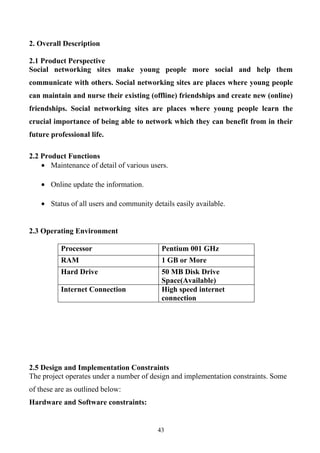
2.3 Operating Environment

          Processor                        Pentium 001 GHz
          RAM                              1 GB or More
          Hard Drive                       50 MB Disk Drive
                                           Space(Available)
          Internet Connection              High speed internet
                                           connection


2.5 Design and Implementation Constraints
The project operates under a number of design and implementation constraints. Some
of these are as outlined below:
Hardware and Software constraints:


                                          43
Since the project has been developed entirely using JAVA and object oriented
methodology, it is largely independent. The project can be run on any platform.
However, it still needs a JAVA framework to run (Net Beans).
End user constraints:
As mentioned above the major constraints for the end user is having a Java framework
on his computer. Also he should be familiar with the operation with the system to a
certain extent , although a help document will be provided to oriented users.

2.6 User Documentation

User manual and CD will be made available for troubleshooting and help. The user
manual will contain detailed information about the usage of the product from a layman
perspective to an expert network / system administrator. The manual shall also be
made available online.
2.7 Assumptions and Dependencies

The proposed solution will be designed to work in an enterprise environment . The
target environment may consist of wired and wireless links inside the network . The
solution has to be self sufficient and free from any unfamiliar dependencies.

3. System Features

An application has divided its working in different modules. Each module consists of
different working for proper functioning of application. All modules are integrate
together to make robust application. These modules provide various features of system.


    • Photo & Video Uploads

    • User profiles

    • Private messaging system


                                           44
• Friend buddy system

   • Add/remove custom applications system

   • Emailing to any user


4. External Interface Requirements

4.1 User Interface

   A graphical User interface is available providing following functionalities:
   • Drop down menu for algorithm selection

   • Selection list for scaling threshold up or down

   • Scrolling control to observe different reminder & many of different things.

   • all reminders are show in the list so that time select whatever reminder customer
      want to send email,sms etc.

   • Help button


4.2 Hardware Interfaces

      The solution extensive use of several hardware devices. These devices include;
         • Internet modem

         • LAN

         • Switches


4.3 Software Interface

                                          45
Operating system -
     With minor allowances for the peculiarities of particular operating systems, the
application can be modified to act largely platform independent since it has been
written in JAVA. The application has however been developed using Windows XP and
will naturally work without changes on the operating systems.


4.4 Communications Interface

As the application is social networking web site it requires high speed internet modem
for the use of this application. For the suitable use there must be a correct internet
connection among the users.

5. Other Nonfunctional Requirements

5.1 Performance Requirements

The solution has to exhibit very stringent performance requirements. The system has
very perfect performance .It can help the businessman to show all meeting schedule
when it can work on system that time this reminder show that meeting ,appointment
whatever client remind that time so the customer can at that time attain that meeting
etc. So the customers are becoming important day by day to remain in competition.


5.2 Safety Requirements
Security
- Some security measures are provided to the application account holders such as
account holder must give his/her account id and password to login. Other than that
security to user’s personnel details and photos and video galleries.


                                           46
5.3 Software Quality Attributes

Availability
    This web application in useful in making relationship among community people,
friends, students and all the humanity to build the relation
In such instances, there strength arise among others from
    • A unifying purpose and clear coordination structure

    • Multiple, interactive communication that encourage simultaneous action

    • Dynamism and creativity

    • Quality and packaging of evidences

    • Representative ideas

    • Strength in numbers


6.Other Requirements


Appendix A: Glossary

LAN=Local Area Network.

GUI=Graphical User Interface.


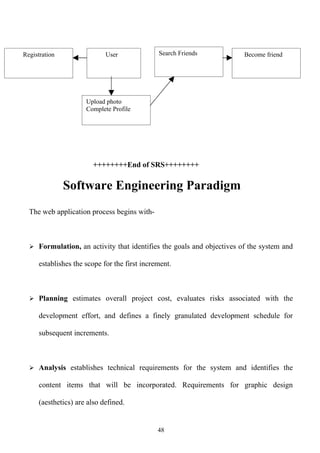
Appendix B: Analysis Models


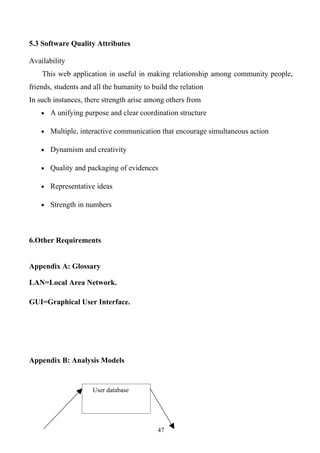
                     User database


                                            47
Registration                 User              Search Friends          Become friend


                      Upload photo
                      Complete Profile


                        ++++++++End of SRS++++++++

               Software Engineering Paradigm
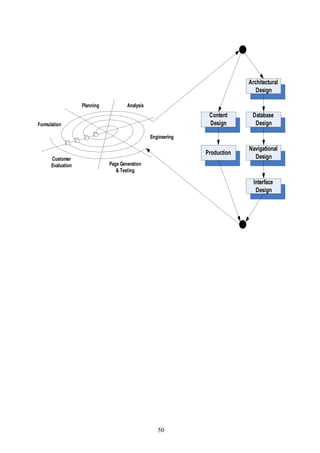
  The web application process begins with-


   Formulation, an activity that identifies the goals and objectives of the system and

      establishes the scope for the first increment.


   Planning estimates overall project cost, evaluates risks associated with the

      development effort, and defines a finely granulated development schedule for

      subsequent increments.


   Analysis establishes technical requirements for the system and identifies the

      content items that will be incorporated. Requirements for graphic design

      (aesthetics) are also defined.


                                               48
 Engineering activity incorporates two parallel task, Content design and production

   are performed by non-technical member of the team. The intent of these tasks is to

   design, produce, and/or acquire all texts, graphics, audio and video contents that are

   to become integrated into the web application. At the same time, a technical design

   tasks are conducted.


 Page Generation is a construction activity that makes heavy use of automated

   tools. The content defined in the engineering activity is merged with the

   architectural, navigational and interface design to produce executable web pages.


 Testing ensures that the web application will operate correctly with different

   browsers.

 Customer Evaluation, this is the point at which changes are requested. These

   changes are integrated into the next path through the incremental process flow.


                                           49
Architectural
                                                                               Design

                   Planning           Analysis
                                                                Content      Database
Formulation                                                     Design        Design

                                                 Engineering

                                                                            Navigational
                                                               Production
      Customer                                                                Design
      Evaluation              Page Generation
                                 & Testing

                                                                              Interface
                                                                               Design


                                                    50
ENTITY- RELATIONSHIP DIAGRAM
                                                                                     FName
                                               Email_i
                             password                          Image
                                               d
                                                                                               LName
                   Dob                                                  Name

                                                User                           User_id
               PhoneN
               o
                                                                                  City
               sex
                                                                       Country
                             address


                                                                                                  Authenticat
                                                                                                  e


                                                                                     Passwor
                                                                                     d
    Make
                                                                        id
    friends


                                                                   name                      Administrator


                                 userid

                                                                                               Send
User friends                      friend                                                       scraps


                                  request                                         userid                scraps


   Fname                                                               Fname
                         image
                                                                                           User
                                                                 image
                                                                                           scrapbook
                                                    A
                                                                   friendi


                                                          51

                                            Search_date
A


     View/upl
     d
                            photos
                                                   View/
                                                   edit


 User photos


                               org                                                   college
pname

                        degree                                                           industry
                                                   User professional

                        carrer


                                                                       occupatio
                          education
                                                      year             n


                      aboutm             marital             hobbies
                      e
                                                                           passion
           religiou
           s
                                      User social
        smoke

                                                                         URL
          music
                                                             drink
                          sports         movie

                                                      52
Job Category                     Categor        A                                              Category
    Job_Nam           CategoryI Password
                                 y    Search_date                              PhoneNo         _name
    e                 D
DATA FLOW DIAGRAMS (DFD)

Data flow diagrams represent the flow of data through a system. A DFD is composed

of:


1. Data movement shown by tagged arrows.

2. Transformation or process of data shown by named bubbles.

3. Sources and destination of data represented by named rectangles.

4. Static storage or data at rest denoted by an open rectangle that is named.


The DFD is intended to represent information flow but it is not a flowchart and is not

intended to indicate decision-making, flow of control, loops and other procedural

aspects of the system. DFD is a useful graphical tool and is applied at the earlier stages

of requirements analysis. It may be further refined at preliminary design stage and is

used as mechanism for creating a top level structural design for software.


           The DFD drawn first at a preliminary level is further expanded into greater

details:

       The context diagram is decomposed and represented with multiple bubbles

Each of these bubbles may be decomposed further and documented as more detailed

DFD s.


                                            53
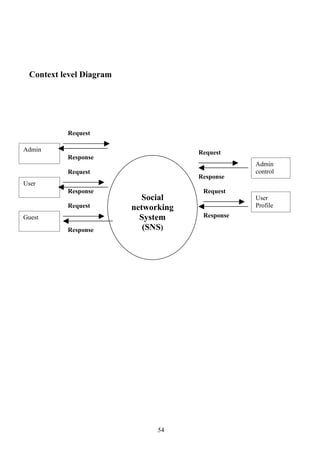
Context level Diagram


          Request

Admin                                 Request
          Response
                                                  Admin
          Request                                 control
                                      Response
User
          Response                     Request
                           Social                 User
          Request        networking               Profile
Guest                      System      Response

          Response          (SNS)


                               54
1st level DFD for user


              Request                     Receive

User
                          Login                       User login table
              Response    1.0


                         Home
                          2.0


                                        Services
                         Profile
                           3.0                      User Data table


                                   55
1st level DFD FOR Guest


            Request                       Update
Guest                                               User Data table
                          Registration
            Response          1.0
                                          Receive


                             Login
                              2.0
                                                    User login Table
Services
            Response


                              Home
                               3.0


                              Profile
                                4.0                   User Data table


                                     56
1st Level DFD for Admin

         login module
                  User Id/password                           Verification

                                           Login
admin                                       1.0
                                                              Response


                    Request
                                                                         Admin login table
                                       control
                                       panel
                    Response                2.0


                                 Confirm                                       Confirm


    2nd Level DFD for user


         login module                                 Existing
                                                       Id/password

                                           login            correct         home
        User                                                                 1.1.2
                                            1.1

                                                            incorrect


                                                  57
Profile
                                 User data table              1.1.3


        home module
                                                                Feedbac
              Existing Id/pswd
                                                                   k
                                       2.0                        2.6
User                                   Home


            Send
                                                            Search
            scrap
                                                            friends
              2.1                                             2.5


                       Send                        Upload
                       email                       photos
                                     Send
                           2.2                      2.4
                                    message
                                      2.3


                                             58
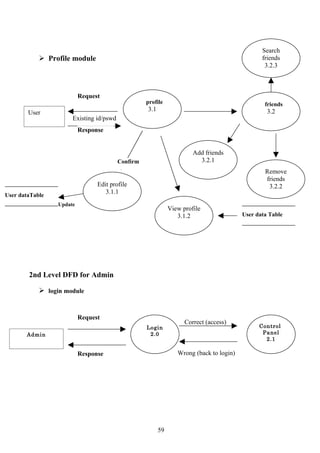
Search
             Profile module                                                                    friends
                                                                                                 3.2.3


                          Request
                                                   profile                                       friends
                                                   3.1                                            3.2
        User
                      Existing id/pswd
                          Response


                                                                       Add friends
                                         Confirm                         3.2.1
                                                                                                 Remove
                                                                                                 friends
                                Edit profile                                                      3.2.2
                                   3.1.1
User dataTable
                 Update
                                                              View profile
                                                                 3.1.2                   User data Table


        2nd Level DFD for Admin

             login module


                          Request
                                                                    Correct (access)
                                                   Login                                       Control
       Admin                                        2.0                                         Panel
                                                                                                 2.1

                          Response                               Wrong (back to login)


                                                         59
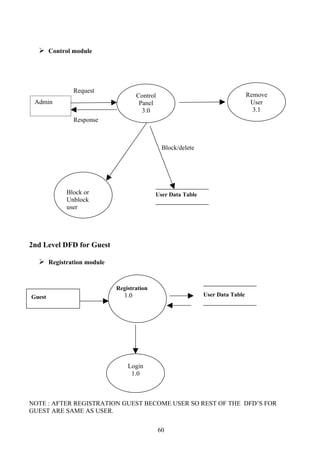
 Control module


             Request
                                   Control                                     Remove
 Admin                              Panel                                       User
                                     3.0                                         3.1
             Response


                                              Block/delete


          Block or                       User Data Table
          Unblock
          user


2nd Level DFD for Guest

   Registration module


                          Registration
Guest                        1.0                             User Data Table


                              Login
                               1.0


NOTE : AFTER REGISTRATION GUEST BECOME USER SO REST OF THE DFD’S FOR
GUEST ARE SAME AS USER.

                                             60
SYSTEM DESIGN
Design is defined as the “the process of applying various techniques and principle for

the purpose for defining a device, a process or a system in sufficient detail to permit its

physical realization”.


After the requirements specifications have been analyzed and specified, software

design is the first of the three technical activities viz.


                Design

                Code-generation and

                Testing.


The design process involves conceiving and planning out in the mind and making a

drawing, pattern and sketch of. In software design, architectural design and detailed

design of each pages being hosted.


External design is software involves concerning, planning and specifying the

externally observable characteristics of a web product. These characteristics include

user display and user friendliness of a website, external data source and data sinks and

the functional characteristics performance requirement and high level process structure

and product.


                                              61
A software design is a meaningful engineering of some software product that is to be

 built. A design can be traced to the user‘s requirements that can be accessed for quality

 against predefined criteria. During the design process the software requirements model

 is transformed into design models that describe the details of data structure system

 architecture interface and component. Each design product is reviewed for quality

 before moving to the next phase of software development.

 DESIGN GUIDELINES: -

 A design should

           Exhibit good architectural structure

           Be modular

           Contain distinct representation of data , architectural, interfaces, and

              component(modules)

           Lead to data structure that are appropriate for the object to be

              implemented and be drawn from recognizable design pattern

           Lead to components that exhibit independent function characteristics.

           Lead to interfaces that complexity of connection between modules and

              with the external environmental.

           Is derived using a reputable method that is driven by information obtained

              during software requirements analysis?


DESIGN PRINCIPLE


                                            62
The design

          Process should not suffer from tunnel vision.

          Should be traceable to the analysis model.

          Should not reinvent the wheel.

          Should minimize intellectual distance between the software and the

             problems as is exist in the world.

          Should exhibit informing and integration.

          Should be structured to accommodate change.

          Should be structured to degrade gently, even with bad data, events or

             operating condition are encountered.

          Should be accessed for quality as it being created.

          Should be reviewed to minimize conceptual error (semantic).


 DESIGN STRATEGY

      Once the specification is ready and analysis has been done, we move on to most

important stage in any project development, which is design. Till this Stage we knew

what is supposed to be done. Under design phase we provide the answer to the

question that how is it supposed to be done?


                                           63
Design is an interactive process and one must repeatedly use the complexity and

reliability. Measures evaluate the progress of the design. There are various approaches

for designing. Some of the most widely used ones are as follows:


             Top down approach

             Bottom up approach

             Object oriented design


The entire design phase of this project can be broadly categorized into two activities.

They are:

             Higher level design

             Lower level design


                                          64
DESCRIPTION OF MODULES

I: Admin:

This module has features for authenticating user and removing unwanted data from the

database as well as removing unwanted users : -

              Login module

          Control panel

                  1. remove user

                      The administrator is having power to remove any user who is

                  misusing the services provided by the system.

                  2. Block user

                     The administrator is having power to block any user for certain

                  period of time according to the offence of a user.

II: guest:

This module is for the new user who wants to create an profile and wants to be the part

of our community : -

              Registration

                   This module is for the new user who wanted to be the part of our

community after registration he/she can access all the resources and services provided

by the system.


                                             65
 Login

                After registration guest may have his/her user id and password and by

             entering it he/she can access all the services as a local user.

III: user:


              Login

                     Registered user can login to their account through their user id and

passwords which were chosen by them at the time of registration. They have to provide

exactly same id and password to access to their account.


              Home

                  After login user can access various services provided by the system and

this is the module where all these resources are available. These services are :-

              1: Send email :- user can send email to their friends .

              2: Send message :- user can send message to their friends.

              3 : Send scrap :- user can post scrap to their friends page.

              4 : Search friends :- user can search their friends in our database.

              5: Upload photos :- user can upload their pictures.

              6: Feedback :- user can give feedback about what he/she feels for the

                system and also suggestion for advancement of the system .


                                               66
 Profile

                 This is the module where all the user information is displayed which

he/she entered at the time of registration . user can complete his/her profile at any point

of time only mandatory information is to be entered at the time of joining.


           Friends

                This is the module where user can add new friends those were already

          part of our community and also can remove them as per their need.


                        ++++++++end of module description++++++++


                                            67
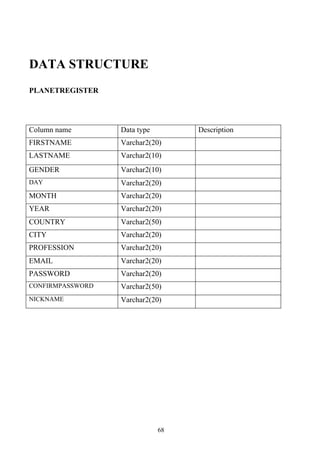
DATA STRUCTURE
PLANETREGISTER


Column name       Data type        Description
FIRSTNAME         Varchar2(20)
LASTNAME          Varchar2(10)
GENDER            Varchar2(10)
DAY               Varchar2(20)
MONTH             Varchar2(20)
YEAR              Varchar2(20)
COUNTRY           Varchar2(50)
CITY              Varchar2(20)
PROFESSION        Varchar2(20)
EMAIL             Varchar2(20)
PASSWORD          Varchar2(20)
CONFIRMPASSWORD   Varchar2(50)
NICKNAME          Varchar2(20)


                              68
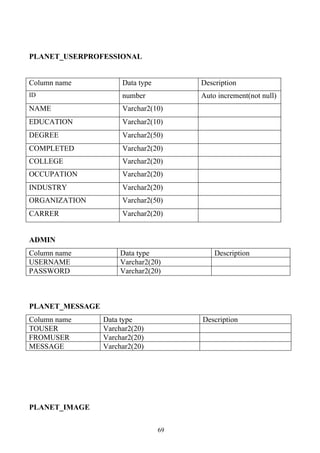
PLANET_USERPROFESSIONAL


Column name           Data type        Description
ID                    number           Auto increment(not null)
NAME                  Varchar2(10)
EDUCATION             Varchar2(10)
DEGREE                Varchar2(50)
COMPLETED             Varchar2(20)
COLLEGE               Varchar2(20)
OCCUPATION            Varchar2(20)
INDUSTRY              Varchar2(20)
ORGANIZATION          Varchar2(50)
CARRER                Varchar2(20)


ADMIN
Column name           Data type            Description
USERNAME              Varchar2(20)
PASSWORD              Varchar2(20)


PLANET_MESSAGE
Column name      Data type             Description
TOUSER           Varchar2(20)
FROMUSER         Varchar2(20)
MESSAGE          Varchar2(20)


PLANET_IMAGE

                                  69
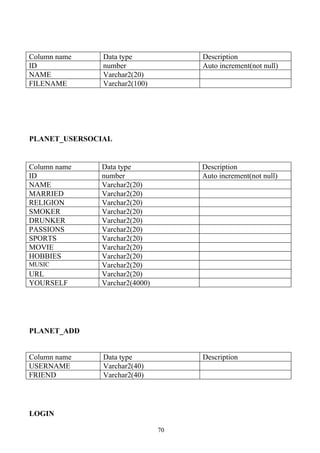
Column name    Data type            Description
ID             number               Auto increment(not null)
NAME           Varchar2(20)
FILENAME       Varchar2(100)


PLANET_USERSOCIAL


Column name   Data type             Description
ID            number                Auto increment(not null)
NAME          Varchar2(20)
MARRIED       Varchar2(20)
RELIGION      Varchar2(20)
SMOKER        Varchar2(20)
DRUNKER       Varchar2(20)
PASSIONS      Varchar2(20)
SPORTS        Varchar2(20)
MOVIE         Varchar2(20)
HOBBIES       Varchar2(20)
MUSIC         Varchar2(20)
URL           Varchar2(20)
YOURSELF      Varchar2(4000)


PLANET_ADD


Column name    Data type            Description
USERNAME       Varchar2(40)
FRIEND         Varchar2(40)


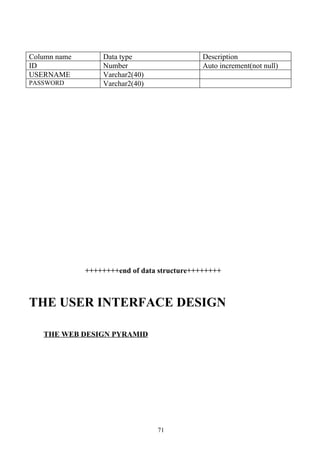
LOGIN

                               70
Column name       Data type                  Description
ID                Number                     Auto increment(not null)
USERNAME          Varchar2(40)
PASSWORD          Varchar2(40)


              ++++++++end of data structure++++++++


THE USER INTERFACE DESIGN

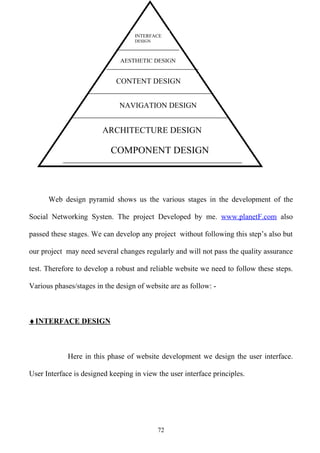
   THE WEB DESIGN PYRAMID


                                 71
INTERFACE
                                   DESIGN


                              AESTHETIC DESIGN


                             CONTENT DESIGN


                              NAVIGATION DESIGN


                        ARCHITECTURE DESIGN

                           COMPONENT DESIGN


      Web design pyramid shows us the various stages in the development of the

Social Networking Systen. The project Developed by me. www.planetF.com also

passed these stages. We can develop any project without following this step’s also but

our project may need several changes regularly and will not pass the quality assurance

test. Therefore to develop a robust and reliable website we need to follow these steps.

Various phases/stages in the design of website are as follow: -


♦ INTERFACE DESIGN


             Here in this phase of website development we design the user interface.

User Interface is designed keeping in view the user interface principles.


                                            72
While designing the user interface for the system for planetF.com we have followed

the user interface designing principles, which includes: -


   • All the color combination have been used taken care of people who are color

      blind so that they can also use the system easily, also colors are used such that it

      doesn’t have bad effect on the eye of user.

   • The entire font has been used just perfectly so that user feels easy while working

      on the system.

   • Proper messaging has been done so that user get proper message at the right

      time.

   • We have used familiar terms in the label so that the user can easily identify

      them.

   • Forms have been developed so that while working on monochrome monitor they

      can be easily used without any modification.


AESTHETIC DESIGN


      At this level of web designing we mainly focus on the graphics designing. We

try to improve the look and feel of the web pages. As we know that in web page

graphics matter the most. We can do so by using the Graphics designing software like

MS Paint, Photoshop. In this project I have extensively used Photoshop and MS Paint

for improving the look and feel of graphics design of the website.

                                           73
♦ CONTENT DESIGN


      Content design defines the Layout and Structure of the website. As layout of any

website must be best, therefore we have given much time and effort in content

designing of the proposed website project. As you will navigate the website you will

get the layout and structure of the WebPages according to the need of the website and

customer.


♦ NAVIGATION DESIGN


      When we reach at this stage we almost know the requirement of the website and

above all customer. So according to the need of the customer we have designed the

navigation links and the internal working of the website.

Navigation design should be such that the user of the website feels easy to navigate

and get the required information on less time, and we have done that during the

navigation design.


♦ ARCHITECTURE DESIGN


      Architecture design of the website shows the Hypermedia structure of the

website. So important care need’s to be taken while designing the architecture of the

                                           74
website. We have taken care of the requirement as well as the user needs while

designing the website.


♦ COMPONENT DESIGN


      Component design of the website includes functional component design either

made by the developer or being imported by the company. Component designing is the

major work to be done by any web developer and, I have used several functional

components in our website, you can find these easily by referring to the coding part of

the website.

After these designs we Use the best available technology to design the project as best

technology gives best result. For developing the project planetF(SNS), We have used

the resent HTML, DHTML tag’s and many new feature of the JavaScript language for

the database application I have used JAVA along with the backend ORACLE.


                         Coding

                                          75
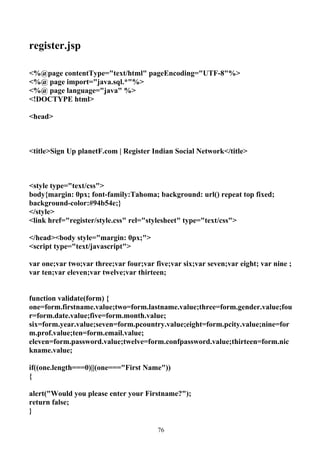
register.jsp

<%@page contentType="text/html" pageEncoding="UTF-8"%>
<%@ page import="java.sql.*"%>
<%@ page language="java" %>
<!DOCTYPE html>

<head>


<title>Sign Up planetF.com | Register Indian Social Network</title>


<style type="text/css">
body{margin: 0px; font-family:Tahoma; background: url() repeat top fixed;
background-color:#94b54e;}
</style>
<link href="register/style.css" rel="stylesheet" type="text/css">

</head><body style="margin: 0px;">
<script type="text/javascript">

var one;var two;var three;var four;var five;var six;var seven;var eight; var nine ;
var ten;var eleven;var twelve;var thirteen;


function validate(form) {
one=form.firstname.value;two=form.lastname.value;three=form.gender.value;fou
r=form.date.value;five=form.month.value;
six=form.year.value;seven=form.pcountry.value;eight=form.pcity.value;nine=for
m.prof.value;ten=form.email.value;
eleven=form.password.value;twelve=form.confpassword.value;thirteen=form.nic
kname.value;

if((one.length===0)||(one==="First Name"))
{

alert("Would you please enter your Firstname?");
return false;
}

                                        76
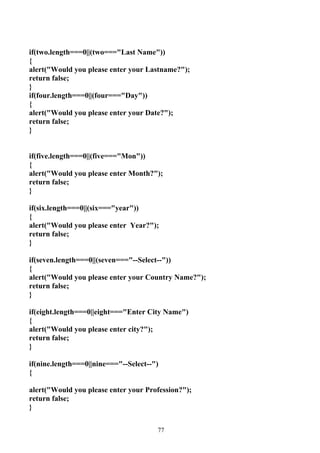
if(two.length===0||(two==="Last Name"))
{
alert("Would you please enter your Lastname?");
return false;
}
if(four.length===0||(four==="Day"))
{
alert("Would you please enter your Date?");
return false;
}


if(five.length===0||(five==="Mon"))
{
alert("Would you please enter Month?");
return false;
}

if(six.length===0||(six==="year"))
{
alert("Would you please enter Year?");
return false;
}

if(seven.length===0||(seven==="--Select--"))
{
alert("Would you please enter your Country Name?");
return false;
}

if(eight.length===0||eight==="Enter City Name")
{
alert("Would you please enter city?");
return false;
}

if(nine.length===0||nine==="--Select--")
{

alert("Would you please enter your Profession?");
return false;
}


                                       77
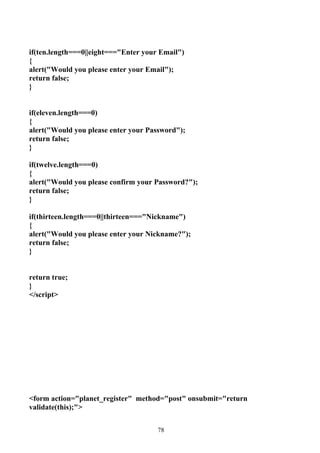
if(ten.length===0||eight==="Enter your Email")
{
alert("Would you please enter your Email");
return false;
}


if(eleven.length===0)
{
alert("Would you please enter your Password");
return false;
}

if(twelve.length===0)
{
alert("Would you please confirm your Password?");
return false;
}

if(thirteen.length===0||thirteen==="Nickname")
{
alert("Would you please enter your Nickname?");
return false;
}


return true;
}
</script>


<form action="planet_register" method="post" onsubmit="return
validate(this);">


                                      78
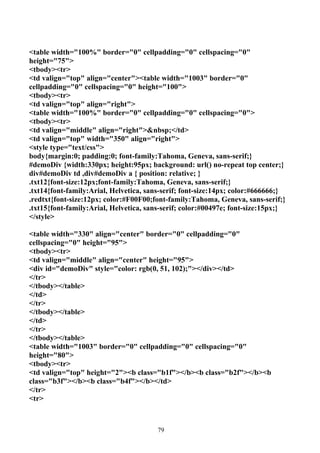
<table width="100%" border="0" cellpadding="0" cellspacing="0"
height="75">
<tbody><tr>
<td valign="top" align="center"><table width="1003" border="0"
cellpadding="0" cellspacing="0" height="100">
<tbody><tr>
<td valign="top" align="right">
<table width="100%" border="0" cellpadding="0" cellspacing="0">
<tbody><tr>
<td valign="middle" align="right">&nbsp;</td>
<td valign="top" width="350" align="right">
<style type="text/css">
body{margin:0; padding:0; font-family:Tahoma, Geneva, sans-serif;}
#demoDiv {width:330px; height:95px; background: url() no-repeat top center;}
div#demoDiv td ,div#demoDiv a { position: relative; }
.txt12{font-size:12px;font-family:Tahoma, Geneva, sans-serif;}
.txt14{font-family:Arial, Helvetica, sans-serif; font-size:14px; color:#666666;}
.redtxt{font-size:12px; color:#F00F00;font-family:Tahoma, Geneva, sans-serif;}
.txt15{font-family:Arial, Helvetica, sans-serif; color:#00497e; font-size:15px;}
</style>

<table width="330" align="center" border="0" cellpadding="0"
cellspacing="0" height="95">
<tbody><tr>
<td valign="middle" align="center" height="95">
<div id="demoDiv" style="color: rgb(0, 51, 102);"></div></td>
</tr>
</tbody></table>
</td>
</tr>
</tbody></table>
</td>
</tr>
</tbody></table>
<table width="1003" border="0" cellpadding="0" cellspacing="0"
height="80">
<tbody><tr>
<td valign="top" height="2"><b class="b1f"></b><b class="b2f"></b><b
class="b3f"></b><b class="b4f"></b></td>
</tr>
<tr>


                                        79
<td class="headerbg" valign="bottom" align="center"><table width="1003"
border="0" cellpadding="0" cellspacing="0" height="75">
<tbody><tr>
<td rowspan="2" valign="middle" width="242" align="center"><img
src="register/logo.png" alt="" width="354" height="78" border="0"
title=""></a>
            </td>
<td style="padding-right: 7px;" width="747" align="right">
<table width="500" border="0" cellpadding="0" cellspacing="0">
<tbody><tr>
<td class="darkbluetext" valign="middle" align="right"><a href=""
class="darkbluelink"><strong>Sign Up</strong></a> | <a href=""
class="darkbluelink"><strong>Login</strong></a></td><td valign="middle"
width="175" align="right">
<table class="boxbg" width="156" border="0" cellpadding="0" cellspacing="0"
height="29">

<tbody><tr>
<td style="padding-left: 2px;" valign="middle" width="122" align="right">
<input name="shname" id="shname" class="inputtxt" value="Find Friends"
type="text">
</td>
<td valign="middle" width="24" align="left" height="30">
<input src="register.gif" alt="" width="20" type="image" align="absmiddle"
border="0" height="20">
</td>
</tr>

</tbody></table>
</td>
</tr>
</tbody></table>

</td>
<td width="20" align="right"></td>
</tr>
<tr>
<td colspan="2" valign="bottom" align="right">
<table width="500" border="0" cellpadding="0" cellspacing="0">
<tbody><tr>
<td>
<!-- -->


                                     80
<div id="bluemenu" class="bluetabs">
<ul>
<li><a href="">Home</a></li>
<li><a href="">Social Networking</a></li>
<li><a href="" rel="dropmenu2_b">Study Zone</a></li>
<li><a href="" rel="dropmenu4_b">Cafe Bharat</a></li>
<li><a href="" rel="dropmenu5_b">GenX Zone</a></li>
<li><a href="" rel="dropmenu6_b">+ My Tab</a></li>
</ul>
</div>

<!--Social Networking-->
<div id="dropmenu1_b" class="dropmenudiv_b">
<a href="" class="iconfriends icons">Friends</a>
<a href="" class="icongangs icons">Gangs</a>
<a href="" class="iconphotos icons">Photos</a>
<a href="" class="iconvideos icons">Videos</a>
<a href="" class="icongreetings icons">Greetings</a>
<a href="" class="iconclassifieds icons">Classifieds</a>
<a href="" class="iconforums icons">Forums</a>
</div>

<!--Study Zone-->
<div id="dropmenu2_b" class="dropmenudiv_b">
<a href="" class="iconstudyindia icons">Study India</a>
<a href="" class="iconstudyabroad icons">Study Abroad</a>
<a href="" class="iconcampustv icons">Campus TV</a>
<a href="" class="iconknowledgebase icons">Notifications</a>
<a href="." class="iconexamresults icons">Exam Results</a>
<a href="" class="iconcampussearch icons">Campus Search</a>
<a href="" class="iconcareers icons">Careers</a>
</div>

<!--Cafe Bharat -->
<div id="dropmenu4_b" class="dropmenudiv_b">
<a href="" class="iconhindi icons">Hindi</a>
<a href="" class="icontamil icons">Tamil</a>
<a href="" class="icontelugu icons">Telugu</a>
<a href="">Bengali</a>
<a href="" class="iconkannada icons">Kannada</a>
<a href="" class="iconmalayalam icons">Malayalam</a>
<a href="" class="iconhollywood icons">English</a>
</div>


                                       81
<!--Services -->
<div id="dropmenu5_b" class="dropmenudiv_b">
<a href="" class="icongirlsonly icons">Girls Only</a>
<a href="" class="iconboyzone icons">Boy Zone</a>
<a href="" class="icongamezone icons">Game Zone</a>
<a href="" class="iconliveradio icons">Live Radio</a>
<a href="" class="iconstarplayer icons">Star Player</a>
<a href="" class="iconmobile icons" target="_blank">Recharge Mobiles</a>
<a href="" class="iconipl icons">Cricket</a>
</div>


<!--GenX Zone -->
<div id="dropmenu3_b" class="dropmenudiv_b">
</div>


<!--My Tab -->
<div id="dropmenu6_b" class="dropmenudiv_b" style="width: 140px;">
<a href="">Manage</a>
</div>
<!-- -->
</td>
</tr>
</tbody></table>
</td>
</tr>
</tbody></table></td>
</tr>
</tbody></table>
</td>
</tr>
</tbody></table>

<link href="register/dialog.css" rel="stylesheet" type="text/css">


<div id="nickdialog" class="flora" title="" style="display: none;">
<table width="100%" border="0" cellpadding="0"
cellspacing="0"><tbody><tr><td height="10"></td></tr></tbody></table>
<table id="table5" width="100%" align="center" border="0" cellpadding="0"
cellspacing="0" height="50">


                                       82
<tbody><tr>
<td class="bluetext" width="240" align="right" height="48"><span
class="blacktext"></span></td>
<td width="205"><input class="blacktextborder" name="nicknamech"
id="nicknamech" size="40" value="Nickname" type="text">
</td>
<td width="155" align="left"><input name="submiturl" class="blacktext"
value="Check now" onClick="checknowcall(2);" type="button">
</td>
</tr>
<tr>
<td style="padding-right: 5px;" align="right" height="28"><span
id="loadingdisp" style="display: none;"><img src="register"
border="0"></span></td>
<td colspan="2" align="left" height="28"><div id="nickerr" style="display:
none;"><span class="blackboldtext" id="nickerr1"></span>
&nbsp;&nbsp;<input name="closen" class="blacktext" onClick="javascript:
closedialog();" value="Close" type="button"></div>
<div id="nicksucc" style="display: none;"><span class="blackboldtext">Nick
name available</span>
<input name="usenow" class="blacktext" onClick="javascript: gotoparent();"
value="Use this URL" type="button">&nbsp;&nbsp;<input name="closen"
class="blacktext" onClick="javascript: closedialog();" value="Close"
type="button"></div>
</td>
</tr>

</tbody></table>
</div>
<table class="bodymaintablebg" width="1003" align="center" border="0"
cellpadding="0" cellspacing="0">
<tbody><tr>
<td valign="top" align="center"><table width="1003" align="center"
border="0" cellpadding="0" cellspacing="0">
<tbody><tr>
<td valign="top" align="center"><table class="subtabbg" width="1003"
align="center" border="0" cellpadding="0" cellspacing="0">
<tbody><tr>
<td valign="top" width="3" align="left" height="26"></td>
<td valign="middle" width="19" align="right"><a href="#"><img
src="register/home.gif" width="15" border="0" height="15"></a></td>
<td valign="top" width="17" align="left"><img src="register/tabsplitter.gif"
width="16" height="24"></td>


                                      83
<td valign="middle" width="36" align="center"><a href="#"
class="greylink"><strong>Register</strong></a></td>
<td valign="top" width="16" align="left">&nbsp;</td>
<td valign="middle" width="71" align="center"><a href="#"
class="blacklink"></a></td>
<td valign="middle" width="11" align="left"><a href="#"></a></td>
<td width="123">&nbsp;</td>
<td valign="top" width="661" align="left">&nbsp;</td>
<td valign="top" width="3" align="right"></td>
</tr>
</tbody></table></td>
</tr>
<tr>
<td valign="top" align="center" height="8"></td>
</tr>
</tbody></table>
<table width="960" align="center" border="0" cellpadding="0"
cellspacing="0">
<tbody><tr>
<td style="padding: 5px;" valign="top" align="center" height="328"><table
width="95%" border="0" cellpadding="0" cellspacing="0">
<tbody><tr>
<td width="73%"></td>
<td width="27%" height="10"></td>
</tr>
<tr>
<td valign="middle" align="left" height="50"><table width="93%" border="0"
cellpadding="0" cellspacing="0">
<tbody><tr>
<td class="blueheading1" valign="middle" width="2%"
align="left">&nbsp;</td>
<td class="blueheading2" valign="middle" width="98%" align="left"
height="33">Become a member of the planetF community </td>
</tr>
<tr>
<td class="greytext" valign="middle" align="left">&nbsp;</td>
<td class="greytext" valign="middle" align="left" height="30"><strong>Whats
New?</strong> Check out the latest features and sections on planetF.com <!--<a
href="#"><img src="images/takeatour.gif" width="84" height="15" border="0"
/></a>--></td>
</tr>
</tbody></table></td>
<td valign="bottom" align="left">


                                      84
<table width="98%" border="0" cellpadding="0" cellspacing="0">
<tbody><tr>
<td valign="middle" align="left" height="20"><img src="register/register-
img.gif" alt="Connecting Indians Worldwide" title="Connecting Indians
Worldwide" width="246" border="0" height="102"></td>
</tr>
</tbody></table></td>
</tr>
</tbody></table>
<table width="95%" border="0" cellpadding="0" cellspacing="0">
<tbody><tr>
<td valign="top" width="72%" align="center" height="291"><table
width="98%" align="left" border="0" cellpadding="0" cellspacing="0">
<tbody><tr>
<td valign="top" width="4" align="left" height="456">&nbsp;</td>
<td valign="top" align="left"><table width="100%" border="0"
cellpadding="0" cellspacing="0">
<tbody><tr>
<td height="15">&nbsp;</td>
<td class="blueheading1" width="26%">Tell us about yourself</td>
<td class="bottomblueline" width="66%">&nbsp;</td>
<td>&nbsp;</td>
</tr>
</tbody></table>
<table width="95%" align="center" border="0" cellpadding="0"
cellspacing="7">
<tbody><tr>
<td width="21%" height="10"></td>
<td width="79%"></td>
</tr>
<tr>
<td class="blacktext" valign="middle" align="right">My Name</td>
<td valign="middle" align="left"><table width="95%" border="0"
cellpadding="0" cellspacing="1">
<tbody><tr>
<td valign="middle" width="33%" align="left"><input name="firstname"
class="normaltextfieldstyle" id="membername" value="First Name"
maxlength="15" onBlur="setPolicy()" type="text"></td>
<td valign="middle" width="67%" align="left"><input name="lastname"
class="normaltextfieldstyle" id="lastname" value="Last Name"
maxlength="20" onBlur="setPolicy1()" type="text"></td>
</tr>
</tbody></table></td>


                                      85
</tr>
<tr>
<td class="blacktext" valign="middle" align="right">I am</td>
<td valign="middle" align="left"><table width="95%" border="0"
cellpadding="0" cellspacing="1">
<tbody><tr>
<td valign="middle" width="6%" align="center"><input name="gender"
id="gender" onBlur="setPolicy2()" value="m" type="radio"></td>
<td class="blacktext" valign="middle" width="13%" align="left">Male</td>
<td valign="middle" width="6%" align="center"><input name="gender"
id="gender" onBlur="setPolicy2()" value="f" type="radio"></td>
<td class="blacktext" valign="middle" width="75%" align="left">Female</td>
</tr>
</tbody></table></td>
</tr>
<tr>
<td class="blacktext" valign="middle" align="right">Birthday</td>
<td valign="middle" align="left"><table width="95%" border="0"
cellpadding="0" cellspacing="1">
<tbody><tr>
<td valign="middle" width="14%" align="left"><select name="date"
class="normaltextfieldstyle" id="date" onBlur="setPolicy3()">
<option selected="selected" value="0">Day</option>
<option value="1">01</option>
<option value="2">02</option>
<option value="3">03</option>
<option value="4">04</option>
<option value="5">05</option>
<option value="6">06</option>
<option value="7">07</option>
<option value="8">08</option>
<option value="9">09</option>
<option value="10">10</option>
<option value="11">11</option>
<option value="12">12</option>
<option value="13">13</option>
<option value="14">14</option>
<option value="15">15</option>
<option value="16">16</option>
<option value="17">17</option>
<option value="18">18</option>
<option value="19">19</option>
<option value="20">20</option>


                                    86
<option value="21">21</option>
<option value="22">22</option>
<option value="23">23</option>
<option value="24">24</option>
<option value="25">25</option>
<option value="26">26</option>
<option value="27">27</option>
<option value="28">28</option>
<option value="29">29</option>
<option value="30">30</option>
<option value="31">31</option>
</select></td>
<td class="blacktext" valign="middle" width="15%" align="left"><select
name="month" class="normaltextfieldstyle" id="month" onBlur="setPolicy4()"
>
<option selected="selected" value="0">Mon</option>
<option value="01">Jan</option>
<option value="02">Feb</option>
<option value="03">Mar</option>
<option value="04">Apr</option>
<option value="05">May</option>
<option value="06">Jun</option>
<option value="07">Jul</option>
<option value="08">Aug</option>
<option value="09">Sep</option>
<option value="10">Oct</option>
<option value="11">Nov</option>
<option value="12">Dec</option>
</select>                      </td>
<td class="blacktext" valign="middle" width="71%" align="left"><select
name="year" class="normaltextfieldstyle" id="year" onBlur="setPolicy5()" >
<option selected="selected" value="0">Year</option>
<option value="1999">
1999                        </option>
<option value="1998">
1998                        </option>
<option value="1997">
1997                        </option>
<option value="1996">
1996                        </option>
<option value="1995">
1995                        </option>
<option value="1994">


                                    87
1994                    </option>
<option value="1993">
1993                    </option>
<option value="1992">
1992                    </option>
<option value="1991">
1991                    </option>
<option value="1990">
1990                    </option>
<option value="1989">
1989                    </option>
<option value="1988">
1988                    </option>
<option value="1987">
1987                    </option>
<option value="1986">
1986                    </option>
<option value="1985">
1985                    </option>
<option value="1984">
1984                    </option>
<option value="1983">
1983                    </option>
<option value="1982">
1982                    </option>
<option value="1981">
1981                    </option>
<option value="1980">
1980                    </option>
<option value="1979">
1979                    </option>
<option value="1978">
1978                    </option>
<option value="1977">
1977                    </option>
<option value="1976">
1976                    </option>
<option value="1975">
1975                    </option>
<option value="1974">
1974                    </option>
<option value="1973">
1973                    </option>


                                    88
<option value="1972">
1972                    </option>
<option value="1971">
1971                    </option>
<option value="1970">
1970                    </option>
<option value="1969">
1969                    </option>
<option value="1968">
1968                    </option>
<option value="1967">
1967                    </option>
<option value="1966">
1966                    </option>
<option value="1965">
1965                    </option>
<option value="1964">
1964                    </option>
<option value="1963">
1963                    </option>
<option value="1962">
1962                    </option>
<option value="1961">
1961                    </option>
<option value="1960">
1960                    </option>
<option value="1959">
1959                    </option>
<option value="1958">
1958                    </option>
<option value="1957">
1957                    </option>
<option value="1956">
1956                    </option>
<option value="1955">
1955                    </option>
<option value="1954">
1954                    </option>
<option value="1953">
1953                    </option>
<option value="1952">
1952                    </option>
<option value="1951">


                                    89
1951                    </option>
<option value="1950">
1950                    </option>
<option value="1949">
1949                    </option>
<option value="1948">
1948                    </option>
<option value="1947">
1947                    </option>
<option value="1946">
1946                    </option>
<option value="1945">
1945                    </option>
<option value="1944">
1944                    </option>
<option value="1943">
1943                    </option>
<option value="1942">
1942                    </option>
<option value="1941">
1941                    </option>
<option value="1940">
1940                    </option>
<option value="1939">
1939                    </option>
<option value="1938">
1938                    </option>
<option value="1937">
1937                    </option>
<option value="1936">
1936                    </option>
<option value="1935">
1935                    </option>
<option value="1934">
1934                    </option>
<option value="1933">
1933                    </option>
<option value="1932">
1932                    </option>
<option value="1931">
1931                    </option>
<option value="1930">
1930                    </option>


                                    90
<option value="1929">
1929                    </option>
<option value="1928">
1928                    </option>
<option value="1927">
1927                    </option>
<option value="1926">
1926                    </option>
<option value="1925">
1925                    </option>
<option value="1924">
1924                    </option>
<option value="1923">
1923                    </option>
<option value="1922">
1922                    </option>
<option value="1921">
1921                    </option>
<option value="1920">
1920                    </option>
<option value="1919">
1919                    </option>
<option value="1918">
1918                    </option>
<option value="1917">
1917                    </option>
<option value="1916">
1916                    </option>
<option value="1915">
1915                    </option>
<option value="1914">
1914                    </option>
<option value="1913">
1913                    </option>
<option value="1912">
1912                    </option>
<option value="1911">
1911                    </option>
<option value="1910">
1910                    </option>
<option value="1909">
1909                    </option>
<option value="1908">


                                    91
1908                         </option>
<option value="1907">
1907                         </option>
<option value="1906">
1906                         </option>
<option value="1905">
1905                         </option>
<option value="1904">
1904                         </option>
<option value="1903">
1903                         </option>
<option value="1902">
1902                         </option>
<option value="1901">
1901                         </option>
<option value="1900">
1900                         </option>
</select></td>
</tr>
</tbody></table></td>
</tr>
<tr>
<td class="blacktext" valign="middle" align="right">I live in</td>
<td valign="middle" align="left"><table width="95%" border="0"
cellpadding="0" cellspacing="1">
<tbody><tr>
<td valign="middle" width="33%" align="left"><select name="pcountry"
id="pcountry" class="normaltextfieldstyle" onBlur="setPolicy6()" >
<option value="0" selected="selected">--Select--</option>
<option value="IN">India</option>
<option value="US">United States</option>
<option value="UK">United Kingdom</option>
<option value="AE">United Arab Emirates</option>
<option value="AU">Australia</option>
<option value="NZ">New Zealand</option>
<option value="FR">France</option>
<option value="CA">Canada</option>
<option value="DE">Germany</option>
<optgroup label="----------------------"></optgroup>
<option value="AF">Afghanistan</option>
<option value="AL">Albania</option>
<option value="DZ">Algeria</option>
<option value="AS">American Samoa</option>


                                   92
<option value="AD">Andorra</option>
<option value="AO">Angola</option>
<option value="AI">Anguilla</option>
<option value="AQ">Antarctica</option>
<option value="AG">Antigua and Barbuda</option>
<option value="AR">Argentina</option>
<option value="AM">Armenia</option>
<option value="AW">Aruba</option>
<option value="AU">Australia</option>
<option value="AT">Austria</option>
<option value="AZ">Azerbaijan</option>
<option value="BS">Bahamas</option>
<option value="BH">Bahrain</option>
<option value="BD">Bangladesh</option>
<option value="BB">Barbados</option>
<option value="BY">Belarus</option>
<option value="BE">Belgium</option>
<option value="BZ">Belize</option>
<option value="BJ">Benin</option>
<option value="BM">Bermuda</option>
<option value="BT">Bhutan</option>
<option value="BO">Bolivia</option>
<option value="BA">Bosnia/Herzegowina</option>
<option value="BW">Botswana</option>
<option value="BV">Bouvet Island</option>
<option value="BR">Brazil</option>
<option value="IO">British Ind Ocean Ter</option>
<option value="BN">Brunei Darussalam</option>
<option value="BG">Bulgaria</option>
<option value="BF">Burkina Faso</option>
<option value="BU">Burma</option>
<option value="BI">Burundi</option>
<option value="KH">Cambodia</option>
<option value="CM">Cameroon</option>
<option value="CA">Canada</option>
<option value="CV">Cape Verde</option>
<option value="KY">Cayman Islands</option>
<option value="CF">Central African Rep</option>
<option value="TD">Chad</option>
<option value="CL">Chile</option>
<option value="CN">China</option>
<option value="CX">Christmas Island</option>
<option value="CC">Cocos Islands</option>


                                    93
<option value="CO">Colombia</option>
<option value="KM">Comoros</option>
<option value="CG">Congo</option>
<option value="CD">Congo Democratic Rep</option>
<option value="CK">Cook Islands</option>
<option value="CR">Costa Rica</option>
<option value="CI">Cote D'Ivoire</option>
<option value="HR">Croatia</option>
<option value="CU">Cuba</option>
<option value="CY">Cyprus</option>
<option value="CZ">Czech Republic</option>
<option value="CS">Czechoslovakia</option>
<option value="DK">Denmark</option>
<option value="DJ">Djibouti</option>
<option value="DM">Dominica</option>
<option value="DO">Dominican Republic</option>
<option value="TP">East Timor</option>
<option value="EC">Ecuador</option>
<option value="EG">Egypt</option>
<option value="SV">El Salvador</option>
<option value="GQ">Equatorial Guinea</option>
<option value="ER">Eritrea</option>
<option value="EE">Estonia</option>
<option value="ET">Ethiopia</option>
<option value="FK">Falkland Islands</option>
<option value="FO">Faroe Islands</option>
<option value="FJ">Fiji</option>
<option value="FI">Finland</option>
<option value="FR">France</option>
<option value="FX">France Metropolitan</option>
<option value="GF">French Guiana</option>
<option value="PF">French Polynesia</option>
<option value="TF">French Southern Ter</option>
<option value="GA">Gabon</option>
<option value="GM">Gambia</option>
<option value="GE">Georgia</option>
<option value="DE">Germany</option>
<option value="GH">Ghana</option>
<option value="GI">Gibraltar</option>
<option value="GR">Greece</option>
<option value="GL">Greenland</option>
<option value="GD">Grenada</option>
<option value="GP">Guadeloupe</option>


                                  94
<option value="GU">Guam</option>
<option value="GT">Guatemala</option>
<option value="GN">Guinea</option>
<option value="GW">Guinea Bissau</option>
<option value="GY">Guyana</option>
<option value="HT">Haiti</option>
<option value="HM">Heard And McDonald Is</option>
<option value="HN">Honduras</option>
<option value="HK">Hong Kong</option>
<option value="HU">Hungary</option>
<option value="IS">Iceland</option>
<option value="IN">India</option>
<option value="ID">Indonesia</option>
<option value="IR">Iran</option>
<option value="IQ">Iraq</option>
<option value="IE">Ireland</option>
<option value="IL">Israel</option>
<option value="IT">Italy</option>
<option value="JM">Jamaica</option>
<option value="JP">Japan</option>
<option value="JO">Jordan</option>
<option value="KZ">Kazakhstan</option>
<option value="KE">Kenya</option>
<option value="KI">Kiribati</option>
<option value="KP">Korea Dem People's Rep</option>
<option value="KR">Korea Republic</option>
<option value="KW">Kuwait</option>
<option value="KG">Kyrgyzstan</option>
<option value="LA">Lao People's Dem Rep</option>
<option value="LV">Latvia</option>
<option value="LB">Lebanon</option>
<option value="LS">Lesotho</option>
<option value="LR">Liberia</option>
<option value="LY">Libyan Arab Jamahiriya</option>
<option value="LI">Liechtenstein</option>
<option value="LT">Lithuania</option>
<option value="LU">Luxembourg</option>
<option value="MO">Macau</option>
<option value="MK">Macedonia</option>
<option value="MG">Madagascar</option>
<option value="MW">Malawi</option>
<option value="MY">Malaysia</option>
<option value="MV">Maldives</option>


                                  95
<option value="ML">Mali</option>
<option value="MT">Malta</option>
<option value="MH">Marshall Islands</option>
<option value="MQ">Martinique</option>
<option value="MR">Mauritania</option>
<option value="MU">Mauritius</option>
<option value="YT">Mayotte</option>
<option value="MX">Mexico</option>
<option value="FM">Micronesia</option>
<option value="MD">Moldova, Republic Of</option>
<option value="MC">Monaco</option>
<option value="MN">Mongolia</option>
<option value="MS">Montserrat</option>
<option value="MA">Morocco</option>
<option value="MZ">Mozambique</option>
<option value="MM">Myanmar</option>
<option value="NA">Namibia</option>
<option value="NR">Nauru</option>
<option value="NP">Nepal</option>
<option value="NL">Netherlands</option>
<option value="AN">Netherlands Antilles</option>
<option value="NT">Neutral Zone</option>
<option value="NC">New Caledonia</option>
<option value="NZ">New Zealand</option>
<option value="NI">Nicaragua</option>
<option value="NE">Niger</option>
<option value="NG">Nigeria</option>
<option value="NU">Niue</option>
<option value="NF">Norfolk Island</option>
<option value="MP">Northern Mariana Islands</option>
<option value="NO">Norway</option>
<option value="OM">Oman</option>
<option value="PK">Pakistan</option>
<option value="PW">Palau</option>
<option value="PS">Palestine</option>
<option value="PA">Panama</option>
<option value="PG">Papua New Guinea</option>
<option value="PY">Paraguay</option>
<option value="PE">Peru</option>
<option value="PH">Philippines</option>
<option value="PN">Pitcairn Island</option>
<option value="PL">Poland</option>
<option value="PT">Portugal</option>


                                   96
<option value="PR">Puerto Rico</option>
<option value="QA">Qatar</option>
<option value="RE">Reunion</option>
<option value="RO">Romania</option>
<option value="RU">Russian Federation</option>
<option value="RW">Rwanda</option>
<option value="KN">Saint Kitts And Nevis</option>
<option value="LC">Saint Lucia</option>
<option value="VC">Saint Vincent/Grenadines</option>
<option value="WS">Samoa</option>
<option value="SM">San Marino</option>
<option value="ST">Sao Tome and Principe</option>
<option value="SA">Saudi Arabia</option>
<option value="SN">Senegal</option>
<option value="SC">Seychelles</option>
<option value="SL">Sierra Leones</option>
<option value="SG">Singapore</option>
<option value="SK">Slovakia (Slovak Republic)</option>
<option value="SI">Slovenia</option>
<option value="SB">Solomon Islands</option>
<option value="SO">Somalia</option>
<option value="ZA">South Africa</option>
<option value="GS">South Georgia/S Sandwich Is</option>
<option value="ES">Spain</option>
<option value="LK">Sri Lanka</option>
<option value="SH">St Helena</option>
<option value="PM">St Pierre and Miquelon</option>
<option value="SD">Sudan</option>
<option value="SR">Suriname</option>
<option value="SJ">Svalbard/Jan Mayen Islands</option>
<option value="SZ">Swaziland</option>
<option value="SE">Sweden</option>
<option value="CH">Switzerland</option>
<option value="SY">Syrian Arab Republic</option>
<option value="TW">Taiwan Province of China</option>
<option value="TJ">Tajikistan</option>
<option value="TZ">Tanzania United Republic of</option>
<option value="TH">Thailand</option>
<option value="TG">Togo</option>
<option value="TK">Tokelau</option>
<option value="TO">Tonga</option>
<option value="TT">Trinidad and Tobago</option>
<option value="TN">Tunisia</option>


                                    97
<option value="TR">Turkey</option>
<option value="TM">Turkmenistan</option>
<option value="TC">Turks And Caicos Islands</option>
<option value="TV">Tuvalu</option>
<option value="UM">US Minor Outlying Is</option>
<option value="UG">Uganda</option>
<option value="UA">Ukraine</option>
<option value="AE">United Arab Emirates</option>
<option value="UK">United Kingdom</option>
<option value="US">United States</option>
<option value="UY">Uruguay</option>
<option value="UZ">Uzbekistan</option>
<option value="VU">Vanuatu</option>
<option value="VA">Vatican City State</option>
<option value="VE">Venezuela</option>
<option value="VN">Viet Nam</option>
<option value="VG">Virgin Islands British</option>
<option value="VI">Virgin Islands US</option>
<option value="WF">Wallis/Futuna Islands</option>
<option value="EH">Western Sahara</option>
<option value="YE">Yemen</option>
<option value="YD">Yemen Democratic</option>
<option value="YU">Yugoslavia</option>
<option value="ZR">Zaire</option>
<option value="ZM">Zambia</option>
<option value="ZW">Zimbabwe</option>
</select></td>
<td class="blacktext" style="padding-left: 5px;" valign="middle" width="67%"
align="left"><input name="pcity" class="normaltextfieldstyle" id="pcity"
onBlur="setPolicy7()" value="Enter City Name" type="text"></td>
</tr>
</tbody></table></td>
</tr>
<tr>
<td class="blacktext" valign="middle" align="right">Occupation</td>
<td valign="middle" align="left"><select class="normaltextfieldstyle"
name="prof" id="prof" onBlur="setPolicy8()">
<option selected="selected" value="0">--Select--</option>
<option value="School">In School</option>
<option value="College">In College</option>
<option value="Working">Working</option>
<option value="Other">Other</option>
</select></td>


                                     98
</tr>
</tbody></table>
<table width="100%" border="0" cellpadding="0" cellspacing="0">
<tbody><tr>
<td width="3%" height="15">&nbsp;</td>
<td width="31%">&nbsp;</td>
<td width="61%">&nbsp;</td>
<td width="5%">&nbsp;</td>
</tr>
<tr>
<td height="15">&nbsp;</td>
<td class="blueheading1">Choose an ID &amp; Password</td>
<td class="bottomblueline errortext" align="right">&nbsp;<b></b></td>
<td>&nbsp;</td>
</tr>
</tbody></table>
<table width="95%" align="center" border="0" cellpadding="0"
cellspacing="7">
<tbody><tr>
<td width="21%" height="10"></td>
<td colspan="2"></td>
</tr>
<tr>
<td class="blacktext" valign="middle" align="right" height="28">Email</td>
<td valign="middle" width="39%" align="left" height="28"><input
name="email" class="normaltextfieldstyle" id="email" onBlur="setPolicy9()"
value="Enter Your Email" type="text"></td>
<td class="bluetext" valign="middle" width="40%" align="left"><span
id="emailmsg" style="display: none;"><img src="register/noteicon.gif"
width="13" align="absmiddle" height="12">&nbsp;&nbsp;A message wii be
sent to this email address,
&nbsp;&nbsp;&nbsp;&nbsp;&nbsp;&nbsp;in case you forget your
password</span></td>
</tr>
<tr>
<td class="blacktext" valign="middle" align="right"
height="28">Password</td>
<td valign="middle" align="left" height="28"><input name="password"
class="normaltextfieldstyle" id="password" maxlength="12"
onBlur="setPolicy10()" type="password">
<br>
<table width="146" border="0" cellpadding="0" cellspacing="0" height="10">
<tbody><tr>


                                    99
<td class="blacktextp" id="mypassword_text" width="63" align="left"></td>
<td width="83" align="left"><table width="98%" border="0" cellpadding="0"
cellspacing="0">
<tbody><tr>
<td id="mypassword_bar" height="5"></td>
</tr>
</tbody></table></td>
</tr>
</tbody></table></td>
<td class="bluetext" valign="middle" align="left"><span id="pwdmsg"
style="display: none;"><img src="register/noteicon.gif" width="13"
height="12">&nbsp;&nbsp;Use 6 to 12 characters, no spaces and
&nbsp;&nbsp;&nbsp;&nbsp;&nbsp;&nbsp;don’t use your name</span></td>
</tr>
<tr>
<td class="blacktext" valign="middle" align="right" height="28">Confirm
Password</td>
<td valign="middle" align="left" height="28"><input name="confpassword"
class="normaltextfieldstyle" id="confpassword" maxlength="12"
onBlur="setPolicy11()" type="password"></td>
<td class="bluetext" valign="middle" align="left"><span id="cpwdmsg"
style="display: none;"><img src="register/noteicon.gif" width="13"
height="12"></span></td>
</tr>
<tr>
<td class="blacktext" valign="middle" align="right" height="28">Choose a
Nickname</td>
<td valign="middle" align="left" height="28"><input name="nickname"
class="normaltextfieldstyle" id="nickname" onBlur="setPolicy12()"
value="Nickname" maxlength="16" type="text">
<a href="javascript:;" onClick="checknick();" class="bluelink"></a></td>
<td class="bluetext" valign="middle" align="left"><span id="nickmsg"
style="display: none;"><img src="register/noteicon.gif" width="13"
height="12"><br>
<strong>&nbsp;&nbsp;&nbsp;&nbsp;&nbsp;&nbsp;Make it unique!</strong></
span></td>
</tr>

</tbody></table>
<table width="100%" border="0" cellpadding="0" cellspacing="0">
<tbody><tr>
<td width="23%">&nbsp;</td>


                                   100
<td width="77%"><table width="95%" border="0" cellpadding="0"
cellspacing="1">
<tbody><tr>
<td valign="middle" width="5%" align="left"><input name="termsc"
id="termsc" value="1" type="checkbox"></td>
<td class="bluetext" valign="middle" width="95%" align="left">I Accept the
<a href="" class="bluelink"><u>Terms of Service</u></a> and <a href=""
class="bluelink"><u>Privacy Policy</u></a></td>
</tr>
</tbody></table></td>
</tr>
<tr>
<td height="30">&nbsp;</td>
<td valign="middle" align="left"> <input type="submit"name="Submit"
value="Register" >

</tr>
</tbody></table></td>
<td valign="top" width="4" align="right">&nbsp;</td>
</tr>
<tr>
<td valign="bottom" align="left">&nbsp;</td>
<td align="center">
</td>
<td valign="bottom" align="right">&nbsp;</td>
</tr>

</tbody></table></td>
<td valign="top" width="1%" align="center">&nbsp;</td>
<td valign="top" width="27%" align="center"><table width="100%"
bgcolor="#9eb2d3" border="0" cellpadding="0" cellspacing="0">
<tbody><tr>
<td valign="top" width="4" align="left"><img
src="register/greyroundtopleft.gif" width="4" height="4"></td>
<td>&nbsp;</td>
<td valign="top" width="4" align="right"><img
src="register/greyroundtopright.gif" width="4" height="4"></td>
</tr>
<tr>
<td valign="top" align="left" height="456">&nbsp;</td>
<td valign="top" align="left">&nbsp;</td>
<td valign="top" align="right">&nbsp;</td>
</tr>


                                    101
<tr>
<td valign="bottom" align="left"><img src="register/greyroundbottomleft.gif"
width="4" height="4"></td>
<td>&nbsp;</td>
<td valign="bottom" align="right"><img
src="register/greyroundbottomright.gif" width="4" height="4"></td>
</tr>
</tbody></table></td>
</tr>
</tbody></table>
<table width="95%" border="0" cellpadding="0" cellspacing="0">
<tbody><tr>
<td>&nbsp;</td>
</tr>
</tbody></table></td>
</tr>
</tbody></table></td>
</tr>
</tbody></table>
<style>
.footerbg{ background-color:#F1F1F1; border-top: 3px solid #CCCCCC;}
</style>

</script>
<table width="1003" align="center" border="0" cellpadding="0"
cellspacing="0" height="25">
<tbody><tr>
<td class="whitebgwithgreyboarder">
<table class="whitebg" width="960" align="center" border="0"
cellpadding="0" cellspacing="0" height="25">
<tbody><tr>
<td valign="middle" width="587"><span class="greytext">© All rights reserved
to planteF.com</span></td>
<td class="greytext" valign="middle" width="373" align="right"><a href=""
class="greylink">Terms of Use</a> | <a href="" class="greylink">Privacy</a></
td>
</tr>
</tbody></table>
</td>
</tr>
<tr>
<td> <table class="bodymaintablebg" width="1003" align="center"
border="0" cellpadding="0" cellspacing="0">


                                     102
<tbody><tr>
<td valign="middle" align="center">
</td>
</tr>
</tbody></table></td>
</tr>
</tbody></table>
</body></html>


Successfullyregistered.jsp

<%@page contentType="text/html" pageEncoding="UTF-8"%>
<!DOCTYPE html>
<html>
<head>
<meta http-equiv="Content-Type" content="text/html; charset=UTF-8">
<title>registered successfully</title>
</head>
<body>
<h3 class="blueheading">SuccessFully Registered</h3><img
src="images/uploading.gif">
<h3 class="blueheading1">Get Ready To Enter Into Planet of Friends In 5
Second </h3>
<META HTTP-EQUIV="refresh"
CONTENT="5;url=http://localhost:8084/planetF/login.html">
</body>
</html>


                                      103
Login.html

<html>
<head>
<title>plantetF.com...!!</title>
<meta http-equiv="Content-Type" content="text/html;
charset=UTF-8"></meta>

<style href>a {text-decoration: none} </style>
<link href="images/style.css" rel="stylesheet" type="text/css">

</head>

<body>
<script type="text/javascript">

function validate(form)
{
var u=form.TXT.value;
var p=form.PSWD.value;
if(u.length===0)
{
alert("pls enter your name");
return false;
}
if(p.length===0)
{
alert("pls enter your password");
return false;
}
return true;
}
</script>
<img border="0" src="images/logo.png" alt="planetF" width="354"
height="78" align="left" /><br>
<p class="blueheading" > Join And Be The Part Of planetF Community </p>
<HR COLOR=red HEIGHT=*>
<HR COLOR=yellow HEIGHT=*>
<HR COLOR=green HEIGHT=*>
<HR COLOR=purple HEIGHT=*>
<table>
<tr>

                                       104
<td>
<img border="0" src="images/smalltown.jpg" alt="company logo"
width="1000" height="500 " align="left" />
</td>
<td>
<hr color="#2085ce" size=8><br>
<p class=blueheading1><font face="comic sans ms">PLEASE ENTER YOUR
DETAILS</p>
<BR>
<form method="post" action="http://localhost:8084/planetF/loginredirect"
onsubmit="return validate(this);">
<p class=blueheading1> Username <INPUT TYPE="TEXTBOX"
NAME=TXT><BR><BR>
Password &nbsp<INPUT TYPE="PASSWORD" NAME=PSWD></p><BR>
<input type="reset" VALUE="Reset" button
style="color:#2085ce">&nbsp&nbsp<input type="submit" value="Submit"
button style="color:#2085ce"></button><br><br>
</form>
<a href="http://localhost:8084/planetF/register.jsp"><font face="comic sans ms"
color="#2085ce" > sign up for a new id</font></a>&nbsp&nbsp&nbsp&nbsp<a
href="http://localhost:8084/planetF/forgot_pswd.jsp"><font face="comic sans
ms" color="#2085ce" > forgot password</font></a><br><br></font>
&nbsp<hr color="#2085ce" size=8><br><br>
<p class="greytext" align=left>||© All rights reserved to planteF.com||</p>
</tr>
</td></table>
</body>

</html>


                                      105
home.jsp

<%@page contentType="text/html" pageEncoding="UTF-8"%>
<%@ page import="java.util.Date, java.text.SimpleDateFormat" %>
<%@ page import="java.sql.*"%>
<!DOCTYPE html>

<html xmlns="http://www.w3.org/1999/xhtml"><head>


<meta http-equiv="Content-Type" content="text/html; charset=ISO-8859-1"></
meta><link rel="SHORTCUT ICON" href=""></link>
<title>planetF - My Account </title><link href="home/style.css" rel="stylesheet"
type="text/css"></link>
<script type="text/javascript" language="JavaScript"
src="home/common.js"></script>
<style type="text/css">
<%--
.style1 {font-size: 16px}
--%>
</style>
</head><bodye leftmargin="0" rightmargin="0" topmargin="0"
bottommargin="0" marginheight="0" marginwidth="0">
<script type="text/javascript">

function validate(form)
{
var u=form.f.value;
if(u.length===0)
{
alert("pls select your image");
return false;
}
return true;
}
</script>
<%!
String s =null;
Connection con=null;
ResultSet rs=null;
// String img1 = null;
int id = 0;

                                      106
String name = null;
String ax;
String getFormattedDate(Date d)
{
SimpleDateFormat simpleDate = new SimpleDateFormat("dd-MMMM-yyyy
hh:mm");
return simpleDate.format(d);
}


%>

<%
Date d = new Date();
String dateString = getFormattedDate (d);
s=(String) session.getAttribute("username");


%>

<%
String img1=null;
DriverManager.registerDriver(new oracle.jdbc.driver.OracleDriver());
con = DriverManager.getConnection("jdbc:oracle:thin:@localhost:1521:xe",
"system", "12345");

Statement st = con.createStatement();
ResultSet rs=st.executeQuery("select filename from planet_image where name
='"+s+"'");


while(rs.next()){
//id = rs.getInt(1);
//name= rs.getString(2);


                                      107
img1 = rs.getString(1);

}


%>
<%
con.close();

%>

<table width="903" border="0" cellpadding="0" cellspacing="0" style="width:
835px;">


<tbody>
<tr>
<td width="302" align="center" style="width: 298px;"><div style="position:
absolute; height: 102px; top: -2px; margin: 0px; padding: 0px; left: 5px; width:
286px;" align="center"><img src="home/logo.png" alt="planetF"
title="planetF" width="354" align="center" border="0" height="78"
/></a></div></td><td width="533" valign="middle" style="height:
94px;"><table style="width: 100%;" 0="" border="0" cellpadding="0"
cellspacing="0"><tbody><tr>
<td width="1%" style="padding-top: 4px;"><span
id="checkloginSpan"></span></td>
<td width="6%">&nbsp;</td><td width="81%" height="42"><table
class="mBlueLink" style="width: 139px;" align="center" border="0"
cellpadding="1" cellspacing="0"><tbody><tr align="left"><td style="width:
1px;"></td>
<td class="mBlueLink" style="width: 72px;"><a href=""
class="Mprofile_topBox"><%=s %></a></td>
<td style="width: 34px; height: 18px;"><a href="logout.jsp" target="_new"
onclick="location.replace('browserClose.php');">Logout</a></td>
</tr>
</tbody>
</table>

<p class="MediaHomeBox">&nbsp;</p></td>
<td width="6%">&nbsp;</td><td width="6%">&nbsp;</td></tr>
</tbody>


                                       108
</table>

</td>
</tr>
</tbody>
</table>
<div id="SubNav"><table width="100%" border="0" cellpadding="0"
cellspacing="0"><tbody><tr>
<td style="height: 24px;" width="835" align="right"><a
href="viewprofile.jsp">View Profile</a>&nbsp;&nbsp;|&nbsp;<a
href="message.jsp">Send Messages</a>&nbsp;&nbsp;|&nbsp;<a
href="email.jsp">Send Email </a>&nbsp;&nbsp;|&nbsp;&nbsp;<a
href="viewmsg.jsp">View Messages</a>&nbsp;&nbsp;|&nbsp;&nbsp;<a
href="editprofile.jsp">Edit Profile</a>&nbsp;&nbsp;|&nbsp;&nbsp;<a
href="deleteuser.jsp">Delete Account</a>&nbsp;&nbsp;&nbsp;</td>
<td style="height: 24px;"
align="right">&nbsp;</td></tr></tbody></table></div><table width="83%"
height="828" border="0" cellpadding="0" cellspacing="0" style="width:
100%;">
<tbody><tr><td valign="top"><table style="width: 835px;" border="0"
cellpadding="4" cellspacing="0"><tbody><tr><td style="width: 835px;"
valign="top"><script type="text/javascript"
src="home/ajax.php"></script><script type="text/javascript"
src="home/ajax.js"></script><div id="Media_Uploading" style="display: none;
position: absolute; top: 100px; left: 350px; background: none repeat scroll 0%
0% rgb(232, 241, 246); height: 80px; width: 344px; font-family: verdana; font-
size: 13px; border: 1px solid rgb(170, 219, 246); padding: 10px; color: rgb(61,
123, 158); font-weight: bold; z-index: 1;"><table width="100%" align="center"
border="0" cellpadding="0" cellspacing="0"><tbody><tr><td><img
src="home/loading_upload.gif" width="81" height="80"></td><td
align="center">Please wait while we are
Uploading&nbsp;.&nbsp;.&nbsp;.&nbsp;</td></tr></tbody></table></div><tabl
e width="100%" border="0" cellpadding="0" cellspacing="0">
<tbody><tr>
<td colspan="2">
<table width="818" border="0" cellpadding="0" cellspacing="0">
<tbody><tr align="left">
<td colspan="5" width="818">
<table style="background-image:
url(&quot;http://www.myindospace.com/images/greyBack.gif&quot;); height:
24px;" width="100%" border="0" cellpadding="0" cellspacing="0">
<tbody><tr>


                                      109
<td class="profile_Photos_username">&nbsp;&nbsp;<span
class="invite_friend">||<%= dateString %>||&nbsp&nbsp&nbsp&nbsp;||
&nbsp;Hello &nbsp;</span>&nbsp;<%=s %>&nbsp;|| </td>

</tr>
<tr style="height: 25px;">
<td class="photos_links">&nbsp;&nbsp;<!-- <a href="#">Messages</a> | --><a
href="#">Friends</a><!-- | <a href="#">Recent Visitors </a> -->| <a
href="#">Favorites</a>                        </td>
</tr>
</tbody></table>        </td>
</tr>
<tr align="left"><td colspan="5" height="5">&nbsp;</td></tr>


<tr><td align="center"><table width="100%" border="0" cellpadding="0"
cellspacing="0">
<tbody><tr>
<td width="23"><img src="home/orange_left_curv.jpg" width="23"
height="120"></td>
<td width="773" background="home/orange_mid_bg.jpg"><table
width="100%" border="0" cellpadding="0" cellspacing="0">
<tbody><tr>
<td width="15%" height="116"><img src="home/uploadphoto_icon.jpg"
width="93" height="93"></td>
<td class="black-text11" width="85%"><div align="left"><br>

<p>You have not uploaded your profile photo till now,
please upload one or more photos to benefit more chances to meet someone
on our site because profiles with photos get up to 95% more attention
as compared to profiles without photos. </p>
<ul>
<li>Upload photo from your planetF account home: <span class="orangeTxt"><a
href="#">Upload profile photo</a></span></li>
<li>Upload photo in your photo gallery and then set as profile photo: <span
class="orangeTxt"><a href="#">Upload photo</a></span></li>
</ul>
</div>                     </td>
</tr>
</tbody></table></td>
<td width="117"><img src="home/orange_right_curv.jpg" width="114"
height="120"></td>
</tr>


                                    110
</tbody></table></td></tr>
</tbody></table> </td>
</tr>
<tr>
<td width="460" height="400" align="center" valign="top">
<table width="100%" height="366" border="0" cellpadding="0"
cellspacing="0">

<tbody><tr>
<td colspan="2" class="photopShowPhotoBox">
<div id="profilediv">
<table width="100%" border="0" cellpadding="0" cellspacing="0">
<tbody>
<tr>
<td colspan="2" bgcolor="#ffadb5" height="2"></td>
</tr>
<tr>
<td class="white-text BottomBack" width="82%" align="left"
bgcolor="#dc3548" height="25">&nbsp;&nbsp;KIndly UPload YOur OWn
PIcture......!! </td>
<td class="white-text" width="18%" align="left" bgcolor="#dc3548">&nbsp;</
td>
</tr>
<form name="image" method="post"
action="imageupload.jsp"enctype="multipart/form-data" onsubmit="return
validate(this);">
<tr>
<td colspan="2" valign="top" bgcolor="#fff5f9">&nbsp;</td>
</tr>
</tbody>
</table>
<table width="94%" align="center" border="0" cellpadding="0"
cellspacing="0">
<tbody>
<tr>

<td colspan="2" align="center" height="12"></td>
</tr>
<tr>

<!--     <td width="224" align="left"><div class="MediaHomeBox"
align="left"> -->
<td class="picture">


                                    111
<img class="picture" src=<%="planetuserimages/"+img1%> alt="" border="0"
/></a></div>
</div></td></tr>
<td class="profielMembername" width="65%" align="center"
height="22"><div id="Uploadprofile">

<table width="100%" border="0" cellpadding="2" cellspacing="0">
<tbody>
<tr>
<td align="left"><span class="Title">Upload Profile Photo :</span></td>
</tr>
<tr>
<td style="width: 150px;" align="left"><input type="file" name="f" />
<input name="upload_photo" value="" type="hidden" />                    </td>
</tr>
<tr>
<td valign="middle" align="left"><input type="submit" name="Upload Photo"
value="Upload Photo" class="button" style="width: 150px;" />
</td>
</tr>
</tbody>
</table>

</div></td> </form>
</tr>
<!--End Upload profile photo-->
<tr align="left" bgcolor="#fffdf8">
<td colspan="2" class="greyboxHeading" height="30">&nbsp;</td>
</tr>
<tr>
<td colspan="2" align="center">&nbsp;</td>
</tr>
</tbody>
</table>
</div></td>
</tr>

<tr>
<td colspan="2" height="6">&nbsp;</td>
</tr>

<!-- my Alerts box end here -->


                                     112
<tr align="left">
<td colspan="2">&nbsp;</td>
</tr>
<tr align="left">
<td height="85" colspan="2" class="pinkBoxCloser"><img src="home/pink-
curve.gif" width="458" height="6" /></td>
</tr>
</tbody></table>
<p>&nbsp;</p></td>
<td valign="top" width="499" align="left"><table width="100%"
align="center" border="0" cellpadding="0" cellspacing="0">
<tbody>


<tr>
<td colspan="4" align="center"><table width="98%" align="center"
border="0" cellpadding="0" cellspacing="0">
<tbody>

<tr>
<td><div id="DivNewestMember">
<table width="100%" border="0" cellpadding="0" cellspacing="0">
<tbody>
<tr>
<td colspan="2" bgcolor="#ffadb5" height="2"></td>
</tr>
<tr>
<td class="white-text BottomBack" width="80%" align="left"
bgcolor="#dc3548" height="25">&nbsp;&nbsp;&nbsp;YOur FRiends......!!
</td>
<td class="white-text" width="20%" align="left"
bgcolor="#dc3548">&raquo;&nbsp;<a href="" class="white-text">VIew
MOre..!!</a> </td>
</tr>
<tr>
<td colspan="2" valign="top" bgcolor="#fff5f9">&nbsp;</td>
</tr>
</tbody>
</table>
</div></td>


                                   113
</tr>
</tbody>
</table></td>
</tr>
</tbody>
</table>
<img src="home/blue-curve.gif" width="458" height="6" /><br>
<table width="91%" height="545" border="0" cellpadding="0"
cellspacing="0">
<tbody>
<tr> </tr>
<tr>
<td align="left"><table width="80%" border="0" cellpadding="0"
cellspacing="0">
<tbody>
<tr>
<td width="224" align="left"><div class="MediaHomeBox">
<div class="Img"><a href="#"></a> <class="Member"><img class="picture1"
src="home/profile.JPG" title="Sammie Ruiz" border="0" /></a></div>
<div style="clear: both;"></div>
<div></div>
<span class="Title"><a href="userprofile.jsp?
ex=Ashmita">&nbsp;&nbsp;Ashmita</a></span><br />
<span class="Title"><br />
</span> </div></td>
<td width="224" align="left"><div class="MediaHomeBox">
<div class="Img"><a href="#"> <class="Member"><img class="picture1"
src="home/s.jpg" title="Genaro Key" border="0" /></a></div>
<div style="clear: both;"></div>
<div></div>
<span class="Title"><a href="userprofile.jsp?ex=shilpi"
id="Member">&nbsp;&nbsp;Silly_pie</a></span><br />
<span class="Title"><br />
</span> </div></td>
<td width="224" align="left"><div class="MediaHomeBox">
<div class="Img"><a href="#" class="Member"><img class="picture1"
src="home/emo.jpg" title="Genaro Key" border="0" /></a></div>
<div style="clear: both;"></div>
<div></div>
<span class="Title"><a href="userprofile.jsp?ex=pankaj"
id="Member">&nbsp;&nbsp;PankajNayal</a></span><br />
<span class="Title"><br />
</span> </div></td>


                                  114
</tr>
<tr>
<td colspan="3" align="center"> <img src="home/blue-curve.gif" width="458"
height="6" /></td>
</tr>
</tbody>
</table></td>
<td align="left">&nbsp;</td>
</tr>
<tr>
<td colspan="3" align="center"><table width="80%" border="0"
cellpadding="0" cellspacing="0">
<tbody>
<tr>
<td width="224" align="left"><div class="MediaHomeBox">
<div class="Img"><a href="" class="Member"><img
class="picture1"src="home/grl1.jpg" title="Sammie Ruiz" border="0" /></a></
div>
<div style="clear: both;"></div>
<div></div>
<span class="Title"><a href="userprofile.jsp?ex=piyush"
id="Member">&nbsp;&nbsp;piyush</a></span><br />
<span class="Title"><br />
</span> </div></td>
<td width="224" align="left"><div class="MediaHomeBox">
<div class="Img"><a href="" class="Member"><img class="picture1"
src="home/grl2.jpg" title="Genaro Key" border="0" /></a></div>
<div style="clear: both;"></div>
<div></div>
<span class="Title"><a href="userprofile.jsp?ex=Ashmita"
id="Member">&nbsp;&nbsp;Sneha</a></span><br />
<span class="Title"><br />
</span> </div></td>
<td width="224" align="left"><div class="MediaHomeBox">
<div class="Img"><a href="" class="Member"><img class="picture1"
src="home/grl.jpg" title="Genaro Key" border="0" /></a></div>
<div style="clear: both;"></div>
<div></div>
<span class="Title"><a href="userprofile.jsp?ex=Ashmita"
id="Member">&nbsp;&nbsp;Deepti</a></span><br />
<span class="Title"><br />
</span> </div></td>


                                    115
</tr>
<tr>
<td colspan="3" align="center"> <img src="home/blue-curve.gif" width="458"
height="6" /></td>
</tr>
</tbody>
</table>
<p>&nbsp;</p>
<p>&nbsp;</p>
<p>&nbsp;</p>
<p>&nbsp;</p>
<p align="justify">&nbsp;</p>
<p>&nbsp;</p>
<p>&nbsp;</p></td>
</tr>
</tbody>
</table>              </td>
</tr>
</tbody></table></td>

</tr></tbody></table></td></tr></tbody></table>


</td></tr><tr><td><table width="100%" border="0" cellpadding="0"
cellspacing="0"><tbody><tr><td><table id="FooterNav" width="100%"
border="0" cellpadding="0" cellspacing="0"><tbody><tr><td valign="middle"
align="left" height="30" nowrap="nowrap">&nbsp;&nbsp;<a href=""
target="_parent" class="footerlinks">About Us</a>&nbsp;&nbsp;|
&nbsp;&nbsp;<a href="" class="footerlinks">Help/FAQs </a>&nbsp;&nbsp;|
&nbsp;&nbsp;<a href="" target="_parent"
class="footerlinks">Feedback</a>&nbsp;&nbsp;|&nbsp;&nbsp;<a href=""
target="_parent" class="footerlinks">Write to us</a>&nbsp;&nbsp;|
&nbsp;&nbsp;<a href="" class="footerlinks">Terms of Use</a>&nbsp;&nbsp;|
&nbsp;&nbsp;<a href="" target="_parent" class="footerlinks">Privacy
policy</a>&nbsp;&nbsp;|&nbsp;&nbsp;<a href="" target="_parent"
class="footerlinks">Advertise</a>&nbsp;&nbsp;|&nbsp;&nbsp;<a href=""
target="_parent" class="footerlinks">Partners</a>&nbsp;&nbsp;|
&nbsp;&nbsp;<a href="" target="_parent"
class="footerlinks">Press</a>&nbsp;&nbsp;|&nbsp;&nbsp;<a href=""
target="_parent" class="footerlinks">Site Map</a>&nbsp;</td></tr></tbody></
table><table width="100%" border="0" cellpadding="0" cellspacing="0"
height="65"><tbody><tr>


                                    116
<td class="normal_text" style="padding-left: 16px;" align="left"
height="35">Copyright © 2011 planetF.com. All rights reserved.</td>
</tr></tbody></table></td></tr></tbody></table></td></tr></tbody></table></b
ody></html>


imageupload.jsp

<%@page import="java.io.DataInputStream"%>
<%@page import="java.io.FileNotFoundException"%>
<%@page import="java.util.ArrayList"%>
<%@page import="java.util.StringTokenizer"%>
<%@page import="java.io.FileOutputStream"%>
<%@page import="java.text.CharacterIterator"%>
<%@page import="java.text.StringCharacterIterator"%>
<%@page import="java.io.InputStream"%>
<%@page import="java.io.File"%>
<%@page import="java.io.FileInputStream"%>
<%@page import="java.sql.*"%>
<!DOCTYPE html PUBLIC "-//W3C//DTD XHTML 1.0 Transitional//EN"
"http://www.w3.org/TR/xhtml1/DTD/xhtml1-transitional.dtd">
<html xmlns="http://www.w3.org/1999/xhtml">
<head>
<link href="images/style.css" rel="stylesheet" type="text/css"></link>
<title></title>

</head>
<%!


String real=null;
String desc=null;
String start=null;
String x=null;
//String url=null;
String name ="";
//String newPath="";
//String result="";
String saveFile="";
int num1=0;

                                    117
int num=0;
int a=0;
int count=0;
Connection con=null;
ResultSet rs=null;
%>


<%

try
{


String contentType = request.getContentType();
//System.out.println("Content type is :: " +contentType);
if ((contentType != null) && (contentType.indexOf("multipart/form-data") >=
0))
{
DataInputStream in = new DataInputStream(request.getInputStream());
int formDataLength = request.getContentLength();
byte dataBytes[] = new byte[formDataLength];
int byteRead = 0;
int totalBytesRead = 0;
while (totalBytesRead < formDataLength)
{
byteRead = in.read(dataBytes, totalBytesRead, formDataLength);
totalBytesRead += byteRead;
}

String file = new String(dataBytes);
name = (String)session.getAttribute("username");
saveFile = file.substring(file.indexOf("filename="") + 10);
//out.print("FileName:" + saveFile.toString());
saveFile = saveFile.substring(0, saveFile.indexOf("n"));
//out.print("FileName:" + saveFile.toString());
saveFile = saveFile.substring(saveFile.lastIndexOf("") +
1,saveFile.indexOf("""));
//out.print("FileName:" + saveFile.toString());
//out.print(dataBytes);
int lastIndex = contentType.lastIndexOf("=");
String boundary = contentType.substring(lastIndex + 1,contentType.length());


                                      118
//out.println(boundary);
int pos;
pos = file.indexOf("filename="");
pos = file.indexOf("n", pos) + 1;
int boundaryLocation = file.indexOf(boundary, pos) - 4;
int startPos = ((file.substring(0, pos)).getBytes()).length;
int endPos = ((file.substring(0, boundaryLocation)).getBytes()).length;
real= saveFile ;
saveFile
="C:UsersacerDocumentsNetBeansProjectsplanetFwebplanetuserimage
s" + saveFile;
// saveFile =
"C:UsersacerDocumentsNetBeansProjectsWebApplication1image" +
saveFile;
FileOutputStream fileOut = new FileOutputStream(saveFile);
//fileOut.write(dataBytes);
fileOut.write(dataBytes, startPos, (endPos - startPos));
fileOut.flush();
fileOut.close();
out.println("<font color=white>File saved as " +saveFile+"</font>");

DriverManager.registerDriver(new oracle.jdbc.driver.OracleDriver());
con = DriverManager.getConnection("jdbc:oracle:thin:@localhost:1521:xe",
"system", "12345");
PreparedStatement ps=null;

out.println("<font color=white>helllooo..</font>");
ps=con.prepareStatement("insert into planet_image (name,filename)
values(?,?)");
// ps=con.prepareStatement("insert into planet_image (filename) values(?)");


ps.setString(1,name);
ps.setString(2,real);

ps.executeUpdate();

out.print("<font color=white> hiiii..</font>");

}


                                        119
}
catch(Exception e){}

finally
{
con.close();
}
%>

<body>
<h3 class="blueheading">Image is uploading</h3><img
src="images/upload.gif"></img>
<h3 class="blueheading1">You Will be Redirected To Your Home Page In 5
Second </h3>
<META HTTP-EQUIV="refresh"
CONTENT="5;url=http://localhost:8084/planetF/home.jsp">
</body>
</html>


viewprofile.jsp


<%@page contentType="text/html" pageEncoding="UTF-8"%>
<%@ page import="java.sql.*"%>
<%@ page import="java.util.*"%>
<!DOCTYPE html PUBLIC "-//W3C//DTD XHTML 1.0 Transitional//EN"
"http://www.w3.org/TR/xhtml1/DTD/xhtml1-transitional.dtd">
<html xmlns="http://www.w3.org/1999/xhtml" xml:lang="en">
<head>
<meta http-equiv="Content-Type" content="text/html;charset=UTF-8" />
<title>User Profile</title>

<link rel="stylesheet" type="text/css" media="screen" href="profile/main.css" /
>


                                      120
<script src="profile/functions.js" type="text/javascript"></script>
</head>
<body>


<%!
int id=0;
String s =null ;
String married="no information provided",religion="no information
provided",smoker="no information provided",hobbies="no information
provided",music="no information provided",url="no information
provided",yourself="no information provided",
drunker="no information provided",passions="no information
provided",sports="no information provided",movie="no information provided";
String education="no information provided",degree="no information
provided",completed="no information provided",college="no information
provided",occupation="no information provided",industry="no information
provided",organization="no information provided",carrer="no information
provided",name="no information provided";
String firstname="no information provided", lastname="no information
provided", gender="no information provided", day="no information provided",
month="no information provided", year="no information provided" ,
country="no information provided", city="no information provided" ,
profession="no information provided",email="no information provided",
password="no information provided", confirmpassword="no information
provided" ,
nickname="no information provided" ;

%>


<%
Connection con=null;
s =(String) session.getAttribute("username");

String img1=null;
DriverManager.registerDriver(new oracle.jdbc.driver.OracleDriver());
con = DriverManager.getConnection("jdbc:oracle:thin:@localhost:1521:xe",
"system", "12345");

Statement st = con.createStatement();


                                        121
ResultSet rs=st.executeQuery("select filename from planet_image where name
='"+s+"'");


while(rs.next()){
//id = rs.getInt(1);
//name= rs.getString(2);

img1 = rs.getString(1);

}
ResultSet rs1=st.executeQuery("select * from planet_usersocial where
name='"+s+"'");
while(rs1.next()){
//id = rs.getInt(1);
//name= rs.getString(2);
int id = rs.getInt(1); name= rs.getString(2); married= rs.getString(3); religion=
rs.getString(4);
smoker= rs.getString(5); drunker= rs.getString(6); passions= rs.getString(7);
sports= rs.getString(8);
movie= rs.getString(9); hobbies= rs.getString(10); music= rs.getString(11);
url= rs.getString(12);
yourself= rs.getString(13);

}
ResultSet rs2=st.executeQuery("select * from planet_userprofessional where
name='"+s+"'");

while(rs2.next()){

id = rs.getInt(1); name= rs.getString(2); education= rs.getString(3); degree=
rs.getString(4);
completed= rs.getString(5); college= rs.getString(6); occupation= rs.getString(7);
industry= rs.getString(8); organization= rs.getString(9); carrer= rs.getString(10);


}


ResultSet rs3=st.executeQuery("select * from planetregister where
firstname='"+s+"'");


                                        122
while(rs3.next()) {
firstname =rs.getString(1); lastname= rs.getString(2); gender= rs.getString(3);
day= rs.getString(4);
month= rs.getString(5); year= rs.getString(6); country= rs.getString(7); city=
rs.getString(8);
profession= rs.getString(9); email= rs.getString(10);password=
rs.getString(11);confirmpassword= rs.getString(12);
nickname= rs.getString(13);

}


%>
<%
con.close();

%>


<div id="header">
<ul>
<li><a href="home.jsp"><span>Go Home</span></a></li>
<li><a href="editprofile.jsp"><span>Edit Profile</span></a></li>
<li><a href="search.jsp"><span>Search Friends</span></a></li>


</ul>
</div>
<div id="about">
<div id="story">
<h1><%=s %> <%=lastname%></h1>
<h2>About You</h2>
<p><%=yourself%></p>
</div>
<ul id="contact">
<li><span>Lives in</span> <strong><%=country%> ,<%=city%></strong></li>
<li><span>Occupation</span> <strong><a href="#"><%=occupation
%></a></strong></li>
<li><span>Email</span> <strong><%=email %> </strong></li>
<li><span>Born On</span> <strong><%=day %>/<%=month %>/<%=year %>
</strong></li>


                                      123
</ul>
<img id="picture" src="<%="planetuserimages/"+img1%>" alt="" />
</div>
<div class="section">
<h2>Professional Details</h2>
<div class="item">
<h3>Education and Work</h3>
<h4>Look What i've Achieved...!!</h4>
<div class="date">Education</div>
<div class="description">
<p>Studied at &nbsp;&nbsp;&nbsp;&nbsp;&nbsp;&nbsp;&nbsp; :&nbsp;<
%=college
%><br></br>Education&nbsp;&nbsp;&nbsp;&nbsp;&nbsp;&nbsp;&nbsp;
:&nbsp;<%=education %><br></br> Degree
Got&nbsp;&nbsp;&nbsp;&nbsp;&nbsp; :&nbsp;<%=degree %><br></br>
completed In&nbsp; :&nbsp;<%=completed %><br></br>
Occupation &nbsp;&nbsp;&nbsp;&nbsp; :&nbsp;<%=occupation %>
<br></br>industry&nbsp;&nbsp;&nbsp;&nbsp;&nbsp;&nbsp;&nbsp;&nbsp;&
nbsp;&nbsp;&nbsp; :&nbsp;<%=industry %><br></br>
organization&nbsp;&nbsp;&nbsp; :&nbsp;<%=organization %> </p>
</div>
</div>

<div class="section">
<h2>Personal Details</h2>
<div class="item">
<h3><a href="#">Social behaviour And Likings</a></h3>
<h4>My Social behaviour...!!</h4>
<div class="date">Personal</div>
<div class="description">
<p>Do i drink :&nbsp;<%=drunker%><br></br> Do i Smoke:&nbsp;<
%=smoker %><br></br>My Hobbies :&nbsp;<%=hobbies %><br></br>
Passionate About :&nbsp;<%=passions%><br></br>Am I married :&nbsp;<
%=married%><br></br></p>
</div>
</div>
<div class="item">
<h3>Look What i Like...!!</h3>
<h4>My likings</h4>
<div class="date">likings</div>
<div class="description">


                                 124
<p>my favourite movie:&nbsp;<%=movie %><br></br> favourite Sports
:&nbsp;<%=sports%><br></br>Music Choice&nbsp;&nbsp; :&nbsp;<
%=music%>                       </p>
</div>
</div>
</div>
<div class="section">
<h2>Basic Information</h2>
<div class="item">
<h5></h5>
<div class="description">
<p>Some Basic Information About The User</p>
</div>
</div>
<div class="item">
<h3>basic Info</h3>
<div class="description">
<p>Your nickname &nbsp;&nbsp;&nbsp;&nbsp;&nbsp;&nbsp; :&nbsp;<
%=nickname%>
<br></br>Your Religon
&nbsp;&nbsp;&nbsp;&nbsp;&nbsp;&nbsp;&nbsp;&nbsp;&nbsp;&nbsp;
:&nbsp;<%=religion%><br></br>
Your Gender
&nbsp;&nbsp;&nbsp;&nbsp;&nbsp;&nbsp;&nbsp;&nbsp;&nbsp;&nbsp;&nbs
p; :&nbsp;<%=gender%></p>
</div>
</div>
<div class="item">
<h3>End Of The Profile</h3>
<div class="description">
<p>++++++++++The End++++++++++</p>
</div>
</div>
</div>
<div id="footer">
<p>© All rights reserved to <a href="">planteF.com</a></p>

</div>

</body>
</html>
editprofile.jsp

                               125
<%@page contentType="text/html" pageEncoding="UTF-8"%>
<!DOCTYPE html>
<html>
<head>
<meta http-equiv="Content-Type" content="text/html; charset=utf-8" />
<title>Edit Your Profile....!!</title>

<style type="text/css">

* { margin: 0; padding: 0; }

html { height: 100%; font-size: 62.5% }

body { height: 100%; background-color: #FFFFFF; font: 1.2em Verdana, Arial,
Helvetica, sans-serif; }


/* ==================== Form style sheet ==================== */

form { margin: 25px 0 0 29px; width: 450px; padding-bottom: 30px; }

fieldset { margin: 0 0 22px 0; border: 1px solid #095D92; padding: 12px 17px;
background-color: #DFF3FF; }
legend { font-size: 1.1em; background-color: #095D92; color: #FFFFFF; font-
weight: bold; padding: 4px 8px; }

label.float { float: left; display: block; width: 100px; margin: 4px 0 0 0; clear: left;
}
label { display: block; width: auto; margin: 0 0 10px 0; }
label.spam-protection { display: inline; width: auto; margin: 0; }

input.inp-text, textarea, input.choose, input.answer { border: 1px solid #909090;
padding: 3px; }
input.inp-text { width: 300px; margin: 0 0 8px 0; }
textarea { width: 400px; height: 150px; margin: 0 0 12px 0; display: block; }

input.choose { margin: 0 2px 0 0; }
input.answer { width: 40px; margin: 0 0 0 10px; }
input.submit-button { font: 1.4em Georgia, "Times New Roman", Times, serif;
letter-spacing: 1px; display: block; margin: 23px 0 0 0; }

.blueheading1 { font-family:Arial, Helvetica, sans-serif;


                                          126
font-size:12px;
font-weight: bold;
color: #2085ce;}

.blueheading {
font-family:Arial, Tahoma;
font-size: 20px;
font-weight: bold;
color: #2085ce;}
form br { display: none; }

/* ==================== Form style sheet END ==================== */

</style>


</head>


<body background="images/blue.jpg"> <br><br>
<h3 class="blueheading"><b>&nbsp&nbsp&nbsp&nbsp;Enter Your Profile
Details</b></h3><br>
<hr color="#2085ce" size="10" width="500"></hr>
<form action="editprofile" method="post">
<fieldset>
<legend>Tell Something about You.....!!</legend>
<textarea name="yourself" cols="30" rows="5" ></textarea><br />

</fieldset>

<fieldset>
<legend>Your Social Details Goes Here.!!</legend>
<label for="input-one" class="float"><strong>Married:</strong></label><br />
<input class="inp-text" name="married" type="text" size="30" /><br />
<label for="input-one" class="float"><strong>Religion:</strong></label><br />
<input class="inp-text" name="religion" type="text" size="30" /><br />
<label for="input-one" class="float"><strong>Smoker:</strong></label><br />
<input class="inp-text" name="smoker" type="text" size="30" /><br />
<label for="input-one" class="float"><strong>Drunker:</strong></label><br />
<input class="inp-text" name="drunker" type="text" size="30" /><br>
<label for="input-two" class="float"><strong>Passions:</strong></label><br />
<input class="inp-text" name="passions" type="text" size="30" />
<label for="input-one" class="float"><strong>Sports:</strong></label><br />


                                     127
<input class="inp-text" name="sports" type="text" size="30" /><br
<label for="input-two" class="float"><strong>Fav Movie:</strong></label><br /
>
<input class="inp-text" name="movie" type="text" size="30" />
<label for="input-two" class="float"><strong>Hobbies:</strong></label><br />
<input class="inp-text" name="hobbies" type="text" size="30" />
<label for="input-one" class="float"><strong>Music:</strong></label><br />
<input class="inp-text" name="music" type="text" size="30" /><br
<label for="input-two" class="float"><strong>Url:</strong></label><br />
<input class="inp-text" name="url" type="text" size="30" />

</fieldset>
<fieldset>
<legend>Your Professional Details Goes Here..!!</legend>
<label for="input-one" class="float"><strong>Education:</strong></label><br /
>
<input class="inp-text" name="education" type="text" size="30" /><br />
<label for="input-one" class="float"><strong>Degree:</strong></label><br />
<input class="inp-text" name="degree" type="text" size="30" /><br />
<label for="input-one" class="float"><strong>Completed
On:</strong></label><br />
<input class="inp-text" name="completed" type="text" size="30" /><br />
<label for="input-one" class="float"><strong>College
Name:</strong></label><br />
<input class="inp-text" name="college" type="text" size="30" /><br>
<label for="input-two"
class="float"><strong>Occupation:</strong></label><br />
<input class="inp-text" name="occupation" type="text" size="30" />
<label for="input-one" class="float"><strong>Industry:</strong></label><br />
<input class="inp-text" name="industry" type="text" size="30" /><br />
<label for="input-one"
class="float"><strong>Organization:</strong></label><br />
<input class="inp-text" name="organization" type="text" size="30" /><br />
<label for="input-one" class="float"><strong>Carrer level:</strong></label><br
/>
<input class="inp-text" name="carrer" type="text" size="30" /><br />
</fieldset>


<p><input class="submit-button" type="submit" alt="SUBMIT"
name="Submit" value="SUBMIT" /></p>


                                     128
</form>

</body>
</html>


redirect.jsp

<%@page contentType="text/html" pageEncoding="UTF-8"%>
<!DOCTYPE html>
<link href="images/style.css" rel="stylesheet" type="text/css">

<html>
<head>
<meta http-equiv="Content-Type" content="text/html; charset=UTF-8">
<title>redirect</title>
</head>
<body>

<h3 class="blueheading">please wait while we upload your profile
data</h3><img src="images/uploading.gif"></img>
<h3 class="blueheading1">You Will be Redirected To Your Home Page In 5
Second </h3>
<META HTTP-EQUIV="refresh"
CONTENT="5;url=http://localhost:8084/planetF/viewprofile.jsp">
</body>
</body>
</html>


search.jsp

                                     129
<%@page contentType="text/html" pageEncoding="UTF-8"%>
<%@page import ="java.sql.*"%>
<!DOCTYPE html>
<html>
<head>
<meta http-equiv="Content-Type" content="text/html; charset=UTF-8">
<link href="images/style.css" rel="stylesheet" type="text/css">
<title>search</title>
<style href>a {text-decoration: none} </style>
<style type="text/css">

* { margin: 0; padding: 0; }

html { height: 100%; font-size: 62.5% }

body { height: 100%; background-color: #FFFFFF; font: 1.2em Verdana, Arial,
Helvetica, sans-serif; }


/* ==================== Form style sheet ==================== */

form { margin: 25px 0 0 29px; width: 450px; padding-bottom: 30px; }

fieldset { margin: 0 0 22px 0; border: 1px solid #095D92; padding: 12px 17px;
background-color: #DFF3FF; }
legend { font-size: 1.1em; background-color: #095D92; color: #FFFFFF; font-
weight: bold; padding: 4px 8px; }

label.float { float: left; display: block; width: 100px; margin: 4px 0 0 0; clear: left;
}
label { display: block; width: auto; margin: 0 0 10px 0; }
label.spam-protection { display: inline; width: auto; margin: 0; }

input.inp-text, textarea, input.choose, input.answer { border: 1px solid #909090;
padding: 3px; }
input.inp-text { width: 300px; margin: 0 0 8px 0; }
textarea { width: 400px; height: 150px; margin: 0 0 12px 0; display: block; }

input.choose { margin: 0 2px 0 0; }
input.answer { width: 40px; margin: 0 0 0 10px; }


                                          130
input.submit-button { font: 1.4em Georgia, "Times New Roman", Times, serif;
letter-spacing: 1px; display: block; margin: 23px 0 0 0; }

.blueheading1 { font-family:Arial, Helvetica, sans-serif;
font-size:12px;
font-weight: bold;
color: #2085ce;}

.blueheading {
font-family:Arial, Tahoma;
font-size: 20px;
font-weight: bold;
color: #2085ce;}
form br { display: none; }
</style>


</head>
<!-- <body background="images/blue.jpg">-->
<body bgcolour="#095D92">

<%!

String search=null;
String search1=null;
String result;
String msg="user not found";
String msg1="user found join us to meet him/her";

%>
<%
search1= request.getParameter("name");


DriverManager.registerDriver(new oracle.jdbc.driver.OracleDriver());

Connection con =
DriverManager.getConnection("jdbc:oracle:thin:@localhost:1521:xe", "system",
"12345");

Statement stmt = con.createStatement();

ResultSet rs = stmt.executeQuery("select * from login");


                                        131
while (rs.next()) {

search = rs.getString(1);
if (search.equals(search1))
{
result=msg1 ;

break;

} else {
result=msg ;
}


}
con.close();
%>
<p class=blueheading>search people on network...!!</p>
<hr color="#2085ce" size="10" width="500">
<form action="search.jsp" method="post">


<fieldset>
<legend>Enter Name Of The person to be Searched....!!</legend>
<label for="input-one" class="float"><strong>Name :</strong></label><br />
<input class="inp-text" name="name" type="text" size="30" /><br />

</fieldset>
<fieldset>
<input type="submit" value="Submit" button style="color:#095D92"><h3
class=blueheading><%=result%></h3>
<%
if(result=="user found join us to meet him/her")
{
out.print("<a href=home.jsp>Go Home");
out.print("<body background='images/blue.jpg'>");
}


%>


                                     132
</fieldset>
</form>
<br><br><br><br><br><br><br><br><br><br><br><br><br><br><br><br><
br><br><br><br><br>
<a href="viewprofile.jsp">click to go back to profile page</a>
</body>
</html>


userprofile.jsp

<%@page contentType="text/html" pageEncoding="UTF-8"%>
<%@ page import="java.sql.*"%>
<%@ page import="java.util.*"%>
<!DOCTYPE html PUBLIC "-//W3C//DTD XHTML 1.0 Transitional//EN"
"http://www.w3.org/TR/xhtml1/DTD/xhtml1-transitional.dtd">
<html xmlns="http://www.w3.org/1999/xhtml" xml:lang="en">
<head>
<meta http-equiv="Content-Type" content="text/html;charset=UTF-8" />
<title>User Profile</title>

<link rel="stylesheet" type="text/css" media="screen" href="profile/main.css" /
>


<script src="profile/functions.js" type="text/javascript"></script>
</head>
<body>
<%!
int id=0;
String a ;

String s =null ;
String married="no information provided",religion="no information
provided",smoker="no information provided",hobbies="no information
provided",music="no information provided",url="no information
provided",yourself="no information provided",


                                       133
drunker="no information provided",passions="no information
provided",sports="no information provided",movie="no information provided";
String education="no information provided",degree="no information
provided",completed="no information provided",college="no information
provided",occupation="no information provided",industry="no information
provided",organization="no information provided",carrer="no information
provided",name="no information provided";
String firstname="no information provided", lastname="no information
provided", gender="no information provided", day="no information provided",
month="no information provided", year="no information provided" ,
country="no information provided", city="no information provided" ,
profession="no information provided",email="no information provided",
password="no information provided", confirmpassword="no information
provided" ,
nickname="no information provided" ;

%>


<%

Connection con=null;
// s =(String) session.getAttribute("username");
a = request.getParameter("ex");
session.setAttribute("add",a);
String img1=null;
DriverManager.registerDriver(new oracle.jdbc.driver.OracleDriver());
con = DriverManager.getConnection("jdbc:oracle:thin:@localhost:1521:xe",
"system", "12345");

Statement st = con.createStatement();
ResultSet rs=st.executeQuery("select filename from planet_image where name
='"+a+"'");


while(rs.next()){
//id = rs.getInt(1);
//name= rs.getString(2);

img1 = rs.getString(1);


                                     134
}
ResultSet rs1=st.executeQuery("select * from planet_usersocial where
name='"+a+"'");
while(rs1.next()){
//id = rs.getInt(1);
//name= rs.getString(2);
int id = rs.getInt(1); name= rs.getString(2); married= rs.getString(3); religion=
rs.getString(4);
smoker= rs.getString(5); drunker= rs.getString(6); passions= rs.getString(7);
sports= rs.getString(8);
movie= rs.getString(9); hobbies= rs.getString(10); music= rs.getString(11);
url= rs.getString(12);
yourself= rs.getString(13);

}
ResultSet rs2=st.executeQuery("select * from planet_userprofessional where
name='"+a+"'");

while(rs2.next()){

id = rs.getInt(1); name= rs.getString(2); education= rs.getString(3); degree=
rs.getString(4);
completed= rs.getString(5); college= rs.getString(6); occupation= rs.getString(7);
industry= rs.getString(8); organization= rs.getString(9); carrer= rs.getString(10);


}


ResultSet rs3=st.executeQuery("select * from planetregister where
firstname='"+a+"'");

while(rs3.next()) {

firstname =rs.getString(1); lastname= rs.getString(2); gender= rs.getString(3);
day= rs.getString(4);
month= rs.getString(5); year= rs.getString(6); country= rs.getString(7); city=
rs.getString(8);
profession= rs.getString(9); email= rs.getString(10);password=
rs.getString(11);confirmpassword= rs.getString(12);
nickname= rs.getString(13);


                                        135
}


%>
<%
con.close();

%>


<div id="header">
<ul>
<li><a href="home.jsp"><span>Go Home</span></a></li>
<li><a href="addfriend.jsp"><span>Add User</span></a></li>
<li><a href="removefrnd.jsp"><span>Remove User</span></a></li>


</ul>
</div>
<div id="about">
<div id="story">
<h1><%=a%> <%=lastname%></h1>
<h2>About You</h2>
<p><%=yourself%></p>
</div>
<ul id="contact">
<li><span>Lives in</span> <strong><%=country%> ,<%=city%></strong></li>
<li><span>Occupation</span> <strong><a href="#"><%=occupation
%></a></strong></li>
<li><span>Email</span> <strong><%=email %> </strong></li>
<li><span>Born On</span> <strong><%=day %>/<%=month %>/<%=year %>
</strong></li>
</ul>
<img id="picture" src="<%="planetuserimages/"+img1%>" alt="" />
</div>
<div class="section">
<h2>Professional Details</h2>
<div class="item">
<h3>Education and Work</h3>
<h4>Look What i've Achieved...!!</h4>
<div class="date">Education</div>


                                   136
<div class="description">
<p>Studied at &nbsp;&nbsp;&nbsp;&nbsp;&nbsp;&nbsp;&nbsp; :&nbsp;<
%=college
%><br></br>Education&nbsp;&nbsp;&nbsp;&nbsp;&nbsp;&nbsp;&nbsp;
:&nbsp;<%=education %><br></br> Degree
Got&nbsp;&nbsp;&nbsp;&nbsp;&nbsp; :&nbsp;<%=degree %><br></br>
completed In&nbsp; :&nbsp;<%=completed %><br></br>
Occupation &nbsp;&nbsp;&nbsp;&nbsp; :&nbsp;<%=occupation %>
<br></br>industry&nbsp;&nbsp;&nbsp;&nbsp;&nbsp;&nbsp;&nbsp;&nbsp;&
nbsp;&nbsp;&nbsp; :&nbsp;<%=industry %><br></br>
organization&nbsp;&nbsp;&nbsp; :&nbsp;<%=organization %> </p>
</div>
</div>

<div class="section">
<h2>Personal Details</h2>
<div class="item">
<h3><a href="#">Social behaviour And Likings</a></h3>
<h4>My Social behaviour...!!</h4>
<div class="date">Personal</div>
<div class="description">
<p>Do i drink :&nbsp;<%=drunker%><br></br> Do i Smoke:&nbsp;<
%=smoker %><br></br>My Hobbies :&nbsp;<%=hobbies %><br></br>
Passionate About :&nbsp;<%=passions%><br></br>Am I married :&nbsp;<
%=married%><br></br></p>
</div>
</div>
<div class="item">
<h3>Look What i Like...!!</h3>
<h4>My likings</h4>
<div class="date">likings</div>
<div class="description">
<p>my favourite movie:&nbsp;<%=movie %><br></br> favourite Sports
:&nbsp;<%=sports%><br></br>Music Choice&nbsp;&nbsp; :&nbsp;<
%=music%>                      </p>
</div>
</div>
</div>
<div class="section">
<h2>Basic Information</h2>
<div class="item">
<h5></h5>
<div class="description">


                                 137
<p>Some Basic Information About The User</p>
</div>
</div>
<div class="item">
<h3>basic Info</h3>
<div class="description">
<p>Your nickname &nbsp;&nbsp;&nbsp;&nbsp;&nbsp;&nbsp; :&nbsp;<
%=nickname%>
<br></br>Your Religon
&nbsp;&nbsp;&nbsp;&nbsp;&nbsp;&nbsp;&nbsp;&nbsp;&nbsp;&nbsp;
:&nbsp;<%=religion%><br></br>
Your Gender
&nbsp;&nbsp;&nbsp;&nbsp;&nbsp;&nbsp;&nbsp;&nbsp;&nbsp;&nbsp;&nbs
p; :&nbsp;<%=gender%></p>
</div>
</div>
<div class="item">
<h3>End Of The Profile</h3>
<div class="description">
<p>++++++++++The End++++++++++</p>
</div>
</div>
</div>
<div id="footer">
<p>© All rights reserved to <a href="">planteF.com</a></p>

</div>

</body>
</html>


addfriend.jsp


                               138
<%@page contentType="text/html" pageEncoding="UTF-8"%>
<%@ page import="java.sql.*"%>
<!DOCTYPE html>
<html>
<head>
<meta http-equiv="Content-Type" content="text/html; charset=UTF-8">
<link href="images/style.css" rel="stylesheet" type="text/css">
<title>Add Friend</title>

</head>
<body background="images/blue.jpg">
<%!

String s=null;
String s1=null;
Connection con;


%>
<%
s =(String) session.getAttribute("add");
s1 =(String) session.getAttribute("username");
DriverManager.registerDriver(new oracle.jdbc.driver.OracleDriver());
con = DriverManager.getConnection("jdbc:oracle:thin:@localhost:1521:xe",
"system", "12345");
Statement st = con.createStatement();
st.executeUpdate("insert into planet_add values('"+s1+"','"+s+"')");
out.print("<font color='white'>");
out.print("<font face='comic sans ms'>");
out.print("<h4>");

out.print("&nbsp&nbsp;");
out.print("<p class=blueheading>");
out.print(s+ "thas been successfully addded to your list......:-)");
%>
<%
con.close();

%>
</body></html>
removefrnd.jsp


                                          139
<%@page contentType="text/html" pageEncoding="UTF-8"%>
<%@ page import="java.sql.*"%>
<!DOCTYPE html>
<html>
<head>
<meta http-equiv="Content-Type" content="text/html; charset=UTF-8">
<link href="images/style.css" rel="stylesheet" type="text/css">
<title>Remove Friend</title>

</head>
<body background="images/blue.jpg">
<%!

String s=null;
String s1=null;
Connection con;


%>
<%
s =(String) session.getAttribute("add");
s1 =(String) session.getAttribute("username");
DriverManager.registerDriver(new oracle.jdbc.driver.OracleDriver());
con = DriverManager.getConnection("jdbc:oracle:thin:@localhost:1521:xe",
"system", "12345");
Statement st = con.createStatement();
st.executeUpdate("delete from PLANET_ADD where friend='"+s+"'" );
out.print("<font color='white'>");
out.print("<font face='comic sans ms'>");
out.print("<h4>");

out.print("&nbsp&nbsp;");
out.print("<p class=blueheading>");
out.print(s+ "thas been successfully deleted from your list......:-(");
%>
<%
con.close();
%></body></html>
message.jsp


                                          140
<%@page contentType="text/html" pageEncoding="UTF-8"%>
<!DOCTYPE html>
<html>
<head>
<meta http-equiv="Content-Type" content="text/html; charset=utf-8" />
<title>Edit Your Profile....!!</title>

<style type="text/css">

* { margin: 0; padding: 0; }

html { height: 100%; font-size: 62.5% }

body { height: 100%; background-color: #FFFFFF; font: 1.2em Verdana, Arial,
Helvetica, sans-serif; }


/* ==================== Form style sheet ==================== */

form { margin: 25px 0 0 29px; width: 450px; padding-bottom: 30px; }

fieldset { margin: 0 0 22px 0; border: 1px solid #095D92; padding: 12px 17px;
background-color: #DFF3FF; }
legend { font-size: 1.1em; background-color: #095D92; color: #FFFFFF; font-
weight: bold; padding: 4px 8px; }

label.float { float: left; display: block; width: 100px; margin: 4px 0 0 0; clear: left;
}
label { display: block; width: auto; margin: 0 0 10px 0; }
label.spam-protection { display: inline; width: auto; margin: 0; }

input.inp-text, textarea, input.choose, input.answer { border: 1px solid #909090;
padding: 3px; }
input.inp-text { width: 300px; margin: 0 0 8px 0; }
textarea { width: 400px; height: 150px; margin: 0 0 12px 0; display: block; }

input.choose { margin: 0 2px 0 0; }
input.answer { width: 40px; margin: 0 0 0 10px; }
input.submit-button { font: 1.4em Georgia, "Times New Roman", Times, serif;
letter-spacing: 1px; display: block; margin: 23px 0 0 0; }

.blueheading1 { font-family:Arial, Helvetica, sans-serif;
font-size:12px;


                                          141
font-weight: bold;
color: #2085ce;}

.blueheading {
font-family:Arial, Tahoma;
font-size: 20px;
font-weight: bold;
color: #2085ce;}
form br { display: none; }

/* ==================== Form style sheet END ==================== */

</style>


</head>


<body background="images/blue.jpg"> <br><br>
<h3 class="blueheading"><b>&nbsp&nbsp&nbsp&nbsp;Send message to
Available User.....!!</b></h3><br>
<hr color="#2085ce" size="10" width="500">
<form action="messageaction" method="post">

<fieldset>
<legend>Enter Name Of The Recipient....!!</legend>
<label for="input-one" class="float"><strong>Name :</strong></label><br />
<input class="inp-text" name="msguser" type="text" size="30" /><br />

</fieldset>


<fieldset>

<legend>Enter Your Message.....!!</legend>
<textarea name="message" cols="30" rows="5" ></textarea><br />

</fieldset>

<p><input class="submit-button" type="submit" alt="SUBMIT"
name="Submit" value="SEND MSG" /></p>
</form>


                                     142
<br><br><br><br><br>
<p align="right">
<a href="home.jsp"><h5 align="right">click to go back to home page</h5></a>
<a href="viewmsg.jsp"><h5 align="right">click to view your
messages</h5></a> </p>
</body>
</html>


msgsent.jsp

<%@page contentType="text/html" pageEncoding="UTF-8"%>
<!DOCTYPE html>
<html>
<head>
<meta http-equiv="Content-Type" content="text/html; charset=UTF-8">
<link href="images/style.css" rel="stylesheet" type="text/css">
<title>message sent</title>
</head>
<body>
<font color="black"><tt> <h3 class="blueheading"><center>your message has
been sent....!!</h3></center>
<img src="mail/message_sent.png"></img></font></tt><br>
<p align="right">
<br>
<br><br><br><br><br><br><br><br><br><br><br><br><br>
<a href="home.jsp">click to go back to home page</a> <br>
<a href="message.jsp">click to Send Another message</a> </p>

<table width="150%" border="0" cellspacing="0" cellpadding="0">
<tr>
<td height="10" bgcolor="#347C17" class="footer" align="center"><font
color="white">All Rights
Reserved. Copyright &copy; planetF. Designed by pancrosoft corporation </td>
</tr>
</table>
</body></html>
viewmsg.jsp


                                     143
<%@page contentType="text/html" pageEncoding="UTF-8"%>
<%@ page import="java.sql.*"%>
<!DOCTYPE html>
<html>
<head>
<meta http-equiv="Content-Type" content="text/html; charset=UTF-8">
<link href="images/style.css" rel="stylesheet" type="text/css">
<title>your messages...!!</title>

</head>
<body background="images/blue.jpg">
<p class=blueheading>view your messages</p>
<%!

String user=null;


%>
<%
user=(String)session.getAttribute("username");

int i=1;

PreparedStatement ps=null;
Statement st=null;

DriverManager.registerDriver(new oracle.jdbc.driver.OracleDriver());

Connection con =
DriverManager.getConnection("jdbc:oracle:thin:@localhost:1521:xe", "system",
"12345");
st = con.createStatement();


ResultSet rs = st.executeQuery("select MESSAGE from PLANET_MESSAGE
where fromuser = '"+user+"'");

while (rs.next())
{
out.print("<font color='white'>");
out.print("<font face='comic sans ms'>");


                                      144
out.print("<h4>");
out.print(i+":");
out.print("&nbsp&nbsp;");
out.print(rs.getString(1));
out.print("<br>");
i++;
}

%>
<%
con.close();

%>

<br><br><br><br><br><br><br><br><br><br><br><br><br><br><br><br><
br>

<br> <br><a href="home.jsp"><h5 align="left">click to go back to home page</
h5></a>
</body>
</html>


email.jsp


                                    145
<!DOCTYPE html>
<%@page contentType="text/html" pageEncoding="UTF-8"%>


<link href="images/style.css" rel="stylesheet" type="text/css">
<html>
<head>
<meta http-equiv="Content-Type" content="text/html; charset=UTF-8">
<title>JSP Page</title>
</head>
<body>
<table width="100%" border="0" cellspacing="0" cellpadding="0"
height="80">
<tr>

<td height="80" bgcolor="" width="302"><img src="mail/logo.png"
width="354" height="78" border="0"></td>
<td height="80" bgcolor="" width="302">
</td>
<td align="right" height="80" bgcolor=""></td>
</tr>
</table>
<table width="100%" border="0" cellspacing="0" cellpadding="0">
<tr>
<td valign="top">
<table width="100%" border="0" cellspacing="0" cellpadding="0"
height="100%">
<tr>
<td valign="top">
<table width="100%" border="0" cellspacing="0" cellpadding="0"
height="100%">
<tr>
<td height="23" bgcolor="#2085ce"><img name="home" src="mail/home.gif"
width="73" height="23" border="0"></a><img name="about"
src="images/about.gif" width="81" height="23" border="0"></a><img
name="services" src="images/services.gif" width="77" height="23"
border="0"></a><img name="clients" src="images/clients.gif" width="71"
height="23" border="0"></a><img name="contact" src="images/contact.gif"
width="81" height="23" border="0"></a></td>
</tr>
<tr>
<td valign="top">


                                   146
<table width="100%" border="0" cellspacing="0" cellpadding="20">
<tr>
<td class="text" valign="top" height="415">
<hr color=#2085ce size=10><br>

<table width="900" align="center" >
<h3 class=blueheading><center>Send Email</center></h3><hr height="20"
align="top" color="green">

<form method="post" action="sendmail">
<tr><td class=blueheading1>Please Enter Your Email ID</td><td> <input
type=text name=email ></td></tr>
<tr><td class=blueheading1>Please Enter Your Password</td><td> <input
type=password name=password></td></tr>
<tr><td class=blueheading1>Please Enter Email ID of Receiver</td><td><input
type=text name=remail ></td></tr>
<tr><td class=blueheading1>Please Enter Subject </td><td> <input type="text"
name=subject></td></tr>
<tr><td class=blueheading1> Enter Your Message </td><td>      <textarea
name="message" rows=5 cols=30>             </textarea></td></tr>
<tr><td colspan="2" align="center">       <input type=submit value="Send
Mail" id="send"></td></tr>

</form></table>
</td>
</tr>

<table width="150%" border="0" cellspacing="0" cellpadding="0">
<tr>
<td height="10" bgcolor="#2085ce" class="footer" align="center"><font
color="white">All Rights
Reserved. Copyright &copy; planetF. Designed by pancrosoft corporation </td>
</tr>
</table>
</body>
</html>


emailsend.jsp


                                     147
<%@page contentType="text/html" pageEncoding="UTF-8"%>
<!DOCTYPE html>
<html>
<head>
<meta http-equiv="Content-Type" content="text/html; charset=UTF-8">
<link href="images/style.css" rel="stylesheet" type="text/css"></link>
<title>confirmation message....!!</title>
</head>
<body>
<table width="100%" border="0" cellspacing="0" cellpadding="0"
height="80">
<tr>

<td height="80" bgcolor="" width="302"><img src="mail/logo.png"
width="354" height="78" border="0"></td>
</tr>
</table>


<table width="150%" border="0" cellspacing="0" cellpadding="0">
<tr>
<td height="10" bgcolor="#347C17" class="footer" align="center"></td>
</table>

<font color="black"><tt> <h3 class="blueheading"><center>your mail has been
sent....!!</h3></center><img src="mail/email.gif"></img></font></tt><br>
<p align="right"><a href="home.jsp">click to go back to home page</a> <br>
<a href="email.jsp">click to Send Another Email</a> </p>


<table width="150%" border="0" cellspacing="0" cellpadding="0">
<tr>
<td height="10" bgcolor="#347C17" class="footer" align="center"><font
color="white">All Rights
Reserved. Copyright &copy; planetF. Designed by pancrosoft corporation </td>
</tr>
</table>
</body></html>
deleteuser.jsp


                                     148
<%@page contentType="text/html" pageEncoding="UTF-8"%>
<!DOCTYPE html>
<html>
<head>
<meta http-equiv="Content-Type" content="text/html; charset=UTF-8">
<title>delete your account</title>
</head>
<body>

<h3 ><tt><font color="red">Are you sure you want to DELETE your
account....!!</font></tt></h3>
<form action="deleteuser" method="post">
<input type="submit" value="DELETE ACCOUNT" >
<img src="images/delete.jpg"></img>

</form></body></html>


deleted.jsp

<%@page contentType="text/html" pageEncoding="UTF-8"%>
<!DOCTYPE html>
<html>
<head>
<meta http-equiv="Content-Type" content="text/html; charset=UTF-8">
<link href="images/style.css" rel="stylesheet" type="text/css">
<title>redirect page</title>
</head>
<body>
<align="right"> <img src="images/bye.jpg"></img></align>
<h3 class="blueheading">we will miss you....!!</h3><img
src="images/uploading.gif"></img><h3 class="blueheading1">You Will be
Redirected To PlanetF login Page In 10 Second </h3><META HTTP-
EQUIV="refresh"
CONTENT="10;url=http://localhost:8084/planetF/login.html"></meta>


</body></html>
error.jsp


                                   149
<%@page contentType="text/html" pageEncoding="UTF-8"%>
<!DOCTYPE html>
<html>
<head>
<meta http-equiv="Content-Type" content="text/html; charset=UTF-8">
<title>User Not Found....!!</title>
</head>
<body>
<style href>a {text-decoration: none} </style>
<img src="images/notexist.png"></img>
<p><font size="4"><a href="login.html">&nbsp&nbsp&nbsp&nbsp; <tt>click
to go back to HomePage</tt></a></font></p>
</body></html>


logout.jsp
<%@page contentType="text/html" pageEncoding="UTF-8"%>
<!DOCTYPE html>
<html>
<head>
<meta http-equiv="Content-Type" content="text/html; charset=UTF-8">
<title>log out</title>
</head>
<body>
<%

String username=(String)session.getAttribute("username");
session.removeAttribute("username");
session.invalidate();
response.setHeader("Cache-Control","no-cache");
response.setHeader("Cache-Control","no-store");
response.setDateHeader("Expires", 0);
response.sendRedirect("login.html");
%>
<script language="JavaScript" type="text/javascript">
window.history.forward(1);
</script>
</body></html>
forgot_pswd.java


                                     150
<html>
<head>
<title>planetF.com</title>
<meta http-equiv="Content-Type" content="text/html;
charset=UTF-8"></meta>
<script type="text/javascript">
function ValidateContactForm()
{
var uid = document.check_data.user_id;
var x=document.check_data.e_mail.value;
var atpos=x.indexOf("@");
var dotpos=x.lastIndexOf(".");

if (uid.value ==""||uid.value==null)
{
alert("Please enter your nick name....!!");
uid.focus();
return false;
}

if (atpos<1 || dotpos<atpos+2 || dotpos+2>=x.length)
{
alert("Not a valid e-mail address.....!!");
return false;
}


}
</script>
</head>
<body>
<table width="100%" border="0" cellspacing="0" cellpadding="0"
height="80">
<tr>

<td height="80" bgcolor="" width="302"><img src="images/logo.png"
width="354" height="78" border="0"></td>

<tr>
<td height="23" bgcolor="#347C17">
</tr>


                                        151
<tr>
<td valign="top">
<table width="100%" border="0" cellspacing="0" cellpadding="20">
<tr>
<td class="text" valign="top" height="415">
<hr color=#4AA02C size=10><br>


<table align="center" width="900">

<tr><td width="900">

<table align="center">
<form name="check_data" action="forget_pwsd" onsubmit="return
ValidateContactForm()" method="POST">

<tr>
<th colspan="2" height="5" valign="top" color="red">
Enter User NickName And E_mail ID<hr height="10" color="blue"></th>
</tr>

<tr>
<td>Enter Your NickName</td>
<td><input type="text" name="nickname" value="" size="25" /></td>
</tr>
<tr>
<td>Enter Your E_mail Id </td>
<td><input type="text" name="email" value="" size="25" /></td>
</tr>
<tr ><td>&nbsp;</td></tr>
<tr>
<td align="center" colspan="2"><input type="submit" value="Submit"
name="submit" />
<input type="reset" value="Reset" name="reset" onclick="clear()" /></td>
</tr>
<tr ><td>&nbsp;</td></tr>
<tr><td>&nbsp;</td></tr>


                                     152
<tr> <table width="150%" border="0" cellspacing="0" cellpadding="0">
<td height="10" bgcolor="#347C17" class="footer" align="center"><font
color="white">All Rights
Reserved. Copyright &copy; planetF. Designed by pancrosoft corporation </td>
</table>
</tr>
</table>
</body>
</html>


yourpassword.jsp

<%@ page import="java.sql.*"%>
<%@ page import="javax.servlet.ServletContext"%>

<!DOCTYPE html>

<html>
<head>
<meta http-equiv="Content-Type" content="text/html; charset=UTF-8">
<title>your forgotten password....:-)</title>
</head>
<body>
<style href>a {text-decoration: none} </style>
<img src="images/logo.png" width="354" height="78" border="0"></td>
<HR COLOR=red HEIGHT=*></hr>
<HR COLOR=yellow HEIGHT=*></hr>
<HR COLOR=green HEIGHT=*></hr>
<HR COLOR=purple HEIGHT=*></hr>
</body>

<%-- <img border="0" src="smalltown.jpg" alt="company logo" width="1000"
height="550 " align="left" / >--%>


<font size="4"><tt>HERE GOES YOUR PASSWORD</tt></font>


                                     153
<%


//ServletContext context = getServletContext();
// String name=(String)session.getAttribute("name");
// String name1=(String)context.getAttribute("name");

// HttpSession ss = request.getSession();
try{

Connection con;

String password = (String)session.getAttribute("name");
String xy=null;


DriverManager.registerDriver(new oracle.jdbc.driver.OracleDriver());
con = DriverManager.getConnection("jdbc:oracle:thin:@localhost:1521:xe",
"system", "12345");

Statement stmt=con.createStatement();
ResultSet rs=stmt.executeQuery("select password from getpassword where
nickname ='"+password+"'");


while(rs.next())
{

xy=rs.getString(1);


out.println("your password is : " +xy);


}
stmt.close();
con.close();
// System.exit(0);
}catch(SQLException s){
out.println(s);
}


                                            154
finally{


}


%>


<br><br><br><br><br><br><br><br><br><br><br><br><br><br><br><br><
br><br><br><br>

<HR COLOR=purple HEIGHT=*></hr>
<HR COLOR=green HEIGHT=*></hr>
<HR COLOR=yellow HEIGHT=*></hr>
<HR COLOR=red HEIGHT=*></hr>


<table width="150%" border="0" cellspacing="0" cellpadding="0">
<td height="10" bgcolor="#347C17" class="footer" align="center"><font
color="white">All Rights
Reserved. Copyright &copy; planetF. Designed by pancrosoft corporation </td>
</table>


</html>


admin.jsp

                                     155
<%@page contentType="text/html" pageEncoding="UTF-8"%>
<!DOCTYPE html>

<html xmlns="http://www.w3.org/1999/xhtml">
<head>
<meta http-equiv="Content-Type" content="text/html; charset=windows-1252" /
>
<title>Login</title>
<link rel="stylesheet" type="text/css" href="admin/style.css" />
<style type="text/css">
<!--
.style1 {
font-size: x-large;
color: #AB0000;
}
-->
</style></head>
<body>
<script type="text/javascript">

function validate(form)
{
var u=form.u.value;
var p=form.p.value;
if(u.length===0)
{
alert("pls enter your name");
return false;
}
if(p.length===0)
{
alert("pls enter password");
return false;
}
return true;
}
</script>

<div id="wrap">
<div class="header">
<div class="header style1"></div>


                                    156
</div>
<div class="center_content">
<div class="left_content">
<div class="title"><span class="title_icon"><img src="" alt="" title=""
/></span>Secret Login</div>

<div class="feat_prod_box_details">
<p class="details"></p>

<div class="contact_form">
<div class="form_subtitle">hello developer...!!</div>
<form name="form" method="post" action="admin" onsubmit="return
validate(this);">
<div class="form_row">
<label class="contact"><strong>Username:</strong></label>
<input type="text" class="contact_input" name="u" />
</div>

<div class="form_row">
<label class="contact"><strong>Password:</strong></label>
<input type="password" class="contact_input" name="p"/>
</div>

<div class="form_row">
<div class="terms">
<!--<input type="checkbox" name="terms" />-->
</div></div>

<div class="form_row">
<input type="submit" class="register" value="login" />
</div>
</form>
</div></div>

<div class="clear"></div>
</div><!--end of left content-->
<!--end of right content-->
<div class="clear"></div>
</div><!--end of center content--></div>
</body></html>
adminview.jsp


                                       157
<%@page contentType="text/html" pageEncoding="UTF-8"%>
<%@page import="java.sql.*" %>
<!DOCTYPE html>
<html>
<head>
<meta http-equiv="Content-Type" content="text/html; charset=UTF-8">
<title>Admin@planetF.com</title>
</head>
<body>
<%! String user="null"; int flag=0;String userdel="null";%>
<h2>Data Rectification and removal...!!</h2>
<form action="adminview.jsp" method="post">
<h3><font color="green">enter name of the user whom data you want to
see</h3>
enter name : <input type="text" name="textbox"></font>
<input type="submit" value="shoot me">
<h3><font color="red">enter name of the user you want to delete</h3>
enter name : <input type="text" name="textbox1"></font>
<input type="submit" value="shoot me">
<h3>available users...!!</h3>
</form>
<hr color=red>
<%
user =request.getParameter("textbox");

DriverManager.registerDriver(new oracle.jdbc.driver.OracleDriver());
Connection conn =
DriverManager.getConnection("jdbc:oracle:thin:@localhost:1521:xe","system",
"12345");


Statement stmt=conn.createStatement();


ResultSet rsx=stmt.executeQuery("Select * from login");
while (rsx.next())
{
out.print("&nbsp;"+rsx.getString(1)+"&nbsp;");
}


%>


                                      158
<hr color=red>
<%


ResultSet rs=stmt.executeQuery("Select * from login where
username='"+user+"'" );
while (rs.next())
{
out.print("<br>");
out.print("n"+rs.getString(1));
out.print("n"+rs.getString(2));
//out.print("n"+rs.getString(3));
out.print("n");
out.print("<hr color=green>");
}
ResultSet rs4=stmt.executeQuery("select * from planet_image where name
='"+user+"'");


while(rs.next()){
//id = rs.getInt(1);
//name= rs.getString(2);

out.print("n"+rs.getInt(1));
out.print("n"+rs.getString(2));
out.print("n"+rs.getString(3));
out.print("n");
out.print("<hr color=green>");
flag=1;
}

ResultSet rs1=stmt.executeQuery("select * from planet_usersocial where
name='"+user+"'");
while(rs1.next()){
//id = rs.getInt(1);
//name= rs.getString(2);
out.print("n"+rs.getInt(1)); out.print("n"+ rs.getString(2)); out.print("n"+
rs.getString(3)); out.print("n"+ rs.getString(4));
out.print("n"+ rs.getString(5)); out.print("n"+rs.getString(6));
out.print("n"+rs.getString(7)); out.print("n"+rs.getString(8));
out.print("n"+ rs.getString(9)); out.print("n"+rs.getString(10));
out.print("n"+rs.getString(11)); out.print("n"+rs.getString(12));
out.print("n"+rs.getString(13));


                                       159
out.print("n");
out.print("<hr color=green>");

}
ResultSet rs2=stmt.executeQuery("select * from planet_userprofessional where
name='"+user+"'");

while(rs2.next()){

out.print("n"+rs.getInt(1)); out.print("n"+ rs.getString(2)); out.print("n"+
rs.getString(3)); out.print("n"+ rs.getString(4));
out.print("n"+ rs.getString(5)); out.print("n"+rs.getString(6));
out.print("n"+rs.getString(7)); out.print("n"+rs.getString(8));
out.print("n"+ rs.getString(9)); out.print("n"+rs.getString(10));
out.print("n");
out.print("<hr color=green>");


}


ResultSet rs3=stmt.executeQuery("select * from planetregister where
firstname='"+user+"'");

while(rs3.next()) {

out.print("n"+rs.getString(1)); out.print("n"+ rs.getString(2)); out.print("n"+
rs.getString(3)); out.print("n"+ rs.getString(4));
out.print("n"+ rs.getString(5)); out.print("n"+rs.getString(6));
out.print("n"+rs.getString(7)); out.print("n"+rs.getString(8));
out.print("n"+ rs.getString(9)); out.print("n"+rs.getString(10));
out.print("n"+rs.getString(11)); out.print("n"+rs.getString(12));
out.print("n"+rs.getString(13));

out.print("n");
out.print("<hr color=green>");

}


%>
<%
userdel =request.getParameter("textbox1");


                                       160
stmt.executeUpdate("delete from login where username='"+userdel+"'" );
stmt.executeUpdate("delete from PLANETREGISTER where
FIRSTNAME='"+userdel+"'" );
stmt.executeUpdate("delete from PLANET_USERPROFESSIONAL where
NAME='"+userdel+"'" );
stmt.executeUpdate("delete from PLANET_USERSOCIAL where
NAME='"+userdel+"'" );
stmt.executeUpdate("delete from PLANET_IMAGE where
NAME='"+userdel+"'" );


%>
<%
conn.close();

%>

<script type="text/javascript">

function closeMe()
{
var win=window.open("","_self");
win.close();
}
</script>


<form>
<input type="button" name="Close" value="click to close window"
onclick="closeMe()" /></form></body></html>


Loginredirect.java
                                    161
import java.sql.*;
import java.io.IOException;
import java.io.PrintWriter;
import java.util.logging.Level;
import java.util.logging.Logger;
import javax.servlet.ServletException;
import javax.servlet.annotation.WebServlet;
import javax.servlet.http.HttpServlet;
import javax.servlet.http.HttpServletRequest;
import javax.servlet.http.HttpServletResponse;
import javax.servlet.RequestDispatcher;
import javax.servlet.ServletContext;
import javax.servlet.http.HttpSession;

@WebServlet(name = "loginredirect", urlPatterns = {"/loginredirect"})
public class loginredirect extends HttpServlet {


protected void processRequest(HttpServletRequest request,
HttpServletResponse response)
throws ServletException, IOException, SQLException {
response.setContentType("text/html;charset=UTF-8");
RequestDispatcher rd;
PrintWriter out = response.getWriter();
try {
ServletContext context = getServletContext();
HttpSession session = request.getSession();

String a = request.getParameter("TXT");
String b = request.getParameter("PSWD");
String TXT1, PSWD1;
int flag = 0;
context.setAttribute("username1", a);
session.setAttribute("username", a);
DriverManager.registerDriver(new oracle.jdbc.driver.OracleDriver());

Connection con =
DriverManager.getConnection("jdbc:oracle:thin:@localhost:1521:xe",
"system", "12345");

Statement stmt = con.createStatement();


                                162
ResultSet rs = stmt.executeQuery("select * from login");
while (rs.next()) {

TXT1 = rs.getString(1);
PSWD1 = rs.getString(2);

// out.println("name ==>"+rs.getString(1));
out.println("&nbsp&nbsp");
// out.println("id ==>"+rs.getInt(2));
out.println("<br>");
if ((TXT1.equals(a)) && (PSWD1.equals(b))) {
flag = 1;

break;
} else {
flag = 0;
}
 }

if (flag == 1) {
// out.print("this is a valid password");
rd = request.getRequestDispatcher("home.jsp");
rd.forward(request, response);
} else {
rd = request.getRequestDispatcher("error.jsp");
rd.forward(request, response);
}


} finally {
out.close();
}
}

@Override
protected void doGet(HttpServletRequest request, HttpServletResponse
response)
throws ServletException, IOException {
try {
processRequest(request, response);
} catch (SQLException ex) {


                                 163
Logger.getLogger(loginredirect.class.getName()).log(Level.SEVERE, null,
    ex);
    }
    }


    @Override
    protected void doPost(HttpServletRequest request, HttpServletResponse
    response)
    throws ServletException, IOException {
    try {
    processRequest(request, response);
    } catch (SQLException ex) {
    Logger.getLogger(loginredirect.class.getName()).log(Level.SEVERE, null,
    ex);
    }
    }


    @Override
    public String getServletInfo() {
    return "Short description";
    }// </editor-fold>
    }


planet_register.java


    import java.io.IOException;
    import java.io.PrintWriter;

                                       164
import java.util.logging.Level;
import java.util.logging.Logger;
import javax.servlet.ServletException;
import javax.servlet.annotation.WebServlet;
import javax.servlet.http.HttpServlet;
import javax.servlet.http.HttpServletRequest;
import javax.servlet.http.HttpServletResponse;
import java.sql.*;
import javax.servlet.RequestDispatcher;


@WebServlet(name = "planet_register", urlPatterns =
{"/planet_register"})
public class planet_register extends HttpServlet {


protected void processRequest(HttpServletRequest request,
HttpServletResponse response)
throws ServletException, IOException, SQLException {
response.setContentType("text/html;charset=UTF-8");
PrintWriter out = response.getWriter();
try {
RequestDispatcher rd;

String firstname = request.getParameter("firstname");


String lastname = request.getParameter("lastname");
String gender = request.getParameter("gender");
String day = request.getParameter("date");
String month = request.getParameter("month");
String year = request.getParameter("year");
String country = request.getParameter("pcountry");
String city = request.getParameter("pcity");
String profession = request.getParameter("prof");
String email = request.getParameter("email");
String password = request.getParameter("password");
String confirmpassword = request.getParameter("confpassword");
String nickname = request.getParameter("nickname");

/*     out.println(firstname);
out.println(lastname);
out.println(gender);


                                 165
out.println(date);
out.println(month);
out.println(year);
out.println(country);
out.println(city);
out.println(profession);
out.println(email);
out.println(password);
out.println(confirmpassword);
out.println(nickname);

*/

DriverManager.registerDriver(new oracle.jdbc.driver.OracleDriver());
Connection con =
DriverManager.getConnection("jdbc:oracle:thin:@localhost:1521:xe",
"system", "12345");
Statement stmt = con.createStatement();

stmt.executeUpdate("insert into planetregister
values('"+firstname+"','"+lastname+"','"+gender+"','"+day+"','"+month+
"','"+year+"','"+country+"','"+city+"','"+profession+"','"+email+"','"+pa
ssword+"','"+confirmpassword+"','"+nickname+"')");
stmt.executeUpdate("insert into login
values('"+firstname+"','"+password+"')");
stmt.executeUpdate("insert into getpassword
values('"+nickname+"','"+email +"','"+password +"')" );
// stmt.executeUpdate("insert into planet_message
values('"+firstname+"','"+null+"')" );

rd= request.getRequestDispatcher("successfullyregistered.jsp");
rd.forward(request, response);
/*
out.println("User successfully Registered");
out.print("<a href=login.html>click to go back to login page</a>");
*/
} finally {
out.close();
}
}

@Override


                                 166
protected void doGet(HttpServletRequest request, HttpServletResponse
    response)
    throws ServletException, IOException {
    try {
    processRequest(request, response);
    } catch (SQLException ex) {
    Logger.getLogger(planet_register.class.getName()).log(Level.SEVERE,
    null, ex);
    }
    }


    @Override
    protected void doPost(HttpServletRequest request, HttpServletResponse
    response)
    throws ServletException, IOException {
    try {
    processRequest(request, response);
    } catch (SQLException ex) {
    Logger.getLogger(planet_register.class.getName()).log(Level.SEVERE,
    null, ex);
    }
    }

    @Override
    public String getServletInfo() {
    return "Short description";
    }
    }


editprofile.java


    import java.io.IOException;
    import java.io.PrintWriter;

                                       167
import java.util.logging.Level;
import java.util.logging.Logger;
import javax.servlet.ServletException;
import javax.servlet.annotation.WebServlet;
import javax.servlet.http.HttpServlet;
import javax.servlet.http.HttpServletRequest;
import javax.servlet.http.HttpServletResponse;
import java.sql.*;
import javax.servlet.http.HttpSession;
import javax.servlet.RequestDispatcher;

@WebServlet(name = "editprofile", urlPatterns = {"/editprofile"})
public class editprofile extends HttpServlet {


protected void processRequest(HttpServletRequest request,
HttpServletResponse response)
throws ServletException, IOException, SQLException {
response.setContentType("text/html;charset=UTF-8");
PrintWriter out = response.getWriter();
try {
HttpSession session = request.getSession(true);
Connection con;
DriverManager.registerDriver(new oracle.jdbc.driver.OracleDriver());
con =
DriverManager.getConnection("jdbc:oracle:thin:@localhost:1521:xe",
"system", "12345");
Statement st = con.createStatement();
String s;
String
married=null,religion=null,smoker=null,drunker=null,passions=null,sports
=null,movie=null,hobbies=null,music=null,url=null,yourself=null;
String
education=null,degree=null,completed=null,college=null,occupation=null,in
dustry=null,organization=null,carrer=null;


s =(String) session.getAttribute("username");

int id=1;

married =request.getParameter("married");
religion=request.getParameter("religion");


                                168
smoker=request.getParameter("smoker");
drunker=request.getParameter("drunker");
passions=request.getParameter("passions");
sports =request.getParameter("sports");
movie=request.getParameter("movie");
hobbies=request.getParameter("hobbies");
music=request.getParameter("music");
url=request.getParameter("url");
yourself =request.getParameter("yourself");

education=request.getParameter("education");
degree =request.getParameter("degree");
completed =request.getParameter("completed");
college=request.getParameter("college");
occupation=request.getParameter("occupation");
industry =request.getParameter("industry");
organization =request.getParameter("organization");
carrer =request.getParameter("carrer");
out.println(s);out.println(married);out.println(religion);out.println(smoker
); out.println(drunker);
out.println(passions);out.println(sports);out.println(movie);
out.println(hobbies);out.println(music);out.println(url);
out.println(yourself);
out.println(education);out.println(degree);out.println(completed);
out.println(college);out.println(occupation);out.println(industry);out.printl
n(organization);out.println(carrer);

st.executeUpdate("insert into planet_usersocial
values('"+id+"','"+s+"','"+married+"','"+religion+"','"+smoker+"','"+dru
nker+"','"+passions+"','"+sports+"','"+movie+"','"+hobbies+"','"+music+
"','"+url+"','"+yourself+"')");
st.executeUpdate("insert into planet_userprofessional
values('"+id+"','"+s+"','"+education+"','"+degree+"','"+completed+"','"+
college+"','"+occupation+"','"+industry+"','"+organization+"','"+carrer+
"')");

RequestDispatcher rd = null;
rd = request.getRequestDispatcher("redirect.jsp");
rd.forward(request, response);
} finally {
out.close();
}
}


                                  169
@Override
    protected void doGet(HttpServletRequest request, HttpServletResponse
    response)
    throws ServletException, IOException {
    try {
    processRequest(request, response);
    } catch (SQLException ex) {
    Logger.getLogger(editprofile.class.getName()).log(Level.SEVERE, null, ex);
    }
    }


    @Override
    protected void doPost(HttpServletRequest request, HttpServletResponse
    response)
    throws ServletException, IOException {
    try {
    processRequest(request, response);
    } catch (SQLException ex) {
    Logger.getLogger(editprofile.class.getName()).log(Level.SEVERE, null, ex);
    }
    }

    @Override
    public String getServletInfo() {
    return "Short description";
    }
    }


deleteuser.java


    import java.io.IOException;
    import java.io.PrintWriter;
    import java.util.logging.Level;

                                       170
import java.util.logging.Logger;
import javax.servlet.ServletException;
import javax.servlet.annotation.WebServlet;
import javax.servlet.http.HttpServlet;
import javax.servlet.http.HttpServletRequest;
import javax.servlet.http.HttpServletResponse;
import java.sql.*;
import javax.servlet.http.HttpSession;


@WebServlet(name = "deleteuser", urlPatterns = {"/deleteuser"})
public class deleteuser extends HttpServlet {


protected void processRequest(HttpServletRequest request,
HttpServletResponse response)
throws ServletException, IOException, SQLException {
response.setContentType("text/html;charset=UTF-8");
PrintWriter out = response.getWriter();
try {
HttpSession ss = request.getSession();
String user = (String)ss.getAttribute("username");
//String user="null";

DriverManager.registerDriver(new oracle.jdbc.driver.OracleDriver());

Connection
con=DriverManager.getConnection("jdbc:oracle:thin:@localhost:1521:xe",
"system","12345");
Statement stmt=con.createStatement();

int records = stmt.executeUpdate("delete from login where
username='"+user+"'" );
stmt.executeUpdate("delete from PLANETREGISTER where
FIRSTNAME='"+user+"'" );
stmt.executeUpdate("delete from PLANET_USERPROFESSIONAL where
NAME='"+user+"'" );
stmt.executeUpdate("delete from PLANET_USERSOCIAL where
NAME='"+user+"'" );
stmt.executeUpdate("delete from PLANET_IMAGE where
NAME='"+user+"'" );
con.commit();


                                171
if(records!=0)
{

response.sendRedirect("deleted.jsp");
}


} catch(Exception e)
{
String a= e.getMessage();
out.println("error==>"+a);
}
finally {
out.close();
}
}

@Override
protected void doGet(HttpServletRequest request, HttpServletResponse
response)
throws ServletException, IOException {
try {
processRequest(request, response);
} catch (SQLException ex) {
Logger.getLogger(deleteuser.class.getName()).log(Level.SEVERE, null, ex);
}
}


@Override
protected void doPost(HttpServletRequest request, HttpServletResponse
response)
throws ServletException, IOException {
try {
processRequest(request, response);
} catch (SQLException ex) {
Logger.getLogger(deleteuser.class.getName()).log(Level.SEVERE, null, ex);
}
}

@Override


                                172
public String getServletInfo() {
   return "Short description";
   }
   }


messageaction.java


   import java.io.IOException;
   import java.io.PrintWriter;
   import java.util.logging.Level;
   import java.util.logging.Logger;
   import javax.servlet.ServletException;
   import javax.servlet.annotation.WebServlet;
   import javax.servlet.http.HttpServlet;

                                      173
import javax.servlet.http.HttpServletRequest;
import javax.servlet.http.HttpServletResponse;
import java.sql.*;
import javax.servlet.RequestDispatcher;
import javax.servlet.http.HttpSession;


@WebServlet(name = "messageaction", urlPatterns = {"/messageaction"})
public class messageaction extends HttpServlet {


protected void processRequest(HttpServletRequest request,
HttpServletResponse response)
throws ServletException, IOException, SQLException {
response.setContentType("text/html;charset=UTF-8");
PrintWriter out = response.getWriter();
try {


RequestDispatcher rd;
HttpSession session=request.getSession();
String username= (String) session.getAttribute("username");
String message=request.getParameter("message");
String msguser=request.getParameter("msguser");
String message1=message.concat("tttfromt"+username);
// String username=(String)request.getAttribute("username1");


out.print(username);
int flag=1;
PreparedStatement ps=null;
ResultSet rs = null;
Statement st=null;
DriverManager.registerDriver(new oracle.jdbc.driver.OracleDriver());

Connection con =
DriverManager.getConnection("jdbc:oracle:thin:@localhost:1521:xe",
"system", "12345");


ps=con.prepareStatement("insert into PLANET_MESSAGE
(TOUSER,FROMUSER,MESSAGE) values(?,?,?)");


                                174
ps.setString(1,username);
ps.setString(2,msguser);
ps.setString(3,message1);

ps.executeUpdate();
rd=request.getRequestDispatcher("msgsent.jsp");
rd.forward(request, response);
out.print("message send");


// ResultSet rs = ps.executeQuery("select username from
planet_message");


/* {
String a=rs.getString(1);

if(msguser.equals(a))
flag=1;

}

if(flag==1)

ps.setString(3,message);


else
{

out.print("something went wrong");
}


*/

} finally {
out.close();
}
}


                               175
@Override
   protected void doGet(HttpServletRequest request, HttpServletResponse
   response)
   throws ServletException, IOException {
   try {
   processRequest(request, response);
   } catch (SQLException ex) {
   Logger.getLogger(messageaction.class.getName()).log(Level.SEVERE, null,
   ex);
   }
   }


   @Override
   protected void doPost(HttpServletRequest request, HttpServletResponse
   response)
   throws ServletException, IOException {
   try {
   processRequest(request, response);
   } catch (SQLException ex) {
   Logger.getLogger(messageaction.class.getName()).log(Level.SEVERE, null,
   ex);
   }
   }

   @Override
   public String getServletInfo() {
   return "Short description";
   }
   }


sendmail.java

   import java.io.IOException;
   import java.io.PrintWriter;
   import javax.servlet.ServletException;
   import javax.servlet.annotation.WebServlet;
   import javax.servlet.http.HttpServlet;
   import javax.servlet.http.HttpServletRequest;
   import javax.servlet.http.HttpServletResponse;
   import java.util.Properties;

                                      176
import javax.activation.DataHandler;
import javax.activation.DataSource;
import javax.activation.FileDataSource;
import javax.mail.BodyPart;
import javax.mail.Message;
import javax.mail.MessagingException;
import javax.mail.Multipart;
import javax.mail.PasswordAuthentication;
import javax.mail.Session;
import javax.mail.Transport;
import javax.mail.internet.AddressException;
import javax.mail.internet.InternetAddress;
import javax.mail.internet.MimeBodyPart;
import javax.mail.internet.MimeMessage;
import javax.mail.internet.MimeMultipart;
import javax.servlet.RequestDispatcher;

@WebServlet(name = "sendmail", urlPatterns = {"/sendmail"})
public class sendmail extends HttpServlet {


protected void processRequest(HttpServletRequest request,
HttpServletResponse response)
throws ServletException, IOException {
RequestDispatcher rd = null;
final String email=request.getParameter("email");
final String password=request.getParameter("password");
String useremail=request.getParameter("remail");
String message1=request.getParameter("message");
String subject=request.getParameter("subject");

response.setContentType("text/html;charset=UTF-8");
PrintWriter out = response.getWriter();
Properties props = new Properties();
props.put("mail.smtp.host", "smtp.gmail.com");
props.put("mail.smtp.socketFactory.port", "465");
props.put("mail.smtp.socketFactory.class",
"javax.net.ssl.SSLSocketFactory");
props.put("mail.smtp.auth", "true");
props.put("mail.smtp.port", "465");


                                177
Session session = Session.getDefaultInstance(props,
new javax.mail.Authenticator() {
@Override
protected PasswordAuthentication getPasswordAuthentication() {
return new PasswordAuthentication(email,password);
}
});

try {

Message message = new MimeMessage(session);
message.setFrom(new InternetAddress(email));
message.setRecipients(Message.RecipientType.TO,
InternetAddress.parse(useremail));
message.setSubject(subject);

// Create a message part to represent the body text
BodyPart messageBodyPart = new MimeBodyPart();
messageBodyPart.setText(message1);

//use a MimeMultipart as we need to handle the file attachments
Multipart multipart = new MimeMultipart();

//add the message body to the mime message
multipart.addBodyPart(messageBodyPart);

// add any file attachments to the message
String[] attachments = {"PATH/filename.txt"};
addAttachments(attachments, multipart);

// Put all message parts in the message
message.setContent(multipart);

// Send the message
Transport.send(message);
rd=request.getRequestDispatcher("emailsend.jsp") ;
rd.forward(request, response);


} catch (MessagingException e) {
throw new RuntimeException(e);
}
}


                                   178
protected static void addAttachments(String[] attachments, Multipart
multipart)
throws MessagingException, AddressException {


for(int i = 0; i< attachments.length -1; i++)
{
String filename = attachments[i];
MimeBodyPart attachmentBodyPart = new MimeBodyPart();

//use a JAF FileDataSource as it does MIME type detection
DataSource source = new FileDataSource(filename);
attachmentBodyPart.setDataHandler(new DataHandler(source));

//assume that the filename you want to send is the same as the
//actual file name - could alter this to remove the file path
attachmentBodyPart.setFileName(filename);

//add the attachment
multipart.addBodyPart(attachmentBodyPart);

}

}
@Override
protected void doGet(HttpServletRequest request, HttpServletResponse
response)
throws ServletException, IOException {
processRequest(request, response);
}

@Override
protected void doPost(HttpServletRequest request, HttpServletResponse
response)
throws ServletException, IOException {
processRequest(request, response);
}

@Override
public String getServletInfo() {
return "Short description";
}// </editor-fold>


                                   179
}


forget_pwsd.java


   import java.io.IOException;
   import java.io.PrintWriter;
   import java.util.logging.Level;
   import java.util.logging.Logger;
   import javax.servlet.ServletException;
   import javax.servlet.annotation.WebServlet;
   import javax.servlet.http.HttpServlet;

                                   180
import javax.servlet.http.HttpServletRequest;
import javax.servlet.http.HttpServletResponse;
import java.sql.*;
import javax.servlet.RequestDispatcher;
import javax.servlet.ServletContext;
import javax.servlet.http.HttpSession;

@WebServlet(name = "forget_pwsd", urlPatterns = {"/forget_pwsd"})
public class forget_pwsd extends HttpServlet {


protected void processRequest(HttpServletRequest request,
HttpServletResponse response)
throws ServletException, IOException, SQLException {
response.setContentType("text/html;charset=UTF-8");
PrintWriter out = response.getWriter();
String name = request.getParameter("nickname");
String emailid = request.getParameter("email");
HttpSession session = request.getSession(true);
ServletContext context=getServletContext();
RequestDispatcher rd = null;


DriverManager.registerDriver(new oracle.jdbc.driver.OracleDriver());

Connection con =
DriverManager.getConnection("jdbc:oracle:thin:@localhost:1521:xe",
"system", "12345");

Statement stmt = con.createStatement();
session.setAttribute("name",name);
// context.setAttribute("name", name);

// ResultSet rs=stmt.executeQuery("select password from getpassword
where nickname ='"+name+"'");
ResultSet rs1=stmt.executeQuery("select nickname,email,password from
getpassword");
int flag=0;

while(rs1.next())
{


                                181
if((name.equalsIgnoreCase(rs1.getString(1)))&&(emailid.equalsIgnoreCase
(rs1.getString(2))))

{
String abc = rs1.getString("password");
flag=1;
break;
}
}

if(flag==1)
{

rd = request.getRequestDispatcher("yourpassword.jsp");
rd.include(request, response);
}
else
rd = request.getRequestDispatcher("error.jsp");
rd.include(request, response);


}


@Override
protected void doGet(HttpServletRequest request, HttpServletResponse
response)
throws ServletException, IOException {
try {
processRequest(request, response);
} catch (SQLException ex) {
Logger.getLogger(forget_pwsd.class.getName()).log(Level.SEVERE, null,
ex);
}
}


@Override
protected void doPost(HttpServletRequest request, HttpServletResponse
response)
throws ServletException, IOException {
try {
processRequest(request, response);


                                182
} catch (SQLException ex) {
   Logger.getLogger(forget_pwsd.class.getName()).log(Level.SEVERE, null,
   ex);
   }
   }

   @Override
   public String getServletInfo() {
   return "Short description";
   }}


admin.java


   import java.sql.*;
   import java.io.IOException;
   import java.io.PrintWriter;
   import java.util.logging.Level;
   import java.util.logging.Logger;
   import javax.servlet.ServletException;
   import javax.servlet.annotation.WebServlet;
   import javax.servlet.http.HttpServlet;

                                      183
import javax.servlet.http.HttpServletRequest;
import javax.servlet.http.HttpServletResponse;
import javax.servlet.RequestDispatcher;
import javax.servlet.ServletContext;
import javax.servlet.http.HttpSession;

@WebServlet(name = "admin", urlPatterns = {"/admin"})
public class admin extends HttpServlet {


protected void processRequest(HttpServletRequest request,
HttpServletResponse response)
throws ServletException, IOException, SQLException {
response.setContentType("text/html;charset=UTF-8");
RequestDispatcher rd;
PrintWriter out = response.getWriter();
try {
ServletContext context = getServletContext();
HttpSession session = request.getSession();

String a = request.getParameter("u");
String b = request.getParameter("p");
String a1, a2;
int flag = 0;
// context.setAttribute("a", a);
session.setAttribute("username", a);
DriverManager.registerDriver(new oracle.jdbc.driver.OracleDriver());

Connection con =
DriverManager.getConnection("jdbc:oracle:thin:@localhost:1521:xe",
"system", "12345");

Statement stmt = con.createStatement();

ResultSet rs = stmt.executeQuery("select * from admin");
while (rs.next()) {

a1 = rs.getString(1);
a2 = rs.getString(2);

// out.println("name ==>"+rs.getString(1));
out.println("&nbsp&nbsp");
// out.println("id ==>"+rs.getInt(2));


                                 184
out.println("<br>");
if ((a1.equals(a)) && (a2.equals(b))) {
flag = 1;

break;
} else {
flag = 0;
}


}

if (flag == 1) {
// out.print("this is a valid password");
rd = request.getRequestDispatcher("adminview.jsp");
rd.forward(request, response);
} else {
out.println("<h1>you are not authorised</h1>");
}


} finally {
out.close();
}
}

@Override
protected void doGet(HttpServletRequest request, HttpServletResponse
response)
throws ServletException, IOException {
try {
processRequest(request, response);
} catch (SQLException ex) {
Logger.getLogger(admin.class.getName()).log(Level.SEVERE, null, ex);
}
}

@Override
protected void doPost(HttpServletRequest request, HttpServletResponse
response)
throws ServletException, IOException {


                                  185
try {
      processRequest(request, response);
      } catch (SQLException ex) {
      Logger.getLogger(admin.class.getName()).log(Level.SEVERE, null, ex);
      }
      }


      @Override
      public String getServletInfo() {
      return "Short description";
      }
      }


      +++++++++++++end of coding++++++++++++++++


SQA Measures
In order to assure quality of the project, in accordance with plan, we took the following
measures:
• Formal Technical Reviews
• Individual Reports
• Regular Brainstorming Sessions


                                          186
• Peer Reviews
• Embedded measures
• Coding Standard
• Structural multilevel testing
• Performance and acceptance testing


Validation Checks


One of the most tiresome tasks when building interactive web forms is the requirement
for validating values that the user enters into the controls. There are two type of
validation checks namely client side and server side. Client side validation are those
that validations are carried out at browser without rendering the page where as server
side validation are carried out at the server when the pages are posted. This causes
significant performance overhead. J2EE provides a base valuator class from which
several types of validation controls can be instantiated.


Client Side Validation
Following validation controls are implemented in this project:
a. Required Field Validator : Checks that the validated control contains a value. It

   cannot be empty.
b. Range Validator: Checks that the value in the validated control is within a

   specified text or numeric range. If the validated control is empty, no validation
   takes place.
c. Compare Validator: Checks that the value of validated control matches the value

   in another control or a specific value.
d. Regular Expression Validator: Checks that the value in the validated control

   matches a specified regular expression. If the validated control is empty, no
   validation takes place.


                                             187
e. Custom Validator: Performs user-defined validation on an input control using a

   specified function.
f. Validation Summary: Displays a summary of all current validation errors.

Besides this some Java Script functions are included to validate the user inputs without
submitting the page to the server.


Server Side Validation
Before posting the page to the server, we check all validation controls that are on the
page are valid by using “IsValid” property of the page. This reduces the overhead of
the server.


Error Handling & Debugging


It is the hope of every programmer to write bug-free programs. Bugs in programs can
be incredibly frustrating, usually disrupting the programs they infect. Such errors can
be classified into these four categories:


Syntax Error


The syntax error is one of the most common errors in programming which is due to
misspelled keywords. J2EE resolves this error quite easily by underlining the keyword.


Compilation Error


The compilation error occurs when the compiler tries to compile a program and
realizes that the program contains codes that may potentially trip up a program. J2EE
provides support to widening and narrowing of data types which can resolves
compilation error to some extent.


                                            188
Runtime Error


The runtime error occurs during the time when application is running and something
unexpected comes. This is called exception which may be of: Out of Memory
Exception, Over Flow Exception and Base Class Exceptions. This happens at the
regular basis in the programs and at the same time programmers do not have enough
time to carefully consider the entire possible scenario in which their programs may be
used and hence results in a buggy program. There are two ways to handle the runtime
errors:
• Unstructured way by using “On Error” statement in earlier versions of JSP. When
   error occurs, control shifted the pointer to the indicated block where exception
   handlings are written.
• Structured way by using “Try-Catch” in J2EE. Try-block code raises exception
   where Catch-block takes proper action against the exception.


Logic Error


Logic errors are most difficult problem to solve. J2EE support tracing of page that
helps in identifying logical error. A Trace Class is used to trace the flow of application.
Trace information can be grouped into multiple categories for easier viewing and can
be written into log files. Tracing can be done at page level or at the application level.


Error handling is an important aspect of software development. Good robust
application anticipates various errors and takes an active role in resolving them without
crashing the program.


                                            189
Output Screens


      190
191
192
193
194
195
196
197
198
199
200
201
202
203
204
205
206
207
208
209
210
211
212
TESTING
Testing is the process of executing a program with the intention of finding errors. A

successful test is one that uncovers an as-yet undiscovered error. We cannot say that

the program is 100% correct but enough to IMS has been carried out which shows that

the program does not contains error; if present it has been minimized.


Strategy

The strategy for testing begins with “testing in the small” and works outward “testing

in the large”. Testing begins with the unit test then progress toward integration test and

culminates with validation and system testing as stated in the jargon of software testing

principles. Following steps will summarize the stratagem adopted:

• Content model is reviewed to uncover errors.

• Design model is reviewed to uncover errors.

• Components or web-pages are unit tested.

• The architecture is constructed and integration IMS are conducted.

• The assembled application is tested for overall functionality and content delivery.

• The application is implemented in a variety of different environmental

   configuration and is tested for compatibility with each configuration.

• The application is tested by a controlled and monitored population of end-users.


   LEVELS OF TESTING


                                           213
In order to uncover the errors present in different phases, we have the concept of

levels of testing. The basic levels of testing are


Client Needs                      Acceptance Testing


Requirements                      System Testing


Design                     Integration Testing


Code                              Unit Testing


Unit Testing
For this test we chose individual class rather than module because class is the smallest

unit contains data and the methods that manipulate these data. The testable unit in this

case is encapsulated class or object.


In planetF, unit testing was done on class-by-class basis. A class can contain a number

of different operations and a particular operation may exist as part of a number of

different classes. Therefore


Integration Testing


                                            214
There are two different strategies for integration testing of OO systems. The first

thread-based testing, integrates the set of classes required to respond to one input or

event for the system. Each system is integrated and tested individually. The second

integration approach, use-based testing, begins the construction of system by testing

those classes which uses very few of server classes.


In planetF, independent classes are tested first followed by dependent classes. This

sequence of testing layers of dependent classes continues until the entire system is

constructed. Regression testing is applied to ensure that no side effects occur.


Black-Box Testing

Black box testing also called behavioral testing, focuses on the functional requirements

of the software. BBT are designed to uncover errors and used to demonstrate that

software functions are operational that input is properly accepted and output is

correctly produced and the integrity of external information is maintained. Though not

a substitute for WTB but BBT is a good complimentary of WBT and concentrates on

different class of errors.


Following categories of errors are uncovered during BBT-

• Incorrect or missing functions

• Interface errors

• Errors in data structures or external database access

                                           215
• Behavior or performance errors, and

• Initialization or termination errors


Testing of planetF has been conducted in usual manner by the development team at

development site as well as the client side by the client.


ACCEPTANCE TESTING

      Acceptance Testing is performed with realistic data of the client to demonstrate

that the software is working satisfactorily. Testing here is focused on external behavior

of the system; the internal logic of program is not emphasized.


      Test cases should be selected so that the largest number of attributes of an

equivalence class is exercised at once. The testing phase is an important part of

software development. It is the process of finding errors and missing operations and

also a complete verification to determine whether the objectives are met and the user

requirements are satisfied.

SYSTEM TESTING

      Here the entire software system is tested. The reference document for this

process is the requirements document, and the goal is to see if software meets its

requirements.

      Here entire ‘planetF’ has been tested against requirements of project and it is

      Checked whether all requirements of project have been satisfied or not.

                                            216
WHITE BOX TESTING


      This is a unit testing method, where a unit will be taken at a time and tested

thoroughly at a statement level to find the maximum possible errors. I tested step wise

every piece of code, taking care that every statement in the code is executed at least

once. The white box testing is also called Glass Box Testing.

      I have generated a list of test cases, sample data, which is used to check all

possible combinations of execution paths through the code at every module level.

      White-box test focuses on the program control structure. Test cases are derived

to ensure that all statement in the program control structure. Test cases are derived to

ensure that all statement in the program control structure. Test cases are derived to

ensure that all statement in the program has been executed at least once during testing

and that all logical conditions have been exercised. Basis path testing, a white box

technique, makes use of program graphs (or graph matrices) to derive the set of

linearly independent test that will ensure coverage. Condition and data flow testing

further exercising degrees of complexity.


                                            217
SECURITY

     As this project is an online project, which is running on the Internet providing

     global access to the company for which it is being developed, Security is a major

     part, which I have taken care & considered very closely. Being the site designer,

     developer and programmer I have used every possible technique to stop any

     breach in the security of this website.

                             In this project security concern and possible threat to the

     security of this project over the Internet has been rectified from almost each and

     every angle. In this regard a few techniques that I have used in this project are

     mentioned below.


• Domain Level Security: -

           The domain renewal or up-gradation for this site is protected through

     password, which prevents any hacker to directly enter into this domain and gain

     control of it. This site has been registered directly through the registrars of

     Register.org The most secure portal providing web registration Services.


• Secure Connection :


                                          218
Secure Socket Layer – This technique is used by the server of this website.

     Through this technique the data being send or received to or from the server runs

     on a protected layer of Sockets through

     HTTP Request object. Especially forms are protected through this technique.


• FTP Password: -


     File Transfer Protocol – I have specially allocated a separate label of password

     to be used for FTP operations. Using this the contents of the site can be changed

     at any time. This password is registered with the domain server of the site and

     provides login the authenticated clients only.


                                         219
PROJECT COMPATIBLITY

      The compatibility of a website project depends upon the Different type of

browsers, which can interpret the code and display the formatted output to the user.

This project is being developed keeping in mind the two world famous browses, which

are used, by most of the users on the Internet.

                 COMPATIBLE BROWSERS


Internet Explorer (3 and above) Current Ver (9.0)

The Internet explorer holding a market share of approx 45% in international survey is a

product of Microsoft and is well versed with all the Microsoft servers and some part of

apache servers. The default Scripting language supported by Internet explorer is

Vbscript. However it also support a smaller version of JavaScript known as Jscript.


Netscape Navigator (3 and Above) Current Ver (5)


The Netscape Navigator a product of Netscape is also a wonderful browser available in

the market. Netscape supports almost all the servers of the world and could be a better

alternative for Microsoft’s (Internet Explorer). The default Scripting language

supported by Netscape is JavaScript. It doesn’t support Vbscript.


                                            220
Other Browsers (any Version)

The project however is being developed keeping in mind the compatibility criteria as

per the norms of Microsoft’s Internet Explorer, but it is compatible almost to all the

browsers of the world which follows the common rules as prescribed by the SGML

(Standard Generalized Markup Language). Some of the browsers such as Hotbot,

Hotjava etc will be able to download and display this page easily.


                       COMPATIBLE SERVERS


Microsoft Servers:

This site is being designed and developed to be hosted on various servers, as on the

Internet there are different server operating systems and different server versions are

being used. The site will use the features of Server side scripting language called java.

Thus it is best compatible with Microsoft servers.


Apache Servers:

The site after development can even be hosted on apache servers, which holds a major

share of the market web hosting services. The java codes are not supported on most of

the servers as they do not have java processor; however some part of apache servers

has this capability.


                                          221
REPORTS
1. Reports are generated for the regular growth of user using the website.
2. Reports are generated for the daily hits to the site.
3. Reports are generated for the increasing space in the database .
4. Reports are generated for the queries.


     PROGRAM EVALUATION AND REVIEW TECHNIQUE (PERT)


                                          System Design (12 Aug)


                                          Process Design (16 Aug)

               Design
               (08 Aug)                   Module Design (20 Aug)
                                                                                       D
                                                                                       O
                                                                      System Testing   C
                                          Data Design (25 Aug)        (18 aug)         U
              System                                                                   M
              Analysis                                                                 E
             N &user                      Form Design (4 Sep)
              Requirem                                                                 T
              ent                                                     Implementation   A
              (27 July)                   Program Design (15 Sep)     (22 Sep)         T
                                                                                       I
                                                                                       O
                  Start                   Documentation Design                         N
                (25July                   (17 Sep)
                2011 )

                                                      Finish
                                                      (22 Sep)


GANTT CHART

                                             222
25Jul   27Jul 8Aug   12Aug   16Aug   20Aug 22Aug   23Aug 24Aug   25Aug   4Sep   15Sep   20Sep   21Sep 22Sep

                                                                                                        Meeting/site visit

xisting
em

 equirement


 analysis

 Design

s Design

e Design

esign


Design


ation &Valid


 Testing

mentation

ocumentation


                                                                  223
Formal Technical Review (FTR) Report is a software quality assurance activity

performed by the software engineers and others. The objective of FTR are-

• To uncover errors in functions, logic or implementation for any representation of

   the software

• To verify whether its meet its requirements

• To ensures that it comply with the established standards

• To ensure that the development in usual manner

• To make projects more manageable


Strategy

• Limit the people

• Advance preparation

• Duration should be less than 2 hrs.

• Note all the issues

• Do not go into the detail when solving problem, just highlight


                                         224
LIMITATIONS OF THE PROJECT
Any computer program has a pre-defined scope of areas in which the program is

allowed to navigate out of this are is the boundary of any project. For a website project

the major boundary is manipulating with the client machine. This limitation is very

much helpful as there are several users who do not what a site to enter into their

memory area.


Such As:

   1. As like any other websites the scope of this site also is limited only to the server

      manipulation and not with the client.

   2. The database in which the reports are being saved is also limited to its defined

      table only it could not go beyond that.


Any computer program has a pre-defined scope of areas in which the program is

allowed to navigate out of this are is the boundary of any project.

For a website project the major boundary is manipulating with the client machine. An

html page is not allowed to write to the memory locations of the client’s computer.

This limitation is very much helpful as there are several users who do not what a site to

enter into their memory area.


                                           225
SCOPE OF FUTURE APPLICATION
In this age of fast growing technology and implementation of the latest technology

there is always a scope for further improvement. Also there can be several ways to

achieve the target.

           The main motto is to implement the new concept in the field of development

by using the tips and tricks related to the modern, primitive and advance age styles and

that makes the difference. There is nothing to do without future implementation.


                     With the day by day growing number of internet user’s the project

applications are also concentrating on various types of users. In other words we can say

that internet is a global area of information which can be broadcasted to a computer

and now a days the most popular to the mobile phones.

      The future applications of this project could be such type of applications, which

will enable this site to be viewed by the WAP browsers. And also I would like to add

some more features for the user and admin like :-

1:- chat box for user for live chatting.

2:- web cam chat for user for broadcasting them live over internet.

3:- photo taging .

4:- user can ignore a friend for some period of time.

5:- sending virtual gifts to friends.

6:- admin can set maximum number of friend for any particular user. Etc.


                                            226
.

                          BIBLIOGRAPHY
Books Referred to:

  •   Web Development with Java Server Pages - Duane K. Fields
  • The Ultimate HTML Reference - Ian Lloyd
  • Software Testing Techniques,Second Edition – Boris Beizer
  • The Complete Reference Java2,Fifth Edition – Herbert Schildt
  •   Software Engineering Tata McGraw-Hill-Rogers
  •   JDBC Specification Sun Microsystems- Pressman
  • Core Servlets and JSP Sun Microsystem- Marty Hall
  • JAVA2 complete reference BPP- Herbert Schildt


Web references:
  •   www.wikipedia.org
  •   www.w3schools.com
  •   www.suncertification.com
  •   www.wiley.com
  •   www.wrox.com
  •   www.sun.java.com
  •   www.ignou.ac.in
  •   www.minddt.com
  •   www.plannet.source.com
  •   www.jakrta.com


                     END OF PROJECT REPORT


                                  227

Planet f the Social Networking System

  • 1.
    PROJECT TITLE The SocialNetworking System For www.planetF.com 1
  • 2.
    INTRODUCTION People have usedthe idea of “social network” loosely for over a century to connote complex sets of relationship between members of social systems at all scales, from interpersonal to international. According to Stephen Downes, “A social network is a collection of individuals linked together by a set of relations”. The conceptual idea of social networks sites is to construct an informal communication environment, which allows users to interact within an online community of friends. People connect with each other by creating online profiles to share interests such as thoughts, music, photos, videos, etc. Since their inception they have attracted millions of users for whom checking their SNS profile has become part of their daily routine. Some are even wondering if social network sites will one day replace email systems. 2
  • 3.
    OBJECTIVE This main objectiveof this website is to provide an informal communication environment which allows users to interact within an online community of friends. In details as follows -: 1. To have an secure and attractive login page access. 2. Make new user account more user friendly and proper validation of details. 3. Search friends easily on network. 4. Send friend request to other users to make friends. 5. Add friends to your friend box to accept request. 6. Creating a public profile having social, professional and personal information. 7. Ease of editing of profile anytime you need. 8. Upload and share photographs on network. 9. Send messages to other friends in terms of scrapbook. 10. Reply directly to incoming user scraps. 11. Administration page to keep an eye on user operation. 12. Easily password recovery processing. 3
  • 4.
    The goal ofthis system is :  To create a Database for the system  To create a secure and attractive login page with suitable validations for users.  To create a Home Page design for the system this will have various options for the user by which he/she can control their information as well as can use services offered by this website.  To create An Administrator section -An interface for the system with features like setting maximum number of friends a user can have, removing or allotting services to the user, removing unwanted data like images videos uploaded by user, taking feedbacks from the user etc.  To create A User section - An interface for the system with features like create profile, edit profile, add friends, search friends, sending a message to friend ,, sending email to friend and many more. PROJECT CATEGORY Whenever any software is developed it may be categorized in any form particular. It may categorized on the bases of there work and the performance. It can change the management system of the particular software. With a particular category it can make the software become understandable for the others perfectly. On time of developing or making software we need to look on their category. 4
  • 5.
    That it belongswith which particular category. Either it is management related, games related, developing or cd-making etc. The software which I was making, it belongs to communication software or social software which will provide social networking services. TOOLS, PLATFORM AND LANGUAGES • HTML Hyper Text Markup Language – This language is a markup language, which runs inside any Internet browser and is used to create the basic layout of a Web Page. Html is called Hyper Text Language because used to develop several Hyper Text words (hypertext words are words which have some actions with it) for a website, which provides connectivity to other pages. It is called a Markup Language because it uses syntax called as Markup Elements to format a web document. SERVLET The Servlet works as a middle tier for a web based application or especially for a website. Servlet are snippets of Java programs which run inside a Servlet Container. A Servlet Container is much like a Web Server which handles user requests and generates responses. Servlet Container is different from a Web Server because it can not only serve requests for static content like HTML page, GIF images, etc., it can also 5
  • 6.
    contain Java Servletsand JSP pages to generate dynamic response. Servlet Container is responsible for loading and maintaining the lifecycle of the Java Servlet. Servlet Container can be used standalone or more often used in conjunction with a Web server. JSP (Java Server Page) JSP is works as little bit designing dynamic web page. Java Server Pages or JSP for short is Sun's solution for developing dynamic web sites. JSP provide excellent server side scripting support for creating database driven web applications. JSP enable the developers to directly insert java code into JSP file, this makes the development process very simple and its maintenance also becomes very easy. JSP pages are efficient, it loads into the web server’s memory on receiving the request very first time and the subsequent calls are served within a very short period of time JDBC (Java Database Connectivity) Jdbc is used for Database Connectivity. Jdbc provides 4 types of driver but in this project type-1 driver is used. Working process of jdbc :- 1. Establish a connection with a database 2. Sends Statements 3. Processes the results ORACLE The input given by the user on the Internet or on a standalone computer is the most precious thing, which is stored at a safe place called as the DATABASE. 6
  • 7.
    Oracle is oneof the most secure and huge database storage System available now a day. On the internet it is used to keep the record of the users registering through the website and maintain a daily report of them. • JAVASCRIPT JavaScript is a Scripting language which provides all the language features with variables, loops, functions etc. the functions of JavaScript are written in a page as an: Inline Script Embedded Script Linked Script These scripts help us to handle events generated by a user over the internet. A JavaScript function can be called to perform some task when the user demands for thus JavaScript can make a website Interactive which could act on user actions. In this project I am going to use a linked scripting code that will act as a validation code for the form pages. 7
  • 8.
    HARDWARE AND SOFTWAREREQUIREMENT HARDWARE: Computer hardware refers to the physical parts of a computer and related devices. Internal hardware devices include mother board, hard device, and RAM. External hardware devices include monitors, keyboards, mice, printers, and scanners. HARDWARE REQUIREMENTS(minimum):  Pentium4  128 MB RAM  20 GB hard Disk (5200 RPM)  108 Keys Keyboard  Inkjet Printer  CDD 48X SOFTWARE: Computer software is a general term that describes computer programs. Related terms such as software programs, applications, scripts, and instruction sets all fall under the category of computer software. Therefore, installing new programs or applications on your computer is synonymous with installing new software on your computer. SOFTWARE REQUIREMENTS:  WINDOWS XP.  JDK1.6.0.  TOMCAT SERVER5.0.  ORACLE.  Internet Explorer 6. 8
  • 9.
    DATA FLOW DIAGRAMS(DFD) Context level Diagram Request Admin Request Response Admin Request control Social Response User networking Response Request System User Request (SNS) Profile Guest Response Response 9
  • 10.
    1st level DFDfor user Request Receive User Login User login table Response 1.0 Home 2.0 Services Profile 3.0 User Data table 10
  • 11.
    1st level DFDFOR Guest Request Update Guest User Data table Registration Response 1.0 Receive Login 2.0 User login Table Services Response Home 3.0 Profile 4.0 User Data table 11
  • 12.
    1st Level DFDfor Admin  login module User Id/password Verification Login admin 1.0 Response Request Admin login table control panel Response 2.0 Confirm Confirm 2nd Level DFD for user  login module Existing Id/password login correct home User 1.1.2 1.1 incorrect 12
  • 13.
    Profile User data table 1.1.3  home module Feedbac Existing Id/pswd k 2.0 2.6 User Home Send Search scrap friends 2.1 2.5 Send Upload email photos Send 2.2 2.4 message 2.3 13
  • 14.
    Search  Profile module friends 3.2.3 Request profile friends 3.1 3.2 User Existing id/pswd Response Add friends Confirm 3.2.1 Remove friends Edit profile 3.2.2 3.1.1 User dataTable Update View profile 3.1.2 User data Table 2nd Level DFD for Admin  login module Request Correct (access) Login Control Admin 2.0 Panel 2.1 Response Wrong (back to login) 14
  • 15.
     Control module Request Control Remove Admin Panel User 3.0 3.1 Response Block/delete Block or User Data Table Unblock user 2nd Level DFD for Guest  Registration module Registration Guest 1.0 User Data Table Login 1.0 NOTE : AFTER REGISTRATION GUEST BECOME USER SO REST OF THE DFD’S FOR GUEST ARE SAME AS USER. 15
  • 16.
    DESCRIPTION OF MODULES I:Admin: This module has features for authenticating user and removing unwanted data from the database as well as removing unwanted users : -  Login module  Control panel 1. remove user The administrator is having power to remove any user who is misusing the services provided by the system. 2. Block user The administrator is having power to block any user for certain period of time according to the offence of a user. II: guest: This module is for the new user who wants to create an profile and wants to be the part of our community : -  Registration This module is for the new user who wanted to be the part of our community after registration he/she can access all the resources and services provided by the system. 16
  • 17.
     Login After registration guest may have his/her user id and password and by entering it he/she can access all the services as a local user. III: user:  Login Registered user can login to their account through their user id and passwords which were chosen by them at the time of registration. They have to provide exactly same id and password to access to their account.  Home After login user can access various services provided by the system and this is the module where all these resources are available. These services are :-  1: Send email :- user can send email to their friends .  2: Send message :- user can send message to their friends.  3 : Send scrap :- user can post scrap to their friends page.  4 : Search friends :- user can search their friends in our database.  5: Upload photos :- user can upload their pictures.  6: Feedback :- user can give feedback about what he/she feels for the system and also suggestion for advancement of the system . 17
  • 18.
     Profile This is the module where all the user information is displayed which he/she entered at the time of registration . user can complete his/her profile at any point of time only mandatory information is to be entered at the time of joining.  Friends This is the module where user can add new friends those were already part of our community and also can remove them as per their need. 18
  • 19.
    ENTITY- RELATIONSHIP DIAGRAM FName Email_i password Image d LName Dob Name User User_id PhoneN o City sex Country address Authenticat e Passwor d Make id friends name Administrator userid Send User friends friend scraps request userid scraps Fname Fname image User image scrapbook A friendi 19 Search_date
  • 20.
    A View/upl d photos View/ edit User photos org college pname degree industry User professional carrer occupatio education year n aboutm marital hobbies e passion religiou s User social smoke URL music drink sports movie 20 Job Category Categor A Category Job_Nam CategoryI Password y Search_date PhoneNo _name e D
  • 21.
    DATA STRUCTURE (RELATIONALDB) UserID Lname Se Fname Password Email Dob Phon Address City Image Country x e USER UserID Edu Degree Year College Occupation Industr Organization Carrer y USER PROFESSIONAL UserID marital Religious Smoke Drin Ur AboutMe Passion Sports Movie Hobbies Music k l USER SOCIAL UserID Friend Request Fname Image USER FRIENDS UserID FriendID Scraps Fname Image USER SCRAPBOOK UserID Photo Pname user photos AdminID AdminPassword FeedBack admin login 21
  • 22.
    PROCESS LOGIC This sectioncovers information about the processing cycle/logical process of the pages being designed for this project. The pages of a project can be of two types and thus the process logic applied on these projects should be of defined in two ways. 1) Process Logic (Static pages) A static page is such type of a page, which is a display only page. Usually it doesn’t contain any type of interaction with the user. Steps:  The client machine requests for a URL (Uniform Resource Locator) through the HTTP (Hyper Text Transfer Protocol) Protocol.  The request is directed to the server  The server of the site listens to the request and searches for the requested HTML PAGE.  The Html Page in its raw format only is send to the client’s browser.  The client browser Illustration 1.1 Requests the html page to the server Server returns the Responses to the browser Client Machine Server 22
  • 23.
    2) Process Logic(Dynamic pages) A dynamic page is a page providing interaction to the user. These pages usually contain database connectivity and uses a middle tier Application such Servlet & JSP. This program resides on the server and Processes the user requests (JSP page) and sends the output to the client machine in simple Html format because we know that the client machine understands only HTML. Steps:  The client machine requests for a URL (Uniform Resource Locator) through the HTTP (Hyper Text Transfer Protocol) Protocol.  The request is directed to the server.  When the server receives a request form an Html (Browser) or Jsp page corresponding Servlet is executed and generates the corresponding response (Output). The Servlet is interact with JDBC and JDBC make connection with DataBase(Oracle).  The processed output is then send to the client machine 23
  • 24.
    SECURITY As this project is an online project, which is running on the Internet providing global access to its users for which it is being developed, Security is a major part, which I have taken care & considered very closely. Being the site designer, developer and programmer I have used every possible technique to stop any breach in the security of this website. In this project security concern and possible threat to the security of this project over the Internet has been rectified from almost each and every angle. In this regard a few techniques that I have used in this project are mentioned below. • Domain Level Security: - The domain renewal or up-gradation for this site is protected through password, which prevents any hacker to directly enter into this domain and gain control of it. • Secure Connection : Secure Socket Layer – This technique is used by the server of this website. Through this technique the data being send or received to or from the server runs on a protected layer of Sockets through HTTP Request object. Especially forms are protected through this technique. • FTP Password: - File Transfer Protocol – I have specially allocated a separate label of password to be used for FTP operations. Using this the contents of the site can be changed at any time. This password is registered with the domain server of the site and provides login the authenticated clients only. 24
  • 25.
    LIMITATIONS OF THEPROJECT Any computer program has a pre-defined scope of areas in which the program is allowed to navigate out of this are is the boundary of any project. For a website project the major boundary is manipulating with the client machine. This limitation is very much helpful as there are several users who do not what a site to enter into their memory area. Such As: 1. As like any other websites the scope of this site also is limited only to the server manipulation and not with the client 2. The database in which the reports are being saved is also limited to its defined table only it could not go beyond that. Any computer program has a pre-defined scope of areas in which the program is allowed to navigate out of this are is the boundary of any project. For a website project the major boundary is manipulating with the client machine. An html page is not allowed to write to the memory locations of the client’s computer. This limitation is very much helpful as there are several users who do not what a site to enter into their memory area. 25
  • 26.
    SCOPE OF FUTUREAPPLICATION In this age of fast growing technology and implementation of the latest technology there is always a scope for further improvement. Also there can be several ways to achieve the target. The main motto is to implement the new concept in the field of development by using the tips and tricks related to the modern, primitive and advance age styles and that makes the difference. There is nothing to do without future implementation. With the day by day growing number of internet user’s the project applications are also concentrating on various types of users. In other words we can say that internet is a global area of information which can be broadcasted to a computer and now a days the most popular to the mobile phones. The future applications of this project could be such type of applications, which will enable this site to be viewed by the WAP browsers. And also I would like to add some more features for the user and admin like :- 1:- chat box for user for live chatting. 2:- web cam chat for user for broadcasting them live over internet. 3:- photo tagging . 4:- user can ignore a friend for some period of time. 5:- sending virtual gifts to friends. 6:- admin can set maximum number of friend for any particular user. Etc. 26
  • 27.
    BIBLIOGRAPHY  Book –MASTERING JAVASCRIPT Author – Jaworski Publisher - BPB Publicaion  Book – HTML BLACK BOOK Author – Steven Holzner Publisher – DreamTech Press  Book - ORACLE: THE COMPLETE REFERENCE Author - George Koch & Kevin Loney Publisher - TATA McGraw-HILL COMPANY LIMITED  Book – JAVA2 COMPLETE REFERENCE Author – Herbert Schildt Publisher – TATA McGraw-Hill END OF PROJECT SYNOPSIS 27
  • 28.
    START OF PROJECTREPORT INTRODUCTION People have used the idea of “social network” loosely for over a century to connote complex sets of relationship between members of social systems at all scales, from interpersonal to international. According to Stephen Downes, “A social network is a collection of individuals linked together by a set of relations”. We define social network sites as web-based services that allow individuals to (1) construct a public or semi-public profile within a bounded system, (2) articulate a list of other users with whom they share a connection, and (3) view and traverse their list of connections and those made by others within the system. The conceptual idea of social networks sites is to construct an informal communication environment, which allows users to interact within an online community of friends. People connect with each other by creating online profiles to share interests such as thoughts, music, photos, videos, etc. Since their inception they have attracted millions of users for whom checking their SNS profile has become part of their daily routine. Some are even wondering if social network sites will one day replace email systems. 28
  • 29.
    A History ofSocial Network Sites The Early Years According to the definition above, the first recognizable social network site launched in 1997. SixDegrees.com allowed users to create profiles, list their Friends and, beginning in 1998, surf the Friends lists. Each of these features existed in some form before SixDegrees, of course. Profiles existed on most major dating sites and many community sites. AIM and ICQ buddy lists supported lists of Friends, although those Friends were not visible to others. Classmates.com allowed people to affiliate with their high school or college and surf the network for others who were also affiliated, but users could not create profiles orlist Friends until years later. SixDegrees was the first to combine these features. SixDegrees promoted itself as a tool to help people connect with and send messages to others. While SixDegrees attracted millions of users, it failed to become a sustainable business and, in 2000, the service closed. Looking back, its founder believes that SixDegrees was simply ahead of its time (A. Weinreich, personal communication, July 11, 2007). While people were already flocking to the Internet, most did not have extended networks of friends who were online. Early adopters complained that there was little to do after accepting Friend requests, and most users were not interested in meeting strangers.From 1997 to 2001, a number of community tools began supporting various combinations of profiles and publicly articulated Friends. AsianAvenue, BlackPlanet, and MiGente allowed users to create personal, professional, and dating profiles—users could identify Friends on their personal profiles without seeking approval for those connections (O.Wasow, personal communication, August 16, 2007). Likewise, shortly after its launch in 1999, LiveJournal listed one-directional connections on user pages. LiveJournal's creator suspects that he fashioned these Friends after instant messaging buddy lists (B. Fitzpatrick, personal communication, June 15, 2007)—on LiveJournal, people mark others as Friends to follow their journals and manage privacy settings. The Korean virtual worlds site Cyworld was started in 1999 and added SNS features in 2001, independent of these other sites (see Kim & Yun, this issue). Likewise, when the Swedish web community LunarStorm refashioned itself as an SNS in 2000, it contained Friends lists, guestbooks, and diary pages (D. Skog, personal communication, September 24, 2007). The next wave of SNSs began when Ryze.com was launched in 2001 to help people leverage their business networks. Ryze's founder reports that he first introduced the site to his friends—primarily members of the San Francisco business and technology community, including the entrepreneurs and investors behind many future SNSs (A. Scott, personalcommunication, June 14, 2007). 29
  • 30.
    In particular, thepeople behind Ryze, Tribe.net, LinkedIn, and Friendster were tightly entwined personally and professionally. They believed that they could support each other without competing (Festa, 2003). In the end, Ryze never acquired mass popularity, Tribe.net grew to attract a passionate niche user base, LinkedIn became a powerful business service, and Friendster became the most significant, if only as "one of the biggest disappointments in Internet history" (Chafkin, 2007, p. 1). Figure 1. Timeline of the launch dates of many major SNSs and dates when community sites re-launched with SNS features. 30
  • 31.
    OBJECTIVE This main objectiveof this System is to provide an informal communication environment which allows users to interact within an online community of friends. In details as follows -: 1. To have an secure and attractive login page access. 2. Make new user account more user friendly and proper validation of details. 3. Search friends easily on network. 4. Send friend request to other users to make friends. 5. Add friends to your friend box to accept request. 6. Creating a public profile having social, professional and personal information. 7. Ease of editing of profile anytime you need. 8. Upload and share photographs on network. 9. Send messages to other friends in terms of scrapbook. 10. Reply directly to incoming user scraps. 11. Administration page to keep an eye on user operation. 12. Easily password recovery processing. 31
  • 32.
    Features of theproject: Share Personal profiles. Create and customize a profile with certain content Such as name, location, interests, website links, and more. Show Personal user image. Upload a user image to represent you on the Network. Socialize Communicate with text-based comments. PlanetF allow you to communicate with friends either by private e-mail-like correspondence, public message board-like posts, or both. OTHER Features : This web site built on 3 Tier Architecture. The web site also includes the electronic mail facility for the users who have registered themselves. This web site gives user to retrieve their lost password through easy recovering method which is graphical as well. 32
  • 33.
    ANALYSIS Identification of need Thisproject is an attempt to get people together where everyone is busy in their day to day tasks and household activities. This project ensures that the different people meet different people in a healthy manner nothing unsocial and only if they are relevant to each other or wish to know new prople. User need to register to get access to the website with some mandatory information to be enterd at registration time. After registration user can login to website through user id and password they have selected during registration and user can use various services provided by the system. The administrator has the right to know everything. He has the right to know the details of the users, has the right to change any service that is provided to the users as well as administrator can delete or modify any unhealthy information or data provided by the user. Even the user’s passwords and hidden details are accessible by the administrator.User can freely use any of the services provided by the system with out voiltaion any rule maintained by administrator. Through this system all works are done through computer nothing manually so it results in fast service provider. The user’s can also contact the administrator or officials through email or his contact numbers but first they have to register themselves as a member by filling up a registration form which can be filled online. Once registered, users can access these 33
  • 34.
    services and registerfor any services being provided by planetF.com, that too online by sitting at home within a fraction of a second by a flick of a button. Aim of this project is to provide an environment helpful for administrator and users as well, so that, they users can easily connect to each other and share their information with each other as well as administrator can easily keep eye on the users through easy to use interface. This project is developed after thorough study of the existing social networking system present today. Requirement analysis is concerned with identifying the basic function of software component in a hardware & software system. 34
  • 35.
    Feasibility Study A feasibilitystudy is conducted to select the best system that meets performance requirement. This entails an identification description, an evaluation of candidate system and the selection of best system for the networked operations. The system required performance is defined by a statement of constraints, the identification of specific system objective and a description of outputs. The key consideration in feasibility analysis are : Economic feasibility The proposed system is economically feasible because the cost involved in purchasing the hardware and the software are within approachable. The personal cost like salaries of employees hired are also nominal, because working in this system need not required a highly qualified professional. The operating-environment costs are marginal. The less time involved also helped in its economical feasibility. The benefits of this project include four types: Cost – saving benefits This project reduces the efforts and time of the user they can easily share their information as well as contact each other free of cost . 35
  • 36.
    Improve-service-level benefits Proposed systemimproves the system’s performance because the current system is based on heavy data processing while the proposed system is based on limited neccesary database which is easy to handle. Improve-information-level benefits It provides better information in the stipulated space and time for decision-making. Time-saving-benefits It saves lots of time and provides the same result in a far lesser period of time. Technical Feasibility Hardware requirement for development Hardware Configuration Processor Intel Pentium 4 CPU, 2.66GHz Memory RAM 256 MB DDR 1 Hard Disk 40 GB SATA Drive CD-RW, Floppy drive 36
  • 37.
    Software requirement fordevelopment Software Configuration Operating System Windows XP Professional Front End Java, Java Server Pages, HTML, javascript Net Beans 7.0 Dream weaver Back End Oracle 10g Behavioral Feasibility Employees of the company are habitual of working with manual system and don’t have the knowledge of working in a computer application based environment that is used in their intranet and are generally resistant to make changes in their working attitude. People are inherently resistant to change and computers have been known to facilitate changes. An estimate should be made of how strong a reaction the staffs are likely to have towards the development of an online computerized system because now this may lead to expulsion of some of the staffs from their jobs. 37
  • 38.
    So a systemhas to be chosen which will provide them much more facilities and less mental disturbance to check weather correct entry is entered and that too at its right place. The System will provide them automatic reporting and checks on entries while storing as well as entering. So the front end has been made user friendly for both the user and administrator. 38
  • 39.
    SYSTEM REQUIREMENT SPECIFICATION 1.Introduction 1.1 Purpose This software Requirement Specification (SRS) documents key specification, functional & nonfunctional requirements of social network service. Social networking sites tend to share some conventional features. Most often, individual users are encouraged to create profiles containing various information about themselves. Users can often upload pictures of themselves to their profiles, post blog entries for others to read, search for other users with similar interests, and compile and share lists of contacts. In addition, user profiles often have a section dedicated to comments from friends and other users. To protect user privacy, social networks usually have controls that allow users to choose who can view their profile, contact them, add them to their list of contacts, and so on. 1.2 Document Convention The document has used underlined words to highlight the user requirements. It also uses capital lettered words to highlight key words. The document has tried to maintain a priority of requirements .The priority has been determined by the judgment of the author and may subject to change. Priority of higher-level requirements is inherited by detailed requirements. The document has used short forms for some commonly abbreviated terms. 39
  • 40.
    1.3 Intended Audienceand Reading Suggestions The document is intended to be a guide for developers, users and testers. The goal of this document is to identify the requirements of application social networking. A developer may directly want to know the requirements by reading the section of USER REQUIREMENTS and skipping other sections if required. 1.4 Product Scope • Purpose The objective of this software is to completely automate the following processes.  The main objective of the project is to establish a network among the people residing in a specific community all the information can be easily accessed and shared among the people.  This system provides users to register their various types of profile like social, personal, professional.  This system provides users to send scrap messages, images, and music files to their friends. User can maintain the scrap book whatever scrap he has send to users.  The system provides users to upload the photos so that user can maintain own album.  This system provides user to join the communities according to their scenario.  This system provides the user to maintain their friend list and user can update their friend list. 40
  • 41.
    This system provides user to send invitation to another friend to join the community or group and can add to their friend list for future. • Benefits • One of the many advantages is that you can connect with lost classmates, lost family members on social networking websites. Simply type in a name and you might see a picture of someone that you haven't seen in years. • Another advantage of social networking sites that's not to be overlooked is the career advantage. By posting information about yourself and your work history, you may just get some job offers. Not only that, but you can even make sales, if you have a business. Some networking websites even allow you to buy advertising space on other people's site pages, showing your work to many people at once. • As if all of that weren't enough, social sites are just a fun way to kick back and relax. You can write on your web page or post pictures on your wall. You can even compete against friends in various games that are a lot of fun. • Stay in touch with contacts, reach out to new people, and show the community you care about company-to-client communication! • Objectives • A goal or objective is a projected computation of affairs that a person or a system plans or intends to achieve—a personal or organizational desired end- point in some sort of assumed development. Many people endeavor to reach goals within a finite time by setting deadlines. • It is roughly similar to purpose of aim, the anticipated result which guides reaction, or an end, which is an object, either a physical object or an abstract object, that has intrinsic value. 41
  • 42.
    1.5 References More information about the project Social Networking Sites used and improvement techniques is available at Websites • Java concepts - www.java.sun.com • Java tutorial - www.sun.com/java/tutorial.html • Networking concepts - www.inetworkmonitoring.com • www.wikipedia.com Books • “Java complete Reference” by Herbert Schildt • “Microsoft Windows Server 2003 in 24 hours” by Joe Habraken. • “Computer Networks”ss by Andrew Tanenbum. • “Computer Networks” by Douglas Corner • “Software Engineering ” by Roger Pressman 42
  • 43.
    2. Overall Description 2.1Product Perspective Social networking sites make young people more social and help them communicate with others. Social networking sites are places where young people can maintain and nurse their existing (offline) friendships and create new (online) friendships. Social networking sites are places where young people learn the crucial importance of being able to network which they can benefit from in their future professional life. 2.2 Product Functions • Maintenance of detail of various users. • Online update the information. • Status of all users and community details easily available. 2.3 Operating Environment Processor Pentium 001 GHz RAM 1 GB or More Hard Drive 50 MB Disk Drive Space(Available) Internet Connection High speed internet connection 2.5 Design and Implementation Constraints The project operates under a number of design and implementation constraints. Some of these are as outlined below: Hardware and Software constraints: 43
  • 44.
    Since the projecthas been developed entirely using JAVA and object oriented methodology, it is largely independent. The project can be run on any platform. However, it still needs a JAVA framework to run (Net Beans). End user constraints: As mentioned above the major constraints for the end user is having a Java framework on his computer. Also he should be familiar with the operation with the system to a certain extent , although a help document will be provided to oriented users. 2.6 User Documentation User manual and CD will be made available for troubleshooting and help. The user manual will contain detailed information about the usage of the product from a layman perspective to an expert network / system administrator. The manual shall also be made available online. 2.7 Assumptions and Dependencies The proposed solution will be designed to work in an enterprise environment . The target environment may consist of wired and wireless links inside the network . The solution has to be self sufficient and free from any unfamiliar dependencies. 3. System Features An application has divided its working in different modules. Each module consists of different working for proper functioning of application. All modules are integrate together to make robust application. These modules provide various features of system. • Photo & Video Uploads • User profiles • Private messaging system 44
  • 45.
    • Friend buddysystem • Add/remove custom applications system • Emailing to any user 4. External Interface Requirements 4.1 User Interface A graphical User interface is available providing following functionalities: • Drop down menu for algorithm selection • Selection list for scaling threshold up or down • Scrolling control to observe different reminder & many of different things. • all reminders are show in the list so that time select whatever reminder customer want to send email,sms etc. • Help button 4.2 Hardware Interfaces The solution extensive use of several hardware devices. These devices include; • Internet modem • LAN • Switches 4.3 Software Interface 45
  • 46.
    Operating system - With minor allowances for the peculiarities of particular operating systems, the application can be modified to act largely platform independent since it has been written in JAVA. The application has however been developed using Windows XP and will naturally work without changes on the operating systems. 4.4 Communications Interface As the application is social networking web site it requires high speed internet modem for the use of this application. For the suitable use there must be a correct internet connection among the users. 5. Other Nonfunctional Requirements 5.1 Performance Requirements The solution has to exhibit very stringent performance requirements. The system has very perfect performance .It can help the businessman to show all meeting schedule when it can work on system that time this reminder show that meeting ,appointment whatever client remind that time so the customer can at that time attain that meeting etc. So the customers are becoming important day by day to remain in competition. 5.2 Safety Requirements Security - Some security measures are provided to the application account holders such as account holder must give his/her account id and password to login. Other than that security to user’s personnel details and photos and video galleries. 46
  • 47.
    5.3 Software QualityAttributes Availability This web application in useful in making relationship among community people, friends, students and all the humanity to build the relation In such instances, there strength arise among others from • A unifying purpose and clear coordination structure • Multiple, interactive communication that encourage simultaneous action • Dynamism and creativity • Quality and packaging of evidences • Representative ideas • Strength in numbers 6.Other Requirements Appendix A: Glossary LAN=Local Area Network. GUI=Graphical User Interface. Appendix B: Analysis Models User database 47
  • 48.
    Registration User Search Friends Become friend Upload photo Complete Profile ++++++++End of SRS++++++++ Software Engineering Paradigm The web application process begins with-  Formulation, an activity that identifies the goals and objectives of the system and establishes the scope for the first increment.  Planning estimates overall project cost, evaluates risks associated with the development effort, and defines a finely granulated development schedule for subsequent increments.  Analysis establishes technical requirements for the system and identifies the content items that will be incorporated. Requirements for graphic design (aesthetics) are also defined. 48
  • 49.
     Engineering activityincorporates two parallel task, Content design and production are performed by non-technical member of the team. The intent of these tasks is to design, produce, and/or acquire all texts, graphics, audio and video contents that are to become integrated into the web application. At the same time, a technical design tasks are conducted.  Page Generation is a construction activity that makes heavy use of automated tools. The content defined in the engineering activity is merged with the architectural, navigational and interface design to produce executable web pages.  Testing ensures that the web application will operate correctly with different browsers.  Customer Evaluation, this is the point at which changes are requested. These changes are integrated into the next path through the incremental process flow. 49
  • 50.
    Architectural Design Planning Analysis Content Database Formulation Design Design Engineering Navigational Production Customer Design Evaluation Page Generation & Testing Interface Design 50
  • 51.
    ENTITY- RELATIONSHIP DIAGRAM FName Email_i password Image d LName Dob Name User User_id PhoneN o City sex Country address Authenticat e Passwor d Make id friends name Administrator userid Send User friends friend scraps request userid scraps Fname Fname image User image scrapbook A friendi 51 Search_date
  • 52.
    A View/upl d photos View/ edit User photos org college pname degree industry User professional carrer occupatio education year n aboutm marital hobbies e passion religiou s User social smoke URL music drink sports movie 52 Job Category Categor A Category Job_Nam CategoryI Password y Search_date PhoneNo _name e D
  • 53.
    DATA FLOW DIAGRAMS(DFD) Data flow diagrams represent the flow of data through a system. A DFD is composed of: 1. Data movement shown by tagged arrows. 2. Transformation or process of data shown by named bubbles. 3. Sources and destination of data represented by named rectangles. 4. Static storage or data at rest denoted by an open rectangle that is named. The DFD is intended to represent information flow but it is not a flowchart and is not intended to indicate decision-making, flow of control, loops and other procedural aspects of the system. DFD is a useful graphical tool and is applied at the earlier stages of requirements analysis. It may be further refined at preliminary design stage and is used as mechanism for creating a top level structural design for software. The DFD drawn first at a preliminary level is further expanded into greater details: The context diagram is decomposed and represented with multiple bubbles Each of these bubbles may be decomposed further and documented as more detailed DFD s. 53
  • 54.
    Context level Diagram Request Admin Request Response Admin Request control Response User Response Request Social User Request networking Profile Guest System Response Response (SNS) 54
  • 55.
    1st level DFDfor user Request Receive User Login User login table Response 1.0 Home 2.0 Services Profile 3.0 User Data table 55
  • 56.
    1st level DFDFOR Guest Request Update Guest User Data table Registration Response 1.0 Receive Login 2.0 User login Table Services Response Home 3.0 Profile 4.0 User Data table 56
  • 57.
    1st Level DFDfor Admin  login module User Id/password Verification Login admin 1.0 Response Request Admin login table control panel Response 2.0 Confirm Confirm 2nd Level DFD for user  login module Existing Id/password login correct home User 1.1.2 1.1 incorrect 57
  • 58.
    Profile User data table 1.1.3  home module Feedbac Existing Id/pswd k 2.0 2.6 User Home Send Search scrap friends 2.1 2.5 Send Upload email photos Send 2.2 2.4 message 2.3 58
  • 59.
    Search  Profile module friends 3.2.3 Request profile friends 3.1 3.2 User Existing id/pswd Response Add friends Confirm 3.2.1 Remove friends Edit profile 3.2.2 3.1.1 User dataTable Update View profile 3.1.2 User data Table 2nd Level DFD for Admin  login module Request Correct (access) Login Control Admin 2.0 Panel 2.1 Response Wrong (back to login) 59
  • 60.
     Control module Request Control Remove Admin Panel User 3.0 3.1 Response Block/delete Block or User Data Table Unblock user 2nd Level DFD for Guest  Registration module Registration Guest 1.0 User Data Table Login 1.0 NOTE : AFTER REGISTRATION GUEST BECOME USER SO REST OF THE DFD’S FOR GUEST ARE SAME AS USER. 60
  • 61.
    SYSTEM DESIGN Design isdefined as the “the process of applying various techniques and principle for the purpose for defining a device, a process or a system in sufficient detail to permit its physical realization”. After the requirements specifications have been analyzed and specified, software design is the first of the three technical activities viz.  Design  Code-generation and  Testing. The design process involves conceiving and planning out in the mind and making a drawing, pattern and sketch of. In software design, architectural design and detailed design of each pages being hosted. External design is software involves concerning, planning and specifying the externally observable characteristics of a web product. These characteristics include user display and user friendliness of a website, external data source and data sinks and the functional characteristics performance requirement and high level process structure and product. 61
  • 62.
    A software designis a meaningful engineering of some software product that is to be built. A design can be traced to the user‘s requirements that can be accessed for quality against predefined criteria. During the design process the software requirements model is transformed into design models that describe the details of data structure system architecture interface and component. Each design product is reviewed for quality before moving to the next phase of software development. DESIGN GUIDELINES: - A design should  Exhibit good architectural structure  Be modular  Contain distinct representation of data , architectural, interfaces, and component(modules)  Lead to data structure that are appropriate for the object to be implemented and be drawn from recognizable design pattern  Lead to components that exhibit independent function characteristics.  Lead to interfaces that complexity of connection between modules and with the external environmental.  Is derived using a reputable method that is driven by information obtained during software requirements analysis? DESIGN PRINCIPLE 62
  • 63.
    The design  Process should not suffer from tunnel vision.  Should be traceable to the analysis model.  Should not reinvent the wheel.  Should minimize intellectual distance between the software and the problems as is exist in the world.  Should exhibit informing and integration.  Should be structured to accommodate change.  Should be structured to degrade gently, even with bad data, events or operating condition are encountered.  Should be accessed for quality as it being created.  Should be reviewed to minimize conceptual error (semantic). DESIGN STRATEGY Once the specification is ready and analysis has been done, we move on to most important stage in any project development, which is design. Till this Stage we knew what is supposed to be done. Under design phase we provide the answer to the question that how is it supposed to be done? 63
  • 64.
    Design is aninteractive process and one must repeatedly use the complexity and reliability. Measures evaluate the progress of the design. There are various approaches for designing. Some of the most widely used ones are as follows:  Top down approach  Bottom up approach  Object oriented design The entire design phase of this project can be broadly categorized into two activities. They are:  Higher level design  Lower level design 64
  • 65.
    DESCRIPTION OF MODULES I:Admin: This module has features for authenticating user and removing unwanted data from the database as well as removing unwanted users : -  Login module  Control panel 1. remove user The administrator is having power to remove any user who is misusing the services provided by the system. 2. Block user The administrator is having power to block any user for certain period of time according to the offence of a user. II: guest: This module is for the new user who wants to create an profile and wants to be the part of our community : -  Registration This module is for the new user who wanted to be the part of our community after registration he/she can access all the resources and services provided by the system. 65
  • 66.
     Login After registration guest may have his/her user id and password and by entering it he/she can access all the services as a local user. III: user:  Login Registered user can login to their account through their user id and passwords which were chosen by them at the time of registration. They have to provide exactly same id and password to access to their account.  Home After login user can access various services provided by the system and this is the module where all these resources are available. These services are :-  1: Send email :- user can send email to their friends .  2: Send message :- user can send message to their friends.  3 : Send scrap :- user can post scrap to their friends page.  4 : Search friends :- user can search their friends in our database.  5: Upload photos :- user can upload their pictures.  6: Feedback :- user can give feedback about what he/she feels for the system and also suggestion for advancement of the system . 66
  • 67.
     Profile This is the module where all the user information is displayed which he/she entered at the time of registration . user can complete his/her profile at any point of time only mandatory information is to be entered at the time of joining.  Friends This is the module where user can add new friends those were already part of our community and also can remove them as per their need. ++++++++end of module description++++++++ 67
  • 68.
    DATA STRUCTURE PLANETREGISTER Column name Data type Description FIRSTNAME Varchar2(20) LASTNAME Varchar2(10) GENDER Varchar2(10) DAY Varchar2(20) MONTH Varchar2(20) YEAR Varchar2(20) COUNTRY Varchar2(50) CITY Varchar2(20) PROFESSION Varchar2(20) EMAIL Varchar2(20) PASSWORD Varchar2(20) CONFIRMPASSWORD Varchar2(50) NICKNAME Varchar2(20) 68
  • 69.
    PLANET_USERPROFESSIONAL Column name Data type Description ID number Auto increment(not null) NAME Varchar2(10) EDUCATION Varchar2(10) DEGREE Varchar2(50) COMPLETED Varchar2(20) COLLEGE Varchar2(20) OCCUPATION Varchar2(20) INDUSTRY Varchar2(20) ORGANIZATION Varchar2(50) CARRER Varchar2(20) ADMIN Column name Data type Description USERNAME Varchar2(20) PASSWORD Varchar2(20) PLANET_MESSAGE Column name Data type Description TOUSER Varchar2(20) FROMUSER Varchar2(20) MESSAGE Varchar2(20) PLANET_IMAGE 69
  • 70.
    Column name Data type Description ID number Auto increment(not null) NAME Varchar2(20) FILENAME Varchar2(100) PLANET_USERSOCIAL Column name Data type Description ID number Auto increment(not null) NAME Varchar2(20) MARRIED Varchar2(20) RELIGION Varchar2(20) SMOKER Varchar2(20) DRUNKER Varchar2(20) PASSIONS Varchar2(20) SPORTS Varchar2(20) MOVIE Varchar2(20) HOBBIES Varchar2(20) MUSIC Varchar2(20) URL Varchar2(20) YOURSELF Varchar2(4000) PLANET_ADD Column name Data type Description USERNAME Varchar2(40) FRIEND Varchar2(40) LOGIN 70
  • 71.
    Column name Data type Description ID Number Auto increment(not null) USERNAME Varchar2(40) PASSWORD Varchar2(40) ++++++++end of data structure++++++++ THE USER INTERFACE DESIGN THE WEB DESIGN PYRAMID 71
  • 72.
    INTERFACE DESIGN AESTHETIC DESIGN CONTENT DESIGN NAVIGATION DESIGN ARCHITECTURE DESIGN COMPONENT DESIGN Web design pyramid shows us the various stages in the development of the Social Networking Systen. The project Developed by me. www.planetF.com also passed these stages. We can develop any project without following this step’s also but our project may need several changes regularly and will not pass the quality assurance test. Therefore to develop a robust and reliable website we need to follow these steps. Various phases/stages in the design of website are as follow: - ♦ INTERFACE DESIGN Here in this phase of website development we design the user interface. User Interface is designed keeping in view the user interface principles. 72
  • 73.
    While designing theuser interface for the system for planetF.com we have followed the user interface designing principles, which includes: - • All the color combination have been used taken care of people who are color blind so that they can also use the system easily, also colors are used such that it doesn’t have bad effect on the eye of user. • The entire font has been used just perfectly so that user feels easy while working on the system. • Proper messaging has been done so that user get proper message at the right time. • We have used familiar terms in the label so that the user can easily identify them. • Forms have been developed so that while working on monochrome monitor they can be easily used without any modification. AESTHETIC DESIGN At this level of web designing we mainly focus on the graphics designing. We try to improve the look and feel of the web pages. As we know that in web page graphics matter the most. We can do so by using the Graphics designing software like MS Paint, Photoshop. In this project I have extensively used Photoshop and MS Paint for improving the look and feel of graphics design of the website. 73
  • 74.
    ♦ CONTENT DESIGN Content design defines the Layout and Structure of the website. As layout of any website must be best, therefore we have given much time and effort in content designing of the proposed website project. As you will navigate the website you will get the layout and structure of the WebPages according to the need of the website and customer. ♦ NAVIGATION DESIGN When we reach at this stage we almost know the requirement of the website and above all customer. So according to the need of the customer we have designed the navigation links and the internal working of the website. Navigation design should be such that the user of the website feels easy to navigate and get the required information on less time, and we have done that during the navigation design. ♦ ARCHITECTURE DESIGN Architecture design of the website shows the Hypermedia structure of the website. So important care need’s to be taken while designing the architecture of the 74
  • 75.
    website. We havetaken care of the requirement as well as the user needs while designing the website. ♦ COMPONENT DESIGN Component design of the website includes functional component design either made by the developer or being imported by the company. Component designing is the major work to be done by any web developer and, I have used several functional components in our website, you can find these easily by referring to the coding part of the website. After these designs we Use the best available technology to design the project as best technology gives best result. For developing the project planetF(SNS), We have used the resent HTML, DHTML tag’s and many new feature of the JavaScript language for the database application I have used JAVA along with the backend ORACLE. Coding 75
  • 76.
    register.jsp <%@page contentType="text/html" pageEncoding="UTF-8"%> <%@page import="java.sql.*"%> <%@ page language="java" %> <!DOCTYPE html> <head> <title>Sign Up planetF.com | Register Indian Social Network</title> <style type="text/css"> body{margin: 0px; font-family:Tahoma; background: url() repeat top fixed; background-color:#94b54e;} </style> <link href="register/style.css" rel="stylesheet" type="text/css"> </head><body style="margin: 0px;"> <script type="text/javascript"> var one;var two;var three;var four;var five;var six;var seven;var eight; var nine ; var ten;var eleven;var twelve;var thirteen; function validate(form) { one=form.firstname.value;two=form.lastname.value;three=form.gender.value;fou r=form.date.value;five=form.month.value; six=form.year.value;seven=form.pcountry.value;eight=form.pcity.value;nine=for m.prof.value;ten=form.email.value; eleven=form.password.value;twelve=form.confpassword.value;thirteen=form.nic kname.value; if((one.length===0)||(one==="First Name")) { alert("Would you please enter your Firstname?"); return false; } 76
  • 77.
    if(two.length===0||(two==="Last Name")) { alert("Would youplease enter your Lastname?"); return false; } if(four.length===0||(four==="Day")) { alert("Would you please enter your Date?"); return false; } if(five.length===0||(five==="Mon")) { alert("Would you please enter Month?"); return false; } if(six.length===0||(six==="year")) { alert("Would you please enter Year?"); return false; } if(seven.length===0||(seven==="--Select--")) { alert("Would you please enter your Country Name?"); return false; } if(eight.length===0||eight==="Enter City Name") { alert("Would you please enter city?"); return false; } if(nine.length===0||nine==="--Select--") { alert("Would you please enter your Profession?"); return false; } 77
  • 78.
    if(ten.length===0||eight==="Enter your Email") { alert("Wouldyou please enter your Email"); return false; } if(eleven.length===0) { alert("Would you please enter your Password"); return false; } if(twelve.length===0) { alert("Would you please confirm your Password?"); return false; } if(thirteen.length===0||thirteen==="Nickname") { alert("Would you please enter your Nickname?"); return false; } return true; } </script> <form action="planet_register" method="post" onsubmit="return validate(this);"> 78
  • 79.
    <table width="100%" border="0"cellpadding="0" cellspacing="0" height="75"> <tbody><tr> <td valign="top" align="center"><table width="1003" border="0" cellpadding="0" cellspacing="0" height="100"> <tbody><tr> <td valign="top" align="right"> <table width="100%" border="0" cellpadding="0" cellspacing="0"> <tbody><tr> <td valign="middle" align="right">&nbsp;</td> <td valign="top" width="350" align="right"> <style type="text/css"> body{margin:0; padding:0; font-family:Tahoma, Geneva, sans-serif;} #demoDiv {width:330px; height:95px; background: url() no-repeat top center;} div#demoDiv td ,div#demoDiv a { position: relative; } .txt12{font-size:12px;font-family:Tahoma, Geneva, sans-serif;} .txt14{font-family:Arial, Helvetica, sans-serif; font-size:14px; color:#666666;} .redtxt{font-size:12px; color:#F00F00;font-family:Tahoma, Geneva, sans-serif;} .txt15{font-family:Arial, Helvetica, sans-serif; color:#00497e; font-size:15px;} </style> <table width="330" align="center" border="0" cellpadding="0" cellspacing="0" height="95"> <tbody><tr> <td valign="middle" align="center" height="95"> <div id="demoDiv" style="color: rgb(0, 51, 102);"></div></td> </tr> </tbody></table> </td> </tr> </tbody></table> </td> </tr> </tbody></table> <table width="1003" border="0" cellpadding="0" cellspacing="0" height="80"> <tbody><tr> <td valign="top" height="2"><b class="b1f"></b><b class="b2f"></b><b class="b3f"></b><b class="b4f"></b></td> </tr> <tr> 79
  • 80.
    <td class="headerbg" valign="bottom"align="center"><table width="1003" border="0" cellpadding="0" cellspacing="0" height="75"> <tbody><tr> <td rowspan="2" valign="middle" width="242" align="center"><img src="register/logo.png" alt="" width="354" height="78" border="0" title=""></a> </td> <td style="padding-right: 7px;" width="747" align="right"> <table width="500" border="0" cellpadding="0" cellspacing="0"> <tbody><tr> <td class="darkbluetext" valign="middle" align="right"><a href="" class="darkbluelink"><strong>Sign Up</strong></a> | <a href="" class="darkbluelink"><strong>Login</strong></a></td><td valign="middle" width="175" align="right"> <table class="boxbg" width="156" border="0" cellpadding="0" cellspacing="0" height="29"> <tbody><tr> <td style="padding-left: 2px;" valign="middle" width="122" align="right"> <input name="shname" id="shname" class="inputtxt" value="Find Friends" type="text"> </td> <td valign="middle" width="24" align="left" height="30"> <input src="register.gif" alt="" width="20" type="image" align="absmiddle" border="0" height="20"> </td> </tr> </tbody></table> </td> </tr> </tbody></table> </td> <td width="20" align="right"></td> </tr> <tr> <td colspan="2" valign="bottom" align="right"> <table width="500" border="0" cellpadding="0" cellspacing="0"> <tbody><tr> <td> <!-- --> 80
  • 81.
    <div id="bluemenu" class="bluetabs"> <ul> <li><ahref="">Home</a></li> <li><a href="">Social Networking</a></li> <li><a href="" rel="dropmenu2_b">Study Zone</a></li> <li><a href="" rel="dropmenu4_b">Cafe Bharat</a></li> <li><a href="" rel="dropmenu5_b">GenX Zone</a></li> <li><a href="" rel="dropmenu6_b">+ My Tab</a></li> </ul> </div> <!--Social Networking--> <div id="dropmenu1_b" class="dropmenudiv_b"> <a href="" class="iconfriends icons">Friends</a> <a href="" class="icongangs icons">Gangs</a> <a href="" class="iconphotos icons">Photos</a> <a href="" class="iconvideos icons">Videos</a> <a href="" class="icongreetings icons">Greetings</a> <a href="" class="iconclassifieds icons">Classifieds</a> <a href="" class="iconforums icons">Forums</a> </div> <!--Study Zone--> <div id="dropmenu2_b" class="dropmenudiv_b"> <a href="" class="iconstudyindia icons">Study India</a> <a href="" class="iconstudyabroad icons">Study Abroad</a> <a href="" class="iconcampustv icons">Campus TV</a> <a href="" class="iconknowledgebase icons">Notifications</a> <a href="." class="iconexamresults icons">Exam Results</a> <a href="" class="iconcampussearch icons">Campus Search</a> <a href="" class="iconcareers icons">Careers</a> </div> <!--Cafe Bharat --> <div id="dropmenu4_b" class="dropmenudiv_b"> <a href="" class="iconhindi icons">Hindi</a> <a href="" class="icontamil icons">Tamil</a> <a href="" class="icontelugu icons">Telugu</a> <a href="">Bengali</a> <a href="" class="iconkannada icons">Kannada</a> <a href="" class="iconmalayalam icons">Malayalam</a> <a href="" class="iconhollywood icons">English</a> </div> 81
  • 82.
    <!--Services --> <div id="dropmenu5_b"class="dropmenudiv_b"> <a href="" class="icongirlsonly icons">Girls Only</a> <a href="" class="iconboyzone icons">Boy Zone</a> <a href="" class="icongamezone icons">Game Zone</a> <a href="" class="iconliveradio icons">Live Radio</a> <a href="" class="iconstarplayer icons">Star Player</a> <a href="" class="iconmobile icons" target="_blank">Recharge Mobiles</a> <a href="" class="iconipl icons">Cricket</a> </div> <!--GenX Zone --> <div id="dropmenu3_b" class="dropmenudiv_b"> </div> <!--My Tab --> <div id="dropmenu6_b" class="dropmenudiv_b" style="width: 140px;"> <a href="">Manage</a> </div> <!-- --> </td> </tr> </tbody></table> </td> </tr> </tbody></table></td> </tr> </tbody></table> </td> </tr> </tbody></table> <link href="register/dialog.css" rel="stylesheet" type="text/css"> <div id="nickdialog" class="flora" title="" style="display: none;"> <table width="100%" border="0" cellpadding="0" cellspacing="0"><tbody><tr><td height="10"></td></tr></tbody></table> <table id="table5" width="100%" align="center" border="0" cellpadding="0" cellspacing="0" height="50"> 82
  • 83.
    <tbody><tr> <td class="bluetext" width="240"align="right" height="48"><span class="blacktext"></span></td> <td width="205"><input class="blacktextborder" name="nicknamech" id="nicknamech" size="40" value="Nickname" type="text"> </td> <td width="155" align="left"><input name="submiturl" class="blacktext" value="Check now" onClick="checknowcall(2);" type="button"> </td> </tr> <tr> <td style="padding-right: 5px;" align="right" height="28"><span id="loadingdisp" style="display: none;"><img src="register" border="0"></span></td> <td colspan="2" align="left" height="28"><div id="nickerr" style="display: none;"><span class="blackboldtext" id="nickerr1"></span> &nbsp;&nbsp;<input name="closen" class="blacktext" onClick="javascript: closedialog();" value="Close" type="button"></div> <div id="nicksucc" style="display: none;"><span class="blackboldtext">Nick name available</span> <input name="usenow" class="blacktext" onClick="javascript: gotoparent();" value="Use this URL" type="button">&nbsp;&nbsp;<input name="closen" class="blacktext" onClick="javascript: closedialog();" value="Close" type="button"></div> </td> </tr> </tbody></table> </div> <table class="bodymaintablebg" width="1003" align="center" border="0" cellpadding="0" cellspacing="0"> <tbody><tr> <td valign="top" align="center"><table width="1003" align="center" border="0" cellpadding="0" cellspacing="0"> <tbody><tr> <td valign="top" align="center"><table class="subtabbg" width="1003" align="center" border="0" cellpadding="0" cellspacing="0"> <tbody><tr> <td valign="top" width="3" align="left" height="26"></td> <td valign="middle" width="19" align="right"><a href="#"><img src="register/home.gif" width="15" border="0" height="15"></a></td> <td valign="top" width="17" align="left"><img src="register/tabsplitter.gif" width="16" height="24"></td> 83
  • 84.
    <td valign="middle" width="36"align="center"><a href="#" class="greylink"><strong>Register</strong></a></td> <td valign="top" width="16" align="left">&nbsp;</td> <td valign="middle" width="71" align="center"><a href="#" class="blacklink"></a></td> <td valign="middle" width="11" align="left"><a href="#"></a></td> <td width="123">&nbsp;</td> <td valign="top" width="661" align="left">&nbsp;</td> <td valign="top" width="3" align="right"></td> </tr> </tbody></table></td> </tr> <tr> <td valign="top" align="center" height="8"></td> </tr> </tbody></table> <table width="960" align="center" border="0" cellpadding="0" cellspacing="0"> <tbody><tr> <td style="padding: 5px;" valign="top" align="center" height="328"><table width="95%" border="0" cellpadding="0" cellspacing="0"> <tbody><tr> <td width="73%"></td> <td width="27%" height="10"></td> </tr> <tr> <td valign="middle" align="left" height="50"><table width="93%" border="0" cellpadding="0" cellspacing="0"> <tbody><tr> <td class="blueheading1" valign="middle" width="2%" align="left">&nbsp;</td> <td class="blueheading2" valign="middle" width="98%" align="left" height="33">Become a member of the planetF community </td> </tr> <tr> <td class="greytext" valign="middle" align="left">&nbsp;</td> <td class="greytext" valign="middle" align="left" height="30"><strong>Whats New?</strong> Check out the latest features and sections on planetF.com <!--<a href="#"><img src="images/takeatour.gif" width="84" height="15" border="0" /></a>--></td> </tr> </tbody></table></td> <td valign="bottom" align="left"> 84
  • 85.
    <table width="98%" border="0"cellpadding="0" cellspacing="0"> <tbody><tr> <td valign="middle" align="left" height="20"><img src="register/register- img.gif" alt="Connecting Indians Worldwide" title="Connecting Indians Worldwide" width="246" border="0" height="102"></td> </tr> </tbody></table></td> </tr> </tbody></table> <table width="95%" border="0" cellpadding="0" cellspacing="0"> <tbody><tr> <td valign="top" width="72%" align="center" height="291"><table width="98%" align="left" border="0" cellpadding="0" cellspacing="0"> <tbody><tr> <td valign="top" width="4" align="left" height="456">&nbsp;</td> <td valign="top" align="left"><table width="100%" border="0" cellpadding="0" cellspacing="0"> <tbody><tr> <td height="15">&nbsp;</td> <td class="blueheading1" width="26%">Tell us about yourself</td> <td class="bottomblueline" width="66%">&nbsp;</td> <td>&nbsp;</td> </tr> </tbody></table> <table width="95%" align="center" border="0" cellpadding="0" cellspacing="7"> <tbody><tr> <td width="21%" height="10"></td> <td width="79%"></td> </tr> <tr> <td class="blacktext" valign="middle" align="right">My Name</td> <td valign="middle" align="left"><table width="95%" border="0" cellpadding="0" cellspacing="1"> <tbody><tr> <td valign="middle" width="33%" align="left"><input name="firstname" class="normaltextfieldstyle" id="membername" value="First Name" maxlength="15" onBlur="setPolicy()" type="text"></td> <td valign="middle" width="67%" align="left"><input name="lastname" class="normaltextfieldstyle" id="lastname" value="Last Name" maxlength="20" onBlur="setPolicy1()" type="text"></td> </tr> </tbody></table></td> 85
  • 86.
    </tr> <tr> <td class="blacktext" valign="middle"align="right">I am</td> <td valign="middle" align="left"><table width="95%" border="0" cellpadding="0" cellspacing="1"> <tbody><tr> <td valign="middle" width="6%" align="center"><input name="gender" id="gender" onBlur="setPolicy2()" value="m" type="radio"></td> <td class="blacktext" valign="middle" width="13%" align="left">Male</td> <td valign="middle" width="6%" align="center"><input name="gender" id="gender" onBlur="setPolicy2()" value="f" type="radio"></td> <td class="blacktext" valign="middle" width="75%" align="left">Female</td> </tr> </tbody></table></td> </tr> <tr> <td class="blacktext" valign="middle" align="right">Birthday</td> <td valign="middle" align="left"><table width="95%" border="0" cellpadding="0" cellspacing="1"> <tbody><tr> <td valign="middle" width="14%" align="left"><select name="date" class="normaltextfieldstyle" id="date" onBlur="setPolicy3()"> <option selected="selected" value="0">Day</option> <option value="1">01</option> <option value="2">02</option> <option value="3">03</option> <option value="4">04</option> <option value="5">05</option> <option value="6">06</option> <option value="7">07</option> <option value="8">08</option> <option value="9">09</option> <option value="10">10</option> <option value="11">11</option> <option value="12">12</option> <option value="13">13</option> <option value="14">14</option> <option value="15">15</option> <option value="16">16</option> <option value="17">17</option> <option value="18">18</option> <option value="19">19</option> <option value="20">20</option> 86
  • 87.
    <option value="21">21</option> <option value="22">22</option> <optionvalue="23">23</option> <option value="24">24</option> <option value="25">25</option> <option value="26">26</option> <option value="27">27</option> <option value="28">28</option> <option value="29">29</option> <option value="30">30</option> <option value="31">31</option> </select></td> <td class="blacktext" valign="middle" width="15%" align="left"><select name="month" class="normaltextfieldstyle" id="month" onBlur="setPolicy4()" > <option selected="selected" value="0">Mon</option> <option value="01">Jan</option> <option value="02">Feb</option> <option value="03">Mar</option> <option value="04">Apr</option> <option value="05">May</option> <option value="06">Jun</option> <option value="07">Jul</option> <option value="08">Aug</option> <option value="09">Sep</option> <option value="10">Oct</option> <option value="11">Nov</option> <option value="12">Dec</option> </select> </td> <td class="blacktext" valign="middle" width="71%" align="left"><select name="year" class="normaltextfieldstyle" id="year" onBlur="setPolicy5()" > <option selected="selected" value="0">Year</option> <option value="1999"> 1999 </option> <option value="1998"> 1998 </option> <option value="1997"> 1997 </option> <option value="1996"> 1996 </option> <option value="1995"> 1995 </option> <option value="1994"> 87
  • 88.
    1994 </option> <option value="1993"> 1993 </option> <option value="1992"> 1992 </option> <option value="1991"> 1991 </option> <option value="1990"> 1990 </option> <option value="1989"> 1989 </option> <option value="1988"> 1988 </option> <option value="1987"> 1987 </option> <option value="1986"> 1986 </option> <option value="1985"> 1985 </option> <option value="1984"> 1984 </option> <option value="1983"> 1983 </option> <option value="1982"> 1982 </option> <option value="1981"> 1981 </option> <option value="1980"> 1980 </option> <option value="1979"> 1979 </option> <option value="1978"> 1978 </option> <option value="1977"> 1977 </option> <option value="1976"> 1976 </option> <option value="1975"> 1975 </option> <option value="1974"> 1974 </option> <option value="1973"> 1973 </option> 88
  • 89.
    <option value="1972"> 1972 </option> <option value="1971"> 1971 </option> <option value="1970"> 1970 </option> <option value="1969"> 1969 </option> <option value="1968"> 1968 </option> <option value="1967"> 1967 </option> <option value="1966"> 1966 </option> <option value="1965"> 1965 </option> <option value="1964"> 1964 </option> <option value="1963"> 1963 </option> <option value="1962"> 1962 </option> <option value="1961"> 1961 </option> <option value="1960"> 1960 </option> <option value="1959"> 1959 </option> <option value="1958"> 1958 </option> <option value="1957"> 1957 </option> <option value="1956"> 1956 </option> <option value="1955"> 1955 </option> <option value="1954"> 1954 </option> <option value="1953"> 1953 </option> <option value="1952"> 1952 </option> <option value="1951"> 89
  • 90.
    1951 </option> <option value="1950"> 1950 </option> <option value="1949"> 1949 </option> <option value="1948"> 1948 </option> <option value="1947"> 1947 </option> <option value="1946"> 1946 </option> <option value="1945"> 1945 </option> <option value="1944"> 1944 </option> <option value="1943"> 1943 </option> <option value="1942"> 1942 </option> <option value="1941"> 1941 </option> <option value="1940"> 1940 </option> <option value="1939"> 1939 </option> <option value="1938"> 1938 </option> <option value="1937"> 1937 </option> <option value="1936"> 1936 </option> <option value="1935"> 1935 </option> <option value="1934"> 1934 </option> <option value="1933"> 1933 </option> <option value="1932"> 1932 </option> <option value="1931"> 1931 </option> <option value="1930"> 1930 </option> 90
  • 91.
    <option value="1929"> 1929 </option> <option value="1928"> 1928 </option> <option value="1927"> 1927 </option> <option value="1926"> 1926 </option> <option value="1925"> 1925 </option> <option value="1924"> 1924 </option> <option value="1923"> 1923 </option> <option value="1922"> 1922 </option> <option value="1921"> 1921 </option> <option value="1920"> 1920 </option> <option value="1919"> 1919 </option> <option value="1918"> 1918 </option> <option value="1917"> 1917 </option> <option value="1916"> 1916 </option> <option value="1915"> 1915 </option> <option value="1914"> 1914 </option> <option value="1913"> 1913 </option> <option value="1912"> 1912 </option> <option value="1911"> 1911 </option> <option value="1910"> 1910 </option> <option value="1909"> 1909 </option> <option value="1908"> 91
  • 92.
    1908 </option> <option value="1907"> 1907 </option> <option value="1906"> 1906 </option> <option value="1905"> 1905 </option> <option value="1904"> 1904 </option> <option value="1903"> 1903 </option> <option value="1902"> 1902 </option> <option value="1901"> 1901 </option> <option value="1900"> 1900 </option> </select></td> </tr> </tbody></table></td> </tr> <tr> <td class="blacktext" valign="middle" align="right">I live in</td> <td valign="middle" align="left"><table width="95%" border="0" cellpadding="0" cellspacing="1"> <tbody><tr> <td valign="middle" width="33%" align="left"><select name="pcountry" id="pcountry" class="normaltextfieldstyle" onBlur="setPolicy6()" > <option value="0" selected="selected">--Select--</option> <option value="IN">India</option> <option value="US">United States</option> <option value="UK">United Kingdom</option> <option value="AE">United Arab Emirates</option> <option value="AU">Australia</option> <option value="NZ">New Zealand</option> <option value="FR">France</option> <option value="CA">Canada</option> <option value="DE">Germany</option> <optgroup label="----------------------"></optgroup> <option value="AF">Afghanistan</option> <option value="AL">Albania</option> <option value="DZ">Algeria</option> <option value="AS">American Samoa</option> 92
  • 93.
    <option value="AD">Andorra</option> <option value="AO">Angola</option> <optionvalue="AI">Anguilla</option> <option value="AQ">Antarctica</option> <option value="AG">Antigua and Barbuda</option> <option value="AR">Argentina</option> <option value="AM">Armenia</option> <option value="AW">Aruba</option> <option value="AU">Australia</option> <option value="AT">Austria</option> <option value="AZ">Azerbaijan</option> <option value="BS">Bahamas</option> <option value="BH">Bahrain</option> <option value="BD">Bangladesh</option> <option value="BB">Barbados</option> <option value="BY">Belarus</option> <option value="BE">Belgium</option> <option value="BZ">Belize</option> <option value="BJ">Benin</option> <option value="BM">Bermuda</option> <option value="BT">Bhutan</option> <option value="BO">Bolivia</option> <option value="BA">Bosnia/Herzegowina</option> <option value="BW">Botswana</option> <option value="BV">Bouvet Island</option> <option value="BR">Brazil</option> <option value="IO">British Ind Ocean Ter</option> <option value="BN">Brunei Darussalam</option> <option value="BG">Bulgaria</option> <option value="BF">Burkina Faso</option> <option value="BU">Burma</option> <option value="BI">Burundi</option> <option value="KH">Cambodia</option> <option value="CM">Cameroon</option> <option value="CA">Canada</option> <option value="CV">Cape Verde</option> <option value="KY">Cayman Islands</option> <option value="CF">Central African Rep</option> <option value="TD">Chad</option> <option value="CL">Chile</option> <option value="CN">China</option> <option value="CX">Christmas Island</option> <option value="CC">Cocos Islands</option> 93
  • 94.
    <option value="CO">Colombia</option> <option value="KM">Comoros</option> <optionvalue="CG">Congo</option> <option value="CD">Congo Democratic Rep</option> <option value="CK">Cook Islands</option> <option value="CR">Costa Rica</option> <option value="CI">Cote D'Ivoire</option> <option value="HR">Croatia</option> <option value="CU">Cuba</option> <option value="CY">Cyprus</option> <option value="CZ">Czech Republic</option> <option value="CS">Czechoslovakia</option> <option value="DK">Denmark</option> <option value="DJ">Djibouti</option> <option value="DM">Dominica</option> <option value="DO">Dominican Republic</option> <option value="TP">East Timor</option> <option value="EC">Ecuador</option> <option value="EG">Egypt</option> <option value="SV">El Salvador</option> <option value="GQ">Equatorial Guinea</option> <option value="ER">Eritrea</option> <option value="EE">Estonia</option> <option value="ET">Ethiopia</option> <option value="FK">Falkland Islands</option> <option value="FO">Faroe Islands</option> <option value="FJ">Fiji</option> <option value="FI">Finland</option> <option value="FR">France</option> <option value="FX">France Metropolitan</option> <option value="GF">French Guiana</option> <option value="PF">French Polynesia</option> <option value="TF">French Southern Ter</option> <option value="GA">Gabon</option> <option value="GM">Gambia</option> <option value="GE">Georgia</option> <option value="DE">Germany</option> <option value="GH">Ghana</option> <option value="GI">Gibraltar</option> <option value="GR">Greece</option> <option value="GL">Greenland</option> <option value="GD">Grenada</option> <option value="GP">Guadeloupe</option> 94
  • 95.
    <option value="GU">Guam</option> <option value="GT">Guatemala</option> <optionvalue="GN">Guinea</option> <option value="GW">Guinea Bissau</option> <option value="GY">Guyana</option> <option value="HT">Haiti</option> <option value="HM">Heard And McDonald Is</option> <option value="HN">Honduras</option> <option value="HK">Hong Kong</option> <option value="HU">Hungary</option> <option value="IS">Iceland</option> <option value="IN">India</option> <option value="ID">Indonesia</option> <option value="IR">Iran</option> <option value="IQ">Iraq</option> <option value="IE">Ireland</option> <option value="IL">Israel</option> <option value="IT">Italy</option> <option value="JM">Jamaica</option> <option value="JP">Japan</option> <option value="JO">Jordan</option> <option value="KZ">Kazakhstan</option> <option value="KE">Kenya</option> <option value="KI">Kiribati</option> <option value="KP">Korea Dem People's Rep</option> <option value="KR">Korea Republic</option> <option value="KW">Kuwait</option> <option value="KG">Kyrgyzstan</option> <option value="LA">Lao People's Dem Rep</option> <option value="LV">Latvia</option> <option value="LB">Lebanon</option> <option value="LS">Lesotho</option> <option value="LR">Liberia</option> <option value="LY">Libyan Arab Jamahiriya</option> <option value="LI">Liechtenstein</option> <option value="LT">Lithuania</option> <option value="LU">Luxembourg</option> <option value="MO">Macau</option> <option value="MK">Macedonia</option> <option value="MG">Madagascar</option> <option value="MW">Malawi</option> <option value="MY">Malaysia</option> <option value="MV">Maldives</option> 95
  • 96.
    <option value="ML">Mali</option> <option value="MT">Malta</option> <optionvalue="MH">Marshall Islands</option> <option value="MQ">Martinique</option> <option value="MR">Mauritania</option> <option value="MU">Mauritius</option> <option value="YT">Mayotte</option> <option value="MX">Mexico</option> <option value="FM">Micronesia</option> <option value="MD">Moldova, Republic Of</option> <option value="MC">Monaco</option> <option value="MN">Mongolia</option> <option value="MS">Montserrat</option> <option value="MA">Morocco</option> <option value="MZ">Mozambique</option> <option value="MM">Myanmar</option> <option value="NA">Namibia</option> <option value="NR">Nauru</option> <option value="NP">Nepal</option> <option value="NL">Netherlands</option> <option value="AN">Netherlands Antilles</option> <option value="NT">Neutral Zone</option> <option value="NC">New Caledonia</option> <option value="NZ">New Zealand</option> <option value="NI">Nicaragua</option> <option value="NE">Niger</option> <option value="NG">Nigeria</option> <option value="NU">Niue</option> <option value="NF">Norfolk Island</option> <option value="MP">Northern Mariana Islands</option> <option value="NO">Norway</option> <option value="OM">Oman</option> <option value="PK">Pakistan</option> <option value="PW">Palau</option> <option value="PS">Palestine</option> <option value="PA">Panama</option> <option value="PG">Papua New Guinea</option> <option value="PY">Paraguay</option> <option value="PE">Peru</option> <option value="PH">Philippines</option> <option value="PN">Pitcairn Island</option> <option value="PL">Poland</option> <option value="PT">Portugal</option> 96
  • 97.
    <option value="PR">Puerto Rico</option> <optionvalue="QA">Qatar</option> <option value="RE">Reunion</option> <option value="RO">Romania</option> <option value="RU">Russian Federation</option> <option value="RW">Rwanda</option> <option value="KN">Saint Kitts And Nevis</option> <option value="LC">Saint Lucia</option> <option value="VC">Saint Vincent/Grenadines</option> <option value="WS">Samoa</option> <option value="SM">San Marino</option> <option value="ST">Sao Tome and Principe</option> <option value="SA">Saudi Arabia</option> <option value="SN">Senegal</option> <option value="SC">Seychelles</option> <option value="SL">Sierra Leones</option> <option value="SG">Singapore</option> <option value="SK">Slovakia (Slovak Republic)</option> <option value="SI">Slovenia</option> <option value="SB">Solomon Islands</option> <option value="SO">Somalia</option> <option value="ZA">South Africa</option> <option value="GS">South Georgia/S Sandwich Is</option> <option value="ES">Spain</option> <option value="LK">Sri Lanka</option> <option value="SH">St Helena</option> <option value="PM">St Pierre and Miquelon</option> <option value="SD">Sudan</option> <option value="SR">Suriname</option> <option value="SJ">Svalbard/Jan Mayen Islands</option> <option value="SZ">Swaziland</option> <option value="SE">Sweden</option> <option value="CH">Switzerland</option> <option value="SY">Syrian Arab Republic</option> <option value="TW">Taiwan Province of China</option> <option value="TJ">Tajikistan</option> <option value="TZ">Tanzania United Republic of</option> <option value="TH">Thailand</option> <option value="TG">Togo</option> <option value="TK">Tokelau</option> <option value="TO">Tonga</option> <option value="TT">Trinidad and Tobago</option> <option value="TN">Tunisia</option> 97
  • 98.
    <option value="TR">Turkey</option> <option value="TM">Turkmenistan</option> <optionvalue="TC">Turks And Caicos Islands</option> <option value="TV">Tuvalu</option> <option value="UM">US Minor Outlying Is</option> <option value="UG">Uganda</option> <option value="UA">Ukraine</option> <option value="AE">United Arab Emirates</option> <option value="UK">United Kingdom</option> <option value="US">United States</option> <option value="UY">Uruguay</option> <option value="UZ">Uzbekistan</option> <option value="VU">Vanuatu</option> <option value="VA">Vatican City State</option> <option value="VE">Venezuela</option> <option value="VN">Viet Nam</option> <option value="VG">Virgin Islands British</option> <option value="VI">Virgin Islands US</option> <option value="WF">Wallis/Futuna Islands</option> <option value="EH">Western Sahara</option> <option value="YE">Yemen</option> <option value="YD">Yemen Democratic</option> <option value="YU">Yugoslavia</option> <option value="ZR">Zaire</option> <option value="ZM">Zambia</option> <option value="ZW">Zimbabwe</option> </select></td> <td class="blacktext" style="padding-left: 5px;" valign="middle" width="67%" align="left"><input name="pcity" class="normaltextfieldstyle" id="pcity" onBlur="setPolicy7()" value="Enter City Name" type="text"></td> </tr> </tbody></table></td> </tr> <tr> <td class="blacktext" valign="middle" align="right">Occupation</td> <td valign="middle" align="left"><select class="normaltextfieldstyle" name="prof" id="prof" onBlur="setPolicy8()"> <option selected="selected" value="0">--Select--</option> <option value="School">In School</option> <option value="College">In College</option> <option value="Working">Working</option> <option value="Other">Other</option> </select></td> 98
  • 99.
    </tr> </tbody></table> <table width="100%" border="0"cellpadding="0" cellspacing="0"> <tbody><tr> <td width="3%" height="15">&nbsp;</td> <td width="31%">&nbsp;</td> <td width="61%">&nbsp;</td> <td width="5%">&nbsp;</td> </tr> <tr> <td height="15">&nbsp;</td> <td class="blueheading1">Choose an ID &amp; Password</td> <td class="bottomblueline errortext" align="right">&nbsp;<b></b></td> <td>&nbsp;</td> </tr> </tbody></table> <table width="95%" align="center" border="0" cellpadding="0" cellspacing="7"> <tbody><tr> <td width="21%" height="10"></td> <td colspan="2"></td> </tr> <tr> <td class="blacktext" valign="middle" align="right" height="28">Email</td> <td valign="middle" width="39%" align="left" height="28"><input name="email" class="normaltextfieldstyle" id="email" onBlur="setPolicy9()" value="Enter Your Email" type="text"></td> <td class="bluetext" valign="middle" width="40%" align="left"><span id="emailmsg" style="display: none;"><img src="register/noteicon.gif" width="13" align="absmiddle" height="12">&nbsp;&nbsp;A message wii be sent to this email address, &nbsp;&nbsp;&nbsp;&nbsp;&nbsp;&nbsp;in case you forget your password</span></td> </tr> <tr> <td class="blacktext" valign="middle" align="right" height="28">Password</td> <td valign="middle" align="left" height="28"><input name="password" class="normaltextfieldstyle" id="password" maxlength="12" onBlur="setPolicy10()" type="password"> <br> <table width="146" border="0" cellpadding="0" cellspacing="0" height="10"> <tbody><tr> 99
  • 100.
    <td class="blacktextp" id="mypassword_text"width="63" align="left"></td> <td width="83" align="left"><table width="98%" border="0" cellpadding="0" cellspacing="0"> <tbody><tr> <td id="mypassword_bar" height="5"></td> </tr> </tbody></table></td> </tr> </tbody></table></td> <td class="bluetext" valign="middle" align="left"><span id="pwdmsg" style="display: none;"><img src="register/noteicon.gif" width="13" height="12">&nbsp;&nbsp;Use 6 to 12 characters, no spaces and &nbsp;&nbsp;&nbsp;&nbsp;&nbsp;&nbsp;don’t use your name</span></td> </tr> <tr> <td class="blacktext" valign="middle" align="right" height="28">Confirm Password</td> <td valign="middle" align="left" height="28"><input name="confpassword" class="normaltextfieldstyle" id="confpassword" maxlength="12" onBlur="setPolicy11()" type="password"></td> <td class="bluetext" valign="middle" align="left"><span id="cpwdmsg" style="display: none;"><img src="register/noteicon.gif" width="13" height="12"></span></td> </tr> <tr> <td class="blacktext" valign="middle" align="right" height="28">Choose a Nickname</td> <td valign="middle" align="left" height="28"><input name="nickname" class="normaltextfieldstyle" id="nickname" onBlur="setPolicy12()" value="Nickname" maxlength="16" type="text"> <a href="javascript:;" onClick="checknick();" class="bluelink"></a></td> <td class="bluetext" valign="middle" align="left"><span id="nickmsg" style="display: none;"><img src="register/noteicon.gif" width="13" height="12"><br> <strong>&nbsp;&nbsp;&nbsp;&nbsp;&nbsp;&nbsp;Make it unique!</strong></ span></td> </tr> </tbody></table> <table width="100%" border="0" cellpadding="0" cellspacing="0"> <tbody><tr> <td width="23%">&nbsp;</td> 100
  • 101.
    <td width="77%"><table width="95%"border="0" cellpadding="0" cellspacing="1"> <tbody><tr> <td valign="middle" width="5%" align="left"><input name="termsc" id="termsc" value="1" type="checkbox"></td> <td class="bluetext" valign="middle" width="95%" align="left">I Accept the <a href="" class="bluelink"><u>Terms of Service</u></a> and <a href="" class="bluelink"><u>Privacy Policy</u></a></td> </tr> </tbody></table></td> </tr> <tr> <td height="30">&nbsp;</td> <td valign="middle" align="left"> <input type="submit"name="Submit" value="Register" > </tr> </tbody></table></td> <td valign="top" width="4" align="right">&nbsp;</td> </tr> <tr> <td valign="bottom" align="left">&nbsp;</td> <td align="center"> </td> <td valign="bottom" align="right">&nbsp;</td> </tr> </tbody></table></td> <td valign="top" width="1%" align="center">&nbsp;</td> <td valign="top" width="27%" align="center"><table width="100%" bgcolor="#9eb2d3" border="0" cellpadding="0" cellspacing="0"> <tbody><tr> <td valign="top" width="4" align="left"><img src="register/greyroundtopleft.gif" width="4" height="4"></td> <td>&nbsp;</td> <td valign="top" width="4" align="right"><img src="register/greyroundtopright.gif" width="4" height="4"></td> </tr> <tr> <td valign="top" align="left" height="456">&nbsp;</td> <td valign="top" align="left">&nbsp;</td> <td valign="top" align="right">&nbsp;</td> </tr> 101
  • 102.
    <tr> <td valign="bottom" align="left"><imgsrc="register/greyroundbottomleft.gif" width="4" height="4"></td> <td>&nbsp;</td> <td valign="bottom" align="right"><img src="register/greyroundbottomright.gif" width="4" height="4"></td> </tr> </tbody></table></td> </tr> </tbody></table> <table width="95%" border="0" cellpadding="0" cellspacing="0"> <tbody><tr> <td>&nbsp;</td> </tr> </tbody></table></td> </tr> </tbody></table></td> </tr> </tbody></table> <style> .footerbg{ background-color:#F1F1F1; border-top: 3px solid #CCCCCC;} </style> </script> <table width="1003" align="center" border="0" cellpadding="0" cellspacing="0" height="25"> <tbody><tr> <td class="whitebgwithgreyboarder"> <table class="whitebg" width="960" align="center" border="0" cellpadding="0" cellspacing="0" height="25"> <tbody><tr> <td valign="middle" width="587"><span class="greytext">© All rights reserved to planteF.com</span></td> <td class="greytext" valign="middle" width="373" align="right"><a href="" class="greylink">Terms of Use</a> | <a href="" class="greylink">Privacy</a></ td> </tr> </tbody></table> </td> </tr> <tr> <td> <table class="bodymaintablebg" width="1003" align="center" border="0" cellpadding="0" cellspacing="0"> 102
  • 103.
    <tbody><tr> <td valign="middle" align="center"> </td> </tr> </tbody></table></td> </tr> </tbody></table> </body></html> Successfullyregistered.jsp <%@pagecontentType="text/html" pageEncoding="UTF-8"%> <!DOCTYPE html> <html> <head> <meta http-equiv="Content-Type" content="text/html; charset=UTF-8"> <title>registered successfully</title> </head> <body> <h3 class="blueheading">SuccessFully Registered</h3><img src="images/uploading.gif"> <h3 class="blueheading1">Get Ready To Enter Into Planet of Friends In 5 Second </h3> <META HTTP-EQUIV="refresh" CONTENT="5;url=http://localhost:8084/planetF/login.html"> </body> </html> 103
  • 104.
    Login.html <html> <head> <title>plantetF.com...!!</title> <meta http-equiv="Content-Type" content="text/html; charset=UTF-8"></meta> <stylehref>a {text-decoration: none} </style> <link href="images/style.css" rel="stylesheet" type="text/css"> </head> <body> <script type="text/javascript"> function validate(form) { var u=form.TXT.value; var p=form.PSWD.value; if(u.length===0) { alert("pls enter your name"); return false; } if(p.length===0) { alert("pls enter your password"); return false; } return true; } </script> <img border="0" src="images/logo.png" alt="planetF" width="354" height="78" align="left" /><br> <p class="blueheading" > Join And Be The Part Of planetF Community </p> <HR COLOR=red HEIGHT=*> <HR COLOR=yellow HEIGHT=*> <HR COLOR=green HEIGHT=*> <HR COLOR=purple HEIGHT=*> <table> <tr> 104
  • 105.
    <td> <img border="0" src="images/smalltown.jpg"alt="company logo" width="1000" height="500 " align="left" /> </td> <td> <hr color="#2085ce" size=8><br> <p class=blueheading1><font face="comic sans ms">PLEASE ENTER YOUR DETAILS</p> <BR> <form method="post" action="http://localhost:8084/planetF/loginredirect" onsubmit="return validate(this);"> <p class=blueheading1> Username <INPUT TYPE="TEXTBOX" NAME=TXT><BR><BR> Password &nbsp<INPUT TYPE="PASSWORD" NAME=PSWD></p><BR> <input type="reset" VALUE="Reset" button style="color:#2085ce">&nbsp&nbsp<input type="submit" value="Submit" button style="color:#2085ce"></button><br><br> </form> <a href="http://localhost:8084/planetF/register.jsp"><font face="comic sans ms" color="#2085ce" > sign up for a new id</font></a>&nbsp&nbsp&nbsp&nbsp<a href="http://localhost:8084/planetF/forgot_pswd.jsp"><font face="comic sans ms" color="#2085ce" > forgot password</font></a><br><br></font> &nbsp<hr color="#2085ce" size=8><br><br> <p class="greytext" align=left>||© All rights reserved to planteF.com||</p> </tr> </td></table> </body> </html> 105
  • 106.
    home.jsp <%@page contentType="text/html" pageEncoding="UTF-8"%> <%@page import="java.util.Date, java.text.SimpleDateFormat" %> <%@ page import="java.sql.*"%> <!DOCTYPE html> <html xmlns="http://www.w3.org/1999/xhtml"><head> <meta http-equiv="Content-Type" content="text/html; charset=ISO-8859-1"></ meta><link rel="SHORTCUT ICON" href=""></link> <title>planetF - My Account </title><link href="home/style.css" rel="stylesheet" type="text/css"></link> <script type="text/javascript" language="JavaScript" src="home/common.js"></script> <style type="text/css"> <%-- .style1 {font-size: 16px} --%> </style> </head><bodye leftmargin="0" rightmargin="0" topmargin="0" bottommargin="0" marginheight="0" marginwidth="0"> <script type="text/javascript"> function validate(form) { var u=form.f.value; if(u.length===0) { alert("pls select your image"); return false; } return true; } </script> <%! String s =null; Connection con=null; ResultSet rs=null; // String img1 = null; int id = 0; 106
  • 107.
    String name =null; String ax; String getFormattedDate(Date d) { SimpleDateFormat simpleDate = new SimpleDateFormat("dd-MMMM-yyyy hh:mm"); return simpleDate.format(d); } %> <% Date d = new Date(); String dateString = getFormattedDate (d); s=(String) session.getAttribute("username"); %> <% String img1=null; DriverManager.registerDriver(new oracle.jdbc.driver.OracleDriver()); con = DriverManager.getConnection("jdbc:oracle:thin:@localhost:1521:xe", "system", "12345"); Statement st = con.createStatement(); ResultSet rs=st.executeQuery("select filename from planet_image where name ='"+s+"'"); while(rs.next()){ //id = rs.getInt(1); //name= rs.getString(2); 107
  • 108.
    img1 = rs.getString(1); } %> <% con.close(); %> <tablewidth="903" border="0" cellpadding="0" cellspacing="0" style="width: 835px;"> <tbody> <tr> <td width="302" align="center" style="width: 298px;"><div style="position: absolute; height: 102px; top: -2px; margin: 0px; padding: 0px; left: 5px; width: 286px;" align="center"><img src="home/logo.png" alt="planetF" title="planetF" width="354" align="center" border="0" height="78" /></a></div></td><td width="533" valign="middle" style="height: 94px;"><table style="width: 100%;" 0="" border="0" cellpadding="0" cellspacing="0"><tbody><tr> <td width="1%" style="padding-top: 4px;"><span id="checkloginSpan"></span></td> <td width="6%">&nbsp;</td><td width="81%" height="42"><table class="mBlueLink" style="width: 139px;" align="center" border="0" cellpadding="1" cellspacing="0"><tbody><tr align="left"><td style="width: 1px;"></td> <td class="mBlueLink" style="width: 72px;"><a href="" class="Mprofile_topBox"><%=s %></a></td> <td style="width: 34px; height: 18px;"><a href="logout.jsp" target="_new" onclick="location.replace('browserClose.php');">Logout</a></td> </tr> </tbody> </table> <p class="MediaHomeBox">&nbsp;</p></td> <td width="6%">&nbsp;</td><td width="6%">&nbsp;</td></tr> </tbody> 108
  • 109.
    </table> </td> </tr> </tbody> </table> <div id="SubNav"><table width="100%"border="0" cellpadding="0" cellspacing="0"><tbody><tr> <td style="height: 24px;" width="835" align="right"><a href="viewprofile.jsp">View Profile</a>&nbsp;&nbsp;|&nbsp;<a href="message.jsp">Send Messages</a>&nbsp;&nbsp;|&nbsp;<a href="email.jsp">Send Email </a>&nbsp;&nbsp;|&nbsp;&nbsp;<a href="viewmsg.jsp">View Messages</a>&nbsp;&nbsp;|&nbsp;&nbsp;<a href="editprofile.jsp">Edit Profile</a>&nbsp;&nbsp;|&nbsp;&nbsp;<a href="deleteuser.jsp">Delete Account</a>&nbsp;&nbsp;&nbsp;</td> <td style="height: 24px;" align="right">&nbsp;</td></tr></tbody></table></div><table width="83%" height="828" border="0" cellpadding="0" cellspacing="0" style="width: 100%;"> <tbody><tr><td valign="top"><table style="width: 835px;" border="0" cellpadding="4" cellspacing="0"><tbody><tr><td style="width: 835px;" valign="top"><script type="text/javascript" src="home/ajax.php"></script><script type="text/javascript" src="home/ajax.js"></script><div id="Media_Uploading" style="display: none; position: absolute; top: 100px; left: 350px; background: none repeat scroll 0% 0% rgb(232, 241, 246); height: 80px; width: 344px; font-family: verdana; font- size: 13px; border: 1px solid rgb(170, 219, 246); padding: 10px; color: rgb(61, 123, 158); font-weight: bold; z-index: 1;"><table width="100%" align="center" border="0" cellpadding="0" cellspacing="0"><tbody><tr><td><img src="home/loading_upload.gif" width="81" height="80"></td><td align="center">Please wait while we are Uploading&nbsp;.&nbsp;.&nbsp;.&nbsp;</td></tr></tbody></table></div><tabl e width="100%" border="0" cellpadding="0" cellspacing="0"> <tbody><tr> <td colspan="2"> <table width="818" border="0" cellpadding="0" cellspacing="0"> <tbody><tr align="left"> <td colspan="5" width="818"> <table style="background-image: url(&quot;http://www.myindospace.com/images/greyBack.gif&quot;); height: 24px;" width="100%" border="0" cellpadding="0" cellspacing="0"> <tbody><tr> 109
  • 110.
    <td class="profile_Photos_username">&nbsp;&nbsp;<span class="invite_friend">||<%= dateString%>||&nbsp&nbsp&nbsp&nbsp;|| &nbsp;Hello &nbsp;</span>&nbsp;<%=s %>&nbsp;|| </td> </tr> <tr style="height: 25px;"> <td class="photos_links">&nbsp;&nbsp;<!-- <a href="#">Messages</a> | --><a href="#">Friends</a><!-- | <a href="#">Recent Visitors </a> -->| <a href="#">Favorites</a> </td> </tr> </tbody></table> </td> </tr> <tr align="left"><td colspan="5" height="5">&nbsp;</td></tr> <tr><td align="center"><table width="100%" border="0" cellpadding="0" cellspacing="0"> <tbody><tr> <td width="23"><img src="home/orange_left_curv.jpg" width="23" height="120"></td> <td width="773" background="home/orange_mid_bg.jpg"><table width="100%" border="0" cellpadding="0" cellspacing="0"> <tbody><tr> <td width="15%" height="116"><img src="home/uploadphoto_icon.jpg" width="93" height="93"></td> <td class="black-text11" width="85%"><div align="left"><br> <p>You have not uploaded your profile photo till now, please upload one or more photos to benefit more chances to meet someone on our site because profiles with photos get up to 95% more attention as compared to profiles without photos. </p> <ul> <li>Upload photo from your planetF account home: <span class="orangeTxt"><a href="#">Upload profile photo</a></span></li> <li>Upload photo in your photo gallery and then set as profile photo: <span class="orangeTxt"><a href="#">Upload photo</a></span></li> </ul> </div> </td> </tr> </tbody></table></td> <td width="117"><img src="home/orange_right_curv.jpg" width="114" height="120"></td> </tr> 110
  • 111.
    </tbody></table></td></tr> </tbody></table> </td> </tr> <tr> <td width="460"height="400" align="center" valign="top"> <table width="100%" height="366" border="0" cellpadding="0" cellspacing="0"> <tbody><tr> <td colspan="2" class="photopShowPhotoBox"> <div id="profilediv"> <table width="100%" border="0" cellpadding="0" cellspacing="0"> <tbody> <tr> <td colspan="2" bgcolor="#ffadb5" height="2"></td> </tr> <tr> <td class="white-text BottomBack" width="82%" align="left" bgcolor="#dc3548" height="25">&nbsp;&nbsp;KIndly UPload YOur OWn PIcture......!! </td> <td class="white-text" width="18%" align="left" bgcolor="#dc3548">&nbsp;</ td> </tr> <form name="image" method="post" action="imageupload.jsp"enctype="multipart/form-data" onsubmit="return validate(this);"> <tr> <td colspan="2" valign="top" bgcolor="#fff5f9">&nbsp;</td> </tr> </tbody> </table> <table width="94%" align="center" border="0" cellpadding="0" cellspacing="0"> <tbody> <tr> <td colspan="2" align="center" height="12"></td> </tr> <tr> <!-- <td width="224" align="left"><div class="MediaHomeBox" align="left"> --> <td class="picture"> 111
  • 112.
    <img class="picture" src=<%="planetuserimages/"+img1%>alt="" border="0" /></a></div> </div></td></tr> <td class="profielMembername" width="65%" align="center" height="22"><div id="Uploadprofile"> <table width="100%" border="0" cellpadding="2" cellspacing="0"> <tbody> <tr> <td align="left"><span class="Title">Upload Profile Photo :</span></td> </tr> <tr> <td style="width: 150px;" align="left"><input type="file" name="f" /> <input name="upload_photo" value="" type="hidden" /> </td> </tr> <tr> <td valign="middle" align="left"><input type="submit" name="Upload Photo" value="Upload Photo" class="button" style="width: 150px;" /> </td> </tr> </tbody> </table> </div></td> </form> </tr> <!--End Upload profile photo--> <tr align="left" bgcolor="#fffdf8"> <td colspan="2" class="greyboxHeading" height="30">&nbsp;</td> </tr> <tr> <td colspan="2" align="center">&nbsp;</td> </tr> </tbody> </table> </div></td> </tr> <tr> <td colspan="2" height="6">&nbsp;</td> </tr> <!-- my Alerts box end here --> 112
  • 113.
    <tr align="left"> <td colspan="2">&nbsp;</td> </tr> <tralign="left"> <td height="85" colspan="2" class="pinkBoxCloser"><img src="home/pink- curve.gif" width="458" height="6" /></td> </tr> </tbody></table> <p>&nbsp;</p></td> <td valign="top" width="499" align="left"><table width="100%" align="center" border="0" cellpadding="0" cellspacing="0"> <tbody> <tr> <td colspan="4" align="center"><table width="98%" align="center" border="0" cellpadding="0" cellspacing="0"> <tbody> <tr> <td><div id="DivNewestMember"> <table width="100%" border="0" cellpadding="0" cellspacing="0"> <tbody> <tr> <td colspan="2" bgcolor="#ffadb5" height="2"></td> </tr> <tr> <td class="white-text BottomBack" width="80%" align="left" bgcolor="#dc3548" height="25">&nbsp;&nbsp;&nbsp;YOur FRiends......!! </td> <td class="white-text" width="20%" align="left" bgcolor="#dc3548">&raquo;&nbsp;<a href="" class="white-text">VIew MOre..!!</a> </td> </tr> <tr> <td colspan="2" valign="top" bgcolor="#fff5f9">&nbsp;</td> </tr> </tbody> </table> </div></td> 113
  • 114.
    </tr> </tbody> </table></td> </tr> </tbody> </table> <img src="home/blue-curve.gif" width="458"height="6" /><br> <table width="91%" height="545" border="0" cellpadding="0" cellspacing="0"> <tbody> <tr> </tr> <tr> <td align="left"><table width="80%" border="0" cellpadding="0" cellspacing="0"> <tbody> <tr> <td width="224" align="left"><div class="MediaHomeBox"> <div class="Img"><a href="#"></a> <class="Member"><img class="picture1" src="home/profile.JPG" title="Sammie Ruiz" border="0" /></a></div> <div style="clear: both;"></div> <div></div> <span class="Title"><a href="userprofile.jsp? ex=Ashmita">&nbsp;&nbsp;Ashmita</a></span><br /> <span class="Title"><br /> </span> </div></td> <td width="224" align="left"><div class="MediaHomeBox"> <div class="Img"><a href="#"> <class="Member"><img class="picture1" src="home/s.jpg" title="Genaro Key" border="0" /></a></div> <div style="clear: both;"></div> <div></div> <span class="Title"><a href="userprofile.jsp?ex=shilpi" id="Member">&nbsp;&nbsp;Silly_pie</a></span><br /> <span class="Title"><br /> </span> </div></td> <td width="224" align="left"><div class="MediaHomeBox"> <div class="Img"><a href="#" class="Member"><img class="picture1" src="home/emo.jpg" title="Genaro Key" border="0" /></a></div> <div style="clear: both;"></div> <div></div> <span class="Title"><a href="userprofile.jsp?ex=pankaj" id="Member">&nbsp;&nbsp;PankajNayal</a></span><br /> <span class="Title"><br /> </span> </div></td> 114
  • 115.
    </tr> <tr> <td colspan="3" align="center"><img src="home/blue-curve.gif" width="458" height="6" /></td> </tr> </tbody> </table></td> <td align="left">&nbsp;</td> <td align="left">&nbsp;</td> </tr> <tr> <td colspan="3" align="center"><table width="80%" border="0" cellpadding="0" cellspacing="0"> <tbody> <tr> <td width="224" align="left"><div class="MediaHomeBox"> <div class="Img"><a href="" class="Member"><img class="picture1"src="home/grl1.jpg" title="Sammie Ruiz" border="0" /></a></ div> <div style="clear: both;"></div> <div></div> <span class="Title"><a href="userprofile.jsp?ex=piyush" id="Member">&nbsp;&nbsp;piyush</a></span><br /> <span class="Title"><br /> </span> </div></td> <td width="224" align="left"><div class="MediaHomeBox"> <div class="Img"><a href="" class="Member"><img class="picture1" src="home/grl2.jpg" title="Genaro Key" border="0" /></a></div> <div style="clear: both;"></div> <div></div> <span class="Title"><a href="userprofile.jsp?ex=Ashmita" id="Member">&nbsp;&nbsp;Sneha</a></span><br /> <span class="Title"><br /> </span> </div></td> <td width="224" align="left"><div class="MediaHomeBox"> <div class="Img"><a href="" class="Member"><img class="picture1" src="home/grl.jpg" title="Genaro Key" border="0" /></a></div> <div style="clear: both;"></div> <div></div> <span class="Title"><a href="userprofile.jsp?ex=Ashmita" id="Member">&nbsp;&nbsp;Deepti</a></span><br /> <span class="Title"><br /> </span> </div></td> 115
  • 116.
    </tr> <tr> <td colspan="3" align="center"><img src="home/blue-curve.gif" width="458" height="6" /></td> </tr> </tbody> </table> <p>&nbsp;</p> <p>&nbsp;</p> <p>&nbsp;</p> <p>&nbsp;</p> <p align="justify">&nbsp;</p> <p>&nbsp;</p> <p>&nbsp;</p></td> </tr> </tbody> </table> </td> </tr> </tbody></table></td> </tr></tbody></table></td></tr></tbody></table> </td></tr><tr><td><table width="100%" border="0" cellpadding="0" cellspacing="0"><tbody><tr><td><table id="FooterNav" width="100%" border="0" cellpadding="0" cellspacing="0"><tbody><tr><td valign="middle" align="left" height="30" nowrap="nowrap">&nbsp;&nbsp;<a href="" target="_parent" class="footerlinks">About Us</a>&nbsp;&nbsp;| &nbsp;&nbsp;<a href="" class="footerlinks">Help/FAQs </a>&nbsp;&nbsp;| &nbsp;&nbsp;<a href="" target="_parent" class="footerlinks">Feedback</a>&nbsp;&nbsp;|&nbsp;&nbsp;<a href="" target="_parent" class="footerlinks">Write to us</a>&nbsp;&nbsp;| &nbsp;&nbsp;<a href="" class="footerlinks">Terms of Use</a>&nbsp;&nbsp;| &nbsp;&nbsp;<a href="" target="_parent" class="footerlinks">Privacy policy</a>&nbsp;&nbsp;|&nbsp;&nbsp;<a href="" target="_parent" class="footerlinks">Advertise</a>&nbsp;&nbsp;|&nbsp;&nbsp;<a href="" target="_parent" class="footerlinks">Partners</a>&nbsp;&nbsp;| &nbsp;&nbsp;<a href="" target="_parent" class="footerlinks">Press</a>&nbsp;&nbsp;|&nbsp;&nbsp;<a href="" target="_parent" class="footerlinks">Site Map</a>&nbsp;</td></tr></tbody></ table><table width="100%" border="0" cellpadding="0" cellspacing="0" height="65"><tbody><tr> 116
  • 117.
    <td class="normal_text" style="padding-left:16px;" align="left" height="35">Copyright © 2011 planetF.com. All rights reserved.</td> </tr></tbody></table></td></tr></tbody></table></td></tr></tbody></table></b ody></html> imageupload.jsp <%@page import="java.io.DataInputStream"%> <%@page import="java.io.FileNotFoundException"%> <%@page import="java.util.ArrayList"%> <%@page import="java.util.StringTokenizer"%> <%@page import="java.io.FileOutputStream"%> <%@page import="java.text.CharacterIterator"%> <%@page import="java.text.StringCharacterIterator"%> <%@page import="java.io.InputStream"%> <%@page import="java.io.File"%> <%@page import="java.io.FileInputStream"%> <%@page import="java.sql.*"%> <!DOCTYPE html PUBLIC "-//W3C//DTD XHTML 1.0 Transitional//EN" "http://www.w3.org/TR/xhtml1/DTD/xhtml1-transitional.dtd"> <html xmlns="http://www.w3.org/1999/xhtml"> <head> <link href="images/style.css" rel="stylesheet" type="text/css"></link> <title></title> </head> <%! String real=null; String desc=null; String start=null; String x=null; //String url=null; String name =""; //String newPath=""; //String result=""; String saveFile=""; int num1=0; 117
  • 118.
    int num=0; int a=0; intcount=0; Connection con=null; ResultSet rs=null; %> <% try { String contentType = request.getContentType(); //System.out.println("Content type is :: " +contentType); if ((contentType != null) && (contentType.indexOf("multipart/form-data") >= 0)) { DataInputStream in = new DataInputStream(request.getInputStream()); int formDataLength = request.getContentLength(); byte dataBytes[] = new byte[formDataLength]; int byteRead = 0; int totalBytesRead = 0; while (totalBytesRead < formDataLength) { byteRead = in.read(dataBytes, totalBytesRead, formDataLength); totalBytesRead += byteRead; } String file = new String(dataBytes); name = (String)session.getAttribute("username"); saveFile = file.substring(file.indexOf("filename="") + 10); //out.print("FileName:" + saveFile.toString()); saveFile = saveFile.substring(0, saveFile.indexOf("n")); //out.print("FileName:" + saveFile.toString()); saveFile = saveFile.substring(saveFile.lastIndexOf("") + 1,saveFile.indexOf(""")); //out.print("FileName:" + saveFile.toString()); //out.print(dataBytes); int lastIndex = contentType.lastIndexOf("="); String boundary = contentType.substring(lastIndex + 1,contentType.length()); 118
  • 119.
    //out.println(boundary); int pos; pos =file.indexOf("filename=""); pos = file.indexOf("n", pos) + 1; pos = file.indexOf("n", pos) + 1; pos = file.indexOf("n", pos) + 1; int boundaryLocation = file.indexOf(boundary, pos) - 4; int startPos = ((file.substring(0, pos)).getBytes()).length; int endPos = ((file.substring(0, boundaryLocation)).getBytes()).length; real= saveFile ; saveFile ="C:UsersacerDocumentsNetBeansProjectsplanetFwebplanetuserimage s" + saveFile; // saveFile = "C:UsersacerDocumentsNetBeansProjectsWebApplication1image" + saveFile; FileOutputStream fileOut = new FileOutputStream(saveFile); //fileOut.write(dataBytes); fileOut.write(dataBytes, startPos, (endPos - startPos)); fileOut.flush(); fileOut.close(); out.println("<font color=white>File saved as " +saveFile+"</font>"); DriverManager.registerDriver(new oracle.jdbc.driver.OracleDriver()); con = DriverManager.getConnection("jdbc:oracle:thin:@localhost:1521:xe", "system", "12345"); PreparedStatement ps=null; out.println("<font color=white>helllooo..</font>"); ps=con.prepareStatement("insert into planet_image (name,filename) values(?,?)"); // ps=con.prepareStatement("insert into planet_image (filename) values(?)"); ps.setString(1,name); ps.setString(2,real); ps.executeUpdate(); out.print("<font color=white> hiiii..</font>"); } 119
  • 120.
    } catch(Exception e){} finally { con.close(); } %> <body> <h3 class="blueheading">Imageis uploading</h3><img src="images/upload.gif"></img> <h3 class="blueheading1">You Will be Redirected To Your Home Page In 5 Second </h3> <META HTTP-EQUIV="refresh" CONTENT="5;url=http://localhost:8084/planetF/home.jsp"> </body> </html> viewprofile.jsp <%@page contentType="text/html" pageEncoding="UTF-8"%> <%@ page import="java.sql.*"%> <%@ page import="java.util.*"%> <!DOCTYPE html PUBLIC "-//W3C//DTD XHTML 1.0 Transitional//EN" "http://www.w3.org/TR/xhtml1/DTD/xhtml1-transitional.dtd"> <html xmlns="http://www.w3.org/1999/xhtml" xml:lang="en"> <head> <meta http-equiv="Content-Type" content="text/html;charset=UTF-8" /> <title>User Profile</title> <link rel="stylesheet" type="text/css" media="screen" href="profile/main.css" / > 120
  • 121.
    <script src="profile/functions.js" type="text/javascript"></script> </head> <body> <%! intid=0; String s =null ; String married="no information provided",religion="no information provided",smoker="no information provided",hobbies="no information provided",music="no information provided",url="no information provided",yourself="no information provided", drunker="no information provided",passions="no information provided",sports="no information provided",movie="no information provided"; String education="no information provided",degree="no information provided",completed="no information provided",college="no information provided",occupation="no information provided",industry="no information provided",organization="no information provided",carrer="no information provided",name="no information provided"; String firstname="no information provided", lastname="no information provided", gender="no information provided", day="no information provided", month="no information provided", year="no information provided" , country="no information provided", city="no information provided" , profession="no information provided",email="no information provided", password="no information provided", confirmpassword="no information provided" , nickname="no information provided" ; %> <% Connection con=null; s =(String) session.getAttribute("username"); String img1=null; DriverManager.registerDriver(new oracle.jdbc.driver.OracleDriver()); con = DriverManager.getConnection("jdbc:oracle:thin:@localhost:1521:xe", "system", "12345"); Statement st = con.createStatement(); 121
  • 122.
    ResultSet rs=st.executeQuery("select filenamefrom planet_image where name ='"+s+"'"); while(rs.next()){ //id = rs.getInt(1); //name= rs.getString(2); img1 = rs.getString(1); } ResultSet rs1=st.executeQuery("select * from planet_usersocial where name='"+s+"'"); while(rs1.next()){ //id = rs.getInt(1); //name= rs.getString(2); int id = rs.getInt(1); name= rs.getString(2); married= rs.getString(3); religion= rs.getString(4); smoker= rs.getString(5); drunker= rs.getString(6); passions= rs.getString(7); sports= rs.getString(8); movie= rs.getString(9); hobbies= rs.getString(10); music= rs.getString(11); url= rs.getString(12); yourself= rs.getString(13); } ResultSet rs2=st.executeQuery("select * from planet_userprofessional where name='"+s+"'"); while(rs2.next()){ id = rs.getInt(1); name= rs.getString(2); education= rs.getString(3); degree= rs.getString(4); completed= rs.getString(5); college= rs.getString(6); occupation= rs.getString(7); industry= rs.getString(8); organization= rs.getString(9); carrer= rs.getString(10); } ResultSet rs3=st.executeQuery("select * from planetregister where firstname='"+s+"'"); 122
  • 123.
    while(rs3.next()) { firstname =rs.getString(1);lastname= rs.getString(2); gender= rs.getString(3); day= rs.getString(4); month= rs.getString(5); year= rs.getString(6); country= rs.getString(7); city= rs.getString(8); profession= rs.getString(9); email= rs.getString(10);password= rs.getString(11);confirmpassword= rs.getString(12); nickname= rs.getString(13); } %> <% con.close(); %> <div id="header"> <ul> <li><a href="home.jsp"><span>Go Home</span></a></li> <li><a href="editprofile.jsp"><span>Edit Profile</span></a></li> <li><a href="search.jsp"><span>Search Friends</span></a></li> </ul> </div> <div id="about"> <div id="story"> <h1><%=s %> <%=lastname%></h1> <h2>About You</h2> <p><%=yourself%></p> </div> <ul id="contact"> <li><span>Lives in</span> <strong><%=country%> ,<%=city%></strong></li> <li><span>Occupation</span> <strong><a href="#"><%=occupation %></a></strong></li> <li><span>Email</span> <strong><%=email %> </strong></li> <li><span>Born On</span> <strong><%=day %>/<%=month %>/<%=year %> </strong></li> 123
  • 124.
    </ul> <img id="picture" src="<%="planetuserimages/"+img1%>"alt="" /> </div> <div class="section"> <h2>Professional Details</h2> <div class="item"> <h3>Education and Work</h3> <h4>Look What i've Achieved...!!</h4> <div class="date">Education</div> <div class="description"> <p>Studied at &nbsp;&nbsp;&nbsp;&nbsp;&nbsp;&nbsp;&nbsp; :&nbsp;< %=college %><br></br>Education&nbsp;&nbsp;&nbsp;&nbsp;&nbsp;&nbsp;&nbsp; :&nbsp;<%=education %><br></br> Degree Got&nbsp;&nbsp;&nbsp;&nbsp;&nbsp; :&nbsp;<%=degree %><br></br> completed In&nbsp; :&nbsp;<%=completed %><br></br> Occupation &nbsp;&nbsp;&nbsp;&nbsp; :&nbsp;<%=occupation %> <br></br>industry&nbsp;&nbsp;&nbsp;&nbsp;&nbsp;&nbsp;&nbsp;&nbsp;& nbsp;&nbsp;&nbsp; :&nbsp;<%=industry %><br></br> organization&nbsp;&nbsp;&nbsp; :&nbsp;<%=organization %> </p> </div> </div> <div class="section"> <h2>Personal Details</h2> <div class="item"> <h3><a href="#">Social behaviour And Likings</a></h3> <h4>My Social behaviour...!!</h4> <div class="date">Personal</div> <div class="description"> <p>Do i drink :&nbsp;<%=drunker%><br></br> Do i Smoke:&nbsp;< %=smoker %><br></br>My Hobbies :&nbsp;<%=hobbies %><br></br> Passionate About :&nbsp;<%=passions%><br></br>Am I married :&nbsp;< %=married%><br></br></p> </div> </div> <div class="item"> <h3>Look What i Like...!!</h3> <h4>My likings</h4> <div class="date">likings</div> <div class="description"> 124
  • 125.
    <p>my favourite movie:&nbsp;<%=movie%><br></br> favourite Sports :&nbsp;<%=sports%><br></br>Music Choice&nbsp;&nbsp; :&nbsp;< %=music%> </p> </div> </div> </div> <div class="section"> <h2>Basic Information</h2> <div class="item"> <h5></h5> <div class="description"> <p>Some Basic Information About The User</p> </div> </div> <div class="item"> <h3>basic Info</h3> <div class="description"> <p>Your nickname &nbsp;&nbsp;&nbsp;&nbsp;&nbsp;&nbsp; :&nbsp;< %=nickname%> <br></br>Your Religon &nbsp;&nbsp;&nbsp;&nbsp;&nbsp;&nbsp;&nbsp;&nbsp;&nbsp;&nbsp; :&nbsp;<%=religion%><br></br> Your Gender &nbsp;&nbsp;&nbsp;&nbsp;&nbsp;&nbsp;&nbsp;&nbsp;&nbsp;&nbsp;&nbs p; :&nbsp;<%=gender%></p> </div> </div> <div class="item"> <h3>End Of The Profile</h3> <div class="description"> <p>++++++++++The End++++++++++</p> </div> </div> </div> <div id="footer"> <p>© All rights reserved to <a href="">planteF.com</a></p> </div> </body> </html> editprofile.jsp 125
  • 126.
    <%@page contentType="text/html" pageEncoding="UTF-8"%> <!DOCTYPEhtml> <html> <head> <meta http-equiv="Content-Type" content="text/html; charset=utf-8" /> <title>Edit Your Profile....!!</title> <style type="text/css"> * { margin: 0; padding: 0; } html { height: 100%; font-size: 62.5% } body { height: 100%; background-color: #FFFFFF; font: 1.2em Verdana, Arial, Helvetica, sans-serif; } /* ==================== Form style sheet ==================== */ form { margin: 25px 0 0 29px; width: 450px; padding-bottom: 30px; } fieldset { margin: 0 0 22px 0; border: 1px solid #095D92; padding: 12px 17px; background-color: #DFF3FF; } legend { font-size: 1.1em; background-color: #095D92; color: #FFFFFF; font- weight: bold; padding: 4px 8px; } label.float { float: left; display: block; width: 100px; margin: 4px 0 0 0; clear: left; } label { display: block; width: auto; margin: 0 0 10px 0; } label.spam-protection { display: inline; width: auto; margin: 0; } input.inp-text, textarea, input.choose, input.answer { border: 1px solid #909090; padding: 3px; } input.inp-text { width: 300px; margin: 0 0 8px 0; } textarea { width: 400px; height: 150px; margin: 0 0 12px 0; display: block; } input.choose { margin: 0 2px 0 0; } input.answer { width: 40px; margin: 0 0 0 10px; } input.submit-button { font: 1.4em Georgia, "Times New Roman", Times, serif; letter-spacing: 1px; display: block; margin: 23px 0 0 0; } .blueheading1 { font-family:Arial, Helvetica, sans-serif; 126
  • 127.
    font-size:12px; font-weight: bold; color: #2085ce;} .blueheading{ font-family:Arial, Tahoma; font-size: 20px; font-weight: bold; color: #2085ce;} form br { display: none; } /* ==================== Form style sheet END ==================== */ </style> </head> <body background="images/blue.jpg"> <br><br> <h3 class="blueheading"><b>&nbsp&nbsp&nbsp&nbsp;Enter Your Profile Details</b></h3><br> <hr color="#2085ce" size="10" width="500"></hr> <form action="editprofile" method="post"> <fieldset> <legend>Tell Something about You.....!!</legend> <textarea name="yourself" cols="30" rows="5" ></textarea><br /> </fieldset> <fieldset> <legend>Your Social Details Goes Here.!!</legend> <label for="input-one" class="float"><strong>Married:</strong></label><br /> <input class="inp-text" name="married" type="text" size="30" /><br /> <label for="input-one" class="float"><strong>Religion:</strong></label><br /> <input class="inp-text" name="religion" type="text" size="30" /><br /> <label for="input-one" class="float"><strong>Smoker:</strong></label><br /> <input class="inp-text" name="smoker" type="text" size="30" /><br /> <label for="input-one" class="float"><strong>Drunker:</strong></label><br /> <input class="inp-text" name="drunker" type="text" size="30" /><br> <label for="input-two" class="float"><strong>Passions:</strong></label><br /> <input class="inp-text" name="passions" type="text" size="30" /> <label for="input-one" class="float"><strong>Sports:</strong></label><br /> 127
  • 128.
    <input class="inp-text" name="sports"type="text" size="30" /><br <label for="input-two" class="float"><strong>Fav Movie:</strong></label><br / > <input class="inp-text" name="movie" type="text" size="30" /> <label for="input-two" class="float"><strong>Hobbies:</strong></label><br /> <input class="inp-text" name="hobbies" type="text" size="30" /> <label for="input-one" class="float"><strong>Music:</strong></label><br /> <input class="inp-text" name="music" type="text" size="30" /><br <label for="input-two" class="float"><strong>Url:</strong></label><br /> <input class="inp-text" name="url" type="text" size="30" /> </fieldset> <fieldset> <legend>Your Professional Details Goes Here..!!</legend> <label for="input-one" class="float"><strong>Education:</strong></label><br / > <input class="inp-text" name="education" type="text" size="30" /><br /> <label for="input-one" class="float"><strong>Degree:</strong></label><br /> <input class="inp-text" name="degree" type="text" size="30" /><br /> <label for="input-one" class="float"><strong>Completed On:</strong></label><br /> <input class="inp-text" name="completed" type="text" size="30" /><br /> <label for="input-one" class="float"><strong>College Name:</strong></label><br /> <input class="inp-text" name="college" type="text" size="30" /><br> <label for="input-two" class="float"><strong>Occupation:</strong></label><br /> <input class="inp-text" name="occupation" type="text" size="30" /> <label for="input-one" class="float"><strong>Industry:</strong></label><br /> <input class="inp-text" name="industry" type="text" size="30" /><br /> <label for="input-one" class="float"><strong>Organization:</strong></label><br /> <input class="inp-text" name="organization" type="text" size="30" /><br /> <label for="input-one" class="float"><strong>Carrer level:</strong></label><br /> <input class="inp-text" name="carrer" type="text" size="30" /><br /> </fieldset> <p><input class="submit-button" type="submit" alt="SUBMIT" name="Submit" value="SUBMIT" /></p> 128
  • 129.
    </form> </body> </html> redirect.jsp <%@page contentType="text/html" pageEncoding="UTF-8"%> <!DOCTYPEhtml> <link href="images/style.css" rel="stylesheet" type="text/css"> <html> <head> <meta http-equiv="Content-Type" content="text/html; charset=UTF-8"> <title>redirect</title> </head> <body> <h3 class="blueheading">please wait while we upload your profile data</h3><img src="images/uploading.gif"></img> <h3 class="blueheading1">You Will be Redirected To Your Home Page In 5 Second </h3> <META HTTP-EQUIV="refresh" CONTENT="5;url=http://localhost:8084/planetF/viewprofile.jsp"> </body> </body> </html> search.jsp 129
  • 130.
    <%@page contentType="text/html" pageEncoding="UTF-8"%> <%@pageimport ="java.sql.*"%> <!DOCTYPE html> <html> <head> <meta http-equiv="Content-Type" content="text/html; charset=UTF-8"> <link href="images/style.css" rel="stylesheet" type="text/css"> <title>search</title> <style href>a {text-decoration: none} </style> <style type="text/css"> * { margin: 0; padding: 0; } html { height: 100%; font-size: 62.5% } body { height: 100%; background-color: #FFFFFF; font: 1.2em Verdana, Arial, Helvetica, sans-serif; } /* ==================== Form style sheet ==================== */ form { margin: 25px 0 0 29px; width: 450px; padding-bottom: 30px; } fieldset { margin: 0 0 22px 0; border: 1px solid #095D92; padding: 12px 17px; background-color: #DFF3FF; } legend { font-size: 1.1em; background-color: #095D92; color: #FFFFFF; font- weight: bold; padding: 4px 8px; } label.float { float: left; display: block; width: 100px; margin: 4px 0 0 0; clear: left; } label { display: block; width: auto; margin: 0 0 10px 0; } label.spam-protection { display: inline; width: auto; margin: 0; } input.inp-text, textarea, input.choose, input.answer { border: 1px solid #909090; padding: 3px; } input.inp-text { width: 300px; margin: 0 0 8px 0; } textarea { width: 400px; height: 150px; margin: 0 0 12px 0; display: block; } input.choose { margin: 0 2px 0 0; } input.answer { width: 40px; margin: 0 0 0 10px; } 130
  • 131.
    input.submit-button { font:1.4em Georgia, "Times New Roman", Times, serif; letter-spacing: 1px; display: block; margin: 23px 0 0 0; } .blueheading1 { font-family:Arial, Helvetica, sans-serif; font-size:12px; font-weight: bold; color: #2085ce;} .blueheading { font-family:Arial, Tahoma; font-size: 20px; font-weight: bold; color: #2085ce;} form br { display: none; } </style> </head> <!-- <body background="images/blue.jpg">--> <body bgcolour="#095D92"> <%! String search=null; String search1=null; String result; String msg="user not found"; String msg1="user found join us to meet him/her"; %> <% search1= request.getParameter("name"); DriverManager.registerDriver(new oracle.jdbc.driver.OracleDriver()); Connection con = DriverManager.getConnection("jdbc:oracle:thin:@localhost:1521:xe", "system", "12345"); Statement stmt = con.createStatement(); ResultSet rs = stmt.executeQuery("select * from login"); 131
  • 132.
    while (rs.next()) { search= rs.getString(1); if (search.equals(search1)) { result=msg1 ; break; } else { result=msg ; } } con.close(); %> <p class=blueheading>search people on network...!!</p> <hr color="#2085ce" size="10" width="500"> <form action="search.jsp" method="post"> <fieldset> <legend>Enter Name Of The person to be Searched....!!</legend> <label for="input-one" class="float"><strong>Name :</strong></label><br /> <input class="inp-text" name="name" type="text" size="30" /><br /> </fieldset> <fieldset> <input type="submit" value="Submit" button style="color:#095D92"><h3 class=blueheading><%=result%></h3> <% if(result=="user found join us to meet him/her") { out.print("<a href=home.jsp>Go Home"); out.print("<body background='images/blue.jpg'>"); } %> 132
  • 133.
    </fieldset> </form> <br><br><br><br><br><br><br><br><br><br><br><br><br><br><br><br>< br><br><br><br><br> <a href="viewprofile.jsp">click togo back to profile page</a> </body> </html> userprofile.jsp <%@page contentType="text/html" pageEncoding="UTF-8"%> <%@ page import="java.sql.*"%> <%@ page import="java.util.*"%> <!DOCTYPE html PUBLIC "-//W3C//DTD XHTML 1.0 Transitional//EN" "http://www.w3.org/TR/xhtml1/DTD/xhtml1-transitional.dtd"> <html xmlns="http://www.w3.org/1999/xhtml" xml:lang="en"> <head> <meta http-equiv="Content-Type" content="text/html;charset=UTF-8" /> <title>User Profile</title> <link rel="stylesheet" type="text/css" media="screen" href="profile/main.css" / > <script src="profile/functions.js" type="text/javascript"></script> </head> <body> <%! int id=0; String a ; String s =null ; String married="no information provided",religion="no information provided",smoker="no information provided",hobbies="no information provided",music="no information provided",url="no information provided",yourself="no information provided", 133
  • 134.
    drunker="no information provided",passions="noinformation provided",sports="no information provided",movie="no information provided"; String education="no information provided",degree="no information provided",completed="no information provided",college="no information provided",occupation="no information provided",industry="no information provided",organization="no information provided",carrer="no information provided",name="no information provided"; String firstname="no information provided", lastname="no information provided", gender="no information provided", day="no information provided", month="no information provided", year="no information provided" , country="no information provided", city="no information provided" , profession="no information provided",email="no information provided", password="no information provided", confirmpassword="no information provided" , nickname="no information provided" ; %> <% Connection con=null; // s =(String) session.getAttribute("username"); a = request.getParameter("ex"); session.setAttribute("add",a); String img1=null; DriverManager.registerDriver(new oracle.jdbc.driver.OracleDriver()); con = DriverManager.getConnection("jdbc:oracle:thin:@localhost:1521:xe", "system", "12345"); Statement st = con.createStatement(); ResultSet rs=st.executeQuery("select filename from planet_image where name ='"+a+"'"); while(rs.next()){ //id = rs.getInt(1); //name= rs.getString(2); img1 = rs.getString(1); 134
  • 135.
    } ResultSet rs1=st.executeQuery("select *from planet_usersocial where name='"+a+"'"); while(rs1.next()){ //id = rs.getInt(1); //name= rs.getString(2); int id = rs.getInt(1); name= rs.getString(2); married= rs.getString(3); religion= rs.getString(4); smoker= rs.getString(5); drunker= rs.getString(6); passions= rs.getString(7); sports= rs.getString(8); movie= rs.getString(9); hobbies= rs.getString(10); music= rs.getString(11); url= rs.getString(12); yourself= rs.getString(13); } ResultSet rs2=st.executeQuery("select * from planet_userprofessional where name='"+a+"'"); while(rs2.next()){ id = rs.getInt(1); name= rs.getString(2); education= rs.getString(3); degree= rs.getString(4); completed= rs.getString(5); college= rs.getString(6); occupation= rs.getString(7); industry= rs.getString(8); organization= rs.getString(9); carrer= rs.getString(10); } ResultSet rs3=st.executeQuery("select * from planetregister where firstname='"+a+"'"); while(rs3.next()) { firstname =rs.getString(1); lastname= rs.getString(2); gender= rs.getString(3); day= rs.getString(4); month= rs.getString(5); year= rs.getString(6); country= rs.getString(7); city= rs.getString(8); profession= rs.getString(9); email= rs.getString(10);password= rs.getString(11);confirmpassword= rs.getString(12); nickname= rs.getString(13); 135
  • 136.
    } %> <% con.close(); %> <div id="header"> <ul> <li><a href="home.jsp"><span>GoHome</span></a></li> <li><a href="addfriend.jsp"><span>Add User</span></a></li> <li><a href="removefrnd.jsp"><span>Remove User</span></a></li> </ul> </div> <div id="about"> <div id="story"> <h1><%=a%> <%=lastname%></h1> <h2>About You</h2> <p><%=yourself%></p> </div> <ul id="contact"> <li><span>Lives in</span> <strong><%=country%> ,<%=city%></strong></li> <li><span>Occupation</span> <strong><a href="#"><%=occupation %></a></strong></li> <li><span>Email</span> <strong><%=email %> </strong></li> <li><span>Born On</span> <strong><%=day %>/<%=month %>/<%=year %> </strong></li> </ul> <img id="picture" src="<%="planetuserimages/"+img1%>" alt="" /> </div> <div class="section"> <h2>Professional Details</h2> <div class="item"> <h3>Education and Work</h3> <h4>Look What i've Achieved...!!</h4> <div class="date">Education</div> 136
  • 137.
    <div class="description"> <p>Studied at&nbsp;&nbsp;&nbsp;&nbsp;&nbsp;&nbsp;&nbsp; :&nbsp;< %=college %><br></br>Education&nbsp;&nbsp;&nbsp;&nbsp;&nbsp;&nbsp;&nbsp; :&nbsp;<%=education %><br></br> Degree Got&nbsp;&nbsp;&nbsp;&nbsp;&nbsp; :&nbsp;<%=degree %><br></br> completed In&nbsp; :&nbsp;<%=completed %><br></br> Occupation &nbsp;&nbsp;&nbsp;&nbsp; :&nbsp;<%=occupation %> <br></br>industry&nbsp;&nbsp;&nbsp;&nbsp;&nbsp;&nbsp;&nbsp;&nbsp;& nbsp;&nbsp;&nbsp; :&nbsp;<%=industry %><br></br> organization&nbsp;&nbsp;&nbsp; :&nbsp;<%=organization %> </p> </div> </div> <div class="section"> <h2>Personal Details</h2> <div class="item"> <h3><a href="#">Social behaviour And Likings</a></h3> <h4>My Social behaviour...!!</h4> <div class="date">Personal</div> <div class="description"> <p>Do i drink :&nbsp;<%=drunker%><br></br> Do i Smoke:&nbsp;< %=smoker %><br></br>My Hobbies :&nbsp;<%=hobbies %><br></br> Passionate About :&nbsp;<%=passions%><br></br>Am I married :&nbsp;< %=married%><br></br></p> </div> </div> <div class="item"> <h3>Look What i Like...!!</h3> <h4>My likings</h4> <div class="date">likings</div> <div class="description"> <p>my favourite movie:&nbsp;<%=movie %><br></br> favourite Sports :&nbsp;<%=sports%><br></br>Music Choice&nbsp;&nbsp; :&nbsp;< %=music%> </p> </div> </div> </div> <div class="section"> <h2>Basic Information</h2> <div class="item"> <h5></h5> <div class="description"> 137
  • 138.
    <p>Some Basic InformationAbout The User</p> </div> </div> <div class="item"> <h3>basic Info</h3> <div class="description"> <p>Your nickname &nbsp;&nbsp;&nbsp;&nbsp;&nbsp;&nbsp; :&nbsp;< %=nickname%> <br></br>Your Religon &nbsp;&nbsp;&nbsp;&nbsp;&nbsp;&nbsp;&nbsp;&nbsp;&nbsp;&nbsp; :&nbsp;<%=religion%><br></br> Your Gender &nbsp;&nbsp;&nbsp;&nbsp;&nbsp;&nbsp;&nbsp;&nbsp;&nbsp;&nbsp;&nbs p; :&nbsp;<%=gender%></p> </div> </div> <div class="item"> <h3>End Of The Profile</h3> <div class="description"> <p>++++++++++The End++++++++++</p> </div> </div> </div> <div id="footer"> <p>© All rights reserved to <a href="">planteF.com</a></p> </div> </body> </html> addfriend.jsp 138
  • 139.
    <%@page contentType="text/html" pageEncoding="UTF-8"%> <%@page import="java.sql.*"%> <!DOCTYPE html> <html> <head> <meta http-equiv="Content-Type" content="text/html; charset=UTF-8"> <link href="images/style.css" rel="stylesheet" type="text/css"> <title>Add Friend</title> </head> <body background="images/blue.jpg"> <%! String s=null; String s1=null; Connection con; %> <% s =(String) session.getAttribute("add"); s1 =(String) session.getAttribute("username"); DriverManager.registerDriver(new oracle.jdbc.driver.OracleDriver()); con = DriverManager.getConnection("jdbc:oracle:thin:@localhost:1521:xe", "system", "12345"); Statement st = con.createStatement(); st.executeUpdate("insert into planet_add values('"+s1+"','"+s+"')"); out.print("<font color='white'>"); out.print("<font face='comic sans ms'>"); out.print("<h4>"); out.print("&nbsp&nbsp;"); out.print("<p class=blueheading>"); out.print(s+ "thas been successfully addded to your list......:-)"); %> <% con.close(); %> </body></html> removefrnd.jsp 139
  • 140.
    <%@page contentType="text/html" pageEncoding="UTF-8"%> <%@page import="java.sql.*"%> <!DOCTYPE html> <html> <head> <meta http-equiv="Content-Type" content="text/html; charset=UTF-8"> <link href="images/style.css" rel="stylesheet" type="text/css"> <title>Remove Friend</title> </head> <body background="images/blue.jpg"> <%! String s=null; String s1=null; Connection con; %> <% s =(String) session.getAttribute("add"); s1 =(String) session.getAttribute("username"); DriverManager.registerDriver(new oracle.jdbc.driver.OracleDriver()); con = DriverManager.getConnection("jdbc:oracle:thin:@localhost:1521:xe", "system", "12345"); Statement st = con.createStatement(); st.executeUpdate("delete from PLANET_ADD where friend='"+s+"'" ); out.print("<font color='white'>"); out.print("<font face='comic sans ms'>"); out.print("<h4>"); out.print("&nbsp&nbsp;"); out.print("<p class=blueheading>"); out.print(s+ "thas been successfully deleted from your list......:-("); %> <% con.close(); %></body></html> message.jsp 140
  • 141.
    <%@page contentType="text/html" pageEncoding="UTF-8"%> <!DOCTYPEhtml> <html> <head> <meta http-equiv="Content-Type" content="text/html; charset=utf-8" /> <title>Edit Your Profile....!!</title> <style type="text/css"> * { margin: 0; padding: 0; } html { height: 100%; font-size: 62.5% } body { height: 100%; background-color: #FFFFFF; font: 1.2em Verdana, Arial, Helvetica, sans-serif; } /* ==================== Form style sheet ==================== */ form { margin: 25px 0 0 29px; width: 450px; padding-bottom: 30px; } fieldset { margin: 0 0 22px 0; border: 1px solid #095D92; padding: 12px 17px; background-color: #DFF3FF; } legend { font-size: 1.1em; background-color: #095D92; color: #FFFFFF; font- weight: bold; padding: 4px 8px; } label.float { float: left; display: block; width: 100px; margin: 4px 0 0 0; clear: left; } label { display: block; width: auto; margin: 0 0 10px 0; } label.spam-protection { display: inline; width: auto; margin: 0; } input.inp-text, textarea, input.choose, input.answer { border: 1px solid #909090; padding: 3px; } input.inp-text { width: 300px; margin: 0 0 8px 0; } textarea { width: 400px; height: 150px; margin: 0 0 12px 0; display: block; } input.choose { margin: 0 2px 0 0; } input.answer { width: 40px; margin: 0 0 0 10px; } input.submit-button { font: 1.4em Georgia, "Times New Roman", Times, serif; letter-spacing: 1px; display: block; margin: 23px 0 0 0; } .blueheading1 { font-family:Arial, Helvetica, sans-serif; font-size:12px; 141
  • 142.
    font-weight: bold; color: #2085ce;} .blueheading{ font-family:Arial, Tahoma; font-size: 20px; font-weight: bold; color: #2085ce;} form br { display: none; } /* ==================== Form style sheet END ==================== */ </style> </head> <body background="images/blue.jpg"> <br><br> <h3 class="blueheading"><b>&nbsp&nbsp&nbsp&nbsp;Send message to Available User.....!!</b></h3><br> <hr color="#2085ce" size="10" width="500"> <form action="messageaction" method="post"> <fieldset> <legend>Enter Name Of The Recipient....!!</legend> <label for="input-one" class="float"><strong>Name :</strong></label><br /> <input class="inp-text" name="msguser" type="text" size="30" /><br /> </fieldset> <fieldset> <legend>Enter Your Message.....!!</legend> <textarea name="message" cols="30" rows="5" ></textarea><br /> </fieldset> <p><input class="submit-button" type="submit" alt="SUBMIT" name="Submit" value="SEND MSG" /></p> </form> 142
  • 143.
    <br><br><br><br><br> <p align="right"> <a href="home.jsp"><h5align="right">click to go back to home page</h5></a> <a href="viewmsg.jsp"><h5 align="right">click to view your messages</h5></a> </p> </body> </html> msgsent.jsp <%@page contentType="text/html" pageEncoding="UTF-8"%> <!DOCTYPE html> <html> <head> <meta http-equiv="Content-Type" content="text/html; charset=UTF-8"> <link href="images/style.css" rel="stylesheet" type="text/css"> <title>message sent</title> </head> <body> <font color="black"><tt> <h3 class="blueheading"><center>your message has been sent....!!</h3></center> <img src="mail/message_sent.png"></img></font></tt><br> <p align="right"> <br> <br><br><br><br><br><br><br><br><br><br><br><br><br> <a href="home.jsp">click to go back to home page</a> <br> <a href="message.jsp">click to Send Another message</a> </p> <table width="150%" border="0" cellspacing="0" cellpadding="0"> <tr> <td height="10" bgcolor="#347C17" class="footer" align="center"><font color="white">All Rights Reserved. Copyright &copy; planetF. Designed by pancrosoft corporation </td> </tr> </table> </body></html> viewmsg.jsp 143
  • 144.
    <%@page contentType="text/html" pageEncoding="UTF-8"%> <%@page import="java.sql.*"%> <!DOCTYPE html> <html> <head> <meta http-equiv="Content-Type" content="text/html; charset=UTF-8"> <link href="images/style.css" rel="stylesheet" type="text/css"> <title>your messages...!!</title> </head> <body background="images/blue.jpg"> <p class=blueheading>view your messages</p> <%! String user=null; %> <% user=(String)session.getAttribute("username"); int i=1; PreparedStatement ps=null; Statement st=null; DriverManager.registerDriver(new oracle.jdbc.driver.OracleDriver()); Connection con = DriverManager.getConnection("jdbc:oracle:thin:@localhost:1521:xe", "system", "12345"); st = con.createStatement(); ResultSet rs = st.executeQuery("select MESSAGE from PLANET_MESSAGE where fromuser = '"+user+"'"); while (rs.next()) { out.print("<font color='white'>"); out.print("<font face='comic sans ms'>"); 144
  • 145.
  • 146.
    <!DOCTYPE html> <%@page contentType="text/html"pageEncoding="UTF-8"%> <link href="images/style.css" rel="stylesheet" type="text/css"> <html> <head> <meta http-equiv="Content-Type" content="text/html; charset=UTF-8"> <title>JSP Page</title> </head> <body> <table width="100%" border="0" cellspacing="0" cellpadding="0" height="80"> <tr> <td height="80" bgcolor="" width="302"><img src="mail/logo.png" width="354" height="78" border="0"></td> <td height="80" bgcolor="" width="302"> </td> <td align="right" height="80" bgcolor=""></td> </tr> </table> <table width="100%" border="0" cellspacing="0" cellpadding="0"> <tr> <td valign="top"> <table width="100%" border="0" cellspacing="0" cellpadding="0" height="100%"> <tr> <td valign="top"> <table width="100%" border="0" cellspacing="0" cellpadding="0" height="100%"> <tr> <td height="23" bgcolor="#2085ce"><img name="home" src="mail/home.gif" width="73" height="23" border="0"></a><img name="about" src="images/about.gif" width="81" height="23" border="0"></a><img name="services" src="images/services.gif" width="77" height="23" border="0"></a><img name="clients" src="images/clients.gif" width="71" height="23" border="0"></a><img name="contact" src="images/contact.gif" width="81" height="23" border="0"></a></td> </tr> <tr> <td valign="top"> 146
  • 147.
    <table width="100%" border="0"cellspacing="0" cellpadding="20"> <tr> <td class="text" valign="top" height="415"> <hr color=#2085ce size=10><br> <table width="900" align="center" > <h3 class=blueheading><center>Send Email</center></h3><hr height="20" align="top" color="green"> <form method="post" action="sendmail"> <tr><td class=blueheading1>Please Enter Your Email ID</td><td> <input type=text name=email ></td></tr> <tr><td class=blueheading1>Please Enter Your Password</td><td> <input type=password name=password></td></tr> <tr><td class=blueheading1>Please Enter Email ID of Receiver</td><td><input type=text name=remail ></td></tr> <tr><td class=blueheading1>Please Enter Subject </td><td> <input type="text" name=subject></td></tr> <tr><td class=blueheading1> Enter Your Message </td><td> <textarea name="message" rows=5 cols=30> </textarea></td></tr> <tr><td colspan="2" align="center"> <input type=submit value="Send Mail" id="send"></td></tr> </form></table> </td> </tr> <table width="150%" border="0" cellspacing="0" cellpadding="0"> <tr> <td height="10" bgcolor="#2085ce" class="footer" align="center"><font color="white">All Rights Reserved. Copyright &copy; planetF. Designed by pancrosoft corporation </td> </tr> </table> </body> </html> emailsend.jsp 147
  • 148.
    <%@page contentType="text/html" pageEncoding="UTF-8"%> <!DOCTYPEhtml> <html> <head> <meta http-equiv="Content-Type" content="text/html; charset=UTF-8"> <link href="images/style.css" rel="stylesheet" type="text/css"></link> <title>confirmation message....!!</title> </head> <body> <table width="100%" border="0" cellspacing="0" cellpadding="0" height="80"> <tr> <td height="80" bgcolor="" width="302"><img src="mail/logo.png" width="354" height="78" border="0"></td> </tr> </table> <table width="150%" border="0" cellspacing="0" cellpadding="0"> <tr> <td height="10" bgcolor="#347C17" class="footer" align="center"></td> </table> <font color="black"><tt> <h3 class="blueheading"><center>your mail has been sent....!!</h3></center><img src="mail/email.gif"></img></font></tt><br> <p align="right"><a href="home.jsp">click to go back to home page</a> <br> <a href="email.jsp">click to Send Another Email</a> </p> <table width="150%" border="0" cellspacing="0" cellpadding="0"> <tr> <td height="10" bgcolor="#347C17" class="footer" align="center"><font color="white">All Rights Reserved. Copyright &copy; planetF. Designed by pancrosoft corporation </td> </tr> </table> </body></html> deleteuser.jsp 148
  • 149.
    <%@page contentType="text/html" pageEncoding="UTF-8"%> <!DOCTYPEhtml> <html> <head> <meta http-equiv="Content-Type" content="text/html; charset=UTF-8"> <title>delete your account</title> </head> <body> <h3 ><tt><font color="red">Are you sure you want to DELETE your account....!!</font></tt></h3> <form action="deleteuser" method="post"> <input type="submit" value="DELETE ACCOUNT" > <img src="images/delete.jpg"></img> </form></body></html> deleted.jsp <%@page contentType="text/html" pageEncoding="UTF-8"%> <!DOCTYPE html> <html> <head> <meta http-equiv="Content-Type" content="text/html; charset=UTF-8"> <link href="images/style.css" rel="stylesheet" type="text/css"> <title>redirect page</title> </head> <body> <align="right"> <img src="images/bye.jpg"></img></align> <h3 class="blueheading">we will miss you....!!</h3><img src="images/uploading.gif"></img><h3 class="blueheading1">You Will be Redirected To PlanetF login Page In 10 Second </h3><META HTTP- EQUIV="refresh" CONTENT="10;url=http://localhost:8084/planetF/login.html"></meta> </body></html> error.jsp 149
  • 150.
    <%@page contentType="text/html" pageEncoding="UTF-8"%> <!DOCTYPEhtml> <html> <head> <meta http-equiv="Content-Type" content="text/html; charset=UTF-8"> <title>User Not Found....!!</title> </head> <body> <style href>a {text-decoration: none} </style> <img src="images/notexist.png"></img> <p><font size="4"><a href="login.html">&nbsp&nbsp&nbsp&nbsp; <tt>click to go back to HomePage</tt></a></font></p> </body></html> logout.jsp <%@page contentType="text/html" pageEncoding="UTF-8"%> <!DOCTYPE html> <html> <head> <meta http-equiv="Content-Type" content="text/html; charset=UTF-8"> <title>log out</title> </head> <body> <% String username=(String)session.getAttribute("username"); session.removeAttribute("username"); session.invalidate(); response.setHeader("Cache-Control","no-cache"); response.setHeader("Cache-Control","no-store"); response.setDateHeader("Expires", 0); response.sendRedirect("login.html"); %> <script language="JavaScript" type="text/javascript"> window.history.forward(1); </script> </body></html> forgot_pswd.java 150
  • 151.
    <html> <head> <title>planetF.com</title> <meta http-equiv="Content-Type" content="text/html; charset=UTF-8"></meta> <scripttype="text/javascript"> function ValidateContactForm() { var uid = document.check_data.user_id; var x=document.check_data.e_mail.value; var atpos=x.indexOf("@"); var dotpos=x.lastIndexOf("."); if (uid.value ==""||uid.value==null) { alert("Please enter your nick name....!!"); uid.focus(); return false; } if (atpos<1 || dotpos<atpos+2 || dotpos+2>=x.length) { alert("Not a valid e-mail address.....!!"); return false; } } </script> </head> <body> <table width="100%" border="0" cellspacing="0" cellpadding="0" height="80"> <tr> <td height="80" bgcolor="" width="302"><img src="images/logo.png" width="354" height="78" border="0"></td> <tr> <td height="23" bgcolor="#347C17"> </tr> 151
  • 152.
    <tr> <td valign="top"> <table width="100%"border="0" cellspacing="0" cellpadding="20"> <tr> <td class="text" valign="top" height="415"> <hr color=#4AA02C size=10><br> <table align="center" width="900"> <tr><td width="900"> <table align="center"> <form name="check_data" action="forget_pwsd" onsubmit="return ValidateContactForm()" method="POST"> <tr> <th colspan="2" height="5" valign="top" color="red"> Enter User NickName And E_mail ID<hr height="10" color="blue"></th> </tr> <tr> <td>Enter Your NickName</td> <td><input type="text" name="nickname" value="" size="25" /></td> </tr> <tr> <td>Enter Your E_mail Id </td> <td><input type="text" name="email" value="" size="25" /></td> </tr> <tr ><td>&nbsp;</td></tr> <tr ><td>&nbsp;</td></tr> <tr ><td>&nbsp;</td></tr> <tr ><td>&nbsp;</td></tr> <tr> <td align="center" colspan="2"><input type="submit" value="Submit" name="submit" /> <input type="reset" value="Reset" name="reset" onclick="clear()" /></td> </tr> <tr ><td>&nbsp;</td></tr> <tr ><td>&nbsp;</td></tr> <tr><td>&nbsp;</td></tr> <tr><td>&nbsp;</td></tr> 152
  • 153.
    <tr> <table width="150%"border="0" cellspacing="0" cellpadding="0"> <td height="10" bgcolor="#347C17" class="footer" align="center"><font color="white">All Rights Reserved. Copyright &copy; planetF. Designed by pancrosoft corporation </td> </table> </tr> </table> </body> </html> yourpassword.jsp <%@ page import="java.sql.*"%> <%@ page import="javax.servlet.ServletContext"%> <!DOCTYPE html> <html> <head> <meta http-equiv="Content-Type" content="text/html; charset=UTF-8"> <title>your forgotten password....:-)</title> </head> <body> <style href>a {text-decoration: none} </style> <img src="images/logo.png" width="354" height="78" border="0"></td> <HR COLOR=red HEIGHT=*></hr> <HR COLOR=yellow HEIGHT=*></hr> <HR COLOR=green HEIGHT=*></hr> <HR COLOR=purple HEIGHT=*></hr> </body> <%-- <img border="0" src="smalltown.jpg" alt="company logo" width="1000" height="550 " align="left" / >--%> <font size="4"><tt>HERE GOES YOUR PASSWORD</tt></font> 153
  • 154.
    <% //ServletContext context =getServletContext(); // String name=(String)session.getAttribute("name"); // String name1=(String)context.getAttribute("name"); // HttpSession ss = request.getSession(); try{ Connection con; String password = (String)session.getAttribute("name"); String xy=null; DriverManager.registerDriver(new oracle.jdbc.driver.OracleDriver()); con = DriverManager.getConnection("jdbc:oracle:thin:@localhost:1521:xe", "system", "12345"); Statement stmt=con.createStatement(); ResultSet rs=stmt.executeQuery("select password from getpassword where nickname ='"+password+"'"); while(rs.next()) { xy=rs.getString(1); out.println("your password is : " +xy); } stmt.close(); con.close(); // System.exit(0); }catch(SQLException s){ out.println(s); } 154
  • 155.
    finally{ } %> <br><br><br><br><br><br><br><br><br><br><br><br><br><br><br><br>< br><br><br><br> <HR COLOR=purple HEIGHT=*></hr> <HRCOLOR=green HEIGHT=*></hr> <HR COLOR=yellow HEIGHT=*></hr> <HR COLOR=red HEIGHT=*></hr> <table width="150%" border="0" cellspacing="0" cellpadding="0"> <td height="10" bgcolor="#347C17" class="footer" align="center"><font color="white">All Rights Reserved. Copyright &copy; planetF. Designed by pancrosoft corporation </td> </table> </html> admin.jsp 155
  • 156.
    <%@page contentType="text/html" pageEncoding="UTF-8"%> <!DOCTYPEhtml> <html xmlns="http://www.w3.org/1999/xhtml"> <head> <meta http-equiv="Content-Type" content="text/html; charset=windows-1252" / > <title>Login</title> <link rel="stylesheet" type="text/css" href="admin/style.css" /> <style type="text/css"> <!-- .style1 { font-size: x-large; color: #AB0000; } --> </style></head> <body> <script type="text/javascript"> function validate(form) { var u=form.u.value; var p=form.p.value; if(u.length===0) { alert("pls enter your name"); return false; } if(p.length===0) { alert("pls enter password"); return false; } return true; } </script> <div id="wrap"> <div class="header"> <div class="header style1"></div> 156
  • 157.
    </div> <div class="center_content"> <div class="left_content"> <divclass="title"><span class="title_icon"><img src="" alt="" title="" /></span>Secret Login</div> <div class="feat_prod_box_details"> <p class="details"></p> <div class="contact_form"> <div class="form_subtitle">hello developer...!!</div> <form name="form" method="post" action="admin" onsubmit="return validate(this);"> <div class="form_row"> <label class="contact"><strong>Username:</strong></label> <input type="text" class="contact_input" name="u" /> </div> <div class="form_row"> <label class="contact"><strong>Password:</strong></label> <input type="password" class="contact_input" name="p"/> </div> <div class="form_row"> <div class="terms"> <!--<input type="checkbox" name="terms" />--> </div></div> <div class="form_row"> <input type="submit" class="register" value="login" /> </div> </form> </div></div> <div class="clear"></div> </div><!--end of left content--> <!--end of right content--> <div class="clear"></div> </div><!--end of center content--></div> </body></html> adminview.jsp 157
  • 158.
    <%@page contentType="text/html" pageEncoding="UTF-8"%> <%@pageimport="java.sql.*" %> <!DOCTYPE html> <html> <head> <meta http-equiv="Content-Type" content="text/html; charset=UTF-8"> <title>Admin@planetF.com</title> </head> <body> <%! String user="null"; int flag=0;String userdel="null";%> <h2>Data Rectification and removal...!!</h2> <form action="adminview.jsp" method="post"> <h3><font color="green">enter name of the user whom data you want to see</h3> enter name : <input type="text" name="textbox"></font> <input type="submit" value="shoot me"> <h3><font color="red">enter name of the user you want to delete</h3> enter name : <input type="text" name="textbox1"></font> <input type="submit" value="shoot me"> <h3>available users...!!</h3> </form> <hr color=red> <% user =request.getParameter("textbox"); DriverManager.registerDriver(new oracle.jdbc.driver.OracleDriver()); Connection conn = DriverManager.getConnection("jdbc:oracle:thin:@localhost:1521:xe","system", "12345"); Statement stmt=conn.createStatement(); ResultSet rsx=stmt.executeQuery("Select * from login"); while (rsx.next()) { out.print("&nbsp;"+rsx.getString(1)+"&nbsp;"); } %> 158
  • 159.
    <hr color=red> <% ResultSet rs=stmt.executeQuery("Select* from login where username='"+user+"'" ); while (rs.next()) { out.print("<br>"); out.print("n"+rs.getString(1)); out.print("n"+rs.getString(2)); //out.print("n"+rs.getString(3)); out.print("n"); out.print("<hr color=green>"); } ResultSet rs4=stmt.executeQuery("select * from planet_image where name ='"+user+"'"); while(rs.next()){ //id = rs.getInt(1); //name= rs.getString(2); out.print("n"+rs.getInt(1)); out.print("n"+rs.getString(2)); out.print("n"+rs.getString(3)); out.print("n"); out.print("<hr color=green>"); flag=1; } ResultSet rs1=stmt.executeQuery("select * from planet_usersocial where name='"+user+"'"); while(rs1.next()){ //id = rs.getInt(1); //name= rs.getString(2); out.print("n"+rs.getInt(1)); out.print("n"+ rs.getString(2)); out.print("n"+ rs.getString(3)); out.print("n"+ rs.getString(4)); out.print("n"+ rs.getString(5)); out.print("n"+rs.getString(6)); out.print("n"+rs.getString(7)); out.print("n"+rs.getString(8)); out.print("n"+ rs.getString(9)); out.print("n"+rs.getString(10)); out.print("n"+rs.getString(11)); out.print("n"+rs.getString(12)); out.print("n"+rs.getString(13)); 159
  • 160.
    out.print("n"); out.print("<hr color=green>"); } ResultSet rs2=stmt.executeQuery("select* from planet_userprofessional where name='"+user+"'"); while(rs2.next()){ out.print("n"+rs.getInt(1)); out.print("n"+ rs.getString(2)); out.print("n"+ rs.getString(3)); out.print("n"+ rs.getString(4)); out.print("n"+ rs.getString(5)); out.print("n"+rs.getString(6)); out.print("n"+rs.getString(7)); out.print("n"+rs.getString(8)); out.print("n"+ rs.getString(9)); out.print("n"+rs.getString(10)); out.print("n"); out.print("<hr color=green>"); } ResultSet rs3=stmt.executeQuery("select * from planetregister where firstname='"+user+"'"); while(rs3.next()) { out.print("n"+rs.getString(1)); out.print("n"+ rs.getString(2)); out.print("n"+ rs.getString(3)); out.print("n"+ rs.getString(4)); out.print("n"+ rs.getString(5)); out.print("n"+rs.getString(6)); out.print("n"+rs.getString(7)); out.print("n"+rs.getString(8)); out.print("n"+ rs.getString(9)); out.print("n"+rs.getString(10)); out.print("n"+rs.getString(11)); out.print("n"+rs.getString(12)); out.print("n"+rs.getString(13)); out.print("n"); out.print("<hr color=green>"); } %> <% userdel =request.getParameter("textbox1"); 160
  • 161.
    stmt.executeUpdate("delete from loginwhere username='"+userdel+"'" ); stmt.executeUpdate("delete from PLANETREGISTER where FIRSTNAME='"+userdel+"'" ); stmt.executeUpdate("delete from PLANET_USERPROFESSIONAL where NAME='"+userdel+"'" ); stmt.executeUpdate("delete from PLANET_USERSOCIAL where NAME='"+userdel+"'" ); stmt.executeUpdate("delete from PLANET_IMAGE where NAME='"+userdel+"'" ); %> <% conn.close(); %> <script type="text/javascript"> function closeMe() { var win=window.open("","_self"); win.close(); } </script> <form> <input type="button" name="Close" value="click to close window" onclick="closeMe()" /></form></body></html> Loginredirect.java 161
  • 162.
    import java.sql.*; import java.io.IOException; importjava.io.PrintWriter; import java.util.logging.Level; import java.util.logging.Logger; import javax.servlet.ServletException; import javax.servlet.annotation.WebServlet; import javax.servlet.http.HttpServlet; import javax.servlet.http.HttpServletRequest; import javax.servlet.http.HttpServletResponse; import javax.servlet.RequestDispatcher; import javax.servlet.ServletContext; import javax.servlet.http.HttpSession; @WebServlet(name = "loginredirect", urlPatterns = {"/loginredirect"}) public class loginredirect extends HttpServlet { protected void processRequest(HttpServletRequest request, HttpServletResponse response) throws ServletException, IOException, SQLException { response.setContentType("text/html;charset=UTF-8"); RequestDispatcher rd; PrintWriter out = response.getWriter(); try { ServletContext context = getServletContext(); HttpSession session = request.getSession(); String a = request.getParameter("TXT"); String b = request.getParameter("PSWD"); String TXT1, PSWD1; int flag = 0; context.setAttribute("username1", a); session.setAttribute("username", a); DriverManager.registerDriver(new oracle.jdbc.driver.OracleDriver()); Connection con = DriverManager.getConnection("jdbc:oracle:thin:@localhost:1521:xe", "system", "12345"); Statement stmt = con.createStatement(); 162
  • 163.
    ResultSet rs =stmt.executeQuery("select * from login"); while (rs.next()) { TXT1 = rs.getString(1); PSWD1 = rs.getString(2); // out.println("name ==>"+rs.getString(1)); out.println("&nbsp&nbsp"); // out.println("id ==>"+rs.getInt(2)); out.println("<br>"); if ((TXT1.equals(a)) && (PSWD1.equals(b))) { flag = 1; break; } else { flag = 0; } } if (flag == 1) { // out.print("this is a valid password"); rd = request.getRequestDispatcher("home.jsp"); rd.forward(request, response); } else { rd = request.getRequestDispatcher("error.jsp"); rd.forward(request, response); } } finally { out.close(); } } @Override protected void doGet(HttpServletRequest request, HttpServletResponse response) throws ServletException, IOException { try { processRequest(request, response); } catch (SQLException ex) { 163
  • 164.
    Logger.getLogger(loginredirect.class.getName()).log(Level.SEVERE, null, ex); } } @Override protected void doPost(HttpServletRequest request, HttpServletResponse response) throws ServletException, IOException { try { processRequest(request, response); } catch (SQLException ex) { Logger.getLogger(loginredirect.class.getName()).log(Level.SEVERE, null, ex); } } @Override public String getServletInfo() { return "Short description"; }// </editor-fold> } planet_register.java import java.io.IOException; import java.io.PrintWriter; 164
  • 165.
    import java.util.logging.Level; import java.util.logging.Logger; importjavax.servlet.ServletException; import javax.servlet.annotation.WebServlet; import javax.servlet.http.HttpServlet; import javax.servlet.http.HttpServletRequest; import javax.servlet.http.HttpServletResponse; import java.sql.*; import javax.servlet.RequestDispatcher; @WebServlet(name = "planet_register", urlPatterns = {"/planet_register"}) public class planet_register extends HttpServlet { protected void processRequest(HttpServletRequest request, HttpServletResponse response) throws ServletException, IOException, SQLException { response.setContentType("text/html;charset=UTF-8"); PrintWriter out = response.getWriter(); try { RequestDispatcher rd; String firstname = request.getParameter("firstname"); String lastname = request.getParameter("lastname"); String gender = request.getParameter("gender"); String day = request.getParameter("date"); String month = request.getParameter("month"); String year = request.getParameter("year"); String country = request.getParameter("pcountry"); String city = request.getParameter("pcity"); String profession = request.getParameter("prof"); String email = request.getParameter("email"); String password = request.getParameter("password"); String confirmpassword = request.getParameter("confpassword"); String nickname = request.getParameter("nickname"); /* out.println(firstname); out.println(lastname); out.println(gender); 165
  • 166.
    out.println(date); out.println(month); out.println(year); out.println(country); out.println(city); out.println(profession); out.println(email); out.println(password); out.println(confirmpassword); out.println(nickname); */ DriverManager.registerDriver(new oracle.jdbc.driver.OracleDriver()); Connection con= DriverManager.getConnection("jdbc:oracle:thin:@localhost:1521:xe", "system", "12345"); Statement stmt = con.createStatement(); stmt.executeUpdate("insert into planetregister values('"+firstname+"','"+lastname+"','"+gender+"','"+day+"','"+month+ "','"+year+"','"+country+"','"+city+"','"+profession+"','"+email+"','"+pa ssword+"','"+confirmpassword+"','"+nickname+"')"); stmt.executeUpdate("insert into login values('"+firstname+"','"+password+"')"); stmt.executeUpdate("insert into getpassword values('"+nickname+"','"+email +"','"+password +"')" ); // stmt.executeUpdate("insert into planet_message values('"+firstname+"','"+null+"')" ); rd= request.getRequestDispatcher("successfullyregistered.jsp"); rd.forward(request, response); /* out.println("User successfully Registered"); out.print("<a href=login.html>click to go back to login page</a>"); */ } finally { out.close(); } } @Override 166
  • 167.
    protected void doGet(HttpServletRequestrequest, HttpServletResponse response) throws ServletException, IOException { try { processRequest(request, response); } catch (SQLException ex) { Logger.getLogger(planet_register.class.getName()).log(Level.SEVERE, null, ex); } } @Override protected void doPost(HttpServletRequest request, HttpServletResponse response) throws ServletException, IOException { try { processRequest(request, response); } catch (SQLException ex) { Logger.getLogger(planet_register.class.getName()).log(Level.SEVERE, null, ex); } } @Override public String getServletInfo() { return "Short description"; } } editprofile.java import java.io.IOException; import java.io.PrintWriter; 167
  • 168.
    import java.util.logging.Level; import java.util.logging.Logger; importjavax.servlet.ServletException; import javax.servlet.annotation.WebServlet; import javax.servlet.http.HttpServlet; import javax.servlet.http.HttpServletRequest; import javax.servlet.http.HttpServletResponse; import java.sql.*; import javax.servlet.http.HttpSession; import javax.servlet.RequestDispatcher; @WebServlet(name = "editprofile", urlPatterns = {"/editprofile"}) public class editprofile extends HttpServlet { protected void processRequest(HttpServletRequest request, HttpServletResponse response) throws ServletException, IOException, SQLException { response.setContentType("text/html;charset=UTF-8"); PrintWriter out = response.getWriter(); try { HttpSession session = request.getSession(true); Connection con; DriverManager.registerDriver(new oracle.jdbc.driver.OracleDriver()); con = DriverManager.getConnection("jdbc:oracle:thin:@localhost:1521:xe", "system", "12345"); Statement st = con.createStatement(); String s; String married=null,religion=null,smoker=null,drunker=null,passions=null,sports =null,movie=null,hobbies=null,music=null,url=null,yourself=null; String education=null,degree=null,completed=null,college=null,occupation=null,in dustry=null,organization=null,carrer=null; s =(String) session.getAttribute("username"); int id=1; married =request.getParameter("married"); religion=request.getParameter("religion"); 168
  • 169.
    smoker=request.getParameter("smoker"); drunker=request.getParameter("drunker"); passions=request.getParameter("passions"); sports =request.getParameter("sports"); movie=request.getParameter("movie"); hobbies=request.getParameter("hobbies"); music=request.getParameter("music"); url=request.getParameter("url"); yourself =request.getParameter("yourself"); education=request.getParameter("education"); degree=request.getParameter("degree"); completed =request.getParameter("completed"); college=request.getParameter("college"); occupation=request.getParameter("occupation"); industry =request.getParameter("industry"); organization =request.getParameter("organization"); carrer =request.getParameter("carrer"); out.println(s);out.println(married);out.println(religion);out.println(smoker ); out.println(drunker); out.println(passions);out.println(sports);out.println(movie); out.println(hobbies);out.println(music);out.println(url); out.println(yourself); out.println(education);out.println(degree);out.println(completed); out.println(college);out.println(occupation);out.println(industry);out.printl n(organization);out.println(carrer); st.executeUpdate("insert into planet_usersocial values('"+id+"','"+s+"','"+married+"','"+religion+"','"+smoker+"','"+dru nker+"','"+passions+"','"+sports+"','"+movie+"','"+hobbies+"','"+music+ "','"+url+"','"+yourself+"')"); st.executeUpdate("insert into planet_userprofessional values('"+id+"','"+s+"','"+education+"','"+degree+"','"+completed+"','"+ college+"','"+occupation+"','"+industry+"','"+organization+"','"+carrer+ "')"); RequestDispatcher rd = null; rd = request.getRequestDispatcher("redirect.jsp"); rd.forward(request, response); } finally { out.close(); } } 169
  • 170.
    @Override protected void doGet(HttpServletRequest request, HttpServletResponse response) throws ServletException, IOException { try { processRequest(request, response); } catch (SQLException ex) { Logger.getLogger(editprofile.class.getName()).log(Level.SEVERE, null, ex); } } @Override protected void doPost(HttpServletRequest request, HttpServletResponse response) throws ServletException, IOException { try { processRequest(request, response); } catch (SQLException ex) { Logger.getLogger(editprofile.class.getName()).log(Level.SEVERE, null, ex); } } @Override public String getServletInfo() { return "Short description"; } } deleteuser.java import java.io.IOException; import java.io.PrintWriter; import java.util.logging.Level; 170
  • 171.
    import java.util.logging.Logger; import javax.servlet.ServletException; importjavax.servlet.annotation.WebServlet; import javax.servlet.http.HttpServlet; import javax.servlet.http.HttpServletRequest; import javax.servlet.http.HttpServletResponse; import java.sql.*; import javax.servlet.http.HttpSession; @WebServlet(name = "deleteuser", urlPatterns = {"/deleteuser"}) public class deleteuser extends HttpServlet { protected void processRequest(HttpServletRequest request, HttpServletResponse response) throws ServletException, IOException, SQLException { response.setContentType("text/html;charset=UTF-8"); PrintWriter out = response.getWriter(); try { HttpSession ss = request.getSession(); String user = (String)ss.getAttribute("username"); //String user="null"; DriverManager.registerDriver(new oracle.jdbc.driver.OracleDriver()); Connection con=DriverManager.getConnection("jdbc:oracle:thin:@localhost:1521:xe", "system","12345"); Statement stmt=con.createStatement(); int records = stmt.executeUpdate("delete from login where username='"+user+"'" ); stmt.executeUpdate("delete from PLANETREGISTER where FIRSTNAME='"+user+"'" ); stmt.executeUpdate("delete from PLANET_USERPROFESSIONAL where NAME='"+user+"'" ); stmt.executeUpdate("delete from PLANET_USERSOCIAL where NAME='"+user+"'" ); stmt.executeUpdate("delete from PLANET_IMAGE where NAME='"+user+"'" ); con.commit(); 171
  • 172.
    if(records!=0) { response.sendRedirect("deleted.jsp"); } } catch(Exception e) { Stringa= e.getMessage(); out.println("error==>"+a); } finally { out.close(); } } @Override protected void doGet(HttpServletRequest request, HttpServletResponse response) throws ServletException, IOException { try { processRequest(request, response); } catch (SQLException ex) { Logger.getLogger(deleteuser.class.getName()).log(Level.SEVERE, null, ex); } } @Override protected void doPost(HttpServletRequest request, HttpServletResponse response) throws ServletException, IOException { try { processRequest(request, response); } catch (SQLException ex) { Logger.getLogger(deleteuser.class.getName()).log(Level.SEVERE, null, ex); } } @Override 172
  • 173.
    public String getServletInfo(){ return "Short description"; } } messageaction.java import java.io.IOException; import java.io.PrintWriter; import java.util.logging.Level; import java.util.logging.Logger; import javax.servlet.ServletException; import javax.servlet.annotation.WebServlet; import javax.servlet.http.HttpServlet; 173
  • 174.
    import javax.servlet.http.HttpServletRequest; import javax.servlet.http.HttpServletResponse; importjava.sql.*; import javax.servlet.RequestDispatcher; import javax.servlet.http.HttpSession; @WebServlet(name = "messageaction", urlPatterns = {"/messageaction"}) public class messageaction extends HttpServlet { protected void processRequest(HttpServletRequest request, HttpServletResponse response) throws ServletException, IOException, SQLException { response.setContentType("text/html;charset=UTF-8"); PrintWriter out = response.getWriter(); try { RequestDispatcher rd; HttpSession session=request.getSession(); String username= (String) session.getAttribute("username"); String message=request.getParameter("message"); String msguser=request.getParameter("msguser"); String message1=message.concat("tttfromt"+username); // String username=(String)request.getAttribute("username1"); out.print(username); int flag=1; PreparedStatement ps=null; ResultSet rs = null; Statement st=null; DriverManager.registerDriver(new oracle.jdbc.driver.OracleDriver()); Connection con = DriverManager.getConnection("jdbc:oracle:thin:@localhost:1521:xe", "system", "12345"); ps=con.prepareStatement("insert into PLANET_MESSAGE (TOUSER,FROMUSER,MESSAGE) values(?,?,?)"); 174
  • 175.
    ps.setString(1,username); ps.setString(2,msguser); ps.setString(3,message1); ps.executeUpdate(); rd=request.getRequestDispatcher("msgsent.jsp"); rd.forward(request, response); out.print("message send"); //ResultSet rs = ps.executeQuery("select username from planet_message"); /* { String a=rs.getString(1); if(msguser.equals(a)) flag=1; } if(flag==1) ps.setString(3,message); else { out.print("something went wrong"); } */ } finally { out.close(); } } 175
  • 176.
    @Override protected void doGet(HttpServletRequest request, HttpServletResponse response) throws ServletException, IOException { try { processRequest(request, response); } catch (SQLException ex) { Logger.getLogger(messageaction.class.getName()).log(Level.SEVERE, null, ex); } } @Override protected void doPost(HttpServletRequest request, HttpServletResponse response) throws ServletException, IOException { try { processRequest(request, response); } catch (SQLException ex) { Logger.getLogger(messageaction.class.getName()).log(Level.SEVERE, null, ex); } } @Override public String getServletInfo() { return "Short description"; } } sendmail.java import java.io.IOException; import java.io.PrintWriter; import javax.servlet.ServletException; import javax.servlet.annotation.WebServlet; import javax.servlet.http.HttpServlet; import javax.servlet.http.HttpServletRequest; import javax.servlet.http.HttpServletResponse; import java.util.Properties; 176
  • 177.
    import javax.activation.DataHandler; import javax.activation.DataSource; importjavax.activation.FileDataSource; import javax.mail.BodyPart; import javax.mail.Message; import javax.mail.MessagingException; import javax.mail.Multipart; import javax.mail.PasswordAuthentication; import javax.mail.Session; import javax.mail.Transport; import javax.mail.internet.AddressException; import javax.mail.internet.InternetAddress; import javax.mail.internet.MimeBodyPart; import javax.mail.internet.MimeMessage; import javax.mail.internet.MimeMultipart; import javax.servlet.RequestDispatcher; @WebServlet(name = "sendmail", urlPatterns = {"/sendmail"}) public class sendmail extends HttpServlet { protected void processRequest(HttpServletRequest request, HttpServletResponse response) throws ServletException, IOException { RequestDispatcher rd = null; final String email=request.getParameter("email"); final String password=request.getParameter("password"); String useremail=request.getParameter("remail"); String message1=request.getParameter("message"); String subject=request.getParameter("subject"); response.setContentType("text/html;charset=UTF-8"); PrintWriter out = response.getWriter(); Properties props = new Properties(); props.put("mail.smtp.host", "smtp.gmail.com"); props.put("mail.smtp.socketFactory.port", "465"); props.put("mail.smtp.socketFactory.class", "javax.net.ssl.SSLSocketFactory"); props.put("mail.smtp.auth", "true"); props.put("mail.smtp.port", "465"); 177
  • 178.
    Session session =Session.getDefaultInstance(props, new javax.mail.Authenticator() { @Override protected PasswordAuthentication getPasswordAuthentication() { return new PasswordAuthentication(email,password); } }); try { Message message = new MimeMessage(session); message.setFrom(new InternetAddress(email)); message.setRecipients(Message.RecipientType.TO, InternetAddress.parse(useremail)); message.setSubject(subject); // Create a message part to represent the body text BodyPart messageBodyPart = new MimeBodyPart(); messageBodyPart.setText(message1); //use a MimeMultipart as we need to handle the file attachments Multipart multipart = new MimeMultipart(); //add the message body to the mime message multipart.addBodyPart(messageBodyPart); // add any file attachments to the message String[] attachments = {"PATH/filename.txt"}; addAttachments(attachments, multipart); // Put all message parts in the message message.setContent(multipart); // Send the message Transport.send(message); rd=request.getRequestDispatcher("emailsend.jsp") ; rd.forward(request, response); } catch (MessagingException e) { throw new RuntimeException(e); } } 178
  • 179.
    protected static voidaddAttachments(String[] attachments, Multipart multipart) throws MessagingException, AddressException { for(int i = 0; i< attachments.length -1; i++) { String filename = attachments[i]; MimeBodyPart attachmentBodyPart = new MimeBodyPart(); //use a JAF FileDataSource as it does MIME type detection DataSource source = new FileDataSource(filename); attachmentBodyPart.setDataHandler(new DataHandler(source)); //assume that the filename you want to send is the same as the //actual file name - could alter this to remove the file path attachmentBodyPart.setFileName(filename); //add the attachment multipart.addBodyPart(attachmentBodyPart); } } @Override protected void doGet(HttpServletRequest request, HttpServletResponse response) throws ServletException, IOException { processRequest(request, response); } @Override protected void doPost(HttpServletRequest request, HttpServletResponse response) throws ServletException, IOException { processRequest(request, response); } @Override public String getServletInfo() { return "Short description"; }// </editor-fold> 179
  • 180.
    } forget_pwsd.java import java.io.IOException; import java.io.PrintWriter; import java.util.logging.Level; import java.util.logging.Logger; import javax.servlet.ServletException; import javax.servlet.annotation.WebServlet; import javax.servlet.http.HttpServlet; 180
  • 181.
    import javax.servlet.http.HttpServletRequest; import javax.servlet.http.HttpServletResponse; importjava.sql.*; import javax.servlet.RequestDispatcher; import javax.servlet.ServletContext; import javax.servlet.http.HttpSession; @WebServlet(name = "forget_pwsd", urlPatterns = {"/forget_pwsd"}) public class forget_pwsd extends HttpServlet { protected void processRequest(HttpServletRequest request, HttpServletResponse response) throws ServletException, IOException, SQLException { response.setContentType("text/html;charset=UTF-8"); PrintWriter out = response.getWriter(); String name = request.getParameter("nickname"); String emailid = request.getParameter("email"); HttpSession session = request.getSession(true); ServletContext context=getServletContext(); RequestDispatcher rd = null; DriverManager.registerDriver(new oracle.jdbc.driver.OracleDriver()); Connection con = DriverManager.getConnection("jdbc:oracle:thin:@localhost:1521:xe", "system", "12345"); Statement stmt = con.createStatement(); session.setAttribute("name",name); // context.setAttribute("name", name); // ResultSet rs=stmt.executeQuery("select password from getpassword where nickname ='"+name+"'"); ResultSet rs1=stmt.executeQuery("select nickname,email,password from getpassword"); int flag=0; while(rs1.next()) { 181
  • 182.
    if((name.equalsIgnoreCase(rs1.getString(1)))&&(emailid.equalsIgnoreCase (rs1.getString(2)))) { String abc =rs1.getString("password"); flag=1; break; } } if(flag==1) { rd = request.getRequestDispatcher("yourpassword.jsp"); rd.include(request, response); } else rd = request.getRequestDispatcher("error.jsp"); rd.include(request, response); } @Override protected void doGet(HttpServletRequest request, HttpServletResponse response) throws ServletException, IOException { try { processRequest(request, response); } catch (SQLException ex) { Logger.getLogger(forget_pwsd.class.getName()).log(Level.SEVERE, null, ex); } } @Override protected void doPost(HttpServletRequest request, HttpServletResponse response) throws ServletException, IOException { try { processRequest(request, response); 182
  • 183.
    } catch (SQLExceptionex) { Logger.getLogger(forget_pwsd.class.getName()).log(Level.SEVERE, null, ex); } } @Override public String getServletInfo() { return "Short description"; }} admin.java import java.sql.*; import java.io.IOException; import java.io.PrintWriter; import java.util.logging.Level; import java.util.logging.Logger; import javax.servlet.ServletException; import javax.servlet.annotation.WebServlet; import javax.servlet.http.HttpServlet; 183
  • 184.
    import javax.servlet.http.HttpServletRequest; import javax.servlet.http.HttpServletResponse; importjavax.servlet.RequestDispatcher; import javax.servlet.ServletContext; import javax.servlet.http.HttpSession; @WebServlet(name = "admin", urlPatterns = {"/admin"}) public class admin extends HttpServlet { protected void processRequest(HttpServletRequest request, HttpServletResponse response) throws ServletException, IOException, SQLException { response.setContentType("text/html;charset=UTF-8"); RequestDispatcher rd; PrintWriter out = response.getWriter(); try { ServletContext context = getServletContext(); HttpSession session = request.getSession(); String a = request.getParameter("u"); String b = request.getParameter("p"); String a1, a2; int flag = 0; // context.setAttribute("a", a); session.setAttribute("username", a); DriverManager.registerDriver(new oracle.jdbc.driver.OracleDriver()); Connection con = DriverManager.getConnection("jdbc:oracle:thin:@localhost:1521:xe", "system", "12345"); Statement stmt = con.createStatement(); ResultSet rs = stmt.executeQuery("select * from admin"); while (rs.next()) { a1 = rs.getString(1); a2 = rs.getString(2); // out.println("name ==>"+rs.getString(1)); out.println("&nbsp&nbsp"); // out.println("id ==>"+rs.getInt(2)); 184
  • 185.
    out.println("<br>"); if ((a1.equals(a)) &&(a2.equals(b))) { flag = 1; break; } else { flag = 0; } } if (flag == 1) { // out.print("this is a valid password"); rd = request.getRequestDispatcher("adminview.jsp"); rd.forward(request, response); } else { out.println("<h1>you are not authorised</h1>"); } } finally { out.close(); } } @Override protected void doGet(HttpServletRequest request, HttpServletResponse response) throws ServletException, IOException { try { processRequest(request, response); } catch (SQLException ex) { Logger.getLogger(admin.class.getName()).log(Level.SEVERE, null, ex); } } @Override protected void doPost(HttpServletRequest request, HttpServletResponse response) throws ServletException, IOException { 185
  • 186.
    try { processRequest(request, response); } catch (SQLException ex) { Logger.getLogger(admin.class.getName()).log(Level.SEVERE, null, ex); } } @Override public String getServletInfo() { return "Short description"; } } +++++++++++++end of coding++++++++++++++++ SQA Measures In order to assure quality of the project, in accordance with plan, we took the following measures: • Formal Technical Reviews • Individual Reports • Regular Brainstorming Sessions 186
  • 187.
    • Peer Reviews •Embedded measures • Coding Standard • Structural multilevel testing • Performance and acceptance testing Validation Checks One of the most tiresome tasks when building interactive web forms is the requirement for validating values that the user enters into the controls. There are two type of validation checks namely client side and server side. Client side validation are those that validations are carried out at browser without rendering the page where as server side validation are carried out at the server when the pages are posted. This causes significant performance overhead. J2EE provides a base valuator class from which several types of validation controls can be instantiated. Client Side Validation Following validation controls are implemented in this project: a. Required Field Validator : Checks that the validated control contains a value. It cannot be empty. b. Range Validator: Checks that the value in the validated control is within a specified text or numeric range. If the validated control is empty, no validation takes place. c. Compare Validator: Checks that the value of validated control matches the value in another control or a specific value. d. Regular Expression Validator: Checks that the value in the validated control matches a specified regular expression. If the validated control is empty, no validation takes place. 187
  • 188.
    e. Custom Validator:Performs user-defined validation on an input control using a specified function. f. Validation Summary: Displays a summary of all current validation errors. Besides this some Java Script functions are included to validate the user inputs without submitting the page to the server. Server Side Validation Before posting the page to the server, we check all validation controls that are on the page are valid by using “IsValid” property of the page. This reduces the overhead of the server. Error Handling & Debugging It is the hope of every programmer to write bug-free programs. Bugs in programs can be incredibly frustrating, usually disrupting the programs they infect. Such errors can be classified into these four categories: Syntax Error The syntax error is one of the most common errors in programming which is due to misspelled keywords. J2EE resolves this error quite easily by underlining the keyword. Compilation Error The compilation error occurs when the compiler tries to compile a program and realizes that the program contains codes that may potentially trip up a program. J2EE provides support to widening and narrowing of data types which can resolves compilation error to some extent. 188
  • 189.
    Runtime Error The runtimeerror occurs during the time when application is running and something unexpected comes. This is called exception which may be of: Out of Memory Exception, Over Flow Exception and Base Class Exceptions. This happens at the regular basis in the programs and at the same time programmers do not have enough time to carefully consider the entire possible scenario in which their programs may be used and hence results in a buggy program. There are two ways to handle the runtime errors: • Unstructured way by using “On Error” statement in earlier versions of JSP. When error occurs, control shifted the pointer to the indicated block where exception handlings are written. • Structured way by using “Try-Catch” in J2EE. Try-block code raises exception where Catch-block takes proper action against the exception. Logic Error Logic errors are most difficult problem to solve. J2EE support tracing of page that helps in identifying logical error. A Trace Class is used to trace the flow of application. Trace information can be grouped into multiple categories for easier viewing and can be written into log files. Tracing can be done at page level or at the application level. Error handling is an important aspect of software development. Good robust application anticipates various errors and takes an active role in resolving them without crashing the program. 189
  • 190.
  • 191.
  • 192.
  • 193.
  • 194.
  • 195.
  • 196.
  • 197.
  • 198.
  • 199.
  • 200.
  • 201.
  • 202.
  • 203.
  • 204.
  • 205.
  • 206.
  • 207.
  • 208.
  • 209.
  • 210.
  • 211.
  • 212.
  • 213.
    TESTING Testing is theprocess of executing a program with the intention of finding errors. A successful test is one that uncovers an as-yet undiscovered error. We cannot say that the program is 100% correct but enough to IMS has been carried out which shows that the program does not contains error; if present it has been minimized. Strategy The strategy for testing begins with “testing in the small” and works outward “testing in the large”. Testing begins with the unit test then progress toward integration test and culminates with validation and system testing as stated in the jargon of software testing principles. Following steps will summarize the stratagem adopted: • Content model is reviewed to uncover errors. • Design model is reviewed to uncover errors. • Components or web-pages are unit tested. • The architecture is constructed and integration IMS are conducted. • The assembled application is tested for overall functionality and content delivery. • The application is implemented in a variety of different environmental configuration and is tested for compatibility with each configuration. • The application is tested by a controlled and monitored population of end-users. LEVELS OF TESTING 213
  • 214.
    In order touncover the errors present in different phases, we have the concept of levels of testing. The basic levels of testing are Client Needs Acceptance Testing Requirements System Testing Design Integration Testing Code Unit Testing Unit Testing For this test we chose individual class rather than module because class is the smallest unit contains data and the methods that manipulate these data. The testable unit in this case is encapsulated class or object. In planetF, unit testing was done on class-by-class basis. A class can contain a number of different operations and a particular operation may exist as part of a number of different classes. Therefore Integration Testing 214
  • 215.
    There are twodifferent strategies for integration testing of OO systems. The first thread-based testing, integrates the set of classes required to respond to one input or event for the system. Each system is integrated and tested individually. The second integration approach, use-based testing, begins the construction of system by testing those classes which uses very few of server classes. In planetF, independent classes are tested first followed by dependent classes. This sequence of testing layers of dependent classes continues until the entire system is constructed. Regression testing is applied to ensure that no side effects occur. Black-Box Testing Black box testing also called behavioral testing, focuses on the functional requirements of the software. BBT are designed to uncover errors and used to demonstrate that software functions are operational that input is properly accepted and output is correctly produced and the integrity of external information is maintained. Though not a substitute for WTB but BBT is a good complimentary of WBT and concentrates on different class of errors. Following categories of errors are uncovered during BBT- • Incorrect or missing functions • Interface errors • Errors in data structures or external database access 215
  • 216.
    • Behavior orperformance errors, and • Initialization or termination errors Testing of planetF has been conducted in usual manner by the development team at development site as well as the client side by the client. ACCEPTANCE TESTING Acceptance Testing is performed with realistic data of the client to demonstrate that the software is working satisfactorily. Testing here is focused on external behavior of the system; the internal logic of program is not emphasized. Test cases should be selected so that the largest number of attributes of an equivalence class is exercised at once. The testing phase is an important part of software development. It is the process of finding errors and missing operations and also a complete verification to determine whether the objectives are met and the user requirements are satisfied. SYSTEM TESTING Here the entire software system is tested. The reference document for this process is the requirements document, and the goal is to see if software meets its requirements. Here entire ‘planetF’ has been tested against requirements of project and it is Checked whether all requirements of project have been satisfied or not. 216
  • 217.
    WHITE BOX TESTING This is a unit testing method, where a unit will be taken at a time and tested thoroughly at a statement level to find the maximum possible errors. I tested step wise every piece of code, taking care that every statement in the code is executed at least once. The white box testing is also called Glass Box Testing. I have generated a list of test cases, sample data, which is used to check all possible combinations of execution paths through the code at every module level. White-box test focuses on the program control structure. Test cases are derived to ensure that all statement in the program control structure. Test cases are derived to ensure that all statement in the program control structure. Test cases are derived to ensure that all statement in the program has been executed at least once during testing and that all logical conditions have been exercised. Basis path testing, a white box technique, makes use of program graphs (or graph matrices) to derive the set of linearly independent test that will ensure coverage. Condition and data flow testing further exercising degrees of complexity. 217
  • 218.
    SECURITY As this project is an online project, which is running on the Internet providing global access to the company for which it is being developed, Security is a major part, which I have taken care & considered very closely. Being the site designer, developer and programmer I have used every possible technique to stop any breach in the security of this website. In this project security concern and possible threat to the security of this project over the Internet has been rectified from almost each and every angle. In this regard a few techniques that I have used in this project are mentioned below. • Domain Level Security: - The domain renewal or up-gradation for this site is protected through password, which prevents any hacker to directly enter into this domain and gain control of it. This site has been registered directly through the registrars of Register.org The most secure portal providing web registration Services. • Secure Connection : 218
  • 219.
    Secure Socket Layer– This technique is used by the server of this website. Through this technique the data being send or received to or from the server runs on a protected layer of Sockets through HTTP Request object. Especially forms are protected through this technique. • FTP Password: - File Transfer Protocol – I have specially allocated a separate label of password to be used for FTP operations. Using this the contents of the site can be changed at any time. This password is registered with the domain server of the site and provides login the authenticated clients only. 219
  • 220.
    PROJECT COMPATIBLITY The compatibility of a website project depends upon the Different type of browsers, which can interpret the code and display the formatted output to the user. This project is being developed keeping in mind the two world famous browses, which are used, by most of the users on the Internet. COMPATIBLE BROWSERS Internet Explorer (3 and above) Current Ver (9.0) The Internet explorer holding a market share of approx 45% in international survey is a product of Microsoft and is well versed with all the Microsoft servers and some part of apache servers. The default Scripting language supported by Internet explorer is Vbscript. However it also support a smaller version of JavaScript known as Jscript. Netscape Navigator (3 and Above) Current Ver (5) The Netscape Navigator a product of Netscape is also a wonderful browser available in the market. Netscape supports almost all the servers of the world and could be a better alternative for Microsoft’s (Internet Explorer). The default Scripting language supported by Netscape is JavaScript. It doesn’t support Vbscript. 220
  • 221.
    Other Browsers (anyVersion) The project however is being developed keeping in mind the compatibility criteria as per the norms of Microsoft’s Internet Explorer, but it is compatible almost to all the browsers of the world which follows the common rules as prescribed by the SGML (Standard Generalized Markup Language). Some of the browsers such as Hotbot, Hotjava etc will be able to download and display this page easily. COMPATIBLE SERVERS Microsoft Servers: This site is being designed and developed to be hosted on various servers, as on the Internet there are different server operating systems and different server versions are being used. The site will use the features of Server side scripting language called java. Thus it is best compatible with Microsoft servers. Apache Servers: The site after development can even be hosted on apache servers, which holds a major share of the market web hosting services. The java codes are not supported on most of the servers as they do not have java processor; however some part of apache servers has this capability. 221
  • 222.
    REPORTS 1. Reports aregenerated for the regular growth of user using the website. 2. Reports are generated for the daily hits to the site. 3. Reports are generated for the increasing space in the database . 4. Reports are generated for the queries. PROGRAM EVALUATION AND REVIEW TECHNIQUE (PERT) System Design (12 Aug) Process Design (16 Aug) Design (08 Aug) Module Design (20 Aug) D O System Testing C Data Design (25 Aug) (18 aug) U System M Analysis E N &user Form Design (4 Sep) Requirem T ent Implementation A (27 July) Program Design (15 Sep) (22 Sep) T I O Start Documentation Design N (25July (17 Sep) 2011 ) Finish (22 Sep) GANTT CHART 222
  • 223.
    25Jul 27Jul 8Aug 12Aug 16Aug 20Aug 22Aug 23Aug 24Aug 25Aug 4Sep 15Sep 20Sep 21Sep 22Sep Meeting/site visit xisting em equirement analysis Design s Design e Design esign Design ation &Valid Testing mentation ocumentation 223
  • 224.
    Formal Technical Review(FTR) Report is a software quality assurance activity performed by the software engineers and others. The objective of FTR are- • To uncover errors in functions, logic or implementation for any representation of the software • To verify whether its meet its requirements • To ensures that it comply with the established standards • To ensure that the development in usual manner • To make projects more manageable Strategy • Limit the people • Advance preparation • Duration should be less than 2 hrs. • Note all the issues • Do not go into the detail when solving problem, just highlight 224
  • 225.
    LIMITATIONS OF THEPROJECT Any computer program has a pre-defined scope of areas in which the program is allowed to navigate out of this are is the boundary of any project. For a website project the major boundary is manipulating with the client machine. This limitation is very much helpful as there are several users who do not what a site to enter into their memory area. Such As: 1. As like any other websites the scope of this site also is limited only to the server manipulation and not with the client. 2. The database in which the reports are being saved is also limited to its defined table only it could not go beyond that. Any computer program has a pre-defined scope of areas in which the program is allowed to navigate out of this are is the boundary of any project. For a website project the major boundary is manipulating with the client machine. An html page is not allowed to write to the memory locations of the client’s computer. This limitation is very much helpful as there are several users who do not what a site to enter into their memory area. 225
  • 226.
    SCOPE OF FUTUREAPPLICATION In this age of fast growing technology and implementation of the latest technology there is always a scope for further improvement. Also there can be several ways to achieve the target. The main motto is to implement the new concept in the field of development by using the tips and tricks related to the modern, primitive and advance age styles and that makes the difference. There is nothing to do without future implementation. With the day by day growing number of internet user’s the project applications are also concentrating on various types of users. In other words we can say that internet is a global area of information which can be broadcasted to a computer and now a days the most popular to the mobile phones. The future applications of this project could be such type of applications, which will enable this site to be viewed by the WAP browsers. And also I would like to add some more features for the user and admin like :- 1:- chat box for user for live chatting. 2:- web cam chat for user for broadcasting them live over internet. 3:- photo taging . 4:- user can ignore a friend for some period of time. 5:- sending virtual gifts to friends. 6:- admin can set maximum number of friend for any particular user. Etc. 226
  • 227.
    . BIBLIOGRAPHY Books Referred to: • Web Development with Java Server Pages - Duane K. Fields • The Ultimate HTML Reference - Ian Lloyd • Software Testing Techniques,Second Edition – Boris Beizer • The Complete Reference Java2,Fifth Edition – Herbert Schildt • Software Engineering Tata McGraw-Hill-Rogers • JDBC Specification Sun Microsystems- Pressman • Core Servlets and JSP Sun Microsystem- Marty Hall • JAVA2 complete reference BPP- Herbert Schildt Web references: • www.wikipedia.org • www.w3schools.com • www.suncertification.com • www.wiley.com • www.wrox.com • www.sun.java.com • www.ignou.ac.in • www.minddt.com • www.plannet.source.com • www.jakrta.com END OF PROJECT REPORT 227