Author:-Ashwani Pandey
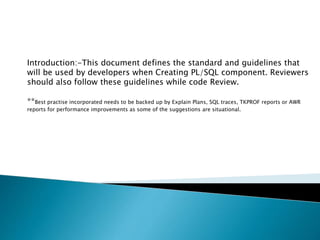
Introduction:-This document defines the standard and guidelines that
will be used by developers when Creating PL/SQL component. Reviewers
should also follow these guidelines while code Review.
**Best practise incorporated needs to be backed up by Explain Plans, SQL traces, TKPROF reports or AWR
reports for performance improvements as some of the suggestions are situational.
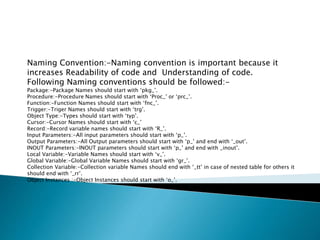
Naming Convention:-Naming convention is important because it
increases Readability of code and Understanding of code.
Following Naming conventions should be followed:-
Package:-Package Names should start with ‘pkg_’.
Procedure:-Procedure Names should start with ‘Proc_’ or ‘prc_’.
Function:-Function Names should start with ‘fnc_’.
Trigger:-Triger Names should start with ‘trg’.
Object Type:-Types should start with ‘typ’.
Cursor:-Cursor Names should start with ‘c_’
Record:-Record variable names should start with ‘R_’.
Input Parameters:-All input parameters should start with ‘p_’.
Output Parameters:-All Output parameters should start with ‘p_’ and end with ‘_out’.
INOUT Parameters:-INOUT parameters should start with ‘p_’ and end with _inout’.
Local Variable:-Variable Names should start with ‘v_’.
Global Variable:-Global Variable Names should start with ‘gr_’.
Collection Variable:-Collection variable Names should end with ‘_tt’ in case of nested table for others it
should end with ‘_rr’.
Object Instances :-Object Instances should start with ‘o_’.
Indentation Recommendations:-Indentation is one of the most
effective ways to display a program’s logical structure.
• Use spaces (not the tab character) for indentation of all PL/SQL and SQL code.
• Use 3 spaces for each nesting level.
• Left-align blocks to create a clear vertical line at the block level. (SQL
statements will often break this with their own subqueries etc, but you can
still maintain a left-alignment layout.)
• For a function or procedure declaration, start the first parameter specification
on a new line.
• Place each parameter on its own line, aligned vertically.
• Use at most one statement per line.
• Always include a space between an identifier and a operator.
• Uppercase keywords, lowercase everything else.
• CamelCase PL/SQL identifiers, lowercase everything else.
• Code formatting can be done in sql developer using The formatter options
which is available at Tools->preferences->Database->Sql Formatter or using
shortcut CTRL+F7
.
Comments:-Comments are Important to understand the Functionality of objects created.
Commenting as you go leads to better continuity as you code, as well as programs with fewer bugs. By
commenting, you are trying to convey to someone else what the program is doing. This always clarifies
things in your mind. Few Examples are given below:-
Comment for Package Descriptions should be in Following format:-
/**********************************************************************
/*
/* Filename:
/* Designer:
/* Developer:
/* Version: 1.0
/* Description: Description of PL/SQL package...
/**********************************************************************/
Comment for Function Description should be in Following Format:-
/*********************************************************************
/*Function:
/*In:
/*Returns:
/*Description
/*********************************************************************/
Templates can be created for Creating Header comments using SQL developer
Tools > Database > SQL Editor Code Templates > Add template
Templates will be saved at C:Users<username>AppDataRoamingSQL
DeveloperCodeTemplate.xml
Comments….
Comment for Procedure Description should be in following format:-
/*********************************************************************
/* Procedure:
/* Out:
/* In:
/* In Out:
/*Description
/*********************************************************************/
Multiline Comments should be given in Format
/*abc
Def */
Single line comments should be given
--abc
• Comment should be given before and after Loop and Conditional statements.
• Comment should be given before all DML,DDL & DCL statement.
• Comment should not be long , it should be meaningful.
Tracking and debugging:-For tracking and debugging following things needs to be
followed.
Do’s:-
Error Logging:-
• While designing tables for any requirement there should always be a column Error_log/Log in
master table to track process of execution.
• All major steps inside the procedure should be logged as a message.
• In case of any Error Table needs to be updated with Error Log Message with Oracle Error /any
meaningful message.
• All exceptions needs to be handled in Pl/SQL objects.
• A clob Variable needs to be declared which should record all major steps in Procedure/Packages.All
steps needs to be appended in clob variable by Explicit conversion using TO_CHAR.
• DBMS_UTILITY.FORMAT_ERROR_BACKTRACE Can also be used to log errors and check the place
where error has occurred.
Tracking:-Created_by, Created_date, Updated_by and updated_date needs to included while designing
table structure. And these details needs to be updated inside procedure/Package.
Configurations:-Instead of Hardcoding values configuration tables should be created.
Don'ts:-
• DBMS_OUTPUT should not be added in final Procedure/Package.
• Debug Insert statements needs to be deleted from final version.
Table Design Best Practices:-
• Use well defined and consistent names for tables and columns
• Use integer id fields for all tables. If id is not required for the time being, it may be
required in the future, Either as part of Primary key or Foreign Key.
• Choose columns with the integer data type (or its variants) for indexing. varchar column
indexing will cause performance problems.
• Create Index on columns which is going to be frequently used in Select Queries.
• Don’t Create unnecessary Indexes It will create performance issue in Insert and update
operation.
• Partition big tables/table parts to different physical storages for better query
performance.
• Use constraints (foreign key, check, not null ...) for data integrity. Don’t give whole
control to application code.
• Normalization must be used as required, to optimize the performance. Under-
normalization will cause excessive repetition of data, over-normalization will cause
excessive joins across too many tables. Both of them will get worse performance.
• Error Logging and Tracking should be Implemented while designing tables.
Table Design Best Practices:-
(Index):-
• you should create an index on a column in any of the following situations:
•The column is queried frequently.
•A referential integrity constraint exists on the column.
•A UNIQUE key integrity constraint exists on the column.
• Use the EXPLAIN PLAN feature to show a theoretical execution plan of a given query
statement.
• If an index is not being used by default and it would be most efficient to use that index,
you can use a query hint so that the index is used.
Index the Correct Tables and Columns:-
• Index columns that are used for joins to improve join performance.
• Primary and unique keys automatically have indexes, but you might need to create an
index on a foreign key.
• Small tables do not require indexes.
Table Design Best Practices:-
(Index)……
Columns with one or more of the following characteristics are good candidates for
indexing:
• Values are unique in the column, or there are few duplicates(Good for B-Tree Indexes).
• There is a wide range of values (Good for bitmap indexes).
• There is a small range of values (Good for bitmap indexes).
Columns with the following characteristics are less suitable for indexing:
• There are many nulls in the column and you do not search on the non-null values.
• LONG and LONG RAW columns cannot be indexed.
• If Functions are being used in where clause to filter data using column, In that case
Function based Index can be used.
Choose the Order of Columns in Composite Indexes:-
• In general, you should put the column expected to be used most often first in the index.
• You can create a composite index (using several columns) and the same index can be
used for queries that reference all of these columns, or just some of them.
Table Design Best Practices(Partition):-
Range Partition:-
• Very large tables which are frequently scanned by a range predicate on a good
partitioning column, such as Created_Date/Updated_date.
• Range partitioning is a convenient method for partitioning historical data.
• Range or interval partitioning is often used to organize data by time intervals on a
column of type DATE.
Hash Partition:-
• With hash partitioning, a row is placed into a partition based on the result of passing
the partitioning key into a hashing algorithm.
• To enable partial or full parallel partition-wise joins with likely equalized partitions.
• To use partition pruning and partition-wise joins according to a partitioning key that is
mostly constrained by a distinct value or value list.
• Choose a column or combination of columns that is unique or almost unique.
List Partition:-
• You should use list partitioning when you want to specifically map rows to partitions
based on discrete values . for Ex. Department based search/State based search.
• Unlike range and hash partitioning, multi-column partition keys are not supported for
list partitioning.
• ***Composite Partitions Can be used while designing tables which will store Historical
Data.
Best Practices for PL/SQL coding:-
Rewrite Complex Sub Queries with temporary table:-Using Oracle created global temporary
table(GTT) or SQL With statement can result in amazing performance improvement.
Use Minus Instead of Not Exists Subqueries:-Using the Minus operator instead of Not in Not
Exist will result in a faster execution plan.
For Ex.:-Minus Operator will give better performance if result set of two queries or Data
between two tables is getting compared for differences.
Use Aggregate/analytic Function:-The oracle Aggregate/analytic functions can do multiple
aggregations with a single pass-through the tables, making them very fast for reporting SQL.
Avoid Indexed column for Calculation:-Avoid Indexed column for calculation in where clause. If
it is necessary use Function-based index.
Use Decode and Case:-Performing complex aggregations with the Decode or case can minimize
the number of times a table has to be selected.In place of writing multiple If else statement
Decode/case can result in amazing performance improvement.
Best Practices for PL/SQL coding:- (Continue…)
Using the NOCOPY Hint:- The NOCOPY hint allows OUT and IN OUT parameter to be
passed by-reference, rather than by-value.
INTEGER Types:- NUMBER and it’s subtypes use an Oracle internal format, rather
than the machine arithmetic.• INTEGER and other constrained type need additional
runtime checks compared to NUMBER.• PLS_INTEGER uses machine arithmetic to
reduce overhead.
Merge Statement:-Instead of using multiple Insert & Update statement use merge
statement.
Avoid use of Not in or having:-Instead ,Not Exist subquery may run faster.
For Ex. Not Exist will run Faster If Reference is data stored in column of a table.
Use Materialized Views: Materialize your aggregations and summaries for static
tables
Best Practices for PL/SQL coding:- (Continue…)
Using Varchar2 in place of Char /Varchar:-Using Varchar2 is always suggested in
place of Char/Varchar for following Resons .
• The difference between a CHAR and a VARCHAR is that a CHAR(n) will ALWAYS be
N bytes long, it will be blank padded upon insert to ensure this. A varchar2(n) on
the other hand will be 1 to N bytes long, it will NOT be blank padded.
• VARCHAR can store up to 2000 bytes of characters while VARCHAR2 can store
up to 4000 bytes of characters.
• If we declare datatype as VARCHAR then it will occupy space for NULL values, In
case of VARCHAR2 datatype it will not occupy any space.
• VARCHAR2 is used to store variable length character strings.
**If String Length is fixed then using Char can improve performance.
For Ex.If column is always going to have value ‘Y’/’N’ then declaring char(1) will be
better.
Best Practices for PL/SQL coding:- (Continue…)
Remove unnecessary large-table full-table scans - Unnecessary full-table scans cause a huge
amount of unnecessary I/O and can drag-down an entire database and it's a SQL best practice
to identify unnecessary full scans and remove them by adding indexes.
Verify optimal index usage - This is one of the most important SQL best practices where you
examine your SQL and verify that your SQL is using the most selective..
Avoid Context Switching:-While designing you pl/sql objects always try to avoid context
switching between pl/sql and sql. This will create performance degrade.
Never Mix data Types :-If a where clause column predicate is number don’t use quotes/string
functions, for char index column always use quotes.
Avoiding implicit conversions can improve performance. Use literals of the appropriate types:
character literals in character expressions, decimal numbers in number expressions, and so
on.
Avoid The Like operator:- always try to replace like with an equality, when appropriate.
Make SQL Statements as Efficient as Possible:-
• Make sure you have appropriate indexes.
• Make sure you have up-to-date statistics on all the tables, using the
subprograms in the DBMS_STATS package
• Avoid use of Distinct in Select statement.
• Analyse the execution plans and performance of the SQL statements, using:
EXPLAIN PLAN statement, SQL Trace facility with TKPROF utility, Oracle Trace
facility.
• Rewrite the SQL statements if necessary. For example, query hints can avoid
problems such as unnecessary full-table scans.
• If you are running SQL statements inside a PL/SQL loop, look at the FORALL
statement as a way to replace loops of INSERT, UPDATE, and DELETE statements.
• If you are looping through the result set of a query, look at the BULK COLLECT
clause of the SELECT INTO statement as a way to bring the entire result set into
memory in a single operation.
Make SQL Statements as Efficient as Possible:- (Continue)
• Reorder Conditional Tests to Put the Least Expensive First.
• UNION vs UNION ALL :-Unless you require that the duplicate rows be eliminated, or you are
certain that the member queries do not produce duplicate data, use UNION ALL
• Use equality first :– Use range operators only where equality does not apply. – Avoid use of
negatives in the form of “ != ” or ” NOT”. – Avoid LIKE pattern matching
• HAVING vs WHERE :-Use HAVING only to filter on aggregate functions (count, sum, avg etc)
. Use WHERE to filter on table columns Script
• Instead of using Select * ,Provide column names.
• There should not be any Cartesian product in the query unless there is a definite
requirement to do so.
• Use equi-joins whenever possible, they improve SQL efficiency.
• Consider using the PARALLEL hint (only when additional resources can be allocated) while
accessing large data sets.
• Avoid doing an ORDER BY on a large data set especially if the response time is important.If
still there is a need of order by then RANK() & DENSE_RANK() can be used.
Make Loops as Efficient as Possible:-Because PL/SQL applications are often built
around loops, it is important to optimize the loop itself and the code inside the
loop:
• Move initializations or computations outside the loop if possible.
For Ex.:-If Value is going to be fixed always.
• To issue a series of DML statements, replace loop constructs with FORALL
statements.
• To loop through a result set and store the values, use the BULK COLLECT
clause on the query to bring the query results into memory in one operation.
• If you have to loop through a result set more than once, or issue other queries
as you loop through a result set, you can probably enhance the original query
to give you exactly the results you want. Some query operators to explore
include UNION, INTERSECT, MINUS, and CONNECT BY.
• You can also nest one query inside another (known as a subselect) to do the
filtering and sorting in multiple stages
Make conditional statement as effective as possible:-
• In place of writing multiple If..end if blocks,write if ..elseif..end if.
• Order of the conditions needs to be placed wisely for ex keep condition which
will be true most of the times at first.
• Use case/Decode statement instead of writing multiple if statements to
increase performance of code.
• Use Case statement rather than using decode. case is more efficient than
Decode, but it all depends on requirement
Best Practices of Using Collections:-
• Index-by tables cannot be stored in database tables, so they are non-
persistent.You cannot use them in a SQL statement and are available only in
PL/SQL blocks.
• Nested tables and Varrays are persistent. You can use the CREATE TYPE
statement to create them in the database, you can read and write them
from/to a database column.
• Nested tables and Varrays must have been initialized before you can use
them.
• The Main difference is Varray has Upper bound, where as Nested table
doesn't. It's size is unconstrained like any other database table.
• PL/SQL collections are essentially arrays in memory, so massive collections
can have a detrimental effect on system performance due to the amount of
memory they require. In some situations, it may be necessary to split the
data being processed into chunks to make the code more memory-
friendly. This “chunking” can be achieved using the LIMIT clause of the BULK
COLLECT syntax.
Pl sql best practices document

Pl sql best practices document

  • 1.
  • 2.
    Introduction:-This document definesthe standard and guidelines that will be used by developers when Creating PL/SQL component. Reviewers should also follow these guidelines while code Review. **Best practise incorporated needs to be backed up by Explain Plans, SQL traces, TKPROF reports or AWR reports for performance improvements as some of the suggestions are situational.
  • 3.
    Naming Convention:-Naming conventionis important because it increases Readability of code and Understanding of code. Following Naming conventions should be followed:- Package:-Package Names should start with ‘pkg_’. Procedure:-Procedure Names should start with ‘Proc_’ or ‘prc_’. Function:-Function Names should start with ‘fnc_’. Trigger:-Triger Names should start with ‘trg’. Object Type:-Types should start with ‘typ’. Cursor:-Cursor Names should start with ‘c_’ Record:-Record variable names should start with ‘R_’. Input Parameters:-All input parameters should start with ‘p_’. Output Parameters:-All Output parameters should start with ‘p_’ and end with ‘_out’. INOUT Parameters:-INOUT parameters should start with ‘p_’ and end with _inout’. Local Variable:-Variable Names should start with ‘v_’. Global Variable:-Global Variable Names should start with ‘gr_’. Collection Variable:-Collection variable Names should end with ‘_tt’ in case of nested table for others it should end with ‘_rr’. Object Instances :-Object Instances should start with ‘o_’.
  • 4.
    Indentation Recommendations:-Indentation isone of the most effective ways to display a program’s logical structure. • Use spaces (not the tab character) for indentation of all PL/SQL and SQL code. • Use 3 spaces for each nesting level. • Left-align blocks to create a clear vertical line at the block level. (SQL statements will often break this with their own subqueries etc, but you can still maintain a left-alignment layout.) • For a function or procedure declaration, start the first parameter specification on a new line. • Place each parameter on its own line, aligned vertically. • Use at most one statement per line. • Always include a space between an identifier and a operator. • Uppercase keywords, lowercase everything else. • CamelCase PL/SQL identifiers, lowercase everything else. • Code formatting can be done in sql developer using The formatter options which is available at Tools->preferences->Database->Sql Formatter or using shortcut CTRL+F7 .
  • 5.
    Comments:-Comments are Importantto understand the Functionality of objects created. Commenting as you go leads to better continuity as you code, as well as programs with fewer bugs. By commenting, you are trying to convey to someone else what the program is doing. This always clarifies things in your mind. Few Examples are given below:- Comment for Package Descriptions should be in Following format:- /********************************************************************** /* /* Filename: /* Designer: /* Developer: /* Version: 1.0 /* Description: Description of PL/SQL package... /**********************************************************************/ Comment for Function Description should be in Following Format:- /********************************************************************* /*Function: /*In: /*Returns: /*Description /*********************************************************************/ Templates can be created for Creating Header comments using SQL developer Tools > Database > SQL Editor Code Templates > Add template Templates will be saved at C:Users<username>AppDataRoamingSQL DeveloperCodeTemplate.xml
  • 6.
    Comments…. Comment for ProcedureDescription should be in following format:- /********************************************************************* /* Procedure: /* Out: /* In: /* In Out: /*Description /*********************************************************************/ Multiline Comments should be given in Format /*abc Def */ Single line comments should be given --abc • Comment should be given before and after Loop and Conditional statements. • Comment should be given before all DML,DDL & DCL statement. • Comment should not be long , it should be meaningful.
  • 7.
    Tracking and debugging:-Fortracking and debugging following things needs to be followed. Do’s:- Error Logging:- • While designing tables for any requirement there should always be a column Error_log/Log in master table to track process of execution. • All major steps inside the procedure should be logged as a message. • In case of any Error Table needs to be updated with Error Log Message with Oracle Error /any meaningful message. • All exceptions needs to be handled in Pl/SQL objects. • A clob Variable needs to be declared which should record all major steps in Procedure/Packages.All steps needs to be appended in clob variable by Explicit conversion using TO_CHAR. • DBMS_UTILITY.FORMAT_ERROR_BACKTRACE Can also be used to log errors and check the place where error has occurred. Tracking:-Created_by, Created_date, Updated_by and updated_date needs to included while designing table structure. And these details needs to be updated inside procedure/Package. Configurations:-Instead of Hardcoding values configuration tables should be created. Don'ts:- • DBMS_OUTPUT should not be added in final Procedure/Package. • Debug Insert statements needs to be deleted from final version.
  • 8.
    Table Design BestPractices:- • Use well defined and consistent names for tables and columns • Use integer id fields for all tables. If id is not required for the time being, it may be required in the future, Either as part of Primary key or Foreign Key. • Choose columns with the integer data type (or its variants) for indexing. varchar column indexing will cause performance problems. • Create Index on columns which is going to be frequently used in Select Queries. • Don’t Create unnecessary Indexes It will create performance issue in Insert and update operation. • Partition big tables/table parts to different physical storages for better query performance. • Use constraints (foreign key, check, not null ...) for data integrity. Don’t give whole control to application code. • Normalization must be used as required, to optimize the performance. Under- normalization will cause excessive repetition of data, over-normalization will cause excessive joins across too many tables. Both of them will get worse performance. • Error Logging and Tracking should be Implemented while designing tables.
  • 9.
    Table Design BestPractices:- (Index):- • you should create an index on a column in any of the following situations: •The column is queried frequently. •A referential integrity constraint exists on the column. •A UNIQUE key integrity constraint exists on the column. • Use the EXPLAIN PLAN feature to show a theoretical execution plan of a given query statement. • If an index is not being used by default and it would be most efficient to use that index, you can use a query hint so that the index is used. Index the Correct Tables and Columns:- • Index columns that are used for joins to improve join performance. • Primary and unique keys automatically have indexes, but you might need to create an index on a foreign key. • Small tables do not require indexes.
  • 10.
    Table Design BestPractices:- (Index)…… Columns with one or more of the following characteristics are good candidates for indexing: • Values are unique in the column, or there are few duplicates(Good for B-Tree Indexes). • There is a wide range of values (Good for bitmap indexes). • There is a small range of values (Good for bitmap indexes). Columns with the following characteristics are less suitable for indexing: • There are many nulls in the column and you do not search on the non-null values. • LONG and LONG RAW columns cannot be indexed. • If Functions are being used in where clause to filter data using column, In that case Function based Index can be used. Choose the Order of Columns in Composite Indexes:- • In general, you should put the column expected to be used most often first in the index. • You can create a composite index (using several columns) and the same index can be used for queries that reference all of these columns, or just some of them.
  • 11.
    Table Design BestPractices(Partition):- Range Partition:- • Very large tables which are frequently scanned by a range predicate on a good partitioning column, such as Created_Date/Updated_date. • Range partitioning is a convenient method for partitioning historical data. • Range or interval partitioning is often used to organize data by time intervals on a column of type DATE. Hash Partition:- • With hash partitioning, a row is placed into a partition based on the result of passing the partitioning key into a hashing algorithm. • To enable partial or full parallel partition-wise joins with likely equalized partitions. • To use partition pruning and partition-wise joins according to a partitioning key that is mostly constrained by a distinct value or value list. • Choose a column or combination of columns that is unique or almost unique. List Partition:- • You should use list partitioning when you want to specifically map rows to partitions based on discrete values . for Ex. Department based search/State based search. • Unlike range and hash partitioning, multi-column partition keys are not supported for list partitioning. • ***Composite Partitions Can be used while designing tables which will store Historical Data.
  • 12.
    Best Practices forPL/SQL coding:- Rewrite Complex Sub Queries with temporary table:-Using Oracle created global temporary table(GTT) or SQL With statement can result in amazing performance improvement. Use Minus Instead of Not Exists Subqueries:-Using the Minus operator instead of Not in Not Exist will result in a faster execution plan. For Ex.:-Minus Operator will give better performance if result set of two queries or Data between two tables is getting compared for differences. Use Aggregate/analytic Function:-The oracle Aggregate/analytic functions can do multiple aggregations with a single pass-through the tables, making them very fast for reporting SQL. Avoid Indexed column for Calculation:-Avoid Indexed column for calculation in where clause. If it is necessary use Function-based index. Use Decode and Case:-Performing complex aggregations with the Decode or case can minimize the number of times a table has to be selected.In place of writing multiple If else statement Decode/case can result in amazing performance improvement.
  • 13.
    Best Practices forPL/SQL coding:- (Continue…) Using the NOCOPY Hint:- The NOCOPY hint allows OUT and IN OUT parameter to be passed by-reference, rather than by-value. INTEGER Types:- NUMBER and it’s subtypes use an Oracle internal format, rather than the machine arithmetic.• INTEGER and other constrained type need additional runtime checks compared to NUMBER.• PLS_INTEGER uses machine arithmetic to reduce overhead. Merge Statement:-Instead of using multiple Insert & Update statement use merge statement. Avoid use of Not in or having:-Instead ,Not Exist subquery may run faster. For Ex. Not Exist will run Faster If Reference is data stored in column of a table. Use Materialized Views: Materialize your aggregations and summaries for static tables
  • 14.
    Best Practices forPL/SQL coding:- (Continue…) Using Varchar2 in place of Char /Varchar:-Using Varchar2 is always suggested in place of Char/Varchar for following Resons . • The difference between a CHAR and a VARCHAR is that a CHAR(n) will ALWAYS be N bytes long, it will be blank padded upon insert to ensure this. A varchar2(n) on the other hand will be 1 to N bytes long, it will NOT be blank padded. • VARCHAR can store up to 2000 bytes of characters while VARCHAR2 can store up to 4000 bytes of characters. • If we declare datatype as VARCHAR then it will occupy space for NULL values, In case of VARCHAR2 datatype it will not occupy any space. • VARCHAR2 is used to store variable length character strings. **If String Length is fixed then using Char can improve performance. For Ex.If column is always going to have value ‘Y’/’N’ then declaring char(1) will be better.
  • 15.
    Best Practices forPL/SQL coding:- (Continue…) Remove unnecessary large-table full-table scans - Unnecessary full-table scans cause a huge amount of unnecessary I/O and can drag-down an entire database and it's a SQL best practice to identify unnecessary full scans and remove them by adding indexes. Verify optimal index usage - This is one of the most important SQL best practices where you examine your SQL and verify that your SQL is using the most selective.. Avoid Context Switching:-While designing you pl/sql objects always try to avoid context switching between pl/sql and sql. This will create performance degrade. Never Mix data Types :-If a where clause column predicate is number don’t use quotes/string functions, for char index column always use quotes. Avoiding implicit conversions can improve performance. Use literals of the appropriate types: character literals in character expressions, decimal numbers in number expressions, and so on. Avoid The Like operator:- always try to replace like with an equality, when appropriate.
  • 16.
    Make SQL Statementsas Efficient as Possible:- • Make sure you have appropriate indexes. • Make sure you have up-to-date statistics on all the tables, using the subprograms in the DBMS_STATS package • Avoid use of Distinct in Select statement. • Analyse the execution plans and performance of the SQL statements, using: EXPLAIN PLAN statement, SQL Trace facility with TKPROF utility, Oracle Trace facility. • Rewrite the SQL statements if necessary. For example, query hints can avoid problems such as unnecessary full-table scans. • If you are running SQL statements inside a PL/SQL loop, look at the FORALL statement as a way to replace loops of INSERT, UPDATE, and DELETE statements. • If you are looping through the result set of a query, look at the BULK COLLECT clause of the SELECT INTO statement as a way to bring the entire result set into memory in a single operation.
  • 17.
    Make SQL Statementsas Efficient as Possible:- (Continue) • Reorder Conditional Tests to Put the Least Expensive First. • UNION vs UNION ALL :-Unless you require that the duplicate rows be eliminated, or you are certain that the member queries do not produce duplicate data, use UNION ALL • Use equality first :– Use range operators only where equality does not apply. – Avoid use of negatives in the form of “ != ” or ” NOT”. – Avoid LIKE pattern matching • HAVING vs WHERE :-Use HAVING only to filter on aggregate functions (count, sum, avg etc) . Use WHERE to filter on table columns Script • Instead of using Select * ,Provide column names. • There should not be any Cartesian product in the query unless there is a definite requirement to do so. • Use equi-joins whenever possible, they improve SQL efficiency. • Consider using the PARALLEL hint (only when additional resources can be allocated) while accessing large data sets. • Avoid doing an ORDER BY on a large data set especially if the response time is important.If still there is a need of order by then RANK() & DENSE_RANK() can be used.
  • 18.
    Make Loops asEfficient as Possible:-Because PL/SQL applications are often built around loops, it is important to optimize the loop itself and the code inside the loop: • Move initializations or computations outside the loop if possible. For Ex.:-If Value is going to be fixed always. • To issue a series of DML statements, replace loop constructs with FORALL statements. • To loop through a result set and store the values, use the BULK COLLECT clause on the query to bring the query results into memory in one operation. • If you have to loop through a result set more than once, or issue other queries as you loop through a result set, you can probably enhance the original query to give you exactly the results you want. Some query operators to explore include UNION, INTERSECT, MINUS, and CONNECT BY. • You can also nest one query inside another (known as a subselect) to do the filtering and sorting in multiple stages
  • 19.
    Make conditional statementas effective as possible:- • In place of writing multiple If..end if blocks,write if ..elseif..end if. • Order of the conditions needs to be placed wisely for ex keep condition which will be true most of the times at first. • Use case/Decode statement instead of writing multiple if statements to increase performance of code. • Use Case statement rather than using decode. case is more efficient than Decode, but it all depends on requirement
  • 20.
    Best Practices ofUsing Collections:- • Index-by tables cannot be stored in database tables, so they are non- persistent.You cannot use them in a SQL statement and are available only in PL/SQL blocks. • Nested tables and Varrays are persistent. You can use the CREATE TYPE statement to create them in the database, you can read and write them from/to a database column. • Nested tables and Varrays must have been initialized before you can use them. • The Main difference is Varray has Upper bound, where as Nested table doesn't. It's size is unconstrained like any other database table. • PL/SQL collections are essentially arrays in memory, so massive collections can have a detrimental effect on system performance due to the amount of memory they require. In some situations, it may be necessary to split the data being processed into chunks to make the code more memory- friendly. This “chunking” can be achieved using the LIMIT clause of the BULK COLLECT syntax.