Traci NissenFall 2009Pipestone County and Pipestone Area Schools
The Critical IssueA demographic study to show areas critical to successful integration of technology at Pipestone Area Schools.2
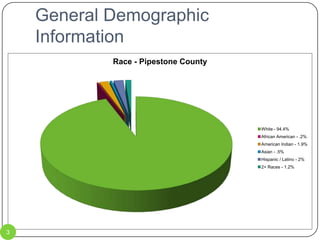
General Demographic Information3
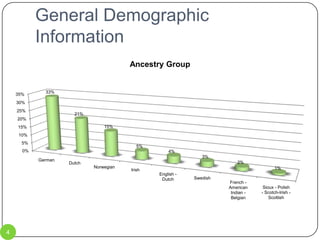
General Demographic Information4
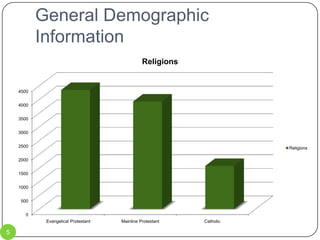
General Demographic Information5
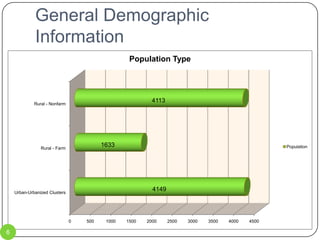
General Demographic Information6
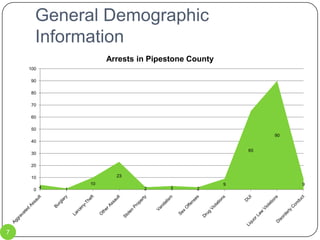
General Demographic Information7
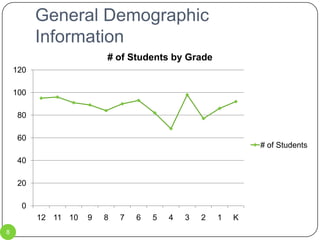
General Demographic Information8
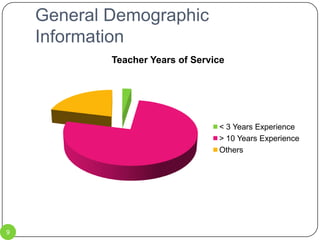
General Demographic Information9
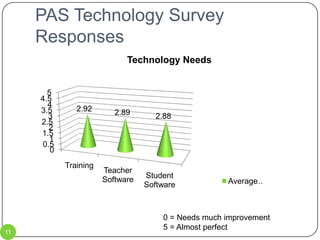
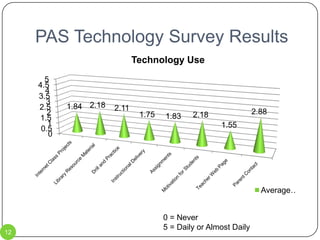
PAS Technology Survey10Each time a new technology plan is approved, the district assesses technology use by teachers via a survey.The following two slides describe teacher responses which scored 3 or less (on a scale of 0-5).Because of the low responses, these are the areas on which the district should focus for the upcoming technology plan. The last technology plan approved was for the years 2008-2010.
PAS Technology Survey Responses0 = Needs much improvement5 = Almost perfect11
PAS Technology Survey Results0 = Never5 = Daily or Almost Daily12
Stillwater Laptop Program13Stillwater Public Schools has participated in a laptop program for the past several years.  The following 3 slides give details of a survey given to teachers, students and parents.The survey is conducted by an outside agency, not the school district.The Stillwater Laptop Program was continued for this school year (2009-2010) after much thought.  The future of the program is uncertain.
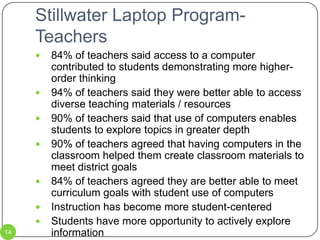
Stillwater Laptop Program-Teachers84% of teachers said access to a computer contributed to students demonstrating more higher-order thinking94% of teachers said they were better able to access diverse teaching materials / resources90% of teachers said that use of computers enables students to explore topics in greater depth90% of teachers agreed that having computers in the classroom helped them create classroom materials to meet district goals84% of teachers agreed they are better able to meet curriculum goals with student use of computersInstruction has become more student-centeredStudents have more opportunity to actively explore informationInstructional content is more up-to-date and interesting for students14
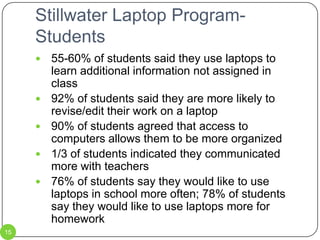
Stillwater Laptop Program-Students55-60% of students said they use laptops to learn additional information not assigned in class92% of students said they are more likely to revise/edit their work on a laptop90% of students agreed that access to computers allows them to be more organized1/3 of students indicated they communicated more with teachers76% of students say they would like to use laptops in school more often; 78% of students say they would like to use laptops more for homework15
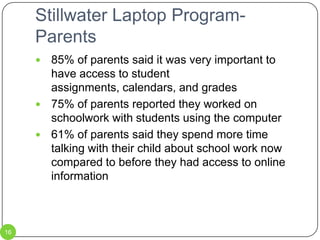
Stillwater Laptop Program-Parents85% of parents said it was very important to have access to student assignments, calendars, and grades75% of parents reported they worked on schoolwork with students using the computer61% of parents said they spend more time talking with their child about school work now compared to before they had access to online information16
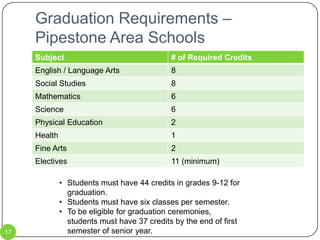
Graduation Requirements – Pipestone Area SchoolsStudents must have 44 credits in grades 9-12 for graduation.
Students must have six classes per semester.
To be eligible for graduation ceremonies, students must have 37 credits by the end of first semester of senior year.17
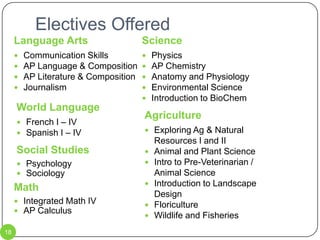
Electives OfferedLanguage ArtsScienceCommunication SkillsAP Language & CompositionAP Literature & CompositionJournalismPhysicsAP ChemistryAnatomy and PhysiologyEnvironmental ScienceIntroduction to BioChemWorld LanguageAgriculture French I – IV
Spanish I – IV Exploring Ag & Natural Resources I and IIAnimal and Plant ScienceIntro to Pre-Veterinarian / Animal ScienceIntroduction to Landscape DesignFloricultureWildlife and FisheriesSocial StudiesPsychology
SociologyMathIntegrated Math IVAP Calculus18
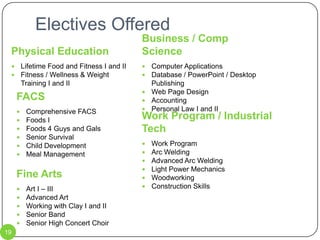
Electives OfferedPhysical EducationBusiness / Comp ScienceLifetime Food and Fitness I and IIFitness / Wellness & Weight Training I and IIComputer ApplicationsDatabase / PowerPoint / Desktop PublishingWeb Page DesignAccountingPersonal Law I and IIFACSComprehensive FACS
Foods I
Foods 4 Guys and Gals
Senior Survival
Child Development
Meal ManagementWork Program / Industrial TechWork ProgramArc WeldingAdvanced Arc WeldingLight Power MechanicsWoodworkingConstruction SkillsFine ArtsArt I – IIIAdvanced ArtWorking with Clay I and IISenior BandSenior High Concert Choir19
Challenges and Facts20
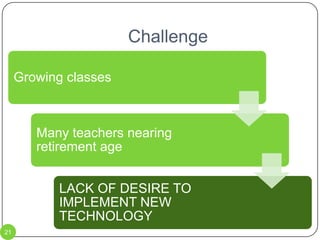
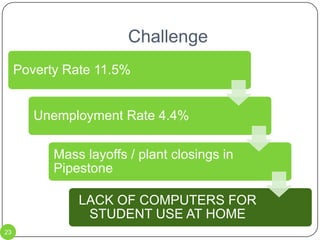
Challenge21
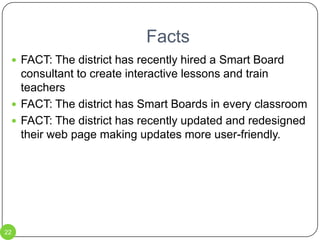
FactsFACT: The district has recently hired a Smart Board consultant to create interactive lessons and train teachersFACT: The district has Smart Boards in every classroomFACT: The district has recently updated and redesigned their web page making updates more user-friendly. 22
Challenge23
FactsFACT: Voters in the Pipestone Area School District recently passed an extra levy to provide for technology over the next ten yearsFACT: The district has already purchased Smart Boards for every classroom as well as new computers for computer labs and classroomFACT: The district has wireless internet capability.FACT: Classroom computers and computer labs cannot accommodate the needs of the district. 24
Challenge25
FactsFACT: The district currently has a Speech/Language Pathologist performing teletherapy services for the BOLD school districtFACT: The district has the technology to offer ITV classes to other districts in the areaFACT: The district is currently using the ITV room for one French class per dayFACT: The district is one of the largest districts in the area, thus it is one of the most likely to be able to offer electives.26
Proposal: First Things FirstPipestone Area Schools has a technology plan that will be effective until 2011.  This current plan was approved in 2008, prior to the technology levy being passed.  The very first thing to be done is to update the district technology plan so that the district and members of the community understand where the money will be used.  One step of developing the new technology plan is to have district staff complete a new survey in regard to their current technology access, classroom use and ability level.  I have constructed a survey on Survey Monkey to assist with this data collection:http://www.surveymonkey.com/s.aspx?sm=_2bUbCzSs3HwD_2fILQ25f7ezg_3d_3d27
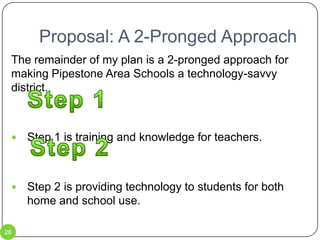
Proposal: A 2-Pronged ApproachThe remainder of my plan is a 2-pronged approach for making Pipestone Area Schools a technology-savvy district.Step 1 is training and knowledge for teachers.Step 2 is providing technology to students for both home and school use.Step 1Step 228
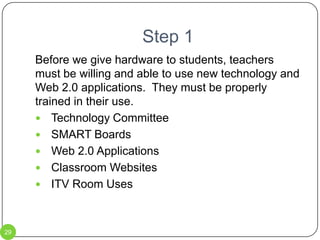
Step 1Before we give hardware to students, teachers must be willing and able to use new technology and Web 2.0 applications.  They must be properly trained in their use.Technology CommitteeSMART BoardsWeb 2.0 Applications Classroom WebsitesITV Room Uses29
Step 1 – Technology CommitteeThe first step will be to create a Technology Committee for the district.  This committee should be comprised of one staff member from each building (Brown Elementary, Hill Elementary, Middle School, and High School), up to two community members, student representatives,  as well as one administrator.The committee will be charged with testing new technology / Web 2.0 applications in their classrooms.After testing, the committee will decide if the district should provide further training on that application. The Technology Committee can also serve as mentors for teachers with lower comfort levels with technology in the classroom. 30
Step 1 – Technology CommitteeThe main cost involved with creating this committee would be payroll costs associated with after school meetings / trainings.  Another possibility for cost would be any costs associated with purchase of programs or other items for use in classrooms.These costs would be paid for with money from the technology levy.  31
Step 1 – SMART BoardsAnother early step will be in relation to SMART Boards.The district has purchased SMART Boards for every classroom.  The interactive white boards are an asset to classrooms, but they are not being used to their full potential.  Teachers have not received enough training on their use in the classroom.The SMART Boards are mainly being used as overpriced white boards.Our students have grown up in a digital world.  By using the SMART Boards to their full extent, we offer them a chance to learn in a way that fits their background better.32
Step 1 – SMART BoardsExtended training for all teachers in the district should take place this summer (2010).  The SW/WC Service Cooperative offers on-site training for districts.The SW/WC Service Cooperative offers extensive training at their office in Marshall.  The Pipestone Area school district has hired Judy Hansen to serve as a consultant to help teachers integrate the SMART Boards into their lessons.  The district should use in-service time to allow her to present ideas to all teachers.  The first of these in-service times would be during the President’s Day in-service.33
Step 1 – SMART BoardsOn-site training from SW/WC Service Cooperative costs $65 / hour plus mileage at the federal mileage rate.Level I training at the SW/WC Service Cooperative office costs $100 / person.Level II training at the SW/WC Service Cooperative office costs $100 / person.  These costs would be paid for with money from the technology levy.  34
Training offered by SW/WC Service CooperativeMoodle 101Advanced MoodleSMART Board Level ISMART Board Level IIPodcasting/VodcastingDigital Story TellingAll of these sessions are offered multiple times during the school year35
Step 1 – Web 2.0We have wireless internet access at all schools.  Teachers are not using all the Web 2.0 applications that are available.Teachers should be trained in the correct use of applications such as:Voice Thread – see sampleWikis – see samplesDiigoGoogle DocsJingOne True Media – see sampleSurvey MonkeyOur students, as digital natives, learn better when technology is used.  They are immersed in technology.  It is time we speak their language.The Technology Committee will test these and other applications and offer training to teachers in their use.Training can be before / after school, during the summer, or during in-service days.36
Step 1 – Sample Voice ThreadHere is an example of a simple Voice Thread that a district could use to gather information:http://voicethread.com/share/698826/TECHNOLOGY in the CLASSROOM37
Step 1 – Sample WikiThis link provides access to two Wikis created by students in the DLiTE Program at Bemidji State University.http://coolkidlit-4-socialstudies.pbworks.com/http://wikisota.pbworks.com/This link provides access to a Wiki that I have created for myself in my teacher education program.  http://tanissen.pbworks.com/FrontPage38
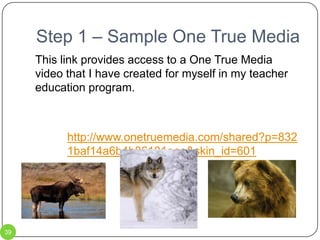
Step 1 – Sample One True MediaThis link provides access to a One True Media video that I have created for myself in my teacher education program.  http://www.onetruemedia.com/shared?p=8321baf14a6b4b86101eee&skin_id=60139
Step 1 - DiigoBy installing Diigo on computers, students will be able to bookmark, highlight on, and use sticky notes on web pages. Each time a bookmark is created, it is saved on the Diigo account.Each time information is highlighted, the web page is saved on the Diigo account.  Content can be marked to be read at a later time.40
Step 1 – Web 2.0There may be minimal costs for some Web 2.0 applications.These costs will vary depending upon which applications are selected for use.These costs would be paid for with money from the technology levy.  41
Step 1 – Classroom WebsitesClassroom websites should be a source of information for both students and parents.  Right now, they are virtually nonexistent at Pipestone Area Schools.  The district will employ one staff member to set up classroom websites and train teachers in their upkeep.A class will be developed in web design.  Students who complete the class can volunteer to help teachers maintain their websites.  Teachers will also have the option of setting up a classroom Wiki rather than a traditional website.  This option will allow teachers more flexibility and options for student participation and collaboration.42
Step 1 – Classroom WebsitesThe main cost associated with this phase is for the staff member who will set up and maintain the web sites.  The web design class can be taught by current staff so there will not be any additional cost.Student volunteers will not be paid for any work they provide teachers.   43
Step 1 – ITV RoomPipestone Area Schools has a fully functional ITV room.  According to Josh Stukel, technology coordinator, the room is used one period per day for a French class.  With the advent of online learning, ITV has become obsolete.  A student news show should be developed, using the ITV room as a studio.  This allows the room and equipment to be used more efficiently.  44
Step 1Monitoring ProgressThe technology committee will meet monthly to discuss applications that have been tried in the classroom.  Once an application has been introduced to all classroom teachers, a survey will be conducted detailing the results of how teachers have integrated that application into their curriculum.  Survey Monkey will be used.The district can also use standardized test scores as a way to determine if these applications are assisting students in passing those tests.45

Pipestone County And Pipestone Area Schools

  • 1.
    Traci NissenFall 2009PipestoneCounty and Pipestone Area Schools
  • 2.
    The Critical IssueAdemographic study to show areas critical to successful integration of technology at Pipestone Area Schools.2
  • 3.
  • 4.
  • 5.
  • 6.
  • 7.
  • 8.
  • 9.
  • 10.
    PAS Technology Survey10Eachtime a new technology plan is approved, the district assesses technology use by teachers via a survey.The following two slides describe teacher responses which scored 3 or less (on a scale of 0-5).Because of the low responses, these are the areas on which the district should focus for the upcoming technology plan. The last technology plan approved was for the years 2008-2010.
  • 11.
    PAS Technology SurveyResponses0 = Needs much improvement5 = Almost perfect11
  • 12.
    PAS Technology SurveyResults0 = Never5 = Daily or Almost Daily12
  • 13.
    Stillwater Laptop Program13StillwaterPublic Schools has participated in a laptop program for the past several years. The following 3 slides give details of a survey given to teachers, students and parents.The survey is conducted by an outside agency, not the school district.The Stillwater Laptop Program was continued for this school year (2009-2010) after much thought. The future of the program is uncertain.
  • 14.
    Stillwater Laptop Program-Teachers84%of teachers said access to a computer contributed to students demonstrating more higher-order thinking94% of teachers said they were better able to access diverse teaching materials / resources90% of teachers said that use of computers enables students to explore topics in greater depth90% of teachers agreed that having computers in the classroom helped them create classroom materials to meet district goals84% of teachers agreed they are better able to meet curriculum goals with student use of computersInstruction has become more student-centeredStudents have more opportunity to actively explore informationInstructional content is more up-to-date and interesting for students14
  • 15.
    Stillwater Laptop Program-Students55-60%of students said they use laptops to learn additional information not assigned in class92% of students said they are more likely to revise/edit their work on a laptop90% of students agreed that access to computers allows them to be more organized1/3 of students indicated they communicated more with teachers76% of students say they would like to use laptops in school more often; 78% of students say they would like to use laptops more for homework15
  • 16.
    Stillwater Laptop Program-Parents85%of parents said it was very important to have access to student assignments, calendars, and grades75% of parents reported they worked on schoolwork with students using the computer61% of parents said they spend more time talking with their child about school work now compared to before they had access to online information16
  • 17.
    Graduation Requirements –Pipestone Area SchoolsStudents must have 44 credits in grades 9-12 for graduation.
  • 18.
    Students must havesix classes per semester.
  • 19.
    To be eligiblefor graduation ceremonies, students must have 37 credits by the end of first semester of senior year.17
  • 20.
    Electives OfferedLanguage ArtsScienceCommunicationSkillsAP Language & CompositionAP Literature & CompositionJournalismPhysicsAP ChemistryAnatomy and PhysiologyEnvironmental ScienceIntroduction to BioChemWorld LanguageAgriculture French I – IV
  • 21.
    Spanish I –IV Exploring Ag & Natural Resources I and IIAnimal and Plant ScienceIntro to Pre-Veterinarian / Animal ScienceIntroduction to Landscape DesignFloricultureWildlife and FisheriesSocial StudiesPsychology
  • 22.
  • 23.
    Electives OfferedPhysical EducationBusiness/ Comp ScienceLifetime Food and Fitness I and IIFitness / Wellness & Weight Training I and IIComputer ApplicationsDatabase / PowerPoint / Desktop PublishingWeb Page DesignAccountingPersonal Law I and IIFACSComprehensive FACS
  • 24.
  • 25.
    Foods 4 Guysand Gals
  • 26.
  • 27.
  • 28.
    Meal ManagementWork Program/ Industrial TechWork ProgramArc WeldingAdvanced Arc WeldingLight Power MechanicsWoodworkingConstruction SkillsFine ArtsArt I – IIIAdvanced ArtWorking with Clay I and IISenior BandSenior High Concert Choir19
  • 29.
  • 30.
  • 31.
    FactsFACT: The districthas recently hired a Smart Board consultant to create interactive lessons and train teachersFACT: The district has Smart Boards in every classroomFACT: The district has recently updated and redesigned their web page making updates more user-friendly. 22
  • 32.
  • 33.
    FactsFACT: Voters inthe Pipestone Area School District recently passed an extra levy to provide for technology over the next ten yearsFACT: The district has already purchased Smart Boards for every classroom as well as new computers for computer labs and classroomFACT: The district has wireless internet capability.FACT: Classroom computers and computer labs cannot accommodate the needs of the district. 24
  • 34.
  • 35.
    FactsFACT: The districtcurrently has a Speech/Language Pathologist performing teletherapy services for the BOLD school districtFACT: The district has the technology to offer ITV classes to other districts in the areaFACT: The district is currently using the ITV room for one French class per dayFACT: The district is one of the largest districts in the area, thus it is one of the most likely to be able to offer electives.26
  • 36.
    Proposal: First ThingsFirstPipestone Area Schools has a technology plan that will be effective until 2011. This current plan was approved in 2008, prior to the technology levy being passed. The very first thing to be done is to update the district technology plan so that the district and members of the community understand where the money will be used. One step of developing the new technology plan is to have district staff complete a new survey in regard to their current technology access, classroom use and ability level. I have constructed a survey on Survey Monkey to assist with this data collection:http://www.surveymonkey.com/s.aspx?sm=_2bUbCzSs3HwD_2fILQ25f7ezg_3d_3d27
  • 37.
    Proposal: A 2-ProngedApproachThe remainder of my plan is a 2-pronged approach for making Pipestone Area Schools a technology-savvy district.Step 1 is training and knowledge for teachers.Step 2 is providing technology to students for both home and school use.Step 1Step 228
  • 38.
    Step 1Before wegive hardware to students, teachers must be willing and able to use new technology and Web 2.0 applications. They must be properly trained in their use.Technology CommitteeSMART BoardsWeb 2.0 Applications Classroom WebsitesITV Room Uses29
  • 39.
    Step 1 –Technology CommitteeThe first step will be to create a Technology Committee for the district. This committee should be comprised of one staff member from each building (Brown Elementary, Hill Elementary, Middle School, and High School), up to two community members, student representatives, as well as one administrator.The committee will be charged with testing new technology / Web 2.0 applications in their classrooms.After testing, the committee will decide if the district should provide further training on that application. The Technology Committee can also serve as mentors for teachers with lower comfort levels with technology in the classroom. 30
  • 40.
    Step 1 –Technology CommitteeThe main cost involved with creating this committee would be payroll costs associated with after school meetings / trainings. Another possibility for cost would be any costs associated with purchase of programs or other items for use in classrooms.These costs would be paid for with money from the technology levy. 31
  • 41.
    Step 1 –SMART BoardsAnother early step will be in relation to SMART Boards.The district has purchased SMART Boards for every classroom. The interactive white boards are an asset to classrooms, but they are not being used to their full potential. Teachers have not received enough training on their use in the classroom.The SMART Boards are mainly being used as overpriced white boards.Our students have grown up in a digital world. By using the SMART Boards to their full extent, we offer them a chance to learn in a way that fits their background better.32
  • 42.
    Step 1 –SMART BoardsExtended training for all teachers in the district should take place this summer (2010). The SW/WC Service Cooperative offers on-site training for districts.The SW/WC Service Cooperative offers extensive training at their office in Marshall. The Pipestone Area school district has hired Judy Hansen to serve as a consultant to help teachers integrate the SMART Boards into their lessons. The district should use in-service time to allow her to present ideas to all teachers. The first of these in-service times would be during the President’s Day in-service.33
  • 43.
    Step 1 –SMART BoardsOn-site training from SW/WC Service Cooperative costs $65 / hour plus mileage at the federal mileage rate.Level I training at the SW/WC Service Cooperative office costs $100 / person.Level II training at the SW/WC Service Cooperative office costs $100 / person. These costs would be paid for with money from the technology levy. 34
  • 44.
    Training offered bySW/WC Service CooperativeMoodle 101Advanced MoodleSMART Board Level ISMART Board Level IIPodcasting/VodcastingDigital Story TellingAll of these sessions are offered multiple times during the school year35
  • 45.
    Step 1 –Web 2.0We have wireless internet access at all schools. Teachers are not using all the Web 2.0 applications that are available.Teachers should be trained in the correct use of applications such as:Voice Thread – see sampleWikis – see samplesDiigoGoogle DocsJingOne True Media – see sampleSurvey MonkeyOur students, as digital natives, learn better when technology is used. They are immersed in technology. It is time we speak their language.The Technology Committee will test these and other applications and offer training to teachers in their use.Training can be before / after school, during the summer, or during in-service days.36
  • 46.
    Step 1 –Sample Voice ThreadHere is an example of a simple Voice Thread that a district could use to gather information:http://voicethread.com/share/698826/TECHNOLOGY in the CLASSROOM37
  • 47.
    Step 1 –Sample WikiThis link provides access to two Wikis created by students in the DLiTE Program at Bemidji State University.http://coolkidlit-4-socialstudies.pbworks.com/http://wikisota.pbworks.com/This link provides access to a Wiki that I have created for myself in my teacher education program. http://tanissen.pbworks.com/FrontPage38
  • 48.
    Step 1 –Sample One True MediaThis link provides access to a One True Media video that I have created for myself in my teacher education program. http://www.onetruemedia.com/shared?p=8321baf14a6b4b86101eee&skin_id=60139
  • 49.
    Step 1 -DiigoBy installing Diigo on computers, students will be able to bookmark, highlight on, and use sticky notes on web pages. Each time a bookmark is created, it is saved on the Diigo account.Each time information is highlighted, the web page is saved on the Diigo account. Content can be marked to be read at a later time.40
  • 50.
    Step 1 –Web 2.0There may be minimal costs for some Web 2.0 applications.These costs will vary depending upon which applications are selected for use.These costs would be paid for with money from the technology levy. 41
  • 51.
    Step 1 –Classroom WebsitesClassroom websites should be a source of information for both students and parents. Right now, they are virtually nonexistent at Pipestone Area Schools. The district will employ one staff member to set up classroom websites and train teachers in their upkeep.A class will be developed in web design. Students who complete the class can volunteer to help teachers maintain their websites. Teachers will also have the option of setting up a classroom Wiki rather than a traditional website. This option will allow teachers more flexibility and options for student participation and collaboration.42
  • 52.
    Step 1 –Classroom WebsitesThe main cost associated with this phase is for the staff member who will set up and maintain the web sites. The web design class can be taught by current staff so there will not be any additional cost.Student volunteers will not be paid for any work they provide teachers. 43
  • 53.
    Step 1 –ITV RoomPipestone Area Schools has a fully functional ITV room. According to Josh Stukel, technology coordinator, the room is used one period per day for a French class. With the advent of online learning, ITV has become obsolete. A student news show should be developed, using the ITV room as a studio. This allows the room and equipment to be used more efficiently. 44
  • 54.
    Step 1Monitoring ProgressThetechnology committee will meet monthly to discuss applications that have been tried in the classroom. Once an application has been introduced to all classroom teachers, a survey will be conducted detailing the results of how teachers have integrated that application into their curriculum. Survey Monkey will be used.The district can also use standardized test scores as a way to determine if these applications are assisting students in passing those tests.45