Tech Pirates
Organized By Tech Pirates
Tech Pirates
Organized By Tech Pirates
What is PHP?
• PHP is an acronym for “Hypertext Preprocessor”
• PHP is a server scripting language, and a powerful tool for making dynamic
and interactive Web pages.
• PHP can be embedded into HTML
• PHP files have extension ".php"
Tech Pirates
Organized By Tech Pirates
Other server side technologies
1. ASP (Active Server Pages):
• This was Microsoft’s first server-side technology
• ASP programming code is interpreted at run time, hence it can be slow in comparison to other
technologies.
2. ASP.NET :
• This replaced Microsoft’s older ASP technology
• It is essentially limited to Windows servers
3. JSP (Java Server Pages)
4. Node.js
5. Perl
6. PHP
7. Python
8. Ruby on Rail
Tech Pirates
Organized By Tech Pirates
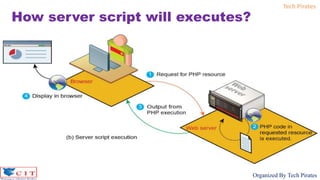
How server script will executes?
Tech Pirates
Organized By Tech Pirates
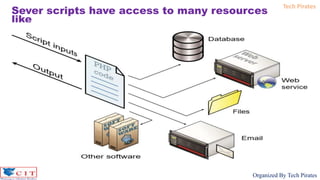
Sever scripts have access to many resources
like
Tech Pirates
Organized By Tech Pirates
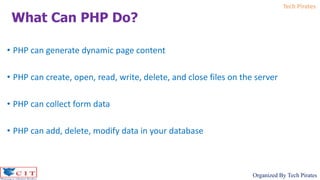
• PHP can generate dynamic page content
• PHP can create, open, read, write, delete, and close files on the server
• PHP can collect form data
• PHP can add, delete, modify data in your database
What Can PHP Do?
Tech Pirates
Organized By Tech Pirates
• PHP runs on various platforms (Windows, Linux, Unix, Mac OS X, etc.)
• PHP is compatible with almost all servers used today (Apache, IIS, etc.)
• PHP supports a wide range of databases
• PHP is easy to learn and runs efficiently on the server side
Why PHP?
Tech Pirates
Organized By Tech Pirates
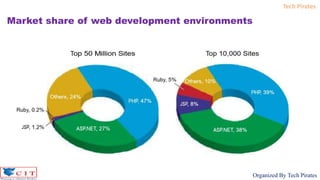
Market share of web development environments
Tech Pirates
Organized By Tech Pirates
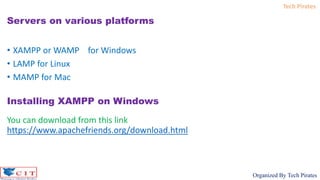
• XAMPP or WAMP for Windows
• LAMP for Linux
• MAMP for Mac
Servers on various platforms
Installing XAMPP on Windows
You can download from this link
https://www.apachefriends.org/download.html
Tech Pirates
Organized By Tech Pirates
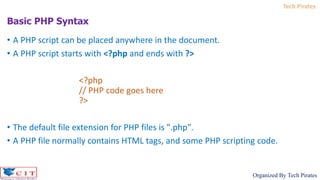
• A PHP script can be placed anywhere in the document.
• A PHP script starts with <?php and ends with ?>
<?php
// PHP code goes here
?>
• The default file extension for PHP files is ".php".
• A PHP file normally contains HTML tags, and some PHP scripting code.
Basic PHP Syntax
Tech Pirates
Organized By Tech Pirates
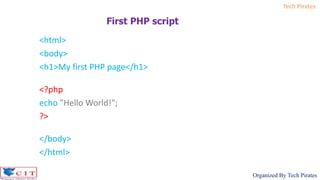
<html>
<body>
<h1>My first PHP page</h1>
<?php
echo "Hello World!";
?>
</body>
</html>
First PHP script
Tech Pirates
Organized By Tech Pirates
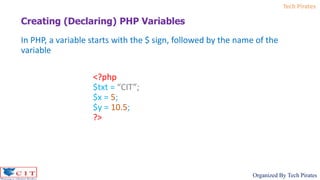
In PHP, a variable starts with the $ sign, followed by the name of the
variable
<?php
$txt = “CIT”;
$x = 5;
$y = 10.5;
?>
Creating (Declaring) PHP Variables
Tech Pirates
Organized By Tech Pirates
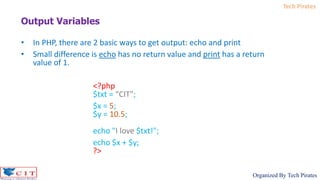
Output Variables
• In PHP, there are 2 basic ways to get output: echo and print
• Small difference is echo has no return value and print has a return
value of 1.
<?php
$txt = “CIT";
$x = 5;
$y = 10.5;
echo "I love $txt!";
echo $x + $y;
?>
Tech Pirates
Organized By Tech Pirates
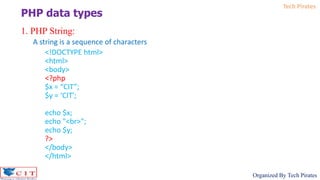
1. PHP String:
A string is a sequence of characters
<!DOCTYPE html>
<html>
<body>
<?php
$x = “CIT”;
$y = ‘CIT';
echo $x;
echo "<br>";
echo $y;
?>
</body>
</html>
PHP data types
Tech Pirates
Organized By Tech Pirates
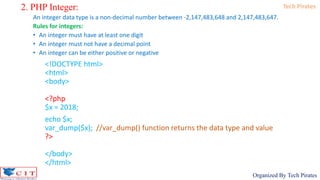
2. PHP Integer:
An integer data type is a non-decimal number between -2,147,483,648 and 2,147,483,647.
Rules for integers:
• An integer must have at least one digit
• An integer must not have a decimal point
• An integer can be either positive or negative
<!DOCTYPE html>
<html>
<body>
<?php
$x = 2018;
echo $x;
var_dump($x); //var_dump() function returns the data type and value
?>
</body>
</html>
Tech Pirates
Organized By Tech Pirates
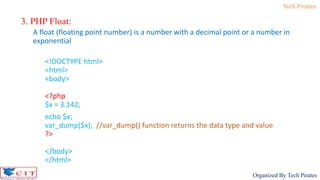
3. PHP Float:
A float (floating point number) is a number with a decimal point or a number in
exponential
<!DOCTYPE html>
<html>
<body>
<?php
$x = 3.142;
echo $x;
var_dump($x); //var_dump() function returns the data type and value
?>
</body>
</html>
Tech Pirates
Organized By Tech Pirates
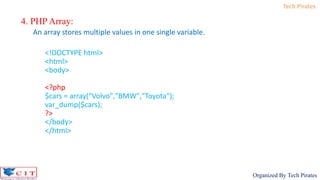
4. PHP Array:
An array stores multiple values in one single variable.
<!DOCTYPE html>
<html>
<body>
<?php
$cars = array("Volvo","BMW","Toyota");
var_dump($cars);
?>
</body>
</html>
Tech Pirates
Organized By Tech Pirates
PHP Conditional Statements
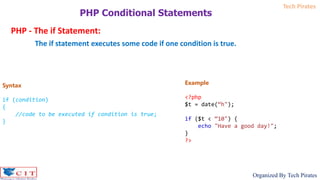
PHP - The if Statement:
The if statement executes some code if one condition is true.
Syntax
if (condition)
{
//code to be executed if condition is true;
}
Example
<?php
$t = date(“h");
if ($t < “10") {
echo "Have a good day!";
}
?>
Tech Pirates
Organized By Tech Pirates
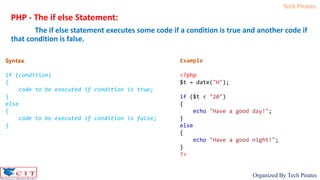
PHP - The if else Statement:
The if else statement executes some code if a condition is true and another code if
that condition is false.
Syntax
if (condition)
{
code to be executed if condition is true;
}
else
{
code to be executed if condition is false;
}
Example
<?php
$t = date("H");
if ($t < "20")
{
echo "Have a good day!";
}
else
{
echo "Have a good night!";
}
?>
Tech Pirates
Organized By Tech Pirates
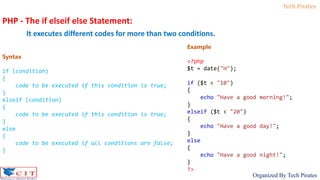
PHP - The if elseif else Statement:
It executes different codes for more than two conditions.
Syntax
if (condition)
{
code to be executed if this condition is true;
}
elseif (condition)
{
code to be executed if this condition is true;
}
else
{
code to be executed if all conditions are false;
}
Example
<?php
$t = date("H");
if ($t < "10")
{
echo "Have a good morning!";
}
elseif ($t < "20")
{
echo "Have a good day!";
}
else
{
echo "Have a good night!";
}
?>
Tech Pirates
Organized By Tech Pirates
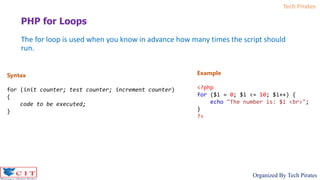
The for loop is used when you know in advance how many times the script should
run.
PHP for Loops
Syntax
for (init counter; test counter; increment counter)
{
code to be executed;
}
Example
<?php
for ($i = 0; $i <= 10; $i++) {
echo "The number is: $i <br>";
}
?>
Tech Pirates
Organized By Tech Pirates
PHP Form Handling
Welcome.html
<html>
<body>
<form action="welcome.php" method="post">
Name : <input type="text" name="name"><br>
E-mail : <input type="text" name="email"><br>
<input type="submit">
</form>
</body>
</html>
welcome.php
<!DOCTYPE HTML>
<html>
<body>
<?php echo "Welcome ".$_POST["name"]; ?><br>
<?php echo "Your email address is
".$_POST["email"]; ?>
</body>
</html>
Tech Pirates
Organized By Tech Pirates

Php

  • 1.
  • 2.
    Tech Pirates Organized ByTech Pirates What is PHP? • PHP is an acronym for “Hypertext Preprocessor” • PHP is a server scripting language, and a powerful tool for making dynamic and interactive Web pages. • PHP can be embedded into HTML • PHP files have extension ".php"
  • 3.
    Tech Pirates Organized ByTech Pirates Other server side technologies 1. ASP (Active Server Pages): • This was Microsoft’s first server-side technology • ASP programming code is interpreted at run time, hence it can be slow in comparison to other technologies. 2. ASP.NET : • This replaced Microsoft’s older ASP technology • It is essentially limited to Windows servers 3. JSP (Java Server Pages) 4. Node.js 5. Perl 6. PHP 7. Python 8. Ruby on Rail
  • 4.
    Tech Pirates Organized ByTech Pirates How server script will executes?
  • 5.
    Tech Pirates Organized ByTech Pirates Sever scripts have access to many resources like
  • 6.
    Tech Pirates Organized ByTech Pirates • PHP can generate dynamic page content • PHP can create, open, read, write, delete, and close files on the server • PHP can collect form data • PHP can add, delete, modify data in your database What Can PHP Do?
  • 7.
    Tech Pirates Organized ByTech Pirates • PHP runs on various platforms (Windows, Linux, Unix, Mac OS X, etc.) • PHP is compatible with almost all servers used today (Apache, IIS, etc.) • PHP supports a wide range of databases • PHP is easy to learn and runs efficiently on the server side Why PHP?
  • 8.
    Tech Pirates Organized ByTech Pirates Market share of web development environments
  • 9.
    Tech Pirates Organized ByTech Pirates • XAMPP or WAMP for Windows • LAMP for Linux • MAMP for Mac Servers on various platforms Installing XAMPP on Windows You can download from this link https://www.apachefriends.org/download.html
  • 10.
    Tech Pirates Organized ByTech Pirates • A PHP script can be placed anywhere in the document. • A PHP script starts with <?php and ends with ?> <?php // PHP code goes here ?> • The default file extension for PHP files is ".php". • A PHP file normally contains HTML tags, and some PHP scripting code. Basic PHP Syntax
  • 11.
    Tech Pirates Organized ByTech Pirates <html> <body> <h1>My first PHP page</h1> <?php echo "Hello World!"; ?> </body> </html> First PHP script
  • 12.
    Tech Pirates Organized ByTech Pirates In PHP, a variable starts with the $ sign, followed by the name of the variable <?php $txt = “CIT”; $x = 5; $y = 10.5; ?> Creating (Declaring) PHP Variables
  • 13.
    Tech Pirates Organized ByTech Pirates Output Variables • In PHP, there are 2 basic ways to get output: echo and print • Small difference is echo has no return value and print has a return value of 1. <?php $txt = “CIT"; $x = 5; $y = 10.5; echo "I love $txt!"; echo $x + $y; ?>
  • 14.
    Tech Pirates Organized ByTech Pirates 1. PHP String: A string is a sequence of characters <!DOCTYPE html> <html> <body> <?php $x = “CIT”; $y = ‘CIT'; echo $x; echo "<br>"; echo $y; ?> </body> </html> PHP data types
  • 15.
    Tech Pirates Organized ByTech Pirates 2. PHP Integer: An integer data type is a non-decimal number between -2,147,483,648 and 2,147,483,647. Rules for integers: • An integer must have at least one digit • An integer must not have a decimal point • An integer can be either positive or negative <!DOCTYPE html> <html> <body> <?php $x = 2018; echo $x; var_dump($x); //var_dump() function returns the data type and value ?> </body> </html>
  • 16.
    Tech Pirates Organized ByTech Pirates 3. PHP Float: A float (floating point number) is a number with a decimal point or a number in exponential <!DOCTYPE html> <html> <body> <?php $x = 3.142; echo $x; var_dump($x); //var_dump() function returns the data type and value ?> </body> </html>
  • 17.
    Tech Pirates Organized ByTech Pirates 4. PHP Array: An array stores multiple values in one single variable. <!DOCTYPE html> <html> <body> <?php $cars = array("Volvo","BMW","Toyota"); var_dump($cars); ?> </body> </html>
  • 18.
    Tech Pirates Organized ByTech Pirates PHP Conditional Statements PHP - The if Statement: The if statement executes some code if one condition is true. Syntax if (condition) { //code to be executed if condition is true; } Example <?php $t = date(“h"); if ($t < “10") { echo "Have a good day!"; } ?>
  • 19.
    Tech Pirates Organized ByTech Pirates PHP - The if else Statement: The if else statement executes some code if a condition is true and another code if that condition is false. Syntax if (condition) { code to be executed if condition is true; } else { code to be executed if condition is false; } Example <?php $t = date("H"); if ($t < "20") { echo "Have a good day!"; } else { echo "Have a good night!"; } ?>
  • 20.
    Tech Pirates Organized ByTech Pirates PHP - The if elseif else Statement: It executes different codes for more than two conditions. Syntax if (condition) { code to be executed if this condition is true; } elseif (condition) { code to be executed if this condition is true; } else { code to be executed if all conditions are false; } Example <?php $t = date("H"); if ($t < "10") { echo "Have a good morning!"; } elseif ($t < "20") { echo "Have a good day!"; } else { echo "Have a good night!"; } ?>
  • 21.
    Tech Pirates Organized ByTech Pirates The for loop is used when you know in advance how many times the script should run. PHP for Loops Syntax for (init counter; test counter; increment counter) { code to be executed; } Example <?php for ($i = 0; $i <= 10; $i++) { echo "The number is: $i <br>"; } ?>
  • 22.
    Tech Pirates Organized ByTech Pirates PHP Form Handling Welcome.html <html> <body> <form action="welcome.php" method="post"> Name : <input type="text" name="name"><br> E-mail : <input type="text" name="email"><br> <input type="submit"> </form> </body> </html> welcome.php <!DOCTYPE HTML> <html> <body> <?php echo "Welcome ".$_POST["name"]; ?><br> <?php echo "Your email address is ".$_POST["email"]; ?> </body> </html>
  • 23.