See what your course-mates are looking at
Library application: 
Benefits to users: 
Privacy concerns: 
Pedagogy concerns: 
Difficulty to achieve: 
Comments:
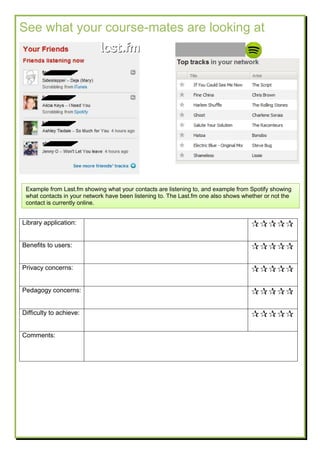
Example from Last.fm showing what your contacts are listening to, and example from Spotify showing
what contacts in your network have been listening to. The Last.fm one also shows whether or not the
contact is currently online.
Favourite author/journal/database
Figure 2: Adding favourites
Figure 3: viewing/editing favourites
Library application: 
Benefits to users: 
Privacy concerns: 
Pedagogy concerns: 
Comments:
Figure 1: homepage
Examples from Ticketmaster showing that you can add
venues, artists or events to a “favourites” list (Figure 1)
which will then be used to send you email notifications
about shows in your area.
Favourites with local events are also shown on the
homepage when you log in to Ticketmaster (Figure 2).
Your list of favourites can easily be edited (Figure 3).
Read later
Library
application:

Benefits to
users:

Privacy
concerns:

Pedagogy
concerns:

Difficulty to
achieve:

Comments:
Bookmarklet or button which enables the reader to flag an
article or other information resource as something they want
to read later.
All flagged items are then aggregated into a list which can
be sorted, tagged and shared.
Recent searches
Library
application:

Benefits to users: 
Privacy concerns: 
Pedagogy
concerns:

Difficulty to
achieve:

Comments:
Example from Google web history
showing the searches a person has
done recently and what they clicked
on in the search results.
There is also the option to filter by
the type of resource (e.g.
web/images/videos/books)
Recently viewed items
Library
application:

Benefits to
users:

Privacy
concerns:

Pedagogy
concerns:

Difficulty to
achieve:

Examples from Amazon and
YouTube showing items you
recently viewed.
Some retail sites will do this for the
length of your browsing session,
even if you’re not logged in.
Skills for you
Library application: 
Benefits to users: 
Privacy concerns: 
Pedagogy
concerns:

Difficulty to
achieve:

Comments:
Example from Lumosity.com showing the first steps of setting up a personalised skills programme.
This would later provide personalised recommendations for skills to study and a progress indicator.
Set preferences for relevance of topics/subjects and sources
Library application: 
Benefits to users: 
Privacy concerns: 
Pedagogy concerns: 
Difficulty to achieve: 
Comments:
Example showing sliders allowing you to personalise Google news to show more stories from some
categories and fewer from others.
It also allows you to give particular sources of news more or less weight.
Recommendations based on other people’s visits
(Customers who viewed this also viewed)
Library application:
Benefits to users:
Privacy concerns:
Pedagogy concerns:
Data needed:
Recommendations based on your previous visits
Examples from Amazon and
Ticketmaster showing
recommendations based on
the logged in user’s previous
browsing history on that
website. Amazon allows you
to tell them not to use
particular items for
recommendations (Figure 1).
Library application: 
Benefits to users: 
Privacy concerns: 
Pedagogy concerns: 
Difficulty to achieve: 
Comments
Figure 4: Why recommended?
New item recommendations based on your previous visits
Library
application:

Benefits to
users:

Privacy
concerns:

Pedagogy
concerns:

Difficulty to
achieve:

Example from Amazon showing recommendations for new items based on things you’ve
looked at in previous visits.
This also allows user to request that a particular item from previous visits is not used for
recommendations.
Comments:

Personalisation top trumps cards

  • 1.
    See what yourcourse-mates are looking at Library application:  Benefits to users:  Privacy concerns:  Pedagogy concerns:  Difficulty to achieve:  Comments: Example from Last.fm showing what your contacts are listening to, and example from Spotify showing what contacts in your network have been listening to. The Last.fm one also shows whether or not the contact is currently online.
  • 2.
    Favourite author/journal/database Figure 2:Adding favourites Figure 3: viewing/editing favourites Library application:  Benefits to users:  Privacy concerns:  Pedagogy concerns:  Comments: Figure 1: homepage Examples from Ticketmaster showing that you can add venues, artists or events to a “favourites” list (Figure 1) which will then be used to send you email notifications about shows in your area. Favourites with local events are also shown on the homepage when you log in to Ticketmaster (Figure 2). Your list of favourites can easily be edited (Figure 3).
  • 3.
    Read later Library application:  Benefits to users:  Privacy concerns:  Pedagogy concerns:  Difficultyto achieve:  Comments: Bookmarklet or button which enables the reader to flag an article or other information resource as something they want to read later. All flagged items are then aggregated into a list which can be sorted, tagged and shared.
  • 4.
    Recent searches Library application:  Benefits tousers:  Privacy concerns:  Pedagogy concerns:  Difficulty to achieve:  Comments: Example from Google web history showing the searches a person has done recently and what they clicked on in the search results. There is also the option to filter by the type of resource (e.g. web/images/videos/books)
  • 5.
    Recently viewed items Library application:  Benefitsto users:  Privacy concerns:  Pedagogy concerns:  Difficulty to achieve:  Examples from Amazon and YouTube showing items you recently viewed. Some retail sites will do this for the length of your browsing session, even if you’re not logged in.
  • 6.
    Skills for you Libraryapplication:  Benefits to users:  Privacy concerns:  Pedagogy concerns:  Difficulty to achieve:  Comments: Example from Lumosity.com showing the first steps of setting up a personalised skills programme. This would later provide personalised recommendations for skills to study and a progress indicator.
  • 7.
    Set preferences forrelevance of topics/subjects and sources Library application:  Benefits to users:  Privacy concerns:  Pedagogy concerns:  Difficulty to achieve:  Comments: Example showing sliders allowing you to personalise Google news to show more stories from some categories and fewer from others. It also allows you to give particular sources of news more or less weight.
  • 8.
    Recommendations based onother people’s visits (Customers who viewed this also viewed) Library application: Benefits to users: Privacy concerns: Pedagogy concerns: Data needed:
  • 9.
    Recommendations based onyour previous visits Examples from Amazon and Ticketmaster showing recommendations based on the logged in user’s previous browsing history on that website. Amazon allows you to tell them not to use particular items for recommendations (Figure 1). Library application:  Benefits to users:  Privacy concerns:  Pedagogy concerns:  Difficulty to achieve:  Comments Figure 4: Why recommended?
  • 10.
    New item recommendationsbased on your previous visits Library application:  Benefits to users:  Privacy concerns:  Pedagogy concerns:  Difficulty to achieve:  Example from Amazon showing recommendations for new items based on things you’ve looked at in previous visits. This also allows user to request that a particular item from previous visits is not used for recommendations. Comments: