1
www.cpa4it.ca@CPA4IT
Personal Taxes
7 Questions you need to ask
2
www.cpa4it.ca@CPA4IT
Chartered Professional Accountants
Chartered
Professional
Accountants for
Information
Technologists
ISO 9001
Registered
Specializing in
Independent
Contractors
Since 1984
Ranked Top50
Cloud
Accountant in
North America 4
years in a row
3
www.cpa4it.ca@CPA4IT
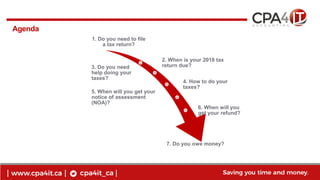
Agenda
Employee vs contractor
1. Do you need to file
a tax return?
2. When is your 2018 tax
return due?3. Do you need
help doing your
taxes?
4. How to do your
taxes?
5. When will you get your
notice of assessment
(NOA)?
6. When will you
get your refund?
7. Do you owe money?
4
www.cpa4it.ca@CPA4IT
1. Do you need to file a tax return?
Find out your tax obligations and whether you need to file an income tax and benefit
return.
If your income was tax exempt or you had no income in Canada this year, you still have
to file your taxes to get the benefits and credits you might be entitled to, such as:
Canada child benefit,
GST/HST tax credit,
Working income tax benefit,
Guaranteed income supplement.
5
www.cpa4it.ca@CPA4IT
2. When is your 2018 tax return due?
Most income tax and benefit returns are due on or before April 30, 2019.
Self-employed individuals and their spouse or common-law partner have until June 15, 2019
to file their return. However, any balance owing for 2018 must be paid on or before April 30,
2019 to avoid interest.
If in 2018, you or your spouse or common-law partner carried on a business whose
expenditures are mainly for a tax shelter, you have to send in your return no later
than April 30.
Deceased persons
If you need to file a tax return for someone who has died in 2018, the due date for their return
will depend on the date of death and whether the person owned a business in 2018.
6
www.cpa4it.ca@CPA4IT
3. Do you need help doing your taxes?
If you need a hand doing your taxes, you may be eligible for free help!
If you have a modest income and a simple tax situation, a volunteer from the Community
Volunteer Income Tax Programmay be able to complete your income tax and benefit return for
you, for free. This service is offered all year around. From February to April, community
organizations across Canada host free tax preparation clinics to help eligible individuals.
7
www.cpa4it.ca@CPA4IT
4. How to do your taxes?
Online
On paper
On the phone
8
www.cpa4it.ca@CPA4IT
4. How to do your taxes?
Step 1: Collect all your information and supporting documents that show your income, and
that support any deductions and credits you plan to claim
Step 2: Select the software you will use to fill out your return or get the general income tax
and benefit package for 2018
Step 3: Make sure your personal information is up to date
Step 4: Report your income
Step 5: Find out which deductions, tax credits, and benefits you can claim
Step 6: Send your return to the Canada Revenue Agency
Step 7: Keep your supporting documents
9
www.cpa4it.ca@CPA4IT
5. When will you get your notice of assessment (NOA)?
If you use the Express NOA service using certified tax software, you will get your NOA right
after filing. You can also ask your tax preparer about Express NOA to get your assessment
faster. Otherwise, you can expect your NOA in the mail within two weeks after filing
electronically and eight weeks if you file a paper return.
Receive your notice of assessment (NOA) online
Get your NOA online with online mail! It's the fast, easy, and secure way to manage your CRA
mail. There are different ways you can register:
log into My Account or the MyCRA mobile web app
enter your email address when you file your return
through your tax preparer
10
www.cpa4it.ca@CPA4IT
6. When will you get your refund?
If you file your return online and choose direct deposit, you can get your refund in as little as
eight business days. If you send us a paper return, it generally takes eight weeks before we
issue your notice of assessment and any refund.
You can verify the status of your return and your refund by logging into CRA's My
Account or MyCRA mobile app.
11
www.cpa4it.ca@CPA4IT
7. Do you owe money?
In order to avoid interest or penalties, you need to pay the balance you owe in full to the
Canada Revenue Agency on or before April 30. There are various payment options to make a
payment to the CRA.
If you cannot pay the balance you owe in full
If you can't pay the full amount you owe, you can make a payment arrangement. The Payment
agreement calculator can assist you in formulating a proposed payment plan to pay off your
tax debt taking into consideration your financial situation. However, it's up to you to contact
the Canada Revenue Agency.
After April 30, 2019, the Canada Revenue Agency will charge interest on any amount you owe
until your balance is paid. The Canada Revenue Agency can grant relief from penalty or
interest, but only in certain circumstances.
12
www.cpa4it.ca@CPA4IT
Good Advice is Priceless
Work with a professional:
That educates you
That asks questions
That you understand
That works with clients like you
ASK FOR A REFERRAL
13
www.cpa4it.ca@CPA4IT
Follow up
Contact your local CPA4IT representative, or visit
www.CPA4IT.ca for more information
Phone: 1-800-465-7532
Email: Contact@CPA4IT.ca
14
www.cpa4it.ca@CPA4IT
*Do you need to make changes to your tax return?
You can make changes to your return by using the ReFILE service offered in certified tax
preparation software packages or, if you are registered for My Account, you can request a
change to your return by clicking "Change my Return" and updating the required information..
You can also request an adjustment to your return by mail using Form T1-ADJ T1 Adjustment
Request.
15
www.cpa4it.ca@CPA4IT
15
16
www.cpa4it.ca@CPA4IT
Tax Free Savings Account (TFSA)
CRA confirms TFSA limit for 2018. The TFSA contribution limit for 2018 will remain
$5,500. The indexation adjustment for personal income tax and benefit amounts is 1.5% for 2018,
which is not enough to raise the TFSA limit to the next $500 increment.Dec 6, 2017
As of January 1, 2018, the total cumulative contribution room for a TFSA is $57,500for those who
have been 18 years or older and residents of Canada for all eligible years. Any unused contribution
room under the cap can be carried forward to subsequent years, without any upward limit.
2/7/201916
17
www.cpa4it.ca@CPA4IT
Registered Retirement Savings Plan (RRSP)
For 2018, your contribution will be limited to 18% of your 2017 earned income, to a maximum
of $26,230. Therefore, you need at least $145,722 of earned income in 2017 to maximize your 2018
contribution. This limit is further reduced by your pension adjustment for 2017.
2/7/201917
18
www.cpa4it.ca@CPA4IT
Registered Education Savings Plan (RESP)
You can contribute a lifetime maximum of $50,000 per beneficiary to an RESP. The amount of
annual contribution room that is eligible for the Canadian Education Savings Grant (CESG) is
$2,500. You are welcome to contribute more, but the 20% grant is only matched by the government
up to $2,500 per year.
*CombinedCESG and ACESG lifetime grant maximum of $7,200 per child.
2/7/201918

Personal tax guide

  • 1.
  • 2.
    2 www.cpa4it.ca@CPA4IT Chartered Professional Accountants Chartered Professional Accountantsfor Information Technologists ISO 9001 Registered Specializing in Independent Contractors Since 1984 Ranked Top50 Cloud Accountant in North America 4 years in a row
  • 3.
    3 www.cpa4it.ca@CPA4IT Agenda Employee vs contractor 1.Do you need to file a tax return? 2. When is your 2018 tax return due?3. Do you need help doing your taxes? 4. How to do your taxes? 5. When will you get your notice of assessment (NOA)? 6. When will you get your refund? 7. Do you owe money?
  • 4.
    4 www.cpa4it.ca@CPA4IT 1. Do youneed to file a tax return? Find out your tax obligations and whether you need to file an income tax and benefit return. If your income was tax exempt or you had no income in Canada this year, you still have to file your taxes to get the benefits and credits you might be entitled to, such as: Canada child benefit, GST/HST tax credit, Working income tax benefit, Guaranteed income supplement.
  • 5.
    5 www.cpa4it.ca@CPA4IT 2. When isyour 2018 tax return due? Most income tax and benefit returns are due on or before April 30, 2019. Self-employed individuals and their spouse or common-law partner have until June 15, 2019 to file their return. However, any balance owing for 2018 must be paid on or before April 30, 2019 to avoid interest. If in 2018, you or your spouse or common-law partner carried on a business whose expenditures are mainly for a tax shelter, you have to send in your return no later than April 30. Deceased persons If you need to file a tax return for someone who has died in 2018, the due date for their return will depend on the date of death and whether the person owned a business in 2018.
  • 6.
    6 www.cpa4it.ca@CPA4IT 3. Do youneed help doing your taxes? If you need a hand doing your taxes, you may be eligible for free help! If you have a modest income and a simple tax situation, a volunteer from the Community Volunteer Income Tax Programmay be able to complete your income tax and benefit return for you, for free. This service is offered all year around. From February to April, community organizations across Canada host free tax preparation clinics to help eligible individuals.
  • 7.
    7 www.cpa4it.ca@CPA4IT 4. How todo your taxes? Online On paper On the phone
  • 8.
    8 www.cpa4it.ca@CPA4IT 4. How todo your taxes? Step 1: Collect all your information and supporting documents that show your income, and that support any deductions and credits you plan to claim Step 2: Select the software you will use to fill out your return or get the general income tax and benefit package for 2018 Step 3: Make sure your personal information is up to date Step 4: Report your income Step 5: Find out which deductions, tax credits, and benefits you can claim Step 6: Send your return to the Canada Revenue Agency Step 7: Keep your supporting documents
  • 9.
    9 www.cpa4it.ca@CPA4IT 5. When willyou get your notice of assessment (NOA)? If you use the Express NOA service using certified tax software, you will get your NOA right after filing. You can also ask your tax preparer about Express NOA to get your assessment faster. Otherwise, you can expect your NOA in the mail within two weeks after filing electronically and eight weeks if you file a paper return. Receive your notice of assessment (NOA) online Get your NOA online with online mail! It's the fast, easy, and secure way to manage your CRA mail. There are different ways you can register: log into My Account or the MyCRA mobile web app enter your email address when you file your return through your tax preparer
  • 10.
    10 www.cpa4it.ca@CPA4IT 6. When willyou get your refund? If you file your return online and choose direct deposit, you can get your refund in as little as eight business days. If you send us a paper return, it generally takes eight weeks before we issue your notice of assessment and any refund. You can verify the status of your return and your refund by logging into CRA's My Account or MyCRA mobile app.
  • 11.
    11 www.cpa4it.ca@CPA4IT 7. Do youowe money? In order to avoid interest or penalties, you need to pay the balance you owe in full to the Canada Revenue Agency on or before April 30. There are various payment options to make a payment to the CRA. If you cannot pay the balance you owe in full If you can't pay the full amount you owe, you can make a payment arrangement. The Payment agreement calculator can assist you in formulating a proposed payment plan to pay off your tax debt taking into consideration your financial situation. However, it's up to you to contact the Canada Revenue Agency. After April 30, 2019, the Canada Revenue Agency will charge interest on any amount you owe until your balance is paid. The Canada Revenue Agency can grant relief from penalty or interest, but only in certain circumstances.
  • 12.
    12 www.cpa4it.ca@CPA4IT Good Advice isPriceless Work with a professional: That educates you That asks questions That you understand That works with clients like you ASK FOR A REFERRAL
  • 13.
    13 www.cpa4it.ca@CPA4IT Follow up Contact yourlocal CPA4IT representative, or visit www.CPA4IT.ca for more information Phone: 1-800-465-7532 Email: Contact@CPA4IT.ca
  • 14.
    14 www.cpa4it.ca@CPA4IT *Do you needto make changes to your tax return? You can make changes to your return by using the ReFILE service offered in certified tax preparation software packages or, if you are registered for My Account, you can request a change to your return by clicking "Change my Return" and updating the required information.. You can also request an adjustment to your return by mail using Form T1-ADJ T1 Adjustment Request.
  • 15.
  • 16.
    16 www.cpa4it.ca@CPA4IT Tax Free SavingsAccount (TFSA) CRA confirms TFSA limit for 2018. The TFSA contribution limit for 2018 will remain $5,500. The indexation adjustment for personal income tax and benefit amounts is 1.5% for 2018, which is not enough to raise the TFSA limit to the next $500 increment.Dec 6, 2017 As of January 1, 2018, the total cumulative contribution room for a TFSA is $57,500for those who have been 18 years or older and residents of Canada for all eligible years. Any unused contribution room under the cap can be carried forward to subsequent years, without any upward limit. 2/7/201916
  • 17.
    17 www.cpa4it.ca@CPA4IT Registered Retirement SavingsPlan (RRSP) For 2018, your contribution will be limited to 18% of your 2017 earned income, to a maximum of $26,230. Therefore, you need at least $145,722 of earned income in 2017 to maximize your 2018 contribution. This limit is further reduced by your pension adjustment for 2017. 2/7/201917
  • 18.
    18 www.cpa4it.ca@CPA4IT Registered Education SavingsPlan (RESP) You can contribute a lifetime maximum of $50,000 per beneficiary to an RESP. The amount of annual contribution room that is eligible for the Canadian Education Savings Grant (CESG) is $2,500. You are welcome to contribute more, but the 20% grant is only matched by the government up to $2,500 per year. *CombinedCESG and ACESG lifetime grant maximum of $7,200 per child. 2/7/201918

Editor's Notes

  • #8 You can fill out your return online, on paper, or by phone. Online Did you know that last year nearly 90% of Canadians chose to file their income tax and benefit return online? Filing online is convenient, easy, and secure.  To help you file electronically, the CRA provides a list of certified desktop and online software products, and web service options, including those that are free of charge. If you register for My Account, you will have access to the secure Auto-fill my return service. If you use certain tax preparation software, it automatically fills in parts of your return, with information that the Canada Revenue Agency has on file for you. On paper To serve Canadians better, the CRA will mail the 2018 Income Tax and Benefits Guide and forms book to individuals who filed on paper last year. You should receive the packages by February 26, 2019. You can order the 2018 tax package, as well packages for previous years, online or download and print it. It can take up to 10 business days for the income tax and benefit package to arrive by mail. On the phone New for this tax-filing season, the File my Return service invites eligible Canadians to file their income tax and benefit return by providing some personal information and answering a series of short questions through a dedicated, automated phone service. File my Return is available to select Canadians with low or fixed incomes whose situations remain unchanged year-to-year. Canadians who may be eligible will receive a personalized invitation letter in the mail by mid-February 2019. Need assistance? Many individuals get the assistance of a spouse or common-law partner, other family member, friend, or accountant when doing their taxes. You don't need to authorize them as your representative if they're only doing your taxes. However, if you want that person to represent you for your income tax matters - access information or make limited changes to your account- you have to authorize that person as a representative. You may be able to get free help from a community organization to help you file your income tax and benefit return through the Community Volunteer Income Tax Program. If you have a modest income and a simple tax situation, volunteers can prepare your return for you, for free.
  • #9 Step 1: Collect all your information and supporting documents that show your income, and that support any deductions and credits you plan to claim To fill out your return, you need all your tax information slips that show your income, such as your T4 slip. You should have received most of your slips and receipts by the end of February. However, T3, and T5013 slips will come later as these do not have to be sent by the issuer until before the end of March. If you have not received, or have lost or misplaced a slip for the current year, you have to ask your employer, or the issuer of the slip, for a copy. If you are registered for My Account, you may be able to view your tax information online and use the secure Auto-fill my return service to automatically fill in parts of your return with information the Canada Revenue Agency has on file for you. You could also use your pay stubs or statements to estimate the income to report and any related deductions and credits you can claim. Attach a copy of the pay stubs or statements to your paper return and keep the original documents. If you are filing online, keep all of your documents in case we ask to see them later. Gather the receipts or records you will need to support any deductions, credits, amounts or expenses you will be claiming.  Step 2: Select the software you will use to fill out your return or get the general income tax and benefit package for 2018 NETFILE- certified tax preparation software offers you a convenient and secure way to do your taxes online. The Canada Revenue Agency has a list of certified software, some of which are free, which allows you to complete and send your return directly to the CRA. If you are registered for My Account, you can use the Auto-fill my return service to automatically fill in parts of your income tax and benefit return when you use certified tax preparation software. Certified software products will also allow you to use the  Express NOA service to receive your notice of assessment right after you file your return. Many products also offer ReFILE capability, which allows you to submit adjustments to your return after you receive your notice of assessment. Step 3: Make sure your personal information is up to date Changes to your personal information such as your marital status, the number of children in your care, your banking information and your address directly affect your benefit and credit payments. If there has been a change in your life let the CRA know as soon as possible to make sure you get the benefits and credits you're entitled to. You can change your address and your direct deposit information before you file your return if you use a NETFILE-certified tax preparation software. Step 4: Report your income Report the income you received in the year from all sources, both inside and outside Canada. Look on the back of your information slips to find instructions on where to report an amount. Step 5: Find out which deductions, tax credits, and benefits you can claim Get information about the deductions and tax credits you can claim on your return to reduce the amount of tax you have to pay. You will also find information on where to claim these amounts on your tax return or on a related form or schedule. Step 6: Send your return to the Canada Revenue Agency There are several ways to send your tax return to the Canada Revenue Agency. You can file online using NETFILE-certified software or through an EFILE service provider, such as a tax preparer. After you or your EFILE service provider have sent your income tax return through the software, you may choose to receive your notice of assessment (NOA) electronically, right away with Express NOA. Avoid delays with paper mail and get your Express NOA or ask your EFILE service provider for one. You can also file a paper return by mailing it to your tax centre after completing it. Step 7: Keep your supporting documents You must keep all your tax documents for at least six years after the last tax year they relate to. If you filed your return late, your records must be kept for six years from the date the return was filed. If you claimed expenses, deductions or tax credits, make sure you keep all your receipts and related documents in case the Canada Revenue Agency asks to see them.