
Pecha kucha
XII Jornadas CETA
Active & Attractive Teaching; Confident & Confortable Learning
                                                                Luisa María Palacios Maroto
What?


20 slides
20 seconds per slide
6 minutes 40
seconds presentation
Why in class?
Work with key
competences

✤   Linguistic competence

✤   Digital competence and
    treatment of information

✤   Competence in autonomy and
    personal initiative

✤   Competence in Learning to
    Learn
Multiple
         subjects


✤   Multiple topics

✤   Can be used in the EFL
    classroom

✤   Can be used in CLIL classes
Benefits in ESL


✤   Fosters oral skills

✤   Meaningful learning
And what else?
Have you thought about...


✤   teaching your students how to make a good
    presentation?
Good
presentations...

✤   Care about the quality of images

✤   Choose a good background- text
    colour combination

✤   Don’t have a lot of text

✤   Don’t have      lots   of   bullets,
    animations...
Life after death by Powerpoint
            Don McMillan
Have you thought about...


✤   teaching your students how to make a good
    presentation?

✤   make your students speak in front of an audience?
Speaking in
        public


✤   Take in mind your audience

✤   Do not read

✤   Have a good volume
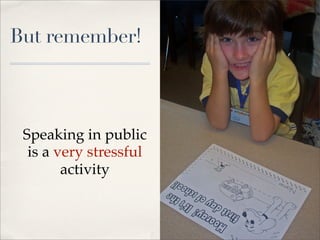
But remember!


 Speaking in public
  is a very stressful
        activity
Have you thought about...


✤   teaching your students how to make a good
    presentation?

✤   make your students speak in front of an audience?

✤   talk with your students about copyright?
Copyright?

✤   Who is the owner of the images
    in the Internet?

✤   How can we use them?

✤   What is CC?

✤   What happens when we
    upload a picture to a social
    network?
Have you thought about...


✤   teaching your students how to make a good
    presentation?

✤   make your students speak in front of an audience?

✤   talk with your students about copyright?

✤   make your students reflect about their own work?
Autoevaluation


✤   Make your students reflect
    about their own learning, their
    performance and how they felt
    when presenting
How?
My students
Planning


✤   Think about the main topic and
    some ideas to illustrate it.

✤    What is the most logical order
    to express what you say?

✤   ESL teachers: Vocabulary,
    grammar!!!
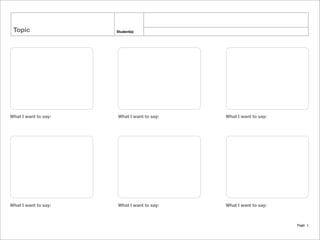
Topic             Student(s)


What I want to say:   What I want to say:   What I want to say:


What I want to say:   What I want to say:   What I want to say:


                                                                 Page 1
Preparation


✤   Think about the images
Free Images


✤   Google

✤   Flickr CC

✤   Open Stock Photography

✤   MorgueFile

✤   Wylio


Source: http://www.xarxatic.com/repositorios-de-imagenes-cc-libres/
Preparation


✤   Think about the images

✤   Set the presentation time for
    each slide
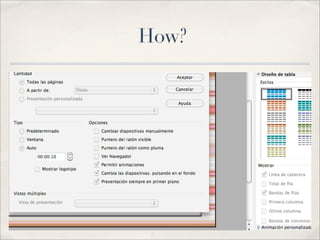
How?
Rehearsal


✤   What is the correct
    pronunciation?

✤   Try not to learn by heart, try
    not to read

✤   Is my speech clear enough?
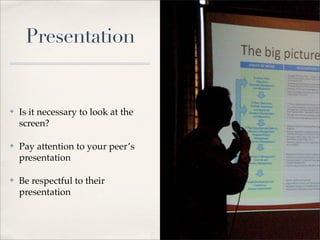
Presentation


✤   Is it necessary to look at the
    screen?

✤   Pay attention to your peer’s
    presentation

✤   Be respectful to their
    presentation
Some questions for the viewers

What was the best of his/her
                                What could be improved?
      presentation?


 Do you think he/she was       Write a short summary of the
        nervous?                        presentation


 Write something you have If you could give him/her a
learnt from this presentation mark, what would it be?
Some questions to answer after
       the presentation...
                               Was I able to show what I
     What did I learn?
                                      have learnt?

What was the most difficult
                               What was the easiest part?
          part?

   Were my peers paying
                                How did I feel about it?
     attention to me?

What was the best part of my
                                What could I improve?
      presentation?
www.myenglishcorner.net

luisapalacios@myenglishcorner.net

Pecha Kucha

  • 1.
    Pecha kucha XII JornadasCETA Active & Attractive Teaching; Confident & Confortable Learning Luisa María Palacios Maroto
  • 2.
    What? 20 slides 20 secondsper slide 6 minutes 40 seconds presentation
  • 3.
  • 4.
    Work with key competences ✤ Linguistic competence ✤ Digital competence and treatment of information ✤ Competence in autonomy and personal initiative ✤ Competence in Learning to Learn
  • 5.
    Multiple subjects ✤ Multiple topics ✤ Can be used in the EFL classroom ✤ Can be used in CLIL classes
  • 6.
    Benefits in ESL ✤ Fosters oral skills ✤ Meaningful learning
  • 7.
  • 8.
    Have you thoughtabout... ✤ teaching your students how to make a good presentation?
  • 9.
    Good presentations... ✤ Care about the quality of images ✤ Choose a good background- text colour combination ✤ Don’t have a lot of text ✤ Don’t have lots of bullets, animations...
  • 10.
    Life after deathby Powerpoint Don McMillan
  • 11.
    Have you thoughtabout... ✤ teaching your students how to make a good presentation? ✤ make your students speak in front of an audience?
  • 12.
    Speaking in public ✤ Take in mind your audience ✤ Do not read ✤ Have a good volume
  • 13.
    But remember! Speakingin public is a very stressful activity
  • 14.
    Have you thoughtabout... ✤ teaching your students how to make a good presentation? ✤ make your students speak in front of an audience? ✤ talk with your students about copyright?
  • 15.
    Copyright? ✤ Who is the owner of the images in the Internet? ✤ How can we use them? ✤ What is CC? ✤ What happens when we upload a picture to a social network?
  • 16.
    Have you thoughtabout... ✤ teaching your students how to make a good presentation? ✤ make your students speak in front of an audience? ✤ talk with your students about copyright? ✤ make your students reflect about their own work?
  • 17.
    Autoevaluation ✤ Make your students reflect about their own learning, their performance and how they felt when presenting
  • 18.
  • 19.
  • 20.
    Planning ✤ Think about the main topic and some ideas to illustrate it. ✤ What is the most logical order to express what you say? ✤ ESL teachers: Vocabulary, grammar!!!
  • 21.
    Topic Student(s) What I want to say: What I want to say: What I want to say: What I want to say: What I want to say: What I want to say: Page 1
  • 22.
    Preparation ✤ Think about the images
  • 23.
    Free Images ✤ Google ✤ Flickr CC ✤ Open Stock Photography ✤ MorgueFile ✤ Wylio Source: http://www.xarxatic.com/repositorios-de-imagenes-cc-libres/
  • 24.
    Preparation ✤ Think about the images ✤ Set the presentation time for each slide
  • 25.
  • 26.
    Rehearsal ✤ What is the correct pronunciation? ✤ Try not to learn by heart, try not to read ✤ Is my speech clear enough?
  • 27.
    Presentation ✤ Is it necessary to look at the screen? ✤ Pay attention to your peer’s presentation ✤ Be respectful to their presentation
  • 28.
    Some questions forthe viewers What was the best of his/her What could be improved? presentation? Do you think he/she was Write a short summary of the nervous? presentation Write something you have If you could give him/her a learnt from this presentation mark, what would it be?
  • 29.
    Some questions toanswer after the presentation... Was I able to show what I What did I learn? have learnt? What was the most difficult What was the easiest part? part? Were my peers paying How did I feel about it? attention to me? What was the best part of my What could I improve? presentation?
  • 30.