PE1 Module 4
Function and Dictionary
2
Function
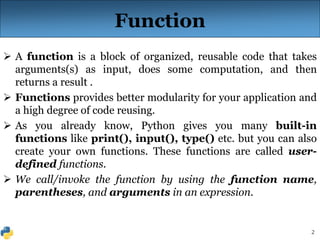
 A function is a block of organized, reusable code that takes
arguments(s) as input, does some computation, and then
returns a result .
 Functions provides better modularity for your application and
a high degree of code reusing.
 As you already know, Python gives you many built-in
functions like print(), input(), type() etc. but you can also
create your own functions. These functions are called user-
defined functions.
 We call/invoke the function by using the function name,
parentheses, and arguments in an expression.
3
Defining a Function
 Here are simple rules to define a function in Python:
Function blocks begin with the keyword def followed by the
function name and parentheses ( ) .
Any input parameters or arguments should be placed
within these parentheses.
The code block within every function starts with a colon (:)
and is indented.
The statement return [expression] exits a function,
optionally passing back an expression to the caller.
A return statement with no arguments is the same as return
None.
Syntax:
def functionName( parameters/ arguments):
4
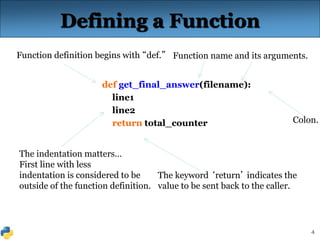
The indentation matters…
First line with less
indentation is considered to be
outside of the function definition.
Defining a Function
def get_final_answer(filename):
line1
line2
return total_counter
Function definition begins with “def.” Function name and its arguments.
The keyword ‘return’ indicates the
value to be sent back to the caller.
Colon.
5
Calling a Function
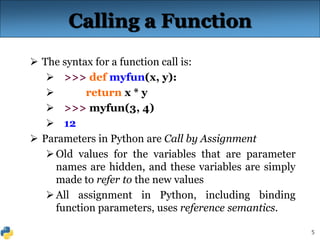
 The syntax for a function call is:
 >>> def myfun(x, y):
 return x * y
 >>> myfun(3, 4)
 12
 Parameters in Python are Call by Assignment
Old values for the variables that are parameter
names are hidden, and these variables are simply
made to refer to the new values
All assignment in Python, including binding
function parameters, uses reference semantics.
6
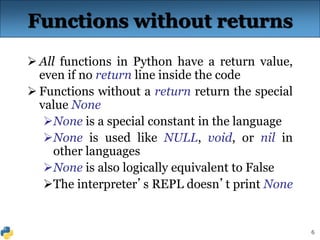
Functions without returns
 All functions in Python have a return value,
even if no return line inside the code
 Functions without a return return the special
value None
None is a special constant in the language
None is used like NULL, void, or nil in
other languages
None is also logically equivalent to False
The interpreter’s REPL doesn’t print None
7
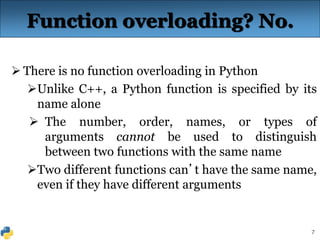
Function overloading? No.
 There is no function overloading in Python
Unlike C++, a Python function is specified by its
name alone
 The number, order, names, or types of
arguments cannot be used to distinguish
between two functions with the same name
Two different functions can’t have the same name,
even if they have different arguments
8
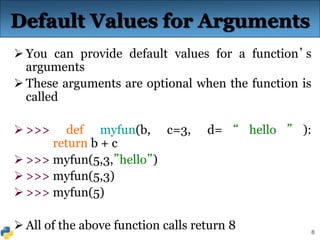
Default Values for Arguments
 You can provide default values for a function’s
arguments
 These arguments are optional when the function is
called
 >>> def myfun(b, c=3, d= “ hello ” ):
return b + c
 >>> myfun(5,3,”hello”)
 >>> myfun(5,3)
 >>> myfun(5)
 All of the above function calls return 8
9
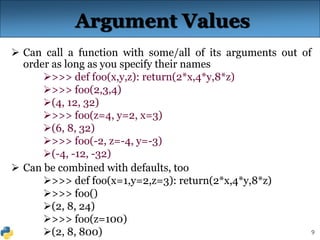
Argument Values
 Can call a function with some/all of its arguments out of
order as long as you specify their names
>>> def foo(x,y,z): return(2*x,4*y,8*z)
>>> foo(2,3,4)
(4, 12, 32)
>>> foo(z=4, y=2, x=3)
(6, 8, 32)
>>> foo(-2, z=-4, y=-3)
(-4, -12, -32)
 Can be combined with defaults, too
>>> def foo(x=1,y=2,z=3): return(2*x,4*y,8*z)
>>> foo()
(2, 8, 24)
>>> foo(z=100)
(2, 8, 800)
10
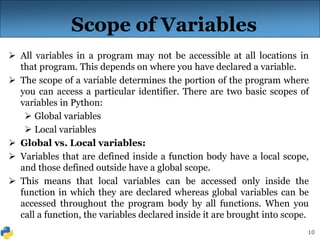
Scope of Variables
 All variables in a program may not be accessible at all locations in
that program. This depends on where you have declared a variable.
 The scope of a variable determines the portion of the program where
you can access a particular identifier. There are two basic scopes of
variables in Python:
 Global variables
 Local variables
 Global vs. Local variables:
 Variables that are defined inside a function body have a local scope,
and those defined outside have a global scope.
 This means that local variables can be accessed only inside the
function in which they are declared whereas global variables can be
accessed throughout the program body by all functions. When you
call a function, the variables declared inside it are brought into scope.
11
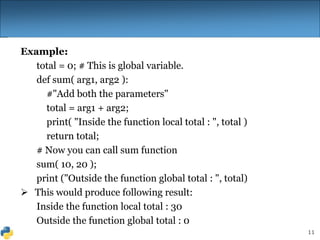
Example:
total = 0; # This is global variable.
def sum( arg1, arg2 ):
#"Add both the parameters"
total = arg1 + arg2;
print( "Inside the function local total : ", total )
return total;
# Now you can call sum function
sum( 10, 20 );
print ("Outside the function global total : ", total)
 This would produce following result:
Inside the function local total : 30
Outside the function global total : 0
12
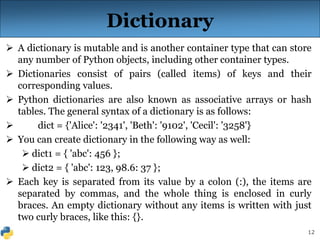
Dictionary
 A dictionary is mutable and is another container type that can store
any number of Python objects, including other container types.
 Dictionaries consist of pairs (called items) of keys and their
corresponding values.
 Python dictionaries are also known as associative arrays or hash
tables. The general syntax of a dictionary is as follows:
 dict = {'Alice': '2341', 'Beth': '9102', 'Cecil': '3258'}
 You can create dictionary in the following way as well:
 dict1 = { 'abc': 456 };
 dict2 = { 'abc': 123, 98.6: 37 };
 Each key is separated from its value by a colon (:), the items are
separated by commas, and the whole thing is enclosed in curly
braces. An empty dictionary without any items is written with just
two curly braces, like this: {}.
13
Accessing Values in Dictionary
 To access dictionary elements, you use the familiar square
brackets along with the key to obtain its value:
 Example:
dict = {'Name': 'Zara', 'Age': 7, 'Class': 'First'};
print "dict['Name']: ", dict['Name'];
print "dict['Age']: ", dict['Age'];
 This will produce following result:
 dict['Name']: Zara
 dict['Age']: 7
14
 If we attempt to access a data item with a key which is not
part of the dictionary, we get an error as follows:
dict = {'Name': 'Zara', 'Age': 7, 'Class': 'First'};
print "dict['Alice']: ", dict['Alice'];
 This will produce following result:
 dict['Zara']:
 Traceback (most recent call last): File "test.py", line
4, in <module> print "dict['Alice']: ", dict['Alice'];
KeyError: 'Alice'
Accessing Values in Dictionary
15
Updating Dictionary
 You can update a dictionary by adding a new entry or
item (i.e., a key-value pair), modifying an existing entry,
or deleting an existing entry as shown below:
 Example:
dict = {'Name': 'Zara', 'Age': 7, 'Class': 'First'};
dict['Age'] = 8; # update existing entry
dict[‘University'] = “Jimma"; # Add new entry
print "dict['Age']: ", dict['Age'];
print "dict['School']: ", dict['School'];
 This will produce following result:
 dict['Age']: 8
 dict['School’]: Jimma
16
Delete Dictionary Elements
 You can either remove individual dictionary elements or clear the entire contents of
a dictionary. You can also delete entire dictionary in a single operation.
 To explicitly remove an entire dictionary, just use the del statement:
 Example:
 dict = {'Name': 'Zara', 'Age': 7, 'Class': 'First'};
 del dict['Name']; # remove entry with key 'Name’
 dict.clear(); # remove all entries in dict
 del dict ; # delete entire dictionary
 print "dict['Age']: ", dict['Age'];
 print "dict['School']: ", dict['School'];
 This will produce following result. Note an exception raised, this is because after
del dict dictionary does not exist any more:
 dict['Age']:
 Traceback (most recent call last): File "test.py", line 8, in <module> print
"dict['Age']: ", dict['Age'];
 TypeError: 'type' object is unsubscriptable
 Note: del() method is discussed in subsequent section.
17
Properties of Dictionary Keys
 Dictionary values have no restrictions. They can be any
arbitrary Python object, either standard objects or user-
defined objects. However, same is not true for the keys.
 There are two important points to remember about
dictionary keys:
 (a) More than one entry per key not allowed. Which means
no duplicate key is allowed. When duplicate keys
encountered during assignment, the last assignment wins.
 Example:
dict = {'Name': 'Zara', 'Age': 7, 'Name': 'Manni'};
print "dict['Name']: ", dict['Name'];
 This will produce following result:
dict['Name']: Manni
18
 (b) Keys must be immutable. Which means you can use
strings, numbers, or tuples as dictionary keys but something
like ['key'] is not allowed.
 Example:
dict = {['Name']: 'Zara', 'Age': 7};
print "dict['Name']: ", dict['Name'];
 This will produce following result. Note an exception raised:
Traceback (most recent call last):
File "test.py", line 3, in <module> dict = {['Name']: 'Zara',
'Age': 7};
TypeError: list objects are unhashable
19
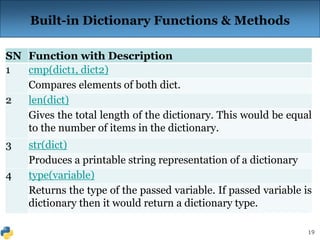
Built-in Dictionary Functions & Methods
SN Function with Description
1 cmp(dict1, dict2)
Compares elements of both dict.
2 len(dict)
Gives the total length of the dictionary. This would be equal
to the number of items in the dictionary.
3 str(dict)
Produces a printable string representation of a dictionary
4 type(variable)
Returns the type of the passed variable. If passed variable is
dictionary then it would return a dictionary type.
20
SN Methods with Description
1 dict.clear()
Removes all elements of dictionary dict
2 dict.copy()
Returns a copy of dictionary dict
2 dict.fromkeys()
Create a new dictionary with keys from seq and values set to value.
3 dict.get(key, default=None)
For key key, returns value or default if key not in dictionary
4 dict.has_key(key)
Returns true if key in dictionary dict, false otherwise
5 dict.items()
Returns a list of dict's (key, value) tuple pairs
6 dict.keys()
Returns list of dictionary dict's keys
7 dict.setdefault(key, default=None)
Similar to get(), but will set dict[key]=default if key is not already in dict
8 dict.update(dict2)
Adds dictionary dict2's key-values pairs to dict
9 dict.values()
21
Any Question?
Thank You!

PE1 Module 4.ppt

  • 1.
    PE1 Module 4 Functionand Dictionary
  • 2.
    2 Function  A functionis a block of organized, reusable code that takes arguments(s) as input, does some computation, and then returns a result .  Functions provides better modularity for your application and a high degree of code reusing.  As you already know, Python gives you many built-in functions like print(), input(), type() etc. but you can also create your own functions. These functions are called user- defined functions.  We call/invoke the function by using the function name, parentheses, and arguments in an expression.
  • 3.
    3 Defining a Function Here are simple rules to define a function in Python: Function blocks begin with the keyword def followed by the function name and parentheses ( ) . Any input parameters or arguments should be placed within these parentheses. The code block within every function starts with a colon (:) and is indented. The statement return [expression] exits a function, optionally passing back an expression to the caller. A return statement with no arguments is the same as return None. Syntax: def functionName( parameters/ arguments):
  • 4.
    4 The indentation matters… Firstline with less indentation is considered to be outside of the function definition. Defining a Function def get_final_answer(filename): line1 line2 return total_counter Function definition begins with “def.” Function name and its arguments. The keyword ‘return’ indicates the value to be sent back to the caller. Colon.
  • 5.
    5 Calling a Function The syntax for a function call is:  >>> def myfun(x, y):  return x * y  >>> myfun(3, 4)  12  Parameters in Python are Call by Assignment Old values for the variables that are parameter names are hidden, and these variables are simply made to refer to the new values All assignment in Python, including binding function parameters, uses reference semantics.
  • 6.
    6 Functions without returns All functions in Python have a return value, even if no return line inside the code  Functions without a return return the special value None None is a special constant in the language None is used like NULL, void, or nil in other languages None is also logically equivalent to False The interpreter’s REPL doesn’t print None
  • 7.
    7 Function overloading? No. There is no function overloading in Python Unlike C++, a Python function is specified by its name alone  The number, order, names, or types of arguments cannot be used to distinguish between two functions with the same name Two different functions can’t have the same name, even if they have different arguments
  • 8.
    8 Default Values forArguments  You can provide default values for a function’s arguments  These arguments are optional when the function is called  >>> def myfun(b, c=3, d= “ hello ” ): return b + c  >>> myfun(5,3,”hello”)  >>> myfun(5,3)  >>> myfun(5)  All of the above function calls return 8
  • 9.
    9 Argument Values  Cancall a function with some/all of its arguments out of order as long as you specify their names >>> def foo(x,y,z): return(2*x,4*y,8*z) >>> foo(2,3,4) (4, 12, 32) >>> foo(z=4, y=2, x=3) (6, 8, 32) >>> foo(-2, z=-4, y=-3) (-4, -12, -32)  Can be combined with defaults, too >>> def foo(x=1,y=2,z=3): return(2*x,4*y,8*z) >>> foo() (2, 8, 24) >>> foo(z=100) (2, 8, 800)
  • 10.
    10 Scope of Variables All variables in a program may not be accessible at all locations in that program. This depends on where you have declared a variable.  The scope of a variable determines the portion of the program where you can access a particular identifier. There are two basic scopes of variables in Python:  Global variables  Local variables  Global vs. Local variables:  Variables that are defined inside a function body have a local scope, and those defined outside have a global scope.  This means that local variables can be accessed only inside the function in which they are declared whereas global variables can be accessed throughout the program body by all functions. When you call a function, the variables declared inside it are brought into scope.
  • 11.
    11 Example: total = 0;# This is global variable. def sum( arg1, arg2 ): #"Add both the parameters" total = arg1 + arg2; print( "Inside the function local total : ", total ) return total; # Now you can call sum function sum( 10, 20 ); print ("Outside the function global total : ", total)  This would produce following result: Inside the function local total : 30 Outside the function global total : 0
  • 12.
    12 Dictionary  A dictionaryis mutable and is another container type that can store any number of Python objects, including other container types.  Dictionaries consist of pairs (called items) of keys and their corresponding values.  Python dictionaries are also known as associative arrays or hash tables. The general syntax of a dictionary is as follows:  dict = {'Alice': '2341', 'Beth': '9102', 'Cecil': '3258'}  You can create dictionary in the following way as well:  dict1 = { 'abc': 456 };  dict2 = { 'abc': 123, 98.6: 37 };  Each key is separated from its value by a colon (:), the items are separated by commas, and the whole thing is enclosed in curly braces. An empty dictionary without any items is written with just two curly braces, like this: {}.
  • 13.
    13 Accessing Values inDictionary  To access dictionary elements, you use the familiar square brackets along with the key to obtain its value:  Example: dict = {'Name': 'Zara', 'Age': 7, 'Class': 'First'}; print "dict['Name']: ", dict['Name']; print "dict['Age']: ", dict['Age'];  This will produce following result:  dict['Name']: Zara  dict['Age']: 7
  • 14.
    14  If weattempt to access a data item with a key which is not part of the dictionary, we get an error as follows: dict = {'Name': 'Zara', 'Age': 7, 'Class': 'First'}; print "dict['Alice']: ", dict['Alice'];  This will produce following result:  dict['Zara']:  Traceback (most recent call last): File "test.py", line 4, in <module> print "dict['Alice']: ", dict['Alice']; KeyError: 'Alice' Accessing Values in Dictionary
  • 15.
    15 Updating Dictionary  Youcan update a dictionary by adding a new entry or item (i.e., a key-value pair), modifying an existing entry, or deleting an existing entry as shown below:  Example: dict = {'Name': 'Zara', 'Age': 7, 'Class': 'First'}; dict['Age'] = 8; # update existing entry dict[‘University'] = “Jimma"; # Add new entry print "dict['Age']: ", dict['Age']; print "dict['School']: ", dict['School'];  This will produce following result:  dict['Age']: 8  dict['School’]: Jimma
  • 16.
    16 Delete Dictionary Elements You can either remove individual dictionary elements or clear the entire contents of a dictionary. You can also delete entire dictionary in a single operation.  To explicitly remove an entire dictionary, just use the del statement:  Example:  dict = {'Name': 'Zara', 'Age': 7, 'Class': 'First'};  del dict['Name']; # remove entry with key 'Name’  dict.clear(); # remove all entries in dict  del dict ; # delete entire dictionary  print "dict['Age']: ", dict['Age'];  print "dict['School']: ", dict['School'];  This will produce following result. Note an exception raised, this is because after del dict dictionary does not exist any more:  dict['Age']:  Traceback (most recent call last): File "test.py", line 8, in <module> print "dict['Age']: ", dict['Age'];  TypeError: 'type' object is unsubscriptable  Note: del() method is discussed in subsequent section.
  • 17.
    17 Properties of DictionaryKeys  Dictionary values have no restrictions. They can be any arbitrary Python object, either standard objects or user- defined objects. However, same is not true for the keys.  There are two important points to remember about dictionary keys:  (a) More than one entry per key not allowed. Which means no duplicate key is allowed. When duplicate keys encountered during assignment, the last assignment wins.  Example: dict = {'Name': 'Zara', 'Age': 7, 'Name': 'Manni'}; print "dict['Name']: ", dict['Name'];  This will produce following result: dict['Name']: Manni
  • 18.
    18  (b) Keysmust be immutable. Which means you can use strings, numbers, or tuples as dictionary keys but something like ['key'] is not allowed.  Example: dict = {['Name']: 'Zara', 'Age': 7}; print "dict['Name']: ", dict['Name'];  This will produce following result. Note an exception raised: Traceback (most recent call last): File "test.py", line 3, in <module> dict = {['Name']: 'Zara', 'Age': 7}; TypeError: list objects are unhashable
  • 19.
    19 Built-in Dictionary Functions& Methods SN Function with Description 1 cmp(dict1, dict2) Compares elements of both dict. 2 len(dict) Gives the total length of the dictionary. This would be equal to the number of items in the dictionary. 3 str(dict) Produces a printable string representation of a dictionary 4 type(variable) Returns the type of the passed variable. If passed variable is dictionary then it would return a dictionary type.
  • 20.
    20 SN Methods withDescription 1 dict.clear() Removes all elements of dictionary dict 2 dict.copy() Returns a copy of dictionary dict 2 dict.fromkeys() Create a new dictionary with keys from seq and values set to value. 3 dict.get(key, default=None) For key key, returns value or default if key not in dictionary 4 dict.has_key(key) Returns true if key in dictionary dict, false otherwise 5 dict.items() Returns a list of dict's (key, value) tuple pairs 6 dict.keys() Returns list of dictionary dict's keys 7 dict.setdefault(key, default=None) Similar to get(), but will set dict[key]=default if key is not already in dict 8 dict.update(dict2) Adds dictionary dict2's key-values pairs to dict 9 dict.values()
  • 21.