1
2
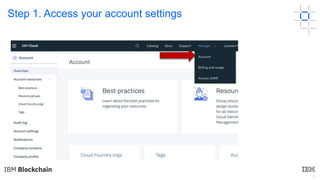
Step 1. Access your account settings
3
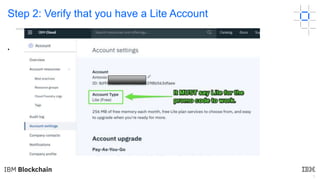
Step 2: Verify that you have a Lite Account
•
4
If your account is not a free LITE you need to:
1. First log out of your current account (if you are
already logged in), and
2. Sign Up for a new IBM Cloud account with a
different email address to take advantage of this
offer.
5
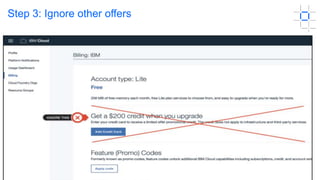
Step 3: Ignore other offers
6
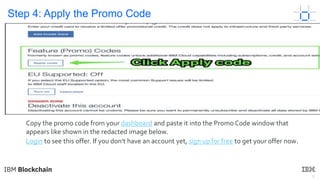
Step 4: Apply the Promo Code
Copy the promo code from your dashboard and paste it into the Promo Code window that
appears like shown in the redacted image below.
Login to see this offer. If you don't have an account yet, sign up for free to get your offer now.
7
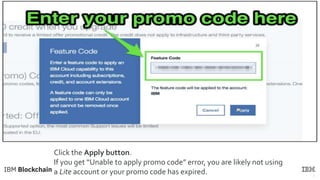
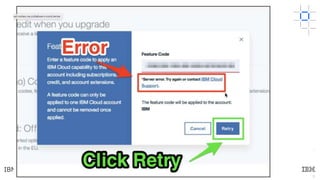
Click the Apply button.
If you get “Unable to apply promo code” error, you are likely not using
a Lite account or your promo code has expired.
8
•
9
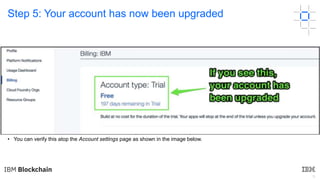
Step 5: Your account has now been upgraded
• If you followed the steps correctly, congratulations, your account type should now go from Lite to Trial. You’ll have access to
standard IBM Cloud services for the next 6 months (a value of $1,200 USD).
• You can verify this atop the Account settings page as shown in the image below.
© Copyright IBM Corporation 2019. All rights reserved. The information contained in these
materials is provided for informational purposes only, and is provided AS IS without warranty
of any kind, express or implied. Any statement of direction represents IBM's current intent, is
subject to change or withdrawal, and represents only goals and objectives. IBM, the IBM
logo, and other IBM products and services are trademarks of the International Business
Machines Corporation, in the United States, other countries or both. Other company, product,
or service names may be trademarks or service marks of others.

Pcode

  • 1.
  • 2.
    2 Step 1. Accessyour account settings
  • 3.
    3 Step 2: Verifythat you have a Lite Account •
  • 4.
    4 If your accountis not a free LITE you need to: 1. First log out of your current account (if you are already logged in), and 2. Sign Up for a new IBM Cloud account with a different email address to take advantage of this offer.
  • 5.
    5 Step 3: Ignoreother offers
  • 6.
    6 Step 4: Applythe Promo Code Copy the promo code from your dashboard and paste it into the Promo Code window that appears like shown in the redacted image below. Login to see this offer. If you don't have an account yet, sign up for free to get your offer now.
  • 7.
    7 Click the Applybutton. If you get “Unable to apply promo code” error, you are likely not using a Lite account or your promo code has expired.
  • 8.
  • 9.
    9 Step 5: Youraccount has now been upgraded • If you followed the steps correctly, congratulations, your account type should now go from Lite to Trial. You’ll have access to standard IBM Cloud services for the next 6 months (a value of $1,200 USD). • You can verify this atop the Account settings page as shown in the image below.
  • 10.
    © Copyright IBMCorporation 2019. All rights reserved. The information contained in these materials is provided for informational purposes only, and is provided AS IS without warranty of any kind, express or implied. Any statement of direction represents IBM's current intent, is subject to change or withdrawal, and represents only goals and objectives. IBM, the IBM logo, and other IBM products and services are trademarks of the International Business Machines Corporation, in the United States, other countries or both. Other company, product, or service names may be trademarks or service marks of others.