Pair Programming
Fitter, happier
More productive
Comfortable
Not drinking too much
What is Pair Programming?
● Agile software method where two developers work with one keyboard/mouse
● One developer “drives” (tactical)
● The other developer “observes/navigates” (strategic)
● Periodically switch “seats”
● Augments or replaces other code peer reviews (including a PR)
● Longer than a Q and A session
● Aims to solve a given problem
Who Does Pair Programming?
● Pivotal Labs
● Thoughtbot
● Thoughtworks
● Hashrocket
● 8th Light
● Github
● Braintree
● Facebook
● Square
● Twitter
● Groupon
● Redbox
Source Quora
Advantages and Disadvantages
● Catches bugs earlier
● Spreading feature expertise
● Technical knowledge transference
● “Two heads are better than one”
● Team building
● Easier handoffs
● The Cost of Change (next slide)
● Capacity hit of 15%-100%,
depending on efficiency
● Personality conflicts (feeling watched,
having to talk through a problem)
● Scheduling can be difficult
● Fatigue of always being “on” (e.g.
can’t go check Reddit)
*IEEE study
The Cost of Change (Part 1)
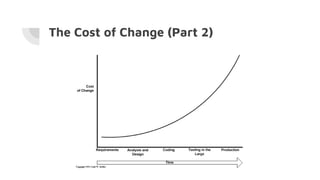
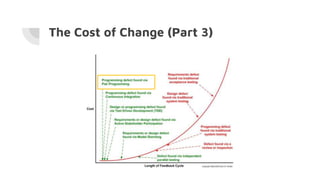
When is the best time to catch a bug?
● Requirements
● Development
● Continuous Integration (Jenkins)
● QA
● Production by client services / customers
Let's find out on the next slide!
The Cost of Change (Part 2)
The Cost of Change (Part 3)
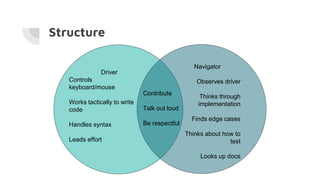
Structure
Driver
Controls
keyboard/mouse
Works tactically to write
code
Handles syntax
Leads effort
Navigator
Observes driver
Thinks through
implementation
Finds edge cases
Thinks about how to
test
Looks up docs
Contribute
Talk out loud
Be respectful
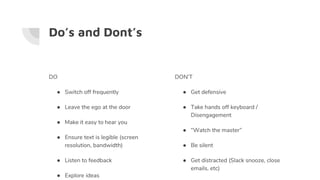
Do’s and Dont’s
DO
● Switch off frequently
● Leave the ego at the door
● Make it easy to hear you
● Ensure text is legible (screen
resolution, bandwidth)
● Listen to feedback
● Explore ideas
DON’T
● Get defensive
● Take hands off keyboard /
Disengagement
● “Watch the master”
● Be silent
● Get distracted (Slack snooze, close
emails, etc)
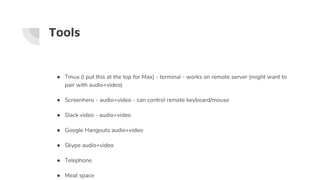
Tools
● Tmux (I put this at the top for Max) - terminal - works on remote server (might want to
pair with audio+video)
● Screenhero - audio+video - can control remote keyboard/mouse
● Slack video - audio+video
● Google Hangouts audio+video
● Skype audio+video
● Telephone
● Meat space
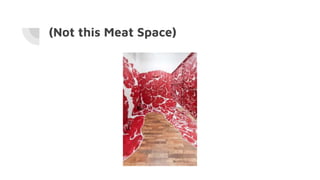
(Not this Meat Space)
Questions?

Pair programming

  • 1.
    Pair Programming Fitter, happier Moreproductive Comfortable Not drinking too much
  • 2.
    What is PairProgramming? ● Agile software method where two developers work with one keyboard/mouse ● One developer “drives” (tactical) ● The other developer “observes/navigates” (strategic) ● Periodically switch “seats” ● Augments or replaces other code peer reviews (including a PR) ● Longer than a Q and A session ● Aims to solve a given problem
  • 3.
    Who Does PairProgramming? ● Pivotal Labs ● Thoughtbot ● Thoughtworks ● Hashrocket ● 8th Light ● Github ● Braintree ● Facebook ● Square ● Twitter ● Groupon ● Redbox Source Quora
  • 4.
    Advantages and Disadvantages ●Catches bugs earlier ● Spreading feature expertise ● Technical knowledge transference ● “Two heads are better than one” ● Team building ● Easier handoffs ● The Cost of Change (next slide) ● Capacity hit of 15%-100%, depending on efficiency ● Personality conflicts (feeling watched, having to talk through a problem) ● Scheduling can be difficult ● Fatigue of always being “on” (e.g. can’t go check Reddit) *IEEE study
  • 5.
    The Cost ofChange (Part 1) When is the best time to catch a bug? ● Requirements ● Development ● Continuous Integration (Jenkins) ● QA ● Production by client services / customers Let's find out on the next slide!
  • 6.
    The Cost ofChange (Part 2)
  • 7.
    The Cost ofChange (Part 3)
  • 8.
    Structure Driver Controls keyboard/mouse Works tactically towrite code Handles syntax Leads effort Navigator Observes driver Thinks through implementation Finds edge cases Thinks about how to test Looks up docs Contribute Talk out loud Be respectful
  • 9.
    Do’s and Dont’s DO ●Switch off frequently ● Leave the ego at the door ● Make it easy to hear you ● Ensure text is legible (screen resolution, bandwidth) ● Listen to feedback ● Explore ideas DON’T ● Get defensive ● Take hands off keyboard / Disengagement ● “Watch the master” ● Be silent ● Get distracted (Slack snooze, close emails, etc)
  • 10.
    Tools ● Tmux (Iput this at the top for Max) - terminal - works on remote server (might want to pair with audio+video) ● Screenhero - audio+video - can control remote keyboard/mouse ● Slack video - audio+video ● Google Hangouts audio+video ● Skype audio+video ● Telephone ● Meat space
  • 11.
  • 12.