
www.outsystems.com Page 1 © 2015 outsystems – all rights reservedV1.0
Platform Troubleshooting
www.outsystems.com Page 2 © 2015 outsystems – all rights reservedV1.0
• Service Center Error Logs
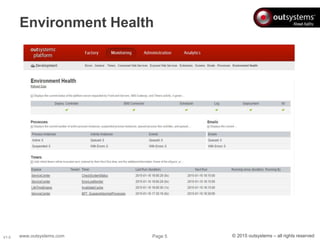
• Environment Health
• .Net stack troubleshoot
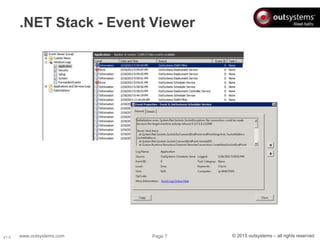
– Event Viewer
• Java stack troubleshoot
– Logs
– Web ports
– Platform internals
– JBoss traces
Information Sources
www.outsystems.com Page 3 © 2015 outsystems – all rights reservedV1.0
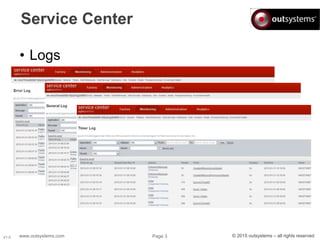
Service Center
• Logs
www.outsystems.com Page 4 © 2015 outsystems – all rights reservedV1.0
Error Log - Includes an entry, every time a platform or application error
occurs;
General Log - Reserved for application specific logging or tracing. Some
platform informative entries are also registered (e.g. slow queries);
Screen Log - Includes an entry for each access to a Screen, either WEB,
Mobile Web or SMS;
SMS Log - Includes an entry for each SMS sent or received;
Timer Log - Includes an entry for each executed Scheduled Job;
Consumed Web Service Log - Includes an entry for each Consumed Web
Service invocation;
Exposed Web Service Log - Includes an entry for each Exposed Web Service
invocation;
Service Center Error Logs
www.outsystems.com Page 5 © 2015 outsystems – all rights reservedV1.0
Environment Health
www.outsystems.com Page 6 © 2015 outsystems – all rights reservedV1.0
OutSystems Configuration Tool
OutSystems Platform
OutSystems Service Center Installer
OutSystems Deployment Controller Service
OutSystems Deployment Service
OutSystems Log Service
OutSystems Scheduler Service
OutSystems SMS Connector Service
Server logging
www.outsystems.com Page 7 © 2015 outsystems – all rights reservedV1.0
.NET Stack - Event Viewer
www.outsystems.com Page 8 © 2015 outsystems – all rights reservedV1.0
Java stack - Logs
• Weblogic logs, what do they have?
– OutSystems.out
(/opt/Oracle/Middleware/user_projects/domains/outsystems_do
main/servers/OutSystems/logs)
• Similar to JBoss server.log
– These logs rotate with numeric suffixes (e.g.
OutSystems.out00123)
– access.log
• Similar to IIS Logs
www.outsystems.com Page 9 © 2015 outsystems – all rights reservedV1.0
Java stack - Logs
• Platform logs, what do they have?
– Each Platform Service has its own log
(/opt/outsystems/platform/logs)
• Similar to Event Viewer (specific for each service)
• Includes OSTraces (if enabled)
• Logs rotate everyday
– One file per day
– Service name log displays current day
www.outsystems.com Page 10 © 2015 outsystems – all rights reservedV1.0
Java stack - Web ports
• What ports are used and why?
– 8080, 8443
• Security limitation
• This ports are used due to a Linux restriction of
only root being able to use ports under 1024
– 80, 443
• Default web access ports
• This ports are mapped to 8080 and 8443 using
iptables so that the user can access with default
settings
www.outsystems.com Page 11 © 2015 outsystems – all rights reservedV1.0
Java stack - Platform internals
• OutSystems services configuration files
• /etc/outsystems
• Used to activate OSTraces
• Platform data
• /opt/outsystems/platform
• running (only existent on front end servers)
• share (only existent on the controller node)
• test (personal test areas)
• logs
– Logs from OutSystems services
www.outsystems.com Page 12 © 2015 outsystems – all rights reservedV1.0
Java stack - Platform internals
• OSTraces
– /ect/outsystems/<...>.properties
• log4j.logger.outsystems=
– FATAL
– ERROR
– WARN
– INFO
– DEBUG
www.outsystems.com Page 13 © 2015 outsystems – all rights reservedV1.0
Java stack - Platform internals
• JBoss file locations
– config files
• /opt/jboss<…>/bin
– Log files
– /opt/jboss<…>/server/outsystems/log/
» boot.log
» server.log
– Message Queue information
– /opt/jboss<…>/server/outsystems/data/h2
www.outsystems.com Page 14 © 2015 outsystems – all rights reservedV1.0
Java stack - JBoss traces
• Access logs
– /opt/jboss<..>/server/outsystems/deploy/jboss
web.sar/server.xml
• className="org.apache.catalina.valves.AccessLogVal
ve“
– Search for this line and validate if its uncommented
• GC logs (garbage collector)
– /opt/jboss<..>/server/outsystems/run.conf
• $JAVA_OPTS -Xloggc:$GCLOG -XX:+PrintGCDetails -
XX:+PrintGCDateStamps
– Search for this line and validate if its uncommented
www.outsystems.com Page 15 © 2015 outsystems – all rights reservedV1.0
References
• Troublesooting the OutSystems Platform
Server - www.outsystems.com/goto/technote-
troubleshoot-platform-server
• Information Logged by the OutSystems
Platform - www.outsystems.com/home/document-
download/119/8/0/0
www.outsystems.com Page 16 © 2015 outsystems – all rights reservedV1.0
The End

OutSystems Platform Troubleshooting

  • 1.
    www.outsystems.com Page 1© 2015 outsystems – all rights reservedV1.0 Platform Troubleshooting
  • 2.
    www.outsystems.com Page 2© 2015 outsystems – all rights reservedV1.0 • Service Center Error Logs • Environment Health • .Net stack troubleshoot – Event Viewer • Java stack troubleshoot – Logs – Web ports – Platform internals – JBoss traces Information Sources
  • 3.
    www.outsystems.com Page 3© 2015 outsystems – all rights reservedV1.0 Service Center • Logs
  • 4.
    www.outsystems.com Page 4© 2015 outsystems – all rights reservedV1.0 Error Log - Includes an entry, every time a platform or application error occurs; General Log - Reserved for application specific logging or tracing. Some platform informative entries are also registered (e.g. slow queries); Screen Log - Includes an entry for each access to a Screen, either WEB, Mobile Web or SMS; SMS Log - Includes an entry for each SMS sent or received; Timer Log - Includes an entry for each executed Scheduled Job; Consumed Web Service Log - Includes an entry for each Consumed Web Service invocation; Exposed Web Service Log - Includes an entry for each Exposed Web Service invocation; Service Center Error Logs
  • 5.
    www.outsystems.com Page 5© 2015 outsystems – all rights reservedV1.0 Environment Health
  • 6.
    www.outsystems.com Page 6© 2015 outsystems – all rights reservedV1.0 OutSystems Configuration Tool OutSystems Platform OutSystems Service Center Installer OutSystems Deployment Controller Service OutSystems Deployment Service OutSystems Log Service OutSystems Scheduler Service OutSystems SMS Connector Service Server logging
  • 7.
    www.outsystems.com Page 7© 2015 outsystems – all rights reservedV1.0 .NET Stack - Event Viewer
  • 8.
    www.outsystems.com Page 8© 2015 outsystems – all rights reservedV1.0 Java stack - Logs • Weblogic logs, what do they have? – OutSystems.out (/opt/Oracle/Middleware/user_projects/domains/outsystems_do main/servers/OutSystems/logs) • Similar to JBoss server.log – These logs rotate with numeric suffixes (e.g. OutSystems.out00123) – access.log • Similar to IIS Logs
  • 9.
    www.outsystems.com Page 9© 2015 outsystems – all rights reservedV1.0 Java stack - Logs • Platform logs, what do they have? – Each Platform Service has its own log (/opt/outsystems/platform/logs) • Similar to Event Viewer (specific for each service) • Includes OSTraces (if enabled) • Logs rotate everyday – One file per day – Service name log displays current day
  • 10.
    www.outsystems.com Page 10© 2015 outsystems – all rights reservedV1.0 Java stack - Web ports • What ports are used and why? – 8080, 8443 • Security limitation • This ports are used due to a Linux restriction of only root being able to use ports under 1024 – 80, 443 • Default web access ports • This ports are mapped to 8080 and 8443 using iptables so that the user can access with default settings
  • 11.
    www.outsystems.com Page 11© 2015 outsystems – all rights reservedV1.0 Java stack - Platform internals • OutSystems services configuration files • /etc/outsystems • Used to activate OSTraces • Platform data • /opt/outsystems/platform • running (only existent on front end servers) • share (only existent on the controller node) • test (personal test areas) • logs – Logs from OutSystems services
  • 12.
    www.outsystems.com Page 12© 2015 outsystems – all rights reservedV1.0 Java stack - Platform internals • OSTraces – /ect/outsystems/<...>.properties • log4j.logger.outsystems= – FATAL – ERROR – WARN – INFO – DEBUG
  • 13.
    www.outsystems.com Page 13© 2015 outsystems – all rights reservedV1.0 Java stack - Platform internals • JBoss file locations – config files • /opt/jboss<…>/bin – Log files – /opt/jboss<…>/server/outsystems/log/ » boot.log » server.log – Message Queue information – /opt/jboss<…>/server/outsystems/data/h2
  • 14.
    www.outsystems.com Page 14© 2015 outsystems – all rights reservedV1.0 Java stack - JBoss traces • Access logs – /opt/jboss<..>/server/outsystems/deploy/jboss web.sar/server.xml • className="org.apache.catalina.valves.AccessLogVal ve“ – Search for this line and validate if its uncommented • GC logs (garbage collector) – /opt/jboss<..>/server/outsystems/run.conf • $JAVA_OPTS -Xloggc:$GCLOG -XX:+PrintGCDetails - XX:+PrintGCDateStamps – Search for this line and validate if its uncommented
  • 15.
    www.outsystems.com Page 15© 2015 outsystems – all rights reservedV1.0 References • Troublesooting the OutSystems Platform Server - www.outsystems.com/goto/technote- troubleshoot-platform-server • Information Logged by the OutSystems Platform - www.outsystems.com/home/document- download/119/8/0/0
  • 16.
    www.outsystems.com Page 16© 2015 outsystems – all rights reservedV1.0 The End