Top front-end techniques
for OutSystems
Free OutSystems webinar
18 August 2016
Source: http://goo.gl/uyRtWF
Top front-end techniques for OutSystems
Rúben Lumberjack Gonçalves
Head of Mobile & Front-End Experts @ OutSystems
@techrug
2
Disclaimer
! This is an extensive subject, so expect simplifications and homework !
Top front-end techniques for OutSystems
Once upon a time…
YouCannotDoThisIn
OutSystems
5
Top front-end techniques for OutSystems
Agenda
● What’s under the hood?
● Top front-end techniques
○ Best practices
○ Rediscovering the personal area
○ Changing the <head>
○ Browser support and testing
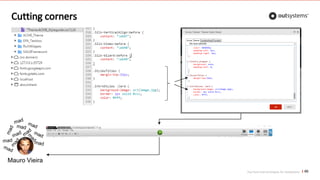
○ Cutting corners or how to avoid 1-click publish
● Fighting the dragon
5
What’s under the hood?
OutSystems front-end 101
Top front-end techniques for OutSystems
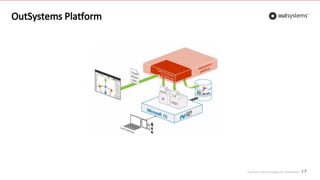
OutSystems Platform
7
Top front-end techniques for OutSystems
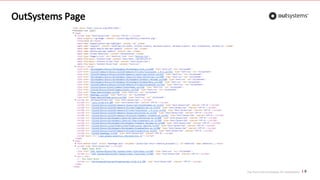
OutSystems Page
8
Top front-end techniques for OutSystems
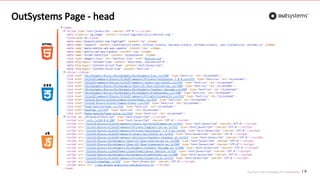
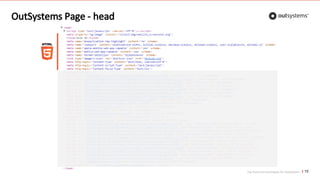
OutSystems Page - head
9
Top front-end techniques for OutSystems
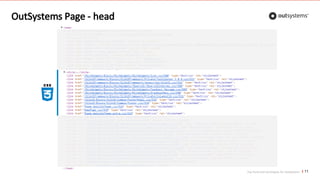
OutSystems Page - head
10
Top front-end techniques for OutSystems
OutSystems Page - head
11
Top front-end techniques for OutSystems
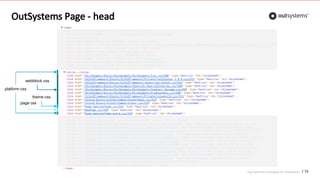
OutSystems Page - head
12
webblock css
platform css
theme css
page css
Top front-end techniques for OutSystems
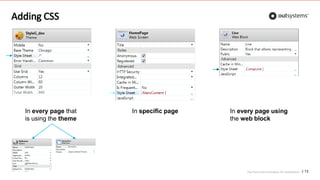
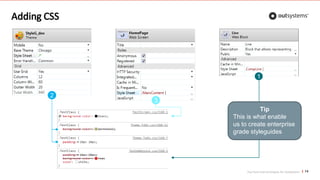
Adding CSS
13
In specific page In every page using
the web block
In every page that
is using the theme
Top front-end techniques for OutSystems
Adding CSS
14
1
2
3
Tip
This is what enable
us to create enterprise
grade styleguides
Top front-end techniques for OutSystems
Learn more about CSS
15
See chapter 4: http://goo.gl/HxyQQg
Top front-end techniques for OutSystems
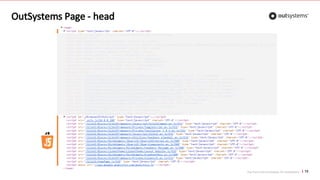
OutSystems Page - head
16
Top front-end techniques for OutSystems
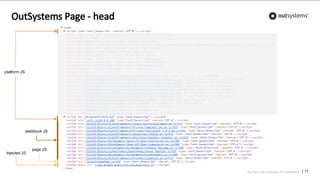
OutSystems Page - head
17
platform JS
webblock JS
page JS
injected JS
Top front-end techniques for OutSystems
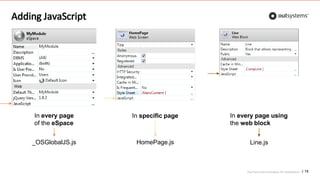
Adding JavaScript
18
In specific page In every page using
the web block
In every page
of the eSpace
_OSGlobalJS.js HomePage.js Line.js
Top front-end techniques for OutSystems
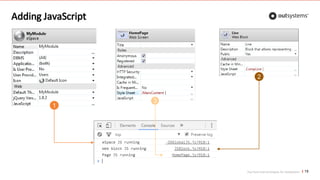
Adding JavaScript
19
1
3
2
Top front-end techniques for OutSystems
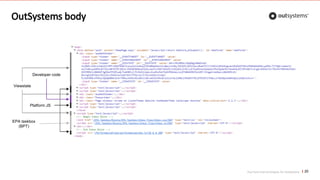
OutSystems body
20
Viewstate
EPA taskbox
(BPT)

Platform JS
Developer code
Top front-end techniques for OutSystems
Recap
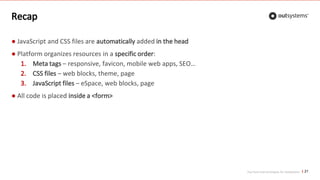
● JavaScript and CSS files are automatically added in the head
● Platform organizes resources in a specific order:
1. Meta tags – responsive, favicon, mobile web apps, SEO…
2. CSS files – web blocks, theme, page
3. JavaScript files – eSpace, web blocks, page
● All code is placed inside a <form>
21
Top front-end techniques
Applied to OutSystems Platform
Top front-end techniques for OutSystems
Agenda
● What’s under the hood?
● Top front-end techniques
23
○ Best practices
Top front-end techniques for OutSystems
Best practices
1. CSS
2. JavaScript
3. Assorted (like candies!)
24
Top front-end techniques for OutSystems
Best practices - CSS
25
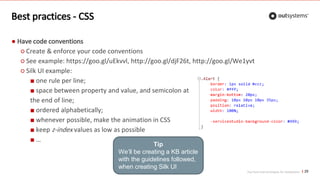
● Have code conventions
○ Create & enforce your code conventions
○ See example: https://goo.gl/uEkvvl, http://goo.gl/djF26t, http://goo.gl/We1yvt
○ Silk UI example:
■ one rule per line;
■ space between property and value, and semicolon at
the end of line;
■ ordered alphabetically;
■ whenever possible, make the animation in CSS
■ keep z-index values as low as possible
■ …
Tip
We’ll be creating a KB article
with the guidelines followed,
when creating Silk UI
Top front-end techniques for OutSystems
Best practices - CSS
26
● Have code conventions
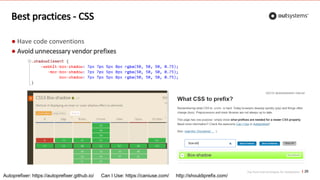
● Avoid unnecessary vendor prefixes
Autoprefixer: https://autoprefixer.github.io/ Can I Use: https://caniuse.com/ http://shouldiprefix.com/
Top front-end techniques for OutSystems
Best practices - CSS
27
● Have code conventions
● Avoid unnecessary vendor prefixes
○ transform: -webkit-transform, -ms-transform
○ animation: -webkit-animation
○ display flex: names change with vendor
○ background with gradient: -webkit-gradient
○ calc: no prefix, but Android 4.4 can’t divide or multiply
○ box-shadow: no prefix
○ box-sizing: no prefix
○ transition: no prefix
Tip
Use Autoprefixer
and Can I Use for
correct prefixes.
Autoprefixer: https://autoprefixer.github.io/ Can I Use: https://caniuse.com/
Top front-end techniques for OutSystems
Best practices - CSS
28
● Have code conventions
● Avoid unnecessary vendor prefixes
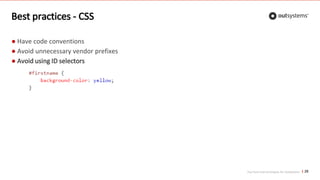
● Avoid using ID selectors
Top front-end techniques for OutSystems
Best practices - CSS
29
● Have code conventions
● Avoid unnecessary vendor prefixes
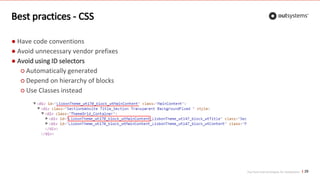
● Avoid using ID selectors
○ Automatically generated
○ Depend on hierarchy of blocks
○ Use Classes instead
Top front-end techniques for OutSystems
Best practices - CSS
30
● Have code conventions
● Avoid unnecessary vendor prefixes
● Avoid using ID selectors
● Be aware of selectors performance
1. ID, e.g. #header
2. Class, e.g. .promo
3. Type, e.g. div
4. Adjacent sibling, e.g. h2 + p
5. Child, e.g. li > ul
6. Descendant, e.g. ul a
7. Universal, i.e. *
8. Attribute, e.g. [type="text"]
9. Pseudo-classes/-elements, e.g. a:hover
Less performant
Read more: http://goo.gl/KkdKLK
Top front-end techniques for OutSystems 31
See webinar: http://goo.gl/aiUlvb
Learn to measure performance
Top front-end techniques for OutSystems
Best practices - CSS
32
● Have code conventions
● Avoid unnecessary vendor prefixes
● Avoid using ID selectors
● Be aware of selectors performance
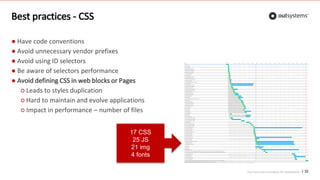
● Avoid defining CSS in web blocks or Pages
○ Leads to styles duplication
○ Hard to maintain and evolve applications
○ Impact in performance – number of files
17 CSS
25 JS
21 img
4 fonts
Top front-end techniques for OutSystems
Learn performance techniques
33
See session: https://goo.gl/arvD3Q
Top front-end techniques for OutSystems
Best practices - CSS
34
● Have code conventions
● Avoid unnecessary vendor prefixes
● Avoid using ID selectors
● Be aware of selectors performance
● Avoid defining CSS in web blocks or Pages
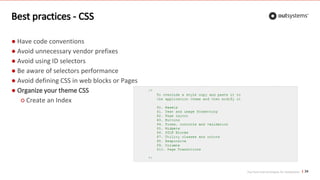
● Organize your theme CSS
○ Create an Index
Top front-end techniques for OutSystems
Best practices - CSS
35
● Have code conventions
● Avoid unnecessary vendor prefixes
● Avoid using ID selectors
● Be aware of selectors performance
● Avoid defining CSS in web blocks or Pages
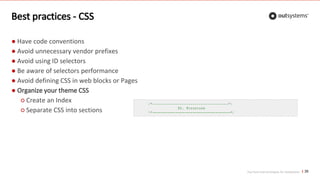
● Organize your theme CSS
○ Create an Index
○ Separate CSS into sections
Top front-end techniques for OutSystems
Best practices - CSS
36
● Have code conventions
● Avoid unnecessary vendor prefixes
● Avoid using ID selectors
● Be aware of selectors performance
● Avoid defining CSS in web blocks or Pages
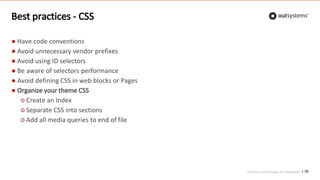
● Organize your theme CSS
○ Create an Index
○ Separate CSS into sections
○ Add all media queries to end of file
Top front-end techniques for OutSystems
Best practices - CSS
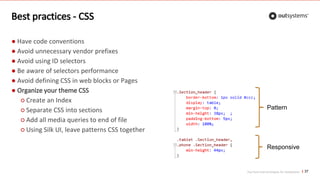
37
● Have code conventions
● Avoid unnecessary vendor prefixes
● Avoid using ID selectors
● Be aware of selectors performance
● Avoid defining CSS in web blocks or Pages
● Organize your theme CSS
○ Create an Index
○ Separate CSS into sections
○ Add all media queries to end of file
○ Using Silk UI, leave patterns CSS together
Responsive
Pattern
Top front-end techniques for OutSystems
Best practices - CSS
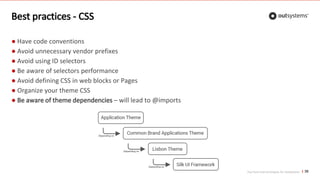
38
● Have code conventions
● Avoid unnecessary vendor prefixes
● Avoid using ID selectors
● Be aware of selectors performance
● Avoid defining CSS in web blocks or Pages
● Organize your theme CSS
● Be aware of theme dependencies – will lead to @imports
Top front-end techniques for OutSystems
Best practices - CSS
39
● Have code conventions
● Avoid unnecessary vendor prefixes
● Avoid using ID selectors
● Be aware of selectors performance
● Avoid defining CSS in web blocks or Pages
● Organize your theme CSS
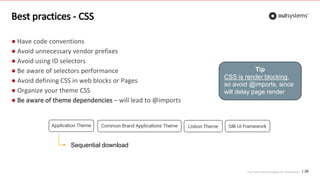
● Be aware of theme dependencies – will lead to @imports
Tip
CSS is render blocking,
so avoid @imports, since
will delay page render
Sequential download
Top front-end techniques for OutSystems 40
See webinar: http://goo.gl/Qr4i50
Learn to architecture your CSS
Top front-end techniques for OutSystems
Best practices - CSS
41
Top front-end techniques for OutSystems
Best practices - JavaScript
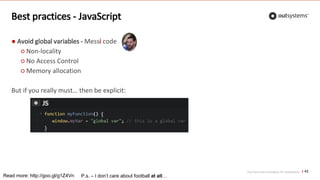
● Avoid global variables - Messi code
○ Non-locality
○ No Access Control
○ Memory allocation
But if you really must… then be explicit:
42
Read more: http://goo.gl/g1Z4Vn P.s. – I don’t care about football at all…
Top front-end techniques for OutSystems
Best practices - JavaScript
● Avoid global variables
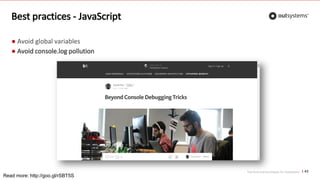
● Avoid console.log pollution
43
Read more: http://goo.gl/rSBT5S
Top front-end techniques for OutSystems
Best practices - JavaScript
● Avoid global variables
● Avoid console.log pollution
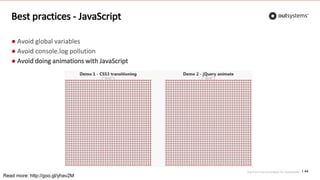
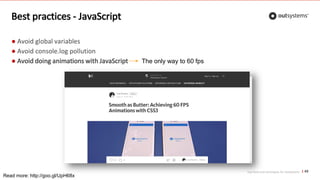
● Avoid doing animations with JavaScript
44
Read more: http://goo.gl/yhav2M
Top front-end techniques for OutSystems
Best practices - JavaScript
● Avoid global variables
● Avoid console.log pollution
● Avoid doing animations with JavaScript
45
Read more: http://goo.gl/UpH68x
The only way to 60 fps
Top front-end techniques for OutSystems
Best practices - JavaScript
● Avoid global variables
● Avoid console.log pollution
● Avoid doing animations with JavaScript
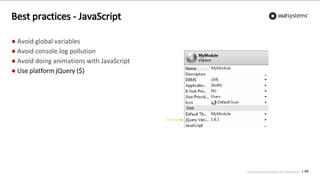
● Use platform jQuery ($)
46
Top front-end techniques for OutSystems
Best practices - JavaScript
● Avoid global variables
● Avoid console.log pollution
● Avoid doing animations with JavaScript
● Use platform jQuery ($)
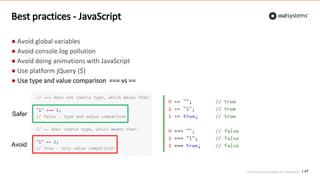
● Use type and value comparison === vs ==
47
Avoid
Safer
Top front-end techniques for OutSystems
Best practices - JavaScript
● Avoid global variables
● Avoid console.log pollution
● Avoid doing animations with JavaScript
● Use platform jQuery ($)
● Use type and value comparison === vs ==
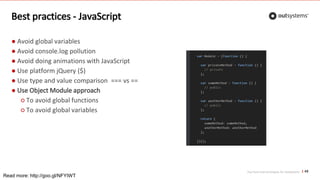
● Use Object Module approach
○ To avoid global functions
○ To avoid global variables
48
Read more: http://goo.gl/NFYIWT
Top front-end techniques for OutSystems
Best practices - JavaScript
● Avoid global variables
● Avoid console.log pollution
● Avoid doing animations with JavaScript
● Use platform jQuery ($)
● Use type and value comparison === vs ==
● Use Object Module approach
● Follow common JavaScript practices
○ w3schools - http://goo.gl/mIrWDF
○ Idiomatic - http://goo.gl/Hs6h47
49
Top front-end techniques for OutSystems
Best practices - Assorted
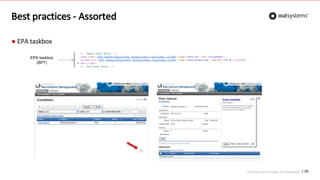
● EPA taskbox
50
EPA taskbox
(BPT)
Top front-end techniques for OutSystems
Best practices - Assorted
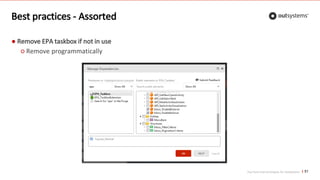
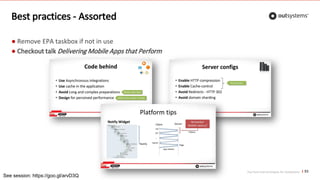
● Remove EPA taskbox if not in use
○ Remove programmatically
51
Top front-end techniques for OutSystems
Best practices - Assorted
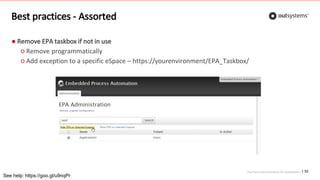
● Remove EPA taskbox if not in use
○ Remove programmatically
○ Add exception to a specific eSpace – https://yourenvironment/EPA_Taskbox/
52
See help: https://goo.gl/u9nqPr
Top front-end techniques for OutSystems
Best practices - Assorted
● Remove EPA taskbox if not in use
● Checkout talk Delivering Mobile Apps that Perform
53
See session: https://goo.gl/arvD3Q
Top front-end techniques for OutSystems
Agenda
● What’s under the hood?
● Top front-end techniques
54
○ Best practices
○ Rediscovering the personal area
Top front-end techniques for OutSystems
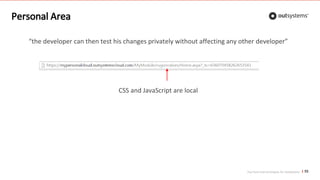
“the developer can then test his changes privately without affecting any other developer”
CSS and JavaScript are local
Personal Area
55
Top front-end techniques for OutSystems
Personal Area
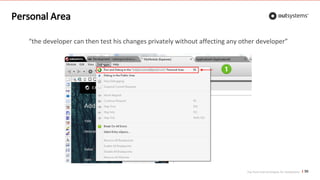
“the developer can then test his changes privately without affecting any other developer”
56
Top front-end techniques for OutSystems
Personal Area - limitations
57
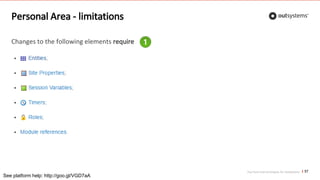
Changes to the following elements require
See platform help: http://goo.gl/VGD7aA
Top front-end techniques for OutSystems
Agenda
● What’s under the hood?
● Top front-end techniques
○ Best practices
○ Rediscovering the personal area
○ Changing the <head>
58
Top front-end techniques for OutSystems
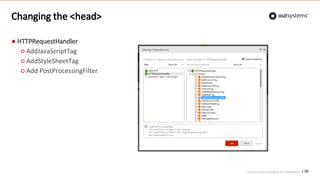
Changing the <head>
● HTTPRequestHandler
○ AddJavaScriptTag
○ AddStyleSheetTag
○ Add PostProcessingFilter
59
Top front-end techniques for OutSystems
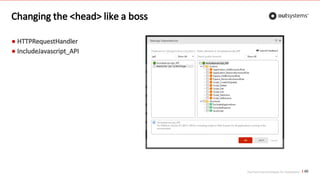
Changing the <head> like a boss
● HTTPRequestHandler
● IncludeJavascript_API
60
Top front-end techniques for OutSystems
Agenda
● What’s under the hood?
● Top front-end techniques
○ Best practices
○ Rediscovering the personal area
○ Changing the <head> like a boss
○ Browser support and testing
61
Top front-end techniques for OutSystems
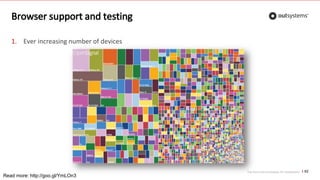
Browser support and testing
1. Ever increasing number of devices
62
Read more: http://goo.gl/YmLOn3
Top front-end techniques for OutSystems
Browser support and testing
1. Ever increasing number of devices
2. Identify target devices for market
63
Read more: http://goo.gl/apBVGF
Top front-end techniques for OutSystems
Browser support and testing
1. Ever increasing number of devices
2. Identify target devices for market
3. Test in target browsers / devices
64
BrowserStack: http://goo.gl/jwIuJM CrossBrowserTesting: http://goo.gl/cOkpE1
Top front-end techniques for OutSystems
Agenda
● What’s under the hood?
● Top front-end techniques
○ Best practices
○ Rediscovering the personal area
○ Changing the <head> like a boss
○ Browser support and testing
○ Cutting corners or how to avoid 1-click publish
65
Top front-end techniques for OutSystems
Cutting corners
66
Mauro Vieira
Top front-end techniques for OutSystems
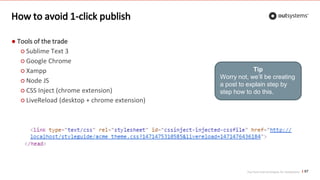
How to avoid 1-click publish
● Tools of the trade
○ Sublime Text 3
○ Google Chrome
○ Xampp
○ Node JS
○ CSS Inject (chrome extension)
○ LiveReload (desktop + chrome extension)
67
Tip
Worry not, we’ll be creating
a post to explain step by
step how to do this.
Live demo
Where things will go wrong. Definitely.
Defeating the dragon
YouCannotDoThisInOutSystems
Top front-end techniques for OutSystems
Rule of thumb…
70
If it can be done in the web technology…
Then, it can be done in
OutSystems
Top front-end techniques for OutSystems
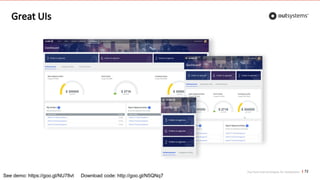
Great UIs
71
See webinar: http://goo.gl/3D2Xqm
Top front-end techniques for OutSystems
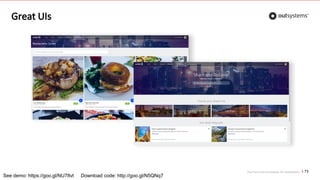
Great UIs
72
See demo: https://goo.gl/NU78vt Download code: http://goo.gl/N5QNq7
Top front-end techniques for OutSystems
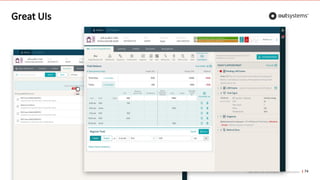
Great UIs
73
See demo: https://goo.gl/NU78vt Download code: http://goo.gl/N5QNq7
Top front-end techniques for OutSystems
Great UIs
74
Takeaways
Or things to keep in mind
Top front-end techniques for OutSystems
Takeaways
76
● Front-end is no different in OutSystems
● Same techniques and approaches apply
● Leverage platform mechanisms, jQuery, HTTPRequestHandler, …
● Everything is possible, but with necessary care
Thank you

Training Webinar: Top front-end techniques for OutSystems

  • 1.
    Top front-end techniques forOutSystems Free OutSystems webinar 18 August 2016 Source: http://goo.gl/uyRtWF
  • 2.
    Top front-end techniquesfor OutSystems Rúben Lumberjack Gonçalves Head of Mobile & Front-End Experts @ OutSystems @techrug 2
  • 3.
    Disclaimer ! This isan extensive subject, so expect simplifications and homework !
  • 4.
    Top front-end techniquesfor OutSystems Once upon a time… YouCannotDoThisIn OutSystems 5
  • 5.
    Top front-end techniquesfor OutSystems Agenda ● What’s under the hood? ● Top front-end techniques ○ Best practices ○ Rediscovering the personal area ○ Changing the <head> ○ Browser support and testing ○ Cutting corners or how to avoid 1-click publish ● Fighting the dragon 5
  • 6.
    What’s under thehood? OutSystems front-end 101
  • 7.
    Top front-end techniquesfor OutSystems OutSystems Platform 7
  • 8.
    Top front-end techniquesfor OutSystems OutSystems Page 8
  • 9.
    Top front-end techniquesfor OutSystems OutSystems Page - head 9
  • 10.
    Top front-end techniquesfor OutSystems OutSystems Page - head 10
  • 11.
    Top front-end techniquesfor OutSystems OutSystems Page - head 11
  • 12.
    Top front-end techniquesfor OutSystems OutSystems Page - head 12 webblock css platform css theme css page css
  • 13.
    Top front-end techniquesfor OutSystems Adding CSS 13 In specific page In every page using the web block In every page that is using the theme
  • 14.
    Top front-end techniquesfor OutSystems Adding CSS 14 1 2 3 Tip This is what enable us to create enterprise grade styleguides
  • 15.
    Top front-end techniquesfor OutSystems Learn more about CSS 15 See chapter 4: http://goo.gl/HxyQQg
  • 16.
    Top front-end techniquesfor OutSystems OutSystems Page - head 16
  • 17.
    Top front-end techniquesfor OutSystems OutSystems Page - head 17 platform JS webblock JS page JS injected JS
  • 18.
    Top front-end techniquesfor OutSystems Adding JavaScript 18 In specific page In every page using the web block In every page of the eSpace _OSGlobalJS.js HomePage.js Line.js
  • 19.
    Top front-end techniquesfor OutSystems Adding JavaScript 19 1 3 2
  • 20.
    Top front-end techniquesfor OutSystems OutSystems body 20 Viewstate EPA taskbox (BPT) Platform JS Developer code
  • 21.
    Top front-end techniquesfor OutSystems Recap ● JavaScript and CSS files are automatically added in the head ● Platform organizes resources in a specific order: 1. Meta tags – responsive, favicon, mobile web apps, SEO… 2. CSS files – web blocks, theme, page 3. JavaScript files – eSpace, web blocks, page ● All code is placed inside a <form> 21
  • 22.
    Top front-end techniques Appliedto OutSystems Platform
  • 23.
    Top front-end techniquesfor OutSystems Agenda ● What’s under the hood? ● Top front-end techniques 23 ○ Best practices
  • 24.
    Top front-end techniquesfor OutSystems Best practices 1. CSS 2. JavaScript 3. Assorted (like candies!) 24
  • 25.
    Top front-end techniquesfor OutSystems Best practices - CSS 25 ● Have code conventions ○ Create & enforce your code conventions ○ See example: https://goo.gl/uEkvvl, http://goo.gl/djF26t, http://goo.gl/We1yvt ○ Silk UI example: ■ one rule per line; ■ space between property and value, and semicolon at the end of line; ■ ordered alphabetically; ■ whenever possible, make the animation in CSS ■ keep z-index values as low as possible ■ … Tip We’ll be creating a KB article with the guidelines followed, when creating Silk UI
  • 26.
    Top front-end techniquesfor OutSystems Best practices - CSS 26 ● Have code conventions ● Avoid unnecessary vendor prefixes Autoprefixer: https://autoprefixer.github.io/ Can I Use: https://caniuse.com/ http://shouldiprefix.com/
  • 27.
    Top front-end techniquesfor OutSystems Best practices - CSS 27 ● Have code conventions ● Avoid unnecessary vendor prefixes ○ transform: -webkit-transform, -ms-transform ○ animation: -webkit-animation ○ display flex: names change with vendor ○ background with gradient: -webkit-gradient ○ calc: no prefix, but Android 4.4 can’t divide or multiply ○ box-shadow: no prefix ○ box-sizing: no prefix ○ transition: no prefix Tip Use Autoprefixer and Can I Use for correct prefixes. Autoprefixer: https://autoprefixer.github.io/ Can I Use: https://caniuse.com/
  • 28.
    Top front-end techniquesfor OutSystems Best practices - CSS 28 ● Have code conventions ● Avoid unnecessary vendor prefixes ● Avoid using ID selectors
  • 29.
    Top front-end techniquesfor OutSystems Best practices - CSS 29 ● Have code conventions ● Avoid unnecessary vendor prefixes ● Avoid using ID selectors ○ Automatically generated ○ Depend on hierarchy of blocks ○ Use Classes instead
  • 30.
    Top front-end techniquesfor OutSystems Best practices - CSS 30 ● Have code conventions ● Avoid unnecessary vendor prefixes ● Avoid using ID selectors ● Be aware of selectors performance 1. ID, e.g. #header 2. Class, e.g. .promo 3. Type, e.g. div 4. Adjacent sibling, e.g. h2 + p 5. Child, e.g. li > ul 6. Descendant, e.g. ul a 7. Universal, i.e. * 8. Attribute, e.g. [type="text"] 9. Pseudo-classes/-elements, e.g. a:hover Less performant Read more: http://goo.gl/KkdKLK
  • 31.
    Top front-end techniquesfor OutSystems 31 See webinar: http://goo.gl/aiUlvb Learn to measure performance
  • 32.
    Top front-end techniquesfor OutSystems Best practices - CSS 32 ● Have code conventions ● Avoid unnecessary vendor prefixes ● Avoid using ID selectors ● Be aware of selectors performance ● Avoid defining CSS in web blocks or Pages ○ Leads to styles duplication ○ Hard to maintain and evolve applications ○ Impact in performance – number of files 17 CSS 25 JS 21 img 4 fonts
  • 33.
    Top front-end techniquesfor OutSystems Learn performance techniques 33 See session: https://goo.gl/arvD3Q
  • 34.
    Top front-end techniquesfor OutSystems Best practices - CSS 34 ● Have code conventions ● Avoid unnecessary vendor prefixes ● Avoid using ID selectors ● Be aware of selectors performance ● Avoid defining CSS in web blocks or Pages ● Organize your theme CSS ○ Create an Index
  • 35.
    Top front-end techniquesfor OutSystems Best practices - CSS 35 ● Have code conventions ● Avoid unnecessary vendor prefixes ● Avoid using ID selectors ● Be aware of selectors performance ● Avoid defining CSS in web blocks or Pages ● Organize your theme CSS ○ Create an Index ○ Separate CSS into sections
  • 36.
    Top front-end techniquesfor OutSystems Best practices - CSS 36 ● Have code conventions ● Avoid unnecessary vendor prefixes ● Avoid using ID selectors ● Be aware of selectors performance ● Avoid defining CSS in web blocks or Pages ● Organize your theme CSS ○ Create an Index ○ Separate CSS into sections ○ Add all media queries to end of file
  • 37.
    Top front-end techniquesfor OutSystems Best practices - CSS 37 ● Have code conventions ● Avoid unnecessary vendor prefixes ● Avoid using ID selectors ● Be aware of selectors performance ● Avoid defining CSS in web blocks or Pages ● Organize your theme CSS ○ Create an Index ○ Separate CSS into sections ○ Add all media queries to end of file ○ Using Silk UI, leave patterns CSS together Responsive Pattern
  • 38.
    Top front-end techniquesfor OutSystems Best practices - CSS 38 ● Have code conventions ● Avoid unnecessary vendor prefixes ● Avoid using ID selectors ● Be aware of selectors performance ● Avoid defining CSS in web blocks or Pages ● Organize your theme CSS ● Be aware of theme dependencies – will lead to @imports
  • 39.
    Top front-end techniquesfor OutSystems Best practices - CSS 39 ● Have code conventions ● Avoid unnecessary vendor prefixes ● Avoid using ID selectors ● Be aware of selectors performance ● Avoid defining CSS in web blocks or Pages ● Organize your theme CSS ● Be aware of theme dependencies – will lead to @imports Tip CSS is render blocking, so avoid @imports, since will delay page render Sequential download
  • 40.
    Top front-end techniquesfor OutSystems 40 See webinar: http://goo.gl/Qr4i50 Learn to architecture your CSS
  • 41.
    Top front-end techniquesfor OutSystems Best practices - CSS 41
  • 42.
    Top front-end techniquesfor OutSystems Best practices - JavaScript ● Avoid global variables - Messi code ○ Non-locality ○ No Access Control ○ Memory allocation But if you really must… then be explicit: 42 Read more: http://goo.gl/g1Z4Vn P.s. – I don’t care about football at all…
  • 43.
    Top front-end techniquesfor OutSystems Best practices - JavaScript ● Avoid global variables ● Avoid console.log pollution 43 Read more: http://goo.gl/rSBT5S
  • 44.
    Top front-end techniquesfor OutSystems Best practices - JavaScript ● Avoid global variables ● Avoid console.log pollution ● Avoid doing animations with JavaScript 44 Read more: http://goo.gl/yhav2M
  • 45.
    Top front-end techniquesfor OutSystems Best practices - JavaScript ● Avoid global variables ● Avoid console.log pollution ● Avoid doing animations with JavaScript 45 Read more: http://goo.gl/UpH68x The only way to 60 fps
  • 46.
    Top front-end techniquesfor OutSystems Best practices - JavaScript ● Avoid global variables ● Avoid console.log pollution ● Avoid doing animations with JavaScript ● Use platform jQuery ($) 46
  • 47.
    Top front-end techniquesfor OutSystems Best practices - JavaScript ● Avoid global variables ● Avoid console.log pollution ● Avoid doing animations with JavaScript ● Use platform jQuery ($) ● Use type and value comparison === vs == 47 Avoid Safer
  • 48.
    Top front-end techniquesfor OutSystems Best practices - JavaScript ● Avoid global variables ● Avoid console.log pollution ● Avoid doing animations with JavaScript ● Use platform jQuery ($) ● Use type and value comparison === vs == ● Use Object Module approach ○ To avoid global functions ○ To avoid global variables 48 Read more: http://goo.gl/NFYIWT
  • 49.
    Top front-end techniquesfor OutSystems Best practices - JavaScript ● Avoid global variables ● Avoid console.log pollution ● Avoid doing animations with JavaScript ● Use platform jQuery ($) ● Use type and value comparison === vs == ● Use Object Module approach ● Follow common JavaScript practices ○ w3schools - http://goo.gl/mIrWDF ○ Idiomatic - http://goo.gl/Hs6h47 49
  • 50.
    Top front-end techniquesfor OutSystems Best practices - Assorted ● EPA taskbox 50 EPA taskbox (BPT)
  • 51.
    Top front-end techniquesfor OutSystems Best practices - Assorted ● Remove EPA taskbox if not in use ○ Remove programmatically 51
  • 52.
    Top front-end techniquesfor OutSystems Best practices - Assorted ● Remove EPA taskbox if not in use ○ Remove programmatically ○ Add exception to a specific eSpace – https://yourenvironment/EPA_Taskbox/ 52 See help: https://goo.gl/u9nqPr
  • 53.
    Top front-end techniquesfor OutSystems Best practices - Assorted ● Remove EPA taskbox if not in use ● Checkout talk Delivering Mobile Apps that Perform 53 See session: https://goo.gl/arvD3Q
  • 54.
    Top front-end techniquesfor OutSystems Agenda ● What’s under the hood? ● Top front-end techniques 54 ○ Best practices ○ Rediscovering the personal area
  • 55.
    Top front-end techniquesfor OutSystems “the developer can then test his changes privately without affecting any other developer” CSS and JavaScript are local Personal Area 55
  • 56.
    Top front-end techniquesfor OutSystems Personal Area “the developer can then test his changes privately without affecting any other developer” 56
  • 57.
    Top front-end techniquesfor OutSystems Personal Area - limitations 57 Changes to the following elements require See platform help: http://goo.gl/VGD7aA
  • 58.
    Top front-end techniquesfor OutSystems Agenda ● What’s under the hood? ● Top front-end techniques ○ Best practices ○ Rediscovering the personal area ○ Changing the <head> 58
  • 59.
    Top front-end techniquesfor OutSystems Changing the <head> ● HTTPRequestHandler ○ AddJavaScriptTag ○ AddStyleSheetTag ○ Add PostProcessingFilter 59
  • 60.
    Top front-end techniquesfor OutSystems Changing the <head> like a boss ● HTTPRequestHandler ● IncludeJavascript_API 60
  • 61.
    Top front-end techniquesfor OutSystems Agenda ● What’s under the hood? ● Top front-end techniques ○ Best practices ○ Rediscovering the personal area ○ Changing the <head> like a boss ○ Browser support and testing 61
  • 62.
    Top front-end techniquesfor OutSystems Browser support and testing 1. Ever increasing number of devices 62 Read more: http://goo.gl/YmLOn3
  • 63.
    Top front-end techniquesfor OutSystems Browser support and testing 1. Ever increasing number of devices 2. Identify target devices for market 63 Read more: http://goo.gl/apBVGF
  • 64.
    Top front-end techniquesfor OutSystems Browser support and testing 1. Ever increasing number of devices 2. Identify target devices for market 3. Test in target browsers / devices 64 BrowserStack: http://goo.gl/jwIuJM CrossBrowserTesting: http://goo.gl/cOkpE1
  • 65.
    Top front-end techniquesfor OutSystems Agenda ● What’s under the hood? ● Top front-end techniques ○ Best practices ○ Rediscovering the personal area ○ Changing the <head> like a boss ○ Browser support and testing ○ Cutting corners or how to avoid 1-click publish 65
  • 66.
    Top front-end techniquesfor OutSystems Cutting corners 66 Mauro Vieira
  • 67.
    Top front-end techniquesfor OutSystems How to avoid 1-click publish ● Tools of the trade ○ Sublime Text 3 ○ Google Chrome ○ Xampp ○ Node JS ○ CSS Inject (chrome extension) ○ LiveReload (desktop + chrome extension) 67 Tip Worry not, we’ll be creating a post to explain step by step how to do this.
  • 68.
    Live demo Where thingswill go wrong. Definitely.
  • 69.
  • 70.
    Top front-end techniquesfor OutSystems Rule of thumb… 70 If it can be done in the web technology… Then, it can be done in OutSystems
  • 71.
    Top front-end techniquesfor OutSystems Great UIs 71 See webinar: http://goo.gl/3D2Xqm
  • 72.
    Top front-end techniquesfor OutSystems Great UIs 72 See demo: https://goo.gl/NU78vt Download code: http://goo.gl/N5QNq7
  • 73.
    Top front-end techniquesfor OutSystems Great UIs 73 See demo: https://goo.gl/NU78vt Download code: http://goo.gl/N5QNq7
  • 74.
    Top front-end techniquesfor OutSystems Great UIs 74
  • 75.
  • 76.
    Top front-end techniquesfor OutSystems Takeaways 76 ● Front-end is no different in OutSystems ● Same techniques and approaches apply ● Leverage platform mechanisms, jQuery, HTTPRequestHandler, … ● Everything is possible, but with necessary care
  • 77.