Delivering SDS simplicity
and extreme performance
Real-World SDS implementation of
getting most out of limited hardware
Murat Karslioglu
Director Storage Systems – Nexenta Systems
Santa Clara, CA USA
October 2013

1
Agenda
•
•
•
•
•

Key Takeaways
Introduction
Performance Results
Conclusion
Q&A

Santa Clara, CA USA
October 2013

2
Key Takeaways
• VDI as a case study of SDS delivering multitenancy and on-demand provisioning
• Remove storage from the VDI admin's plate
• Get higher VDI density and better
performance out of the limited hardware
resources

Santa Clara, CA USA
October 2013

3
Consolidate. Simplify. Virtualize. Monitor

• We picked an affordable branch office server:
• Limited resources, NOT a great fit for VDI
• Intel® Xeon® E5-2400 series 6 core processor
• 48 Gigabytes of RAM
• Three 2.5” size HDDs (No SSDs)

Santa Clara, CA USA
October 2013

4
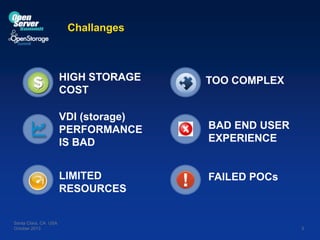
Challanges

HIGH STORAGE
COST
VDI (storage)
PERFORMANCE
IS BAD

BAD END USER
EXPERIENCE

LIMITED
RESOURCES

Santa Clara, CA USA
October 2013

TOO COMPLEX

FAILED POCs

5
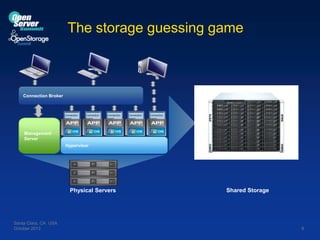
The storage guessing game

Connection Broker

Connection
Agent

Connection
Agent

Connection
Agent

Connection
Agent

Connection
Agent

Management
Server
Hypervisor

Physical Servers

Santa Clara, CA USA
October 2013

Shared Storage

6
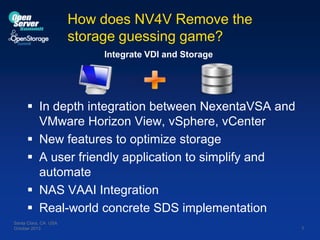
How does NV4V Remove the
storage guessing game?
Integrate VDI and Storage

 In depth integration between NexentaVSA and
VMware Horizon View, vSphere, vCenter
 New features to optimize storage
 A user friendly application to simplify and
automate
 NAS VAAI Integration
 Real-world concrete SDS implementation
Santa Clara, CA USA
October 2013

7
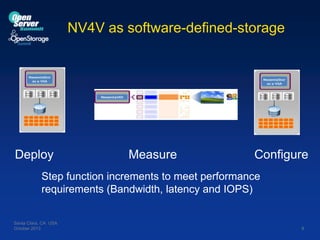
NV4V as software-defined-storage

Deploy

Measure

Configure

Step function increments to meet performance
requirements (Bandwidth, latency and IOPS)
Santa Clara, CA USA
October 2013

8
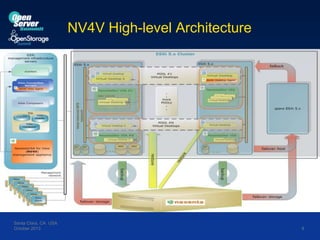
NV4V High-level Architecture

Santa Clara, CA USA
October 2013

9
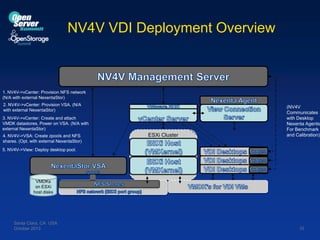
NV4V VDI Deployment Overview

1. NV4V->vCenter: Provision NFS network
(N/A with external NexentaStor)
2. NV4V->vCenter: Provision VSA. (N/A
with external NexentaStor)
3. NV4V->vCenter: Create and attach
VMDK datastores, Power on VSA. (N/A with
external NexentaStor)
4. NV4V->VSA: Create zpools and NFS
shares. (Opt. with external NexentaStor)

ESXi Cluster

(NV4V
Communicates
with Desktop
Nexenta Agents
For Benchmark
and Calibration)

5. NV4V->View: Deploy desktop pool.

VMDKs
on ESXi
host disks

Santa Clara, CA USA
October 2013

10
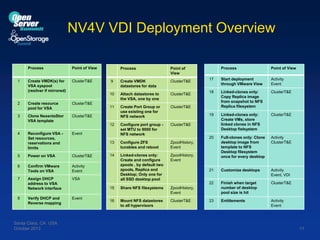
NV4V VDI Deployment Overview
Process

Point of View

Create VMDK(s) for
VSA syspool
(resilver if mirrored)

ClusterT&E

2

Create resource
pool for VSA

ClusterT&E

3

Clone NexentaStor
VSA template

ClusterT&E

4

Confirm VMware
Tools on VSA
Assign DHCP
address to VSA
Network interface

Event

8

16

Mount NFS datastores
to all hypervisors

ClusterT&E

Santa Clara, CA USA
October 2013

ClusterT&E

Full-clones only: Clone
desktop image from
template to NFS
Desktop filesystem
once for every desktop

Activity
ClusterT&E

Customize desktops

Activity
Event, VDI

Finish when target
number of desktop
pool size is hit

ClusterT&E

23

Entitlements

Activity
Event

ZpoolHistory,
Event

VSA

Verify DHCP and
Reverse mapping

Share NFS filesystems

Linked-clones only:
Create VMs, store
linked clones in NFS
Desktop fielsystem

ZpoolHistory,
Event

Activity
Event

7

ClusterT&E

21

Linked-clones only:
Create and configure
zpools , by default two
zpools, Replica and
Desktop; Only one for
all SSD desktop pool

Linked-clones only:
Copy Replica image
from snapshot to NFS
Replica filesystem

ZpoolHistory,
Event

14

18

ClusterT&E

Configure ZFS
tunables and reboot

Activity
Event

ClusterT&E

Configure port group set MTU to 9000 for
NFS network

Start deployment
through VMware View

22

6

Create Port Group or
use existing one for
NFS network

15

ClusterT&E

11

13

Power on VSA

ClusterT&E

Event

5

Attach datastores to
the VSA, one by one

17

20

ClusterT&E

10

Reconfigure VSA Set resources,
reservations and
limits

Create VMDK
datastores for data

Point of View

19

9

Process

Point of
View

12

1

Process

11
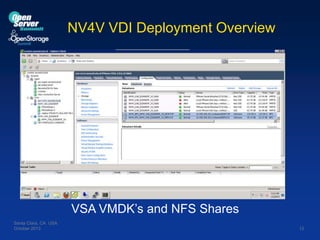
NV4V VDI Deployment Overview

VSA VMDK’s and NFS Shares
Santa Clara, CA USA
October 2013

12
Improving performance with NV4V
Nexenta NV4V + Server + VMware View
=
Perfect Branch Office Solution
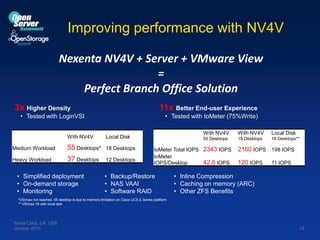
3x Higher Density

11x Better End-user Experience

• Tested with LoginVSI

• Tested with IoMeter (75%Write)

With NV4V
Medium Workload

55 Desktops*

18 Desktops

Heavy Workload

37 Desktops

12 Desktops

With NV4V

• Simplified deployment
• On-demand storage
• Monitoring

With NV4V

Local Disk

55 Desktops

Local Disk

18 Desktops

18 Desktops**

IoMeter Total IOPS 2343 IOPS
IoMeter
42.6 IOPS
IOPS/Desktop

• Backup/Restore
• NAS VAAI
• Software RAID

2160 IOPS 198 IOPS
120 IOPS

11 IOPS

• Inline Compression
• Caching on memory (ARC)
• Other ZFS Benefits

*VSImax not reached, 55 desktop is due to memory limitation on Cisco UCS E Series platform
** VSImax 18 with local disk

Santa Clara, CA USA
October 2013

13
Improving performance with NV4V
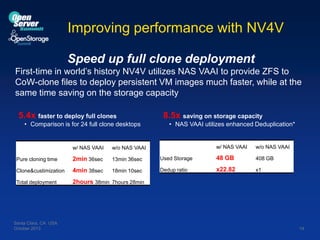
Speed up full clone deployment
First-time in world’s history NV4V utilizes NAS VAAI to provide ZFS to
CoW-clone files to deploy persistent VM images much faster, while at the
same time saving on the storage capacity
5.4x faster to deploy full clones
• Comparison is for 24 full clone desktops

w/ NAS VAAI

2min 36sec

13min 36sec

Clone&custimization

4min 38sec

18min 10sec

Total deployment

• NAS VAAI utilizes enhanced Deduplication*

w/ NAS VAAI

w/o NAS VAAI

Used Storage

48 GB

408 GB

Dedup ratio

x22.82

x1

w/o NAS VAAI

Pure cloning time

8.5x saving on storage capacity

2hours 38min 7hours 28min

Santa Clara, CA USA
October 2013

14
Conclusion










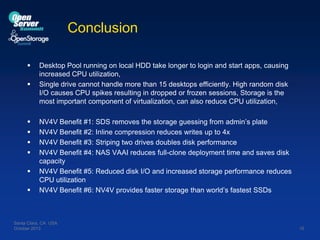
Desktop Pool running on local HDD take longer to login and start apps, causing
increased CPU utilization,
Single drive cannot handle more than 15 desktops efficiently. High random disk
I/O causes CPU spikes resulting in dropped or frozen sessions, Storage is the
most important component of virtualization, can also reduce CPU utilization,
NV4V Benefit #1: SDS removes the storage guessing from admin’s plate
NV4V Benefit #2: Inline compression reduces writes up to 4x
NV4V Benefit #3: Striping two drives doubles disk performance
NV4V Benefit #4: NAS VAAI reduces full-clone deployment time and saves disk
capacity
NV4V Benefit #5: Reduced disk I/O and increased storage performance reduces
CPU utilization
NV4V Benefit #6: NV4V provides faster storage than world’s fastest SSDs

Santa Clara, CA USA
October 2013

15
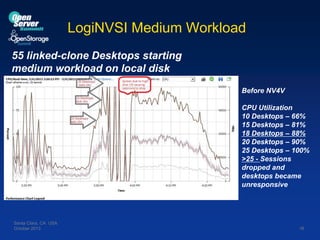
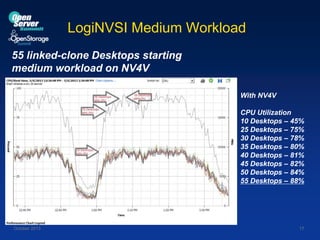
LogiNVSI Medium Workload
55 linked-clone Desktops starting
medium workload on local disk
Before NV4V
CPU Utilization
10 Desktops – 66%
15 Desktops – 81%
18 Desktops – 88%
20 Desktops – 90%
25 Desktops – 100%
>25 - Sessions
dropped and
desktops became
unresponsive

Santa Clara, CA USA
October 2013

16
LogiNVSI Medium Workload
55 linked-clone Desktops starting
medium workload on NV4V
With NV4V

CPU Utilization
10 Desktops – 45%
25 Desktops – 75%
30 Desktops – 78%
35 Desktops – 80%
40 Desktops – 81%
45 Desktops – 82%
50 Desktops – 84%
55 Desktops – 88%

Santa Clara, CA USA
October 2013

17
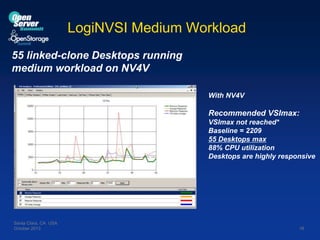
LogiNVSI Medium Workload
55 linked-clone Desktops running
medium workload on NV4V
With NV4V

Recommended VSImax:
VSImax not reached*
Baseline = 2209
55 Desktops max
88% CPU utilization
Desktops are highly responsive

Santa Clara, CA USA
October 2013

18
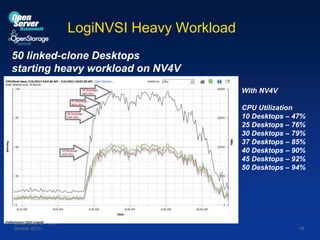
LogiNVSI Heavy Workload
50 linked-clone Desktops
starting heavy workload on NV4V
With NV4V
CPU Utilization
10 Desktops – 47%
25 Desktops – 76%
30 Desktops – 79%
37 Desktops – 85%
40 Desktops – 90%
45 Desktops – 92%
50 Desktops – 94%

Santa Clara, CA USA
October 2013

19
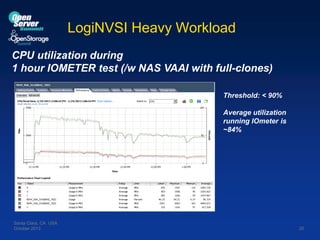
LogiNVSI Heavy Workload
CPU utilization during
1 hour IOMETER test (/w NAS VAAI with full-clones)
Threshold: < 90%

Average utilization
running IOmeter is
~84%

Santa Clara, CA USA
October 2013

20
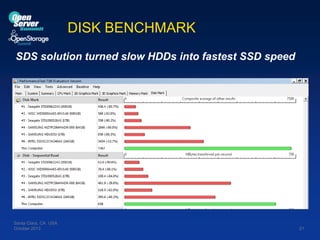
DISK BENCHMARK
SDS solution turned slow HDDs into fastest SSD speed

Santa Clara, CA USA
October 2013

21

OSS 2013 - Murat Karslioglu - Delivering SDS simplicity and extreme preformance

  • 1.
    Delivering SDS simplicity andextreme performance Real-World SDS implementation of getting most out of limited hardware Murat Karslioglu Director Storage Systems – Nexenta Systems Santa Clara, CA USA October 2013 1
  • 2.
  • 3.
    Key Takeaways • VDIas a case study of SDS delivering multitenancy and on-demand provisioning • Remove storage from the VDI admin's plate • Get higher VDI density and better performance out of the limited hardware resources Santa Clara, CA USA October 2013 3
  • 4.
    Consolidate. Simplify. Virtualize.Monitor • We picked an affordable branch office server: • Limited resources, NOT a great fit for VDI • Intel® Xeon® E5-2400 series 6 core processor • 48 Gigabytes of RAM • Three 2.5” size HDDs (No SSDs) Santa Clara, CA USA October 2013 4
  • 5.
    Challanges HIGH STORAGE COST VDI (storage) PERFORMANCE ISBAD BAD END USER EXPERIENCE LIMITED RESOURCES Santa Clara, CA USA October 2013 TOO COMPLEX FAILED POCs 5
  • 6.
    The storage guessinggame Connection Broker Connection Agent Connection Agent Connection Agent Connection Agent Connection Agent Management Server Hypervisor Physical Servers Santa Clara, CA USA October 2013 Shared Storage 6
  • 7.
    How does NV4VRemove the storage guessing game? Integrate VDI and Storage  In depth integration between NexentaVSA and VMware Horizon View, vSphere, vCenter  New features to optimize storage  A user friendly application to simplify and automate  NAS VAAI Integration  Real-world concrete SDS implementation Santa Clara, CA USA October 2013 7
  • 8.
    NV4V as software-defined-storage Deploy Measure Configure Stepfunction increments to meet performance requirements (Bandwidth, latency and IOPS) Santa Clara, CA USA October 2013 8
  • 9.
    NV4V High-level Architecture SantaClara, CA USA October 2013 9
  • 10.
    NV4V VDI DeploymentOverview 1. NV4V->vCenter: Provision NFS network (N/A with external NexentaStor) 2. NV4V->vCenter: Provision VSA. (N/A with external NexentaStor) 3. NV4V->vCenter: Create and attach VMDK datastores, Power on VSA. (N/A with external NexentaStor) 4. NV4V->VSA: Create zpools and NFS shares. (Opt. with external NexentaStor) ESXi Cluster (NV4V Communicates with Desktop Nexenta Agents For Benchmark and Calibration) 5. NV4V->View: Deploy desktop pool. VMDKs on ESXi host disks Santa Clara, CA USA October 2013 10
  • 11.
    NV4V VDI DeploymentOverview Process Point of View Create VMDK(s) for VSA syspool (resilver if mirrored) ClusterT&E 2 Create resource pool for VSA ClusterT&E 3 Clone NexentaStor VSA template ClusterT&E 4 Confirm VMware Tools on VSA Assign DHCP address to VSA Network interface Event 8 16 Mount NFS datastores to all hypervisors ClusterT&E Santa Clara, CA USA October 2013 ClusterT&E Full-clones only: Clone desktop image from template to NFS Desktop filesystem once for every desktop Activity ClusterT&E Customize desktops Activity Event, VDI Finish when target number of desktop pool size is hit ClusterT&E 23 Entitlements Activity Event ZpoolHistory, Event VSA Verify DHCP and Reverse mapping Share NFS filesystems Linked-clones only: Create VMs, store linked clones in NFS Desktop fielsystem ZpoolHistory, Event Activity Event 7 ClusterT&E 21 Linked-clones only: Create and configure zpools , by default two zpools, Replica and Desktop; Only one for all SSD desktop pool Linked-clones only: Copy Replica image from snapshot to NFS Replica filesystem ZpoolHistory, Event 14 18 ClusterT&E Configure ZFS tunables and reboot Activity Event ClusterT&E Configure port group set MTU to 9000 for NFS network Start deployment through VMware View 22 6 Create Port Group or use existing one for NFS network 15 ClusterT&E 11 13 Power on VSA ClusterT&E Event 5 Attach datastores to the VSA, one by one 17 20 ClusterT&E 10 Reconfigure VSA Set resources, reservations and limits Create VMDK datastores for data Point of View 19 9 Process Point of View 12 1 Process 11
  • 12.
    NV4V VDI DeploymentOverview VSA VMDK’s and NFS Shares Santa Clara, CA USA October 2013 12
  • 13.
    Improving performance withNV4V Nexenta NV4V + Server + VMware View = Perfect Branch Office Solution 3x Higher Density 11x Better End-user Experience • Tested with LoginVSI • Tested with IoMeter (75%Write) With NV4V Medium Workload 55 Desktops* 18 Desktops Heavy Workload 37 Desktops 12 Desktops With NV4V • Simplified deployment • On-demand storage • Monitoring With NV4V Local Disk 55 Desktops Local Disk 18 Desktops 18 Desktops** IoMeter Total IOPS 2343 IOPS IoMeter 42.6 IOPS IOPS/Desktop • Backup/Restore • NAS VAAI • Software RAID 2160 IOPS 198 IOPS 120 IOPS 11 IOPS • Inline Compression • Caching on memory (ARC) • Other ZFS Benefits *VSImax not reached, 55 desktop is due to memory limitation on Cisco UCS E Series platform ** VSImax 18 with local disk Santa Clara, CA USA October 2013 13
  • 14.
    Improving performance withNV4V Speed up full clone deployment First-time in world’s history NV4V utilizes NAS VAAI to provide ZFS to CoW-clone files to deploy persistent VM images much faster, while at the same time saving on the storage capacity 5.4x faster to deploy full clones • Comparison is for 24 full clone desktops w/ NAS VAAI 2min 36sec 13min 36sec Clone&custimization 4min 38sec 18min 10sec Total deployment • NAS VAAI utilizes enhanced Deduplication* w/ NAS VAAI w/o NAS VAAI Used Storage 48 GB 408 GB Dedup ratio x22.82 x1 w/o NAS VAAI Pure cloning time 8.5x saving on storage capacity 2hours 38min 7hours 28min Santa Clara, CA USA October 2013 14
  • 15.
    Conclusion         Desktop Pool runningon local HDD take longer to login and start apps, causing increased CPU utilization, Single drive cannot handle more than 15 desktops efficiently. High random disk I/O causes CPU spikes resulting in dropped or frozen sessions, Storage is the most important component of virtualization, can also reduce CPU utilization, NV4V Benefit #1: SDS removes the storage guessing from admin’s plate NV4V Benefit #2: Inline compression reduces writes up to 4x NV4V Benefit #3: Striping two drives doubles disk performance NV4V Benefit #4: NAS VAAI reduces full-clone deployment time and saves disk capacity NV4V Benefit #5: Reduced disk I/O and increased storage performance reduces CPU utilization NV4V Benefit #6: NV4V provides faster storage than world’s fastest SSDs Santa Clara, CA USA October 2013 15
  • 16.
    LogiNVSI Medium Workload 55linked-clone Desktops starting medium workload on local disk Before NV4V CPU Utilization 10 Desktops – 66% 15 Desktops – 81% 18 Desktops – 88% 20 Desktops – 90% 25 Desktops – 100% >25 - Sessions dropped and desktops became unresponsive Santa Clara, CA USA October 2013 16
  • 17.
    LogiNVSI Medium Workload 55linked-clone Desktops starting medium workload on NV4V With NV4V CPU Utilization 10 Desktops – 45% 25 Desktops – 75% 30 Desktops – 78% 35 Desktops – 80% 40 Desktops – 81% 45 Desktops – 82% 50 Desktops – 84% 55 Desktops – 88% Santa Clara, CA USA October 2013 17
  • 18.
    LogiNVSI Medium Workload 55linked-clone Desktops running medium workload on NV4V With NV4V Recommended VSImax: VSImax not reached* Baseline = 2209 55 Desktops max 88% CPU utilization Desktops are highly responsive Santa Clara, CA USA October 2013 18
  • 19.
    LogiNVSI Heavy Workload 50linked-clone Desktops starting heavy workload on NV4V With NV4V CPU Utilization 10 Desktops – 47% 25 Desktops – 76% 30 Desktops – 79% 37 Desktops – 85% 40 Desktops – 90% 45 Desktops – 92% 50 Desktops – 94% Santa Clara, CA USA October 2013 19
  • 20.
    LogiNVSI Heavy Workload CPUutilization during 1 hour IOMETER test (/w NAS VAAI with full-clones) Threshold: < 90% Average utilization running IOmeter is ~84% Santa Clara, CA USA October 2013 20
  • 21.
    DISK BENCHMARK SDS solutionturned slow HDDs into fastest SSD speed Santa Clara, CA USA October 2013 21