www.origsoft.com | © Original Software 1
Jim Trentadue
Software Quality Consulting Director
Original Software
jtrentadue@origsoft.com
Transform Manual Testing
processes to incorporate
Test Automation
www.origsoft.com | © Original Software 2
Agenda
2 Automation Models and Frameworks
3 Incorporating Automation into Standard Testing Processes
4
5 Case Study
Deep-dive into Testing Artifacts
Test activities / deliverables by SDLC
1
Presentation Recap
6
www.origsoft.com | © Original Software 3
SDLC Test Activities / Deliverables
www.origsoft.com | © Original Software 4
Test Activities within an Agile SDLC
Project Initiation
The End Game
(System Test)
Release Planning
Release to Prod/Support
Each Iteration
1
…
X
Get an understanding of the project
Participate in sizing stories; Create test plans
Participate in sprint planning, estimating tasks
Write and execute story tests
Pair-test with other testers, developers
Business validation (customers)
Automate new functional test cases; Run automated regression test cases
Run project load tests
Demo to the stakeholders
Release mgmt tests mock deploy on staging; Smoke test on staging
Perform load test (if needed)
Complete regression test; Participate in releases readiness
Business testers perform UAT
Participate in release to production
Participate in retrospectives
Agile Testing – Crispin & Gregory
Typical Agile process of activities to deliverables
www.origsoft.com | © Original Software 5
Test activities within a Waterfall SDLC
Project
Initiation
Test
Strategy
Analysis
Design
Develop
Testing
Deploy
Test
Scenarios
Test
Cases
Test
Scripts
Test
Results
Test
Summary
Standard V-Model set of testing activities
www.origsoft.com | © Original Software 6
Test Automation working models
and frameworks in the industry
www.origsoft.com | © Original Software 7
Record 
Playback
Structured
Testing
(invokes
more
conditions)
Data
Driven
Keyword
Driven
Model /
Object
Based
Actions
Based
Hybrid:
combines 2
or more of
the
previous
frameworks
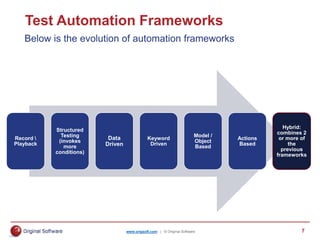
Test Automation Frameworks
Below is the evolution of automation frameworks
www.origsoft.com | © Original Software 8
0-10%
UI Centric
Automation
20-40%
Service or Middle Tier Automation
50-60%
Unit level Automation
+80%, UI Centric Automation
0-10%
Service or Middle Tier Automation
0-10%
Unit level
Automation
Velocity Partners – The Agile Test Automation pyramid, Mike Cohn
Key points with Test Automation & Agile
Agile automation
 Smaller units of
work built uniquely
vs. end-to-end
 Constant review of
automation backlog
 Automation of
forms not complete
www.origsoft.com | © Original Software 9
Automated Software Testing: Introduction, Management and Performance – Dustin, Rashka, Paul
D. System Design & Development C. Small Tool Pilot/Prototype
A. System Life-Cycle Process
F. Production and Maintenance
B.
Business
Analysis
and
Requirements
E.
Integration
and
Test
Mapping ATLM against a Waterfall SDLC
How an Automated Test Lifecycle Management maps to SDLC
www.origsoft.com | © Original Software 10
Fusing Automation into the Process
www.origsoft.com | © Original Software 11
Agile Testing – Crispin & Gregory
Test Automation – Agile fusion
Automated
& Manual
Manual
Automated Tools
Technology-Facing
Supporting
the
Team
Business-Facing
Q3
Q1 Q4
Q2
Critique
Product
Unit Tests
Component Tests
Performance & Load Testing
Security Testing
“ility” Testing
Functional Tests
Examples
Story Tests
Prototypes
Simulations
Exploratory Testing
Scenarios
Usability Testing
UAT
Alpha / Beta
www.origsoft.com | © Original Software 12
Test Automation – Agile (ish) fusion
No one admits to doing pure Waterfall anymore
Define TA scope in Release Test Plan
Automated & Manual Scenarios
Prepare error-handling
(new and regression)
Record carefully
Replay
CM
Test Automation activities:
Project
Initiation
Test
Strategy
Analysis
Design
Develop
Testing
Deploy
Test
Scenarios
Test
Cases
Test
Scripts
Test
Results
Test
Summary
www.origsoft.com | © Original Software 13
Deep-dive into Testing Artifacts
www.origsoft.com | © Original Software 14
Test Strategy / Test Plan
Not listing automation
for accomplishing the
testing on schedule
Omitting variables:
Resources, Data,
Objects, Licenses,
Environments
Omitting
automation
How the tool selection
was done and how
testers will use this
To include automation
in every iteration / build
To obtain
buy-in for
automation
www.origsoft.com | © Original Software 15
Test Stories / Test Scenarios
Planning at a wrong
level for automation
Ambiguous areas:
Usability, Reliability,
Maintainability, etc.
Topics not
automatable
To define the ‘what’
along with ‘how’
Peer reviews to ensure
accuracy in automation
To parse
candidates
www.origsoft.com | © Original Software 16
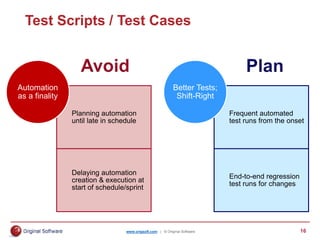
Test Scripts / Test Cases
Planning automation
until late in schedule
Delaying automation
creation & execution at
start of schedule/sprint
Automation
as a finality
Frequent automated
test runs from the onset
End-to-end regression
test runs for changes
Better Tests;
Shift-Right
www.origsoft.com | © Original Software 17
Retrospectives / Test Summary
The notion that TA is
like a manual test case
Not scheduling a
maintenance window
Not doing
tweaks
TA metric reviews per
iteration / sprint
To automate completed
manual tests
To improve
automation
www.origsoft.com | © Original Software 18
Case Study
www.origsoft.com | © Original Software 19
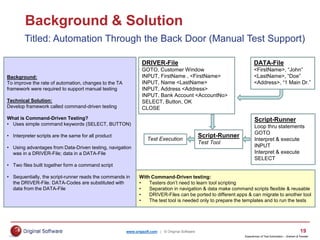
Background & Solution
Titled: Automation Through the Back Door (Manual Test Support)
Background:
To improve the rate of automation, changes to the TA
framework were required to support manual testing
Technical Solution:
Develop framework called command-driven testing
What is Command-Driven Testing?
• Uses simple command keywords (SELECT, BUTTON)
• Interpreter scripts are the same for all product
• Using advantages from Data-Driven testing, navigation
was in a DRIVER-File; data in a DATA-File
• Two files built together form a command script
• Sequentially, the script-runner reads the commands in
the DRIVER-File. DATA-Codes are substituted with
data from the DATA-File
With Command-Driven testing:
• Testers don’t need to learn tool scripting
• Separation in navigation & data make command scripts flexible & reusable
• DRIVER-Files can be ported to different apps & can migrate to another tool
• The test tool is needed only to prepare the templates and to run the tests
DRIVER-File
GOTO, Customer Window
INPUT, FirstName , <FirstName>
INPUT, Name <LastName>
INPUT, Address <Address>
INPUT, Bank Account <AccountNo>
SELECT, Button, OK
CLOSE
DATA-File
<FirstName>, “John”
<LastName>, “Doe”
<Address>, “1 Main Dr.”
Script-Runner
Loop thru statements
GOTO
Interpret & execute
INPUT
Interpret & execute
SELECT
Script-Runner
Test Tool
Test Execution
Experiences of Test Automation – Graham & Fewster
www.origsoft.com | © Original Software 20
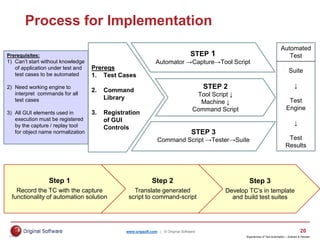
Step 1
Record the TC with the capture
functionality of automation solution
Step 2
Translate generated
script to command-script
Step 3
Develop TC’s in template
and build test suites
Process for Implementation
Experiences of Test Automation – Graham & Fewster
Prerequisites:
1) Can’t start without knowledge
of application under test and
test cases to be automated
2) Need working engine to
interpret commands for all
test cases
3) All GUI elements used in
execution must be registered
by the capture / replay tool
for object name normalization
Prereqs
1. Test Cases
2. Command
Library
3. Registration
of GUI
Controls
STEP 1
Automator →Capture→Tool Script
STEP 2
Tool Script ↓
Machine ↓
Command Script
STEP 3
Command Script →Tester→Suite
Automated
Test
Suite
↓
Test
Engine
↓
Test
Results
www.origsoft.com | © Original Software 21
Case Study - Key Points
Command –Driven framework was adopted for manual testing as well
Helped limit testers working on same template concurrently
Defect reporting was much easier with rework to recreate the issue
Constant reviews to assess ongoing needs for automated and manual testing
Implementation supported partial automated test execution; for test prep tasks
Manual tests now focused on customer-specific conditions instead
www.origsoft.com | © Original Software 22
Presentation Recap
www.origsoft.com | © Original Software 23
Recap of the Presentation
Outline your process by phase and deliverable; insert automation often
Research industry frameworks and apply best practices
Fuse automation topics into each testing phase with corresponding deliverable
Delve into your testing process to plan and avoid topics around automation
Present a real-life case study to management to build your case
www.origsoft.com | © Original Software 24
Thank you for attending
this presentation!
Jim Trentadue
Software Quality Consulting Director
Original Software
jtrentadue@origsoft.com

OS-Final-Transform-Manual-Testing-Processes-to-incorporate-Automatio....pptx

  • 1.
    www.origsoft.com | ©Original Software 1 Jim Trentadue Software Quality Consulting Director Original Software jtrentadue@origsoft.com Transform Manual Testing processes to incorporate Test Automation
  • 2.
    www.origsoft.com | ©Original Software 2 Agenda 2 Automation Models and Frameworks 3 Incorporating Automation into Standard Testing Processes 4 5 Case Study Deep-dive into Testing Artifacts Test activities / deliverables by SDLC 1 Presentation Recap 6
  • 3.
    www.origsoft.com | ©Original Software 3 SDLC Test Activities / Deliverables
  • 4.
    www.origsoft.com | ©Original Software 4 Test Activities within an Agile SDLC Project Initiation The End Game (System Test) Release Planning Release to Prod/Support Each Iteration 1 … X Get an understanding of the project Participate in sizing stories; Create test plans Participate in sprint planning, estimating tasks Write and execute story tests Pair-test with other testers, developers Business validation (customers) Automate new functional test cases; Run automated regression test cases Run project load tests Demo to the stakeholders Release mgmt tests mock deploy on staging; Smoke test on staging Perform load test (if needed) Complete regression test; Participate in releases readiness Business testers perform UAT Participate in release to production Participate in retrospectives Agile Testing – Crispin & Gregory Typical Agile process of activities to deliverables
  • 5.
    www.origsoft.com | ©Original Software 5 Test activities within a Waterfall SDLC Project Initiation Test Strategy Analysis Design Develop Testing Deploy Test Scenarios Test Cases Test Scripts Test Results Test Summary Standard V-Model set of testing activities
  • 6.
    www.origsoft.com | ©Original Software 6 Test Automation working models and frameworks in the industry
  • 7.
    www.origsoft.com | ©Original Software 7 Record Playback Structured Testing (invokes more conditions) Data Driven Keyword Driven Model / Object Based Actions Based Hybrid: combines 2 or more of the previous frameworks Test Automation Frameworks Below is the evolution of automation frameworks
  • 8.
    www.origsoft.com | ©Original Software 8 0-10% UI Centric Automation 20-40% Service or Middle Tier Automation 50-60% Unit level Automation +80%, UI Centric Automation 0-10% Service or Middle Tier Automation 0-10% Unit level Automation Velocity Partners – The Agile Test Automation pyramid, Mike Cohn Key points with Test Automation & Agile Agile automation  Smaller units of work built uniquely vs. end-to-end  Constant review of automation backlog  Automation of forms not complete
  • 9.
    www.origsoft.com | ©Original Software 9 Automated Software Testing: Introduction, Management and Performance – Dustin, Rashka, Paul D. System Design & Development C. Small Tool Pilot/Prototype A. System Life-Cycle Process F. Production and Maintenance B. Business Analysis and Requirements E. Integration and Test Mapping ATLM against a Waterfall SDLC How an Automated Test Lifecycle Management maps to SDLC
  • 10.
    www.origsoft.com | ©Original Software 10 Fusing Automation into the Process
  • 11.
    www.origsoft.com | ©Original Software 11 Agile Testing – Crispin & Gregory Test Automation – Agile fusion Automated & Manual Manual Automated Tools Technology-Facing Supporting the Team Business-Facing Q3 Q1 Q4 Q2 Critique Product Unit Tests Component Tests Performance & Load Testing Security Testing “ility” Testing Functional Tests Examples Story Tests Prototypes Simulations Exploratory Testing Scenarios Usability Testing UAT Alpha / Beta
  • 12.
    www.origsoft.com | ©Original Software 12 Test Automation – Agile (ish) fusion No one admits to doing pure Waterfall anymore Define TA scope in Release Test Plan Automated & Manual Scenarios Prepare error-handling (new and regression) Record carefully Replay CM Test Automation activities: Project Initiation Test Strategy Analysis Design Develop Testing Deploy Test Scenarios Test Cases Test Scripts Test Results Test Summary
  • 13.
    www.origsoft.com | ©Original Software 13 Deep-dive into Testing Artifacts
  • 14.
    www.origsoft.com | ©Original Software 14 Test Strategy / Test Plan Not listing automation for accomplishing the testing on schedule Omitting variables: Resources, Data, Objects, Licenses, Environments Omitting automation How the tool selection was done and how testers will use this To include automation in every iteration / build To obtain buy-in for automation
  • 15.
    www.origsoft.com | ©Original Software 15 Test Stories / Test Scenarios Planning at a wrong level for automation Ambiguous areas: Usability, Reliability, Maintainability, etc. Topics not automatable To define the ‘what’ along with ‘how’ Peer reviews to ensure accuracy in automation To parse candidates
  • 16.
    www.origsoft.com | ©Original Software 16 Test Scripts / Test Cases Planning automation until late in schedule Delaying automation creation & execution at start of schedule/sprint Automation as a finality Frequent automated test runs from the onset End-to-end regression test runs for changes Better Tests; Shift-Right
  • 17.
    www.origsoft.com | ©Original Software 17 Retrospectives / Test Summary The notion that TA is like a manual test case Not scheduling a maintenance window Not doing tweaks TA metric reviews per iteration / sprint To automate completed manual tests To improve automation
  • 18.
    www.origsoft.com | ©Original Software 18 Case Study
  • 19.
    www.origsoft.com | ©Original Software 19 Background & Solution Titled: Automation Through the Back Door (Manual Test Support) Background: To improve the rate of automation, changes to the TA framework were required to support manual testing Technical Solution: Develop framework called command-driven testing What is Command-Driven Testing? • Uses simple command keywords (SELECT, BUTTON) • Interpreter scripts are the same for all product • Using advantages from Data-Driven testing, navigation was in a DRIVER-File; data in a DATA-File • Two files built together form a command script • Sequentially, the script-runner reads the commands in the DRIVER-File. DATA-Codes are substituted with data from the DATA-File With Command-Driven testing: • Testers don’t need to learn tool scripting • Separation in navigation & data make command scripts flexible & reusable • DRIVER-Files can be ported to different apps & can migrate to another tool • The test tool is needed only to prepare the templates and to run the tests DRIVER-File GOTO, Customer Window INPUT, FirstName , <FirstName> INPUT, Name <LastName> INPUT, Address <Address> INPUT, Bank Account <AccountNo> SELECT, Button, OK CLOSE DATA-File <FirstName>, “John” <LastName>, “Doe” <Address>, “1 Main Dr.” Script-Runner Loop thru statements GOTO Interpret & execute INPUT Interpret & execute SELECT Script-Runner Test Tool Test Execution Experiences of Test Automation – Graham & Fewster
  • 20.
    www.origsoft.com | ©Original Software 20 Step 1 Record the TC with the capture functionality of automation solution Step 2 Translate generated script to command-script Step 3 Develop TC’s in template and build test suites Process for Implementation Experiences of Test Automation – Graham & Fewster Prerequisites: 1) Can’t start without knowledge of application under test and test cases to be automated 2) Need working engine to interpret commands for all test cases 3) All GUI elements used in execution must be registered by the capture / replay tool for object name normalization Prereqs 1. Test Cases 2. Command Library 3. Registration of GUI Controls STEP 1 Automator →Capture→Tool Script STEP 2 Tool Script ↓ Machine ↓ Command Script STEP 3 Command Script →Tester→Suite Automated Test Suite ↓ Test Engine ↓ Test Results
  • 21.
    www.origsoft.com | ©Original Software 21 Case Study - Key Points Command –Driven framework was adopted for manual testing as well Helped limit testers working on same template concurrently Defect reporting was much easier with rework to recreate the issue Constant reviews to assess ongoing needs for automated and manual testing Implementation supported partial automated test execution; for test prep tasks Manual tests now focused on customer-specific conditions instead
  • 22.
    www.origsoft.com | ©Original Software 22 Presentation Recap
  • 23.
    www.origsoft.com | ©Original Software 23 Recap of the Presentation Outline your process by phase and deliverable; insert automation often Research industry frameworks and apply best practices Fuse automation topics into each testing phase with corresponding deliverable Delve into your testing process to plan and avoid topics around automation Present a real-life case study to management to build your case
  • 24.
    www.origsoft.com | ©Original Software 24 Thank you for attending this presentation! Jim Trentadue Software Quality Consulting Director Original Software jtrentadue@origsoft.com

Editor's Notes

  • #3 There are two ways this slide could be operated: You may hyperlink the various Agenda Items to the slides that encompass their respective content (do not forget to add a ‘back’ button linking back to this slide) Alternatively you may copy & paste the agenda slide besides the respective content slides so that when you press next, it shows the agenda slide once more, but this time, the upcoming topic will be highlighted. NOTE: This slide is suitable for 5 menu items max, in case you need to add more menu items, then first group all the textboxes (including the numbered ones) together and resize them to make em smaller. The text in these text boxes has been set to “shrink to fit” settings, so now if you reduce the size of the textboxes the font size will change automatically, thereby making it easier to add more menu items without any problems.
  • #12 Automated: How can it prepared for a test first mentality? How can we unit test our presentation layer? Automated & Manual: How are we going to prototype? What tool are we going to use for business facing tests to guide development? Do we have regression tests that need updating? Manual: Requires more advance planning and will need to track the users’ activities for further analysis Tools: Some testing may require the old UI until complete: i.e. Load or Security
  • #13 Automated: How can it prepared for a test first mentality? How can we unit test our presentation layer? Automated & Manual: How are we going to prototype? What tool are we going to use for business facing tests to guide development? Do we have regression tests that need updating? Manual: Requires more advance planning and will need to track the users’ activities for further analysis Tools: Some testing may require the old UI until complete: i.e. Load or Security