
Redbooks Paper
                                                                                                David Edwards
                                                                                                 Axel Buecker


Organization Chart Design for IBM Tivoli
Identity Manager

Preface
                The need for this Redpaper rose out of design workshops and customer presentations. One
                area that lacks documented knowledge is on the design of the IBM® Tivoli® Identity Manager
                Organization Chart (Org Chart). This previous lack of documentation was sometimes an
                obstacle to enabling consultants to design an effective IBM Tivoli Identity Manager
                implementation.

                The aim of the document is provide information to assist in the effective design of the IBM
                Tivoli Identity Manager Org Chart. It covers the design considerations, details some
                approaches, and then makes some recommendations based on typical deployment
                strategies. It is not intended to present a set of standard designs that can be used as is; there
                will always need to be a design process to ensure the solution is right for the particular
                deployment.

                The document is targeted at senior consultants and architects involved in the IBM Tivoli
                Identity Manager solution design. It assumes an understanding of IBM Tivoli Identity Manager
                at both a functional and technical level and uses standard IBM Tivoli Identity Manager
                terminology without explanation. The information in this document is generic for the IBM Tivoli
                Identity Manager 4.x releases (enRole 4.x, IBM Tivoli Identity Manager 4.3/4.4, and IBM Tivoli
                Identity Manager 4.5.x). Where there is version-specific information, the versions will be
                highlighted.

                As a background for this document, you may want to review the following documents:
                   The IBM Tivoli Identity Manager product manuals can be found on the IBM Tivoli
                   Information Centre Web site
                   (http://publib.boulder.ibm.com/tividd/td/IdentityManager4.5.1.html). Of particular
                   relevance is the IBM Tivoli Identity Manager Policy and Organization Administration Guide
                   V4.5.1, SC32-1149.
                   The redbook Identity Management Design Guide with IBM Tivoli Identity Manager,
                   SG24-6996, which is available for download at the Redbooks Web site
                   (http://www.redbooks.ibm.com).


© Copyright IBM Corp. 2004. All rights reserved.                                        ibm.com/redbooks        1
The document uses the terms Org Chart and Org Tree interchangeably, depending on the
               context. When talking about the entire chart, the term Org Chart is more appropriate, but
               when talking about specifics, such as navigation, the term Org Tree makes more sense.

               Please direct any comments or corrections to davidedw@au1.ibm.com.


Introduction
               IBM Tivoli Identity Manager is the premier identity provisioning solution on the market today.
               It provides significant functionality in the areas of centralized administration of identity on
               disparate targets, delegated administration, user self-service, extensible workflow to support
               business processes, and reporting. Central to most of this functionality is the IBM Tivoli
               Identity Manager Organizational Chart, often referred to as the Org Chart or Org Tree. The
               Org Chart is a logical structure within the IBM Tivoli Identity Manager directory and provides a
               means of locating IBM Tivoli Identity Manager objects, such as users, and enabling
               inheritance for policies and other objects. The correct design of the IBM Tivoli Identity
               Manager Org Chart is critical to the success of an IBM Tivoli Identity Manager deployment.

               This document looks at the design of the IBM Tivoli Identity Manager Org Chart. The first
               section of the document discusses design considerations for the Org Chart (what you should
               consider and what is relevant for your deployment). Some of the topics include usability,
               object inheritance, and delegated administration.

               The second section presents a number of standard Org Chart models that have been used in
               the past. For each one, we present an overview of the model and then a discussion of the
               pros and cons of the model and when it would be appropriate to use.

               The final section of the document looks at a number of deployment approaches and
               discusses which models or combination of models would be appropriate to each. This places
               the earlier sections in the context of your deployment and hopefully gives you the information
               you need to design an effective Org Chart.


Design considerations
               This section looks at the considerations for designing the Org Chart, that is, what is relevant
               to your deployment and what you need to consider. The areas of consideration are usability,
               delegated administration, inheritance of IBM Tivoli Identity Manager objects, workflow,
               customization, the use of admin domains, and hosting multiple tenants.


Usability
               IBM Tivoli Identity Manager is an administrative tool, that is, a means for organizations to
               administer identity. There may be a significant level of user interface with IBM Tivoli Identity
               Manager by people of varying technical ability, so usability may be a key concern.

               Search vs. Org Tree navigation
               Before considering usability issues for the Org Tree, you need to decide whether the tree will
               be needed for this deployment. How will the administrators work with IBM Tivoli Identity
               Manager, particularly, how will they work with users (people)?

               One way is to search through the tree until you find the appropriate container (org unit and so
               on) and add a new user or modify an existing user. Depending on how you structure the Org
               Chart, this may be acceptable or not (see “Scrolling vs. drilling” on page 3).

2   Organization Chart Design for IBM Tivoli Identity Manager
The other approach is to use the search function to locate existing users and then work with
them. What about adding new users? If you are using some form of automated HR feed to
load users, then there will never (or rarely) be a need to use the UI to add a user. If this is the
approach for the deployment, then the Org Chart design considerations are not relevant.

There are a number of usability considerations detailed in the following sections, including:
   The effort required (for example, number of mouse clicks) the admin has to do to get their
   job done
   The number of lines to display
   The performance of the system, that is, the amount of time waiting for something to
   happen

Scrolling vs. drilling
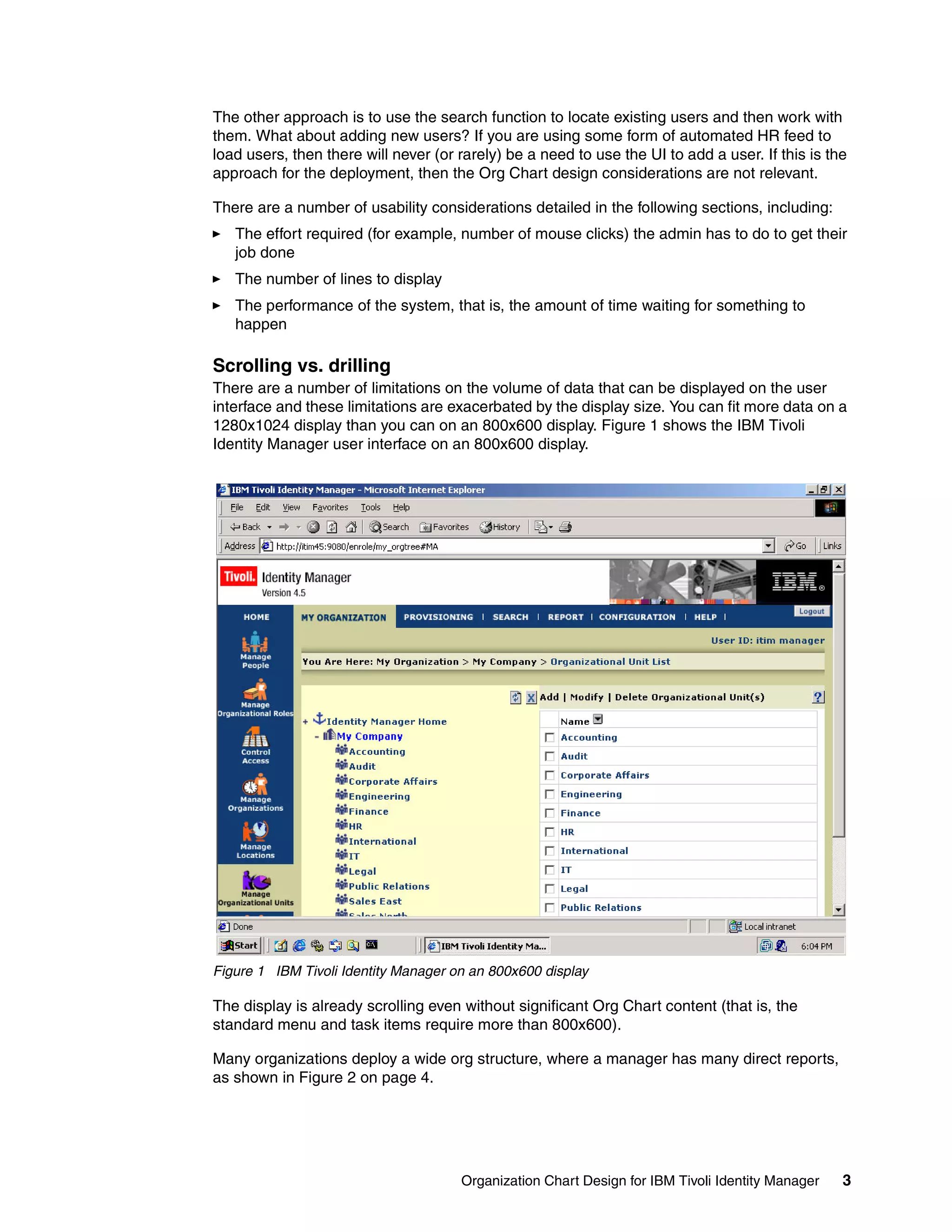
There are a number of limitations on the volume of data that can be displayed on the user
interface and these limitations are exacerbated by the display size. You can fit more data on a
1280x1024 display than you can on an 800x600 display. Figure 1 shows the IBM Tivoli
Identity Manager user interface on an 800x600 display.


Figure 1 IBM Tivoli Identity Manager on an 800x600 display

The display is already scrolling even without significant Org Chart content (that is, the
standard menu and task items require more than 800x600).

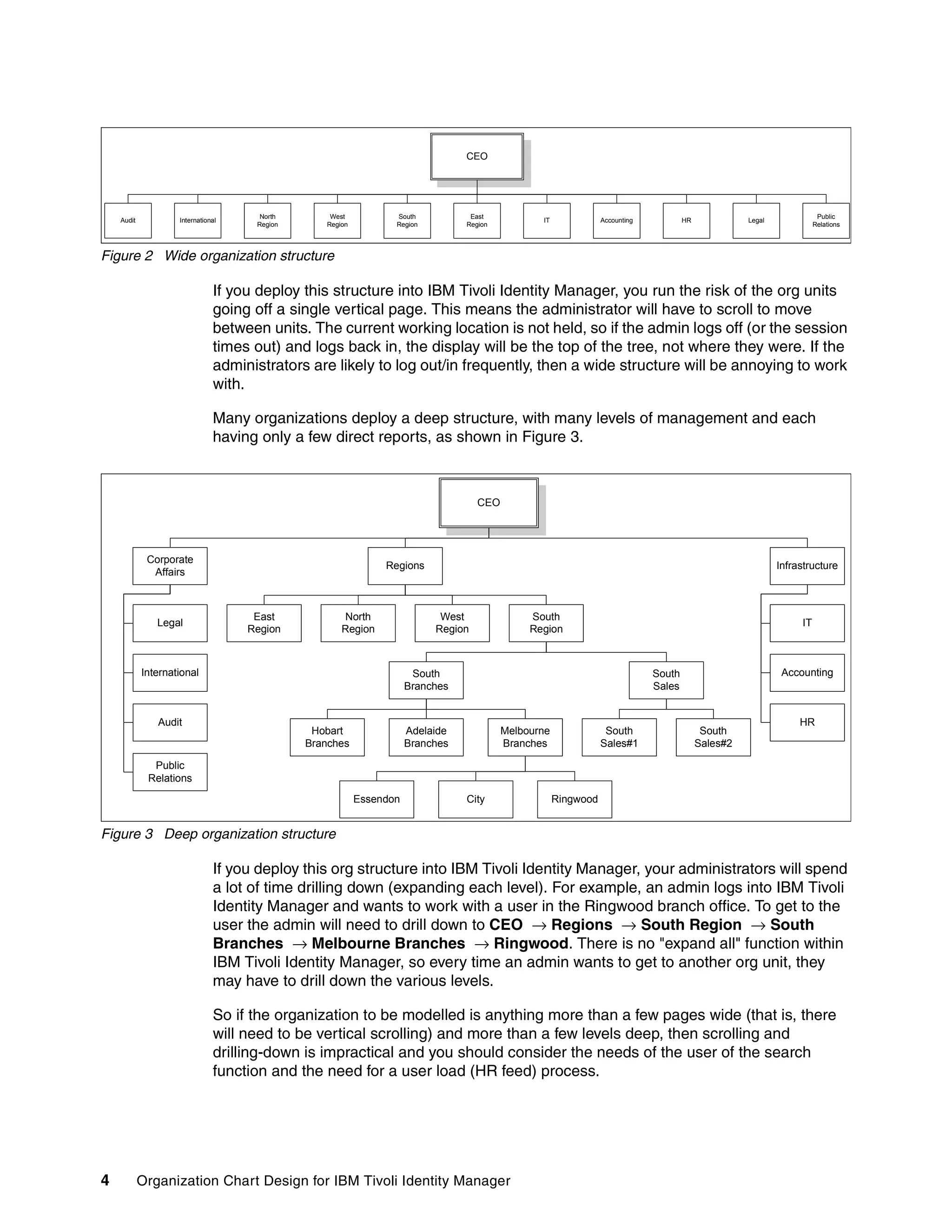
Many organizations deploy a wide org structure, where a manager has many direct reports,
as shown in Figure 2 on page 4.


                                      Organization Chart Design for IBM Tivoli Identity Manager   3
CEO


                                      North       West           South           East                                                                                  Public
    Audit           International                                                               IT              Accounting           HR             Legal
                                     Region      Region          Region         Region                                                                                Relations


Figure 2 Wide organization structure

                               If you deploy this structure into IBM Tivoli Identity Manager, you run the risk of the org units
                               going off a single vertical page. This means the administrator will have to scroll to move
                               between units. The current working location is not held, so if the admin logs off (or the session
                               times out) and logs back in, the display will be the top of the tree, not where they were. If the
                               administrators are likely to log out/in frequently, then a wide structure will be annoying to work
                               with.

                               Many organizations deploy a deep structure, with many levels of management and each
                               having only a few direct reports, as shown in Figure 3.


                                                                                   CEO


             Corporate
                                                               Regions                                                                                      Infrastructure
              Affairs


                                     East            North                 West               South
               Legal                                                                                                                                             IT
                                    Region           Region               Region              Region


            International                                             South                                                  South                           Accounting
                                                                     Branches                                                Sales


               Audit                                                                                                                                             HR
                                               Hobart                Adelaide            Melbourne               South                     South
                                              Branches               Branches            Branches               Sales#1                   Sales#2

              Public
             Relations
                                                          Essendon              City                 Ringwood


Figure 3 Deep organization structure

                               If you deploy this org structure into IBM Tivoli Identity Manager, your administrators will spend
                               a lot of time drilling down (expanding each level). For example, an admin logs into IBM Tivoli
                               Identity Manager and wants to work with a user in the Ringwood branch office. To get to the
                               user the admin will need to drill down to CEO → Regions → South Region → South
                               Branches → Melbourne Branches → Ringwood. There is no "expand all" function within
                               IBM Tivoli Identity Manager, so every time an admin wants to get to another org unit, they
                               may have to drill down the various levels.

                               So if the organization to be modelled is anything more than a few pages wide (that is, there
                               will need to be vertical scrolling) and more than a few levels deep, then scrolling and
                               drilling-down is impractical and you should consider the needs of the user of the search
                               function and the need for a user load (HR feed) process.


4           Organization Chart Design for IBM Tivoli Identity Manager
The number of lines per page
           The user interface has a parameter that controls the number of lines of data displayed on a
           page. This does not affect the Org Chart itself, but it does affect the display of the objects in
           the Org Chart containers. For example, in Figure 1 on page 3, there are more than ten objects
           in the My Company organization container, and the display variable is set to ten, so when the
           UI is rendered, the objects display will be paginated, showing only the first ten. For a large
           container (such as hundreds or thousands of users in an org unit), there will be many pages
           of objects to click through to find a particular object.

           IBM Tivoli Identity Manager will only get ten pages at a time, so if you know the object you
           want is on page 25, you will have to go to page 10, click Next, go to page 20, click Next, and
           then go to page 25. This is unusable for large numbers of objects in any container.

           The number of lines per page relates to the screen size. If the administrators are going to use
           800x600 screens, then there is little value in setting the number of lines per page to more
           than ten, as the administrator will spend a lot of time scrolling. Some customers may be
           happy to scroll and set the number of lines per page to a large number to reduce pagination.

           So if the administrators are to navigate the tree (rather than using the search function), the
           number of objects in any one container should be kept to a minimum, certainly less than ten
           pages worth.

           Performance
           Another usability factor is performance. Much of this is controlled by hardware sizing and
           tuning parameters, but Org Chart design can have an impact on this.

           The following Org Chart-related parameters can have an impact on performance:
              Number of users in a container: This topic was discussed earlier. The greater the number
              of users in a container (such as org unit), the longer it will take for IBM Tivoli Identity
              Manager to retrieve the users, paginate them, and display the list.
              Number of containers under another container: That is, the width of the tree under a
              particular branch. This is the same as the number of users under a container.
              Number of lines displayed on a page: This also affects how long IBM Tivoli Identity
              Manager takes to render a page. The more lines per page, the more information IBM Tivoli
              Identity Manager has to display on a page.

           The only significant one of these will be the number of users in a container. You are more
           likely to get hundreds of users in an org unit than you are to get hundred of teams under a
           single department. If there is a need for large user containers (as a result of other Org Chart
           design considerations), then this needs to be factored into the performance requirements and
           hardware design.


Delegated administration
           Delegated administration is implemented in IBM Tivoli Identity Manager by tying access
           control to the Org Chart and using the ACI inheritance. By delegated admin, we normally
           mean granting a set of administrator's access rights to a subset of the user base. Tied to this
           is the design of the Org Chart for efficient delineation of control (that is, having different levels
           of admins for the same group of users).

           Prior to looking at the Org Chart design, you need to define the administrative roles, the
           scope of those roles (user base and type of administrative access), and who will belong to the
           roles. This will feed into the Org Chart design. Depending on the other requirements for the


                                                  Organization Chart Design for IBM Tivoli Identity Manager    5
Org Chart, there may need to be some rationalization of roles to keep the Org Chart from
               becoming too complex and unwieldy.

               The next section summarizes ACIs and Groups as they relate to the Org Chart.

               ACIs and IBM Tivoli Identity Manager groups
               An ACI controls user access by defining the access privileges of an IBM Tivoli Identity
               Manager group or ACI principal. Members of an IBM Tivoli Identity Manager group or an ACI
               principal can view and perform operations on attributes within a target class (context), as
               defined by the scope of the ACI. The scope of an ACI will be either single-level or sub-tree,
               and apply to the branch of the Org Tree in which the ACI is placed. Thus, the location of the
               ACI in the Org Chart is relevant.

               ACIs grant or deny the ability to perform various functions. Managers can provision and
               manage persons in their organizational unit based on their level of access. This role-based
               access is for IBM Tivoli Identity Manager users assigned to the IBM Tivoli Identity Manager
               groups. Groups have no hierarchical implication; they can be placed anywhere in the Org
               Chart.

               There is an exception to this: the IBM Tivoli Identity Manager Administrators are not affected
               by ACIs. They have access to all functions and all objects.

               The standard IBM Tivoli Identity Manager access model is:
               1. All access is denied by default.
               2. An explicit grant of access overrides this (for example, granted access to modify
                  password).
               3. An explicit deny of access overrides the explicit grant.

               So if you have not been given access to something, you will not have access to it. Even if you
               have been granted access to something, you may also be explicitly denied access to it, so
               you will not be able to access it.

               How do you design the Org Chart with this access model in mind? There are a number of
               considerations, discussed in the following sections:
                   Design for distributed administration: Where there are a number of similar admin roles
                   applying to different parts of the organization
                   Design for deferent levels of administration: Where administrators have the same scope of
                   users, but different levels of access.
                   Associated with this is the design for manageability, that is, controlling access to other
                   object in IBM Tivoli Identity Manager (such as policies and organization roles). This is
                   mentioned in later sections of the document.
                   Use of Admin Domains to simplify the access control model.

               The goal with ACI design is to keep it simple. You could place as many ACIs as there are
               combinations of objects, attributes, and containers, but this represents the worst case with
               hundreds or thousands of ACIs. This is not manageable.

               Design for distributed administration
               There are often cases, particularly in large geographically dispersed organizations, where
               there are local admins or help desks and their centralized counterparts. The local admins
               may only work 9 am to 5 pm Monday through Friday with a central team available 24x7. In
               most cases their people have the same type of access, such as password reset and new
               account creation, over different sets of users. Using the example shown in Figure 3 on

6   Organization Chart Design for IBM Tivoli Identity Manager
page 4, let us say we have admins in Melbourne, Adelaide, and Hobart that perform
password reset for the users in their area (including the sub-branches), and we have a central
help desk that performs the same function across the entire organization. How do the ACI
requirements affect the Org Chart design?

First, we cannot apply ACIs based on a person's attributes; it has to be based on their
location in the Org Tree. IBM Tivoli Identity Manager does not have the means to apply a
dynamic ACI like "if their location = Melbourne, or their parent location = Melbourne, apply the
Melbourne ACIs”. So the Org Chart must in some way represent the geographic area.

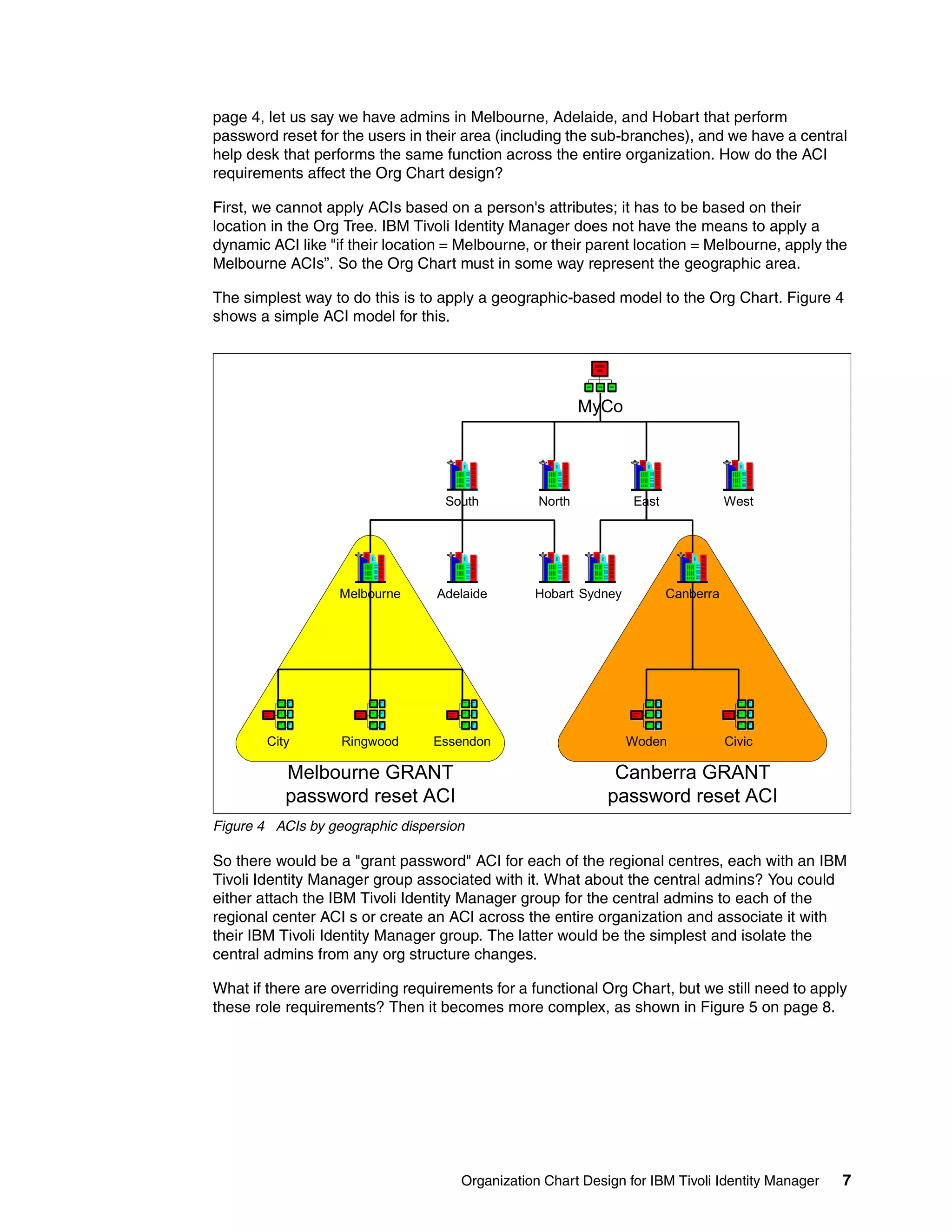
The simplest way to do this is to apply a geographic-based model to the Org Chart. Figure 4
shows a simple ACI model for this.


                                                         MyCo


                                   South         North          East              West


                   Melbourne     Adelaide       Hobart Sydney          Canberra


        City       Ringwood      Essendon                       Woden             Civic

           Melbourne GRANT                                   Canberra GRANT
           password reset ACI                               password reset ACI
Figure 4 ACIs by geographic dispersion

So there would be a "grant password" ACI for each of the regional centres, each with an IBM
Tivoli Identity Manager group associated with it. What about the central admins? You could
either attach the IBM Tivoli Identity Manager group for the central admins to each of the
regional center ACI s or create an ACI across the entire organization and associate it with
their IBM Tivoli Identity Manager group. The latter would be the simplest and isolate the
central admins from any org structure changes.

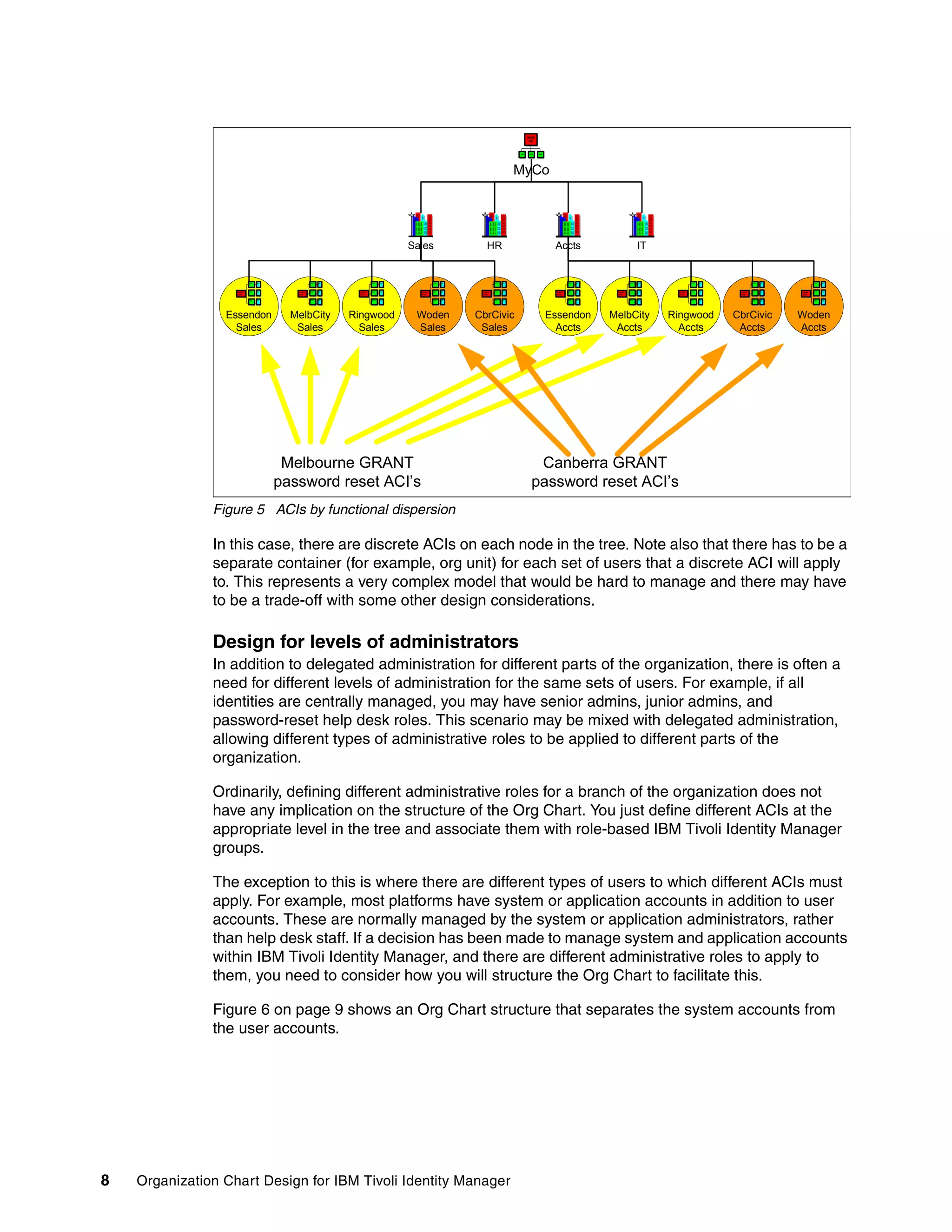
What if there are overriding requirements for a functional Org Chart, but we still need to apply
these role requirements? Then it becomes more complex, as shown in Figure 5 on page 8.


                                     Organization Chart Design for IBM Tivoli Identity Manager   7
MyCo


                                                    Sales      HR          Accts         IT


                 Essendon     MelbCity   Ringwood    Woden   CbrCivic    Essendon   MelbCity   Ringwood   CbrCivic   Woden
                   Sales       Sales       Sales     Sales    Sales        Accts     Accts       Accts     Accts     Accts


                             Melbourne GRANT                             Canberra GRANT
                            password reset ACI’s                        password reset ACI’s
               Figure 5 ACIs by functional dispersion

               In this case, there are discrete ACIs on each node in the tree. Note also that there has to be a
               separate container (for example, org unit) for each set of users that a discrete ACI will apply
               to. This represents a very complex model that would be hard to manage and there may have
               to be a trade-off with some other design considerations.

               Design for levels of administrators
               In addition to delegated administration for different parts of the organization, there is often a
               need for different levels of administration for the same sets of users. For example, if all
               identities are centrally managed, you may have senior admins, junior admins, and
               password-reset help desk roles. This scenario may be mixed with delegated administration,
               allowing different types of administrative roles to be applied to different parts of the
               organization.

               Ordinarily, defining different administrative roles for a branch of the organization does not
               have any implication on the structure of the Org Chart. You just define different ACIs at the
               appropriate level in the tree and associate them with role-based IBM Tivoli Identity Manager
               groups.

               The exception to this is where there are different types of users to which different ACIs must
               apply. For example, most platforms have system or application accounts in addition to user
               accounts. These are normally managed by the system or application administrators, rather
               than help desk staff. If a decision has been made to manage system and application accounts
               within IBM Tivoli Identity Manager, and there are different administrative roles to apply to
               them, you need to consider how you will structure the Org Chart to facilitate this.

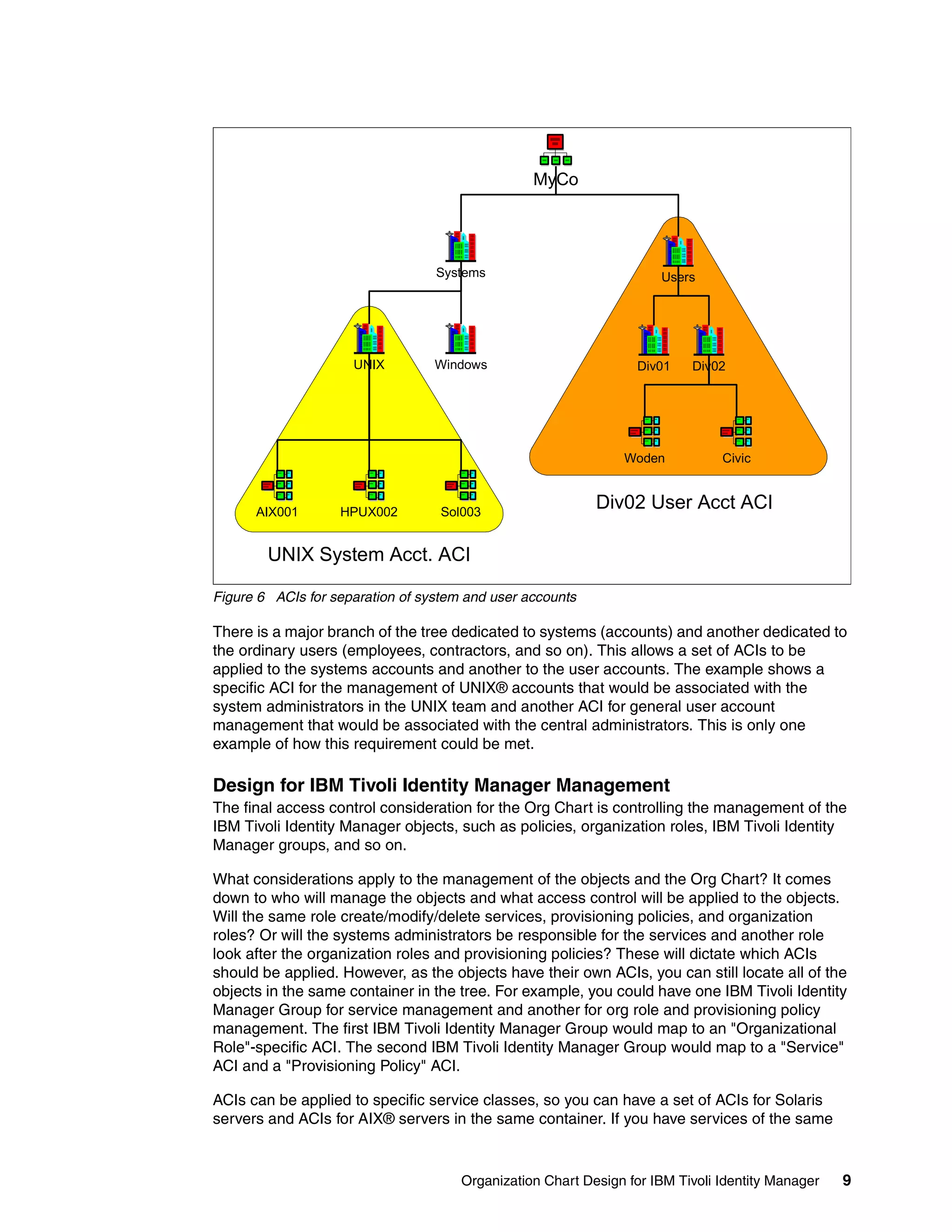
               Figure 6 on page 9 shows an Org Chart structure that separates the system accounts from
               the user accounts.


8   Organization Chart Design for IBM Tivoli Identity Manager
MyCo


                                  Systems                            Users


                     UNIX         Windows                         Div01   Div02


                                                               Woden           Civic


      AIX001       HPUX002         Sol003
                                                           Div02 User Acct ACI

        UNIX System Acct. ACI

Figure 6 ACIs for separation of system and user accounts

There is a major branch of the tree dedicated to systems (accounts) and another dedicated to
the ordinary users (employees, contractors, and so on). This allows a set of ACIs to be
applied to the systems accounts and another to the user accounts. The example shows a
specific ACI for the management of UNIX® accounts that would be associated with the
system administrators in the UNIX team and another ACI for general user account
management that would be associated with the central administrators. This is only one
example of how this requirement could be met.

Design for IBM Tivoli Identity Manager Management
The final access control consideration for the Org Chart is controlling the management of the
IBM Tivoli Identity Manager objects, such as policies, organization roles, IBM Tivoli Identity
Manager groups, and so on.

What considerations apply to the management of the objects and the Org Chart? It comes
down to who will manage the objects and what access control will be applied to the objects.
Will the same role create/modify/delete services, provisioning policies, and organization
roles? Or will the systems administrators be responsible for the services and another role
look after the organization roles and provisioning policies? These will dictate which ACIs
should be applied. However, as the objects have their own ACIs, you can still locate all of the
objects in the same container in the tree. For example, you could have one IBM Tivoli Identity
Manager Group for service management and another for org role and provisioning policy
management. The first IBM Tivoli Identity Manager Group would map to an "Organizational
Role"-specific ACI. The second IBM Tivoli Identity Manager Group would map to a "Service"
ACI and a "Provisioning Policy" ACI.

ACIs can be applied to specific service classes, so you can have a set of ACIs for Solaris
servers and ACIs for AIX® servers in the same container. If you have services of the same


                                      Organization Chart Design for IBM Tivoli Identity Manager   9
type requiring different access control, such as production Solaris servers and non-production
               Solaris servers, you will need to place them in different buckets and apply different ACIs.

               The need to manage different types of users with different access roles (whether the
               delineation is geographic or functional) may be a key consideration for Org Chart design.

               The use of admin domains
               Admin domains are described in Chapter 12, “Admin Domains”, of the IBM Tivoli Identity
               Manager Policy and Organization Administration Guide V4.5.1, SC32-1149 as follows.

               IBM Tivoli Identity Manager Server allows organizations to create and administer different
               divisions of an organization as separate entities with their own policies, services, ACIs, and
               so on. Each division is an admin domain and can have its own administrator that cannot
               administer or view other admin domains' policies, services, ACIs, and so on. The domain
               administrator can define and manage provisioning entities, policies, services, workflow
               definitions, roles, and users within his or her own admin domain.

               Domain administrators cannot see entities and subunits in other admin domains. Domain
               administrators also do not have access to services or accounts, either. However, they can
               create an ACI to allow themselves (and users in their domain) to have access to services and
               accounts. Domain administrators can perform only administrative tasks. Domain
               administrators cannot perform system configuration tasks. The admin domains feature is also
               a people-based management feature, as domain administrators can manage person entities
               only within their own admin domain.

               Thus, admin domains are a means to simplify the delegated administrative model. If you have
               a requirement to separate parts of the organization into discrete identity management
               domains, you could either do it with an extensive set of ACIs on the different branches, or you
               could define admin domains with the inherent domain-only access control.

               For managing multiple tenants, such as in an outsourcing arrangement, use of admin
               domains may be appropriate.


Hierarchical behavior of IBM Tivoli Identity Manager objects
               Many of the key functional aspects of IBM Tivoli Identity Manager rely on the scope of
               influence of objects within the Org Chart, that is, the objects listed below, when placed in the
               Org Tree, will have a scope that influences other IBM Tivoli Identity Manager objects in only
               that branch of the tree (single level) or in all branches of the tree below, including this one
               (sub-tree scope). This includes:
                  Provisioning Policy: The granting of entitlement to accounts and attributes
                  Service Selection Policy: Deciding which service instance a person is entitled to based on
                  some combination of the person's attributes (such as their location in the tree)
                  Identity Policy: Determining the user ID for account creation
                  Password Policy: Determining password strength rules
                  OS/Location Supervisors: Determining a "supervisor" workflow participant
                  Admin domain administrator: When determining a "domain administrator" workflow
                  participant

               The ramifications on the Org Chart of these are discussed in the following sections.


10   Organization Chart Design for IBM Tivoli Identity Manager
Provisioning policy and organization roles
There are three IBM Tivoli Identity Manager objects involved ion this area: services,
provisioning policies, and organization roles.

The Org Chart considerations for these objects are that the services must be at or below the
level of the policy, and that the roles and persons can anywhere in relation to the policies,
services and each other. So the provisioning policies, organization roles, and services can be
anywhere in the Org Chart, but the provisioning policy must be at the same level or higher
than the related service.

There are two types of organization roles, static and dynamic. Static organization roles can
be anywhere in the org tree and any person can be (manually) attached to them. The
dynamic organization roles, where membership is based on an LDAP filter and membership
is thus dynamic, have a scope relative to their position in the tree. The scope can be single
where it only applies to users in the local container, or sub-tree where it applies to the local
container and all sub containers. The logic of membership to dynamic organization roles is
that any organization roles that apply will be attached to the user, not the one closest in the
tree. For example, let's say there is a tree with organization roles as shown below:

ou=divisonA (org_role_A)

+- ou=deptAA (org_role_AA)

 +- ou=branchAAA (org_role_AAA)

If each of these organization roles had a scope of sub-tree and an LDAP filter like
(objectclass=*) then a person located in ou=branchAAA will have all three organization roles;
org_role_A, org_role_AA, and org_role_AAA.

So if you want a discrete dynamic organization role to apply to users based on their location
in the tree, you may need to consider placing them in the leaf nodes (containers), making the
LDAP filter very specific or making the organization role scope be single.

The placement of services, provisioning policies, and organization roles for management are
covered in “Design for IBM Tivoli Identity Manager Management” on page 9.

Service selection policies
Service selection policies extend the ability of provisioning policies by providing the ability to
provision accounts based on person attributes. In order for a service selection policy to be
enforced, a provisioning policy must target it. The service selection policy then identifies the
service type to target and defines provisioning based on a JavaScript.

The service selection policy can be located in the same container as the provisioning policy or
in a container located above the provisioning policy's container. The scope of a service
selection policy determines which provisioning policies can target it. Service selection policies
with single scope can only be targeted by provisioning policies at the same level in the
organization tree as the service selection policy. Service selection policies with sub-tree
scope can be targeted by provisioning policies at the same level or below the service
selection policy.

The service selection policies use JavaScript to determine which service should be used. The
logic in the JavaScript normally uses person object attributes to determine the service to use,
often the person's location in the Org Chart. For example, if the user is to be associated with
their local Windows NT Primary Domain Controller in a geographically dispersed
organization, then a service selection policy would have to be written to determine the
person’s geographic location. This could come from a person object attribute (for example, a


                                     Organization Chart Design for IBM Tivoli Identity Manager   11
location attribute) or their location in the Org Tree (if the tree has been structured
               geographically).

               The placement of objects for management is covered in “Design for IBM Tivoli Identity
               Manager Management” on page 9.

               So there are no Org Chart restrictions in relation to user, only in relation to the associated
               provisioning policies. However, you may need to consider the structure of the Org Chart if the
               service selection policy will be based on the location in the tree.

               Identity policies and password policies
               Identity and password policies should be at the same level or higher than the services they
               are applied to. However, the current versions of the product may display some confusing
               behavior relating to this (that is, there is a bug).

               Identity and password policies can be global, specific to a service profile, or specific to a
               service instance. There is a scope argument for them (single-level or sub-tree), but this does
               not appear to apply in the 4.5 release of IBM Tivoli Identity Manager.

               The placement of objects for management is covered in “Design for IBM Tivoli Identity
               Manager Management” on page 9.


Workflow
               Workflow is used to align the technical functionality within IBM Tivoli Identity Manager with
               business processes. How workflow is used has ramifications on the Org Chart design.

               Inheritance of workflow
               There is no inheritance of workflows to users; a workflow does not need to be "above" the
               user in the Org Tree for it to apply to them.

               Also, there is no placement relationship between workflows and provisioning policies. The
               workflows can be placed anywhere in the Org Tree. The placement of objects for
               management is covered in “Design for IBM Tivoli Identity Manager Management” on page 9.

               Use of dynamic workflow participants
               A key component of approval workflow nodes is the participant and escalation participant.
               The participant is one or more signature authorities that must approve or reject the request.
               The participant can be an individual or a group of individuals. You can explicitly map an object
               instance, such as a particular IBM Tivoli Identity Manager user, as a participant. Or you can
               use one of the dynamic participant types that are determined at execution time.

               The generic participants can include a requester (the person performing the action),
               requestee (the person the action is being performed on), service owner (owner of a service
               for provisioning accounts), and system administrator.

               The Org Chart dependant generic participants are:
                  Sponsor (entitlement workflows only): Each business partner person or business partner
                  organization can have a sponsor defined. When workflow is run, the sponsor appropriate
                  to the requestee is determined from their BPPerson object or BPOrg object.
                  Supervisor: Each person, org unit, and location can have a supervisor defined. When
                  workflow is run, the supervisor appropriate to the requestee is determined from their
                  person, or from the closest location or org unit object having a supervisor.


12   Organization Chart Design for IBM Tivoli Identity Manager
Domain Administrator: If admin domains are being used, the "domain administrator" will
              be determined by finding the admin domain object having an administrator that is closest
              to the service.

           This enables building of organizational workflows that can apply to all parts of the
           organization by using specific information that is held on the person objects, or their location
           containers, rather than being hard-coded in the workflow definition.

           From a design perspective, you need to have an understanding of how workflow is to be used
           in the solution. Are there common workflows that apply to all parts of the organization? For
           example, a request for a new account must go to the line manager first and then the owner of
           the system that the account is for? If this is the case, it makes sense to use generic workflow.

           How will the approvers be defined? Will each person have their manager defined on their
           person object or on the org unit (for example, a team)? If the former is used, you do not need
           to worry about Org Chart design. If you are going to use the latter, then the leaf nodes of the
           Org Tree need to be the teams that each person belongs to and their line manager needs to
           be defined as their supervisor/sponsor. Managing the supervisors of a container has far less
           administrative overhead than managing the supervisors of each user, unless some form of
           HR feed (including the line manager) is used.

           Service owners do not have any impact on the Org Chart structure.

           It imposes the same restrictions as the supervisors on OUs and locations. The participant is
           still found by searching up the tree for the first admin domain having an administrator defined.
           The only difference in that the search is started from the service instead of from the
           requestee.


Other considerations
           While usability, access control, and object inheritance are the key considerations for Org
           Chart design, there are some others that may impact a particular deployment.

           Customization: Use of org location in scripts/programs
           IBM Tivoli Identity Manager offers extensive customization scope through the Java™ API. It is
           possible to determine the Org Tree container for an object to drive processing, such as in a
           custom workflow object. Customization for this would be in response to a specific customer
           requirement that could not be met by the normal product functionality. It is impossible to
           speculate what form this may take, but you should be aware of any customization
           requirements and if there are any implications on the Org Chart structure.

           Bulk load
           Most projects will need to have some form of bulk load when the solution is deployed into
           production.

           The IBM Tivoli Identity Manager data load mechanism (that is, DSML load) has the ability to
           include JavaScript to define where each new user should be placed in the tree. If you do not
           include a placement rule, all users will be placed into a single container, and will then have to
           move all of the users into their correct Org Tree container. This may be an appropriate
           approach.

           If, however, you want to load users into their correct Org Tree container, you will need to code
           some JavaScript to use some attribute in the incoming person data to determine the location.
           This may place a restriction on your Org Chart and the naming of the Org Chart containers.


                                               Organization Chart Design for IBM Tivoli Identity Manager   13
Updating of the Org Chart
               How dynamic is the organization’s Org Chart that you are emulating in IBM Tivoli Identity
               Manager? If the Org Chart changes frequently, then manual changes to IBM Tivoli Identity
               Manager may not be appropriate and you will have to look at some programmatic way to
               dynamically update the Org Chart and move users around. It can be done, but it is not a trivial
               exercise. You could use the IBM Tivoli Identity Manager data services API, or develop
               something in ITDI (and generate random erGlobalIDs).

               If there is a requirement to dynamically update the Org Chart, you will need to revisit the other
               considerations. What is the implication on the ACI and inheritance models if you change
               containers around? Use of dynamic Org Charts will almost force you to apply inheritance and
               ACI models at the top of the Org Tree.


Summary
               In summary, the following areas should be considered when designing the IBM Tivoli Identity
               Manager Org Chart:
                  Usability
                  – Will the administrators navigate the tree or use the search function?
                  – Will the proposed design involve a great deal of scrolling and drilling?
                  – What size screens will the administrators use, and can the number of lines per page be
                    tuned?
                  – What are the performance implications to the user for the proposed design?
                  The ACI model (delegated administration)
                  – What are the requirements for distributed administration?
                  – What are the requirements for levels of administrators (that is, what roles)?
                  – What are the requirements for management of the IBM Tivoli Identity Manager solution
                    (that is, access control for the IBM Tivoli Identity Manager objects)?
                  – Is there a requirement for multiple tenants, with discreet access control?
                  Inheritance of IBM Tivoli Identity Manager objects
                  – What are the requirements for provisioning policies and organizational roles?
                  – What is the requirement for org location specific service selection policies?
                  Workflow
                  – What workflow is required and will it need the dynamic participants?
                  Other considerations
                  – Is there special org location specific customization?
                  – How will the initial bulk load be handled and how are users to be placed in the Org
                    Tree?
                  – Is the Org Chart dynamic, and if so does there need to be an automated update
                    mechanism?

               Like all design, the process of designing the Org Chart is an iterative process. You need to
               come up with a solution that meets the key requirements and tune it to meet the remaining
               requirements or get some agreement on not meeting the requirements.

               The next section details some standard models for Org Charts and ties them back to the
               considerations covered in this section.


14   Organization Chart Design for IBM Tivoli Identity Manager
Some models for Org Charts
            In this section, we discuss a number of standard models that could form a starting point for an
            Org Chart design. For each model, we present an overview of it, discuss the pros and cons
            and recommend when it would be appropriate.

            The simplest, and most trivial model, is where all objects (people and non-people) are in a
            single container (the organization). The remaining models may describe the high-level
            structure of the Org Chart, or detail a particular part of a structure. Thus, the models may be
            combined to build a solution. For example:
               You might deploy a strict organizational chart under the organization root in IBM Tivoli
               Identity Manager.
               You might deploy admin domains for different parts of the organization and deploy a
               logical structure under each.
               You might have a high-level split into people and services and then deploy an
               attribute-based person model under that.

            There are many combinations available, which will depend on the deployment requirements.
            The models listed below do not represent a complete set, merely the common ones.


Model 1 - All at the Top
            This is the simplest model, where there is only one container, the organization, with all
            objects in it.

            Model overview
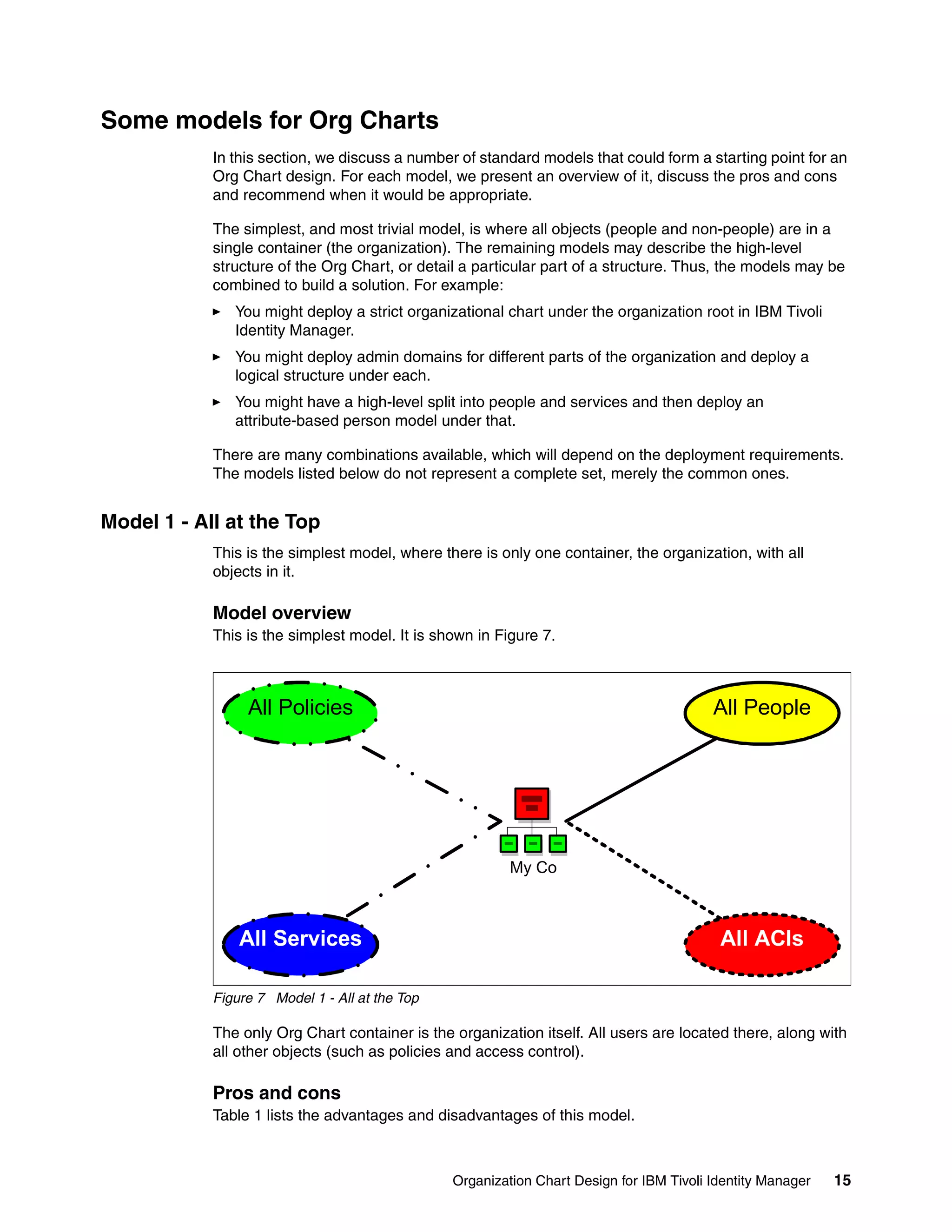
            This is the simplest model. It is shown in Figure 7.


                 All Policies                                                            All People


                                                         My Co


                All Services                                                              All ACIs

            Figure 7 Model 1 - All at the Top

            The only Org Chart container is the organization itself. All users are located there, along with
            all other objects (such as policies and access control).

            Pros and cons
            Table 1 lists the advantages and disadvantages of this model.


                                                Organization Chart Design for IBM Tivoli Identity Manager   15
Table 1 Pros and cons
                Consideration                    Advantages                            Disadvantages

                Usability                        This is a very simple model and       Not scalable to many users.
                                                 very usable for an                    The org could have too many
                                                 administrator. There are no           users and make scrolling a
                                                 issues with navigation.               problem.

                Delegated Admin                        Can be used for different          Not suitable for distributed
                                                       levels of admins, with all         admin, as all users are in
                                                       ACIs defined in one place.         one container.
                                                       Easy to manage all IBM             Cannot delineate
                                                       Tivoli Identity Manager            management of IBM Tivoli
                                                       objects as they are all in         Identity Manager objects
                                                       one place.                         (for example, different sets
                                                                                          of Solaris servers).

                Inheritance of IBM Tivoli        All objects are in one container,     Cannot use service selection
                Identity Manager objects         so there are no concerns about        policies based on org location.
                                                 the location of services with
                                                 respect to the provisioning
                                                 policies.

                Workflow                         Nil                                   Cannot use the dynamic
                                                                                       participants based on org
                                                                                       location.

                Other                                  Bulk load is simple, as all     Cannot use customization
                                                       people are in one location,     based on org location.
                                                       so you do not need a
                                                       placement rule.
                                                       As there is no org structure,
                                                       there are no concerns
                                                       about dynamically updating
                                                       the structure.


               When it would be appropriate
               This model has very limited use. It is not appropriate for a production deployment. Its use in a
               test or development environment is limited, although it may be useful for a unit testing
               environment. It is not appropriate for a training environment, demonstration environment, or
               Proof of Concept (PoC) environment, as you cannot demonstrate many of the key features of
               IBM Tivoli Identity Manager.

               Model 1.5 - Almost All At The Top
               This model is basically the same as the All at the Top model, except that all users are placed
               in a single OU immediately below the org. The advantage is that you can throw many users
               into the OU (assuming admins will search for users) without suffering a performance impact
               when admins go to My Organization to browse for roles. As long as no one ever focuses on
               the All Users OU with Manage People selected, there is no performance hit.


Model 2 - Separation of Users from Services
               This model splits the general users from the services and systems users, so the structure is
               split between general identity management and management of the IBM Tivoli Identity
               Manager object that enable identity management.


16   Organization Chart Design for IBM Tivoli Identity Manager
Model overview
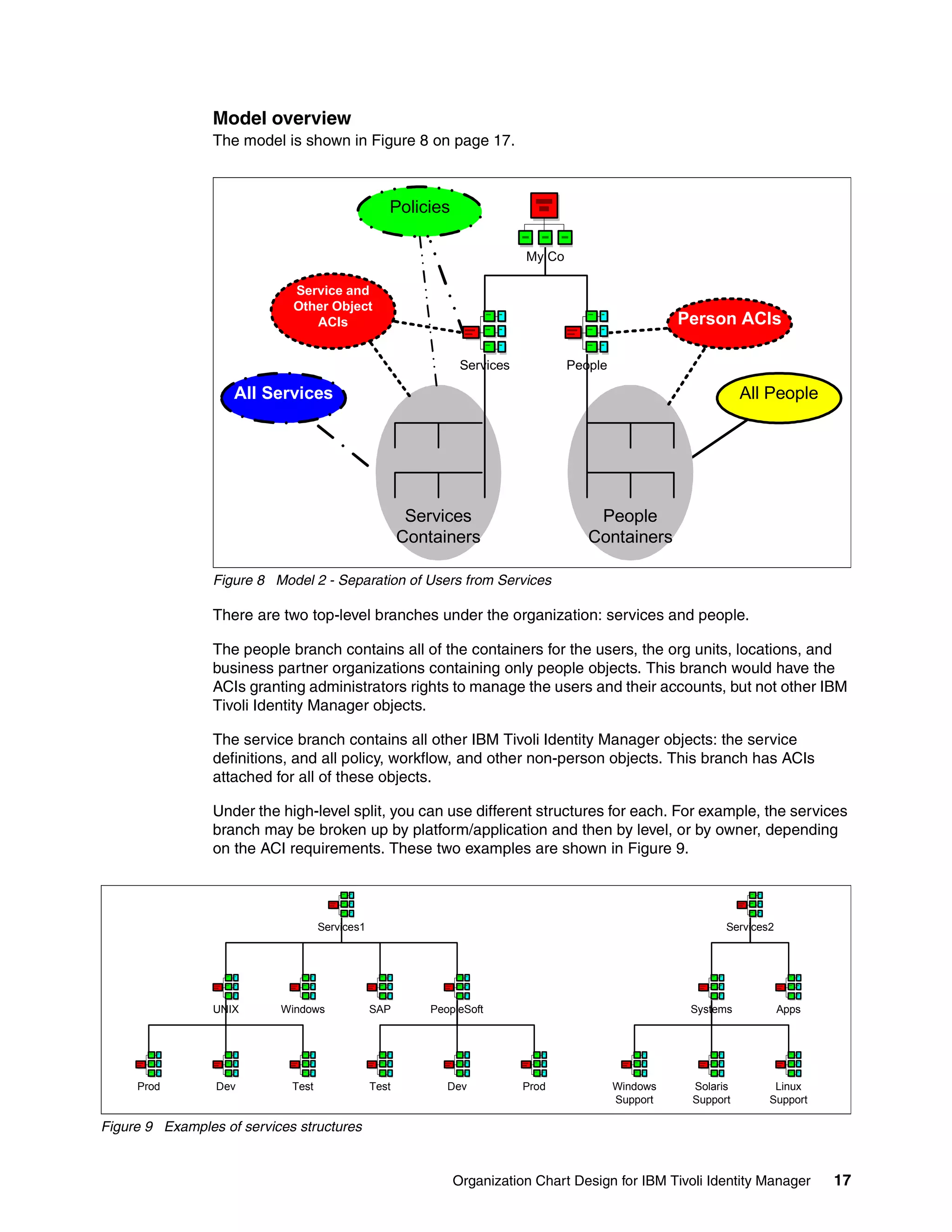
                 The model is shown in Figure 8 on page 17.


                                                   Policies

                                                                           My Co

                             Service and
                             Other Object
                                ACIs                                                                  Person ACIs

                                                                Services           People

                    All Services                                                                                 All People


                                                        Services                       People
                                                       Containers                     Containers

                 Figure 8 Model 2 - Separation of Users from Services

                 There are two top-level branches under the organization: services and people.

                 The people branch contains all of the containers for the users, the org units, locations, and
                 business partner organizations containing only people objects. This branch would have the
                 ACIs granting administrators rights to manage the users and their accounts, but not other IBM
                 Tivoli Identity Manager objects.

                 The service branch contains all other IBM Tivoli Identity Manager objects: the service
                 definitions, and all policy, workflow, and other non-person objects. This branch has ACIs
                 attached for all of these objects.

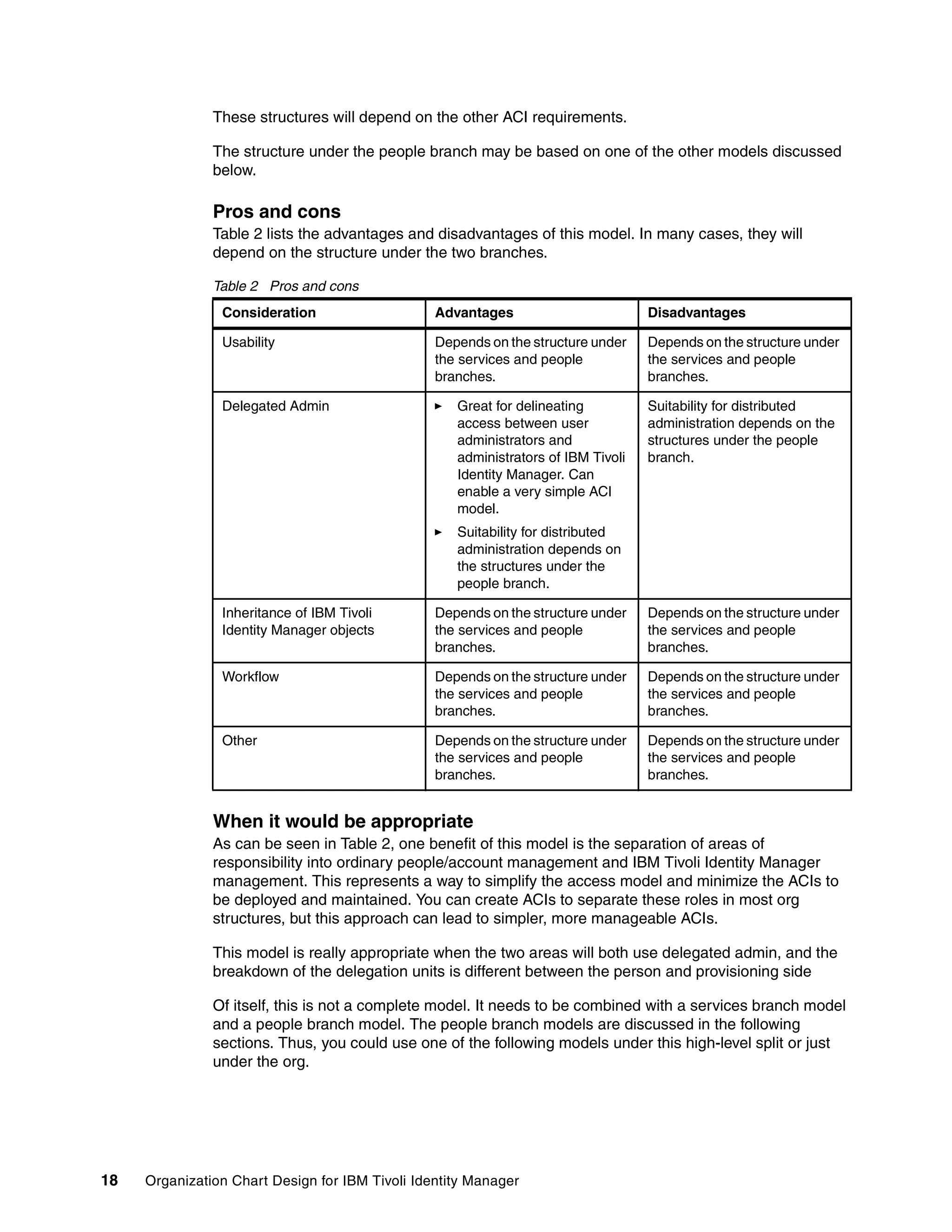
                 Under the high-level split, you can use different structures for each. For example, the services
                 branch may be broken up by platform/application and then by level, or by owner, depending
                 on the ACI requirements. These two examples are shown in Figure 9.


                                    Services1                                                                Services2


                 UNIX      Windows              SAP        PeopleSoft                                  Systems           Apps


     Prod        Dev         Test               Test          Dev          Prod             Windows    Solaris        Linux
                                                                                            Support    Support       Support

Figure 9 Examples of services structures


                                                               Organization Chart Design for IBM Tivoli Identity Manager        17
These structures will depend on the other ACI requirements.

               The structure under the people branch may be based on one of the other models discussed
               below.

               Pros and cons
               Table 2 lists the advantages and disadvantages of this model. In many cases, they will
               depend on the structure under the two branches.

               Table 2 Pros and cons
                Consideration                    Advantages                        Disadvantages

                Usability                        Depends on the structure under    Depends on the structure under
                                                 the services and people           the services and people
                                                 branches.                         branches.

                Delegated Admin                     Great for delineating          Suitability for distributed
                                                    access between user            administration depends on the
                                                    administrators and             structures under the people
                                                    administrators of IBM Tivoli   branch.
                                                    Identity Manager. Can
                                                    enable a very simple ACI
                                                    model.
                                                    Suitability for distributed
                                                    administration depends on
                                                    the structures under the
                                                    people branch.

                Inheritance of IBM Tivoli        Depends on the structure under    Depends on the structure under
                Identity Manager objects         the services and people           the services and people
                                                 branches.                         branches.

                Workflow                         Depends on the structure under    Depends on the structure under
                                                 the services and people           the services and people
                                                 branches.                         branches.

                Other                            Depends on the structure under    Depends on the structure under
                                                 the services and people           the services and people
                                                 branches.                         branches.


               When it would be appropriate
               As can be seen in Table 2, one benefit of this model is the separation of areas of
               responsibility into ordinary people/account management and IBM Tivoli Identity Manager
               management. This represents a way to simplify the access model and minimize the ACIs to
               be deployed and maintained. You can create ACIs to separate these roles in most org
               structures, but this approach can lead to simpler, more manageable ACIs.

               This model is really appropriate when the two areas will both use delegated admin, and the
               breakdown of the delegation units is different between the person and provisioning side

               Of itself, this is not a complete model. It needs to be combined with a services branch model
               and a people branch model. The people branch models are discussed in the following
               sections. Thus, you could use one of the following models under this high-level split or just
               under the org.


18   Organization Chart Design for IBM Tivoli Identity Manager
Model 3 - Use of Admin Domains
          Admin domains can be used anywhere in the Org Tree, but it makes sense to use them at a
          high level to break up administration of separate business units.

          Model overview
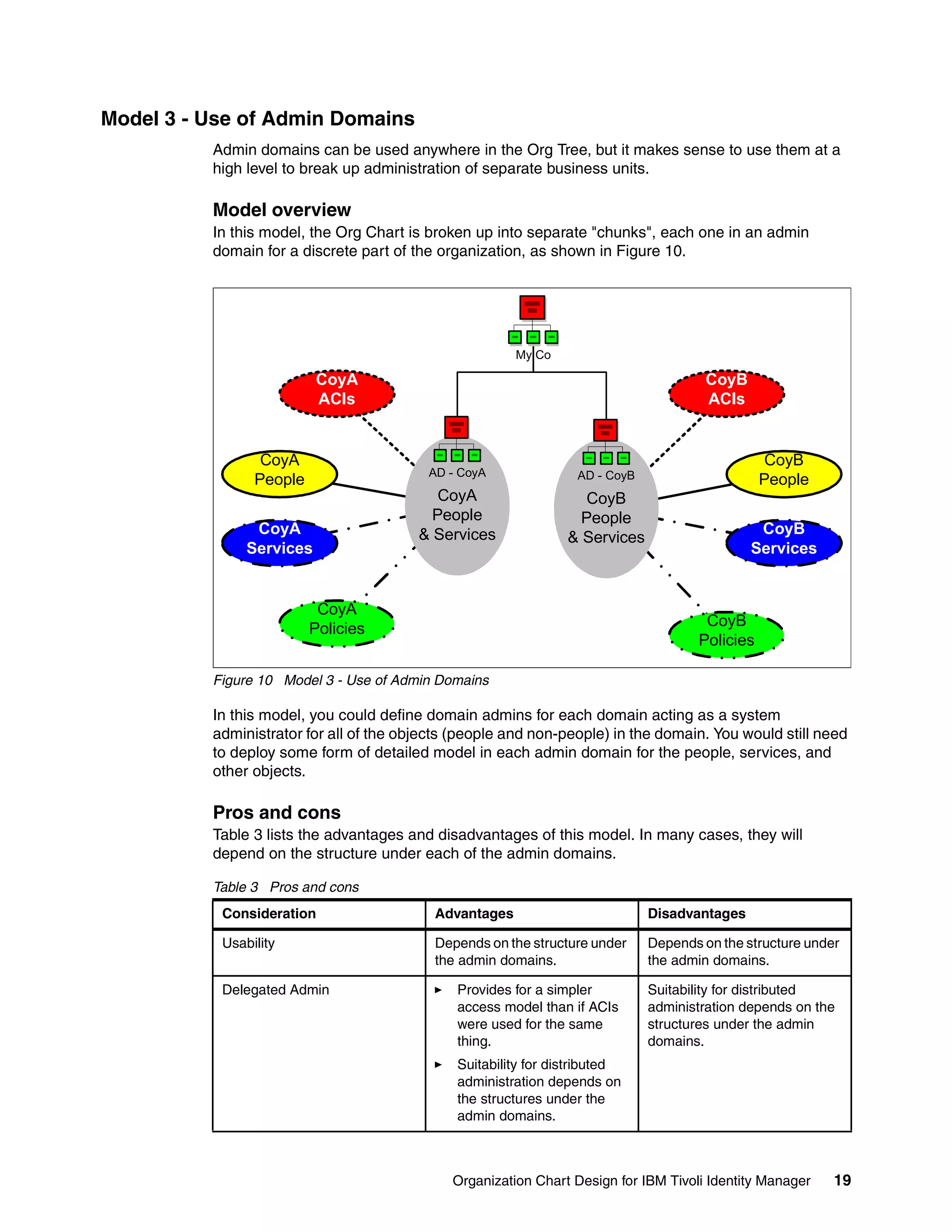
          In this model, the Org Chart is broken up into separate "chunks", each one in an admin
          domain for a discrete part of the organization, as shown in Figure 10.


                                                        My Co

                          CoyA                                                        CoyB
                          ACIs                                                        ACIs


                 CoyA                                                                            CoyB
                                          AD - CoyA              AD - CoyB
                People                                                                          People
                                            CoyA                   CoyB
                                           People                 People
                CoyA                     & Services                                           CoyB
                                                                & Services
               Services                                                                      Services


                          CoyA
                         Policies                                                     CoyB
                                                                                     Policies

          Figure 10 Model 3 - Use of Admin Domains

          In this model, you could define domain admins for each domain acting as a system
          administrator for all of the objects (people and non-people) in the domain. You would still need
          to deploy some form of detailed model in each admin domain for the people, services, and
          other objects.

          Pros and cons
          Table 3 lists the advantages and disadvantages of this model. In many cases, they will
          depend on the structure under each of the admin domains.

          Table 3 Pros and cons
           Consideration                   Advantages                        Disadvantages

           Usability                       Depends on the structure under    Depends on the structure under
                                           the admin domains.                the admin domains.

           Delegated Admin                    Provides for a simpler         Suitability for distributed
                                              access model than if ACIs      administration depends on the
                                              were used for the same         structures under the admin
                                              thing.                         domains.
                                              Suitability for distributed
                                              administration depends on
                                              the structures under the
                                              admin domains.


                                              Organization Chart Design for IBM Tivoli Identity Manager   19
Consideration                    Advantages                       Disadvantages

                Inheritance of IBM Tivoli        Depends on the structure under   Depends on the structure under
                Identity Manager objects         the admin domains.               the admin domains.

                Workflow                         Depends on the structure under   Depends on the structure under
                                                 the admin domains.               the admin domains.

                Other                            Depends on the structure under   Depends on the structure under
                                                 the admin domains.               the admin domains.


               When it would be appropriate
               The key benefit of this model is the simplification of the access model when you want to
               separate the Org Chart into logically discrete units. It would be used with one of the other
               models to provide a usable Org Chart design.


Model 4 - User Containers Based on User Attributes
               In this model, the user containers are based on some attribute associated with the person
               object, such as their surname or employee number. It is not concerned with the services or
               other objects, just the people.

               Model overview
               This model puts users into containers based on some common attribute. For example:
                  Containers based on the first letter of the surname
                  Containers based on user type where the user type is available information (for example,
                  contractors have employee number Cnnnnn, permanent employees are Pnnnnn, and part
                  timers are Xnnnnn).

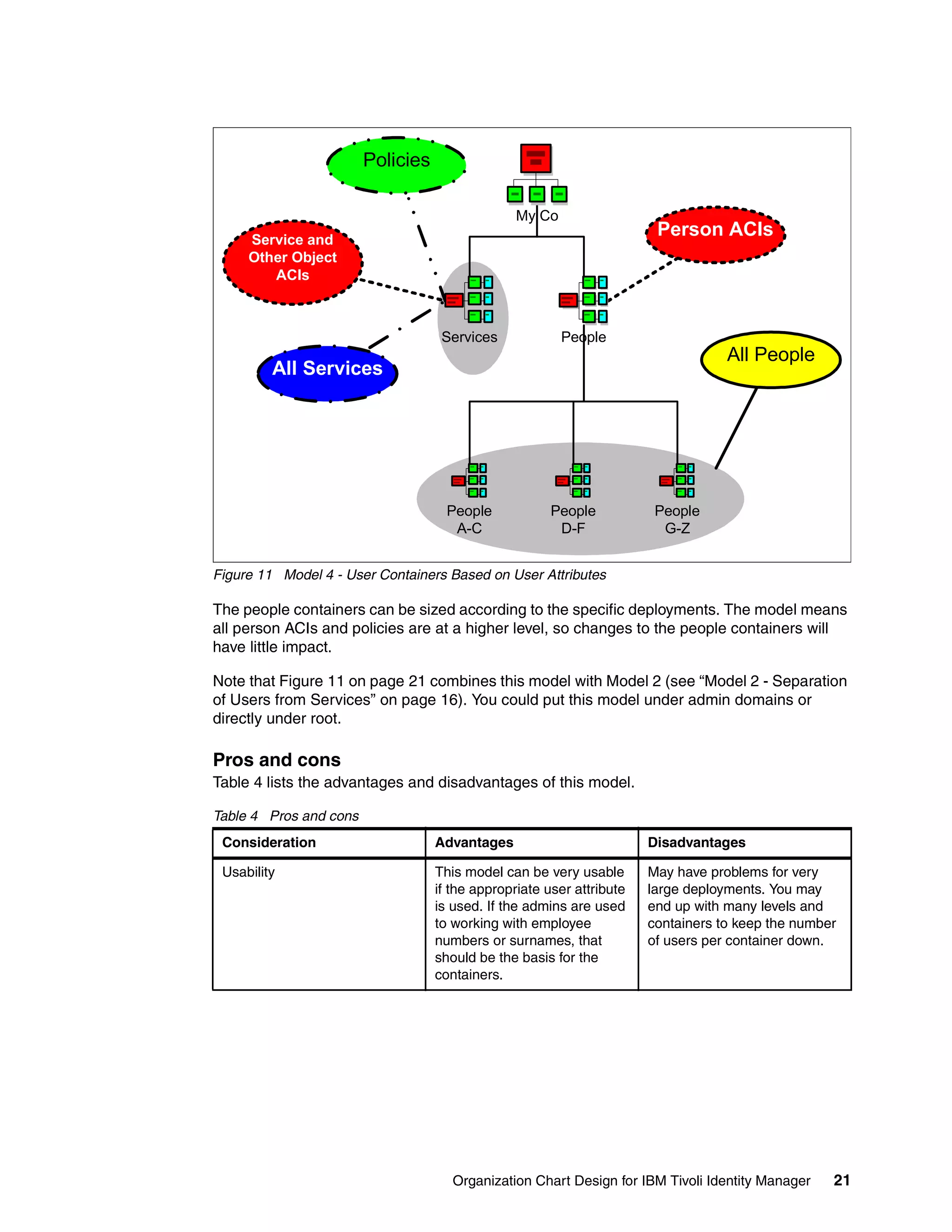
               Figure 11 shows an example of containers based on person information.


20   Organization Chart Design for IBM Tivoli Identity Manager
Policies

                                                 My Co
     Service and
                                                                        Person ACIs
     Other Object
        ACIs


                                    Services             People
                                                                                   All People
         All Services


                                     People            People           People
                                      A-C               D-F              G-Z


Figure 11 Model 4 - User Containers Based on User Attributes

The people containers can be sized according to the specific deployments. The model means
all person ACIs and policies are at a higher level, so changes to the people containers will
have little impact.

Note that Figure 11 on page 21 combines this model with Model 2 (see “Model 2 - Separation
of Users from Services” on page 16). You could put this model under admin domains or
directly under root.

Pros and cons
Table 4 lists the advantages and disadvantages of this model.

Table 4 Pros and cons
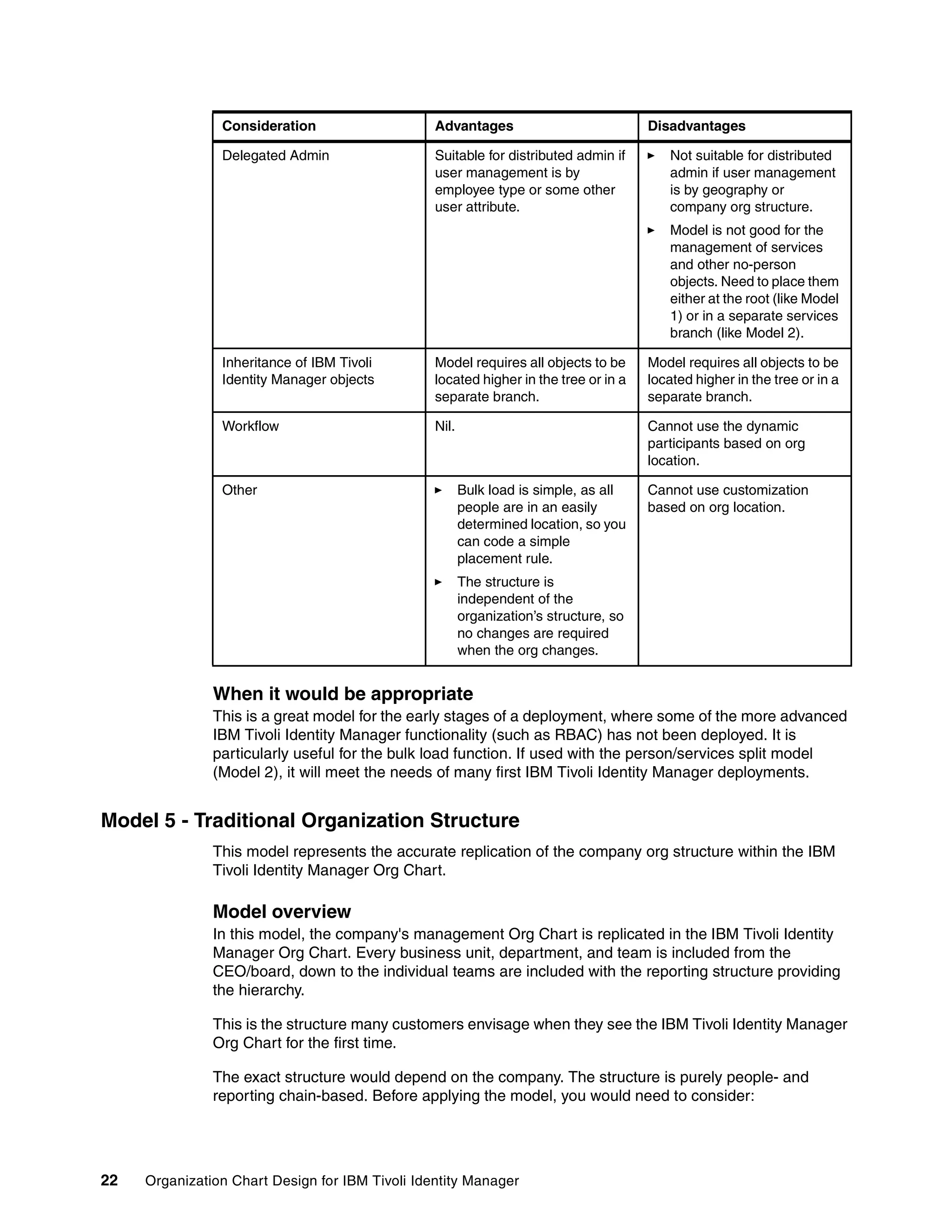
 Consideration                     Advantages                          Disadvantages

 Usability                         This model can be very usable       May have problems for very
                                   if the appropriate user attribute   large deployments. You may
                                   is used. If the admins are used     end up with many levels and
                                   to working with employee            containers to keep the number
                                   numbers or surnames, that           of users per container down.
                                   should be the basis for the
                                   containers.


                                      Organization Chart Design for IBM Tivoli Identity Manager    21
Consideration                    Advantages                            Disadvantages

                Delegated Admin                  Suitable for distributed admin if        Not suitable for distributed
                                                 user management is by                    admin if user management
                                                 employee type or some other              is by geography or
                                                 user attribute.                          company org structure.
                                                                                          Model is not good for the
                                                                                          management of services
                                                                                          and other no-person
                                                                                          objects. Need to place them
                                                                                          either at the root (like Model
                                                                                          1) or in a separate services
                                                                                          branch (like Model 2).

                Inheritance of IBM Tivoli        Model requires all objects to be      Model requires all objects to be
                Identity Manager objects         located higher in the tree or in a    located higher in the tree or in a
                                                 separate branch.                      separate branch.

                Workflow                         Nil.                                  Cannot use the dynamic
                                                                                       participants based on org
                                                                                       location.

                Other                                   Bulk load is simple, as all    Cannot use customization
                                                        people are in an easily        based on org location.
                                                        determined location, so you
                                                        can code a simple
                                                        placement rule.
                                                        The structure is
                                                        independent of the
                                                        organization’s structure, so
                                                        no changes are required
                                                        when the org changes.


               When it would be appropriate
               This is a great model for the early stages of a deployment, where some of the more advanced
               IBM Tivoli Identity Manager functionality (such as RBAC) has not been deployed. It is
               particularly useful for the bulk load function. If used with the person/services split model
               (Model 2), it will meet the needs of many first IBM Tivoli Identity Manager deployments.


Model 5 - Traditional Organization Structure
               This model represents the accurate replication of the company org structure within the IBM
               Tivoli Identity Manager Org Chart.

               Model overview
               In this model, the company's management Org Chart is replicated in the IBM Tivoli Identity
               Manager Org Chart. Every business unit, department, and team is included from the
               CEO/board, down to the individual teams are included with the reporting structure providing
               the hierarchy.

               This is the structure many customers envisage when they see the IBM Tivoli Identity Manager
               Org Chart for the first time.

               The exact structure would depend on the company. The structure is purely people- and
               reporting chain-based. Before applying the model, you would need to consider:


22   Organization Chart Design for IBM Tivoli Identity Manager
Where are the people located? Obviously the team members would be in their respective
   teams, but what about managers and their assistants?
   Is there sufficient data in the HR feed to correctly place users in their containers? If you do
   not have any org-related attributes in the HR feed, you will have to manually allocate (and
   later move) users to containers, representing a significant manual overhead and risk of
   error.
   What about non-people accounts, such as system accounts? Are they to be managed in
   the IBM Tivoli Identity Manager solution? If so, what container do they go in?
   Where will the services be located?
   What are the access control requirements? Where will the ACIs need to go and will the
   ACI model be too complex to manage?
   Where will the other objects, such as policy, go?
   How will the structure be maintained? Is there some sort of HR feed available to drive the
   IBM Tivoli Identity Manager Org Chart changes?
   Will there be users in multiple parts of the organization at any one time? For example,
   project resources may be part of a team, but also below to a project structure. A person in
   IBM Tivoli Identity Manager can only exist in one container, so if there are these types of
   people, and organization-based model may not be appropriate.

These issues need to be resolved prior to deploying this model. Most organizations
have a very large and complex Org Chart with many levels of management. It will take a
significant amount of time to build (unless some customization is used) and will be hard to
change (again unless some customization is used).

Pros and cons
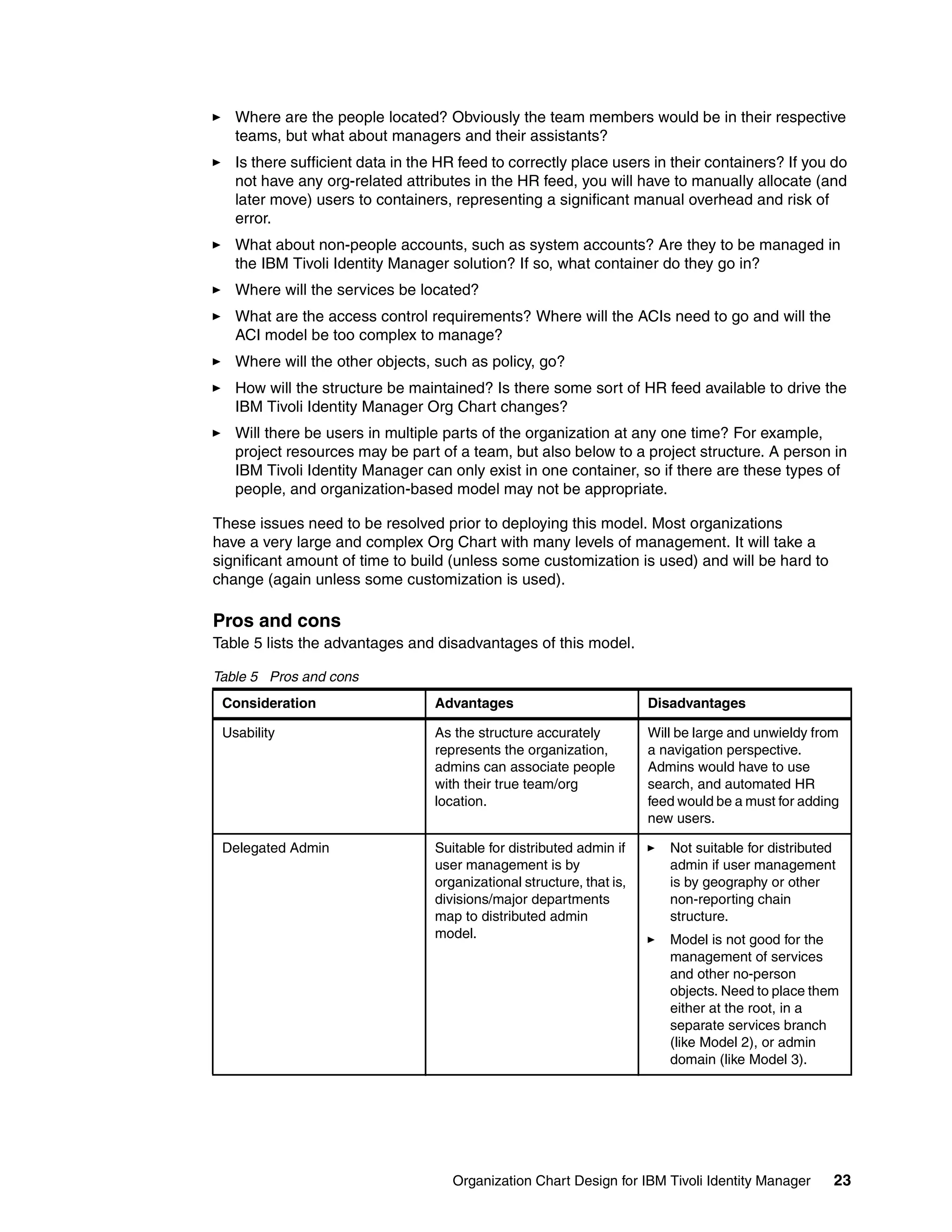
Table 5 lists the advantages and disadvantages of this model.

Table 5 Pros and cons
 Consideration                    Advantages                           Disadvantages

 Usability                       As the structure accurately           Will be large and unwieldy from
                                 represents the organization,          a navigation perspective.
                                 admins can associate people           Admins would have to use
                                 with their true team/org              search, and automated HR
                                 location.                             feed would be a must for adding
                                                                       new users.

 Delegated Admin                  Suitable for distributed admin if       Not suitable for distributed
                                  user management is by                   admin if user management
                                  organizational structure, that is,      is by geography or other
                                  divisions/major departments             non-reporting chain
                                  map to distributed admin                structure.
                                  model.                                  Model is not good for the
                                                                          management of services
                                                                          and other no-person
                                                                          objects. Need to place them
                                                                          either at the root, in a
                                                                          separate services branch
                                                                          (like Model 2), or admin
                                                                          domain (like Model 3).


                                     Organization Chart Design for IBM Tivoli Identity Manager       23
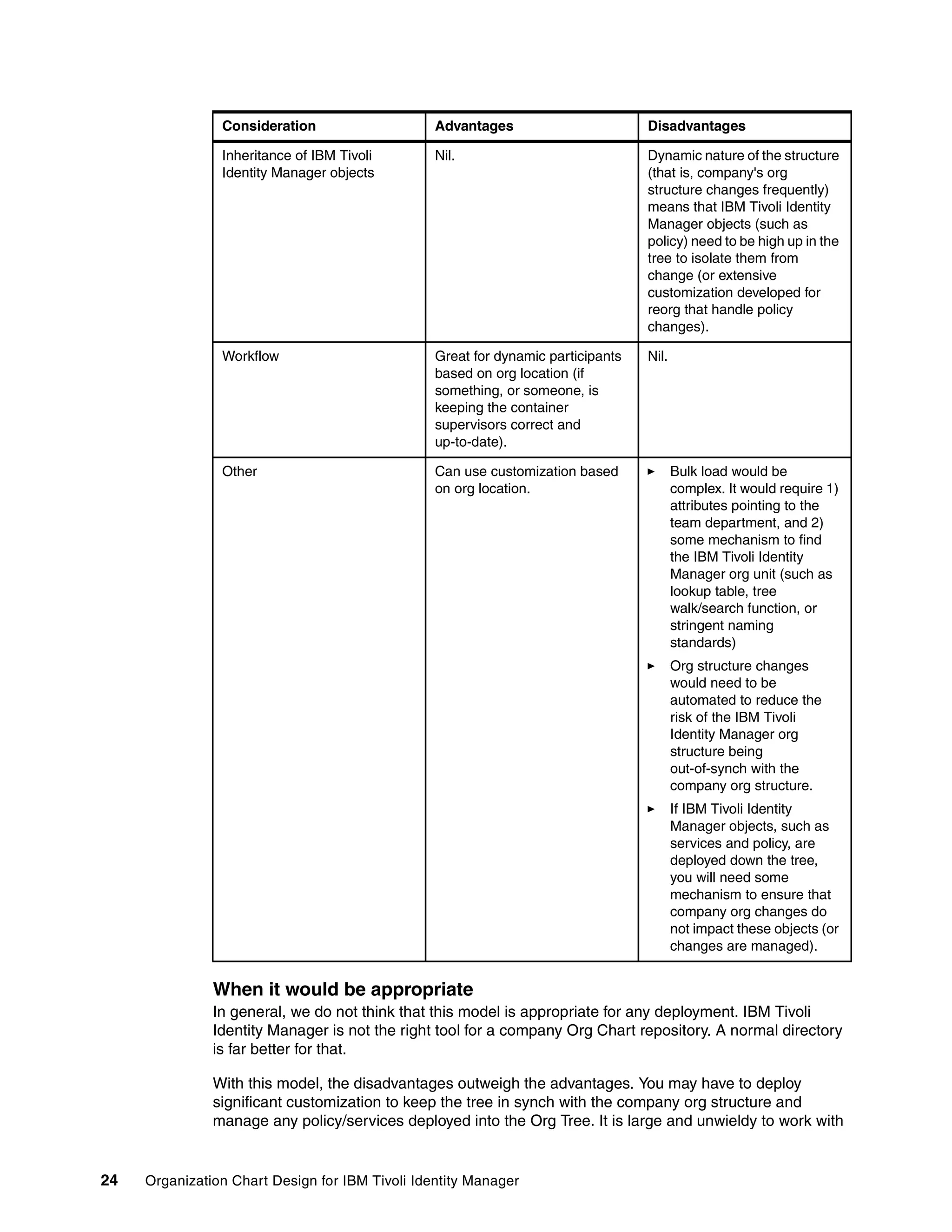
Consideration                    Advantages                       Disadvantages

                Inheritance of IBM Tivoli        Nil.                             Dynamic nature of the structure
                Identity Manager objects                                          (that is, company's org
                                                                                  structure changes frequently)
                                                                                  means that IBM Tivoli Identity
                                                                                  Manager objects (such as
                                                                                  policy) need to be high up in the
                                                                                  tree to isolate them from
                                                                                  change (or extensive
                                                                                  customization developed for
                                                                                  reorg that handle policy
                                                                                  changes).

                Workflow                         Great for dynamic participants   Nil.
                                                 based on org location (if
                                                 something, or someone, is
                                                 keeping the container
                                                 supervisors correct and
                                                 up-to-date).

                Other                            Can use customization based             Bulk load would be
                                                 on org location.                        complex. It would require 1)
                                                                                         attributes pointing to the
                                                                                         team department, and 2)
                                                                                         some mechanism to find
                                                                                         the IBM Tivoli Identity
                                                                                         Manager org unit (such as
                                                                                         lookup table, tree
                                                                                         walk/search function, or
                                                                                         stringent naming
                                                                                         standards)
                                                                                         Org structure changes
                                                                                         would need to be
                                                                                         automated to reduce the
                                                                                         risk of the IBM Tivoli
                                                                                         Identity Manager org
                                                                                         structure being
                                                                                         out-of-synch with the
                                                                                         company org structure.
                                                                                         If IBM Tivoli Identity
                                                                                         Manager objects, such as
                                                                                         services and policy, are
                                                                                         deployed down the tree,
                                                                                         you will need some
                                                                                         mechanism to ensure that
                                                                                         company org changes do
                                                                                         not impact these objects (or
                                                                                         changes are managed).


               When it would be appropriate
               In general, we do not think that this model is appropriate for any deployment. IBM Tivoli
               Identity Manager is not the right tool for a company Org Chart repository. A normal directory
               is far better for that.

               With this model, the disadvantages outweigh the advantages. You may have to deploy
               significant customization to keep the tree in synch with the company org structure and
               manage any policy/services deployed into the Org Tree. It is large and unwieldy to work with


24   Organization Chart Design for IBM Tivoli Identity Manager
as an administrator. It may help with the access model, but in many customers the access
           model does not follow the reporting structure fully.

           A better approach would be to combine one of the high-level models (such as “Model 2 -
           Separation of Users from Services” on page 16 or “Model 3 - Use of Admin Domains” on
           page 19) with one of the simplified models described in the following sections (see “Model 6 -
           Simplified Logical Structure” on page 25 or “Model 7 - Functional Structure” on page 29)


Model 6 - Simplified Logical Structure
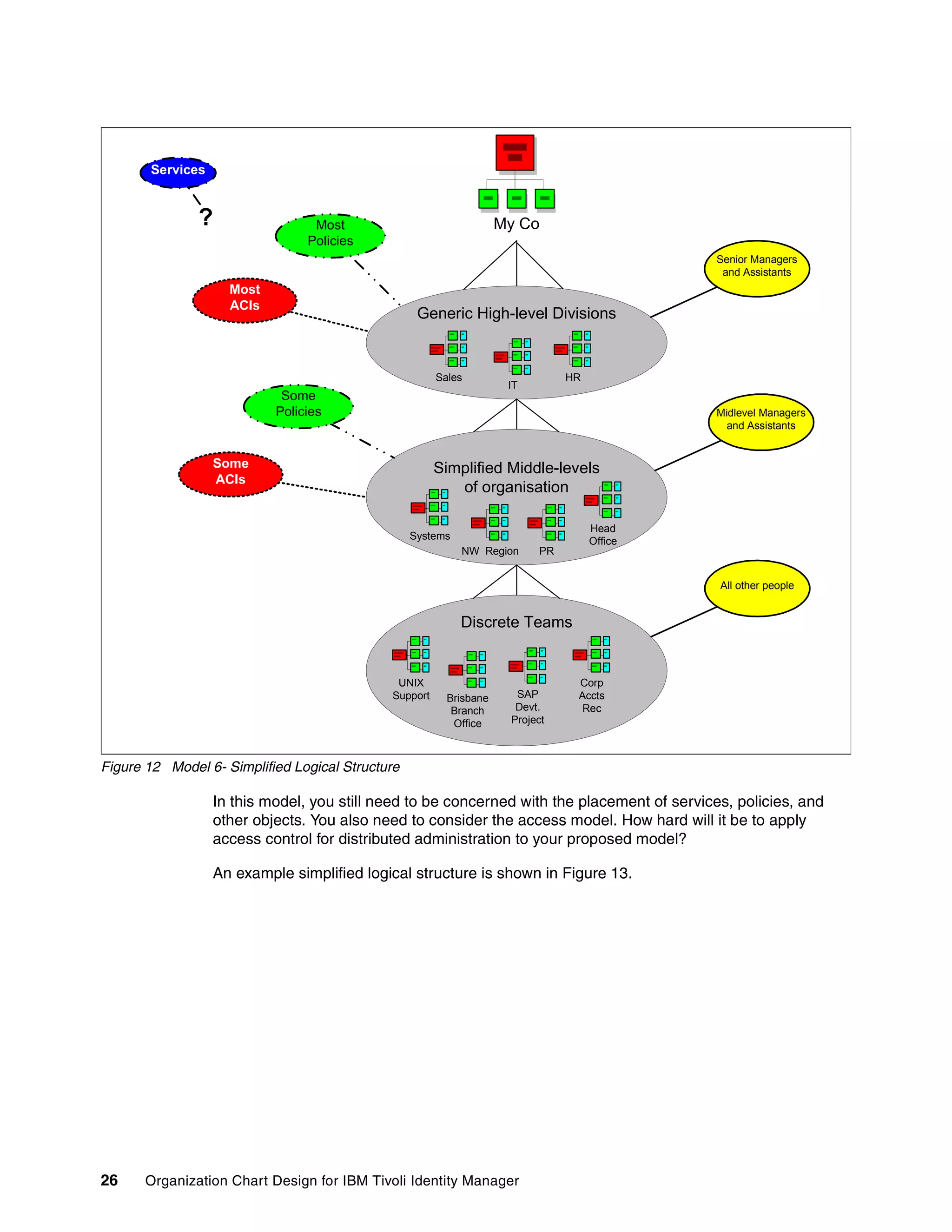
           In this model, the traditional org structure is generalized to give a simplified structure.

           Model overview
           In most organizations, the Org Chart changes often. These changes may range from
           changing some team names and managers, to reorganizing the entire company. In all of
           these changes that are two constants:
           1. Everyone still reports to the CEO/board at the top level (even though the number and type
              of reports often change)
           2. At the lowest level, employees still work for a manager in a team, even though the team
              name and manager may change.

           From an IBM Tivoli Identity Manager perspective, you may not need a complete Org Chart.
           For example, if you are only concerned with access control by division or geography, it may
           make sense to deploy the IBM Tivoli Identity Manager Org Chart along divisional or
           geographic lines. While many organizations have unique names for the divisions, they will
           generally have the lines of business divisions (such as Retail, Sales, Marketing,
           Development, and so on) and infrastructure divisions (such IT, HR, Accounting, and so on).
           You could model your customer organization along these primary high-level divisions,
           simplify the middle levels of management, and detail the actual teams of people.

           This model is shown in Figure 12.


                                                Organization Chart Design for IBM Tivoli Identity Manager   25
Services


               ?                 Most                               My Co
                                Policies
                                                                                             Senior Managers
                                                                                              and Assistants
                    Most
                    ACIs
                                                   Generic High-level Divisions


                                                       Sales                   HR
                                                                     IT
                            Some
                           Policies                                                          Midlevel Managers
                                                                                               and Assistants


                  Some                                 Simplified Middle-levels
                  ACIs
                                                          of organisation

                                                                                    Head
                                                  Systems                           Office
                                                            NW Region     PR


                                                                                             All other people


                                                            Discrete Teams


                                              UNIX                              Corp
                                             Support     Brisbane     SAP       Accts
                                                          Branch      Devt.      Rec
                                                          Office     Project


Figure 12 Model 6- Simplified Logical Structure

                  In this model, you still need to be concerned with the placement of services, policies, and
                  other objects. You also need to consider the access model. How hard will it be to apply
                  access control for distributed administration to your proposed model?

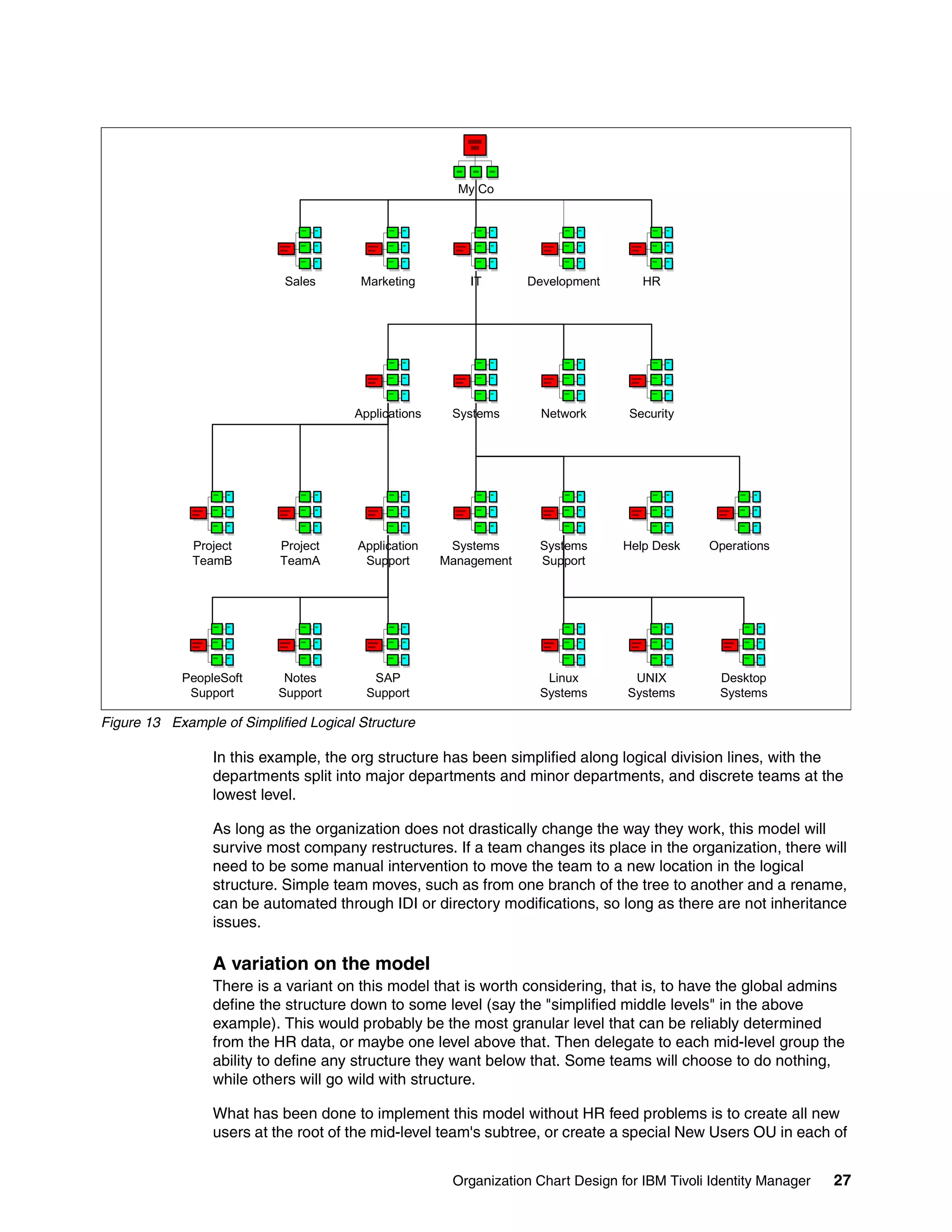
                  An example simplified logical structure is shown in Figure 13.


26    Organization Chart Design for IBM Tivoli Identity Manager
My Co


                            Sales       Marketing         IT       Development       HR


                                       Applications    Systems       Network       Security


              Project      Project      Application    Systems      Systems       Help Desk    Operations
              TeamB        TeamA         Support      Management    Support


            PeopleSoft      Notes         SAP                        Linux         UNIX          Desktop
             Support       Support       Support                    Systems       Systems        Systems

Figure 13 Example of Simplified Logical Structure

                 In this example, the org structure has been simplified along logical division lines, with the
                 departments split into major departments and minor departments, and discrete teams at the
                 lowest level.

                 As long as the organization does not drastically change the way they work, this model will
                 survive most company restructures. If a team changes its place in the organization, there will
                 need to be some manual intervention to move the team to a new location in the logical
                 structure. Simple team moves, such as from one branch of the tree to another and a rename,
                 can be automated through IDI or directory modifications, so long as there are not inheritance
                 issues.

                 A variation on the model
                 There is a variant on this model that is worth considering, that is, to have the global admins
                 define the structure down to some level (say the "simplified middle levels" in the above
                 example). This would probably be the most granular level that can be reliably determined
                 from the HR data, or maybe one level above that. Then delegate to each mid-level group the
                 ability to define any structure they want below that. Some teams will choose to do nothing,
                 while others will go wild with structure.

                 What has been done to implement this model without HR feed problems is to create all new
                 users at the root of the mid-level team's subtree, or create a special New Users OU in each of


                                                       Organization Chart Design for IBM Tivoli Identity Manager   27
the mid-level organizations to use as an HR feed drop-off bucket. It is then up to the
               delegated admins in each of the mid-level orgs to manually transfer the people who show up
               in their New Users bucket to the person's correct location in their subtree.

               You need to do some modifications in the HR feed's placement rules to prevent the feed from
               moving modified users back to the New Users bucket. You can easily do this by having the
               placement rules look for the erParent attribute on the user. It is null for new users; in that
               case, the rules would figure out which New Users bucket to place them into. For existing
               users, the placement rules can return an empty string, which will update the user's attributes,
               but not move them from their current location.

               This is a very useful model for big orgs because it makes it easy to tackle each business unit
               or department separately. The departments with the inclination (and budget) can buy some
               consulting time to design their department level tree structure. It avoids designing the
               complete tree structure around the pilot business unit's supervisor approval or help desk ACI
               requirements, only to find out that another division of the company has completely conflicting
               requirements.

               Another option with this model is to replace some of the manual transfer of users from the
               New Users containers with department level HR feeds. These feeds could use the
               department's New Users container as the source of the feed data, and implement the
               department's own placement rules for their subtree.

               Pros and cons
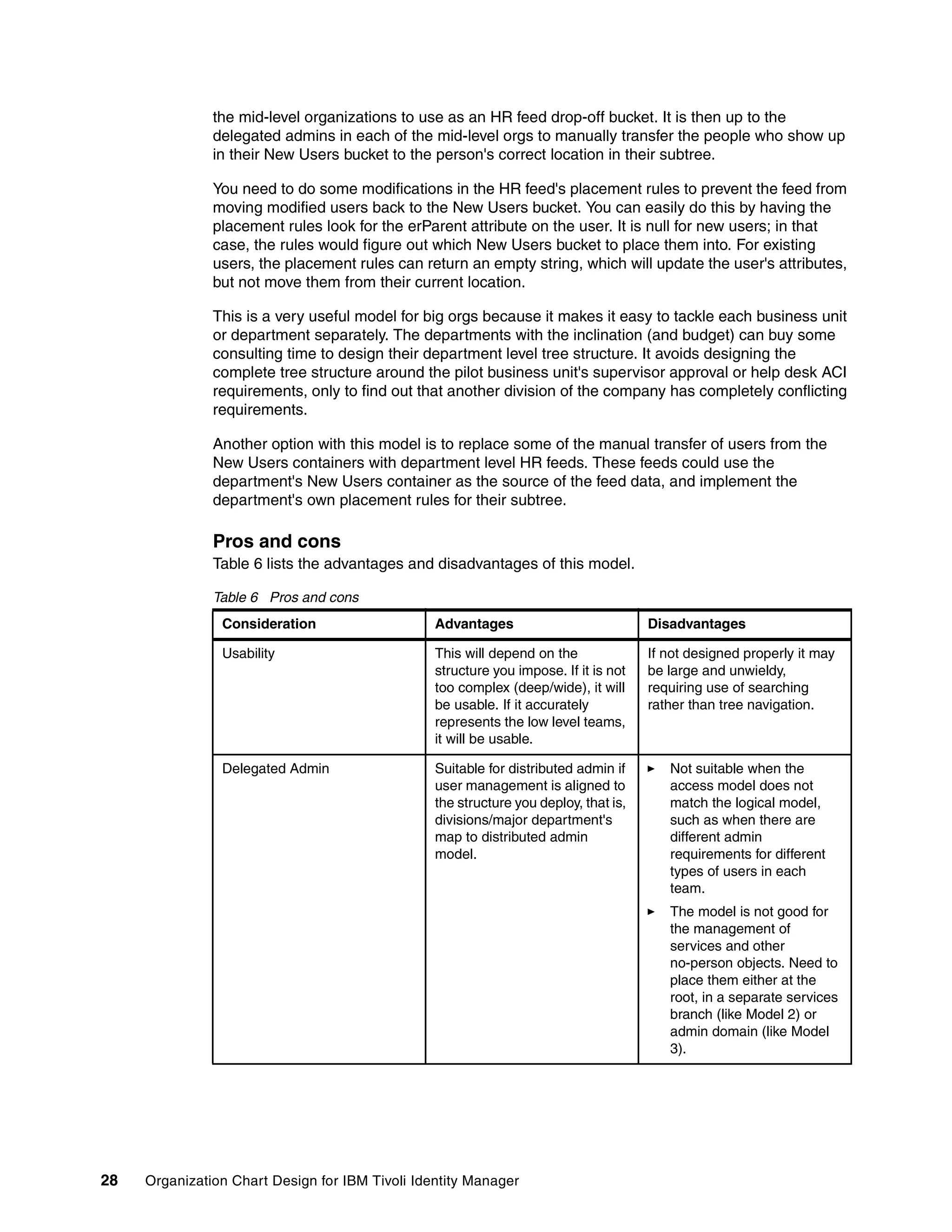
               Table 6 lists the advantages and disadvantages of this model.

               Table 6 Pros and cons
                Consideration                    Advantages                           Disadvantages

                Usability                        This will depend on the              If not designed properly it may
                                                 structure you impose. If it is not   be large and unwieldy,
                                                 too complex (deep/wide), it will     requiring use of searching
                                                 be usable. If it accurately          rather than tree navigation.
                                                 represents the low level teams,
                                                 it will be usable.

                Delegated Admin                  Suitable for distributed admin if       Not suitable when the
                                                 user management is aligned to           access model does not
                                                 the structure you deploy, that is,      match the logical model,
                                                 divisions/major department's            such as when there are
                                                 map to distributed admin                different admin
                                                 model.                                  requirements for different
                                                                                         types of users in each
                                                                                         team.
                                                                                         The model is not good for
                                                                                         the management of
                                                                                         services and other
                                                                                         no-person objects. Need to
                                                                                         place them either at the
                                                                                         root, in a separate services
                                                                                         branch (like Model 2) or
                                                                                         admin domain (like Model
                                                                                         3).


28   Organization Chart Design for IBM Tivoli Identity Manager
Consideration                   Advantages                          Disadvantages

            Inheritance of IBM Tivoli       This will depend on where/how       Nil.
            Identity Manager objects        the objects are placed in the
                                            Org Chart. This model is less
                                            susceptible to change that the
                                            previous model.

            Workflow                        Good for dynamic participants       Nil.
                                            based on org location, for those
                                            in the leaf nodes (teams). Less
                                            appropriate for the middle level
                                            managers who may be bundled
                                            in the generic middle levels.

            Other                           Can use customization based                Bulk load would be
                                            on org location. Largely isolated          complex. It would require 1)
                                            from the impact of                         attributes pointing to the
                                            reorganizations, expect for                team department, and 2)
                                            major ones.                                some mechanism to find
                                                                                       the IBM Tivoli Identity
                                                                                       Manager org unit (such as
                                                                                       lookup table, tree
                                                                                       walk/search function, and
                                                                                       stringent naming
                                                                                       standards).
                                                                                       May need some
                                                                                       procedures/processes to
                                                                                       capture and apply any org
                                                                                       changes.
                                                                                       If IBM Tivoli Identity
                                                                                       Manager objects, such as
                                                                                       services and policy, are
                                                                                       deployed down the tree,
                                                                                       you will need some
                                                                                       mechanism to ensure that
                                                                                       company org changes do
                                                                                       not impact these objects (or
                                                                                       changes are managed).


           When it would be appropriate
           This model would be appropriate for most IBM Tivoli Identity Manager deployments,
           particularly where there is no driving need for a fully-fledged company structure and the bulk
           of the identity management is for the ordinary users (that is, non-managers).

           The most effective use would be combined with one of the high-level models (such as “Model
           2 - Separation of Users from Services” on page 16 or “Model 3 - Use of Admin Domains” on
           page 19).


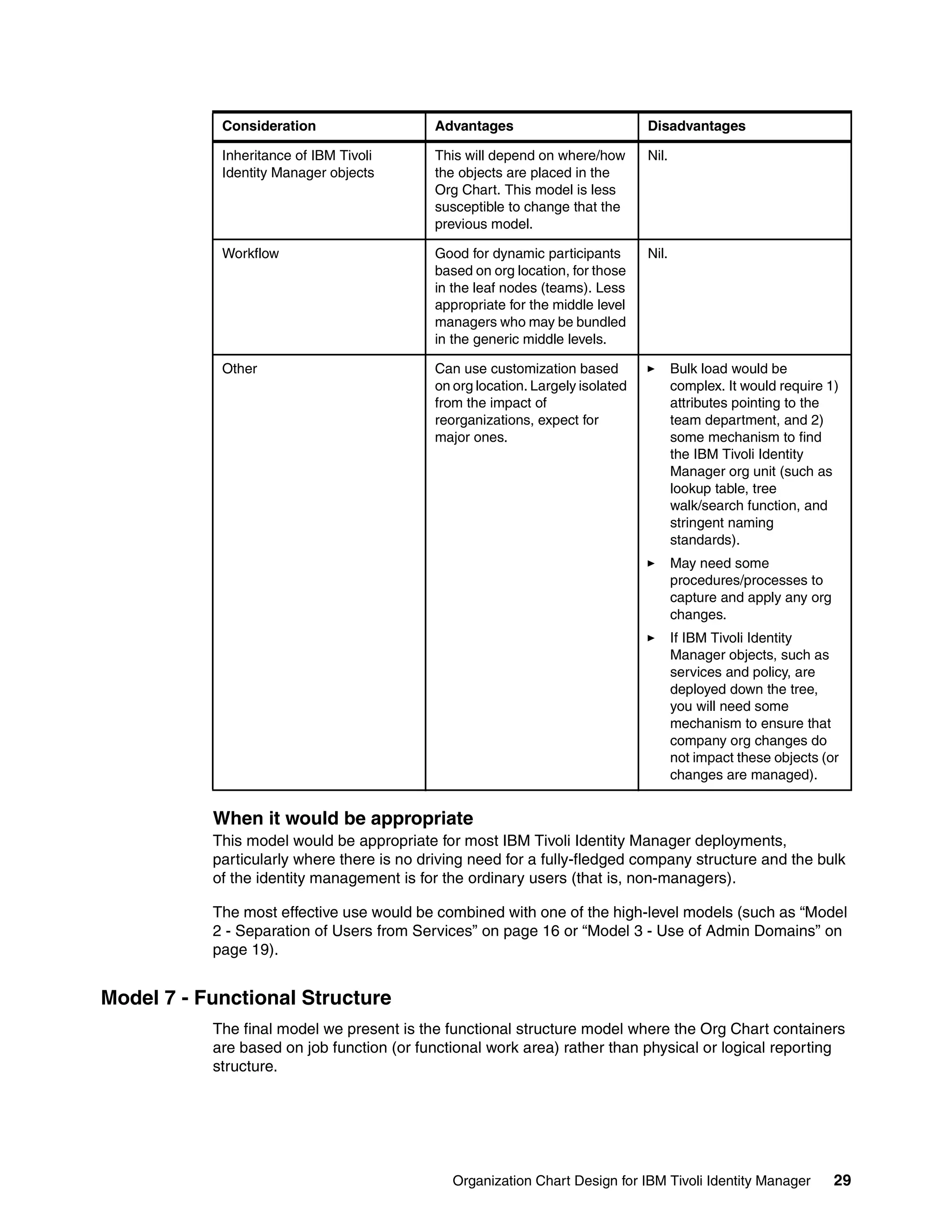
Model 7 - Functional Structure
           The final model we present is the functional structure model where the Org Chart containers
           are based on job function (or functional work area) rather than physical or logical reporting
           structure.


                                               Organization Chart Design for IBM Tivoli Identity Manager           29
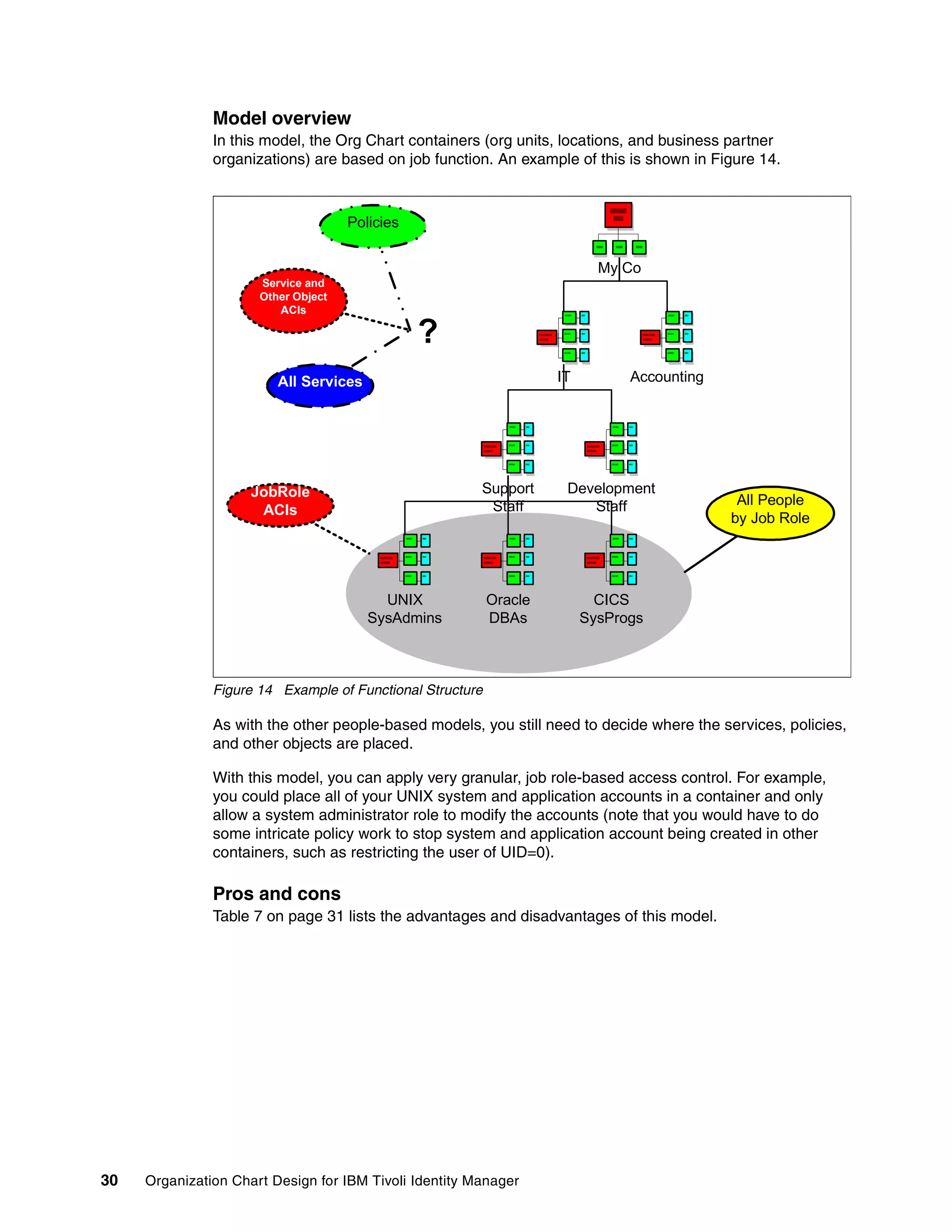
Model overview
               In this model, the Org Chart containers (org units, locations, and business partner
               organizations) are based on job function. An example of this is shown in Figure 14.


                                     Policies


                                                                           My Co
                      Service and
                      Other Object
                         ACIs

                                                ?
                         All Services                               IT         Accounting


                     JobRole                            Support      Development
                                                         Staff          Staff                All People
                      ACIs
                                                                                            by Job Role


                                          UNIX             Oracle          CICS
                                        SysAdmins          DBAs          SysProgs


               Figure 14 Example of Functional Structure

               As with the other people-based models, you still need to decide where the services, policies,
               and other objects are placed.

               With this model, you can apply very granular, job role-based access control. For example,
               you could place all of your UNIX system and application accounts in a container and only
               allow a system administrator role to modify the accounts (note that you would have to do
               some intricate policy work to stop system and application account being created in other
               containers, such as restricting the user of UID=0).

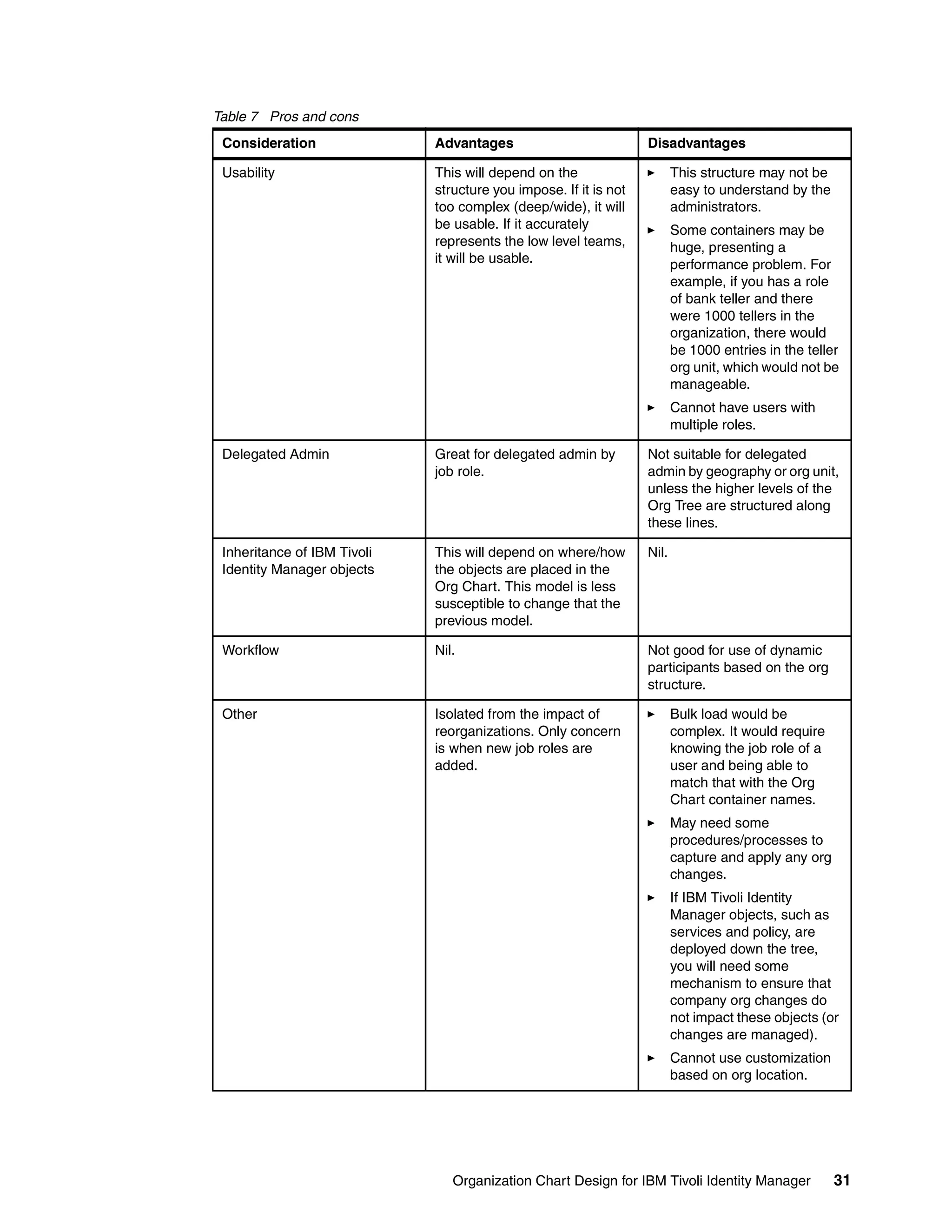
               Pros and cons
               Table 7 on page 31 lists the advantages and disadvantages of this model.


30   Organization Chart Design for IBM Tivoli Identity Manager
Table 7 Pros and cons
 Consideration               Advantages                           Disadvantages

 Usability                   This will depend on the                     This structure may not be
                             structure you impose. If it is not          easy to understand by the
                             too complex (deep/wide), it will            administrators.
                             be usable. If it accurately                 Some containers may be
                             represents the low level teams,             huge, presenting a
                             it will be usable.                          performance problem. For
                                                                         example, if you has a role
                                                                         of bank teller and there
                                                                         were 1000 tellers in the
                                                                         organization, there would
                                                                         be 1000 entries in the teller
                                                                         org unit, which would not be
                                                                         manageable.
                                                                         Cannot have users with
                                                                         multiple roles.

 Delegated Admin             Great for delegated admin by         Not suitable for delegated
                             job role.                            admin by geography or org unit,
                                                                  unless the higher levels of the
                                                                  Org Tree are structured along
                                                                  these lines.

 Inheritance of IBM Tivoli   This will depend on where/how        Nil.
 Identity Manager objects    the objects are placed in the
                             Org Chart. This model is less
                             susceptible to change that the
                             previous model.

 Workflow                    Nil.                                 Not good for use of dynamic
                                                                  participants based on the org
                                                                  structure.

 Other                       Isolated from the impact of                 Bulk load would be
                             reorganizations. Only concern               complex. It would require
                             is when new job roles are                   knowing the job role of a
                             added.                                      user and being able to
                                                                         match that with the Org
                                                                         Chart container names.
                                                                         May need some
                                                                         procedures/processes to
                                                                         capture and apply any org
                                                                         changes.
                                                                         If IBM Tivoli Identity
                                                                         Manager objects, such as
                                                                         services and policy, are
                                                                         deployed down the tree,
                                                                         you will need some
                                                                         mechanism to ensure that
                                                                         company org changes do
                                                                         not impact these objects (or
                                                                         changes are managed).
                                                                         Cannot use customization
                                                                         based on org location.


                                Organization Chart Design for IBM Tivoli Identity Manager            31
When it would be appropriate
               Before deploying this model, you need a good understanding of an organization’s job roles.
               Many companies cannot detail all their job roles.

               This model would be appropriate where job role based provisioning or access control was the
               overriding requirement. It is more likely to be combined with another model. For example, you
               may need to deploy a logical Org Chart with job role based "leaf nodes" rather than teams.


Recommended approaches
               There is no standard Org Chart template that can be applied to every IBM Tivoli Identity
               Manager deployment. Each customer has a unique set of requirements and what might be a
               major consideration for one customer may not be relevant to another. You need to work
               through the requirements that pertain to the Org Chart. You may come up with an Org Chart
               that meets all requirements, but you probably will not. You may need to iterate through the
               design process and compromise on the Org Chart structure or customer requirements, or
               both, until both the designer and customer are in agreement.

               To start the design process, after reviewing the requirements, you need an initial design.
               What model, or combination of models, do you choose? The requirements should give you a
               direction to take. For example, there may be some distributed administration requirements, or
               some usability requirements.

               IBM Tivoli Identity Manager deployments have a number of standard phases. It is rare to
               deploy all IBM Tivoli Identity Manager functionality all at once. There is often a pilot or Proof
               of Concept phase, prior to purchasing the software or committing resources to the
               deployment. The first pieces of functionality deployed are either user self-service for
               password resets or centralized administration of identities (or both together). This may be
               combined with some workflow, HR integration, and some policies, or these may be a
               separate step. Delegated or distributed admin may be a subsequent phase, with automated
               role-based provisioning being the ultimate goal for many customers. Each of these phases
               has characteristics that can help define the Org Chart design.

               The following sections look at a number of deployment phases, the characteristics of the
               phase, and a recommended Org Chart approach. These should form a starting point for the
               Org Chart design when working through the requirements.


Pilot or Proof of Concept
               The aim of a Proof of Concept or pilot is normally to demonstrate the capabilities of a solution
               to meet a set of requirements against a limited set of resources. For an IBM Tivoli Identity
               Manager PoC or pilot, you are normally building a system to demonstrate identity
               management functionality to a customer or senior management with a limited set of users.
               The key difference between a PoC and a pilot is that with a pilot, the deployment may remain
               in place and be expanded on for subsequent phases, whereas a PoC system is normally
               discarded after the PoC project.

               Thus general characteristics of a PoC or pilot are:
                  Likely to deploy most of IBM Tivoli Identity Manager's functionality, including policy,
                  delegated administration, workflow, HR-feed, usability, and reporting.
                  Will only be loading a subset of users, so the entire company Org Chart is not normally
                  required.


32   Organization Chart Design for IBM Tivoli Identity Manager
Not normally concerned with ownership or control of IBM Tivoli Identity Manager objects; a
   number of IBM Tivoli Identity Manager Administrators can be defined for this.

The design can be very simple and straightforward. There are two major considerations:
   What functionality needs to be demonstrated and what is the most effective (or simplest)
   org structure to do that?
   Will the design move forward into production and be extended, or will it be discarded at
   the end of the project?

Let us assume that a PoC will be for all users in the systems area, with a systems support
area (with a UNIX team, a systems management team, and a Windows® team) and an
operations area (with system ops and help desk).

The PoC will demonstrate all functionality, including role-based provisioning, with some
delegated administration of the help desk staff to the help desk team leads. The system will
be discarded after the PoC.

As we were not concerned with ownership or control of IBM Tivoli Identity Manager objects,
only delegated administration, all services, policy, and other objects can reside at the IBM
Tivoli Identity Manager org root. The org structure may look like Figure 15.


                                 Service and                              Policies
                                 Other Object
                                    ACIs


                                                                     All Services
                                                          My Co
                             Person/
                             Account                                                 All People
                              ACIs


                                                      Systems


                                                                                     Person/
                                                                                     Account
                              Systems                             Operations          ACIs
                              Support


                 Windows     Systems             UNIX         Operation        HelpDesk
                 Support    Management          Support        Support


Figure 15 Example of PoC Org Chart

In this design, the access model calls for one set of admins to have administrative rights to all
users, so there is a set of people/account ACIs at the systems level. There is also a set of
ACIs defined for the HelpDesk org unit, specifically for the HelpDesk Supervisor role. All
policies, services, and other objects are located in the root (organization) container for
simplicity.


                                     Organization Chart Design for IBM Tivoli Identity Manager    33
If this set of requirements were for a pilot that would remain in use at the end of the project,
                 you have to consider how to manage the non-people objects and how to manage the people
                 objects. It is easy to move users from one part of the Org Tree to another, but you cannot
                 easily move services, policies and other objects. So if the pilot remains, our advice is to
                 establish a design that can go forward for the policies, services, and other objects, but not
                 worry about the people containers, as they can be moved later.

                 This lends itself to the use of admin domains or splitting the tree into services and people
                 branches, as shown Figure 16.


                                        Service and
                                        Other Object
                                           ACIs

                                                                                                Person/
                                                                                                Account
                                                                  My Co                          ACIs
                             Policies


                          All Services

                                                       Services                People

                                              Services
                                              Structure

                                                                                                 All People


                                                                     Systems


                                                                                                  Person/
                                                                                                  Account
                                           Systems                             Operations          ACIs
                                           Support


                        Windows          Systems              UNIX        Operation         HelpDesk
                        Support         Management           Support       Support


Figure 16 Example of pilot Org Chart

                 The services branch of the Org Tree would contain all services, policies, and other objects
                 along with their ACIs. The structure would depend on the requirements for management and
                 ownership of the services and so on.

                 When moving from the pilot phase to a subsequent phase, the services branch could remain
                 intact, while a new people branch was built to suit the production rollout requirements.


34    Organization Chart Design for IBM Tivoli Identity Manager
Centralized admin and user self-service
           Normally, the key business driver for an IBM Tivoli Identity Manager project is reduced
           account management cost through user self-service of passwords (leading to reduced help
           desk costs) and centralized account management using a single tool. The aim of a project to
           deploy IBM Tivoli Identity Manager for user self-service and centralized admin is for a quick
           return on investment (ROI) by deploying one or both of these functions, to either a significant
           subset of the employee base or the entire employee base.

           Thus, the characteristics of this deployment phase are:
              Rapid deployment, requiring simple configuration and minimal if any customization.
              Loading of the entire user population (or a major portion of it) at implementation time and
              procedures (manual or automatic) to keep the IBM Tivoli Identity Manager user population
              up to date.
              No need for delegated administration, so the access model is centralized.

           From an Org Chart design perspective, this means:
              Keep it simple. There is no need for complex access control models, so you do not need
              to replicate the entire company org structure.
              A need to be able to bulk load users and locate them in the tree. If there is a small user
              population (tens or hundreds of users), it may be acceptable to load all users into a single
              container and manually move them into their correct containers. For a large user
              population, they will need to be loaded into their correct containers based on user
              attributes supplied by the HR system. If you only have employee numbers or surnames,
              then you may need to use them to build the containers.
              The ordinary users (those that will only use IBM Tivoli Identity Manager to reset their
              passwords) don't see the Org Chart. The administrators only need a simple structure to
              enable them to locate and work with users. If a automated HR feed mechanism is used,
              there is no need for the administrators to navigate the Org Tree.
              As this will likely be the first stage of an IBM Tivoli Identity Manager rollout, you need to
              consider management of services and other objects. As mentioned above, it is easy to
              move users around in the tree, but much harder to move services and policies.

           Our recommendations would be to:
           1. Deploy admin domains or a people/services split high in the Org Chart for management of
              objects for this and subsequent phases.
           2. Within the people branch, use a simple structure based on a common piece of data, such
              as the surname (family name). This model is easy to deploy, requires very little placement
              rule coding for the HR load, and is very usable.

           An example of this is shown in Figure 17 on page 36.


                                               Organization Chart Design for IBM Tivoli Identity Manager      35
Service and
                                        Other Object
                                           ACIs

                                                                                               Person/
                                                                                               Account
                             Policies                             My Co                         ACIs


                          All Services

                                                       Services             People

                                              Services
                                              Structure
                                                                                               All People


                                          Permanent                          Contractors


                        Perm A-H           Perm I-P          Perm Q-Z     Contr A-M        Contr N-Z


Figure 17 Example of simple centralized admin and user self service Org Chart

                 Note that this structure is similar to Figure 16 on page 34 and lends itself to simple migration
                 from a pilot project into the initial deployment.

                 The services branch of the Org Tree would contain all services, policies, and other objects
                 along with their ACIs. The structure would depend on the requirements for management and
                 ownership of the services, and so on.

                 The person structure is largely based on the information available in the HR feed and the
                 number of users in each container. You would need to do some analysis on the data before
                 confirming the structure.

                 As with the pilot structure, when moving to another phase and deploying a more complex
                 structure, you can leave the people branch (or admin domain) as it is, build the new person
                 structure, and then move the users into the new structure.


Subsequent phases
                 The design of the Org Chart for subsequent phases will depend largely on the functionality
                 being deployed and the Org Chart constraints that are imposed. If you are deploying some

36    Organization Chart Design for IBM Tivoli Identity Manager
workflow and more complex provisioning policy, but retaining centralized admin and manual
           role assignment, you may be able to continue to use the existing design. If you are deploying
           fully automated role-based provisioning with delegated administration, you will need to spend
           some time on the redesign.

           We would suggest that any large scale production deployment with a reasonable level of
           functionality and different administrative roles have the following structure:
           1. A high-level split into either services/people or admin domains (perhaps with a
              services/people split under that). This separates identity management from management
              of the solution.
           2. A person container structure that will be user attribute based (as in the section above), a
              strict representation of the company reporting structure, a logical simplified representation
              of the company structure (reporting, geographic, LOB, and so on), or functional. Which of
              these is used, or which combination, will depend on the requirements of the deployment
              and the constraints imposed by the model (such as complexity, usability, level of
              customization required, and so on).


A final thought
           Be very careful of conflicting requirements within the enterprise.

           Your pilot group may have a requirement that account creation/modification must be
           approved by a person's supervisor. Great! We will implement an Org Tree that represents the
           supervisor relationship so approvals will work.

           But you may find out that the next group you talk to also wants to do supervisor approvals, but
           for them supervisor does not mean team lead, it means department manager. And the next
           group you talk to sends all approvals to regional IT managers regardless of what department
           the person works for.

           What we are trying to say is that even if you are doing a phased rollout, the Org Tree is
           something that requires the input of everyone, not just the group you are rolling out in phase
           1. If the enterprise is just too big to get a consensus on the tree structure, then you must be
           very careful about anything that is implemented at the top of the tree and build in a
           reasonable amount of flexibility into the design.


The team that wrote this Redpaper
           This Redpaper was produced by a team of specialists from around the world working at the
           International Technical Support Organization, Austin Center.

           David Edwards is an IBM Certified Consulting IT Specialist with the Asia-Pacific Tivoli
           Support Team and is based in Melbourne, Australia. He has been with IBM/Tivoli for six years
           working with the Tivoli security products. He has 17 years IT experience in a variety of roles,
           including COBOL application developer, CICS® systems programmer, and systems
           management consultant. He holds a degree in Science from Monash University and a
           graduate diploma in Computer Science from Swinburne University. He has authored two
           previous Redbooks, including Enterprise Security Management with Tivoli, and has published
           a number of papers on the Tivoli security products.

           Axel Buecker is a Certified Consulting Software I/T Specialist at the International Technical
           Support Organization, Austin Center. He writes extensively and teaches IBM classes
           worldwide on areas of Software Security Architecture. He holds a degree in computer science
           from the University of Bremen, Germany. He has 18 years of experience in a variety of areas


                                               Organization Chart Design for IBM Tivoli Identity Manager   37
related to Workstation and Systems Management, Network Computing, and e-business
               solutions. Before joining the ITSO in March 2000, Axel was working for IBM in Germany as a
               Senior I/T Specialist in Software Security Architecture.


38   Organization Chart Design for IBM Tivoli Identity Manager
Notices

This information was developed for products and services offered in the U.S.A.

IBM may not offer the products, services, or features discussed in this document in other countries. Consult
your local IBM representative for information on the products and services currently available in your area.
Any reference to an IBM product, program, or service is not intended to state or imply that only that IBM
product, program, or service may be used. Any functionally equivalent product, program, or service that does
not infringe any IBM intellectual property right may be used instead. However, it is the user's responsibility to
evaluate and verify the operation of any non-IBM product, program, or service.

IBM may have patents or pending patent applications covering subject matter described in this document. The
furnishing of this document does not give you any license to these patents. You can send license inquiries, in
writing, to:
IBM Director of Licensing, IBM Corporation, North Castle Drive Armonk, NY 10504-1785 U.S.A.

The following paragraph does not apply to the United Kingdom or any other country where such
provisions are inconsistent with local law: INTERNATIONAL BUSINESS MACHINES CORPORATION
PROVIDES THIS PUBLICATION "AS IS" WITHOUT WARRANTY OF ANY KIND, EITHER EXPRESS OR
IMPLIED, INCLUDING, BUT NOT LIMITED TO, THE IMPLIED WARRANTIES OF NON-INFRINGEMENT,
MERCHANTABILITY OR FITNESS FOR A PARTICULAR PURPOSE. Some states do not allow disclaimer of
express or implied warranties in certain transactions, therefore, this statement may not apply to you.

This information could include technical inaccuracies or typographical errors. Changes are periodically made
to the information herein; these changes will be incorporated in new editions of the publication. IBM may make
improvements and/or changes in the product(s) and/or the program(s) described in this publication at any time
without notice.

Any references in this information to non-IBM Web sites are provided for convenience only and do not in any
manner serve as an endorsement of those Web sites. The materials at those Web sites are not part of the
materials for this IBM product and use of those Web sites is at your own risk.

IBM may use or distribute any of the information you supply in any way it believes appropriate without
incurring any obligation to you.

Information concerning non-IBM products was obtained from the suppliers of those products, their published
announcements or other publicly available sources. IBM has not tested those products and cannot confirm the
accuracy of performance, compatibility or any other claims related to non-IBM products. Questions on the
capabilities of non-IBM products should be addressed to the suppliers of those products.

This information contains examples of data and reports used in daily business operations. To illustrate them
as completely as possible, the examples include the names of individuals, companies, brands, and products.
All of these names are fictitious and any similarity to the names and addresses used by an actual business
enterprise is entirely coincidental.

COPYRIGHT LICENSE:
This information contains sample application programs in source language, which illustrates programming
techniques on various operating platforms. You may copy, modify, and distribute these sample programs in
any form without payment to IBM, for the purposes of developing, using, marketing or distributing application
programs conforming to the application programming interface for the operating platform for which the sample
programs are written. These examples have not been thoroughly tested under all conditions. IBM, therefore,
cannot guarantee or imply reliability, serviceability, or function of these programs. You may copy, modify, and
distribute these sample programs in any form without payment to IBM for the purposes of developing, using,
marketing, or distributing application programs conforming to IBM's application programming interfaces.


© Copyright IBM Corp. 2004. All rights reserved.                                                               39
This document created or updated on October 12, 2004.

Send us your comments in one of the following ways:                                                      ®
  Use the online Contact us review redbook form found at:
  ibm.com/redbooks
  Send your comments in an email to:
  redbook@us.ibm.com
  Mail your comments to:
  IBM Corporation, International Technical Support Organization
  Dept. JN9B Building 003 Internal Zip 2834
  11400 Burnet Road
  Austin, Texas 78758-3493 U.S.A.


Trademarks
The following terms are trademarks of the International Business Machines Corporation in the United States,
other countries, or both:

  AIX®                                 IBM®                               Tivoli®
  CICS®                                Redbooks (logo)     ™

The following terms are trademarks of other companies:

Java and all Java-based trademarks and logos are trademarks or registered trademarks of Sun
Microsystems, Inc. in the United States, other countries, or both.

Windows and the Windows logo are trademarks of Microsoft Corporation in the United States, other countries,
or both.

UNIX is a registered trademark of The Open Group in the United States and other countries.

Other company, product, and service names may be trademarks or service marks of others.


40    Organization Chart Design for IBM Tivoli Identity Manager

Organization chart design for ibm tivoli identity manager redp3920

  • 1.
    Redbooks Paper David Edwards Axel Buecker Organization Chart Design for IBM Tivoli Identity Manager Preface The need for this Redpaper rose out of design workshops and customer presentations. One area that lacks documented knowledge is on the design of the IBM® Tivoli® Identity Manager Organization Chart (Org Chart). This previous lack of documentation was sometimes an obstacle to enabling consultants to design an effective IBM Tivoli Identity Manager implementation. The aim of the document is provide information to assist in the effective design of the IBM Tivoli Identity Manager Org Chart. It covers the design considerations, details some approaches, and then makes some recommendations based on typical deployment strategies. It is not intended to present a set of standard designs that can be used as is; there will always need to be a design process to ensure the solution is right for the particular deployment. The document is targeted at senior consultants and architects involved in the IBM Tivoli Identity Manager solution design. It assumes an understanding of IBM Tivoli Identity Manager at both a functional and technical level and uses standard IBM Tivoli Identity Manager terminology without explanation. The information in this document is generic for the IBM Tivoli Identity Manager 4.x releases (enRole 4.x, IBM Tivoli Identity Manager 4.3/4.4, and IBM Tivoli Identity Manager 4.5.x). Where there is version-specific information, the versions will be highlighted. As a background for this document, you may want to review the following documents: The IBM Tivoli Identity Manager product manuals can be found on the IBM Tivoli Information Centre Web site (http://publib.boulder.ibm.com/tividd/td/IdentityManager4.5.1.html). Of particular relevance is the IBM Tivoli Identity Manager Policy and Organization Administration Guide V4.5.1, SC32-1149. The redbook Identity Management Design Guide with IBM Tivoli Identity Manager, SG24-6996, which is available for download at the Redbooks Web site (http://www.redbooks.ibm.com). © Copyright IBM Corp. 2004. All rights reserved. ibm.com/redbooks 1
  • 2.
    The document usesthe terms Org Chart and Org Tree interchangeably, depending on the context. When talking about the entire chart, the term Org Chart is more appropriate, but when talking about specifics, such as navigation, the term Org Tree makes more sense. Please direct any comments or corrections to davidedw@au1.ibm.com. Introduction IBM Tivoli Identity Manager is the premier identity provisioning solution on the market today. It provides significant functionality in the areas of centralized administration of identity on disparate targets, delegated administration, user self-service, extensible workflow to support business processes, and reporting. Central to most of this functionality is the IBM Tivoli Identity Manager Organizational Chart, often referred to as the Org Chart or Org Tree. The Org Chart is a logical structure within the IBM Tivoli Identity Manager directory and provides a means of locating IBM Tivoli Identity Manager objects, such as users, and enabling inheritance for policies and other objects. The correct design of the IBM Tivoli Identity Manager Org Chart is critical to the success of an IBM Tivoli Identity Manager deployment. This document looks at the design of the IBM Tivoli Identity Manager Org Chart. The first section of the document discusses design considerations for the Org Chart (what you should consider and what is relevant for your deployment). Some of the topics include usability, object inheritance, and delegated administration. The second section presents a number of standard Org Chart models that have been used in the past. For each one, we present an overview of the model and then a discussion of the pros and cons of the model and when it would be appropriate to use. The final section of the document looks at a number of deployment approaches and discusses which models or combination of models would be appropriate to each. This places the earlier sections in the context of your deployment and hopefully gives you the information you need to design an effective Org Chart. Design considerations This section looks at the considerations for designing the Org Chart, that is, what is relevant to your deployment and what you need to consider. The areas of consideration are usability, delegated administration, inheritance of IBM Tivoli Identity Manager objects, workflow, customization, the use of admin domains, and hosting multiple tenants. Usability IBM Tivoli Identity Manager is an administrative tool, that is, a means for organizations to administer identity. There may be a significant level of user interface with IBM Tivoli Identity Manager by people of varying technical ability, so usability may be a key concern. Search vs. Org Tree navigation Before considering usability issues for the Org Tree, you need to decide whether the tree will be needed for this deployment. How will the administrators work with IBM Tivoli Identity Manager, particularly, how will they work with users (people)? One way is to search through the tree until you find the appropriate container (org unit and so on) and add a new user or modify an existing user. Depending on how you structure the Org Chart, this may be acceptable or not (see “Scrolling vs. drilling” on page 3). 2 Organization Chart Design for IBM Tivoli Identity Manager
  • 3.
    The other approachis to use the search function to locate existing users and then work with them. What about adding new users? If you are using some form of automated HR feed to load users, then there will never (or rarely) be a need to use the UI to add a user. If this is the approach for the deployment, then the Org Chart design considerations are not relevant. There are a number of usability considerations detailed in the following sections, including: The effort required (for example, number of mouse clicks) the admin has to do to get their job done The number of lines to display The performance of the system, that is, the amount of time waiting for something to happen Scrolling vs. drilling There are a number of limitations on the volume of data that can be displayed on the user interface and these limitations are exacerbated by the display size. You can fit more data on a 1280x1024 display than you can on an 800x600 display. Figure 1 shows the IBM Tivoli Identity Manager user interface on an 800x600 display. Figure 1 IBM Tivoli Identity Manager on an 800x600 display The display is already scrolling even without significant Org Chart content (that is, the standard menu and task items require more than 800x600). Many organizations deploy a wide org structure, where a manager has many direct reports, as shown in Figure 2 on page 4. Organization Chart Design for IBM Tivoli Identity Manager 3
  • 4.
    CEO North West South East Public Audit International IT Accounting HR Legal Region Region Region Region Relations Figure 2 Wide organization structure If you deploy this structure into IBM Tivoli Identity Manager, you run the risk of the org units going off a single vertical page. This means the administrator will have to scroll to move between units. The current working location is not held, so if the admin logs off (or the session times out) and logs back in, the display will be the top of the tree, not where they were. If the administrators are likely to log out/in frequently, then a wide structure will be annoying to work with. Many organizations deploy a deep structure, with many levels of management and each having only a few direct reports, as shown in Figure 3. CEO Corporate Regions Infrastructure Affairs East North West South Legal IT Region Region Region Region International South South Accounting Branches Sales Audit HR Hobart Adelaide Melbourne South South Branches Branches Branches Sales#1 Sales#2 Public Relations Essendon City Ringwood Figure 3 Deep organization structure If you deploy this org structure into IBM Tivoli Identity Manager, your administrators will spend a lot of time drilling down (expanding each level). For example, an admin logs into IBM Tivoli Identity Manager and wants to work with a user in the Ringwood branch office. To get to the user the admin will need to drill down to CEO → Regions → South Region → South Branches → Melbourne Branches → Ringwood. There is no "expand all" function within IBM Tivoli Identity Manager, so every time an admin wants to get to another org unit, they may have to drill down the various levels. So if the organization to be modelled is anything more than a few pages wide (that is, there will need to be vertical scrolling) and more than a few levels deep, then scrolling and drilling-down is impractical and you should consider the needs of the user of the search function and the need for a user load (HR feed) process. 4 Organization Chart Design for IBM Tivoli Identity Manager
  • 5.
    The number oflines per page The user interface has a parameter that controls the number of lines of data displayed on a page. This does not affect the Org Chart itself, but it does affect the display of the objects in the Org Chart containers. For example, in Figure 1 on page 3, there are more than ten objects in the My Company organization container, and the display variable is set to ten, so when the UI is rendered, the objects display will be paginated, showing only the first ten. For a large container (such as hundreds or thousands of users in an org unit), there will be many pages of objects to click through to find a particular object. IBM Tivoli Identity Manager will only get ten pages at a time, so if you know the object you want is on page 25, you will have to go to page 10, click Next, go to page 20, click Next, and then go to page 25. This is unusable for large numbers of objects in any container. The number of lines per page relates to the screen size. If the administrators are going to use 800x600 screens, then there is little value in setting the number of lines per page to more than ten, as the administrator will spend a lot of time scrolling. Some customers may be happy to scroll and set the number of lines per page to a large number to reduce pagination. So if the administrators are to navigate the tree (rather than using the search function), the number of objects in any one container should be kept to a minimum, certainly less than ten pages worth. Performance Another usability factor is performance. Much of this is controlled by hardware sizing and tuning parameters, but Org Chart design can have an impact on this. The following Org Chart-related parameters can have an impact on performance: Number of users in a container: This topic was discussed earlier. The greater the number of users in a container (such as org unit), the longer it will take for IBM Tivoli Identity Manager to retrieve the users, paginate them, and display the list. Number of containers under another container: That is, the width of the tree under a particular branch. This is the same as the number of users under a container. Number of lines displayed on a page: This also affects how long IBM Tivoli Identity Manager takes to render a page. The more lines per page, the more information IBM Tivoli Identity Manager has to display on a page. The only significant one of these will be the number of users in a container. You are more likely to get hundreds of users in an org unit than you are to get hundred of teams under a single department. If there is a need for large user containers (as a result of other Org Chart design considerations), then this needs to be factored into the performance requirements and hardware design. Delegated administration Delegated administration is implemented in IBM Tivoli Identity Manager by tying access control to the Org Chart and using the ACI inheritance. By delegated admin, we normally mean granting a set of administrator's access rights to a subset of the user base. Tied to this is the design of the Org Chart for efficient delineation of control (that is, having different levels of admins for the same group of users). Prior to looking at the Org Chart design, you need to define the administrative roles, the scope of those roles (user base and type of administrative access), and who will belong to the roles. This will feed into the Org Chart design. Depending on the other requirements for the Organization Chart Design for IBM Tivoli Identity Manager 5
  • 6.
    Org Chart, theremay need to be some rationalization of roles to keep the Org Chart from becoming too complex and unwieldy. The next section summarizes ACIs and Groups as they relate to the Org Chart. ACIs and IBM Tivoli Identity Manager groups An ACI controls user access by defining the access privileges of an IBM Tivoli Identity Manager group or ACI principal. Members of an IBM Tivoli Identity Manager group or an ACI principal can view and perform operations on attributes within a target class (context), as defined by the scope of the ACI. The scope of an ACI will be either single-level or sub-tree, and apply to the branch of the Org Tree in which the ACI is placed. Thus, the location of the ACI in the Org Chart is relevant. ACIs grant or deny the ability to perform various functions. Managers can provision and manage persons in their organizational unit based on their level of access. This role-based access is for IBM Tivoli Identity Manager users assigned to the IBM Tivoli Identity Manager groups. Groups have no hierarchical implication; they can be placed anywhere in the Org Chart. There is an exception to this: the IBM Tivoli Identity Manager Administrators are not affected by ACIs. They have access to all functions and all objects. The standard IBM Tivoli Identity Manager access model is: 1. All access is denied by default. 2. An explicit grant of access overrides this (for example, granted access to modify password). 3. An explicit deny of access overrides the explicit grant. So if you have not been given access to something, you will not have access to it. Even if you have been granted access to something, you may also be explicitly denied access to it, so you will not be able to access it. How do you design the Org Chart with this access model in mind? There are a number of considerations, discussed in the following sections: Design for distributed administration: Where there are a number of similar admin roles applying to different parts of the organization Design for deferent levels of administration: Where administrators have the same scope of users, but different levels of access. Associated with this is the design for manageability, that is, controlling access to other object in IBM Tivoli Identity Manager (such as policies and organization roles). This is mentioned in later sections of the document. Use of Admin Domains to simplify the access control model. The goal with ACI design is to keep it simple. You could place as many ACIs as there are combinations of objects, attributes, and containers, but this represents the worst case with hundreds or thousands of ACIs. This is not manageable. Design for distributed administration There are often cases, particularly in large geographically dispersed organizations, where there are local admins or help desks and their centralized counterparts. The local admins may only work 9 am to 5 pm Monday through Friday with a central team available 24x7. In most cases their people have the same type of access, such as password reset and new account creation, over different sets of users. Using the example shown in Figure 3 on 6 Organization Chart Design for IBM Tivoli Identity Manager
  • 7.
    page 4, letus say we have admins in Melbourne, Adelaide, and Hobart that perform password reset for the users in their area (including the sub-branches), and we have a central help desk that performs the same function across the entire organization. How do the ACI requirements affect the Org Chart design? First, we cannot apply ACIs based on a person's attributes; it has to be based on their location in the Org Tree. IBM Tivoli Identity Manager does not have the means to apply a dynamic ACI like "if their location = Melbourne, or their parent location = Melbourne, apply the Melbourne ACIs”. So the Org Chart must in some way represent the geographic area. The simplest way to do this is to apply a geographic-based model to the Org Chart. Figure 4 shows a simple ACI model for this. MyCo South North East West Melbourne Adelaide Hobart Sydney Canberra City Ringwood Essendon Woden Civic Melbourne GRANT Canberra GRANT password reset ACI password reset ACI Figure 4 ACIs by geographic dispersion So there would be a "grant password" ACI for each of the regional centres, each with an IBM Tivoli Identity Manager group associated with it. What about the central admins? You could either attach the IBM Tivoli Identity Manager group for the central admins to each of the regional center ACI s or create an ACI across the entire organization and associate it with their IBM Tivoli Identity Manager group. The latter would be the simplest and isolate the central admins from any org structure changes. What if there are overriding requirements for a functional Org Chart, but we still need to apply these role requirements? Then it becomes more complex, as shown in Figure 5 on page 8. Organization Chart Design for IBM Tivoli Identity Manager 7
  • 8.
    MyCo Sales HR Accts IT Essendon MelbCity Ringwood Woden CbrCivic Essendon MelbCity Ringwood CbrCivic Woden Sales Sales Sales Sales Sales Accts Accts Accts Accts Accts Melbourne GRANT Canberra GRANT password reset ACI’s password reset ACI’s Figure 5 ACIs by functional dispersion In this case, there are discrete ACIs on each node in the tree. Note also that there has to be a separate container (for example, org unit) for each set of users that a discrete ACI will apply to. This represents a very complex model that would be hard to manage and there may have to be a trade-off with some other design considerations. Design for levels of administrators In addition to delegated administration for different parts of the organization, there is often a need for different levels of administration for the same sets of users. For example, if all identities are centrally managed, you may have senior admins, junior admins, and password-reset help desk roles. This scenario may be mixed with delegated administration, allowing different types of administrative roles to be applied to different parts of the organization. Ordinarily, defining different administrative roles for a branch of the organization does not have any implication on the structure of the Org Chart. You just define different ACIs at the appropriate level in the tree and associate them with role-based IBM Tivoli Identity Manager groups. The exception to this is where there are different types of users to which different ACIs must apply. For example, most platforms have system or application accounts in addition to user accounts. These are normally managed by the system or application administrators, rather than help desk staff. If a decision has been made to manage system and application accounts within IBM Tivoli Identity Manager, and there are different administrative roles to apply to them, you need to consider how you will structure the Org Chart to facilitate this. Figure 6 on page 9 shows an Org Chart structure that separates the system accounts from the user accounts. 8 Organization Chart Design for IBM Tivoli Identity Manager
  • 9.
    MyCo Systems Users UNIX Windows Div01 Div02 Woden Civic AIX001 HPUX002 Sol003 Div02 User Acct ACI UNIX System Acct. ACI Figure 6 ACIs for separation of system and user accounts There is a major branch of the tree dedicated to systems (accounts) and another dedicated to the ordinary users (employees, contractors, and so on). This allows a set of ACIs to be applied to the systems accounts and another to the user accounts. The example shows a specific ACI for the management of UNIX® accounts that would be associated with the system administrators in the UNIX team and another ACI for general user account management that would be associated with the central administrators. This is only one example of how this requirement could be met. Design for IBM Tivoli Identity Manager Management The final access control consideration for the Org Chart is controlling the management of the IBM Tivoli Identity Manager objects, such as policies, organization roles, IBM Tivoli Identity Manager groups, and so on. What considerations apply to the management of the objects and the Org Chart? It comes down to who will manage the objects and what access control will be applied to the objects. Will the same role create/modify/delete services, provisioning policies, and organization roles? Or will the systems administrators be responsible for the services and another role look after the organization roles and provisioning policies? These will dictate which ACIs should be applied. However, as the objects have their own ACIs, you can still locate all of the objects in the same container in the tree. For example, you could have one IBM Tivoli Identity Manager Group for service management and another for org role and provisioning policy management. The first IBM Tivoli Identity Manager Group would map to an "Organizational Role"-specific ACI. The second IBM Tivoli Identity Manager Group would map to a "Service" ACI and a "Provisioning Policy" ACI. ACIs can be applied to specific service classes, so you can have a set of ACIs for Solaris servers and ACIs for AIX® servers in the same container. If you have services of the same Organization Chart Design for IBM Tivoli Identity Manager 9
  • 10.
    type requiring differentaccess control, such as production Solaris servers and non-production Solaris servers, you will need to place them in different buckets and apply different ACIs. The need to manage different types of users with different access roles (whether the delineation is geographic or functional) may be a key consideration for Org Chart design. The use of admin domains Admin domains are described in Chapter 12, “Admin Domains”, of the IBM Tivoli Identity Manager Policy and Organization Administration Guide V4.5.1, SC32-1149 as follows. IBM Tivoli Identity Manager Server allows organizations to create and administer different divisions of an organization as separate entities with their own policies, services, ACIs, and so on. Each division is an admin domain and can have its own administrator that cannot administer or view other admin domains' policies, services, ACIs, and so on. The domain administrator can define and manage provisioning entities, policies, services, workflow definitions, roles, and users within his or her own admin domain. Domain administrators cannot see entities and subunits in other admin domains. Domain administrators also do not have access to services or accounts, either. However, they can create an ACI to allow themselves (and users in their domain) to have access to services and accounts. Domain administrators can perform only administrative tasks. Domain administrators cannot perform system configuration tasks. The admin domains feature is also a people-based management feature, as domain administrators can manage person entities only within their own admin domain. Thus, admin domains are a means to simplify the delegated administrative model. If you have a requirement to separate parts of the organization into discrete identity management domains, you could either do it with an extensive set of ACIs on the different branches, or you could define admin domains with the inherent domain-only access control. For managing multiple tenants, such as in an outsourcing arrangement, use of admin domains may be appropriate. Hierarchical behavior of IBM Tivoli Identity Manager objects Many of the key functional aspects of IBM Tivoli Identity Manager rely on the scope of influence of objects within the Org Chart, that is, the objects listed below, when placed in the Org Tree, will have a scope that influences other IBM Tivoli Identity Manager objects in only that branch of the tree (single level) or in all branches of the tree below, including this one (sub-tree scope). This includes: Provisioning Policy: The granting of entitlement to accounts and attributes Service Selection Policy: Deciding which service instance a person is entitled to based on some combination of the person's attributes (such as their location in the tree) Identity Policy: Determining the user ID for account creation Password Policy: Determining password strength rules OS/Location Supervisors: Determining a "supervisor" workflow participant Admin domain administrator: When determining a "domain administrator" workflow participant The ramifications on the Org Chart of these are discussed in the following sections. 10 Organization Chart Design for IBM Tivoli Identity Manager
  • 11.
    Provisioning policy andorganization roles There are three IBM Tivoli Identity Manager objects involved ion this area: services, provisioning policies, and organization roles. The Org Chart considerations for these objects are that the services must be at or below the level of the policy, and that the roles and persons can anywhere in relation to the policies, services and each other. So the provisioning policies, organization roles, and services can be anywhere in the Org Chart, but the provisioning policy must be at the same level or higher than the related service. There are two types of organization roles, static and dynamic. Static organization roles can be anywhere in the org tree and any person can be (manually) attached to them. The dynamic organization roles, where membership is based on an LDAP filter and membership is thus dynamic, have a scope relative to their position in the tree. The scope can be single where it only applies to users in the local container, or sub-tree where it applies to the local container and all sub containers. The logic of membership to dynamic organization roles is that any organization roles that apply will be attached to the user, not the one closest in the tree. For example, let's say there is a tree with organization roles as shown below: ou=divisonA (org_role_A) +- ou=deptAA (org_role_AA) +- ou=branchAAA (org_role_AAA) If each of these organization roles had a scope of sub-tree and an LDAP filter like (objectclass=*) then a person located in ou=branchAAA will have all three organization roles; org_role_A, org_role_AA, and org_role_AAA. So if you want a discrete dynamic organization role to apply to users based on their location in the tree, you may need to consider placing them in the leaf nodes (containers), making the LDAP filter very specific or making the organization role scope be single. The placement of services, provisioning policies, and organization roles for management are covered in “Design for IBM Tivoli Identity Manager Management” on page 9. Service selection policies Service selection policies extend the ability of provisioning policies by providing the ability to provision accounts based on person attributes. In order for a service selection policy to be enforced, a provisioning policy must target it. The service selection policy then identifies the service type to target and defines provisioning based on a JavaScript. The service selection policy can be located in the same container as the provisioning policy or in a container located above the provisioning policy's container. The scope of a service selection policy determines which provisioning policies can target it. Service selection policies with single scope can only be targeted by provisioning policies at the same level in the organization tree as the service selection policy. Service selection policies with sub-tree scope can be targeted by provisioning policies at the same level or below the service selection policy. The service selection policies use JavaScript to determine which service should be used. The logic in the JavaScript normally uses person object attributes to determine the service to use, often the person's location in the Org Chart. For example, if the user is to be associated with their local Windows NT Primary Domain Controller in a geographically dispersed organization, then a service selection policy would have to be written to determine the person’s geographic location. This could come from a person object attribute (for example, a Organization Chart Design for IBM Tivoli Identity Manager 11
  • 12.
    location attribute) ortheir location in the Org Tree (if the tree has been structured geographically). The placement of objects for management is covered in “Design for IBM Tivoli Identity Manager Management” on page 9. So there are no Org Chart restrictions in relation to user, only in relation to the associated provisioning policies. However, you may need to consider the structure of the Org Chart if the service selection policy will be based on the location in the tree. Identity policies and password policies Identity and password policies should be at the same level or higher than the services they are applied to. However, the current versions of the product may display some confusing behavior relating to this (that is, there is a bug). Identity and password policies can be global, specific to a service profile, or specific to a service instance. There is a scope argument for them (single-level or sub-tree), but this does not appear to apply in the 4.5 release of IBM Tivoli Identity Manager. The placement of objects for management is covered in “Design for IBM Tivoli Identity Manager Management” on page 9. Workflow Workflow is used to align the technical functionality within IBM Tivoli Identity Manager with business processes. How workflow is used has ramifications on the Org Chart design. Inheritance of workflow There is no inheritance of workflows to users; a workflow does not need to be "above" the user in the Org Tree for it to apply to them. Also, there is no placement relationship between workflows and provisioning policies. The workflows can be placed anywhere in the Org Tree. The placement of objects for management is covered in “Design for IBM Tivoli Identity Manager Management” on page 9. Use of dynamic workflow participants A key component of approval workflow nodes is the participant and escalation participant. The participant is one or more signature authorities that must approve or reject the request. The participant can be an individual or a group of individuals. You can explicitly map an object instance, such as a particular IBM Tivoli Identity Manager user, as a participant. Or you can use one of the dynamic participant types that are determined at execution time. The generic participants can include a requester (the person performing the action), requestee (the person the action is being performed on), service owner (owner of a service for provisioning accounts), and system administrator. The Org Chart dependant generic participants are: Sponsor (entitlement workflows only): Each business partner person or business partner organization can have a sponsor defined. When workflow is run, the sponsor appropriate to the requestee is determined from their BPPerson object or BPOrg object. Supervisor: Each person, org unit, and location can have a supervisor defined. When workflow is run, the supervisor appropriate to the requestee is determined from their person, or from the closest location or org unit object having a supervisor. 12 Organization Chart Design for IBM Tivoli Identity Manager
  • 13.
    Domain Administrator: Ifadmin domains are being used, the "domain administrator" will be determined by finding the admin domain object having an administrator that is closest to the service. This enables building of organizational workflows that can apply to all parts of the organization by using specific information that is held on the person objects, or their location containers, rather than being hard-coded in the workflow definition. From a design perspective, you need to have an understanding of how workflow is to be used in the solution. Are there common workflows that apply to all parts of the organization? For example, a request for a new account must go to the line manager first and then the owner of the system that the account is for? If this is the case, it makes sense to use generic workflow. How will the approvers be defined? Will each person have their manager defined on their person object or on the org unit (for example, a team)? If the former is used, you do not need to worry about Org Chart design. If you are going to use the latter, then the leaf nodes of the Org Tree need to be the teams that each person belongs to and their line manager needs to be defined as their supervisor/sponsor. Managing the supervisors of a container has far less administrative overhead than managing the supervisors of each user, unless some form of HR feed (including the line manager) is used. Service owners do not have any impact on the Org Chart structure. It imposes the same restrictions as the supervisors on OUs and locations. The participant is still found by searching up the tree for the first admin domain having an administrator defined. The only difference in that the search is started from the service instead of from the requestee. Other considerations While usability, access control, and object inheritance are the key considerations for Org Chart design, there are some others that may impact a particular deployment. Customization: Use of org location in scripts/programs IBM Tivoli Identity Manager offers extensive customization scope through the Java™ API. It is possible to determine the Org Tree container for an object to drive processing, such as in a custom workflow object. Customization for this would be in response to a specific customer requirement that could not be met by the normal product functionality. It is impossible to speculate what form this may take, but you should be aware of any customization requirements and if there are any implications on the Org Chart structure. Bulk load Most projects will need to have some form of bulk load when the solution is deployed into production. The IBM Tivoli Identity Manager data load mechanism (that is, DSML load) has the ability to include JavaScript to define where each new user should be placed in the tree. If you do not include a placement rule, all users will be placed into a single container, and will then have to move all of the users into their correct Org Tree container. This may be an appropriate approach. If, however, you want to load users into their correct Org Tree container, you will need to code some JavaScript to use some attribute in the incoming person data to determine the location. This may place a restriction on your Org Chart and the naming of the Org Chart containers. Organization Chart Design for IBM Tivoli Identity Manager 13
  • 14.
    Updating of theOrg Chart How dynamic is the organization’s Org Chart that you are emulating in IBM Tivoli Identity Manager? If the Org Chart changes frequently, then manual changes to IBM Tivoli Identity Manager may not be appropriate and you will have to look at some programmatic way to dynamically update the Org Chart and move users around. It can be done, but it is not a trivial exercise. You could use the IBM Tivoli Identity Manager data services API, or develop something in ITDI (and generate random erGlobalIDs). If there is a requirement to dynamically update the Org Chart, you will need to revisit the other considerations. What is the implication on the ACI and inheritance models if you change containers around? Use of dynamic Org Charts will almost force you to apply inheritance and ACI models at the top of the Org Tree. Summary In summary, the following areas should be considered when designing the IBM Tivoli Identity Manager Org Chart: Usability – Will the administrators navigate the tree or use the search function? – Will the proposed design involve a great deal of scrolling and drilling? – What size screens will the administrators use, and can the number of lines per page be tuned? – What are the performance implications to the user for the proposed design? The ACI model (delegated administration) – What are the requirements for distributed administration? – What are the requirements for levels of administrators (that is, what roles)? – What are the requirements for management of the IBM Tivoli Identity Manager solution (that is, access control for the IBM Tivoli Identity Manager objects)? – Is there a requirement for multiple tenants, with discreet access control? Inheritance of IBM Tivoli Identity Manager objects – What are the requirements for provisioning policies and organizational roles? – What is the requirement for org location specific service selection policies? Workflow – What workflow is required and will it need the dynamic participants? Other considerations – Is there special org location specific customization? – How will the initial bulk load be handled and how are users to be placed in the Org Tree? – Is the Org Chart dynamic, and if so does there need to be an automated update mechanism? Like all design, the process of designing the Org Chart is an iterative process. You need to come up with a solution that meets the key requirements and tune it to meet the remaining requirements or get some agreement on not meeting the requirements. The next section details some standard models for Org Charts and ties them back to the considerations covered in this section. 14 Organization Chart Design for IBM Tivoli Identity Manager
  • 15.
    Some models forOrg Charts In this section, we discuss a number of standard models that could form a starting point for an Org Chart design. For each model, we present an overview of it, discuss the pros and cons and recommend when it would be appropriate. The simplest, and most trivial model, is where all objects (people and non-people) are in a single container (the organization). The remaining models may describe the high-level structure of the Org Chart, or detail a particular part of a structure. Thus, the models may be combined to build a solution. For example: You might deploy a strict organizational chart under the organization root in IBM Tivoli Identity Manager. You might deploy admin domains for different parts of the organization and deploy a logical structure under each. You might have a high-level split into people and services and then deploy an attribute-based person model under that. There are many combinations available, which will depend on the deployment requirements. The models listed below do not represent a complete set, merely the common ones. Model 1 - All at the Top This is the simplest model, where there is only one container, the organization, with all objects in it. Model overview This is the simplest model. It is shown in Figure 7. All Policies All People My Co All Services All ACIs Figure 7 Model 1 - All at the Top The only Org Chart container is the organization itself. All users are located there, along with all other objects (such as policies and access control). Pros and cons Table 1 lists the advantages and disadvantages of this model. Organization Chart Design for IBM Tivoli Identity Manager 15
  • 16.
    Table 1 Prosand cons Consideration Advantages Disadvantages Usability This is a very simple model and Not scalable to many users. very usable for an The org could have too many administrator. There are no users and make scrolling a issues with navigation. problem. Delegated Admin Can be used for different Not suitable for distributed levels of admins, with all admin, as all users are in ACIs defined in one place. one container. Easy to manage all IBM Cannot delineate Tivoli Identity Manager management of IBM Tivoli objects as they are all in Identity Manager objects one place. (for example, different sets of Solaris servers). Inheritance of IBM Tivoli All objects are in one container, Cannot use service selection Identity Manager objects so there are no concerns about policies based on org location. the location of services with respect to the provisioning policies. Workflow Nil Cannot use the dynamic participants based on org location. Other Bulk load is simple, as all Cannot use customization people are in one location, based on org location. so you do not need a placement rule. As there is no org structure, there are no concerns about dynamically updating the structure. When it would be appropriate This model has very limited use. It is not appropriate for a production deployment. Its use in a test or development environment is limited, although it may be useful for a unit testing environment. It is not appropriate for a training environment, demonstration environment, or Proof of Concept (PoC) environment, as you cannot demonstrate many of the key features of IBM Tivoli Identity Manager. Model 1.5 - Almost All At The Top This model is basically the same as the All at the Top model, except that all users are placed in a single OU immediately below the org. The advantage is that you can throw many users into the OU (assuming admins will search for users) without suffering a performance impact when admins go to My Organization to browse for roles. As long as no one ever focuses on the All Users OU with Manage People selected, there is no performance hit. Model 2 - Separation of Users from Services This model splits the general users from the services and systems users, so the structure is split between general identity management and management of the IBM Tivoli Identity Manager object that enable identity management. 16 Organization Chart Design for IBM Tivoli Identity Manager
  • 17.
    Model overview The model is shown in Figure 8 on page 17. Policies My Co Service and Other Object ACIs Person ACIs Services People All Services All People Services People Containers Containers Figure 8 Model 2 - Separation of Users from Services There are two top-level branches under the organization: services and people. The people branch contains all of the containers for the users, the org units, locations, and business partner organizations containing only people objects. This branch would have the ACIs granting administrators rights to manage the users and their accounts, but not other IBM Tivoli Identity Manager objects. The service branch contains all other IBM Tivoli Identity Manager objects: the service definitions, and all policy, workflow, and other non-person objects. This branch has ACIs attached for all of these objects. Under the high-level split, you can use different structures for each. For example, the services branch may be broken up by platform/application and then by level, or by owner, depending on the ACI requirements. These two examples are shown in Figure 9. Services1 Services2 UNIX Windows SAP PeopleSoft Systems Apps Prod Dev Test Test Dev Prod Windows Solaris Linux Support Support Support Figure 9 Examples of services structures Organization Chart Design for IBM Tivoli Identity Manager 17
  • 18.
    These structures willdepend on the other ACI requirements. The structure under the people branch may be based on one of the other models discussed below. Pros and cons Table 2 lists the advantages and disadvantages of this model. In many cases, they will depend on the structure under the two branches. Table 2 Pros and cons Consideration Advantages Disadvantages Usability Depends on the structure under Depends on the structure under the services and people the services and people branches. branches. Delegated Admin Great for delineating Suitability for distributed access between user administration depends on the administrators and structures under the people administrators of IBM Tivoli branch. Identity Manager. Can enable a very simple ACI model. Suitability for distributed administration depends on the structures under the people branch. Inheritance of IBM Tivoli Depends on the structure under Depends on the structure under Identity Manager objects the services and people the services and people branches. branches. Workflow Depends on the structure under Depends on the structure under the services and people the services and people branches. branches. Other Depends on the structure under Depends on the structure under the services and people the services and people branches. branches. When it would be appropriate As can be seen in Table 2, one benefit of this model is the separation of areas of responsibility into ordinary people/account management and IBM Tivoli Identity Manager management. This represents a way to simplify the access model and minimize the ACIs to be deployed and maintained. You can create ACIs to separate these roles in most org structures, but this approach can lead to simpler, more manageable ACIs. This model is really appropriate when the two areas will both use delegated admin, and the breakdown of the delegation units is different between the person and provisioning side Of itself, this is not a complete model. It needs to be combined with a services branch model and a people branch model. The people branch models are discussed in the following sections. Thus, you could use one of the following models under this high-level split or just under the org. 18 Organization Chart Design for IBM Tivoli Identity Manager
  • 19.
    Model 3 -Use of Admin Domains Admin domains can be used anywhere in the Org Tree, but it makes sense to use them at a high level to break up administration of separate business units. Model overview In this model, the Org Chart is broken up into separate "chunks", each one in an admin domain for a discrete part of the organization, as shown in Figure 10. My Co CoyA CoyB ACIs ACIs CoyA CoyB AD - CoyA AD - CoyB People People CoyA CoyB People People CoyA & Services CoyB & Services Services Services CoyA Policies CoyB Policies Figure 10 Model 3 - Use of Admin Domains In this model, you could define domain admins for each domain acting as a system administrator for all of the objects (people and non-people) in the domain. You would still need to deploy some form of detailed model in each admin domain for the people, services, and other objects. Pros and cons Table 3 lists the advantages and disadvantages of this model. In many cases, they will depend on the structure under each of the admin domains. Table 3 Pros and cons Consideration Advantages Disadvantages Usability Depends on the structure under Depends on the structure under the admin domains. the admin domains. Delegated Admin Provides for a simpler Suitability for distributed access model than if ACIs administration depends on the were used for the same structures under the admin thing. domains. Suitability for distributed administration depends on the structures under the admin domains. Organization Chart Design for IBM Tivoli Identity Manager 19
  • 20.
    Consideration Advantages Disadvantages Inheritance of IBM Tivoli Depends on the structure under Depends on the structure under Identity Manager objects the admin domains. the admin domains. Workflow Depends on the structure under Depends on the structure under the admin domains. the admin domains. Other Depends on the structure under Depends on the structure under the admin domains. the admin domains. When it would be appropriate The key benefit of this model is the simplification of the access model when you want to separate the Org Chart into logically discrete units. It would be used with one of the other models to provide a usable Org Chart design. Model 4 - User Containers Based on User Attributes In this model, the user containers are based on some attribute associated with the person object, such as their surname or employee number. It is not concerned with the services or other objects, just the people. Model overview This model puts users into containers based on some common attribute. For example: Containers based on the first letter of the surname Containers based on user type where the user type is available information (for example, contractors have employee number Cnnnnn, permanent employees are Pnnnnn, and part timers are Xnnnnn). Figure 11 shows an example of containers based on person information. 20 Organization Chart Design for IBM Tivoli Identity Manager
  • 21.
    Policies My Co Service and Person ACIs Other Object ACIs Services People All People All Services People People People A-C D-F G-Z Figure 11 Model 4 - User Containers Based on User Attributes The people containers can be sized according to the specific deployments. The model means all person ACIs and policies are at a higher level, so changes to the people containers will have little impact. Note that Figure 11 on page 21 combines this model with Model 2 (see “Model 2 - Separation of Users from Services” on page 16). You could put this model under admin domains or directly under root. Pros and cons Table 4 lists the advantages and disadvantages of this model. Table 4 Pros and cons Consideration Advantages Disadvantages Usability This model can be very usable May have problems for very if the appropriate user attribute large deployments. You may is used. If the admins are used end up with many levels and to working with employee containers to keep the number numbers or surnames, that of users per container down. should be the basis for the containers. Organization Chart Design for IBM Tivoli Identity Manager 21
  • 22.
    Consideration Advantages Disadvantages Delegated Admin Suitable for distributed admin if Not suitable for distributed user management is by admin if user management employee type or some other is by geography or user attribute. company org structure. Model is not good for the management of services and other no-person objects. Need to place them either at the root (like Model 1) or in a separate services branch (like Model 2). Inheritance of IBM Tivoli Model requires all objects to be Model requires all objects to be Identity Manager objects located higher in the tree or in a located higher in the tree or in a separate branch. separate branch. Workflow Nil. Cannot use the dynamic participants based on org location. Other Bulk load is simple, as all Cannot use customization people are in an easily based on org location. determined location, so you can code a simple placement rule. The structure is independent of the organization’s structure, so no changes are required when the org changes. When it would be appropriate This is a great model for the early stages of a deployment, where some of the more advanced IBM Tivoli Identity Manager functionality (such as RBAC) has not been deployed. It is particularly useful for the bulk load function. If used with the person/services split model (Model 2), it will meet the needs of many first IBM Tivoli Identity Manager deployments. Model 5 - Traditional Organization Structure This model represents the accurate replication of the company org structure within the IBM Tivoli Identity Manager Org Chart. Model overview In this model, the company's management Org Chart is replicated in the IBM Tivoli Identity Manager Org Chart. Every business unit, department, and team is included from the CEO/board, down to the individual teams are included with the reporting structure providing the hierarchy. This is the structure many customers envisage when they see the IBM Tivoli Identity Manager Org Chart for the first time. The exact structure would depend on the company. The structure is purely people- and reporting chain-based. Before applying the model, you would need to consider: 22 Organization Chart Design for IBM Tivoli Identity Manager
  • 23.
    Where are thepeople located? Obviously the team members would be in their respective teams, but what about managers and their assistants? Is there sufficient data in the HR feed to correctly place users in their containers? If you do not have any org-related attributes in the HR feed, you will have to manually allocate (and later move) users to containers, representing a significant manual overhead and risk of error. What about non-people accounts, such as system accounts? Are they to be managed in the IBM Tivoli Identity Manager solution? If so, what container do they go in? Where will the services be located? What are the access control requirements? Where will the ACIs need to go and will the ACI model be too complex to manage? Where will the other objects, such as policy, go? How will the structure be maintained? Is there some sort of HR feed available to drive the IBM Tivoli Identity Manager Org Chart changes? Will there be users in multiple parts of the organization at any one time? For example, project resources may be part of a team, but also below to a project structure. A person in IBM Tivoli Identity Manager can only exist in one container, so if there are these types of people, and organization-based model may not be appropriate. These issues need to be resolved prior to deploying this model. Most organizations have a very large and complex Org Chart with many levels of management. It will take a significant amount of time to build (unless some customization is used) and will be hard to change (again unless some customization is used). Pros and cons Table 5 lists the advantages and disadvantages of this model. Table 5 Pros and cons Consideration Advantages Disadvantages Usability As the structure accurately Will be large and unwieldy from represents the organization, a navigation perspective. admins can associate people Admins would have to use with their true team/org search, and automated HR location. feed would be a must for adding new users. Delegated Admin Suitable for distributed admin if Not suitable for distributed user management is by admin if user management organizational structure, that is, is by geography or other divisions/major departments non-reporting chain map to distributed admin structure. model. Model is not good for the management of services and other no-person objects. Need to place them either at the root, in a separate services branch (like Model 2), or admin domain (like Model 3). Organization Chart Design for IBM Tivoli Identity Manager 23
  • 24.
    Consideration Advantages Disadvantages Inheritance of IBM Tivoli Nil. Dynamic nature of the structure Identity Manager objects (that is, company's org structure changes frequently) means that IBM Tivoli Identity Manager objects (such as policy) need to be high up in the tree to isolate them from change (or extensive customization developed for reorg that handle policy changes). Workflow Great for dynamic participants Nil. based on org location (if something, or someone, is keeping the container supervisors correct and up-to-date). Other Can use customization based Bulk load would be on org location. complex. It would require 1) attributes pointing to the team department, and 2) some mechanism to find the IBM Tivoli Identity Manager org unit (such as lookup table, tree walk/search function, or stringent naming standards) Org structure changes would need to be automated to reduce the risk of the IBM Tivoli Identity Manager org structure being out-of-synch with the company org structure. If IBM Tivoli Identity Manager objects, such as services and policy, are deployed down the tree, you will need some mechanism to ensure that company org changes do not impact these objects (or changes are managed). When it would be appropriate In general, we do not think that this model is appropriate for any deployment. IBM Tivoli Identity Manager is not the right tool for a company Org Chart repository. A normal directory is far better for that. With this model, the disadvantages outweigh the advantages. You may have to deploy significant customization to keep the tree in synch with the company org structure and manage any policy/services deployed into the Org Tree. It is large and unwieldy to work with 24 Organization Chart Design for IBM Tivoli Identity Manager
  • 25.
    as an administrator.It may help with the access model, but in many customers the access model does not follow the reporting structure fully. A better approach would be to combine one of the high-level models (such as “Model 2 - Separation of Users from Services” on page 16 or “Model 3 - Use of Admin Domains” on page 19) with one of the simplified models described in the following sections (see “Model 6 - Simplified Logical Structure” on page 25 or “Model 7 - Functional Structure” on page 29) Model 6 - Simplified Logical Structure In this model, the traditional org structure is generalized to give a simplified structure. Model overview In most organizations, the Org Chart changes often. These changes may range from changing some team names and managers, to reorganizing the entire company. In all of these changes that are two constants: 1. Everyone still reports to the CEO/board at the top level (even though the number and type of reports often change) 2. At the lowest level, employees still work for a manager in a team, even though the team name and manager may change. From an IBM Tivoli Identity Manager perspective, you may not need a complete Org Chart. For example, if you are only concerned with access control by division or geography, it may make sense to deploy the IBM Tivoli Identity Manager Org Chart along divisional or geographic lines. While many organizations have unique names for the divisions, they will generally have the lines of business divisions (such as Retail, Sales, Marketing, Development, and so on) and infrastructure divisions (such IT, HR, Accounting, and so on). You could model your customer organization along these primary high-level divisions, simplify the middle levels of management, and detail the actual teams of people. This model is shown in Figure 12. Organization Chart Design for IBM Tivoli Identity Manager 25
  • 26.
    Services ? Most My Co Policies Senior Managers and Assistants Most ACIs Generic High-level Divisions Sales HR IT Some Policies Midlevel Managers and Assistants Some Simplified Middle-levels ACIs of organisation Head Systems Office NW Region PR All other people Discrete Teams UNIX Corp Support Brisbane SAP Accts Branch Devt. Rec Office Project Figure 12 Model 6- Simplified Logical Structure In this model, you still need to be concerned with the placement of services, policies, and other objects. You also need to consider the access model. How hard will it be to apply access control for distributed administration to your proposed model? An example simplified logical structure is shown in Figure 13. 26 Organization Chart Design for IBM Tivoli Identity Manager
  • 27.
    My Co Sales Marketing IT Development HR Applications Systems Network Security Project Project Application Systems Systems Help Desk Operations TeamB TeamA Support Management Support PeopleSoft Notes SAP Linux UNIX Desktop Support Support Support Systems Systems Systems Figure 13 Example of Simplified Logical Structure In this example, the org structure has been simplified along logical division lines, with the departments split into major departments and minor departments, and discrete teams at the lowest level. As long as the organization does not drastically change the way they work, this model will survive most company restructures. If a team changes its place in the organization, there will need to be some manual intervention to move the team to a new location in the logical structure. Simple team moves, such as from one branch of the tree to another and a rename, can be automated through IDI or directory modifications, so long as there are not inheritance issues. A variation on the model There is a variant on this model that is worth considering, that is, to have the global admins define the structure down to some level (say the "simplified middle levels" in the above example). This would probably be the most granular level that can be reliably determined from the HR data, or maybe one level above that. Then delegate to each mid-level group the ability to define any structure they want below that. Some teams will choose to do nothing, while others will go wild with structure. What has been done to implement this model without HR feed problems is to create all new users at the root of the mid-level team's subtree, or create a special New Users OU in each of Organization Chart Design for IBM Tivoli Identity Manager 27
  • 28.
    the mid-level organizationsto use as an HR feed drop-off bucket. It is then up to the delegated admins in each of the mid-level orgs to manually transfer the people who show up in their New Users bucket to the person's correct location in their subtree. You need to do some modifications in the HR feed's placement rules to prevent the feed from moving modified users back to the New Users bucket. You can easily do this by having the placement rules look for the erParent attribute on the user. It is null for new users; in that case, the rules would figure out which New Users bucket to place them into. For existing users, the placement rules can return an empty string, which will update the user's attributes, but not move them from their current location. This is a very useful model for big orgs because it makes it easy to tackle each business unit or department separately. The departments with the inclination (and budget) can buy some consulting time to design their department level tree structure. It avoids designing the complete tree structure around the pilot business unit's supervisor approval or help desk ACI requirements, only to find out that another division of the company has completely conflicting requirements. Another option with this model is to replace some of the manual transfer of users from the New Users containers with department level HR feeds. These feeds could use the department's New Users container as the source of the feed data, and implement the department's own placement rules for their subtree. Pros and cons Table 6 lists the advantages and disadvantages of this model. Table 6 Pros and cons Consideration Advantages Disadvantages Usability This will depend on the If not designed properly it may structure you impose. If it is not be large and unwieldy, too complex (deep/wide), it will requiring use of searching be usable. If it accurately rather than tree navigation. represents the low level teams, it will be usable. Delegated Admin Suitable for distributed admin if Not suitable when the user management is aligned to access model does not the structure you deploy, that is, match the logical model, divisions/major department's such as when there are map to distributed admin different admin model. requirements for different types of users in each team. The model is not good for the management of services and other no-person objects. Need to place them either at the root, in a separate services branch (like Model 2) or admin domain (like Model 3). 28 Organization Chart Design for IBM Tivoli Identity Manager
  • 29.
    Consideration Advantages Disadvantages Inheritance of IBM Tivoli This will depend on where/how Nil. Identity Manager objects the objects are placed in the Org Chart. This model is less susceptible to change that the previous model. Workflow Good for dynamic participants Nil. based on org location, for those in the leaf nodes (teams). Less appropriate for the middle level managers who may be bundled in the generic middle levels. Other Can use customization based Bulk load would be on org location. Largely isolated complex. It would require 1) from the impact of attributes pointing to the reorganizations, expect for team department, and 2) major ones. some mechanism to find the IBM Tivoli Identity Manager org unit (such as lookup table, tree walk/search function, and stringent naming standards). May need some procedures/processes to capture and apply any org changes. If IBM Tivoli Identity Manager objects, such as services and policy, are deployed down the tree, you will need some mechanism to ensure that company org changes do not impact these objects (or changes are managed). When it would be appropriate This model would be appropriate for most IBM Tivoli Identity Manager deployments, particularly where there is no driving need for a fully-fledged company structure and the bulk of the identity management is for the ordinary users (that is, non-managers). The most effective use would be combined with one of the high-level models (such as “Model 2 - Separation of Users from Services” on page 16 or “Model 3 - Use of Admin Domains” on page 19). Model 7 - Functional Structure The final model we present is the functional structure model where the Org Chart containers are based on job function (or functional work area) rather than physical or logical reporting structure. Organization Chart Design for IBM Tivoli Identity Manager 29
  • 30.
    Model overview In this model, the Org Chart containers (org units, locations, and business partner organizations) are based on job function. An example of this is shown in Figure 14. Policies My Co Service and Other Object ACIs ? All Services IT Accounting JobRole Support Development Staff Staff All People ACIs by Job Role UNIX Oracle CICS SysAdmins DBAs SysProgs Figure 14 Example of Functional Structure As with the other people-based models, you still need to decide where the services, policies, and other objects are placed. With this model, you can apply very granular, job role-based access control. For example, you could place all of your UNIX system and application accounts in a container and only allow a system administrator role to modify the accounts (note that you would have to do some intricate policy work to stop system and application account being created in other containers, such as restricting the user of UID=0). Pros and cons Table 7 on page 31 lists the advantages and disadvantages of this model. 30 Organization Chart Design for IBM Tivoli Identity Manager
  • 31.
    Table 7 Prosand cons Consideration Advantages Disadvantages Usability This will depend on the This structure may not be structure you impose. If it is not easy to understand by the too complex (deep/wide), it will administrators. be usable. If it accurately Some containers may be represents the low level teams, huge, presenting a it will be usable. performance problem. For example, if you has a role of bank teller and there were 1000 tellers in the organization, there would be 1000 entries in the teller org unit, which would not be manageable. Cannot have users with multiple roles. Delegated Admin Great for delegated admin by Not suitable for delegated job role. admin by geography or org unit, unless the higher levels of the Org Tree are structured along these lines. Inheritance of IBM Tivoli This will depend on where/how Nil. Identity Manager objects the objects are placed in the Org Chart. This model is less susceptible to change that the previous model. Workflow Nil. Not good for use of dynamic participants based on the org structure. Other Isolated from the impact of Bulk load would be reorganizations. Only concern complex. It would require is when new job roles are knowing the job role of a added. user and being able to match that with the Org Chart container names. May need some procedures/processes to capture and apply any org changes. If IBM Tivoli Identity Manager objects, such as services and policy, are deployed down the tree, you will need some mechanism to ensure that company org changes do not impact these objects (or changes are managed). Cannot use customization based on org location. Organization Chart Design for IBM Tivoli Identity Manager 31
  • 32.
    When it wouldbe appropriate Before deploying this model, you need a good understanding of an organization’s job roles. Many companies cannot detail all their job roles. This model would be appropriate where job role based provisioning or access control was the overriding requirement. It is more likely to be combined with another model. For example, you may need to deploy a logical Org Chart with job role based "leaf nodes" rather than teams. Recommended approaches There is no standard Org Chart template that can be applied to every IBM Tivoli Identity Manager deployment. Each customer has a unique set of requirements and what might be a major consideration for one customer may not be relevant to another. You need to work through the requirements that pertain to the Org Chart. You may come up with an Org Chart that meets all requirements, but you probably will not. You may need to iterate through the design process and compromise on the Org Chart structure or customer requirements, or both, until both the designer and customer are in agreement. To start the design process, after reviewing the requirements, you need an initial design. What model, or combination of models, do you choose? The requirements should give you a direction to take. For example, there may be some distributed administration requirements, or some usability requirements. IBM Tivoli Identity Manager deployments have a number of standard phases. It is rare to deploy all IBM Tivoli Identity Manager functionality all at once. There is often a pilot or Proof of Concept phase, prior to purchasing the software or committing resources to the deployment. The first pieces of functionality deployed are either user self-service for password resets or centralized administration of identities (or both together). This may be combined with some workflow, HR integration, and some policies, or these may be a separate step. Delegated or distributed admin may be a subsequent phase, with automated role-based provisioning being the ultimate goal for many customers. Each of these phases has characteristics that can help define the Org Chart design. The following sections look at a number of deployment phases, the characteristics of the phase, and a recommended Org Chart approach. These should form a starting point for the Org Chart design when working through the requirements. Pilot or Proof of Concept The aim of a Proof of Concept or pilot is normally to demonstrate the capabilities of a solution to meet a set of requirements against a limited set of resources. For an IBM Tivoli Identity Manager PoC or pilot, you are normally building a system to demonstrate identity management functionality to a customer or senior management with a limited set of users. The key difference between a PoC and a pilot is that with a pilot, the deployment may remain in place and be expanded on for subsequent phases, whereas a PoC system is normally discarded after the PoC project. Thus general characteristics of a PoC or pilot are: Likely to deploy most of IBM Tivoli Identity Manager's functionality, including policy, delegated administration, workflow, HR-feed, usability, and reporting. Will only be loading a subset of users, so the entire company Org Chart is not normally required. 32 Organization Chart Design for IBM Tivoli Identity Manager
  • 33.
    Not normally concernedwith ownership or control of IBM Tivoli Identity Manager objects; a number of IBM Tivoli Identity Manager Administrators can be defined for this. The design can be very simple and straightforward. There are two major considerations: What functionality needs to be demonstrated and what is the most effective (or simplest) org structure to do that? Will the design move forward into production and be extended, or will it be discarded at the end of the project? Let us assume that a PoC will be for all users in the systems area, with a systems support area (with a UNIX team, a systems management team, and a Windows® team) and an operations area (with system ops and help desk). The PoC will demonstrate all functionality, including role-based provisioning, with some delegated administration of the help desk staff to the help desk team leads. The system will be discarded after the PoC. As we were not concerned with ownership or control of IBM Tivoli Identity Manager objects, only delegated administration, all services, policy, and other objects can reside at the IBM Tivoli Identity Manager org root. The org structure may look like Figure 15. Service and Policies Other Object ACIs All Services My Co Person/ Account All People ACIs Systems Person/ Account Systems Operations ACIs Support Windows Systems UNIX Operation HelpDesk Support Management Support Support Figure 15 Example of PoC Org Chart In this design, the access model calls for one set of admins to have administrative rights to all users, so there is a set of people/account ACIs at the systems level. There is also a set of ACIs defined for the HelpDesk org unit, specifically for the HelpDesk Supervisor role. All policies, services, and other objects are located in the root (organization) container for simplicity. Organization Chart Design for IBM Tivoli Identity Manager 33
  • 34.
    If this setof requirements were for a pilot that would remain in use at the end of the project, you have to consider how to manage the non-people objects and how to manage the people objects. It is easy to move users from one part of the Org Tree to another, but you cannot easily move services, policies and other objects. So if the pilot remains, our advice is to establish a design that can go forward for the policies, services, and other objects, but not worry about the people containers, as they can be moved later. This lends itself to the use of admin domains or splitting the tree into services and people branches, as shown Figure 16. Service and Other Object ACIs Person/ Account My Co ACIs Policies All Services Services People Services Structure All People Systems Person/ Account Systems Operations ACIs Support Windows Systems UNIX Operation HelpDesk Support Management Support Support Figure 16 Example of pilot Org Chart The services branch of the Org Tree would contain all services, policies, and other objects along with their ACIs. The structure would depend on the requirements for management and ownership of the services and so on. When moving from the pilot phase to a subsequent phase, the services branch could remain intact, while a new people branch was built to suit the production rollout requirements. 34 Organization Chart Design for IBM Tivoli Identity Manager
  • 35.
    Centralized admin anduser self-service Normally, the key business driver for an IBM Tivoli Identity Manager project is reduced account management cost through user self-service of passwords (leading to reduced help desk costs) and centralized account management using a single tool. The aim of a project to deploy IBM Tivoli Identity Manager for user self-service and centralized admin is for a quick return on investment (ROI) by deploying one or both of these functions, to either a significant subset of the employee base or the entire employee base. Thus, the characteristics of this deployment phase are: Rapid deployment, requiring simple configuration and minimal if any customization. Loading of the entire user population (or a major portion of it) at implementation time and procedures (manual or automatic) to keep the IBM Tivoli Identity Manager user population up to date. No need for delegated administration, so the access model is centralized. From an Org Chart design perspective, this means: Keep it simple. There is no need for complex access control models, so you do not need to replicate the entire company org structure. A need to be able to bulk load users and locate them in the tree. If there is a small user population (tens or hundreds of users), it may be acceptable to load all users into a single container and manually move them into their correct containers. For a large user population, they will need to be loaded into their correct containers based on user attributes supplied by the HR system. If you only have employee numbers or surnames, then you may need to use them to build the containers. The ordinary users (those that will only use IBM Tivoli Identity Manager to reset their passwords) don't see the Org Chart. The administrators only need a simple structure to enable them to locate and work with users. If a automated HR feed mechanism is used, there is no need for the administrators to navigate the Org Tree. As this will likely be the first stage of an IBM Tivoli Identity Manager rollout, you need to consider management of services and other objects. As mentioned above, it is easy to move users around in the tree, but much harder to move services and policies. Our recommendations would be to: 1. Deploy admin domains or a people/services split high in the Org Chart for management of objects for this and subsequent phases. 2. Within the people branch, use a simple structure based on a common piece of data, such as the surname (family name). This model is easy to deploy, requires very little placement rule coding for the HR load, and is very usable. An example of this is shown in Figure 17 on page 36. Organization Chart Design for IBM Tivoli Identity Manager 35
  • 36.
    Service and Other Object ACIs Person/ Account Policies My Co ACIs All Services Services People Services Structure All People Permanent Contractors Perm A-H Perm I-P Perm Q-Z Contr A-M Contr N-Z Figure 17 Example of simple centralized admin and user self service Org Chart Note that this structure is similar to Figure 16 on page 34 and lends itself to simple migration from a pilot project into the initial deployment. The services branch of the Org Tree would contain all services, policies, and other objects along with their ACIs. The structure would depend on the requirements for management and ownership of the services, and so on. The person structure is largely based on the information available in the HR feed and the number of users in each container. You would need to do some analysis on the data before confirming the structure. As with the pilot structure, when moving to another phase and deploying a more complex structure, you can leave the people branch (or admin domain) as it is, build the new person structure, and then move the users into the new structure. Subsequent phases The design of the Org Chart for subsequent phases will depend largely on the functionality being deployed and the Org Chart constraints that are imposed. If you are deploying some 36 Organization Chart Design for IBM Tivoli Identity Manager
  • 37.
    workflow and morecomplex provisioning policy, but retaining centralized admin and manual role assignment, you may be able to continue to use the existing design. If you are deploying fully automated role-based provisioning with delegated administration, you will need to spend some time on the redesign. We would suggest that any large scale production deployment with a reasonable level of functionality and different administrative roles have the following structure: 1. A high-level split into either services/people or admin domains (perhaps with a services/people split under that). This separates identity management from management of the solution. 2. A person container structure that will be user attribute based (as in the section above), a strict representation of the company reporting structure, a logical simplified representation of the company structure (reporting, geographic, LOB, and so on), or functional. Which of these is used, or which combination, will depend on the requirements of the deployment and the constraints imposed by the model (such as complexity, usability, level of customization required, and so on). A final thought Be very careful of conflicting requirements within the enterprise. Your pilot group may have a requirement that account creation/modification must be approved by a person's supervisor. Great! We will implement an Org Tree that represents the supervisor relationship so approvals will work. But you may find out that the next group you talk to also wants to do supervisor approvals, but for them supervisor does not mean team lead, it means department manager. And the next group you talk to sends all approvals to regional IT managers regardless of what department the person works for. What we are trying to say is that even if you are doing a phased rollout, the Org Tree is something that requires the input of everyone, not just the group you are rolling out in phase 1. If the enterprise is just too big to get a consensus on the tree structure, then you must be very careful about anything that is implemented at the top of the tree and build in a reasonable amount of flexibility into the design. The team that wrote this Redpaper This Redpaper was produced by a team of specialists from around the world working at the International Technical Support Organization, Austin Center. David Edwards is an IBM Certified Consulting IT Specialist with the Asia-Pacific Tivoli Support Team and is based in Melbourne, Australia. He has been with IBM/Tivoli for six years working with the Tivoli security products. He has 17 years IT experience in a variety of roles, including COBOL application developer, CICS® systems programmer, and systems management consultant. He holds a degree in Science from Monash University and a graduate diploma in Computer Science from Swinburne University. He has authored two previous Redbooks, including Enterprise Security Management with Tivoli, and has published a number of papers on the Tivoli security products. Axel Buecker is a Certified Consulting Software I/T Specialist at the International Technical Support Organization, Austin Center. He writes extensively and teaches IBM classes worldwide on areas of Software Security Architecture. He holds a degree in computer science from the University of Bremen, Germany. He has 18 years of experience in a variety of areas Organization Chart Design for IBM Tivoli Identity Manager 37
  • 38.
    related to Workstationand Systems Management, Network Computing, and e-business solutions. Before joining the ITSO in March 2000, Axel was working for IBM in Germany as a Senior I/T Specialist in Software Security Architecture. 38 Organization Chart Design for IBM Tivoli Identity Manager
  • 39.
    Notices This information wasdeveloped for products and services offered in the U.S.A. IBM may not offer the products, services, or features discussed in this document in other countries. Consult your local IBM representative for information on the products and services currently available in your area. Any reference to an IBM product, program, or service is not intended to state or imply that only that IBM product, program, or service may be used. Any functionally equivalent product, program, or service that does not infringe any IBM intellectual property right may be used instead. However, it is the user's responsibility to evaluate and verify the operation of any non-IBM product, program, or service. IBM may have patents or pending patent applications covering subject matter described in this document. The furnishing of this document does not give you any license to these patents. You can send license inquiries, in writing, to: IBM Director of Licensing, IBM Corporation, North Castle Drive Armonk, NY 10504-1785 U.S.A. The following paragraph does not apply to the United Kingdom or any other country where such provisions are inconsistent with local law: INTERNATIONAL BUSINESS MACHINES CORPORATION PROVIDES THIS PUBLICATION "AS IS" WITHOUT WARRANTY OF ANY KIND, EITHER EXPRESS OR IMPLIED, INCLUDING, BUT NOT LIMITED TO, THE IMPLIED WARRANTIES OF NON-INFRINGEMENT, MERCHANTABILITY OR FITNESS FOR A PARTICULAR PURPOSE. Some states do not allow disclaimer of express or implied warranties in certain transactions, therefore, this statement may not apply to you. This information could include technical inaccuracies or typographical errors. Changes are periodically made to the information herein; these changes will be incorporated in new editions of the publication. IBM may make improvements and/or changes in the product(s) and/or the program(s) described in this publication at any time without notice. Any references in this information to non-IBM Web sites are provided for convenience only and do not in any manner serve as an endorsement of those Web sites. The materials at those Web sites are not part of the materials for this IBM product and use of those Web sites is at your own risk. IBM may use or distribute any of the information you supply in any way it believes appropriate without incurring any obligation to you. Information concerning non-IBM products was obtained from the suppliers of those products, their published announcements or other publicly available sources. IBM has not tested those products and cannot confirm the accuracy of performance, compatibility or any other claims related to non-IBM products. Questions on the capabilities of non-IBM products should be addressed to the suppliers of those products. This information contains examples of data and reports used in daily business operations. To illustrate them as completely as possible, the examples include the names of individuals, companies, brands, and products. All of these names are fictitious and any similarity to the names and addresses used by an actual business enterprise is entirely coincidental. COPYRIGHT LICENSE: This information contains sample application programs in source language, which illustrates programming techniques on various operating platforms. You may copy, modify, and distribute these sample programs in any form without payment to IBM, for the purposes of developing, using, marketing or distributing application programs conforming to the application programming interface for the operating platform for which the sample programs are written. These examples have not been thoroughly tested under all conditions. IBM, therefore, cannot guarantee or imply reliability, serviceability, or function of these programs. You may copy, modify, and distribute these sample programs in any form without payment to IBM for the purposes of developing, using, marketing, or distributing application programs conforming to IBM's application programming interfaces. © Copyright IBM Corp. 2004. All rights reserved. 39
  • 40.
    This document createdor updated on October 12, 2004. Send us your comments in one of the following ways: ® Use the online Contact us review redbook form found at: ibm.com/redbooks Send your comments in an email to: redbook@us.ibm.com Mail your comments to: IBM Corporation, International Technical Support Organization Dept. JN9B Building 003 Internal Zip 2834 11400 Burnet Road Austin, Texas 78758-3493 U.S.A. Trademarks The following terms are trademarks of the International Business Machines Corporation in the United States, other countries, or both: AIX® IBM® Tivoli® CICS® Redbooks (logo) ™ The following terms are trademarks of other companies: Java and all Java-based trademarks and logos are trademarks or registered trademarks of Sun Microsystems, Inc. in the United States, other countries, or both. Windows and the Windows logo are trademarks of Microsoft Corporation in the United States, other countries, or both. UNIX is a registered trademark of The Open Group in the United States and other countries. Other company, product, and service names may be trademarks or service marks of others. 40 Organization Chart Design for IBM Tivoli Identity Manager