Oracle Human
Resources (Payroll)
Overview
Introduction to Oracle Payroll
Part of Oracle Human Resources module, automating payroll processes.
Integrates employee management with financial and legal compliance.
Key Functions:
◦ Employee Payroll Setup
◦ Element Entries (e.g., salary, bonuses, deductions)
◦ Payroll Calculation and Processing
◦ Tax and Compliance Management
◦ Payment Distribution (Direct Deposits, Checks)
Benefits:
Accurate and automated payroll calculation.
Reduces human error and saves time.
Ensures compliance with tax regulations and reporting requirements.
Key Features of Oracle Payroll
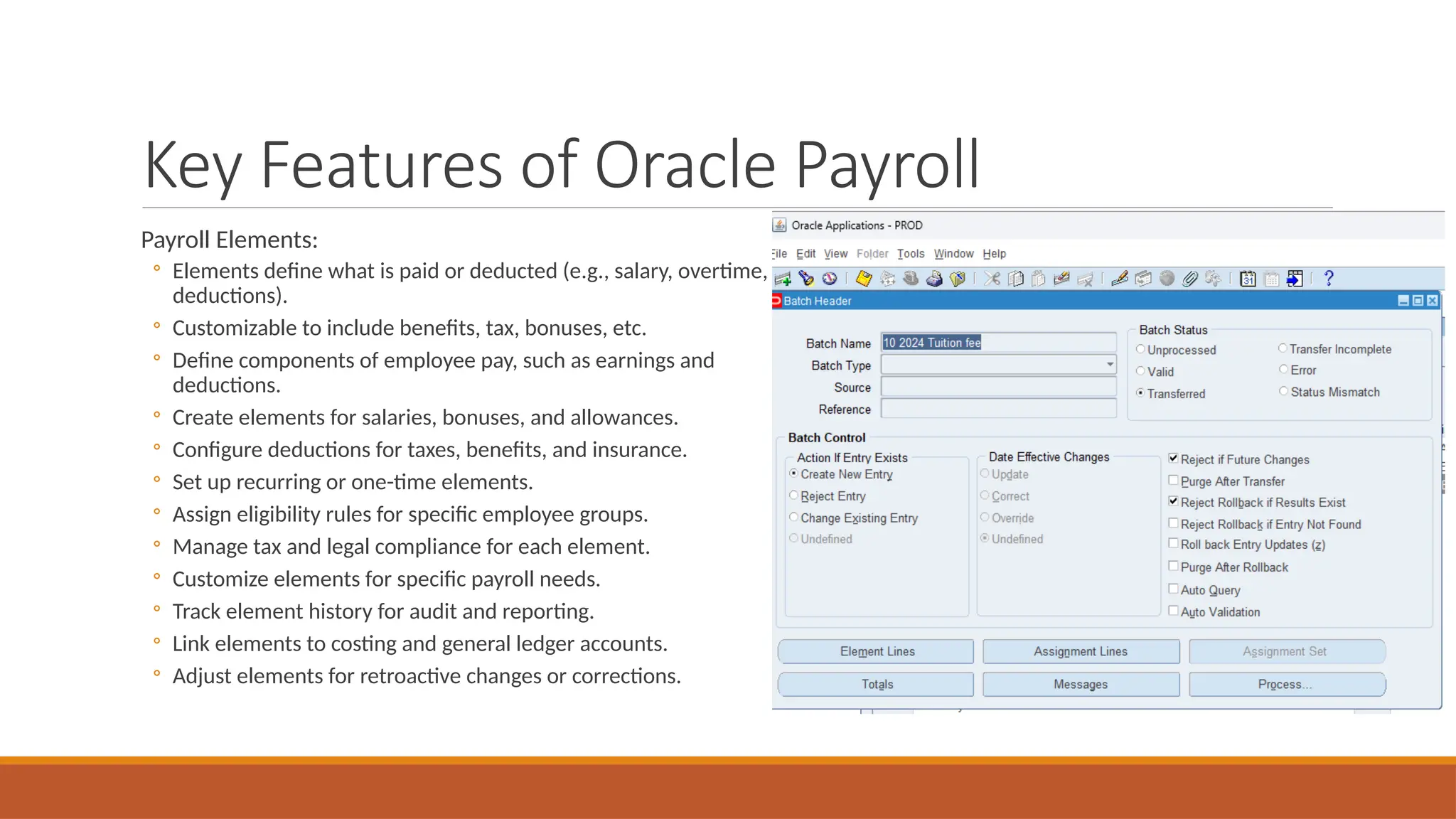
Payroll Elements:
◦ Elements define what is paid or deducted (e.g., salary, overtime,
deductions).
◦ Customizable to include benefits, tax, bonuses, etc.
◦ Define components of employee pay, such as earnings and
deductions.
◦ Create elements for salaries, bonuses, and allowances.
◦ Configure deductions for taxes, benefits, and insurance.
◦ Set up recurring or one-time elements.
◦ Assign eligibility rules for specific employee groups.
◦ Manage tax and legal compliance for each element.
◦ Customize elements for specific payroll needs.
◦ Track element history for audit and reporting.
◦ Link elements to costing and general ledger accounts.
◦ Adjust elements for retroactive changes or corrections.
Key Features of Oracle Payroll
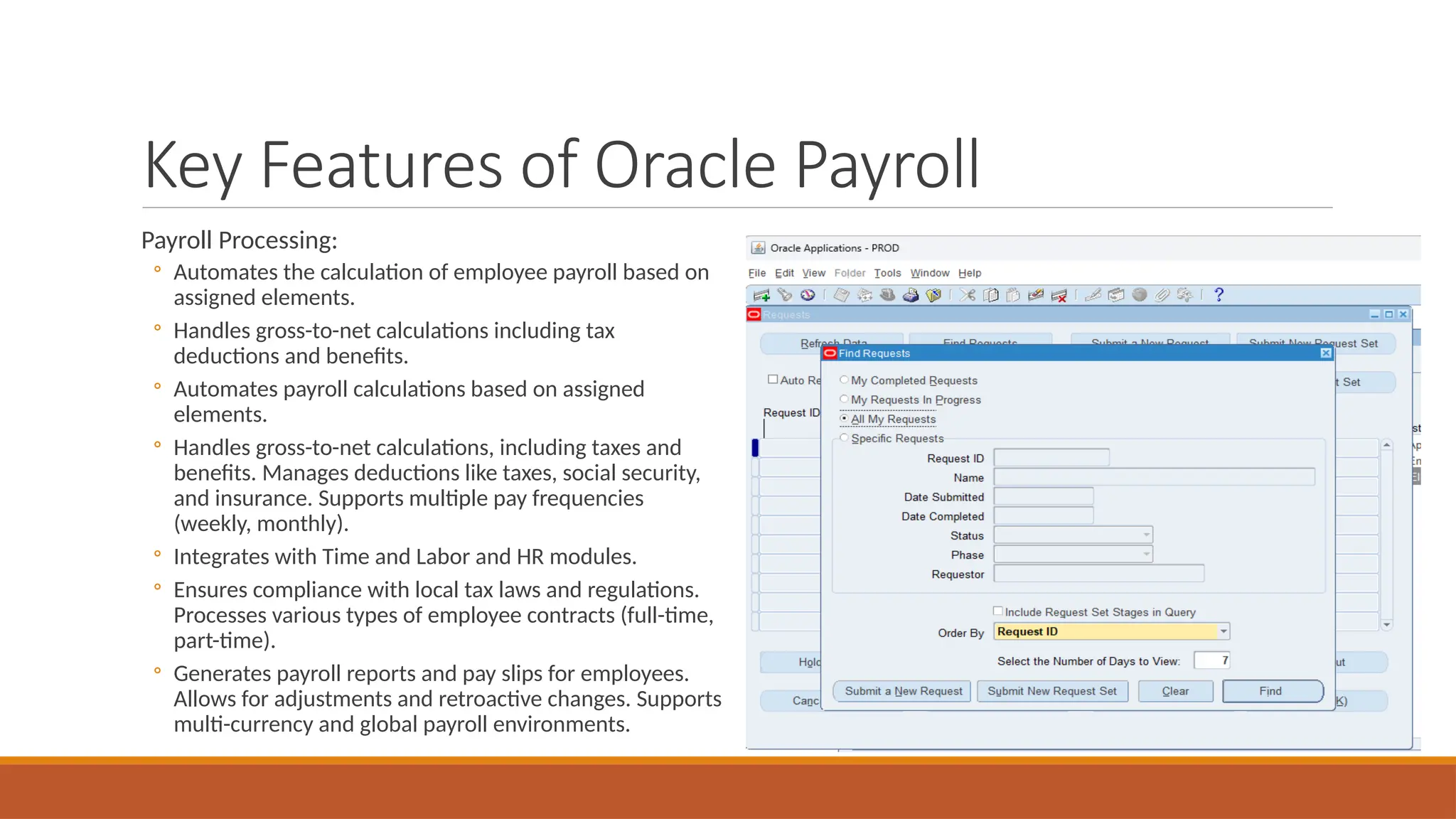
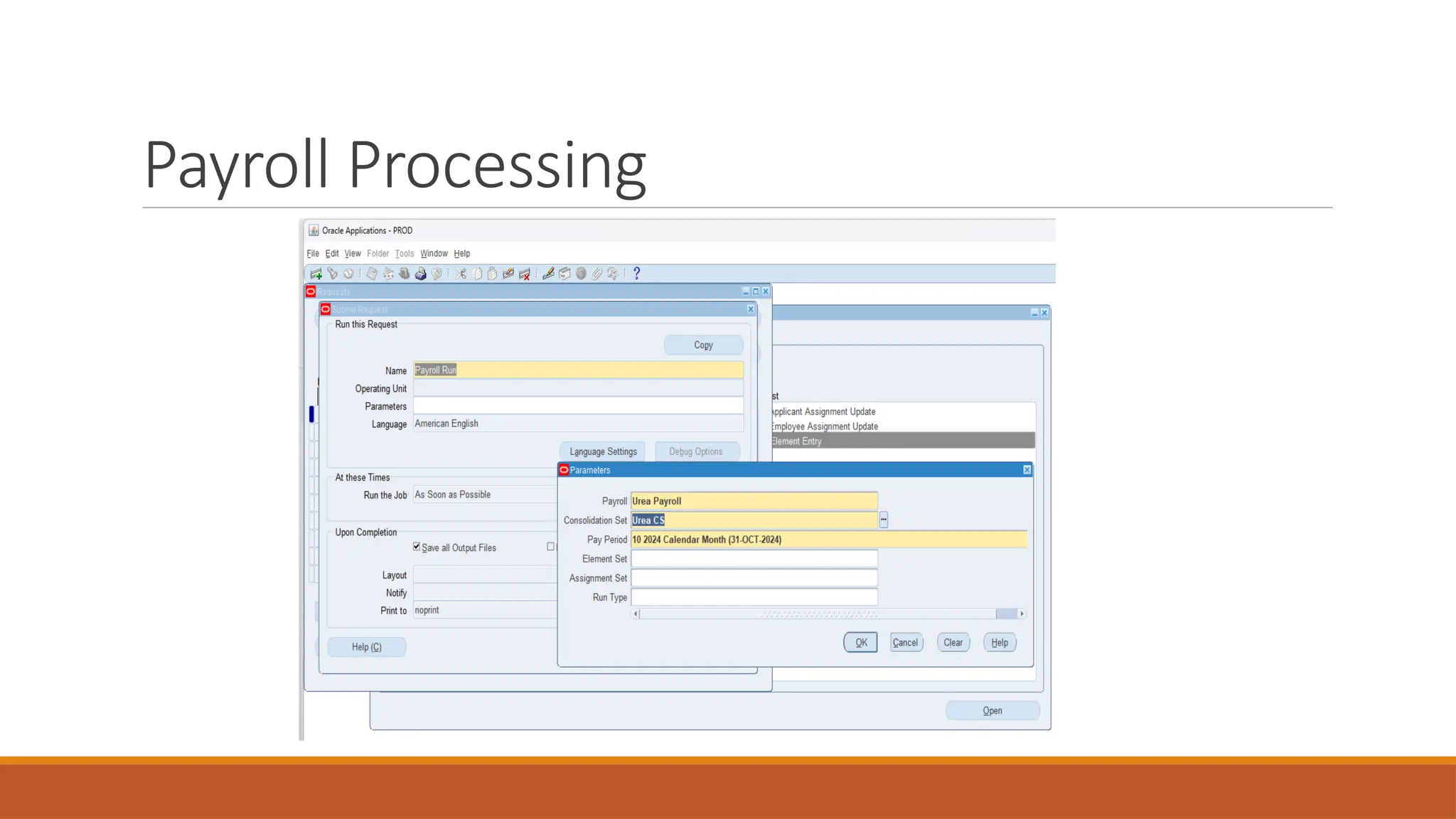
Payroll Processing:
◦ Automates the calculation of employee payroll based on
assigned elements.
◦ Handles gross-to-net calculations including tax
deductions and benefits.
◦ Automates payroll calculations based on assigned
elements.
◦ Handles gross-to-net calculations, including taxes and
benefits. Manages deductions like taxes, social security,
and insurance. Supports multiple pay frequencies
(weekly, monthly).
◦ Integrates with Time and Labor and HR modules.
◦ Ensures compliance with local tax laws and regulations.
Processes various types of employee contracts (full-time,
part-time).
◦ Generates payroll reports and pay slips for employees.
Allows for adjustments and retroactive changes. Supports
multi-currency and global payroll environments.
Payroll Processing
Payroll Processing
Key Features of Oracle Payroll
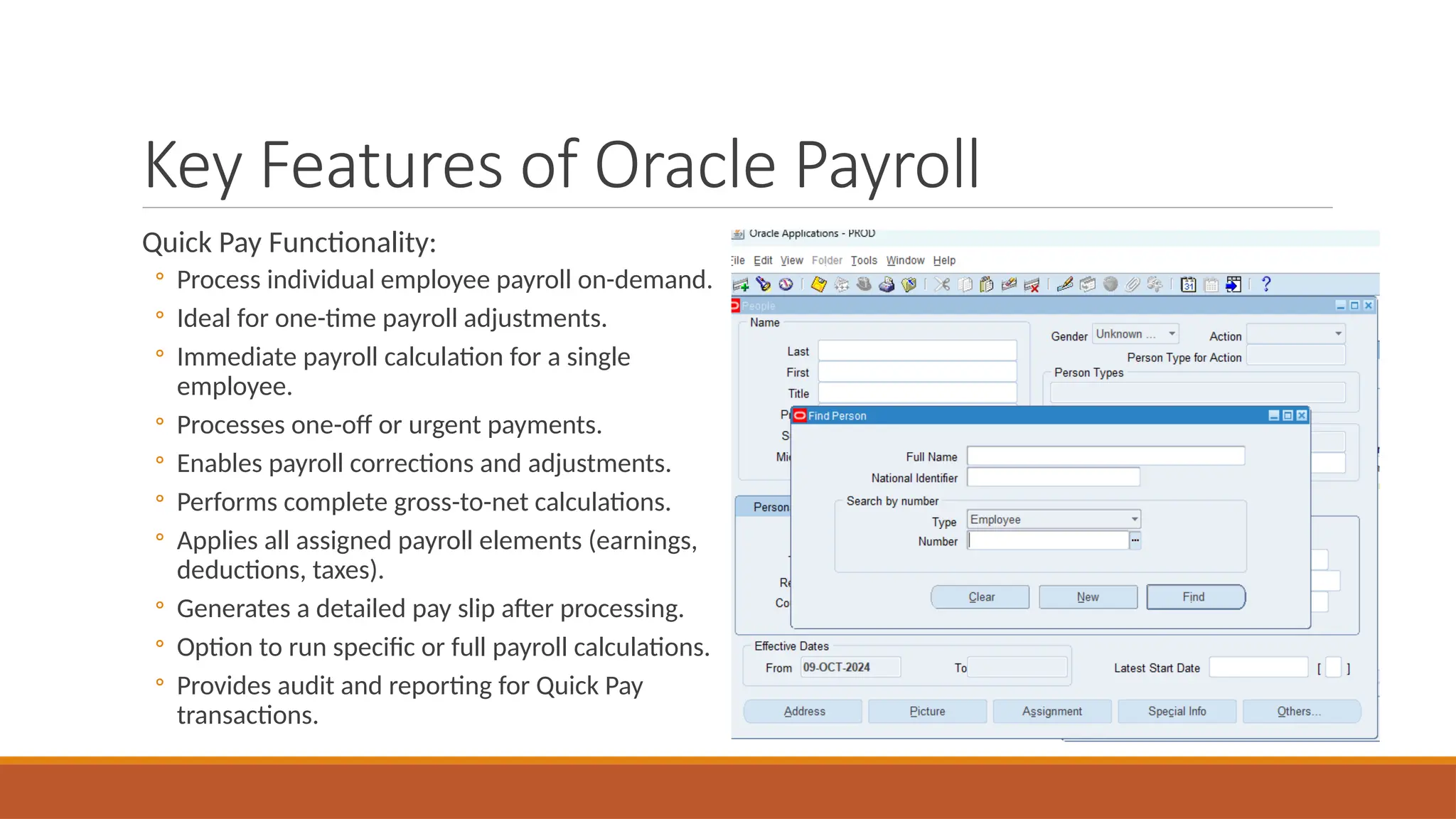
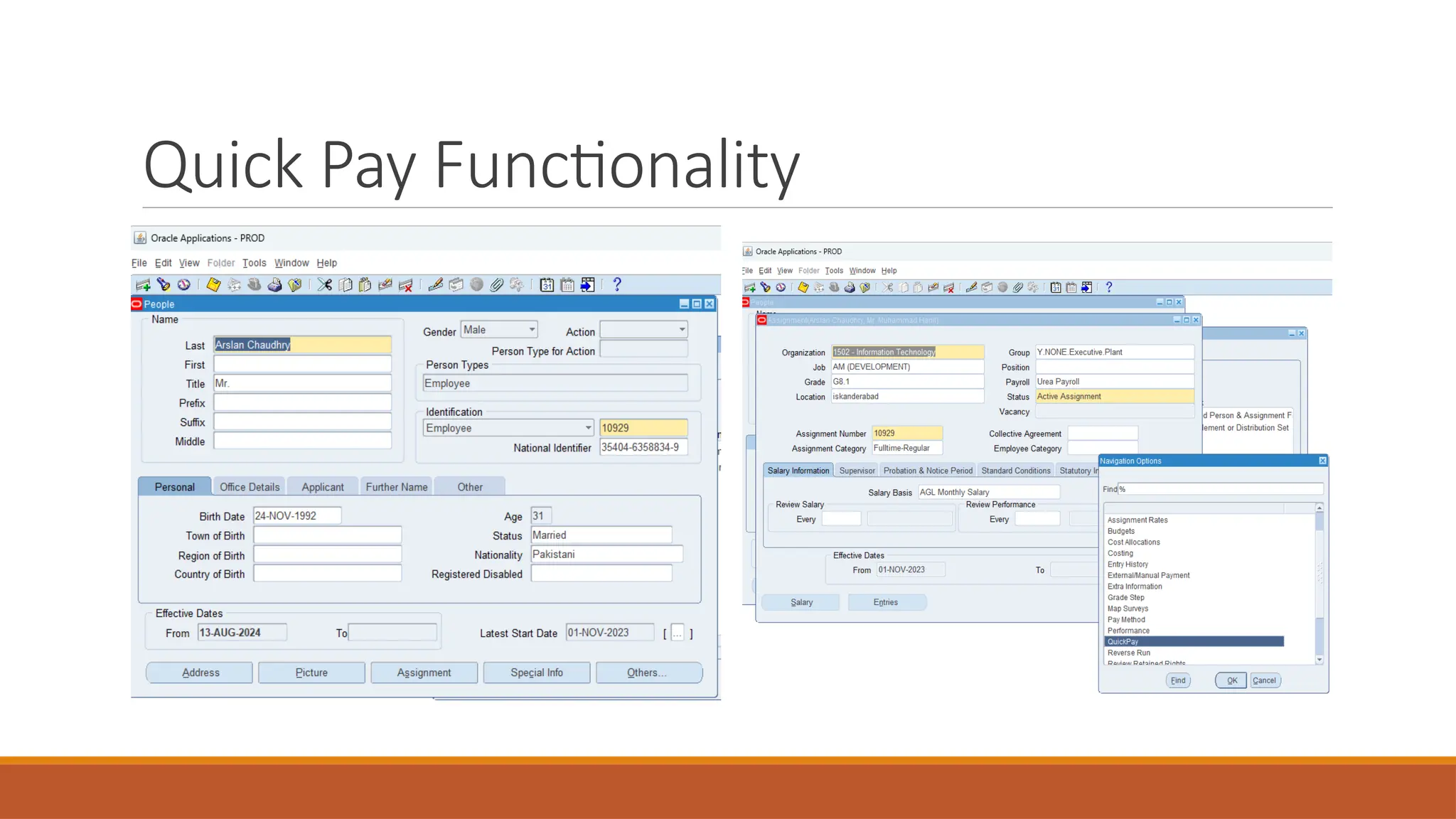
Quick Pay Functionality:
◦ Process individual employee payroll on-demand.
◦ Ideal for one-time payroll adjustments.
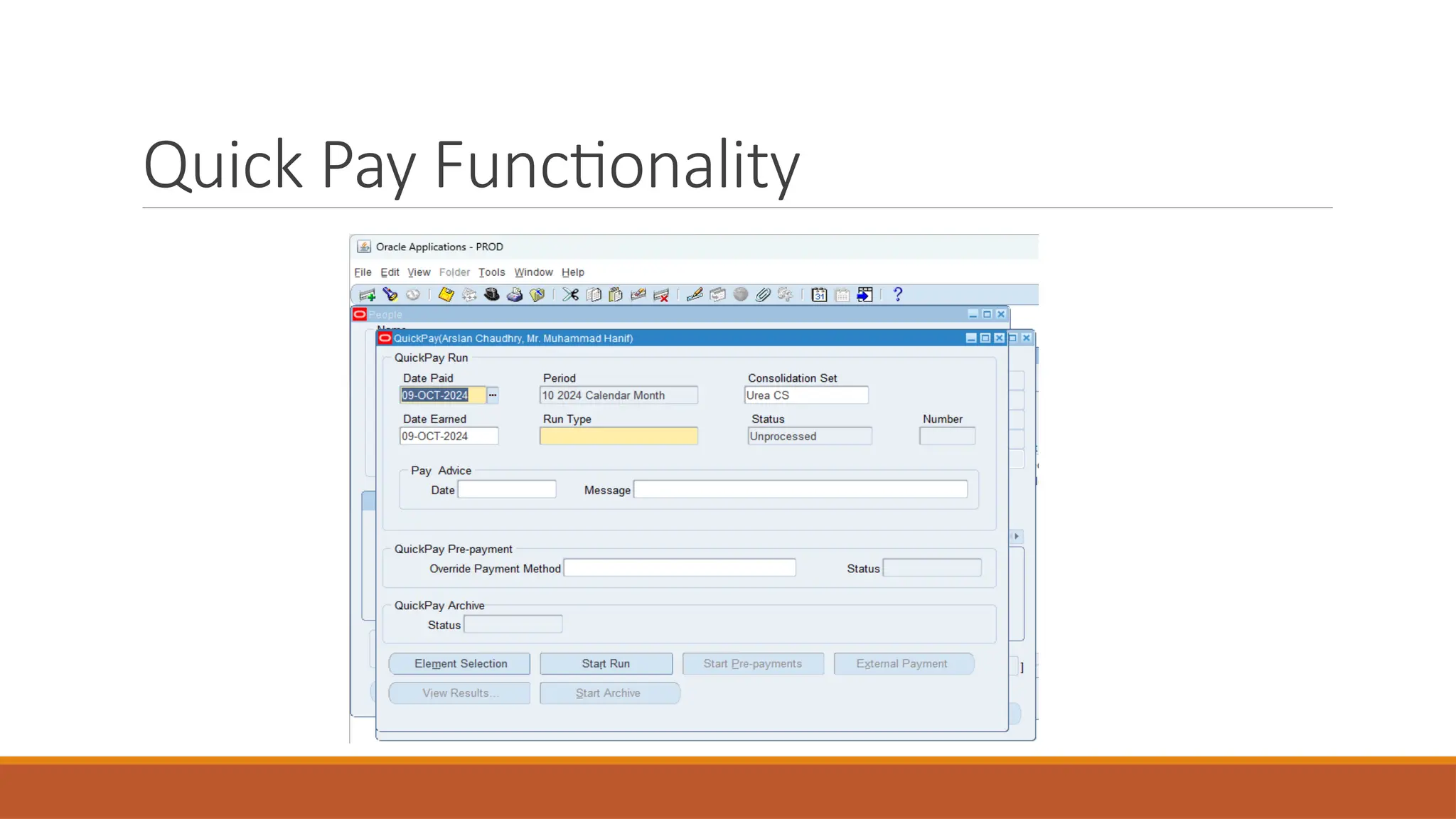
◦ Immediate payroll calculation for a single
employee.
◦ Processes one-off or urgent payments.
◦ Enables payroll corrections and adjustments.
◦ Performs complete gross-to-net calculations.
◦ Applies all assigned payroll elements (earnings,
deductions, taxes).
◦ Generates a detailed pay slip after processing.
◦ Option to run specific or full payroll calculations.
◦ Provides audit and reporting for Quick Pay
transactions.
Quick Pay Functionality
Key Features of Oracle Payroll
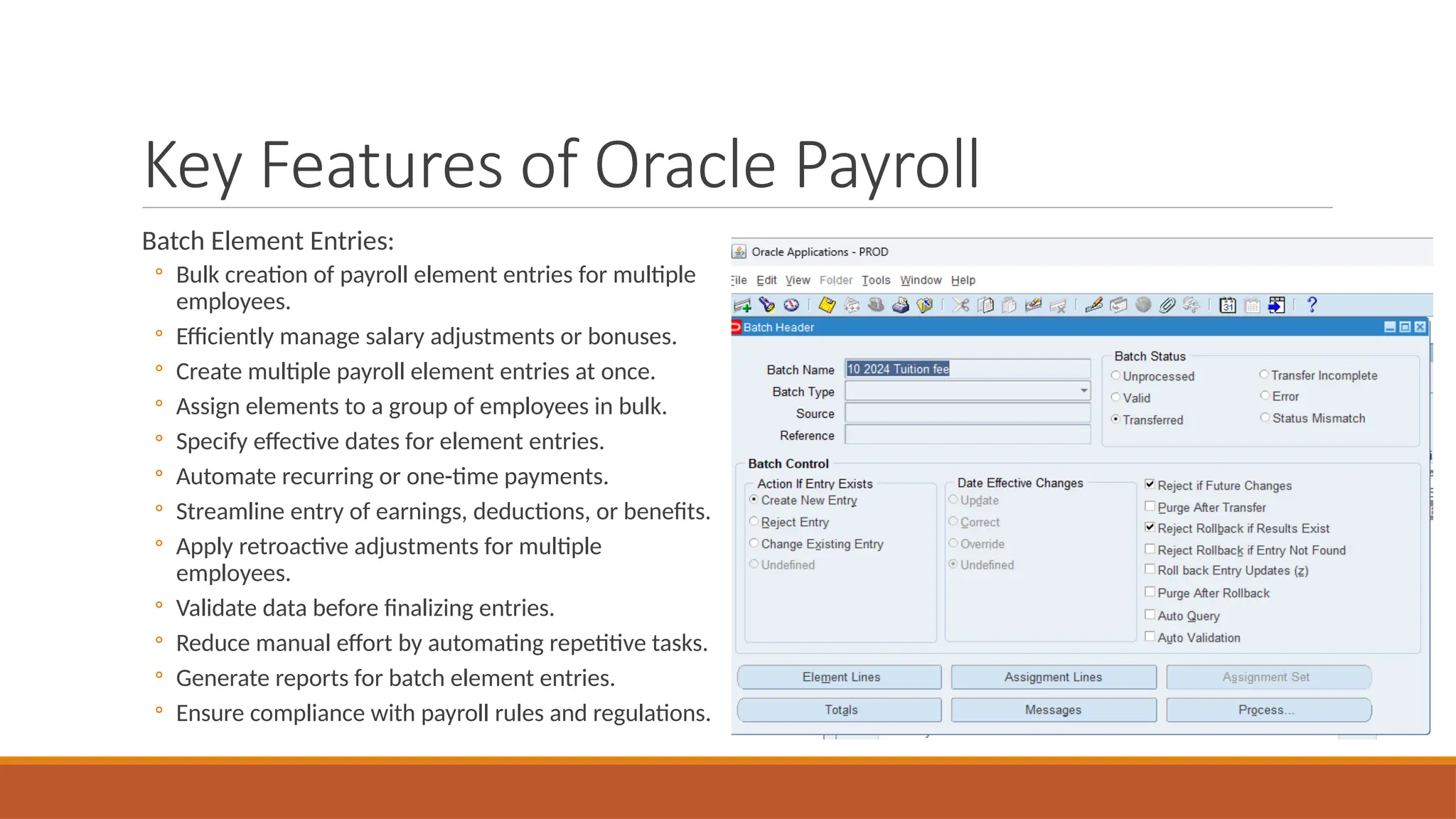
Batch Element Entries:
◦ Bulk creation of payroll element entries for multiple
employees.
◦ Efficiently manage salary adjustments or bonuses.
◦ Create multiple payroll element entries at once.
◦ Assign elements to a group of employees in bulk.
◦ Specify effective dates for element entries.
◦ Automate recurring or one-time payments.
◦ Streamline entry of earnings, deductions, or benefits.
◦ Apply retroactive adjustments for multiple
employees.
◦ Validate data before finalizing entries.
◦ Reduce manual effort by automating repetitive tasks.
◦ Generate reports for batch element entries.
◦ Ensure compliance with payroll rules and regulations.
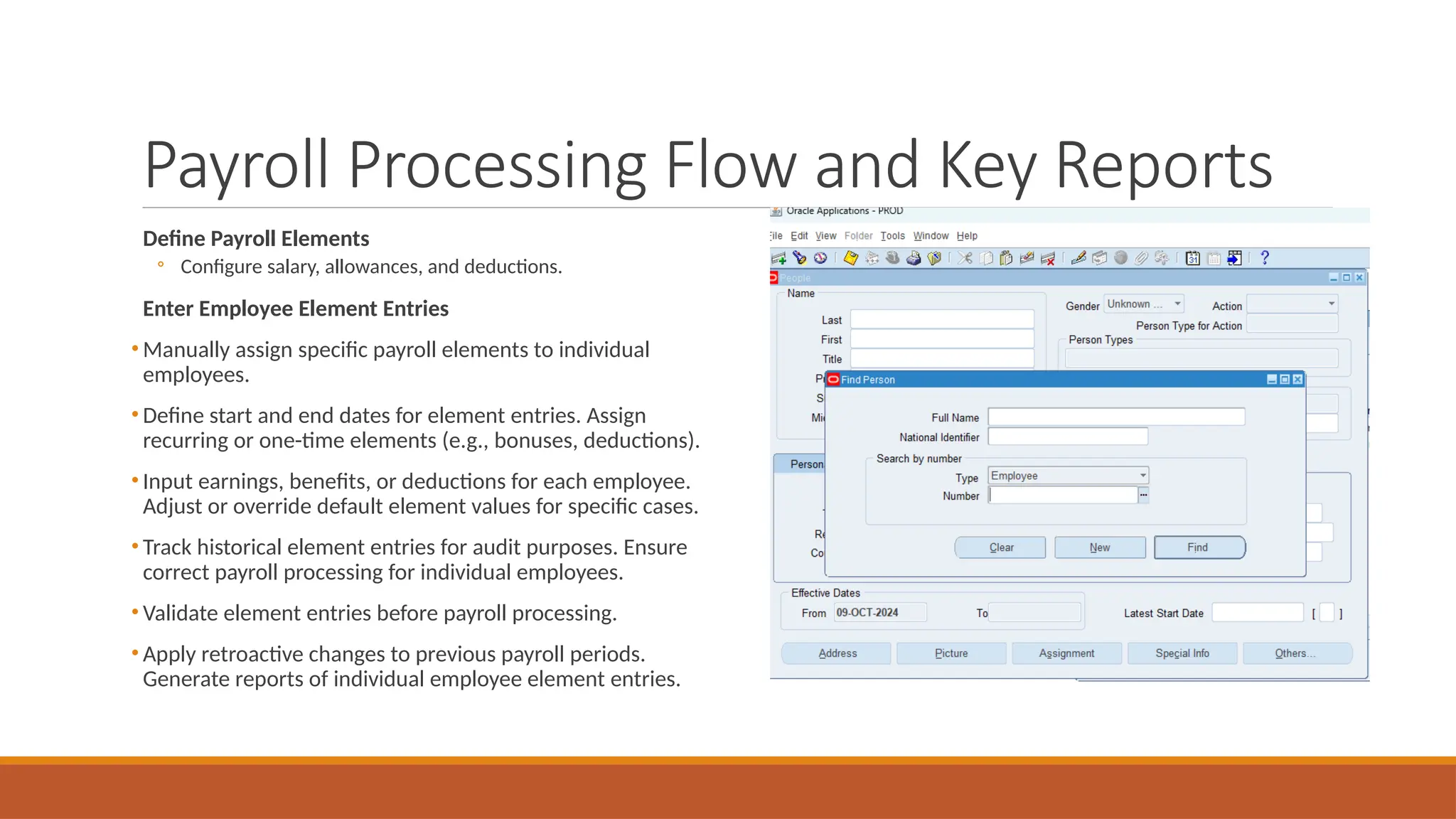
Payroll Processing Flow and Key Reports
Define Payroll Elements
◦ Configure salary, allowances, and deductions.
Enter Employee Element Entries
• Manually assign specific payroll elements to individual
employees.
• Define start and end dates for element entries. Assign
recurring or one-time elements (e.g., bonuses, deductions).
• Input earnings, benefits, or deductions for each employee.
Adjust or override default element values for specific cases.
• Track historical element entries for audit purposes. Ensure
correct payroll processing for individual employees.
• Validate element entries before payroll processing.
• Apply retroactive changes to previous payroll periods.
Generate reports of individual employee element entries.
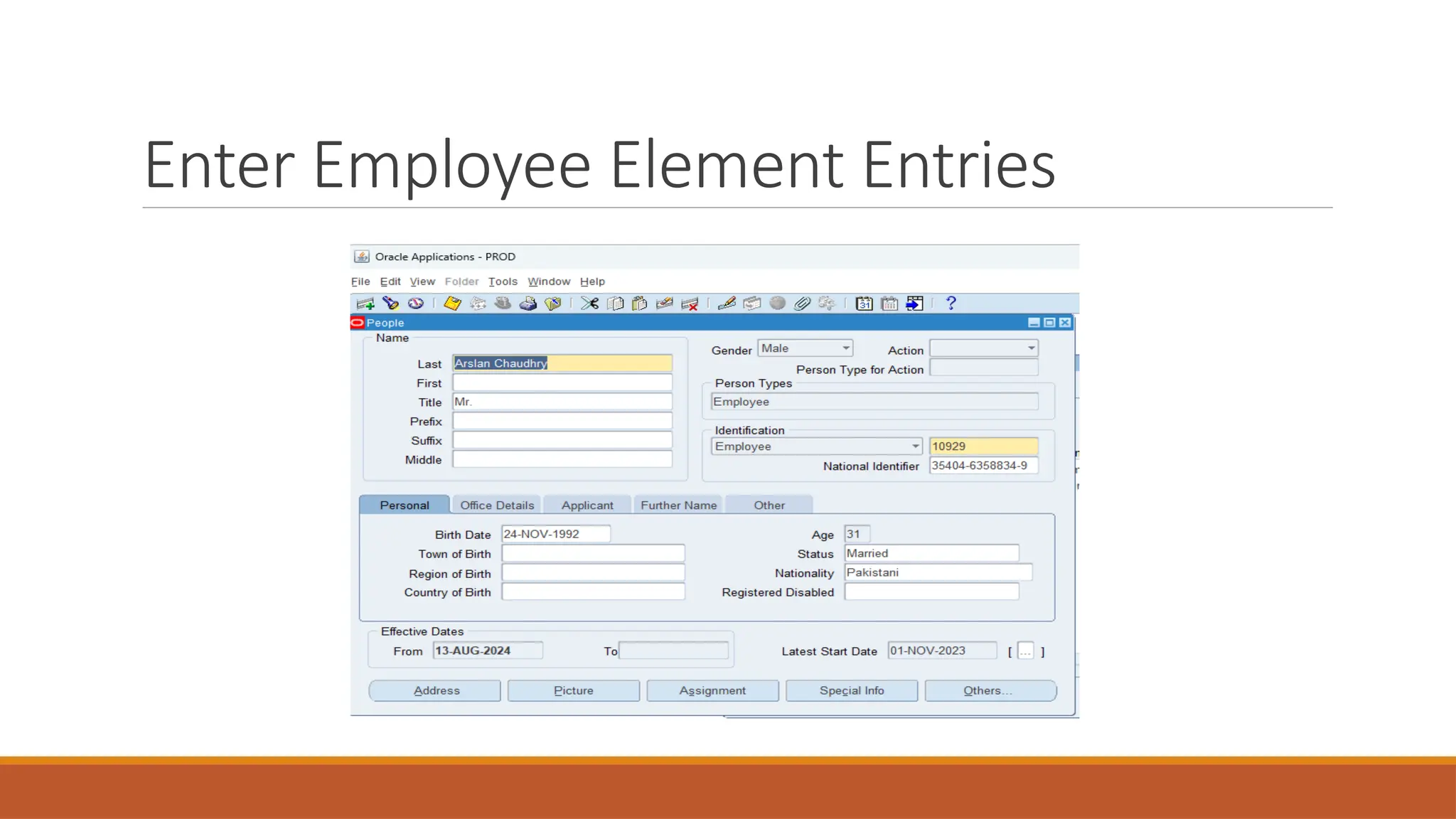
Enter Employee Element Entries
Payroll Processing Flow and Key Reports
Assign payroll elements to employees for calculation.
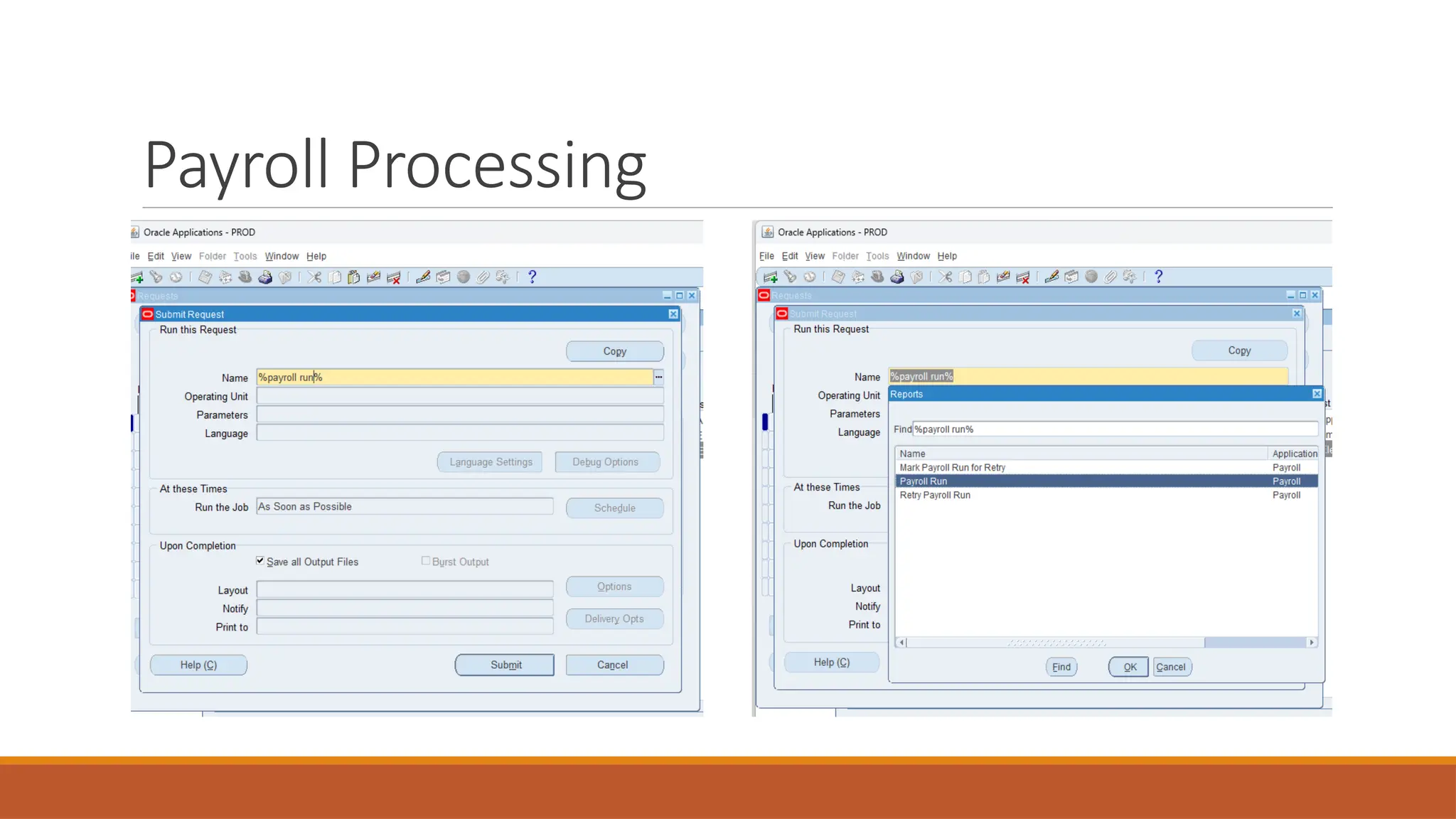
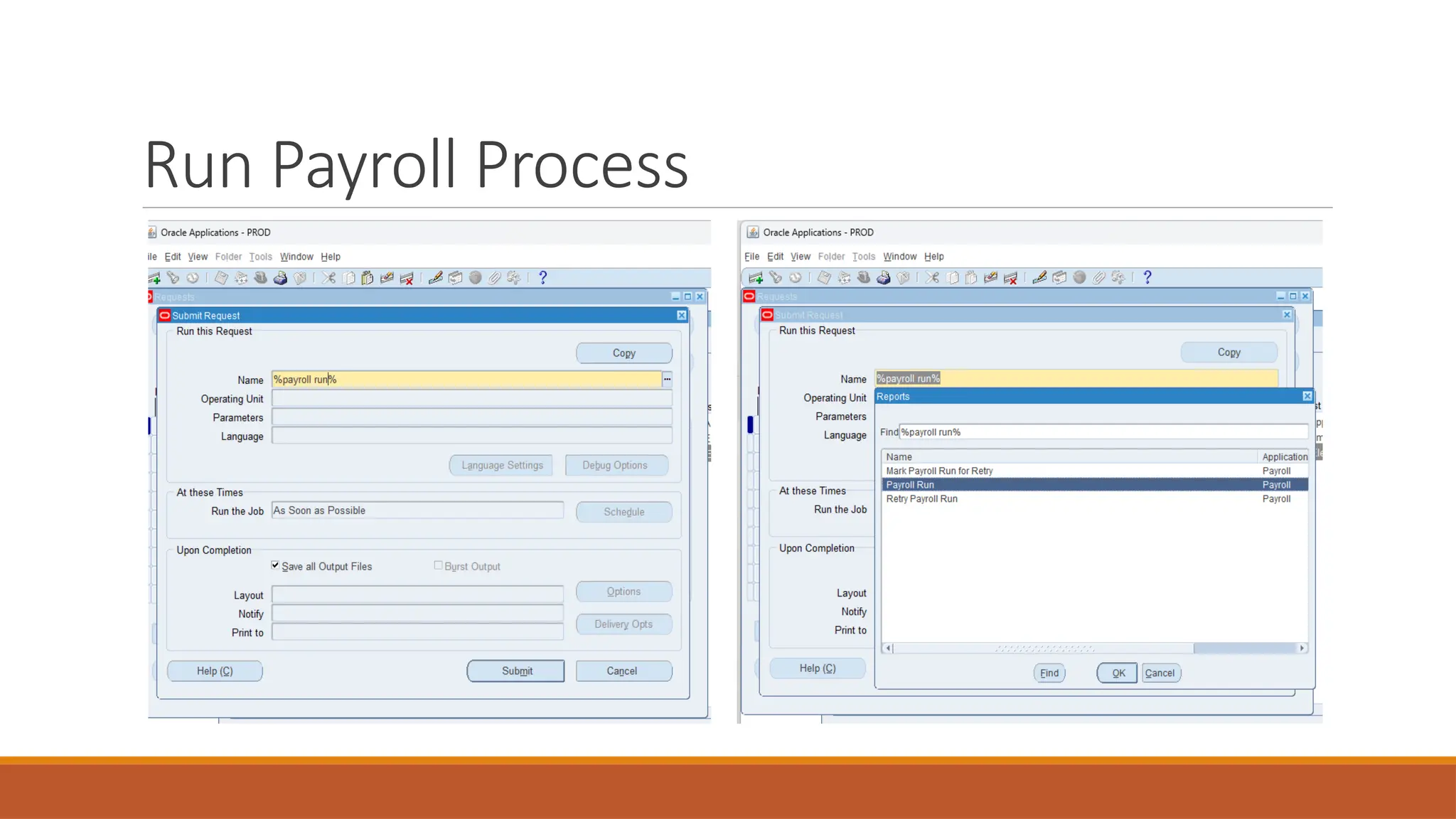
Run Payroll Process
◦ Execute payroll run to calculate gross-to-net pay.
◦ Initiates payroll processing for a group of employees.
◦ Calculates gross-to-net pay for each employee.
◦ Applies earnings, deductions, and tax rules.
◦ Processes benefits, allowances, and other elements.
◦ Ensures compliance with tax and regulatory requirements.
◦ Generates payslips and payroll reports.
◦ Validates and audits payroll data before finalizing.
◦ Handles retroactive payments and adjustments.
◦ Updates employee financial records in the system.
◦ Allows for reversal or reprocessing if necessary.
Run Payroll Process
Reporting and Compliance in Oracle
Payroll
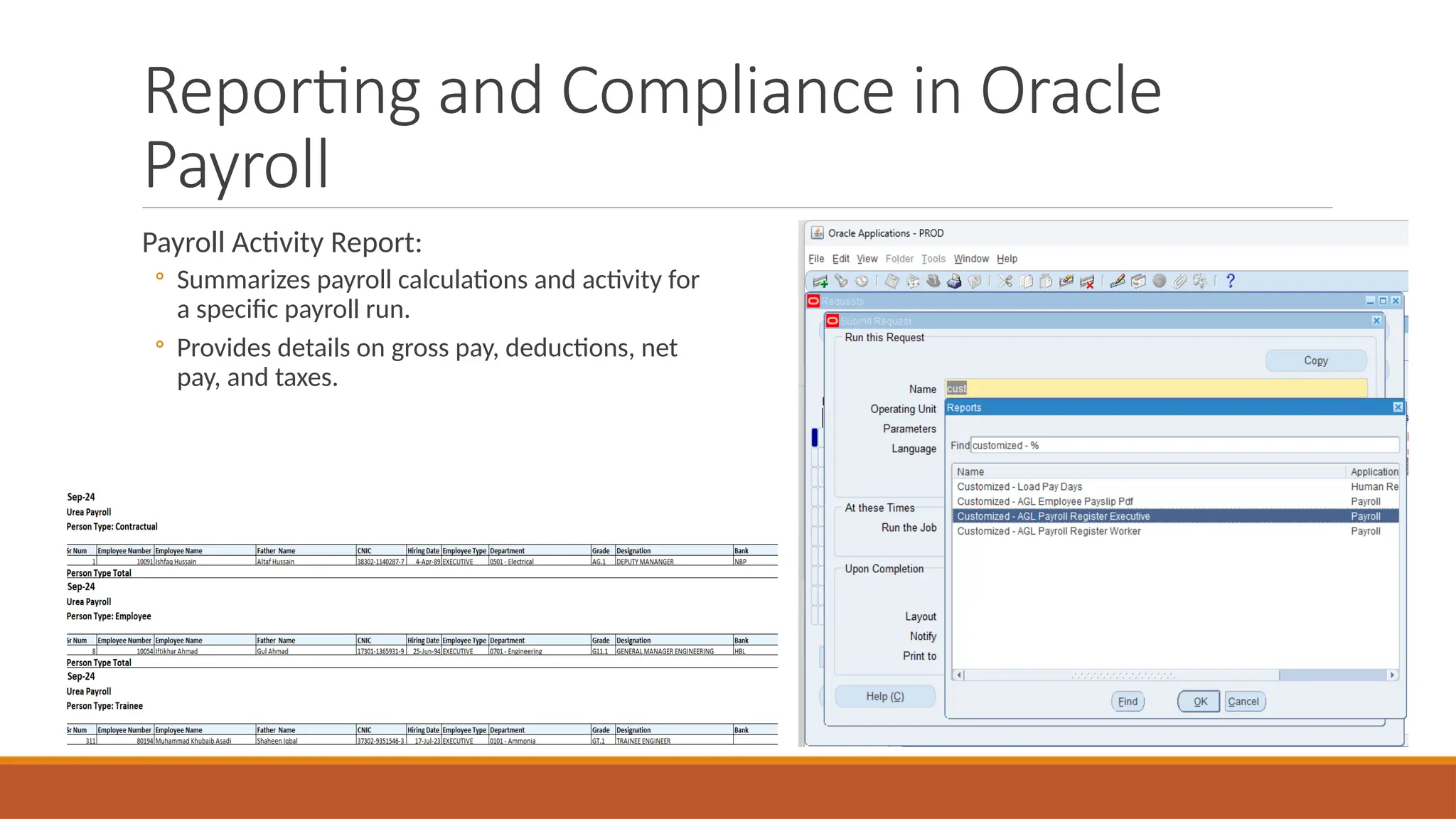
Payroll Activity Report:
◦ Summarizes payroll calculations and activity for
a specific payroll run.
◦ Provides details on gross pay, deductions, net
pay, and taxes.
Reporting and Compliance in Oracle
Payroll
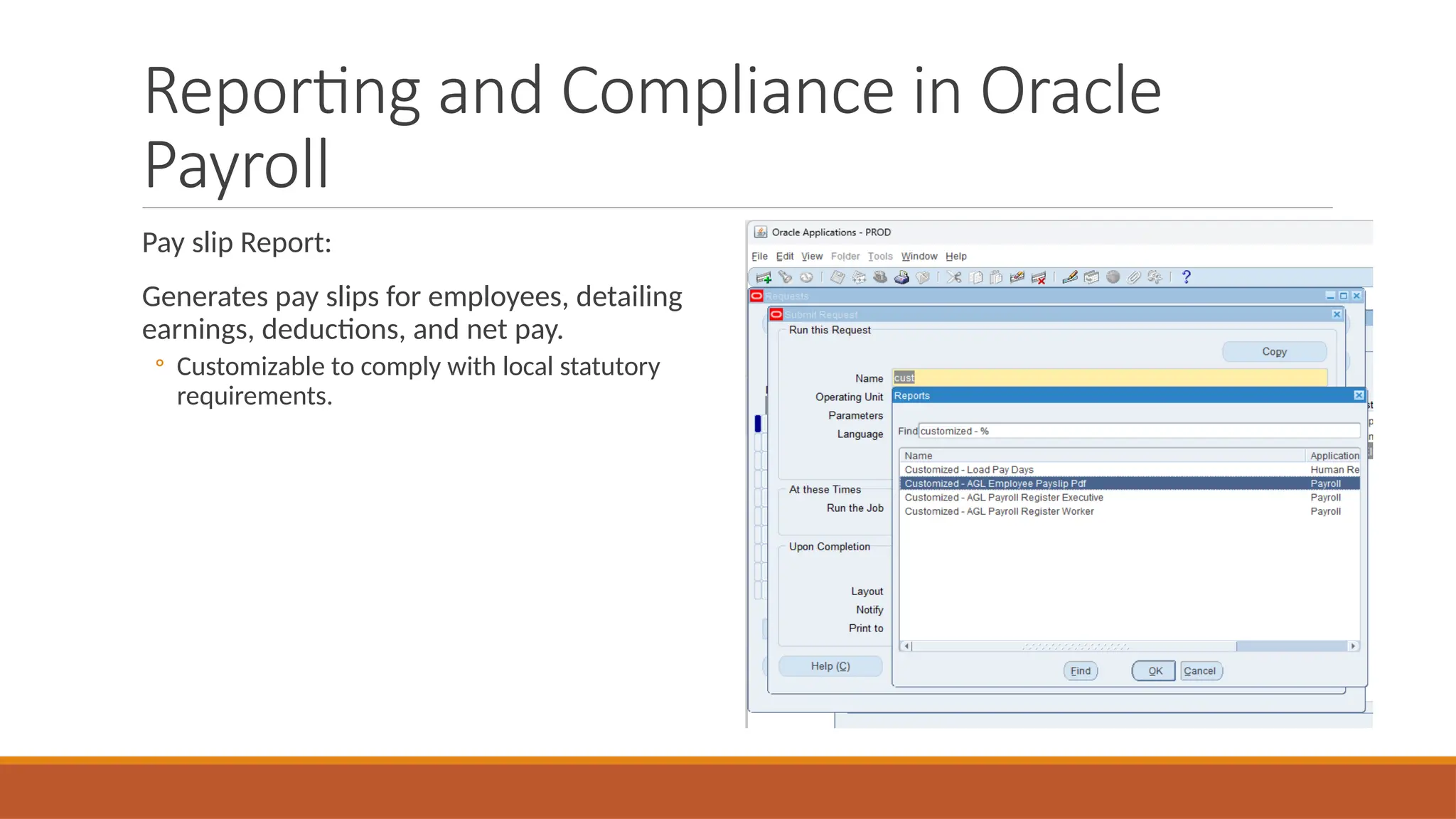
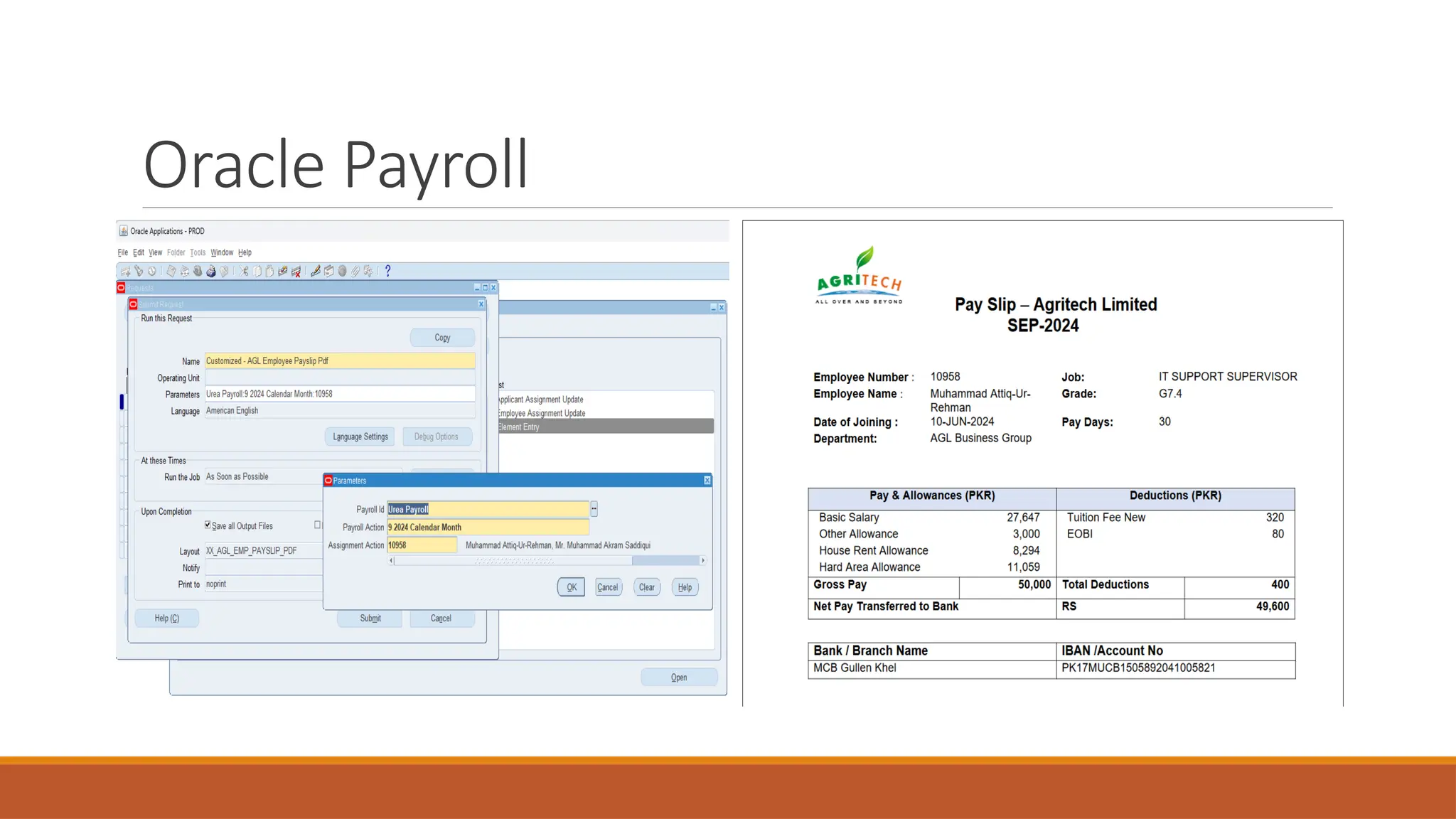
Pay slip Report:
Generates pay slips for employees, detailing
earnings, deductions, and net pay.
◦ Customizable to comply with local statutory
requirements.
Oracle Payroll
Payroll Processing Flow and Key Reports
Generate Reports
◦ Payroll Register: Provides a detailed breakdown of each employee's payroll for auditing.
Enterprise Asset
Management (EAM)
Major Functions
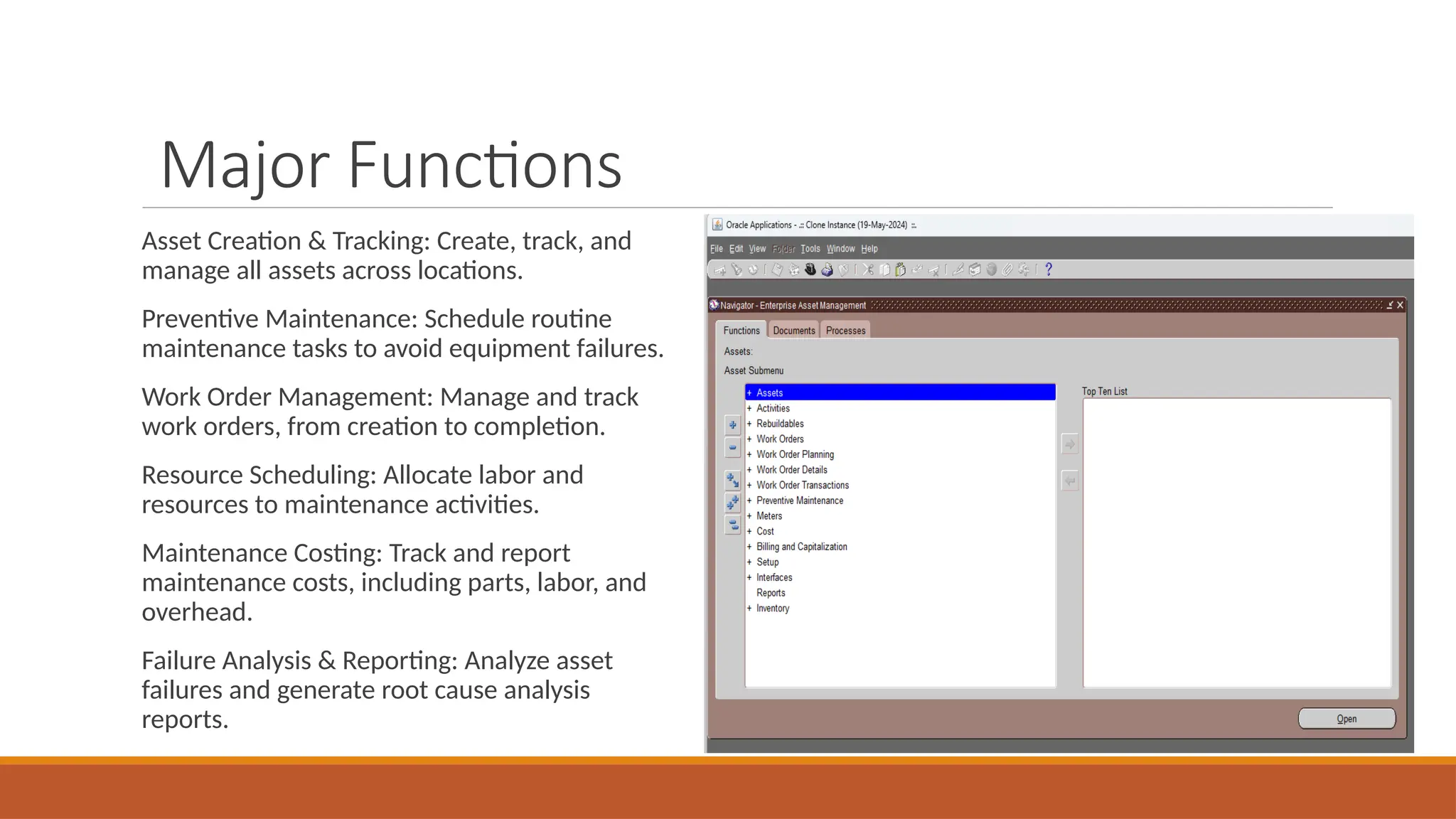
Asset Creation & Tracking: Create, track, and
manage all assets across locations.
Preventive Maintenance: Schedule routine
maintenance tasks to avoid equipment failures.
Work Order Management: Manage and track
work orders, from creation to completion.
Resource Scheduling: Allocate labor and
resources to maintenance activities.
Maintenance Costing: Track and report
maintenance costs, including parts, labor, and
overhead.
Failure Analysis & Reporting: Analyze asset
failures and generate root cause analysis
reports.
Asset Management
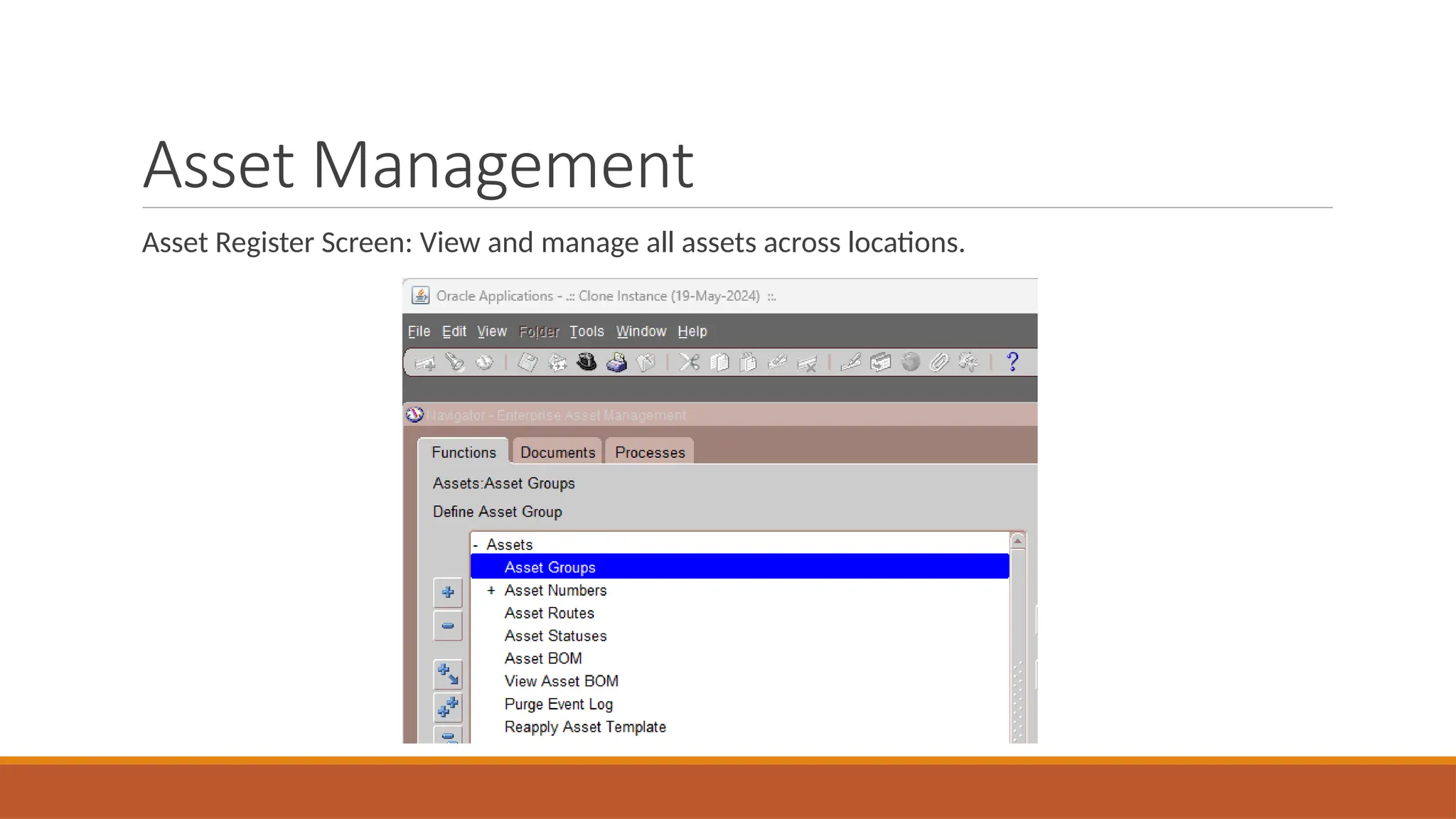
Asset Register Screen: View and manage all assets across locations.
Asset Management
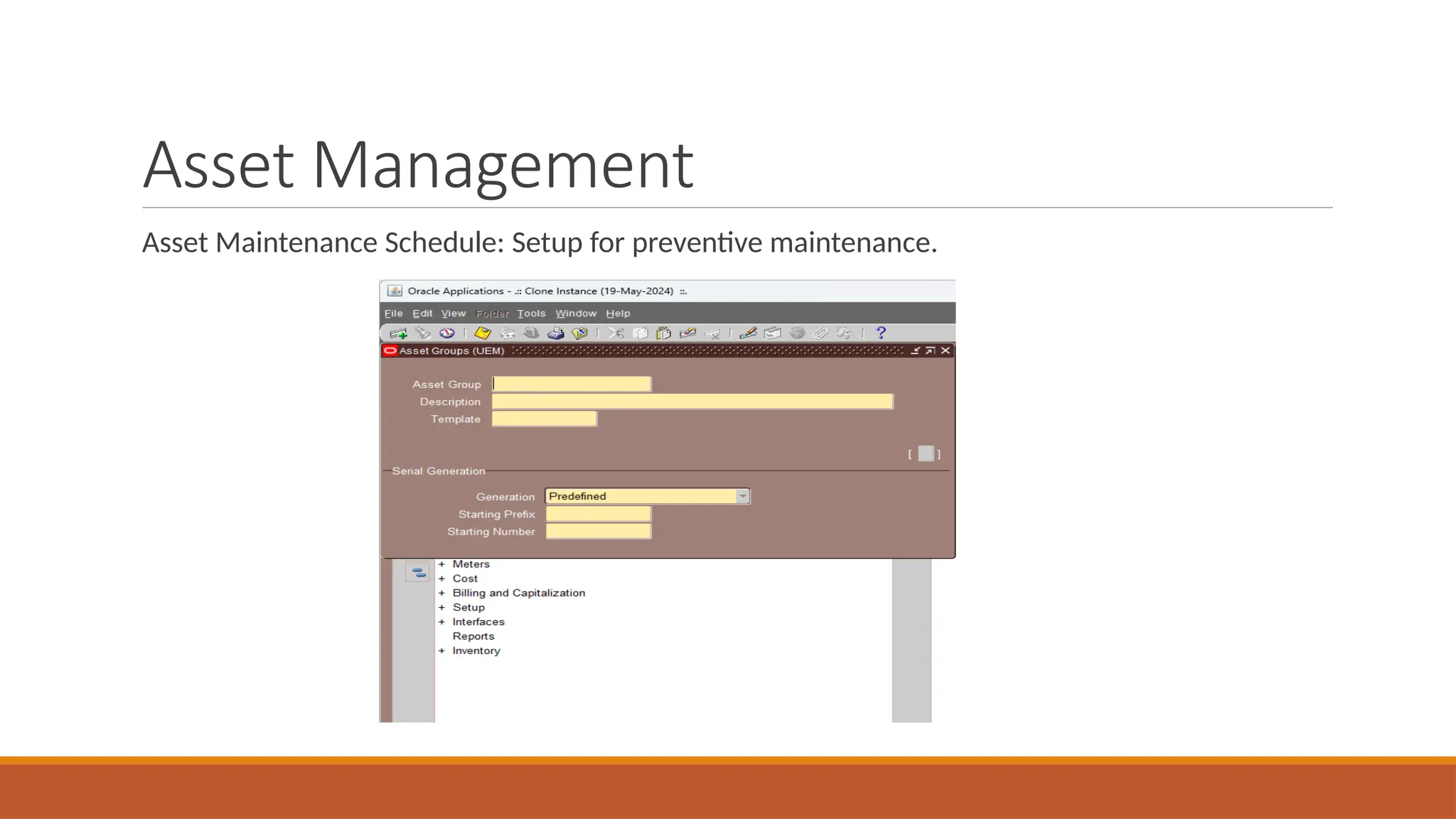
Asset Maintenance Schedule: Setup for preventive maintenance.
Asset Management
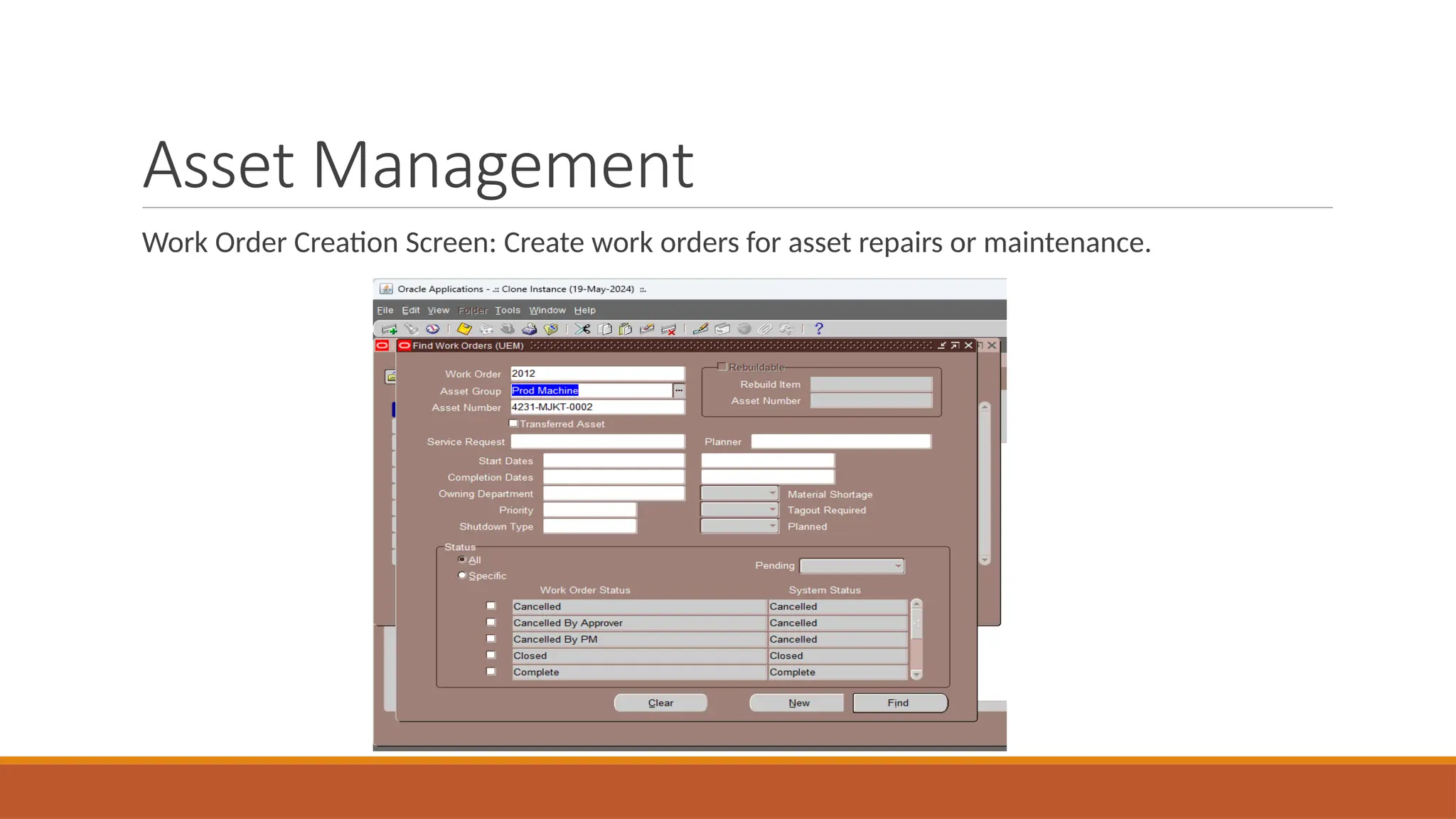
Work Order Creation Screen: Create work orders for asset repairs or maintenance.
Asset Management
Maintenance History Screen: View maintenance records for assets.
Work Order Management
Create and initiate work orders for maintenance tasks.
Assign work orders to specific resources or teams.
Track work order status from initiation to completion.
Prioritize work orders based on urgency and impact.
Manage and document materials and parts required for work orders.
Integrate with inventory management for accurate stock levels.
Set estimated completion times and monitor progress.
Generate reports on work order performance and efficiency.
Ensure compliance with safety and regulatory standards.
Archive completed work orders for future reference and auditing.
Work Order Management
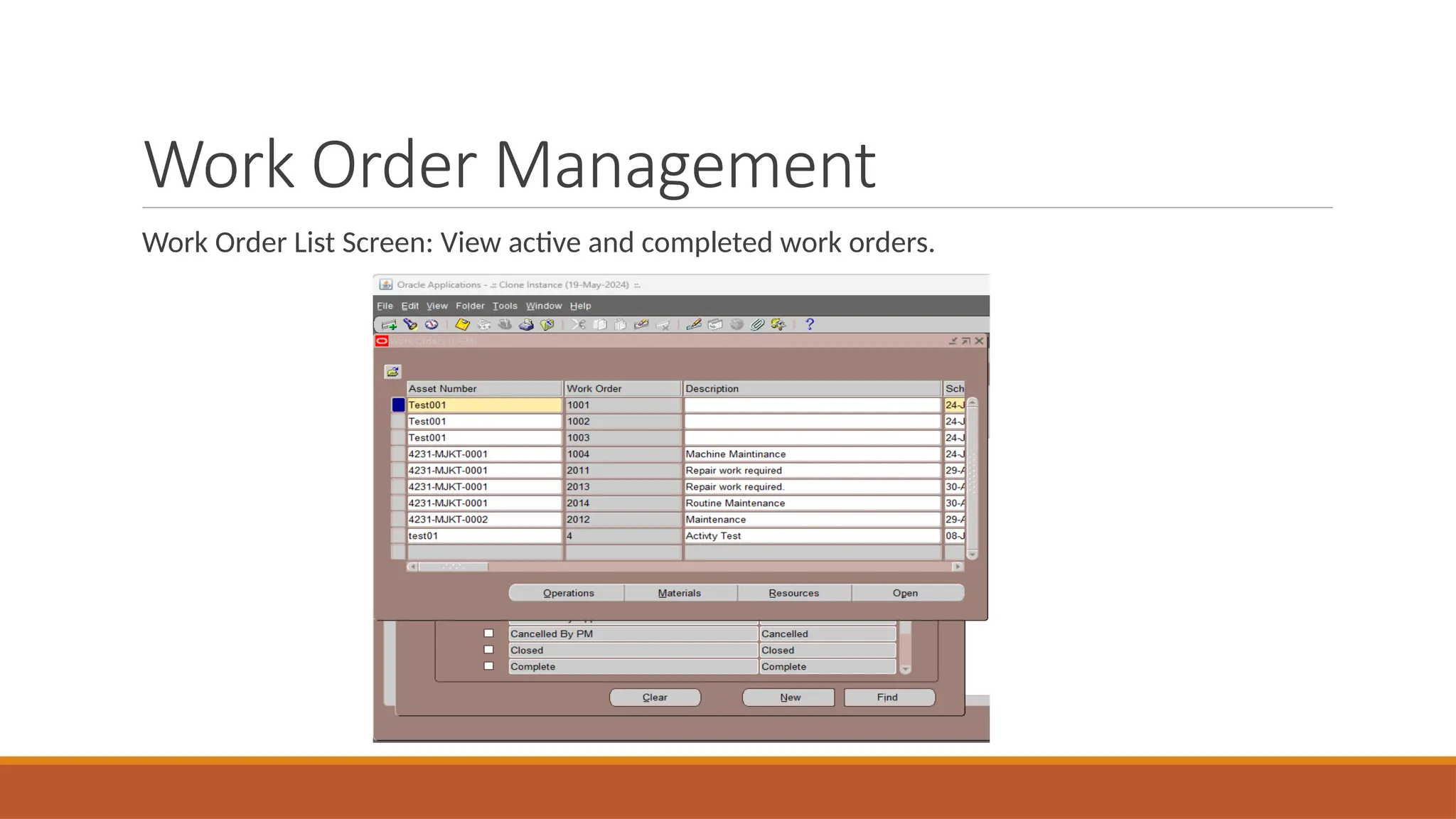
Work Order List Screen: View active and completed work orders.
Work Order Management
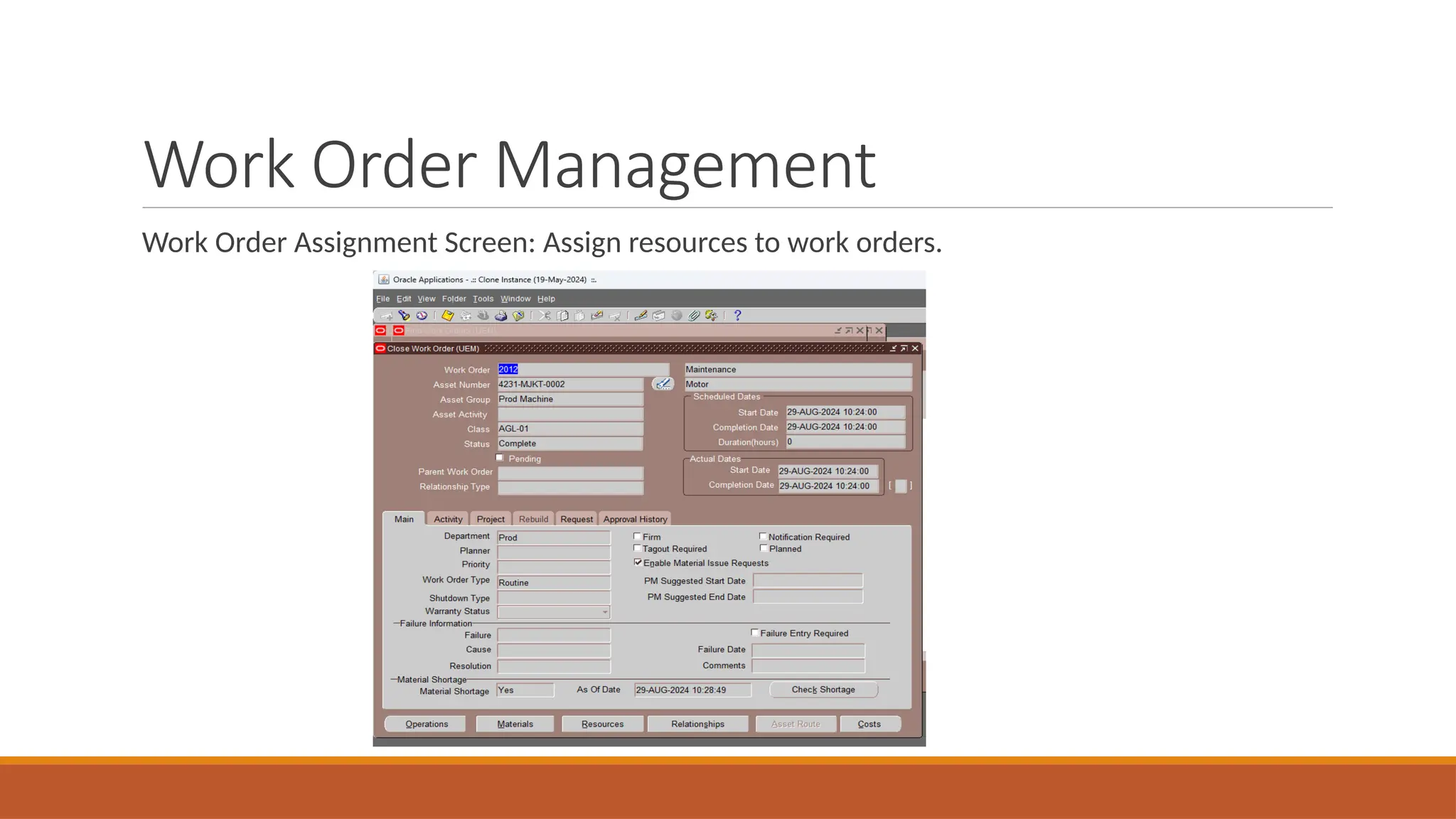
Work Order Assignment Screen: Assign resources to work orders.
Work Order Management
Maintenance Resource Scheduling: Allocate human and material resources for tasks. Plan and allocate resources
for maintenance activities.
Schedule preventive and corrective maintenance tasks.
Track resource availability and workload.
Optimize resource usage to minimize downtime.
Integrate with asset management systems for accurate data.
Set priorities for maintenance activities based on urgency.
Monitor progress and adjust schedules as needed.
Generate reports on resource utilization and maintenance performance.
Ensure compliance with maintenance regulations and standards.
Communicate schedules and changes to maintenance teams.
Work Order Management
Work Order Costing Screen: Track and report on costs associated with work orders.
Displays detailed cost breakdown for each work order.
Includes labor, material, and overhead costs associated with tasks.
Tracks actual vs. estimated costs for better budgeting.
Allows input of additional costs incurred during work order execution.
Integrates with financial systems for accurate accounting.
Generates cost reports for analysis and decision-making.
Provides historical cost data for comparison and planning.
Enables identification of cost-saving opportunities.
Supports multiple currencies for international projects.
Facilitates budget tracking and variance analysis..
Major Reports (EAM)
Asset Maintenance History Report: Detailed report on maintenance activities for each asset.
Major Reports (EAM)
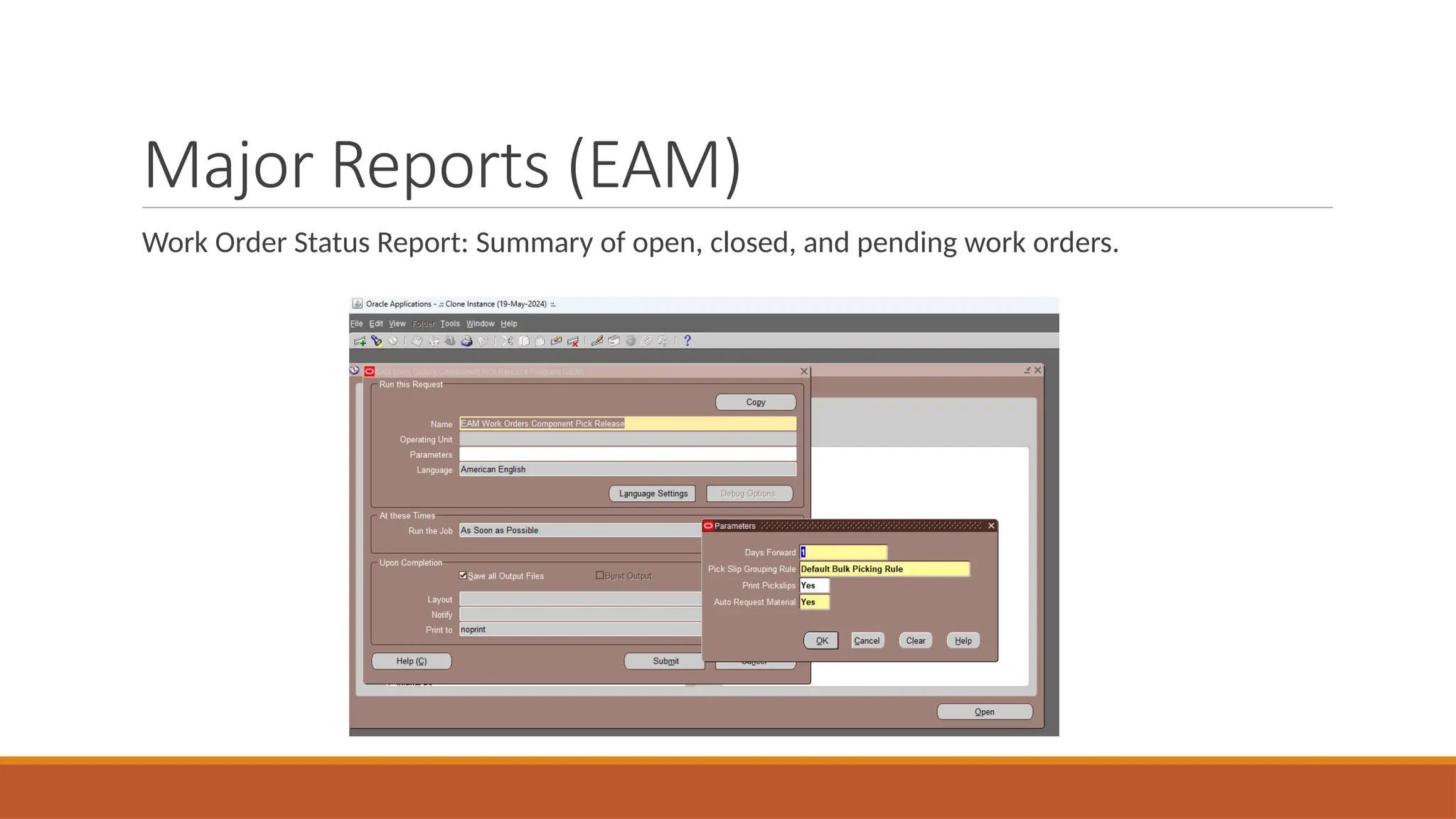
Work Order Status Report: Summary of open, closed, and pending work orders.
Major Reports (EAM)
Resource Utilization Report: Overview of labor and material resource usage for maintenance.
Maintenance Cost Report: Breakdown of costs per asset, department, and maintenance activity.
Oracle Process
Manufacturing (OPM)
Major Functions
Formula and Recipe Management: Manage formulas, recipes, and versions for manufacturing
processes.
Batch Creation & Execution: Track and manage production batches, including quantities and
materials.
Product Costing: Track production costs, including raw materials and overheads.
Production Compliance: Ensure compliance with industry regulations and standards (e.g., FDA).
Lot and Serial Tracking: Track materials and products through batch/serial control.
Quality Management: Integrate quality checks within the production process.
Formula Management
Formula Definition Screen: Define and manage manufacturing formulas.
Allows creation and management of manufacturing formulas.
Defines ingredients and their proportions for each formula.
Supports multiple versions of the same formula for flexibility.
Includes functionality to specify unit of measure for ingredients.
Enables calculation of yields based on input quantities.
Integrates with recipe management for streamlined production.
Provides version control to track changes in formulas.
Allows for the inclusion of comments and notes for clarity.
Supports compliance with industry standards and regulations.
Facilitates easy retrieval and editing of existing formulas.
Formula Management
Recipe Setup Screen: Create recipes with multiple steps and ingredients.
Create and manage recipes for production processes.
Define step-by-step instructions for manufacturing.
Assign ingredients and quantities for each step.
Link recipes to specific formulas for consistency.
Specify equipment and resources required for each step.
Set up production yields and batch sizes.
Enable version control for recipe changes.
Integrate with quality control measures.
Track costs associated with each recipe.
Ensure compliance with regulatory and safety standards.
Formula Management
Batch Creation Screen: Start new batches for production based on predefined recipes.
Initiate new production batches based on predefined recipes.
Specify batch size and production quantities.
Allocate raw materials and resources for the batch.
Track batch progress in real-time.Set batch start and end dates for scheduling.
Link batches to specific work orders or production plans.
Monitor ingredient and material usage per batch.
Apply lot and serial control for batch traceability.
Ensure compliance with quality and regulatory standards.
Generate reports on batch status and performance.
Formula Management
Material Requirements Screen: List of raw materials and their quantities for batch processing.
Displays list of raw materials needed for production.
Specifies material quantities required for each batch.
Tracks available inventory and material shortages.
Links materials to specific production orders or batches.
Enables allocation of materials from stock or purchase orders.
Monitors material usage during production.
Generates reports on material consumption and requirements.
Supports planning for future material needs.
Integrates with inventory management for real-time updates.
Ensures compliance with production and quality standards.
Batch Execution & Compliance
Formula Definition Screen: Define and manage manufacturing formulas.
Define and manage manufacturing formulas.
Specify ingredients and their quantities for each formula.
Set up unit of measure for each ingredient.
Manage multiple versions of the same formula.
Calculate yields based on input quantities.
Integrate formulas with recipe management.
Track changes with version control for auditing.
Add notes and comments for clarity and instructions.
Ensure compliance with industry and regulatory standards.
Easily retrieve and modify existing formulas.
Batch Execution & Compliance
Recipe Setup Screen: Create recipes with multiple steps and ingredients.
Create and configure recipes for manufacturing processes.
Define ingredients and quantities for each recipe step.
Set up step-by-step instructions for production.
Link recipes to formulas for accurate production runs.
Specify equipment and resource requirements for each step.
Manage version control for recipe updates and revisions.
Set production yields and batch sizes for efficiency.
Ensure compliance with quality and safety standards.
Integrate recipes with production schedules and work orders.
Track costs and performance for each recipe setup.
Batch Execution & Compliance
Batch Creation Screen: Start new batches for production based on predefined recipes.
Create new production batches based on recipes.
Specify batch size and production quantities.
Allocate materials and resources for batch execution.
Set batch start and completion dates.
Monitor real-time batch progress and status.
Link batch to production orders or work orders.
Apply lot and serial tracking for traceability.
Ensure compliance with regulatory and quality standards.
Track material consumption and inventory impact.
Generate reports on batch performance and output.
Batch Execution & Compliance
Material Requirements Screen: List of raw materials and their quantities for batch processing.
List raw materials needed for production batches.
Specify material quantities required for each batch.
Track material availability and shortages in inventory.
Link materials to specific production orders or batches.
Allocate materials from inventory or purchase orders.
Monitor material consumption during production.
Generate reports on material requirements and usage.
Plan for future material needs and reordering.
Integrate with inventory management for real-time updates.
Ensure compliance with production and quality standards.
Major Reports (OPM)
Batch Costing Report: Track costs associated with each production batch.
Material Usage Report: Report showing raw materials consumed in each batch.
Production Output Report: Quantities produced in each batch versus targets.
Quality Control Report: Results of quality checks conducted during production.

Oracle Human Resources OPM EAMbbbbbbbbbb

  • 1.
  • 2.
    Introduction to OraclePayroll Part of Oracle Human Resources module, automating payroll processes. Integrates employee management with financial and legal compliance. Key Functions: ◦ Employee Payroll Setup ◦ Element Entries (e.g., salary, bonuses, deductions) ◦ Payroll Calculation and Processing ◦ Tax and Compliance Management ◦ Payment Distribution (Direct Deposits, Checks) Benefits: Accurate and automated payroll calculation. Reduces human error and saves time. Ensures compliance with tax regulations and reporting requirements.
  • 3.
    Key Features ofOracle Payroll Payroll Elements: ◦ Elements define what is paid or deducted (e.g., salary, overtime, deductions). ◦ Customizable to include benefits, tax, bonuses, etc. ◦ Define components of employee pay, such as earnings and deductions. ◦ Create elements for salaries, bonuses, and allowances. ◦ Configure deductions for taxes, benefits, and insurance. ◦ Set up recurring or one-time elements. ◦ Assign eligibility rules for specific employee groups. ◦ Manage tax and legal compliance for each element. ◦ Customize elements for specific payroll needs. ◦ Track element history for audit and reporting. ◦ Link elements to costing and general ledger accounts. ◦ Adjust elements for retroactive changes or corrections.
  • 4.
    Key Features ofOracle Payroll Payroll Processing: ◦ Automates the calculation of employee payroll based on assigned elements. ◦ Handles gross-to-net calculations including tax deductions and benefits. ◦ Automates payroll calculations based on assigned elements. ◦ Handles gross-to-net calculations, including taxes and benefits. Manages deductions like taxes, social security, and insurance. Supports multiple pay frequencies (weekly, monthly). ◦ Integrates with Time and Labor and HR modules. ◦ Ensures compliance with local tax laws and regulations. Processes various types of employee contracts (full-time, part-time). ◦ Generates payroll reports and pay slips for employees. Allows for adjustments and retroactive changes. Supports multi-currency and global payroll environments.
  • 5.
  • 6.
  • 7.
    Key Features ofOracle Payroll Quick Pay Functionality: ◦ Process individual employee payroll on-demand. ◦ Ideal for one-time payroll adjustments. ◦ Immediate payroll calculation for a single employee. ◦ Processes one-off or urgent payments. ◦ Enables payroll corrections and adjustments. ◦ Performs complete gross-to-net calculations. ◦ Applies all assigned payroll elements (earnings, deductions, taxes). ◦ Generates a detailed pay slip after processing. ◦ Option to run specific or full payroll calculations. ◦ Provides audit and reporting for Quick Pay transactions.
  • 8.
  • 9.
  • 10.
    Key Features ofOracle Payroll Batch Element Entries: ◦ Bulk creation of payroll element entries for multiple employees. ◦ Efficiently manage salary adjustments or bonuses. ◦ Create multiple payroll element entries at once. ◦ Assign elements to a group of employees in bulk. ◦ Specify effective dates for element entries. ◦ Automate recurring or one-time payments. ◦ Streamline entry of earnings, deductions, or benefits. ◦ Apply retroactive adjustments for multiple employees. ◦ Validate data before finalizing entries. ◦ Reduce manual effort by automating repetitive tasks. ◦ Generate reports for batch element entries. ◦ Ensure compliance with payroll rules and regulations.
  • 11.
    Payroll Processing Flowand Key Reports Define Payroll Elements ◦ Configure salary, allowances, and deductions. Enter Employee Element Entries • Manually assign specific payroll elements to individual employees. • Define start and end dates for element entries. Assign recurring or one-time elements (e.g., bonuses, deductions). • Input earnings, benefits, or deductions for each employee. Adjust or override default element values for specific cases. • Track historical element entries for audit purposes. Ensure correct payroll processing for individual employees. • Validate element entries before payroll processing. • Apply retroactive changes to previous payroll periods. Generate reports of individual employee element entries.
  • 12.
  • 13.
    Payroll Processing Flowand Key Reports Assign payroll elements to employees for calculation. Run Payroll Process ◦ Execute payroll run to calculate gross-to-net pay. ◦ Initiates payroll processing for a group of employees. ◦ Calculates gross-to-net pay for each employee. ◦ Applies earnings, deductions, and tax rules. ◦ Processes benefits, allowances, and other elements. ◦ Ensures compliance with tax and regulatory requirements. ◦ Generates payslips and payroll reports. ◦ Validates and audits payroll data before finalizing. ◦ Handles retroactive payments and adjustments. ◦ Updates employee financial records in the system. ◦ Allows for reversal or reprocessing if necessary.
  • 14.
  • 15.
    Reporting and Compliancein Oracle Payroll Payroll Activity Report: ◦ Summarizes payroll calculations and activity for a specific payroll run. ◦ Provides details on gross pay, deductions, net pay, and taxes.
  • 16.
    Reporting and Compliancein Oracle Payroll Pay slip Report: Generates pay slips for employees, detailing earnings, deductions, and net pay. ◦ Customizable to comply with local statutory requirements.
  • 17.
  • 18.
    Payroll Processing Flowand Key Reports Generate Reports ◦ Payroll Register: Provides a detailed breakdown of each employee's payroll for auditing.
  • 19.
  • 20.
    Major Functions Asset Creation& Tracking: Create, track, and manage all assets across locations. Preventive Maintenance: Schedule routine maintenance tasks to avoid equipment failures. Work Order Management: Manage and track work orders, from creation to completion. Resource Scheduling: Allocate labor and resources to maintenance activities. Maintenance Costing: Track and report maintenance costs, including parts, labor, and overhead. Failure Analysis & Reporting: Analyze asset failures and generate root cause analysis reports.
  • 21.
    Asset Management Asset RegisterScreen: View and manage all assets across locations.
  • 22.
    Asset Management Asset MaintenanceSchedule: Setup for preventive maintenance.
  • 23.
    Asset Management Work OrderCreation Screen: Create work orders for asset repairs or maintenance.
  • 24.
    Asset Management Maintenance HistoryScreen: View maintenance records for assets.
  • 25.
    Work Order Management Createand initiate work orders for maintenance tasks. Assign work orders to specific resources or teams. Track work order status from initiation to completion. Prioritize work orders based on urgency and impact. Manage and document materials and parts required for work orders. Integrate with inventory management for accurate stock levels. Set estimated completion times and monitor progress. Generate reports on work order performance and efficiency. Ensure compliance with safety and regulatory standards. Archive completed work orders for future reference and auditing.
  • 26.
    Work Order Management WorkOrder List Screen: View active and completed work orders.
  • 27.
    Work Order Management WorkOrder Assignment Screen: Assign resources to work orders.
  • 28.
    Work Order Management MaintenanceResource Scheduling: Allocate human and material resources for tasks. Plan and allocate resources for maintenance activities. Schedule preventive and corrective maintenance tasks. Track resource availability and workload. Optimize resource usage to minimize downtime. Integrate with asset management systems for accurate data. Set priorities for maintenance activities based on urgency. Monitor progress and adjust schedules as needed. Generate reports on resource utilization and maintenance performance. Ensure compliance with maintenance regulations and standards. Communicate schedules and changes to maintenance teams.
  • 29.
    Work Order Management WorkOrder Costing Screen: Track and report on costs associated with work orders. Displays detailed cost breakdown for each work order. Includes labor, material, and overhead costs associated with tasks. Tracks actual vs. estimated costs for better budgeting. Allows input of additional costs incurred during work order execution. Integrates with financial systems for accurate accounting. Generates cost reports for analysis and decision-making. Provides historical cost data for comparison and planning. Enables identification of cost-saving opportunities. Supports multiple currencies for international projects. Facilitates budget tracking and variance analysis..
  • 30.
    Major Reports (EAM) AssetMaintenance History Report: Detailed report on maintenance activities for each asset.
  • 31.
    Major Reports (EAM) WorkOrder Status Report: Summary of open, closed, and pending work orders.
  • 32.
    Major Reports (EAM) ResourceUtilization Report: Overview of labor and material resource usage for maintenance. Maintenance Cost Report: Breakdown of costs per asset, department, and maintenance activity.
  • 33.
  • 34.
    Major Functions Formula andRecipe Management: Manage formulas, recipes, and versions for manufacturing processes. Batch Creation & Execution: Track and manage production batches, including quantities and materials. Product Costing: Track production costs, including raw materials and overheads. Production Compliance: Ensure compliance with industry regulations and standards (e.g., FDA). Lot and Serial Tracking: Track materials and products through batch/serial control. Quality Management: Integrate quality checks within the production process.
  • 35.
    Formula Management Formula DefinitionScreen: Define and manage manufacturing formulas. Allows creation and management of manufacturing formulas. Defines ingredients and their proportions for each formula. Supports multiple versions of the same formula for flexibility. Includes functionality to specify unit of measure for ingredients. Enables calculation of yields based on input quantities. Integrates with recipe management for streamlined production. Provides version control to track changes in formulas. Allows for the inclusion of comments and notes for clarity. Supports compliance with industry standards and regulations. Facilitates easy retrieval and editing of existing formulas.
  • 36.
    Formula Management Recipe SetupScreen: Create recipes with multiple steps and ingredients. Create and manage recipes for production processes. Define step-by-step instructions for manufacturing. Assign ingredients and quantities for each step. Link recipes to specific formulas for consistency. Specify equipment and resources required for each step. Set up production yields and batch sizes. Enable version control for recipe changes. Integrate with quality control measures. Track costs associated with each recipe. Ensure compliance with regulatory and safety standards.
  • 37.
    Formula Management Batch CreationScreen: Start new batches for production based on predefined recipes. Initiate new production batches based on predefined recipes. Specify batch size and production quantities. Allocate raw materials and resources for the batch. Track batch progress in real-time.Set batch start and end dates for scheduling. Link batches to specific work orders or production plans. Monitor ingredient and material usage per batch. Apply lot and serial control for batch traceability. Ensure compliance with quality and regulatory standards. Generate reports on batch status and performance.
  • 38.
    Formula Management Material RequirementsScreen: List of raw materials and their quantities for batch processing. Displays list of raw materials needed for production. Specifies material quantities required for each batch. Tracks available inventory and material shortages. Links materials to specific production orders or batches. Enables allocation of materials from stock or purchase orders. Monitors material usage during production. Generates reports on material consumption and requirements. Supports planning for future material needs. Integrates with inventory management for real-time updates. Ensures compliance with production and quality standards.
  • 39.
    Batch Execution &Compliance Formula Definition Screen: Define and manage manufacturing formulas. Define and manage manufacturing formulas. Specify ingredients and their quantities for each formula. Set up unit of measure for each ingredient. Manage multiple versions of the same formula. Calculate yields based on input quantities. Integrate formulas with recipe management. Track changes with version control for auditing. Add notes and comments for clarity and instructions. Ensure compliance with industry and regulatory standards. Easily retrieve and modify existing formulas.
  • 40.
    Batch Execution &Compliance Recipe Setup Screen: Create recipes with multiple steps and ingredients. Create and configure recipes for manufacturing processes. Define ingredients and quantities for each recipe step. Set up step-by-step instructions for production. Link recipes to formulas for accurate production runs. Specify equipment and resource requirements for each step. Manage version control for recipe updates and revisions. Set production yields and batch sizes for efficiency. Ensure compliance with quality and safety standards. Integrate recipes with production schedules and work orders. Track costs and performance for each recipe setup.
  • 41.
    Batch Execution &Compliance Batch Creation Screen: Start new batches for production based on predefined recipes. Create new production batches based on recipes. Specify batch size and production quantities. Allocate materials and resources for batch execution. Set batch start and completion dates. Monitor real-time batch progress and status. Link batch to production orders or work orders. Apply lot and serial tracking for traceability. Ensure compliance with regulatory and quality standards. Track material consumption and inventory impact. Generate reports on batch performance and output.
  • 42.
    Batch Execution &Compliance Material Requirements Screen: List of raw materials and their quantities for batch processing. List raw materials needed for production batches. Specify material quantities required for each batch. Track material availability and shortages in inventory. Link materials to specific production orders or batches. Allocate materials from inventory or purchase orders. Monitor material consumption during production. Generate reports on material requirements and usage. Plan for future material needs and reordering. Integrate with inventory management for real-time updates. Ensure compliance with production and quality standards.
  • 43.
    Major Reports (OPM) BatchCosting Report: Track costs associated with each production batch. Material Usage Report: Report showing raw materials consumed in each batch. Production Output Report: Quantities produced in each batch versus targets. Quality Control Report: Results of quality checks conducted during production.