‫ایران‬ ‫اوراکل‬ ‫کاربران‬ ‫ه‬
‫ایران‬ ‫اوراکل‬ ‫کاربران‬ ‫گروه‬
‫خانوادگی‬ ‫نام‬ ‫و‬ ‫نام‬:‫حاجی‬ ‫مسعود‬
‫پور‬ ‫حسن‬
‫ارائه‬ ‫موضوع‬:Oracle AFD
‫تاریخ‬:1396/12/10
‫ایران‬ ‫اوراکل‬ ‫کاربران‬ ‫ه‬
‫دهنده‬‫ارائه‬ ‫درباره‬
‫مدیر‬‫پایگاه‬‫شرکت‬ ‫در‬ ‫داده‬
‫مشاور‬ ‫و‬ ‫انفورماتیک‬ ‫خدمات‬
‫از‬ ‫بیش‬ ‫با‬۵‫در‬ ‫کار‬ ‫سابقه‬ ‫سال‬
‫داده‬ ‫پایگاه‬ ‫زمینه‬‫اوراکل‬
https://ir.linkedin.com/in/masoud-haji-hassan-pour
http://masoudhhp.me/
‫کاربران‬ ‫گروه‬ ‫از‬ ‫سپاس‬ ‫با‬‫ایران‬ ‫اوراکل‬
Oracle AFD
‫ارائه‬ ‫موضوع‬
‫ایران‬ ‫اوراکل‬ ‫کاربران‬ ‫ه‬
Agenda
• About Oracle ASM Filter Driver (AFD)
• Configuring Oracle AFD During Installation
• Configuring Oracle AFD After Installation
• Migrating to Oracle ASMLIB From AFD
• Check Oracle AFD has been configured
• Oracle AFD management commands
‫ایران‬ ‫اوراکل‬ ‫کاربران‬ ‫ه‬
Agenda
• About Oracle ASM Filter Driver (AFD)
• Configuring Oracle AFD During Installation
• Configuring Oracle AFD After Installation
• Migrating to Oracle ASMLIB From AFD
• Check Oracle AFD has been configured
• Oracle AFD management commands
‫ایران‬ ‫اوراکل‬ ‫کاربران‬ ‫ه‬
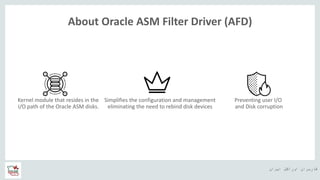
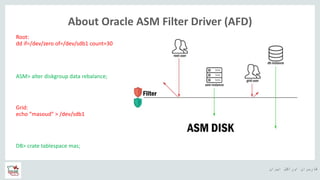
About Oracle ASM Filter Driver (AFD)
Kernel module that resides in the
I/O path of the Oracle ASM disks.
Preventing user I/O
and Disk corruption
Simplifies the configuration and management
eliminating the need to rebind disk devices
‫ایران‬ ‫اوراکل‬ ‫کاربران‬ ‫ه‬
About Oracle ASM Filter Driver (AFD)
Root:
dd if=/dev/zero of=/dev/sdb1 count=30
DB> crate tablespace mas;
Grid:
echo “masoud” > /dev/sdb1
ASM> alter diskgroup data rebalance;
‫ایران‬ ‫اوراکل‬ ‫کاربران‬ ‫ه‬
About Oracle ASM Filter Driver (AFD)
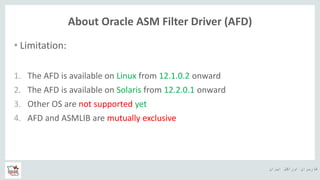
• Limitation:
1. The AFD is available on Linux from 12.1.0.2 onward
2. The AFD is available on Solaris from 12.2.0.1 onward
3. Other OS are not supported yet
4. AFD and ASMLIB are mutually exclusive
‫ایران‬ ‫اوراکل‬ ‫کاربران‬ ‫ه‬
Agenda
• About Oracle ASM Filter Driver (AFD)
• Configuring Oracle AFD During Installation
• Configuring Oracle AFD After Installation
• Migrating to Oracle ASMLIB From AFD
• Check Oracle AFD has been configured
• Oracle AFD management commands
‫ایران‬ ‫اوراکل‬ ‫کاربران‬ ‫ه‬
Configuring Oracle AFD During Installation
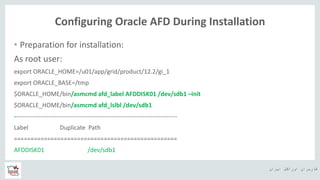
• Preparation for installation:
As root user:
export ORACLE_HOME=/u01/app/grid/product/12.2/gi_1
export ORACLE_BASE=/tmp
$ORACLE_HOME/bin/asmcmd afd_label AFDDISK01 /dev/sdb1 –init
$ORACLE_HOME/bin/asmcmd afd_lslbl /dev/sdb1
--------------------------------------------------------------------------------
Label Duplicate Path
=================================================
AFDDISK01 /dev/sdb1
‫ایران‬ ‫اوراکل‬ ‫کاربران‬ ‫ه‬
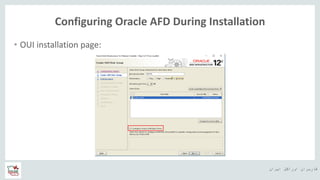
Configuring Oracle AFD During Installation
• OUI installation page:
‫ایران‬ ‫اوراکل‬ ‫کاربران‬ ‫ه‬
Configuring Oracle AFD During Installation
• Check after installation:
ASM> sho parameter asm_diskstring
NAME TYPE VALUE
------------------------------------ ----------- ------------------------------
asm_diskstring string AFD:*
[grid@mydb2 ~]$ asmcmd dsget
parameter:AFD:*
profile:AFD:*
‫ایران‬ ‫اوراکل‬ ‫کاربران‬ ‫ه‬
Configuring Oracle AFD During Installation
• Check after installation:
[grid@mydb2 dev]$ srvctl config asm
ASM home: <CRS home>
Password file: +DATA/orapwasm
ASM listener: LISTENER
Spfile: +DATA/ASM/ASMPARAMETERFILE/registry.253.969025733
ASM diskgroup discovery string: AFD:*
[grid@mydb2 grid]$ asmcmd afd_state
ASMCMD-9526: The AFD state is 'LOADED' and filtering is 'ENABLED' on host 'mydb2'
‫ایران‬ ‫اوراکل‬ ‫کاربران‬ ‫ه‬
Agenda
• About Oracle ASM Filter Driver (AFD)
• Configuring Oracle AFD During Installation
• Configuring Oracle AFD After Installation
• Migrating to Oracle ASMLIB From AFD
• Check Oracle AFD has been configured
• Oracle AFD management commands
‫ایران‬ ‫اوراکل‬ ‫کاربران‬ ‫ه‬
Configuring Oracle AFD After Installation
As grid user:
[grid@mydb2 ~]$ asmcmd dsget
parameter:/dev/oracleasm/disks/*
profile:/dev/oracleasm/disks/*
[grid@mydb2 ~]$ asmcmd dsset ‘/dev/oracleasm/disks/*’,’AFD:*’
[grid@mydb2 ~]$ asmcmd dsget
parameter:/dev/oracleasm/disks/*, AFD:*
profile:/dev/oracleasm/disks/*,AFD:*
‫ایران‬ ‫اوراکل‬ ‫کاربران‬ ‫ه‬
Configuring Oracle AFD After Installation
As root user:
[root@mydb2 bin]# /u01/app/grid/product/12.2/gi_1/bin/crsctl stop has
.
CRS-2677: Stop of 'ora.driver.afd' on 'mydb2' succeeded
CRS-2793: Shutdown of Oracle High Availability Services-managed resources on 'mydb2' has completed
CRS-4133: Oracle High Availability Services has been stopped.
[root@mydb2 bin]# /u01/app/grid/product/12.2/gi_1/bin/acfsload stop
[root@mydb2 bin]# oracleasm exit
Unmounting ASMlib driver filesystem: /dev/oracleasm
Unloading module "oracleasm": oracleasm
‫ایران‬ ‫اوراکل‬ ‫کاربران‬ ‫ه‬
Configuring Oracle AFD After Installation
[root@mydb2 bin]# oracleasm status
Checking if ASM is loaded: no
Checking if /dev/oracleasm is mounted: no
[root@mydb2 bin]# ./asmcmd afd_configure
AFD-9323: Creating module dependencies - this may take some time.
AFD-9154: Loading 'oracleafd.ko' driver.
AFD-649: Verifying AFD devices.
AFD-9156: Detecting control device '/dev/oracleafd/admin'.
AFD-638: AFD installation correctness verified.
‫ایران‬ ‫اوراکل‬ ‫کاربران‬ ‫ه‬
Configuring Oracle AFD After Installation
[root@mydb2 bin]# systemctl disable oracleasm
Removed symlink /etc/systemd/system/multi-user.target.wants/oracleasm.service.
[root@mydb2 bin]# ./asmcmd afd_label AFDDISK01 /dev/sdb1 –migrate
[root@mydb2 bin]# ./asmcmd afd_lslbl /dev/sdb1
--------------------------------------------------------------------------------
Label Duplicate Path
=================================================
AFDDISK01 /dev/sdb1
‫ایران‬ ‫اوراکل‬ ‫کاربران‬ ‫ه‬
Configuring Oracle AFD After Installation
[root@mydb2 bin]# ./crsctl start has
CRS-4123: Oracle High Availability Services has been started.
[root@mydb2 bin]# ./acfsload start
ACFS-9391: Checking for existing ADVM/ACFS installation.
ACFS-9392: Validating ADVM/ACFS installation files for operating system.
ACFS-9393: Verifying ASM Administrator setup.
ACFS-9308: Loading installed ADVM/ACFS drivers.
ACFS-9156: Detecting control device '/dev/asm/.asm_ctl_spec'.
ACFS-9156: Detecting control device '/dev/ofsctl'.
ACFS-9322: completed
‫ایران‬ ‫اوراکل‬ ‫کاربران‬ ‫ه‬
Configuring Oracle AFD After Installation
As greed user:
[grid@mydb2 ~]$ crsctl stat res ora.driver.afd
NAME=ora.driver.afd
TYPE=ora.driver.afd.type
TARGET=ONLINE
STATE=ONLINE on mydb2
[grid@mydb2 ~]$ asmcmd lsdsk -p
Group_Num Disk_Num Incarn Mount_Stat Header_Stat Mode_Stat State Path
1 0 4042477514 CACHED MEMBER ONLINE NORMAL AFD:AFDDISK01
‫ایران‬ ‫اوراکل‬ ‫کاربران‬ ‫ه‬
Configuring Oracle AFD After Installation
[grid@mydb2 ~]$ asmcmd dsget
parameter:/dev/oracleasm/disks/*, AFD:*
profile:/dev/oracleasm/disks/*,AFD:*
[grid@mydb2 ~]$ asmcmd dsset 'AFD:*‘
[grid@mydb2 ~]$ asmcmd dsget
parameter:AFD:*
profile:AFD:*
‫ایران‬ ‫اوراکل‬ ‫کاربران‬ ‫ه‬
Configuring Oracle AFD After Installation
[grid@mydb2 ~]$ srvctl config asm
ASM home: <CRS home>
Password file: +DATA/orapwasm
Backup of Password file:
ASM listener: LISTENER
Spfile: +DATA/ASM/ASMPARAMETERFILE/registry.253.969025733
ASM diskgroup discovery string: AFD:*
[grid@mydb2 ~]$ asmcmd afd_state
ASMCMD-9526: The AFD state is 'LOADED' and filtering is 'ENABLED' on host 'mydb2'
‫ایران‬ ‫اوراکل‬ ‫کاربران‬ ‫ه‬
Agenda
• About Oracle ASM Filter Driver (AFD)
• Configuring Oracle AFD During Installation
• Configuring Oracle AFD After Installation
• Migrating to Oracle ASMLIB From AFD
• Check Oracle AFD has been configured
• Oracle AFD management commands
‫ایران‬ ‫اوراکل‬ ‫کاربران‬ ‫ه‬
Migrating to Oracle ASMLIB From AFD
• Why if you do not like to use AFD? You could flow instructions below to
come back to our old love, ASMLIB
As grid user:
[grid@mydb2 ~]$ asmcmd dsget
parameter: AFD:*
profile:AFD:*
[grid@mydb2 ~]$ asmcmd dsset ’AFD:*’, ‘/dev/oracleasm/disks/*’
[grid@mydb2 ~]$ asmcmd dsget
parameter:AFD:*,/dev/oracleasm/disks/*
profile:AFD:*,/dev/oracleasm/disks/*
‫ایران‬ ‫اوراکل‬ ‫کاربران‬ ‫ه‬
Migrating to Oracle ASMLIB From AFD
As root user:
[root@mydb2 bin]# /u01/app/grid/product/12.2/gi_1/bin/crsctl stop has
.
.
.
CRS-2677: Stop of 'ora.driver.afd' on 'mydb2' succeeded
CRS-2793: Shutdown of Oracle High Availability Services-managed resources on 'mydb2' has completed
CRS-4133: Oracle High Availability Services has been stopped.
‫ایران‬ ‫اوراکل‬ ‫کاربران‬ ‫ه‬
Migrating to Oracle ASMLIB From AFD
[root@mydb2 bin]# /u01/app/grid/product/12.2/gi_1/bin/acfsload stop
[root@mydb2 bin]# /u01/app/grid/product/12.2/gi_1/bin/asmcmd afd_deconfigure
AFD-632: Existing AFD installation detected.
AFD-634: Removing previous AFD installation.
AFD-635: Previous AFD components successfully removed.
Modifying resource dependencies - this may take some time.
[root@mydb2 bin]# yum install oracleasm-support –y
Installed:
oracleasm-support.x86_64 0:2.1.11-1.el7
Complete!
‫ایران‬ ‫اوراکل‬ ‫کاربران‬ ‫ه‬
Migrating to Oracle ASMLIB From AFD
[root@mydb2 bin]# oracleasm configure –i
Default user to own the driver interface []: grid
Default group to own the driver interface []: asmadmin
Start Oracle ASM library driver on boot (y/n) [n]: y
Scan for Oracle ASM disks on boot (y/n) [y]: y
Writing Oracle ASM library driver configuration: done
[root@mydb2 bin]# oracleasm init
Loading module "oracleasm": oracleasm
Configuring "oracleasm" to use device physical block size
Mounting ASMlib driver filesystem: /dev/oracleasm
‫ایران‬ ‫اوراکل‬ ‫کاربران‬ ‫ه‬
Migrating to Oracle ASMLIB From AFD
[root@mydb2 bin]# oracleasm status
Checking if ASM is loaded: yes
Checking if /dev/oracleasm is mounted: yes
[root@mydb2 bin]# oracleasm scandisks
Reloading disk partitions: done
Cleaning any stale ASM disks...
Scanning system for ASM disks...
Instantiating disk "AFDDISK01“
[root@mydb2 bin]# oracleasm listdisks
AFDDISK01
‫ایران‬ ‫اوراکل‬ ‫کاربران‬ ‫ه‬
Migrating to Oracle ASMLIB From AFD
[root@mydb2 bin]# ll /dev/oracleasm/disks/*
brw-rw----. 1 grid asmadmin 8, 17 Feb 25 15:06 /dev/oracleasm/disks/AFDDISK01
[root@mydb2 bin]# /u01/app/grid/product/12.2/gi_1/bin/crsctl start has
CRS-4123: Oracle High Availability Services has been started.
As grid user:
[grid@mydb2 ~]$ crsctl check has
CRS-4638: Oracle High Availability Services is online
[grid@mydb2 ~]$ asmcmd dsset '/dev/oracleasm/disks/*'
[grid@mydb2 ~]$ srvctl status asm
ASM is running on mydb2
‫ایران‬ ‫اوراکل‬ ‫کاربران‬ ‫ه‬
Migrating to Oracle ASMLIB From AFD
[grid@mydb2 ~]$ asmcmd dsget
parameter:/dev/oracleasm/disks/*
profile:/dev/oracleasm/disks/*
[grid@mydb2 ~]$ asmcmd lsdsk -p
Group_Num Disk_Num Incarn Mount_Stat Header_Stat Mode_Stat State Path
1 0 4034024175 CACHED MEMBER ONLINE NORMAL /dev/oracleasm/disks/AFDDISK01
[grid@mydb2 ~]$ asmcmd afd_state
ASMCMD-9530: The AFD state is 'NOT SUPPORTED'
‫ایران‬ ‫اوراکل‬ ‫کاربران‬ ‫ه‬
Migrating to Oracle ASMLIB From AFD
[grid@mydb2 ~]$ srvctl config asm
ASM home: <CRS home>
Password file: +DATA/orapwasm
ASM listener: LISTENER
Spfile: +DATA/ASM/ASMPARAMETERFILE/registry.253.969025733
ASM diskgroup discovery string: /dev/oracleasm/disks/*
[root@mydb2 bin]# /u01/app/grid/product/12.2/gi_1/bin/acfsload start
.
.
ACFS-9322: completed
‫ایران‬ ‫اوراکل‬ ‫کاربران‬ ‫ه‬
Agenda
• About Oracle ASM Filter Driver (AFD)
• Configuring Oracle AFD During Installation
• Configuring Oracle AFD After Installation
• Migrating to Oracle ASMLIB From AFD
• Check Oracle AFD has been configured
• Oracle AFD management commands
‫ایران‬ ‫اوراکل‬ ‫کاربران‬ ‫ه‬
Check Oracle AFD has been configured
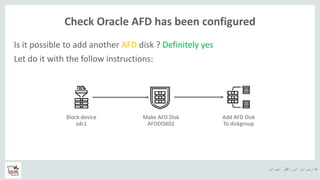
Is it possible to add another AFD disk ? Definitely yes
Let do it with the follow instructions:
Block device
sdc1
Make AFD Disk
AFDDISK02
Add AFD Disk
To diskgroup
‫ایران‬ ‫اوراکل‬ ‫کاربران‬ ‫ه‬
Check Oracle AFD has been configured
As all you know, you could use fdisk or any alternatives to format
Block device.
[root@mydb2 bin]# fdisk -l /dev/sdc
Disk /dev/sdc: 21.5 GB, 21474836480 bytes, 41943040 sectors
Units = sectors of 1 * 512 = 512 bytes
Sector size (logical/physical): 512 bytes / 512 bytes
I/O size (minimum/optimal): 512 bytes / 512 bytes
Disk identifier: 0x00ec3a6d
Device Boot Start End Blocks Id System
/dev/sdc1 2048 41943039 20970496 83 Linux
Block device
sdc1
‫ایران‬ ‫اوراکل‬ ‫کاربران‬ ‫ه‬
Check Oracle AFD has been configured
As root user:
[root@mydb2 bin]# ./asmcmd afd_label AFDDISK02 /dev/sdc1 --init
ASMCMD-9521: AFD is already configured
[root@mydb2 bin]# ./asmcmd afd_label AFDDISK02 /dev/sdc1
[root@mydb2 bin]# ./asmcmd afd_lslbl
--------------------------------------------------------------------------------
Label Duplicate Path
=================================================
AFDDISK01 /dev/sdb1
AFDDISK02 /dev/sdc1
Make AFD Disk
AFDDISK02
‫ایران‬ ‫اوراکل‬ ‫کاربران‬ ‫ه‬
Check Oracle AFD has been configured
As grid user:
[grid@mydb2 ~]$ asmcmd lsdsk --candidate
Path
AFD:AFDDISK02
ASM> alter diskgroup data add disk 'AFD:AFDDISK02';
Diskgroup altered.
[grid@mydb2 ~]$ asmcmd lsdsk -p -G data
Group_Num Disk_Num Incarn Mount_Stat Header_Stat Mode_Stat State Path
1 0 4042477514 CACHED MEMBER ONLINE NORMAL AFD:AFDDISK01
1 1 4042477516 CACHED MEMBER ONLINE NORMAL AFD:AFDDISK02
Add AFD Disk
To diskgroup
‫ایران‬ ‫اوراکل‬ ‫کاربران‬ ‫ه‬
Check Oracle AFD has been configured
The value of the AFD_STATE parameter of SYS_ASMFD_PROPERTIES specifies
whether Oracle ASMFD is configured for the Oracle ASM instance.
ASM> SELECT SYS_CONTEXT('SYS_ASMFD_PROPERTIES', 'AFD_STATE') FROM DUAL;
SYS_CONTEXT('SYS_ASMFD_PROPERTIES','AFD_STATE')
--------------------------------------------------------------------------------
CONFIGURED
You can check the state of Oracle AFD with the ASMCMD afd_state
command
[grid@mydb2 ~]$ asmcmd afd_state
ASMCMD-9526: The AFD state is 'LOADED' and filtering is 'ENABLED' on host 'mydb2'
‫ایران‬ ‫اوراکل‬ ‫کاربران‬ ‫ه‬
Check Oracle AFD has been configured
It is worth mentioning path of ‘AFD:*’ is not block device, they are text file:
[root@mydb2 bin]# file /dev/oracleafd/disks/*
/dev/oracleafd/disks/AFDDISK01: ASCII text
/dev/oracleafd/disks/AFDDISK02: ASCII text
Actually they are references:
[grid@mydb2 ~]$ cat /dev/oracleafd/disks/AFDDISK01
/dev/sdb1
[grid@mydb2 ~]$ asmcmd afd_dsget
AFD discovery string: /dev/sd*
‫ایران‬ ‫اوراکل‬ ‫کاربران‬ ‫ه‬
Check Oracle AFD has been configured
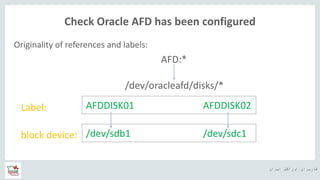
Originality of references and labels:
AFD:*
/dev/oracleafd/disks/*
AFDDISK01 AFDDISK02Label:
block device: /dev/sdb1 /dev/sdc1
‫ایران‬ ‫اوراکل‬ ‫کاربران‬ ‫ه‬
Check Oracle AFD has been configured
Checking AFD:
OS users except root user:
[grid@mydb2 ~]$ echo “Masoud” > /dev/sdb1
-bash: /dev/sdb1: Permission denied
[oracle@mydb2 ~]$ echo “I have required Privileges” > /dev/sdc1
-bash: /dev/sdc1: Permission denied
‫ایران‬ ‫اوراکل‬ ‫کاربران‬ ‫ه‬
Check Oracle AFD has been configured
Checking AFD:
[root@mydb2 bin]# dd if=/dev/zero of=/dev/sdb1 count=30
30+0 records in
30+0 records out
15360 bytes (15 kB) copied, 0.000210336 s, 73.0 MB/s
[root@mydb2 bin]# vim /var/log/messages
Feb 26 18:07:07 mydb2 kernel: F 4388703.592/180226143707 flush-8:16[39886] oracleafd:18:0894:Write
IO to ASM managed device: [8] [17]
Feb 26 18:07:07 mydb2 kernel: Buffer I/O error on device sdb1, logical block 0
Feb 26 18:07:07 mydb2 kernel: lost page write due to I/O error on sdb1
‫ایران‬ ‫اوراکل‬ ‫کاربران‬ ‫ه‬
Check Oracle AFD has been configured
Is it possible to turn off I/O filtering in the AFD? Yes, but it is not best practice
As root user:
[root@mydb2 bin]# ./asmcmd afd_filter -d /dev/sdb1
[root@mydb2 bin]# ./asmcmd afd_lsdsk
--------------------------------------------------------------------------------
Label Filtering Path
=================================================
AFDDISK01 DISABLED /dev/sdb1
AFDDISK02 ENABLED /dev/sdc1
‫ایران‬ ‫اوراکل‬ ‫کاربران‬ ‫ه‬
Check Oracle AFD has been configured
As root user:
[root@mydb2 bin]# od -t x1z /dev/sdb1 | head -n 2
0000000 00 00 00 00 00 00 00 00 00 00 00 00 00 00 00 00 >................<
0000020 00 00 00 00 00 00 00 00 00 00 00 00 00 00 00 00 >................<
[root@mydb2 bin]# echo "mas" > /dev/sdb1
[root@mydb2 bin]# od -t x1z /dev/sdb1 | head -n 2
0000000 6d 61 73 0a 00 00 00 00 00 00 00 00 00 00 00 00 >mas.............<
0000020 00 00 00 00 00 00 00 00 00 00 00 00 00 00 00 00 >................<
‫ایران‬ ‫اوراکل‬ ‫کاربران‬ ‫ه‬
Check Oracle AFD has been configured
[grid@mydb2 ~]$ srvctl start diskgroup -diskgroup data
PRCR-1079 : Failed to start resource ora.DATA.dg
CRS-5017: The resource action "ora.DATA.dg start" encountered the following error:
ORA-15032: not all alterations performed
ORA-15017: diskgroup "DATA" cannot be mounted
ORA-15040: diskgroup is incomplete
. For details refer to "(:CLSN00107:)" in
"/u01/app/grid/diag/crs/mydb2/crs/trace/ohasd_oraagent_grid.trc".
CRS-2674: Start of 'ora.DATA.dg' on 'mydb2' failed
‫ایران‬ ‫اوراکل‬ ‫کاربران‬ ‫ه‬
Agenda
• About Oracle ASM Filter Driver (AFD)
• Configuring Oracle AFD During Installation
• Configuring Oracle AFD After Installation
• Migrating to Oracle ASMLIB From AFD
• Check Oracle AFD has been configured
• Oracle AFD management commands
‫ایران‬ ‫اوراکل‬ ‫کاربران‬ ‫ه‬
Oracle AFD management commands
afd_configure
Configures AFD on the local node. This command requires the Oracle Clusterware stack to be down on the
local node. The command must be executed by a privileged user. After afd_configure execution the default
filtering state is enabled.
Synopsis
afd_configure [-d | -e] [-f]
Description
The options for afd_configure are described below
-d - disable AFD filtering mode
-e - enable AFD filtering mode
-f - force AFD configuration
‫ایران‬ ‫اوراکل‬ ‫کاربران‬ ‫ه‬
Oracle AFD management commands
afd_deconfigure
Deconfigures AFD from the local node. This command requires the Oracle Clusterware stack to be down on
the local node. The command must be executed by a privileged user.
Synopsis
afd_deconfigure [-f]
Description
The options for afd_deconfigure are described below
-f - force AFD deconfiguration
‫ایران‬ ‫اوراکل‬ ‫کاربران‬ ‫ه‬
Oracle AFD management commands
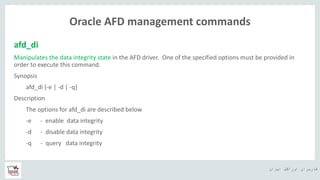
afd_di
Manipulates the data integrity state in the AFD driver. One of the specified options must be provided in
order to execute this command.
Synopsis
afd_di {-e | -d | -q}
Description
The options for afd_di are described below
-e - enable data integrity
-d - disable data integrity
-q - query data integrity
‫ایران‬ ‫اوراکل‬ ‫کاربران‬ ‫ه‬
Oracle AFD management commands
afd_dsget
Retrieves the AFD discovery diskstring value
Synopsis
afd_dsget [--all]
Description
The options for the afd_dsget command are described below.
--all - Get clusterwide AFD discovery diskstring.
‫ایران‬ ‫اوراکل‬ ‫کاربران‬ ‫ه‬
Oracle AFD management commands
afd_dsset
Sets the AFD discovery diskstring value
Synopsis
afd_dsset <afddiskstring> [--all]
Description
The options for the afd_dsset command are described below.
--all - Set clusterwide AFD discovery diskstring.
‫ایران‬ ‫اوراکل‬ ‫کاربران‬ ‫ه‬
Oracle AFD management commands
afd_filter
Sets the AFD filtering mode on a given disk path. If the command is executed without specifying a disk path
then filtering is set at node level.
Synopsis
afd_filter {-e | -d } [<disk-path>] [--all]
Description
The options for afd_filter are described below
-e - enable AFD filtering mode
-d - disable AFD filtering mode
--all - set clusterwide AFD filtering mode
‫ایران‬ ‫اوراکل‬ ‫کاربران‬ ‫ه‬
Oracle AFD management commands
afd_label
To set the given label to the specified disk. '--init' option is not allowed if AFD is already loaded.
Synopsis
afd_label <label> <disk> [--rename | --migrate] [--init]
Description
label - label for the disk
disk - disk path
--rename - to relabel a disk that was labeled earlier
--migrate - to label a disk that was provisioned for ASM
--init - to set AFD label during initialize stage
‫ایران‬ ‫اوراکل‬ ‫کاربران‬ ‫ه‬
Oracle AFD management commands
afd_lsdsk
List Oracle ASM Filter Driver disks.
Synopsis
afd_lsdsk [--all]
Description
--all - clusterwide fetch of AFD disks.
‫ایران‬ ‫اوراکل‬ ‫کاربران‬ ‫ه‬
Oracle AFD management commands
afd_lslbl
Scans OS disks using the given discovery string and lists the disks that contain AFD labels. If the command is
executed without specifying a disk string then it uses the configured afd_diskstring value.
Synopsis
afd_lslbl [<disk-string>]
Examples
The following example uses afd_lslbl to scan OS disks
for AFD labels and lists them.
ASMCMD [+] >afd_lslbl '/dev/sd*'
‫ایران‬ ‫اوراکل‬ ‫کاربران‬ ‫ه‬
Oracle AFD management commands
afd_refresh
Refreshes AFD disks using the afd discovery string. It uses the configured afd_diskstring value.
Synopsis
afd_refresh [--all]
Description
The options for the afd_refresh command are described below.
--all - clusterwide afd refresh
‫ایران‬ ‫اوراکل‬ ‫کاربران‬ ‫ه‬
Oracle AFD management commands
afd_scan
Scans for AFD disks using the given discovery string. If the command is executed without specifying a disk
string then it uses the configured afd_diskstring value.
Synopsis
afd_scan [<disk-string>] [--all]
Description
The options for the afd_scan command are described below.
--all - clusterwide afd scan
‫ایران‬ ‫اوراکل‬ ‫کاربران‬ ‫ه‬
Oracle AFD management commands
afd_state
Returns the state of AFD
Synopsis
afd_state [--all]
Description
The options for afd_state are described below
--all - clusterwide afd state check
Examples
ASMCMD [+] >afd_state
ASMCMD-9526: The AFD state is 'LOADED' and filtering is 'DEFAULT' on host 'myhost'
‫ایران‬ ‫اوراکل‬ ‫کاربران‬ ‫ه‬
Oracle AFD management commands
afd_unlabel
To clear an existing label from a disk using either its label or disk path. If a disk needs to be unlabeled during
initialization stage it can be done only by using its disk path. '-f' option will not clear the label if there are
pending opens.
Synopsis
afd_unlabel { <label> | <'disk'> } [-f] [--init]
Description
label - label to clear
disk - disk path
-f - forcibly clear the label if ASM member disk and no pending opens of the disk
--init - to clear AFD label during initialize stage
‫ایران‬ ‫اوراکل‬ ‫کاربران‬ ‫ه‬
References
• https://docs.oracle.com/en/database/oracle/oracle-database/12.2/ostmg/administer-
filter-driver.html#GUID-2F5E344F-AFC2-4768-8C00-6F3C56302123
‫ایران‬ ‫اوراکل‬ ‫کاربران‬ ‫ه‬
https://ir.linkedin.com/in/masoud-haji-hassan-pour
Masoud Haji Hassan Pour
Mas.Hassanpour@gmail.com
Thanks
for your attention
http://masoudhhp.me/
‫ایران‬ ‫اوراکل‬ ‫کاربران‬ ‫ه‬
‫سبزتان‬ ‫حضور‬ ‫از‬ ‫تشکر‬ ‫با‬

Oracle AFD

  • 1.
    ‫ایران‬ ‫اوراکل‬ ‫کاربران‬‫ه‬ ‫ایران‬ ‫اوراکل‬ ‫کاربران‬ ‫گروه‬ ‫خانوادگی‬ ‫نام‬ ‫و‬ ‫نام‬:‫حاجی‬ ‫مسعود‬ ‫پور‬ ‫حسن‬ ‫ارائه‬ ‫موضوع‬:Oracle AFD ‫تاریخ‬:1396/12/10
  • 2.
    ‫ایران‬ ‫اوراکل‬ ‫کاربران‬‫ه‬ ‫دهنده‬‫ارائه‬ ‫درباره‬ ‫مدیر‬‫پایگاه‬‫شرکت‬ ‫در‬ ‫داده‬ ‫مشاور‬ ‫و‬ ‫انفورماتیک‬ ‫خدمات‬ ‫از‬ ‫بیش‬ ‫با‬۵‫در‬ ‫کار‬ ‫سابقه‬ ‫سال‬ ‫داده‬ ‫پایگاه‬ ‫زمینه‬‫اوراکل‬ https://ir.linkedin.com/in/masoud-haji-hassan-pour http://masoudhhp.me/
  • 3.
    ‫کاربران‬ ‫گروه‬ ‫از‬‫سپاس‬ ‫با‬‫ایران‬ ‫اوراکل‬ Oracle AFD ‫ارائه‬ ‫موضوع‬
  • 4.
    ‫ایران‬ ‫اوراکل‬ ‫کاربران‬‫ه‬ Agenda • About Oracle ASM Filter Driver (AFD) • Configuring Oracle AFD During Installation • Configuring Oracle AFD After Installation • Migrating to Oracle ASMLIB From AFD • Check Oracle AFD has been configured • Oracle AFD management commands
  • 5.
    ‫ایران‬ ‫اوراکل‬ ‫کاربران‬‫ه‬ Agenda • About Oracle ASM Filter Driver (AFD) • Configuring Oracle AFD During Installation • Configuring Oracle AFD After Installation • Migrating to Oracle ASMLIB From AFD • Check Oracle AFD has been configured • Oracle AFD management commands
  • 6.
    ‫ایران‬ ‫اوراکل‬ ‫کاربران‬‫ه‬ About Oracle ASM Filter Driver (AFD) Kernel module that resides in the I/O path of the Oracle ASM disks. Preventing user I/O and Disk corruption Simplifies the configuration and management eliminating the need to rebind disk devices
  • 7.
    ‫ایران‬ ‫اوراکل‬ ‫کاربران‬‫ه‬ About Oracle ASM Filter Driver (AFD) Root: dd if=/dev/zero of=/dev/sdb1 count=30 DB> crate tablespace mas; Grid: echo “masoud” > /dev/sdb1 ASM> alter diskgroup data rebalance;
  • 8.
    ‫ایران‬ ‫اوراکل‬ ‫کاربران‬‫ه‬ About Oracle ASM Filter Driver (AFD) • Limitation: 1. The AFD is available on Linux from 12.1.0.2 onward 2. The AFD is available on Solaris from 12.2.0.1 onward 3. Other OS are not supported yet 4. AFD and ASMLIB are mutually exclusive
  • 9.
    ‫ایران‬ ‫اوراکل‬ ‫کاربران‬‫ه‬ Agenda • About Oracle ASM Filter Driver (AFD) • Configuring Oracle AFD During Installation • Configuring Oracle AFD After Installation • Migrating to Oracle ASMLIB From AFD • Check Oracle AFD has been configured • Oracle AFD management commands
  • 10.
    ‫ایران‬ ‫اوراکل‬ ‫کاربران‬‫ه‬ Configuring Oracle AFD During Installation • Preparation for installation: As root user: export ORACLE_HOME=/u01/app/grid/product/12.2/gi_1 export ORACLE_BASE=/tmp $ORACLE_HOME/bin/asmcmd afd_label AFDDISK01 /dev/sdb1 –init $ORACLE_HOME/bin/asmcmd afd_lslbl /dev/sdb1 -------------------------------------------------------------------------------- Label Duplicate Path ================================================= AFDDISK01 /dev/sdb1
  • 11.
    ‫ایران‬ ‫اوراکل‬ ‫کاربران‬‫ه‬ Configuring Oracle AFD During Installation • OUI installation page:
  • 12.
    ‫ایران‬ ‫اوراکل‬ ‫کاربران‬‫ه‬ Configuring Oracle AFD During Installation • Check after installation: ASM> sho parameter asm_diskstring NAME TYPE VALUE ------------------------------------ ----------- ------------------------------ asm_diskstring string AFD:* [grid@mydb2 ~]$ asmcmd dsget parameter:AFD:* profile:AFD:*
  • 13.
    ‫ایران‬ ‫اوراکل‬ ‫کاربران‬‫ه‬ Configuring Oracle AFD During Installation • Check after installation: [grid@mydb2 dev]$ srvctl config asm ASM home: <CRS home> Password file: +DATA/orapwasm ASM listener: LISTENER Spfile: +DATA/ASM/ASMPARAMETERFILE/registry.253.969025733 ASM diskgroup discovery string: AFD:* [grid@mydb2 grid]$ asmcmd afd_state ASMCMD-9526: The AFD state is 'LOADED' and filtering is 'ENABLED' on host 'mydb2'
  • 14.
    ‫ایران‬ ‫اوراکل‬ ‫کاربران‬‫ه‬ Agenda • About Oracle ASM Filter Driver (AFD) • Configuring Oracle AFD During Installation • Configuring Oracle AFD After Installation • Migrating to Oracle ASMLIB From AFD • Check Oracle AFD has been configured • Oracle AFD management commands
  • 15.
    ‫ایران‬ ‫اوراکل‬ ‫کاربران‬‫ه‬ Configuring Oracle AFD After Installation As grid user: [grid@mydb2 ~]$ asmcmd dsget parameter:/dev/oracleasm/disks/* profile:/dev/oracleasm/disks/* [grid@mydb2 ~]$ asmcmd dsset ‘/dev/oracleasm/disks/*’,’AFD:*’ [grid@mydb2 ~]$ asmcmd dsget parameter:/dev/oracleasm/disks/*, AFD:* profile:/dev/oracleasm/disks/*,AFD:*
  • 16.
    ‫ایران‬ ‫اوراکل‬ ‫کاربران‬‫ه‬ Configuring Oracle AFD After Installation As root user: [root@mydb2 bin]# /u01/app/grid/product/12.2/gi_1/bin/crsctl stop has . CRS-2677: Stop of 'ora.driver.afd' on 'mydb2' succeeded CRS-2793: Shutdown of Oracle High Availability Services-managed resources on 'mydb2' has completed CRS-4133: Oracle High Availability Services has been stopped. [root@mydb2 bin]# /u01/app/grid/product/12.2/gi_1/bin/acfsload stop [root@mydb2 bin]# oracleasm exit Unmounting ASMlib driver filesystem: /dev/oracleasm Unloading module "oracleasm": oracleasm
  • 17.
    ‫ایران‬ ‫اوراکل‬ ‫کاربران‬‫ه‬ Configuring Oracle AFD After Installation [root@mydb2 bin]# oracleasm status Checking if ASM is loaded: no Checking if /dev/oracleasm is mounted: no [root@mydb2 bin]# ./asmcmd afd_configure AFD-9323: Creating module dependencies - this may take some time. AFD-9154: Loading 'oracleafd.ko' driver. AFD-649: Verifying AFD devices. AFD-9156: Detecting control device '/dev/oracleafd/admin'. AFD-638: AFD installation correctness verified.
  • 18.
    ‫ایران‬ ‫اوراکل‬ ‫کاربران‬‫ه‬ Configuring Oracle AFD After Installation [root@mydb2 bin]# systemctl disable oracleasm Removed symlink /etc/systemd/system/multi-user.target.wants/oracleasm.service. [root@mydb2 bin]# ./asmcmd afd_label AFDDISK01 /dev/sdb1 –migrate [root@mydb2 bin]# ./asmcmd afd_lslbl /dev/sdb1 -------------------------------------------------------------------------------- Label Duplicate Path ================================================= AFDDISK01 /dev/sdb1
  • 19.
    ‫ایران‬ ‫اوراکل‬ ‫کاربران‬‫ه‬ Configuring Oracle AFD After Installation [root@mydb2 bin]# ./crsctl start has CRS-4123: Oracle High Availability Services has been started. [root@mydb2 bin]# ./acfsload start ACFS-9391: Checking for existing ADVM/ACFS installation. ACFS-9392: Validating ADVM/ACFS installation files for operating system. ACFS-9393: Verifying ASM Administrator setup. ACFS-9308: Loading installed ADVM/ACFS drivers. ACFS-9156: Detecting control device '/dev/asm/.asm_ctl_spec'. ACFS-9156: Detecting control device '/dev/ofsctl'. ACFS-9322: completed
  • 20.
    ‫ایران‬ ‫اوراکل‬ ‫کاربران‬‫ه‬ Configuring Oracle AFD After Installation As greed user: [grid@mydb2 ~]$ crsctl stat res ora.driver.afd NAME=ora.driver.afd TYPE=ora.driver.afd.type TARGET=ONLINE STATE=ONLINE on mydb2 [grid@mydb2 ~]$ asmcmd lsdsk -p Group_Num Disk_Num Incarn Mount_Stat Header_Stat Mode_Stat State Path 1 0 4042477514 CACHED MEMBER ONLINE NORMAL AFD:AFDDISK01
  • 21.
    ‫ایران‬ ‫اوراکل‬ ‫کاربران‬‫ه‬ Configuring Oracle AFD After Installation [grid@mydb2 ~]$ asmcmd dsget parameter:/dev/oracleasm/disks/*, AFD:* profile:/dev/oracleasm/disks/*,AFD:* [grid@mydb2 ~]$ asmcmd dsset 'AFD:*‘ [grid@mydb2 ~]$ asmcmd dsget parameter:AFD:* profile:AFD:*
  • 22.
    ‫ایران‬ ‫اوراکل‬ ‫کاربران‬‫ه‬ Configuring Oracle AFD After Installation [grid@mydb2 ~]$ srvctl config asm ASM home: <CRS home> Password file: +DATA/orapwasm Backup of Password file: ASM listener: LISTENER Spfile: +DATA/ASM/ASMPARAMETERFILE/registry.253.969025733 ASM diskgroup discovery string: AFD:* [grid@mydb2 ~]$ asmcmd afd_state ASMCMD-9526: The AFD state is 'LOADED' and filtering is 'ENABLED' on host 'mydb2'
  • 23.
    ‫ایران‬ ‫اوراکل‬ ‫کاربران‬‫ه‬ Agenda • About Oracle ASM Filter Driver (AFD) • Configuring Oracle AFD During Installation • Configuring Oracle AFD After Installation • Migrating to Oracle ASMLIB From AFD • Check Oracle AFD has been configured • Oracle AFD management commands
  • 24.
    ‫ایران‬ ‫اوراکل‬ ‫کاربران‬‫ه‬ Migrating to Oracle ASMLIB From AFD • Why if you do not like to use AFD? You could flow instructions below to come back to our old love, ASMLIB As grid user: [grid@mydb2 ~]$ asmcmd dsget parameter: AFD:* profile:AFD:* [grid@mydb2 ~]$ asmcmd dsset ’AFD:*’, ‘/dev/oracleasm/disks/*’ [grid@mydb2 ~]$ asmcmd dsget parameter:AFD:*,/dev/oracleasm/disks/* profile:AFD:*,/dev/oracleasm/disks/*
  • 25.
    ‫ایران‬ ‫اوراکل‬ ‫کاربران‬‫ه‬ Migrating to Oracle ASMLIB From AFD As root user: [root@mydb2 bin]# /u01/app/grid/product/12.2/gi_1/bin/crsctl stop has . . . CRS-2677: Stop of 'ora.driver.afd' on 'mydb2' succeeded CRS-2793: Shutdown of Oracle High Availability Services-managed resources on 'mydb2' has completed CRS-4133: Oracle High Availability Services has been stopped.
  • 26.
    ‫ایران‬ ‫اوراکل‬ ‫کاربران‬‫ه‬ Migrating to Oracle ASMLIB From AFD [root@mydb2 bin]# /u01/app/grid/product/12.2/gi_1/bin/acfsload stop [root@mydb2 bin]# /u01/app/grid/product/12.2/gi_1/bin/asmcmd afd_deconfigure AFD-632: Existing AFD installation detected. AFD-634: Removing previous AFD installation. AFD-635: Previous AFD components successfully removed. Modifying resource dependencies - this may take some time. [root@mydb2 bin]# yum install oracleasm-support –y Installed: oracleasm-support.x86_64 0:2.1.11-1.el7 Complete!
  • 27.
    ‫ایران‬ ‫اوراکل‬ ‫کاربران‬‫ه‬ Migrating to Oracle ASMLIB From AFD [root@mydb2 bin]# oracleasm configure –i Default user to own the driver interface []: grid Default group to own the driver interface []: asmadmin Start Oracle ASM library driver on boot (y/n) [n]: y Scan for Oracle ASM disks on boot (y/n) [y]: y Writing Oracle ASM library driver configuration: done [root@mydb2 bin]# oracleasm init Loading module "oracleasm": oracleasm Configuring "oracleasm" to use device physical block size Mounting ASMlib driver filesystem: /dev/oracleasm
  • 28.
    ‫ایران‬ ‫اوراکل‬ ‫کاربران‬‫ه‬ Migrating to Oracle ASMLIB From AFD [root@mydb2 bin]# oracleasm status Checking if ASM is loaded: yes Checking if /dev/oracleasm is mounted: yes [root@mydb2 bin]# oracleasm scandisks Reloading disk partitions: done Cleaning any stale ASM disks... Scanning system for ASM disks... Instantiating disk "AFDDISK01“ [root@mydb2 bin]# oracleasm listdisks AFDDISK01
  • 29.
    ‫ایران‬ ‫اوراکل‬ ‫کاربران‬‫ه‬ Migrating to Oracle ASMLIB From AFD [root@mydb2 bin]# ll /dev/oracleasm/disks/* brw-rw----. 1 grid asmadmin 8, 17 Feb 25 15:06 /dev/oracleasm/disks/AFDDISK01 [root@mydb2 bin]# /u01/app/grid/product/12.2/gi_1/bin/crsctl start has CRS-4123: Oracle High Availability Services has been started. As grid user: [grid@mydb2 ~]$ crsctl check has CRS-4638: Oracle High Availability Services is online [grid@mydb2 ~]$ asmcmd dsset '/dev/oracleasm/disks/*' [grid@mydb2 ~]$ srvctl status asm ASM is running on mydb2
  • 30.
    ‫ایران‬ ‫اوراکل‬ ‫کاربران‬‫ه‬ Migrating to Oracle ASMLIB From AFD [grid@mydb2 ~]$ asmcmd dsget parameter:/dev/oracleasm/disks/* profile:/dev/oracleasm/disks/* [grid@mydb2 ~]$ asmcmd lsdsk -p Group_Num Disk_Num Incarn Mount_Stat Header_Stat Mode_Stat State Path 1 0 4034024175 CACHED MEMBER ONLINE NORMAL /dev/oracleasm/disks/AFDDISK01 [grid@mydb2 ~]$ asmcmd afd_state ASMCMD-9530: The AFD state is 'NOT SUPPORTED'
  • 31.
    ‫ایران‬ ‫اوراکل‬ ‫کاربران‬‫ه‬ Migrating to Oracle ASMLIB From AFD [grid@mydb2 ~]$ srvctl config asm ASM home: <CRS home> Password file: +DATA/orapwasm ASM listener: LISTENER Spfile: +DATA/ASM/ASMPARAMETERFILE/registry.253.969025733 ASM diskgroup discovery string: /dev/oracleasm/disks/* [root@mydb2 bin]# /u01/app/grid/product/12.2/gi_1/bin/acfsload start . . ACFS-9322: completed
  • 32.
    ‫ایران‬ ‫اوراکل‬ ‫کاربران‬‫ه‬ Agenda • About Oracle ASM Filter Driver (AFD) • Configuring Oracle AFD During Installation • Configuring Oracle AFD After Installation • Migrating to Oracle ASMLIB From AFD • Check Oracle AFD has been configured • Oracle AFD management commands
  • 33.
    ‫ایران‬ ‫اوراکل‬ ‫کاربران‬‫ه‬ Check Oracle AFD has been configured Is it possible to add another AFD disk ? Definitely yes Let do it with the follow instructions: Block device sdc1 Make AFD Disk AFDDISK02 Add AFD Disk To diskgroup
  • 34.
    ‫ایران‬ ‫اوراکل‬ ‫کاربران‬‫ه‬ Check Oracle AFD has been configured As all you know, you could use fdisk or any alternatives to format Block device. [root@mydb2 bin]# fdisk -l /dev/sdc Disk /dev/sdc: 21.5 GB, 21474836480 bytes, 41943040 sectors Units = sectors of 1 * 512 = 512 bytes Sector size (logical/physical): 512 bytes / 512 bytes I/O size (minimum/optimal): 512 bytes / 512 bytes Disk identifier: 0x00ec3a6d Device Boot Start End Blocks Id System /dev/sdc1 2048 41943039 20970496 83 Linux Block device sdc1
  • 35.
    ‫ایران‬ ‫اوراکل‬ ‫کاربران‬‫ه‬ Check Oracle AFD has been configured As root user: [root@mydb2 bin]# ./asmcmd afd_label AFDDISK02 /dev/sdc1 --init ASMCMD-9521: AFD is already configured [root@mydb2 bin]# ./asmcmd afd_label AFDDISK02 /dev/sdc1 [root@mydb2 bin]# ./asmcmd afd_lslbl -------------------------------------------------------------------------------- Label Duplicate Path ================================================= AFDDISK01 /dev/sdb1 AFDDISK02 /dev/sdc1 Make AFD Disk AFDDISK02
  • 36.
    ‫ایران‬ ‫اوراکل‬ ‫کاربران‬‫ه‬ Check Oracle AFD has been configured As grid user: [grid@mydb2 ~]$ asmcmd lsdsk --candidate Path AFD:AFDDISK02 ASM> alter diskgroup data add disk 'AFD:AFDDISK02'; Diskgroup altered. [grid@mydb2 ~]$ asmcmd lsdsk -p -G data Group_Num Disk_Num Incarn Mount_Stat Header_Stat Mode_Stat State Path 1 0 4042477514 CACHED MEMBER ONLINE NORMAL AFD:AFDDISK01 1 1 4042477516 CACHED MEMBER ONLINE NORMAL AFD:AFDDISK02 Add AFD Disk To diskgroup
  • 37.
    ‫ایران‬ ‫اوراکل‬ ‫کاربران‬‫ه‬ Check Oracle AFD has been configured The value of the AFD_STATE parameter of SYS_ASMFD_PROPERTIES specifies whether Oracle ASMFD is configured for the Oracle ASM instance. ASM> SELECT SYS_CONTEXT('SYS_ASMFD_PROPERTIES', 'AFD_STATE') FROM DUAL; SYS_CONTEXT('SYS_ASMFD_PROPERTIES','AFD_STATE') -------------------------------------------------------------------------------- CONFIGURED You can check the state of Oracle AFD with the ASMCMD afd_state command [grid@mydb2 ~]$ asmcmd afd_state ASMCMD-9526: The AFD state is 'LOADED' and filtering is 'ENABLED' on host 'mydb2'
  • 38.
    ‫ایران‬ ‫اوراکل‬ ‫کاربران‬‫ه‬ Check Oracle AFD has been configured It is worth mentioning path of ‘AFD:*’ is not block device, they are text file: [root@mydb2 bin]# file /dev/oracleafd/disks/* /dev/oracleafd/disks/AFDDISK01: ASCII text /dev/oracleafd/disks/AFDDISK02: ASCII text Actually they are references: [grid@mydb2 ~]$ cat /dev/oracleafd/disks/AFDDISK01 /dev/sdb1 [grid@mydb2 ~]$ asmcmd afd_dsget AFD discovery string: /dev/sd*
  • 39.
    ‫ایران‬ ‫اوراکل‬ ‫کاربران‬‫ه‬ Check Oracle AFD has been configured Originality of references and labels: AFD:* /dev/oracleafd/disks/* AFDDISK01 AFDDISK02Label: block device: /dev/sdb1 /dev/sdc1
  • 40.
    ‫ایران‬ ‫اوراکل‬ ‫کاربران‬‫ه‬ Check Oracle AFD has been configured Checking AFD: OS users except root user: [grid@mydb2 ~]$ echo “Masoud” > /dev/sdb1 -bash: /dev/sdb1: Permission denied [oracle@mydb2 ~]$ echo “I have required Privileges” > /dev/sdc1 -bash: /dev/sdc1: Permission denied
  • 41.
    ‫ایران‬ ‫اوراکل‬ ‫کاربران‬‫ه‬ Check Oracle AFD has been configured Checking AFD: [root@mydb2 bin]# dd if=/dev/zero of=/dev/sdb1 count=30 30+0 records in 30+0 records out 15360 bytes (15 kB) copied, 0.000210336 s, 73.0 MB/s [root@mydb2 bin]# vim /var/log/messages Feb 26 18:07:07 mydb2 kernel: F 4388703.592/180226143707 flush-8:16[39886] oracleafd:18:0894:Write IO to ASM managed device: [8] [17] Feb 26 18:07:07 mydb2 kernel: Buffer I/O error on device sdb1, logical block 0 Feb 26 18:07:07 mydb2 kernel: lost page write due to I/O error on sdb1
  • 42.
    ‫ایران‬ ‫اوراکل‬ ‫کاربران‬‫ه‬ Check Oracle AFD has been configured Is it possible to turn off I/O filtering in the AFD? Yes, but it is not best practice As root user: [root@mydb2 bin]# ./asmcmd afd_filter -d /dev/sdb1 [root@mydb2 bin]# ./asmcmd afd_lsdsk -------------------------------------------------------------------------------- Label Filtering Path ================================================= AFDDISK01 DISABLED /dev/sdb1 AFDDISK02 ENABLED /dev/sdc1
  • 43.
    ‫ایران‬ ‫اوراکل‬ ‫کاربران‬‫ه‬ Check Oracle AFD has been configured As root user: [root@mydb2 bin]# od -t x1z /dev/sdb1 | head -n 2 0000000 00 00 00 00 00 00 00 00 00 00 00 00 00 00 00 00 >................< 0000020 00 00 00 00 00 00 00 00 00 00 00 00 00 00 00 00 >................< [root@mydb2 bin]# echo "mas" > /dev/sdb1 [root@mydb2 bin]# od -t x1z /dev/sdb1 | head -n 2 0000000 6d 61 73 0a 00 00 00 00 00 00 00 00 00 00 00 00 >mas.............< 0000020 00 00 00 00 00 00 00 00 00 00 00 00 00 00 00 00 >................<
  • 44.
    ‫ایران‬ ‫اوراکل‬ ‫کاربران‬‫ه‬ Check Oracle AFD has been configured [grid@mydb2 ~]$ srvctl start diskgroup -diskgroup data PRCR-1079 : Failed to start resource ora.DATA.dg CRS-5017: The resource action "ora.DATA.dg start" encountered the following error: ORA-15032: not all alterations performed ORA-15017: diskgroup "DATA" cannot be mounted ORA-15040: diskgroup is incomplete . For details refer to "(:CLSN00107:)" in "/u01/app/grid/diag/crs/mydb2/crs/trace/ohasd_oraagent_grid.trc". CRS-2674: Start of 'ora.DATA.dg' on 'mydb2' failed
  • 45.
    ‫ایران‬ ‫اوراکل‬ ‫کاربران‬‫ه‬ Agenda • About Oracle ASM Filter Driver (AFD) • Configuring Oracle AFD During Installation • Configuring Oracle AFD After Installation • Migrating to Oracle ASMLIB From AFD • Check Oracle AFD has been configured • Oracle AFD management commands
  • 46.
    ‫ایران‬ ‫اوراکل‬ ‫کاربران‬‫ه‬ Oracle AFD management commands afd_configure Configures AFD on the local node. This command requires the Oracle Clusterware stack to be down on the local node. The command must be executed by a privileged user. After afd_configure execution the default filtering state is enabled. Synopsis afd_configure [-d | -e] [-f] Description The options for afd_configure are described below -d - disable AFD filtering mode -e - enable AFD filtering mode -f - force AFD configuration
  • 47.
    ‫ایران‬ ‫اوراکل‬ ‫کاربران‬‫ه‬ Oracle AFD management commands afd_deconfigure Deconfigures AFD from the local node. This command requires the Oracle Clusterware stack to be down on the local node. The command must be executed by a privileged user. Synopsis afd_deconfigure [-f] Description The options for afd_deconfigure are described below -f - force AFD deconfiguration
  • 48.
    ‫ایران‬ ‫اوراکل‬ ‫کاربران‬‫ه‬ Oracle AFD management commands afd_di Manipulates the data integrity state in the AFD driver. One of the specified options must be provided in order to execute this command. Synopsis afd_di {-e | -d | -q} Description The options for afd_di are described below -e - enable data integrity -d - disable data integrity -q - query data integrity
  • 49.
    ‫ایران‬ ‫اوراکل‬ ‫کاربران‬‫ه‬ Oracle AFD management commands afd_dsget Retrieves the AFD discovery diskstring value Synopsis afd_dsget [--all] Description The options for the afd_dsget command are described below. --all - Get clusterwide AFD discovery diskstring.
  • 50.
    ‫ایران‬ ‫اوراکل‬ ‫کاربران‬‫ه‬ Oracle AFD management commands afd_dsset Sets the AFD discovery diskstring value Synopsis afd_dsset <afddiskstring> [--all] Description The options for the afd_dsset command are described below. --all - Set clusterwide AFD discovery diskstring.
  • 51.
    ‫ایران‬ ‫اوراکل‬ ‫کاربران‬‫ه‬ Oracle AFD management commands afd_filter Sets the AFD filtering mode on a given disk path. If the command is executed without specifying a disk path then filtering is set at node level. Synopsis afd_filter {-e | -d } [<disk-path>] [--all] Description The options for afd_filter are described below -e - enable AFD filtering mode -d - disable AFD filtering mode --all - set clusterwide AFD filtering mode
  • 52.
    ‫ایران‬ ‫اوراکل‬ ‫کاربران‬‫ه‬ Oracle AFD management commands afd_label To set the given label to the specified disk. '--init' option is not allowed if AFD is already loaded. Synopsis afd_label <label> <disk> [--rename | --migrate] [--init] Description label - label for the disk disk - disk path --rename - to relabel a disk that was labeled earlier --migrate - to label a disk that was provisioned for ASM --init - to set AFD label during initialize stage
  • 53.
    ‫ایران‬ ‫اوراکل‬ ‫کاربران‬‫ه‬ Oracle AFD management commands afd_lsdsk List Oracle ASM Filter Driver disks. Synopsis afd_lsdsk [--all] Description --all - clusterwide fetch of AFD disks.
  • 54.
    ‫ایران‬ ‫اوراکل‬ ‫کاربران‬‫ه‬ Oracle AFD management commands afd_lslbl Scans OS disks using the given discovery string and lists the disks that contain AFD labels. If the command is executed without specifying a disk string then it uses the configured afd_diskstring value. Synopsis afd_lslbl [<disk-string>] Examples The following example uses afd_lslbl to scan OS disks for AFD labels and lists them. ASMCMD [+] >afd_lslbl '/dev/sd*'
  • 55.
    ‫ایران‬ ‫اوراکل‬ ‫کاربران‬‫ه‬ Oracle AFD management commands afd_refresh Refreshes AFD disks using the afd discovery string. It uses the configured afd_diskstring value. Synopsis afd_refresh [--all] Description The options for the afd_refresh command are described below. --all - clusterwide afd refresh
  • 56.
    ‫ایران‬ ‫اوراکل‬ ‫کاربران‬‫ه‬ Oracle AFD management commands afd_scan Scans for AFD disks using the given discovery string. If the command is executed without specifying a disk string then it uses the configured afd_diskstring value. Synopsis afd_scan [<disk-string>] [--all] Description The options for the afd_scan command are described below. --all - clusterwide afd scan
  • 57.
    ‫ایران‬ ‫اوراکل‬ ‫کاربران‬‫ه‬ Oracle AFD management commands afd_state Returns the state of AFD Synopsis afd_state [--all] Description The options for afd_state are described below --all - clusterwide afd state check Examples ASMCMD [+] >afd_state ASMCMD-9526: The AFD state is 'LOADED' and filtering is 'DEFAULT' on host 'myhost'
  • 58.
    ‫ایران‬ ‫اوراکل‬ ‫کاربران‬‫ه‬ Oracle AFD management commands afd_unlabel To clear an existing label from a disk using either its label or disk path. If a disk needs to be unlabeled during initialization stage it can be done only by using its disk path. '-f' option will not clear the label if there are pending opens. Synopsis afd_unlabel { <label> | <'disk'> } [-f] [--init] Description label - label to clear disk - disk path -f - forcibly clear the label if ASM member disk and no pending opens of the disk --init - to clear AFD label during initialize stage
  • 59.
    ‫ایران‬ ‫اوراکل‬ ‫کاربران‬‫ه‬ References • https://docs.oracle.com/en/database/oracle/oracle-database/12.2/ostmg/administer- filter-driver.html#GUID-2F5E344F-AFC2-4768-8C00-6F3C56302123
  • 60.
    ‫ایران‬ ‫اوراکل‬ ‫کاربران‬‫ه‬ https://ir.linkedin.com/in/masoud-haji-hassan-pour Masoud Haji Hassan Pour Mas.Hassanpour@gmail.com Thanks for your attention http://masoudhhp.me/
  • 61.
    ‫ایران‬ ‫اوراکل‬ ‫کاربران‬‫ه‬ ‫سبزتان‬ ‫حضور‬ ‫از‬ ‫تشکر‬ ‫با‬