2
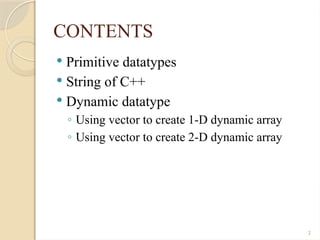
CONTENTS
Primitive datatypes
String of C++
Dynamic datatype
◦ Using vector to create 1-D dynamic array
◦ Using vector to create 2-D dynamic array
3.
3
PRIMITIVE DATATYPES
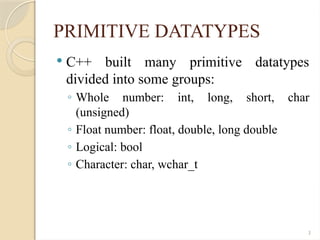
C++built many primitive datatypes
divided into some groups:
◦ Whole number: int, long, short, char
(unsigned)
◦ Float number: float, double, long double
◦ Logical: bool
◦ Character: char, wchar_t
4.
4
PRIMITIVE DATATYPES
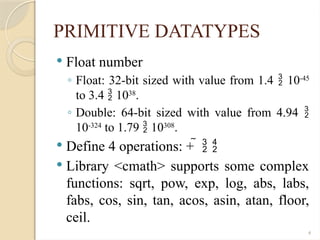
Floatnumber
◦ Float: 32-bit sized with value from 1.4 10-45
to 3.4 1038
.
◦ Double: 64-bit sized with value from 4.94
10-324
to 1.79 10308
.
Define 4 operations: +
Library <cmath> supports some complex
functions: sqrt, pow, exp, log, abs, labs,
fabs, cos, sin, tan, acos, asin, atan, floor,
ceil.
5.
5
PRIMITIVE DATATYPES
32-bitfloat value [1.410-45
, 3.41038
]
Byte 0
Byte 1
Byte 2
Byte 3
0
8 7
16 15
24 23
31
Bit
Sign
Bits
Expo
Bits
Mantissa
typedef union{
float Value; unsigned long dWord; unsigned short Words[2]; unsigned char Bytes[4];
struct{ unsigned long Mantissa: 23; unsigned int Expo: 8; unsigned int Sign: 1; };
}floatStruct;
6.
6
PRIMITIVE DATATYPES
64-bitdouble value [4.9410-324
,
1.7910308
]
Byte 0
Byte 1
Byte 2
Byte 3
0
51
52
63
Bit
Sign
Bits
Expo
Bits
Mantissa
typedef union{
double Value; unsigned long dWord[2]; unsigned short Words[4]; unsigned char Bytes[8];
struct{ unsigned long long Mantissa: 52; unsigned long long Expo: 11; unsigned long long Sign:
1; };
}doubleStruct;
Byte 4
Byte 5
Byte 6
Byte 7
7.
7
PRIMITIVE DATATYPES
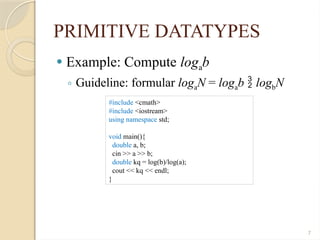
Example:Compute logab
◦ Guideline: formular logaN = logab logbN
#include <cmath>
#include <iostream>
using namespace std;
void main(){
double a, b;
cin >> a >> b;
double kq = log(b)/log(a);
cout << kq << endl;
}
8.
8
PRIMITIVE DATATYPES
Wholenumber
◦ char: 8-bit with value from -128 to 127.
◦ int: 16/32-bit with value from -2n-1
to 2n-1
– 1 (n = 16 or 32 bits).
◦ short: 16-bit sized with value from -32768 to 32767.
◦ long: 32-bit sized with value from -2,147,483,648 to 2,147,483,647.
Define four operations: +
Represent the whole number with three formats:
◦ Octal: 0225 = 2 82
+ 2 81
+ 5 = 149
◦ Hexadecimal: 0x3B = 3 161
+ 11 = 59
◦ Decimal
Example: 8-bit whole number [-128, 127]
◦ n = 127
◦ n = -127
0 1 1 1 1 1 1 1
1 0 0 0 0 0 0 0
invert
1 0 0 0 0 0 0 1
plus 1
9.
9
PRIMITIVE DATATYPES
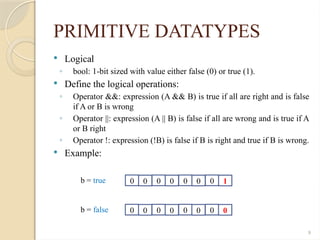
Logical
◦bool: 1-bit sized with value either false (0) or true (1).
Define the logical operations:
◦ Operator &&: expression (A && B) is true if all are right and is false
if A or B is wrong
◦ Operator ||: expression (A || B) is false if all are wrong and is true if A
or B right
◦ Operator !: expression (!B) is false if B is right and true if B is wrong.
Example:
0 0 0 0 0 0 0 1
b = true
0 0 0 0 0 0 0 0
b = false
10.
10
PRIMITIVE DATATYPES
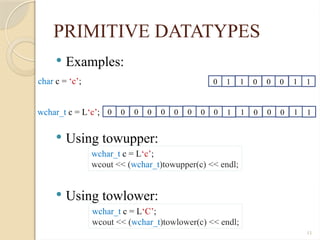
Character
◦unsigned char: using char without sign to store a value
of character, ex: unsigned char c = ‘c’;
◦ Using char to store the value from [0, 255] in ASCII
table.
◦ Note: sizeof(‘c’) = 1 (byte)
◦ unsigned wchar_t: using wchar_t without sign to store
the character, ex: unsigned wchar_t c = L‘c’ or unsigned
wchar_t c = ‘c’;
◦ Using wchar_t to store ~ 65000 values in unicode table
◦ Note: sizeof(L‘c’) = 2 (byte)
◦ Need to include <cwchar> when using the 2-byte
characters
12
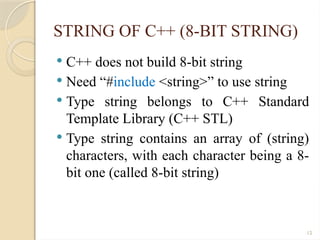
STRING OF C++(8-BIT STRING)
C++ does not build 8-bit string
Need “#include <string>” to use string
Type string belongs to C++ Standard
Template Library (C++ STL)
Type string contains an array of (string)
characters, with each character being a 8-
bit one (called 8-bit string)
13.
13
STRING OF C++(8-BIT STRING)
Analyze a string
◦ Data (property)
A number of characters which a string contains
A pointer contains the address of a string
◦ Method
Get a length – length(): int
Take sub-string – substring(int starPos, int nChar):
string
Operator input/output (>>, <<), comparison (==, !=,
>, <…)
Operator extraction ([])
…
14.
14
STRING OF C++(8-BIT STRING)
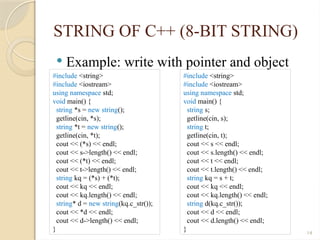
Example: write with pointer and object
#include <string>
#include <iostream>
using namespace std;
void main() {
string *s = new string();
getline(cin, *s);
string *t = new string();
getline(cin, *t);
cout << (*s) << endl;
cout << s->length() << endl;
cout << (*t) << endl;
cout << t->length() << endl;
string kq = (*s) + (*t);
cout << kq << endl;
cout << kq.length() << endl;
string* d = new string(kq.c_str());
cout << *d << endl;
cout << d->length() << endl;
}
#include <string>
#include <iostream>
using namespace std;
void main() {
string s;
getline(cin, s);
string t;
getline(cin, t);
cout << s << endl;
cout << s.length() << endl;
cout << t << endl;
cout << t.length() << endl;
string kq = s + t;
cout << kq << endl;
cout << kq.length() << endl;
string d(kq.c_str());
cout << d << endl;
cout << d.length() << endl;
}
15.
15
STRING OF C++(8-BIT STRING)
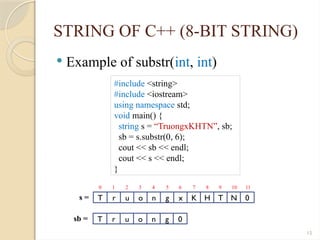
Example of substr(int, int)
#include <string>
#include <iostream>
using namespace std;
void main() {
string s = “TruongxKHTN”, sb;
sb = s.substr(0, 6);
cout << sb << endl;
cout << s << endl;
}
T r u o n g x K H T N 0
s =
T r u o n g 0
sb =
0 1 2 3 4 5 6 7 8 9 10 11
16.
16
STRING OF C++(8-BIT STRING)
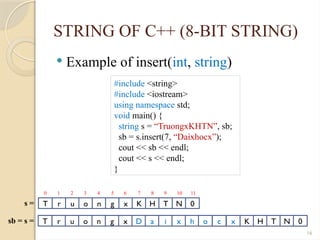
Example of insert(int, string)
#include <string>
#include <iostream>
using namespace std;
void main() {
string s = “TruongxKHTN”, sb;
sb = s.insert(7, “Daixhocx”);
cout << sb << endl;
cout << s << endl;
}
T r u o n g x K H T N 0
s =
0 1 2 3 4 5 6 7 8 9 10 11
T r u o n g x D a i x h
sb = s = o c x K H T N 0
17.
17
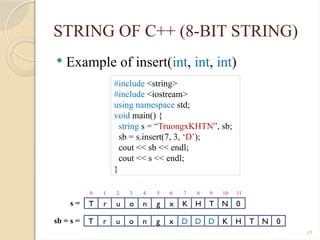
STRING OF C++(8-BIT STRING)
Example of insert(int, int, int)
#include <string>
#include <iostream>
using namespace std;
void main() {
string s = “TruongxKHTN”, sb;
sb = s.insert(7, 3, ‘D’);
cout << sb << endl;
cout << s << endl;
}
T r u o n g x K H T N 0
s =
0 1 2 3 4 5 6 7 8 9 10 11
T r u o n g x D D D
sb = s = K H T N 0
18.
18
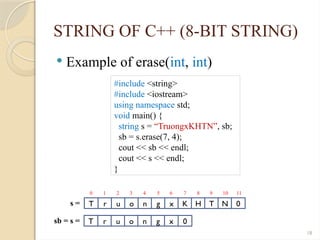
STRING OF C++(8-BIT STRING)
Example of erase(int, int)
#include <string>
#include <iostream>
using namespace std;
void main() {
string s = “TruongxKHTN”, sb;
sb = s.erase(7, 4);
cout << sb << endl;
cout << s << endl;
}
T r u o n g x K H T N 0
s =
0 1 2 3 4 5 6 7 8 9 10 11
T r u o n g x
sb = s = 0
19.
19
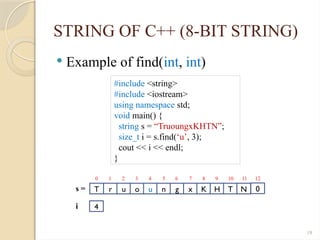
STRING OF C++(8-BIT STRING)
Example of find(int, int)
#include <string>
#include <iostream>
using namespace std;
void main() {
string s = “TruoungxKHTN”;
size_t i = s.find(‘u’, 3);
cout << i << endl;
}
T r u o u n g x K H T N
s =
0 1 2 3 4 5 6 7 8 9 10 11
4
i
0
12
20.
20
STRING OF C++(8-BIT STRING)
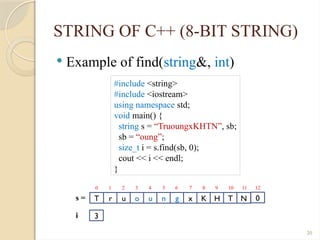
Example of find(string&, int)
#include <string>
#include <iostream>
using namespace std;
void main() {
string s = “TruoungxKHTN”, sb;
sb = “oung”;
size_t i = s.find(sb, 0);
cout << i << endl;
}
T r u o u n g x K H T N
s =
0 1 2 3 4 5 6 7 8 9 10 11
3
i
0
12
21.
21
STRING OF C++(8-BIT STRING)
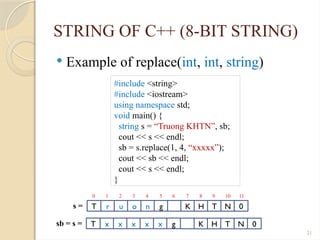
Example of replace(int, int, string)
#include <string>
#include <iostream>
using namespace std;
void main() {
string s = “Truong KHTN”, sb;
cout << s << endl;
sb = s.replace(1, 4, “xxxxx”);
cout << sb << endl;
cout << s << endl;
}
T r u o n g K H T N 0
s =
T x x x x x g
sb = s =
0 1 2 3 4 5 6 7 8 9 10 11
K H T N 0
22.
22
STRING OF C++(8-BIT STRING)
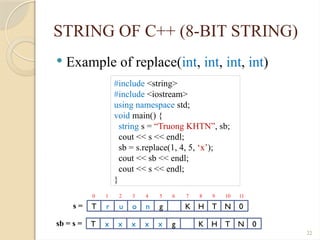
Example of replace(int, int, int, int)
#include <string>
#include <iostream>
using namespace std;
void main() {
string s = “Truong KHTN”, sb;
cout << s << endl;
sb = s.replace(1, 4, 5, ‘x’);
cout << sb << endl;
cout << s << endl;
}
T r u o n g K H T N 0
s =
T x x x x x g
sb = s =
0 1 2 3 4 5 6 7 8 9 10 11
K H T N 0
23.
23
STRING OF C++(8-BIT STRING)
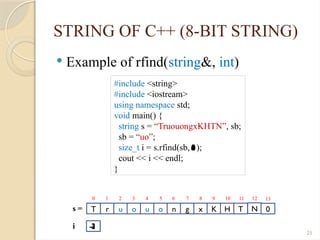
Example of rfind(string&, int)
#include <string>
#include <iostream>
using namespace std;
void main() {
string s = “TruouongxKHTN”, sb;
sb = “uo”;
size_t i = s.rfind(sb, );
cout << i << endl;
}
T r u o u o n g x K H T
s =
0 1 2 3 4 5 6 7 8 9 10 11
i
N
12
0
13
-1
0
1
3
2
2
4
4
5
6
24.
24
STRING OF C++(8-BIT STRING)
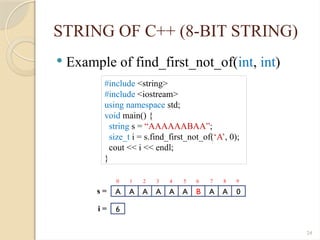
Example of find_first_not_of(int, int)
#include <string>
#include <iostream>
using namespace std;
void main() {
string s = “AAAAAABAA”;
size_t i = s.find_first_not_of(‘A’, 0);
cout << i << endl;
}
A A A A A A B A A 0
s =
i =
0 1 2 3 4 5 6 7 8 9
6
25.
25
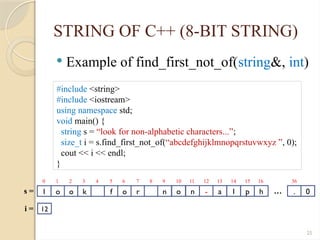
STRING OF C++(8-BIT STRING)
Example of find_first_not_of(string&, int)
#include <string>
#include <iostream>
using namespace std;
void main() {
string s = “look for non-alphabetic characters...”;
size_t i = s.find_first_not_of(“abcdefghijklmnopqrstuvwxyz ”, 0);
cout << i << endl;
}
l o o k f o r n
s =
i =
0 1 2 3 4 5 6 7 8 9
12
o n - a l p h . 0
10 11 12 13 14 15 16 36
…
26.
26
STRING OF C++(16-BIT STRING)
C++ does not build 16-bit string
Need “#include <wstring>” to using type
wstring
Type wstring belongs to C++ Standard
Template Library (C++ STL)
Type wstring contains an array of (string)
characters, with each character sized 16-
bit (called 16-bit string)
27.
27
STRING OF C++(16-BIT STRING)
Each character of 16-bit string is wchar_t.
16-bit string constant starts with L, for
example: L“This is a string”
Method length() of wstring object returns a
number of characters (NOT return a size
with byte)
Adding a prefix ‘w’ in front of the libraries
and objects when using with 16-bit string:
◦ Example: wostream, wistream, wcout, wcin
28.
28
DYNAMIC DATATYPES
C++supports some structural datatypes to
store and access.
If not using the library, we use the pointer
to build 1-D dynamic array
#include <iostream>
using namespace std;
void main(){
int n; float* a;
cin>>n;
a = new float[n];
for(int i = 0; i < n; i++)
cin>>a[i];
for(int i = 0; i < n; i++)
cout<<a[i]<<“ ”;
delete[] a;
}
<100>
a
<200>
n
4
<50>
<50> <54> <58> <62>
1 2 3 4
29.
29
DYNAMIC DATATYPES
(vector creates1-D dynamic array)
C++ supports vector to store and access.
Note:
◦ No need to destroy (clean) the object called ‘a’ after we
finish.
◦ Vector elements are placed in contiguous storage so that
they can be accessed and traversed using iterators
#include <iostream>
using namespace std;
void main(){
int n; vector<float> a;
cin>>n;
a.resize(n);
for(int i = 0; i < a.size(); i++)
cin>>a[i];
for(int i = 0; i < a.size(); i++)
cout<<a[i]<< “ ”;
a[0] = 5;
}
<100>
n
4
<200>
a
<50>
<50>
4
3
2
1
<???>
<50>
5
30.
30
DYNAMIC DATATYPES
(vector creates1-D dynamic array)
Method called push_back of vector object
Note: Need not use resize() to pre-
determine the size of a vector object
#include <iostream>
using namespace std;
void main(){
int n; vector<float> a, float tmp;
cin>>n;
for(int i = 0; i < n; i++){
cin>>tmp;
a.push_back(tmp);
}
for(int i = 0; i < a.size(); i++)
cout<<a[i]<<“ ”;
}
<100>
n
4
<300>
a
<50>
<50>
4
3
2
1
<200>
tmp
1
2
3
4
31.
31
DYNAMIC DATATYPES
(vector creates1-D dynamic array)
Overload operator “>>” & “<<” for vector
istream& operator>>(istream& iDev, vector<float> &a) {
float tmp;
iDev.clear();
while (iDev >> tmp)
a.push_back(tmp);
iDev.clear();
return iDev;
}
ostream& operator<<(ostream& oDev, const vector<float> &a) {
for (int i = 0; i < a.size(); i++)
oDev << a[i] << " ";
return oDev;
}
void main() {
vector<float> a, b;
cin >> a >> b;
cout << a << b;
}
32.
32
DYNAMIC DATATYPES
(vector creates1-D dynamic array)
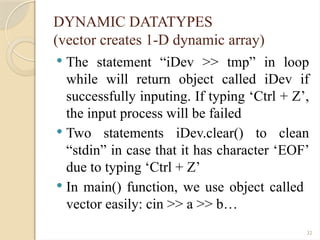
The statement “iDev >> tmp” in loop
while will return object called iDev if
successfully inputing. If typing ‘Ctrl + Z’,
the input process will be failed
Two statements iDev.clear() to clean
“stdin” in case that it has character ‘EOF’
due to typing ‘Ctrl + Z’
In main() function, we use object called
vector easily: cin >> a >> b…
33.
33
DYNAMIC DATATYPES
(vector creates2-D dynamic array)
Secondly applying vector to create 2-D
dynamic array
#include <iostream>
#include <fstream>
#include <vector>
using namespace std;
typedef vector<double> doubleArray;
void initMatrix(vector<doubleArray> &a, int n){
a.resize(n);
for(int i = 0; i < n; i++){
a[i].resize(n);
}
}
…
doubleArray
…
vector<doubleArray>
…
…
…
…
doubleArray
doubleArray
doubleArray
n
n
34.
34
DYNAMIC DATATYPES
(vector creates2-D dynamic array)
Overload operator “>>” & “<<”
istream& operator>>(istream& iDev, vector<doubleArray> &a) {
int n; iDev>>n; initMatrix(a, n);
for (int i = 0; i < a.size(); i++){
for (int j = 0; j < a[i].size(); j++){
a[i][j] = 0;
if(iDev) iDev >> a[i][j];
}
}
return iDev;
}
ostream& operator<<(ostream& oDev, const vector<float> &a) {
oDev<<a.size()<<endl;
for (int i = 0; i < a.size(); i++){
for (int j = 0; j < a[i].size(); j++)
oDev << a[i][j] << “ ”;
oDev << endl;
}
return oDev;
}
…
vector<doubleArray>
…
…
…
…
n
n
a.size()
a[i].size()
35.
35
DYNAMIC DATATYPES
(vector creates2-D dynamic array)
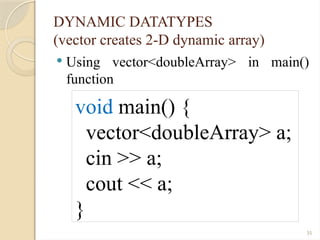
Using vector<doubleArray> in main()
function
void main() {
vector<doubleArray> a;
cin >> a;
cout << a;
}
36.
36
DYNAMIC DATATYPES
(Other classes– List<T>)
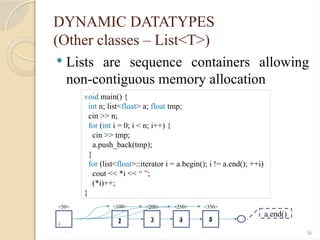
Lists are sequence containers allowing
non-contiguous memory allocation
void main() {
int n; list<float> a; float tmp;
cin >> n;
for (int i = 0; i < n; i++) {
cin >> tmp;
a.push_back(tmp);
}
for (list<float>::iterator i = a.begin(); i != a.end(); ++i)
cout << *i << “ ”;
(*i)++;
}
<100> <200> <250> <350>
i
<50>
1 2 3 4
2 3 4 5
a.end()
37.
37
DYNAMIC DATATYPES
(Other classes– stack<T>)
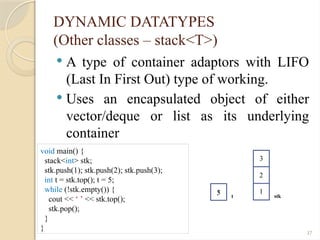
A type of container adaptors with LIFO
(Last In First Out) type of working.
Uses an encapsulated object of either
vector/deque or list as its underlying
container
void main() {
stack<int> stk;
stk.push(1); stk.push(2); stk.push(3);
int t = stk.top(); t = 5;
while (!stk.empty()) {
cout << ‘ ’ << stk.top();
stk.pop();
}
}
stk
1
2
3
3 t
5
38.
38
DYNAMIC DATATYPES
(Other classes– stack<T>)
A type of container adaptors with LIFO
(Last In First Out) type of working.
Uses an encapsulated object of either
vector/deque or list as its underlying
container
void main() {
stack<int*> stk;
stk.push(new int[1]{1});
stk.push(new int[1]{2});
stk.push(new int[1]{3});
int *t = stk.top(); *t = 5;
while (!stk.empty()) {
cout << ‘ ’ << *(stk.top()); stk.pop();
}
}
t
<10>
<30>
<50>
<50>
<30>
<10>
1
2
3
<10>
<100>
stk
5
39.
39
COMPARISON WITH JAVA& C#
Some datatypes in this language but not in the others
Some datatypes have the same name but different in meanings and vice
versa
For example:
◦ ‘char’ in C++ is for ASCII 8-bit character and number
◦ ‘wchar_t’ for 16-bit characters is not in the C++’s core
◦ ‘char’ in C# and Java is for 16-bit characters
◦ Java and C# has boolean type in their cores
◦ ‘long’ in C++ is 32 bits, but 64 bits in Java and C#
◦ Java has no unsigned datatype for whole numbers
◦ C++ uses reserved word ‘unsigned’ for non-negative number
◦ C# has different datatypes for non-negative whole number, such as uint,
ushort…
◦ C# and Java have “toString” methods, for example x = 123, x.toString()
produces the string “123”
◦ Java has class for the primitive datatypes, for example Integer for int or Float
for float
◦ With C#, all primitive datatype themselves are the classes.
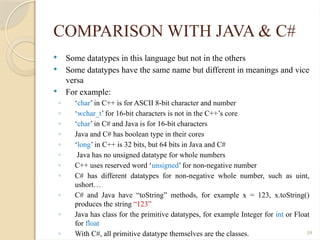
40.
40
COMPARISON WITH JAVA& C#
Number datatypes in C++, Java and C#
C++ Java C# Description
char
short
long
byte
short
int
sbyte
short
int
1-byte integer [-128, 127]
2-byte integer [-32768, 32767]
4-byte integer [-2147483648,
2147483647]
int / / depend on 16-bit or 32-bit system
unsigned int
(or unsigned)
/ / unsigned whole number depends on 16-bit or
32-bit system
unsigned char
unsigned short
unsigned long
/
/
/
byte
ushort
uint
1-byte integer [0, 255]
2-byte integer [0, 65535]
4-byte integer [0, 4294967296]
char
wchar_t
/
char
/
char
ASCII 1-byte character
Unicode character [u+0000, u+ffff]
int64_t long long 64-bit whole number [-263
, 263
– 1]
uint64_t / ulong 64-bit whole number [0, 264
– 1]
bool boolean bool logical value [true, false]
float float float 4-byte floating-point number
https://flaviocopes.com/unicode/
41.
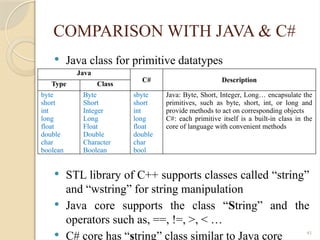
41
COMPARISON WITH JAVA& C#
Java class for primitive datatypes
STL library of C++ supports classes called “string”
and “wstring” for string manipulation
Java core supports the class “String” and the
operators such as, ==, !=, >, < …
C# core has “string” class similar to Java core
Java
C# Description
Type Class
byte
short
int
long
float
double
char
boolean
Byte
Short
Integer
Long
Float
Double
Character
Boolean
sbyte
short
int
long
float
double
char
bool
Java: Byte, Short, Integer, Long… encapsulate the
primitives, such as byte, short, int, or long and
provide methods to act on corresponding objects
C#: each primitive itself is a built-in class in the
core of language with convenient methods
42.
42
COMPARISON WITH JAVA& C#
(1-D dynamic array)
Java & C# have built-in dynamic arrays
Line Java C#
1 // Array.java // Array.cs
2 import java.util.*; using System;
3 public class Array { class Array {
4 static float[] initAray(int n) { static float[] initArray(int n) {
5 float[] a; float[] a;
6 a = new float[n]; a = new float[n];
7 for(int i = 0; i < n; i++) { for(int i = 0; i < n; i++) {
8 a[i] = 1/(1+i*(float)i); a[i] = 1/(1+i*(float)i);
9 } }
10 return a; return a;
11 } }
12 static void showArray(float[] a) { static void showArray(float[] a) {
13 for(int i = 0; i < a.length; i++) { for(int i = 0; i < a.Length; i++) {
14 System.out.println(a[i]); Console.WriteLine(a[i]);
15 } }
16 } }
17 static void main(String[] argv) { static void Main(string[] argv) {
18 int n = 10; int n = 10;
19 float[] a = initArray(n); float[] a = initArray(n);
20 showArray(a); showArray(a);
21 } }
22 } }
43.
43
COMPARISON WITH JAVA& C#
(2-D dynamic array)
Java & C# have built-in dynamic arrays
◦ Java uses float[][], while C# uses float[,]
◦ Java uses new float[m][n], while C# uses new
float[m, n]
◦ Java uses a[i][j], while C# uses a[i, j]
Line Java C#
1 // Array.java // Array.cs
2 import java.util.*; using System;
3 public class Array2D_Example { class Array2D_Example {
4 static void main(String[] argv) { static void Main(string[] argv) {
5 float[][] a; int m = 3, n = 4; float[,] a; int m = 3, n = 4;
6 a = new float[m][n]; a = new float[m, n];
7 if(a != null) { if(a != null) {
8 for(int i = 0; i < m; i++) for(int i = 0; i < m; i++)
9 for(int j = 0; j < n; j++) for(int j = 0; j < n; j++)
10 a[i][j] = i * j; a[i, j] = i * j;
11 // Use array // Use array
12 // … // …
13 } }
14 }} }}
44.
44
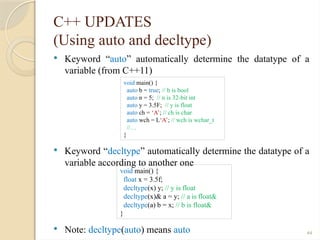
C++ UPDATES
(Using autoand decltype)
Keyword “auto” automatically determine the datatype of a
variable (from C++11)
Keyword “decltype” automatically determine the datatype of a
variable according to another one
Note: decltype(auto) means auto
void main() {
auto b = true; // b is bool
auto n = 5; // n is 32-bit int
auto y = 3.5F; // y is float
auto ch = ‘A’; // ch is char
auto wch = L‘A’; // wch is wchar_t
//…
}
void main() {
float x = 3.5f;
decltype(x) y; // y is float
decltype(x)& a = y; // a is float&
decltype(a) b = x; // b is float&
}
45.
45
C++ UPDATES
(Using STL’sstatic <array>)
Using array<class T, size_t N> to allocate
a static array
Using std::sort method to sort an array
void main() {
array<int, 10> a = {19, 23, 29, 31};
cout << a.size() << endl;
cout << a[2] << “ ” << a.at(8) << endl;
cout << a.at(20) << endl;
}
void main() {
array<int, 10> a = {19, 23, 29, 31};
std::sort(a.begin(), a.end());
for(int i = 0; i < a.size(); i++)
cout << a[i] << “ ”;
}
46.
46
C++ UPDATES
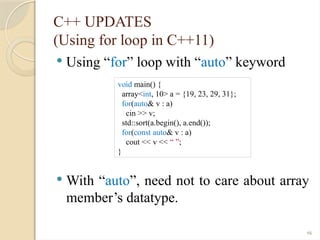
(Using forloop in C++11)
Using “for” loop with “auto” keyword
With “auto”, need not to care about array
member’s datatype.
void main() {
array<int, 10> a = {19, 23, 29, 31};
for(auto& v : a)
cin >> v;
std::sort(a.begin(), a.end());
for(const auto& v : a)
cout << v << “ ”;
}
![5
PRIMITIVE DATATYPES
32-bit float value [1.410-45
, 3.41038
]
Byte 0
Byte 1
Byte 2
Byte 3
0
8 7
16 15
24 23
31
Bit
Sign
Bits
Expo
Bits
Mantissa
typedef union{
float Value; unsigned long dWord; unsigned short Words[2]; unsigned char Bytes[4];
struct{ unsigned long Mantissa: 23; unsigned int Expo: 8; unsigned int Sign: 1; };
}floatStruct;](https://image.slidesharecdn.com/oopw03publish-250806025824-6d1ac57d/85/Opject-Oriented-Brogramming-WHat-is-that-5-320.jpg)
![6
PRIMITIVE DATATYPES
64-bit double value [4.9410-324
,
1.7910308
]
Byte 0
Byte 1
Byte 2
Byte 3
0
51
52
63
Bit
Sign
Bits
Expo
Bits
Mantissa
typedef union{
double Value; unsigned long dWord[2]; unsigned short Words[4]; unsigned char Bytes[8];
struct{ unsigned long long Mantissa: 52; unsigned long long Expo: 11; unsigned long long Sign:
1; };
}doubleStruct;
Byte 4
Byte 5
Byte 6
Byte 7](https://image.slidesharecdn.com/oopw03publish-250806025824-6d1ac57d/85/Opject-Oriented-Brogramming-WHat-is-that-6-320.jpg)
![8
PRIMITIVE DATATYPES
Whole number
◦ char: 8-bit with value from -128 to 127.
◦ int: 16/32-bit with value from -2n-1
to 2n-1
– 1 (n = 16 or 32 bits).
◦ short: 16-bit sized with value from -32768 to 32767.
◦ long: 32-bit sized with value from -2,147,483,648 to 2,147,483,647.
Define four operations: +
Represent the whole number with three formats:
◦ Octal: 0225 = 2 82
+ 2 81
+ 5 = 149
◦ Hexadecimal: 0x3B = 3 161
+ 11 = 59
◦ Decimal
Example: 8-bit whole number [-128, 127]
◦ n = 127
◦ n = -127
0 1 1 1 1 1 1 1
1 0 0 0 0 0 0 0
invert
1 0 0 0 0 0 0 1
plus 1](https://image.slidesharecdn.com/oopw03publish-250806025824-6d1ac57d/85/Opject-Oriented-Brogramming-WHat-is-that-8-320.jpg)
![10
PRIMITIVE DATATYPES
Character
◦ unsigned char: using char without sign to store a value
of character, ex: unsigned char c = ‘c’;
◦ Using char to store the value from [0, 255] in ASCII
table.
◦ Note: sizeof(‘c’) = 1 (byte)
◦ unsigned wchar_t: using wchar_t without sign to store
the character, ex: unsigned wchar_t c = L‘c’ or unsigned
wchar_t c = ‘c’;
◦ Using wchar_t to store ~ 65000 values in unicode table
◦ Note: sizeof(L‘c’) = 2 (byte)
◦ Need to include <cwchar> when using the 2-byte
characters](https://image.slidesharecdn.com/oopw03publish-250806025824-6d1ac57d/85/Opject-Oriented-Brogramming-WHat-is-that-10-320.jpg)
![13
STRING OF C++ (8-BIT STRING)
Analyze a string
◦ Data (property)
A number of characters which a string contains
A pointer contains the address of a string
◦ Method
Get a length – length(): int
Take sub-string – substring(int starPos, int nChar):
string
Operator input/output (>>, <<), comparison (==, !=,
>, <…)
Operator extraction ([])
…](https://image.slidesharecdn.com/oopw03publish-250806025824-6d1ac57d/85/Opject-Oriented-Brogramming-WHat-is-that-13-320.jpg)
![28
DYNAMIC DATATYPES
C++ supports some structural datatypes to
store and access.
If not using the library, we use the pointer
to build 1-D dynamic array
#include <iostream>
using namespace std;
void main(){
int n; float* a;
cin>>n;
a = new float[n];
for(int i = 0; i < n; i++)
cin>>a[i];
for(int i = 0; i < n; i++)
cout<<a[i]<<“ ”;
delete[] a;
}
<100>
a
<200>
n
4
<50>
<50> <54> <58> <62>
1 2 3 4](https://image.slidesharecdn.com/oopw03publish-250806025824-6d1ac57d/85/Opject-Oriented-Brogramming-WHat-is-that-28-320.jpg)
![29
DYNAMIC DATATYPES
(vector creates 1-D dynamic array)
C++ supports vector to store and access.
Note:
◦ No need to destroy (clean) the object called ‘a’ after we
finish.
◦ Vector elements are placed in contiguous storage so that
they can be accessed and traversed using iterators
#include <iostream>
using namespace std;
void main(){
int n; vector<float> a;
cin>>n;
a.resize(n);
for(int i = 0; i < a.size(); i++)
cin>>a[i];
for(int i = 0; i < a.size(); i++)
cout<<a[i]<< “ ”;
a[0] = 5;
}
<100>
n
4
<200>
a
<50>
<50>
4
3
2
1
<???>
<50>
5](https://image.slidesharecdn.com/oopw03publish-250806025824-6d1ac57d/85/Opject-Oriented-Brogramming-WHat-is-that-29-320.jpg)
![30
DYNAMIC DATATYPES
(vector creates 1-D dynamic array)
Method called push_back of vector object
Note: Need not use resize() to pre-
determine the size of a vector object
#include <iostream>
using namespace std;
void main(){
int n; vector<float> a, float tmp;
cin>>n;
for(int i = 0; i < n; i++){
cin>>tmp;
a.push_back(tmp);
}
for(int i = 0; i < a.size(); i++)
cout<<a[i]<<“ ”;
}
<100>
n
4
<300>
a
<50>
<50>
4
3
2
1
<200>
tmp
1
2
3
4](https://image.slidesharecdn.com/oopw03publish-250806025824-6d1ac57d/85/Opject-Oriented-Brogramming-WHat-is-that-30-320.jpg)
![31
DYNAMIC DATATYPES
(vector creates 1-D dynamic array)
Overload operator “>>” & “<<” for vector
istream& operator>>(istream& iDev, vector<float> &a) {
float tmp;
iDev.clear();
while (iDev >> tmp)
a.push_back(tmp);
iDev.clear();
return iDev;
}
ostream& operator<<(ostream& oDev, const vector<float> &a) {
for (int i = 0; i < a.size(); i++)
oDev << a[i] << " ";
return oDev;
}
void main() {
vector<float> a, b;
cin >> a >> b;
cout << a << b;
}](https://image.slidesharecdn.com/oopw03publish-250806025824-6d1ac57d/85/Opject-Oriented-Brogramming-WHat-is-that-31-320.jpg)
![33
DYNAMIC DATATYPES
(vector creates 2-D dynamic array)
Secondly applying vector to create 2-D
dynamic array
#include <iostream>
#include <fstream>
#include <vector>
using namespace std;
typedef vector<double> doubleArray;
void initMatrix(vector<doubleArray> &a, int n){
a.resize(n);
for(int i = 0; i < n; i++){
a[i].resize(n);
}
}
…
doubleArray
…
vector<doubleArray>
…
…
…
…
doubleArray
doubleArray
doubleArray
n
n](https://image.slidesharecdn.com/oopw03publish-250806025824-6d1ac57d/85/Opject-Oriented-Brogramming-WHat-is-that-33-320.jpg)
![34
DYNAMIC DATATYPES
(vector creates 2-D dynamic array)
Overload operator “>>” & “<<”
istream& operator>>(istream& iDev, vector<doubleArray> &a) {
int n; iDev>>n; initMatrix(a, n);
for (int i = 0; i < a.size(); i++){
for (int j = 0; j < a[i].size(); j++){
a[i][j] = 0;
if(iDev) iDev >> a[i][j];
}
}
return iDev;
}
ostream& operator<<(ostream& oDev, const vector<float> &a) {
oDev<<a.size()<<endl;
for (int i = 0; i < a.size(); i++){
for (int j = 0; j < a[i].size(); j++)
oDev << a[i][j] << “ ”;
oDev << endl;
}
return oDev;
}
…
vector<doubleArray>
…
…
…
…
n
n
a.size()
a[i].size()](https://image.slidesharecdn.com/oopw03publish-250806025824-6d1ac57d/85/Opject-Oriented-Brogramming-WHat-is-that-34-320.jpg)
![38
DYNAMIC DATATYPES
(Other classes – stack<T>)
A type of container adaptors with LIFO
(Last In First Out) type of working.
Uses an encapsulated object of either
vector/deque or list as its underlying
container
void main() {
stack<int*> stk;
stk.push(new int[1]{1});
stk.push(new int[1]{2});
stk.push(new int[1]{3});
int *t = stk.top(); *t = 5;
while (!stk.empty()) {
cout << ‘ ’ << *(stk.top()); stk.pop();
}
}
t
<10>
<30>
<50>
<50>
<30>
<10>
1
2
3
<10>
<100>
stk
5](https://image.slidesharecdn.com/oopw03publish-250806025824-6d1ac57d/85/Opject-Oriented-Brogramming-WHat-is-that-38-320.jpg)
![40
COMPARISON WITH JAVA & C#
Number datatypes in C++, Java and C#
C++ Java C# Description
char
short
long
byte
short
int
sbyte
short
int
1-byte integer [-128, 127]
2-byte integer [-32768, 32767]
4-byte integer [-2147483648,
2147483647]
int / / depend on 16-bit or 32-bit system
unsigned int
(or unsigned)
/ / unsigned whole number depends on 16-bit or
32-bit system
unsigned char
unsigned short
unsigned long
/
/
/
byte
ushort
uint
1-byte integer [0, 255]
2-byte integer [0, 65535]
4-byte integer [0, 4294967296]
char
wchar_t
/
char
/
char
ASCII 1-byte character
Unicode character [u+0000, u+ffff]
int64_t long long 64-bit whole number [-263
, 263
– 1]
uint64_t / ulong 64-bit whole number [0, 264
– 1]
bool boolean bool logical value [true, false]
float float float 4-byte floating-point number
https://flaviocopes.com/unicode/](https://image.slidesharecdn.com/oopw03publish-250806025824-6d1ac57d/85/Opject-Oriented-Brogramming-WHat-is-that-40-320.jpg)
![42
COMPARISON WITH JAVA & C#
(1-D dynamic array)
Java & C# have built-in dynamic arrays
Line Java C#
1 // Array.java // Array.cs
2 import java.util.*; using System;
3 public class Array { class Array {
4 static float[] initAray(int n) { static float[] initArray(int n) {
5 float[] a; float[] a;
6 a = new float[n]; a = new float[n];
7 for(int i = 0; i < n; i++) { for(int i = 0; i < n; i++) {
8 a[i] = 1/(1+i*(float)i); a[i] = 1/(1+i*(float)i);
9 } }
10 return a; return a;
11 } }
12 static void showArray(float[] a) { static void showArray(float[] a) {
13 for(int i = 0; i < a.length; i++) { for(int i = 0; i < a.Length; i++) {
14 System.out.println(a[i]); Console.WriteLine(a[i]);
15 } }
16 } }
17 static void main(String[] argv) { static void Main(string[] argv) {
18 int n = 10; int n = 10;
19 float[] a = initArray(n); float[] a = initArray(n);
20 showArray(a); showArray(a);
21 } }
22 } }](https://image.slidesharecdn.com/oopw03publish-250806025824-6d1ac57d/85/Opject-Oriented-Brogramming-WHat-is-that-42-320.jpg)
![43
COMPARISON WITH JAVA & C#
(2-D dynamic array)
Java & C# have built-in dynamic arrays
◦ Java uses float[][], while C# uses float[,]
◦ Java uses new float[m][n], while C# uses new
float[m, n]
◦ Java uses a[i][j], while C# uses a[i, j]
Line Java C#
1 // Array.java // Array.cs
2 import java.util.*; using System;
3 public class Array2D_Example { class Array2D_Example {
4 static void main(String[] argv) { static void Main(string[] argv) {
5 float[][] a; int m = 3, n = 4; float[,] a; int m = 3, n = 4;
6 a = new float[m][n]; a = new float[m, n];
7 if(a != null) { if(a != null) {
8 for(int i = 0; i < m; i++) for(int i = 0; i < m; i++)
9 for(int j = 0; j < n; j++) for(int j = 0; j < n; j++)
10 a[i][j] = i * j; a[i, j] = i * j;
11 // Use array // Use array
12 // … // …
13 } }
14 }} }}](https://image.slidesharecdn.com/oopw03publish-250806025824-6d1ac57d/85/Opject-Oriented-Brogramming-WHat-is-that-43-320.jpg)
![45
C++ UPDATES
(Using STL’s static <array>)
Using array<class T, size_t N> to allocate
a static array
Using std::sort method to sort an array
void main() {
array<int, 10> a = {19, 23, 29, 31};
cout << a.size() << endl;
cout << a[2] << “ ” << a.at(8) << endl;
cout << a.at(20) << endl;
}
void main() {
array<int, 10> a = {19, 23, 29, 31};
std::sort(a.begin(), a.end());
for(int i = 0; i < a.size(); i++)
cout << a[i] << “ ”;
}](https://image.slidesharecdn.com/oopw03publish-250806025824-6d1ac57d/85/Opject-Oriented-Brogramming-WHat-is-that-45-320.jpg)