Operations Hub
Supercharging growth by solving for ops
Icebreaker: who’s your favorite musician /
artist / group at the moment?
Nick Carbone
Go-to-Market Manager
Operations Hub + Enterprise CRM
ncarbone@hubspot.com
● Joined HubSpot in 2017 (we only had 2 Hubs!)
● Worked in Customer Onboarding and later Sales
Hub GTM
● Works remotely in Raleigh, NC
● Passionate about thoughtful CRM implementations,
golf, and breakfast
Agenda
● Who (and what) does Operations Hub solve for?
● How Operations Hub addresses ops’ needs
○ Feature overview
○ Use cases
○ Best practices
● Q&A
Operations Hub is a data and process
enablement tool.
More efficiently manage the movement
and downstream use of HubSpot data,
and streamline mission critical business
processes within the CRM.
Operations Hub is built with ops
professionals, data leaders, and
HubSpot admins in mind.
…it’s also built for “The
HubSpot Person” that’s asked
to build, connect and fix
everything in HubSpot for their
company…
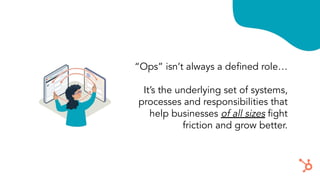
“Ops” isn’t always a defined role…
It’s the underlying set of systems,
processes and responsibilities that
help businesses of all sizes fight
friction and grow better.
At a high level, those are…
Platform
How can we get
every team the info
they need to do
their jobs?
Process
Can we make that
info consistent,
efficient, and
automated?
Perspective
How can we use all
our data to drive
business strategy?
All too often those
“3 Ps” feel hard to
manage!
(At best)
Today’s Ops
Legacy Ops
Siloed and reactive.
Business runs slowly.
Customer experience is fragmented.
Ops is strategic.
Business runs seamlessly.
Customer experience is flawless.
Operations Hub can help get us there…
Integrate (Platform) Automate (Process)
● 100+ Data Sync apps
● Real time, two-way sync
● Historical sync
● Custom Code Actions
● Data quality automation
● Scheduled workflow triggers
Report (Perspective)
● Datasets
● Formula fields in reports
● Snowflake Integration
We built Ops Hub with the “3 Ps” in mind…
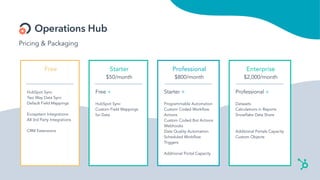
Pricing & Packaging
Free
HubSpot Sync
Two Way Data Sync
Default Field Mappings
Ecosystem Integrations
All 3rd Party Integrations
CRM Extensions
Starter
$50/month
Free +
HubSpot Sync
Custom Field Mappings
for Data
Professional
$800/month
Starter +
Programmable Automation
Custom Coded Workflow
Actions
Custom Coded Bot Actions
Webhooks
Data Quality Automation
Scheduled Workflow
Triggers
Additional Portal Capacity
Enterprise
$2,000/month
Professional +
Datasets
Calculations in Reports
Snowflake Data Share
Additional Portals Capacity
Custom Objects
Operations Hub Feature Overview
Platform
Use Data Sync in Operations Hub
Starter (and Free) to integrate
HubSpot with over 100 apps and
eliminate data silos!
We are using the technology we
acquired from PieSync to build a sync
framework that makes integrations work
better, and allows us to build faster.
What makes them better? They’re
two-way, real-time, and customizable.
And they pull historical data, too.
The first 25 data sync powered
integrations are launching in April.
Data Sync
Real-time data sync between HubSpot
and 100+ platforms
● One-way or two-way sync (your
choice!)
● Custom sync rules
● Customizable field mappings
(OH Starter)
● Historical sync
● Sync health monitoring
Coming soon…
● Advanced segmentation
● New field mapping types
We are using the technology we
acquired from PieSync to build a sync
framework that makes integrations work
better, and allows us to build faster.
What makes them better? They’re
two-way, real-time, and customizable.
And they pull historical data, too.
The first 25 data sync powered
integrations are launching in April.
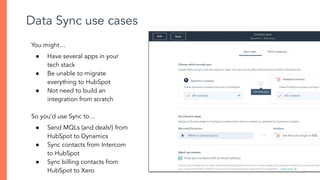
Data Sync use cases
You might…
● Have several apps in your
tech stack
● Be unable to migrate
everything to HubSpot
● Not need to build an
integration from scratch
So you’d use Sync to…
● Send MQLs (and deals!) from
HubSpot to Dynamics
● Sync contacts from Intercom
to HubSpot
● Sync billing contacts from
HubSpot to Xero
Quick pause to
check the chat….
Process
Operations Hub Pro unlocks
advanced business process
automation with sophisticated
workflow features.
We are using the technology we
acquired from PieSync to build a sync
framework that makes integrations work
better, and allows us to build faster.
What makes them better? They’re
two-way, real-time, and customizable.
And they pull historical data, too.
The first 25 data sync powered
integrations are launching in April.
Programmable Automation
Automation that’s infinitely flexible…
Programmable automation is an umbrella term that
describes several super cool features:
● Scheduled workflow triggers
● Data quality automation
● Custom code actions in workflows and bots
● Webhooks in workflows and bots
We are using the technology we
acquired from PieSync to build a sync
framework that makes integrations work
better, and allows us to build faster.
What makes them better? They’re
two-way, real-time, and customizable.
And they pull historical data, too.
The first 25 data sync powered
integrations are launching in April.
Scheduled Workflow Triggers
Recurring workflows!
Use cases:
● Task creation
● Programmable email
● Scheduled data cleanup
We are using the technology we
acquired from PieSync to build a sync
framework that makes integrations work
better, and allows us to build faster.
What makes them better? They’re
two-way, real-time, and customizable.
And they pull historical data, too.
The first 25 data sync powered
integrations are launching in April.
Data Quality Automation
Dirty data in your CRM costs time and
money - and we’re working on helping
you change that.
Use cases:
● Text string formatting
● Date formatting
● Add/subtract time
● Simple arithmetic
● And much, much more!
Super simple use case for Scheduled Triggers + Data Quality Automation…
A weekly workflow that ensures all contacts’ first and last names are capitalized
Quick pause to
check the chat….
We are using the technology we
acquired from PieSync to build a sync
framework that makes integrations work
better, and allows us to build faster.
What makes them better? They’re
two-way, real-time, and customizable.
And they pull historical data, too.
The first 25 data sync powered
integrations are launching in April.
Custom Code Actions
Custom Code Actions
allow you to write and
deploy code from within a
workflow action or a bot
action.
They’re intended to solve
for almost everything
standard workflow action
can’t.
We are using the technology we
acquired from PieSync to build a sync
framework that makes integrations work
better, and allows us to build faster.
What makes them better? They’re
two-way, real-time, and customizable.
And they pull historical data, too.
The first 25 data sync powered
integrations are launching in April.
Use cases for Custom Code Actions
Tons!
● Complete All Tasks of a Closed Deal
● Look Up Data in an External Database
● Weighted Lead Rotation
● Territory Management
● Custom/Advanced Record Deduplication
● Enrich your Company Data with a Business Intelligence Service
I borrowed all of these from our new Programmable Automation Use Case Library -
check it out!
Writing code can be tough…
Use your resources!
1. Dedicated TC blocks
2. HubSpot Partners
3. Each other!
There’s help available for custom code projects,
with or without internal dev resources!
HUBSPOT
Quick pause to
check the chat….
Perspective
Ops Hub Enterprise supercharges
reporting, making it easy for
everyone to unlock insights in their
CRM.
Datasets
Curated data that saves your team time, and enables fast, easy,
consistent reporting.
Datasets essentially does two really, really cool things:
1. Unlocks the ability to create advanced calculations in reports
and fully customize your source data
2. Makes it easy for the average HubSpot user to build reports
First - how do Datasets fit into
reporting?
1) Raw data created in CRM
2) Ops/Analyst preps & narrows
down available data in a Dataset
3) User easily builds a report using that
Dataset
We are using the technology we
acquired from PieSync to build a sync
framework that makes integrations work
better, and allows us to build faster.
What makes them better? They’re
two-way, real-time, and customizable.
And they pull historical data, too.
The first 25 data sync powered
integrations are launching in April.
Datasets
Advanced data prep!
Use cases…
● Calculate custom KPIs
● Customize property names
● Use functions to manipulate
data
For example…
● Commissions, margins, ROI
● Custom date reporting
● Merge/truncate text
We are using the technology we
acquired from PieSync to build a sync
framework that makes integrations work
better, and allows us to build faster.
What makes them better? They’re
two-way, real-time, and customizable.
And they pull historical data, too.
The first 25 data sync powered
integrations are launching in April.
Datasets
Streamlined reporting!
��
This is way easier to
understand...
Use case: create a Dataset for running
monthly sale reports
Quick pause to
check the chat….
Snowflake Data Share
The Snowflake Share is a great way to fit HubSpot into your existing reporting flow.
It allows you to pass your HubSpot
data to Snowflake so you can curate
and analyze your HubSpot data
within your existing data stack.
Some regional restrictions exist, but
we’re working on expanding
coverage in 2022.
Q&A
Thank you

Operations hub implementation 25.01.22

  • 1.
  • 2.
    Icebreaker: who’s yourfavorite musician / artist / group at the moment?
  • 3.
    Nick Carbone Go-to-Market Manager OperationsHub + Enterprise CRM ncarbone@hubspot.com ● Joined HubSpot in 2017 (we only had 2 Hubs!) ● Worked in Customer Onboarding and later Sales Hub GTM ● Works remotely in Raleigh, NC ● Passionate about thoughtful CRM implementations, golf, and breakfast
  • 4.
    Agenda ● Who (andwhat) does Operations Hub solve for? ● How Operations Hub addresses ops’ needs ○ Feature overview ○ Use cases ○ Best practices ● Q&A
  • 5.
    Operations Hub isa data and process enablement tool. More efficiently manage the movement and downstream use of HubSpot data, and streamline mission critical business processes within the CRM.
  • 6.
    Operations Hub isbuilt with ops professionals, data leaders, and HubSpot admins in mind.
  • 7.
    …it’s also builtfor “The HubSpot Person” that’s asked to build, connect and fix everything in HubSpot for their company…
  • 8.
    “Ops” isn’t alwaysa defined role… It’s the underlying set of systems, processes and responsibilities that help businesses of all sizes fight friction and grow better.
  • 9.
    At a highlevel, those are… Platform How can we get every team the info they need to do their jobs? Process Can we make that info consistent, efficient, and automated? Perspective How can we use all our data to drive business strategy?
  • 10.
    All too oftenthose “3 Ps” feel hard to manage! (At best)
  • 11.
    Today’s Ops Legacy Ops Siloedand reactive. Business runs slowly. Customer experience is fragmented. Ops is strategic. Business runs seamlessly. Customer experience is flawless.
  • 12.
    Operations Hub canhelp get us there…
  • 13.
    Integrate (Platform) Automate(Process) ● 100+ Data Sync apps ● Real time, two-way sync ● Historical sync ● Custom Code Actions ● Data quality automation ● Scheduled workflow triggers Report (Perspective) ● Datasets ● Formula fields in reports ● Snowflake Integration We built Ops Hub with the “3 Ps” in mind…
  • 14.
    Pricing & Packaging Free HubSpotSync Two Way Data Sync Default Field Mappings Ecosystem Integrations All 3rd Party Integrations CRM Extensions Starter $50/month Free + HubSpot Sync Custom Field Mappings for Data Professional $800/month Starter + Programmable Automation Custom Coded Workflow Actions Custom Coded Bot Actions Webhooks Data Quality Automation Scheduled Workflow Triggers Additional Portal Capacity Enterprise $2,000/month Professional + Datasets Calculations in Reports Snowflake Data Share Additional Portals Capacity Custom Objects
  • 15.
  • 16.
    Platform Use Data Syncin Operations Hub Starter (and Free) to integrate HubSpot with over 100 apps and eliminate data silos!
  • 17.
    We are usingthe technology we acquired from PieSync to build a sync framework that makes integrations work better, and allows us to build faster. What makes them better? They’re two-way, real-time, and customizable. And they pull historical data, too. The first 25 data sync powered integrations are launching in April. Data Sync Real-time data sync between HubSpot and 100+ platforms ● One-way or two-way sync (your choice!) ● Custom sync rules ● Customizable field mappings (OH Starter) ● Historical sync ● Sync health monitoring Coming soon… ● Advanced segmentation ● New field mapping types
  • 18.
    We are usingthe technology we acquired from PieSync to build a sync framework that makes integrations work better, and allows us to build faster. What makes them better? They’re two-way, real-time, and customizable. And they pull historical data, too. The first 25 data sync powered integrations are launching in April. Data Sync use cases You might… ● Have several apps in your tech stack ● Be unable to migrate everything to HubSpot ● Not need to build an integration from scratch So you’d use Sync to… ● Send MQLs (and deals!) from HubSpot to Dynamics ● Sync contacts from Intercom to HubSpot ● Sync billing contacts from HubSpot to Xero
  • 19.
  • 20.
    Process Operations Hub Prounlocks advanced business process automation with sophisticated workflow features.
  • 21.
    We are usingthe technology we acquired from PieSync to build a sync framework that makes integrations work better, and allows us to build faster. What makes them better? They’re two-way, real-time, and customizable. And they pull historical data, too. The first 25 data sync powered integrations are launching in April. Programmable Automation Automation that’s infinitely flexible… Programmable automation is an umbrella term that describes several super cool features: ● Scheduled workflow triggers ● Data quality automation ● Custom code actions in workflows and bots ● Webhooks in workflows and bots
  • 22.
    We are usingthe technology we acquired from PieSync to build a sync framework that makes integrations work better, and allows us to build faster. What makes them better? They’re two-way, real-time, and customizable. And they pull historical data, too. The first 25 data sync powered integrations are launching in April. Scheduled Workflow Triggers Recurring workflows! Use cases: ● Task creation ● Programmable email ● Scheduled data cleanup
  • 23.
    We are usingthe technology we acquired from PieSync to build a sync framework that makes integrations work better, and allows us to build faster. What makes them better? They’re two-way, real-time, and customizable. And they pull historical data, too. The first 25 data sync powered integrations are launching in April. Data Quality Automation Dirty data in your CRM costs time and money - and we’re working on helping you change that. Use cases: ● Text string formatting ● Date formatting ● Add/subtract time ● Simple arithmetic ● And much, much more!
  • 24.
    Super simple usecase for Scheduled Triggers + Data Quality Automation… A weekly workflow that ensures all contacts’ first and last names are capitalized
  • 25.
  • 26.
    We are usingthe technology we acquired from PieSync to build a sync framework that makes integrations work better, and allows us to build faster. What makes them better? They’re two-way, real-time, and customizable. And they pull historical data, too. The first 25 data sync powered integrations are launching in April. Custom Code Actions Custom Code Actions allow you to write and deploy code from within a workflow action or a bot action. They’re intended to solve for almost everything standard workflow action can’t.
  • 27.
    We are usingthe technology we acquired from PieSync to build a sync framework that makes integrations work better, and allows us to build faster. What makes them better? They’re two-way, real-time, and customizable. And they pull historical data, too. The first 25 data sync powered integrations are launching in April. Use cases for Custom Code Actions Tons! ● Complete All Tasks of a Closed Deal ● Look Up Data in an External Database ● Weighted Lead Rotation ● Territory Management ● Custom/Advanced Record Deduplication ● Enrich your Company Data with a Business Intelligence Service I borrowed all of these from our new Programmable Automation Use Case Library - check it out!
  • 28.
    Writing code canbe tough… Use your resources! 1. Dedicated TC blocks 2. HubSpot Partners 3. Each other! There’s help available for custom code projects, with or without internal dev resources! HUBSPOT
  • 29.
  • 30.
    Perspective Ops Hub Enterprisesupercharges reporting, making it easy for everyone to unlock insights in their CRM.
  • 31.
    Datasets Curated data thatsaves your team time, and enables fast, easy, consistent reporting. Datasets essentially does two really, really cool things: 1. Unlocks the ability to create advanced calculations in reports and fully customize your source data 2. Makes it easy for the average HubSpot user to build reports
  • 32.
    First - howdo Datasets fit into reporting? 1) Raw data created in CRM 2) Ops/Analyst preps & narrows down available data in a Dataset 3) User easily builds a report using that Dataset
  • 33.
    We are usingthe technology we acquired from PieSync to build a sync framework that makes integrations work better, and allows us to build faster. What makes them better? They’re two-way, real-time, and customizable. And they pull historical data, too. The first 25 data sync powered integrations are launching in April. Datasets Advanced data prep! Use cases… ● Calculate custom KPIs ● Customize property names ● Use functions to manipulate data For example… ● Commissions, margins, ROI ● Custom date reporting ● Merge/truncate text
  • 34.
    We are usingthe technology we acquired from PieSync to build a sync framework that makes integrations work better, and allows us to build faster. What makes them better? They’re two-way, real-time, and customizable. And they pull historical data, too. The first 25 data sync powered integrations are launching in April. Datasets Streamlined reporting! �� This is way easier to understand...
  • 35.
    Use case: createa Dataset for running monthly sale reports
  • 36.
  • 37.
    Snowflake Data Share TheSnowflake Share is a great way to fit HubSpot into your existing reporting flow. It allows you to pass your HubSpot data to Snowflake so you can curate and analyze your HubSpot data within your existing data stack. Some regional restrictions exist, but we’re working on expanding coverage in 2022.
  • 38.
  • 39.