ICT IGCSE Theory – Revision Presentation
1.3 Operating systems
Chapter
1:
Types
and
components
of
computer
systems
• Define and describe operating systems which contain a Command Line Interface
(CLI)
• Define and describe operating systems which contain a Graphical User Interface
(GUI)
• Describe the differences, including the benefits and drawbacks, between operating
systems which contain a CLI and those which contain a GUI
WWW.YAHMAD.CO.
UK
1.3 Operating systems
Chapter
1:
Types
and
components
of
computer
systems
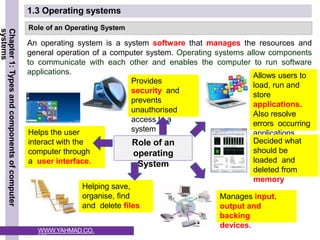
Role of an Operating System
An operating system is a system software that manages the resources and
general operation of a computer system. Operating systems allow components
to communicate with each other and enables the computer to run software
applications.
Role of an
operating
System
Helps the user
interact with the
computer through
a user interface.
Provides
security and
prevents
unauthorised
access to a
system
Allows users to
load, run and
store
applications.
Also resolve
errors occurring
applications
Decided what
should be
loaded and
deleted from
memory
Helping save,
organise, find
and delete files
Manages input,
output and
backing
devices.
WWW.YAHMAD.CO.
UK
ICT IGCSE Theory – Revision Presentation
1.3 Operating systems
Chapter
1:
Types
and
components
of
computer
systems
Describe the main functions of the operating system?
Key Words: User Interface, Security, Files, memory,
applications, input/output/storages devices
Exam
Question
WWW.YAHMAD.CO.
UK
The operating system provides the user interface which allows the user
to interact with the system. In addition the operating system provides
security and prevents unauthorised access to a system. Files and
folders can be created and organised.
Furthermore the operating system allows users to load, run and store
applications
also decides what should be loaded into the computer memory (RAM).
The operating
system also manages the input/output/storages devices.
ICT IGCSE Theory – Revision Presentation
1.3 Operating systems
Chapter
1:
Types
and
components
of
computer
systems
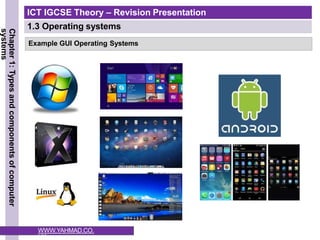
Example GUI Operating Systems
WWW.YAHMAD.CO.
UK
ICT IGCSE Theory – Revision Presentation
1.3 Operating systems
Chapter
1:
Types
and
components
of
computer
systems
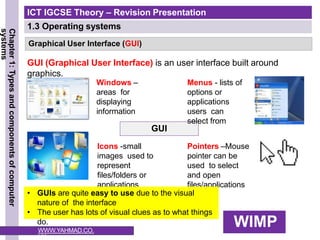
Graphical User Interface (GUI)
GUI (Graphical User Interface) is an user interface built around
graphics.
GUI
Windows –
areas for
displaying
information
Icons -small
images used to
represent
files/folders or
applications
Menus - lists of
options or
applications
users can
select from
Pointers –Mouse
pointer can be
used to select
and open
files/applications
WIMP
WWW.YAHMAD.CO.
UK
• GUIs are quite easy to use due to the visual
nature of the interface
• The user has lots of visual clues as to what things
do.
ICT IGCSE Theory – Revision Presentation
1.3 Operating systems
Chapter
1:
Types
and
components
of
computer
systems
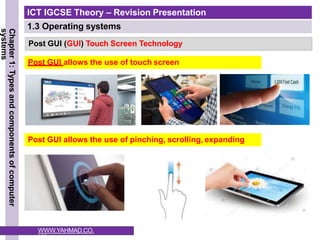
Post GUI (GUI) Touch Screen Technology
Post GUI allows the use of pinching, scrolling, expanding
Post GUI allows the use of touch screen
WWW.YAHMAD.CO.
UK
ICT IGCSE Theory – Revision Presentation
1.3 Operating systems
Chapter
1:
Types
and
components
of
computer
systems
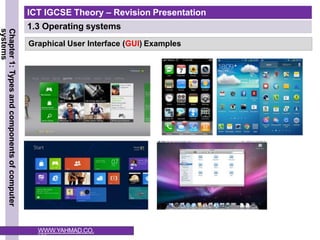
Graphical User Interface (GUI) Examples
WWW.YAHMAD.CO.
UK
ICT IGCSE Theory – Revision Presentation
1.3 Operating systems
Chapter
1:
Types
and
components
of
computer
systems
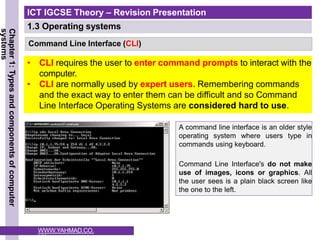
Command Line Interface (CLI)
• CLI requires the user to enter command prompts to interact with the
computer.
• CLI are normally used by expert users. Remembering commands
and the exact way to enter them can be difficult and so Command
Line Interface Operating Systems are considered hard to use.
A command line interface is an older style
operating system where users type in
commands using keyboard.
Command Line Interface's do not make
use of images, icons or graphics. All
the user sees is a plain black screen like
the one to the left.
WWW.YAHMAD.CO.
UK
ICT IGCSE Theory – Revision Presentation
1.3 Operating systems
Chapter
1:
Types
and
components
of
computer
systems
Graphical User Interface (GUI)
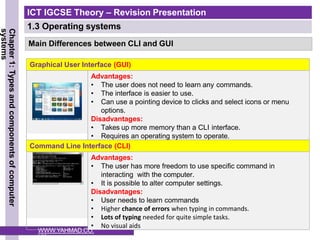
Advantages:
• The user does not need to learn any commands.
• The interface is easier to use.
• Can use a pointing device to clicks and select icons or menu
options.
Disadvantages:
• Takes up more memory than a CLI interface.
• Requires an operating system to operate.
Command Line Interface (CLI)
Advantages:
• The user has more freedom to use specific command in
interacting with the computer.
• It is possible to alter computer settings.
Disadvantages:
• User needs to learn commands
• Higher chance of errors when typing in commands.
• Lots of typing needed for quite simple tasks.
• No visual aids
Main Differences between CLI and GUI
WWW.YAHMAD.CO.
UK
ICT IGCSE Theory – Revision Presentation
1.3 Operating systems
Chapter
1:
Types
and
components
of
computer
systems
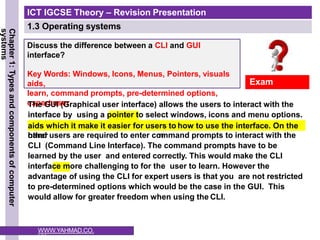
Discuss the difference between a CLI and GUI
interface?
Key Words: Windows, Icons, Menus, Pointers, visuals
aids,
learn, command prompts, pre-determined options,
expert user
Exam
Question
The GUI (Graphical user interface) allows the users to interact with the
interface by using a pointer to select windows, icons and menu options.
The GUI will have visual lear
n
aids which it make it easier for users to how to use the interface. On the
other
hand users are required to enter command prompts to interact with the
CLI (Command Line Interface). The command prompts have to be
learned by the user and entered correctly. This would make the CLI
interface more challenging to for the user to learn. However the
advantage of using the CLI for expert users is that you are not restricted
to pre-determined options which would be the case in the GUI. This
would allow for greater freedom when using the CLI.
WWW.YAHMAD.CO.
UK

Operating systems....................................

  • 1.
    ICT IGCSE Theory– Revision Presentation 1.3 Operating systems Chapter 1: Types and components of computer systems • Define and describe operating systems which contain a Command Line Interface (CLI) • Define and describe operating systems which contain a Graphical User Interface (GUI) • Describe the differences, including the benefits and drawbacks, between operating systems which contain a CLI and those which contain a GUI WWW.YAHMAD.CO. UK
  • 2.
    1.3 Operating systems Chapter 1: Types and components of computer systems Roleof an Operating System An operating system is a system software that manages the resources and general operation of a computer system. Operating systems allow components to communicate with each other and enables the computer to run software applications. Role of an operating System Helps the user interact with the computer through a user interface. Provides security and prevents unauthorised access to a system Allows users to load, run and store applications. Also resolve errors occurring applications Decided what should be loaded and deleted from memory Helping save, organise, find and delete files Manages input, output and backing devices. WWW.YAHMAD.CO. UK
  • 3.
    ICT IGCSE Theory– Revision Presentation 1.3 Operating systems Chapter 1: Types and components of computer systems Describe the main functions of the operating system? Key Words: User Interface, Security, Files, memory, applications, input/output/storages devices Exam Question WWW.YAHMAD.CO. UK The operating system provides the user interface which allows the user to interact with the system. In addition the operating system provides security and prevents unauthorised access to a system. Files and folders can be created and organised. Furthermore the operating system allows users to load, run and store applications also decides what should be loaded into the computer memory (RAM). The operating system also manages the input/output/storages devices.
  • 4.
    ICT IGCSE Theory– Revision Presentation 1.3 Operating systems Chapter 1: Types and components of computer systems Example GUI Operating Systems WWW.YAHMAD.CO. UK
  • 5.
    ICT IGCSE Theory– Revision Presentation 1.3 Operating systems Chapter 1: Types and components of computer systems Graphical User Interface (GUI) GUI (Graphical User Interface) is an user interface built around graphics. GUI Windows – areas for displaying information Icons -small images used to represent files/folders or applications Menus - lists of options or applications users can select from Pointers –Mouse pointer can be used to select and open files/applications WIMP WWW.YAHMAD.CO. UK • GUIs are quite easy to use due to the visual nature of the interface • The user has lots of visual clues as to what things do.
  • 6.
    ICT IGCSE Theory– Revision Presentation 1.3 Operating systems Chapter 1: Types and components of computer systems Post GUI (GUI) Touch Screen Technology Post GUI allows the use of pinching, scrolling, expanding Post GUI allows the use of touch screen WWW.YAHMAD.CO. UK
  • 7.
    ICT IGCSE Theory– Revision Presentation 1.3 Operating systems Chapter 1: Types and components of computer systems Graphical User Interface (GUI) Examples WWW.YAHMAD.CO. UK
  • 8.
    ICT IGCSE Theory– Revision Presentation 1.3 Operating systems Chapter 1: Types and components of computer systems Command Line Interface (CLI) • CLI requires the user to enter command prompts to interact with the computer. • CLI are normally used by expert users. Remembering commands and the exact way to enter them can be difficult and so Command Line Interface Operating Systems are considered hard to use. A command line interface is an older style operating system where users type in commands using keyboard. Command Line Interface's do not make use of images, icons or graphics. All the user sees is a plain black screen like the one to the left. WWW.YAHMAD.CO. UK
  • 9.
    ICT IGCSE Theory– Revision Presentation 1.3 Operating systems Chapter 1: Types and components of computer systems Graphical User Interface (GUI) Advantages: • The user does not need to learn any commands. • The interface is easier to use. • Can use a pointing device to clicks and select icons or menu options. Disadvantages: • Takes up more memory than a CLI interface. • Requires an operating system to operate. Command Line Interface (CLI) Advantages: • The user has more freedom to use specific command in interacting with the computer. • It is possible to alter computer settings. Disadvantages: • User needs to learn commands • Higher chance of errors when typing in commands. • Lots of typing needed for quite simple tasks. • No visual aids Main Differences between CLI and GUI WWW.YAHMAD.CO. UK
  • 10.
    ICT IGCSE Theory– Revision Presentation 1.3 Operating systems Chapter 1: Types and components of computer systems Discuss the difference between a CLI and GUI interface? Key Words: Windows, Icons, Menus, Pointers, visuals aids, learn, command prompts, pre-determined options, expert user Exam Question The GUI (Graphical user interface) allows the users to interact with the interface by using a pointer to select windows, icons and menu options. The GUI will have visual lear n aids which it make it easier for users to how to use the interface. On the other hand users are required to enter command prompts to interact with the CLI (Command Line Interface). The command prompts have to be learned by the user and entered correctly. This would make the CLI interface more challenging to for the user to learn. However the advantage of using the CLI for expert users is that you are not restricted to pre-determined options which would be the case in the GUI. This would allow for greater freedom when using the CLI. WWW.YAHMAD.CO. UK