1.1 Silberschatz, Galvin and Gagne ©2013
Operating System Concepts – 9th
Edition
Module 1
Module 1
Introduction to OS
Introduction to OS
1.2 Silberschatz, Galvin and Gagne ©2013
Operating System Concepts – 9th
Edition
Outline
Outline
 What Operating Systems Do
What Operating Systems Do
 Introduction to OS
Introduction to OS
 Types of Operating System
Types of Operating System
 OS design issues
OS design issues
 Operating-System Structure
Operating-System Structure
 Abstractions
Abstractions
 Processes, resources
Processes, resources
 Security
Security
1.3 Silberschatz, Galvin and Gagne ©2013
Operating System Concepts – 9th
Edition
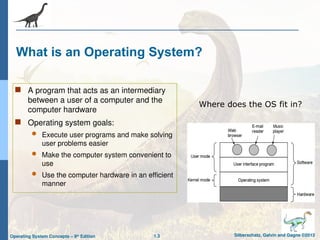
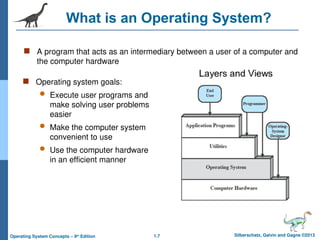
What is an Operating System?
 A program that acts as an intermediary
between a user of a computer and the
computer hardware
 Operating system goals:
 Execute user programs and make solving
user problems easier
 Make the computer system convenient to
use
 Use the computer hardware in an efficient
manner
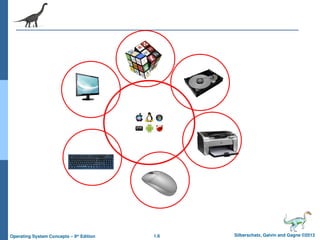
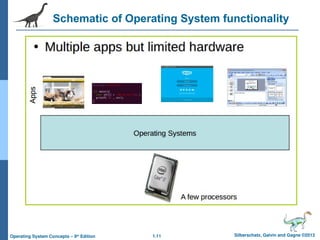
Where does the OS fit in?
1.4 Silberschatz, Galvin and Gagne ©2013
Operating System Concepts – 9th
Edition
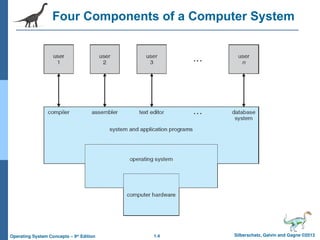
Four Components of a Computer System
1.5 Silberschatz, Galvin and Gagne ©2013
Operating System Concepts – 9th
Edition
Introduction to OS
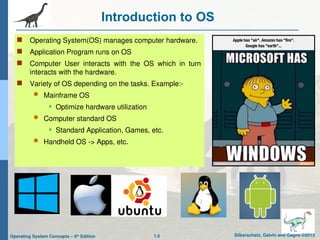
 Operating System(OS) manages computer hardware.
 Application Program runs on OS
 Computer User interacts with the OS which in turn
interacts with the hardware.
 Variety of OS depending on the tasks. Example:-
 Mainframe OS
 Optimize hardware utilization
 Computer standard OS
 Standard Application, Games, etc.
 Handheld OS -> Apps, etc.
1.6 Silberschatz, Galvin and Gagne ©2013
Operating System Concepts – 9th
Edition
1.7 Silberschatz, Galvin and Gagne ©2013
Operating System Concepts – 9th
Edition
What is an Operating System?
 Operating system goals:
 Execute user programs and
make solving user problems
easier
 Make the computer system
convenient to use
 Use the computer hardware
in an efficient manner
 A program that acts as an intermediary between a user of a computer and
the computer hardware
1.8 Silberschatz, Galvin and Gagne ©2013
Operating System Concepts – 9th
Edition
What Operating Systems Do
 Depends on the point of view
Depends on the point of view
 Users want convenience,
Users want convenience, ease
ease of
of use
use and
and good performance
good performance
 Don
Don’
’t care about
t care about resource
resource utilization
utilization
 But shared computer such as
But shared computer such as mainframe
mainframe or
or minicomputer
minicomputer must keep all
must keep all
users happy
users happy
 Users of dedicate systems such as
Users of dedicate systems such as workstations
workstations have dedicated
have dedicated
resources but frequently use shared resources from
resources but frequently use shared resources from servers
servers
 Handheld computers are resource poor, optimized for usability and
Handheld computers are resource poor, optimized for usability and
battery life
battery life
 Some computers have little or no user interface, such as embedded
Some computers have little or no user interface, such as embedded
computers in devices and automobiles
1.9 Silberschatz, Galvin and Gagne ©2013
Operating System Concepts – 9th
Edition
Operating System Definition
 OS is a
OS is a resource allocator
resource allocator
 Manages all resources
Manages all resources
 Decides between conflicting requests for efficient and fair resource
Decides between conflicting requests for efficient and fair resource
use
use
 OS is a
OS is a control program
control program
 Controls execution of programs to prevent errors and improper use of
Controls execution of programs to prevent errors and improper use of
the computer
the computer
1.10 Silberschatz, Galvin and Gagne ©2013
Operating System Concepts – 9th
Edition
Computer Startup
 bootstrap program
bootstrap program is loaded at power-up or reboot
is loaded at power-up or reboot
 Typically stored in ROM or EPROM, generally known as
Typically stored in ROM or EPROM, generally known as
firmware
firmware
 Initializes all aspects of system
Initializes all aspects of system
 Loads operating system kernel and starts execution
Loads operating system kernel and starts execution
1.11 Silberschatz, Galvin and Gagne ©2013
Operating System Concepts – 9th
Edition
Schematic of Operating System functionality
1.12 Silberschatz, Galvin and Gagne ©2013
Operating System Concepts – 9th
Edition
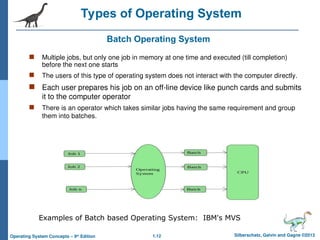
Batch Operating System
 Multiple jobs, but only one job in memory at one time and executed (till completion)
before the next one starts
 The users of this type of operating system does not interact with the computer directly.
 Each user prepares his job on an off-line device like punch cards and submits
it to the computer operator
 There is an operator which takes similar jobs having the same requirement and group
them into batches.
Types of Operating System
Examples of Batch based Operating System: IBM's MVS
1.13 Silberschatz, Galvin and Gagne ©2013
Operating System Concepts – 9th
Edition
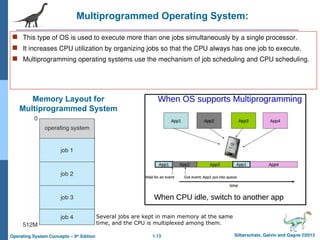
Multiprogrammed Operating System:
 This type of OS is used to execute more than one jobs simultaneously by a single processor.
 It increases CPU utilization by organizing jobs so that the CPU always has one job to execute.
 Multiprogramming operating systems use the mechanism of job scheduling and CPU scheduling.
Memory Layout for
Multiprogrammed System
Several jobs are kept in main memory at the same
time, and the CPU is multiplexed among them.
1.14 Silberschatz, Galvin and Gagne ©2013
Operating System Concepts – 9th
Edition
OS - Multiprogramming
 I/O routine supplied by the system.
 Memory management – the system must allocate the memory to several jobs.
 CPU scheduling – the system must choose among several jobs ready to run.
 Allocation of devices.
1.15 Silberschatz, Galvin and Gagne ©2013
Operating System Concepts – 9th
Edition
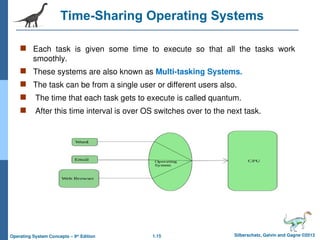
Time-Sharing Operating Systems
 Each task is given some time to execute so that all the tasks work
smoothly.
 These systems are also known as Multi-tasking Systems.
 The task can be from a single user or different users also.
 The time that each task gets to execute is called quantum.
 After this time interval is over OS switches over to the next task.
1.16 Silberschatz, Galvin and Gagne ©2013
Operating System Concepts – 9th
Edition
Time-Sharing Systems–Interactive Computing
 The CPU is multiplexed among several jobs that are kept in memory and on disk (the CPU
is allocated to a job only if the job is in memory).
 A job swapped in and out of memory to the disk.
 On-line communication between the user and the system is provided; when the operating
system finishes the execution of one command, it seeks the next “control statement” from
the user’s keyboard.
 On-line system must be available for users to access data and code.
1.17 Silberschatz, Galvin and Gagne ©2013
Operating System Concepts – 9th
Edition
Types of Operating System
 Multiprogramming needed for efficiency
 Single user cannot keep CPU and I/O devices busy at all times
 Multiprogramming organizes jobs (code and data) so CPU always has one to execute
 A subset of total jobs in system is kept in memory
 One job selected and run via job scheduling
 When it has to wait (for I/O for example), OS switches to another job
 Timesharing (multitasking) is logical extension in which CPU switches jobs so
frequently that users can interact with each job while it is running, creating interactive
computing
 Response time should be < 1 second
 Each user has at least one program executing in memory process
 If several jobs ready to run at the same time  CPU scheduling
 If processes don’t fit in memory, swapping moves them in and out to run
 Virtual memory allows execution of processes not completely in memory
Multiprogramming Vs Timesharing
1.18 Silberschatz, Galvin and Gagne ©2013
Operating System Concepts – 9th
Edition
Distributed & Embedded
Operating System
Distributed
A distributed operating system manages a group of independent
computers and makes them appear to be a single computer.
The development of networked computers that could be linked and
communicate with each other, gave rise to distributed computing.
Embedded
Embedded operating systems are designed to be used in embedded
computer systems.
They are designed to operate on small machines like PDAs with
less autonomy.
They are able to operate with a limited number of resources.
1.19 Silberschatz, Galvin and Gagne ©2013
Operating System Concepts – 9th
Edition
Real-Time Operating System
 These types of OSs serve real-time systems.
 The time interval required to process and respond to inputs is very
small.
 This time interval is called response time.
 Real-time systems are used when there are time requirements that
are very strict like
 missile systems,
 air traffic control systems,
 robots, etc.
1.20 Silberschatz, Galvin and Gagne ©2013
Operating System Concepts – 9th
Edition
Real-Time Operating Systems
 Often used as a control device in a dedicated application such as
controlling scientific experiments, medical imaging systems, industrial
control systems, and some display systems.
 Well-defined fixed-time constraints.
 Hard real-time system.
 Secondary storage limited or absent, data stored in short-term memory, or
read-only memory (ROM)
 Conflicts with time-sharing systems, not supported by general-purpose
operating systems.
 Soft real-time system
 Limited utility in industrial control or robotics
 Useful in applications (multimedia, virtual reality) requiring advanced operating-
system features.
1.21 Silberschatz, Galvin and Gagne ©2013
Operating System Concepts – 9th
Edition
OS Services
 User Interface: There are different kinds, like touchscreen, GUI, and command-line.
 Program Execution: (Execute programs for users)
 I/O operations: It is much too difficult for users to operate the I/O hardware correctly
without help.
 File System Manipulation: The OS helps us store, organize, manage, and protect
our information.
 Communications: Users need their processes to exchange information. OSs help.
The two main ways to do it are with shared memory and by message passing.
 Error Detection: An OS continually checks to see if something is going wrong. The
OS is programmed to take appropriate action.
 Resource Allocation
 Logging:
 Records for accounting, fault detection, failure, protection, maintenance, update, security, etc.
 Protection and Security.
1.22 Silberschatz, Galvin and Gagne ©2013
Operating System Concepts – 9th
Edition
OS Design Goals
 Design Goals:
 system that is convenient,
 reliable,
 safe, and
 fast.
 Implementation: The implementation of the operating system, that is the
manner in which the ideas of the design are written in programming
language(s).
 Assembly
 High Level Language
 Earlier assembly could make the code run faster but nowadays high-level
are translated to equivalently good assembly code.
 Instead performance of OS will increase if selection data structure and
algorithms are done rather than proper assembly code.
1.23 Silberschatz, Galvin and Gagne ©2013
Operating System Concepts – 9th
Edition
Operating System Structures
 Monolithic
 Micro-kernel models
 Layered (conceptual)
 Modular
Kernels may be classified mainly in three categories: -
Monolithic Kernel
Micro Kernel
Hybrid Kernel
1.24 Silberschatz, Galvin and Gagne ©2013
Operating System Concepts – 9th
Edition
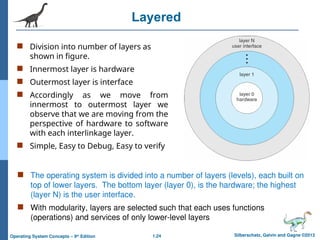
Layered
 Division into number of layers as
shown in figure.
 Innermost layer is hardware
 Outermost layer is interface
 Accordingly as we move from
innermost to outermost layer we
observe that we are moving from the
perspective of hardware to software
with each interlinkage layer.
 Simple, Easy to Debug, Easy to verify
 The operating system is divided into a number of layers (levels), each built on
top of lower layers. The bottom layer (layer 0), is the hardware; the highest
(layer N) is the user interface.
 With modularity, layers are selected such that each uses functions
(operations) and services of only lower-level layers
1.25 Silberschatz, Galvin and Gagne ©2013
Operating System Concepts – 9th
Edition
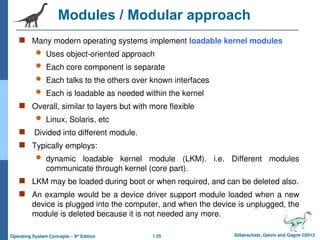
Modules / Modular approach
 Many modern operating systems implement loadable kernel modules
 Uses object-oriented approach
 Each core component is separate
 Each talks to the others over known interfaces
 Each is loadable as needed within the kernel
 Overall, similar to layers but with more flexible
 Linux, Solaris, etc
 Divided into different module.
 Typically employs:
 dynamic loadable kernel module (LKM). i.e. Different modules
communicate through kernel (core part).
 LKM may be loaded during boot or when required, and can be deleted also.
 An example would be a device driver support module loaded when a new
device is plugged into the computer, and when the device is unplugged, the
module is deleted because it is not needed any more.
1.26 Silberschatz, Galvin and Gagne ©2013
Operating System Concepts – 9th
Edition
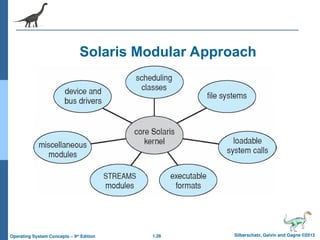
Solaris Modular Approach
1.27 Silberschatz, Galvin and Gagne ©2013
Operating System Concepts – 9th
Edition
Monolithic Kernel
1.28 Silberschatz, Galvin and Gagne ©2013
Operating System Concepts – 9th
Edition
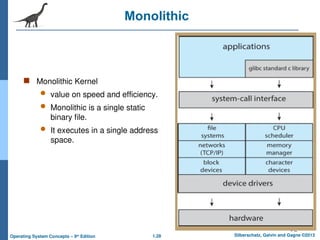
Monolithic
 Monolithic Kernel
 value on speed and efficiency.
 Monolithic is a single static
binary file.
 It executes in a single address
space.
1.29 Silberschatz, Galvin and Gagne ©2013
Operating System Concepts – 9th
Edition
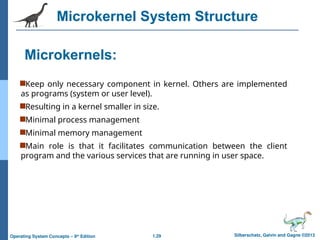
Microkernels:
Keep only necessary component in kernel. Others are implemented
as programs (system or user level).
Resulting in a kernel smaller in size.
Minimal process management
Minimal memory management
Main role is that it facilitates communication between the client
program and the various services that are running in user space.
Microkernel System Structure
1.30 Silberschatz, Galvin and Gagne ©2013
Operating System Concepts – 9th
Edition
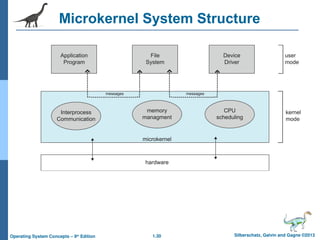
Microkernel System Structure
1.31 Silberschatz, Galvin and Gagne ©2013
Operating System Concepts – 9th
Edition
Microkernel System Structure
 Moves as much from the kernel into user space
 Mach example of microkernel
 Mac OS X kernel (Darwin) partly based on Mach
 Communication takes place between user modules using message
passing
 Benefits:
 Easier to extend a microkernel
 Easier to port the operating system to new architectures
 More reliable (less code is running in kernel mode)
 More secure
 Detriments:
 Performance overhead of user space to kernel space
communication
1.32 Silberschatz, Galvin and Gagne ©2013
Operating System Concepts – 9th
Edition
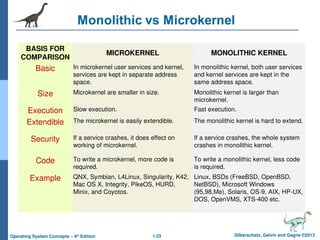
Microkernel Vs Monolithic
Source: www.atg.world/Monolithic vs Microkernel
1.33 Silberschatz, Galvin and Gagne ©2013
Operating System Concepts – 9th
Edition
BASIS FOR
COMPARISON
MICROKERNEL MONOLITHIC KERNEL
Basic In microkernel user services and kernel,
services are kept in separate address
space.
In monolithic kernel, both user services
and kernel services are kept in the
same address space.
Size Microkernel are smaller in size. Monolithic kernel is larger than
microkernel.
Execution Slow execution. Fast execution.
Extendible The microkernel is easily extendible. The monolithic kernel is hard to extend.
Security If a service crashes, it does effect on
working of microkernel.
If a service crashes, the whole system
crashes in monolithic kernel.
Code To write a microkernel, more code is
required.
To write a monolithic kernel, less code
is required.
Example QNX, Symbian, L4Linux, Singularity, K42,
Mac OS X, Integrity, PikeOS, HURD,
Minix, and Coyotos.
Linux, BSDs (FreeBSD, OpenBSD,
NetBSD), Microsoft Windows
(95,98,Me), Solaris, OS-9, AIX, HP-UX,
DOS, OpenVMS, XTS-400 etc.
1.34 Silberschatz, Galvin and Gagne ©2013
Operating System Concepts – 9th
Edition
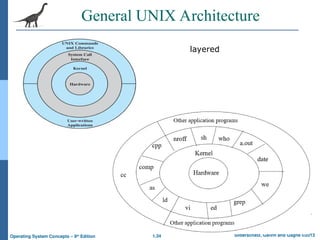
General UNIX Architecture
layered
1.35 Silberschatz, Galvin and Gagne ©2013
Operating System Concepts – 9th
Edition
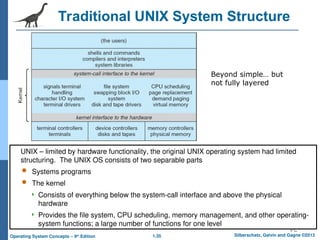
Traditional UNIX System Structure
Beyond simple… but
not fully layered
UNIX – limited by hardware functionality, the original UNIX operating system had limited
structuring. The UNIX OS consists of two separable parts
 Systems programs
 The kernel
 Consists of everything below the system-call interface and above the physical
hardware
 Provides the file system, CPU scheduling, memory management, and other operating-
system functions; a large number of functions for one level
1.36 Silberschatz, Galvin and Gagne ©2013
Operating System Concepts – 9th
Edition
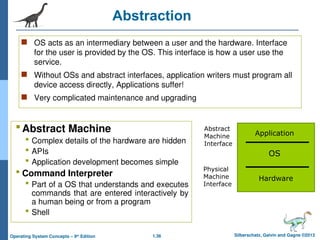
Abstraction
 OS acts as an intermediary between a user and the hardware. Interface
for the user is provided by the OS. This interface is how a user use the
service.
 Without OSs and abstract interfaces, application writers must program all
device access directly, Applications suffer!
 Very complicated maintenance and upgrading
Abstract Machine
 Complex details of the hardware are hidden
 APIs
 Application development becomes simple
 Command Interpreter
 Part of a OS that understands and executes
commands that are entered interactively by
a human being or from a program
 Shell
Application
OS
Hardware
Abstract
Machine
Interface
Physical
Machine
Interface
1.37 Silberschatz, Galvin and Gagne ©2013
Operating System Concepts – 9th
Edition
Operating Systems Provide Abstraction
1.38 Silberschatz, Galvin and Gagne ©2013
Operating System Concepts – 9th
Edition
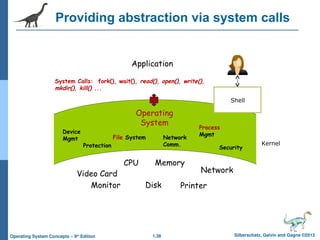
Providing abstraction via system calls
Operating
System
Video Card
CPU
Monitor Printer
Disk
Memory
Network
Application
System Calls: fork(), wait(), read(), open(), write(),
mkdir(), kill() ...
Device
Mgmt File System Network
Comm.
Process
Mgmt
Protection Security
Kernel
Shell
1.39 Silberschatz, Galvin and Gagne ©2013
Operating System Concepts – 9th
Edition
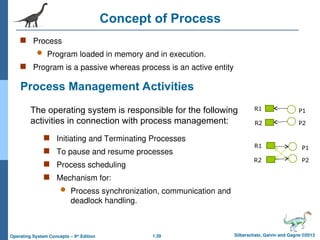
Concept of Process
 Process
 Program loaded in memory and in execution.
 Program is a passive whereas process is an active entity
Process Management Activities
 Initiating and Terminating Processes
 To pause and resume processes
 Process scheduling
 Mechanism for:
 Process synchronization, communication and
deadlock handling.
The operating system is responsible for the following
activities in connection with process management:
P1
P2
R1
R2
R1
R2
P1
P2
1.40 Silberschatz, Galvin and Gagne ©2013
Operating System Concepts – 9th
Edition
Resource
 OS acts an interface between hardware and software.
 Resources are objects that can be allocated in a computer .
Examples:
 Processors,
 Devices: Both input and output devices,
 Memory
 Files
1.41 Silberschatz, Galvin and Gagne ©2013
Operating System Concepts – 9th
Edition
Influence of Security
Other Security Issues
Program Threats
Trojans
Trap Door
System Threats
Worms
Viruses
Denial of Services
1.42 Silberschatz, Galvin and Gagne ©2013
Operating System Concepts – 9th
Edition
Networking and OS
 General network configurations
 Network operating system (NOS)
 Distributed operating system (D/OS)
1.43 Silberschatz, Galvin and Gagne ©2013
Operating System Concepts – 9th
Edition
Multimedia OS
 To identify the characteristics of multimedia data
 To explore the operating system requirements of multimedia data, including CPU and
disk scheduling and network management
 Multimedia files can be quite large
 Continuous media data may require very high data rates
 Multimedia applications may be sensitive to timing delays during playback of the media
 The operating system must guarantee the specific data rate and timing requirements of
continuous media
 Such requirements are known as Quality-of-Service (QoS) guarantees
 Guaranteeing QoS has the following effects in a computer system:
1. CPU processing
2. Scheduling
3. File systems
4. Network protocols
1.44 Silberschatz, Galvin and Gagne ©2013
Operating System Concepts – 9th
Edition
Multimedia OS
 The operating system requirements of multimedia data, including CPU and
disk scheduling and network management and Guaranteeing QoS.
 Multimedia applications may be sensitive to timing delays during
playback of the media
1.45 Silberschatz, Galvin and Gagne ©2013
Operating System Concepts – 9th
Edition
Main Bibliography
A. Silberschatz, P. B. Galvin, and G. Gagne, “Operating Systems Concepts
(Essentials)”, 9th Edition, John Wiley & Sons, 2012.
http://codex.cs.yale.edu/avi/os-book/
1.46 Silberschatz, Galvin and Gagne ©2013
Operating System Concepts – 9th
Edition
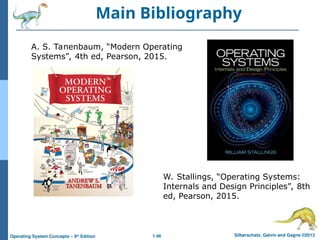
Main Bibliography
A. S. Tanenbaum, “Modern Operating
Systems”, 4th ed, Pearson, 2015.
W. Stallings, “Operating Systems:
Internals and Design Principles”, 8th
ed, Pearson, 2015.
1.47 Silberschatz, Galvin and Gagne ©2013
Operating System Concepts – 9th
Edition
THANK YOU
THANK YOU
1.48 Silberschatz, Galvin and Gagne ©2013
Operating System Concepts – 9th
Edition
Additional Learning Resources
1.49 Silberschatz, Galvin and Gagne ©2013
Operating System Concepts – 9th
Edition
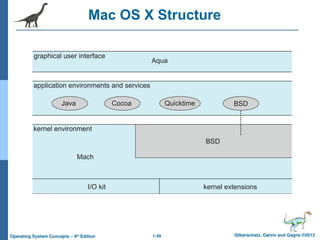
Mac OS X Structure
1.50 Silberschatz, Galvin and Gagne ©2013
Operating System Concepts – 9th
Edition
iOS
 Apple mobile OS for iPhone, iPad
 Structured on Mac OS X, added functionality
 Does not run OS X applications natively
 Also runs on different CPU architecture
(ARM vs. Intel)
 Cocoa Touch Objective-C API for
developing apps
 Media services layer for graphics, audio,
video
 Core services provides cloud computing,
databases
 Core operating system, based on Mac OS X
kernel
1.51 Silberschatz, Galvin and Gagne ©2013
Operating System Concepts – 9th
Edition
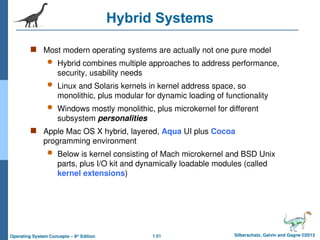
Hybrid Systems
 Most modern operating systems are actually not one pure model
 Hybrid combines multiple approaches to address performance,
security, usability needs
 Linux and Solaris kernels in kernel address space, so
monolithic, plus modular for dynamic loading of functionality
 Windows mostly monolithic, plus microkernel for different
subsystem personalities
 Apple Mac OS X hybrid, layered, Aqua UI plus Cocoa
programming environment
 Below is kernel consisting of Mach microkernel and BSD Unix
parts, plus I/O kit and dynamically loadable modules (called
kernel extensions)
1.52 Silberschatz, Galvin and Gagne ©2013
Operating System Concepts – 9th
Edition
Android
 Developed by Open Handset Alliance (mostly Google)
 Open Source
 Similar stack to IOS
 Based on Linux kernel but modified
 Provides process, memory, device-driver management
 Adds power management
 Runtime environment includes core set of libraries and Dalvik
virtual machine
 Apps developed in Java plus Android API
 Java class files compiled to Java bytecode then translated
to executable than runs in Dalvik VM
 Libraries include frameworks for web browser (webkit), database
(SQLite), multimedia, smaller libc
1.53 Silberschatz, Galvin and Gagne ©2013
Operating System Concepts – 9th
Edition
Android Architecture
1.54 Silberschatz, Galvin and Gagne ©2013
Operating System Concepts – 9th
Edition
Operating-System Debugging
 Debugging is finding and fixing errors, or bugs
 OS generate log files containing error information
 Failure of an application can generate core dump file capturing
memory of the process
 Operating system failure can generate crash dump file containing
kernel memory
 Beyond crashes, performance tuning can optimize system performance
 Sometimes using trace listings of activities, recorded for analysis
 Profiling is periodic sampling of instruction pointer to look for
statistical trends
Kernighan’s Law: “Debugging is twice as hard as writing the code in the
first place. Therefore, if you write the code as cleverly as possible, you
are, by definition, not smart enough to debug it.”

Operating system Module1 Lecture Notes.ppt

  • 1.
    1.1 Silberschatz, Galvinand Gagne ©2013 Operating System Concepts – 9th Edition Module 1 Module 1 Introduction to OS Introduction to OS
  • 2.
    1.2 Silberschatz, Galvinand Gagne ©2013 Operating System Concepts – 9th Edition Outline Outline  What Operating Systems Do What Operating Systems Do  Introduction to OS Introduction to OS  Types of Operating System Types of Operating System  OS design issues OS design issues  Operating-System Structure Operating-System Structure  Abstractions Abstractions  Processes, resources Processes, resources  Security Security
  • 3.
    1.3 Silberschatz, Galvinand Gagne ©2013 Operating System Concepts – 9th Edition What is an Operating System?  A program that acts as an intermediary between a user of a computer and the computer hardware  Operating system goals:  Execute user programs and make solving user problems easier  Make the computer system convenient to use  Use the computer hardware in an efficient manner Where does the OS fit in?
  • 4.
    1.4 Silberschatz, Galvinand Gagne ©2013 Operating System Concepts – 9th Edition Four Components of a Computer System
  • 5.
    1.5 Silberschatz, Galvinand Gagne ©2013 Operating System Concepts – 9th Edition Introduction to OS  Operating System(OS) manages computer hardware.  Application Program runs on OS  Computer User interacts with the OS which in turn interacts with the hardware.  Variety of OS depending on the tasks. Example:-  Mainframe OS  Optimize hardware utilization  Computer standard OS  Standard Application, Games, etc.  Handheld OS -> Apps, etc.
  • 6.
    1.6 Silberschatz, Galvinand Gagne ©2013 Operating System Concepts – 9th Edition
  • 7.
    1.7 Silberschatz, Galvinand Gagne ©2013 Operating System Concepts – 9th Edition What is an Operating System?  Operating system goals:  Execute user programs and make solving user problems easier  Make the computer system convenient to use  Use the computer hardware in an efficient manner  A program that acts as an intermediary between a user of a computer and the computer hardware
  • 8.
    1.8 Silberschatz, Galvinand Gagne ©2013 Operating System Concepts – 9th Edition What Operating Systems Do  Depends on the point of view Depends on the point of view  Users want convenience, Users want convenience, ease ease of of use use and and good performance good performance  Don Don’ ’t care about t care about resource resource utilization utilization  But shared computer such as But shared computer such as mainframe mainframe or or minicomputer minicomputer must keep all must keep all users happy users happy  Users of dedicate systems such as Users of dedicate systems such as workstations workstations have dedicated have dedicated resources but frequently use shared resources from resources but frequently use shared resources from servers servers  Handheld computers are resource poor, optimized for usability and Handheld computers are resource poor, optimized for usability and battery life battery life  Some computers have little or no user interface, such as embedded Some computers have little or no user interface, such as embedded computers in devices and automobiles computers in devices and automobiles
  • 9.
    1.9 Silberschatz, Galvinand Gagne ©2013 Operating System Concepts – 9th Edition Operating System Definition  OS is a OS is a resource allocator resource allocator  Manages all resources Manages all resources  Decides between conflicting requests for efficient and fair resource Decides between conflicting requests for efficient and fair resource use use  OS is a OS is a control program control program  Controls execution of programs to prevent errors and improper use of Controls execution of programs to prevent errors and improper use of the computer the computer
  • 10.
    1.10 Silberschatz, Galvinand Gagne ©2013 Operating System Concepts – 9th Edition Computer Startup  bootstrap program bootstrap program is loaded at power-up or reboot is loaded at power-up or reboot  Typically stored in ROM or EPROM, generally known as Typically stored in ROM or EPROM, generally known as firmware firmware  Initializes all aspects of system Initializes all aspects of system  Loads operating system kernel and starts execution Loads operating system kernel and starts execution
  • 11.
    1.11 Silberschatz, Galvinand Gagne ©2013 Operating System Concepts – 9th Edition Schematic of Operating System functionality
  • 12.
    1.12 Silberschatz, Galvinand Gagne ©2013 Operating System Concepts – 9th Edition Batch Operating System  Multiple jobs, but only one job in memory at one time and executed (till completion) before the next one starts  The users of this type of operating system does not interact with the computer directly.  Each user prepares his job on an off-line device like punch cards and submits it to the computer operator  There is an operator which takes similar jobs having the same requirement and group them into batches. Types of Operating System Examples of Batch based Operating System: IBM's MVS
  • 13.
    1.13 Silberschatz, Galvinand Gagne ©2013 Operating System Concepts – 9th Edition Multiprogrammed Operating System:  This type of OS is used to execute more than one jobs simultaneously by a single processor.  It increases CPU utilization by organizing jobs so that the CPU always has one job to execute.  Multiprogramming operating systems use the mechanism of job scheduling and CPU scheduling. Memory Layout for Multiprogrammed System Several jobs are kept in main memory at the same time, and the CPU is multiplexed among them.
  • 14.
    1.14 Silberschatz, Galvinand Gagne ©2013 Operating System Concepts – 9th Edition OS - Multiprogramming  I/O routine supplied by the system.  Memory management – the system must allocate the memory to several jobs.  CPU scheduling – the system must choose among several jobs ready to run.  Allocation of devices.
  • 15.
    1.15 Silberschatz, Galvinand Gagne ©2013 Operating System Concepts – 9th Edition Time-Sharing Operating Systems  Each task is given some time to execute so that all the tasks work smoothly.  These systems are also known as Multi-tasking Systems.  The task can be from a single user or different users also.  The time that each task gets to execute is called quantum.  After this time interval is over OS switches over to the next task.
  • 16.
    1.16 Silberschatz, Galvinand Gagne ©2013 Operating System Concepts – 9th Edition Time-Sharing Systems–Interactive Computing  The CPU is multiplexed among several jobs that are kept in memory and on disk (the CPU is allocated to a job only if the job is in memory).  A job swapped in and out of memory to the disk.  On-line communication between the user and the system is provided; when the operating system finishes the execution of one command, it seeks the next “control statement” from the user’s keyboard.  On-line system must be available for users to access data and code.
  • 17.
    1.17 Silberschatz, Galvinand Gagne ©2013 Operating System Concepts – 9th Edition Types of Operating System  Multiprogramming needed for efficiency  Single user cannot keep CPU and I/O devices busy at all times  Multiprogramming organizes jobs (code and data) so CPU always has one to execute  A subset of total jobs in system is kept in memory  One job selected and run via job scheduling  When it has to wait (for I/O for example), OS switches to another job  Timesharing (multitasking) is logical extension in which CPU switches jobs so frequently that users can interact with each job while it is running, creating interactive computing  Response time should be < 1 second  Each user has at least one program executing in memory process  If several jobs ready to run at the same time  CPU scheduling  If processes don’t fit in memory, swapping moves them in and out to run  Virtual memory allows execution of processes not completely in memory Multiprogramming Vs Timesharing
  • 18.
    1.18 Silberschatz, Galvinand Gagne ©2013 Operating System Concepts – 9th Edition Distributed & Embedded Operating System Distributed A distributed operating system manages a group of independent computers and makes them appear to be a single computer. The development of networked computers that could be linked and communicate with each other, gave rise to distributed computing. Embedded Embedded operating systems are designed to be used in embedded computer systems. They are designed to operate on small machines like PDAs with less autonomy. They are able to operate with a limited number of resources.
  • 19.
    1.19 Silberschatz, Galvinand Gagne ©2013 Operating System Concepts – 9th Edition Real-Time Operating System  These types of OSs serve real-time systems.  The time interval required to process and respond to inputs is very small.  This time interval is called response time.  Real-time systems are used when there are time requirements that are very strict like  missile systems,  air traffic control systems,  robots, etc.
  • 20.
    1.20 Silberschatz, Galvinand Gagne ©2013 Operating System Concepts – 9th Edition Real-Time Operating Systems  Often used as a control device in a dedicated application such as controlling scientific experiments, medical imaging systems, industrial control systems, and some display systems.  Well-defined fixed-time constraints.  Hard real-time system.  Secondary storage limited or absent, data stored in short-term memory, or read-only memory (ROM)  Conflicts with time-sharing systems, not supported by general-purpose operating systems.  Soft real-time system  Limited utility in industrial control or robotics  Useful in applications (multimedia, virtual reality) requiring advanced operating- system features.
  • 21.
    1.21 Silberschatz, Galvinand Gagne ©2013 Operating System Concepts – 9th Edition OS Services  User Interface: There are different kinds, like touchscreen, GUI, and command-line.  Program Execution: (Execute programs for users)  I/O operations: It is much too difficult for users to operate the I/O hardware correctly without help.  File System Manipulation: The OS helps us store, organize, manage, and protect our information.  Communications: Users need their processes to exchange information. OSs help. The two main ways to do it are with shared memory and by message passing.  Error Detection: An OS continually checks to see if something is going wrong. The OS is programmed to take appropriate action.  Resource Allocation  Logging:  Records for accounting, fault detection, failure, protection, maintenance, update, security, etc.  Protection and Security.
  • 22.
    1.22 Silberschatz, Galvinand Gagne ©2013 Operating System Concepts – 9th Edition OS Design Goals  Design Goals:  system that is convenient,  reliable,  safe, and  fast.  Implementation: The implementation of the operating system, that is the manner in which the ideas of the design are written in programming language(s).  Assembly  High Level Language  Earlier assembly could make the code run faster but nowadays high-level are translated to equivalently good assembly code.  Instead performance of OS will increase if selection data structure and algorithms are done rather than proper assembly code.
  • 23.
    1.23 Silberschatz, Galvinand Gagne ©2013 Operating System Concepts – 9th Edition Operating System Structures  Monolithic  Micro-kernel models  Layered (conceptual)  Modular Kernels may be classified mainly in three categories: - Monolithic Kernel Micro Kernel Hybrid Kernel
  • 24.
    1.24 Silberschatz, Galvinand Gagne ©2013 Operating System Concepts – 9th Edition Layered  Division into number of layers as shown in figure.  Innermost layer is hardware  Outermost layer is interface  Accordingly as we move from innermost to outermost layer we observe that we are moving from the perspective of hardware to software with each interlinkage layer.  Simple, Easy to Debug, Easy to verify  The operating system is divided into a number of layers (levels), each built on top of lower layers. The bottom layer (layer 0), is the hardware; the highest (layer N) is the user interface.  With modularity, layers are selected such that each uses functions (operations) and services of only lower-level layers
  • 25.
    1.25 Silberschatz, Galvinand Gagne ©2013 Operating System Concepts – 9th Edition Modules / Modular approach  Many modern operating systems implement loadable kernel modules  Uses object-oriented approach  Each core component is separate  Each talks to the others over known interfaces  Each is loadable as needed within the kernel  Overall, similar to layers but with more flexible  Linux, Solaris, etc  Divided into different module.  Typically employs:  dynamic loadable kernel module (LKM). i.e. Different modules communicate through kernel (core part).  LKM may be loaded during boot or when required, and can be deleted also.  An example would be a device driver support module loaded when a new device is plugged into the computer, and when the device is unplugged, the module is deleted because it is not needed any more.
  • 26.
    1.26 Silberschatz, Galvinand Gagne ©2013 Operating System Concepts – 9th Edition Solaris Modular Approach
  • 27.
    1.27 Silberschatz, Galvinand Gagne ©2013 Operating System Concepts – 9th Edition Monolithic Kernel
  • 28.
    1.28 Silberschatz, Galvinand Gagne ©2013 Operating System Concepts – 9th Edition Monolithic  Monolithic Kernel  value on speed and efficiency.  Monolithic is a single static binary file.  It executes in a single address space.
  • 29.
    1.29 Silberschatz, Galvinand Gagne ©2013 Operating System Concepts – 9th Edition Microkernels: Keep only necessary component in kernel. Others are implemented as programs (system or user level). Resulting in a kernel smaller in size. Minimal process management Minimal memory management Main role is that it facilitates communication between the client program and the various services that are running in user space. Microkernel System Structure
  • 30.
    1.30 Silberschatz, Galvinand Gagne ©2013 Operating System Concepts – 9th Edition Microkernel System Structure
  • 31.
    1.31 Silberschatz, Galvinand Gagne ©2013 Operating System Concepts – 9th Edition Microkernel System Structure  Moves as much from the kernel into user space  Mach example of microkernel  Mac OS X kernel (Darwin) partly based on Mach  Communication takes place between user modules using message passing  Benefits:  Easier to extend a microkernel  Easier to port the operating system to new architectures  More reliable (less code is running in kernel mode)  More secure  Detriments:  Performance overhead of user space to kernel space communication
  • 32.
    1.32 Silberschatz, Galvinand Gagne ©2013 Operating System Concepts – 9th Edition Microkernel Vs Monolithic Source: www.atg.world/Monolithic vs Microkernel
  • 33.
    1.33 Silberschatz, Galvinand Gagne ©2013 Operating System Concepts – 9th Edition BASIS FOR COMPARISON MICROKERNEL MONOLITHIC KERNEL Basic In microkernel user services and kernel, services are kept in separate address space. In monolithic kernel, both user services and kernel services are kept in the same address space. Size Microkernel are smaller in size. Monolithic kernel is larger than microkernel. Execution Slow execution. Fast execution. Extendible The microkernel is easily extendible. The monolithic kernel is hard to extend. Security If a service crashes, it does effect on working of microkernel. If a service crashes, the whole system crashes in monolithic kernel. Code To write a microkernel, more code is required. To write a monolithic kernel, less code is required. Example QNX, Symbian, L4Linux, Singularity, K42, Mac OS X, Integrity, PikeOS, HURD, Minix, and Coyotos. Linux, BSDs (FreeBSD, OpenBSD, NetBSD), Microsoft Windows (95,98,Me), Solaris, OS-9, AIX, HP-UX, DOS, OpenVMS, XTS-400 etc.
  • 34.
    1.34 Silberschatz, Galvinand Gagne ©2013 Operating System Concepts – 9th Edition General UNIX Architecture layered
  • 35.
    1.35 Silberschatz, Galvinand Gagne ©2013 Operating System Concepts – 9th Edition Traditional UNIX System Structure Beyond simple… but not fully layered UNIX – limited by hardware functionality, the original UNIX operating system had limited structuring. The UNIX OS consists of two separable parts  Systems programs  The kernel  Consists of everything below the system-call interface and above the physical hardware  Provides the file system, CPU scheduling, memory management, and other operating- system functions; a large number of functions for one level
  • 36.
    1.36 Silberschatz, Galvinand Gagne ©2013 Operating System Concepts – 9th Edition Abstraction  OS acts as an intermediary between a user and the hardware. Interface for the user is provided by the OS. This interface is how a user use the service.  Without OSs and abstract interfaces, application writers must program all device access directly, Applications suffer!  Very complicated maintenance and upgrading Abstract Machine  Complex details of the hardware are hidden  APIs  Application development becomes simple  Command Interpreter  Part of a OS that understands and executes commands that are entered interactively by a human being or from a program  Shell Application OS Hardware Abstract Machine Interface Physical Machine Interface
  • 37.
    1.37 Silberschatz, Galvinand Gagne ©2013 Operating System Concepts – 9th Edition Operating Systems Provide Abstraction
  • 38.
    1.38 Silberschatz, Galvinand Gagne ©2013 Operating System Concepts – 9th Edition Providing abstraction via system calls Operating System Video Card CPU Monitor Printer Disk Memory Network Application System Calls: fork(), wait(), read(), open(), write(), mkdir(), kill() ... Device Mgmt File System Network Comm. Process Mgmt Protection Security Kernel Shell
  • 39.
    1.39 Silberschatz, Galvinand Gagne ©2013 Operating System Concepts – 9th Edition Concept of Process  Process  Program loaded in memory and in execution.  Program is a passive whereas process is an active entity Process Management Activities  Initiating and Terminating Processes  To pause and resume processes  Process scheduling  Mechanism for:  Process synchronization, communication and deadlock handling. The operating system is responsible for the following activities in connection with process management: P1 P2 R1 R2 R1 R2 P1 P2
  • 40.
    1.40 Silberschatz, Galvinand Gagne ©2013 Operating System Concepts – 9th Edition Resource  OS acts an interface between hardware and software.  Resources are objects that can be allocated in a computer . Examples:  Processors,  Devices: Both input and output devices,  Memory  Files
  • 41.
    1.41 Silberschatz, Galvinand Gagne ©2013 Operating System Concepts – 9th Edition Influence of Security Other Security Issues Program Threats Trojans Trap Door System Threats Worms Viruses Denial of Services
  • 42.
    1.42 Silberschatz, Galvinand Gagne ©2013 Operating System Concepts – 9th Edition Networking and OS  General network configurations  Network operating system (NOS)  Distributed operating system (D/OS)
  • 43.
    1.43 Silberschatz, Galvinand Gagne ©2013 Operating System Concepts – 9th Edition Multimedia OS  To identify the characteristics of multimedia data  To explore the operating system requirements of multimedia data, including CPU and disk scheduling and network management  Multimedia files can be quite large  Continuous media data may require very high data rates  Multimedia applications may be sensitive to timing delays during playback of the media  The operating system must guarantee the specific data rate and timing requirements of continuous media  Such requirements are known as Quality-of-Service (QoS) guarantees  Guaranteeing QoS has the following effects in a computer system: 1. CPU processing 2. Scheduling 3. File systems 4. Network protocols
  • 44.
    1.44 Silberschatz, Galvinand Gagne ©2013 Operating System Concepts – 9th Edition Multimedia OS  The operating system requirements of multimedia data, including CPU and disk scheduling and network management and Guaranteeing QoS.  Multimedia applications may be sensitive to timing delays during playback of the media
  • 45.
    1.45 Silberschatz, Galvinand Gagne ©2013 Operating System Concepts – 9th Edition Main Bibliography A. Silberschatz, P. B. Galvin, and G. Gagne, “Operating Systems Concepts (Essentials)”, 9th Edition, John Wiley & Sons, 2012. http://codex.cs.yale.edu/avi/os-book/
  • 46.
    1.46 Silberschatz, Galvinand Gagne ©2013 Operating System Concepts – 9th Edition Main Bibliography A. S. Tanenbaum, “Modern Operating Systems”, 4th ed, Pearson, 2015. W. Stallings, “Operating Systems: Internals and Design Principles”, 8th ed, Pearson, 2015.
  • 47.
    1.47 Silberschatz, Galvinand Gagne ©2013 Operating System Concepts – 9th Edition THANK YOU THANK YOU
  • 48.
    1.48 Silberschatz, Galvinand Gagne ©2013 Operating System Concepts – 9th Edition Additional Learning Resources Additional Learning Resources
  • 49.
    1.49 Silberschatz, Galvinand Gagne ©2013 Operating System Concepts – 9th Edition Mac OS X Structure
  • 50.
    1.50 Silberschatz, Galvinand Gagne ©2013 Operating System Concepts – 9th Edition iOS  Apple mobile OS for iPhone, iPad  Structured on Mac OS X, added functionality  Does not run OS X applications natively  Also runs on different CPU architecture (ARM vs. Intel)  Cocoa Touch Objective-C API for developing apps  Media services layer for graphics, audio, video  Core services provides cloud computing, databases  Core operating system, based on Mac OS X kernel
  • 51.
    1.51 Silberschatz, Galvinand Gagne ©2013 Operating System Concepts – 9th Edition Hybrid Systems  Most modern operating systems are actually not one pure model  Hybrid combines multiple approaches to address performance, security, usability needs  Linux and Solaris kernels in kernel address space, so monolithic, plus modular for dynamic loading of functionality  Windows mostly monolithic, plus microkernel for different subsystem personalities  Apple Mac OS X hybrid, layered, Aqua UI plus Cocoa programming environment  Below is kernel consisting of Mach microkernel and BSD Unix parts, plus I/O kit and dynamically loadable modules (called kernel extensions)
  • 52.
    1.52 Silberschatz, Galvinand Gagne ©2013 Operating System Concepts – 9th Edition Android  Developed by Open Handset Alliance (mostly Google)  Open Source  Similar stack to IOS  Based on Linux kernel but modified  Provides process, memory, device-driver management  Adds power management  Runtime environment includes core set of libraries and Dalvik virtual machine  Apps developed in Java plus Android API  Java class files compiled to Java bytecode then translated to executable than runs in Dalvik VM  Libraries include frameworks for web browser (webkit), database (SQLite), multimedia, smaller libc
  • 53.
    1.53 Silberschatz, Galvinand Gagne ©2013 Operating System Concepts – 9th Edition Android Architecture
  • 54.
    1.54 Silberschatz, Galvinand Gagne ©2013 Operating System Concepts – 9th Edition Operating-System Debugging  Debugging is finding and fixing errors, or bugs  OS generate log files containing error information  Failure of an application can generate core dump file capturing memory of the process  Operating system failure can generate crash dump file containing kernel memory  Beyond crashes, performance tuning can optimize system performance  Sometimes using trace listings of activities, recorded for analysis  Profiling is periodic sampling of instruction pointer to look for statistical trends Kernighan’s Law: “Debugging is twice as hard as writing the code in the first place. Therefore, if you write the code as cleverly as possible, you are, by definition, not smart enough to debug it.”