Silberschatz, Galvin and Gagne ©2013
Operating System Concepts – 9th
Edition
Chapter 2: Operating-System
Structures
2.2 Silberschatz, Galvin and Gagne ©2013
Operating System Concepts – 9th
Edition
Chapter 2: Operating-System Structures
● Operating System Services
● User Operating System Interface
● System Calls
● Types of System Calls
● System Programs
● Operating System Design and Implementation
● Operating System Structure
● Operating System Debugging
● Operating System Generation
● System Boot
2.3 Silberschatz, Galvin and Gagne ©2013
Operating System Concepts – 9th
Edition
Operating System Services
● User interface
● Program Execution
● I/O Operations
● File System manipulation
● Communications
● Error detection
● Resource Allocation
● Accounting
● Protection and Security
2.4 Silberschatz, Galvin and Gagne ©2013
Operating System Concepts – 9th
Edition
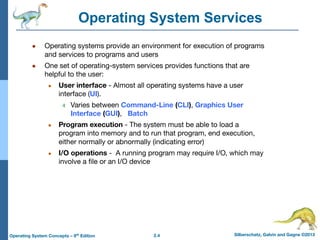
Operating System Services
● Operating systems provide an environment for execution of programs
and services to programs and users
● One set of operating-system services provides functions that are
helpful to the user:
● User interface - Almost all operating systems have a user
interface (UI).
4 Varies between Command-Line (CLI), Graphics User
Interface (GUI), Batch
● Program execution - The system must be able to load a
program into memory and to run that program, end execution,
either normally or abnormally (indicating error)
● I/O operations - A running program may require I/O, which may
involve a file or an I/O device
2.5 Silberschatz, Galvin and Gagne ©2013
Operating System Concepts – 9th
Edition
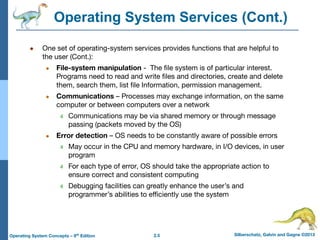
Operating System Services (Cont.)
● One set of operating-system services provides functions that are helpful to
the user (Cont.):
● File-system manipulation - The file system is of particular interest.
Programs need to read and write files and directories, create and delete
them, search them, list file Information, permission management.
● Communications – Processes may exchange information, on the same
computer or between computers over a network
4 Communications may be via shared memory or through message
passing (packets moved by the OS)
● Error detection – OS needs to be constantly aware of possible errors
4 May occur in the CPU and memory hardware, in I/O devices, in user
program
4 For each type of error, OS should take the appropriate action to
ensure correct and consistent computing
4 Debugging facilities can greatly enhance the user’s and
programmer’s abilities to efficiently use the system
2.6 Silberschatz, Galvin and Gagne ©2013
Operating System Concepts – 9th
Edition
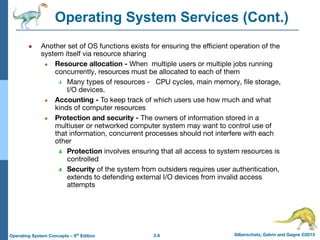
Operating System Services (Cont.)
● Another set of OS functions exists for ensuring the efficient operation of the
system itself via resource sharing
● Resource allocation - When multiple users or multiple jobs running
concurrently, resources must be allocated to each of them
4 Many types of resources - CPU cycles, main memory, file storage,
I/O devices.
● Accounting - To keep track of which users use how much and what
kinds of computer resources
● Protection and security - The owners of information stored in a
multiuser or networked computer system may want to control use of
that information, concurrent processes should not interfere with each
other
4 Protection involves ensuring that all access to system resources is
controlled
4 Security of the system from outsiders requires user authentication,
extends to defending external I/O devices from invalid access
attempts
2.7 Silberschatz, Galvin and Gagne ©2013
Operating System Concepts – 9th
Edition
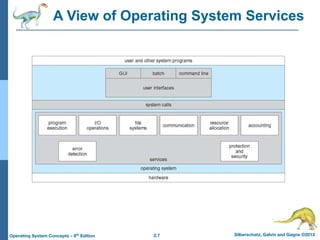
A View of Operating System Services
2.8 Silberschatz, Galvin and Gagne ©2013
Operating System Concepts – 9th
Edition
User Operating System Interface - CLI
CLI or command interpreter allows direct command entry
● Sometimes implemented in kernel, sometimes by systems
program
● Sometimes multiple flavors implemented – shells
● Primarily fetches a command from user and executes it
● Sometimes commands built-in, sometimes just names of
programs
2.9 Silberschatz, Galvin and Gagne ©2013
Operating System Concepts – 9th
Edition
User Operating System Interface - GUI
● User-friendly desktop metaphor interface
● Usually mouse, keyboard, and monitor
● Icons represent files, programs, actions, etc
● Various mouse buttons over objects in the interface cause
various actions (provide information, options, execute function,
open directory (known as a folder)
● Many systems now include both CLI and GUI interfaces
● Microsoft Windows is GUI with CLI “command” shell
● Apple Mac OS X is “Aqua” GUI interface with UNIX kernel
underneath and shells available
● Unix and Linux have CLI with optional GUI interfaces (CDE,
KDE, GNOME)
2.10 Silberschatz, Galvin and Gagne ©2013
Operating System Concepts – 9th
Edition
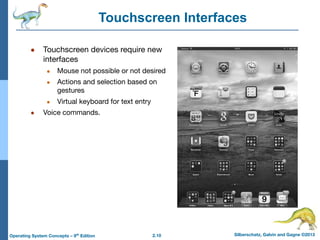
Touchscreen Interfaces
● Touchscreen devices require new
interfaces
● Mouse not possible or not desired
● Actions and selection based on
gestures
● Virtual keyboard for text entry
● Voice commands.
2.11 Silberschatz, Galvin and Gagne ©2013
Operating System Concepts – 9th
Edition
System calls
● System calls provide an interface to the services made available by an
operating system.
● Ex: Writing a simple program to read data from one file and copy them to
another file.
Source File Destination File
2.12 Silberschatz, Galvin and Gagne ©2013
Operating System Concepts – 9th
Edition
Types of System calls
● Process control
● File management
● Device management
● Information maintenance
● Communications
2.13 Silberschatz, Galvin and Gagne ©2013
Operating System Concepts – 9th
Edition
Process control
● End , abort
● Load, Execute
● Create process, terminate process
● Wait for time
● Allocate and free memory
● Wait event, signal event
● Get process attributes, set PA
2.14 Silberschatz, Galvin and Gagne ©2013
Operating System Concepts – 9th
Edition
File management , Device management
● Create file, Delete file
● Open , close
● Read, write, reposition
● Get file attributes
● Set file attributes
Device management
● Request device , release device
● Read , write , reposition
● Get device attributes
● Set device attributes
2.15 Silberschatz, Galvin and Gagne ©2013
Operating System Concepts – 9th
Edition
Information maintenance , communications
● Get time or date , set time or date
● Get system data , set system data
● Get process
● Set process
Communications : Message passing , shared memory
● Create delete communication connection
● Send , receive messages
● Transfer status information
2.16 Silberschatz, Galvin and Gagne ©2013
Operating System Concepts – 9th
Edition
System Programs
● System programs provide a convenient environment for program
development and execution.
● Some of them provide user interface to system calls and other are
considerably more complex. They can be divided into these categories
i) File management
ii) Status information
iii) File manipulation
iv) Programming language support
v) Program loading and execution
vi) Communications
2.17 Silberschatz, Galvin and Gagne ©2013
Operating System Concepts – 9th
Edition
Operating System Design and Implementation
● Design and Implementation of OS not “solvable”, but some
approaches have proven successful
● Internal structure of different Operating Systems can vary widely
● Start the design by defining goals and specifications
● Affected by choice of hardware, type of system
● User goals and System goals
● User goals – operating system should be convenient to use,
easy to learn, reliable, safe, and fast
● System goals – operating system should be easy to design,
implement, and maintain, as well as flexible, reliable, error-free,
and efficient
2.18 Silberschatz, Galvin and Gagne ©2013
Operating System Concepts – 9th
Edition
Operating System Design and Implementation (Cont.)
● Important principle to separate
Policy: What will be done?
Mechanism: How to do it?
● The separation of policy from mechanism is a very important
principle, it allows maximum flexibility if policy decisions are to
be changed later (example – timer)
● Specifying and designing an OS is highly creative task of
software engineering
● Implementation
● Early OS in assembly language
● Now C, C++
2.19 Silberschatz, Galvin and Gagne ©2013
Operating System Concepts – 9th
Edition
Operating System Structure
● General-purpose OS is very large program
● Various ways to structure ones
● Simple structure – MS-DOS
● More complex -- UNIX
● Layered – an abstrcation
● Microkernel -Mach
2.20 Silberschatz, Galvin and Gagne ©2013
Operating System Concepts – 9th
Edition
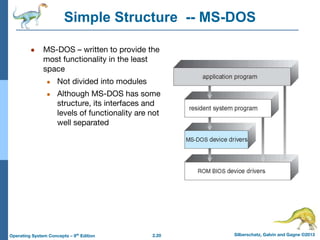
Simple Structure -- MS-DOS
● MS-DOS – written to provide the
most functionality in the least
space
● Not divided into modules
● Although MS-DOS has some
structure, its interfaces and
levels of functionality are not
well separated
2.21 Silberschatz, Galvin and Gagne ©2013
Operating System Concepts – 9th
Edition
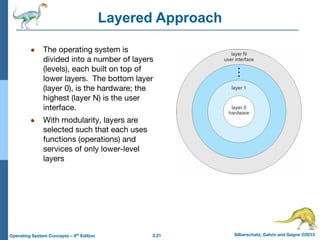
Layered Approach
● The operating system is
divided into a number of layers
(levels), each built on top of
lower layers. The bottom layer
(layer 0), is the hardware; the
highest (layer N) is the user
interface.
● With modularity, layers are
selected such that each uses
functions (operations) and
services of only lower-level
layers
2.22 Silberschatz, Galvin and Gagne ©2013
Operating System Concepts – 9th
Edition
Microkernel System Structure
● Moves as much from the kernel into user space
● Mach example of microkernel
● Communication takes place between user modules using
message passing
● Benefits:
● Easier to extend a microkernel
● Easier to port the operating system to new architectures
● More reliable (less code is running in kernel mode)
● More secure
● Detriments:
● Performance overhead of user space to kernel space
communication
2.23 Silberschatz, Galvin and Gagne ©2013
Operating System Concepts – 9th
Edition
Modules
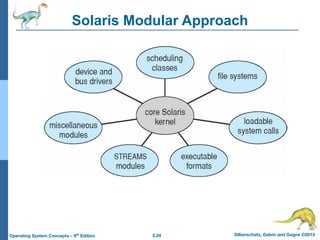
● Many modern operating systems implement loadable kernel
modules
● Uses object-oriented approach
● Each core component is separate
● Each talks to the others over known interfaces
● Each is loadable as needed within the kernel
● Overall, similar to layers but with more flexible
● Linux, Solaris, etc
2.24 Silberschatz, Galvin and Gagne ©2013
Operating System Concepts – 9th
Edition
Solaris Modular Approach
2.25 Silberschatz, Galvin and Gagne ©2013
Operating System Concepts – 9th
Edition
Virtual Machines
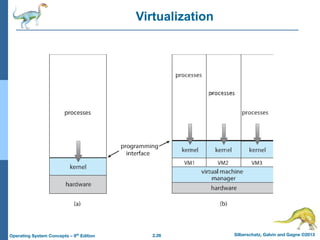
● The fundamental idea behind a virtual machine is to abstract the
hardware of a single computer (the CPU, memory, disk drives,
network interface cards, and so forth) into several different
execution environments, thereby creating the illusion that each
separate execution environment is running its own private
computer.
● By using CPU scheduling and virtual memory technique an
operating system can create the illusion a process has its own
processor with its own memory .
● The virtual machine provides an interface that is identical to the
underlying bare hardware.
2.26 Silberschatz, Galvin and Gagne ©2013
Operating System Concepts – 9th
Edition
Virtualization
2.27 Silberschatz, Galvin and Gagne ©2013
Operating System Concepts – 9th
Edition
Operating System Generation
● The configuration of the system or system generated for each specific
computer site a process is known as System Generation.
● The system programs reads from a given file or asks the operator of the
system for information about specific configuration of the hardware
systems.
● The following kind of information must be determined
i) What CPU is to be used ?
ii) How much memory is available ?
iii) What devices are available ?
iv) What operating systems options are desired ?
2.28 Silberschatz, Galvin and Gagne ©2013
Operating System Concepts – 9th
Edition
System Boot
● When power initialized on system, execution starts at a fixed
memory location
● Firmware ROM used to hold initial boot code
● Operating system must be made available to hardware so
hardware can start it
● Small piece of code – bootstrap loader, stored in ROM or
EEPROM locates the kernel, loads it into memory, and starts it
● Sometimes two-step process where boot block at fixed
location loaded by ROM code, which loads bootstrap loader
from disk
Silberschatz, Galvin and Gagne ©2013
Operating System Concepts – 9th
Edition
End of Chapter 2

Lecture_02_System_Structures.ppt.pdf

  • 1.
    Silberschatz, Galvin andGagne ©2013 Operating System Concepts – 9th Edition Chapter 2: Operating-System Structures
  • 2.
    2.2 Silberschatz, Galvinand Gagne ©2013 Operating System Concepts – 9th Edition Chapter 2: Operating-System Structures ● Operating System Services ● User Operating System Interface ● System Calls ● Types of System Calls ● System Programs ● Operating System Design and Implementation ● Operating System Structure ● Operating System Debugging ● Operating System Generation ● System Boot
  • 3.
    2.3 Silberschatz, Galvinand Gagne ©2013 Operating System Concepts – 9th Edition Operating System Services ● User interface ● Program Execution ● I/O Operations ● File System manipulation ● Communications ● Error detection ● Resource Allocation ● Accounting ● Protection and Security
  • 4.
    2.4 Silberschatz, Galvinand Gagne ©2013 Operating System Concepts – 9th Edition Operating System Services ● Operating systems provide an environment for execution of programs and services to programs and users ● One set of operating-system services provides functions that are helpful to the user: ● User interface - Almost all operating systems have a user interface (UI). 4 Varies between Command-Line (CLI), Graphics User Interface (GUI), Batch ● Program execution - The system must be able to load a program into memory and to run that program, end execution, either normally or abnormally (indicating error) ● I/O operations - A running program may require I/O, which may involve a file or an I/O device
  • 5.
    2.5 Silberschatz, Galvinand Gagne ©2013 Operating System Concepts – 9th Edition Operating System Services (Cont.) ● One set of operating-system services provides functions that are helpful to the user (Cont.): ● File-system manipulation - The file system is of particular interest. Programs need to read and write files and directories, create and delete them, search them, list file Information, permission management. ● Communications – Processes may exchange information, on the same computer or between computers over a network 4 Communications may be via shared memory or through message passing (packets moved by the OS) ● Error detection – OS needs to be constantly aware of possible errors 4 May occur in the CPU and memory hardware, in I/O devices, in user program 4 For each type of error, OS should take the appropriate action to ensure correct and consistent computing 4 Debugging facilities can greatly enhance the user’s and programmer’s abilities to efficiently use the system
  • 6.
    2.6 Silberschatz, Galvinand Gagne ©2013 Operating System Concepts – 9th Edition Operating System Services (Cont.) ● Another set of OS functions exists for ensuring the efficient operation of the system itself via resource sharing ● Resource allocation - When multiple users or multiple jobs running concurrently, resources must be allocated to each of them 4 Many types of resources - CPU cycles, main memory, file storage, I/O devices. ● Accounting - To keep track of which users use how much and what kinds of computer resources ● Protection and security - The owners of information stored in a multiuser or networked computer system may want to control use of that information, concurrent processes should not interfere with each other 4 Protection involves ensuring that all access to system resources is controlled 4 Security of the system from outsiders requires user authentication, extends to defending external I/O devices from invalid access attempts
  • 7.
    2.7 Silberschatz, Galvinand Gagne ©2013 Operating System Concepts – 9th Edition A View of Operating System Services
  • 8.
    2.8 Silberschatz, Galvinand Gagne ©2013 Operating System Concepts – 9th Edition User Operating System Interface - CLI CLI or command interpreter allows direct command entry ● Sometimes implemented in kernel, sometimes by systems program ● Sometimes multiple flavors implemented – shells ● Primarily fetches a command from user and executes it ● Sometimes commands built-in, sometimes just names of programs
  • 9.
    2.9 Silberschatz, Galvinand Gagne ©2013 Operating System Concepts – 9th Edition User Operating System Interface - GUI ● User-friendly desktop metaphor interface ● Usually mouse, keyboard, and monitor ● Icons represent files, programs, actions, etc ● Various mouse buttons over objects in the interface cause various actions (provide information, options, execute function, open directory (known as a folder) ● Many systems now include both CLI and GUI interfaces ● Microsoft Windows is GUI with CLI “command” shell ● Apple Mac OS X is “Aqua” GUI interface with UNIX kernel underneath and shells available ● Unix and Linux have CLI with optional GUI interfaces (CDE, KDE, GNOME)
  • 10.
    2.10 Silberschatz, Galvinand Gagne ©2013 Operating System Concepts – 9th Edition Touchscreen Interfaces ● Touchscreen devices require new interfaces ● Mouse not possible or not desired ● Actions and selection based on gestures ● Virtual keyboard for text entry ● Voice commands.
  • 11.
    2.11 Silberschatz, Galvinand Gagne ©2013 Operating System Concepts – 9th Edition System calls ● System calls provide an interface to the services made available by an operating system. ● Ex: Writing a simple program to read data from one file and copy them to another file. Source File Destination File
  • 12.
    2.12 Silberschatz, Galvinand Gagne ©2013 Operating System Concepts – 9th Edition Types of System calls ● Process control ● File management ● Device management ● Information maintenance ● Communications
  • 13.
    2.13 Silberschatz, Galvinand Gagne ©2013 Operating System Concepts – 9th Edition Process control ● End , abort ● Load, Execute ● Create process, terminate process ● Wait for time ● Allocate and free memory ● Wait event, signal event ● Get process attributes, set PA
  • 14.
    2.14 Silberschatz, Galvinand Gagne ©2013 Operating System Concepts – 9th Edition File management , Device management ● Create file, Delete file ● Open , close ● Read, write, reposition ● Get file attributes ● Set file attributes Device management ● Request device , release device ● Read , write , reposition ● Get device attributes ● Set device attributes
  • 15.
    2.15 Silberschatz, Galvinand Gagne ©2013 Operating System Concepts – 9th Edition Information maintenance , communications ● Get time or date , set time or date ● Get system data , set system data ● Get process ● Set process Communications : Message passing , shared memory ● Create delete communication connection ● Send , receive messages ● Transfer status information
  • 16.
    2.16 Silberschatz, Galvinand Gagne ©2013 Operating System Concepts – 9th Edition System Programs ● System programs provide a convenient environment for program development and execution. ● Some of them provide user interface to system calls and other are considerably more complex. They can be divided into these categories i) File management ii) Status information iii) File manipulation iv) Programming language support v) Program loading and execution vi) Communications
  • 17.
    2.17 Silberschatz, Galvinand Gagne ©2013 Operating System Concepts – 9th Edition Operating System Design and Implementation ● Design and Implementation of OS not “solvable”, but some approaches have proven successful ● Internal structure of different Operating Systems can vary widely ● Start the design by defining goals and specifications ● Affected by choice of hardware, type of system ● User goals and System goals ● User goals – operating system should be convenient to use, easy to learn, reliable, safe, and fast ● System goals – operating system should be easy to design, implement, and maintain, as well as flexible, reliable, error-free, and efficient
  • 18.
    2.18 Silberschatz, Galvinand Gagne ©2013 Operating System Concepts – 9th Edition Operating System Design and Implementation (Cont.) ● Important principle to separate Policy: What will be done? Mechanism: How to do it? ● The separation of policy from mechanism is a very important principle, it allows maximum flexibility if policy decisions are to be changed later (example – timer) ● Specifying and designing an OS is highly creative task of software engineering ● Implementation ● Early OS in assembly language ● Now C, C++
  • 19.
    2.19 Silberschatz, Galvinand Gagne ©2013 Operating System Concepts – 9th Edition Operating System Structure ● General-purpose OS is very large program ● Various ways to structure ones ● Simple structure – MS-DOS ● More complex -- UNIX ● Layered – an abstrcation ● Microkernel -Mach
  • 20.
    2.20 Silberschatz, Galvinand Gagne ©2013 Operating System Concepts – 9th Edition Simple Structure -- MS-DOS ● MS-DOS – written to provide the most functionality in the least space ● Not divided into modules ● Although MS-DOS has some structure, its interfaces and levels of functionality are not well separated
  • 21.
    2.21 Silberschatz, Galvinand Gagne ©2013 Operating System Concepts – 9th Edition Layered Approach ● The operating system is divided into a number of layers (levels), each built on top of lower layers. The bottom layer (layer 0), is the hardware; the highest (layer N) is the user interface. ● With modularity, layers are selected such that each uses functions (operations) and services of only lower-level layers
  • 22.
    2.22 Silberschatz, Galvinand Gagne ©2013 Operating System Concepts – 9th Edition Microkernel System Structure ● Moves as much from the kernel into user space ● Mach example of microkernel ● Communication takes place between user modules using message passing ● Benefits: ● Easier to extend a microkernel ● Easier to port the operating system to new architectures ● More reliable (less code is running in kernel mode) ● More secure ● Detriments: ● Performance overhead of user space to kernel space communication
  • 23.
    2.23 Silberschatz, Galvinand Gagne ©2013 Operating System Concepts – 9th Edition Modules ● Many modern operating systems implement loadable kernel modules ● Uses object-oriented approach ● Each core component is separate ● Each talks to the others over known interfaces ● Each is loadable as needed within the kernel ● Overall, similar to layers but with more flexible ● Linux, Solaris, etc
  • 24.
    2.24 Silberschatz, Galvinand Gagne ©2013 Operating System Concepts – 9th Edition Solaris Modular Approach
  • 25.
    2.25 Silberschatz, Galvinand Gagne ©2013 Operating System Concepts – 9th Edition Virtual Machines ● The fundamental idea behind a virtual machine is to abstract the hardware of a single computer (the CPU, memory, disk drives, network interface cards, and so forth) into several different execution environments, thereby creating the illusion that each separate execution environment is running its own private computer. ● By using CPU scheduling and virtual memory technique an operating system can create the illusion a process has its own processor with its own memory . ● The virtual machine provides an interface that is identical to the underlying bare hardware.
  • 26.
    2.26 Silberschatz, Galvinand Gagne ©2013 Operating System Concepts – 9th Edition Virtualization
  • 27.
    2.27 Silberschatz, Galvinand Gagne ©2013 Operating System Concepts – 9th Edition Operating System Generation ● The configuration of the system or system generated for each specific computer site a process is known as System Generation. ● The system programs reads from a given file or asks the operator of the system for information about specific configuration of the hardware systems. ● The following kind of information must be determined i) What CPU is to be used ? ii) How much memory is available ? iii) What devices are available ? iv) What operating systems options are desired ?
  • 28.
    2.28 Silberschatz, Galvinand Gagne ©2013 Operating System Concepts – 9th Edition System Boot ● When power initialized on system, execution starts at a fixed memory location ● Firmware ROM used to hold initial boot code ● Operating system must be made available to hardware so hardware can start it ● Small piece of code – bootstrap loader, stored in ROM or EEPROM locates the kernel, loads it into memory, and starts it ● Sometimes two-step process where boot block at fixed location loaded by ROM code, which loads bootstrap loader from disk
  • 29.
    Silberschatz, Galvin andGagne ©2013 Operating System Concepts – 9th Edition End of Chapter 2