OpenStack
Open source software to build public and private clouds.
What is OpenStack?
+
Communit
y
           +
Communit
y
           +
Communit
y
           +   Technolog
               y
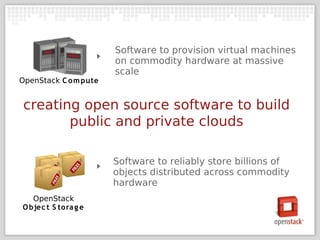
creating open source software to build
       public and private clouds
Software to provision virtual machines
                       on commodity hardware at massive
                       scale
OpenStack C o m pute


 creating open source software to build
        public and private clouds

                       Software to reliably store billions of
                       objects distributed across commodity
                       hardware
   OpenStack
O bjec t S to ra g e
OpenStack Mission


 ‣   “To produce the ubiquito us open source
     cloud computing platform that will meet
       the needs of public and private cloud
       providers regardless of size, by being
      s im ple to im plem ent and m a s s ively
                     s c a la ble.”
Why is OpenStack important?
OpenStack Founding Principles

‣   Apache 2.0 license, no paid ‘enterprise’ version
‣   Open design process, 2x year public Design
    Summits
‣   Publicly available source code repository
‣   All community processes documented and
    transparent
‣   Commitment to drive and adopt open standards
‣   Modular design for deployment flexibility via
    APIs
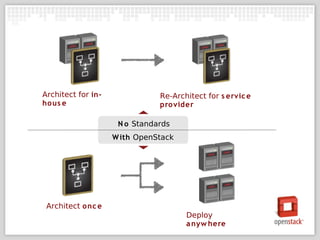
Architect for in-              Re-Architect for s ervic e
ho us e                        pro vider

                     N o Standards
                    W ith OpenStack


 Architect onc e
                                      Deploy
                                      a nyw here
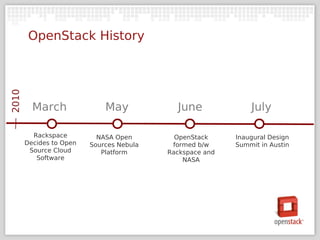
OpenStack History
2010


         March               May            June              July

         Rackspace         NASA Open        OpenStack     Inaugural Design
       Decides to Open   Sources Nebula    formed b/w     Summit in Austin
        Source Cloud        Platform      Rackspace and
          Software                            NASA
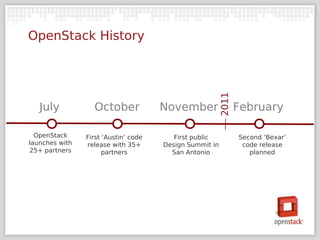
OpenStack History


                                                         2011
   July           October             November                  February

  OpenStack     First ‘Austin’ code      First public           Second ‘Bexar’
launches with   release with 35+      Design Summit in           code release
25+ partners          partners          San Antonio                planned
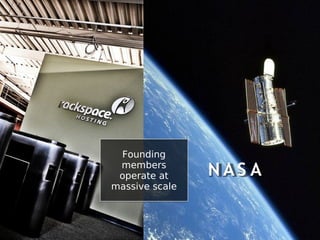
Founding
 members
 operate at     NAS A
massive scale
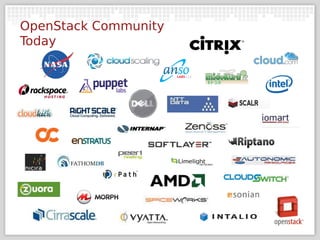
OpenStack Community
Today
HOW TO: Turn Racks of
Commodity Hardware
  Into a Cloud with
     OpenStack
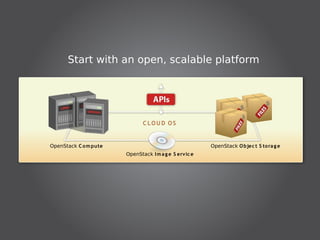
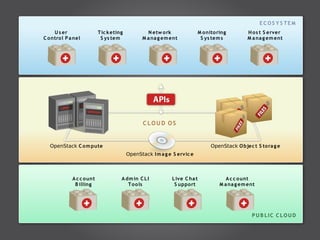
Start with an open, scalable platform


                              C LOU D OS


OpenStack C o m pute                                   OpenStack O bjec t S tora g e
                       OpenStack I m a g e S ervic e
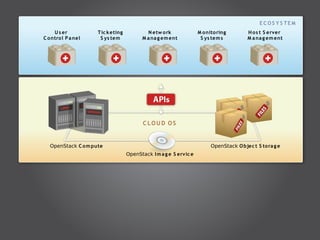
E C OS Y S TE M
     U s er          T ic k eting           N etw o rk              M onito ring        H o s t S erver
C o ntro l P a nel    S ys tem            M a na g em ent            S ys tem s         M a na g em ent


                                           C LOU D OS


   OpenStack C o m pute                                                  OpenStack O bjec t S tora g e
                                    OpenStack I m a g e S ervic e
E C OS Y S TE M
     U s er                 T ic k eting           N etw o rk              M onito ring        H o s t S erver
C o ntro l P a nel           S ys tem            M a na g em ent            S ys tem s         M a na g em ent


                                                  C LOU D OS


   OpenStack C o m pute                                                         OpenStack O bjec t S tora g e
                                           OpenStack I m a g e S ervic e


              A c c o unt              A dm in C L I          L ive C ha t             A c c o unt
               B illing                   T o o ls             S uppo rt            M a na g em ent


                                                                                                 P U B LIC C LOU D
E C OS Y S TE M
     U s er             T ic k eting           N etw o rk              M onito ring          H o s t S erver
C o ntro l P a nel       S ys tem            M a na g em ent            S ys tem s           M a na g em ent


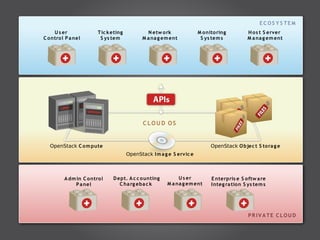
                                              C LOU D OS


   OpenStack C o m pute                                                     OpenStack O bjec t S tora g e
                                       OpenStack I m a g e S ervic e


          A dm in C o ntrol    D ept. A c c o unting         U s er         E nterpris e S oftw a re
              P a nel             C ha rg eba c k       M a na g em ent     I nteg ra tio n S ys tem s


                                                                                             PR IV A TE C LOU D
OpenStack Compute Details
Software to provision virtual machines on commodity hardware at
massive scale.
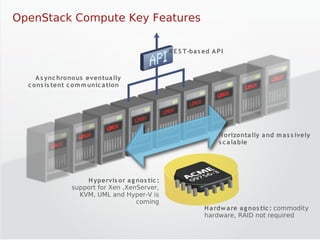
OpenStack Compute Key Features

                                                  R E S T -ba s ed A P I


     A s ync hronous eventua lly
  c ons is tent c om m unic a tion 


                                                                      H orizonta lly a nd m a s s ively
                                                                      s c a la ble


                     H ypervis or a g nos tic :
                 support for Xen ,XenServer,
                   KVM, UML and Hyper-V is
                                      coming
                                                                H a rdw a re a g nos tic : commodity
                                                                hardware, RAID not required
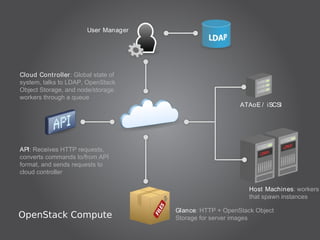
User Manager


Cloud Cont roller: Global state of
system, talks to LDAP, OpenStack
Object Storage, and node/storage
workers through a queue
                                                          ATAoE / iSCSI


API: Receives HTTP requests,
converts commands to/from API
format, and sends requests to
cloud controller

                                                             Host Machines: workers
                                                             that spawn instances

                                      Glance: HTTP + OpenStack Object
OpenStack Compute                     Storage for server images
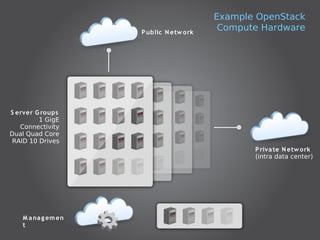
Example OpenStack
                    P ublic N etw ork
                                         Compute Hardware


S erver G roups
         1 GigE
   Connectivity
Dual Quad Core
 RAID 10 Drives
                                               P riva te N etw ork
                                               (intra data center)


   M a na g em en
   t
OpenStack Object Storage
Details store billions of objects distributed across commodity
Software to reliably
hardware
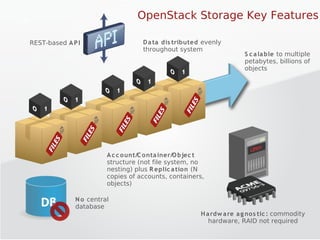
OpenStack Storage Key Features

REST-based A P I                   D a ta dis tributed evenly
                                   throughout system
                                                                     S c a la ble to multiple
                                                                     petabytes, billions of
                                                                     objects


                        A c c o unt/C onta iner/O bjec t
                        structure (not file system, no
                        nesting) plus R eplic a tion (N
                        copies of accounts, containers,
                        objects) 

              N o central
              database
                                                      H a rdw a re a g nos tic : commodity
                                                         hardware, RAID not required
System Components
‣   T he R ing : Mapping of names to entities (accounts,
    containers, objects) on disk.
    ‣   Stores data based on zones, devices, partitions, and replicas
    ‣   Weights can be used to balance the distribution of partitions
    ‣   Used by the Proxy Server for many background processes

‣   P rox y S erver: Request routing, exposes the public API
‣   O bjec t S erver: Blob storage server, uses xattrs, uses
    binary format
    ‣   Recommended to run on XFS
    ‣   Object location based on path from name hash & timestamp
System Components (Cont.)
‱   C onta iner S erver: Handles listing of objects,
    stores as SQLite DB
‱   A c c ount S erver: Handles listing of containers,
    stores as SQLite DB
‱   R eplic a tion: Keep the system consistent, handle
    failures
‱   U pda ters : Process failed or queued updates
‣   A udito rs : Verify integrity of objects, containers,
    and accounts
Software Dependencies
Object Storage (Swift) development currently targets Ubuntu
Server 10.04, but should work on most Linux platforms with
the following software:
‣ Python 2.6

‣ rsync 3.0


 And the following python libraries:
 ‣ Eventlet 0.9.8

 ‣ WebOb 0.9.8

 ‣ Setuptools

 ‣ Simplejson

 ‣ Xattr

 ‣ Nose

 ‣ Sphinx
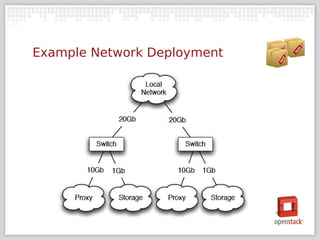
Example Network Deployment
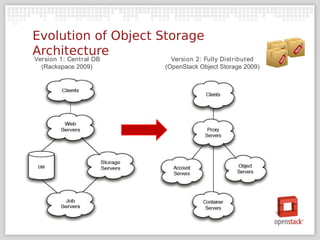
Evolution of Object Storage
Architecture
Version 1: Cent ral DB     Version 2: Fully Dist ribut ed
  (Rackspace 2009)       (OpenStack Object Storage 2009)
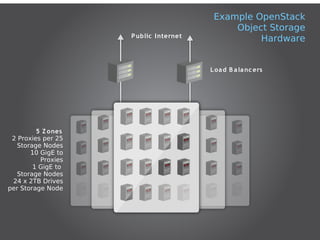
Example OpenStack
                                             Object Storage
                    P ublic I nternet
                                                  Hardware


                                        L oa d B a la nc ers


         5 Z ones
 2 Proxies per 25
   Storage Nodes
       10 GigE to
          Proxies
        1 GigE to
   Storage Nodes
 24 x 2TB Drives
per Storage Node
Planning an OpenStack
Deployment
Requirements & Technology
Choices
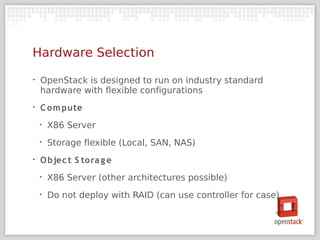
Hardware Selection
‣   OpenStack is designed to run on industry standard
    hardware with flexible configurations
‣   C om pute
    ‣   X86 Server
    ‣   Storage flexible (Local, SAN, NAS)
‣   O bjec t S tora g e
    ‣   X86 Server (other architectures possible)
    ‣   Do not deploy with RAID (can use controller for case)
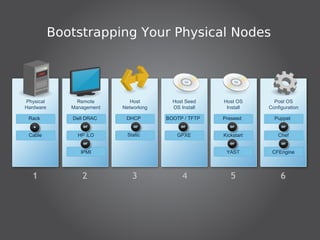
Bootstrapping Your Physical Nodes


Physical        Remote        Host        Host Seed    Host OS       Post OS
Hardware      Management   Networking     OS Install    Install    Configuration

 Rack         Dell DRAC     DHCP        BOOTP / TFTP   Preseed       Puppet


 Cable          HP iLO       Static        GPXE        Kickstart       Chef


                 IPMI                                   YAST        CFEngine


  1              2             3              4           5             6
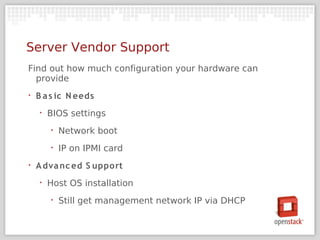
Server Vendor Support
Find out how much configuration your hardware can
  provide
‣   B a s ic N eeds
    ‣   BIOS settings
        ‣   Network boot
        ‣   IP on IPMI card
‣   A dva nc ed S upport
    ‣   Host OS installation
        ‣   Still get management network IP via DHCP
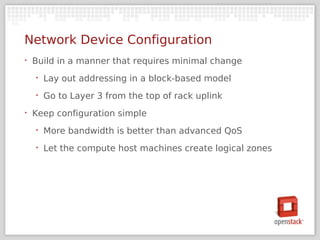
Network Device Configuration
‣   Build in a manner that requires minimal change
    ‣   Lay out addressing in a block-based model
    ‣   Go to Layer 3 from the top of rack uplink
‣   Keep configuration simple
    ‣   More bandwidth is better than advanced QoS
    ‣   Let the compute host machines create logical zones
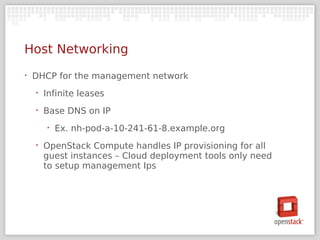
Host Networking
‣   DHCP for the management network
    ‣   Infinite leases
    ‣   Base DNS on IP
        ‣   Ex. nh-pod-a-10-241-61-8.example.org
    ‣   OpenStack Compute handles IP provisioning for all
        guest instances – Cloud deployment tools only need
        to setup management Ips
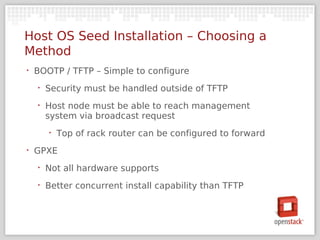
Host OS Seed Installation – Choosing a
Method
‣   BOOTP / TFTP – Simple to configure
    ‣   Security must be handled outside of TFTP
    ‣   Host node must be able to reach management
        system via broadcast request
        ‣   Top of rack router can be configured to forward
‣   GPXE
    ‣   Not all hardware supports
    ‣   Better concurrent install capability than TFTP
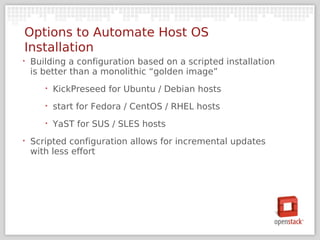
Options to Automate Host OS
Installation
‣   Building a configuration based on a scripted installation
    is better than a monolithic “golden image”
       ‣   KickPreseed for Ubuntu / Debian hosts
       ‣   start for Fedora / CentOS / RHEL hosts
       ‣   YaST for SUS / SLES hosts
‣   Scripted configuration allows for incremental updates
    with less effort
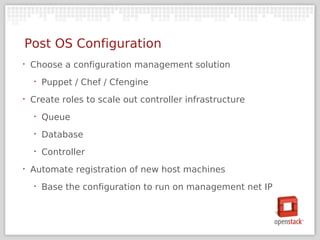
Post OS Configuration
‣   Choose a configuration management solution
    ‣   Puppet / Chef / Cfengine
‣   Create roles to scale out controller infrastructure
    ‣   Queue
    ‣   Database
    ‣   Controller
‣   Automate registration of new host machines
    ‣   Base the configuration to run on management net IP
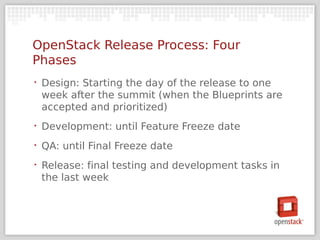
OpenStack Release Process: Four
Phases
‣   Design: Starting the day of the release to one
    week after the summit (when the Blueprints are
    accepted and prioritized)
‣   Development: until Feature Freeze date
‣   QA: until Final Freeze date
‣   Release: final testing and development tasks in
    the last week
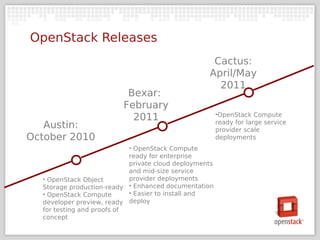
OpenStack Releases
                                                    Cactus:
                                                   April/May
                                                     2011
                           Bexar:
                          February
                                                        ‱OpenStack Compute
                            2011                        ready for large service
   Austin:                                              provider scale
October 2010                                            deployments
                            ‱ OpenStack Compute
                            ready for enterprise
                            private cloud deployments
                            and mid-size service
  ‱ OpenStack Object        provider deployments
  Storage production-ready ‱ Enhanced documentation
  ‱ OpenStack Compute       ‱ Easier to install and
  developer preview, ready deploy
  for testing and proofs of
  concept
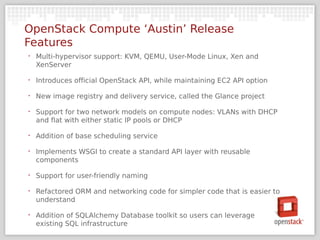
OpenStack Compute ‘Austin’ Release
Features
‣   Multi-hypervisor support: KVM, QEMU, User-Mode Linux, Xen and
    XenServer

‣   Introduces official OpenStack API, while maintaining EC2 API option

‣   New image registry and delivery service, called the Glance project

‣   Support for two network models on compute nodes: VLANs with DHCP
    and flat with either static IP pools or DHCP

‣   Addition of base scheduling service

‣   Implements WSGI to create a standard API layer with reusable
    components

‣   Support for user-friendly naming

‣   Refactored ORM and networking code for simpler code that is easier to
    understand

‣   Addition of SQLAlchemy Database toolkit so users can leverage
    existing SQL infrastructure
Object Storage ‘Austin’ Release
Features
‣   Addition of a stats system that produces per-account
    hourly summaries of system usage
‣   Ability for users to set ACL’s and grant public access to
    containers
‣   Support for API access to account and container
    metadata
‣   Rate limiting was extended to allow requests to be
    slowed down and support stair stepped rate limits
    based on container size
‣   WSGI support was improved and pulled into middleware
Join Us
‣   General Information: http://openstack.org

‣   Developers & Testers

    ‣   http://launchpad.net/openstack

    ‣   http://wiki.openstack.org

‣   Writers: http://wiki.openstack.org/Documentation

‣   Blog: http://openstack.org/blog

‣   Twitter: http://twitter.com/openstack

‣
    Jobs: http://openstack.org/jobs
Open Stack OW2 Conference Nov10

Open Stack OW2 Conference Nov10

  • 1.
    OpenStack Open source softwareto build public and private clouds.
  • 3.
  • 4.
  • 5.
  • 6.
  • 7.
    Communit y + Technolog y
  • 8.
    creating open sourcesoftware to build public and private clouds
  • 9.
    Software to provisionvirtual machines on commodity hardware at massive scale OpenStack C o m pute creating open source software to build public and private clouds Software to reliably store billions of objects distributed across commodity hardware OpenStack O bjec t S to ra g e
  • 10.
    OpenStack Mission ‣ “To produce the ubiquito us open source cloud computing platform that will meet the needs of public and private cloud providers regardless of size, by being s im ple to im plem ent and m a s s ively s c a la ble.”
  • 11.
    Why is OpenStackimportant?
  • 12.
    OpenStack Founding Principles ‣ Apache 2.0 license, no paid ‘enterprise’ version ‣ Open design process, 2x year public Design Summits ‣ Publicly available source code repository ‣ All community processes documented and transparent ‣ Commitment to drive and adopt open standards ‣ Modular design for deployment flexibility via APIs
  • 13.
    Architect for in- Re-Architect for s ervic e ho us e pro vider N o Standards W ith OpenStack Architect onc e Deploy a nyw here
  • 14.
    OpenStack History 2010 March May June July Rackspace NASA Open OpenStack Inaugural Design Decides to Open Sources Nebula formed b/w Summit in Austin Source Cloud Platform Rackspace and Software NASA
  • 15.
    OpenStack History 2011 July October November February OpenStack First ‘Austin’ code First public Second ‘Bexar’ launches with release with 35+ Design Summit in code release 25+ partners partners San Antonio planned
  • 16.
    Founding members operateat NAS A massive scale
  • 17.
  • 18.
    HOW TO: TurnRacks of Commodity Hardware Into a Cloud with OpenStack
  • 19.
    Start with anopen, scalable platform C LOU D OS OpenStack C o m pute OpenStack O bjec t S tora g e OpenStack I m a g e S ervic e
  • 20.
    E C OSY S TE M U s er T ic k eting N etw o rk M onito ring H o s t S erver C o ntro l P a nel S ys tem M a na g em ent S ys tem s M a na g em ent C LOU D OS OpenStack C o m pute OpenStack O bjec t S tora g e OpenStack I m a g e S ervic e
  • 21.
    E C OSY S TE M U s er T ic k eting N etw o rk M onito ring H o s t S erver C o ntro l P a nel S ys tem M a na g em ent S ys tem s M a na g em ent C LOU D OS OpenStack C o m pute OpenStack O bjec t S tora g e OpenStack I m a g e S ervic e A c c o unt A dm in C L I L ive C ha t A c c o unt B illing T o o ls S uppo rt M a na g em ent P U B LIC C LOU D
  • 22.
    E C OSY S TE M U s er T ic k eting N etw o rk M onito ring H o s t S erver C o ntro l P a nel S ys tem M a na g em ent S ys tem s M a na g em ent C LOU D OS OpenStack C o m pute OpenStack O bjec t S tora g e OpenStack I m a g e S ervic e A dm in C o ntrol D ept. A c c o unting U s er E nterpris e S oftw a re P a nel C ha rg eba c k M a na g em ent I nteg ra tio n S ys tem s PR IV A TE C LOU D
  • 23.
    OpenStack Compute Details Softwareto provision virtual machines on commodity hardware at massive scale.
  • 24.
    OpenStack Compute KeyFeatures R E S T -ba s ed A P I A s ync hronous eventua lly c ons is tent c om m unic a tion  H orizonta lly a nd m a s s ively s c a la ble H ypervis or a g nos tic : support for Xen ,XenServer, KVM, UML and Hyper-V is coming H a rdw a re a g nos tic : commodity hardware, RAID not required
  • 25.
    User Manager Cloud Controller: Global state of system, talks to LDAP, OpenStack Object Storage, and node/storage workers through a queue ATAoE / iSCSI API: Receives HTTP requests, converts commands to/from API format, and sends requests to cloud controller Host Machines: workers that spawn instances Glance: HTTP + OpenStack Object OpenStack Compute Storage for server images
  • 26.
    Example OpenStack P ublic N etw ork Compute Hardware S erver G roups 1 GigE Connectivity Dual Quad Core RAID 10 Drives P riva te N etw ork (intra data center) M a na g em en t
  • 27.
    OpenStack Object Storage Detailsstore billions of objects distributed across commodity Software to reliably hardware
  • 28.
    OpenStack Storage KeyFeatures REST-based A P I D a ta dis tributed evenly throughout system S c a la ble to multiple petabytes, billions of objects A c c o unt/C onta iner/O bjec t structure (not file system, no nesting) plus R eplic a tion (N copies of accounts, containers, objects)  N o central database H a rdw a re a g nos tic : commodity hardware, RAID not required
  • 29.
    System Components ‣ T he R ing : Mapping of names to entities (accounts, containers, objects) on disk. ‣ Stores data based on zones, devices, partitions, and replicas ‣ Weights can be used to balance the distribution of partitions ‣ Used by the Proxy Server for many background processes ‣ P rox y S erver: Request routing, exposes the public API ‣ O bjec t S erver: Blob storage server, uses xattrs, uses binary format ‣ Recommended to run on XFS ‣ Object location based on path from name hash & timestamp
  • 30.
    System Components (Cont.) ‱ C onta iner S erver: Handles listing of objects, stores as SQLite DB ‱ A c c ount S erver: Handles listing of containers, stores as SQLite DB ‱ R eplic a tion: Keep the system consistent, handle failures ‱ U pda ters : Process failed or queued updates ‣ A udito rs : Verify integrity of objects, containers, and accounts
  • 31.
    Software Dependencies Object Storage(Swift) development currently targets Ubuntu Server 10.04, but should work on most Linux platforms with the following software: ‣ Python 2.6 ‣ rsync 3.0 And the following python libraries: ‣ Eventlet 0.9.8 ‣ WebOb 0.9.8 ‣ Setuptools ‣ Simplejson ‣ Xattr ‣ Nose ‣ Sphinx
  • 32.
  • 33.
    Evolution of ObjectStorage Architecture Version 1: Cent ral DB Version 2: Fully Dist ribut ed (Rackspace 2009) (OpenStack Object Storage 2009)
  • 34.
    Example OpenStack Object Storage P ublic I nternet Hardware L oa d B a la nc ers 5 Z ones 2 Proxies per 25 Storage Nodes 10 GigE to Proxies 1 GigE to Storage Nodes 24 x 2TB Drives per Storage Node
  • 35.
  • 36.
    Hardware Selection ‣ OpenStack is designed to run on industry standard hardware with flexible configurations ‣ C om pute ‣ X86 Server ‣ Storage flexible (Local, SAN, NAS) ‣ O bjec t S tora g e ‣ X86 Server (other architectures possible) ‣ Do not deploy with RAID (can use controller for case)
  • 37.
    Bootstrapping Your PhysicalNodes Physical Remote Host Host Seed Host OS Post OS Hardware Management Networking OS Install Install Configuration Rack Dell DRAC DHCP BOOTP / TFTP Preseed Puppet Cable HP iLO Static GPXE Kickstart Chef IPMI YAST CFEngine 1 2 3 4 5 6
  • 38.
    Server Vendor Support Findout how much configuration your hardware can provide ‣ B a s ic N eeds ‣ BIOS settings ‣ Network boot ‣ IP on IPMI card ‣ A dva nc ed S upport ‣ Host OS installation ‣ Still get management network IP via DHCP
  • 39.
    Network Device Configuration ‣ Build in a manner that requires minimal change ‣ Lay out addressing in a block-based model ‣ Go to Layer 3 from the top of rack uplink ‣ Keep configuration simple ‣ More bandwidth is better than advanced QoS ‣ Let the compute host machines create logical zones
  • 40.
    Host Networking ‣ DHCP for the management network ‣ Infinite leases ‣ Base DNS on IP ‣ Ex. nh-pod-a-10-241-61-8.example.org ‣ OpenStack Compute handles IP provisioning for all guest instances – Cloud deployment tools only need to setup management Ips
  • 41.
    Host OS SeedInstallation – Choosing a Method ‣ BOOTP / TFTP – Simple to configure ‣ Security must be handled outside of TFTP ‣ Host node must be able to reach management system via broadcast request ‣ Top of rack router can be configured to forward ‣ GPXE ‣ Not all hardware supports ‣ Better concurrent install capability than TFTP
  • 42.
    Options to AutomateHost OS Installation ‣ Building a configuration based on a scripted installation is better than a monolithic “golden image” ‣ KickPreseed for Ubuntu / Debian hosts ‣ start for Fedora / CentOS / RHEL hosts ‣ YaST for SUS / SLES hosts ‣ Scripted configuration allows for incremental updates with less effort
  • 43.
    Post OS Configuration ‣ Choose a configuration management solution ‣ Puppet / Chef / Cfengine ‣ Create roles to scale out controller infrastructure ‣ Queue ‣ Database ‣ Controller ‣ Automate registration of new host machines ‣ Base the configuration to run on management net IP
  • 44.
    OpenStack Release Process:Four Phases ‣ Design: Starting the day of the release to one week after the summit (when the Blueprints are accepted and prioritized) ‣ Development: until Feature Freeze date ‣ QA: until Final Freeze date ‣ Release: final testing and development tasks in the last week
  • 45.
    OpenStack Releases Cactus: April/May 2011 Bexar: February ‱OpenStack Compute 2011 ready for large service Austin: provider scale October 2010 deployments ‱ OpenStack Compute ready for enterprise private cloud deployments and mid-size service ‱ OpenStack Object provider deployments Storage production-ready ‱ Enhanced documentation ‱ OpenStack Compute ‱ Easier to install and developer preview, ready deploy for testing and proofs of concept
  • 46.
    OpenStack Compute ‘Austin’Release Features ‣ Multi-hypervisor support: KVM, QEMU, User-Mode Linux, Xen and XenServer ‣ Introduces official OpenStack API, while maintaining EC2 API option ‣ New image registry and delivery service, called the Glance project ‣ Support for two network models on compute nodes: VLANs with DHCP and flat with either static IP pools or DHCP ‣ Addition of base scheduling service ‣ Implements WSGI to create a standard API layer with reusable components ‣ Support for user-friendly naming ‣ Refactored ORM and networking code for simpler code that is easier to understand ‣ Addition of SQLAlchemy Database toolkit so users can leverage existing SQL infrastructure
  • 47.
    Object Storage ‘Austin’Release Features ‣ Addition of a stats system that produces per-account hourly summaries of system usage ‣ Ability for users to set ACL’s and grant public access to containers ‣ Support for API access to account and container metadata ‣ Rate limiting was extended to allow requests to be slowed down and support stair stepped rate limits based on container size ‣ WSGI support was improved and pulled into middleware
  • 48.
    Join Us ‣ General Information: http://openstack.org ‣ Developers & Testers ‣ http://launchpad.net/openstack ‣ http://wiki.openstack.org ‣ Writers: http://wiki.openstack.org/Documentation ‣ Blog: http://openstack.org/blog ‣ Twitter: http://twitter.com/openstack ‣ Jobs: http://openstack.org/jobs