Free Open Source Systems for the
Public Libraries
National Library of the Philippines
Ryan A. Terrenal
Outline
● What is Open Source?
● Products for your Library
What is OpenSource?
● Open source software is software that users have the ability to run,
distribute, study and modify for any purpose.
● Open source is a collaborative software-development method that harnesses
the power of peer review and transparency of process to develop code that
is freely accessible.
1
● Open source draws on an ecosystem of thousands of
developers and customers all over the world to drive
innovation.2
1,2
http://connect.educause.edu/display/47941
Sharing of ideas
"If you have an apple and I have an apple
and we exchange apples, then you and I
will still each have one apple. But if you
have an idea and I have an idea and we
exchange these ideas, then each of us will
have two ideas.”
Attributed to Bernard Shaw
Open Source Community
• Open source is about more than free software
• Community is crucial to the growth of open source
• Without shared knowledge and collaboration the project will not grow
• People who use open source can collaborate in many ways with the community
•Write code
•Write documentation
• Debug
• Educate others
Open Source Community
“Open source revealed a fundamental truth about humans
that had gone largely unnoticed until the connectively of the Internet
brought it into high relief: labor can often be organized more efficiently
in the context of a community than it can in the context of the
corporation. The best person to do a job is the one who most wants to
do that job; and the best people to evaluate their performance are their
friends and peers who, by the way, will enthusiastically pitch in to
improve the final product, simply for the sheer pleasure of helping one
another and creating something beautiful from which they all will
benefit.”
Howe, J. (2008). Crowdsourcing: Why the power of the crowd is driving
the future of business. New York: Crown Business. p.8
Who’s Using Open
Source?
•Government Agencies
•All Kinds of Businesses
•Schools (K-colleges)
•Web Developers
Why so Popular?
• Reliability through Peer Review
• Freedom to Innovate
•No Vendor Lock-in
• User-centric Development
• Zero License Fees
Why Should Libraries Care?
Open Source & Libraries
Libraries and Open Source Both...
• Believe that information should be freely accessible to
everyone
• Give away stuff
• Benefit from the generosity of others
• Are about communities
• Make the world a better place
Give me some
examples!!
Operating System
• Is and always will be free of charge
• Ubuntu / Fedora contains all the applications you'll ever need:
• word processing
• email applications
• web server software
• programming tools
• games
• Designed with security in mind
• Great for patron stations!!
Web Browser: Firefox
•Customizable with Plugins
•Offers more security that IE
•Phishing protection
•Built in pop up blocker
•Spyware protection
•Private Browsing
•Frequent updates
•Built in spell checking
•Built in RSS recognition
Download: http://www.mozilla.com/en-
US/firefox
Web Browser: Google Chrome
Google Chrome is a new open source browsing option
• Available for many operating systems
• More security than IE:
• Malware protection
• Spyware protection
• Anti-Phishing
• Private browsing
• Extend functionality with plugins
Download:
http://www.google.com/chrome/eula.html
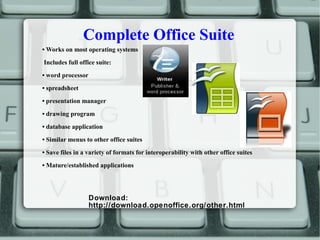
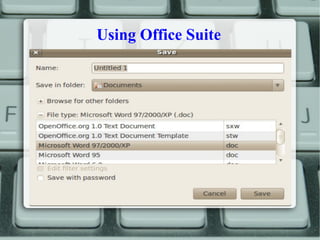
Complete Office Suite
• Works on most operating systems
Includes full office suite:
• word processor
• spreadsheet
• presentation manager
• drawing program
• database application
• Similar menus to other office suites
• Save files in a variety of formats for interoperability with other office suites
• Mature/established applications
Download:
http://download.openoffice.org/other.html
Using Office Suite
Web-Based ILS
• Fully web-based ILS
• Offers same features as the proprietary ILS
 Cataloging
 Circulation
 Patron Management
 Acquisitions
 Serials
• Software available for free
• Support available at reasonable prices
• Data is yours!
website: http://koha.org/
What will NLP ITD Offer?
● Technology Transfers
● Training for Librarian & Library Staff
● Training will be at Provincial or Regional Level
● Electronic Resources (Scanned books, downloaded electronic
materials from ebsco, gale, and emerald)
Thank You!
Ryan A. Terrenal
RTerrenal@nlp.gov.ph
RTerrenal822r@gmail.com
Information Technology Officer I
National Library of the Philippines
website: http://web.nlp.gov.ph
Attribution
Nicole C. Engard ByWater Solution
website: http://web.nlp.gov.ph

Open source systems

  • 1.
    Free Open SourceSystems for the Public Libraries National Library of the Philippines Ryan A. Terrenal
  • 2.
    Outline ● What isOpen Source? ● Products for your Library
  • 3.
    What is OpenSource? ●Open source software is software that users have the ability to run, distribute, study and modify for any purpose. ● Open source is a collaborative software-development method that harnesses the power of peer review and transparency of process to develop code that is freely accessible. 1 ● Open source draws on an ecosystem of thousands of developers and customers all over the world to drive innovation.2 1,2 http://connect.educause.edu/display/47941
  • 4.
    Sharing of ideas "Ifyou have an apple and I have an apple and we exchange apples, then you and I will still each have one apple. But if you have an idea and I have an idea and we exchange these ideas, then each of us will have two ideas.” Attributed to Bernard Shaw
  • 5.
    Open Source Community •Open source is about more than free software • Community is crucial to the growth of open source • Without shared knowledge and collaboration the project will not grow • People who use open source can collaborate in many ways with the community •Write code •Write documentation • Debug • Educate others
  • 6.
    Open Source Community “Opensource revealed a fundamental truth about humans that had gone largely unnoticed until the connectively of the Internet brought it into high relief: labor can often be organized more efficiently in the context of a community than it can in the context of the corporation. The best person to do a job is the one who most wants to do that job; and the best people to evaluate their performance are their friends and peers who, by the way, will enthusiastically pitch in to improve the final product, simply for the sheer pleasure of helping one another and creating something beautiful from which they all will benefit.” Howe, J. (2008). Crowdsourcing: Why the power of the crowd is driving the future of business. New York: Crown Business. p.8
  • 7.
    Who’s Using Open Source? •GovernmentAgencies •All Kinds of Businesses •Schools (K-colleges) •Web Developers
  • 8.
    Why so Popular? •Reliability through Peer Review • Freedom to Innovate •No Vendor Lock-in • User-centric Development • Zero License Fees
  • 9.
  • 10.
    Open Source &Libraries Libraries and Open Source Both... • Believe that information should be freely accessible to everyone • Give away stuff • Benefit from the generosity of others • Are about communities • Make the world a better place
  • 11.
  • 12.
    Operating System • Isand always will be free of charge • Ubuntu / Fedora contains all the applications you'll ever need: • word processing • email applications • web server software • programming tools • games • Designed with security in mind • Great for patron stations!!
  • 13.
    Web Browser: Firefox •Customizablewith Plugins •Offers more security that IE •Phishing protection •Built in pop up blocker •Spyware protection •Private Browsing •Frequent updates •Built in spell checking •Built in RSS recognition Download: http://www.mozilla.com/en- US/firefox
  • 14.
    Web Browser: GoogleChrome Google Chrome is a new open source browsing option • Available for many operating systems • More security than IE: • Malware protection • Spyware protection • Anti-Phishing • Private browsing • Extend functionality with plugins Download: http://www.google.com/chrome/eula.html
  • 15.
    Complete Office Suite •Works on most operating systems Includes full office suite: • word processor • spreadsheet • presentation manager • drawing program • database application • Similar menus to other office suites • Save files in a variety of formats for interoperability with other office suites • Mature/established applications Download: http://download.openoffice.org/other.html
  • 16.
  • 17.
    Web-Based ILS • Fullyweb-based ILS • Offers same features as the proprietary ILS  Cataloging  Circulation  Patron Management  Acquisitions  Serials • Software available for free • Support available at reasonable prices • Data is yours! website: http://koha.org/
  • 18.
    What will NLPITD Offer? ● Technology Transfers ● Training for Librarian & Library Staff ● Training will be at Provincial or Regional Level ● Electronic Resources (Scanned books, downloaded electronic materials from ebsco, gale, and emerald)
  • 19.
    Thank You! Ryan A.Terrenal RTerrenal@nlp.gov.ph RTerrenal822r@gmail.com Information Technology Officer I National Library of the Philippines website: http://web.nlp.gov.ph
  • 20.
    Attribution Nicole C. EngardByWater Solution website: http://web.nlp.gov.ph