Open source evaluation
a comprehensive guide to
knowing what you are using
Karan Marjara Viral Chhasatia
kmarjara@amazon.com viralhc@amazon.com
Amazon – Open Source Program Office
By the end of this session you’ll be able to:
• Know what to consider when selecting an Open Source
package
• Understand why evaluating OSS component is important
• Know current available open source solutions
2
Agenda
• Open Source Usage
• OSS Health – License
• OSS Health – Community
• OSS Health – Security
• OSS Health – Metrics and Tools
3
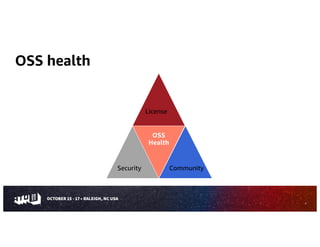
OSS health
OSS
Health
4
Community
Security
License
Open source usage
• Using OSS as a library or utility component (Direct)
• Using OSS as the main part of you application
• Create a service using an open source project
5
OSS Health – License
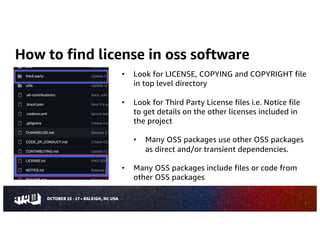
How to find license in oss software
7
• Look for LICENSE, COPYING and COPYRIGHT file
in top level directory
• Look for Third Party License files i.e. Notice file
to get details on the other licenses included in
the project
• Many OSS packages use other OSS packages
as direct and/or transient dependencies.
• Many OSS packages include files or code from
other OSS packages
Risks in license selection
• Internal use or distribution
• How do you plan to use?
• Are you using as a dependency or as a major
component or as a service?
• How are you linking?
• Are you modifying?
8
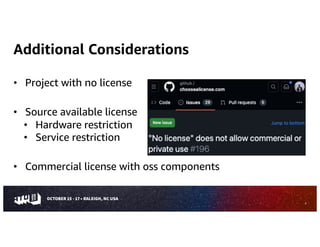
Additional Considerations
• Project with no license
• Source available license
• Hardware restriction
• Service restriction
• Commercial license with oss components
9
OSS Health – Security
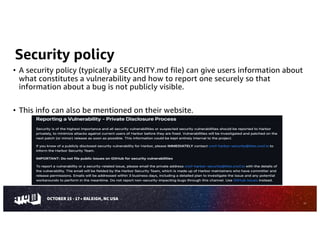
Security policy
• A security policy (typically a SECURITY.md file) can give users information about
what constitutes a vulnerability and how to report one securely so that
information about a bug is not publicly visible.
• This info can also be mentioned on their website.
11
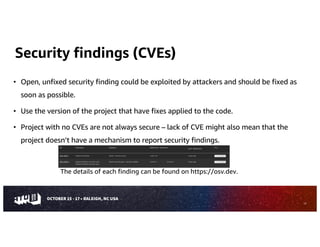
Security findings (CVEs)
• Open, unfixed security finding could be exploited by attackers and should be fixed as
soon as possible.
• Use the version of the project that have fixes applied to the code.
• Project with no CVEs are not always secure – lack of CVE might also mean that the
project doesn’t have a mechanism to report security findings.
The details of each finding can be found on https://osv.dev.
12
Dependency update tool & pinned dependencies
• Out-of-date dependencies make a project vulnerable to known flaws and prone
to attacks.
• Tools automate the process of updating dependencies by opening a pull request
to update them if found.
• Pinned dependencies reduce several security risks.
13
Branch protection, code-review & signed releases
14
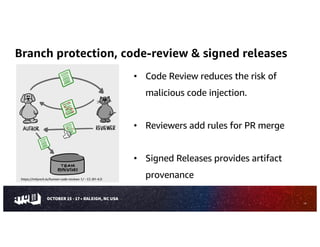
• Code Review reduces the risk of
malicious code injection.
• Reviewers add rules for PR merge
• Signed Releases provides artifact
provenance
https://mtlynch.io/human-code-reviews-1/ - CC-BY-4.0
Binary artifacts in the source repo
• Including generated executables in the source repository
increases user risk.
• Users will often directly use executables if they are included
in the source repository, leading to many dangerous
behaviors.
• Binary artifacts can’t be reviewed – over time the included
executables might not correspond to the source code.
15
OSS Health – Community
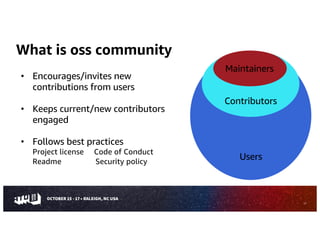
What is oss community
• Encourages/invites new
contributions from users
• Keeps current/new contributors
engaged
• Follows best practices
Project license Code of Conduct
Readme Security policy
17
Maintainers
Users
Contributors
18
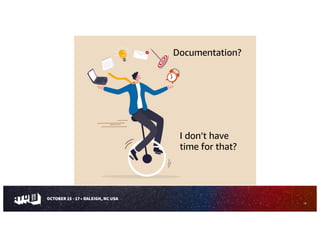
I don’t have
time for that?
Documentation?
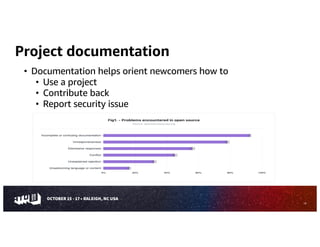
Project documentation
19
• Documentation helps orient newcomers how to
• Use a project
• Contribute back
• Report security issue
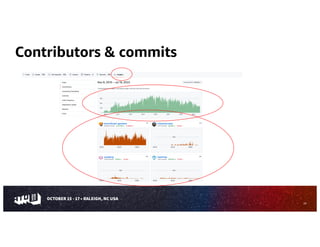
Contributors & commits
20
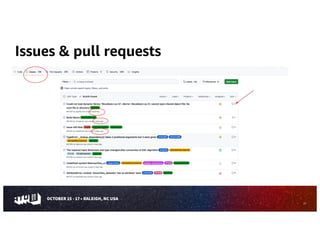
Issues & pull requests
21
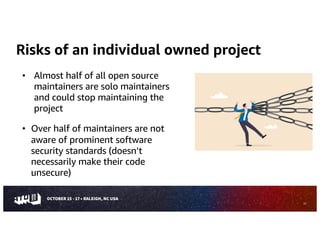
Risks of an individual owned project
• Almost half of all open source
maintainers are solo maintainers
and could stop maintaining the
project
• Over half of maintainers are not
aware of prominent software
security standards (doesn’t
necessarily make their code
unsecure)
22
Risks of a single vendor maintained project
• A package maintained by a company has a high risk of not
being maintained as the vendor
• Could change license
• Could add commercial obligations
• Choose to not to accept improvements
23
OSS Health – Resources
CHAOSS
25
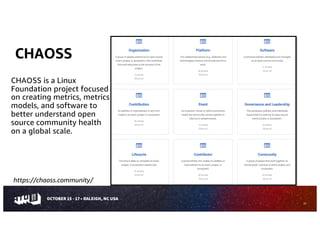
CHAOSS is a Linux
Foundation project focused
on creating metrics, metrics
models, and software to
better understand open
source community health
on a global scale.
https://chaoss.community/
Tools provided by CHAOSS
• CHAOSS software applies metrics and models to collect and
visualize open source community health.
• These tools collect data automatically related with contributing
to OSS development.
Grimoirelab Augur
26
OpenSSF scorecard
• Automated tool that assesses multiple risks associated with the project.
• Run “checks” and provide a score of 0-10
• Scorecard can be used for your Open source project and/or evaluating the
overall health of the Open source project.
• Project Goals
• Automate analysis and trust decisions on the security posture of open
source projects.
• Use this data to proactively improve the security posture of the critical
projects the world depends on.
27
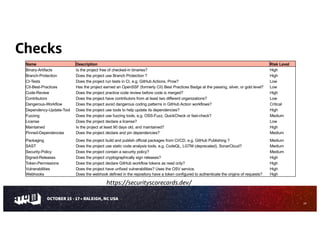
Checks
28
Name Description Risk Level
Binary-Artifacts Is the project free of checked-in binaries? High
Branch-Protection Does the project use Branch Protection ? High
CI-Tests Does the project run tests in CI, e.g. GitHub Actions, Prow? Low
CII-Best-Practices Has the project earned an OpenSSF (formerly CII) Best Practices Badge at the passing, silver, or gold level? Low
Code-Review Does the project practice code review before code is merged? High
Contributors Does the project have contributors from at least two different organizations? Low
Dangerous-Workflow Does the project avoid dangerous coding patterns in GitHub Action workflows? Critical
Dependency-Update-Tool Does the project use tools to help update its dependencies? High
Fuzzing Does the project use fuzzing tools, e.g. OSS-Fuzz, QuickCheck or fast-check? Medium
License Does the project declare a license? Low
Maintained Is the project at least 90 days old, and maintained? High
Pinned-Dependencies Does the project declare and pin dependencies? Medium
Packaging Does the project build and publish official packages from CI/CD, e.g. GitHub Publishing ? Medium
SAST Does the project use static code analysis tools, e.g. CodeQL, LGTM (deprecated), SonarCloud? Medium
Security-Policy Does the project contain a security policy? Medium
Signed-Releases Does the project cryptographically sign releases? High
Token-Permissions Does the project declare GitHub workflow tokens as read only? High
Vulnerabilities Does the project have unfixed vulnerabilities? Uses the OSV service. High
Webhooks Does the webhook defined in the repository have a token configured to authenticate the origins of requests? High
https://securityscorecards.dev/
Conclusion
• Evaluating OSS health (License – Security – Community) for your oss
components is important before using.
• Choose metrics that are important to your use case.
• Use CHAOSS and/or OpenSSF Scorecard tools to evaluate your oss component
29
Questions?
kmarjara@amazon.com viralhc@amazon.com
Thank You

Open Source evaluation: A comprehensive guide on what you are using

  • 1.
    Open source evaluation acomprehensive guide to knowing what you are using Karan Marjara Viral Chhasatia kmarjara@amazon.com viralhc@amazon.com Amazon – Open Source Program Office
  • 2.
    By the endof this session you’ll be able to: • Know what to consider when selecting an Open Source package • Understand why evaluating OSS component is important • Know current available open source solutions 2
  • 3.
    Agenda • Open SourceUsage • OSS Health – License • OSS Health – Community • OSS Health – Security • OSS Health – Metrics and Tools 3
  • 4.
  • 5.
    Open source usage •Using OSS as a library or utility component (Direct) • Using OSS as the main part of you application • Create a service using an open source project 5
  • 6.
  • 7.
    How to findlicense in oss software 7 • Look for LICENSE, COPYING and COPYRIGHT file in top level directory • Look for Third Party License files i.e. Notice file to get details on the other licenses included in the project • Many OSS packages use other OSS packages as direct and/or transient dependencies. • Many OSS packages include files or code from other OSS packages
  • 8.
    Risks in licenseselection • Internal use or distribution • How do you plan to use? • Are you using as a dependency or as a major component or as a service? • How are you linking? • Are you modifying? 8
  • 9.
    Additional Considerations • Projectwith no license • Source available license • Hardware restriction • Service restriction • Commercial license with oss components 9
  • 10.
  • 11.
    Security policy • Asecurity policy (typically a SECURITY.md file) can give users information about what constitutes a vulnerability and how to report one securely so that information about a bug is not publicly visible. • This info can also be mentioned on their website. 11
  • 12.
    Security findings (CVEs) •Open, unfixed security finding could be exploited by attackers and should be fixed as soon as possible. • Use the version of the project that have fixes applied to the code. • Project with no CVEs are not always secure – lack of CVE might also mean that the project doesn’t have a mechanism to report security findings. The details of each finding can be found on https://osv.dev. 12
  • 13.
    Dependency update tool& pinned dependencies • Out-of-date dependencies make a project vulnerable to known flaws and prone to attacks. • Tools automate the process of updating dependencies by opening a pull request to update them if found. • Pinned dependencies reduce several security risks. 13
  • 14.
    Branch protection, code-review& signed releases 14 • Code Review reduces the risk of malicious code injection. • Reviewers add rules for PR merge • Signed Releases provides artifact provenance https://mtlynch.io/human-code-reviews-1/ - CC-BY-4.0
  • 15.
    Binary artifacts inthe source repo • Including generated executables in the source repository increases user risk. • Users will often directly use executables if they are included in the source repository, leading to many dangerous behaviors. • Binary artifacts can’t be reviewed – over time the included executables might not correspond to the source code. 15
  • 16.
    OSS Health –Community
  • 17.
    What is osscommunity • Encourages/invites new contributions from users • Keeps current/new contributors engaged • Follows best practices Project license Code of Conduct Readme Security policy 17 Maintainers Users Contributors
  • 18.
    18 I don’t have timefor that? Documentation?
  • 19.
    Project documentation 19 • Documentationhelps orient newcomers how to • Use a project • Contribute back • Report security issue
  • 20.
  • 21.
    Issues & pullrequests 21
  • 22.
    Risks of anindividual owned project • Almost half of all open source maintainers are solo maintainers and could stop maintaining the project • Over half of maintainers are not aware of prominent software security standards (doesn’t necessarily make their code unsecure) 22
  • 23.
    Risks of asingle vendor maintained project • A package maintained by a company has a high risk of not being maintained as the vendor • Could change license • Could add commercial obligations • Choose to not to accept improvements 23
  • 24.
    OSS Health –Resources
  • 25.
    CHAOSS 25 CHAOSS is aLinux Foundation project focused on creating metrics, metrics models, and software to better understand open source community health on a global scale. https://chaoss.community/
  • 26.
    Tools provided byCHAOSS • CHAOSS software applies metrics and models to collect and visualize open source community health. • These tools collect data automatically related with contributing to OSS development. Grimoirelab Augur 26
  • 27.
    OpenSSF scorecard • Automatedtool that assesses multiple risks associated with the project. • Run “checks” and provide a score of 0-10 • Scorecard can be used for your Open source project and/or evaluating the overall health of the Open source project. • Project Goals • Automate analysis and trust decisions on the security posture of open source projects. • Use this data to proactively improve the security posture of the critical projects the world depends on. 27
  • 28.
    Checks 28 Name Description RiskLevel Binary-Artifacts Is the project free of checked-in binaries? High Branch-Protection Does the project use Branch Protection ? High CI-Tests Does the project run tests in CI, e.g. GitHub Actions, Prow? Low CII-Best-Practices Has the project earned an OpenSSF (formerly CII) Best Practices Badge at the passing, silver, or gold level? Low Code-Review Does the project practice code review before code is merged? High Contributors Does the project have contributors from at least two different organizations? Low Dangerous-Workflow Does the project avoid dangerous coding patterns in GitHub Action workflows? Critical Dependency-Update-Tool Does the project use tools to help update its dependencies? High Fuzzing Does the project use fuzzing tools, e.g. OSS-Fuzz, QuickCheck or fast-check? Medium License Does the project declare a license? Low Maintained Is the project at least 90 days old, and maintained? High Pinned-Dependencies Does the project declare and pin dependencies? Medium Packaging Does the project build and publish official packages from CI/CD, e.g. GitHub Publishing ? Medium SAST Does the project use static code analysis tools, e.g. CodeQL, LGTM (deprecated), SonarCloud? Medium Security-Policy Does the project contain a security policy? Medium Signed-Releases Does the project cryptographically sign releases? High Token-Permissions Does the project declare GitHub workflow tokens as read only? High Vulnerabilities Does the project have unfixed vulnerabilities? Uses the OSV service. High Webhooks Does the webhook defined in the repository have a token configured to authenticate the origins of requests? High https://securityscorecards.dev/
  • 29.
    Conclusion • Evaluating OSShealth (License – Security – Community) for your oss components is important before using. • Choose metrics that are important to your use case. • Use CHAOSS and/or OpenSSF Scorecard tools to evaluate your oss component 29
  • 30.
  • 31.