O = Open Source Edition
                                                                                                                                                                                                                  S = Network Standard Edition

                                                                             Zimbra Collaboration Suite 6.0 Feature List                                                                                       P = Network Professional Edition
                                                                                                                                                                                                                        (PS) = Priced Separately


Feature                                                                       Description                                                                                                            O S P
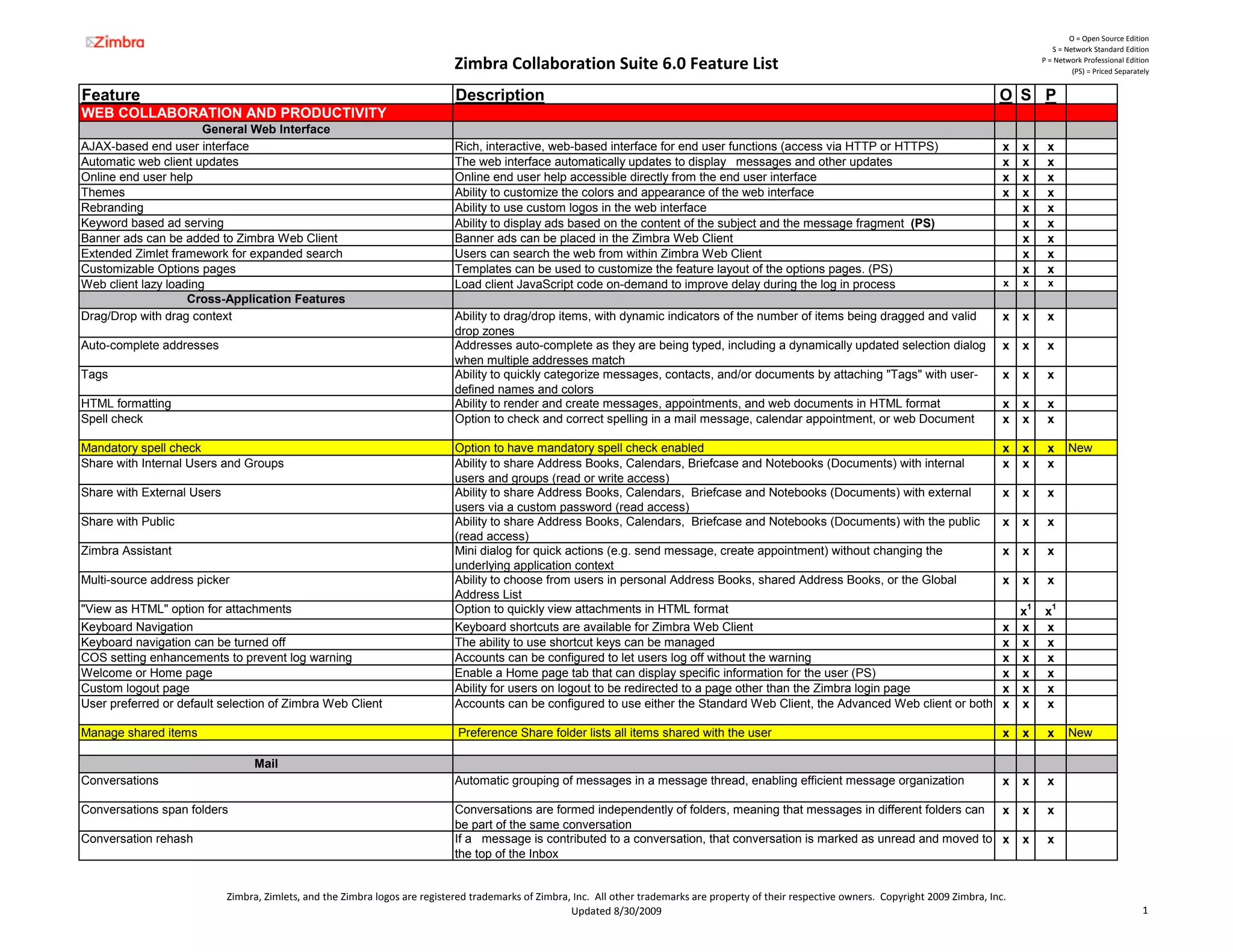
WEB COLLABORATION AND PRODUCTIVITY
                       General Web Interface
AJAX-based end user interface                                                 Rich, interactive, web-based interface for end user functions (access via HTTP or HTTPS)                                x   x     x
Automatic web client updates                                                  The web interface automatically updates to display messages and other updates                                           x   x     x
Online end user help                                                          Online end user help accessible directly from the end user interface                                                    x   x     x
Themes                                                                        Ability to customize the colors and appearance of the web interface                                                     x   x     x
Rebranding                                                                    Ability to use custom logos in the web interface                                                                            x     x
Keyword based ad serving                                                      Ability to display ads based on the content of the subject and the message fragment (PS)                                    x     x
Banner ads can be added to Zimbra Web Client                                  Banner ads can be placed in the Zimbra Web Client                                                                           x     x
Extended Zimlet framework for expanded search                                 Users can search the web from within Zimbra Web Client                                                                      x     x
Customizable Options pages                                                    Templates can be used to customize the feature layout of the options pages. (PS)                                            x     x
Web client lazy loading                                                       Load client JavaScript code on-demand to improve delay during the log in process                                        x   x     x
                    Cross-Application Features
Drag/Drop with drag context                                                   Ability to drag/drop items, with dynamic indicators of the number of items being dragged and valid                      x   x     x
                                                                              drop zones
Auto-complete addresses                                                       Addresses auto-complete as they are being typed, including a dynamically updated selection dialog                       x   x     x
                                                                              when multiple addresses match
Tags                                                                          Ability to quickly categorize messages, contacts, and/or documents by attaching "Tags" with user-                       x   x     x
                                                                              defined names and colors
HTML formatting                                                               Ability to render and create messages, appointments, and web documents in HTML format                                   x   x     x
Spell check                                                                   Option to check and correct spelling in a mail message, calendar appointment, or web Document                           x   x     x

Mandatory spell check                                                         Option to have mandatory spell check enabled                                                                            x   x     x      New
Share with Internal Users and Groups                                          Ability to share Address Books, Calendars, Briefcase and Notebooks (Documents) with internal                            x   x     x
                                                                              users and groups (read or write access)
Share with External Users                                                     Ability to share Address Books, Calendars, Briefcase and Notebooks (Documents) with external                            x   x     x
                                                                              users via a custom password (read access)
Share with Public                                                             Ability to share Address Books, Calendars, Briefcase and Notebooks (Documents) with the public                          x   x     x
                                                                              (read access)
Zimbra Assistant                                                              Mini dialog for quick actions (e.g. send message, create appointment) without changing the                              x   x     x
                                                                              underlying application context
Multi-source address picker                                                   Ability to choose from users in personal Address Books, shared Address Books, or the Global                             x   x     x
                                                                              Address List
"View as HTML" option for attachments                                         Option to quickly view attachments in HTML format                                                                           x1    x1
Keyboard Navigation                                                           Keyboard shortcuts are available for Zimbra Web Client                                                                  x   x     x
Keyboard navigation can be turned off                                         The ability to use shortcut keys can be managed                                                                         x   x     x
COS setting enhancements to prevent log warning                               Accounts can be configured to let users log off without the warning                                                     x   x     x
Welcome or Home page                                                          Enable a Home page tab that can display specific information for the user (PS)                                          x   x     x
Custom logout page                                                            Ability for users on logout to be redirected to a page other than the Zimbra login page                                 x   x     x
User preferred or default selection of Zimbra Web Client                      Accounts can be configured to use either the Standard Web Client, the Advanced Web client or both                       x   x     x

Manage shared items                                                           Preference Share folder lists all items shared with the user                                                            x   x     x      New

                                  Mail
Conversations                                                                 Automatic grouping of messages in a message thread, enabling efficient message organization                             x   x     x

Conversations span folders                                                    Conversations are formed independently of folders, meaning that messages in different folders can x                         x     x
                                                                              be part of the same conversation
Conversation rehash                                                           If a message is contributed to a conversation, that conversation is marked as unread and moved to x                         x     x
                                                                              the top of the Inbox


                            Zimbra, Zimlets, and the Zimbra logos are registered trademarks of Zimbra, Inc.  All other trademarks are property of their respective owners.  Copyright 2009 Zimbra, Inc.
                                                                                                      Updated 8/30/2009                                                                                                                      1
O = Open Source Edition
                                                                                                                                                                                                                S = Network Standard Edition

                                                                            Zimbra Collaboration Suite 6.0 Feature List                                                                                      P = Network Professional Edition
                                                                                                                                                                                                                      (PS) = Priced Separately


Feature                                                                      Description                                                                                                            O S P
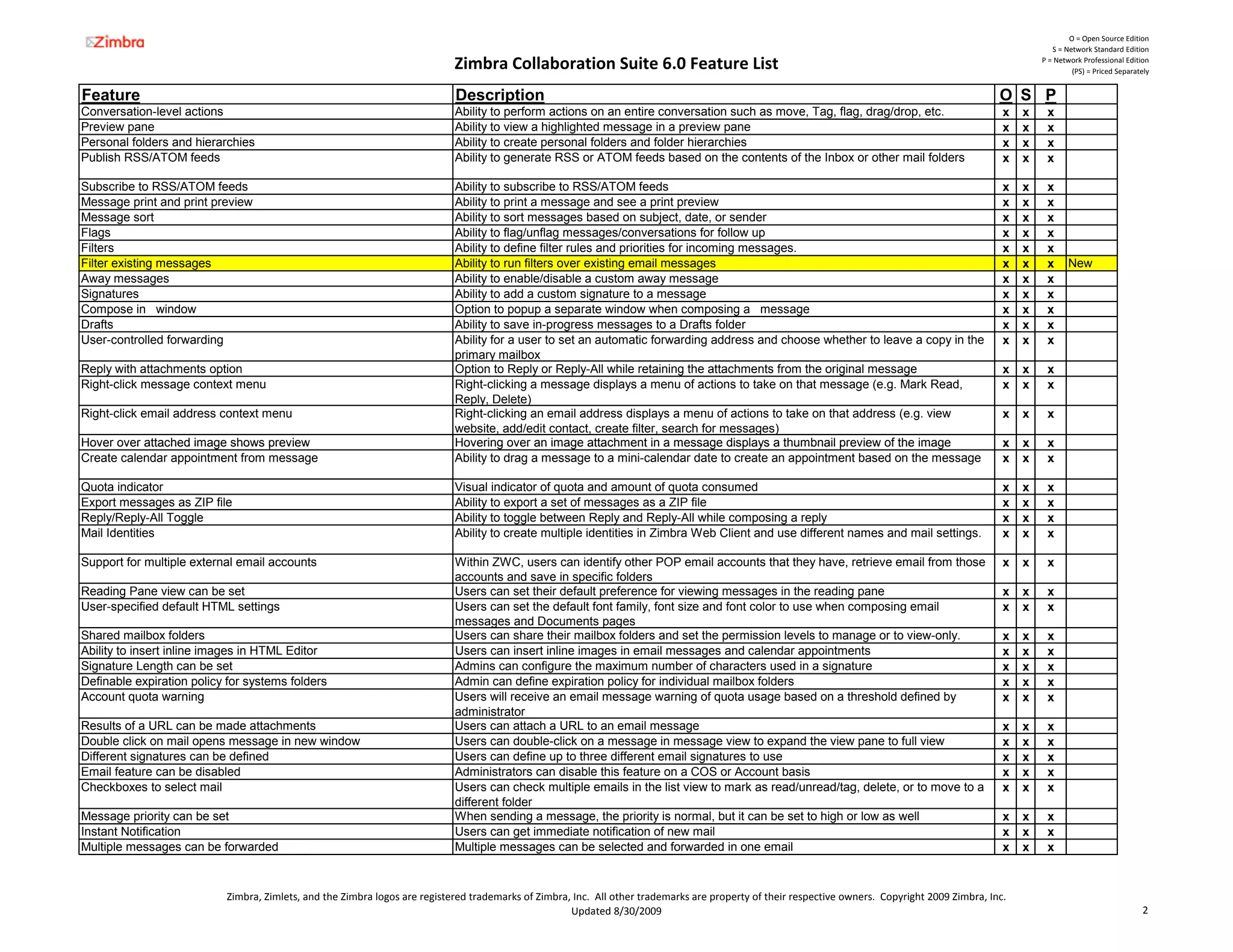
Conversation-level actions                                                   Ability to perform actions on an entire conversation such as move, Tag, flag, drag/drop, etc.                           x   x    x
Preview pane                                                                 Ability to view a highlighted message in a preview pane                                                                 x   x    x
Personal folders and hierarchies                                             Ability to create personal folders and folder hierarchies                                                               x   x    x
Publish RSS/ATOM feeds                                                       Ability to generate RSS or ATOM feeds based on the contents of the Inbox or other mail folders                          x   x    x

Subscribe to RSS/ATOM feeds                                                  Ability to subscribe to RSS/ATOM feeds                                                                                  x   x    x
Message print and print preview                                              Ability to print a message and see a print preview                                                                      x   x    x
Message sort                                                                 Ability to sort messages based on subject, date, or sender                                                              x   x    x
Flags                                                                        Ability to flag/unflag messages/conversations for follow up                                                             x   x    x
Filters                                                                      Ability to define filter rules and priorities for incoming messages.                                                    x   x    x
Filter existing messages                                                     Ability to run filters over existing email messages                                                                     x   x    x      New
Away messages                                                                Ability to enable/disable a custom away message                                                                         x   x    x
Signatures                                                                   Ability to add a custom signature to a message                                                                          x   x    x
Compose in window                                                            Option to popup a separate window when composing a message                                                              x   x    x
Drafts                                                                       Ability to save in-progress messages to a Drafts folder                                                                 x   x    x
User-controlled forwarding                                                   Ability for a user to set an automatic forwarding address and choose whether to leave a copy in the                     x   x    x
                                                                             primary mailbox
Reply with attachments option                                                Option to Reply or Reply-All while retaining the attachments from the original message                                  x   x    x
Right-click message context menu                                             Right-clicking a message displays a menu of actions to take on that message (e.g. Mark Read,                            x   x    x
                                                                             Reply, Delete)
Right-click email address context menu                                       Right-clicking an email address displays a menu of actions to take on that address (e.g. view                           x   x    x
                                                                             website, add/edit contact, create filter, search for messages)
Hover over attached image shows preview                                      Hovering over an image attachment in a message displays a thumbnail preview of the image                                x   x    x
Create calendar appointment from message                                     Ability to drag a message to a mini-calendar date to create an appointment based on the message                         x   x    x

Quota indicator                                                              Visual indicator of quota and amount of quota consumed                                                                  x   x    x
Export messages as ZIP file                                                  Ability to export a set of messages as a ZIP file                                                                       x   x    x
Reply/Reply-All Toggle                                                       Ability to toggle between Reply and Reply-All while composing a reply                                                   x   x    x
Mail Identities                                                              Ability to create multiple identities in Zimbra Web Client and use different names and mail settings.                   x   x    x

Support for multiple external email accounts                                 Within ZWC, users can identify other POP email accounts that they have, retrieve email from those                       x   x    x
                                                                             accounts and save in specific folders
Reading Pane view can be set                                                 Users can set their default preference for viewing messages in the reading pane                                         x   x    x
User-specified default HTML settings                                         Users can set the default font family, font size and font color to use when composing email                             x   x    x
                                                                             messages and Documents pages
Shared mailbox folders                                                       Users can share their mailbox folders and set the permission levels to manage or to view-only.                          x   x    x
Ability to insert inline images in HTML Editor                               Users can insert inline images in email messages and calendar appointments                                              x   x    x
Signature Length can be set                                                  Admins can configure the maximum number of characters used in a signature                                               x   x    x
Definable expiration policy for systems folders                              Admin can define expiration policy for individual mailbox folders                                                       x   x    x
Account quota warning                                                        Users will receive an email message warning of quota usage based on a threshold defined by                              x   x    x
                                                                             administrator
Results of a URL can be made attachments                                     Users can attach a URL to an email message                                                                              x   x    x
Double click on mail opens message in new window                             Users can double-click on a message in message view to expand the view pane to full view                                x   x    x
Different signatures can be defined                                          Users can define up to three different email signatures to use                                                          x   x    x
Email feature can be disabled                                                Administrators can disable this feature on a COS or Account basis                                                       x   x    x
Checkboxes to select mail                                                    Users can check multiple emails in the list view to mark as read/unread/tag, delete, or to move to a                    x   x    x
                                                                             different folder
Message priority can be set                                                  When sending a message, the priority is normal, but it can be set to high or low as well                                x   x    x
Instant Notification                                                         Users can get immediate notification of new mail                                                                        x   x    x
Multiple messages can be forwarded                                           Multiple messages can be selected and forwarded in one email                                                            x   x    x


                           Zimbra, Zimlets, and the Zimbra logos are registered trademarks of Zimbra, Inc.  All other trademarks are property of their respective owners.  Copyright 2009 Zimbra, Inc.
                                                                                                     Updated 8/30/2009                                                                                                                     2
O = Open Source Edition
                                                                                                                                                                                                                 S = Network Standard Edition

                                                                             Zimbra Collaboration Suite 6.0 Feature List                                                                                      P = Network Professional Edition
                                                                                                                                                                                                                       (PS) = Priced Separately


Feature                                                                       Description                                                                                                            O S P
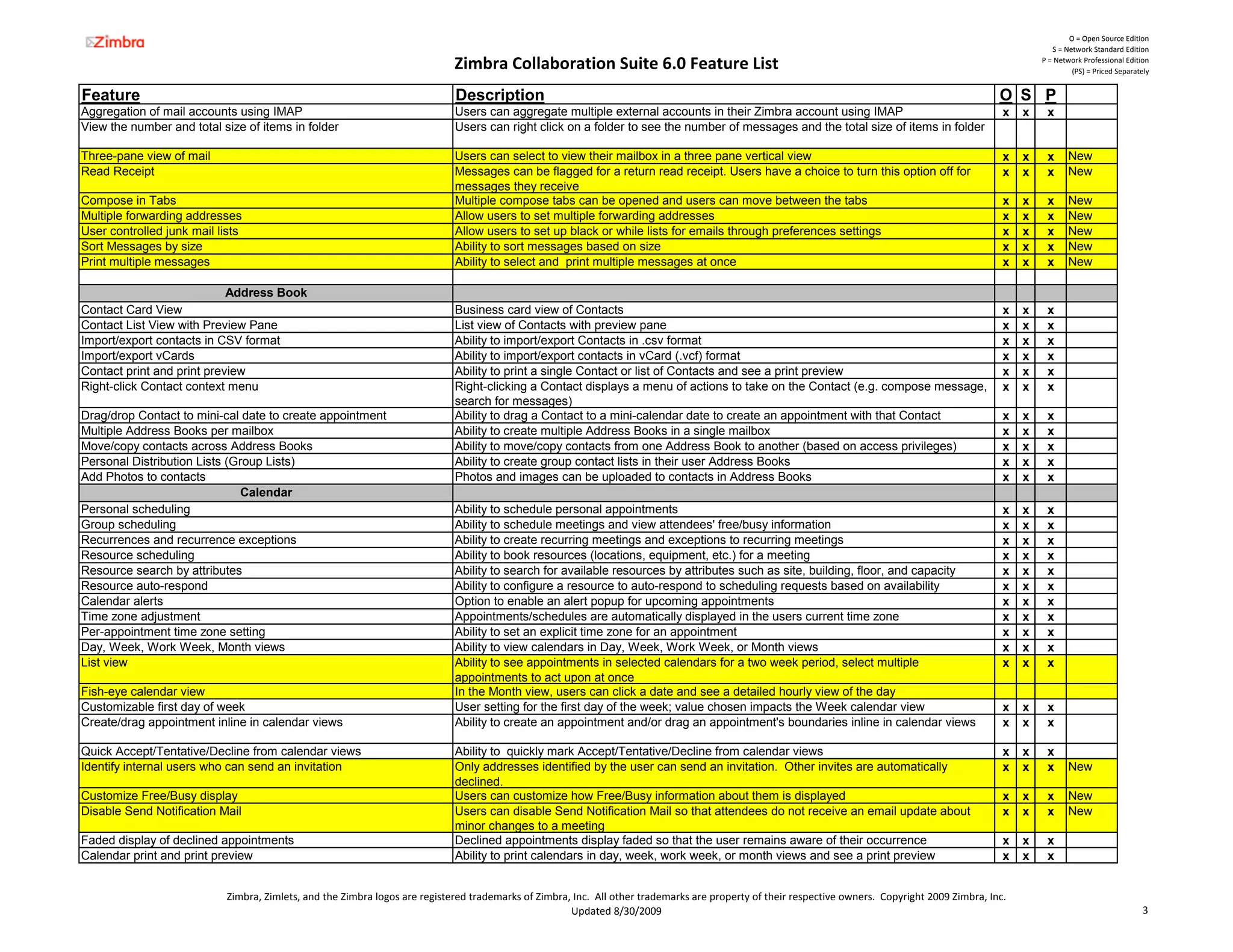
Aggregation of mail accounts using IMAP                                       Users can aggregate multiple external accounts in their Zimbra account using IMAP                                       x   x    x
View the number and total size of items in folder                             Users can right click on a folder to see the number of messages and the total size of items in folder

Three-pane view of mail                                                       Users can select to view their mailbox in a three pane vertical view                                                    x   x    x      New
Read Receipt                                                                  Messages can be flagged for a return read receipt. Users have a choice to turn this option off for                      x   x    x      New
                                                                              messages they receive
Compose in Tabs                                                               Multiple compose tabs can be opened and users can move between the tabs                                                 x   x    x      New
Multiple forwarding addresses                                                 Allow users to set multiple forwarding addresses                                                                        x   x    x      New
User controlled junk mail lists                                               Allow users to set up black or while lists for emails through preferences settings                                      x   x    x      New
Sort Messages by size                                                         Ability to sort messages based on size                                                                                  x   x    x      New
Print multiple messages                                                       Ability to select and print multiple messages at once                                                                   x   x    x      New

                            Address Book
Contact Card View                                                             Business card view of Contacts                                                                                          x   x    x
Contact List View with Preview Pane                                           List view of Contacts with preview pane                                                                                 x   x    x
Import/export contacts in CSV format                                          Ability to import/export Contacts in .csv format                                                                        x   x    x
Import/export vCards                                                          Ability to import/export contacts in vCard (.vcf) format                                                                x   x    x
Contact print and print preview                                               Ability to print a single Contact or list of Contacts and see a print preview                                           x   x    x
Right-click Contact context menu                                              Right-clicking a Contact displays a menu of actions to take on the Contact (e.g. compose message,                       x   x    x
                                                                              search for messages)
Drag/drop Contact to mini-cal date to create appointment                      Ability to drag a Contact to a mini-calendar date to create an appointment with that Contact                            x   x    x
Multiple Address Books per mailbox                                            Ability to create multiple Address Books in a single mailbox                                                            x   x    x
Move/copy contacts across Address Books                                       Ability to move/copy contacts from one Address Book to another (based on access privileges)                             x   x    x
Personal Distribution Lists (Group Lists)                                     Ability to create group contact lists in their user Address Books                                                       x   x    x
Add Photos to contacts                                                        Photos and images can be uploaded to contacts in Address Books                                                          x   x    x
                              Calendar
Personal scheduling                                                           Ability to schedule personal appointments                                                                               x   x    x
Group scheduling                                                              Ability to schedule meetings and view attendees' free/busy information                                                  x   x    x
Recurrences and recurrence exceptions                                         Ability to create recurring meetings and exceptions to recurring meetings                                               x   x    x
Resource scheduling                                                           Ability to book resources (locations, equipment, etc.) for a meeting                                                    x   x    x
Resource search by attributes                                                 Ability to search for available resources by attributes such as site, building, floor, and capacity                     x   x    x
Resource auto-respond                                                         Ability to configure a resource to auto-respond to scheduling requests based on availability                            x   x    x
Calendar alerts                                                               Option to enable an alert popup for upcoming appointments                                                               x   x    x
Time zone adjustment                                                          Appointments/schedules are automatically displayed in the users current time zone                                       x   x    x
Per-appointment time zone setting                                             Ability to set an explicit time zone for an appointment                                                                 x   x    x
Day, Week, Work Week, Month views                                             Ability to view calendars in Day, Week, Work Week, or Month views                                                       x   x    x
List view                                                                     Ability to see appointments in selected calendars for a two week period, select multiple                                x   x    x
                                                                              appointments to act upon at once
Fish-eye calendar view                                                        In the Month view, users can click a date and see a detailed hourly view of the day
Customizable first day of week                                                User setting for the first day of the week; value chosen impacts the Week calendar view                                 x   x    x
Create/drag appointment inline in calendar views                              Ability to create an appointment and/or drag an appointment's boundaries inline in calendar views                       x   x    x

Quick Accept/Tentative/Decline from calendar views                            Ability to quickly mark Accept/Tentative/Decline from calendar views                                                    x   x    x
Identify internal users who can send an invitation                            Only addresses identified by the user can send an invitation. Other invites are automatically                           x   x    x      New
                                                                              declined.
Customize Free/Busy display                                                   Users can customize how Free/Busy information about them is displayed                                                   x   x    x      New
Disable Send Notification Mail                                                Users can disable Send Notification Mail so that attendees do not receive an email update about                         x   x    x      New
                                                                              minor changes to a meeting
Faded display of declined appointments                                        Declined appointments display faded so that the user remains aware of their occurrence                                  x   x    x
Calendar print and print preview                                              Ability to print calendars in day, week, work week, or month views and see a print preview                              x   x    x


                            Zimbra, Zimlets, and the Zimbra logos are registered trademarks of Zimbra, Inc.  All other trademarks are property of their respective owners.  Copyright 2009 Zimbra, Inc.
                                                                                                      Updated 8/30/2009                                                                                                                     3
O = Open Source Edition
                                                                                                                                                                                                                  S = Network Standard Edition

                                                                              Zimbra Collaboration Suite 6.0 Feature List                                                                                      P = Network Professional Edition
                                                                                                                                                                                                                        (PS) = Priced Separately


Feature                                                                        Description                                                                                                            O S P
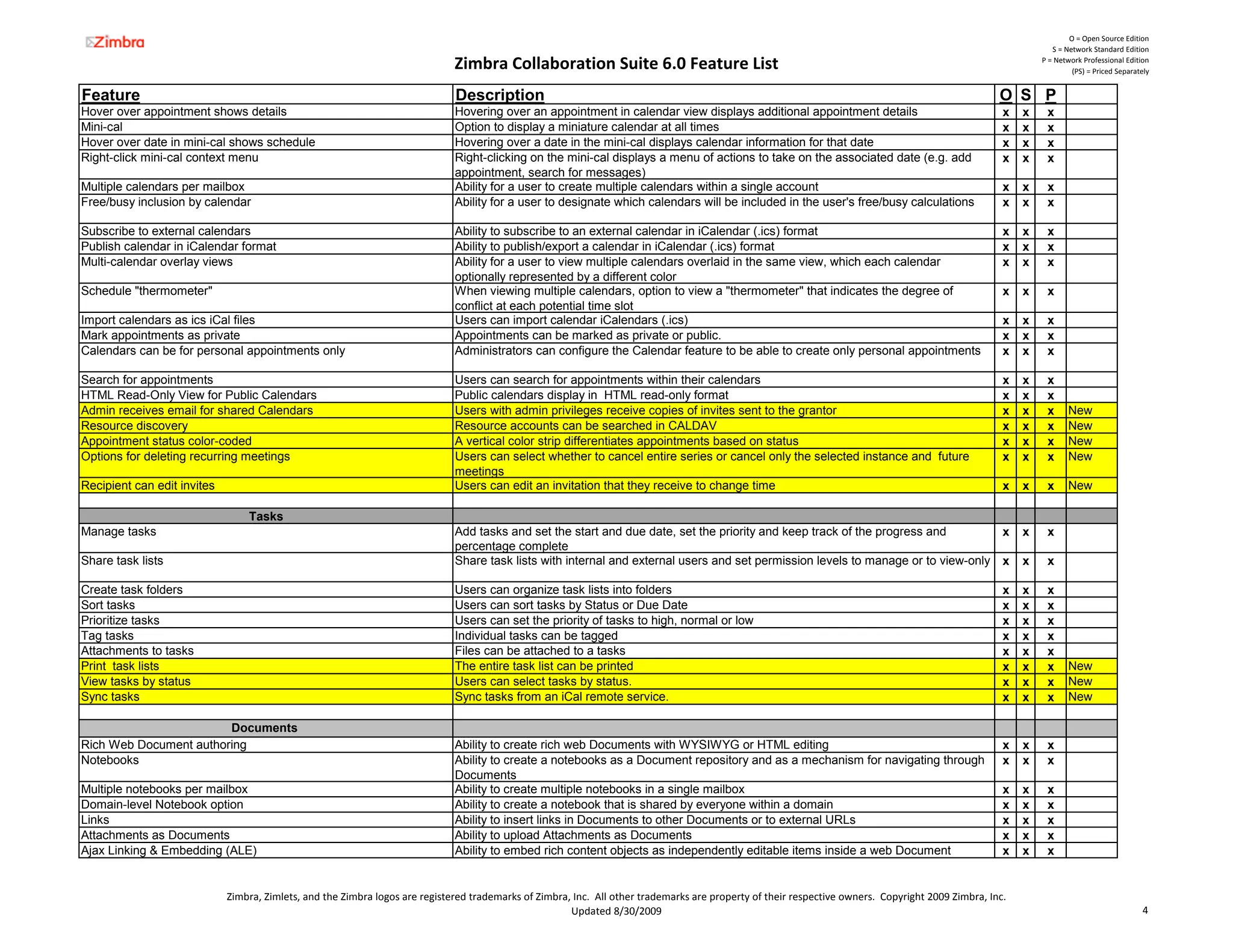
Hover over appointment shows details                                           Hovering over an appointment in calendar view displays additional appointment details                                   x   x    x
Mini-cal                                                                       Option to display a miniature calendar at all times                                                                     x   x    x
Hover over date in mini-cal shows schedule                                     Hovering over a date in the mini-cal displays calendar information for that date                                        x   x    x
Right-click mini-cal context menu                                              Right-clicking on the mini-cal displays a menu of actions to take on the associated date (e.g. add                      x   x    x
                                                                               appointment, search for messages)
Multiple calendars per mailbox                                                 Ability for a user to create multiple calendars within a single account                                                 x   x    x
Free/busy inclusion by calendar                                                Ability for a user to designate which calendars will be included in the user's free/busy calculations                   x   x    x

Subscribe to external calendars                                                Ability to subscribe to an external calendar in iCalendar (.ics) format                                                 x   x    x
Publish calendar in iCalendar format                                           Ability to publish/export a calendar in iCalendar (.ics) format                                                         x   x    x
Multi-calendar overlay views                                                   Ability for a user to view multiple calendars overlaid in the same view, which each calendar                            x   x    x
                                                                               optionally represented by a different color
Schedule "thermometer"                                                         When viewing multiple calendars, option to view a "thermometer" that indicates the degree of                            x   x    x
                                                                               conflict at each potential time slot
Import calendars as ics iCal files                                             Users can import calendar iCalendars (.ics)                                                                             x   x    x
Mark appointments as private                                                   Appointments can be marked as private or public.                                                                        x   x    x
Calendars can be for personal appointments only                                Administrators can configure the Calendar feature to be able to create only personal appointments                       x   x    x

Search for appointments                                                        Users can search for appointments within their calendars                                                                x   x    x
HTML Read-Only View for Public Calendars                                       Public calendars display in HTML read-only format                                                                       x   x    x
Admin receives email for shared Calendars                                      Users with admin privileges receive copies of invites sent to the grantor                                               x   x    x      New
Resource discovery                                                             Resource accounts can be searched in CALDAV                                                                             x   x    x      New
Appointment status color-coded
                     color coded                                               A vertical color strip differentiates appointments based on status                                                      x   x    x      New
Options for deleting recurring meetings                                        Users can select whether to cancel entire series or cancel only the selected instance and future                        x   x    x      New
                                                                               meetings
Recipient can edit invites                                                     Users can edit an invitation that they receive to change time                                                           x   x    x      New

                                 Tasks
Manage tasks                                                                   Add tasks and set the start and due date, set the priority and keep track of the progress and                           x   x    x
                                                                               percentage complete
Share task lists                                                               Share task lists with internal and external users and set permission levels to manage or to view-only                   x   x    x

Create task folders                                                            Users can organize task lists into folders                                                                              x   x    x
Sort tasks                                                                     Users can sort tasks by Status or Due Date                                                                              x   x    x
Prioritize tasks                                                               Users can set the priority of tasks to high, normal or low                                                              x   x    x
Tag tasks                                                                      Individual tasks can be tagged                                                                                          x   x    x
Attachments to tasks                                                           Files can be attached to a tasks                                                                                        x   x    x
Print task lists                                                               The entire task list can be printed                                                                                     x   x    x      New
View tasks by status                                                           Users can select tasks by status.                                                                                       x   x    x      New
Sync tasks                                                                     Sync tasks from an iCal remote service.                                                                                 x   x    x      New

                        Documents
Rich Web Document authoring                                                    Ability to create rich web Documents with WYSIWYG or HTML editing                                                       x   x    x
Notebooks                                                                      Ability to create a notebooks as a Document repository and as a mechanism for navigating through                        x   x    x
                                                                               Documents
Multiple notebooks per mailbox                                                 Ability to create multiple notebooks in a single mailbox                                                                x   x    x
Domain-level Notebook option                                                   Ability to create a notebook that is shared by everyone within a domain                                                 x   x    x
Links                                                                          Ability to insert links in Documents to other Documents or to external URLs                                             x   x    x
Attachments as Documents                                                       Ability to upload Attachments as Documents                                                                              x   x    x
Ajax Linking & Embedding (ALE)                                                 Ability to embed rich content objects as independently editable items inside a web Document                             x   x    x


                             Zimbra, Zimlets, and the Zimbra logos are registered trademarks of Zimbra, Inc.  All other trademarks are property of their respective owners.  Copyright 2009 Zimbra, Inc.
                                                                                                       Updated 8/30/2009                                                                                                                     4
O = Open Source Edition
                                                                                                                                                                                                               S = Network Standard Edition

                                                                           Zimbra Collaboration Suite 6.0 Feature List                                                                                      P = Network Professional Edition
                                                                                                                                                                                                                     (PS) = Priced Separately


Feature                                                                     Description                                                                                                            O S P
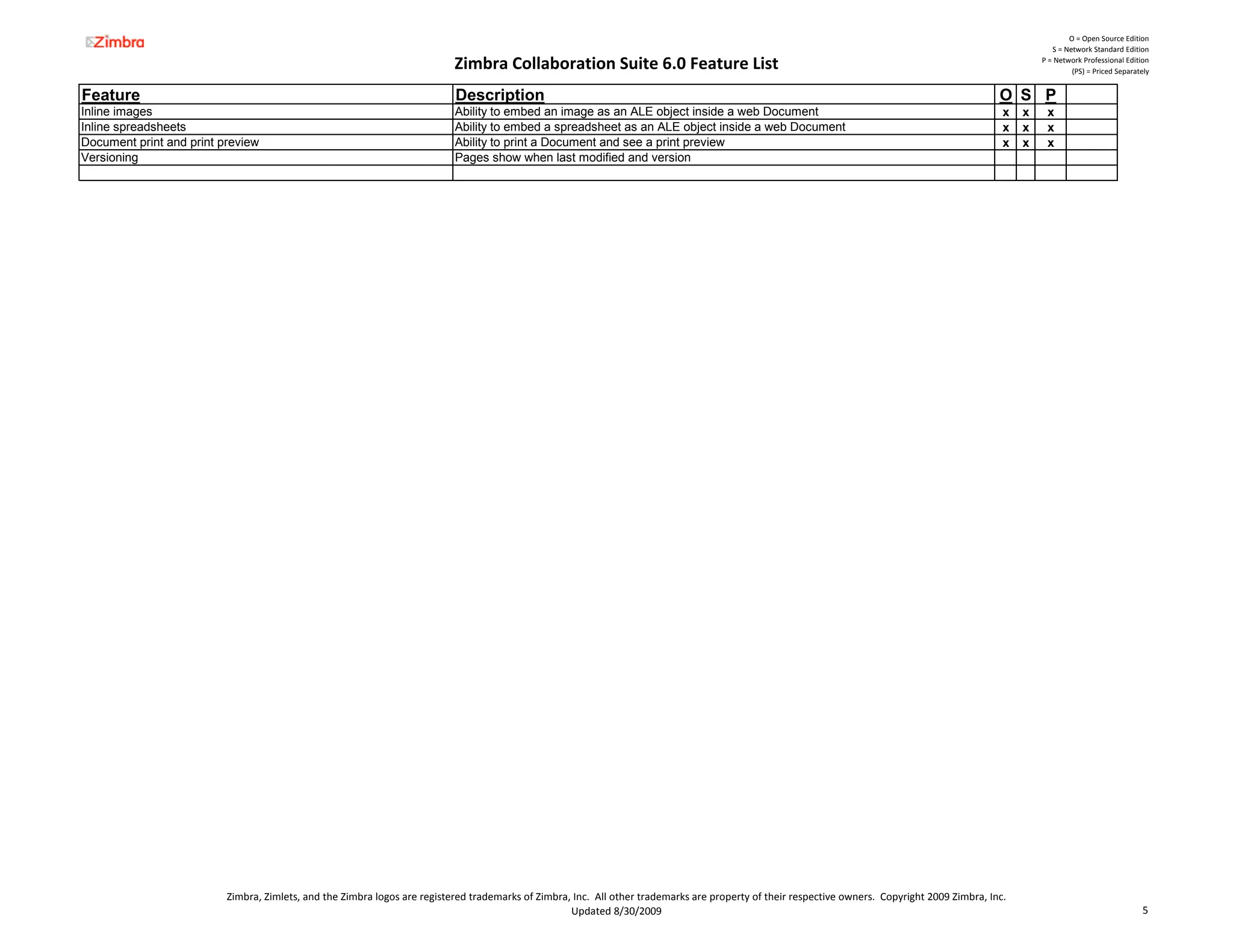
Inline images                                                               Ability to embed an image as an ALE object inside a web Document                                                        x   x    x
Inline spreadsheets                                                         Ability to embed a spreadsheet as an ALE object inside a web Document                                                   x   x    x
Document print and print preview                                            Ability to print a Document and see a print preview                                                                     x   x    x
Versioning                                                                  Pages show when last modified and version


                          Zimbra, Zimlets, and the Zimbra logos are registered trademarks of Zimbra, Inc.  All other trademarks are property of their respective owners.  Copyright 2009 Zimbra, Inc.
                                                                                                    Updated 8/30/2009                                                                                                                     5
O = Open Source Edition
                                                                                                                                                                                                                  S = Network Standard Edition

                                                                              Zimbra Collaboration Suite 6.0 Feature List                                                                                      P = Network Professional Edition
                                                                                                                                                                                                                        (PS) = Priced Separately


Feature                                                                        Description                                                                                                            O S P
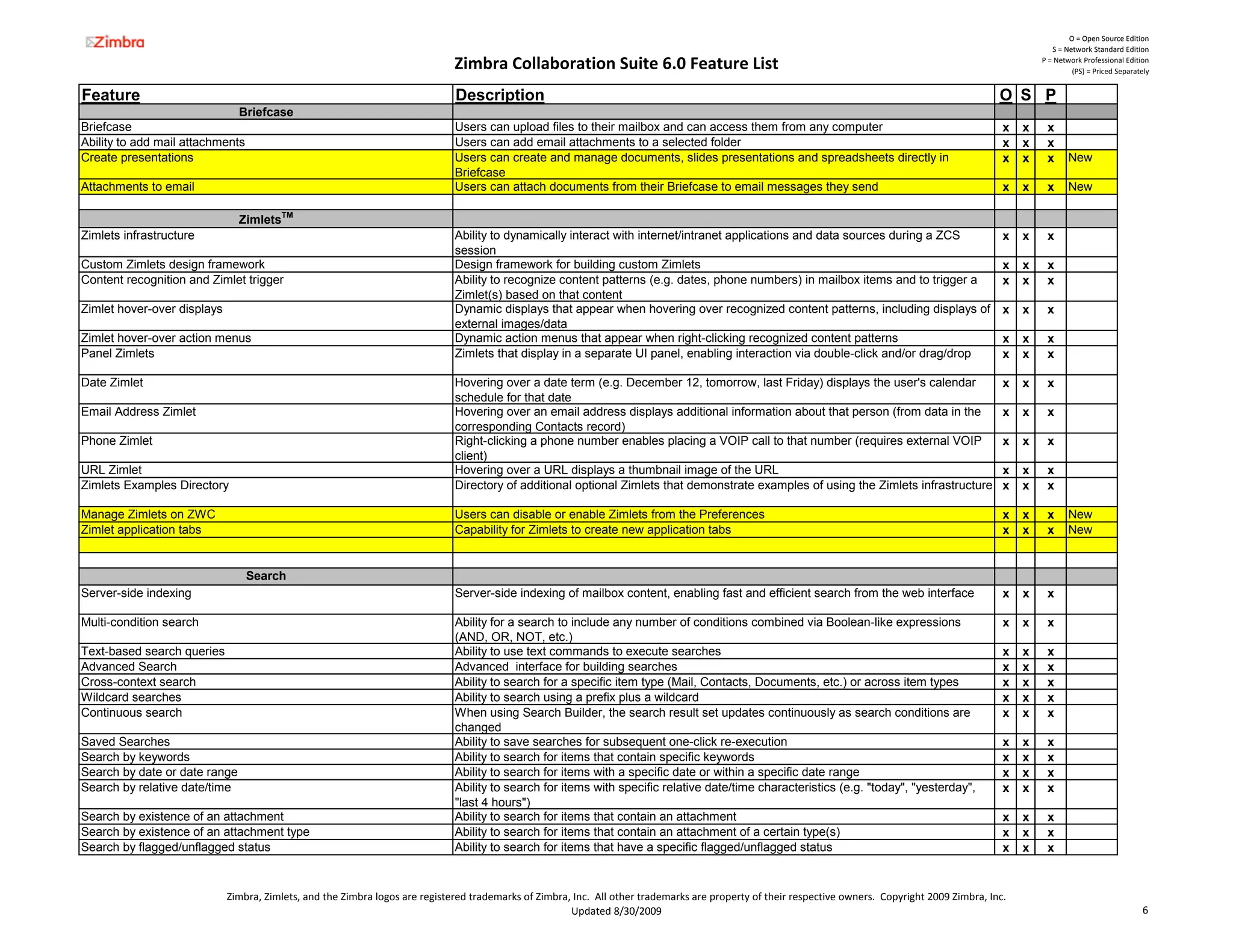
                               Briefcase
Briefcase                                                                      Users can upload files to their mailbox and can access them from any computer                                           x   x    x
Ability to add mail attachments                                                Users can add email attachments to a selected folder                                                                    x   x    x
Create presentations                                                           Users can create and manage documents, slides presentations and spreadsheets directly in                                x   x    x      New
                                                                               Briefcase
Attachments to email                                                           Users can attach documents from their Briefcase to email messages they send                                             x   x    x      New

                               ZimletsTM
Zimlets infrastructure                                                         Ability to dynamically interact with internet/intranet applications and data sources during a ZCS                       x   x    x
                                                                               session
Custom Zimlets design framework                                                Design framework for building custom Zimlets                                                                            x   x    x
Content recognition and Zimlet trigger                                         Ability to recognize content patterns (e.g. dates, phone numbers) in mailbox items and to trigger a                     x   x    x
                                                                               Zimlet(s) based on that content
Zimlet hover-over displays                                                     Dynamic displays that appear when hovering over recognized content patterns, including displays of                      x   x    x
                                                                               external images/data
Zimlet hover-over action menus                                                 Dynamic action menus that appear when right-clicking recognized content patterns                                        x   x    x
Panel Zimlets                                                                  Zimlets that display in a separate UI panel, enabling interaction via double-click and/or drag/drop                     x   x    x

Date Zimlet                                                                    Hovering over a date term (e.g. December 12, tomorrow, last Friday) displays the user's calendar                        x   x    x
                                                                               schedule for that date
Email Address Zimlet                                                           Hovering over an email address displays additional information about that person (from data in the                      x   x    x
                                                                               corresponding Contacts record)
Phone Zimlet                                                                   Right-clicking
                                                                               Right clicking a phone number enables placing a VOIP call to that number (requires external VOIP                        x   x    x
                                                                               client)
URL Zimlet                                                                     Hovering over a URL displays a thumbnail image of the URL                                                               x   x    x
Zimlets Examples Directory                                                     Directory of additional optional Zimlets that demonstrate examples of using the Zimlets infrastructure                  x   x    x

Manage Zimlets on ZWC                                                          Users can disable or enable Zimlets from the Preferences                                                                x   x    x      New
Zimlet application tabs                                                        Capability for Zimlets to create new application tabs                                                                   x   x    x      New


                                  Search
Server-side indexing                                                           Server-side indexing of mailbox content, enabling fast and efficient search from the web interface                      x   x    x

Multi-condition search                                                         Ability for a search to include any number of conditions combined via Boolean-like expressions                          x   x    x
                                                                               (AND, OR, NOT, etc.)
Text-based search queries                                                      Ability to use text commands to execute searches                                                                        x   x    x
Advanced Search                                                                Advanced interface for building searches                                                                                x   x    x
Cross-context search                                                           Ability to search for a specific item type (Mail, Contacts, Documents, etc.) or across item types                       x   x    x
Wildcard searches                                                              Ability to search using a prefix plus a wildcard                                                                        x   x    x
Continuous search                                                              When using Search Builder, the search result set updates continuously as search conditions are                          x   x    x
                                                                               changed
Saved Searches                                                                 Ability to save searches for subsequent one-click re-execution                                                          x   x    x
Search by keywords                                                             Ability to search for items that contain specific keywords                                                              x   x    x
Search by date or date range                                                   Ability to search for items with a specific date or within a specific date range                                        x   x    x
Search by relative date/time                                                   Ability to search for items with specific relative date/time characteristics (e.g. "today", "yesterday",                x   x    x
                                                                               "last 4 hours")
Search by existence of an attachment                                           Ability to search for items that contain an attachment                                                                  x   x    x
Search by existence of an attachment type                                      Ability to search for items that contain an attachment of a certain type(s)                                             x   x    x
Search by flagged/unflagged status                                             Ability to search for items that have a specific flagged/unflagged status                                               x   x    x


                             Zimbra, Zimlets, and the Zimbra logos are registered trademarks of Zimbra, Inc.  All other trademarks are property of their respective owners.  Copyright 2009 Zimbra, Inc.
                                                                                                       Updated 8/30/2009                                                                                                                     6
O = Open Source Edition
                                                                                                                                                                                                                S = Network Standard Edition

                                                                            Zimbra Collaboration Suite 6.0 Feature List                                                                                      P = Network Professional Edition
                                                                                                                                                                                                                      (PS) = Priced Separately


Feature                                                                      Description                                                                                                            O S P
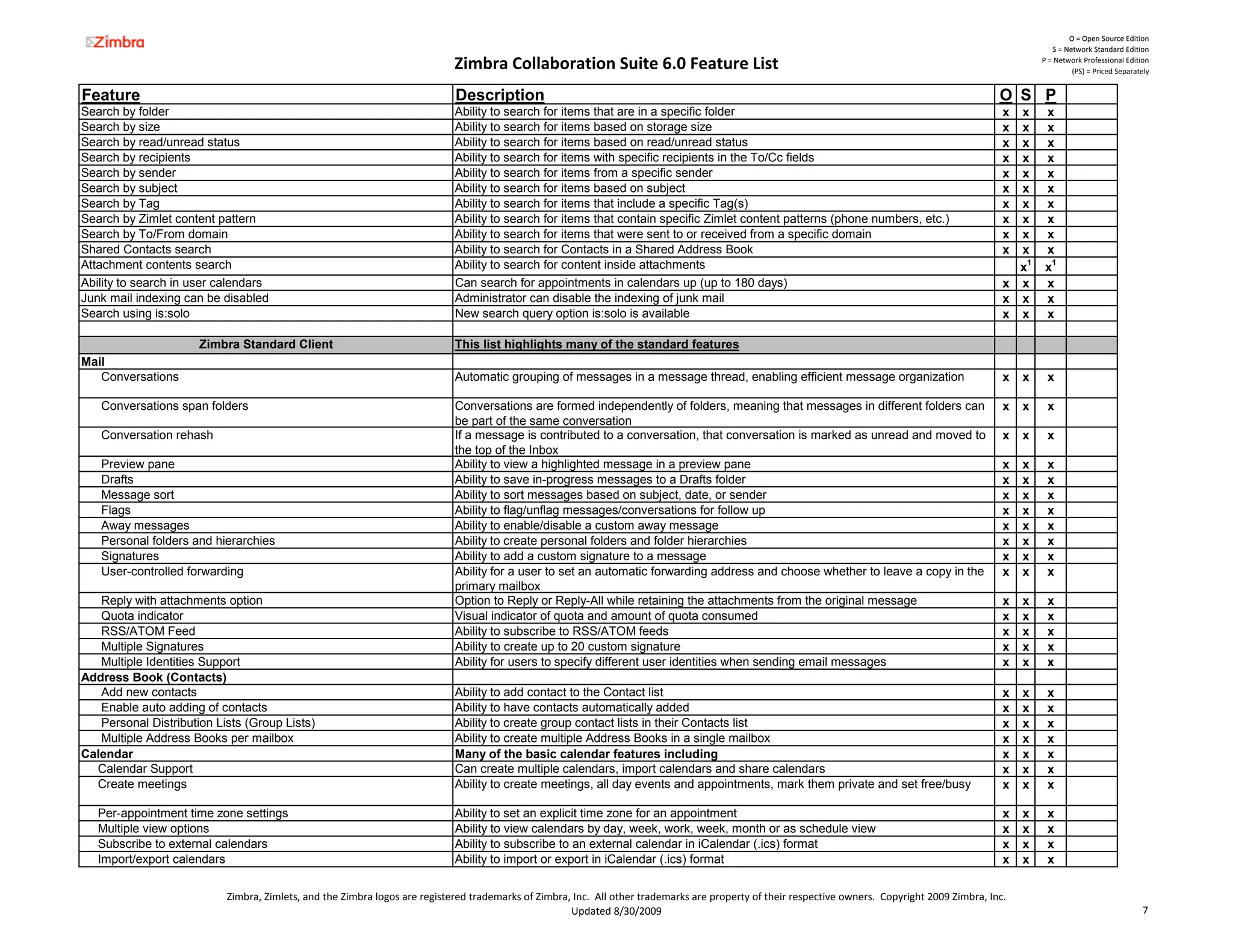
Search by folder                                                             Ability to search for items that are in a specific folder                                                               x x      x
Search by size                                                               Ability to search for items based on storage size                                                                       x x      x
Search by read/unread status                                                 Ability to search for items based on read/unread status                                                                 x x      x
Search by recipients                                                         Ability to search for items with specific recipients in the To/Cc fields                                                x x      x
Search by sender                                                             Ability to search for items from a specific sender                                                                      x x      x
Search by subject                                                            Ability to search for items based on subject                                                                            x x      x
Search by Tag                                                                Ability to search for items that include a specific Tag(s)                                                              x x      x
Search by Zimlet content pattern                                             Ability to search for items that contain specific Zimlet content patterns (phone numbers, etc.)                         x x      x
Search by To/From domain                                                     Ability to search for items that were sent to or received from a specific domain                                        x x      x
Shared Contacts search                                                       Ability to search for Contacts in a Shared Address Book                                                                 x x      x
Attachment contents search                                                   Ability to search for content inside attachments                                                                          x1     x1
Ability to search in user calendars                                          Can search for appointments in calendars up (up to 180 days)                                                            x x      x
Junk mail indexing can be disabled                                           Administrator can disable the indexing of junk mail                                                                     x x      x
Search using is:solo                                                         New search query option is:solo is available                                                                            x x      x

                      Zimbra Standard Client                                 This list highlights many of the standard features
Mail
   Conversations                                                             Automatic grouping of messages in a message thread, enabling efficient message organization                             x   x    x

   Conversations span folders                                                Conversations are formed independently of folders, meaning that messages in different folders can                       x   x    x
                                                                             be part of the same conversation
   Conversation rehash                                                       If a message is contributed to a conversation, that conversation is marked as unread and moved to                       x   x    x
                                                                             the top f th Inbox
                                                                             th t of the I b
   Preview pane                                                              Ability to view a highlighted message in a preview pane                                                                 x   x    x
   Drafts                                                                    Ability to save in-progress messages to a Drafts folder                                                                 x   x    x
   Message sort                                                              Ability to sort messages based on subject, date, or sender                                                              x   x    x
   Flags                                                                     Ability to flag/unflag messages/conversations for follow up                                                             x   x    x
   Away messages                                                             Ability to enable/disable a custom away message                                                                         x   x    x
   Personal folders and hierarchies                                          Ability to create personal folders and folder hierarchies                                                               x   x    x
   Signatures                                                                Ability to add a custom signature to a message                                                                          x   x    x
   User-controlled forwarding                                                Ability for a user to set an automatic forwarding address and choose whether to leave a copy in the                     x   x    x
                                                                             primary mailbox
   Reply with attachments option                                             Option to Reply or Reply-All while retaining the attachments from the original message                                  x   x    x
   Quota indicator                                                           Visual indicator of quota and amount of quota consumed                                                                  x   x    x
   RSS/ATOM Feed                                                             Ability to subscribe to RSS/ATOM feeds                                                                                  x   x    x
   Multiple Signatures                                                       Ability to create up to 20 custom signature                                                                             x   x    x
   Multiple Identities Support                                               Ability for users to specify different user identities when sending email messages                                      x   x    x
Address Book (Contacts)
   Add new contacts                                                          Ability to add contact to the Contact list                                                                              x   x    x
   Enable auto adding of contacts                                            Ability to have contacts automatically added                                                                            x   x    x
   Personal Distribution Lists (Group Lists)                                 Ability to create group contact lists in their Contacts list                                                            x   x    x
   Multiple Address Books per mailbox                                        Ability to create multiple Address Books in a single mailbox                                                            x   x    x
Calendar                                                                     Many of the basic calendar features including                                                                           x   x    x
  Calendar Support                                                           Can create multiple calendars, import calendars and share calendars                                                     x   x    x
  Create meetings                                                            Ability to create meetings, all day events and appointments, mark them private and set free/busy                        x   x    x

   Per-appointment time zone settings                                        Ability to set an explicit time zone for an appointment                                                                 x   x    x
   Multiple view options                                                     Ability to view calendars by day, week, work, week, month or as schedule view                                           x   x    x
   Subscribe to external calendars                                           Ability to subscribe to an external calendar in iCalendar (.ics) format                                                 x   x    x
   Import/export calendars                                                   Ability to import or export in iCalendar (.ics) format                                                                  x   x    x

                           Zimbra, Zimlets, and the Zimbra logos are registered trademarks of Zimbra, Inc.  All other trademarks are property of their respective owners.  Copyright 2009 Zimbra, Inc.
                                                                                                     Updated 8/30/2009                                                                                                                     7
O = Open Source Edition
                                                                                                                                                                                                                  S = Network Standard Edition

                                                                              Zimbra Collaboration Suite 6.0 Feature List                                                                                      P = Network Professional Edition
                                                                                                                                                                                                                        (PS) = Priced Separately


Feature                                                                        Description                                                                                                            O S P
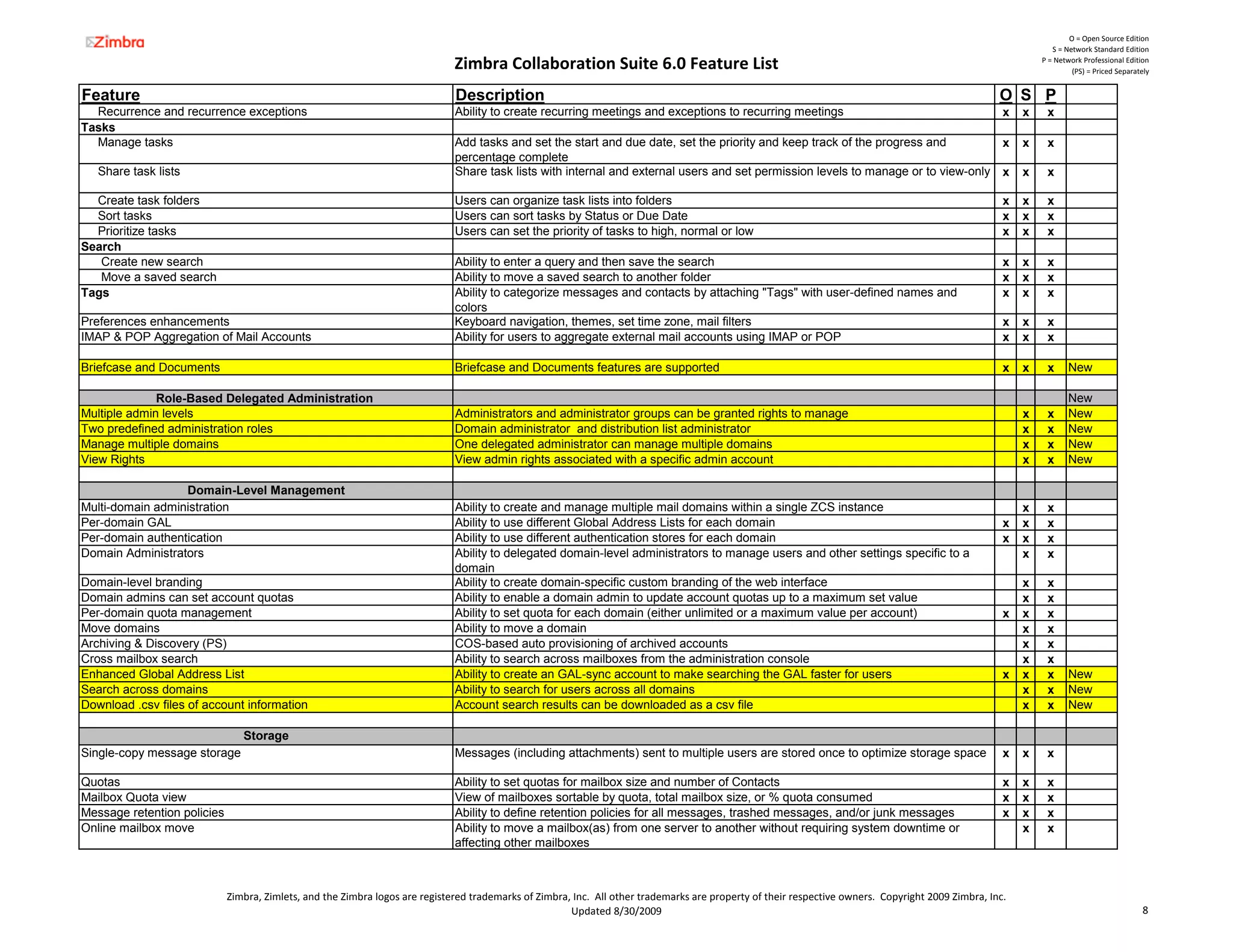
  Recurrence and recurrence exceptions                                         Ability to create recurring meetings and exceptions to recurring meetings                                               x   x    x
Tasks
  Manage tasks                                                                 Add tasks and set the start and due date, set the priority and keep track of the progress and                           x   x    x
                                                                               percentage complete
   Share task lists                                                            Share task lists with internal and external users and set permission levels to manage or to view-only                   x   x    x

  Create task folders                                                          Users can organize task lists into folders                                                                              x   x    x
  Sort tasks                                                                   Users can sort tasks by Status or Due Date                                                                              x   x    x
  Prioritize tasks                                                             Users can set the priority of tasks to high, normal or low                                                              x   x    x
Search
   Create new search                                                           Ability to enter a query and then save the search                                                                       x   x    x
   Move a saved search                                                         Ability to move a saved search to another folder                                                                        x   x    x
Tags                                                                           Ability to categorize messages and contacts by attaching "Tags" with user-defined names and                             x   x    x
                                                                               colors
Preferences enhancements                                                       Keyboard navigation, themes, set time zone, mail filters                                                                x   x    x
IMAP & POP Aggregation of Mail Accounts                                        Ability for users to aggregate external mail accounts using IMAP or POP                                                 x   x    x

Briefcase and Documents                                                        Briefcase and Documents features are supported                                                                          x   x    x      New

              Role-Based Delegated Administration                                                                                                                                                                      New
Multiple admin levels                                                          Administrators and administrator groups can be granted rights to manage                                                     x    x      New
Two predefined administration roles                                            Domain administrator and distribution list administrator                                                                    x    x      New
Manage multiple domains                                                        One delegated administrator can manage multiple domains                                                                     x    x      New
View Rights                                                                    View admin rights associated with a specific admin account                                                                  x    x      New

                  Domain-Level Management
Multi-domain administration                                                    Ability to create and manage multiple mail domains within a single ZCS instance                                             x    x
Per-domain GAL                                                                 Ability to use different Global Address Lists for each domain                                                           x   x    x
Per-domain authentication                                                      Ability to use different authentication stores for each domain                                                          x   x    x
Domain Administrators                                                          Ability to delegated domain-level administrators to manage users and other settings specific to a                           x    x
                                                                               domain
Domain-level branding                                                          Ability to create domain-specific custom branding of the web interface                                                      x    x
Domain admins can set account quotas                                           Ability to enable a domain admin to update account quotas up to a maximum set value                                         x    x
Per-domain quota management                                                    Ability to set quota for each domain (either unlimited or a maximum value per account)                                  x   x    x
Move domains                                                                   Ability to move a domain                                                                                                    x    x
Archiving & Discovery (PS)                                                     COS-based auto provisioning of archived accounts                                                                            x    x
Cross mailbox search                                                           Ability to search across mailboxes from the administration console                                                          x    x
Enhanced Global Address List                                                   Ability to create an GAL-sync account to make searching the GAL faster for users                                        x   x    x      New
Search across domains                                                          Ability to search for users across all domains                                                                              x    x      New
Download .csv files of account information                                     Account search results can be downloaded as a csv file                                                                      x    x      New

                                Storage
Single-copy message storage                                                    Messages (including attachments) sent to multiple users are stored once to optimize storage space                       x   x    x

Quotas                                                                         Ability to set quotas for mailbox size and number of Contacts                                                           x   x    x
Mailbox Quota view                                                             View of mailboxes sortable by quota, total mailbox size, or % quota consumed                                            x   x    x
Message retention policies                                                     Ability to define retention policies for all messages, trashed messages, and/or junk messages                           x   x    x
Online mailbox move                                                            Ability to move a mailbox(as) from one server to another without requiring system downtime or                               x    x
                                                                               affecting other mailboxes


                             Zimbra, Zimlets, and the Zimbra logos are registered trademarks of Zimbra, Inc.  All other trademarks are property of their respective owners.  Copyright 2009 Zimbra, Inc.
                                                                                                       Updated 8/30/2009                                                                                                                     8
O = Open Source Edition
                                                                                                                                                                                                                 S = Network Standard Edition

                                                                            Zimbra Collaboration Suite 6.0 Feature List                                                                                       P = Network Professional Edition
                                                                                                                                                                                                                       (PS) = Priced Separately


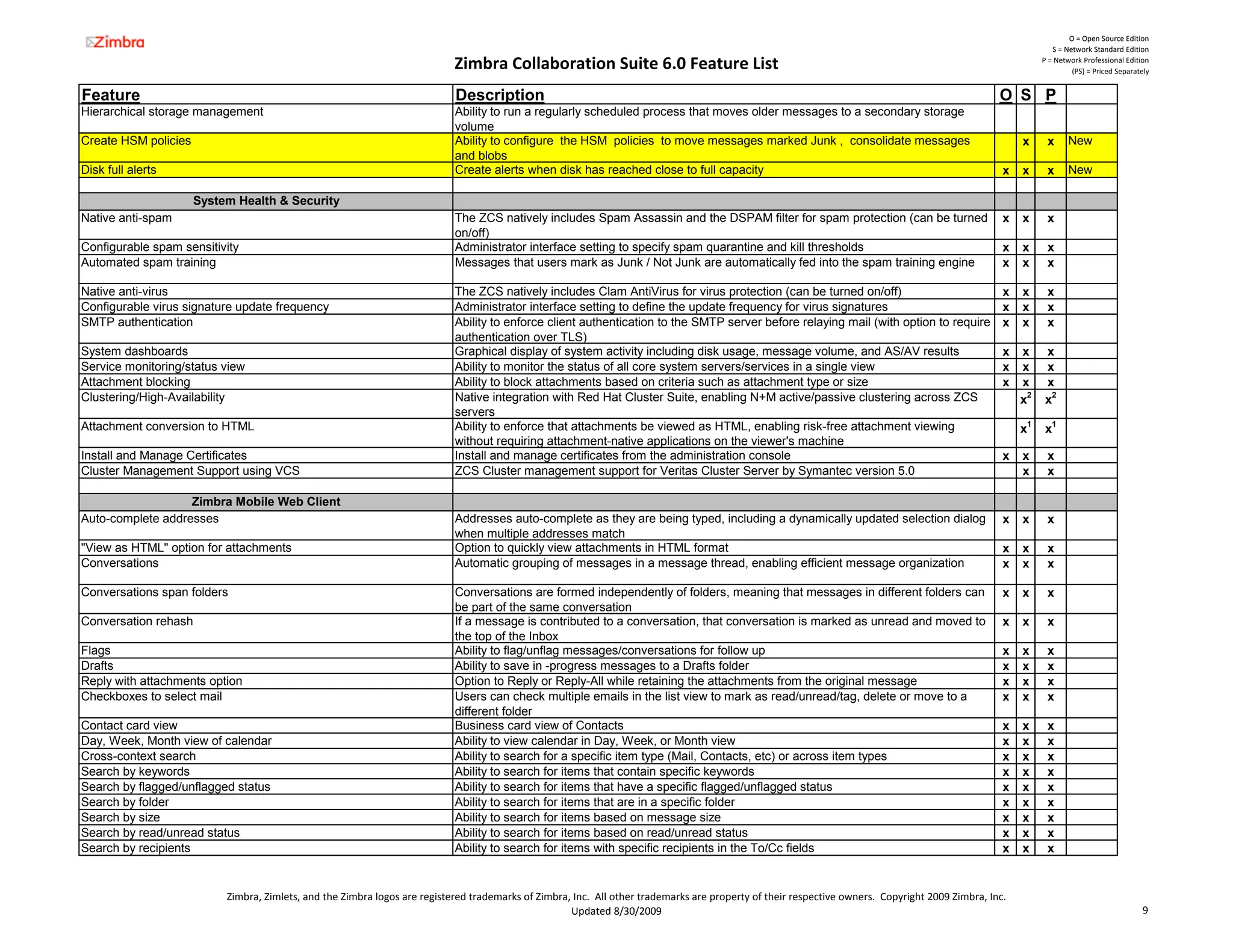
Feature                                                                      Description                                                                                                            O S P
Hierarchical storage management                                              Ability to run a regularly scheduled process that moves older messages to a secondary storage
                                                                             volume
Create HSM policies                                                          Ability to configure the HSM policies to move messages marked Junk , consolidate messages                                   x     x      New
                                                                             and blobs
Disk full alerts                                                             Create alerts when disk has reached close to full capacity                                                              x   x     x      New

                      System Health & Security
Native anti-spam                                                             The ZCS natively includes Spam Assassin and the DSPAM filter for spam protection (can be turned                         x   x     x
                                                                             on/off)
Configurable spam sensitivity                                                Administrator interface setting to specify spam quarantine and kill thresholds                                          x   x     x
Automated spam training                                                      Messages that users mark as Junk / Not Junk are automatically fed into the spam training engine                         x   x     x

Native anti-virus                                                            The ZCS natively includes Clam AntiVirus for virus protection (can be turned on/off)                                    x   x     x
Configurable virus signature update frequency                                Administrator interface setting to define the update frequency for virus signatures                                     x   x     x
SMTP authentication                                                          Ability to enforce client authentication to the SMTP server before relaying mail (with option to require                x   x     x
                                                                             authentication over TLS)
System dashboards                                                            Graphical display of system activity including disk usage, message volume, and AS/AV results                            x   x     x
Service monitoring/status view                                               Ability to monitor the status of all core system servers/services in a single view                                      x   x     x
Attachment blocking                                                          Ability to block attachments based on criteria such as attachment type or size                                          x   x     x
Clustering/High-Availability                                                 Native integration with Red Hat Cluster Suite, enabling N+M active/passive clustering across ZCS                            x2    x2
                                                                             servers
Attachment conversion to HTML                                                Ability to enforce that attachments be viewed as HTML, enabling risk-free attachment viewing                                x1    x1
                                                                             without requiring attachment native applications on the viewer's machine
                                                                                                attachment-native                      viewer s
Install and Manage Certificates                                              Install and manage certificates from the administration console                                                         x   x     x
Cluster Management Support using VCS                                         ZCS Cluster management support for Veritas Cluster Server by Symantec version 5.0                                           x     x

                   Zimbra Mobile Web Client
Auto-complete addresses                                                      Addresses auto-complete as they are being typed, including a dynamically updated selection dialog                       x   x     x
                                                                             when multiple addresses match
"View as HTML" option for attachments                                        Option to quickly view attachments in HTML format                                                                       x   x     x
Conversations                                                                Automatic grouping of messages in a message thread, enabling efficient message organization                             x   x     x

Conversations span folders                                                   Conversations are formed independently of folders, meaning that messages in different folders can                       x   x     x
                                                                             be part of the same conversation
Conversation rehash                                                          If a message is contributed to a conversation, that conversation is marked as unread and moved to                       x   x     x
                                                                             the top of the Inbox
Flags                                                                        Ability to flag/unflag messages/conversations for follow up                                                             x   x     x
Drafts                                                                       Ability to save in -progress messages to a Drafts folder                                                                x   x     x
Reply with attachments option                                                Option to Reply or Reply-All while retaining the attachments from the original message                                  x   x     x
Checkboxes to select mail                                                    Users can check multiple emails in the list view to mark as read/unread/tag, delete or move to a                        x   x     x
                                                                             different folder
Contact card view                                                            Business card view of Contacts                                                                                          x   x     x
Day, Week, Month view of calendar                                            Ability to view calendar in Day, Week, or Month view                                                                    x   x     x
Cross-context search                                                         Ability to search for a specific item type (Mail, Contacts, etc) or across item types                                   x   x     x
Search by keywords                                                           Ability to search for items that contain specific keywords                                                              x   x     x
Search by flagged/unflagged status                                           Ability to search for items that have a specific flagged/unflagged status                                               x   x     x
Search by folder                                                             Ability to search for items that are in a specific folder                                                               x   x     x
Search by size                                                               Ability to search for items based on message size                                                                       x   x     x
Search by read/unread status                                                 Ability to search for items based on read/unread status                                                                 x   x     x
Search by recipients                                                         Ability to search for items with specific recipients in the To/Cc fields                                                x   x     x


                           Zimbra, Zimlets, and the Zimbra logos are registered trademarks of Zimbra, Inc.  All other trademarks are property of their respective owners.  Copyright 2009 Zimbra, Inc.
                                                                                                     Updated 8/30/2009                                                                                                                      9
O = Open Source Edition
                                                                                                                                                                                                                  S = Network Standard Edition

                                                                              Zimbra Collaboration Suite 6.0 Feature List                                                                                      P = Network Professional Edition
                                                                                                                                                                                                                        (PS) = Priced Separately


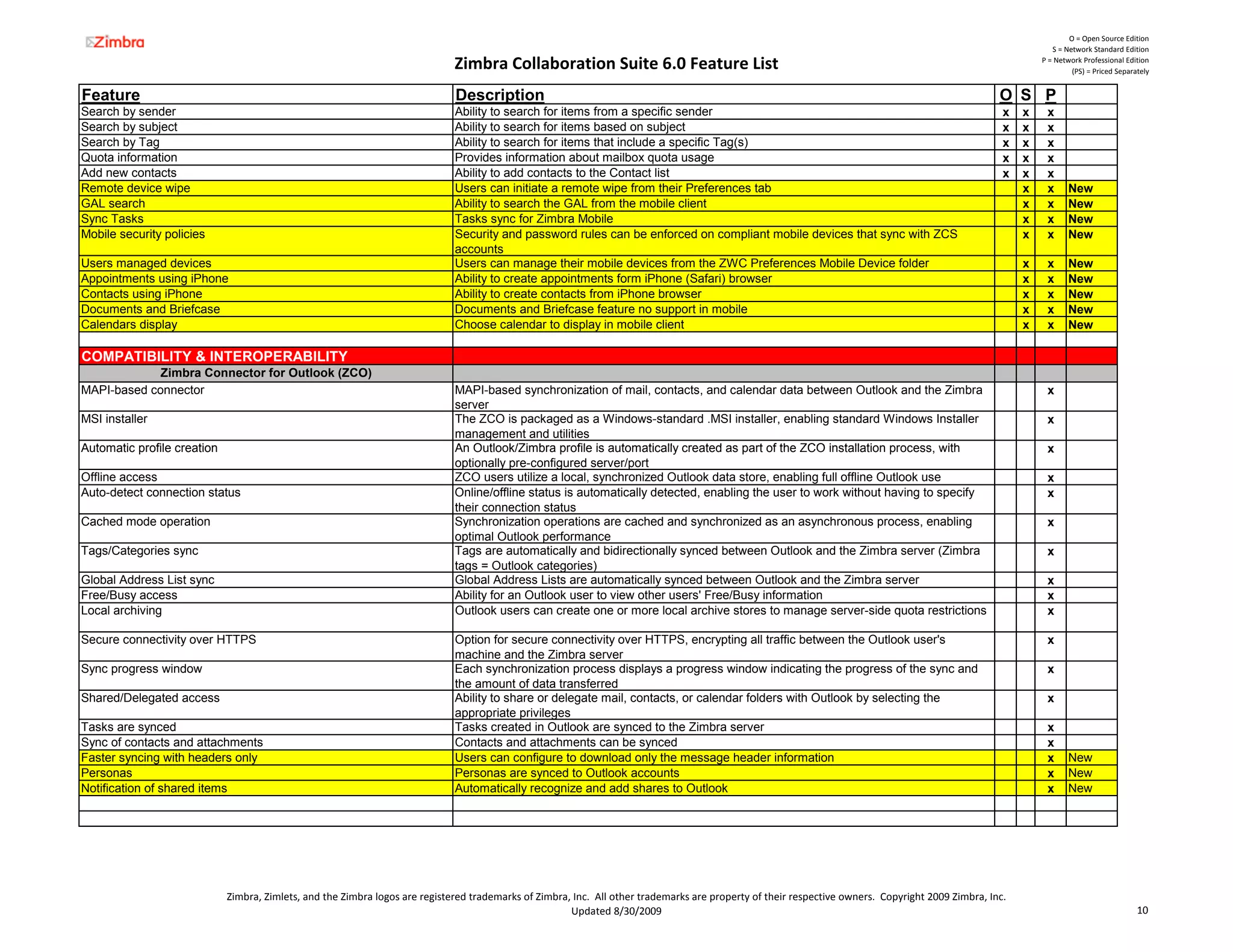
Feature                                                                        Description                                                                                                            O S P
Search by sender                                                               Ability to search for items from a specific sender                                                                      x   x    x
Search by subject                                                              Ability to search for items based on subject                                                                            x   x    x
Search by Tag                                                                  Ability to search for items that include a specific Tag(s)                                                              x   x    x
Quota information                                                              Provides information about mailbox quota usage                                                                          x   x    x
Add new contacts                                                               Ability to add contacts to the Contact list                                                                             x   x    x
Remote device wipe                                                             Users can initiate a remote wipe from their Preferences tab                                                                 x    x      New
GAL search                                                                     Ability to search the GAL from the mobile client                                                                            x    x      New
Sync Tasks                                                                     Tasks sync for Zimbra Mobile                                                                                                x    x      New
Mobile security policies                                                       Security and password rules can be enforced on compliant mobile devices that sync with ZCS                                  x    x      New
                                                                               accounts
Users managed devices                                                          Users can manage their mobile devices from the ZWC Preferences Mobile Device folder                                         x    x      New
Appointments using iPhone                                                      Ability to create appointments form iPhone (Safari) browser                                                                 x    x      New
Contacts using iPhone                                                          Ability to create contacts from iPhone browser                                                                              x    x      New
Documents and Briefcase                                                        Documents and Briefcase feature no support in mobile                                                                        x    x      New
Calendars display                                                              Choose calendar to display in mobile client                                                                                 x    x      New

COMPATIBILITY & INTEROPERABILITY
             Zimbra Connector for Outlook (ZCO)
MAPI-based connector                                                           MAPI-based synchronization of mail, contacts, and calendar data between Outlook and the Zimbra                                   x
                                                                               server
MSI installer                                                                  The ZCO is packaged as a Windows-standard .MSI installer, enabling standard Windows Installer                                    x
                                                                               management and utilities
Automatic
A tomatic profile creation                                                     An Outlook/Zimbra profile is automatically created as part of the ZCO installation process, with
                                                                                   O tlook/Zimbra            a tomaticall                                          process ith                                  x
                                                                               optionally pre-configured server/port
Offline access                                                                 ZCO users utilize a local, synchronized Outlook data store, enabling full offline Outlook use                                    x
Auto-detect connection status                                                  Online/offline status is automatically detected, enabling the user to work without having to specify                             x
                                                                               their connection status
Cached mode operation                                                          Synchronization operations are cached and synchronized as an asynchronous process, enabling                                      x
                                                                               optimal Outlook performance
Tags/Categories sync                                                           Tags are automatically and bidirectionally synced between Outlook and the Zimbra server (Zimbra                                  x
                                                                               tags = Outlook categories)
Global Address List sync                                                       Global Address Lists are automatically synced between Outlook and the Zimbra server                                              x
Free/Busy access                                                               Ability for an Outlook user to view other users' Free/Busy information                                                           x
Local archiving                                                                Outlook users can create one or more local archive stores to manage server-side quota restrictions                               x

Secure connectivity over HTTPS                                                 Option for secure connectivity over HTTPS, encrypting all traffic between the Outlook user's                                     x
                                                                               machine and the Zimbra server
Sync progress window                                                           Each synchronization process displays a progress window indicating the progress of the sync and                                  x
                                                                               the amount of data transferred
Shared/Delegated access                                                        Ability to share or delegate mail, contacts, or calendar folders with Outlook by selecting the                                   x
                                                                               appropriate privileges
Tasks are synced                                                               Tasks created in Outlook are synced to the Zimbra server                                                                         x
Sync of contacts and attachments                                               Contacts and attachments can be synced                                                                                           x
Faster syncing with headers only                                               Users can configure to download only the message header information                                                              x      New
Personas                                                                       Personas are synced to Outlook accounts                                                                                          x      New
Notification of shared items                                                   Automatically recognize and add shares to Outlook                                                                                x      New


                             Zimbra, Zimlets, and the Zimbra logos are registered trademarks of Zimbra, Inc.  All other trademarks are property of their respective owners.  Copyright 2009 Zimbra, Inc.
                                                                                                       Updated 8/30/2009                                                                                                                    10
O = Open Source Edition
                                                                                                                                                                                                                 S = Network Standard Edition

                                                                             Zimbra Collaboration Suite 6.0 Feature List                                                                                      P = Network Professional Edition
                                                                                                                                                                                                                       (PS) = Priced Separately


Feature                                                                       Description                                                                                                            O S P
                 Zimbra Connector for Apple iSync
iCal calendar sync                                                            Enable two-way synchronization between the Zimbra server and iCal calendar                                                       x
Contacts sync                                                                 Enable two-way synchronization between the Zimbra server and Address Book                                                        x
Integration with Microsoft Entourage                                          Integration of Entourage calendar and contacts with Zimbra server                                                                x
Automatic synchronization                                                     When enabled, changes made locally to Address Book, iCal data or to Entourage calendar and                                       x
                                                                              contacts are immediately sent to the Zimbra server Note: Calendar syncing with Entourage is only
                                                                              supported for OS X 10.4
Schedule synchronization                                                      Ability to select when iCal and Address Book should synchronize with the Zimbra server                                           x
CalDAV standard support (Beta)                                                CalDAV models calendar events as HTTP resources in iCal format.                                                         x   x    x

                   Additional Compatibility
Exchange Migration Wizard                                                     Graphical tool that facilitates migration of accounts and mail/calendar/contacts/categories data from                   x   x    x
                                                                              Exchange to the ZCS server
Import Wizard for Outlook                                                     Graphical tool that facilitates migration of an Outlook PST to the ZCS server                                           x   x    x
IMAP                                                                          Ability to access the ZCS server via IMAP clients, with the option to connect over SSL/TLS                              x   x    x
POP                                                                           Ability to access the ZCS server via POP clients, with the option to connect via SSL/TLS                                x   x    x
SOAP/REST APIs                                                                Comprehensive suite of standards-based web services APIs enabling seamless integration with                             x   x    x
                                                                              other applications
Active Directory integration                                                  Ability to utilize Active Directory for user authentication and/or Global Address List                                  x   x    x
External LDAP directory integration                                           Ability to utilize an external LDAP directory for user authentication and/or Global Address List                        x   x    x
Initial user password                                                         Admin can configure an initial password in the migration wizard and import wizard for newly                             x   x    x
                                                                              provisioned accounts
Lotus Domino Migration Wizard                                                 Graphic tool that facilitates migration of accounts and mail/calendar/contacts data from Lotus                          x   x    x
                                                                              Domino to the ZCS server
J2ME Support                                                                  J2ME mobile client support (Beta)                                                                                       x   x    x
Zimbra Mobile Web Client                                                      XHTML mobile client optimized for iPhones and other PDA-like devices                                                    x   x    x
Zimbra Desktop                                                                Users can access to the contents of their mailboxes when they are off line. Changes are synced                          x   x    x
                                                                              when they log on
Blackberry Enterprise Server interop (PS)                                     Users can access ZCS using BlackBerry mobile devices as ZCB is a plug-in that enables                                       x    x
                                                                              synchronization


Notes:
1. Items marked with x1 are not available in the Mac OS X version of the Zimbra Collaboration Suite
2. Items marked with x2 are not available in the Mac OS X or SUSE versions of the Zimbra Collaboration Suite


                            Zimbra, Zimlets, and the Zimbra logos are registered trademarks of Zimbra, Inc.  All other trademarks are property of their respective owners.  Copyright 2009 Zimbra, Inc.
                                                                                                      Updated 8/30/2009                                                                                                                    11

Open Source Erp

  • 1.
    O = Open Source Edition S = Network Standard Edition Zimbra Collaboration Suite 6.0 Feature List P = Network Professional Edition (PS) = Priced Separately Feature Description O S P WEB COLLABORATION AND PRODUCTIVITY General Web Interface AJAX-based end user interface Rich, interactive, web-based interface for end user functions (access via HTTP or HTTPS) x x x Automatic web client updates The web interface automatically updates to display messages and other updates x x x Online end user help Online end user help accessible directly from the end user interface x x x Themes Ability to customize the colors and appearance of the web interface x x x Rebranding Ability to use custom logos in the web interface x x Keyword based ad serving Ability to display ads based on the content of the subject and the message fragment (PS) x x Banner ads can be added to Zimbra Web Client Banner ads can be placed in the Zimbra Web Client x x Extended Zimlet framework for expanded search Users can search the web from within Zimbra Web Client x x Customizable Options pages Templates can be used to customize the feature layout of the options pages. (PS) x x Web client lazy loading Load client JavaScript code on-demand to improve delay during the log in process x x x Cross-Application Features Drag/Drop with drag context Ability to drag/drop items, with dynamic indicators of the number of items being dragged and valid x x x drop zones Auto-complete addresses Addresses auto-complete as they are being typed, including a dynamically updated selection dialog x x x when multiple addresses match Tags Ability to quickly categorize messages, contacts, and/or documents by attaching "Tags" with user- x x x defined names and colors HTML formatting Ability to render and create messages, appointments, and web documents in HTML format x x x Spell check Option to check and correct spelling in a mail message, calendar appointment, or web Document x x x Mandatory spell check Option to have mandatory spell check enabled x x x New Share with Internal Users and Groups Ability to share Address Books, Calendars, Briefcase and Notebooks (Documents) with internal x x x users and groups (read or write access) Share with External Users Ability to share Address Books, Calendars, Briefcase and Notebooks (Documents) with external x x x users via a custom password (read access) Share with Public Ability to share Address Books, Calendars, Briefcase and Notebooks (Documents) with the public x x x (read access) Zimbra Assistant Mini dialog for quick actions (e.g. send message, create appointment) without changing the x x x underlying application context Multi-source address picker Ability to choose from users in personal Address Books, shared Address Books, or the Global x x x Address List "View as HTML" option for attachments Option to quickly view attachments in HTML format x1 x1 Keyboard Navigation Keyboard shortcuts are available for Zimbra Web Client x x x Keyboard navigation can be turned off The ability to use shortcut keys can be managed x x x COS setting enhancements to prevent log warning Accounts can be configured to let users log off without the warning x x x Welcome or Home page Enable a Home page tab that can display specific information for the user (PS) x x x Custom logout page Ability for users on logout to be redirected to a page other than the Zimbra login page x x x User preferred or default selection of Zimbra Web Client Accounts can be configured to use either the Standard Web Client, the Advanced Web client or both x x x Manage shared items Preference Share folder lists all items shared with the user x x x New Mail Conversations Automatic grouping of messages in a message thread, enabling efficient message organization x x x Conversations span folders Conversations are formed independently of folders, meaning that messages in different folders can x x x be part of the same conversation Conversation rehash If a message is contributed to a conversation, that conversation is marked as unread and moved to x x x the top of the Inbox Zimbra, Zimlets, and the Zimbra logos are registered trademarks of Zimbra, Inc.  All other trademarks are property of their respective owners.  Copyright 2009 Zimbra, Inc. Updated 8/30/2009 1
  • 2.
    O = Open Source Edition S = Network Standard Edition Zimbra Collaboration Suite 6.0 Feature List P = Network Professional Edition (PS) = Priced Separately Feature Description O S P Conversation-level actions Ability to perform actions on an entire conversation such as move, Tag, flag, drag/drop, etc. x x x Preview pane Ability to view a highlighted message in a preview pane x x x Personal folders and hierarchies Ability to create personal folders and folder hierarchies x x x Publish RSS/ATOM feeds Ability to generate RSS or ATOM feeds based on the contents of the Inbox or other mail folders x x x Subscribe to RSS/ATOM feeds Ability to subscribe to RSS/ATOM feeds x x x Message print and print preview Ability to print a message and see a print preview x x x Message sort Ability to sort messages based on subject, date, or sender x x x Flags Ability to flag/unflag messages/conversations for follow up x x x Filters Ability to define filter rules and priorities for incoming messages. x x x Filter existing messages Ability to run filters over existing email messages x x x New Away messages Ability to enable/disable a custom away message x x x Signatures Ability to add a custom signature to a message x x x Compose in window Option to popup a separate window when composing a message x x x Drafts Ability to save in-progress messages to a Drafts folder x x x User-controlled forwarding Ability for a user to set an automatic forwarding address and choose whether to leave a copy in the x x x primary mailbox Reply with attachments option Option to Reply or Reply-All while retaining the attachments from the original message x x x Right-click message context menu Right-clicking a message displays a menu of actions to take on that message (e.g. Mark Read, x x x Reply, Delete) Right-click email address context menu Right-clicking an email address displays a menu of actions to take on that address (e.g. view x x x website, add/edit contact, create filter, search for messages) Hover over attached image shows preview Hovering over an image attachment in a message displays a thumbnail preview of the image x x x Create calendar appointment from message Ability to drag a message to a mini-calendar date to create an appointment based on the message x x x Quota indicator Visual indicator of quota and amount of quota consumed x x x Export messages as ZIP file Ability to export a set of messages as a ZIP file x x x Reply/Reply-All Toggle Ability to toggle between Reply and Reply-All while composing a reply x x x Mail Identities Ability to create multiple identities in Zimbra Web Client and use different names and mail settings. x x x Support for multiple external email accounts Within ZWC, users can identify other POP email accounts that they have, retrieve email from those x x x accounts and save in specific folders Reading Pane view can be set Users can set their default preference for viewing messages in the reading pane x x x User-specified default HTML settings Users can set the default font family, font size and font color to use when composing email x x x messages and Documents pages Shared mailbox folders Users can share their mailbox folders and set the permission levels to manage or to view-only. x x x Ability to insert inline images in HTML Editor Users can insert inline images in email messages and calendar appointments x x x Signature Length can be set Admins can configure the maximum number of characters used in a signature x x x Definable expiration policy for systems folders Admin can define expiration policy for individual mailbox folders x x x Account quota warning Users will receive an email message warning of quota usage based on a threshold defined by x x x administrator Results of a URL can be made attachments Users can attach a URL to an email message x x x Double click on mail opens message in new window Users can double-click on a message in message view to expand the view pane to full view x x x Different signatures can be defined Users can define up to three different email signatures to use x x x Email feature can be disabled Administrators can disable this feature on a COS or Account basis x x x Checkboxes to select mail Users can check multiple emails in the list view to mark as read/unread/tag, delete, or to move to a x x x different folder Message priority can be set When sending a message, the priority is normal, but it can be set to high or low as well x x x Instant Notification Users can get immediate notification of new mail x x x Multiple messages can be forwarded Multiple messages can be selected and forwarded in one email x x x Zimbra, Zimlets, and the Zimbra logos are registered trademarks of Zimbra, Inc.  All other trademarks are property of their respective owners.  Copyright 2009 Zimbra, Inc. Updated 8/30/2009 2
  • 3.
    O = Open Source Edition S = Network Standard Edition Zimbra Collaboration Suite 6.0 Feature List P = Network Professional Edition (PS) = Priced Separately Feature Description O S P Aggregation of mail accounts using IMAP Users can aggregate multiple external accounts in their Zimbra account using IMAP x x x View the number and total size of items in folder Users can right click on a folder to see the number of messages and the total size of items in folder Three-pane view of mail Users can select to view their mailbox in a three pane vertical view x x x New Read Receipt Messages can be flagged for a return read receipt. Users have a choice to turn this option off for x x x New messages they receive Compose in Tabs Multiple compose tabs can be opened and users can move between the tabs x x x New Multiple forwarding addresses Allow users to set multiple forwarding addresses x x x New User controlled junk mail lists Allow users to set up black or while lists for emails through preferences settings x x x New Sort Messages by size Ability to sort messages based on size x x x New Print multiple messages Ability to select and print multiple messages at once x x x New Address Book Contact Card View Business card view of Contacts x x x Contact List View with Preview Pane List view of Contacts with preview pane x x x Import/export contacts in CSV format Ability to import/export Contacts in .csv format x x x Import/export vCards Ability to import/export contacts in vCard (.vcf) format x x x Contact print and print preview Ability to print a single Contact or list of Contacts and see a print preview x x x Right-click Contact context menu Right-clicking a Contact displays a menu of actions to take on the Contact (e.g. compose message, x x x search for messages) Drag/drop Contact to mini-cal date to create appointment Ability to drag a Contact to a mini-calendar date to create an appointment with that Contact x x x Multiple Address Books per mailbox Ability to create multiple Address Books in a single mailbox x x x Move/copy contacts across Address Books Ability to move/copy contacts from one Address Book to another (based on access privileges) x x x Personal Distribution Lists (Group Lists) Ability to create group contact lists in their user Address Books x x x Add Photos to contacts Photos and images can be uploaded to contacts in Address Books x x x Calendar Personal scheduling Ability to schedule personal appointments x x x Group scheduling Ability to schedule meetings and view attendees' free/busy information x x x Recurrences and recurrence exceptions Ability to create recurring meetings and exceptions to recurring meetings x x x Resource scheduling Ability to book resources (locations, equipment, etc.) for a meeting x x x Resource search by attributes Ability to search for available resources by attributes such as site, building, floor, and capacity x x x Resource auto-respond Ability to configure a resource to auto-respond to scheduling requests based on availability x x x Calendar alerts Option to enable an alert popup for upcoming appointments x x x Time zone adjustment Appointments/schedules are automatically displayed in the users current time zone x x x Per-appointment time zone setting Ability to set an explicit time zone for an appointment x x x Day, Week, Work Week, Month views Ability to view calendars in Day, Week, Work Week, or Month views x x x List view Ability to see appointments in selected calendars for a two week period, select multiple x x x appointments to act upon at once Fish-eye calendar view In the Month view, users can click a date and see a detailed hourly view of the day Customizable first day of week User setting for the first day of the week; value chosen impacts the Week calendar view x x x Create/drag appointment inline in calendar views Ability to create an appointment and/or drag an appointment's boundaries inline in calendar views x x x Quick Accept/Tentative/Decline from calendar views Ability to quickly mark Accept/Tentative/Decline from calendar views x x x Identify internal users who can send an invitation Only addresses identified by the user can send an invitation. Other invites are automatically x x x New declined. Customize Free/Busy display Users can customize how Free/Busy information about them is displayed x x x New Disable Send Notification Mail Users can disable Send Notification Mail so that attendees do not receive an email update about x x x New minor changes to a meeting Faded display of declined appointments Declined appointments display faded so that the user remains aware of their occurrence x x x Calendar print and print preview Ability to print calendars in day, week, work week, or month views and see a print preview x x x Zimbra, Zimlets, and the Zimbra logos are registered trademarks of Zimbra, Inc.  All other trademarks are property of their respective owners.  Copyright 2009 Zimbra, Inc. Updated 8/30/2009 3
  • 4.
    O = Open Source Edition S = Network Standard Edition Zimbra Collaboration Suite 6.0 Feature List P = Network Professional Edition (PS) = Priced Separately Feature Description O S P Hover over appointment shows details Hovering over an appointment in calendar view displays additional appointment details x x x Mini-cal Option to display a miniature calendar at all times x x x Hover over date in mini-cal shows schedule Hovering over a date in the mini-cal displays calendar information for that date x x x Right-click mini-cal context menu Right-clicking on the mini-cal displays a menu of actions to take on the associated date (e.g. add x x x appointment, search for messages) Multiple calendars per mailbox Ability for a user to create multiple calendars within a single account x x x Free/busy inclusion by calendar Ability for a user to designate which calendars will be included in the user's free/busy calculations x x x Subscribe to external calendars Ability to subscribe to an external calendar in iCalendar (.ics) format x x x Publish calendar in iCalendar format Ability to publish/export a calendar in iCalendar (.ics) format x x x Multi-calendar overlay views Ability for a user to view multiple calendars overlaid in the same view, which each calendar x x x optionally represented by a different color Schedule "thermometer" When viewing multiple calendars, option to view a "thermometer" that indicates the degree of x x x conflict at each potential time slot Import calendars as ics iCal files Users can import calendar iCalendars (.ics) x x x Mark appointments as private Appointments can be marked as private or public. x x x Calendars can be for personal appointments only Administrators can configure the Calendar feature to be able to create only personal appointments x x x Search for appointments Users can search for appointments within their calendars x x x HTML Read-Only View for Public Calendars Public calendars display in HTML read-only format x x x Admin receives email for shared Calendars Users with admin privileges receive copies of invites sent to the grantor x x x New Resource discovery Resource accounts can be searched in CALDAV x x x New Appointment status color-coded color coded A vertical color strip differentiates appointments based on status x x x New Options for deleting recurring meetings Users can select whether to cancel entire series or cancel only the selected instance and future x x x New meetings Recipient can edit invites Users can edit an invitation that they receive to change time x x x New Tasks Manage tasks Add tasks and set the start and due date, set the priority and keep track of the progress and x x x percentage complete Share task lists Share task lists with internal and external users and set permission levels to manage or to view-only x x x Create task folders Users can organize task lists into folders x x x Sort tasks Users can sort tasks by Status or Due Date x x x Prioritize tasks Users can set the priority of tasks to high, normal or low x x x Tag tasks Individual tasks can be tagged x x x Attachments to tasks Files can be attached to a tasks x x x Print task lists The entire task list can be printed x x x New View tasks by status Users can select tasks by status. x x x New Sync tasks Sync tasks from an iCal remote service. x x x New Documents Rich Web Document authoring Ability to create rich web Documents with WYSIWYG or HTML editing x x x Notebooks Ability to create a notebooks as a Document repository and as a mechanism for navigating through x x x Documents Multiple notebooks per mailbox Ability to create multiple notebooks in a single mailbox x x x Domain-level Notebook option Ability to create a notebook that is shared by everyone within a domain x x x Links Ability to insert links in Documents to other Documents or to external URLs x x x Attachments as Documents Ability to upload Attachments as Documents x x x Ajax Linking & Embedding (ALE) Ability to embed rich content objects as independently editable items inside a web Document x x x Zimbra, Zimlets, and the Zimbra logos are registered trademarks of Zimbra, Inc.  All other trademarks are property of their respective owners.  Copyright 2009 Zimbra, Inc. Updated 8/30/2009 4
  • 5.
    O = Open Source Edition S = Network Standard Edition Zimbra Collaboration Suite 6.0 Feature List P = Network Professional Edition (PS) = Priced Separately Feature Description O S P Inline images Ability to embed an image as an ALE object inside a web Document x x x Inline spreadsheets Ability to embed a spreadsheet as an ALE object inside a web Document x x x Document print and print preview Ability to print a Document and see a print preview x x x Versioning Pages show when last modified and version Zimbra, Zimlets, and the Zimbra logos are registered trademarks of Zimbra, Inc.  All other trademarks are property of their respective owners.  Copyright 2009 Zimbra, Inc. Updated 8/30/2009 5
  • 6.
    O = Open Source Edition S = Network Standard Edition Zimbra Collaboration Suite 6.0 Feature List P = Network Professional Edition (PS) = Priced Separately Feature Description O S P Briefcase Briefcase Users can upload files to their mailbox and can access them from any computer x x x Ability to add mail attachments Users can add email attachments to a selected folder x x x Create presentations Users can create and manage documents, slides presentations and spreadsheets directly in x x x New Briefcase Attachments to email Users can attach documents from their Briefcase to email messages they send x x x New ZimletsTM Zimlets infrastructure Ability to dynamically interact with internet/intranet applications and data sources during a ZCS x x x session Custom Zimlets design framework Design framework for building custom Zimlets x x x Content recognition and Zimlet trigger Ability to recognize content patterns (e.g. dates, phone numbers) in mailbox items and to trigger a x x x Zimlet(s) based on that content Zimlet hover-over displays Dynamic displays that appear when hovering over recognized content patterns, including displays of x x x external images/data Zimlet hover-over action menus Dynamic action menus that appear when right-clicking recognized content patterns x x x Panel Zimlets Zimlets that display in a separate UI panel, enabling interaction via double-click and/or drag/drop x x x Date Zimlet Hovering over a date term (e.g. December 12, tomorrow, last Friday) displays the user's calendar x x x schedule for that date Email Address Zimlet Hovering over an email address displays additional information about that person (from data in the x x x corresponding Contacts record) Phone Zimlet Right-clicking Right clicking a phone number enables placing a VOIP call to that number (requires external VOIP x x x client) URL Zimlet Hovering over a URL displays a thumbnail image of the URL x x x Zimlets Examples Directory Directory of additional optional Zimlets that demonstrate examples of using the Zimlets infrastructure x x x Manage Zimlets on ZWC Users can disable or enable Zimlets from the Preferences x x x New Zimlet application tabs Capability for Zimlets to create new application tabs x x x New Search Server-side indexing Server-side indexing of mailbox content, enabling fast and efficient search from the web interface x x x Multi-condition search Ability for a search to include any number of conditions combined via Boolean-like expressions x x x (AND, OR, NOT, etc.) Text-based search queries Ability to use text commands to execute searches x x x Advanced Search Advanced interface for building searches x x x Cross-context search Ability to search for a specific item type (Mail, Contacts, Documents, etc.) or across item types x x x Wildcard searches Ability to search using a prefix plus a wildcard x x x Continuous search When using Search Builder, the search result set updates continuously as search conditions are x x x changed Saved Searches Ability to save searches for subsequent one-click re-execution x x x Search by keywords Ability to search for items that contain specific keywords x x x Search by date or date range Ability to search for items with a specific date or within a specific date range x x x Search by relative date/time Ability to search for items with specific relative date/time characteristics (e.g. "today", "yesterday", x x x "last 4 hours") Search by existence of an attachment Ability to search for items that contain an attachment x x x Search by existence of an attachment type Ability to search for items that contain an attachment of a certain type(s) x x x Search by flagged/unflagged status Ability to search for items that have a specific flagged/unflagged status x x x Zimbra, Zimlets, and the Zimbra logos are registered trademarks of Zimbra, Inc.  All other trademarks are property of their respective owners.  Copyright 2009 Zimbra, Inc. Updated 8/30/2009 6
  • 7.
    O = Open Source Edition S = Network Standard Edition Zimbra Collaboration Suite 6.0 Feature List P = Network Professional Edition (PS) = Priced Separately Feature Description O S P Search by folder Ability to search for items that are in a specific folder x x x Search by size Ability to search for items based on storage size x x x Search by read/unread status Ability to search for items based on read/unread status x x x Search by recipients Ability to search for items with specific recipients in the To/Cc fields x x x Search by sender Ability to search for items from a specific sender x x x Search by subject Ability to search for items based on subject x x x Search by Tag Ability to search for items that include a specific Tag(s) x x x Search by Zimlet content pattern Ability to search for items that contain specific Zimlet content patterns (phone numbers, etc.) x x x Search by To/From domain Ability to search for items that were sent to or received from a specific domain x x x Shared Contacts search Ability to search for Contacts in a Shared Address Book x x x Attachment contents search Ability to search for content inside attachments x1 x1 Ability to search in user calendars Can search for appointments in calendars up (up to 180 days) x x x Junk mail indexing can be disabled Administrator can disable the indexing of junk mail x x x Search using is:solo New search query option is:solo is available x x x Zimbra Standard Client This list highlights many of the standard features Mail Conversations Automatic grouping of messages in a message thread, enabling efficient message organization x x x Conversations span folders Conversations are formed independently of folders, meaning that messages in different folders can x x x be part of the same conversation Conversation rehash If a message is contributed to a conversation, that conversation is marked as unread and moved to x x x the top f th Inbox th t of the I b Preview pane Ability to view a highlighted message in a preview pane x x x Drafts Ability to save in-progress messages to a Drafts folder x x x Message sort Ability to sort messages based on subject, date, or sender x x x Flags Ability to flag/unflag messages/conversations for follow up x x x Away messages Ability to enable/disable a custom away message x x x Personal folders and hierarchies Ability to create personal folders and folder hierarchies x x x Signatures Ability to add a custom signature to a message x x x User-controlled forwarding Ability for a user to set an automatic forwarding address and choose whether to leave a copy in the x x x primary mailbox Reply with attachments option Option to Reply or Reply-All while retaining the attachments from the original message x x x Quota indicator Visual indicator of quota and amount of quota consumed x x x RSS/ATOM Feed Ability to subscribe to RSS/ATOM feeds x x x Multiple Signatures Ability to create up to 20 custom signature x x x Multiple Identities Support Ability for users to specify different user identities when sending email messages x x x Address Book (Contacts) Add new contacts Ability to add contact to the Contact list x x x Enable auto adding of contacts Ability to have contacts automatically added x x x Personal Distribution Lists (Group Lists) Ability to create group contact lists in their Contacts list x x x Multiple Address Books per mailbox Ability to create multiple Address Books in a single mailbox x x x Calendar Many of the basic calendar features including x x x Calendar Support Can create multiple calendars, import calendars and share calendars x x x Create meetings Ability to create meetings, all day events and appointments, mark them private and set free/busy x x x Per-appointment time zone settings Ability to set an explicit time zone for an appointment x x x Multiple view options Ability to view calendars by day, week, work, week, month or as schedule view x x x Subscribe to external calendars Ability to subscribe to an external calendar in iCalendar (.ics) format x x x Import/export calendars Ability to import or export in iCalendar (.ics) format x x x Zimbra, Zimlets, and the Zimbra logos are registered trademarks of Zimbra, Inc.  All other trademarks are property of their respective owners.  Copyright 2009 Zimbra, Inc. Updated 8/30/2009 7
  • 8.
    O = Open Source Edition S = Network Standard Edition Zimbra Collaboration Suite 6.0 Feature List P = Network Professional Edition (PS) = Priced Separately Feature Description O S P Recurrence and recurrence exceptions Ability to create recurring meetings and exceptions to recurring meetings x x x Tasks Manage tasks Add tasks and set the start and due date, set the priority and keep track of the progress and x x x percentage complete Share task lists Share task lists with internal and external users and set permission levels to manage or to view-only x x x Create task folders Users can organize task lists into folders x x x Sort tasks Users can sort tasks by Status or Due Date x x x Prioritize tasks Users can set the priority of tasks to high, normal or low x x x Search Create new search Ability to enter a query and then save the search x x x Move a saved search Ability to move a saved search to another folder x x x Tags Ability to categorize messages and contacts by attaching "Tags" with user-defined names and x x x colors Preferences enhancements Keyboard navigation, themes, set time zone, mail filters x x x IMAP & POP Aggregation of Mail Accounts Ability for users to aggregate external mail accounts using IMAP or POP x x x Briefcase and Documents Briefcase and Documents features are supported x x x New Role-Based Delegated Administration New Multiple admin levels Administrators and administrator groups can be granted rights to manage x x New Two predefined administration roles Domain administrator and distribution list administrator x x New Manage multiple domains One delegated administrator can manage multiple domains x x New View Rights View admin rights associated with a specific admin account x x New Domain-Level Management Multi-domain administration Ability to create and manage multiple mail domains within a single ZCS instance x x Per-domain GAL Ability to use different Global Address Lists for each domain x x x Per-domain authentication Ability to use different authentication stores for each domain x x x Domain Administrators Ability to delegated domain-level administrators to manage users and other settings specific to a x x domain Domain-level branding Ability to create domain-specific custom branding of the web interface x x Domain admins can set account quotas Ability to enable a domain admin to update account quotas up to a maximum set value x x Per-domain quota management Ability to set quota for each domain (either unlimited or a maximum value per account) x x x Move domains Ability to move a domain x x Archiving & Discovery (PS) COS-based auto provisioning of archived accounts x x Cross mailbox search Ability to search across mailboxes from the administration console x x Enhanced Global Address List Ability to create an GAL-sync account to make searching the GAL faster for users x x x New Search across domains Ability to search for users across all domains x x New Download .csv files of account information Account search results can be downloaded as a csv file x x New Storage Single-copy message storage Messages (including attachments) sent to multiple users are stored once to optimize storage space x x x Quotas Ability to set quotas for mailbox size and number of Contacts x x x Mailbox Quota view View of mailboxes sortable by quota, total mailbox size, or % quota consumed x x x Message retention policies Ability to define retention policies for all messages, trashed messages, and/or junk messages x x x Online mailbox move Ability to move a mailbox(as) from one server to another without requiring system downtime or x x affecting other mailboxes Zimbra, Zimlets, and the Zimbra logos are registered trademarks of Zimbra, Inc.  All other trademarks are property of their respective owners.  Copyright 2009 Zimbra, Inc. Updated 8/30/2009 8
  • 9.
    O = Open Source Edition S = Network Standard Edition Zimbra Collaboration Suite 6.0 Feature List P = Network Professional Edition (PS) = Priced Separately Feature Description O S P Hierarchical storage management Ability to run a regularly scheduled process that moves older messages to a secondary storage volume Create HSM policies Ability to configure the HSM policies to move messages marked Junk , consolidate messages x x New and blobs Disk full alerts Create alerts when disk has reached close to full capacity x x x New System Health & Security Native anti-spam The ZCS natively includes Spam Assassin and the DSPAM filter for spam protection (can be turned x x x on/off) Configurable spam sensitivity Administrator interface setting to specify spam quarantine and kill thresholds x x x Automated spam training Messages that users mark as Junk / Not Junk are automatically fed into the spam training engine x x x Native anti-virus The ZCS natively includes Clam AntiVirus for virus protection (can be turned on/off) x x x Configurable virus signature update frequency Administrator interface setting to define the update frequency for virus signatures x x x SMTP authentication Ability to enforce client authentication to the SMTP server before relaying mail (with option to require x x x authentication over TLS) System dashboards Graphical display of system activity including disk usage, message volume, and AS/AV results x x x Service monitoring/status view Ability to monitor the status of all core system servers/services in a single view x x x Attachment blocking Ability to block attachments based on criteria such as attachment type or size x x x Clustering/High-Availability Native integration with Red Hat Cluster Suite, enabling N+M active/passive clustering across ZCS x2 x2 servers Attachment conversion to HTML Ability to enforce that attachments be viewed as HTML, enabling risk-free attachment viewing x1 x1 without requiring attachment native applications on the viewer's machine attachment-native viewer s Install and Manage Certificates Install and manage certificates from the administration console x x x Cluster Management Support using VCS ZCS Cluster management support for Veritas Cluster Server by Symantec version 5.0 x x Zimbra Mobile Web Client Auto-complete addresses Addresses auto-complete as they are being typed, including a dynamically updated selection dialog x x x when multiple addresses match "View as HTML" option for attachments Option to quickly view attachments in HTML format x x x Conversations Automatic grouping of messages in a message thread, enabling efficient message organization x x x Conversations span folders Conversations are formed independently of folders, meaning that messages in different folders can x x x be part of the same conversation Conversation rehash If a message is contributed to a conversation, that conversation is marked as unread and moved to x x x the top of the Inbox Flags Ability to flag/unflag messages/conversations for follow up x x x Drafts Ability to save in -progress messages to a Drafts folder x x x Reply with attachments option Option to Reply or Reply-All while retaining the attachments from the original message x x x Checkboxes to select mail Users can check multiple emails in the list view to mark as read/unread/tag, delete or move to a x x x different folder Contact card view Business card view of Contacts x x x Day, Week, Month view of calendar Ability to view calendar in Day, Week, or Month view x x x Cross-context search Ability to search for a specific item type (Mail, Contacts, etc) or across item types x x x Search by keywords Ability to search for items that contain specific keywords x x x Search by flagged/unflagged status Ability to search for items that have a specific flagged/unflagged status x x x Search by folder Ability to search for items that are in a specific folder x x x Search by size Ability to search for items based on message size x x x Search by read/unread status Ability to search for items based on read/unread status x x x Search by recipients Ability to search for items with specific recipients in the To/Cc fields x x x Zimbra, Zimlets, and the Zimbra logos are registered trademarks of Zimbra, Inc.  All other trademarks are property of their respective owners.  Copyright 2009 Zimbra, Inc. Updated 8/30/2009 9
  • 10.
    O = Open Source Edition S = Network Standard Edition Zimbra Collaboration Suite 6.0 Feature List P = Network Professional Edition (PS) = Priced Separately Feature Description O S P Search by sender Ability to search for items from a specific sender x x x Search by subject Ability to search for items based on subject x x x Search by Tag Ability to search for items that include a specific Tag(s) x x x Quota information Provides information about mailbox quota usage x x x Add new contacts Ability to add contacts to the Contact list x x x Remote device wipe Users can initiate a remote wipe from their Preferences tab x x New GAL search Ability to search the GAL from the mobile client x x New Sync Tasks Tasks sync for Zimbra Mobile x x New Mobile security policies Security and password rules can be enforced on compliant mobile devices that sync with ZCS x x New accounts Users managed devices Users can manage their mobile devices from the ZWC Preferences Mobile Device folder x x New Appointments using iPhone Ability to create appointments form iPhone (Safari) browser x x New Contacts using iPhone Ability to create contacts from iPhone browser x x New Documents and Briefcase Documents and Briefcase feature no support in mobile x x New Calendars display Choose calendar to display in mobile client x x New COMPATIBILITY & INTEROPERABILITY Zimbra Connector for Outlook (ZCO) MAPI-based connector MAPI-based synchronization of mail, contacts, and calendar data between Outlook and the Zimbra x server MSI installer The ZCO is packaged as a Windows-standard .MSI installer, enabling standard Windows Installer x management and utilities Automatic A tomatic profile creation An Outlook/Zimbra profile is automatically created as part of the ZCO installation process, with O tlook/Zimbra a tomaticall process ith x optionally pre-configured server/port Offline access ZCO users utilize a local, synchronized Outlook data store, enabling full offline Outlook use x Auto-detect connection status Online/offline status is automatically detected, enabling the user to work without having to specify x their connection status Cached mode operation Synchronization operations are cached and synchronized as an asynchronous process, enabling x optimal Outlook performance Tags/Categories sync Tags are automatically and bidirectionally synced between Outlook and the Zimbra server (Zimbra x tags = Outlook categories) Global Address List sync Global Address Lists are automatically synced between Outlook and the Zimbra server x Free/Busy access Ability for an Outlook user to view other users' Free/Busy information x Local archiving Outlook users can create one or more local archive stores to manage server-side quota restrictions x Secure connectivity over HTTPS Option for secure connectivity over HTTPS, encrypting all traffic between the Outlook user's x machine and the Zimbra server Sync progress window Each synchronization process displays a progress window indicating the progress of the sync and x the amount of data transferred Shared/Delegated access Ability to share or delegate mail, contacts, or calendar folders with Outlook by selecting the x appropriate privileges Tasks are synced Tasks created in Outlook are synced to the Zimbra server x Sync of contacts and attachments Contacts and attachments can be synced x Faster syncing with headers only Users can configure to download only the message header information x New Personas Personas are synced to Outlook accounts x New Notification of shared items Automatically recognize and add shares to Outlook x New Zimbra, Zimlets, and the Zimbra logos are registered trademarks of Zimbra, Inc.  All other trademarks are property of their respective owners.  Copyright 2009 Zimbra, Inc. Updated 8/30/2009 10
  • 11.
    O = Open Source Edition S = Network Standard Edition Zimbra Collaboration Suite 6.0 Feature List P = Network Professional Edition (PS) = Priced Separately Feature Description O S P Zimbra Connector for Apple iSync iCal calendar sync Enable two-way synchronization between the Zimbra server and iCal calendar x Contacts sync Enable two-way synchronization between the Zimbra server and Address Book x Integration with Microsoft Entourage Integration of Entourage calendar and contacts with Zimbra server x Automatic synchronization When enabled, changes made locally to Address Book, iCal data or to Entourage calendar and x contacts are immediately sent to the Zimbra server Note: Calendar syncing with Entourage is only supported for OS X 10.4 Schedule synchronization Ability to select when iCal and Address Book should synchronize with the Zimbra server x CalDAV standard support (Beta) CalDAV models calendar events as HTTP resources in iCal format. x x x Additional Compatibility Exchange Migration Wizard Graphical tool that facilitates migration of accounts and mail/calendar/contacts/categories data from x x x Exchange to the ZCS server Import Wizard for Outlook Graphical tool that facilitates migration of an Outlook PST to the ZCS server x x x IMAP Ability to access the ZCS server via IMAP clients, with the option to connect over SSL/TLS x x x POP Ability to access the ZCS server via POP clients, with the option to connect via SSL/TLS x x x SOAP/REST APIs Comprehensive suite of standards-based web services APIs enabling seamless integration with x x x other applications Active Directory integration Ability to utilize Active Directory for user authentication and/or Global Address List x x x External LDAP directory integration Ability to utilize an external LDAP directory for user authentication and/or Global Address List x x x Initial user password Admin can configure an initial password in the migration wizard and import wizard for newly x x x provisioned accounts Lotus Domino Migration Wizard Graphic tool that facilitates migration of accounts and mail/calendar/contacts data from Lotus x x x Domino to the ZCS server J2ME Support J2ME mobile client support (Beta) x x x Zimbra Mobile Web Client XHTML mobile client optimized for iPhones and other PDA-like devices x x x Zimbra Desktop Users can access to the contents of their mailboxes when they are off line. Changes are synced x x x when they log on Blackberry Enterprise Server interop (PS) Users can access ZCS using BlackBerry mobile devices as ZCB is a plug-in that enables x x synchronization Notes: 1. Items marked with x1 are not available in the Mac OS X version of the Zimbra Collaboration Suite 2. Items marked with x2 are not available in the Mac OS X or SUSE versions of the Zimbra Collaboration Suite Zimbra, Zimlets, and the Zimbra logos are registered trademarks of Zimbra, Inc.  All other trademarks are property of their respective owners.  Copyright 2009 Zimbra, Inc. Updated 8/30/2009 11