



1
A first look
2
Agenda
• History
• Introduction
• Server Configuration
• Server Features
• Right-sizings
• Microservices
• Summary + Demos
33
History
4
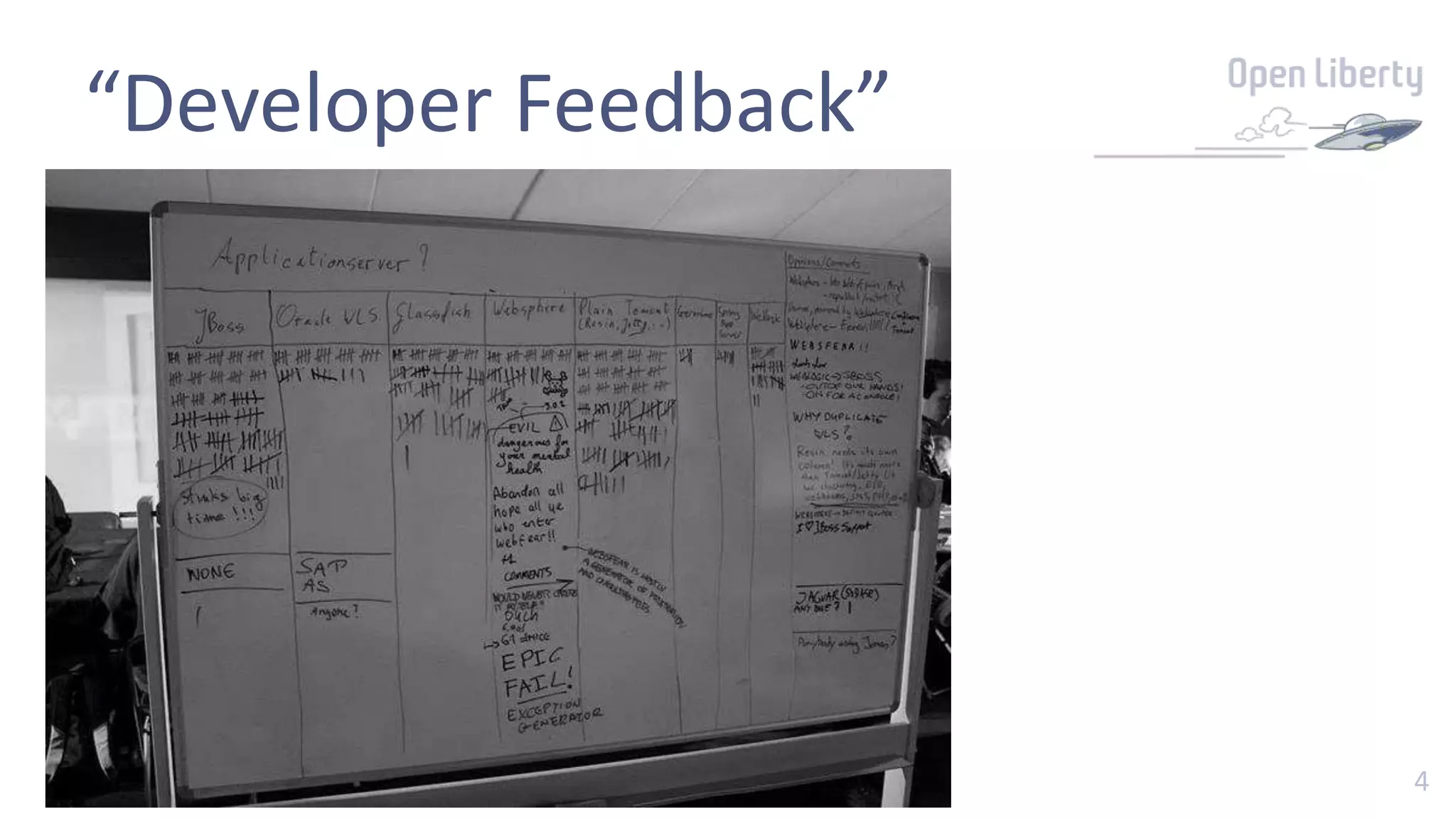
“Developer Feedback”
5
“Developer Feedback”
Quotes
Evil
EPIC FAIL!
Exception generator
Would never choose it myself
Dangerous for your mental health
Abandon all hope ye who enter webfear!!
Websfear is mostly a generator of frustration and consulting fees
6
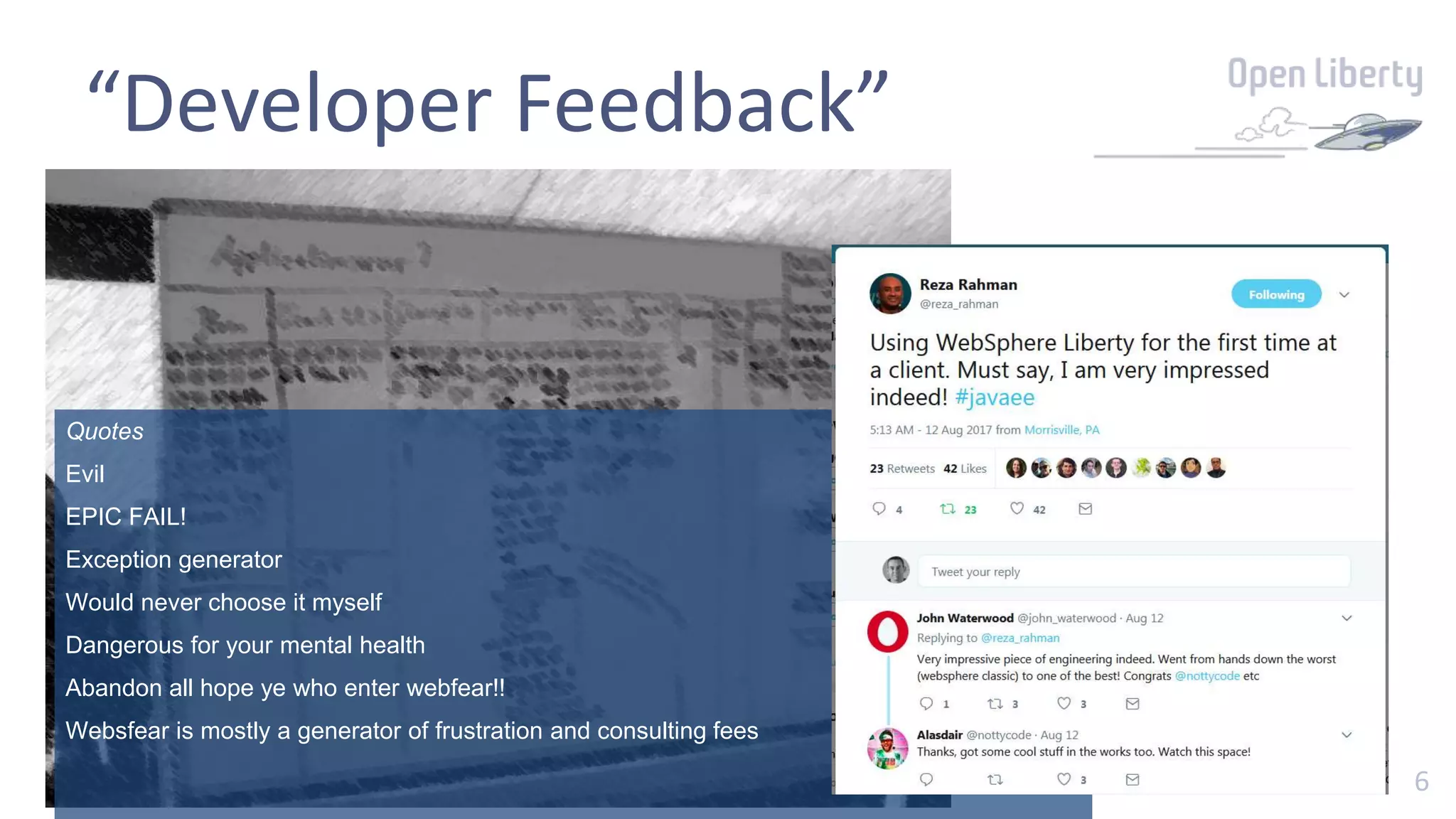
“Developer Feedback”
Quotes
Evil
EPIC FAIL!
Exception generator
Would never choose it myself
Dangerous for your mental health
Abandon all hope ye who enter webfear!!
Websfear is mostly a generator of frustration and consulting fees
7
Goals
• Efficient
• Simple to use
• Consistency
• Just enough Application Server
• Very good for virtualized environments
• End of migration
• Agile Ready
88
Introduction
getting started
9
openliberty.io
10
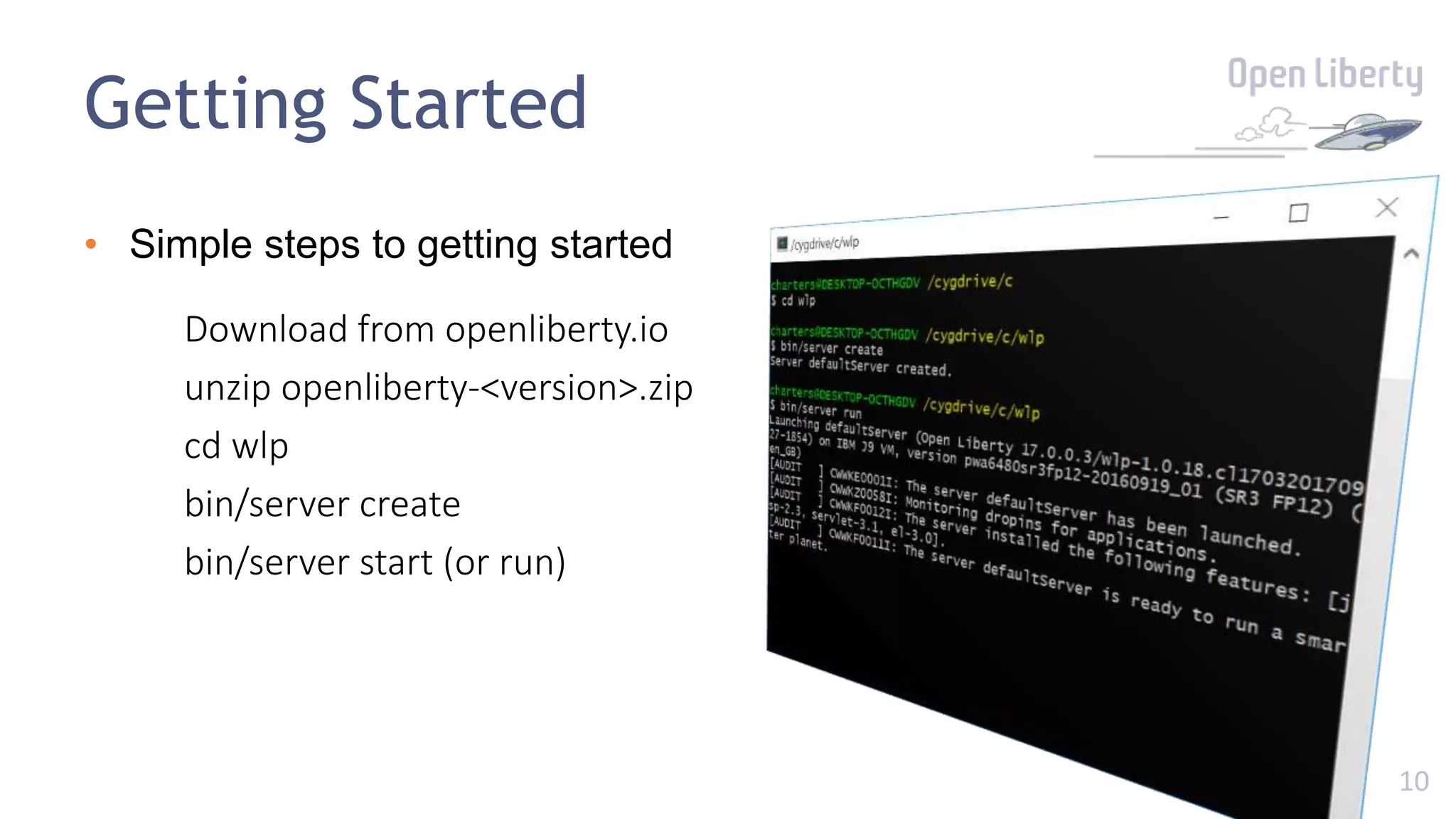
Getting Started
• Simple steps to getting started
Download from openliberty.io
unzip openliberty-<version>.zip
cd wlp
bin/server create
bin/server start (or run)
11
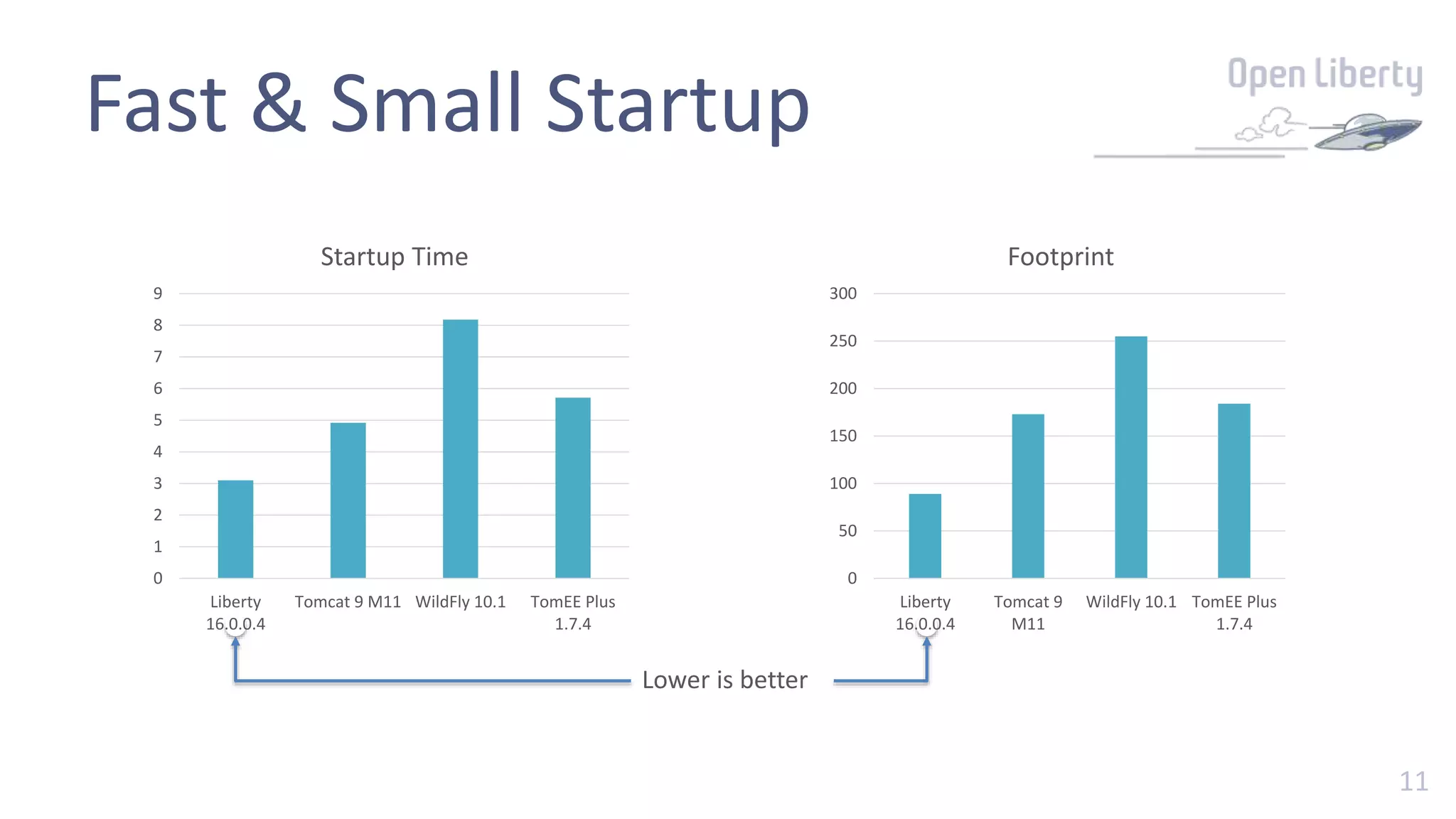
Fast & Small Startup
0
1
2
3
4
5
6
7
8
9
Liberty
16.0.0.4
Tomcat 9 M11 WildFly 10.1 TomEE Plus
1.7.4
Startup Time
0
50
100
150
200
250
300
Liberty
16.0.0.4
Tomcat 9
M11
WildFly 10.1 TomEE Plus
1.7.4
Footprint
Lower is better
1212
Demo 1
bin/server create, run/start, stop
1313
Server configuration
simple minimal config, perfect for DevOps
14
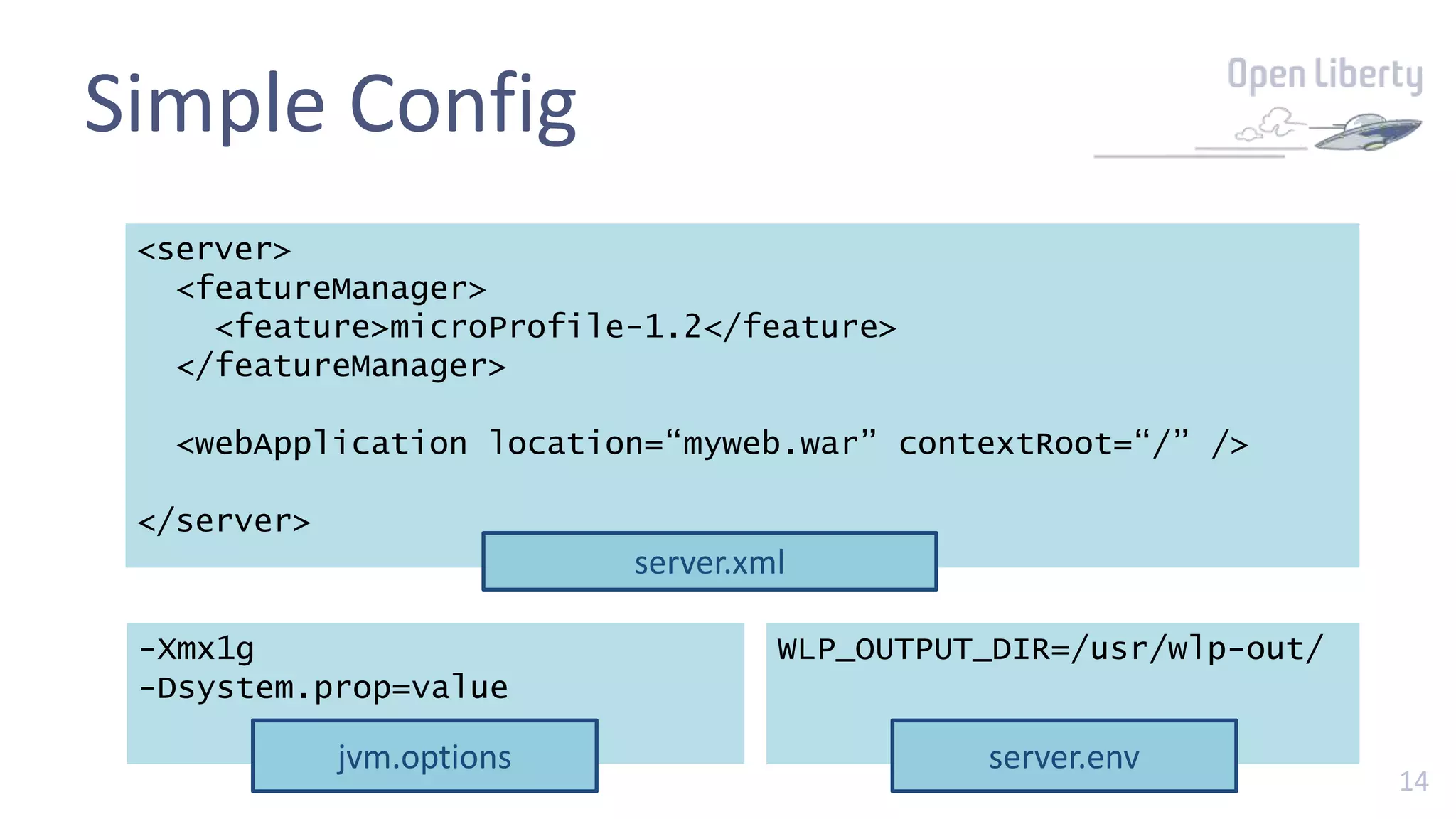
Simple Config
<server>
<featureManager>
<feature>microProfile-1.2</feature>
</featureManager>
<webApplication location=“myweb.war” contextRoot=“/” />
</server>
server.xml
-Xmx1g
-Dsystem.prop=value
jvm.options
WLP_OUTPUT_DIR=/usr/wlp-out/
server.env
15
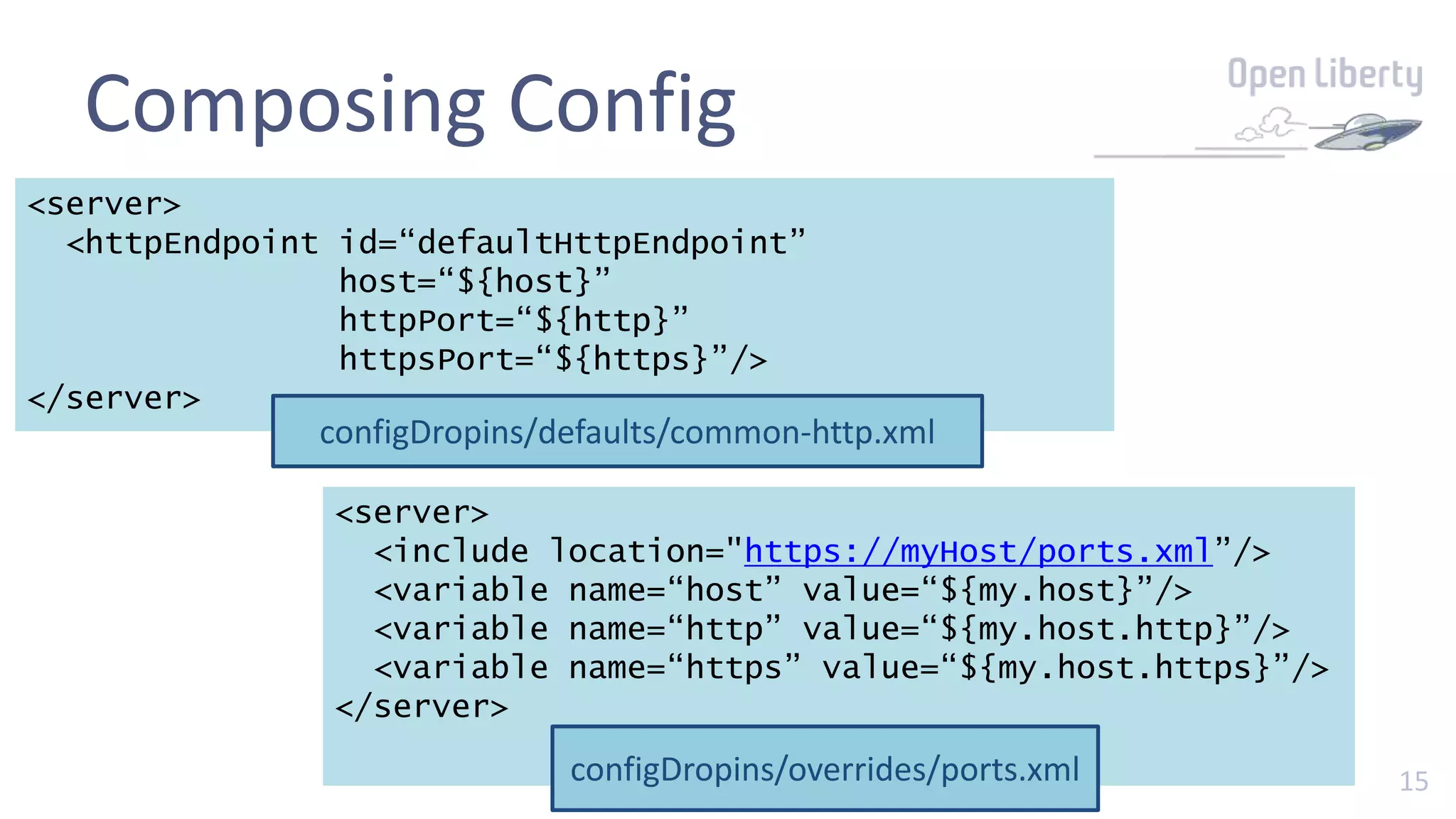
Composing Config
<server>
<httpEndpoint id=“defaultHttpEndpoint”
host=“${host}”
httpPort=“${http}”
httpsPort=“${https}”/>
</server>
configDropins/defaults/common-http.xml
<server>
<include location="https://myHost/ports.xml”/>
<variable name=“host” value=“${my.host}”/>
<variable name=“http” value=“${my.host.http}”/>
<variable name=“https” value=“${my.host.https}”/>
</server>
configDropins/overrides/ports.xml
1616
Demo 2
templatizing config (http port) - factor 3
1717
Server features
the best things come in small packages
18
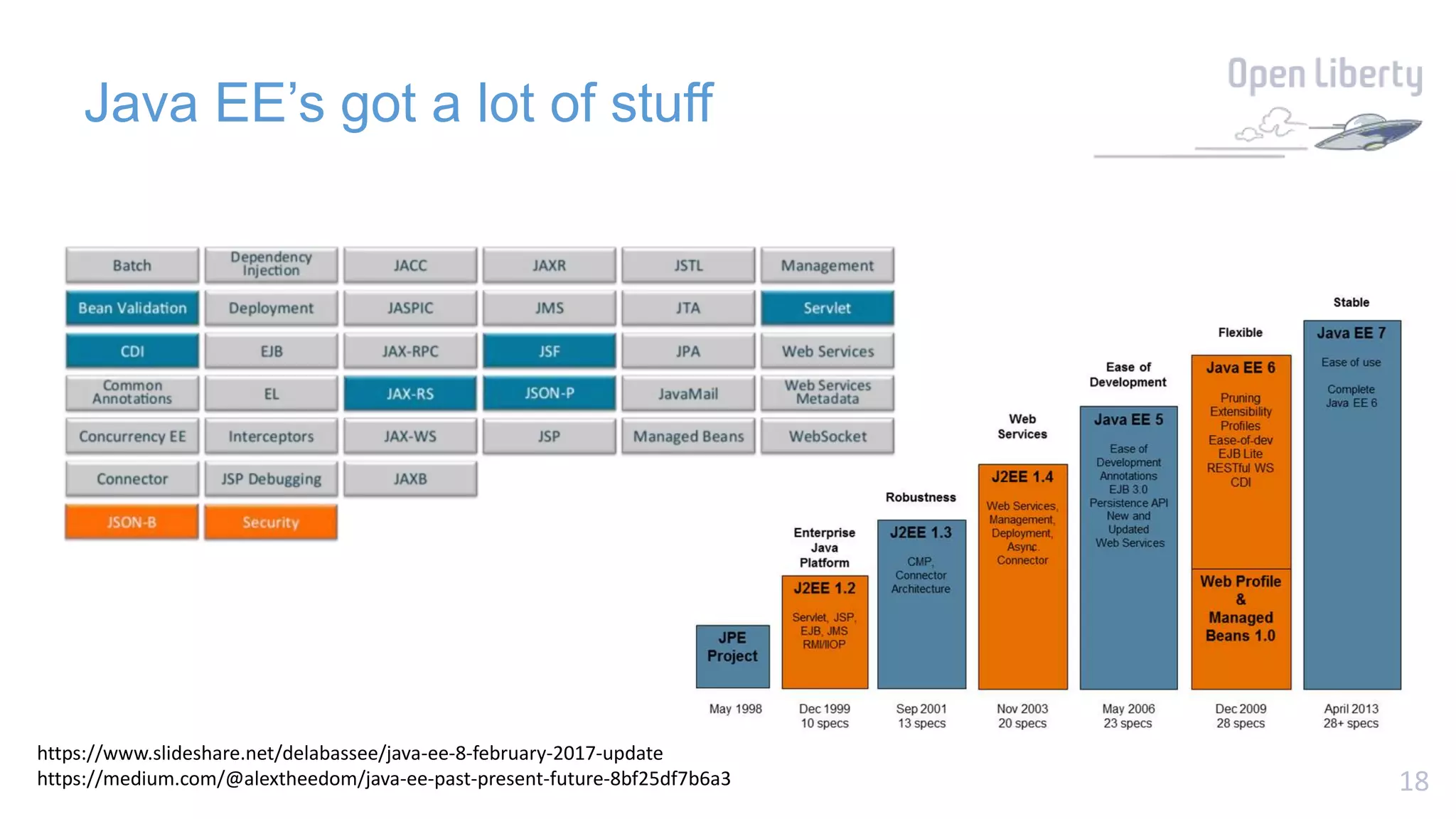
Java EE’s got a lot of stuff
https://www.slideshare.net/delabassee/java-ee-8-february-2017-update
https://medium.com/@alextheedom/java-ee-past-present-future-8bf25df7b6a3
19
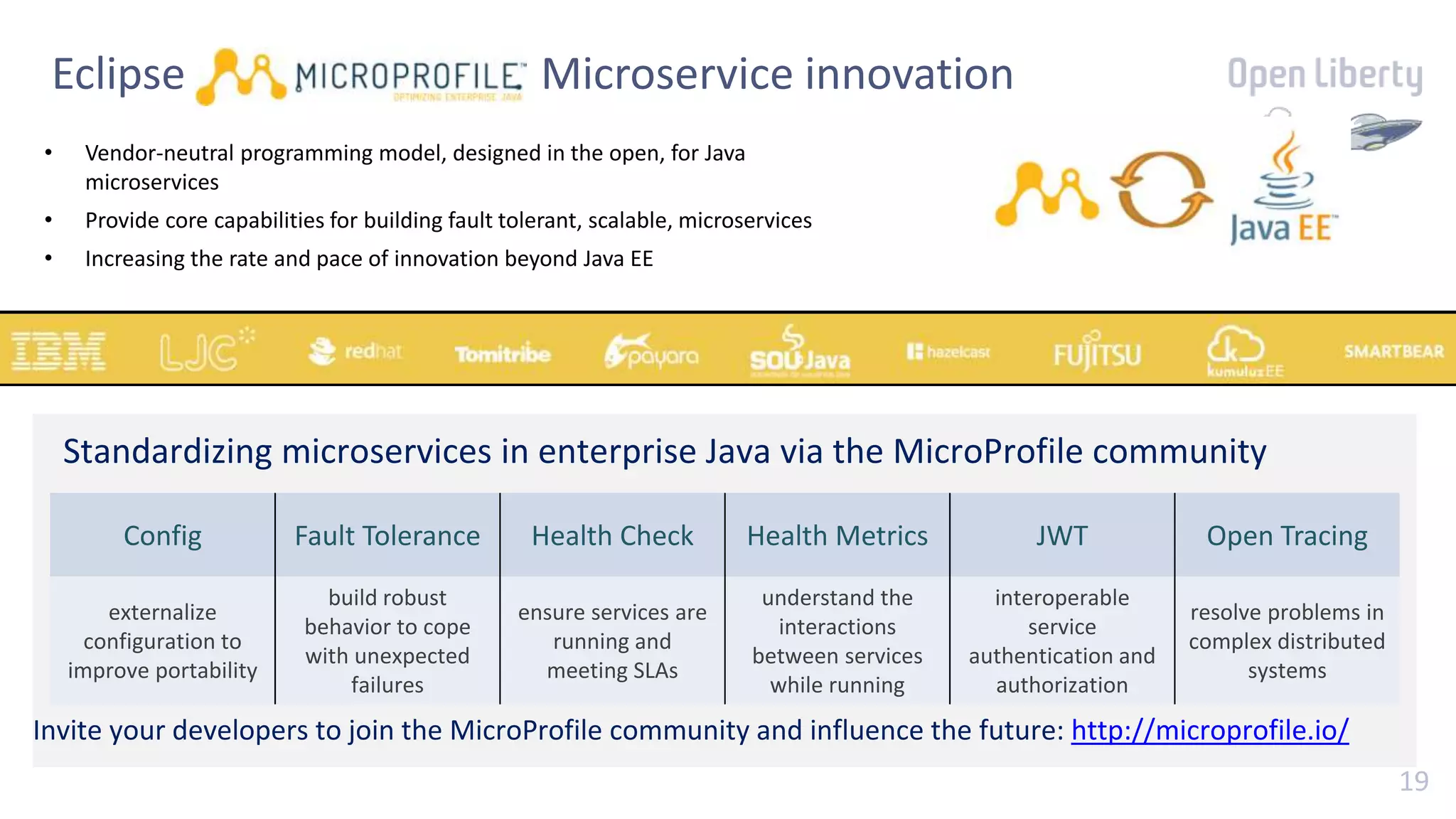
Eclipse MicroProfile : Microservice innovation
• Vendor-neutral programming model, designed in the open, for Java
microservices
• Provide core capabilities for building fault tolerant, scalable, microservices
• Increasing the rate and pace of innovation beyond Java EE
Standardizing microservices in enterprise Java via the MicroProfile community
Config Fault Tolerance Health Check Health Metrics JWT Open Tracing
externalize
configuration to
improve portability
build robust
behavior to cope
with unexpected
failures
ensure services are
running and
meeting SLAs
understand the
interactions
between services
while running
interoperable
service
authentication and
authorization
resolve problems in
complex distributed
systems
Invite your developers to join the MicroProfile community and influence the future: http://microprofile.io/
20
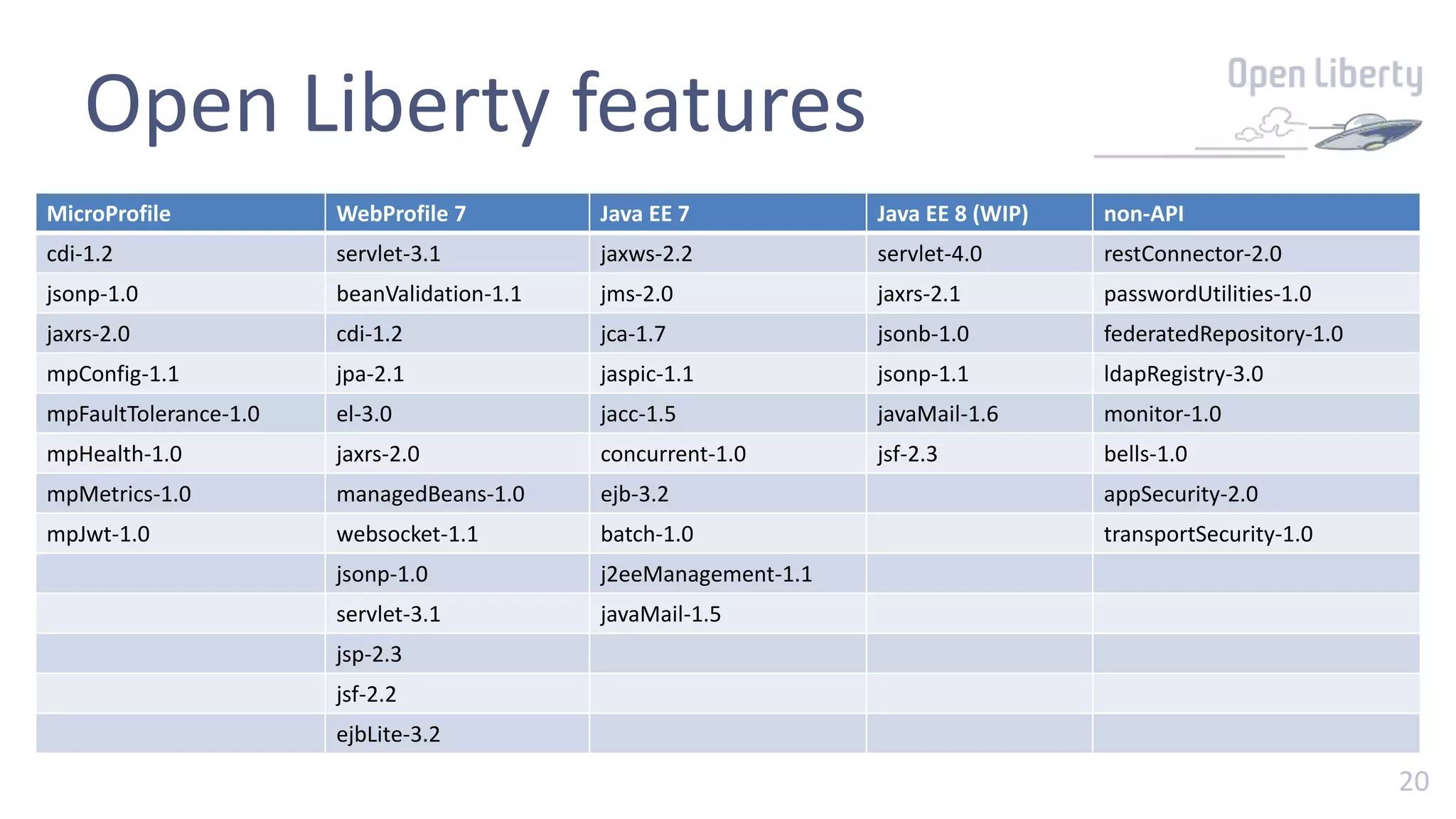
Open Liberty features
MicroProfile WebProfile 7 Java EE 7 Java EE 8 (WIP) non-API
cdi-1.2 servlet-3.1 jaxws-2.2 servlet-4.0 restConnector-2.0
jsonp-1.0 beanValidation-1.1 jms-2.0 jaxrs-2.1 passwordUtilities-1.0
jaxrs-2.0 cdi-1.2 jca-1.7 jsonb-1.0 federatedRepository-1.0
mpConfig-1.1 jpa-2.1 jaspic-1.1 jsonp-1.1 ldapRegistry-3.0
mpFaultTolerance-1.0 el-3.0 jacc-1.5 javaMail-1.6 monitor-1.0
mpHealth-1.0 jaxrs-2.0 concurrent-1.0 jsf-2.3 bells-1.0
mpMetrics-1.0 managedBeans-1.0 ejb-3.2 appSecurity-2.0
mpJwt-1.0 websocket-1.1 batch-1.0 transportSecurity-1.0
jsonp-1.0 j2eeManagement-1.1
servlet-3.1 javaMail-1.5
jsp-2.3
jsf-2.2
ejbLite-3.2
2121
Right-sizing
use what you choose
22
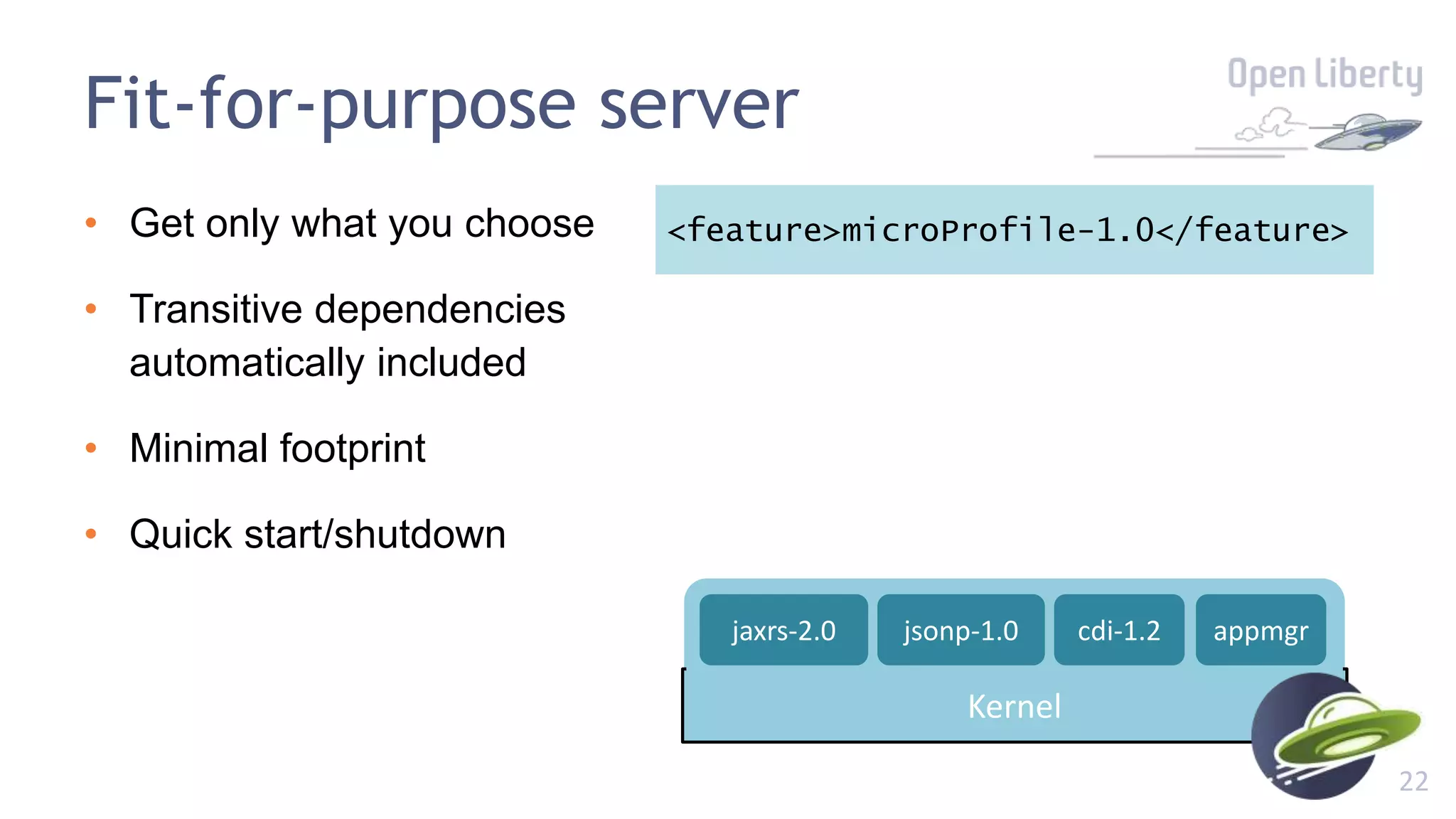
Fit-for-purpose server
• Get only what you choose
• Transitive dependencies
automatically included
• Minimal footprint
• Quick start/shutdown
<feature>microProfile-1.0</feature>
Kernel
appmgrjaxrs-2.0 cdi-1.2jsonp-1.0
23
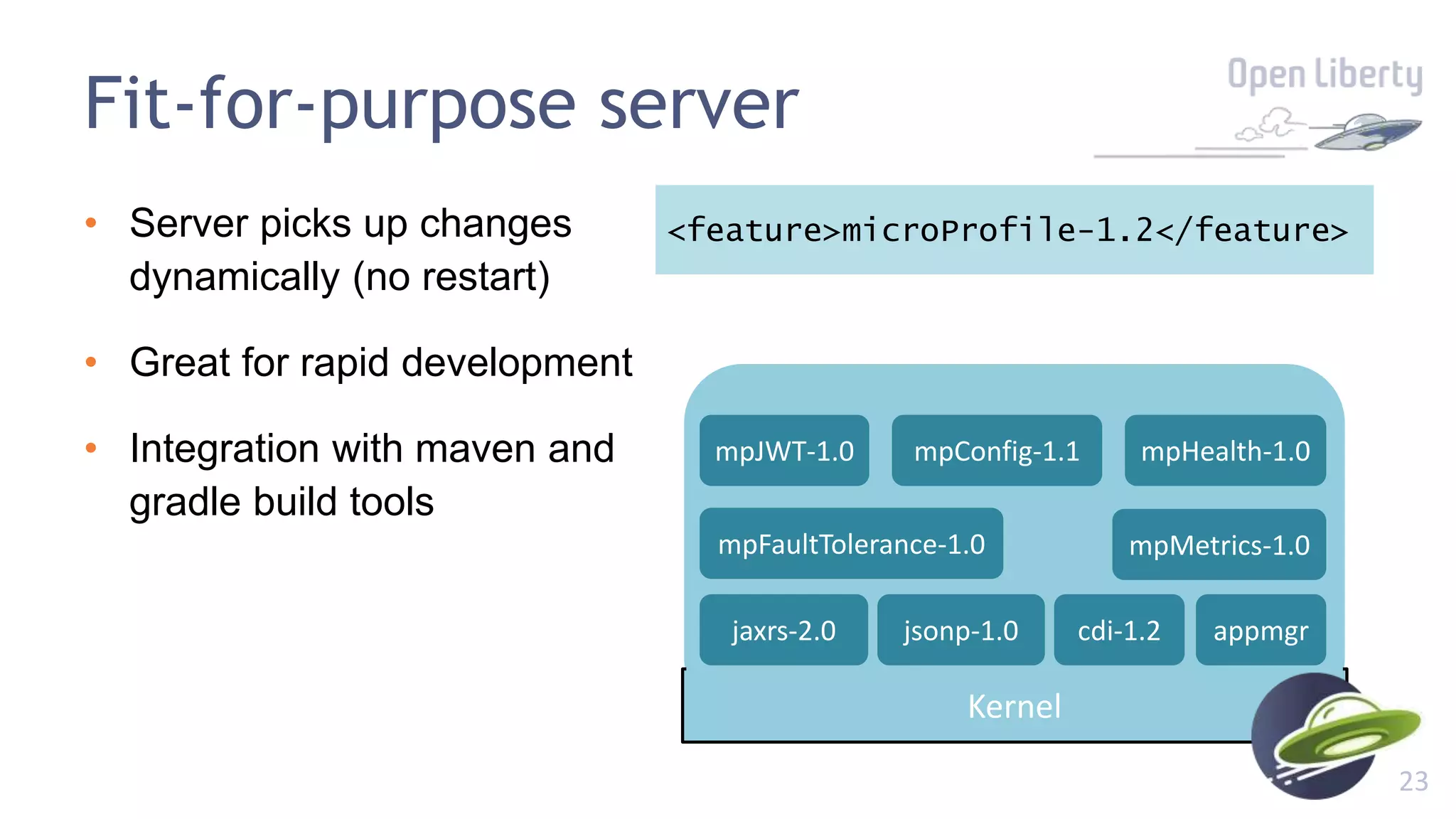
Fit-for-purpose server
• Server picks up changes
dynamically (no restart)
• Great for rapid development
• Integration with maven and
gradle build tools
<feature>microProfile-1.2</feature>
Kernel
appmgrjaxrs-2.0 cdi-1.2jsonp-1.0
mpConfig-1.1
mpMetrics-1.0mpFaultTolerance-1.0
mpHealth-1.0mpJWT-1.0
24
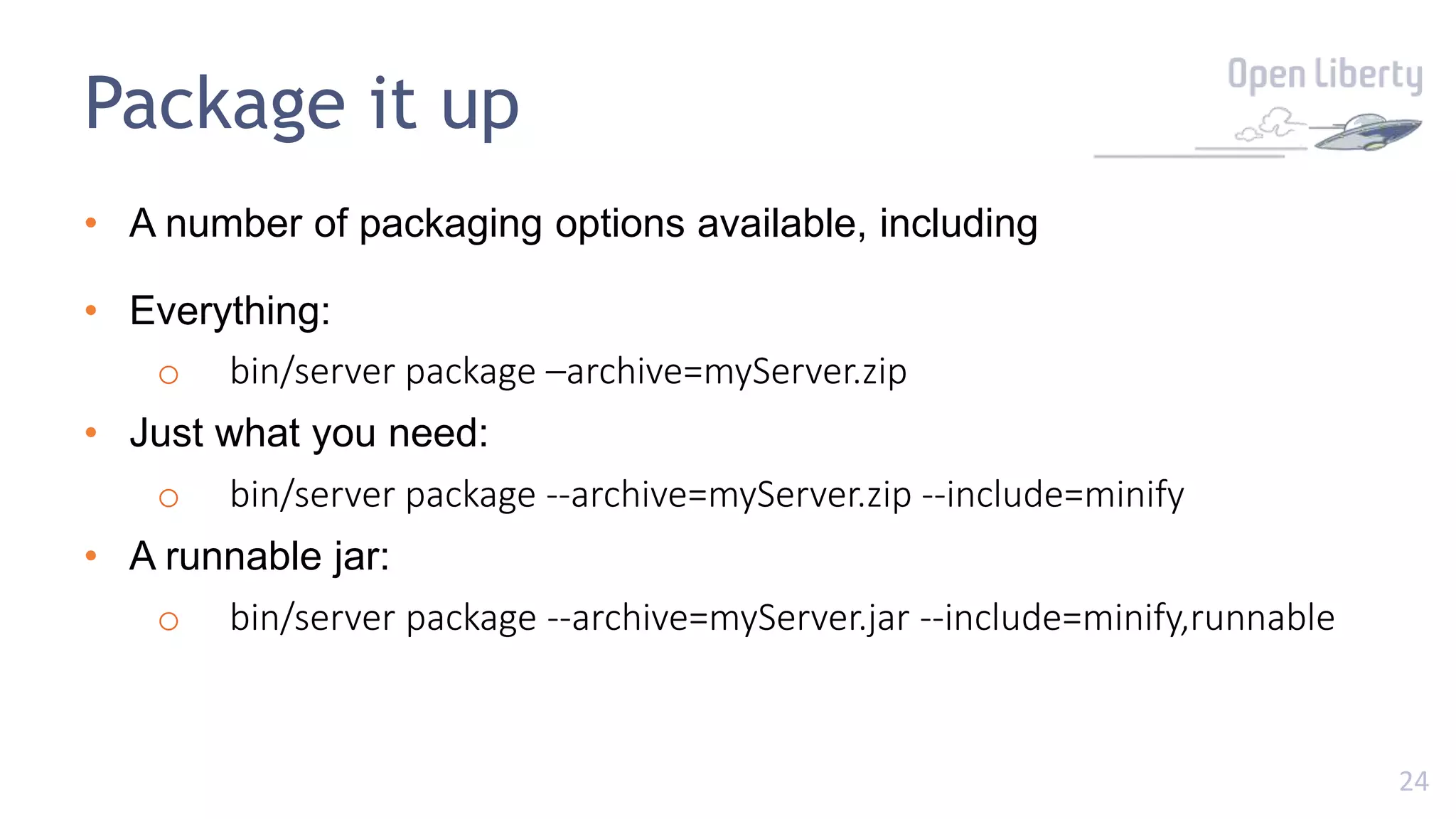
Package it up
• A number of packaging options available, including
• Everything:
o bin/server package –archive=myServer.zip
• Just what you need:
o bin/server package --archive=myServer.zip --include=minify
• A runnable jar:
o bin/server package --archive=myServer.jar --include=minify,runnable
2525
Demo 3
develop and package a minimal runnable REST service
2626
Robust Cloud Native
Microservices
right-size + MicroProfile + Docker
27
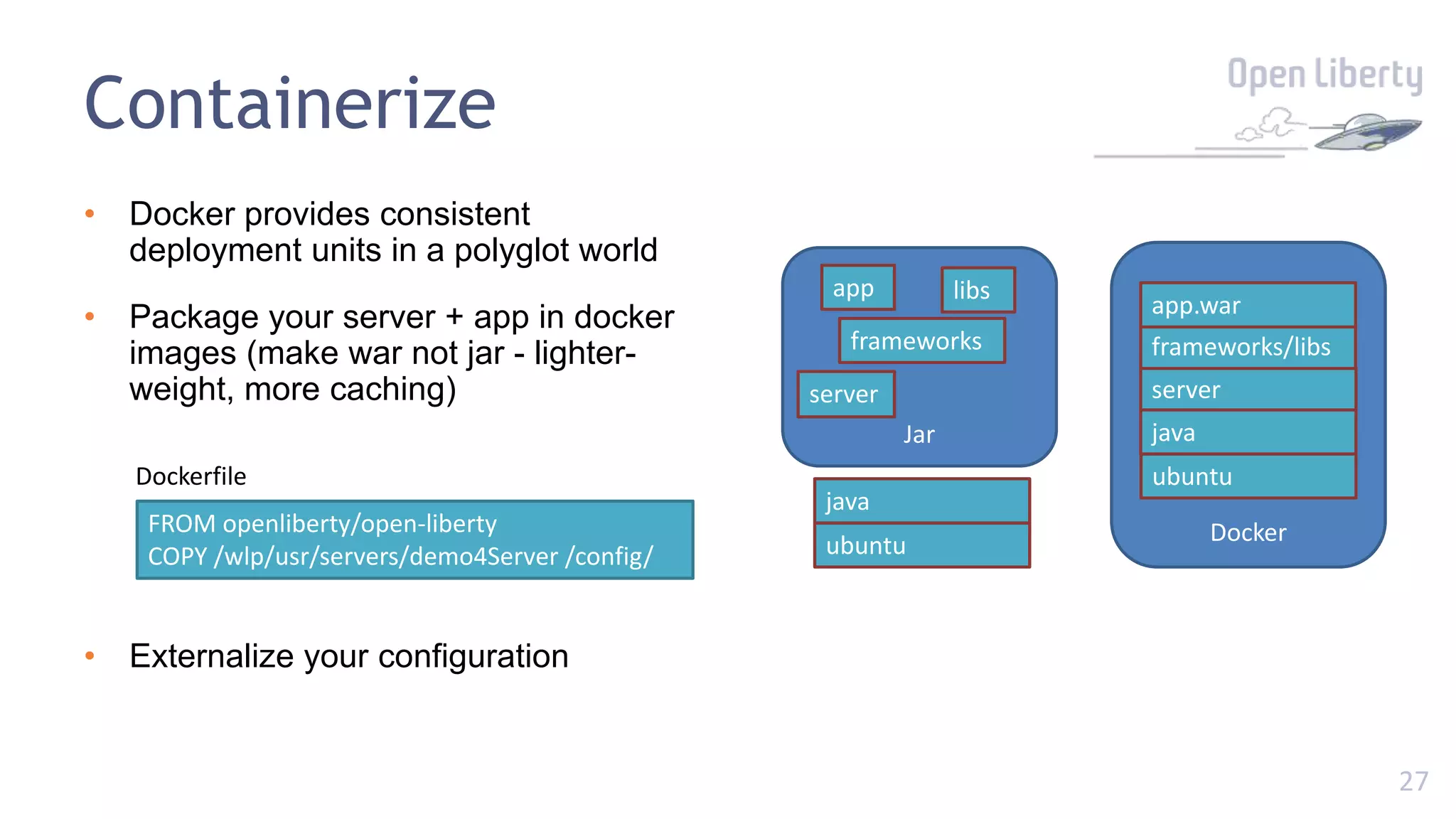
Containerize
• Docker provides consistent
deployment units in a polyglot world
• Package your server + app in docker
images (make war not jar - lighter-
weight, more caching)
• Externalize your configuration
Docker
server
ubuntu
java
frameworks/libs
app.war
Jar
server
ubuntu
java
frameworks
app libs
FROM openliberty/open-liberty
COPY /wlp/usr/servers/demo4Server /config/
Dockerfile
28
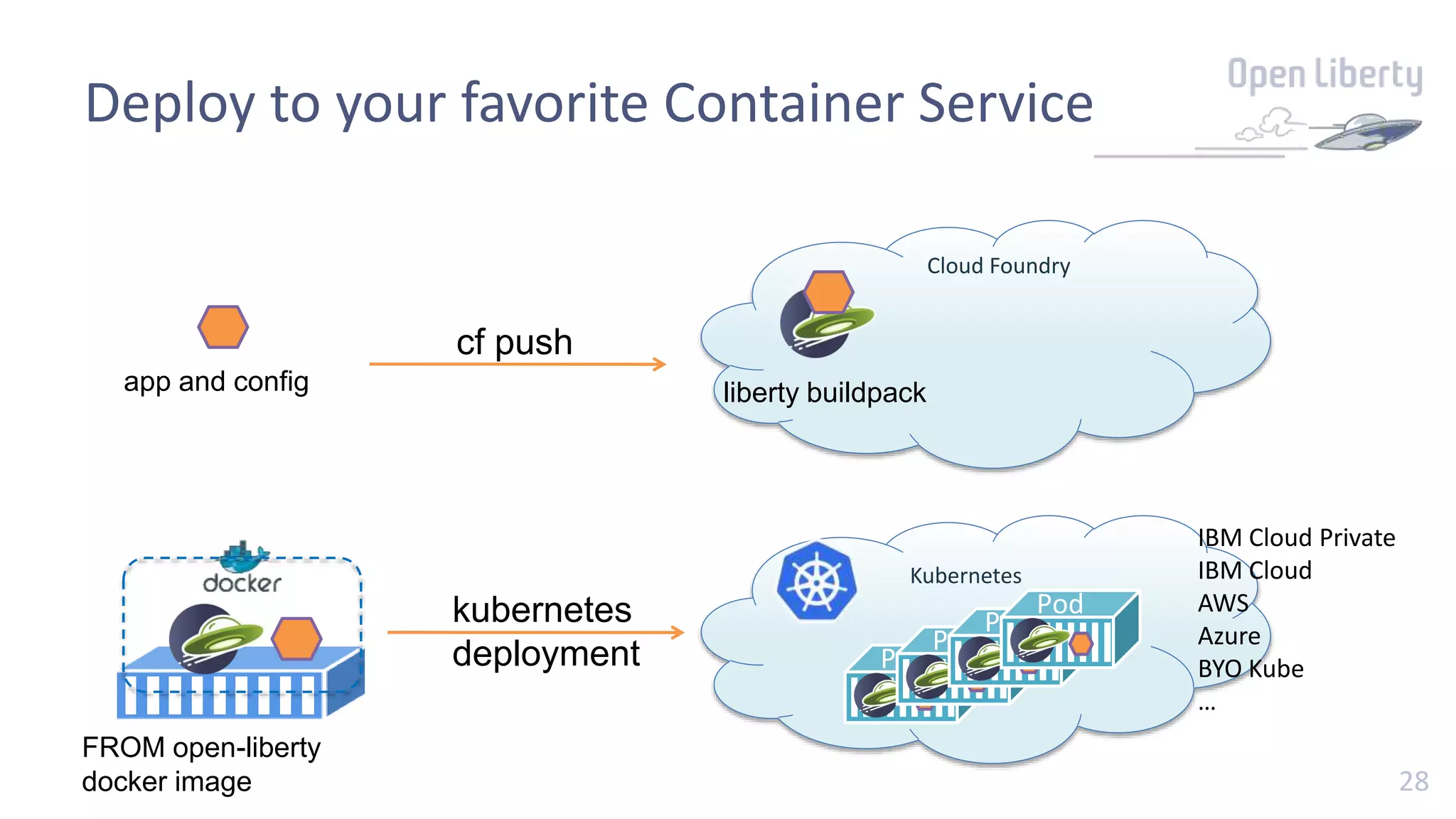
Cloud Foundry
app and config liberty buildpack
cf push
Deploy to your favorite Container Service
FROM open-liberty
docker image
Kubernetes
Pod
kubernetes
deployment Pod
Pod
Pod
Pod
IBM Cloud Private
IBM Cloud
AWS
Azure
BYO Kube
…
2929
Demo 4
a Docker microservice
30
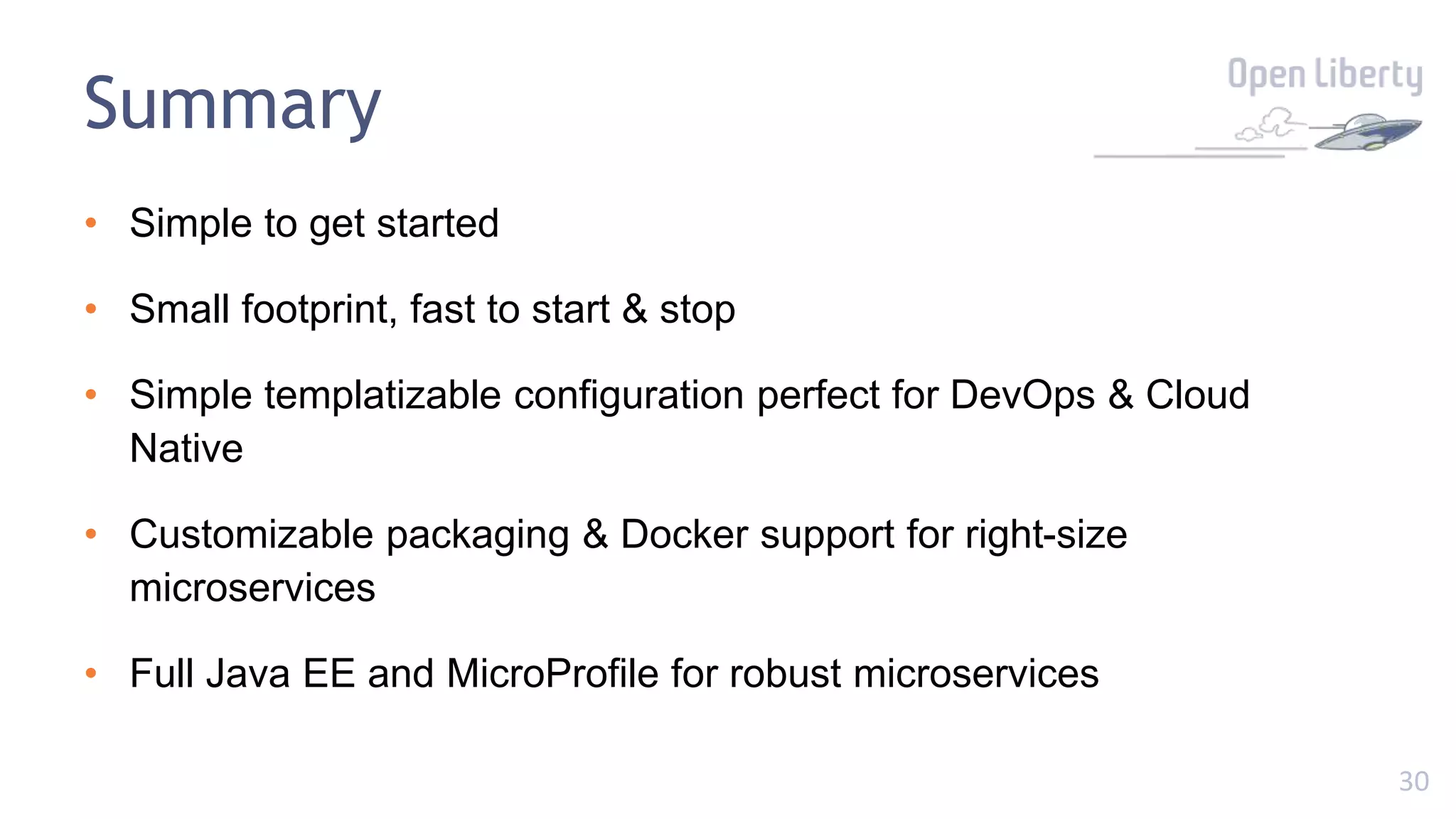
Summary
• Simple to get started
• Small footprint, fast to start & stop
• Simple templatizable configuration perfect for DevOps & Cloud
Native
• Customizable packaging & Docker support for right-size
microservices
• Full Java EE and MicroProfile for robust microservices
31
Useful links
• https://openliberty.io/
• https://github.com/openliberty/open-liberty
• http://groups.io/g/openliberty
• https://stackoverflow.com/questions/tagged/open-liberty
• http://www.eclipse.org/openj9/
• https://developer.ibm.com/microservice-builder/
3232
Thank You!

A first look at Open Liberty

  • 1.
  • 2.
    2 Agenda • History • Introduction •Server Configuration • Server Features • Right-sizings • Microservices • Summary + Demos
  • 3.
  • 4.
  • 5.
    5 “Developer Feedback” Quotes Evil EPIC FAIL! Exceptiongenerator Would never choose it myself Dangerous for your mental health Abandon all hope ye who enter webfear!! Websfear is mostly a generator of frustration and consulting fees
  • 6.
    6 “Developer Feedback” Quotes Evil EPIC FAIL! Exceptiongenerator Would never choose it myself Dangerous for your mental health Abandon all hope ye who enter webfear!! Websfear is mostly a generator of frustration and consulting fees
  • 7.
    7 Goals • Efficient • Simpleto use • Consistency • Just enough Application Server • Very good for virtualized environments • End of migration • Agile Ready
  • 8.
  • 9.
  • 10.
    10 Getting Started • Simplesteps to getting started Download from openliberty.io unzip openliberty-<version>.zip cd wlp bin/server create bin/server start (or run)
  • 11.
    11 Fast & SmallStartup 0 1 2 3 4 5 6 7 8 9 Liberty 16.0.0.4 Tomcat 9 M11 WildFly 10.1 TomEE Plus 1.7.4 Startup Time 0 50 100 150 200 250 300 Liberty 16.0.0.4 Tomcat 9 M11 WildFly 10.1 TomEE Plus 1.7.4 Footprint Lower is better
  • 12.
  • 13.
    1313 Server configuration simple minimalconfig, perfect for DevOps
  • 14.
    14 Simple Config <server> <featureManager> <feature>microProfile-1.2</feature> </featureManager> <webApplication location=“myweb.war”contextRoot=“/” /> </server> server.xml -Xmx1g -Dsystem.prop=value jvm.options WLP_OUTPUT_DIR=/usr/wlp-out/ server.env
  • 15.
    15 Composing Config <server> <httpEndpoint id=“defaultHttpEndpoint” host=“${host}” httpPort=“${http}” httpsPort=“${https}”/> </server> configDropins/defaults/common-http.xml <server> <includelocation="https://myHost/ports.xml”/> <variable name=“host” value=“${my.host}”/> <variable name=“http” value=“${my.host.http}”/> <variable name=“https” value=“${my.host.https}”/> </server> configDropins/overrides/ports.xml
  • 16.
    1616 Demo 2 templatizing config(http port) - factor 3
  • 17.
    1717 Server features the bestthings come in small packages
  • 18.
    18 Java EE’s gota lot of stuff https://www.slideshare.net/delabassee/java-ee-8-february-2017-update https://medium.com/@alextheedom/java-ee-past-present-future-8bf25df7b6a3
  • 19.
    19 Eclipse MicroProfile :Microservice innovation • Vendor-neutral programming model, designed in the open, for Java microservices • Provide core capabilities for building fault tolerant, scalable, microservices • Increasing the rate and pace of innovation beyond Java EE Standardizing microservices in enterprise Java via the MicroProfile community Config Fault Tolerance Health Check Health Metrics JWT Open Tracing externalize configuration to improve portability build robust behavior to cope with unexpected failures ensure services are running and meeting SLAs understand the interactions between services while running interoperable service authentication and authorization resolve problems in complex distributed systems Invite your developers to join the MicroProfile community and influence the future: http://microprofile.io/
  • 20.
    20 Open Liberty features MicroProfileWebProfile 7 Java EE 7 Java EE 8 (WIP) non-API cdi-1.2 servlet-3.1 jaxws-2.2 servlet-4.0 restConnector-2.0 jsonp-1.0 beanValidation-1.1 jms-2.0 jaxrs-2.1 passwordUtilities-1.0 jaxrs-2.0 cdi-1.2 jca-1.7 jsonb-1.0 federatedRepository-1.0 mpConfig-1.1 jpa-2.1 jaspic-1.1 jsonp-1.1 ldapRegistry-3.0 mpFaultTolerance-1.0 el-3.0 jacc-1.5 javaMail-1.6 monitor-1.0 mpHealth-1.0 jaxrs-2.0 concurrent-1.0 jsf-2.3 bells-1.0 mpMetrics-1.0 managedBeans-1.0 ejb-3.2 appSecurity-2.0 mpJwt-1.0 websocket-1.1 batch-1.0 transportSecurity-1.0 jsonp-1.0 j2eeManagement-1.1 servlet-3.1 javaMail-1.5 jsp-2.3 jsf-2.2 ejbLite-3.2
  • 21.
  • 22.
    22 Fit-for-purpose server • Getonly what you choose • Transitive dependencies automatically included • Minimal footprint • Quick start/shutdown <feature>microProfile-1.0</feature> Kernel appmgrjaxrs-2.0 cdi-1.2jsonp-1.0
  • 23.
    23 Fit-for-purpose server • Serverpicks up changes dynamically (no restart) • Great for rapid development • Integration with maven and gradle build tools <feature>microProfile-1.2</feature> Kernel appmgrjaxrs-2.0 cdi-1.2jsonp-1.0 mpConfig-1.1 mpMetrics-1.0mpFaultTolerance-1.0 mpHealth-1.0mpJWT-1.0
  • 24.
    24 Package it up •A number of packaging options available, including • Everything: o bin/server package –archive=myServer.zip • Just what you need: o bin/server package --archive=myServer.zip --include=minify • A runnable jar: o bin/server package --archive=myServer.jar --include=minify,runnable
  • 25.
    2525 Demo 3 develop andpackage a minimal runnable REST service
  • 26.
  • 27.
    27 Containerize • Docker providesconsistent deployment units in a polyglot world • Package your server + app in docker images (make war not jar - lighter- weight, more caching) • Externalize your configuration Docker server ubuntu java frameworks/libs app.war Jar server ubuntu java frameworks app libs FROM openliberty/open-liberty COPY /wlp/usr/servers/demo4Server /config/ Dockerfile
  • 28.
    28 Cloud Foundry app andconfig liberty buildpack cf push Deploy to your favorite Container Service FROM open-liberty docker image Kubernetes Pod kubernetes deployment Pod Pod Pod Pod IBM Cloud Private IBM Cloud AWS Azure BYO Kube …
  • 29.
  • 30.
    30 Summary • Simple toget started • Small footprint, fast to start & stop • Simple templatizable configuration perfect for DevOps & Cloud Native • Customizable packaging & Docker support for right-size microservices • Full Java EE and MicroProfile for robust microservices
  • 31.
    31 Useful links • https://openliberty.io/ •https://github.com/openliberty/open-liberty • http://groups.io/g/openliberty • https://stackoverflow.com/questions/tagged/open-liberty • http://www.eclipse.org/openj9/ • https://developer.ibm.com/microservice-builder/
  • 32.

Editor's Notes

  • #5 Use screenshow mode Picture from Devoxx 2008 view of AppServer landscape
  • #6 Use screenshow mode
  • #7 Use screenshow mode
  • #8 Customers building cloud-native apps and microservices have a choice of the edition that best suits their needs when they want to get support. For Web applications or microservices that rely only on the Web Profile, customers can select Liberty Core. For applications that need to integrate with existing Java EE applications, for example using JMS, customers can select Liberty Base. For a complete end-to-end DevOps pipeline that includes integration with GitHub, Jenkins, Zipkin, and Kubernetes (community edition, IBM Cloud private sold separately provides supported Kubernetes) then customers can select WebSphere Liberty ND (Network Deployment) NOTE: Licensing conditions apply when running a mixed environment comprising both commercial WebSphere and Open Liberty (see later slide) 1 reasons we did what we did (GP) [State what we believe:]  "We believe that the tools you choose shouldn’t make your job harder than necessary, or obscure what’s really going on under the covers because, at the end of the day, you are the one who has to support it." "We believe you should be able to focus on getting your job done without worrying about how to wire together the technology you need to do it." "We understand that whatever you're building is likely to be a part of something bigger." Aimed initially at addressing developers needs to get away from "WebsFear" Admin console 'may or may not need to restart server'. Even before we released it, progressed to lightweight runtime but ALWAYS focussed on developer-first Cloud motivation for small performant runtime: we needed our own solution in IBM for efficiency in public cloud.  1 Things we solved that are either unique or best in class (AN)
  • #12 Anyone can produce a slide with Graphs on it – look, here’s ours… (what’s the phrase… lies, damned lies, and statistics?) Why the graph? Because we want to show you that Liberty probably doesn’t match your expectations of an IBM app server – you expect it to be big and slow, and its not, it’s small and fast because we listened to feedback and built a runtime that meets developers needs. So what’s the takeaway from the graph? That Liberty is as competitive as the rest of the field – better than the rest of the field – as we saw when we did a compare against the popular open source alternatives. We know that your mileage may vary, which is why we’re not going to try and explain this in detail – seeing is believing, so we ask that you forget any preconceived ideas of what WebSphere Liberty is like and take a look for yourself (we’ll show you how easy that is later)
  • #15 https://www.ibm.com/support/knowledgecenter/en/SS7K4U_liberty/com.ibm.websphere.wlp.zseries.doc/ae/twlp_admin_customvars.html
  • #16 Mention you can check in config.
  • #20 See http://microprofile.io/ Graphic shows the community members for MicroProfile who are contributing to the technical direction and development of core capabilities that MicroProfile offers. These form the essential building blocks of microservices and are currently absent from the Java EE specification. By taking a community driven approach to their development, the broader Java developer community can increase the rate and pace of innovation, and prove the technology through the community prior to offering the capabilities to Oracle to standardizes as part of a future Java EE specification. As MicroProfile is an open source Eclipse project, multiple vendors provide implementations of the MicroProfile specification following the tradition of Java EE itself which provides a vendor neutral specification for enterprise application development. This helps optimize the portability of apps built using the MicroProfile specification and avoids vendor lock-in.
  • #23 Another aspect of “performance” is related to the developer experience of how quickly can a solution be developed using Liberty? At one extreme (on the left) there is the “package everything you may ever need and always have it”. So you get consistency but no choice and (re)start time in the dev environment is slow Another extreme (not shouwn) is to assemble exactly what you need from different sources and stitch it together. Here you are picking choice over consistency and the challenge comes when you need to extend or debug with a variety of different prob-det strategies from the component pieces. The best choice is the one on the right. Chose only what you need from a wide set of capabilities developed with common configuration, lifecycle and prob-det strategies – choice with consistency. That is what Liberty offers with “features” being the runtime units enabled through simple and consistent configuration.
  • #24 Another aspect of “performance” is related to the developer experience of how quickly can a solution be developed using Liberty? At one extreme (on the left) there is the “package everything you may ever need and always have it”. So you get consistency but no choice and (re)start time in the dev environment is slow Another extreme (not shouwn) is to assemble exactly what you need from different sources and stitch it together. Here you are picking choice over consistency and the challenge comes when you need to extend or debug with a variety of different prob-det strategies from the component pieces. The best choice is the one on the right. Chose only what you need from a wide set of capabilities developed with common configuration, lifecycle and prob-det strategies – choice with consistency. That is what Liberty offers with “features” being the runtime units enabled through simple and consistent configuration.
  • #29 New cloud models were not a concern at the time but were quickly adopted because of Liberty's design