PROJECT ON
RESTAURANTBILLING
SYSTEM
Dr. VIRENDRA SWAROOP INSTITUTE OF
COMPUTER STUDIES
KIDWAI NAGAR, KANPUR
Project Team Members
NAME
ABHILASH PANDEY
DIVYAJEET SINGH
ISHAN TRIPATHI
ROLL NUMBER
2200470140003
2200470140003
2200470140003
Table of Contents
 ABSTRACT
 EXISTING SYSTEM
 PROPOSED SYSTEM
 BLOCK DIAGRAMS
 HARDWARE AND SOFTWARE REQUIREMENTS
 CODING
 CONCLUSION
 REFERENCES
ABSTRACT
This is a simple web-based restaurant billing system that allows users to select
items from a menu, add them to a cart, and generate a bill. The system includes a
menu page, a cart/dashboard page, and a billing page with payment options.
It is designed for the sole purpose of efficiency, speed, and accuracy. The
details of new food items can also entered and retrieve the details of food
items and employees available in the System.
INTRODUCTION
The project “Restaurant billing system” for
monitoring and controlling the transactions in a
restaurant.
This is a simple web-based restaurant billing
system that allows users to select items from a
menu, add them to a cart, and generate a bill. The
system includes a menu page, a cart/dashboard
page, and a billing page with payment options.
The system processes transaction and stores the
resulting data. Reports will be generated from
these data which help the manager to make
appropriate business decisions for the restaurant.
PURPOSE OF RBS
● Reservation system
● Provide many payment mode
● Easy way to enter new customers
● Provide membership to customer
● Automatic GST calculation
Existing System
● Online Ordering System
● Payment Gateway
● Inventory Management
● Offline Access
● Account Management
Proposed System
● Automated system
● To reduce difficult time communicating
● Eliminate the need for lengthy waits at restaurants
● Diverse array of businesses
Features
● View a list of menu items System.
● Add and remove items to/from the
cart.
● Calculate the total bill amount.
● Choose from multiple payment
methods: Online Banking, UPI, and
Card Payment.
Technology Used
● HTML
● CSS (Bootstrap for styling)
● JavaScript
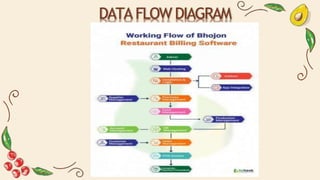
DATA FLOW DIAGRAM
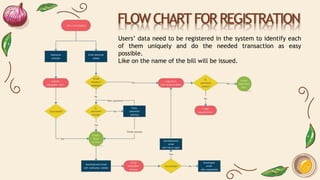
FLOW CHART FOR REGISTRATION
Users’ data need to be registered in the system to identify each
of them uniquely and do the needed transaction as easy
possible.
Like on the name of the bill will be issued.
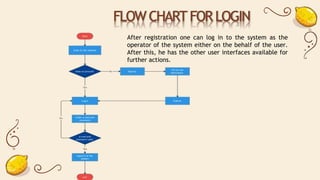
FLOW CHART FOR LOGIN
After registration one can log in to the system as the
operator of the system either on the behalf of the user.
After this, he has the other user interfaces available for
further actions.
SELECTION AND PLACING ORDER
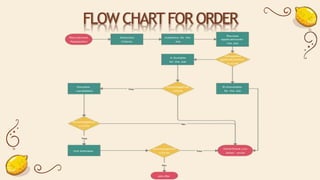
According to various filters and according to the price, one can select
food. After the successful selection of the item, he has to place the
order. Here the customer confirmation is required on the basis of the
order that will be placed.
FLOW CHART FOR ORDER
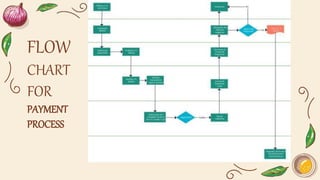
BILLING AND PAYMENT
Bill is prepared according to the item selected. Here tax
calculation is also considered and then total calculation and then
bill according to them is shown to the user then payment part
comes.
Payment selected by the customer either in the cash mode or
debit or credit and information is fed into the system.
FLOW
CHART
FOR
PAYMENT
PROCESS
Hardware Requirements :
 Receipt/thermal printer
 Kitchen/impact printer
 Barcode scanner
 Cash drawer
 Payment device
 Router
HardwareandSoftwareRequirements
Software Requirements :
 Inventory tracking
 POS system
 POS terminal
 CRM integration
 Easy menu setup
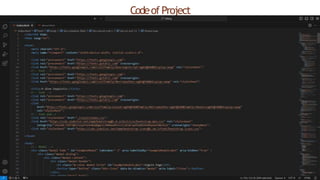
Codeof Project
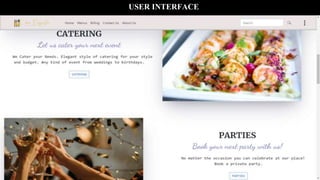
USER INTERFACE
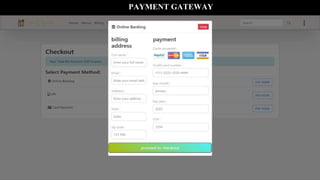
PAYMENT GATEWAY
CONCLUSION
Finally, in the restaurant billing system source code, the outcome of all the
time hard work is here. We have a system which takes the necessary
choices of the customer according to the various filter like price, category
of the food, and popularity. Then he is able to place the order accordingly
and then the system calculates all the total of the order with taxes and
then it can dispatch the bill that is handed over to the customer.
THANK YOU

online restaurant billing system ppt vsics

  • 1.
  • 2.
    Dr. VIRENDRA SWAROOPINSTITUTE OF COMPUTER STUDIES KIDWAI NAGAR, KANPUR Project Team Members NAME ABHILASH PANDEY DIVYAJEET SINGH ISHAN TRIPATHI ROLL NUMBER 2200470140003 2200470140003 2200470140003
  • 3.
    Table of Contents ABSTRACT  EXISTING SYSTEM  PROPOSED SYSTEM  BLOCK DIAGRAMS  HARDWARE AND SOFTWARE REQUIREMENTS  CODING  CONCLUSION  REFERENCES
  • 4.
    ABSTRACT This is asimple web-based restaurant billing system that allows users to select items from a menu, add them to a cart, and generate a bill. The system includes a menu page, a cart/dashboard page, and a billing page with payment options. It is designed for the sole purpose of efficiency, speed, and accuracy. The details of new food items can also entered and retrieve the details of food items and employees available in the System.
  • 5.
    INTRODUCTION The project “Restaurantbilling system” for monitoring and controlling the transactions in a restaurant. This is a simple web-based restaurant billing system that allows users to select items from a menu, add them to a cart, and generate a bill. The system includes a menu page, a cart/dashboard page, and a billing page with payment options. The system processes transaction and stores the resulting data. Reports will be generated from these data which help the manager to make appropriate business decisions for the restaurant.
  • 6.
    PURPOSE OF RBS ●Reservation system ● Provide many payment mode ● Easy way to enter new customers ● Provide membership to customer ● Automatic GST calculation
  • 7.
    Existing System ● OnlineOrdering System ● Payment Gateway ● Inventory Management ● Offline Access ● Account Management
  • 8.
    Proposed System ● Automatedsystem ● To reduce difficult time communicating ● Eliminate the need for lengthy waits at restaurants ● Diverse array of businesses
  • 9.
    Features ● View alist of menu items System. ● Add and remove items to/from the cart. ● Calculate the total bill amount. ● Choose from multiple payment methods: Online Banking, UPI, and Card Payment.
  • 10.
    Technology Used ● HTML ●CSS (Bootstrap for styling) ● JavaScript
  • 11.
  • 12.
    FLOW CHART FORREGISTRATION Users’ data need to be registered in the system to identify each of them uniquely and do the needed transaction as easy possible. Like on the name of the bill will be issued.
  • 13.
    FLOW CHART FORLOGIN After registration one can log in to the system as the operator of the system either on the behalf of the user. After this, he has the other user interfaces available for further actions.
  • 14.
    SELECTION AND PLACINGORDER According to various filters and according to the price, one can select food. After the successful selection of the item, he has to place the order. Here the customer confirmation is required on the basis of the order that will be placed.
  • 15.
  • 16.
    BILLING AND PAYMENT Billis prepared according to the item selected. Here tax calculation is also considered and then total calculation and then bill according to them is shown to the user then payment part comes. Payment selected by the customer either in the cash mode or debit or credit and information is fed into the system.
  • 17.
  • 18.
    Hardware Requirements : Receipt/thermal printer  Kitchen/impact printer  Barcode scanner  Cash drawer  Payment device  Router HardwareandSoftwareRequirements Software Requirements :  Inventory tracking  POS system  POS terminal  CRM integration  Easy menu setup
  • 19.
  • 20.
  • 21.
  • 22.
    CONCLUSION Finally, in therestaurant billing system source code, the outcome of all the time hard work is here. We have a system which takes the necessary choices of the customer according to the various filter like price, category of the food, and popularity. Then he is able to place the order accordingly and then the system calculates all the total of the order with taxes and then it can dispatch the bill that is handed over to the customer.
  • 23.