


SAMSUNG
Smart Office Solution
“Office in the cloud”
Printing Solutions Business
Samsung Electronics Co, Ltd
Chin Yoon
Vice President
Strategic Marketing
Virtual Office
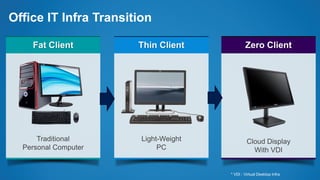
Office IT Infra Transition
* VDI : Virtual Desktop Infra
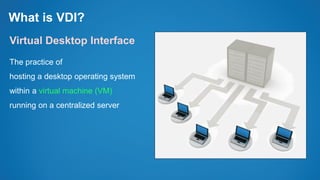
What is VDI?
Virtual Desktop Interface
The practice of
hosting a desktop operating system
within a virtual machine (VM)
running on a centralized server
VDI Market Trends
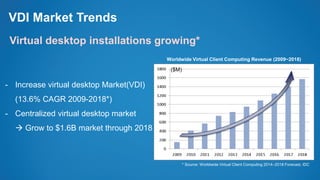
Virtual desktop installations growing*
- Increase virtual desktop Market(VDI)
(13.6% CAGR 2009-2018*)
- Centralized virtual desktop market
 Grow to $1.6B market through 2018
* Source: Worldwide Virtual Client Computing 2014–2018 Forecast, IDC
Worldwide Virtual Client Computing Revenue (2009~2018)
($M)
VDI Market Trends
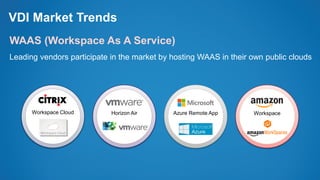
WAAS (Workspace As A Service)
Leading vendors participate in the market by hosting WAAS in their own public clouds
Workspace Cloud Horizon Air Azure Remote App Workspace
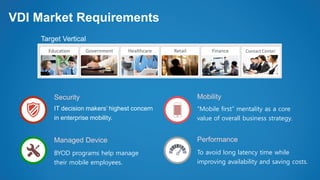
VDI Market Requirements
Security
Managed Device
Mobility
Performance
IT decision makers’ highest concern
in enterprise mobility.
BYOD programs help manage
their mobile employees.
“Mobile first” mentality as a core
value of overall business strategy.
To avoid long latency time while
improving availability and saving costs.
Contact CenterFinanceRetailHealthcareGovernmentEducation
Target Vertical
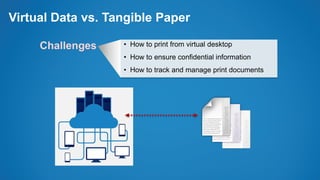
Virtual Data vs. Tangible Paper
• How to print from virtual desktop
• How to ensure confidential information
• How to track and manage print documents
Challenges
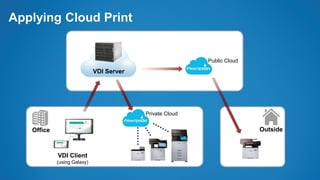
Applying Cloud Print
VDI Server
VDI Client
(using Galaxy)
Office Outside
Private Cloud
Public Cloud
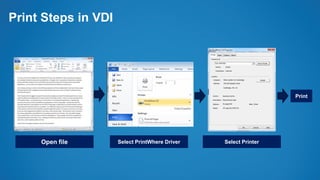
Open file
Print Steps in VDI
Select PrintWhere Driver Select Printer
Print
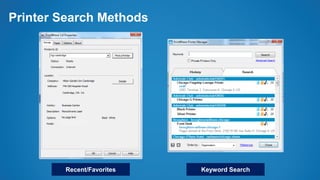
Printer Search Methods
Recent/Favorites Keyword Search
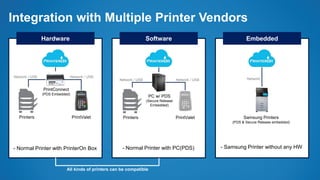
Integration with Multiple Printer Vendors
Hardware Software Embedded
All kinds of printers can be compatible
PrintValetPrinters
- Normal Printer with PrinterOn Box
PrintConnect
(PDS Embedded)
Network / USB Network / USB
PrintValetPrinters
PC w/ PDS
(Secure Release
Embedded)
Network / USB Network / USB Network
Samsung Printers
(PDS & Secure Release embedded)
- Normal Printer with PC(PDS) - Samsung Printer without any HW
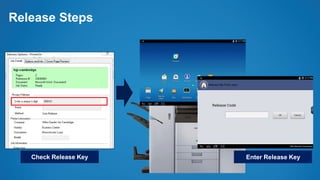
Release Steps
Check Release Key Enter Release Key
Concerning about Document Security
• In the cloud, all data should be protected by various security technology.
• How about printing?
• Even if print data is on the cloud, print security should be same as
enterprise printing.
• Like authentication, tracking and reporting
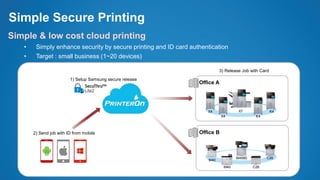
Simple Secure Printing
Simple & low cost cloud printing
• Simply enhance security by secure printing and ID card authentication
• Target : small business (1~20 devices)
2) Send job with ID from mobile
1) Setup Samsung secure release
Office A
Office B
3) Release Job with Card
X7X4
X4
K4
K4
M4580 C26
M40
M40
C26
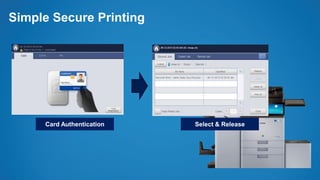
Simple Secure Printing
Card Authentication Select & Release
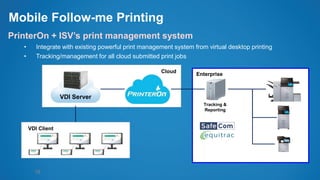
Mobile Follow-me Printing
18
PrinterOn + ISV’s print management system
• Integrate with existing powerful print management system from virtual desktop printing
• Tracking/management for all cloud submitted print jobs
VDI Server
VDI Client
Tracking &
Reporting
Enterprise
Cloud
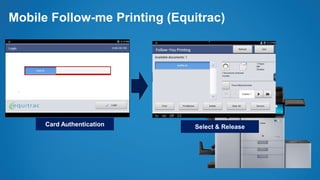
Mobile Follow-me Printing (Equitrac)
Card Authentication Select & Release
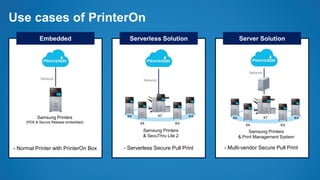
Use cases of PrinterOn
Embedded Serverless Solution Server Solution
- Normal Printer with PrinterOn Box
Network
Samsung Printers
(PDS & Secure Release embedded)
- Serverless Secure Pull Print - Multi-vendor Secure Pull Print
X7X4
X4
K4
K4
Network
Samsung Printers
& SecuThru Lite 2
X7X4
X4
K4
K4
Network
Samsung Printers
& Print Management System
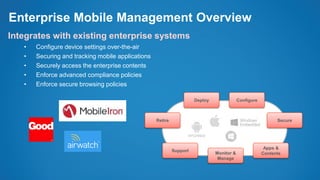
Enterprise Mobile Management Overview
Integrates with existing enterprise systems
• Configure device settings over-the-air
• Securing and tracking mobile applications
• Securely access the enterprise contents
• Enforce advanced compliance policies
• Enforce secure browsing policies
Deploy
Retire Secure
Configure
Support
Monitor &
Manage
Apps &
Contents
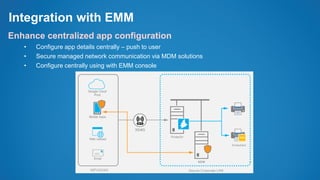
Integration with EMM
Enhance centralized app configuration
• Configure app details centrally – push to user
• Secure managed network communication via MDM solutions
• Configure centrally using with EMM console
Office in the cloud short

Office in the cloud short

  • 1.
    SAMSUNG Smart Office Solution “Officein the cloud” Printing Solutions Business Samsung Electronics Co, Ltd
  • 2.
  • 3.
  • 4.
    Office IT InfraTransition * VDI : Virtual Desktop Infra
  • 5.
    What is VDI? VirtualDesktop Interface The practice of hosting a desktop operating system within a virtual machine (VM) running on a centralized server
  • 6.
    VDI Market Trends Virtualdesktop installations growing* - Increase virtual desktop Market(VDI) (13.6% CAGR 2009-2018*) - Centralized virtual desktop market  Grow to $1.6B market through 2018 * Source: Worldwide Virtual Client Computing 2014–2018 Forecast, IDC Worldwide Virtual Client Computing Revenue (2009~2018) ($M)
  • 7.
    VDI Market Trends WAAS(Workspace As A Service) Leading vendors participate in the market by hosting WAAS in their own public clouds Workspace Cloud Horizon Air Azure Remote App Workspace
  • 8.
    VDI Market Requirements Security ManagedDevice Mobility Performance IT decision makers’ highest concern in enterprise mobility. BYOD programs help manage their mobile employees. “Mobile first” mentality as a core value of overall business strategy. To avoid long latency time while improving availability and saving costs. Contact CenterFinanceRetailHealthcareGovernmentEducation Target Vertical
  • 9.
    Virtual Data vs.Tangible Paper • How to print from virtual desktop • How to ensure confidential information • How to track and manage print documents Challenges
  • 10.
    Applying Cloud Print VDIServer VDI Client (using Galaxy) Office Outside Private Cloud Public Cloud
  • 11.
    Open file Print Stepsin VDI Select PrintWhere Driver Select Printer Print
  • 12.
  • 13.
    Integration with MultiplePrinter Vendors Hardware Software Embedded All kinds of printers can be compatible PrintValetPrinters - Normal Printer with PrinterOn Box PrintConnect (PDS Embedded) Network / USB Network / USB PrintValetPrinters PC w/ PDS (Secure Release Embedded) Network / USB Network / USB Network Samsung Printers (PDS & Secure Release embedded) - Normal Printer with PC(PDS) - Samsung Printer without any HW
  • 14.
    Release Steps Check ReleaseKey Enter Release Key
  • 15.
    Concerning about DocumentSecurity • In the cloud, all data should be protected by various security technology. • How about printing? • Even if print data is on the cloud, print security should be same as enterprise printing. • Like authentication, tracking and reporting
  • 16.
    Simple Secure Printing Simple& low cost cloud printing • Simply enhance security by secure printing and ID card authentication • Target : small business (1~20 devices) 2) Send job with ID from mobile 1) Setup Samsung secure release Office A Office B 3) Release Job with Card X7X4 X4 K4 K4 M4580 C26 M40 M40 C26
  • 17.
    Simple Secure Printing CardAuthentication Select & Release
  • 18.
    Mobile Follow-me Printing 18 PrinterOn+ ISV’s print management system • Integrate with existing powerful print management system from virtual desktop printing • Tracking/management for all cloud submitted print jobs VDI Server VDI Client Tracking & Reporting Enterprise Cloud
  • 19.
    Mobile Follow-me Printing(Equitrac) Card Authentication Select & Release
  • 20.
    Use cases ofPrinterOn Embedded Serverless Solution Server Solution - Normal Printer with PrinterOn Box Network Samsung Printers (PDS & Secure Release embedded) - Serverless Secure Pull Print - Multi-vendor Secure Pull Print X7X4 X4 K4 K4 Network Samsung Printers & SecuThru Lite 2 X7X4 X4 K4 K4 Network Samsung Printers & Print Management System
  • 21.
    Enterprise Mobile ManagementOverview Integrates with existing enterprise systems • Configure device settings over-the-air • Securing and tracking mobile applications • Securely access the enterprise contents • Enforce advanced compliance policies • Enforce secure browsing policies Deploy Retire Secure Configure Support Monitor & Manage Apps & Contents
  • 22.
    Integration with EMM Enhancecentralized app configuration • Configure app details centrally – push to user • Secure managed network communication via MDM solutions • Configure centrally using with EMM console