Office 365
Presented by: Craig Corfield
Email: craig@multi.co.za
Phone: 011 435 0450
Web: https://www.multi.co.za
Blog: https://www.multi.co.za/blog
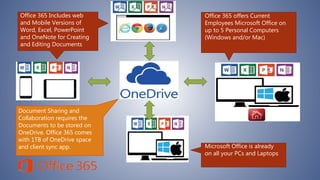
Microsoft Office is already
on all your PCs and Laptops
Office 365 offers Current
Employees Microsoft Office on
up to 5 Personal Computers
(Windows and/or Mac)
Office 365 Includes web
and Mobile Versions of
Word, Excel, PowerPoint
and OneNote for Creating
and Editing Documents
Document Sharing and
Collaboration requires the
Documents to be stored on
OneDrive. Office 365 comes
with 1TB of OneDrive space
and client sync app.
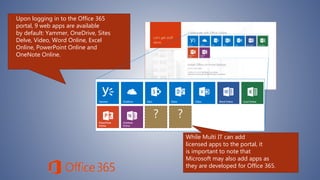
Upon logging in to the Office 365
portal, 9 web apps are available
by default: Yammer, OneDrive, Sites
Delve, Video, Word Online, Excel
Online, PowerPoint Online and
OneNote Online.
While Multi IT can add
licensed apps to the portal, it
is important to note that
Microsoft may also add apps as
they are developed for Office 365.
? ?
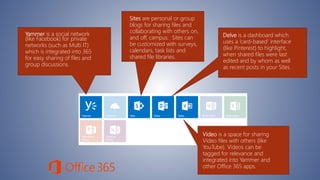
Yammer is a social network
(like Facebook) for private
networks (such as Multi IT)
which is integrated into 365
for easy sharing of files and
group discussions.
Sites are personal or group
blogs for sharing files and
collaborating with others on,
and off, campus. Sites can
be customized with surveys,
calendars, task lists and
shared file libraries.
Delve is a dashboard which
uses a ‘card-based’ interface
(like Pinterest) to highlight,
when shared files were last
edited and by whom as well
as recent posts in your Sites.
Video is a space for sharing
Video files with others (like
YouTube). Videos can be
tagged for relevance and
integrated into Yammer and
other Office 365 apps.
While Yammer, Sites, Delve and Video are
valuable resources, the focus of this
demonstration today will be on the major
applications offered in Office 365: Word
Online, Excel Online, PowerPoint Online,
OneNote Online and OneDrive.
Now, let’s take a look at
OneDrive!
Why OneDrive for Business
• Ability to share documents or folders
• Sync files to your office desktop
• Edit online or locally
• Work remotely
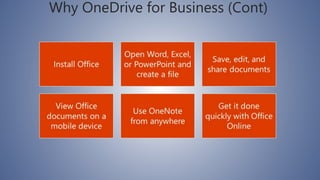
Why OneDrive for Business (Cont)
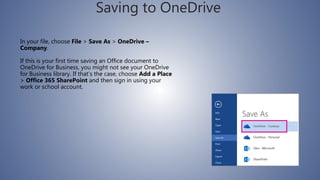
Saving to OneDrive
In your file, choose File > Save As > OneDrive –
Company.
If this is your first time saving an Office document to
OneDrive for Business, you might not see your OneDrive
for Business library. If that’s the case, choose Add a Place
> Office 365 SharePoint and then sign in using your
work or school account.
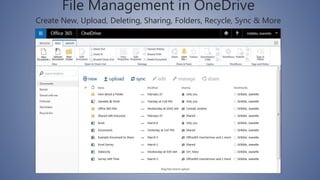
File Management in OneDrive
Create New, Upload, Deleting, Sharing, Folders, Recycle, Sync & More
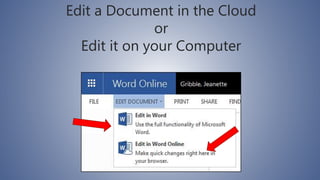
Edit a Document in the Cloud
or
Edit it on your Computer
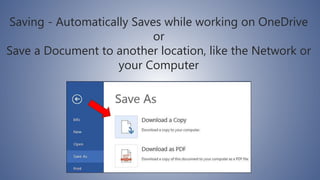
Saving - Automatically Saves while working on OneDrive
or
Save a Document to another location, like the Network or
your Computer
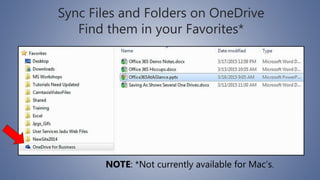
Sync Files and Folders on OneDrive
Find them in your Favorites*
NOTE: *Not currently available for Mac’s.
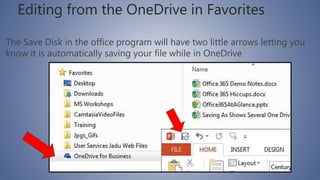
Editing from the OneDrive in Favorites
The Save Disk in the office program will have two little arrows letting you
know it is automatically saving your file while in OneDrive
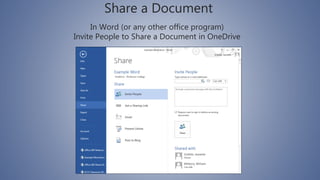
In Word (or any other office program)
Invite People to Share a Document in OneDrive
Share a Document
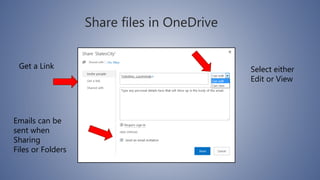
Share files in OneDrive
Select either
Edit or View
Emails can be
sent when
Sharing
Files or Folders
Get a Link
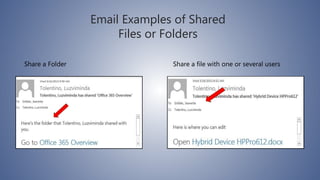
Email Examples of Shared
Files or Folders
Share a file with one or several usersShare a Folder
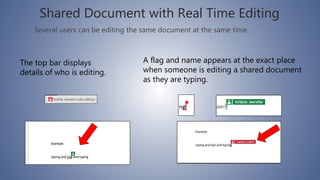
Shared Document with Real Time Editing
Several users can be editing the same document at the same time.
A flag and name appears at the exact place
when someone is editing a shared document
as they are typing.
The top bar displays
details of who is editing.
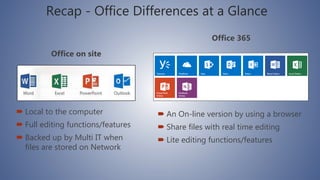
Recap - Office Differences at a Glance
Office on site
 Local to the computer
 Full editing functions/features
 Backed up by Multi IT when
files are stored on Network
Office 365
 An On-line version by using a browser
 Share files with real time editing
 Lite editing functions/features
Frequently Asked Questions about Office
365
Where do I log on?
 You can log on through portal.office.com
Do I have to install something on my
computer at work to use Office 365?
 No, Multi customers computers already have Microsoft Office
installed on them. To use Office 365 you simply use your
company O365 email address and Password to log on
What can I store on this Space, the cloud?
 Microsoft OneDrive is file storage space on a Microsoft server. You
may store any type of files on your OneDrive space.
(i.e. zip files, audio files, video files, PDFs, etc.)
Not just Microsoft Office documents (.docx, .xlsx, etc.).
Please note that OneDrive space is not backed up (by
Microsoft or Multi IT) and thus, any files deleted from
OneDrive are NOT recoverable.
Who may use Office 365?
 Office 365 at Simarca is for current employees only.
If I share a document can I get back to my original
version?
 Yes, under the Manage is Version History which gives you the
ability to restore to a specific version on a specific date.
Questions?
Should you have any more questions please contact the
helpdesk at support@multi.co.za or call 011 435 0450
Thanks!

Office 365 and one drive

  • 1.
    Office 365 Presented by:Craig Corfield Email: craig@multi.co.za Phone: 011 435 0450 Web: https://www.multi.co.za Blog: https://www.multi.co.za/blog
  • 2.
    Microsoft Office isalready on all your PCs and Laptops Office 365 offers Current Employees Microsoft Office on up to 5 Personal Computers (Windows and/or Mac) Office 365 Includes web and Mobile Versions of Word, Excel, PowerPoint and OneNote for Creating and Editing Documents Document Sharing and Collaboration requires the Documents to be stored on OneDrive. Office 365 comes with 1TB of OneDrive space and client sync app.
  • 3.
    Upon logging into the Office 365 portal, 9 web apps are available by default: Yammer, OneDrive, Sites Delve, Video, Word Online, Excel Online, PowerPoint Online and OneNote Online. While Multi IT can add licensed apps to the portal, it is important to note that Microsoft may also add apps as they are developed for Office 365. ? ?
  • 4.
    Yammer is asocial network (like Facebook) for private networks (such as Multi IT) which is integrated into 365 for easy sharing of files and group discussions. Sites are personal or group blogs for sharing files and collaborating with others on, and off, campus. Sites can be customized with surveys, calendars, task lists and shared file libraries. Delve is a dashboard which uses a ‘card-based’ interface (like Pinterest) to highlight, when shared files were last edited and by whom as well as recent posts in your Sites. Video is a space for sharing Video files with others (like YouTube). Videos can be tagged for relevance and integrated into Yammer and other Office 365 apps.
  • 5.
    While Yammer, Sites,Delve and Video are valuable resources, the focus of this demonstration today will be on the major applications offered in Office 365: Word Online, Excel Online, PowerPoint Online, OneNote Online and OneDrive.
  • 6.
    Now, let’s takea look at OneDrive!
  • 7.
    Why OneDrive forBusiness • Ability to share documents or folders • Sync files to your office desktop • Edit online or locally • Work remotely
  • 8.
    Why OneDrive forBusiness (Cont)
  • 9.
    Saving to OneDrive Inyour file, choose File > Save As > OneDrive – Company. If this is your first time saving an Office document to OneDrive for Business, you might not see your OneDrive for Business library. If that’s the case, choose Add a Place > Office 365 SharePoint and then sign in using your work or school account.
  • 10.
    File Management inOneDrive Create New, Upload, Deleting, Sharing, Folders, Recycle, Sync & More
  • 11.
    Edit a Documentin the Cloud or Edit it on your Computer
  • 12.
    Saving - AutomaticallySaves while working on OneDrive or Save a Document to another location, like the Network or your Computer
  • 13.
    Sync Files andFolders on OneDrive Find them in your Favorites* NOTE: *Not currently available for Mac’s.
  • 14.
    Editing from theOneDrive in Favorites The Save Disk in the office program will have two little arrows letting you know it is automatically saving your file while in OneDrive
  • 15.
    In Word (orany other office program) Invite People to Share a Document in OneDrive Share a Document
  • 16.
    Share files inOneDrive Select either Edit or View Emails can be sent when Sharing Files or Folders Get a Link
  • 17.
    Email Examples ofShared Files or Folders Share a file with one or several usersShare a Folder
  • 18.
    Shared Document withReal Time Editing Several users can be editing the same document at the same time. A flag and name appears at the exact place when someone is editing a shared document as they are typing. The top bar displays details of who is editing.
  • 19.
    Recap - OfficeDifferences at a Glance Office on site  Local to the computer  Full editing functions/features  Backed up by Multi IT when files are stored on Network Office 365  An On-line version by using a browser  Share files with real time editing  Lite editing functions/features
  • 20.
  • 21.
    Where do Ilog on?  You can log on through portal.office.com Do I have to install something on my computer at work to use Office 365?  No, Multi customers computers already have Microsoft Office installed on them. To use Office 365 you simply use your company O365 email address and Password to log on
  • 22.
    What can Istore on this Space, the cloud?  Microsoft OneDrive is file storage space on a Microsoft server. You may store any type of files on your OneDrive space. (i.e. zip files, audio files, video files, PDFs, etc.) Not just Microsoft Office documents (.docx, .xlsx, etc.). Please note that OneDrive space is not backed up (by Microsoft or Multi IT) and thus, any files deleted from OneDrive are NOT recoverable.
  • 23.
    Who may useOffice 365?  Office 365 at Simarca is for current employees only. If I share a document can I get back to my original version?  Yes, under the Manage is Version History which gives you the ability to restore to a specific version on a specific date.
  • 24.
    Questions? Should you haveany more questions please contact the helpdesk at support@multi.co.za or call 011 435 0450 Thanks!