2
CONTENTS
Conception
Objectlifecycle
Data encapsulation
Create & destroy object
Input/output
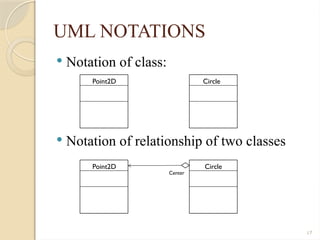
Source code organization
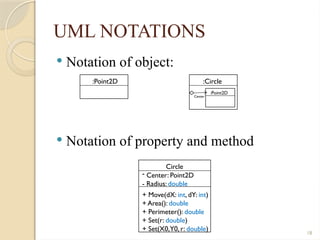
UML notations
Comparison with Java and C#
3.
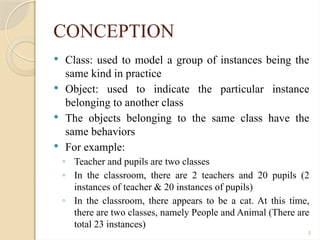
3
CONCEPTION
Class: usedto model a group of instances being the
same kind in practice
Object: used to indicate the particular instance
belonging to another class
The objects belonging to the same class have the
same behaviors
For example:
◦ Teacher and pupils are two classes
◦ In the classroom, there are 2 teachers and 20 pupils (2
instances of teacher & 20 instances of pupils)
◦ In the classroom, there appears to be a cat. At this time,
there are two classes, namely People and Animal (There are
total 23 instances)
4.
4
CONCEPTION
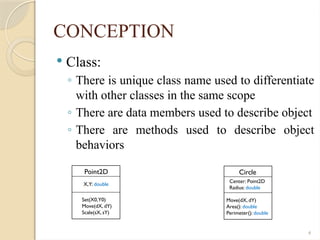
Class:
◦ Thereis unique class name used to differentiate
with other classes in the same scope
◦ There are data members used to describe object
◦ There are methods used to describe object
behaviors
Point2D
X,Y: double
Set(X0,Y0)
Move(dX, dY)
Scale(sX, sY)
Circle
Center: Point2D
Radius: double
Move(dX, dY)
Area(): double
Perimeter(): double
7
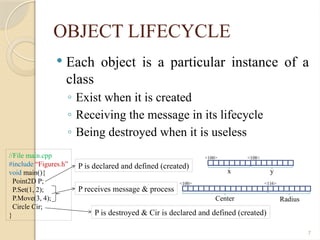
OBJECT LIFECYCLE
Eachobject is a particular instance of a
class
◦ Exist when it is created
◦ Receiving the message in its lifecycle
◦ Being destroyed when it is useless
//File main.cpp
#include “Figures.h”
void main(){
Point2D P;
P.Set(1, 2);
P.Move(3, 4);
Circle Cir;
}
P is declared and defined (created)
P receives message & process
P is destroyed & Cir is declared and defined (created)
<100> <108>
<100>
x y
Center Radius
<116>
8.
8
DATA ENCAPSULATION
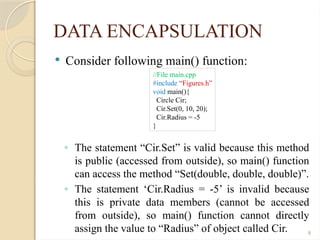
Considerfollowing main() function:
◦ The statement “Cir.Set” is valid because this method
is public (accessed from outside), so main() function
can access the method “Set(double, double, double)”.
◦ The statement ‘Cir.Radius = -5’ is invalid because
this is private data members (cannot be accessed
from outside), so main() function cannot directly
assign the value to “Radius” of object called Cir.
//File main.cpp
#include “Figures.h”
void main(){
Circle Cir;
Cir.Set(0, 10, 20);
Cir.Radius = -5
}
9.
9
DATA ENCAPSULATION
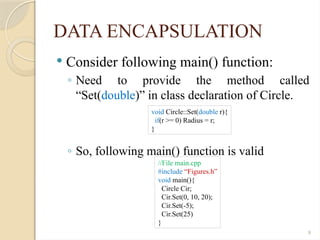
Considerfollowing main() function:
◦ Need to provide the method called
“Set(double)” in class declaration of Circle.
◦ So, following main() function is valid
void Circle::Set(double r){
if(r >= 0) Radius = r;
}
//File main.cpp
#include “Figures.h”
void main(){
Circle Cir;
Cir.Set(0, 10, 20);
Cir.Set(-5);
Cir.Set(25)
}
10.
10
CREATE & DESTROYOBJECT
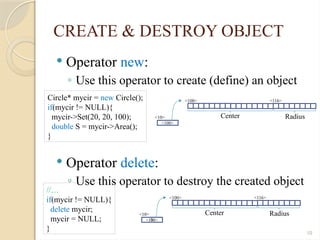
Operator new:
◦ Use this operator to create (define) an object
Operator delete:
◦ Use this operator to destroy the created object
Circle* mycir = new Circle();
if(mycir != NULL){
mycir->Set(20, 20, 100);
double S = mycir->Area();
}
//…
if(mycir != NULL){
delete mycir;
mycir = NULL;
}
<100>
Center Radius
<116>
<10>
<100>
<100>
Center Radius
<116>
<10>
<100>
0
11.
11
CREATE & DESTROYOBJECT
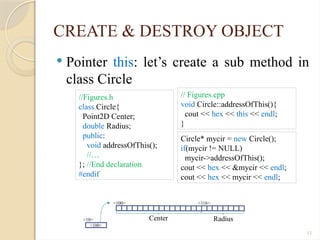
Pointer this: let’s create a sub method in
class Circle
// Figures.cpp
void Circle::addressOfThis(){
cout << hex << this << endl;
}
<100>
Center Radius
<116>
<10>
<100>
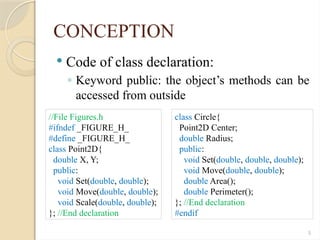
//Figures.h
class Circle{
Point2D Center;
double Radius;
public:
void addressOfThis();
//…
}; //End declaration
#endif
Circle* mycir = new Circle();
if(mycir != NULL)
mycir->addressOfThis();
cout << hex << &mycir << endl;
cout << hex << mycir << endl;
12.
12
INPUT / OUTPUT
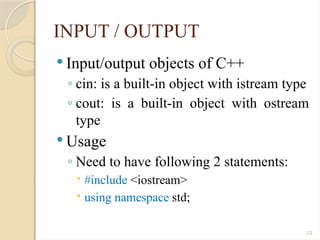
Input/output objects of C++
◦ cin: is a built-in object with istream type
◦ cout: is a built-in object with ostream
type
Usage
◦ Need to have following 2 statements:
#include <iostream>
using namespace std;
13.
13
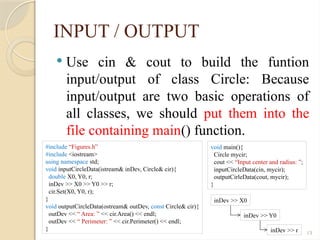
INPUT / OUTPUT
Use cin & cout to build the funtion
input/output of class Circle: Because
input/output are two basic operations of
all classes, we should put them into the
file containing main() function.
#include “Figures.h”
#include <iostream>
using namespace std;
void inputCircleData(istream& inDev, Circle& cir){
double X0, Y0, r;
inDev >> X0 >> Y0 >> r;
cir.Set(X0, Y0, r);
}
void outputCircleData(ostream& outDev, const Circle& cir){
outDev << “ Area: ” << cir.Area() << endl;
outDev << “ Perimeter: ” << cir.Perimeter() << endl;
}
void main(){
Circle mycir;
cout << “Input center and radius: ”;
inputCircleData(cin, mycir);
outputCirleData(cout, mycir);
}
inDev >> X0
inDev >> Y0
inDev >> r
15
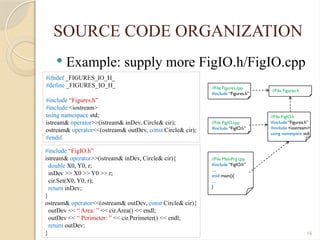
SOURCE CODE ORGANIZATION
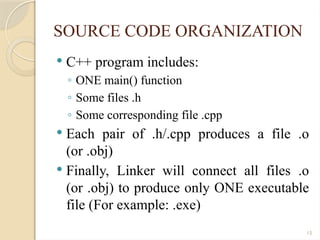
C++ program includes:
◦ ONE main() function
◦ Some files .h
◦ Some corresponding file .cpp
Each pair of .h/.cpp produces a file .o
(or .obj)
Finally, Linker will connect all files .o
(or .obj) to produce only ONE executable
file (For example: .exe)
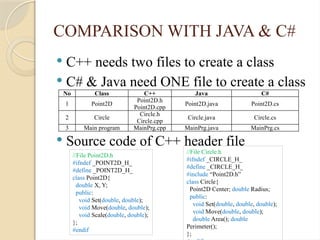
COMPARISON WITH JAVA& C#
C++ needs two files to create a class
C# & Java need ONE file to create a class
Source code of C++ header file
No Class C++ Java C#
1 Point2D
Point2D.h
Point2D.cpp
Point2D.java Point2D.cs
2 Circle
Circle.h
Circle.cpp
Circle.java Circle.cs
3 Main program MainPrg.cpp MainPrg.java MainPrg.cs
//File Point2D.h
#ifndef _POINT2D_H_
#define _POINT2D_H_
class Point2D{
double X, Y;
public:
void Set(double, double);
void Move(double, double);
void Scale(double, double);
};
#endif
//File Circle.h
#ifndef _CIRCLE_H_
#define _CIRCLE_H_
#include “Point2D.h”
class Circle{
Point2D Center; double Radius;
public:
void Set(double, double, double);
void Move(double, double);
double Area(); double
Perimeter();
};
20.
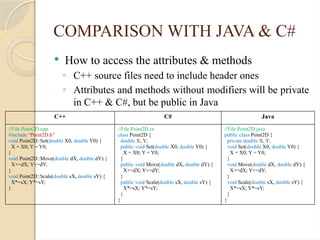
COMPARISON WITH JAVA& C#
How to access the attributes & methods
◦ C++ source files need to include header ones
◦ Attributes and methods without modifiers will be private
in C++ & C#, but be public in Java
C++ C# Java
//File Point2D.cpp
#include “Point2D.h”
void Point2D::Set(double X0, double Y0) {
X = X0; Y = Y0;
}
void Point2D::Move(double dX, double dY) {
X+=dX; Y+=dY;
}
void Point2D::Scale(double sX, double sY) {
X*=sX; Y*=sY;
}
//File Point2D.cs
class Point2D {
double X, Y;
public void Set(double X0, double Y0) {
X = X0; Y = Y0;
}
public void Move(double dX, double dY) {
X+=dX; Y+=dY;
}
public void Scale(double sX, double sY) {
X*=sX; Y*=sY;
}
}
//File Point2D.java
public class Point2D {
private double X, Y;
void Set(double X0, double Y0) {
X = X0; Y = Y0;
}
void Move(double dX, double dY) {
X+=dX; Y+=dY;
}
void Scale(double sX, double sY) {
X*=sX; Y*=sY;
}
}
21.
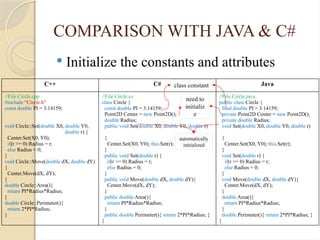
COMPARISON WITH JAVA& C#
Initialize the constants and attributes
C++ C# Java
//File Circle.cpp
#include “Circle.h”
const double PI = 3.14159;
void Circle::Set(double X0, double Y0,
double r) {
Center.Set(X0, Y0);
if(r >= 0) Radius = r;
else Radius = 0;
}
void Circle::Move(double dX, double dY)
{
Center.Move(dX, dY);
}
double Circle::Area(){
return PI*Radius*Radius;
}
double Circle::Perimeter(){
return 2*PI*Radius;
}
//File Circle.cs
class Circle {
const double PI = 3.14159;
Point2D Center = new Point2D();
double Radius;
public void Set(double X0, double Y0, double r)
{
Center.Set(X0, Y0); this.Set(r);
}
public void Set(double r) {
if(r >= 0) Radius = r;
else Radius = 0;
}
public void Move(double dX, double dY){
Center.Move(dX, dY);
}
public double Area(){
return PI*Radius*Radius;
}
public double Perimeter(){ return 2*PI*Radius; }
}
//File Circle.java
public class Circle {
final double PI = 3.14159;
private Point2D Center = new Point2D();
private double Radius;
void Set(double X0, double Y0, double r)
{
Center.Set(X0, Y0); this.Set(r);
}
void Set(double r) {
if(r >= 0) Radius = r;
else Radius = 0;
}
void Move(double dX, double dY){
Center.Move(dX, dY);
}
double Area(){
return PI*Radius*Radius;
}
double Perimeter(){ return 2*PI*Radius; }
}
class constant
need to
initializ
e
automatically
initialized
22.
COMPARISON WITH JAVA& C#
Main program
◦ Object “mycir” in C++ automatically allocated
◦ Object “mycir” in C# & Java must be explicitly allocated
◦ Object “mycir” automatically destroyed when finished
C++ C# Java
//File MainPrg.cpp
#include “Circle.h”
#include <iostream>
using namepsace std;
int main(int argc, char* argv[]) {
Circle mycir;
double r = 10;
mycir.Set(r);
cout << “R = ” << r << endl;
cout << “Area = ”
<< mycir.Area() << endl;
cout << “Perimeter = ”
<< mycir.Perimeter() << endl;
cin.get();
return 0;
}
//File MainPrg.cs
using System;
class MainPrg {
static void Main(string argv[])
Circle mycir = new Circle();
double r = 10;
mycir.Set(r);
Console.WriteLine(“R = ” + r);
Console.WriteLine(“Area = ” +
mycir.Area());
Console.WriteLine(“Perimeter = ” +
mycir.Perimeter());
Console.ReadLine();
}
}
//File MainPrg.java
import java.util.*;
public class MainPrg {
static void main(String argv[])
Circle mycir = new Circle();
double r = 10;
mycir.Set(r);
System.out.println(“R = ” + r);
System.out.println(“Area = ” +
mycir.Area());
System.out.println(“Perimeter = ” +
mycir.Perimeter());
}
}
23.
COMPARISON WITH JAVA& C#
Rewrite main program for C++
◦ Using operator “new” to allocate for object “mycir”
◦ using operator “delete” to deallocate for object “mycir”
C++ C++ with pointer
//File MainPrg.cpp
#include “Circle.h”
#include <iostream>
using namepsace std;
int main(int argc, char* argv[]) {
Circle mycir;
double r = 10;
mycir.Set(r);
cout << “R = ” << r << endl;
cout << “Area = ” << mycir.Area() << endl;
cout << “Perimeter = ” << mycir.Perimeter() << endl;
cin.get();
return 0;
}
//File MainPrg.cpp
#include “Circle.h”
#include <iostream>
using namepsace std;
int main(int argc, char* argv[]) {
Circle* mycir = new Circle();
double r = 10;
mycir->Set(r);
cout << “R = ” << r << endl;
cout << “Area = ” << mycir->Area() << endl;
cout << “Perimeter = ” << mycir->Perimeter() << endl;
delete mycir;
cin.get();
return 0;
}
![COMPARISON WITH JAVA & C#
Main program
◦ Object “mycir” in C++ automatically allocated
◦ Object “mycir” in C# & Java must be explicitly allocated
◦ Object “mycir” automatically destroyed when finished
C++ C# Java
//File MainPrg.cpp
#include “Circle.h”
#include <iostream>
using namepsace std;
int main(int argc, char* argv[]) {
Circle mycir;
double r = 10;
mycir.Set(r);
cout << “R = ” << r << endl;
cout << “Area = ”
<< mycir.Area() << endl;
cout << “Perimeter = ”
<< mycir.Perimeter() << endl;
cin.get();
return 0;
}
//File MainPrg.cs
using System;
class MainPrg {
static void Main(string argv[])
Circle mycir = new Circle();
double r = 10;
mycir.Set(r);
Console.WriteLine(“R = ” + r);
Console.WriteLine(“Area = ” +
mycir.Area());
Console.WriteLine(“Perimeter = ” +
mycir.Perimeter());
Console.ReadLine();
}
}
//File MainPrg.java
import java.util.*;
public class MainPrg {
static void main(String argv[])
Circle mycir = new Circle();
double r = 10;
mycir.Set(r);
System.out.println(“R = ” + r);
System.out.println(“Area = ” +
mycir.Area());
System.out.println(“Perimeter = ” +
mycir.Perimeter());
}
}](https://image.slidesharecdn.com/oopw02publish-250806023301-9e013d16/85/Object-Oriented-Programming-Basic-Concepts-22-320.jpg)
![COMPARISON WITH JAVA & C#
Rewrite main program for C++
◦ Using operator “new” to allocate for object “mycir”
◦ using operator “delete” to deallocate for object “mycir”
C++ C++ with pointer
//File MainPrg.cpp
#include “Circle.h”
#include <iostream>
using namepsace std;
int main(int argc, char* argv[]) {
Circle mycir;
double r = 10;
mycir.Set(r);
cout << “R = ” << r << endl;
cout << “Area = ” << mycir.Area() << endl;
cout << “Perimeter = ” << mycir.Perimeter() << endl;
cin.get();
return 0;
}
//File MainPrg.cpp
#include “Circle.h”
#include <iostream>
using namepsace std;
int main(int argc, char* argv[]) {
Circle* mycir = new Circle();
double r = 10;
mycir->Set(r);
cout << “R = ” << r << endl;
cout << “Area = ” << mycir->Area() << endl;
cout << “Perimeter = ” << mycir->Perimeter() << endl;
delete mycir;
cin.get();
return 0;
}](https://image.slidesharecdn.com/oopw02publish-250806023301-9e013d16/85/Object-Oriented-Programming-Basic-Concepts-23-320.jpg)


