Pandora FMS
Administrator Manual
Monitoring postgresql Server on Unix
Manual Monitoring postgresql Server Administration
© Artica Soluciones Tecnológicas 2005­2012
Index
1.Changelog.....................................................................................3
2.Introduction...................................................................................4
3.Requirements................................................................................5
3.1.Documentation that must deliver the required monitoring area...............................5
4.Compatibility Matrix ....................................................................6
5.Installation.....................................................................................7
6.Monitorización .............................................................................8
7.Configuration file..........................................................................9
1 CHANGELOG
Date Author Change Version
19/04/12 David First Version v1r1
Page 3
2 INTRODUCTION
The following diagram gives an idea of the interaction of pandora plugin.
This paper aims at describing the monitoring of PostgreSQL databases on Unix.
To extract the information is used:
• An external configuration file which defines all the parameters of the plugin.
•  It uses the software already installed  on the system for monitoring by the plugin 
without having to install third party libraries or utilities.
• They perform a number of basic checks "default", but you can remove or customize.
•  It has an interface "open"  to specify SQL queries free model allowing SQL queries 
always return a data only.
From a general point of view Pandora fms launches plugin, loading the configuration parameters
from file configuracion.ini and performs a series of queries to postgres server and returns an xml
monitoring, which is collected by pandora.
We can also launch this plugin from the command line:
./pandora_postgres_plugin.pl -f file-config
This implementation is using a configuration file (or boot) called configuración.ini, if we throw
without use file would be:
./pandora_postgres_plugin.pl -u user -c password [-n basename] [-d dir_ip_server] [-p port] [-h]
For more info ./pandora_postgres_plugin.pl -h
Page 4
3 REQUIREMENTS
The requirements to work properly this monitoring are:
• Install the Pandora FMS agent.
• To have perl installed.
•  Having a postgresql database installed on the machine where it will be monitored, with 
connectivity to the database.
• Specify the name, user, password and host of the postgresql database.
3.1.  Documentation that must deliver the required monitoring area
For proper monitoring postgresql is necessary for the technical area send some information 
that will be included in the configuration files. This information is:
• Username, password, host with access to the postgresql database.
• IMPORTANT: SQL MODULES MAY MONITOR ONLY A PARAMETER THAT IS THE ONLY 
QUESTIONS MAY RETURN A DATA (A ROW AND COLUMN)
Page 5
4 COMPATIBILITY MATRIX
The Agent compatibility matrix is as follows
Systems which have been tested • Ubuntu 12.10 con postgresql 9
• OpenSuse 11.2 con postgresql 9
Systems where
should work
• Other Unix systems with postgresql 9 or 
higher.
Page 6
5 INSTALLATION
To install this plugin must follow the following steps: 
1st. Copy and plugin configuration file in / etc / pandora / plugins / (if you have the plugin oars in 
another folder see step 2). 
2nd. Access the folder where the configuration file pandora_agent.conf (in ubuntu / etc / pandora. 
In this file we add a line 
module_plugin perl pandora_postgres_plugin.pl -f filename_config 2>
/etc/pandora/plugins/error.log
In case you want to install the plugin into a separate folder will be the following line: 
module_plugin perl path/pandora_postgres_plugin.pl -f filename_config 2>
/etc/pandora/plugins/erro.log
To perform this action you can use the following command: 
sudo echo "module_plugin path/pandora_postgres_plugin.pl -f filename_config 2>
/etc/pandora/plugins/error.log" >> /etc/pandora/ pandora_agent.conf
Also you can install without having a configuration file, then the command is: 
module_plugin ./pandora_postgres_plugin.pl -u user -c password [-n basename] [-d
dir_ip_server] [-p port] 2> error.log
3 º. Reboot the agent. 
sudo /etc/init.d/pandora_agent_daemon
We can also install the plugin if you use the configuration file, but lose some features (like creating 
your own queries).
Page 7
6 MONITORING
The plugin monitors "default" the following:
• Connection Status   If possible the connection to the specified IP and ports.→
•  Server status
• Server port →  Only if the server is listening.
• Percentage of cpu usage 
• Percentage of memory usage 
Included in the file config.ini:
• Number of roles from the DB.
• Number of users postgres server.
• Number of active locks postgres server. 
• Space server bytes.
• Number of commits.
• Number of rollback.
• Number of active processes on the server. 
• Number of bases postgres server.
• Number tuples returned by the server. 
• Tuples in the database searched.
• Tuples inserted into the postgres server.
• Updated tuples in the postgres server.
 • Number of tuples removed postgres server.
All these modules are parameterized in the file "config.ini" that comes in the package of the plugin. 
These modules can be eliminated or extended for postgresql administrator.
Page 8
7 CONFIGURATION FILE
In this file are the beginning of the plugin parameters, predefined modules and the modules we want
to load user created sql.
For predefinos modules (enable / disable):
Percent cpu usage: GCPU = yes. If no boot file does not load
Percentage of use of mem: GMem = yes. If no boot file does not load
Apart from these two modules predefinos two more (but not be disabled), see list of modules.
IMPORTANT: SQL MODULES MAY MONITOR ONLY A PARAMETER THAT IS THE
ONLY QUESTIONS MAY RETURN A DATA (A ROW AND COLUMN)
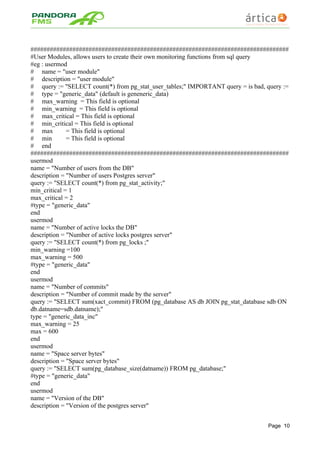
Below is an example of the file config.ini
#pandora_postgres_plugin.conf
#
#
#
#REQUIRED FIELDS
#Name of the database on which we connect
basename = david
#server address
server_addr = 127.0.0.1
#server port
port = 5432
#user to connect
user = postgres
#password
password =
#################################
#Enable Predefined Modules
# eg: Gcpu = yes (enabled)
# Gcpu = no (disabled)
# Gcpu = (disabled)
##################################
# Percentage of cpu usage
Gcpu = yes
# Percentage of memory usage
Gmem = yes
Page 9
################################################################################
#User Modules, allows users to create their own monitoring functions from sql query
#eg : usermod
# name = "user module"
# description = "user module"
# query := "SELECT count(*) from pg_stat_user_tables;" IMPORTANT query = is bad, query :=
# type = "generic_data" (default is geneneric_data)
# max_warning = This field is optional
# min_warning = This field is optional
# max_critical = This field is optional
# min_critical = This field is optional
# max = This field is optional
# min = This field is optional
# end
################################################################################
usermod
name = "Number of users from the DB"
description = "Number of users Postgres server"
query := "SELECT count(*) from pg_stat_activity;"
min_critical = 1
max_critical = 2
#type = "generic_data"
end
usermod
name = "Number of active locks the DB"
description = "Number of active locks postgres server"
query := "SELECT count(*) from pg_locks ;"
min_warning =100
max_warning = 500
#type = "generic_data"
end
usermod
name = "Number of commits"
description = "Number of commit made by the server"
query := "SELECT sum(xact_commit) FROM (pg_database AS db JOIN pg_stat_database sdb ON
db.datname=sdb.datname);"
type = "generic_data_inc"
max_warning = 25
max = 600
end
usermod
name = "Space server bytes"
description = "Space server bytes"
query := "SELECT sum(pg_database_size(datname)) FROM pg_database;"
#type = "generic_data"
end
usermod
name = "Version of the DB"
description = "Version of the postgres server"
Page 10
query := "SELECT version() ;"
type = "generic_data_string"
end
usermod
name = "Number of roles from the DB"
description = "Number of postgres server roles"
query := "SELECT count(*) from pg_roles ;"
type = "generic_data"
end
usermod
name = "Number of rollback"
description = "Number of rollback made by the server"
query := "SELECT sum(xact_rollback) FROM (pg_database AS db JOIN pg_stat_database sdb ON
db.datname=sdb.datname);"
type = "generic_data_inc"
end
usermod
name = "Number of active processes on the server"
description = "Number of active processes on the server"
query := "SELECT sum(xact_rollback) FROM (pg_database AS db JOIN pg_stat_database sdb ON
db.datname=sdb.datname);"
max = 2000
type = "generic_data"
end
usermod
name = "Number of bases in the DB"
description = "Number of bases postgres server"
query := "SELECT count(*) FROM pg_database;"
type = "generic_data"
end
usermod
name = "Tuples returned in the DB"
description = "Number tuples returned by the server"
query := "SELECT sum(tup_returned) FROM (pg_database AS db JOIN pg_stat_database sdb ON
db.datname=sdb.datname);"
type = "generic_data_inc"
end
usermod
name = "Tuples in the database searched "
description = "Tuples sought in postgres server"
query := "SELECT sum(tup_fetched) FROM (pg_database AS db JOIN pg_stat_database sdb ON
db.datname=sdb.datname);"
type = "generic_data_inc"
end
usermod
name = "Tuples inserted into the database"
description = "Tuples inserted into the postgres server"
query := "SELECT sum(tup_inserted) FROM (pg_database AS db JOIN pg_stat_database sdb ON
db.datname=sdb.datname);"
type = "generic_data_inc"
Page 11
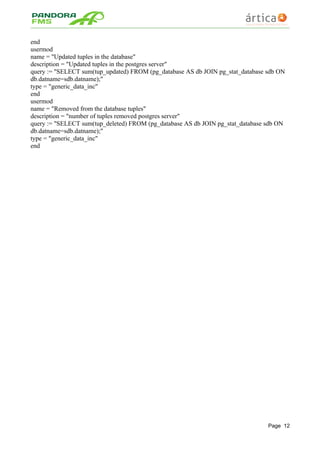
end
usermod
name = "Updated tuples in the database"
description = "Updated tuples in the postgres server"
query := "SELECT sum(tup_updated) FROM (pg_database AS db JOIN pg_stat_database sdb ON
db.datname=sdb.datname);"
type = "generic_data_inc"
end
usermod
name = "Removed from the database tuples"
description = "number of tuples removed postgres server"
query := "SELECT sum(tup_deleted) FROM (pg_database AS db JOIN pg_stat_database sdb ON
db.datname=sdb.datname);"
type = "generic_data_inc"
end
Page 12

Pandora FMS: PostgreSQL Plugin

  • 1.
  • 2.
    Manual Monitoring postgresqlServer Administration © Artica Soluciones Tecnológicas 2005­2012 Index 1.Changelog.....................................................................................3 2.Introduction...................................................................................4 3.Requirements................................................................................5 3.1.Documentation that must deliver the required monitoring area...............................5 4.Compatibility Matrix ....................................................................6 5.Installation.....................................................................................7 6.Monitorización .............................................................................8 7.Configuration file..........................................................................9
  • 3.
    1 CHANGELOG Date Author ChangeVersion 19/04/12 David First Version v1r1 Page 3
  • 4.
    2 INTRODUCTION The following diagramgives an idea of the interaction of pandora plugin. This paper aims at describing the monitoring of PostgreSQL databases on Unix. To extract the information is used: • An external configuration file which defines all the parameters of the plugin. •  It uses the software already installed  on the system for monitoring by the plugin  without having to install third party libraries or utilities. • They perform a number of basic checks "default", but you can remove or customize. •  It has an interface "open"  to specify SQL queries free model allowing SQL queries  always return a data only. From a general point of view Pandora fms launches plugin, loading the configuration parameters from file configuracion.ini and performs a series of queries to postgres server and returns an xml monitoring, which is collected by pandora. We can also launch this plugin from the command line: ./pandora_postgres_plugin.pl -f file-config This implementation is using a configuration file (or boot) called configuración.ini, if we throw without use file would be: ./pandora_postgres_plugin.pl -u user -c password [-n basename] [-d dir_ip_server] [-p port] [-h] For more info ./pandora_postgres_plugin.pl -h Page 4
  • 5.
    3 REQUIREMENTS The requirements to work properly this monitoring are: • Install the Pandora FMS agent. • To have perl installed. •  Having a postgresql database installed on the machine where it will be monitored, with  connectivity to the database. • Specify the name, user, password and host of the postgresql database. 3.1.  Documentation that must deliver the required monitoring area For proper monitoring postgresql is necessary for the technical area send some information  that will be included in the configuration files. This information is: • Username, password, host with access to the postgresql database. • IMPORTANT: SQL MODULES MAY MONITOR ONLY A PARAMETER THAT IS THE ONLY  QUESTIONS MAY RETURN A DATA (A ROW AND COLUMN) Page 5
  • 6.
    4 COMPATIBILITY MATRIX The Agent compatibilitymatrix is as follows Systems which have been tested • Ubuntu 12.10 con postgresql 9 • OpenSuse 11.2 con postgresql 9 Systems where should work • Other Unix systems with postgresql 9 or  higher. Page 6
  • 7.
    5 INSTALLATION To install this plugin must follow the following steps:  1st. Copy and plugin configuration file in / etc / pandora / plugins / (if you have the plugin oars in  another folder see step 2).  2nd. Access the folder where the configuration file pandora_agent.conf (in ubuntu / etc / pandora.  In this file we add a line  module_plugin perl pandora_postgres_plugin.pl-f filename_config 2> /etc/pandora/plugins/error.log In case you want to install the plugin into a separate folder will be the following line:  module_plugin perl path/pandora_postgres_plugin.pl -f filename_config 2> /etc/pandora/plugins/erro.log To perform this action you can use the following command:  sudo echo "module_plugin path/pandora_postgres_plugin.pl -f filename_config 2> /etc/pandora/plugins/error.log" >> /etc/pandora/ pandora_agent.conf Also you can install without having a configuration file, then the command is:  module_plugin ./pandora_postgres_plugin.pl -u user -c password [-n basename] [-d dir_ip_server] [-p port] 2> error.log 3 º. Reboot the agent.  sudo /etc/init.d/pandora_agent_daemon We can also install the plugin if you use the configuration file, but lose some features (like creating  your own queries). Page 7
  • 8.
    6 MONITORING The plugin monitors"default" the following: • Connection Status   If possible the connection to the specified IP and ports.→ •  Server status • Server port →  Only if the server is listening. • Percentage of cpu usage  • Percentage of memory usage  Included in the file config.ini: • Number of roles from the DB. • Number of users postgres server. • Number of active locks postgres server.  • Space server bytes. • Number of commits. • Number of rollback. • Number of active processes on the server.  • Number of bases postgres server. • Number tuples returned by the server.  • Tuples in the database searched. • Tuples inserted into the postgres server. • Updated tuples in the postgres server.  • Number of tuples removed postgres server. All these modules are parameterized in the file "config.ini" that comes in the package of the plugin.  These modules can be eliminated or extended for postgresql administrator. Page 8
  • 9.
    7 CONFIGURATION FILE In this fileare the beginning of the plugin parameters, predefined modules and the modules we want to load user created sql. For predefinos modules (enable / disable): Percent cpu usage: GCPU = yes. If no boot file does not load Percentage of use of mem: GMem = yes. If no boot file does not load Apart from these two modules predefinos two more (but not be disabled), see list of modules. IMPORTANT: SQL MODULES MAY MONITOR ONLY A PARAMETER THAT IS THE ONLY QUESTIONS MAY RETURN A DATA (A ROW AND COLUMN) Below is an example of the file config.ini #pandora_postgres_plugin.conf # # # #REQUIRED FIELDS #Name of the database on which we connect basename = david #server address server_addr = 127.0.0.1 #server port port = 5432 #user to connect user = postgres #password password = ################################# #Enable Predefined Modules # eg: Gcpu = yes (enabled) # Gcpu = no (disabled) # Gcpu = (disabled) ################################## # Percentage of cpu usage Gcpu = yes # Percentage of memory usage Gmem = yes Page 9
  • 10.
    ################################################################################ #User Modules, allowsusers to create their own monitoring functions from sql query #eg : usermod # name = "user module" # description = "user module" # query := "SELECT count(*) from pg_stat_user_tables;" IMPORTANT query = is bad, query := # type = "generic_data" (default is geneneric_data) # max_warning = This field is optional # min_warning = This field is optional # max_critical = This field is optional # min_critical = This field is optional # max = This field is optional # min = This field is optional # end ################################################################################ usermod name = "Number of users from the DB" description = "Number of users Postgres server" query := "SELECT count(*) from pg_stat_activity;" min_critical = 1 max_critical = 2 #type = "generic_data" end usermod name = "Number of active locks the DB" description = "Number of active locks postgres server" query := "SELECT count(*) from pg_locks ;" min_warning =100 max_warning = 500 #type = "generic_data" end usermod name = "Number of commits" description = "Number of commit made by the server" query := "SELECT sum(xact_commit) FROM (pg_database AS db JOIN pg_stat_database sdb ON db.datname=sdb.datname);" type = "generic_data_inc" max_warning = 25 max = 600 end usermod name = "Space server bytes" description = "Space server bytes" query := "SELECT sum(pg_database_size(datname)) FROM pg_database;" #type = "generic_data" end usermod name = "Version of the DB" description = "Version of the postgres server" Page 10
  • 11.
    query := "SELECTversion() ;" type = "generic_data_string" end usermod name = "Number of roles from the DB" description = "Number of postgres server roles" query := "SELECT count(*) from pg_roles ;" type = "generic_data" end usermod name = "Number of rollback" description = "Number of rollback made by the server" query := "SELECT sum(xact_rollback) FROM (pg_database AS db JOIN pg_stat_database sdb ON db.datname=sdb.datname);" type = "generic_data_inc" end usermod name = "Number of active processes on the server" description = "Number of active processes on the server" query := "SELECT sum(xact_rollback) FROM (pg_database AS db JOIN pg_stat_database sdb ON db.datname=sdb.datname);" max = 2000 type = "generic_data" end usermod name = "Number of bases in the DB" description = "Number of bases postgres server" query := "SELECT count(*) FROM pg_database;" type = "generic_data" end usermod name = "Tuples returned in the DB" description = "Number tuples returned by the server" query := "SELECT sum(tup_returned) FROM (pg_database AS db JOIN pg_stat_database sdb ON db.datname=sdb.datname);" type = "generic_data_inc" end usermod name = "Tuples in the database searched " description = "Tuples sought in postgres server" query := "SELECT sum(tup_fetched) FROM (pg_database AS db JOIN pg_stat_database sdb ON db.datname=sdb.datname);" type = "generic_data_inc" end usermod name = "Tuples inserted into the database" description = "Tuples inserted into the postgres server" query := "SELECT sum(tup_inserted) FROM (pg_database AS db JOIN pg_stat_database sdb ON db.datname=sdb.datname);" type = "generic_data_inc" Page 11
  • 12.
    end usermod name = "Updatedtuples in the database" description = "Updated tuples in the postgres server" query := "SELECT sum(tup_updated) FROM (pg_database AS db JOIN pg_stat_database sdb ON db.datname=sdb.datname);" type = "generic_data_inc" end usermod name = "Removed from the database tuples" description = "number of tuples removed postgres server" query := "SELECT sum(tup_deleted) FROM (pg_database AS db JOIN pg_stat_database sdb ON db.datname=sdb.datname);" type = "generic_data_inc" end Page 12