Copyright 2017 IBM Corporation
Extending and Customizing
IBM Connections Cloud
Stefano Pogliani
Client Technical Professional – IBM Watson Work
Copyright 2017 IBM Corporation
Please note
• IBM’s statements regarding its plans, directions, and intent are subject to change or withdrawal without notice at IBM’s sole discretion.
• Information regarding potential future products is intended to outline our general product direction and it should not be relied on in making
a purchasing decision.
• The information mentioned regarding potential future products is not a commitment, promise, or legal obligation to deliver any material,
code or functionality. Information about potential future products may not be incorporated into any contract.
• The development, release, and timing of any future features or functionality described for our products remains at our sole discretion.
• Performance is based on measurements and projections using standard IBM benchmarks in a controlled environment. The actual
throughput or performance that any user will experience will vary depending upon many factors, including considerations such as the
amount of multiprogramming in the user’s job stream, the I/O configuration, the storage configuration, and the workload processed.
Therefore, no assurance can be given that an individual user will achieve results similar to those stated here.
2
Copyright 2017 IBM Corporation
Abstract
In this session, we will explore the different options for customizing
Connections Cloud
Copyright 2017 IBM Corporation
Integration options
Extension points
Copyright 2017 IBM Corporation
Extension points
Copyright 2017 IBM Corporation
Communi
ties
Profiles Contacts
Activity
Stream
Top
navigation
bar
Files
6
External
Apps
Activity
Stream
Top
navigation
bar
Files
CommunitiesProfiles Contacts
Copyright 2017 IBM Corporation
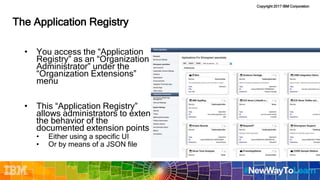
The Application Registry
• You access the “Application
Registry” as an “Organization
Administrator” under the
“Organization Extensions”
menu
• This “Application Registry”
allows administrators to extend
the behavior of the
documented extension points
• Either using a specific UI
• Or by means of a JSON file
Copyright 2017 IBM Corporation
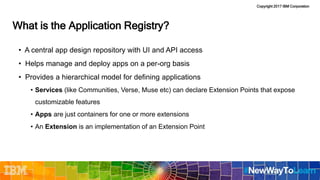
• A central app design repository with UI and API access
• Helps manage and deploy apps on a per-org basis
• Provides a hierarchical model for defining applications
• Services (like Communities, Verse, Muse etc) can declare Extension Points that expose
customizable features
• Apps are just containers for one or more extensions
• An Extension is an implementation of an Extension Point
SLIDE
What is the Application Registry?
Copyright 2017 IBM Corporation
Simplified Anatomy of an App
{
"services": ["Muse"],
"name": "My App",
"extensions": [ {
"type": "com.ibm.communities",
"payload": {
"match": {
"url": "communities" }
"include-files":["flipcard.user.js" ]
}}]}
SLIDE
Muse
My App
Flip Card
Layout
Watson Tone
Analysis
Homepage
Customizations
NewsRiverFeed
Copyright 2017 IBM Corporation
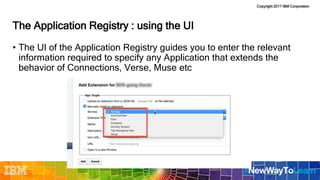
The Application Registry : using the UI
• The UI of the Application Registry guides you to enter the relevant
information required to specify any Application that extends the
behavior of Connections, Verse, Muse etc
Copyright 2017 IBM Corporation
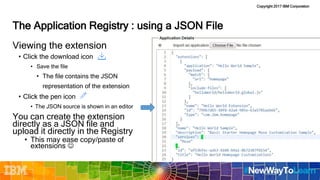
The Application Registry : using a JSON File
Viewing the extension
• Click the download icon
• Save the file
• The file contains the JSON
representation of the extension
• Click the pen icon
• The JSON source is shown in an editor
You can create the extension
directly as a JSON file and
upload it directly in the Registry
• This may ease copy/paste of
extensions 
Copyright 2017 IBM Corporation
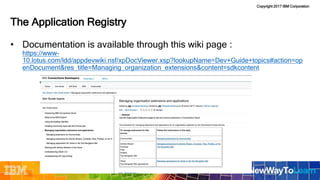
• Documentation is available through this wiki page :
https://www-
10.lotus.com/ldd/appdevwiki.nsf/xpDocViewer.xsp?lookupName=Dev+Guide+topics#action=op
enDocument&res_title=Managing_organization_extensions&content=sdkcontent
The Application Registry
Copyright 2017 IBM Corporation
Modifying the Menu
Header
Copyright 2017 IBM Corporation
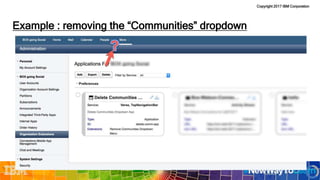
Example : removing the “Communities” dropdown
14
Copyright 2017 IBM Corporation
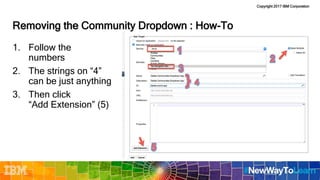
Removing the Community Dropdown : How-To
1. Follow the
numbers
2. The strings on “4”
can be just anything
3. Then click
“Add Extension” (5)
Copyright 2017 IBM Corporation
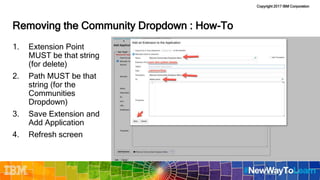
Removing the Community Dropdown : How-To
1. Extension Point
MUST be that string
(for delete)
2. Path MUST be that
string (for the
Communities
Dropdown)
3. Save Extension and
Add Application
4. Refresh screen
Copyright 2017 IBM Corporation
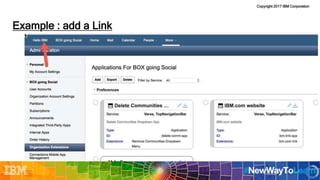
Example : add a Link
17
Copyright 2017 IBM Corporation
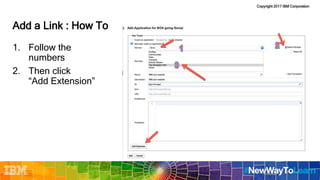
Add a Link : How To
1. Follow the
numbers
2. Then click
“Add Extension”
Copyright 2017 IBM Corporation
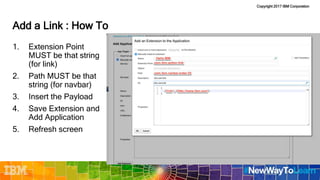
Add a Link : How To
1. Extension Point
MUST be that string
(for link)
2. Path MUST be that
string (for navbar)
3. Insert the Payload
4. Save Extension and
Add Application
5. Refresh screen
Copyright 2017 IBM Corporation
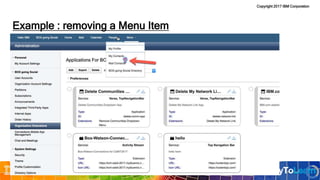
Example : removing a Menu Item
Copyright 2017 IBM Corporation
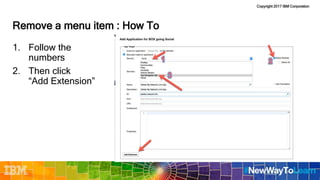
Remove a menu item : How To
1. Follow the
numbers
2. Then click
“Add Extension”
Copyright 2017 IBM Corporation
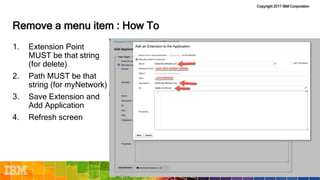
Remove a menu item : How To
1. Extension Point
MUST be that string
(for delete)
2. Path MUST be that
string (for myNetwork)
3. Save Extension and
Add Application
4. Refresh screen
Copyright 2017 IBM Corporation
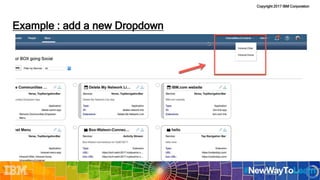
Example : add a new Dropdown
23
Copyright 2017 IBM Corporation
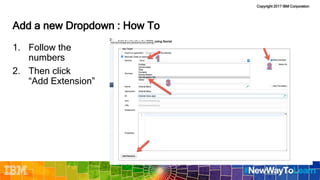
Add a new Dropdown : How To
1. Follow the
numbers
2. Then click
“Add Extension”
Copyright 2017 IBM Corporation
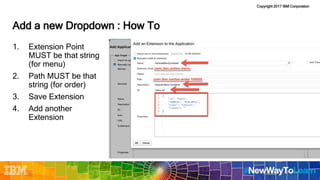
Add a new Dropdown : How To
1. Extension Point
MUST be that string
(for menu)
2. Path MUST be that
string (for order)
3. Save Extension
4. Add another
Extension
Copyright 2017 IBM Corporation
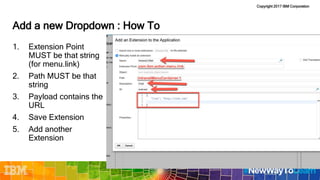
Add a new Dropdown : How To
1. Extension Point
MUST be that string
(for menu.link)
2. Path MUST be that
string
3. Payload contains the
URL
4. Save Extension
5. Add another
Extension
Copyright 2017 IBM Corporation
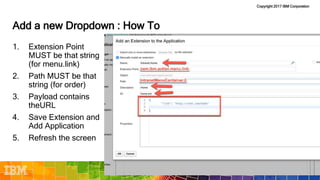
Add a new Dropdown : How To
1. Extension Point
MUST be that string
(for menu.link)
2. Path MUST be that
string (for order)
3. Payload contains
theURL
4. Save Extension and
Add Application
5. Refresh the screen
Copyright 2017 IBM Corporation
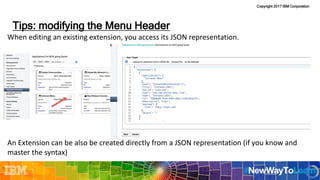
When editing an existing extension, you access its JSON representation.
An Extension can be also be created directly from a JSON representation (if you know and
master the syntax)
Tips: modifying the Menu Header
28
Copyright 2017 IBM Corporation
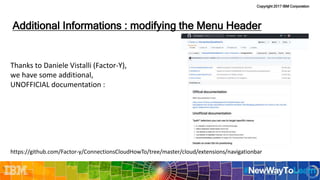
Thanks to Daniele Vistalli (Factor-Y),
we have some additional,
UNOFFICIAL documentation :
https://github.com/Factor-y/ConnectionsCloudHowTo/tree/master/cloud/extensions/navigationbar
Additional Informations : modifying the Menu Header
29
Copyright 2017 IBM Corporation
Other UI extensions
Copyright 2017 IBM Corporation
User Interface Extensions
• Contact Record
• Display a new link for a contact record in the context menu and details page for the specified contact
• File Menu
• Add a new action to a specific file
• New File Menu
• Display a new item in the New menu in Files
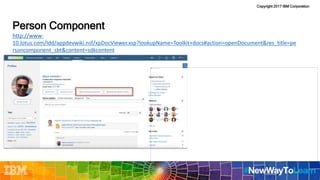
• Person Component
• Extend the user's profile page
• Service Menu
• Add a new menu item to show under the list of applications in navigation bar
Copyright 2017 IBM Corporation
User Interface Extensions
• Extensions add content to predefined locations in user interface
• Link from Connections Cloud to 3rd party applications
• Pass contextual information to 3rd party applications
• ${file_id}The ID of the file.
• ${user_id}The ID of the current user.
• ${subscriber_id}The ID of the current user.
• ${org_id}The ID of the organization of the current user.
• ${customer_id}The ID of the organization of the current user.
• Documentation
• https://developer.ibm.com/social/cloud/#ext-uiconnections
• https://www-
10.lotus.com/ldd/appdevwiki.nsf/xpDocViewer.xsp?lookupName=Dev+Guide+topics#action=
openDocument&res_title=Managing_organization_extensions&content=sdkcontent
Copyright 2017 IBM Corporation
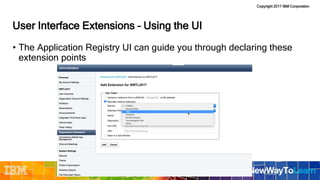
User Interface Extensions – Using the UI
• The Application Registry UI can guide you through declaring these
extension points
Copyright 2017 IBM Corporation
User Interface Extensions – JSON File
• You can also import JSON files in the App Registry
• See https://developer.ibm.com/social/cloud/#ext-uiconnections
Copyright 2017 IBM Corporation
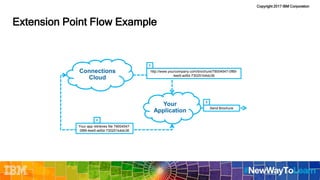
Extension Point Flow Example
Your
Application
Connections
Cloud
http://www.yourcompany.com/brochure/79004547-0f89-
4ee5-ad5d-730251b4dc36
Your app retrieves file 79004547-
0f89-4ee5-ad5d-730251b4dc36
Send Brochure
1
2
3
Copyright 2017 IBM Corporation
Person Component
http://www-
10.lotus.com/ldd/appdevwiki.nsf/xpDocViewer.xsp?lookupName=Toolkit+docs#action=openDocument&res_title=pe
rsoncomponent_sbt&content=sdkcontent
Copyright 2017 IBM Corporation
Contact Record - http://www-10.lotus.com/ldd/appdevwiki.nsf/dx/contactrecord_sbt
Copyright 2017 IBM Corporation
New File Menu - http://www-10.lotus.com/ldd/appdevwiki.nsf/dx/newfilemenu_sbt
Copyright 2017 IBM Corporation
Community Apps
Copyright 2017 IBM Corporation
iFrame Community Apps
• iFrame Community Apps allow extending the list
of widgets available for a Community
• They are managed as any other extension
• Think to them as a way to add an iFrame
(showing another application, or your own
application) into the Community Overview page
• They can be positioned anywhere in the
Community Overview page, even in the center
column
Copyright 2017 IBM Corporation
iFrame Community Apps : Administration
• iFrame Community Apps are described by a JSON file
• The JSON file can be registered in the Connections App Registry
as any other extension
Copyright 2017 IBM Corporation
iFrame Community Apps: Technical Considerations
• All is documented here :
https://www-
10.lotus.com/ldd/appdevwiki.nsf/xpDocViewer.xsp?lookupName=Dev+Guide+topics#action=openDocument&res_title
=Creating_Communities_apps_with_the_URL_Widget&content=sdkcontent
• This documentation comes with an example also
• Additional examples are available here:
https://gist.github.com/vfrancis/ebbec1381ca21d12dd2a
Copyright 2017 IBM Corporation
iFrame Community Apps : Technical Considerations
• Connections and your iFrame app communicate via an event
listener.
• If you want to use information about the current user or community in your app, include
a postMessage event listener and trigger Connections Cloud to pass contextual
information to the listener.
• Connections communicates to your iFrame app the following
information:
• Currently logged in User : id, mail, orgId, displayName
• Infos on the role: canContribute, canPersonalize
• Current Community: id, name, orgId
Copyright 2017 IBM Corporation
iFrame Community Apps : Technical Considerations
Copyright 2017 IBM Corporation
iFrame Community Apps : Technical Considerations
• Important things to consider:
• The HTML hosting your iFrame is in a different domain than Connections Cloud
• Connections communicates information to your iFrame ONLY “on load”
• The net-effect is that your iFrame cannot issue AJAX calls to Connections to
retrieve, after load, additional information.
• A server-side component needs to be planned if your iFrame actually requires to
dynamically communicate with Connections
• Static Connections infos are allowed (the iFrame runs inside an authenticated
Connections session)
• Example : you can embed a profile photo, but the id of the user must be
hardcoded or may come from “onload”
Copyright 2017 IBM Corporation
Using APIs
Copyright 2017 IBM Corporation
Using IBM Connections Cloud APIs
• https://www-
10.lotus.com/ldd/appdevwiki.nsf/xpAPIViewer.xsp?lookupName=API+Reference#action=openDo
cument&res_title=Getting_started_ic50&content=apicontent
Copyright 2017 IBM Corporation
NodeRED
Copyright 2017 IBM Corporation
Making Connections APIs available as nodes
Copyright 2017 IBM Corporation
Integration Examples
Copyright 2017 IBM Corporation
Integrating with the Activity Stream – App Registry
Copyright 2017 IBM Corporation
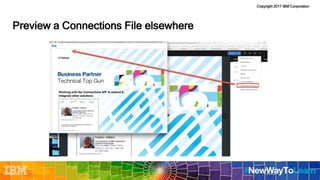
Preview a Connections File elsewhere
Files
Copyright 2017 IBM Corporation
Preview a Connections File elsewhere
Copyright 2017 IBM Corporation
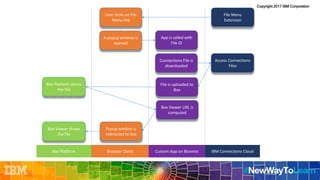
User clicks on File
Menu link
Browser Client IBM Connections CloudCustom App on Bluemix
App is called with
File ID
Box Viewer URL is
computed
Access Connections
Files
File is uploaded to
Box
Popup window is
redirected to Box
Box Platform stores
the file
Box Platform
Box Viewer shows
the file
File Menu
Extension
Connections File is
downloaded
A popup window is
opened
Copyright 2017 IBM Corporation
Preview a Connections File elsewhere
Copyright 2017 IBM Corporation
Muse
Copyright 2017 IBM Corporation
Muse : not everything in a nail
• Muse is a tactical solution
• The strategic solution for Connections customization is extension
points
• Services declare extension points for customizable features
• Customizations are implemented based on the extension point rules
• Muse extensions are based on a “man-in-the-middle” approach
• Intercept and modify interesting request/responses
• More fragile than an extension point mechanism
• But a good tactical solution where no extension points are in place
Copyright 2017 IBM Corporation
Additional Information
Copyright 2017 IBM Corporation
Additional Information
Add the Connections banner to your app
Seamless User Experience with IBM Connections Cloud
Reuse the IBM Connections Cloud Banner in Apps
How to Build a Hello World App for IBM Connections
Do all these and more at –
https://developer.ibm.com/social/cloud
Copyright 2017 IBM Corporation
Questions?
Copyright 2017 IBM Corporation
The End

Nwtl2017 extending and customizing ibm connections cloud

  • 1.
    Copyright 2017 IBMCorporation Extending and Customizing IBM Connections Cloud Stefano Pogliani Client Technical Professional – IBM Watson Work
  • 2.
    Copyright 2017 IBMCorporation Please note • IBM’s statements regarding its plans, directions, and intent are subject to change or withdrawal without notice at IBM’s sole discretion. • Information regarding potential future products is intended to outline our general product direction and it should not be relied on in making a purchasing decision. • The information mentioned regarding potential future products is not a commitment, promise, or legal obligation to deliver any material, code or functionality. Information about potential future products may not be incorporated into any contract. • The development, release, and timing of any future features or functionality described for our products remains at our sole discretion. • Performance is based on measurements and projections using standard IBM benchmarks in a controlled environment. The actual throughput or performance that any user will experience will vary depending upon many factors, including considerations such as the amount of multiprogramming in the user’s job stream, the I/O configuration, the storage configuration, and the workload processed. Therefore, no assurance can be given that an individual user will achieve results similar to those stated here. 2
  • 3.
    Copyright 2017 IBMCorporation Abstract In this session, we will explore the different options for customizing Connections Cloud
  • 4.
    Copyright 2017 IBMCorporation Integration options Extension points
  • 5.
    Copyright 2017 IBMCorporation Extension points
  • 6.
    Copyright 2017 IBMCorporation Communi ties Profiles Contacts Activity Stream Top navigation bar Files 6 External Apps Activity Stream Top navigation bar Files CommunitiesProfiles Contacts
  • 7.
    Copyright 2017 IBMCorporation The Application Registry • You access the “Application Registry” as an “Organization Administrator” under the “Organization Extensions” menu • This “Application Registry” allows administrators to extend the behavior of the documented extension points • Either using a specific UI • Or by means of a JSON file
  • 8.
    Copyright 2017 IBMCorporation • A central app design repository with UI and API access • Helps manage and deploy apps on a per-org basis • Provides a hierarchical model for defining applications • Services (like Communities, Verse, Muse etc) can declare Extension Points that expose customizable features • Apps are just containers for one or more extensions • An Extension is an implementation of an Extension Point SLIDE What is the Application Registry?
  • 9.
    Copyright 2017 IBMCorporation Simplified Anatomy of an App { "services": ["Muse"], "name": "My App", "extensions": [ { "type": "com.ibm.communities", "payload": { "match": { "url": "communities" } "include-files":["flipcard.user.js" ] }}]} SLIDE Muse My App Flip Card Layout Watson Tone Analysis Homepage Customizations NewsRiverFeed
  • 10.
    Copyright 2017 IBMCorporation The Application Registry : using the UI • The UI of the Application Registry guides you to enter the relevant information required to specify any Application that extends the behavior of Connections, Verse, Muse etc
  • 11.
    Copyright 2017 IBMCorporation The Application Registry : using a JSON File Viewing the extension • Click the download icon • Save the file • The file contains the JSON representation of the extension • Click the pen icon • The JSON source is shown in an editor You can create the extension directly as a JSON file and upload it directly in the Registry • This may ease copy/paste of extensions 
  • 12.
    Copyright 2017 IBMCorporation • Documentation is available through this wiki page : https://www- 10.lotus.com/ldd/appdevwiki.nsf/xpDocViewer.xsp?lookupName=Dev+Guide+topics#action=op enDocument&res_title=Managing_organization_extensions&content=sdkcontent The Application Registry
  • 13.
    Copyright 2017 IBMCorporation Modifying the Menu Header
  • 14.
    Copyright 2017 IBMCorporation Example : removing the “Communities” dropdown 14
  • 15.
    Copyright 2017 IBMCorporation Removing the Community Dropdown : How-To 1. Follow the numbers 2. The strings on “4” can be just anything 3. Then click “Add Extension” (5)
  • 16.
    Copyright 2017 IBMCorporation Removing the Community Dropdown : How-To 1. Extension Point MUST be that string (for delete) 2. Path MUST be that string (for the Communities Dropdown) 3. Save Extension and Add Application 4. Refresh screen
  • 17.
    Copyright 2017 IBMCorporation Example : add a Link 17
  • 18.
    Copyright 2017 IBMCorporation Add a Link : How To 1. Follow the numbers 2. Then click “Add Extension”
  • 19.
    Copyright 2017 IBMCorporation Add a Link : How To 1. Extension Point MUST be that string (for link) 2. Path MUST be that string (for navbar) 3. Insert the Payload 4. Save Extension and Add Application 5. Refresh screen
  • 20.
    Copyright 2017 IBMCorporation Example : removing a Menu Item
  • 21.
    Copyright 2017 IBMCorporation Remove a menu item : How To 1. Follow the numbers 2. Then click “Add Extension”
  • 22.
    Copyright 2017 IBMCorporation Remove a menu item : How To 1. Extension Point MUST be that string (for delete) 2. Path MUST be that string (for myNetwork) 3. Save Extension and Add Application 4. Refresh screen
  • 23.
    Copyright 2017 IBMCorporation Example : add a new Dropdown 23
  • 24.
    Copyright 2017 IBMCorporation Add a new Dropdown : How To 1. Follow the numbers 2. Then click “Add Extension”
  • 25.
    Copyright 2017 IBMCorporation Add a new Dropdown : How To 1. Extension Point MUST be that string (for menu) 2. Path MUST be that string (for order) 3. Save Extension 4. Add another Extension
  • 26.
    Copyright 2017 IBMCorporation Add a new Dropdown : How To 1. Extension Point MUST be that string (for menu.link) 2. Path MUST be that string 3. Payload contains the URL 4. Save Extension 5. Add another Extension
  • 27.
    Copyright 2017 IBMCorporation Add a new Dropdown : How To 1. Extension Point MUST be that string (for menu.link) 2. Path MUST be that string (for order) 3. Payload contains theURL 4. Save Extension and Add Application 5. Refresh the screen
  • 28.
    Copyright 2017 IBMCorporation When editing an existing extension, you access its JSON representation. An Extension can be also be created directly from a JSON representation (if you know and master the syntax) Tips: modifying the Menu Header 28
  • 29.
    Copyright 2017 IBMCorporation Thanks to Daniele Vistalli (Factor-Y), we have some additional, UNOFFICIAL documentation : https://github.com/Factor-y/ConnectionsCloudHowTo/tree/master/cloud/extensions/navigationbar Additional Informations : modifying the Menu Header 29
  • 30.
    Copyright 2017 IBMCorporation Other UI extensions
  • 31.
    Copyright 2017 IBMCorporation User Interface Extensions • Contact Record • Display a new link for a contact record in the context menu and details page for the specified contact • File Menu • Add a new action to a specific file • New File Menu • Display a new item in the New menu in Files • Person Component • Extend the user's profile page • Service Menu • Add a new menu item to show under the list of applications in navigation bar
  • 32.
    Copyright 2017 IBMCorporation User Interface Extensions • Extensions add content to predefined locations in user interface • Link from Connections Cloud to 3rd party applications • Pass contextual information to 3rd party applications • ${file_id}The ID of the file. • ${user_id}The ID of the current user. • ${subscriber_id}The ID of the current user. • ${org_id}The ID of the organization of the current user. • ${customer_id}The ID of the organization of the current user. • Documentation • https://developer.ibm.com/social/cloud/#ext-uiconnections • https://www- 10.lotus.com/ldd/appdevwiki.nsf/xpDocViewer.xsp?lookupName=Dev+Guide+topics#action= openDocument&res_title=Managing_organization_extensions&content=sdkcontent
  • 33.
    Copyright 2017 IBMCorporation User Interface Extensions – Using the UI • The Application Registry UI can guide you through declaring these extension points
  • 34.
    Copyright 2017 IBMCorporation User Interface Extensions – JSON File • You can also import JSON files in the App Registry • See https://developer.ibm.com/social/cloud/#ext-uiconnections
  • 35.
    Copyright 2017 IBMCorporation Extension Point Flow Example Your Application Connections Cloud http://www.yourcompany.com/brochure/79004547-0f89- 4ee5-ad5d-730251b4dc36 Your app retrieves file 79004547- 0f89-4ee5-ad5d-730251b4dc36 Send Brochure 1 2 3
  • 36.
    Copyright 2017 IBMCorporation Person Component http://www- 10.lotus.com/ldd/appdevwiki.nsf/xpDocViewer.xsp?lookupName=Toolkit+docs#action=openDocument&res_title=pe rsoncomponent_sbt&content=sdkcontent
  • 37.
    Copyright 2017 IBMCorporation Contact Record - http://www-10.lotus.com/ldd/appdevwiki.nsf/dx/contactrecord_sbt
  • 38.
    Copyright 2017 IBMCorporation New File Menu - http://www-10.lotus.com/ldd/appdevwiki.nsf/dx/newfilemenu_sbt
  • 39.
    Copyright 2017 IBMCorporation
  • 40.
    Copyright 2017 IBMCorporation Community Apps
  • 41.
    Copyright 2017 IBMCorporation iFrame Community Apps • iFrame Community Apps allow extending the list of widgets available for a Community • They are managed as any other extension • Think to them as a way to add an iFrame (showing another application, or your own application) into the Community Overview page • They can be positioned anywhere in the Community Overview page, even in the center column
  • 42.
    Copyright 2017 IBMCorporation
  • 43.
    Copyright 2017 IBMCorporation iFrame Community Apps : Administration • iFrame Community Apps are described by a JSON file • The JSON file can be registered in the Connections App Registry as any other extension
  • 44.
    Copyright 2017 IBMCorporation iFrame Community Apps: Technical Considerations • All is documented here : https://www- 10.lotus.com/ldd/appdevwiki.nsf/xpDocViewer.xsp?lookupName=Dev+Guide+topics#action=openDocument&res_title =Creating_Communities_apps_with_the_URL_Widget&content=sdkcontent • This documentation comes with an example also • Additional examples are available here: https://gist.github.com/vfrancis/ebbec1381ca21d12dd2a
  • 45.
    Copyright 2017 IBMCorporation iFrame Community Apps : Technical Considerations • Connections and your iFrame app communicate via an event listener. • If you want to use information about the current user or community in your app, include a postMessage event listener and trigger Connections Cloud to pass contextual information to the listener. • Connections communicates to your iFrame app the following information: • Currently logged in User : id, mail, orgId, displayName • Infos on the role: canContribute, canPersonalize • Current Community: id, name, orgId
  • 46.
    Copyright 2017 IBMCorporation iFrame Community Apps : Technical Considerations
  • 47.
    Copyright 2017 IBMCorporation iFrame Community Apps : Technical Considerations • Important things to consider: • The HTML hosting your iFrame is in a different domain than Connections Cloud • Connections communicates information to your iFrame ONLY “on load” • The net-effect is that your iFrame cannot issue AJAX calls to Connections to retrieve, after load, additional information. • A server-side component needs to be planned if your iFrame actually requires to dynamically communicate with Connections • Static Connections infos are allowed (the iFrame runs inside an authenticated Connections session) • Example : you can embed a profile photo, but the id of the user must be hardcoded or may come from “onload”
  • 48.
    Copyright 2017 IBMCorporation
  • 49.
    Copyright 2017 IBMCorporation
  • 50.
    Copyright 2017 IBMCorporation
  • 51.
    Copyright 2017 IBMCorporation Using APIs
  • 52.
    Copyright 2017 IBMCorporation Using IBM Connections Cloud APIs • https://www- 10.lotus.com/ldd/appdevwiki.nsf/xpAPIViewer.xsp?lookupName=API+Reference#action=openDo cument&res_title=Getting_started_ic50&content=apicontent
  • 53.
    Copyright 2017 IBMCorporation NodeRED
  • 54.
    Copyright 2017 IBMCorporation Making Connections APIs available as nodes
  • 55.
    Copyright 2017 IBMCorporation Integration Examples
  • 56.
    Copyright 2017 IBMCorporation
  • 57.
    Copyright 2017 IBMCorporation Integrating with the Activity Stream – App Registry
  • 58.
    Copyright 2017 IBMCorporation
  • 59.
    Copyright 2017 IBMCorporation Preview a Connections File elsewhere Files
  • 60.
    Copyright 2017 IBMCorporation Preview a Connections File elsewhere
  • 61.
    Copyright 2017 IBMCorporation User clicks on File Menu link Browser Client IBM Connections CloudCustom App on Bluemix App is called with File ID Box Viewer URL is computed Access Connections Files File is uploaded to Box Popup window is redirected to Box Box Platform stores the file Box Platform Box Viewer shows the file File Menu Extension Connections File is downloaded A popup window is opened
  • 62.
    Copyright 2017 IBMCorporation Preview a Connections File elsewhere
  • 63.
    Copyright 2017 IBMCorporation Muse
  • 64.
    Copyright 2017 IBMCorporation
  • 65.
    Copyright 2017 IBMCorporation
  • 66.
    Copyright 2017 IBMCorporation
  • 67.
    Copyright 2017 IBMCorporation
  • 68.
    Copyright 2017 IBMCorporation Muse : not everything in a nail • Muse is a tactical solution • The strategic solution for Connections customization is extension points • Services declare extension points for customizable features • Customizations are implemented based on the extension point rules • Muse extensions are based on a “man-in-the-middle” approach • Intercept and modify interesting request/responses • More fragile than an extension point mechanism • But a good tactical solution where no extension points are in place
  • 69.
    Copyright 2017 IBMCorporation Additional Information
  • 70.
    Copyright 2017 IBMCorporation Additional Information Add the Connections banner to your app Seamless User Experience with IBM Connections Cloud Reuse the IBM Connections Cloud Banner in Apps How to Build a Hello World App for IBM Connections Do all these and more at – https://developer.ibm.com/social/cloud
  • 71.
    Copyright 2017 IBMCorporation Questions?
  • 72.
    Copyright 2017 IBMCorporation The End

Editor's Notes

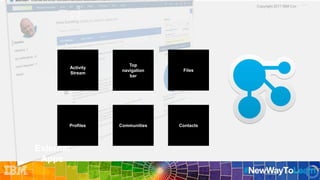
  • #5 We will be taking you through some examples of Integration options and extension points to highlight how you can make your end users happier, because this is what the focus should be
  • #6 We will be taking you through some examples of Integration options and extension points to highlight how you can make your end users happier, because this is what the focus should be
  • #7 Let us focus on IBM Connections, which I hope you are all fans of. When we look at application infrastructures we need to recognize ‘external applications’ which could be your applications on premises or 3rd party tools. Basically anything outside of the Connections Cloud. Or Connections Cloud which we can label as the ‘inside’. <CLICK> Our platform allows you to have two ways of integrations: Outside in and Inside out <CLICK>Where with Outside in you are taking content from an external source and bringing it inside connections. <CLICK> and Where with Inside out you take IBM Connections content and inject that into another application
  • #36 So this is what happens when the user clicks the “Send Brochure” menu item. The browser will access the custom brochure application over the web. The URL also contains that special file ID as part of the URL. This is how the brochure application knows which file to retrieve from Connections Cloud. After it fetches the file, the application processes the file and sends it as a brochure.