
ADMINISTRATION
Maurice Teeuwe | Technical Specialist
IBM Connections Cloud
m@nl.ibm.com
ibmcloud.com/social
V2.1.1 – March 2017
& INTEGRATION
IBM Connections Cloud
In 100 slides
This file can be downloaded from ibm.biz/CloudAdministrationIntegration
© 2017 IBM Corporation
IBM Connections Cloud
Page 2
IBM’s statements regarding its plans, directions, and intent are subject to change or withdrawal without notice at
IBM’s sole discretion.
Information regarding potential future products is intended to outline our general product direction and it should not be
relied on in making a purchasing decision.
The information mentioned regarding potential future products is not a commitment, promise, or legal obligation to
deliver any material, code or functionality. Information about potential future products may not be incorporated into
any contract. The development, release, and timing of any future features or functionality described for our products
remains at our sole discretion
Performance is based on measurements and projections using standard IBM benchmarks in a controlled
environment. The actual throughput or performance that any user will experience will vary depending upon many
factors, including considerations such as the amount of multiprogramming in the user’s job stream, the I/O
configuration, the storage configuration, and the workload processed. Therefore, no assurance can be given that an
individual user will achieve results similar to those stated here.
Please Note
© 2017 IBM Corporation
IBM Connections Cloud
Page 3
Agenda
Collaboration Administration
Messaging Administration
Integration
Bulk Administration
© 2017 IBM Corporation
IBM Connections Cloud
Page 4
Agenda
Collaboration Administration
Messaging Administration
Integration
Bulk Administration
© 2017 IBM Corporation
IBM Connections Cloud
Page 5
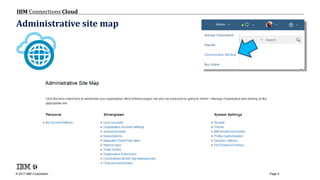
Administrative site map
© 2017 IBM Corporation
IBM Connections Cloud
Page 6
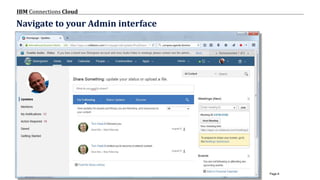
Navigate to your Admin interface
© 2017 IBM Corporation
IBM Connections Cloud
Page 7
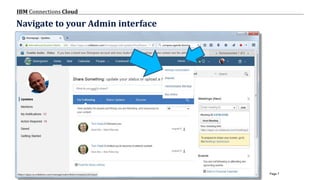
Navigate to your Admin interface
© 2017 IBM Corporation
IBM Connections Cloud
Page 8
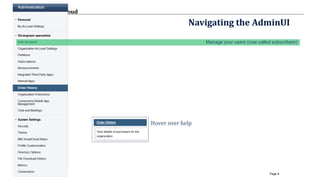
Navigating the AdminUI
Manage your users (now called subscribers)
Hover over help
© 2017 IBM Corporation
IBM Connections Cloud
Page 9
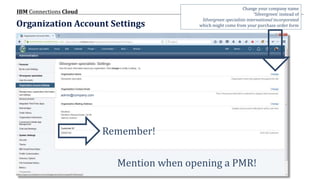
Organization Account Settings
Remember!
admin@company.com
Mention when opening a PMR!
Change your company name
‘Silvergreen’ instead of
Silvergreen specialists international incorporated
which might come from your purchase order form
© 2017 IBM Corporation
IBM Connections Cloud
Page 10
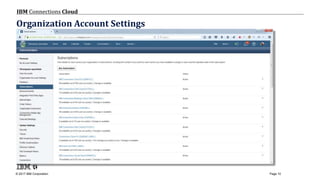
Organization Account Settings
© 2017 IBM Corporation
IBM Connections Cloud
Page 11
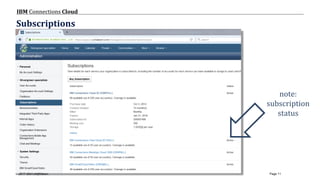
Subscriptions
note:
subscription
status
© 2017 IBM Corporation
IBM Connections Cloud
Page 12
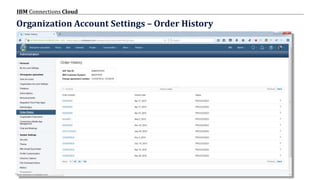
Organization Account Settings – Order History
© 2017 IBM Corporation
IBM Connections Cloud
Page 13
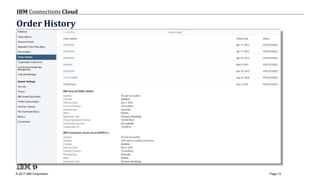
Order History
© 2017 IBM Corporation
IBM Connections Cloud
Page 14
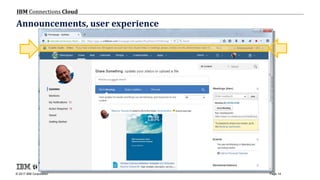
Announcements, user experience
© 2017 IBM Corporation
IBM Connections Cloud
Page 15
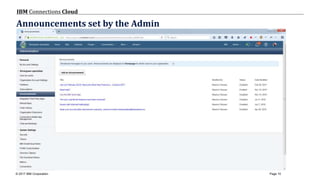
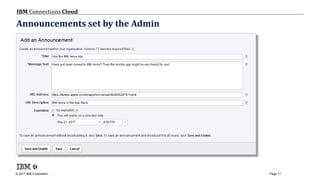
Announcements set by the Admin
© 2017 IBM Corporation
IBM Connections Cloud
Page 16
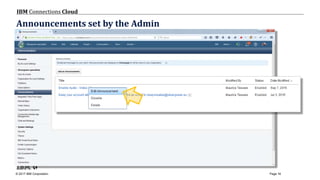
Announcements set by the Admin
© 2017 IBM Corporation
IBM Connections Cloud
Page 17
Announcements set by the Admin
© 2017 IBM Corporation
IBM Connections Cloud
Page 18
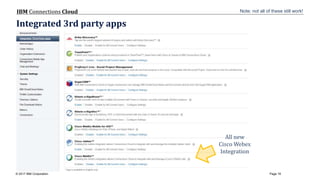
Integrated 3rd party apps
All new
Cisco Webex
Integration
Note: not all of these still work!
© 2017 IBM Corporation
IBM Connections Cloud
Page 19
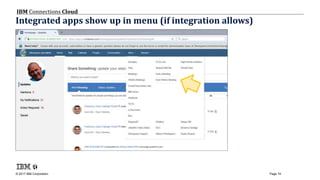
Integrated apps show up in menu (if integration allows)
© 2017 IBM Corporation
IBM Connections Cloud
Page 20
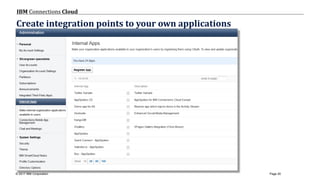
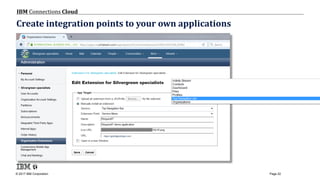
Create integration points to your own applications
© 2017 IBM Corporation
IBM Connections Cloud
Page 21
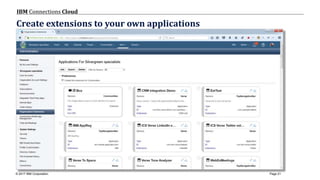
Create extensions to your own applications
© 2017 IBM Corporation
IBM Connections Cloud
Page 22
Create integration points to your own applications
https://gksfdgksdhgks.com
© 2017 IBM Corporation
IBM Connections Cloud
Page 23
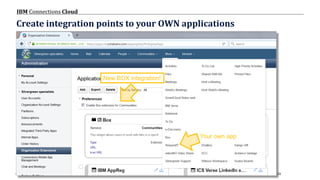
Create integration points to your OWN applications
Your own app
New BOX integration!
© 2017 IBM Corporation
IBM Connections Cloud
Page 24
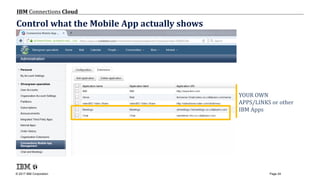
Control what the Mobile App actually shows
YOUR OWN
APPS/LINKS or other
IBM Apps
© 2017 IBM Corporation
IBM Connections Cloud
Page 25
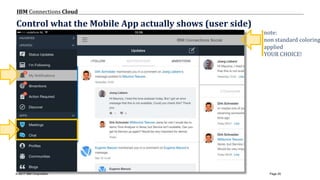
Control what the Mobile App actually shows (user side)
note:
non standard coloring
applied
YOUR CHOICE!
© 2017 IBM Corporation
IBM Connections Cloud
Page 26
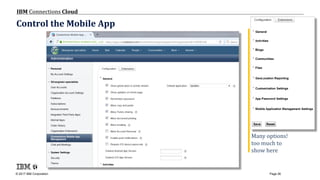
Control the Mobile App
Many options!
too much to
show here
© 2017 IBM Corporation
IBM Connections Cloud
Page 27
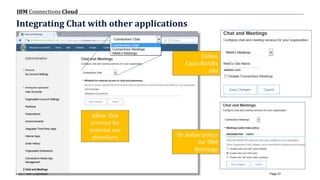
Integrating Chat with other applications
Allow chat
services for
external use
elsewhere Or define policy
for IBM
Meetings
Define
Cisco WebEx
site
© 2017 IBM Corporation
IBM Connections Cloud
Page 28
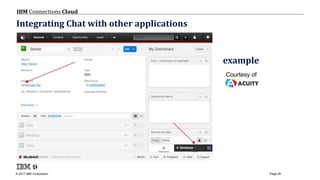
Integrating Chat with other applications
Courtesy of
example
© 2017 IBM Corporation
IBM Connections Cloud
Page 29
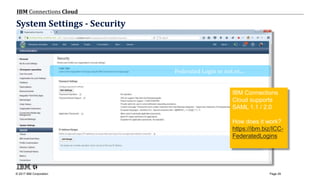
System Settings - Security
Federated Login or not or....
IBM Connections
Cloud supports
SAML 1.1 / 2.0
How does it work?
https://ibm.biz/ICC-
FederatedLogins
© 2017 IBM Corporation
IBM Connections Cloud
Page 30
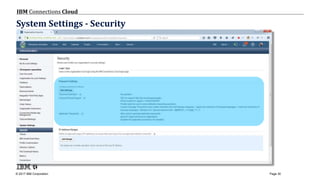
System Settings - Security
© 2017 IBM Corporation
IBM Connections Cloud
Page 31
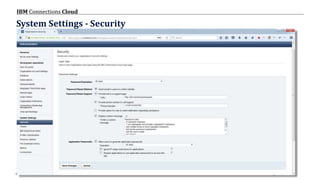
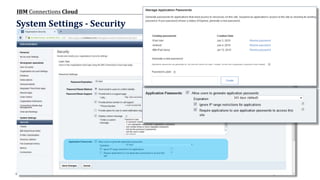
System Settings - Security
© 2017 IBM Corporation
IBM Connections Cloud
Page 32
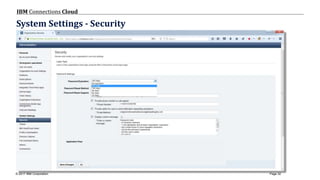
System Settings - Security
© 2017 IBM Corporation
IBM Connections Cloud
Page 33
System Settings - Security
© 2017 IBM Corporation
IBM Connections Cloud
Page 34
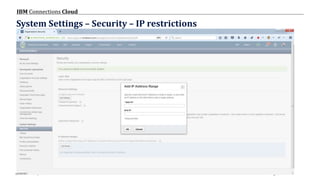
System Settings – Security – IP restrictions
© 2017 IBM Corporation
IBM Connections Cloud
Page 35
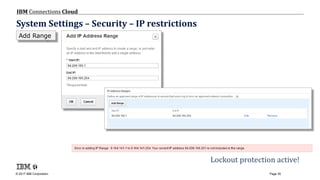
Be safer Lockout protection active!
Add Range
System Settings – Security – IP restrictions
© 2017 IBM Corporation
IBM Connections Cloud
Page 36
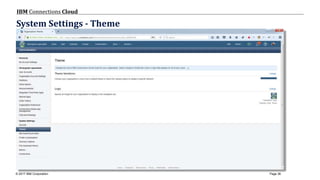
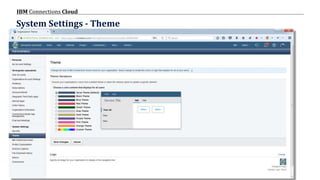
System Settings - Theme
© 2017 IBM Corporation
IBM Connections Cloud
Page 37
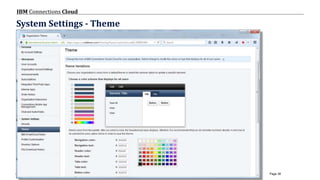
System Settings - Theme
© 2017 IBM Corporation
IBM Connections Cloud
Page 38
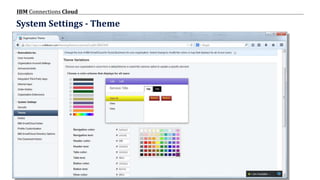
System Settings - Theme
© 2017 IBM Corporation
IBM Connections Cloud
Page 39
System Settings - Theme
© 2017 IBM Corporation
IBM Connections Cloud
Page 40
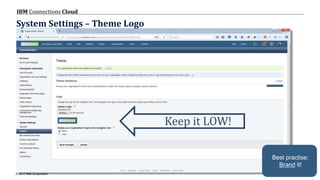
System Settings – Theme Logo
Keep it LOW!
Best practise:
Brand it!
© 2017 IBM Corporation
IBM Connections Cloud
Page 41
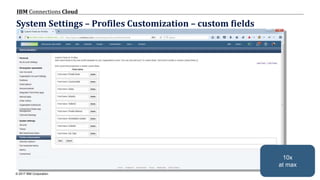
System Settings – Profiles Customization – custom fields
10x
at max
© 2017 IBM Corporation
IBM Connections Cloud
Page 42
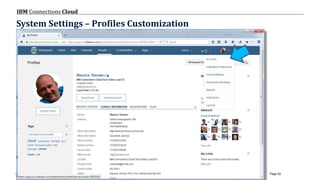
System Settings – Profiles Customization
© 2017 IBM Corporation
IBM Connections Cloud
Page 43
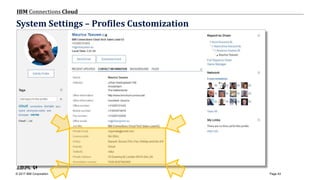
System Settings – Profiles Customization
© 2017 IBM Corporation
IBM Connections Cloud
Page 44
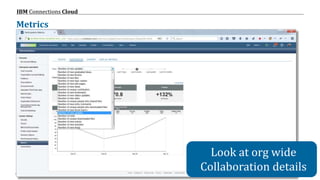
Metrics
Look at org wide
Collaboration details
© 2017 IBM Corporation
IBM Connections Cloud
Page 45
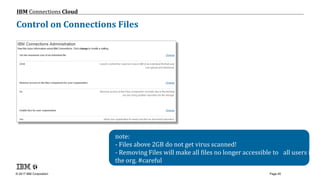
Control on Connections Files
note:
- Files above 2GB do not get virus scanned!
- Removing Files will make all files no longer accessible to all users in
the org. #careful
© 2017 IBM Corporation
IBM Connections Cloud
Page 46
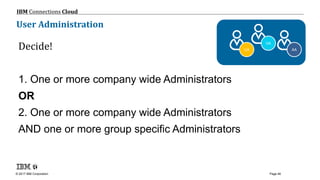
User Administration
Decide!
1. One or more company wide Administrators
OR
2. One or more company wide Administrators
AND one or more group specific Administrators
AA
OA
UA
© 2017 IBM Corporation
IBM Connections Cloud
Page 47
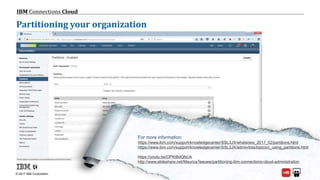
Partitioning your organization
For more information:
https://www.ibm.com/support/knowledgecenter/SSL3JX/whatsnew_2017_02/partitions.html
https://www.ibm.com/support/knowledgecenter/SSL3JX/admin/bss/topics/c_using_partitions.html
https://youtu.be/OPKtBdQfsUk
http://www.slideshare.net/MauriceTeeuwe/partitioning-ibm-connections-cloud-administration
© 2017 IBM Corporation
IBM Connections Cloud
Page 48
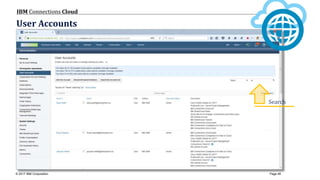
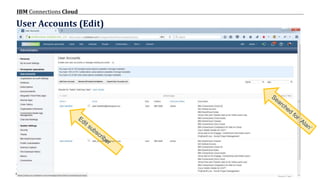
User Accounts
Search
© 2017 IBM Corporation
IBM Connections Cloud
Page 49
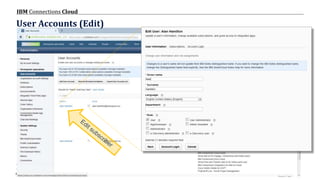
User Accounts (Edit)
© 2017 IBM Corporation
IBM Connections Cloud
Page 50
User Accounts (Edit)
© 2017 IBM Corporation
IBM Connections Cloud
Page 51
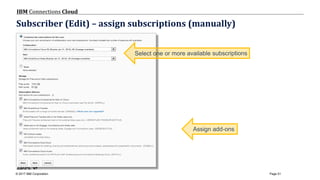
Subscriber (Edit) – assign subscriptions (manually)
© 2017 IBM Corporation
IBM Connections Cloud
Page 52
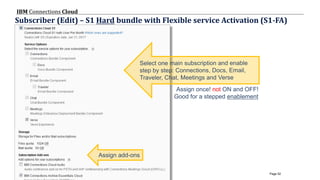
Subscriber (Edit) – S1 Hard bundle with Flexible service Activation (S1-FA)
Assign once! not ON and OFF!
Good for a stepped enablement
© 2017 IBM Corporation
IBM Connections Cloud
Page 53
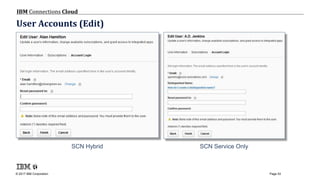
User Accounts (Edit)
SCN Hybrid SCN Service Only
© 2017 IBM Corporation
IBM Connections Cloud
Page 54
Agenda
Collaboration Administration
Messaging Administration
Integration
Bulk Administration
© 2017 IBM Corporation
IBM Connections Cloud
Page 55
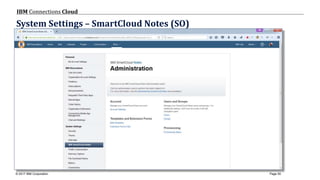
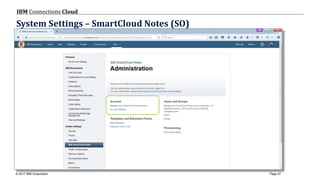
System Settings – SmartCloud Notes (SO)
© 2017 IBM Corporation
IBM Connections Cloud
Page 56
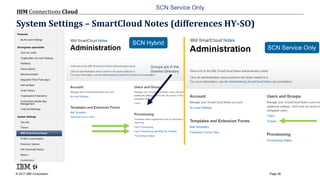
System Settings – SmartCloud Notes (differences HY-SO)
SCN Service Only
Groups are in the
Domino Directory
SCN Hybrid
SCN Service Only
© 2017 IBM Corporation
IBM Connections Cloud
Page 57
System Settings – SmartCloud Notes (SO)
© 2017 IBM Corporation
IBM Connections Cloud
Page 58
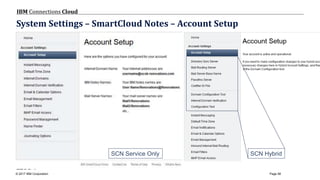
System Settings – SmartCloud Notes – Account Setup
SCN HybridSCN Service Only
© 2017 IBM Corporation
IBM Connections Cloud
Page 59
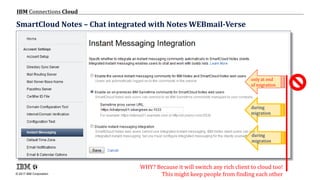
SmartCloud Notes – Chat integrated with Notes WEBmail-Verse
only at end
of migration
during
migration
during
migration
WHY? Because it will switch any rich client to cloud too!
This might keep people from finding each other
© 2017 IBM Corporation
IBM Connections Cloud
Page 60
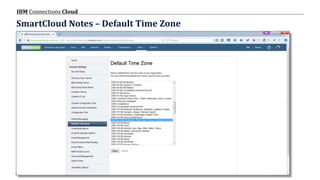
SmartCloud Notes – Default Time Zone
© 2017 IBM Corporation
IBM Connections Cloud
Page 61
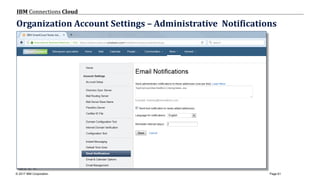
Organization Account Settings – Administrative Notifications
© 2017 IBM Corporation
IBM Connections Cloud
Page 62
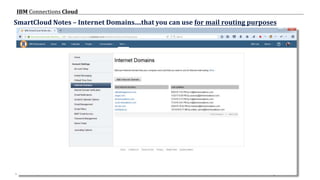
SmartCloud Notes – Internet Domains....that you can use for mail routing purposes
SCN SO
ONLY
SCN HY =
Domino Directory
© 2017 IBM Corporation
IBM Connections Cloud
Page 63
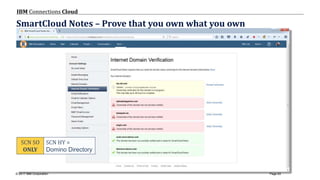
SmartCloud Notes – Prove that you own what you own
SCN SO
ONLY
SCN HY =
Domino Directory
© 2017 IBM Corporation
IBM Connections Cloud
Page 64
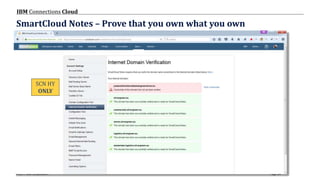
SmartCloud Notes – Prove that you own what you own
SCN HY
ONLY
© 2017 IBM Corporation
IBM Connections Cloud
Page 65
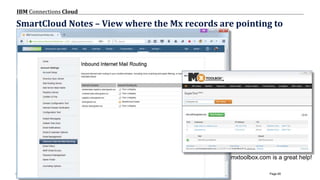
SmartCloud Notes – View where the Mx records are pointing to
mxtoolbox.com is a great help!
© 2017 IBM Corporation
IBM Connections Cloud
Page 66
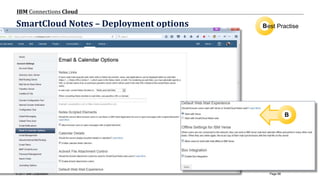
SmartCloud Notes – Deployment options Best Practise
B
© 2017 IBM Corporation
IBM Connections Cloud
Page 67
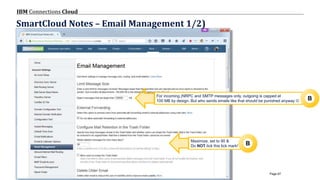
SmartCloud Notes – Email Management 1/2)
For incoming (NRPC and SMTP messages only, outgoing is capped at
100 MB by design. But who sends emails like that should be punished anyway 
Maximize, set to 90 &
Do NOT tick this tick mark!
B
B
© 2017 IBM Corporation
IBM Connections Cloud
Page 68
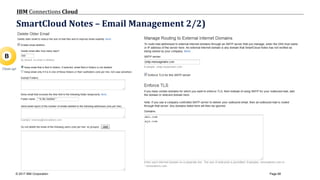
SmartCloud Notes – Email Management 2/2)
B
Clean up!
© 2017 IBM Corporation
IBM Connections Cloud
Page 69
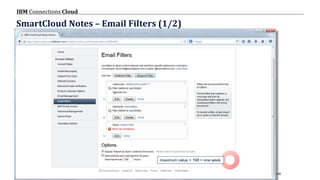
SmartCloud Notes – Email Filters (1/2)
maximum value = 168 = one week
© 2017 IBM Corporation
IBM Connections Cloud
Page 70
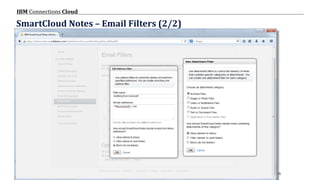
SmartCloud Notes – Email Filters (2/2)
© 2017 IBM Corporation
IBM Connections Cloud
Page 71
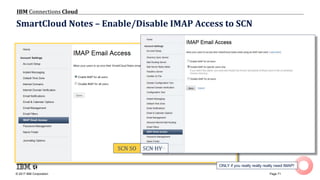
SmartCloud Notes – Enable/Disable IMAP Access to SCN
ONLY if you really really really need IMAP!
SCN SO SCN HY
© 2017 IBM Corporation
IBM Connections Cloud
Page 72
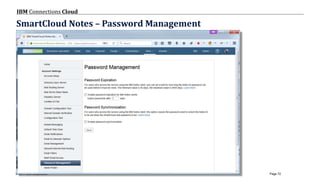
SmartCloud Notes – Password Management
© 2017 IBM Corporation
IBM Connections Cloud
Page 73
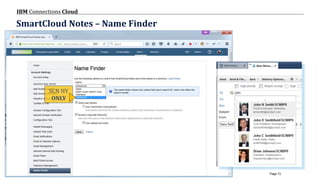
SmartCloud Notes – Name Finder
SCN HY
ONLY
© 2017 IBM Corporation
IBM Connections Cloud
Page 74
Agenda
Collaboration Administration
Messaging Administration
Integration
Bulk Administration
© 2017 IBM Corporation
IBM Connections Cloud
Page 75
© 2013 IBM Corporation
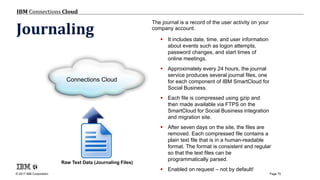
Journaling
The journal is a record of the user activity on your
company account.
 It includes date, time, and user information
about events such as logon attempts,
password changes, and start times of
online meetings.
 Approximately every 24 hours, the journal
service produces several journal files, one
for each component of IBM SmartCloud for
Social Business.
 Each file is compressed using gzip and
then made available via FTPS on the
SmartCloud for Social Business integration
and migration site.
 After seven days on the site, the files are
removed. Each compressed file contains a
plain text file that is in a human-readable
format. The format is consistent and regular
so that the text files can be
programmatically parsed.
 Enabled on request – not by default!
Connections Cloud
Raw Text Data (Journaling Files)
© 2017 IBM Corporation
IBM Connections Cloud
Page 76
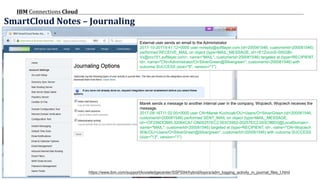
SmartCloud Notes – Journaling
Marek sends a message to another internal user in the company, Wojciech. Wojciech receives the
message.
2017-09-16T11:02:00+0000 user CN=Marek Kuchciak/OU=Users/O=SilverGreen (id=200081546,
customerId=200081546) performed SENT_MAIL on object (type=MAIL_MESSAGE,
id=<OF256DCB85.32064CA7-ON00257EC2.003C5952-00257EC2.003C9BD3@LocalDomain>,
name="MAIL", customerId=200081546) targeted at (type=RECIPIENT, id=, name="CN=Wojciech
Wilk/OU=Users/O=SilverGreen@Silvergreen", customerId=200081546) with outcome SUCCESS
(size="13", version="1")
External user sends an email to the Administrator
2017-10-20T19:41:12+0000 user noreply@softlayer.com (id=200081546, customerId=200081546)
performed RECEIVE_MAIL on object (type=MAIL_MESSAGE, id=<E1ZocmS-000GBr-
Vx@mx151.softlayer.com>, name="MAIL", customerId=200081546) targeted at (type=RECIPIENT,
id=, name="CN=Administrator/O=SilverGreen@Silvergreen", customerId=200081546) with
outcome SUCCESS (size="6", version="1")
https://www.ibm.com/support/knowledgecenter/SSPS94/hybrid/topics/adm_logging_activity_in_journal_files_t.html
© 2017 IBM Corporation
IBM Connections Cloud
Page 77
© 2013 IBM Corporation
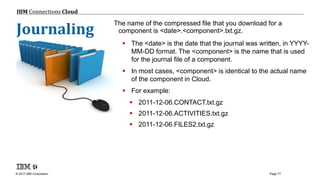
The name of the compressed file that you download for a
component is <date>.<component>.txt.gz.
 The <date> is the date that the journal was written, in YYYY-
MM-DD format. The <component> is the name that is used
for the journal file of a component.
 In most cases, <component> is identical to the actual name
of the component in Cloud.
 For example:
 2011-12-06.CONTACT.txt.gz
 2011-12-06.ACTIVITIES.txt.gz
 2011-12-06.FILES2.txt.gz
Journaling
© 2017 IBM Corporation
IBM Connections Cloud
Page 78
File delivery
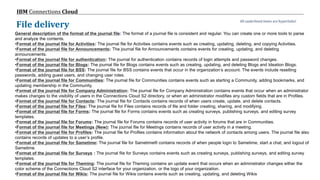
General description of the format of the journal file: The format of a journal file is consistent and regular. You can create one or more tools to parse
and analyze the contents.
•Format of the journal file for Activities: The journal file for Activities contains events such as creating, updating, deleting, and copying Activities.
•Format of the journal file for Announcements: The journal file for Announcements contains events for creating, updating, and deleting
announcements.
•Format of the journal file for authentication: The journal for authentication contains records of login attempts and password changes.
•Format of the journal file for Blogs: The journal file for Blogs contains events such as creating, updating, and deleting Blogs and Ideation Blogs.
•Format of the journal file for BSS: The journal file for BSS contains events that occur in the organization’s account. The events include resetting
passwords, adding guest users, and changing user roles.
•Format of the journal file for Communities: The journal file for Communities contains events such as starting a Community, adding bookmarks, and
updating membership in the Community.
•Format of the journal file for Company Administration: The journal file for Company Administration contains events that occur when an administrator
makes changes to the visibility of users in the Connections Cloud S2 directory, or when an administrator modifies any custom fields that are in Profiles.
•Format of the journal file for Contacts: The journal file for Contacts contains records of when users create, update, and delete contacts.
•Format of the journal file for Files: The journal file for Files contains records of file and folder creating, sharing, and modifying.
•Format of the journal file for Forms: The journal file for Forms contains events such as creating surveys, publishing surveys, and editing survey
templates.
•Format of the journal file for Forums: The journal file for Forums contains records of user activity in forums that are in Communities.
•Format of the journal file for Meetings (New): The journal file for Meetings contains records of user activity in a meeting.
•Format of the journal file for Profiles: The journal file for Profiles contains information about the network of contacts among users. The journal file also
contains records of updates to a user’s profile.
•Format of the journal file for Sametime: The journal file for Sametime® contains records of when people login to Sametime, start a chat, and logout of
Sametime.
•Format of the journal file for Surveys : The journal file for Surveys contains events such as creating surveys, publishing surveys, and editing survey
templates.
•Format of the journal file for Theming: The journal file for Theming contains an update event that occurs when an administrator changes either the
color scheme of the Connections Cloud S2 interface for your organization, or the logo of your organization.
•Format of the journal file for Wikis: The journal file for Wikis contains events such as creating, updating, and deleting Wikis
All underlined items are hyperlinks!
© 2017 IBM Corporation
IBM Connections Cloud
Page 79
Metrics Reporting options
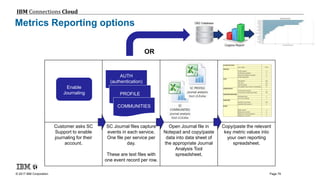
Customer asks SC
Support to enable
journaling for their
account.
SC Journal files capture
events in each service.
One file per service per
day.
These are text files with
one event record per row.
Open Journal file in
Notepad and copy/paste
data into data sheet of
the appropriate Journal
Analysis Tool
spreadsheet.
Copy/paste the relevant
key metric values into
your own reporting
spreadsheet.
Enable
Journaling
AUTH
(authentication)
PROFILE
COMMUNITIES
OR
© 2017 IBM Corporation
IBM Connections Cloud
Page 80
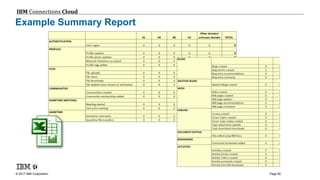
Example Summary Report
© 2017 IBM Corporation
IBM Connections Cloud
Page 81
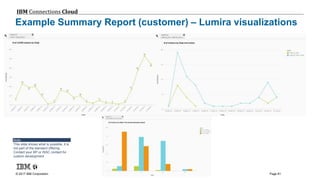
Example Summary Report (customer) – Lumira visualizations
Note:
This slide shows what is possible, it is
not part of the standard offering.
Contact your BP or ISSC contact for
custom development
© 2017 IBM Corporation
IBM Connections Cloud
Page 82
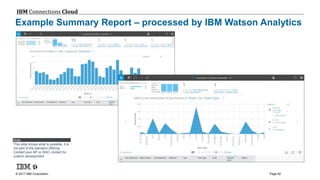
Example Summary Report – processed by IBM Watson Analytics
Note:
This slide shows what is possible, it is
not part of the standard offering.
Contact your BP or ISSC contact for
custom development
© 2017 IBM Corporation
IBM Connections Cloud
Page 83
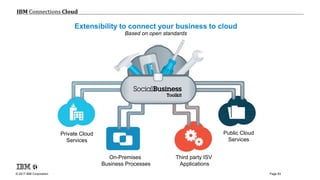
Extensibility to connect your business to cloud
Based on open standards
Private Cloud
Services
On-Premises
Business Processes
Third party ISV
Applications
Public Cloud
Services
© 2017 IBM Corporation
IBM Connections Cloud
Page 84
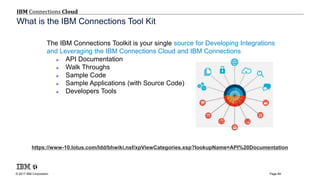
https://www-10.lotus.com/ldd/bhwiki.nsf/xpViewCategories.xsp?lookupName=API%20Documentation
The IBM Connections Toolkit is your single source for Developing Integrations
and Leveraging the IBM Connections Cloud and IBM Connections
 API Documentation
 Walk Throughs
 Sample Code
 Sample Applications (with Source Code)
 Developers Tools
What is the IBM Connections Tool Kit
© 2017 IBM Corporation
IBM Connections Cloud
Page 85
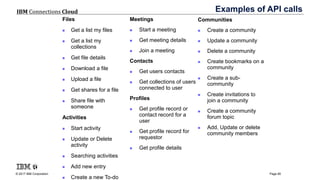
Examples of API calls
Files
 Get a list my files
 Get a list my
collections
 Get file details
 Download a file
 Upload a file
 Get shares for a file
 Share file with
someone
Activities
 Start activity
 Update or Delete
activity
 Searching activities
 Add new entry
 Create a new To-do
Meetings
 Start a meeting
 Get meeting details
 Join a meeting
Contacts
 Get users contacts
 Get collections of users
connected to user
Profiles
 Get profile record or
contact record for a
user
 Get profile record for
requestor
 Get profile details
Communities
 Create a community
 Update a community
 Delete a community
 Create bookmarks on a
community
 Create a sub-
community
 Create invitations to
join a community
 Create a community
forum topic
 Add, Update or delete
community members
© 2017 IBM Corporation
IBM Connections Cloud
Page 86
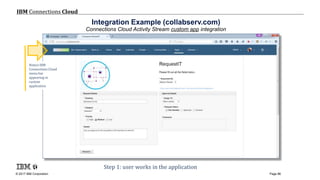
Integration Example (collabserv.com)
Connections Cloud Activity Stream custom app integration
Step 1: user works in the application
Notice IBM
Connections Cloud
menu bar
appearing in
custom
application
© 2017 IBM Corporation
IBM Connections Cloud
Page 87
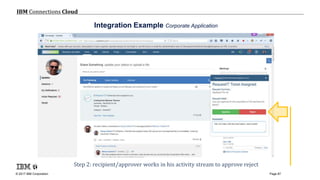
Integration Example Corporate Application
Step 2: recipient/approver works in his activity stream to approve reject
© 2017 IBM Corporation
IBM Connections Cloud
Page 88
Agenda
Collaboration Administration
Messaging Administration
Integration
Bulk Administration
© 2017 IBM Corporation
IBM Connections Cloud
Page 89
Bulk Administration – Enterprise Integration Site
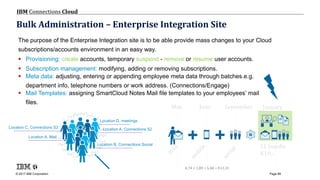
The purpose of the Enterprise Integration site is to be able provide mass changes to your Cloud
subscriptions/accounts environment in an easy way.
 Provisioning: create accounts, temporary suspend - remove or resume user accounts.
 Subscription management: modifying, adding or removing subscriptions.
 Meta data: adjusting, entering or appending employee meta data through batches.e.g.
department info, telephone numbers or work address. (Connections/Engage)
 Mail Templates: assigning SmartCloud Notes Mail file templates to your employees’ mail
files.
Location A, Mail
Location A, Connections S2
Location B, Connections Social
Location C, Connections S2
Location D, meetings
+ + S1 bundle
€10,-
May June September January
4,74 + 1,89 + 5,68 = €12,31
© 2017 IBM Corporation
IBM Connections Cloud
Page 90
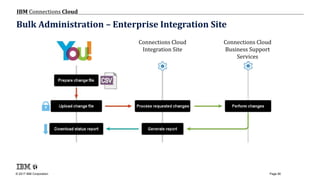
Bulk Administration – Enterprise Integration Site
Connections Cloud
Integration Site
Connections Cloud
Business Support
Services
© 2017 IBM Corporation
IBM Connections Cloud
Page 91
Bulk Administration – CSV File
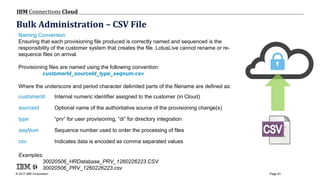
Naming Convention
Ensuring that each provisioning file produced is correctly named and sequenced is the
responsibility of the customer system that creates the file. LotusLive cannot rename or re-
sequence files on arrival.
Provisioning files are named using the following convention:
customerId_sourceId_type_seqnum.csv
Where the underscore and period character delimited parts of the filename are defined as:
customerId Internal numeric identifier assigned to the customer (in Cloud)
sourceId Optional name of the authoritative source of the provisioning change(s)
type “prv” for user provisioning, “di” for directory integration
seqNum Sequence number used to order the processing of files
csv Indicates data is encoded as comma separated values
Examples:
30020506_HRDatabase_PRV_1260226223.CSV
30020506_PRV_1260226223.csv
© 2017 IBM Corporation
IBM Connections Cloud
Page 92
Bulk Administration – Enterprise Integration Site
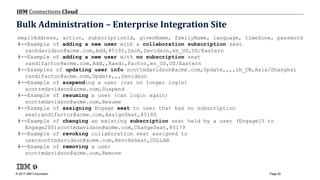
emailAddress, action, subscriptionId, givenName, familyName, language, timeZone, password
#--Example of adding a new user with a collaboration subscription seat
zachdavidson@acme.com,Add,85181,Zach,Davidson,en_US,US/Eastern
#--Example of adding a new user with no subscription seat
randifactor@acme.com,Add,,Randi,Factor,en_US,US/Eastern
#--Examples of updating user info scottmdavidson@acme.com,Update,,,,zh_CN,Asia/Shanghai
randifactor@acme.com,Update,,,Davidson
#--Example of suspending a user (can no longer login)
scottmdavidson@acme.com,Suspend
#--Example of resuming a user (can login again)
scottmdavidson@acme.com,Resume
#--Example of assigning Engage seat to user that has no subscription
seatrandifactor@acme.com,AssignSeat,85180
#--Example of changing an existing subscription seat held by a user (Engage15 to
Engage200)scottmdavidson@acme.com,ChangeSeat,85179
#--Example of revoking collaboration seat assigned to
userscottmdavidson@acme.com,RevokeSeat,COLLAB
#--Example of removing a user
scottmdavidson@acme.com,Remove
© 2017 IBM Corporation
IBM Connections Cloud
Page 93
Bulk Administration – Enterprise Integration Site
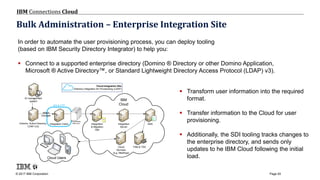
In order to automate the user provisioning process, you can deploy tooling
(based on IBM Security Directory Integrator) to help you:
 Connect to a supported enterprise directory (Domino ® Directory or other Domino Application,
Microsoft ® Active Directory™, or Standard Lightweight Directory Access Protocol (LDAP) v3).
 Transform user information into the required
format.
 Transfer information to the Cloud for user
provisioning.
 Additionally, the SDI tooling tracks changes to
the enterprise directory, and sends only
updates to he IBM Cloud following the initial
load.
Integration
& Migration
Site
ID management
system
Integration Client Integration
Server
BSS
TAM & TDSCloud
Services
(e.g. Meetings)
detect
changes
Provisioning
Files (csv)
Cloud Users
IBM
CloudSDI & FTP
Domino, Active Directory,
LDAP (v3)
Cloud Integration Site
Directory Integration for Provisioning (LDAP)
© 2017 IBM Corporation
IBM Connections Cloud
Page 94
Bulk Administration – Enterprise Integration Site
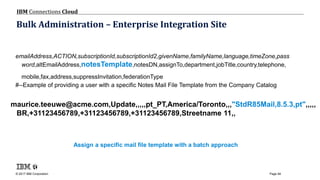
Assign a specific mail file template with a batch approach
emailAddress,ACTION,subscriptionId,subscriptionId2,givenName,familyName,language,timeZone,pass
word,altEmailAddress,notesTemplate,notesDN,assignTo,department,jobTitle,country,telephone,
mobile,fax,address,suppressInvitation,federationType
#--Example of providing a user with a specific Notes Mail File Template from the Company Catalog
maurice.teeuwe@acme.com,Update,,,,,pt_PT,America/Toronto,,,"StdR85Mail,8.5.3,pt",,,,,
BR,+31123456789,+31123456789,+31123456789,Streetname 11,,
© 2017 IBM Corporation
IBM Connections Cloud
Page 95
Bulk Administration – Enterprise Integration Enablement
 Cloud customer administrator must contact Client Services Group (CSG) to begin using the
Enterprise Integration Site (a.k.a. LLIS)
 Expectation is that ISSC or some other service engagement is required for most customers
 Customer can go at it alone if sufficiently savvy
 Must provide the following info to be enabled:
 Company Name
 Customer ID
 EIS User account (email address)
 Customer Administrator (for UP)
Best Practice:
Use an alias email
address or
“functional acount”
These credentials
will be used for the
company, not the
person to log in.
B
© 2017 IBM Corporation
IBM Connections Cloud
Page 96
Bulk Administration – Limitations & Firewall
Service Limitations - Preventing overload:
 Maximum of 200 lines per csv.
 FTP service for uploading provisioning change files and
downloading reports.
 FTP client configuration to reach the Integration Site
 Host:
ftp.ce.collabserv.com (EU DC)
ftp.na.collabserv.com (US DC)
ftp.ap.collabserv.com (JP DC)
Ports: 990, 60000 to 61000
SSL mode: implicit
Best Practise:
To maximize the solution:
Use a maximum of 183 lines per csv.
3 * 183 = 549 lines processed per hour.
B
© 2017 IBM Corporation
IBM Connections Cloud
Page 97
What did we cover?
Administrate:
 Subscribers & Subscriptions
 SCN SO & HY
 Mobile Device Connections App
 In bulk
 Integration options
© 2017 IBM Corporation
IBM Connections Cloud
Page 98
References
IBM Cloud Platform Enterprise Integration Server Help - wiki
Administering Connections Cloud
Administering SmartCloud Notes: Hybrid Environment
Administering SmartCloud Notes: Service-Only Environment
Integration Server Info Center https://ibm.biz/Bdi47P
Preparing your Enterprise for IBM Connections Cloud
http://ibm.biz/CloudRedbookPDF
© 2017 IBM Corporation
IBM Connections Cloud
Page 99
Questions
http://ibmcloud.com/social
© 2017 IBM Corporation
IBM Connections Cloud
Page 100
SIMPLIFIED CHINESEHINDI JAPANESE
ARABICRUSSIANTRADITIONAL CHINESE TAMIL THAI
FRENCH
GERMAN
ITALIAN
SPANISH
BRAZILIAN PORTUGUESE
Thank You
© 2017 IBM Corporation
IBM Connections Cloud
Page 101
Acknowledgements and Disclaimers
© Copyright IBM Corporation 2017. All rights reserved.
 U.S. Government Users Restricted Rights - Use, duplication or disclosure restricted by GSA ADP Schedule Contract with IBM Corp.
 IBM, the IBM logo, ibm.com,and Lotus are trademarks or registered trademarks of International Business Machines Corporation in the United States, other countries, or both. If
these and other IBM trademarked terms are marked on their first occurrence in this information with a trademark symbol (® or ™), these symbols indicate U.S. registered or
common law trademarks owned by IBM at the time this information was published. Such trademarks may also be registered or common law trademarks in other countries. A
current list of IBM trademarks is available on the Web at “Copyright and trademark information” at www.ibm.com/legal/copytrade.shtml
Other company, product, or service names may be trademarks or service marks of others.
Availability. References in this presentation to IBM products, programs, or services do not imply that they will be available in all countries in which IBM operates.
The workshops, sessions and materials have been prepared by IBM or the session speakers and reflect their own views. They are provided for informational purposes only, and are
neither intended to, nor shall have the effect of being, legal or other guidance or advice to any participant. While efforts were made to verify the completeness and accuracy of the
information contained in this presentation, it is provided AS-IS without warranty of any kind, express or implied. IBM shall not be responsible for any damages arising out of the use
of, or otherwise related to, this presentation or any other materials. Nothing contained in this presentation is intended to, nor shall have the effect of, creating any warranties or
representations from IBM or its suppliers or licensors, or altering the terms and conditions of the applicable license agreement governing the use of IBM software.
All customer examples described are presented as illustrations of how those customers have used IBM products and the results they may have achieved. Actual environmental
costs and performance characteristics may vary by customer. Nothing contained in these materials is intended to, nor shall have the effect of, stating or implying that any activities
undertaken by you will result in any specific sales, revenue growth or other results.

Cloud administration

  • 1.
    ADMINISTRATION Maurice Teeuwe |Technical Specialist IBM Connections Cloud m@nl.ibm.com ibmcloud.com/social V2.1.1 – March 2017 & INTEGRATION IBM Connections Cloud In 100 slides This file can be downloaded from ibm.biz/CloudAdministrationIntegration
  • 2.
    © 2017 IBMCorporation IBM Connections Cloud Page 2 IBM’s statements regarding its plans, directions, and intent are subject to change or withdrawal without notice at IBM’s sole discretion. Information regarding potential future products is intended to outline our general product direction and it should not be relied on in making a purchasing decision. The information mentioned regarding potential future products is not a commitment, promise, or legal obligation to deliver any material, code or functionality. Information about potential future products may not be incorporated into any contract. The development, release, and timing of any future features or functionality described for our products remains at our sole discretion Performance is based on measurements and projections using standard IBM benchmarks in a controlled environment. The actual throughput or performance that any user will experience will vary depending upon many factors, including considerations such as the amount of multiprogramming in the user’s job stream, the I/O configuration, the storage configuration, and the workload processed. Therefore, no assurance can be given that an individual user will achieve results similar to those stated here. Please Note
  • 3.
    © 2017 IBMCorporation IBM Connections Cloud Page 3 Agenda Collaboration Administration Messaging Administration Integration Bulk Administration
  • 4.
    © 2017 IBMCorporation IBM Connections Cloud Page 4 Agenda Collaboration Administration Messaging Administration Integration Bulk Administration
  • 5.
    © 2017 IBMCorporation IBM Connections Cloud Page 5 Administrative site map
  • 6.
    © 2017 IBMCorporation IBM Connections Cloud Page 6 Navigate to your Admin interface
  • 7.
    © 2017 IBMCorporation IBM Connections Cloud Page 7 Navigate to your Admin interface
  • 8.
    © 2017 IBMCorporation IBM Connections Cloud Page 8 Navigating the AdminUI Manage your users (now called subscribers) Hover over help
  • 9.
    © 2017 IBMCorporation IBM Connections Cloud Page 9 Organization Account Settings Remember! admin@company.com Mention when opening a PMR! Change your company name ‘Silvergreen’ instead of Silvergreen specialists international incorporated which might come from your purchase order form
  • 10.
    © 2017 IBMCorporation IBM Connections Cloud Page 10 Organization Account Settings
  • 11.
    © 2017 IBMCorporation IBM Connections Cloud Page 11 Subscriptions note: subscription status
  • 12.
    © 2017 IBMCorporation IBM Connections Cloud Page 12 Organization Account Settings – Order History
  • 13.
    © 2017 IBMCorporation IBM Connections Cloud Page 13 Order History
  • 14.
    © 2017 IBMCorporation IBM Connections Cloud Page 14 Announcements, user experience
  • 15.
    © 2017 IBMCorporation IBM Connections Cloud Page 15 Announcements set by the Admin
  • 16.
    © 2017 IBMCorporation IBM Connections Cloud Page 16 Announcements set by the Admin
  • 17.
    © 2017 IBMCorporation IBM Connections Cloud Page 17 Announcements set by the Admin
  • 18.
    © 2017 IBMCorporation IBM Connections Cloud Page 18 Integrated 3rd party apps All new Cisco Webex Integration Note: not all of these still work!
  • 19.
    © 2017 IBMCorporation IBM Connections Cloud Page 19 Integrated apps show up in menu (if integration allows)
  • 20.
    © 2017 IBMCorporation IBM Connections Cloud Page 20 Create integration points to your own applications
  • 21.
    © 2017 IBMCorporation IBM Connections Cloud Page 21 Create extensions to your own applications
  • 22.
    © 2017 IBMCorporation IBM Connections Cloud Page 22 Create integration points to your own applications https://gksfdgksdhgks.com
  • 23.
    © 2017 IBMCorporation IBM Connections Cloud Page 23 Create integration points to your OWN applications Your own app New BOX integration!
  • 24.
    © 2017 IBMCorporation IBM Connections Cloud Page 24 Control what the Mobile App actually shows YOUR OWN APPS/LINKS or other IBM Apps
  • 25.
    © 2017 IBMCorporation IBM Connections Cloud Page 25 Control what the Mobile App actually shows (user side) note: non standard coloring applied YOUR CHOICE!
  • 26.
    © 2017 IBMCorporation IBM Connections Cloud Page 26 Control the Mobile App Many options! too much to show here
  • 27.
    © 2017 IBMCorporation IBM Connections Cloud Page 27 Integrating Chat with other applications Allow chat services for external use elsewhere Or define policy for IBM Meetings Define Cisco WebEx site
  • 28.
    © 2017 IBMCorporation IBM Connections Cloud Page 28 Integrating Chat with other applications Courtesy of example
  • 29.
    © 2017 IBMCorporation IBM Connections Cloud Page 29 System Settings - Security Federated Login or not or.... IBM Connections Cloud supports SAML 1.1 / 2.0 How does it work? https://ibm.biz/ICC- FederatedLogins
  • 30.
    © 2017 IBMCorporation IBM Connections Cloud Page 30 System Settings - Security
  • 31.
    © 2017 IBMCorporation IBM Connections Cloud Page 31 System Settings - Security
  • 32.
    © 2017 IBMCorporation IBM Connections Cloud Page 32 System Settings - Security
  • 33.
    © 2017 IBMCorporation IBM Connections Cloud Page 33 System Settings - Security
  • 34.
    © 2017 IBMCorporation IBM Connections Cloud Page 34 System Settings – Security – IP restrictions
  • 35.
    © 2017 IBMCorporation IBM Connections Cloud Page 35 Be safer Lockout protection active! Add Range System Settings – Security – IP restrictions
  • 36.
    © 2017 IBMCorporation IBM Connections Cloud Page 36 System Settings - Theme
  • 37.
    © 2017 IBMCorporation IBM Connections Cloud Page 37 System Settings - Theme
  • 38.
    © 2017 IBMCorporation IBM Connections Cloud Page 38 System Settings - Theme
  • 39.
    © 2017 IBMCorporation IBM Connections Cloud Page 39 System Settings - Theme
  • 40.
    © 2017 IBMCorporation IBM Connections Cloud Page 40 System Settings – Theme Logo Keep it LOW! Best practise: Brand it!
  • 41.
    © 2017 IBMCorporation IBM Connections Cloud Page 41 System Settings – Profiles Customization – custom fields 10x at max
  • 42.
    © 2017 IBMCorporation IBM Connections Cloud Page 42 System Settings – Profiles Customization
  • 43.
    © 2017 IBMCorporation IBM Connections Cloud Page 43 System Settings – Profiles Customization
  • 44.
    © 2017 IBMCorporation IBM Connections Cloud Page 44 Metrics Look at org wide Collaboration details
  • 45.
    © 2017 IBMCorporation IBM Connections Cloud Page 45 Control on Connections Files note: - Files above 2GB do not get virus scanned! - Removing Files will make all files no longer accessible to all users in the org. #careful
  • 46.
    © 2017 IBMCorporation IBM Connections Cloud Page 46 User Administration Decide! 1. One or more company wide Administrators OR 2. One or more company wide Administrators AND one or more group specific Administrators AA OA UA
  • 47.
    © 2017 IBMCorporation IBM Connections Cloud Page 47 Partitioning your organization For more information: https://www.ibm.com/support/knowledgecenter/SSL3JX/whatsnew_2017_02/partitions.html https://www.ibm.com/support/knowledgecenter/SSL3JX/admin/bss/topics/c_using_partitions.html https://youtu.be/OPKtBdQfsUk http://www.slideshare.net/MauriceTeeuwe/partitioning-ibm-connections-cloud-administration
  • 48.
    © 2017 IBMCorporation IBM Connections Cloud Page 48 User Accounts Search
  • 49.
    © 2017 IBMCorporation IBM Connections Cloud Page 49 User Accounts (Edit)
  • 50.
    © 2017 IBMCorporation IBM Connections Cloud Page 50 User Accounts (Edit)
  • 51.
    © 2017 IBMCorporation IBM Connections Cloud Page 51 Subscriber (Edit) – assign subscriptions (manually)
  • 52.
    © 2017 IBMCorporation IBM Connections Cloud Page 52 Subscriber (Edit) – S1 Hard bundle with Flexible service Activation (S1-FA) Assign once! not ON and OFF! Good for a stepped enablement
  • 53.
    © 2017 IBMCorporation IBM Connections Cloud Page 53 User Accounts (Edit) SCN Hybrid SCN Service Only
  • 54.
    © 2017 IBMCorporation IBM Connections Cloud Page 54 Agenda Collaboration Administration Messaging Administration Integration Bulk Administration
  • 55.
    © 2017 IBMCorporation IBM Connections Cloud Page 55 System Settings – SmartCloud Notes (SO)
  • 56.
    © 2017 IBMCorporation IBM Connections Cloud Page 56 System Settings – SmartCloud Notes (differences HY-SO) SCN Service Only Groups are in the Domino Directory SCN Hybrid SCN Service Only
  • 57.
    © 2017 IBMCorporation IBM Connections Cloud Page 57 System Settings – SmartCloud Notes (SO)
  • 58.
    © 2017 IBMCorporation IBM Connections Cloud Page 58 System Settings – SmartCloud Notes – Account Setup SCN HybridSCN Service Only
  • 59.
    © 2017 IBMCorporation IBM Connections Cloud Page 59 SmartCloud Notes – Chat integrated with Notes WEBmail-Verse only at end of migration during migration during migration WHY? Because it will switch any rich client to cloud too! This might keep people from finding each other
  • 60.
    © 2017 IBMCorporation IBM Connections Cloud Page 60 SmartCloud Notes – Default Time Zone
  • 61.
    © 2017 IBMCorporation IBM Connections Cloud Page 61 Organization Account Settings – Administrative Notifications
  • 62.
    © 2017 IBMCorporation IBM Connections Cloud Page 62 SmartCloud Notes – Internet Domains....that you can use for mail routing purposes SCN SO ONLY SCN HY = Domino Directory
  • 63.
    © 2017 IBMCorporation IBM Connections Cloud Page 63 SmartCloud Notes – Prove that you own what you own SCN SO ONLY SCN HY = Domino Directory
  • 64.
    © 2017 IBMCorporation IBM Connections Cloud Page 64 SmartCloud Notes – Prove that you own what you own SCN HY ONLY
  • 65.
    © 2017 IBMCorporation IBM Connections Cloud Page 65 SmartCloud Notes – View where the Mx records are pointing to mxtoolbox.com is a great help!
  • 66.
    © 2017 IBMCorporation IBM Connections Cloud Page 66 SmartCloud Notes – Deployment options Best Practise B
  • 67.
    © 2017 IBMCorporation IBM Connections Cloud Page 67 SmartCloud Notes – Email Management 1/2) For incoming (NRPC and SMTP messages only, outgoing is capped at 100 MB by design. But who sends emails like that should be punished anyway  Maximize, set to 90 & Do NOT tick this tick mark! B B
  • 68.
    © 2017 IBMCorporation IBM Connections Cloud Page 68 SmartCloud Notes – Email Management 2/2) B Clean up!
  • 69.
    © 2017 IBMCorporation IBM Connections Cloud Page 69 SmartCloud Notes – Email Filters (1/2) maximum value = 168 = one week
  • 70.
    © 2017 IBMCorporation IBM Connections Cloud Page 70 SmartCloud Notes – Email Filters (2/2)
  • 71.
    © 2017 IBMCorporation IBM Connections Cloud Page 71 SmartCloud Notes – Enable/Disable IMAP Access to SCN ONLY if you really really really need IMAP! SCN SO SCN HY
  • 72.
    © 2017 IBMCorporation IBM Connections Cloud Page 72 SmartCloud Notes – Password Management
  • 73.
    © 2017 IBMCorporation IBM Connections Cloud Page 73 SmartCloud Notes – Name Finder SCN HY ONLY
  • 74.
    © 2017 IBMCorporation IBM Connections Cloud Page 74 Agenda Collaboration Administration Messaging Administration Integration Bulk Administration
  • 75.
    © 2017 IBMCorporation IBM Connections Cloud Page 75 © 2013 IBM Corporation Journaling The journal is a record of the user activity on your company account.  It includes date, time, and user information about events such as logon attempts, password changes, and start times of online meetings.  Approximately every 24 hours, the journal service produces several journal files, one for each component of IBM SmartCloud for Social Business.  Each file is compressed using gzip and then made available via FTPS on the SmartCloud for Social Business integration and migration site.  After seven days on the site, the files are removed. Each compressed file contains a plain text file that is in a human-readable format. The format is consistent and regular so that the text files can be programmatically parsed.  Enabled on request – not by default! Connections Cloud Raw Text Data (Journaling Files)
  • 76.
    © 2017 IBMCorporation IBM Connections Cloud Page 76 SmartCloud Notes – Journaling Marek sends a message to another internal user in the company, Wojciech. Wojciech receives the message. 2017-09-16T11:02:00+0000 user CN=Marek Kuchciak/OU=Users/O=SilverGreen (id=200081546, customerId=200081546) performed SENT_MAIL on object (type=MAIL_MESSAGE, id=<OF256DCB85.32064CA7-ON00257EC2.003C5952-00257EC2.003C9BD3@LocalDomain>, name="MAIL", customerId=200081546) targeted at (type=RECIPIENT, id=, name="CN=Wojciech Wilk/OU=Users/O=SilverGreen@Silvergreen", customerId=200081546) with outcome SUCCESS (size="13", version="1") External user sends an email to the Administrator 2017-10-20T19:41:12+0000 user noreply@softlayer.com (id=200081546, customerId=200081546) performed RECEIVE_MAIL on object (type=MAIL_MESSAGE, id=<E1ZocmS-000GBr- Vx@mx151.softlayer.com>, name="MAIL", customerId=200081546) targeted at (type=RECIPIENT, id=, name="CN=Administrator/O=SilverGreen@Silvergreen", customerId=200081546) with outcome SUCCESS (size="6", version="1") https://www.ibm.com/support/knowledgecenter/SSPS94/hybrid/topics/adm_logging_activity_in_journal_files_t.html
  • 77.
    © 2017 IBMCorporation IBM Connections Cloud Page 77 © 2013 IBM Corporation The name of the compressed file that you download for a component is <date>.<component>.txt.gz.  The <date> is the date that the journal was written, in YYYY- MM-DD format. The <component> is the name that is used for the journal file of a component.  In most cases, <component> is identical to the actual name of the component in Cloud.  For example:  2011-12-06.CONTACT.txt.gz  2011-12-06.ACTIVITIES.txt.gz  2011-12-06.FILES2.txt.gz Journaling
  • 78.
    © 2017 IBMCorporation IBM Connections Cloud Page 78 File delivery General description of the format of the journal file: The format of a journal file is consistent and regular. You can create one or more tools to parse and analyze the contents. •Format of the journal file for Activities: The journal file for Activities contains events such as creating, updating, deleting, and copying Activities. •Format of the journal file for Announcements: The journal file for Announcements contains events for creating, updating, and deleting announcements. •Format of the journal file for authentication: The journal for authentication contains records of login attempts and password changes. •Format of the journal file for Blogs: The journal file for Blogs contains events such as creating, updating, and deleting Blogs and Ideation Blogs. •Format of the journal file for BSS: The journal file for BSS contains events that occur in the organization’s account. The events include resetting passwords, adding guest users, and changing user roles. •Format of the journal file for Communities: The journal file for Communities contains events such as starting a Community, adding bookmarks, and updating membership in the Community. •Format of the journal file for Company Administration: The journal file for Company Administration contains events that occur when an administrator makes changes to the visibility of users in the Connections Cloud S2 directory, or when an administrator modifies any custom fields that are in Profiles. •Format of the journal file for Contacts: The journal file for Contacts contains records of when users create, update, and delete contacts. •Format of the journal file for Files: The journal file for Files contains records of file and folder creating, sharing, and modifying. •Format of the journal file for Forms: The journal file for Forms contains events such as creating surveys, publishing surveys, and editing survey templates. •Format of the journal file for Forums: The journal file for Forums contains records of user activity in forums that are in Communities. •Format of the journal file for Meetings (New): The journal file for Meetings contains records of user activity in a meeting. •Format of the journal file for Profiles: The journal file for Profiles contains information about the network of contacts among users. The journal file also contains records of updates to a user’s profile. •Format of the journal file for Sametime: The journal file for Sametime® contains records of when people login to Sametime, start a chat, and logout of Sametime. •Format of the journal file for Surveys : The journal file for Surveys contains events such as creating surveys, publishing surveys, and editing survey templates. •Format of the journal file for Theming: The journal file for Theming contains an update event that occurs when an administrator changes either the color scheme of the Connections Cloud S2 interface for your organization, or the logo of your organization. •Format of the journal file for Wikis: The journal file for Wikis contains events such as creating, updating, and deleting Wikis All underlined items are hyperlinks!
  • 79.
    © 2017 IBMCorporation IBM Connections Cloud Page 79 Metrics Reporting options Customer asks SC Support to enable journaling for their account. SC Journal files capture events in each service. One file per service per day. These are text files with one event record per row. Open Journal file in Notepad and copy/paste data into data sheet of the appropriate Journal Analysis Tool spreadsheet. Copy/paste the relevant key metric values into your own reporting spreadsheet. Enable Journaling AUTH (authentication) PROFILE COMMUNITIES OR
  • 80.
    © 2017 IBMCorporation IBM Connections Cloud Page 80 Example Summary Report
  • 81.
    © 2017 IBMCorporation IBM Connections Cloud Page 81 Example Summary Report (customer) – Lumira visualizations Note: This slide shows what is possible, it is not part of the standard offering. Contact your BP or ISSC contact for custom development
  • 82.
    © 2017 IBMCorporation IBM Connections Cloud Page 82 Example Summary Report – processed by IBM Watson Analytics Note: This slide shows what is possible, it is not part of the standard offering. Contact your BP or ISSC contact for custom development
  • 83.
    © 2017 IBMCorporation IBM Connections Cloud Page 83 Extensibility to connect your business to cloud Based on open standards Private Cloud Services On-Premises Business Processes Third party ISV Applications Public Cloud Services
  • 84.
    © 2017 IBMCorporation IBM Connections Cloud Page 84 https://www-10.lotus.com/ldd/bhwiki.nsf/xpViewCategories.xsp?lookupName=API%20Documentation The IBM Connections Toolkit is your single source for Developing Integrations and Leveraging the IBM Connections Cloud and IBM Connections  API Documentation  Walk Throughs  Sample Code  Sample Applications (with Source Code)  Developers Tools What is the IBM Connections Tool Kit
  • 85.
    © 2017 IBMCorporation IBM Connections Cloud Page 85 Examples of API calls Files  Get a list my files  Get a list my collections  Get file details  Download a file  Upload a file  Get shares for a file  Share file with someone Activities  Start activity  Update or Delete activity  Searching activities  Add new entry  Create a new To-do Meetings  Start a meeting  Get meeting details  Join a meeting Contacts  Get users contacts  Get collections of users connected to user Profiles  Get profile record or contact record for a user  Get profile record for requestor  Get profile details Communities  Create a community  Update a community  Delete a community  Create bookmarks on a community  Create a sub- community  Create invitations to join a community  Create a community forum topic  Add, Update or delete community members
  • 86.
    © 2017 IBMCorporation IBM Connections Cloud Page 86 Integration Example (collabserv.com) Connections Cloud Activity Stream custom app integration Step 1: user works in the application Notice IBM Connections Cloud menu bar appearing in custom application
  • 87.
    © 2017 IBMCorporation IBM Connections Cloud Page 87 Integration Example Corporate Application Step 2: recipient/approver works in his activity stream to approve reject
  • 88.
    © 2017 IBMCorporation IBM Connections Cloud Page 88 Agenda Collaboration Administration Messaging Administration Integration Bulk Administration
  • 89.
    © 2017 IBMCorporation IBM Connections Cloud Page 89 Bulk Administration – Enterprise Integration Site The purpose of the Enterprise Integration site is to be able provide mass changes to your Cloud subscriptions/accounts environment in an easy way.  Provisioning: create accounts, temporary suspend - remove or resume user accounts.  Subscription management: modifying, adding or removing subscriptions.  Meta data: adjusting, entering or appending employee meta data through batches.e.g. department info, telephone numbers or work address. (Connections/Engage)  Mail Templates: assigning SmartCloud Notes Mail file templates to your employees’ mail files. Location A, Mail Location A, Connections S2 Location B, Connections Social Location C, Connections S2 Location D, meetings + + S1 bundle €10,- May June September January 4,74 + 1,89 + 5,68 = €12,31
  • 90.
    © 2017 IBMCorporation IBM Connections Cloud Page 90 Bulk Administration – Enterprise Integration Site Connections Cloud Integration Site Connections Cloud Business Support Services
  • 91.
    © 2017 IBMCorporation IBM Connections Cloud Page 91 Bulk Administration – CSV File Naming Convention Ensuring that each provisioning file produced is correctly named and sequenced is the responsibility of the customer system that creates the file. LotusLive cannot rename or re- sequence files on arrival. Provisioning files are named using the following convention: customerId_sourceId_type_seqnum.csv Where the underscore and period character delimited parts of the filename are defined as: customerId Internal numeric identifier assigned to the customer (in Cloud) sourceId Optional name of the authoritative source of the provisioning change(s) type “prv” for user provisioning, “di” for directory integration seqNum Sequence number used to order the processing of files csv Indicates data is encoded as comma separated values Examples: 30020506_HRDatabase_PRV_1260226223.CSV 30020506_PRV_1260226223.csv
  • 92.
    © 2017 IBMCorporation IBM Connections Cloud Page 92 Bulk Administration – Enterprise Integration Site emailAddress, action, subscriptionId, givenName, familyName, language, timeZone, password #--Example of adding a new user with a collaboration subscription seat zachdavidson@acme.com,Add,85181,Zach,Davidson,en_US,US/Eastern #--Example of adding a new user with no subscription seat randifactor@acme.com,Add,,Randi,Factor,en_US,US/Eastern #--Examples of updating user info scottmdavidson@acme.com,Update,,,,zh_CN,Asia/Shanghai randifactor@acme.com,Update,,,Davidson #--Example of suspending a user (can no longer login) scottmdavidson@acme.com,Suspend #--Example of resuming a user (can login again) scottmdavidson@acme.com,Resume #--Example of assigning Engage seat to user that has no subscription seatrandifactor@acme.com,AssignSeat,85180 #--Example of changing an existing subscription seat held by a user (Engage15 to Engage200)scottmdavidson@acme.com,ChangeSeat,85179 #--Example of revoking collaboration seat assigned to userscottmdavidson@acme.com,RevokeSeat,COLLAB #--Example of removing a user scottmdavidson@acme.com,Remove
  • 93.
    © 2017 IBMCorporation IBM Connections Cloud Page 93 Bulk Administration – Enterprise Integration Site In order to automate the user provisioning process, you can deploy tooling (based on IBM Security Directory Integrator) to help you:  Connect to a supported enterprise directory (Domino ® Directory or other Domino Application, Microsoft ® Active Directory™, or Standard Lightweight Directory Access Protocol (LDAP) v3).  Transform user information into the required format.  Transfer information to the Cloud for user provisioning.  Additionally, the SDI tooling tracks changes to the enterprise directory, and sends only updates to he IBM Cloud following the initial load. Integration & Migration Site ID management system Integration Client Integration Server BSS TAM & TDSCloud Services (e.g. Meetings) detect changes Provisioning Files (csv) Cloud Users IBM CloudSDI & FTP Domino, Active Directory, LDAP (v3) Cloud Integration Site Directory Integration for Provisioning (LDAP)
  • 94.
    © 2017 IBMCorporation IBM Connections Cloud Page 94 Bulk Administration – Enterprise Integration Site Assign a specific mail file template with a batch approach emailAddress,ACTION,subscriptionId,subscriptionId2,givenName,familyName,language,timeZone,pass word,altEmailAddress,notesTemplate,notesDN,assignTo,department,jobTitle,country,telephone, mobile,fax,address,suppressInvitation,federationType #--Example of providing a user with a specific Notes Mail File Template from the Company Catalog maurice.teeuwe@acme.com,Update,,,,,pt_PT,America/Toronto,,,"StdR85Mail,8.5.3,pt",,,,, BR,+31123456789,+31123456789,+31123456789,Streetname 11,,
  • 95.
    © 2017 IBMCorporation IBM Connections Cloud Page 95 Bulk Administration – Enterprise Integration Enablement  Cloud customer administrator must contact Client Services Group (CSG) to begin using the Enterprise Integration Site (a.k.a. LLIS)  Expectation is that ISSC or some other service engagement is required for most customers  Customer can go at it alone if sufficiently savvy  Must provide the following info to be enabled:  Company Name  Customer ID  EIS User account (email address)  Customer Administrator (for UP) Best Practice: Use an alias email address or “functional acount” These credentials will be used for the company, not the person to log in. B
  • 96.
    © 2017 IBMCorporation IBM Connections Cloud Page 96 Bulk Administration – Limitations & Firewall Service Limitations - Preventing overload:  Maximum of 200 lines per csv.  FTP service for uploading provisioning change files and downloading reports.  FTP client configuration to reach the Integration Site  Host: ftp.ce.collabserv.com (EU DC) ftp.na.collabserv.com (US DC) ftp.ap.collabserv.com (JP DC) Ports: 990, 60000 to 61000 SSL mode: implicit Best Practise: To maximize the solution: Use a maximum of 183 lines per csv. 3 * 183 = 549 lines processed per hour. B
  • 97.
    © 2017 IBMCorporation IBM Connections Cloud Page 97 What did we cover? Administrate:  Subscribers & Subscriptions  SCN SO & HY  Mobile Device Connections App  In bulk  Integration options
  • 98.
    © 2017 IBMCorporation IBM Connections Cloud Page 98 References IBM Cloud Platform Enterprise Integration Server Help - wiki Administering Connections Cloud Administering SmartCloud Notes: Hybrid Environment Administering SmartCloud Notes: Service-Only Environment Integration Server Info Center https://ibm.biz/Bdi47P Preparing your Enterprise for IBM Connections Cloud http://ibm.biz/CloudRedbookPDF
  • 99.
    © 2017 IBMCorporation IBM Connections Cloud Page 99 Questions http://ibmcloud.com/social
  • 100.
    © 2017 IBMCorporation IBM Connections Cloud Page 100 SIMPLIFIED CHINESEHINDI JAPANESE ARABICRUSSIANTRADITIONAL CHINESE TAMIL THAI FRENCH GERMAN ITALIAN SPANISH BRAZILIAN PORTUGUESE Thank You
  • 101.
    © 2017 IBMCorporation IBM Connections Cloud Page 101 Acknowledgements and Disclaimers © Copyright IBM Corporation 2017. All rights reserved.  U.S. Government Users Restricted Rights - Use, duplication or disclosure restricted by GSA ADP Schedule Contract with IBM Corp.  IBM, the IBM logo, ibm.com,and Lotus are trademarks or registered trademarks of International Business Machines Corporation in the United States, other countries, or both. If these and other IBM trademarked terms are marked on their first occurrence in this information with a trademark symbol (® or ™), these symbols indicate U.S. registered or common law trademarks owned by IBM at the time this information was published. Such trademarks may also be registered or common law trademarks in other countries. A current list of IBM trademarks is available on the Web at “Copyright and trademark information” at www.ibm.com/legal/copytrade.shtml Other company, product, or service names may be trademarks or service marks of others. Availability. References in this presentation to IBM products, programs, or services do not imply that they will be available in all countries in which IBM operates. The workshops, sessions and materials have been prepared by IBM or the session speakers and reflect their own views. They are provided for informational purposes only, and are neither intended to, nor shall have the effect of being, legal or other guidance or advice to any participant. While efforts were made to verify the completeness and accuracy of the information contained in this presentation, it is provided AS-IS without warranty of any kind, express or implied. IBM shall not be responsible for any damages arising out of the use of, or otherwise related to, this presentation or any other materials. Nothing contained in this presentation is intended to, nor shall have the effect of, creating any warranties or representations from IBM or its suppliers or licensors, or altering the terms and conditions of the applicable license agreement governing the use of IBM software. All customer examples described are presented as illustrations of how those customers have used IBM products and the results they may have achieved. Actual environmental costs and performance characteristics may vary by customer. Nothing contained in these materials is intended to, nor shall have the effect of, stating or implying that any activities undertaken by you will result in any specific sales, revenue growth or other results.