NPM
ecosystem
threats
Watch out your dependencies!
NPM Ecosystem
To support JavaScript developers with third-party code, the node
package manager, or short npm, provides more than a million of free
and reusable code packages.
Package.json
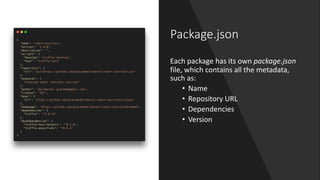
Each package has its own package.json
file, which contains all the metadata,
such as:
• Name
• Repository URL
• Dependencies
• Version
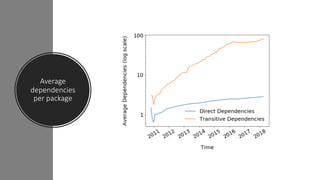
Dependency graph
Each package has a dependency graph, generated by
• the direct dependencies
• and the transitive dependencies (the dependencies of the
dependencies)
An average dependency graph is around 100 nodes, but it can easily
reach 1000+ nodes on complex packages
Average
dependencies
per package
Golden rules
It’s fundamental to ensure that the package that we are going to install:
• Does not contain public known vulnerabilities
• Does what it claims it do
• Is the one that the registry intended to serve
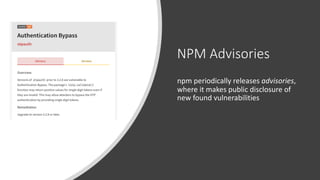
NPM Advisories
npm periodically releases advisories,
where it makes public disclosure of
new found vulnerabilities
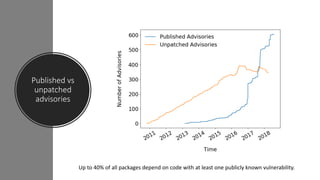
Published vs
unpatched
advisories
Up to 40% of all packages depend on code with at least one publicly known vulnerability.
Code audit
How can we sure that the package we are installing does not contain
known vulnerabilities?
• npm audit, released on the last major version (v6)
NPM audit
From documentation:
«npm audit will produce a report of security vulnerabilities with the
affected package name, vulnerability severity and description, path,
and other information, and, if available, commands to apply patches to
resolve vulnerabilities»
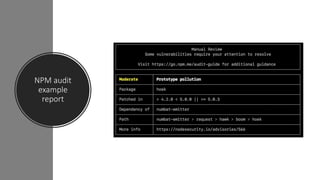
NPM audit
example
report
NPM audit
Behind the scenes
• It creates a snapshot of all the dependency graph
• It submits it to the default registry (npm usually)
• The registry compares each dependency with the public advisories
• It generates a report based on comparing results
Snyk
Another tool that can be used to monitor
vulnerable code is Snyk.
It’s a commercial service similar to npm audit but
with other many features, which is not restricted to
JavaScript ecosystem.
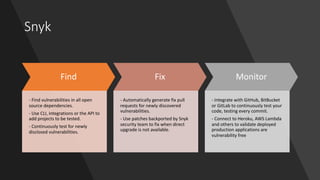
Snyk
Find
- Find vulnerabilities in all open
source dependencies.
- Use CLI, integrations or the API to
add projects to be tested.
- Continuously test for newly
disclosed vulnerabilities.
Fix
- Automatically generate fix pull
requests for newly discovered
vulnerabilities.
- Use patches backported by Snyk
security team to fix when direct
upgrade is not available.
Monitor
- Integrate with GitHub, BitBucket
or GitLab to continuously test your
code, testing every commit.
- Connect to Heroku, AWS Lambda
and others to validate deployed
production applications are
vulnerability free
Snyk
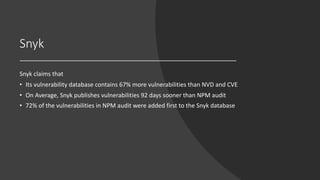
Snyk claims that
• Its vulnerability database contains 67% more vulnerabilities than NVD and CVE
• On Average, Snyk publishes vulnerabilities 92 days sooner than NPM audit
• 72% of the vulnerabilities in NPM audit were added first to the Snyk database
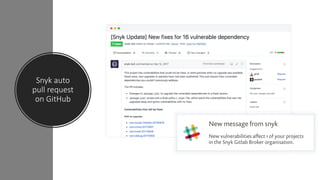
Snyk auto
pull request
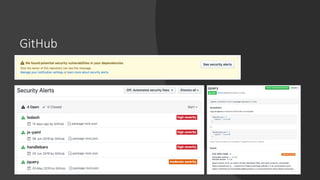
on GitHub
GitHub
Source code authenticity
• Almost all the packages published on npm are open source, and their
code is published on GitHub or similar platforms.
• The source code published in public repositories is not required to
match the one deployed in the npm registry
Colors attack
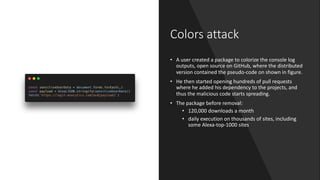
• A user created a package to colorize the console log
outputs, open source on GitHub, where the distributed
version contained the pseudo-code on shown in figure.
• He then started opening hundreds of pull requests
where he added his dependency to the projects, and
thus the malicious code starts spreading.
• The package before removal:
• 120,000 downloads a month
• daily execution on thousands of sites, including
some Alexa-top-1000 sites
Source code authenticity
There not exist an official solution to this problem yet, but a proof-of-
concept that has been posted in the official npm GitHub repository.
Source code authenticity
To publish a package on npm, you need to submit directly the files, as if
it were upload from a local machine. This is the exploitable weak point
for attackers to compromise the deployed code.
Source code
authenticity
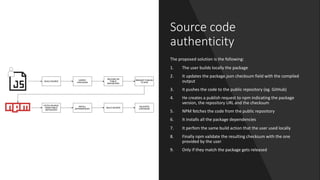
The proposed solution is the following:
1. The user builds locally the package
2. It updates the package.json checksum field with the compiled
output
3. It pushes the code to the public repository (eg. GitHub)
4. He creates a publish request to npm indicating the package
version, the repository URL and the checksum
5. NPM fetches the code from the public repository
6. It installs all the package dependencies
7. It perfom the same build action that the user used locally
8. Finally npm validate the resulting checksum with the one
provided by the user
9. Only if they match the package gets released
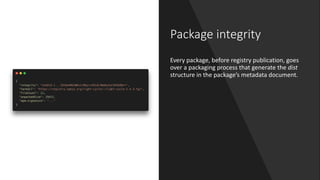
Package integrity
Every package, before registry publication, goes
over a packaging process that generate the dist
structure in the package’s metadata document.
Package integrity
This dist structure tells npm clients
• where to fetch the tarball to install the package
• and how to verify that the tarball fetched is the same as the one the
npm registry intended to serve
Checksums problem
• Checksums do not protect against man-in-the-middle attacks.
• If an attacker has interposed a proxy between the npm client and the
registry, they can tamper with both the document that advertises the
shasum and the tarball itself. An npm client would trust the package
and therefore install the tarball.
Pretty Good Privacy
• To detect this kind of tampering npm proposes to sign package
integrity fields along with some data that uniquely identifies the
package and it’s version.
• The registry signs the following data for each new package version
published:
• <package>@<version>:<integrity>
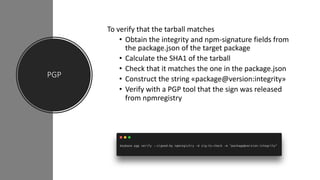
PGP
To verify that the tarball matches
• Obtain the integrity and npm-signature fields from
the package.json of the target package
• Calculate the SHA1 of the tarball
• Check that it matches the one in the package.json
• Construct the string «package@version:integrity»
• Verify with a PGP tool that the sign was released
from npmregistry
Trust issue
Installing an average npm package introduces an implicit trust on
• 79 third-party packages
• 39 maintainers
event-stream CoPay attack
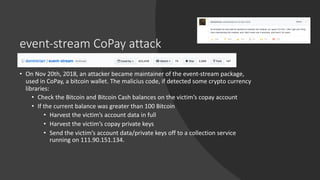
• On Nov 20th, 2018, an attacker became maintainer of the event-stream package,
used in CoPay, a bitcoin wallet. The malicius code, if detected some crypto currency
libraries:
• Check the Bitcoin and Bitcoin Cash balances on the victim’s copay account
• If the current balance was greater than 100 Bitcoin
• Harvest the victim’s account data in full
• Harvest the victim’s copay private keys
• Send the victim’s account data/private keys off to a collection service
running on 111.90.151.134.
eslint-scope attack
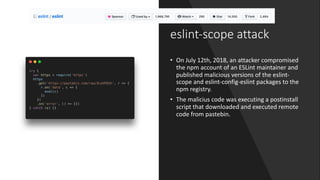
• On July 12th, 2018, an attacker compromised
the npm account of an ESLint maintainer and
published malicious versions of the eslint-
scope and eslint-config-eslint packages to the
npm registry.
• The malicius code was executing a postinstall
script that downloaded and executed remote
code from pastebin.
References
1. M. Zimmermann, Alexandru Staicu and Cam Tenny, «Small World with High Risks: A Study of Security Threats in the
npm Ecosystem»
2. https://blog.npmjs.org/post/173719309445/npm-audit-identify-and-fix-insecure
3. https://blog.npmjs.org/post/172999548390/new-pgp-machinery
4. https://hackernoon.com/im-harvesting-credit-card-numbers-and-passwords-from-your-site-here-s-how-
9a8cb347c5b5
5. https://gist.github.com/hzoo/51cb84afdc50b14bffa6c6dc49826b3e
6. https://hackernoon.com/secure-npm-ca2fe0e9aeff
7. https://github.com/dominictarr/event-stream/issues/116#issuecomment-441759047
8. https://snyk.io/blog/ten-npm-security-best-practices/
9. https://blog.npmjs.org/post/180565383195/details-about-the-event-stream-incident

NPM ecosystem threats

  • 1.
  • 2.
    NPM Ecosystem To supportJavaScript developers with third-party code, the node package manager, or short npm, provides more than a million of free and reusable code packages.
  • 3.
    Package.json Each package hasits own package.json file, which contains all the metadata, such as: • Name • Repository URL • Dependencies • Version
  • 4.
    Dependency graph Each packagehas a dependency graph, generated by • the direct dependencies • and the transitive dependencies (the dependencies of the dependencies) An average dependency graph is around 100 nodes, but it can easily reach 1000+ nodes on complex packages
  • 5.
  • 6.
    Golden rules It’s fundamentalto ensure that the package that we are going to install: • Does not contain public known vulnerabilities • Does what it claims it do • Is the one that the registry intended to serve
  • 7.
    NPM Advisories npm periodicallyreleases advisories, where it makes public disclosure of new found vulnerabilities
  • 8.
    Published vs unpatched advisories Up to40% of all packages depend on code with at least one publicly known vulnerability.
  • 9.
    Code audit How canwe sure that the package we are installing does not contain known vulnerabilities? • npm audit, released on the last major version (v6)
  • 10.
    NPM audit From documentation: «npmaudit will produce a report of security vulnerabilities with the affected package name, vulnerability severity and description, path, and other information, and, if available, commands to apply patches to resolve vulnerabilities»
  • 11.
  • 12.
    NPM audit Behind thescenes • It creates a snapshot of all the dependency graph • It submits it to the default registry (npm usually) • The registry compares each dependency with the public advisories • It generates a report based on comparing results
  • 13.
    Snyk Another tool thatcan be used to monitor vulnerable code is Snyk. It’s a commercial service similar to npm audit but with other many features, which is not restricted to JavaScript ecosystem.
  • 14.
    Snyk Find - Find vulnerabilitiesin all open source dependencies. - Use CLI, integrations or the API to add projects to be tested. - Continuously test for newly disclosed vulnerabilities. Fix - Automatically generate fix pull requests for newly discovered vulnerabilities. - Use patches backported by Snyk security team to fix when direct upgrade is not available. Monitor - Integrate with GitHub, BitBucket or GitLab to continuously test your code, testing every commit. - Connect to Heroku, AWS Lambda and others to validate deployed production applications are vulnerability free
  • 15.
    Snyk Snyk claims that •Its vulnerability database contains 67% more vulnerabilities than NVD and CVE • On Average, Snyk publishes vulnerabilities 92 days sooner than NPM audit • 72% of the vulnerabilities in NPM audit were added first to the Snyk database
  • 16.
  • 17.
  • 18.
    Source code authenticity •Almost all the packages published on npm are open source, and their code is published on GitHub or similar platforms. • The source code published in public repositories is not required to match the one deployed in the npm registry
  • 19.
    Colors attack • Auser created a package to colorize the console log outputs, open source on GitHub, where the distributed version contained the pseudo-code on shown in figure. • He then started opening hundreds of pull requests where he added his dependency to the projects, and thus the malicious code starts spreading. • The package before removal: • 120,000 downloads a month • daily execution on thousands of sites, including some Alexa-top-1000 sites
  • 20.
    Source code authenticity Therenot exist an official solution to this problem yet, but a proof-of- concept that has been posted in the official npm GitHub repository.
  • 21.
    Source code authenticity Topublish a package on npm, you need to submit directly the files, as if it were upload from a local machine. This is the exploitable weak point for attackers to compromise the deployed code.
  • 22.
    Source code authenticity The proposedsolution is the following: 1. The user builds locally the package 2. It updates the package.json checksum field with the compiled output 3. It pushes the code to the public repository (eg. GitHub) 4. He creates a publish request to npm indicating the package version, the repository URL and the checksum 5. NPM fetches the code from the public repository 6. It installs all the package dependencies 7. It perfom the same build action that the user used locally 8. Finally npm validate the resulting checksum with the one provided by the user 9. Only if they match the package gets released
  • 23.
    Package integrity Every package,before registry publication, goes over a packaging process that generate the dist structure in the package’s metadata document.
  • 24.
    Package integrity This diststructure tells npm clients • where to fetch the tarball to install the package • and how to verify that the tarball fetched is the same as the one the npm registry intended to serve
  • 25.
    Checksums problem • Checksumsdo not protect against man-in-the-middle attacks. • If an attacker has interposed a proxy between the npm client and the registry, they can tamper with both the document that advertises the shasum and the tarball itself. An npm client would trust the package and therefore install the tarball.
  • 26.
    Pretty Good Privacy •To detect this kind of tampering npm proposes to sign package integrity fields along with some data that uniquely identifies the package and it’s version. • The registry signs the following data for each new package version published: • <package>@<version>:<integrity>
  • 27.
    PGP To verify thatthe tarball matches • Obtain the integrity and npm-signature fields from the package.json of the target package • Calculate the SHA1 of the tarball • Check that it matches the one in the package.json • Construct the string «package@version:integrity» • Verify with a PGP tool that the sign was released from npmregistry
  • 28.
    Trust issue Installing anaverage npm package introduces an implicit trust on • 79 third-party packages • 39 maintainers
  • 29.
    event-stream CoPay attack •On Nov 20th, 2018, an attacker became maintainer of the event-stream package, used in CoPay, a bitcoin wallet. The malicius code, if detected some crypto currency libraries: • Check the Bitcoin and Bitcoin Cash balances on the victim’s copay account • If the current balance was greater than 100 Bitcoin • Harvest the victim’s account data in full • Harvest the victim’s copay private keys • Send the victim’s account data/private keys off to a collection service running on 111.90.151.134.
  • 30.
    eslint-scope attack • OnJuly 12th, 2018, an attacker compromised the npm account of an ESLint maintainer and published malicious versions of the eslint- scope and eslint-config-eslint packages to the npm registry. • The malicius code was executing a postinstall script that downloaded and executed remote code from pastebin.
  • 31.
    References 1. M. Zimmermann,Alexandru Staicu and Cam Tenny, «Small World with High Risks: A Study of Security Threats in the npm Ecosystem» 2. https://blog.npmjs.org/post/173719309445/npm-audit-identify-and-fix-insecure 3. https://blog.npmjs.org/post/172999548390/new-pgp-machinery 4. https://hackernoon.com/im-harvesting-credit-card-numbers-and-passwords-from-your-site-here-s-how- 9a8cb347c5b5 5. https://gist.github.com/hzoo/51cb84afdc50b14bffa6c6dc49826b3e 6. https://hackernoon.com/secure-npm-ca2fe0e9aeff 7. https://github.com/dominictarr/event-stream/issues/116#issuecomment-441759047 8. https://snyk.io/blog/ten-npm-security-best-practices/ 9. https://blog.npmjs.org/post/180565383195/details-about-the-event-stream-incident